【MCP】使用SpringBoot基于Streamable-HTTP构建MCP-Client
MCP实现原理
先来看看大语言模型工具调用的时序图
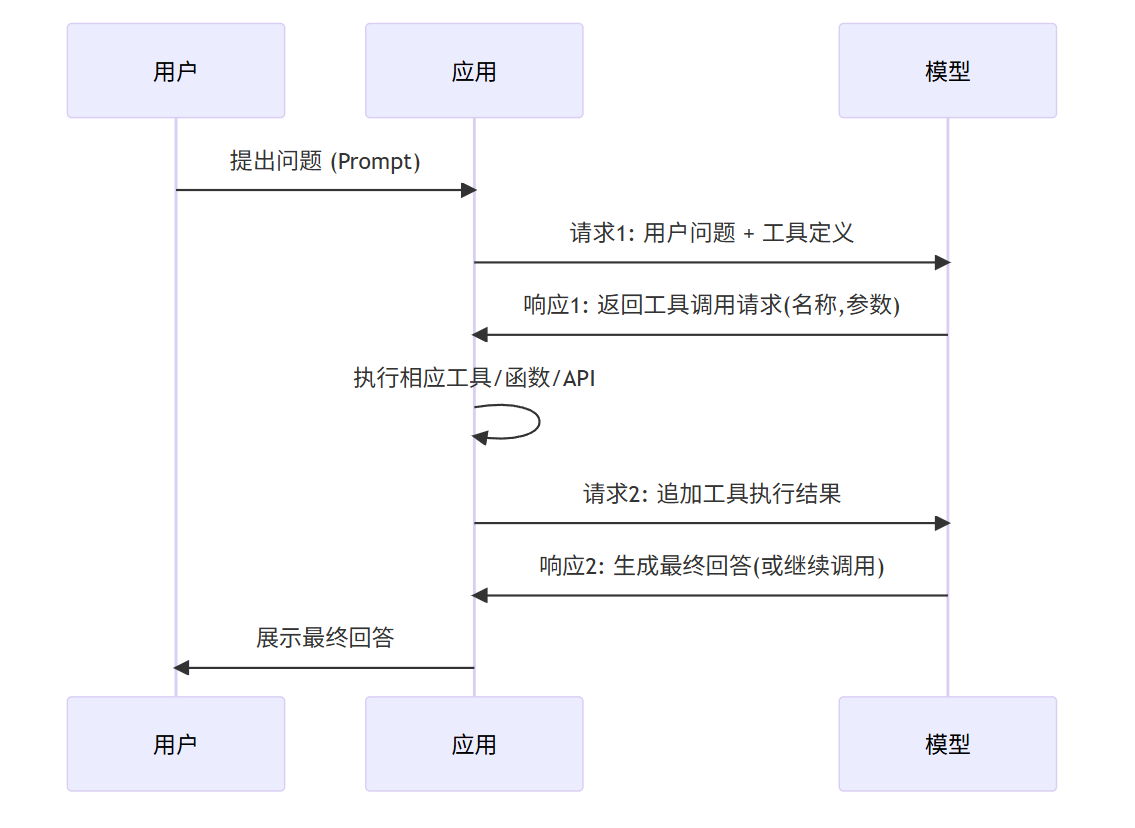
MCP(模型上下文协议,Model Context Protocol),通常更广义地理解为基于上下文的工具使用(Context-based Tool Usage) 或 提示工程中的工具使用(Tool Use via Prompt Engineering)。它的核心原理是将工具的描述、使用说明和示例直接作为上下文(Prompt)的一部分,输入给大模型。模型不"调用"工具,而是根据其通用语言能力,"理解"并"生成"使用工具所需的指令或参数。
与Function Calling不同,MCP模式下,大模型本身并不直接生成可执行的函数调用对象。它更像是一个"聪明的指令遵循者":你告诉它有哪些工具,每个工具能做什么,以及如何使用它们。当用户提出需求时,模型会根据这些上下文信息,生成一个符合预设格式的文本输出,这个输出指示了外部系统应该如何操作。
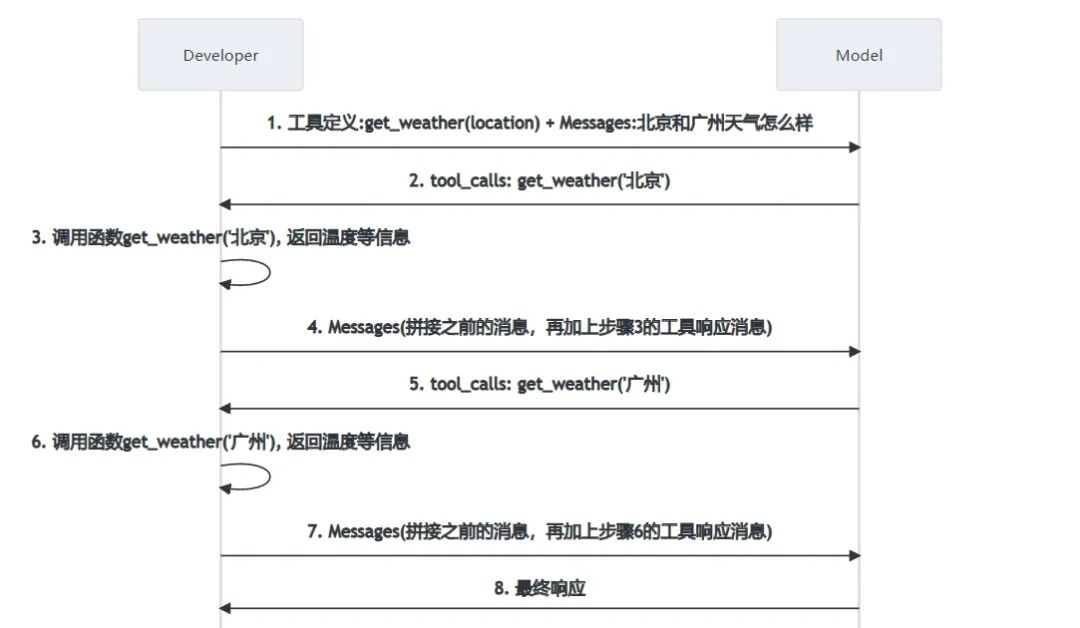
MCP的client端和server端通讯的协议也在逐步演进,一开始主流的是SSE协议,随后又诞生了Streamable-HTTP协议,用于取代SSE协议。
本文将介绍如何使用SpringBoot基于Streamable-HTTP构建MCP-Client客户端。
想了解如何构建MCP-Server,可以查看这篇文章:
【MCP】使用SpringBoot基于Streamable-HTTP构建MCP-Server.md
本文开发环境介绍
| 开发依赖 | 版本 |
|---|---|
| Spring Boot | 4.0.1 |
| spring-ai-bom | 2.0.0-M1 |
| spring-ai-starter-mcp-server-webflux | 2.0.0-M1 |
pom核心依赖
xml
<dependencyManagement>
  <dependency>
    <groupId>org.springframework.ai</groupId>
    <artifactId>spring-ai-bom</artifactId>
    <version>${spring-ai.version}</version>
    <type>pom</type>
    <scope>import</scope>
  </dependency>
</dependencyManagement>

<!--<dependency>-->
<!--  <groupId>org.springframework.ai</groupId>-->
<!--  <artifactId>spring-ai-starter-mcp-client</artifactId>-->
<!--</dependency>-->
<dependency>
  <groupId>org.springframework.ai</groupId>
  <artifactId>spring-ai-starter-mcp-client-webflux</artifactId>
</dependency>
<dependency>
  <groupId>org.springframework.ai</groupId>
  <artifactId>spring-ai-starter-model-anthropic</artifactId>
</dependency>
spring-ai-starter-mcp-client-webflux和spring-ai-starter-mcp-client都可以,一种是响应式架构,一种是非响应式架构,两者只能二选一。
创建启动类
创建Spring Boot应用的启动类
java
package com.wen3.demo.ai.mcp.client;


import jakarta.annotation.Resource;
import lombok.extern.slf4j.Slf4j;
import org.springframework.ai.tool.ToolCallbackProvider;
import org.springframework.boot.SpringApplication;
import org.springframework.boot.autoconfigure.SpringBootApplication;
import tools.jackson.databind.ObjectMapper;

/**
 * @author tangheng
 */
@Slf4j
@SpringBootApplication
public class McpClientApplication{

    @Resource
    private ToolCallbackProvider tools;
    @Resource
    ObjectMapper objectMapper;

    public static void main(String[] args) {
        SpringApplication.run(McpClientApplication.class, args);
    }
}
配置文件
yaml
server:
  port: 9091

spring.ai:
  #  openai:
  #    base-url: https://api.scnet.cn/api/llm
  #    api-key: xxx
  #    chat:
  #      options:
  #        model: DeepSeek-R1-Distill-Qwen-7B
  #        #model: DeepSeek-R1-Distill-Qwen-32B
  #        #model: QwQ-32B
  #        temperature: 0.7
  anthropic:
    api-key: xxx

  mcp:
    client:
      enabled: true
      name: demo-mcp-client
      version: 1.0.0
      request-timeout: 30s
      type: ASYNC
      streamable-http:
        connections:
          server1:
            url: http://localhost:9090
          server2:
            url: http://localhost:9090
            endpoint: /mcp
      toolcallback:
        enabled: true
相关配置类
org.springframework.ai.mcp.client.common.autoconfigure.properties.McpClientCommonProperties前缀为spring.ai.mcp.client的配置项org.springframework.ai.mcp.client.common.autoconfigure.annotations.McpClientAnnotationScannerProperties前缀为spring.ai.mcp.client.annotation-scanner的配置项,默认为扫描@McpTool注解进行工具的注册org.springframework.ai.mcp.client.common.autoconfigure.properties.McpStreamableHttpClientProperties前缀为spring.ai.mcp.client.streamable-http的配置项,请求端点默认是/mcp
Junit单元测试
- 先单独调用
MCP-Server进行测试
java
package com.wen3.demo.ai.mcp.client.tools;


import com.wen3.demo.ai.mcp.client.McpClientSpringbootTestBase;
import io.modelcontextprotocol.client.McpAsyncClient;
import io.modelcontextprotocol.spec.McpSchema.CallToolRequest;
import io.modelcontextprotocol.spec.McpSchema.CallToolResult;
import io.modelcontextprotocol.spec.McpSchema.ListToolsResult;
import io.modelcontextprotocol.spec.McpSchema.Tool;
import jakarta.annotation.Resource;
import lombok.AccessLevel;
import lombok.SneakyThrows;
import lombok.experimental.FieldDefaults;
import org.junit.jupiter.api.Test;

import java.util.List;
import java.util.Map;

/**
 * @author tangheng
 */
@FieldDefaults(level = AccessLevel.PROTECTED)
public class DemoToolTest extends McpClientSpringbootTestBase {

    @Resource
    List<McpAsyncClient> mcpAsyncClients;

    @SneakyThrows
    @Test
    void mcpClient() {
        log.info("mcpAsyncClients: {}", mcpAsyncClients);
        McpAsyncClient client = mcpAsyncClients.getFirst();

        client.initialize();

        client.ping();

        // List and demonstrate tools
        ListToolsResult toolsList = client.listTools().block();
        System.out.println("Available Tools = " + toolsList);

        for (Tool tool : toolsList.tools()) {
            log.info("{}", objectMapper.writeValueAsString(tool));
        }

        CallToolResult callToolResult = client.callTool(new CallToolRequest("hello", Map.of("city", "北京"))).block();
        log.info("工具调用结果: {}", objectMapper.writeValueAsString(callToolResult.content()));

        CallToolResult callToolResult2 = client.callTool(new CallToolRequest("helloWithName", Map.of("name", "小花"))).block();
        log.info("工具调用结果: {}", objectMapper.writeValueAsString(callToolResult2.content()));

        client.closeGracefully();
    }
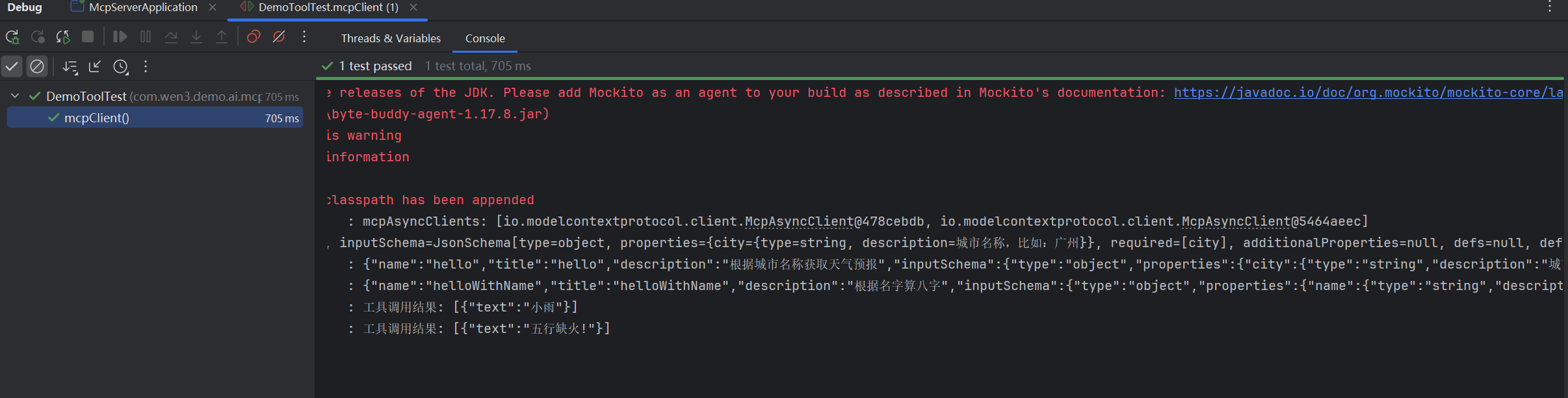
}- 单元测试控制台输出截图
- 结合大语言模型进行工具调用测试
java
package com.wen3.demo.ai.mcp.client.tools;


import com.wen3.demo.ai.mcp.client.McpClientSpringbootTestBase;
import io.modelcontextprotocol.client.McpAsyncClient;
import io.modelcontextprotocol.spec.McpSchema.CallToolRequest;
import io.modelcontextprotocol.spec.McpSchema.CallToolResult;
import io.modelcontextprotocol.spec.McpSchema.ListToolsResult;
import io.modelcontextprotocol.spec.McpSchema.Tool;
import jakarta.annotation.Resource;
import lombok.AccessLevel;
import lombok.SneakyThrows;
import lombok.experimental.FieldDefaults;
import org.junit.jupiter.api.Test;
import org.springframework.ai.chat.client.ChatClient;
import org.springframework.ai.tool.ToolCallbackProvider;
import org.springframework.context.ConfigurableApplicationContext;

import java.util.List;
import java.util.Map;

/**
 * @author tangheng
 */
@FieldDefaults(level = AccessLevel.PROTECTED)
public class DemoToolTest extends McpClientSpringbootTestBase {

    @Resource
    List<McpAsyncClient> mcpAsyncClients;
    @Resource
    ChatClient.Builder chatClientBuilder;
    @Resource
    ToolCallbackProvider tools;
    @Resource
    ConfigurableApplicationContext context;

    @SneakyThrows
    @Test
    void mcpClient() {
        log.info("mcpAsyncClients: {}", mcpAsyncClients);
        McpAsyncClient client = mcpAsyncClients.getFirst();

        client.initialize();

        client.ping();

        // List and demonstrate tools
        ListToolsResult toolsList = client.listTools().block();
        System.out.println("Available Tools = " + toolsList);

        for (Tool tool : toolsList.tools()) {
            log.info("{}", objectMapper.writeValueAsString(tool));
        }

        CallToolResult callToolResult = client.callTool(new CallToolRequest("hello", Map.of("city", "北京"))).block();
        log.info("工具调用结果: {}", objectMapper.writeValueAsString(callToolResult.content()));

        CallToolResult callToolResult2 = client.callTool(new CallToolRequest("helloWithName", Map.of("name", "小花"))).block();
        log.info("工具调用结果: {}", objectMapper.writeValueAsString(callToolResult2.content()));

        client.closeGracefully();
    }

    @Test
    void chat() {
        var chatClient = chatClientBuilder
                .defaultToolCallbacks(tools)
                .build();

        String userInput = "What tools are available?";

        System.out.println("\n>>> QUESTION: " + userInput);
        System.out.println("\n>>> ASSISTANT: " + chatClient.prompt(userInput).call().content());

        context.close();
    }
}