这一期讲解的控件是日期控件,datetext 是 LVGL 库中的一个组件,用于创建显示日期的控件。
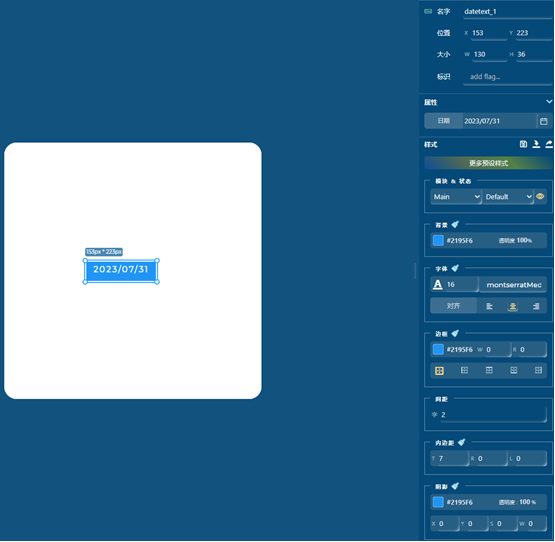
显示当前的日期,年月日。在GUI_guider中可以通过右侧的属性列表设置日期、背景以及字体的颜色大小格式。
以下是我根据属性栏设置的样式:
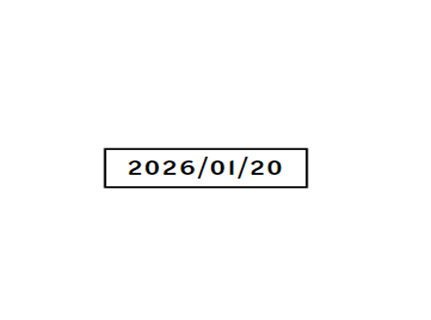
以下是代码实例:
//Write codes screen_1_datetext_1
//创建标签对象
ui->screen_1_datetext_1 = lv_label_create(ui->screen_1);
//设置标签显示文本为 "2026/01/20"
lv_label_set_text(ui->screen_1_datetext_1, "2026/01/20");
//文本水平居中对齐
lv_obj_set_style_text_align(ui->screen_1_datetext_1, LV_TEXT_ALIGN_CENTER, 0);
//添加可点击标志,使标签可以响应点击事件
lv_obj_add_flag(ui->screen_1_datetext_1, LV_OBJ_FLAG_CLICKABLE);
//绑定事件回调函数 screen_1_datetext_1_event_handler
lv_obj_add_event_cb(ui->screen_1_datetext_1, screen_1_datetext_1_event_handler, LV_EVENT_ALL, NULL);
//设置位置以及大小
lv_obj_set_pos(ui->screen_1_datetext_1, 153, 226);
lv_obj_set_size(ui->screen_1_datetext_1, 167, 38);
//Write style for screen_1_datetext_1, Part: LV_PART_MAIN, State: LV_STATE_DEFAULT.
// 边框半径(0表示直角矩形)
lv_obj_set_style_radius(ui->screen_1_datetext_1, 0, LV_PART_MAIN|LV_STATE_DEFAULT);
// 文本颜色(黑色)
lv_obj_set_style_text_color(ui->screen_1_datetext_1, lv_color_hex(0x000000), LV_PART_MAIN|LV_STATE_DEFAULT);
// 字体
lv_obj_set_style_text_font(ui->screen_1_datetext_1, &lv_font_Alatsi_Regular_22, LV_PART_MAIN|LV_STATE_DEFAULT);
// 文本不透明度(255=完全不透明)
lv_obj_set_style_text_opa(ui->screen_1_datetext_1, 255, LV_PART_MAIN|LV_STATE_DEFAULT);
// 字符间距(2像素)
lv_obj_set_style_text_letter_space(ui->screen_1_datetext_1, 2, LV_PART_MAIN|LV_STATE_DEFAULT);
// 背景不透明度
lv_obj_set_style_bg_opa(ui->screen_1_datetext_1, 255, LV_PART_MAIN|LV_STATE_DEFAULT);
// 背景颜色(白色)
lv_obj_set_style_bg_color(ui->screen_1_datetext_1, lv_color_hex(0xffffff), LV_PART_MAIN|LV_STATE_DEFAULT);
// 背景渐变方向(无渐变)
lv_obj_set_style_bg_grad_dir(ui->screen_1_datetext_1, LV_GRAD_DIR_NONE, LV_PART_MAIN|LV_STATE_DEFAULT);
// 上内边距(7像素)
lv_obj_set_style_pad_top(ui->screen_1_datetext_1, 7, LV_PART_MAIN|LV_STATE_DEFAULT);
// 左右内边距(0像素)
lv_obj_set_style_pad_right(ui->screen_1_datetext_1, 0, LV_PART_MAIN|LV_STATE_DEFAULT);
// 阴影宽度(1像素)
lv_obj_set_style_pad_left(ui->screen_1_datetext_1, 0, LV_PART_MAIN|LV_STATE_DEFAULT);
// 阴影颜色(黑色)
lv_obj_set_style_shadow_width(ui->screen_1_datetext_1, 1, LV_PART_MAIN|LV_STATE_DEFAULT);
// 阴影不透明度(255=完全显示)
lv_obj_set_style_shadow_color(ui->screen_1_datetext_1, lv_color_hex(0x000000), LV_PART_MAIN|LV_STATE_DEFAULT);
// 阴影扩展(2像素,使阴影更扩散)
lv_obj_set_style_shadow_opa(ui->screen_1_datetext_1, 255, LV_PART_MAIN|LV_STATE_DEFAULT);
// 阴影偏移(水平和垂直方向都不偏移)
lv_obj_set_style_shadow_spread(ui->screen_1_datetext_1, 2, LV_PART_MAIN|LV_STATE_DEFAULT);
lv_obj_set_style_shadow_ofs_x(ui->screen_1_datetext_1, 0, LV_PART_MAIN|LV_STATE_DEFAULT);
lv_obj_set_style_shadow_ofs_y(ui->screen_1_datetext_1, 0, LV_PART_MAIN|LV_STATE_DEFAULT);
本文章由威三学社出品
对课程感兴趣可以私信联系