目录
[1.1 文件:存储的基本抽象](#1.1 文件:存储的基本抽象)
[1.2 目录树:层次化组织结构](#1.2 目录树:层次化组织结构)
[1.3 文件路径:定位机制](#1.3 文件路径:定位机制)
[1.4 文件类型与识别机制](#1.4 文件类型与识别机制)
[1.5 文件权限:访问控制模型](#1.5 文件权限:访问控制模型)
[2.1 File类:文件的Java抽象](#2.1 File类:文件的Java抽象)
[2.2 文件创建与删除的原子性](#2.2 文件创建与删除的原子性)
[2.3 Java IO流体系架构](#2.3 Java IO流体系架构)
[2.4 文件读取的三种模式](#2.4 文件读取的三种模式)
模式3:使用BufferedInputStream(自动缓冲)
[2.5 文本文件的正确读写](#2.5 文本文件的正确读写)
[2.6 高效文件写入模式](#2.6 高效文件写入模式)
[3.1 目录遍历算法实现](#3.1 目录遍历算法实现)
[3.2 文件搜索工具实现](#3.2 文件搜索工具实现)
[3.3 文件复制的高级实现](#3.3 文件复制的高级实现)
[4.1 IO性能优化策略](#4.1 IO性能优化策略)
[4.2 异常处理与资源管理](#4.2 异常处理与资源管理)
[4.3 大文件处理策略](#4.3 大文件处理策略)
[5.1 Java NIO.2 API概述](#5.1 Java NIO.2 API概述)
[传统IO vs NIO.2对比:](#传统IO vs NIO.2对比:)
[5.2 文件监控与变化检测](#5.2 文件监控与变化检测)
前言
在计算科学中,持久化存储 是一个核心概念。程序运行过程中产生的数据需要被长期保存,而不仅仅是驻留在易失性内存中。硬盘、固态硬盘等存储设备提供了这种能力,但直接操作物理存储介质极其复杂。因此,操作系统引入了文件系统这一抽象层,将存储设备组织成逻辑上独立且易于管理的单元------文件。本文将从理论出发,深入探讨文件系统的设计原理,并结合Java语言的具体实现,全面解析文件操作的各个方面。
一、文件系统理论基础
1.1 文件:存储的基本抽象
文件(File) 是操作系统对存储设备中数据的逻辑抽象。从用户视角看,文件是包含了特定信息的命名实体;从系统视角看,文件是存储在介质上的字节序列及其元数据的集合。
关键理论点:
文件是数据存储的最小逻辑单位
文件系统隐藏了物理存储的复杂性(如扇区、磁道等)
文件具有逻辑独立性,与物理存储位置无关
文件元数据(Metadata)
每个文件都包含两类信息:
数据内容:文件的实际信息
元数据:描述文件属性的信息
1.2 目录树:层次化组织结构
目录(Directory) 是一种特殊文件,其内容是文件系统中其他文件(包括子目录)的元数据索引。这种设计形成了树形结构,是文件系统组织的核心。
目录树结构图示:
/
├── bin/                 # 系统可执行文件
│   ├── ls
│   ├── cat
│   └── grep
├── home/                # 用户主目录
│   ├── alice/
│   │   ├── Documents/
│   │   │   ├── report.docx
│   │   │   └── data.xlsx
│   │   └── Pictures/
│   └── bob/
├── etc/                 # 系统配置文件
└── var/                 # 可变数据
└── log/ # 日志文件理论意义:
-
路径解析:目录树结构使得路径寻址成为可能
-
命名空间管理:不同目录下的文件可以重名
-
访问控制:权限可以基于目录层级继承
1.3 文件路径:定位机制
路径(Path) 是文件系统中定位文件的唯一标识。路径解析是文件系统的核心功能之一。
绝对路径与相对路径对比表:
| 类型 | 定义 | 示例 | 起点 | 特点 |
|---|---|---|---|---|
| 绝对路径 | 从根目录开始的完整路径 | /home/user/docs/report.txt |
根目录 | 唯一确定,与当前位置无关 |
| 相对路径 | 相对于当前工作目录的路径 | ./docs/report.txt 或 ../shared/config.ini |
当前目录 | 简洁,便于移动整个目录结构 |
路径表示法图解:
文件系统树:
/
├── home/
│   └── user/
│       ├── current/    <-- 当前目录
│       │   └── file1.txt
│       ├── docs/
│       │   └── report.pdf
│       └── parent/
│           └── config.ini

绝对路径示例:
/home/user/docs/report.pdf

相对路径示例:
./file1.txt           # 当前目录下的file1.txt
../docs/report.pdf    # 兄弟目录docs下的report.pdf
../../etc/passwd      # 向上两级后的etc/passwd
1.4 文件类型与识别机制
文件可根据内容和用途分为多种类型,操作系统采用不同机制识别文件类型:
文件分类体系:
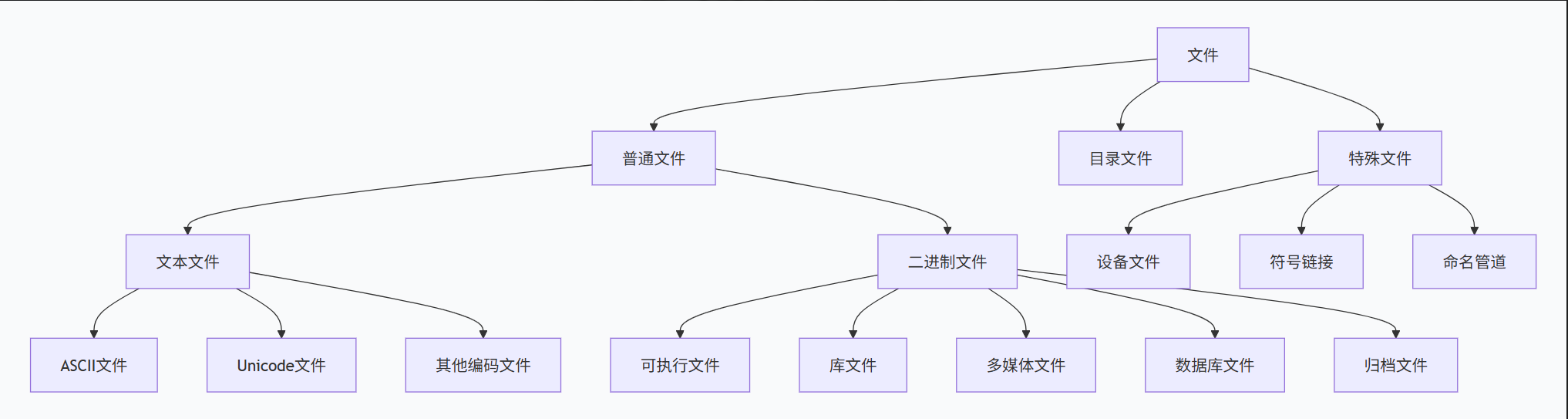
文件识别机制对比:
| 操作系统 | 主要识别方式 | 示例 | 特点 |
|---|---|---|---|
| Windows | 文件扩展名 | .txt, .exe, .jpg |
用户友好,易于理解 |
| Linux/Unix | 文件头魔数(Magic Number) + 扩展名 | ELF可执行文件头部7F 45 4C 46 |
更准确,安全性更高 |
| macOS | 扩展名 + 文件类型元数据 | .app目录 + 特定元数据 |
结合多种方式 |
1.5 文件权限:访问控制模型
现代操作系统采用基于用户-组-其他的三级权限模型,确保系统安全。
UNIX权限位详解:
权限表示:rwx rwx rwx
           ↑   ↑   ↑
           用户 组  其他

权限位含义:
r (read)    = 4 = 可读取内容/列出目录内容
w (write)   = 2 = 可修改内容/在目录中创建/删除文件
x (execute) = 1 = 可执行/可进入目录

权限计算示例:
rwxr-xr-- = 111 101 100 = 754
二、Java文件操作API详解
2.1 File类:文件的Java抽象
java.io.File类提供了文件系统的抽象表示,它封装了路径操作和文件属性访问。
File类核心方法分类表:
| 方法类别 | 方法签名 | 功能说明 | 返回值说明 |
|---|---|---|---|
| 路径操作 | String getPath() |
返回构造时传入的路径 | 可能是相对或绝对路径 |
String getAbsolutePath() |
返回绝对路径表示 | 可能包含.或..符号 |
|
String getCanonicalPath() |
返回规范化的绝对路径 | 解析所有符号链接和相对引用 | |
| 属性查询 | boolean exists() |
检查文件/目录是否存在 | 文件不存在不代表路径无效 |
boolean isFile() |
是否为普通文件 | 非目录、非特殊文件 | |
boolean isDirectory() |
是否为目录 | 目录是一种特殊文件 | |
long length() |
文件大小(字节) | 目录返回值未定义 | |
| 文件操作 | boolean createNewFile() |
创建新空文件 | 原子操作,避免竞态条件 |
boolean delete() |
删除文件/空目录 | 不能删除非空目录 | |
boolean renameTo(File dest) |
重命名或移动文件 | 可能跨文件系统失败 | |
| 目录操作 | boolean mkdir() |
创建单级目录 | 父目录必须存在 |
boolean mkdirs() |
创建多级目录 | 自动创建不存在的父目录 | |
String[] list() |
列出目录内容(名称) | 不包括.和.. |
|
File[] listFiles() |
列出目录内容(File对象) | 便于进一步操作 |
路径解析示例代码分析:
java
import java.io.File;
import java.io.IOException;

public class PathAnalysis {
    public static void main(String[] args) throws IOException {
        // 假设当前目录: /home/user/project
        File file = new File("../docs/report.txt");

        System.out.println("构造路径: " + file.getPath());
        // 输出: ../docs/report.txt

        System.out.println("绝对路径: " + file.getAbsolutePath());
        // 输出: /home/user/project/../docs/report.txt
        // 注意: 包含相对引用".."

        System.out.println("规范路径: " + file.getCanonicalPath());
        // 输出: /home/user/docs/report.txt
        // 已解析所有相对引用

        System.out.println("父目录: " + file.getParent());
        // 输出: ../docs

        System.out.println("文件名: " + file.getName());
        // 输出: report.txt
    }
}
2.2 文件创建与删除的原子性
文件操作中的原子性至关重要,特别是在多线程或多进程环境中。
创建文件的正确模式:
java
import java.io.File;
import java.io.IOException;

public class AtomicFileCreation {
    public static void main(String[] args) {
        File file = new File("data.txt");

        // 错误方式:存在竞态条件
        if (!file.exists()) {
            // 此处可能有其他进程创建了文件
            try {
                file.createNewFile(); // 可能失败
            } catch (IOException e) {
                e.printStackTrace();
            }
        }

        // 正确方式:原子性操作
        try {
            if (file.createNewFile()) {
                System.out.println("文件创建成功");
            } else {
                System.out.println("文件已存在");
            }
        } catch (IOException e) {
            System.out.println("创建失败: " + e.getMessage());
        }
    }
}
deleteOnExit()机制:
deleteOnExit()方法在JVM退出时删除文件,适用于临时文件清理:
java
import java.io.File;
import java.io.IOException;

public class DeleteOnExitDemo {
    public static void main(String[] args) throws IOException {
        File tempFile = File.createTempFile("temp_", ".dat");
        System.out.println("临时文件: " + tempFile.getAbsolutePath());

        // 标记为退出时删除
        tempFile.deleteOnExit();

        // 使用文件...

        // 程序正常退出时自动删除
        // 即使发生异常,只要JVM退出也会删除
    }
}
2.3 Java IO流体系架构
Java的IO系统基于流(Stream) 抽象,分为字节流和字符流两大类。
字节流与字符流的本质区别:
| 对比维度 | 字节流 | 字符流 |
|---|---|---|
| 处理单位 | 字节(8-bit) | 字符(16-bit Unicode) |
| 编码处理 | 不处理编码 | 自动处理字符编码转换 |
| 主要类 | InputStream/OutputStream | Reader/Writer |
| 适用场景 | 二进制文件(图片、视频等) | 文本文件 |
| 性能考虑 | 直接处理原始数据 | 需要编码/解码开销 |
2.4 文件读取的三种模式
模式1:单字节读取(低效,仅用于演示)
java
import java.io.FileInputStream;
import java.io.IOException;
import java.io.InputStream;

public class SingleByteRead {
    public static void main(String[] args) throws IOException {
        try (InputStream is = new FileInputStream("input.txt")) {
            int byteRead;
            int count = 0;

            while ((byteRead = is.read()) != -1) {
                // 每次读取1字节,性能极差
                count++;
                System.out.print((char) byteRead);
            }

            System.out.println("\n读取字节数: " + count);
        }
    }
}性能分析:每次系统调用只读取1字节,上下文切换开销巨大,不适用于生产环境。
模式2:缓冲区批量读取(推荐)
java
import java.io.FileInputStream;
import java.io.IOException;
import java.io.InputStream;

public class BufferedRead {
    public static void main(String[] args) throws IOException {
        // 缓冲区大小选择策略:
        // 1. 默认8KB适合大多数场景
        // 2. 大文件可适当增大(如64KB)
        // 3. 内存敏感环境可减小
        byte[] buffer = new byte[8192]; // 8KB缓冲区

        try (InputStream is = new FileInputStream("largefile.dat")) {
            int bytesRead;
            long totalBytes = 0;

            while ((bytesRead = is.read(buffer)) != -1) {
                totalBytes += bytesRead;

                // 处理buffer[0..bytesRead-1]
                processBuffer(buffer, bytesRead);
            }

            System.out.println("总读取字节: " + totalBytes);
        }
    }

    private static void processBuffer(byte[] buffer, int length) {
        // 实际业务处理
    }
}缓冲区大小优化公式:
理想缓冲区大小 = min(可用内存/4, 文件大小, 系统页大小×N)
一般建议值:4KB ~ 64KB
模式3:使用BufferedInputStream(自动缓冲)
java
import java.io.BufferedInputStream;
import java.io.FileInputStream;
import java.io.IOException;
import java.io.InputStream;

public class AutoBufferedRead {
    public static void main(String[] args) throws IOException {
        // BufferedInputStream内部维护缓冲区
        // 默认缓冲区大小8KB,可通过构造函数调整
        try (InputStream is = new BufferedInputStream(
                new FileInputStream("input.txt"), 65536)) { // 64KB缓冲区

            byte[] buffer = new byte[1024];
            int bytesRead;

            while ((bytesRead = is.read(buffer)) != -1) {
                // 处理数据
            }
        }
    }
}
2.5 文本文件的正确读写
处理文本文件时必须考虑字符编码,否则会出现乱码问题。
字符编码问题示例:
java
import java.io.FileOutputStream;
import java.io.IOException;
import java.io.OutputStream;

public class EncodingProblem {
    public static void main(String[] args) throws IOException {
        String text = "你好,世界!"; // 包含中文字符

        try (OutputStream os = new FileOutputStream("test.txt")) {
            // 错误:使用平台默认编码(可能是GBK)
            os.write(text.getBytes());

            // 正确:明确指定UTF-8编码
            os.write(text.getBytes("UTF-8"));

            // 更优:使用字符流自动处理编码
            // try (Writer writer = new OutputStreamWriter(os, "UTF-8")) {
            //     writer.write(text);
            // }
        }
    }
}
使用Scanner读取文本文件:
java
import java.io.FileInputStream;
import java.io.IOException;
import java.io.InputStream;
import java.util.Scanner;

public class TextFileScanner {
    public static void main(String[] args) throws IOException {
        // 场景1:逐词读取
        try (InputStream is = new FileInputStream("article.txt");
             Scanner scanner = new Scanner(is, "UTF-8")) {

            scanner.useDelimiter("[\\s\\p{Punct}]+"); // 按空格和标点分割

            int wordCount = 0;
            while (scanner.hasNext()) {
                String word = scanner.next();
                wordCount++;
                System.out.println("单词 " + wordCount + ": " + word);
            }
        }

        // 场景2:逐行读取(更常用)
        try (InputStream is = new FileInputStream("data.csv");
             Scanner scanner = new Scanner(is, "UTF-8")) {

            int lineNumber = 0;
            while (scanner.hasNextLine()) {
                String line = scanner.nextLine();
                lineNumber++;

                // CSV解析示例
                String[] columns = line.split(",");
                System.out.printf("第%d行: %s%n", lineNumber,
                                 String.join(" | ", columns));
            }
        }
    }
}
2.6 高效文件写入模式
模式比较表:
| 写入模式 | 实现类 | 缓冲区 | 自动刷新 | 编码处理 | 适用场景 |
|---|---|---|---|---|---|
| 原始字节流 | FileOutputStream | 无 | 无 | 无 | 二进制文件写入 |
| 缓冲字节流 | BufferedOutputStream | 有 | 手动flush | 无 | 二进制文件高效写入 |
| 字符输出流 | OutputStreamWriter | 可选 | 手动flush | 支持 | 文本文件基础写入 |
| 缓冲字符流 | BufferedWriter | 有 | 手动flush | 支持 | 文本文件高效写入 |
| 格式化输出 | PrintWriter | 有 | 可选autoFlush | 支持 | 格式化文本输出 |
PrintWriter的高级用法:
java
import java.io.FileOutputStream;
import java.io.IOException;
import java.io.OutputStream;
import java.io.OutputStreamWriter;
import java.io.PrintWriter;

public class AdvancedPrintWriter {
    public static void main(String[] args) throws IOException {
        try (OutputStream os = new FileOutputStream("output.log");
             OutputStreamWriter osw = new OutputStreamWriter(os, "UTF-8");
             PrintWriter writer = new PrintWriter(osw, true)) { // autoFlush=true

            // 1. 基本写入
            writer.print("基本文本");
            writer.println(); // 换行

            // 2. 格式化输出
            writer.printf("日期: %tF%n", System.currentTimeMillis());
            writer.printf("价格: $%.2f%n", 19.99);
            writer.printf("数量: %03d%n", 7);

            // 3. 错误处理
            writer.checkError(); // 检查是否发生IO错误

            // 4. 追加模式(需在FileOutputStream中指定)
            // new FileOutputStream("output.log", true)
        }
    }
}
三、高级文件操作实践
3.1 目录遍历算法实现
递归深度优先遍历:
java
import java.io.File;
import java.util.ArrayList;
import java.util.List;

public class DirectoryTraversal {

    /**
     * 深度优先遍历目录
     * @param root 根目录
     * @return 所有文件的列表
     */
    public static List<File> dfsTraversal(File root) {
        List<File> result = new ArrayList<>();
        dfsTraversal(root, result);
        return result;
    }

    private static void dfsTraversal(File current, List<File> result) {
        // 安全性检查
        if (current == null || !current.exists()) {
            return;
        }

        // 添加当前文件(如果是普通文件)
        if (current.isFile()) {
            result.add(current);
            return;
        }

        // 遍历子目录
        File[] children = current.listFiles();
        if (children == null) {
            // 权限不足或IO错误
            return;
        }

        for (File child : children) {
            dfsTraversal(child, result);
        }
    }

    /**
     * 广度优先遍历目录
     * @param root 根目录
     * @return 按层级排序的文件列表
     */
    public static List<File> bfsTraversal(File root) {
        List<File> result = new ArrayList<>();
        if (root == null || !root.exists()) {
            return result;
        }

        Queue<File> queue = new LinkedList<>();
        queue.offer(root);

        while (!queue.isEmpty()) {
            File current = queue.poll();

            if (current.isFile()) {
                result.add(current);
            } else {
                File[] children = current.listFiles();
                if (children != null) {
                    for (File child : children) {
                        queue.offer(child);
                    }
                }
            }
        }

        return result;
    }
}
目录遍历性能优化:
java
import java.io.File;
import java.io.IOException;
import java.nio.file.*;
import java.nio.file.attribute.BasicFileAttributes;
import java.util.ArrayList;
import java.util.List;

public class EfficientDirectoryWalker {

    /**
     * 使用NIO Files.walkFileTree API(Java 7+)
     * 性能更好,资源管理更安全
     */
    public static List<Path> walkFileTree(String rootDir) throws IOException {
        List<Path> result = new ArrayList<>();

        Files.walkFileTree(Paths.get(rootDir), new SimpleFileVisitor<Path>() {
            @Override
            public FileVisitResult visitFile(Path file, BasicFileAttributes attrs) {
                result.add(file);
                return FileVisitResult.CONTINUE;
            }

            @Override
            public FileVisitResult visitFileFailed(Path file, IOException exc) {
                // 处理访问失败的文件(如权限不足)
                System.err.println("无法访问: " + file + ", 原因: " + exc.getMessage());
                return FileVisitResult.CONTINUE;
            }

            @Override
            public FileVisitResult postVisitDirectory(Path dir, IOException exc) {
                if (exc != null) {
                    System.err.println("遍历目录失败: " + dir);
                }
                return FileVisitResult.CONTINUE;
            }
        });

        return result;
    }
}
3.2 文件搜索工具实现
java
import java.io.*;
import java.util.*;

public class FileSearchUtility {

    /**
     * 综合搜索:按文件名和内容搜索
     */
    public static List<File> searchFiles(File rootDir,
                                         String fileNamePattern,
                                         String contentKeyword,
                                         boolean caseSensitive) throws IOException {
        List<File> result = new ArrayList<>();
        searchFilesRecursive(rootDir, fileNamePattern, contentKeyword,
                           caseSensitive, result);
        return result;
    }

    private static void searchFilesRecursive(File dir,
                                            String fileNamePattern,
                                            String contentKeyword,
                                            boolean caseSensitive,
                                            List<File> result) throws IOException {
        File[] files = dir.listFiles();
        if (files == null) return;

        for (File file : files) {
            if (file.isDirectory()) {
                // 递归搜索子目录
                searchFilesRecursive(file, fileNamePattern, contentKeyword,
                                   caseSensitive, result);
            } else {
                boolean matches = true;

                // 1. 检查文件名匹配
                if (fileNamePattern != null && !fileNamePattern.isEmpty()) {
                    String fileName = file.getName();
                    String pattern = caseSensitive ? fileNamePattern :
                                     fileNamePattern.toLowerCase();
                    String nameToCheck = caseSensitive ? fileName :
                                         fileName.toLowerCase();

                    if (!nameToCheck.contains(pattern)) {
                        matches = false;
                    }
                }

                // 2. 检查内容匹配
                if (matches && contentKeyword != null && !contentKeyword.isEmpty()) {
                    if (!fileContainsKeyword(file, contentKeyword, caseSensitive)) {
                        matches = false;
                    }
                }

                if (matches) {
                    result.add(file);
                }
            }
        }
    }

    /**
     * 检查文件是否包含关键词
     * 使用缓冲区提高性能
     */
    private static boolean fileContainsKeyword(File file, String keyword,
                                              boolean caseSensitive) throws IOException {
        // 优化:先检查文件大小,避免读取过大文件
        if (file.length() > 10 * 1024 * 1024) { // 10MB
            System.out.println("文件过大,跳过内容搜索: " + file.getName());
            return false;
        }

        String searchKeyword = caseSensitive ? keyword : keyword.toLowerCase();

        try (BufferedReader reader = new BufferedReader(
                new InputStreamReader(new FileInputStream(file), "UTF-8"))) {

            char[] buffer = new char[8192];
            int charsRead;
            StringBuilder contentBuffer = new StringBuilder();

            while ((charsRead = reader.read(buffer)) != -1) {
                contentBuffer.append(buffer, 0, charsRead);

                // 检查当前缓冲区是否包含关键词
                String currentContent = caseSensitive ? contentBuffer.toString() :
                                        contentBuffer.toString().toLowerCase();

                if (currentContent.contains(searchKeyword)) {
                    return true;
                }

                // 滑动窗口:保留可能跨越缓冲区边界的关键词部分
                int keepLength = Math.min(keyword.length() - 1, contentBuffer.length());
                contentBuffer.delete(0, contentBuffer.length() - keepLength);
            }
        }

        return false;
    }
}
3.3 文件复制的高级实现
分块复制与进度监控:
java
import java.io.*;
import java.text.DecimalFormat;

public class AdvancedFileCopier {

    public static void copyFileWithProgress(File source, File destination,
                                          ProgressListener listener) throws IOException {
        // 参数验证
        if (!source.exists()) {
            throw new FileNotFoundException("源文件不存在: " + source.getPath());
        }

        if (!source.isFile()) {
            throw new IOException("源路径不是文件: " + source.getPath());
        }

        // 创建目标目录(如果需要)
        File parentDir = destination.getParentFile();
        if (parentDir != null && !parentDir.exists()) {
            if (!parentDir.mkdirs()) {
                throw new IOException("无法创建目标目录: " + parentDir.getPath());
            }
        }

        long fileSize = source.length();
        long totalCopied = 0;

        // 动态调整缓冲区大小(基于文件大小)
        int bufferSize = calculateOptimalBufferSize(fileSize);
        byte[] buffer = new byte[bufferSize];

        try (InputStream is = new BufferedInputStream(new FileInputStream(source), bufferSize);
             OutputStream os = new BufferedOutputStream(new FileOutputStream(destination), bufferSize)) {

            int bytesRead;
            long lastUpdateTime = System.currentTimeMillis();
            DecimalFormat df = new DecimalFormat("0.00");

            while ((bytesRead = is.read(buffer)) != -1) {
                os.write(buffer, 0, bytesRead);
                totalCopied += bytesRead;

                // 进度通知(限制频率)
                long currentTime = System.currentTimeMillis();
                if (listener != null && (currentTime - lastUpdateTime > 100 || bytesRead == -1)) {
                    float progress = (float) totalCopied / fileSize * 100;
                    float speed = calculateSpeed(totalCopied, lastUpdateTime, currentTime);

                    listener.onProgress(progress, speed, totalCopied, fileSize);
                    lastUpdateTime = currentTime;
                }
            }

            os.flush();

            if (listener != null) {
                listener.onComplete(destination);
            }
        }
    }

    private static int calculateOptimalBufferSize(long fileSize) {
        // 基于文件大小的缓冲区优化策略
        if (fileSize < 1024 * 1024) {        // < 1MB
            return 4 * 1024;                 // 4KB
        } else if (fileSize < 10 * 1024 * 1024) { // < 10MB
            return 32 * 1024;                // 32KB
        } else if (fileSize < 100 * 1024 * 1024) { // < 100MB
            return 64 * 1024;                // 64KB
        } else {
            return 128 * 1024;               // 128KB
        }
    }

    private static float calculateSpeed(long bytesCopied, long startTime, long endTime) {
        if (endTime <= startTime) return 0;

        float elapsedSeconds = (endTime - startTime) / 1000.0f;
        if (elapsedSeconds <= 0) return 0;

        return bytesCopied / elapsedSeconds / 1024.0f; // KB/s
    }

    public interface ProgressListener {
        void onProgress(float percentage, float speedKBps, long copied, long total);
        void onComplete(File destination);
    }

    /**
     * 使用NIO的零拷贝技术(Java 7+)
     * 在某些情况下性能更好
     */
    public static void copyFileWithTransferTo(File source, File destination) throws IOException {
        try (FileInputStream fis = new FileInputStream(source);
             FileOutputStream fos = new FileOutputStream(destination);
             FileChannel sourceChannel = fis.getChannel();
             FileChannel destChannel = fos.getChannel()) {

            long position = 0;
            long size = sourceChannel.size();

            while (position < size) {
                position += sourceChannel.transferTo(position, size - position, destChannel);
            }
        }
    }
}
四、性能优化与最佳实践
4.1 IO性能优化策略
缓冲区策略对比:
| 策略 | 缓冲区大小 | 适用场景 | 优点 | 缺点 |
|---|---|---|---|---|
| 固定小缓冲区 | 1KB-4KB | 内存受限环境 | 内存占用小 | IO次数多,性能差 |
| 固定适中缓冲区 | 8KB-32KB | 通用场景 | 平衡性好 | 可能不是最优 |
| 动态缓冲区 | 基于文件大小调整 | 大文件操作 | 性能优化好 | 实现复杂 |
| 系统默认缓冲区 | 依赖实现 | 简单应用 | 无需配置 | 可能不是最优 |
性能测试框架示例:
java
import java.io.*;
import java.util.concurrent.TimeUnit;

public class IOPerformanceBenchmark {

    public static void benchmarkCopy(String methodName, Runnable copyTask) {
        System.out.println("\n=== 测试方法: " + methodName + " ===");

        long startTime = System.nanoTime();

        try {
            copyTask.run();
        } catch (Exception e) {
            System.err.println("测试失败: " + e.getMessage());
            return;
        }

        long endTime = System.nanoTime();
        long durationMs = TimeUnit.NANOSECONDS.toMillis(endTime - startTime);

        System.out.println("耗时: " + durationMs + "ms");
    }

    public static void createTestFile(String path, long sizeMB) throws IOException {
        File testFile = new File(path);
        System.out.println("创建测试文件: " + sizeMB + "MB");

        try (OutputStream os = new BufferedOutputStream(
                new FileOutputStream(testFile))) {

            byte[] pattern = "0123456789ABCDEF".getBytes();
            long bytesToWrite = sizeMB * 1024 * 1024;
            long written = 0;

            while (written < bytesToWrite) {
                int toWrite = (int) Math.min(pattern.length, bytesToWrite - written);
                os.write(pattern, 0, toWrite);
                written += toWrite;
            }
        }
    }

    public static void main(String[] args) throws IOException {
        // 准备测试文件
        String sourceFile = "test_source.dat";
        String destFile = "test_dest.dat";

        createTestFile(sourceFile, 100); // 100MB测试文件

        // 测试不同缓冲区大小
        int[] bufferSizes = {1024, 4096, 8192, 32768, 65536, 131072};

        for (int bufferSize : bufferSizes) {
            benchmarkCopy("缓冲区大小=" + bufferSize + "字节", () -> {
                try {
                    copyWithBuffer(sourceFile, destFile, bufferSize);
                } catch (IOException e) {
                    throw new RuntimeException(e);
                }
            });
        }

        // 清理测试文件
        new File(sourceFile).delete();
        new File(destFile).delete();
    }

    private static void copyWithBuffer(String source, String dest, int bufferSize)
            throws IOException {
        try (InputStream is = new FileInputStream(source);
             OutputStream os = new FileOutputStream(dest)) {

            byte[] buffer = new byte[bufferSize];
            int bytesRead;

            while ((bytesRead = is.read(buffer)) != -1) {
                os.write(buffer, 0, bytesRead);
            }
        }
    }
}
4.2 异常处理与资源管理
正确的资源管理模式:
java
import java.io.*;

public class ResourceManagement {

    // 反模式:手动管理资源,容易泄露
    public static void copyFileBad(File src, File dst) throws IOException {
        InputStream in = null;
        OutputStream out = null;

        try {
            in = new FileInputStream(src);
            out = new FileOutputStream(dst);

            byte[] buffer = new byte[8192];
            int bytesRead;

            while ((bytesRead = in.read(buffer)) != -1) {
                out.write(buffer, 0, bytesRead);
            }
        } finally {
            // 可能忘记关闭,或者关闭时发生异常影响其他关闭
            if (in != null) {
                in.close();
            }
            if (out != null) {
                out.close();
            }
        }
    }

    // 正模式:try-with-resources(Java 7+)
    public static void copyFileGood(File src, File dst) throws IOException {
        try (InputStream in = new FileInputStream(src);
             OutputStream out = new FileOutputStream(dst)) {

            byte[] buffer = new byte[8192];
            int bytesRead;

            while ((bytesRead = in.read(buffer)) != -1) {
                out.write(buffer, 0, bytesRead);
            }
        }
        // 资源自动关闭,即使发生异常
    }

    // 正确处理多个异常
    public static void processFile(String path) {
        try (BufferedReader reader = new BufferedReader(
                new FileReader(path))) {

            String line;
            while ((line = reader.readLine()) != null) {
                // 处理行
            }

        } catch (FileNotFoundException e) {
            System.err.println("文件未找到: " + path);
            // 可能创建新文件或提示用户

        } catch (SecurityException e) {
            System.err.println("没有权限访问文件: " + path);
            // 提示权限问题

        } catch (IOException e) {
            System.err.println("IO错误: " + e.getMessage());
            // 记录日志或重试

        } catch (Exception e) {
            System.err.println("未知错误: " + e.getMessage());
            // 通用错误处理
        }
    }
}
4.3 大文件处理策略
分块处理大文件:
java
import java.io.*;
import java.util.concurrent.*;

public class LargeFileProcessor {

    /**
     * 并行处理大文件
     */
    public static void processLargeFileParallel(File largeFile, int chunkSizeMB,
                                               FileProcessor processor)
            throws IOException, InterruptedException, ExecutionException {

        long fileSize = largeFile.length();
        long chunkSize = chunkSizeMB * 1024L * 1024L;
        int numChunks = (int) Math.ceil((double) fileSize / chunkSize);

        ExecutorService executor = Executors.newFixedThreadPool(
            Runtime.getRuntime().availableProcessors()
        );

        List<Future<Void>> futures = new ArrayList<>();

        for (int i = 0; i < numChunks; i++) {
            final int chunkIndex = i;
            long startPos = i * chunkSize;
            long endPos = Math.min(startPos + chunkSize, fileSize);

            Future<Void> future = executor.submit(() -> {
                processFileChunk(largeFile, startPos, endPos, processor, chunkIndex);
                return null;
            });

            futures.add(future);
        }

        // 等待所有任务完成
        for (Future<Void> future : futures) {
            future.get();
        }

        executor.shutdown();
    }

    private static void processFileChunk(File file, long start, long end,
                                        FileProcessor processor, int chunkIndex)
            throws IOException {

        try (RandomAccessFile raf = new RandomAccessFile(file, "r")) {
            raf.seek(start);

            byte[] buffer = new byte[8192];
            long position = start;

            while (position < end) {
                int toRead = (int) Math.min(buffer.length, end - position);
                int bytesRead = raf.read(buffer, 0, toRead);

                if (bytesRead == -1) break;

                processor.process(buffer, bytesRead, chunkIndex);
                position += bytesRead;
            }
        }
    }

    public interface FileProcessor {
        void process(byte[] data, int length, int chunkIndex);
    }
}
五、现代Java文件操作(NIO.2)
5.1 Java NIO.2 API概述
Java 7引入了NIO.2 API,提供了更现代、更强大的文件操作接口。
传统IO vs NIO.2对比:
java
import java.io.*;
import java.nio.file.*;
import java.nio.file.attribute.*;
import java.util.*;

public class NIO2Examples {

    // 传统IO方式
    public static void traditionalFileOps() throws IOException {
        File file = new File("test.txt");

        // 创建文件
        file.createNewFile();

        // 检查属性
        boolean exists = file.exists();
        boolean isFile = file.isFile();
        long size = file.length();

        // 列出目录
        File[] files = new File(".").listFiles();

        // 删除文件
        file.delete();
    }

    // NIO.2方式
    public static void nio2FileOps() throws IOException {
        Path path = Paths.get("test.txt");

        // 创建文件(支持设置属性)
        Files.createFile(path);

        // 检查属性(更丰富)
        boolean exists = Files.exists(path);
        boolean isRegularFile = Files.isRegularFile(path);
        long size = Files.size(path);

        // 获取更多属性
        BasicFileAttributes attrs = Files.readAttributes(
            path, BasicFileAttributes.class);
        FileTime creationTime = attrs.creationTime();
        FileTime lastModified = attrs.lastModifiedTime();

        // 列出目录(带过滤)
        try (DirectoryStream<Path> stream = Files.newDirectoryStream(
                Paths.get("."), "*.{txt,java}")) {
            for (Path entry : stream) {
                System.out.println(entry.getFileName());
            }
        }

        // 删除文件(更多选项)
        Files.delete(path);  // 不存在时抛出异常
        Files.deleteIfExists(path);  // 不存在时不抛异常
    }
}
5.2 文件监控与变化检测
java
import java.io.*;
import java.nio.file.*;
import static java.nio.file.StandardWatchEventKinds.*;

public class FileChangeMonitor {

    public static void watchDirectory(String directoryPath) throws IOException {
        Path path = Paths.get(directoryPath);

        try (WatchService watchService = FileSystems.getDefault().newWatchService()) {
            // 注册感兴趣的事件类型
            path.register(watchService,
                ENTRY_CREATE,
                ENTRY_MODIFY,
                ENTRY_DELETE);

            System.out.println("开始监控目录: " + directoryPath);

            while (true) {
                WatchKey key;
                try {
                    key = watchService.take(); // 阻塞直到事件发生
                } catch (InterruptedException e) {
                    System.out.println("监控被中断");
                    return;
                }

                for (WatchEvent<?> event : key.pollEvents()) {
                    WatchEvent.Kind<?> kind = event.kind();

                    // 处理OVERFLOW事件
                    if (kind == OVERFLOW) {
                        continue;
                    }

                    // 获取文件名
                    @SuppressWarnings("unchecked")
                    WatchEvent<Path> ev = (WatchEvent<Path>) event;
                    Path fileName = ev.context();

                    // 处理不同事件
                    if (kind == ENTRY_CREATE) {
                        System.out.println("文件创建: " + fileName);
                    } else if (kind == ENTRY_MODIFY) {
                        System.out.println("文件修改: " + fileName);
                    } else if (kind == ENTRY_DELETE) {
                        System.out.println("文件删除: " + fileName);
                    }
                }

                // 重置key,继续监听
                boolean valid = key.reset();
                if (!valid) {
                    System.out.println("监控目录已失效");
                    break;
                }
            }
        }
    }
}
总结
-
文件抽象:操作系统将存储设备抽象为文件和目录的层次结构
-
路径解析:绝对路径和相对路径提供了文件的定位机制
-
权限系统:基于用户-组-其他模型保障文件安全
-
IO流模型:Java将输入输出抽象为字节流和字符流
-
缓冲机制:通过减少系统调用提高IO性能
-
资源管理:try-with-resources确保资源正确释放
-
异常处理:正确处理IO异常提高程序健壮性