文章目录
- [1. 进程间通信介绍](#1. 进程间通信介绍)
- [2. 管道](#2. 管道)
-
- [2.1 匿名管道](#2.1 匿名管道)
- [2.2 匿名管道的使用](#2.2 匿名管道的使用)
- [2.3 命名管道的使用](#2.3 命名管道的使用)
1. 进程间通信介绍
- 进程为什么要通信?
进程也是需要某种协同的,所以进程间需要通信。
事实上:进程具有独立性的。 进程=内核数据结构+代码和数据
- 进程如何通信?
进程间通信,操作系统会在系统中开一个公用的内存资源,进程可以通过该资源实现通信。
- 进程通信的常见方式是什么?
systemV(本地通信)
方式
a. 消息队列
b. 共享内存
c. 信号量
管道(直接复用内核代码直接通信)匿名管道
命名管道
2. 管道
2.1 匿名管道
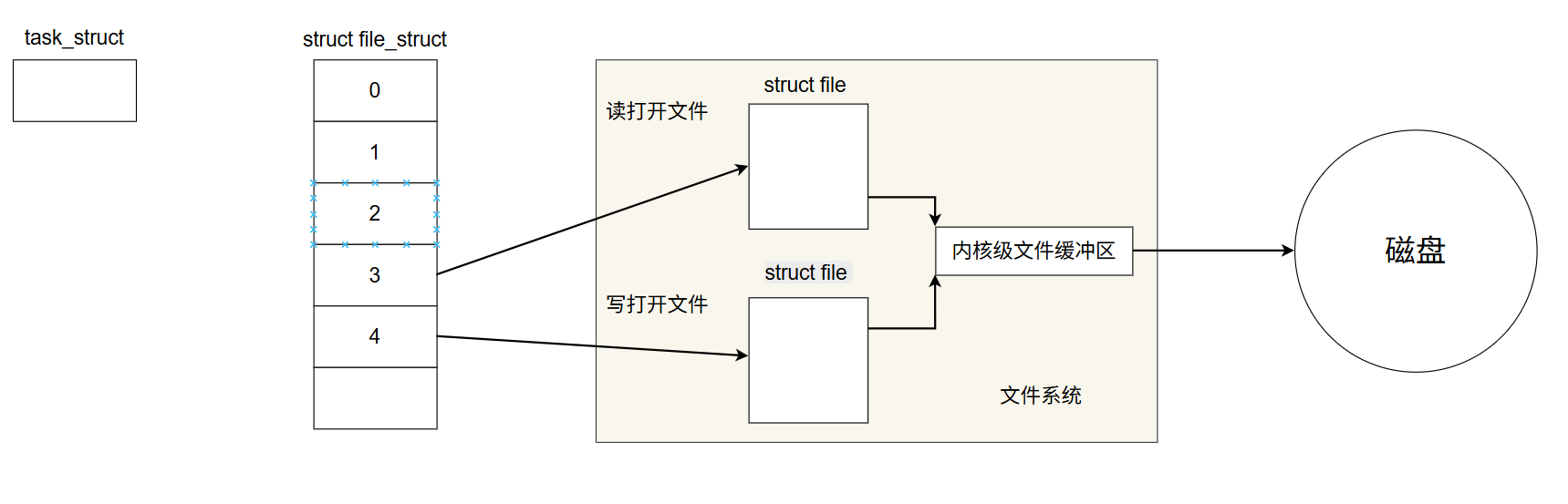
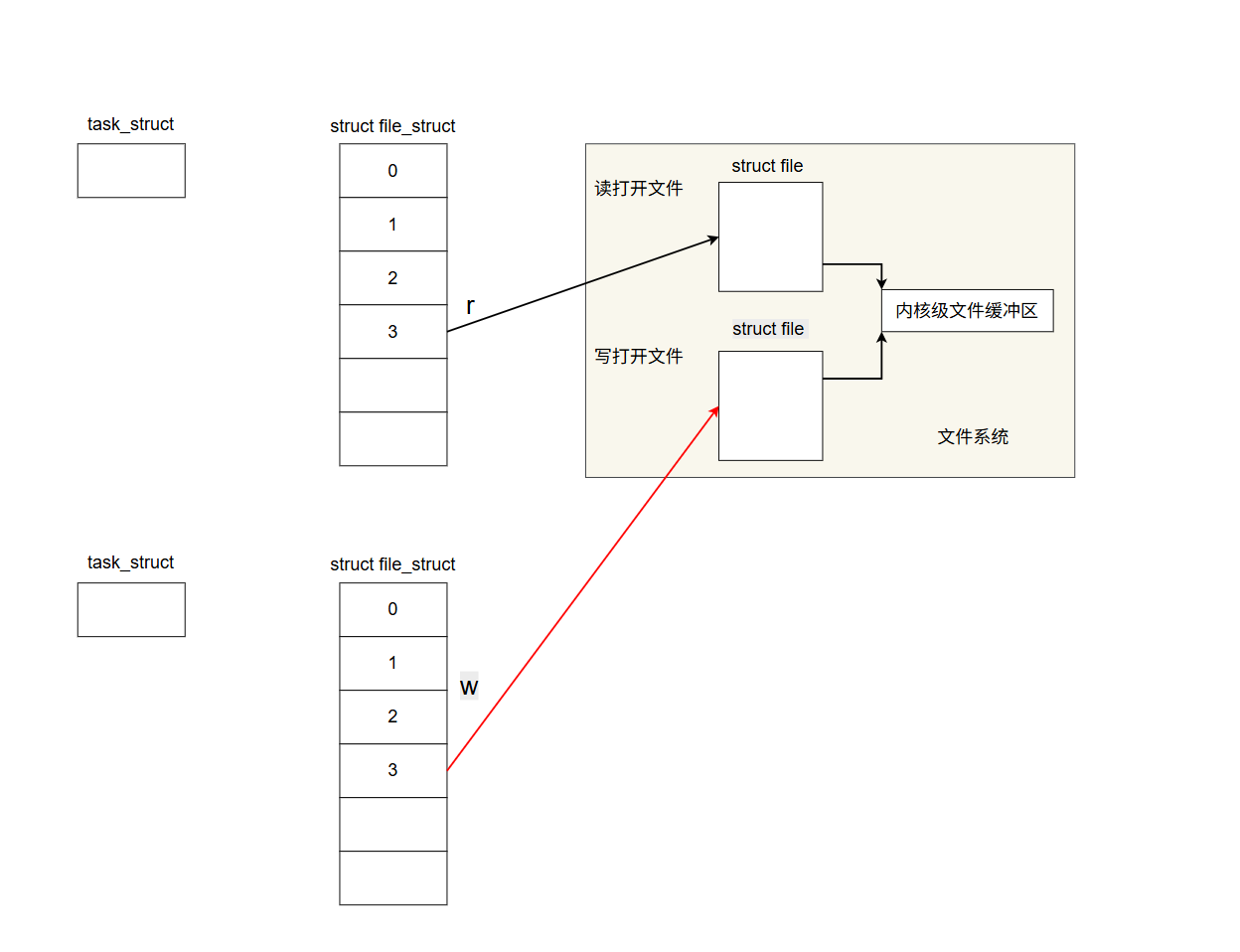
如上图,一个进程以不同方式打开同一个文件,即读和写,该进程的struct file_struct会分别添加读和写的文件描述符(fd),但两个文件指向的内核级缓冲区相同。
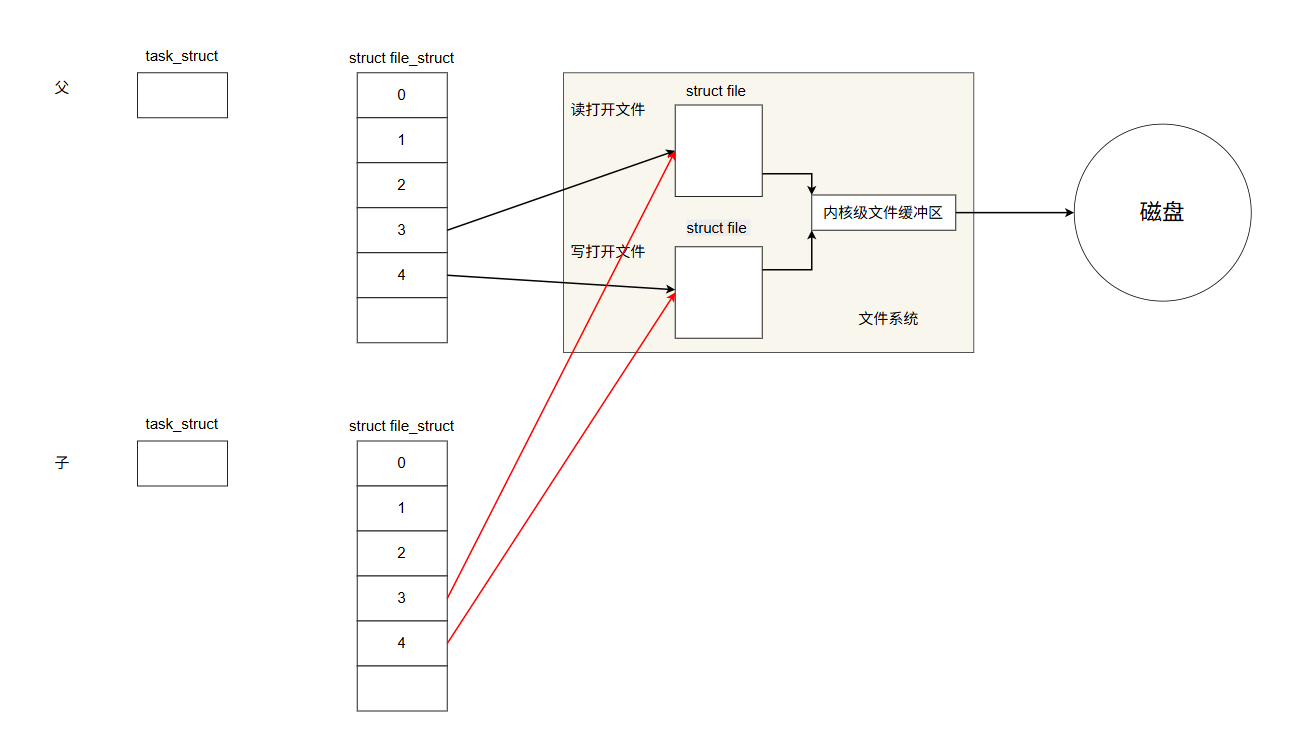
父进程fork出子进程,子进程会复制父进程的几乎全部地址空间和内核数据结构。
因此我们可以利用上述两个特性实现出管道通信,即一种单方向的通信方式。
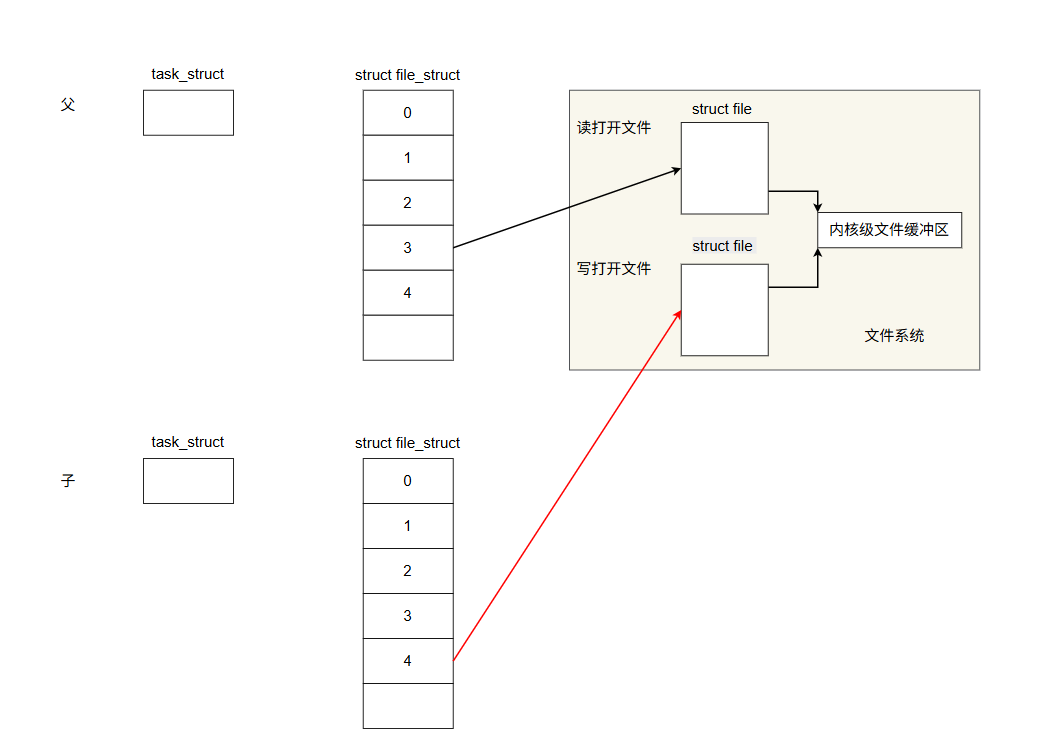
两个进程打开同一个文件,其中一个进程只有写的文件描述符,另一个只有读该文件的文件描述符,并且通信只需要使用内核缓冲区即可实现,因此内核缓冲区的数据并不需要通过修改磁盘。该种通信方式为管道,通信反向只能一个进程发出信号,另一个进程只能读取信号,类似于管道的工作原理。

管道通信里的匿名管道,核心原因是它没有对应的文件系统路径和名称,仅存在于内核空间中。
匿名管道通过 pipe() 系统调用创建,内核会在内存中生成对应的管道缓冲区,但不会在文件系统中创建任何可见的文件或节点;它只能用于具有亲缘关系的进程(如父子进程)间通信,进程退出后管道资源会被内核自动回收,全程没有对外暴露的"名字",因此被称为匿名管道。
2.2 匿名管道的使用
cpp
#include<iostream>
#include <cstring>
#include <cerrno>
#include <string>
#include<unistd.h>
#include<vector>
#include <sys/types.h>
#include <sys/wait.h>
#include "test.hpp"
class channel
{
private:
    /* data */
    int _wfd;
    std::string _name;
    pid_t _id;
public:
    channel(int wfd,std::string name,pid_t id)
    :_wfd(wfd)
    ,_name(name)
    ,_id(id)
    {

    }
    ~channel()
    {

    }
    int getwfd()
    {
        return _wfd;
    }
    void closeWfd()
    {
        close(_wfd);

    }
    void clean()
    {
        std::cout<<"wait pid:"<<_id<<std::endl;
        int n = waitpid(_id,NULL,0);

        if(n<0) perror("wait error");
        else std::cout<<"wait success"<<std::endl;
    }
};


void work()
{
    while(1)
    {
        int control;
        int n=read(0,&control,sizeof(control));
        if(n==0) break;//父进程关闭写端,read会返回0;
        else if(n==sizeof(n)&&(control>=0&&control<=2))
            {
                Func[control]();

            }
    }

}


void CreatPipeProcess(std::vector<channel>& Channel,int num)
{
    for(int i=0;i<num;i++)
    {
        int pipefd[2]={0};
        int n=pipe(pipefd);
        pid_t id=fork();
        if(id==0)
        {
            if(!Channel.empty())
            {
                for(auto e:Channel)
                {
                    e.closeWfd();
                }
            }
            close(pipefd[1]);
            dup2(pipefd[0],0);
            close(pipefd[0]);
            work();
            exit(0);

        }
        close(pipefd[0]);
        std::string name="channel"+std::to_string(i);
        Channel.push_back({pipefd[1],name,id});
    }
}

int nextChnnel(std::vector<channel>& Channel,int& n)
{
    int re=n;
    n++;
    n=n%Channel.size();

    return Channel[n].getwfd();

}

void send(int wfd)
{
    int control=chooseFunc();
    write(wfd,&control,sizeof(control));

}
void PipeController(std::vector<channel>& Channel,int time=-1)
{
    if(time>0)
    {
        int n=0;
        while(time--)
        {
            sleep(1);
            send(nextChnnel(Channel,n));
        }
    }
    else if(time<0)
    {
        int n=0;
        while(1)
        {
            sleep(1);
            send(nextChnnel(Channel,n));
        }
    }
}
void CleanPipe(std::vector<channel>& Channel)
{
    for(auto e:Channel)
    {
        e.closeWfd();
        e.clean();
    }
}
int main(int argc,char*argv[])
{
    int num= std::stoi(argv[1]);
    funcLoad();
    std::vector<channel> Channel;
   //1.创建管道和进程
   CreatPipeProcess(Channel,num);
   //2.控制管道
   PipeController(Channel,10);
   //3.清除管道
   CleanPipe(Channel);

}
头文件 test.hpp
cpp
"test.hpp"
#pragma once
#include <unistd.h>
#include<cstdlib>
#include<ctime>
typedef void(*func)();

void Print()
{
    std::cout << "I am print task" << std::endl;
}
void DownLoad()
{
    std::cout << "I am a download task" << std::endl;
}
void Flush()
{
    std::cout << "I am a flush task" << std::endl;
}


func Func[3];

void funcLoad()
{
    srand(time(0)^getpid()^13333);
    Func[0]=Print;
    Func[1]=DownLoad;
    Func[2]=Flush;
}

int chooseFunc()
{
    int n=rand()%3;
    return n;
}
注意:
- 匿名管道最核心的特点是只能用于父子或有亲缘关系的进程间通信,它是单向的字节流通道,依赖文件描述符传递数据且没有文件名,所以生命周期随进程。
- 使用时要记得成对处理读写端,父进程创建后及时关闭不需要的描述符,避免子进程无法感知EOF而阻塞;最后一定要在进程退出前显式关闭所有管道描述符并回收子进程,避免资源泄漏。
- 上述代码中我们创建多个子进程时,注意文件描述符的管理,避免退出子进程僵尸进程:
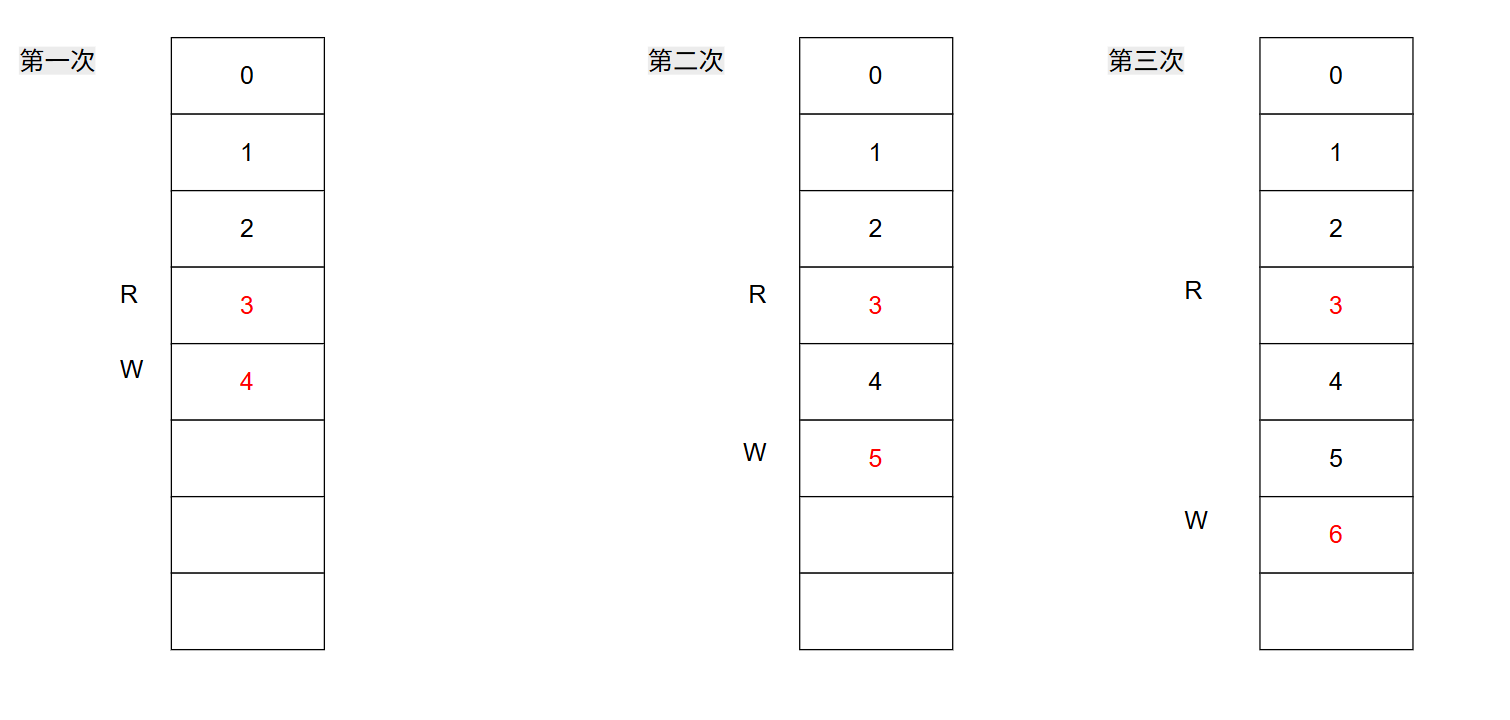
如图,我们创建第一个子进程时,父进程关闭了读端,也就是3的文件描述符;创建第二个子进程时,子进程会继承父进程的写端也就是4;这样后续每一个进程都会继承前面的,写端的文件描述符,因此后面我们关闭进程时,很容易导致子进程的文件描述符没有释放干净,导致僵尸进程,从而导致父进程阻塞。
因此我们创建子进程时,需要将从父进程那里继承的文件描述符中,多余的文件描述符关闭:
cpp
if(!Channel.empty())//即在子进程中关闭多余的文件描述符
{
     for(auto e:Channel)
     {
         e.closeWfd();
     }
 }
2.3 命名管道的使用
命名管道用于两个毫无血缘关系的进程进行通信。
两个进程分别通过公共文件的路径打开该文件,利用该文件进行通信。该文件不需要将内存缓冲区刷新到磁盘中,从而提高通信效率,该管道叫做命名管道。
cpp
//命名管道封装
#pragma once
#include<iostream>
#include<cstring>
#include <sys/types.h>
#include <sys/stat.h>
#include <fcntl.h>
#include <unistd.h>
#define CREATE 1
#define USER 2
#define SIZE 4096
const std::string PATH = "./mkfifo";


class namepipe
{
private:
    int _who;
    int _fd;
    std::string _fifo_path;
public:
    namepipe(std::string fifo_path,int who,int fd=-1)
    :_who(who)
    ,_fd(fd)
    ,_fifo_path(fifo_path)
    {
        if(_who==CREATE)
        {
            mkfifo(PATH.c_str(),0666);
        }
    }
    bool open_write()
    {
        int n=open(PATH.c_str(),O_WRONLY);
        if(n<0) perror("errno");
        _fd=n;
        return true;

    }
    bool open_read()
    {
        int n=open(PATH.c_str(),O_RDONLY);
        if(n<0) perror("errno");
        _fd=n;
        return true;

    }
    int my_read(std::string* message)
    {
        char buff[SIZE];
        int n=read(_fd,buff,SIZE);
        if(n>0)
        {
            buff[n]=0;
            *message=std::string(buff);
        }
        return n;
    }
    int my_write(std::string message)
    {

        getline(std::cin,message);
        int n=write(_fd,message.c_str(),message.size());
        if(n>0)
        {

        }
        return n;
    }
    ~namepipe()
    {
        if(_who==CREATE)
        {
            unlink(PATH.c_str());
        }
        close(_fd);
    }
};
控制端(发送消息):
cpp
#include"mkpipe.hpp"
int main()
{
     namepipe fifo(PATH,USER);
     fifo.open_write();
     std::string message;
     while(1)
     {
        std::cout<<"please cout::"<<std::endl;
        fifo.my_write(message);
     }

}
接收端(接收信号):
cpp
#include"mkpipe.hpp"
int main()
{
    namepipe fifo(PATH,CREATE);
    std::string in;
    fifo.open_read();
    while(1)
     {
        fifo.my_read(&in);
        std::cout<<in<<std::endl;
     }
}