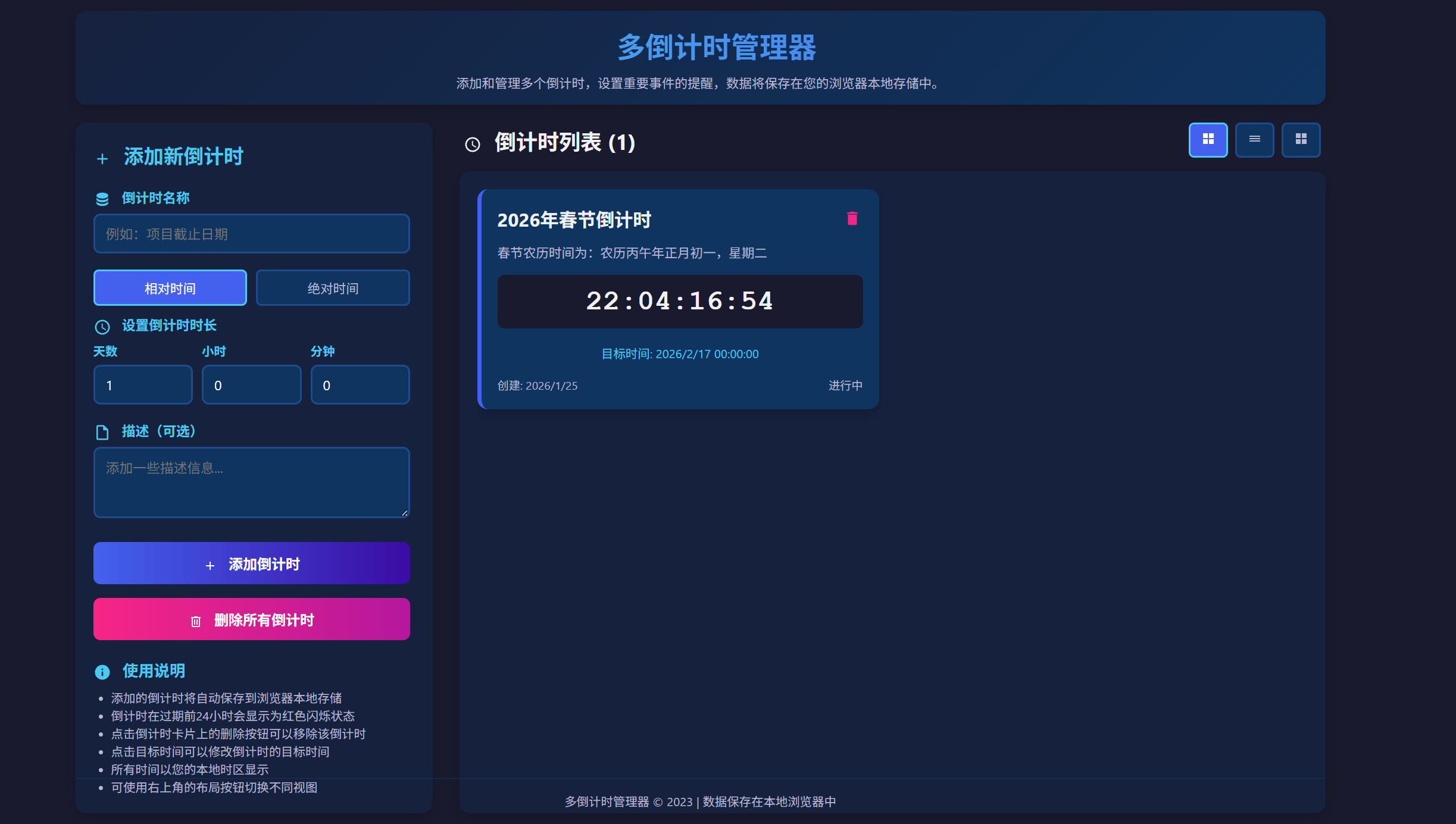
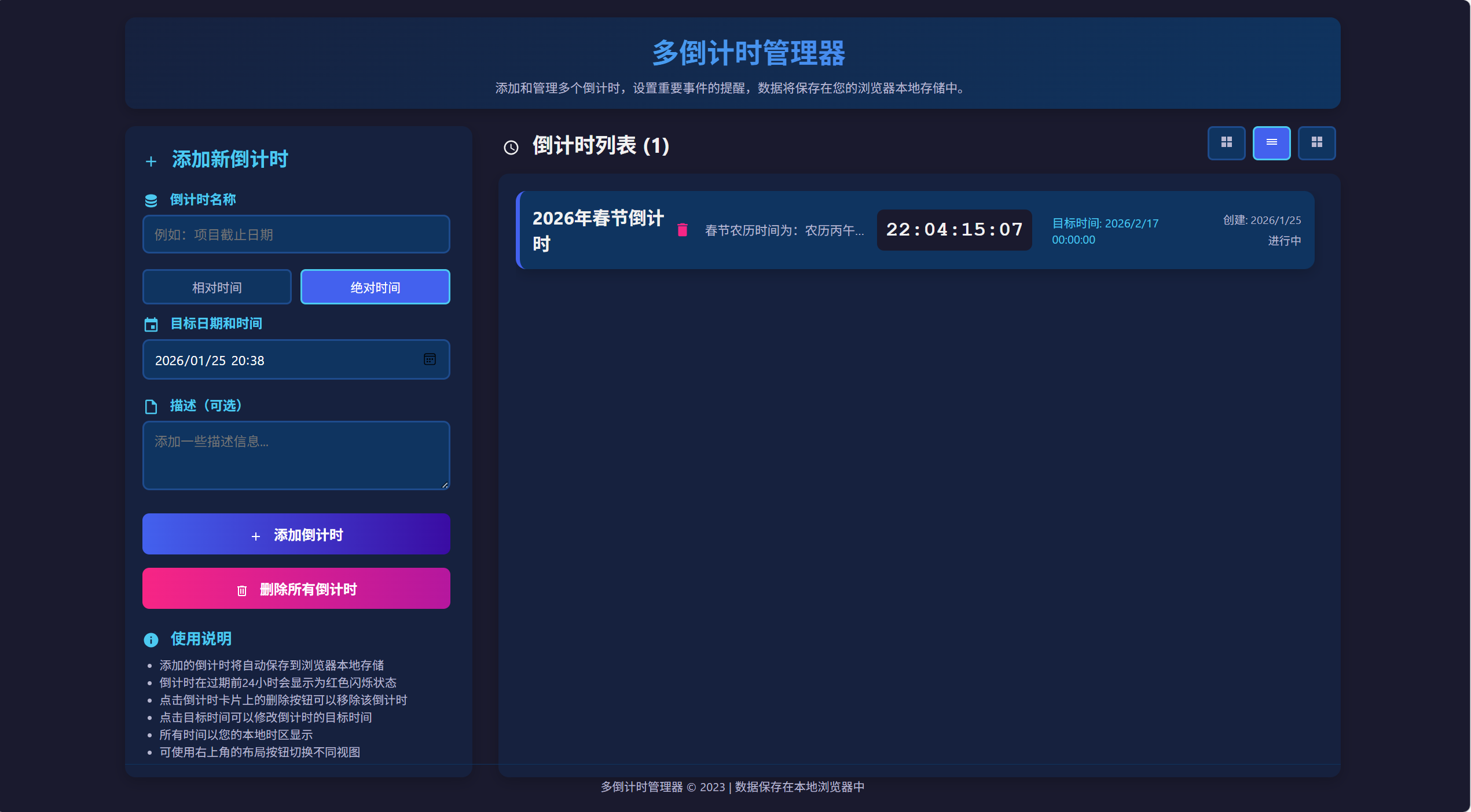
<!DOCTYPE html>
<html lang="zh-CN">
<head>
<meta charset="UTF-8">
<meta name="viewport" content="width=device-width, initial-scale=1.0">
<title>多倒计时管理器</title>
<style>
* {
margin: 0;
padding: 0;
box-sizing: border-box;
font-family: 'Segoe UI', Tahoma, Geneva, Verdana, sans-serif;
}
body {
background-color: #1a1a2e;
color: #f1f1f1;
min-height: 100vh;
padding: 20px;
}
.container {
max-width: 1400px;
margin: 0 auto;
display: flex;
flex-direction: column;
height: calc(100vh - 40px);
}
header {
text-align: center;
margin-bottom: 20px;
padding: 15px 20px;
background: linear-gradient(135deg, #16213e, #0f3460);
border-radius: 12px;
box-shadow: 0 5px 15px rgba(0, 0, 0, 0.2);
}
h1 {
font-size: 2rem;
margin-bottom: 8px;
background: linear-gradient(to right, #4cc9f0, #4361ee);
-webkit-background-clip: text;
background-clip: text;
color: transparent;
}
.subtitle {
font-size: 0.9rem;
color: #b8b8d1;
max-width: 600px;
margin: 0 auto;
}
.app-wrapper {
display: flex;
flex-wrap: wrap;
gap: 30px;
flex: 1;
min-height: 0;
}
.control-panel {
flex: 1;
min-width: 320px;
max-width: 400px;
background-color: #16213e;
padding: 20px;
border-radius: 12px;
box-shadow: 0 5px 15px rgba(0, 0, 0, 0.2);
display: flex;
flex-direction: column;
}
.control-panel-content {
flex: 1;
overflow-y: auto;
padding-right: 5px;
}
.timers-container {
flex: 2;
min-width: 300px;
display: flex;
flex-direction: column;
min-height: 0;
}
.timers-header {
display: flex;
justify-content: space-between;
align-items: center;
margin-bottom: 15px;
padding: 0 5px;
}
.timers-header h2 {
font-size: 1.5rem;
}
.layout-controls {
display: flex;
gap: 8px;
}
.layout-btn {
background-color: #0f3460;
border: 2px solid #1e4b8c;
border-radius: 6px;
color: #b8b8d1;
cursor: pointer;
padding: 8px 12px;
font-size: 0.9rem;
transition: all 0.2s;
}
.layout-btn.active {
background-color: #4361ee;
color: white;
border-color: #4cc9f0;
}
.layout-btn:hover {
background-color: #1e4b8c;
}
.timers-grid-wrapper {
flex: 1;
background-color: #16213e;
border-radius: 12px;
padding: 20px;
box-shadow: 0 5px 15px rgba(0, 0, 0, 0.2);
display: flex;
flex-direction: column;
min-height: 0;
}
.timers-grid {
display: grid;
grid-template-columns: repeat(auto-fill, minmax(320px, 1fr));
gap: 20px;
overflow-y: auto;
padding-right: 10px;
flex: 1;
}
/* 网格视图样式 */
.timers-grid.grid-view {
grid-template-columns: repeat(auto-fill, minmax(320px, 1fr));
}
/* 列表视图样式 */
.timers-grid.list-view {
grid-template-columns: 1fr;
gap: 12px;
}
.timers-grid.list-view .timer-card {
padding: 15px;
display: flex;
flex-direction: row;
align-items: center;
}
.timers-grid.list-view .timer-header {
flex: 1;
margin-bottom: 0;
margin-right: 15px;
}
.timers-grid.list-view .timer-description {
flex: 1;
margin-bottom: 0;
margin-right: 15px;
overflow: hidden;
text-overflow: ellipsis;
white-space: nowrap;
max-width: 200px;
}
.timers-grid.list-view .timer-display {
flex: 0 0 150px;
margin-bottom: 0;
margin-right: 15px;
font-size: 1.5rem;
padding: 10px;
}
.timers-grid.list-view .timer-date {
flex: 0 0 180px;
text-align: left;
margin-top: 0;
margin-right: 15px;
}
.timers-grid.list-view .timer-status {
flex: 0 0 100px;
margin-top: 0;
flex-direction: column;
align-items: flex-end;
gap: 5px;
}
.timers-grid.list-view .timer-delete {
margin-left: 10px;
}
/* 紧凑视图样式 */
.timers-grid.compact-view {
grid-template-columns: repeat(auto-fill, minmax(250px, 1fr));
gap: 15px;
}
.timers-grid.compact-view .timer-card {
padding: 15px;
}
.timers-grid.compact-view .timer-title {
font-size: 1.1rem;
}
.timers-grid.compact-view .timer-description {
font-size: 0.85rem;
margin-bottom: 12px;
line-height: 1.4;
max-height: 40px;
overflow: hidden;
}
.timers-grid.compact-view .timer-display {
font-size: 1.6rem;
padding: 10px;
margin-bottom: 10px;
}
.timers-grid.compact-view .timer-date {
font-size: 0.8rem;
}
.timers-grid.compact-view .timer-status {
font-size: 0.75rem;
}
/* 自定义滚动条样式 */
.timers-grid::-webkit-scrollbar,
.control-panel-content::-webkit-scrollbar {
width: 8px;
}
.timers-grid::-webkit-scrollbar-track,
.control-panel-content::-webkit-scrollbar-track {
background: #0f3460;
border-radius: 4px;
}
.timers-grid::-webkit-scrollbar-thumb,
.control-panel-content::-webkit-scrollbar-thumb {
background: #4361ee;
border-radius: 4px;
}
.timers-grid::-webkit-scrollbar-thumb:hover,
.control-panel-content::-webkit-scrollbar-thumb:hover {
background: #3a0ca3;
}
.control-panel h2 {
font-size: 1.4rem;
margin-bottom: 20px;
color: #4cc9f0;
}
.form-group {
margin-bottom: 18px;
}
label {
display: block;
margin-bottom: 6px;
font-weight: 600;
color: #4cc9f0;
font-size: 0.95rem;
}
input, textarea, select {
width: 100%;
padding: 10px 12px;
background-color: #0f3460;
border: 2px solid #1e4b8c;
border-radius: 8px;
color: white;
font-size: 0.95rem;
transition: border 0.3s;
}
input:focus, textarea:focus, select:focus {
outline: none;
border-color: #4cc9f0;
}
textarea {
resize: vertical;
min-height: 80px;
}
.time-input-group {
display: flex;
gap: 10px;
}
.time-input {
flex: 1;
}
.time-input label {
font-size: 0.85rem;
}
.btn {
display: inline-block;
background: linear-gradient(to right, #4361ee, #3a0ca3);
color: white;
border: none;
padding: 12px 20px;
border-radius: 8px;
font-size: 1rem;
font-weight: 600;
cursor: pointer;
transition: all 0.3s;
text-align: center;
width: 100%;
margin-top: 5px;
}
.btn:hover {
transform: translateY(-2px);
box-shadow: 0 5px 15px rgba(67, 97, 238, 0.4);
}
.btn svg {
width: 16px;
height: 16px;
margin-right: 8px;
vertical-align: middle;
}
.btn-delete-all {
background: linear-gradient(to right, #f72585, #b5179e);
margin-top: 15px;
}
.btn-delete-all:hover {
box-shadow: 0 5px 15px rgba(247, 37, 133, 0.4);
}
.timer-card {
background-color: #0f3460;
border-radius: 12px;
padding: 18px;
box-shadow: 0 5px 15px rgba(0, 0, 0, 0.2);
border-left: 5px solid #4361ee;
transition: transform 0.3s, box-shadow 0.3s;
height: fit-content;
}
.timer-card:hover {
transform: translateY(-5px);
box-shadow: 0 8px 20px rgba(0, 0, 0, 0.3);
}
.timer-card.expiring {
border-left-color: #f72585;
animation: pulse 1.5s infinite;
}
.timer-card.expired {
border-left-color: #ff6b6b;
}
@keyframes pulse {
0% { box-shadow: 0 0 0 0 rgba(247, 37, 133, 0.4); }
70% { box-shadow: 0 0 0 10px rgba(247, 37, 133, 0); }
100% { box-shadow: 0 0 0 0 rgba(247, 37, 133, 0); }
}
.timer-header {
display: flex;
justify-content: space-between;
align-items: center;
margin-bottom: 12px;
}
.timer-title {
font-size: 1.3rem;
font-weight: 700;
color: #f1f1f1;
}
.timer-delete {
background: none;
border: none;
color: #f72585;
cursor: pointer;
transition: transform 0.2s;
width: 24px;
height: 24px;
display: flex;
align-items: center;
justify-content: center;
}
.timer-delete:hover {
transform: scale(1.3);
}
.timer-description {
color: #b8b8d1;
margin-bottom: 15px;
font-size: 0.9rem;
line-height: 1.5;
}
.timer-display {
font-size: 2rem;
font-weight: 700;
text-align: center;
font-family: 'Courier New', monospace;
margin-bottom: 12px;
background-color: #1a1a2e;
padding: 12px;
border-radius: 8px;
}
.timer-date {
text-align: center;
color: #4cc9f0;
font-size: 0.85rem;
margin-top: 5px;
cursor: pointer;
transition: all 0.2s;
padding: 5px 8px;
border-radius: 5px;
}
.timer-date:hover {
background-color: rgba(76, 201, 240, 0.1);
}
.timer-date.editing {
background-color: rgba(76, 201, 240, 0.2);
}
.timer-status {
display: flex;
justify-content: space-between;
margin-top: 12px;
font-size: 0.8rem;
color: #b8b8d1;
}
.empty-state {
text-align: center;
padding: 40px 20px;
color: #b8b8d1;
display: flex;
flex-direction: column;
justify-content: center;
align-items: center;
height: 100%;
}
.empty-state svg {
width: 60px;
height: 60px;
margin-bottom: 15px;
fill: #4361ee;
}
.empty-state h3 {
font-size: 1.5rem;
margin-bottom: 10px;
color: #f1f1f1;
}
footer {
text-align: center;
margin-top: 20px;
padding-top: 15px;
border-top: 1px solid #0f3460;
color: #b8b8d1;
font-size: 0.85rem;
}
.time-option-selector {
display: flex;
gap: 10px;
margin-bottom: 10px;
}
.time-option-btn {
flex: 1;
padding: 8px 10px;
background-color: #0f3460;
border: 2px solid #1e4b8c;
border-radius: 6px;
color: #b8b8d1;
cursor: pointer;
text-align: center;
font-size: 0.9rem;
transition: all 0.2s;
}
.time-option-btn.active {
background-color: #4361ee;
color: white;
border-color: #4cc9f0;
}
.time-option-btn:hover {
background-color: #1e4b8c;
}
.time-input-section {
margin-bottom: 15px;
}
.icon {
display: inline-block;
width: 20px;
height: 20px;
margin-right: 8px;
vertical-align: middle;
}
.edit-date-input {
background-color: #0f3460;
border: 2px solid #4cc9f0;
border-radius: 5px;
color: white;
padding: 5px 8px;
font-size: 0.85rem;
width: 100%;
}
.edit-actions {
display: flex;
gap: 8px;
margin-top: 5px;
}
.edit-btn {
background-color: #4361ee;
color: white;
border: none;
border-radius: 4px;
padding: 4px 8px;
font-size: 0.8rem;
cursor: pointer;
transition: background-color 0.2s;
flex: 1;
}
.edit-btn:hover {
background-color: #3a0ca3;
}
.edit-btn.cancel {
background-color: #6c757d;
}
.edit-btn.cancel:hover {
background-color: #5a6268;
}
@media (max-width: 1024px) {
.timers-grid.grid-view {
grid-template-columns: repeat(auto-fill, minmax(280px, 1fr));
}
}
@media (max-width: 768px) {
.app-wrapper {
flex-direction: column;
}
.control-panel {
max-width: 100%;
max-height: 500px;
}
.timers-container {
min-height: 500px;
}
h1 {
font-size: 1.8rem;
}
.timers-grid.list-view .timer-card {
flex-direction: column;
align-items: stretch;
}
.timers-grid.list-view .timer-header,
.timers-grid.list-view .timer-description,
.timers-grid.list-view .timer-display,
.timers-grid.list-view .timer-date,
.timers-grid.list-view .timer-status {
margin-right: 0;
margin-bottom: 10px;
width: 100%;
}
.timers-grid.list-view .timer-description {
max-width: 100%;
white-space: normal;
}
.timers-grid.list-view .timer-status {
flex-direction: row;
}
}
@media (max-width: 480px) {
body {
padding: 10px;
}
.container {
height: calc(100vh - 20px);
}
.timers-grid.grid-view,
.timers-grid.compact-view {
grid-template-columns: 1fr;
}
.time-input-group {
flex-direction: column;
gap: 5px;
}
.layout-controls {
flex-wrap: wrap;
}
}
</style>
</head>
<body>
<div class="container">
<header>
<h1>
<svg class="icon" viewBox="0 0 24 24" fill="currentColor">
<path d="M6,2A2,2 0 0,0 4,4V20A2,2 0 0,0 6,22H18A2,2 0 0,0 20,20V8L14,2H6M6,4H13V9H18V20H6V4M8,12V14H16V12H8M8,16V18H13V16H8Z" />
</svg>
多倒计时管理器
</h1>
<p class="subtitle">添加和管理多个倒计时,设置重要事件的提醒,数据将保存在您的浏览器本地存储中。</p>
</header>
<div class="app-wrapper">
<div class="control-panel">
<div class="control-panel-content">
<h2>
<svg class="icon" viewBox="0 0 24 24" fill="#4cc9f0">
<path d="M19,13H13V19H11V13H5V11H11V5H13V11H19V13Z" />
</svg>
添加新倒计时
</h2>
<form id="timerForm">
<div class="form-group">
<label for="timerName">
<svg class="icon" viewBox="0 0 24 24" fill="#4cc9f0">
<path d="M12,3C7.58,3 4,4.79 4,7C4,9.21 7.58,11 12,11C16.42,11 20,9.21 20,7C20,4.79 16.42,3 12,3M4,9V12C4,14.21 7.58,16 12,16C16.42,16 20,14.21 20,12V9C20,11.21 16.42,13 12,13C7.58,13 4,11.21 4,9M4,14V17C4,19.21 7.58,21 12,21C16.42,21 20,19.21 20,17V14C20,16.21 16.42,18 12,18C7.58,18 4,16.21 4,14Z" />
</svg>
倒计时名称
</label>
<input type="text" id="timerName" placeholder="例如:项目截止日期" required>
</div>
<div class="time-option-selector">
<div class="time-option-btn active" id="relativeTimeBtn">相对时间</div>
<div class="time-option-btn" id="absoluteTimeBtn">绝对时间</div>
</div>
<div id="relativeTimeSection" class="time-input-section">
<div class="form-group">
<label>
<svg class="icon" viewBox="0 0 24 24" fill="#4cc9f0">
<path d="M12,20A8,8 0 0,0 20,12A8,8 0 0,0 12,4A8,8 0 0,0 4,12A8,8 0 0,0 12,20M12,2A10,10 0 0,1 22,12A10,10 0 0,1 12,22C6.47,22 2,17.5 2,12A10,10 0 0,1 12,2M12.5,7V12.25L17,14.92L16.25,16.15L11,13V7H12.5Z" />
</svg>
设置倒计时时长
</label>
<div class="time-input-group">
<div class="time-input">
<label for="daysInput">天数</label>
<input type="number" id="daysInput" min="0" value="1" placeholder="0">
</div>
<div class="time-input">
<label for="hoursInput">小时</label>
<input type="number" id="hoursInput" min="0" max="23" value="0" placeholder="0">
</div>
<div class="time-input">
<label for="minutesInput">分钟</label>
<input type="number" id="minutesInput" min="0" max="59" value="0" placeholder="0">
</div>
</div>
</div>
</div>
<div id="absoluteTimeSection" class="time-input-section" style="display: none;">
<div class="form-group">
<label for="targetDate">
<svg class="icon" viewBox="0 0 24 24" fill="#4cc9f0">
<path d="M19,19H5V8H19M16,1V3H8V1H6V3H5C3.89,3 3,3.89 3,5V19A2,2 0 0,0 5,21H19A2,2 0 0,0 21,19V5C21,3.89 20.1,3 19,3H18V1M17,12H12V17H17V12Z" />
</svg>
目标日期和时间
</label>
<input type="datetime-local" id="targetDate" required>
</div>
</div>
<div class="form-group">
<label for="timerDescription">
<svg class="icon" viewBox="0 0 24 24" fill="#4cc9f0">
<path d="M14,2H6A2,2 0 0,0 4,4V20A2,2 0 0,0 6,22H18A2,2 0 0,0 20,20V8L14,2M18,20H6V4H13V9H18V20Z" />
</svg>
描述(可选)
</label>
<textarea id="timerDescription" placeholder="添加一些描述信息..."></textarea>
</div>
<button type="submit" class="btn">
<svg viewBox="0 0 24 24" fill="white">
<path d="M19,13H13V19H11V13H5V11H11V5H13V11H19V13Z" />
</svg>
添加倒计时
</button>
</form>
<button id="deleteAllBtn" class="btn btn-delete-all">
<svg viewBox="0 0 24 24" fill="white">
<path d="M9,3V4H4V6H5V19A2,2 0 0,0 7,21H17A2,2 0 0,0 19,19V6H20V4H15V3H9M7,6H17V19H7V6M9,8V17H11V8H9M13,8V17H15V8H13Z" />
</svg>
删除所有倒计时
</button>
<div class="instructions">
<h3 style="margin-top: 20px; margin-bottom: 8px; color: #4cc9f0; font-size: 1.1rem;">
<svg class="icon" viewBox="0 0 24 24" fill="#4cc9f0">
<path d="M13,9H11V7H13M13,17H11V11H13M12,2A10,10 0 0,0 2,12A10,10 0 0,0 12,22A10,10 0 0,0 22,12A10,10 0 0,0 12,2Z" />
</svg>
使用说明
</h3>
<ul style="color: #b8b8d1; padding-left: 20px; font-size: 0.85rem;">
<li>添加的倒计时将自动保存到浏览器本地存储</li>
<li>倒计时在过期前24小时会显示为红色闪烁状态</li>
<li>点击倒计时卡片上的删除按钮可以移除该倒计时</li>
<li>点击目标时间可以修改倒计时的目标时间</li>
<li>所有时间以您的本地时区显示</li>
<li>可使用右上角的布局按钮切换不同视图</li>
</ul>
</div>
</div>
</div>
<div class="timers-container">
<div class="timers-header">
<h2>
<svg class="icon" viewBox="0 0 24 24" fill="#f1f1f1">
<path d="M12,20A8,8 0 0,0 20,12A8,8 0 0,0 12,4A8,8 0 0,0 4,12A8,8 0 0,0 12,20M12,2A10,10 0 0,1 22,12A10,10 0 0,1 12,22C6.47,22 2,17.5 2,12A10,10 0 0,1 12,2M12.5,7V12.25L17,14.92L16.25,16.15L11,13V7H12.5Z" />
</svg>
倒计时列表 (<span id="timerCount">0</span>)
</h2>
<div class="layout-controls">
<button class="layout-btn active" id="gridViewBtn" title="网格视图">
<svg width="16" height="16" viewBox="0 0 24 24" fill="currentColor">
<path d="M3,11H11V3H3M3,21H11V13H3M13,21H21V13H13M13,3V11H21V3" />
</svg>
</button>
<button class="layout-btn" id="listViewBtn" title="列表视图">
<svg width="16" height="16" viewBox="0 0 24 24" fill="currentColor">
<path d="M3,9H21V7H3V9M3,13H21V11H3V13M3,17H21V15H3V17Z" />
</svg>
</button>
<button class="layout-btn" id="compactViewBtn" title="紧凑视图">
<svg width="16" height="16" viewBox="0 0 24 24" fill="currentColor">
<path d="M3,3H11V11H3V3M3,13H11V21H3V13M13,3H21V11H13V3M13,13H21V21H13V13Z" />
</svg>
</button>
</div>
</div>
<div class="timers-grid-wrapper">
<div id="timersGrid" class="timers-grid grid-view">
<!-- 倒计时卡片会动态添加到这里 -->
</div>
<div id="emptyState" class="empty-state">
<svg viewBox="0 0 24 24">
<path d="M12,20A8,8 0 0,0 20,12A8,8 0 0,0 12,4A8,8 0 0,0 4,12A8,8 0 0,0 12,20M12,2A10,10 0 0,1 22,12A10,10 0 0,1 12,22C6.47,22 2,17.5 2,12A10,10 0 0,1 12,2M12.5,7V12.25L17,14.92L16.25,16.15L11,13V7H12.5Z" />
</svg>
<h3>暂无倒计时</h3>
<p>添加您的第一个倒计时,开始追踪重要事件</p>
</div>
</div>
</div>
</div>
<footer>
<p>多倒计时管理器 © 2023 | 数据保存在本地浏览器中</p>
</footer>
</div>
<script>
// 初始化变量
let timers = [];
let updateInterval;
let timeMode = 'relative'; // 'relative' 或 'absolute'
let currentLayout = 'grid'; // 'grid', 'list', 'compact'
let editingTimerId = null; // 当前正在编辑的倒计时ID
// DOM 元素
const timerForm = document.getElementById('timerForm');
const timersGrid = document.getElementById('timersGrid');
const emptyState = document.getElementById('emptyState');
const timerCount = document.getElementById('timerCount');
const deleteAllBtn = document.getElementById('deleteAllBtn');
const relativeTimeBtn = document.getElementById('relativeTimeBtn');
const absoluteTimeBtn = document.getElementById('absoluteTimeBtn');
const relativeTimeSection = document.getElementById('relativeTimeSection');
const absoluteTimeSection = document.getElementById('absoluteTimeSection');
const daysInput = document.getElementById('daysInput');
const hoursInput = document.getElementById('hoursInput');
const minutesInput = document.getElementById('minutesInput');
const targetDateInput = document.getElementById('targetDate');
const gridViewBtn = document.getElementById('gridViewBtn');
const listViewBtn = document.getElementById('listViewBtn');
const compactViewBtn = document.getElementById('compactViewBtn');
// SVG图标
const svgIcons = {
delete: '<svg width="20" height="20" viewBox="0 0 24 24" fill="#f72585"><path d="M19,4H15.5L14.5,3H9.5L8.5,4H5V6H19M6,19A2,2 0 0,0 8,21H16A2,2 0 0,0 18,19V7H6V19Z"/></svg>',
plus: '<svg width="20" height="20" viewBox="0 0 24 24" fill="#4cc9f0"><path d="M19,13H13V19H11V13H5V11H11V5H13V11H19V13Z"/></svg>',
clock: '<svg width="20" height="20" viewBox="0 0 24 24" fill="#4cc9f0"><path d="M12,20A8,8 0 0,0 20,12A8,8 0 0,0 12,4A8,8 0 0,0 4,12A8,8 0 0,0 12,20M12,2A10,10 0 0,1 22,12A10,10 0 0,1 12,22C6.47,22 2,17.5 2,12A10,10 0 0,1 12,2M12.5,7V12.25L17,14.92L16.25,16.15L11,13V7H12.5Z"/></svg>',
calendar: '<svg width="20" height="20" viewBox="0 0 24 24" fill="#4cc9f0"><path d="M19,19H5V8H19M16,1V3H8V1H6V3H5C3.89,3 3,3.89 3,5V19A2,2 0 0,0 5,21H19A2,2 0 0,0 21,19V5C21,3.89 20.1,3 19,3H18V1M17,12H12V17H17V12Z"/></svg>'
};
// 初始化日期时间输入
function initializeDateTimeInput() {
const now = new Date();
// 设置为当前时间加上1小时
now.setHours(now.getHours() + 1);
now.setMinutes(now.getMinutes() - now.getTimezoneOffset());
targetDateInput.value = now.toISOString().slice(0, 16);
}
// 时间模式切换
relativeTimeBtn.addEventListener('click', function() {
timeMode = 'relative';
relativeTimeBtn.classList.add('active');
absoluteTimeBtn.classList.remove('active');
relativeTimeSection.style.display = 'block';
absoluteTimeSection.style.display = 'none';
});
absoluteTimeBtn.addEventListener('click', function() {
timeMode = 'absolute';
absoluteTimeBtn.classList.add('active');
relativeTimeBtn.classList.remove('active');
absoluteTimeSection.style.display = 'block';
relativeTimeSection.style.display = 'none';
});
// 布局切换功能
function setLayout(layout) {
currentLayout = layout;
// 移除所有布局类
timersGrid.classList.remove('grid-view', 'list-view', 'compact-view');
// 添加当前布局类
timersGrid.classList.add(layout + '-view');
// 更新按钮状态
gridViewBtn.classList.remove('active');
listViewBtn.classList.remove('active');
compactViewBtn.classList.remove('active');
if (layout === 'grid') {
gridViewBtn.classList.add('active');
} else if (layout === 'list') {
listViewBtn.classList.add('active');
} else if (layout === 'compact') {
compactViewBtn.classList.add('active');
}
// 保存布局设置到本地存储
localStorage.setItem('timerLayout', layout);
}
gridViewBtn.addEventListener('click', function() {
setLayout('grid');
});
listViewBtn.addEventListener('click', function() {
setLayout('list');
});
compactViewBtn.addEventListener('click', function() {
setLayout('compact');
});
// 页面加载时从本地存储加载倒计时和布局设置
document.addEventListener('DOMContentLoaded', function() {
initializeDateTimeInput();
loadTimers();
// 加载布局设置
const savedLayout = localStorage.getItem('timerLayout');
if (savedLayout && ['grid', 'list', 'compact'].includes(savedLayout)) {
setLayout(savedLayout);
}
startUpdateInterval();
});
// 表单提交事件
timerForm.addEventListener('submit', function(e) {
e.preventDefault();
addTimer();
});
// 删除所有倒计时按钮事件
deleteAllBtn.addEventListener('click', function() {
if (timers.length > 0 && confirm("确定要删除所有倒计时吗?此操作不可撤销。")) {
timers = [];
saveTimers();
renderTimers();
}
});
// 添加新倒计时
function addTimer() {
const name = document.getElementById('timerName').value.trim();
const description = document.getElementById('timerDescription').value.trim();
if (!name) {
alert("请输入倒计时名称");
return;
}
let targetDate;
if (timeMode === 'relative') {
// 相对时间模式
const days = parseInt(daysInput.value) || 0;
const hours = parseInt(hoursInput.value) || 0;
const minutes = parseInt(minutesInput.value) || 0;
if (days === 0 && hours === 0 && minutes === 0) {
alert("请设置倒计时时长,至少需要设置一个非零值");
return;
}
if (days < 0 || hours < 0 || minutes < 0) {
alert("时间值不能为负数");
return;
}
if (hours > 23) {
alert("小时数不能超过23");
return;
}
if (minutes > 59) {
alert("分钟数不能超过59");
return;
}
// 修复时间计算:正确计算总毫秒数
const totalMilliseconds =
(days * 24 * 60 * 60 * 1000) + // 天数转换为毫秒
(hours * 60 * 60 * 1000) + // 小时转换为毫秒
(minutes * 60 * 1000); // 分钟转换为毫秒
// 计算目标时间
targetDate = new Date(Date.now() + totalMilliseconds);
} else {
// 绝对时间模式
const dateTime = targetDateInput.value;
if (!dateTime) {
alert("请选择目标日期和时间");
return;
}
targetDate = new Date(dateTime);
}
const now = new Date();
if (targetDate <= now) {
alert("目标日期必须是将来的时间");
return;
}
const newTimer = {
id: Date.now(),
name: name,
targetDate: targetDate.getTime(),
description: description,
createdAt: now.getTime()
};
timers.push(newTimer);
saveTimers();
renderTimers();
// 重置表单
timerForm.reset();
// 重置默认值
daysInput.value = 1;
hoursInput.value = 0;
minutesInput.value = 0;
initializeDateTimeInput();
}
// 删除单个倒计时
function deleteTimer(id) {
timers = timers.filter(timer => timer.id !== id);
saveTimers();
renderTimers();
}
// 开始编辑倒计时目标时间
function startEditTimerDate(timerId) {
// 如果已经在编辑其他倒计时,先取消编辑
if (editingTimerId && editingTimerId !== timerId) {
cancelEditTimerDate(editingTimerId);
}
editingTimerId = timerId;
const timer = timers.find(t => t.id === timerId);
if (!timer) return;
const targetDate = new Date(timer.targetDate);
const dateElement = document.querySelector(`.timer-card[data-id="${timerId}"] .timer-date`);
if (!dateElement) return;
// 将日期时间转换为datetime-local输入格式
const year = targetDate.getFullYear();
const month = (targetDate.getMonth() + 1).toString().padStart(2, '0');
const day = targetDate.getDate().toString().padStart(2, '0');
const hours = targetDate.getHours().toString().padStart(2, '0');
const minutes = targetDate.getMinutes().toString().padStart(2, '0');
const dateTimeValue = `${year}-${month}-${day}T${hours}:${minutes}`;
// 创建编辑界面
dateElement.innerHTML = `
<input type="datetime-local" class="edit-date-input" value="${dateTimeValue}">
<div class="edit-actions">
<button class="edit-btn save" onclick="saveTimerDate(${timerId})">保存</button>
<button class="edit-btn cancel" onclick="cancelEditTimerDate(${timerId})">取消</button>
</div>
`;
dateElement.classList.add('editing');
// 自动聚焦到输入框
const input = dateElement.querySelector('input');
if (input) {
input.focus();
}
}
// 保存修改的目标时间
function saveTimerDate(timerId) {
const timer = timers.find(t => t.id === timerId);
if (!timer) return;
const dateElement = document.querySelector(`.timer-card[data-id="${timerId}"] .timer-date`);
if (!dateElement) return;
const input = dateElement.querySelector('input');
if (!input) return;
const newDateTime = input.value;
if (!newDateTime) {
alert("请选择新的目标时间");
return;
}
const newTargetDate = new Date(newDateTime);
const now = new Date();
if (newTargetDate <= now) {
alert("目标日期必须是将来的时间");
return;
}
// 更新倒计时的目标时间
timer.targetDate = newTargetDate.getTime();
// 保存到本地存储
saveTimers();
// 重新渲染
renderTimers();
// 重置编辑状态
editingTimerId = null;
}
// 取消编辑目标时间
function cancelEditTimerDate(timerId) {
editingTimerId = null;
renderTimers();
}
// 渲染所有倒计时
function renderTimers() {
if (timers.length === 0) {
timersGrid.innerHTML = '';
emptyState.style.display = 'flex';
timerCount.textContent = '0';
return;
}
emptyState.style.display = 'none';
timerCount.textContent = timers.length;
// 按目标日期排序(最近的在前)
timers.sort((a, b) => a.targetDate - b.targetDate);
let timersHTML = '';
timers.forEach(timer => {
const timerData = calculateTimeRemaining(timer.targetDate);
const targetDate = new Date(timer.targetDate);
// 确定卡片样式
let cardClass = 'timer-card';
if (timerData.isExpired) {
cardClass += ' expired';
} else if (timerData.isExpiringSoon) {
cardClass += ' expiring';
}
// 如果是当前正在编辑的倒计时,显示编辑界面
if (editingTimerId === timer.id) {
// 将日期时间转换为datetime-local输入格式
const year = targetDate.getFullYear();
const month = (targetDate.getMonth() + 1).toString().padStart(2, '0');
const day = targetDate.getDate().toString().padStart(2, '0');
const hours = targetDate.getHours().toString().padStart(2, '0');
const minutes = targetDate.getMinutes().toString().padStart(2, '0');
const dateTimeValue = `${year}-${month}-${day}T${hours}:${minutes}`;
timersHTML += `
<div class="${cardClass}" data-id="${timer.id}">
<div class="timer-header">
<div class="timer-title">${escapeHtml(timer.name)}</div>
<button class="timer-delete" onclick="deleteTimer(${timer.id})" title="删除">
${svgIcons.delete}
</button>
</div>
<div class="timer-description">${timer.description ? escapeHtml(timer.description) : '无描述'}</div>
<div class="timer-display">
${timerData.isExpired ? '已过期' : timerData.display}
</div>
<div class="timer-date editing">
<input type="datetime-local" class="edit-date-input" value="${dateTimeValue}">
<div class="edit-actions">
<button class="edit-btn save" onclick="saveTimerDate(${timer.id})">保存</button>
<button class="edit-btn cancel" onclick="cancelEditTimerDate(${timer.id})">取消</button>
</div>
</div>
<div class="timer-status">
<span>创建: ${new Date(timer.createdAt).toLocaleDateString('zh-CN')}</span>
<span>${timerData.isExpired ? '已过期' : timerData.isExpiringSoon ? '即将到期' : '进行中'}</span>
</div>
</div>
`;
} else {
// 根据布局生成不同的HTML
if (currentLayout === 'list') {
timersHTML += `
<div class="${cardClass}" data-id="${timer.id}">
<div class="timer-header">
<div class="timer-title">${escapeHtml(timer.name)}</div>
</div>
<div class="timer-description" title="${escapeHtml(timer.description || '无描述')}">
${timer.description ? escapeHtml(timer.description) : '无描述'}
</div>
<div class="timer-display">
${timerData.isExpired ? '已过期' : timerData.display}
</div>
<div class="timer-date" onclick="startEditTimerDate(${timer.id})" title="点击修改目标时间">
目标: ${targetDate.toLocaleString('zh-CN')}
</div>
<div class="timer-status">
<span>创建: ${new Date(timer.createdAt).toLocaleDateString('zh-CN')}</span>
<span>${timerData.isExpired ? '已过期' : timerData.isExpiringSoon ? '即将到期' : '进行中'}</span>
</div>
<button class="timer-delete" onclick="deleteTimer(${timer.id})" title="删除">
${svgIcons.delete}
</button>
</div>
`;
} else {
// 网格视图和紧凑视图使用相同的HTML结构
timersHTML += `
<div class="${cardClass}" data-id="${timer.id}">
<div class="timer-header">
<div class="timer-title">${escapeHtml(timer.name)}</div>
<button class="timer-delete" onclick="deleteTimer(${timer.id})" title="删除">
${svgIcons.delete}
</button>
</div>
<div class="timer-description">${timer.description ? escapeHtml(timer.description) : '无描述'}</div>
<div class="timer-display">
${timerData.isExpired ? '已过期' : timerData.display}
</div>
<div class="timer-date" onclick="startEditTimerDate(${timer.id})" title="点击修改目标时间">
目标时间: ${targetDate.toLocaleString('zh-CN')}
</div>
<div class="timer-status">
<span>创建: ${new Date(timer.createdAt).toLocaleDateString('zh-CN')}</span>
<span>${timerData.isExpired ? '已过期' : timerData.isExpiringSoon ? '即将到期' : '进行中'}</span>
</div>
</div>
`;
}
}
});
timersGrid.innerHTML = timersHTML;
// 自动滚动到最新添加的倒计时
if (timers.length > 0) {
setTimeout(() => {
const latestTimer = timers[timers.length - 1];
const latestTimerElement = document.querySelector(`[data-id="${latestTimer.id}"]`);
if (latestTimerElement) {
latestTimerElement.scrollIntoView({ behavior: 'smooth', block: 'nearest' });
}
}, 100);
}
}
// 计算剩余时间
function calculateTimeRemaining(targetTimestamp) {
const now = Date.now();
const diff = targetTimestamp - now;
if (diff <= 0) {
return {
display: '00:00:00:00',
isExpired: true,
isExpiringSoon: false
};
}
const isExpiringSoon = diff < 24 * 60 * 60 * 1000; // 小于24小时
const totalSeconds = Math.floor(diff / 1000);
const days = Math.floor(totalSeconds / (24 * 60 * 60));
const hours = Math.floor((totalSeconds % (24 * 60 * 60)) / (60 * 60));
const minutes = Math.floor((totalSeconds % (60 * 60)) / 60);
const seconds = totalSeconds % 60;
return {
display: `${days.toString().padStart(2, '0')}:${hours.toString().padStart(2, '0')}:${minutes.toString().padStart(2, '0')}:${seconds.toString().padStart(2, '0')}`,
isExpired: false,
isExpiringSoon: isExpiringSoon
};
}
// 开始更新倒计时的间隔
function startUpdateInterval() {
clearInterval(updateInterval);
updateInterval = setInterval(updateAllTimers, 1000);
}
// 更新所有倒计时
function updateAllTimers() {
if (timers.length === 0) return;
const timerCards = document.querySelectorAll('.timer-card');
timerCards.forEach(card => {
const timerId = parseInt(card.getAttribute('data-id'));
const timer = timers.find(t => t.id === timerId);
if (!timer) return;
const timerData = calculateTimeRemaining(timer.targetDate);
const displayElement = card.querySelector('.timer-display');
if (displayElement) {
displayElement.innerHTML = timerData.isExpired ? '已过期' : timerData.display;
}
// 更新样式
card.className = 'timer-card';
if (timerData.isExpired) {
card.classList.add('expired');
} else if (timerData.isExpiringSoon) {
card.classList.add('expiring');
}
// 更新状态
const statusElement = card.querySelector('.timer-status span:last-child');
if (statusElement) {
statusElement.textContent = timerData.isExpired ? '已过期' : timerData.isExpiringSoon ? '即将到期' : '进行中';
}
});
}
// 从本地存储加载倒计时
function loadTimers() {
const savedTimers = localStorage.getItem('multiTimers');
if (savedTimers) {
try {
timers = JSON.parse(savedTimers);
// 过滤掉已过期太久的倒计时(超过30天)
const thirtyDaysAgo = Date.now() - (30 * 24 * 60 * 60 * 1000);
timers = timers.filter(timer => {
const isOldExpired = timer.targetDate < Date.now() && timer.createdAt < thirtyDaysAgo;
return !isOldExpired;
});
renderTimers();
} catch (e) {
console.error("加载倒计时数据失败:", e);
timers = [];
}
}
}
// 保存倒计时到本地存储
function saveTimers() {
localStorage.setItem('multiTimers', JSON.stringify(timers));
}
// 辅助函数:HTML转义防止XSS攻击
function escapeHtml(text) {
const div = document.createElement('div');
div.textContent = text;
return div.innerHTML;
}
</script>
</body>
</html>