文章目录
书接上文
官方文档:https://www.elastic.co/guide/en/elasticsearch/reference/7.10/analysis-tokenfilters.html
六、字符过滤器:char_filter
1、内置字符过滤器:html_strip(html解码)
从文本中去除HTML元素,并将HTML实体替换为其解码后的形式(例如,将&替换为&)。
json
// 示例
GET /_analyze
{
  "tokenizer": "keyword",
  "char_filter": [
    "html_strip"
  ],
  "text": "<p>I'm so <b>happy</b>!</p>"
}
// 结果:
[ \nI'm so happy!\n ]
2、内置字符过滤器:mapping(字符映射)
mapping字符过滤器接受键值对形式的输入。每当遇到与某个键相匹配的字符序列时,它会将该字符序列替换为与该键对应的值。
匹配过程采用"贪心算法":在给定位置上,与字符串最长的匹配部分将被选中。替换操作可以使用空字符串进行。
json
// 示例:字符转换
GET /_analyze
{
  "tokenizer": "keyword",
  "char_filter": [
    {
      "type": "mapping",
      "mappings": [
        "٠ => 0",
        "١ => 1",
        "٢ => 2",
        "٣ => 3",
        "٤ => 4",
        "٥ => 5",
        "٦ => 6",
        "٧ => 7",
        "٨ => 8",
        "٩ => 9"
      ]
    }
  ],
  "text": "My license plate is ٢٥٠١٥"
}
// 结果:
[ My license plate is 25015 ]
可选参数:
mappings:(必填*,字符串数组)映射关系数组,其中每个元素的格式为key => value。必须指定其中之一或参数mappings_path。
mappings_path:(必填*,字符串类型) 包含key => value映射信息的文件的路径。
json
// 示例:自定义字符过滤器
PUT /my-index-000001
{
  "settings": {
    "analysis": {
      "analyzer": {
        "my_analyzer": {
          "tokenizer": "standard",
          "char_filter": [
            "my_mappings_char_filter"
          ]
        }
      },
      "char_filter": {
        "my_mappings_char_filter": {
          "type": "mapping",
          "mappings": [
            ":) => _happy_",
            ":( => _sad_"
          ]
        }
      }
    }
  }
}
3、内置字符过滤器:pattern_replace(正则替换)
pattern_replace字符过滤器使用正则表达式来匹配那些需要被替换为指定字符串的字符。替换字符串可以引用正则表达式中的捕获组。
可选配置:
pattern:一个Java正则表达式。为必填项。
replacement:替换字符串可以使用$1..$9语法来引用捕获组。
flags:Java正则表达式标志。各标志需用竖线分隔,例如"CASE_INSENSITIVE|COMMENTS"。
json
// 示例:将数字中的连字符替换为下划线。也就是说,123-456-789会变为123_456_789。
PUT my-index-00001
{
  "settings": {
    "analysis": {
      "analyzer": {
        "my_analyzer": {
          "tokenizer": "standard",
          "char_filter": [
            "my_char_filter"
          ]
        }
      },
      "char_filter": {
        "my_char_filter": {
          "type": "pattern_replace",
          "pattern": "(\\d+)-(?=\\d)",
          "replacement": "$1_"
        }
      }
    }
  }
}

POST my-index-00001/_analyze
{
  "analyzer": "my_analyzer",
  "text": "My credit card is 123-456-789"
}
// 结果:
[ My, credit, card, is, 123_456_789 ]
七、规范化器:normalizer
规范化器与分析器的功能类似,不同之处在于它们通常只生成一个标记。因此,规范化器没有分词功能,且仅能使用部分可用的字符过滤器及标记过滤器。只有那些能够针对单个字符进行处理的过滤器才被允许使用。例如,小写转换过滤器是可以使用的,但需要处理整个关键词的词干提取过滤器则不可使用。目前可用于规范化器的过滤器包括:arabic_normalization、asciifolding、bengali_normalization、cjk_width、decimal_digit、elision、german_normalization、hindi_normalization、indic_normalization、lowercase、persian_normalization、scandinavian_folding、serbian_normalization、sorani_normalization、uppercase。
json
PUT index
{
  "settings": {
    "analysis": {
      "char_filter": {
        "quote": {
          "type": "mapping",
          "mappings": [
            "<< => \"",
            ">> => \""
          ]
        }
      },
      "normalizer": {
        "my_normalizer": {
          "type": "custom",
          "char_filter": ["quote"],
          "filter": ["lowercase", "asciifolding"]
        }
      }
    }
  },
  "mappings": {
    "properties": {
      "foo": {
        "type": "keyword",
        "normalizer": "my_normalizer"
      }
    }
  }
}
八、IK中文分词器
elasticsearch-analysis-ik: https://github.com/medcl/elasticsearch-analysis-ik/releases
1、什么是IK分词器
分词:即把一段中文或者别的划分成一个个的关键字,我们在搜索时候会把自己的信息进行分词,会把数据库中或者索引库中的数据进行分词,然后进行---个匹配操作,默认的中文分词是将毎个字看成一个词,比如"我爱中国"会被分为"我""爱""中"国",这显然是不符合要求的,所以我们需要安装中文分词器IK来解决这个问题。
如果要使用中文,建议使用IK分词器!
IK提供了两个分词算法: ik_smart和 ik_max_word,其中 ik_smart为最少切分,ik_max_word为最细粒度划分!
2、离线安装(下载与es对应的版本!!!否则会启动报错)
①下载完,解压到ES目录下
D:\es\elasticsearch-7.6.0\plugins\elasticsearch-analysis-ik-7.6.0
②重启es,会出现加载ik插件
bash
[2021-05-07T09:51:29,253][INFO ][o.e.p.PluginsService ] [DESKTOP-KAO1R1F] loaded plugin [analysis-ik]③使用elasticsearch-plugin.bat,查看插件

3、使用kibana测试
json
GET _analyze
{
  "analyzer" : "ik_smart",
  "text" : "中国共产党"
}

{
  "tokens" : [
    {
      "token" : "中国共产党",
      "start_offset" : 0,
      "end_offset" : 5,
      "type" : "CN_WORD",
      "position" : 0
    }
  ]
}
json
GET _analyze
{
  "analyzer" : "ik_max_word",
  "text" : "中国共产党"
}

{
  "tokens" : [
    {
      "token" : "中国共产党",
      "start_offset" : 0,
      "end_offset" : 5,
      "type" : "CN_WORD",
      "position" : 0
    },
    {
      "token" : "中国",
      "start_offset" : 0,
      "end_offset" : 2,
      "type" : "CN_WORD",
      "position" : 1
    },
    {
      "token" : "国共",
      "start_offset" : 1,
      "end_offset" : 3,
      "type" : "CN_WORD",
      "position" : 2
    },
    {
      "token" : "共产党",
      "start_offset" : 2,
      "end_offset" : 5,
      "type" : "CN_WORD",
      "position" : 3
    },
    {
      "token" : "共产",
      "start_offset" : 2,
      "end_offset" : 4,
      "type" : "CN_WORD",
      "position" : 4
    },
    {
      "token" : "党",
      "start_offset" : 4,
      "end_offset" : 5,
      "type" : "CN_CHAR",
      "position" : 5
    }
  ]
}
②有些词被拆分了,需要自己来配置分词
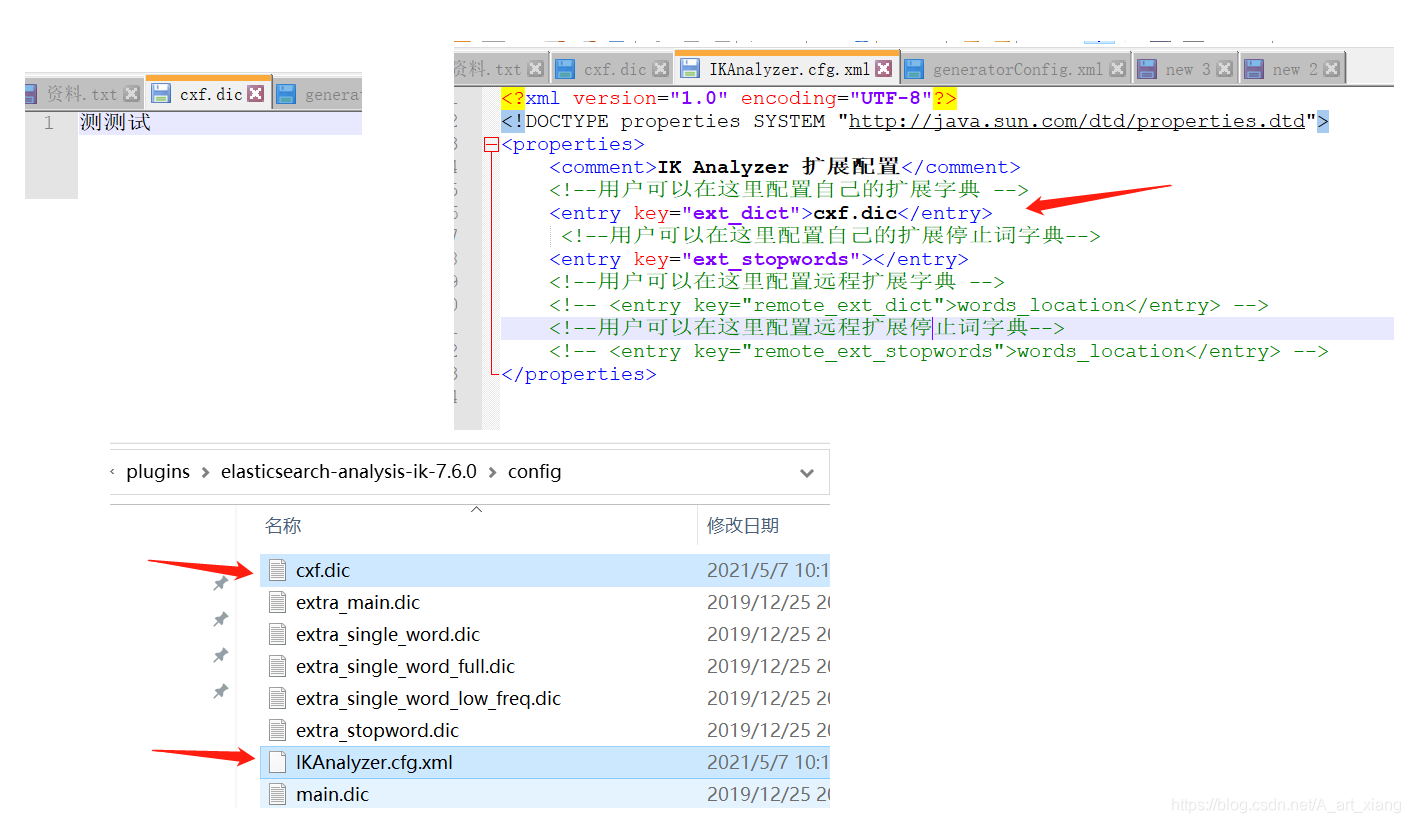
重启es看细节
bash
[2021-05-07T10:21:48,875][INFO ][o.e.g.GatewayService     ] [DESKTOP-KAO1R1F] recovered [5] indices into cluster_state
[2021-05-07T10:21:49,223][INFO ][o.w.a.d.Monitor          ] [DESKTOP-KAO1R1F] try load config from D:\es\elasticsearch-7.6.0\config\analysis-ik\IKAnalyzer.cfg.xml
[2021-05-07T10:21:49,228][INFO ][o.w.a.d.Monitor          ] [DESKTOP-KAO1R1F] try load config from D:\es\elasticsearch-7.6.0\plugins\elasticsearch-analysis-ik-7.6.0\config\IKAnalyzer.cfg.xml
[2021-05-07T10:21:49,751][INFO ][o.w.a.d.Monitor          ] [DESKTOP-KAO1R1F] [Dict Loading] D:\es\elasticsearch-7.6.0\plugins\elasticsearch-analysis-ik-7.6.0\config\cxf.dic
4、在线安装
bash
# 拓展:可以在线安装
#查看已安装插件
bin/elasticsearch-plugin list
#安装插件
bin/elasticsearch-plugin install analysis-icu
#删除插件
bin/elasticsearch-plugin remove analysis-icu
json
# 测试分词效果
POST _analyze
{
    "analyzer":"icu_analyzer",
    "text":"中华人民共和国"
}
#ES的默认分词设置是standard,会单字拆分
POST _analyze
{
    "analyzer":"standard",
    "text":"青岛青岛青岛"
}

#ik_smart:会做最粗粒度的拆
POST _analyze
{
    "analyzer": "ik_smart",
    "text": "青岛青岛青岛"
 }

#ik_max_word:会将文本做最细粒度的拆分
POST _analyze
{
    "analyzer":"ik_max_word",
    "text":"青岛青岛青岛"
}
json
# 创建索引时可以指定IK分词器作为默认分词器
PUT /es_db
{
    "settings" : {
        "index" : {
            "analysis.analyzer.default.type": "ik_max_word"
        }
    }
}
5、拓展:查询指定索引分词器
json
GET /search_index/_analyze
{
  "analyzer" : "search_index_analyzer",
  "text" : "xxxxxxxxxxxxxxxx"
}