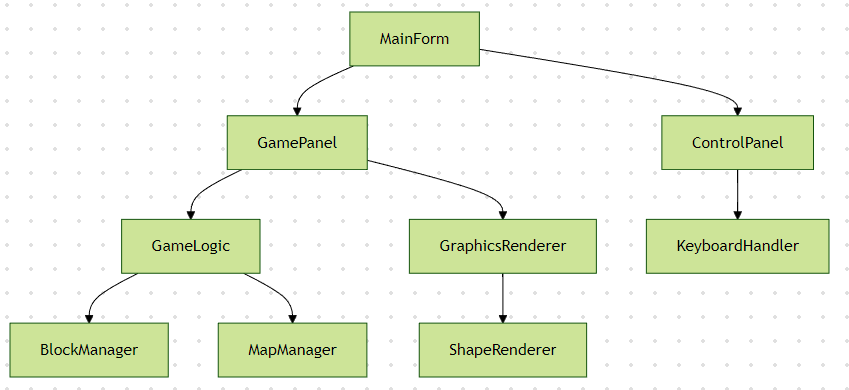
一、项目架构设计
二、核心代码实现
1. 游戏主窗体 (MainForm.cs)
csharp
public partial class MainForm : Form
{
    private GameLogic gameLogic;

    public MainForm()
    {
        InitializeComponent();
        InitializeGame();
    }

    private void InitializeGame()
    {
        gameLogic = new GameLogic(this);
        this.KeyDown += GameLogic_KeyDown;
        this.DoubleBuffered = true; // 抗锯齿
        SetStyle(ControlStyles.AllPaintingInWmPaint | ControlStyles.UserPaint | ControlStyles.DoubleBuffer, true);
    }

    private void GameLogic_KeyDown(object sender, KeyEventArgs e)
    {
        gameLogic.HandleInput(e.KeyCode);
        Invalidate(); // 触发重绘
    }
}
2. 游戏逻辑核心 (GameLogic.cs)
csharp
public class GameLogic
{
    private const int BlockSize = 30;
    private const int BoardWidth = 10;
    private const int BoardHeight = 20;

    private Point[,] board;
    private Tetromino currentPiece;
    private Random random;
    private int score;

    public GameLogic(Control parent)
    {
        board = new Point[BoardWidth, BoardHeight];
        random = new Random();
        currentPiece = CreateRandomPiece();
        InitializeBoard();
    }

    private Tetromino CreateRandomPiece()
    {
        Array values = Enum.GetValues(typeof(TetrominoType));
        return new Tetromino((TetrominoType)values.GetValue(random.Next(values.Length)));
    }

    public void MoveLeft()
    {
        if (CanMove(currentPiece, -1, 0))
            currentPiece.X--;
    }

    public void RotatePiece()
    {
        var rotated = currentPiece.Rotate();
        if (CanMove(rotated, 0, 0))
            currentPiece = rotated;
    }

    private bool CanMove(Tetromino piece, int dx, int dy)
    {
        foreach (var block in piece.Blocks)
        {
            int newX = piece.X + block.X + dx;
            int newY = piece.Y + block.Y + dy;

            if (newX < 0 || newX >= BoardWidth || newY >= BoardHeight)
                return false;

            if (board[newX, newY] != null)
                return false;
        }
        return true;
    }

    public void Update()
    {
        if (!CanMove(currentPiece, 0, 1))
        {
            PlacePiece();
            CheckLines();
            currentPiece = CreateRandomPiece();
            if (!CanMove(currentPiece, 0, 0))
                GameOver();
        }
        else
        {
            currentPiece.Y++;
        }
    }
}
三、关键数据结构
1. 方块类型枚举
csharp
public enum TetrominoType
{
    I, O, T, S, Z, J, L
}
2. 方块模型类
csharp
public class Tetromino
{
    public TetrominoType Type { get; }
    public Point Position { get; set; }
    public Color Color { get; }
    public Point[] Blocks { get; }

    public Tetromino(TetrominoType type)
    {
        Type = type;
        Position = new Point(4, 0);
        Color = GetColorByType(type);
        Blocks = GetBlockCoordinates(type);
    }

    private Point[] GetBlockCoordinates(TetrominoType type)
    {
        // 返回各类型方块的相对坐标
        // 例如:I型返回 new Point[] { new Point(0,0), new Point(1,0), ... }
    }
}
四、核心技术实现
1. 图形渲染引擎
csharp
public class GraphicsRenderer
{
    public void Draw(Graphics g, Tetromino piece)
    {
        foreach (var block in piece.Blocks)
        {
            int x = piece.Position.X + block.X;
            int y = piece.Position.Y + block.Y;
            g.FillRectangle(new SolidBrush(piece.Color),
                x * BlockSize, y * BlockSize,
                BlockSize, BlockSize);
        }
    }
}
2. 碰撞检测算法
csharp
private bool CheckCollision(Tetromino piece)
{
    foreach (var block in piece.Blocks)
    {
        int x = piece.Position.X + block.X;
        int y = piece.Position.Y + block.Y;

        if (x < 0 || x >= BoardWidth || y >= BoardHeight)
            return true;

        if (board[x, y] != null)
            return true;
    }
    return false;
}
五、功能扩展方案
1. 计分系统
csharp
public class ScoreSystem
{
    private int score;
    private int level;

    public void AddScore(int linesCleared)
    {
        score += linesCleared * 100;
        if (linesCleared >= 4) level++;
    }
}
2. 音效系统
csharp
public class SoundManager
{
    private SoundPlayer clearSound;
    private SoundPlayer gameOverSound;

    public void PlayClearSound() => clearSound.Play();
    public void PlayGameOverSound() => gameOverSound.Play();
}
参考代码 C# 俄罗斯方块 游戏 www.youwenfan.com/contentcsq/93148.html
六、调试技巧
-
可视化调试
csharp#if DEBUG public void DrawDebugInfo(Graphics g) { g.DrawString($"Score: {score}", Font, Brushes.Red, 10, 10); g.DrawString($"Level: {level}", Font, Brushes.Red, 10, 30); } #endif -
性能监控
csharpusing (var sw = Stopwatch.StartNew()) { UpdateGameLogic(); Debug.WriteLine($"Frame time: {sw.ElapsedMilliseconds}ms"); }
七、完整项目结构
TetrisGame/
├── MainForm.cs
├── GameLogic.cs
├── Tetromino.cs
├── GraphicsRenderer.cs
├── SoundManager.cs
├── ScoreSystem.cs
├── Resources/
│   ├── tetrominoes.png
│   └── background.jpg
└── Properties/
    └── Settings.settings
八、扩展建议
- 增加游戏模式 挑战模式(限定时间) 生存模式(无限下落)
- 网络对战功能 使用Socket实现联机对战 开发匹配系统
- AI对战模块 实现基于Minimax算法的AI 开发难度分级系统