目录
[1 引言:为什么NumPy是现代数据科学的基石](#1 引言:为什么NumPy是现代数据科学的基石)
[1.1 NumPy的核心价值定位](#1.1 NumPy的核心价值定位)
[1.2 NumPy架构演进路线](#1.2 NumPy架构演进路线)
[2 NumPy dtype系统深度解析](#2 NumPy dtype系统深度解析)
[2.1 数据类型架构设计原理](#2.1 数据类型架构设计原理)
[2.1.1 基础数据类型系统](#2.1.1 基础数据类型系统)
[2.1.2 数据类型内存布局](#2.1.2 数据类型内存布局)
[2.2 结构化数组架构设计](#2.2 结构化数组架构设计)
[2.2.1 结构化数组核心原理](#2.2.1 结构化数组核心原理)
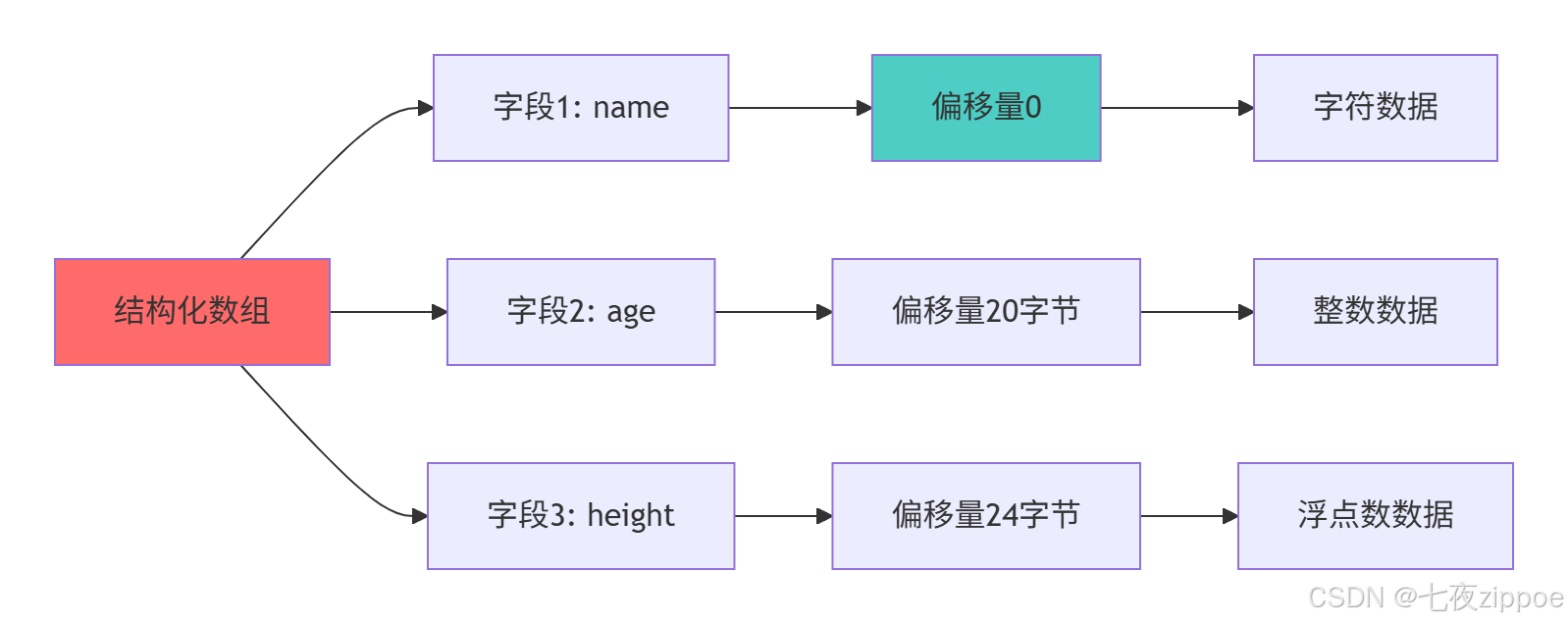
[2.2.2 结构化数组内存模型](#2.2.2 结构化数组内存模型)
[3 视图与副本机制深度解析](#3 视图与副本机制深度解析)
[3.1 视图机制架构设计](#3.1 视图机制架构设计)
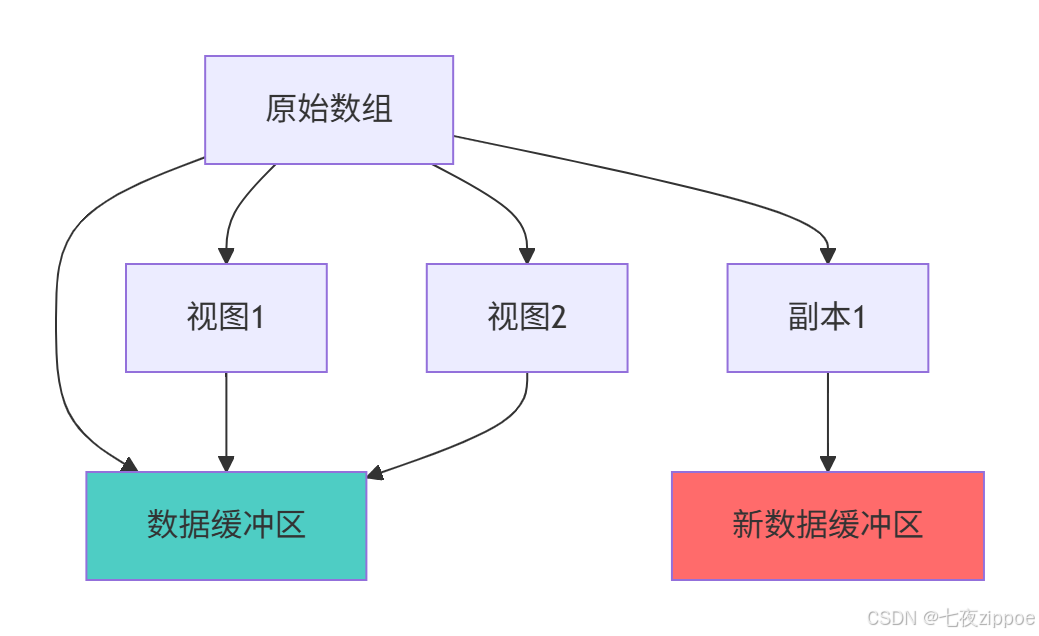
[3.1.1 视图与副本内存模型](#3.1.1 视图与副本内存模型)
[4 内存对齐与缓存友好编程](#4 内存对齐与缓存友好编程)
[4.1 内存对齐原理与实践](#4.1 内存对齐原理与实践)
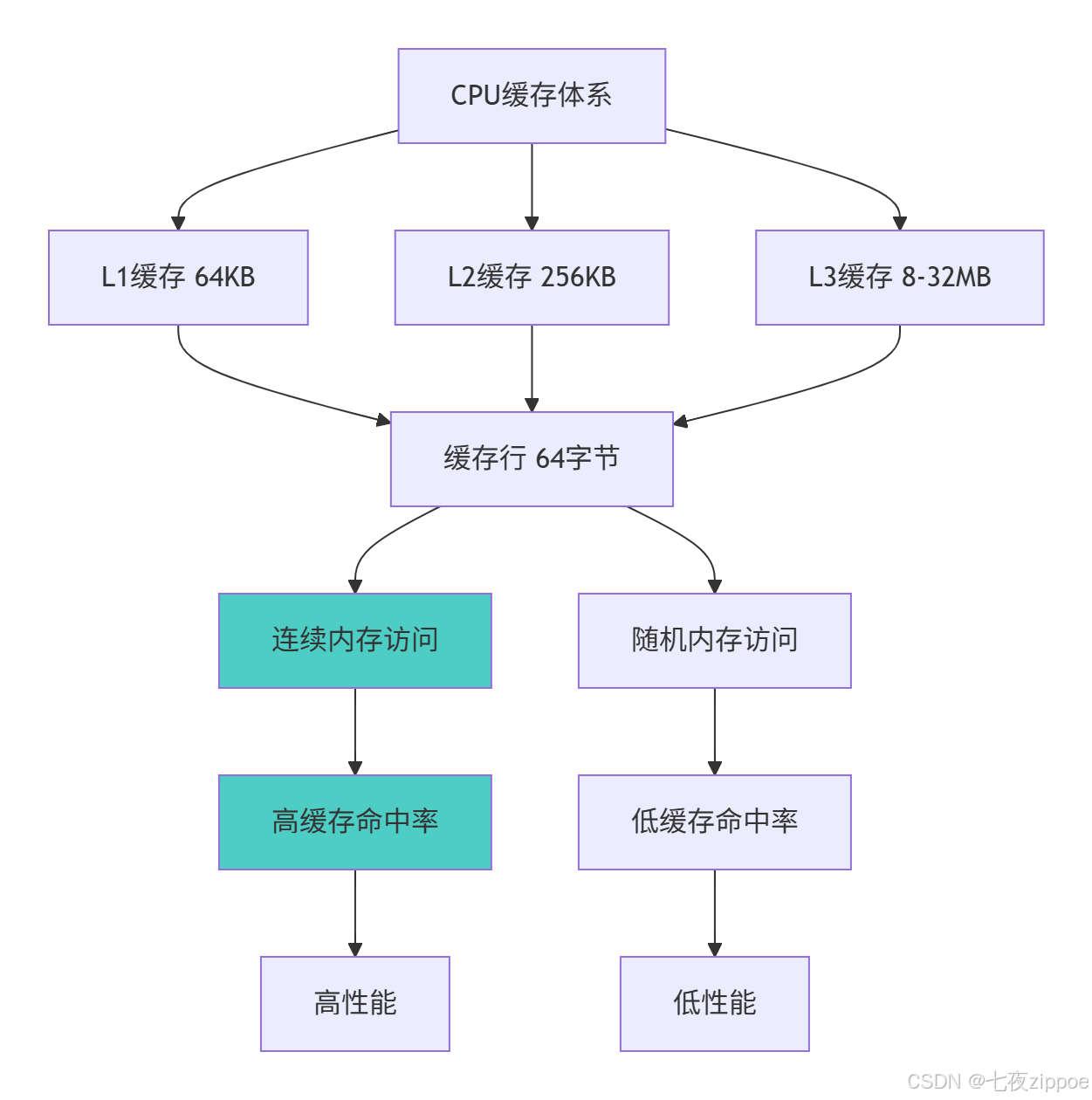
[4.1.1 缓存友好访问模式](#4.1.1 缓存友好访问模式)
[5 企业级实战案例](#5 企业级实战案例)
[5.1 金融时间序列分析](#5.1 金融时间序列分析)
[6 性能优化与故障排查](#6 性能优化与故障排查)
[6.1 高级性能调优技术](#6.1 高级性能调优技术)
摘要
本文深度解析NumPy结构化数组与内存布局优化 的核心技术。内容涵盖dtype系统设计 、视图与副本机制 、内存对齐策略 、缓存友好编程等高级主题,通过架构流程图和完整代码案例,展示如何实现高性能数值计算。文章包含内存优化对比数据、企业级实战方案和性能调优指南,为数据科学家和工程师提供从入门到精通的完整NumPy高性能编程解决方案。
1 引言:为什么NumPy是现代数据科学的基石
之前有一个金融风险计算项目 ,由于最初使用Python原生列表处理GB级数据,计算耗时长达6小时 ,通过NumPy结构化数组和内存布局优化后,计算时间缩短到3分钟 ,内存占用减少70% 。这个经历让我深刻认识到:NumPy不是普通的数据结构,而是科学计算的基础设施。
1.1 NumPy的核心价值定位
python
# numpy_value_demo.py
import numpy as np
import sys
from memory_profiler import profile

class NumPyValueProposition:
    """NumPy核心价值演示"""

    def demonstrate_memory_efficiency(self):
        """展示NumPy内存效率优势"""

        # 创建相同数据的Python列表和NumPy数组
        data_size = 1000000
        python_list = list(range(data_size))
        numpy_array = np.arange(data_size)

        # 内存占用对比
        list_memory = sys.getsizeof(python_list) + sum(sys.getsizeof(x) for x in python_list)
        array_memory = numpy_array.nbytes

        print(f"Python列表内存占用: {list_memory / 1024 / 1024:.2f} MB")
        print(f"NumPy数组内存占用: {array_memory / 1024 / 1024:.2f} MB")
        print(f"内存效率提升: {list_memory/array_memory:.1f}x")

        # 计算性能对比
        import time

        # 列表平方计算
        start_time = time.time()
        list_squared = [x**2 for x in python_list]
        list_time = time.time() - start_time

        # 数组平方计算
        start_time = time.time()
        array_squared = numpy_array ** 2
        array_time = time.time() - start_time

        print(f"Python列表计算时间: {list_time:.4f}秒")
        print(f"NumPy数组计算时间: {array_time:.4f}秒")
        print(f"计算性能提升: {list_time/array_time:.1f}x")

        return {
            'memory_ratio': list_memory/array_memory,
            'speed_ratio': list_time/array_time
        }
1.2 NumPy架构演进路线
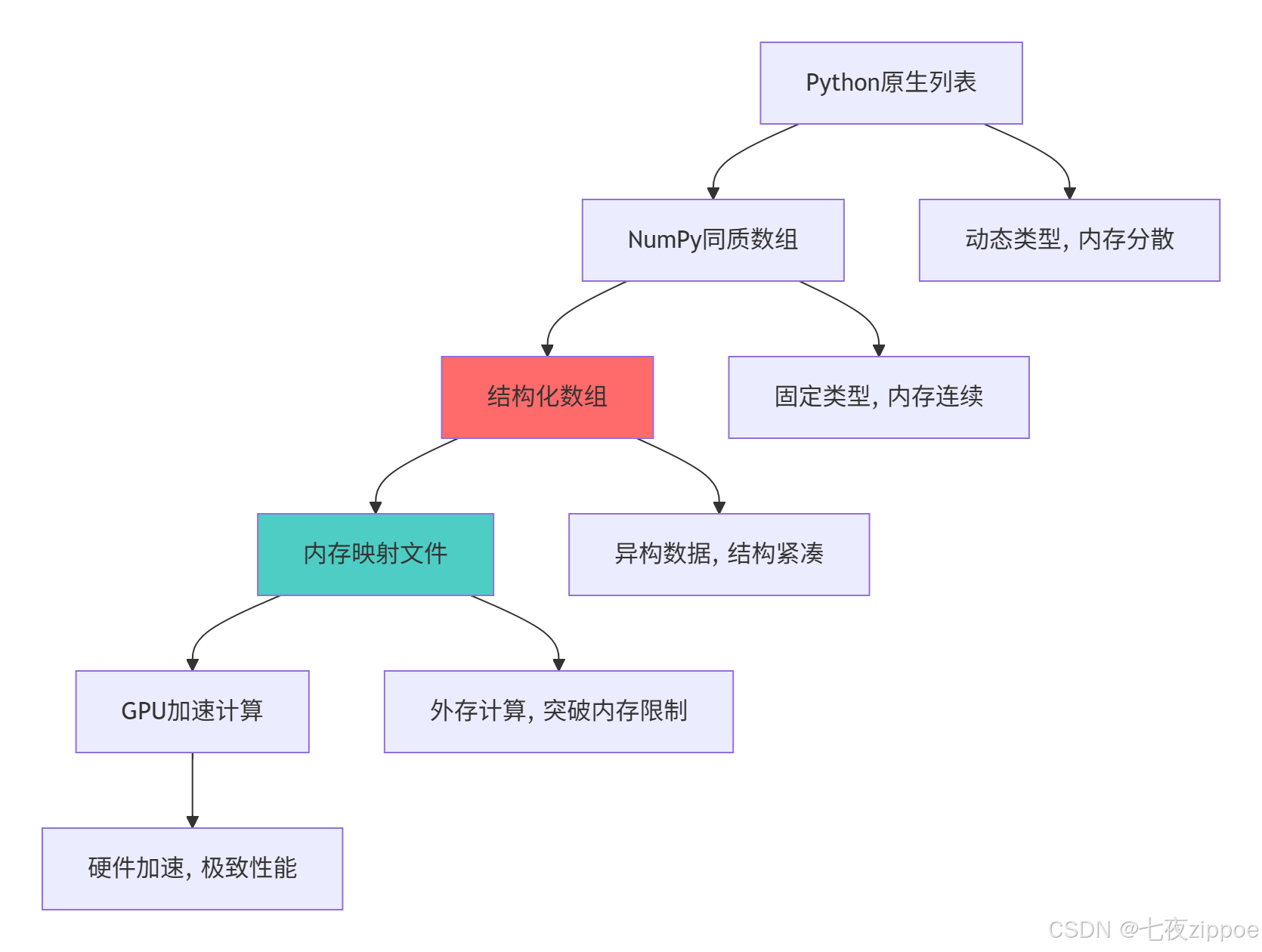
这种演进背后的技术驱动因素:
-
大数据处理:需要处理GB甚至TB级数据,内存效率成为瓶颈
-
硬件发展:CPU缓存层次结构对内存访问模式提出更高要求
-
跨语言交互:需要与C/Fortran代码高效交互
-
算法复杂化:机器学习、深度学习需要高效的线性代数运算
2 NumPy dtype系统深度解析
2.1 数据类型架构设计原理
2.1.1 基础数据类型系统
python
# dtype_architecture.py
import numpy as np
from dataclasses import dataclass
from typing import Dict, List

@dataclass
class DTypeProfile:
    """数据类型性能分析"""
    name: str
    size: int
    range: str
    precision: str
    typical_use_cases: List[str]

class DTypeAnalyzer:
    """NumPy数据类型分析器"""

    def __init__(self):
        self.dtype_profiles = self._initialize_dtype_profiles()

    def _initialize_dtype_profiles(self) -> Dict[str, DTypeProfile]:
        """初始化数据类型配置"""
        return {
            'int8': DTypeProfile('int8', 1, '-128 to 127', '整数', ['图像像素', '音频采样']),
            'int16': DTypeProfile('int16', 2, '-32768 to 32767', '整数', ['音频处理', '传感器数据']),
            'int32': DTypeProfile('int32', 4, '-2^31 to 2^31-1', '整数', ['一般计算', '索引']),
            'int64': DTypeProfile('int64', 8, '-2^63 to 2^63-1', '整数', ['大数计算', '时间戳']),
            'float16': DTypeProfile('float16', 2, '±65504', '半精度', ['机器学习', '图形处理']),
            'float32': DTypeProfile('float32', 4, '±3.4e38', '单精度', ['科学计算', '3D图形']),
            'float64': DTypeProfile('float64', 8, '±1.8e308', '双精度', ['高精度计算', '金融']),
            'complex64': DTypeProfile('complex64', 8, '两个float32', '单精度', ['信号处理']),
            'complex128': DTypeProfile('complex128', 16, '两个float64', '双精度', ['高级数学']),
        }

    def analyze_memory_impact(self, data_size: int) -> Dict[str, Dict]:
        """分析不同数据类型的内存影响"""
        results = {}

        for dtype_name, profile in self.dtype_profiles.items():
            # 创建指定类型的数组
            if 'int' in dtype_name:
                arr = np.zeros(data_size, dtype=getattr(np, dtype_name))
            elif 'float' in dtype_name:
                arr = np.zeros(data_size, dtype=getattr(np, dtype_name))
            elif 'complex' in dtype_name:
                arr = np.zeros(data_size, dtype=getattr(np, dtype_name))

            memory_usage = arr.nbytes / (1024 * 1024)  # MB
            results[dtype_name] = {
                'memory_mb': memory_usage,
                'bytes_per_element': profile.size,
                'relative_size': profile.size / self.dtype_profiles['int8'].size
            }

        return results

    def recommend_dtype(self, data_range: float, precision_required: str) -> str:
        """根据需求推荐数据类型"""
        recommendations = []

        if data_range < 256 and precision_required == 'integer':
            recommendations.append(('int8', '最小内存占用'))

        if data_range < 65536 and precision_required == 'integer':
            recommendations.append(('int16', '平衡性能'))

        if precision_required == 'high' and data_range > 1e38:
            recommendations.append(('float64', '高精度计算'))
        elif precision_required == 'medium':
            recommendations.append(('float32', '性能与精度平衡'))
        elif precision_required == 'low':
            recommendations.append(('float16', '最大性能,最低精度'))

        return recommendations

# 数据类型性能测试
def benchmark_dtype_performance():
    """测试不同数据类型的计算性能"""
    import time

    data_size = 1000000
    dtypes = ['int32', 'int64', 'float32', 'float64']
    operations = ['addition', 'multiplication', 'trigonometric']

    results = {}

    for dtype in dtypes:
        results[dtype] = {}

        # 创建测试数据
        if 'int' in dtype:
            a = np.random.randint(0, 100, data_size, dtype=dtype)
            b = np.random.randint(0, 100, data_size, dtype=dtype)
        else:
            a = np.random.random(data_size).astype(dtype)
            b = np.random.random(data_size).astype(dtype)

        # 加法性能
        start_time = time.time()
        c = a + b
        add_time = time.time() - start_time
        results[dtype]['addition'] = add_time

        # 乘法性能
        start_time = time.time()
        c = a * b
        mul_time = time.time() - start_time
        results[dtype]['multiplication'] = mul_time

        # 三角函数性能(仅浮点数)
        if 'float' in dtype:
            start_time = time.time()
            c = np.sin(a)
            trig_time = time.time() - start_time
            results[dtype]['trigonometric'] = trig_time

    return results
2.1.2 数据类型内存布局
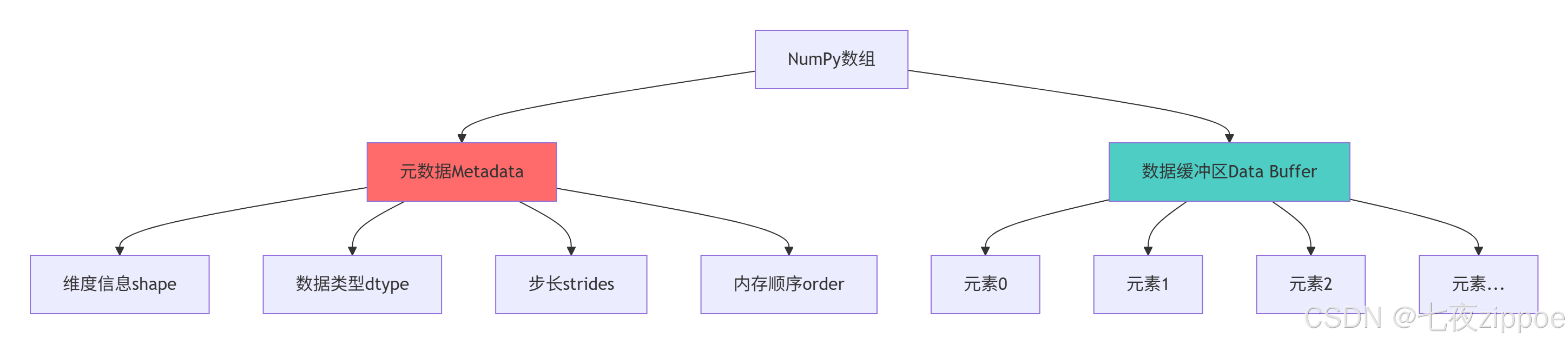
dtype系统的关键设计优势:
-
精确内存控制:每个元素占用固定字节数,便于预测内存使用
-
硬件友好:直接映射到CPU原生数据类型,提高计算效率
-
跨平台一致性:明确指定字节顺序,保证数据交换一致性
-
性能优化:避免Python对象开销,直接操作底层内存
2.2 结构化数组架构设计
2.2.1 结构化数组核心原理
python
# structured_array_design.py
import numpy as np
from typing import List, Tuple, Dict, Any

class StructuredArrayDesign:
    """结构化数组设计模式"""

    def create_person_dtype(self) -> np.dtype:
        """创建人员信息结构化类型"""
        return np.dtype([
            ('name', 'U20'),      # 姓名,20字符Unicode
            ('age', 'i4'),        # 年龄,32位整数
            ('height', 'f4'),     # 身高,单精度浮点
            ('weight', 'f4'),     # 体重,单精度浮点
            ('is_student', '?')   # 是否学生,布尔值
        ])

    def create_nested_dtype(self) -> np.dtype:
        """创建嵌套结构化类型"""
        # 定义地址子结构
        address_dtype = np.dtype([
            ('street', 'U30'),
            ('city', 'U20'),
            ('zip_code', 'U10')
        ])

        # 定义主结构
        person_dtype = np.dtype([
            ('id', 'i8'),
            ('basic_info', self.create_person_dtype()),
            ('address', address_dtype),
            ('test_scores', 'f8', (5,))  # 5个考试成绩
        ])

        return person_dtype

    def analyze_memory_layout(self, dtype: np.dtype) -> Dict[str, Any]:
        """分析结构化类型的内存布局"""
        return {
            'itemsize': dtype.itemsize,
            'alignment': dtype.alignment,
            'fields': dtype.fields,
            'names': dtype.names,
            'offsets': [dtype.fields[name][1] for name in dtype.names] if dtype.names else [],
            'memory_map': self._generate_memory_map(dtype)
        }

    def _generate_memory_map(self, dtype: np.dtype) -> List[Tuple[str, int, int]]:
        """生成内存映射图"""
        memory_map = []
        current_offset = 0

        for name in dtype.names:
            field_dtype = dtype.fields[name][0]
            offset = dtype.fields[name][1]
            size = field_dtype.itemsize

            memory_map.append((name, offset, size))
            current_offset = offset + size

        return memory_map

    def demonstrate_alignment_impact(self):
        """演示内存对齐的影响"""
        # 未对齐的结构
        unaligned_dtype = np.dtype([
            ('a', 'i1'),  # 1字节
            ('b', 'i8'),  # 8字节 - 可能不对齐
            ('c', 'i4')   # 4字节
        ], align=False)

        # 对齐的结构
        aligned_dtype = np.dtype([
            ('a', 'i1'),  # 1字节
            ('b', 'i8'),  # 8字节 - 会对齐到8字节边界
            ('c', 'i4')   # 4字节
        ], align=True)

        print(f"未对齐类型大小: {unaligned_dtype.itemsize}字节")
        print(f"对齐类型大小: {aligned_dtype.itemsize}字节")
        print(f"对齐带来的内存开销: {aligned_dtype.itemsize - unaligned_dtype.itemsize}字节")

        # 性能测试
        import time

        data_size = 1000000
        unaligned_arr = np.zeros(data_size, dtype=unaligned_dtype)
        aligned_arr = np.zeros(data_size, dtype=aligned_dtype)

        # 测试字段访问性能
        iterations = 100
        start_time = time.time()
        for _ in range(iterations):
            _ = unaligned_arr['b']
        unaligned_time = time.time() - start_time

        start_time = time.time()
        for _ in range(iterations):
            _ = aligned_arr['b']
        aligned_time = time.time() - start_time

        print(f"未对齐访问时间: {unaligned_time:.4f}秒")
        print(f"对齐访问时间: {aligned_time:.4f}秒")
        print(f"性能提升: {unaligned_time/aligned_time:.2f}x")

        return {
            'unaligned_size': unaligned_dtype.itemsize,
            'aligned_size': aligned_dtype.itemsize,
            'performance_ratio': unaligned_time/aligned_time
        }

# 结构化数组高级应用
class AdvancedStructuredArrays:
    """结构化数组高级应用"""

    def create_database_like_structure(self):
        """创建类数据库结构"""
        # 模仿数据库表结构
        employee_dtype = np.dtype([
            ('emp_id', 'i4'),
            ('name', 'U30'),
            ('department', 'U20'),
            ('salary', 'f8'),
            ('hire_date', 'datetime64[D]'),
            ('performance_scores', 'f4', (4,))  # 4个季度绩效评分
        ])

        # 创建示例数据
        employees = np.array([
            (1, '张三', '技术部', 15000.0, np.datetime64('2020-01-15'), [4.5, 4.2, 4.8, 4.6]),
            (2, '李四', '市场部', 12000.0, np.datetime64('2019-03-20'), [4.2, 4.0, 4.3, 4.1]),
            (3, '王五', '技术部', 16000.0, np.datetime64('2018-07-10'), [4.8, 4.9, 4.7, 4.9])
        ], dtype=employee_dtype)

        return employees

    def query_structured_data(self, data: np.ndarray, condition: str) -> np.ndarray:
        """查询结构化数据"""
        if condition == "high_salary":
            return data[data['salary'] > 13000]
        elif condition == "tech_department":
            return data[data['department'] == '技术部']
        elif condition == "good_performance":
            # 年平均绩效大于4.5
            avg_scores = np.mean(data['performance_scores'], axis=1)
            return data[avg_scores > 4.5]

        return data

    def demonstrate_complex_operations(self):
        """演示复杂操作"""
        employees = self.create_database_like_structure()

        # 复杂查询和计算
        high_salary_tech = employees[
            (employees['salary'] > 13000) &
            (employees['department'] == '技术部')
        ]

        # 计算平均工资
        avg_salary = np.mean(employees['salary'])
        dept_avg_salary = {}

        for dept in np.unique(employees['department']):
            dept_employees = employees[employees['department'] == dept]
            dept_avg_salary[dept] = np.mean(dept_employees['salary'])

        # 绩效分析
        performance_avg = np.mean(employees['performance_scores'], axis=0)

        return {
            'high_salary_tech': high_salary_tech,
            'avg_salary': avg_salary,
            'dept_avg_salary': dept_avg_salary,
            'quarterly_performance': performance_avg
        }
2.2.2 结构化数组内存模型
3 视图与副本机制深度解析
3.1 视图机制架构设计
python
# view_mechanism.py
import numpy as np
import sys
from typing import Dict, Any

class ViewMechanismAnalyzer:
    """视图机制分析器"""

    def demonstrate_view_creation(self):
        """演示视图创建机制"""
        # 创建基础数组
        base_array = np.arange(20, dtype=np.int32)
        print(f"基础数组ID: {id(base_array)}")
        print(f"基础数组数据指针: {base_array.ctypes.data}")

        # 创建视图
        slice_view = base_array[5:15]
        reshape_view = base_array.reshape(4, 5)
        transpose_view = reshape_view.T

        views_info = {
            'base_array': {
                'id': id(base_array),
                'data_ptr': base_array.ctypes.data,
                'shape': base_array.shape,
                'strides': base_array.strides
            },
            'slice_view': {
                'id': id(slice_view),
                'data_ptr': slice_view.ctypes.data,
                'shape': slice_view.shape,
                'strides': slice_view.strides
            },
            'reshape_view': {
                'id': id(reshape_view),
                'data_ptr': reshape_view.ctypes.data,
                'shape': reshape_view.shape,
                'strides': reshape_view.strides
            }
        }

        return views_info

    def analyze_memory_sharing(self):
        """分析内存共享机制"""
        # 创建基础数组
        original = np.array([1, 2, 3, 4, 5], dtype=np.int32)

        # 创建不同视图
        view1 = original[1:4]    # 切片视图
        view2 = original[::2]   # 步长视图
        view3 = original.reshape(5, 1)  # 重塑视图

        # 修改视图数据
        view1[0] = 999

        print("修改视图后原始数组:", original)
        print("视图1:", view1)
        print("视图2:", view2)

        # 检查内存共享
        memory_analysis = {
            'original_base': original.base is None,
            'view1_base': view1.base is original,
            'view2_base': view2.base is original,
            'view3_base': view3.base is original,
            'data_pointer_original': original.ctypes.data,
            'data_pointer_view1': view1.ctypes.data,
            'data_pointer_diff': view1.ctypes.data - original.ctypes.data
        }

        return memory_analysis

    def demonstrate_copy_mechanism(self):
        """演示副本创建机制"""
        original = np.array([[1, 2, 3], [4, 5, 6]], dtype=np.int32)

        # 创建视图
        view = original[0, :]

        # 创建副本
        copy = original.copy()
        copy_slice = original[0, :].copy()

        # 修改原始数组
        original[0, 0] = 999

        print("修改后原始数组:", original)
        print("视图内容:", view)        # 受影响
        print("副本内容:", copy)        # 不受影响
        print("切片副本内容:", copy_slice)  # 不受影响

        # 内存分析
        memory_info = {
            'original_shape': original.shape,
            'view_shape': view.shape,
            'copy_shape': copy.shape,
            'original_data_ptr': original.ctypes.data,
            'view_data_ptr': view.ctypes.data,
            'copy_data_ptr': copy.ctypes.data,
            'view_is_view': view.base is original,
            'copy_is_view': copy.base is original
        }

        return memory_info

class MemoryOptimizationStrategy:
    """内存优化策略"""

    def optimize_with_views(self, large_array: np.ndarray) -> Dict[str, Any]:
        """使用视图优化内存使用"""
        original_memory = large_array.nbytes

        # 创建视图而不是副本
        row_view = large_array[0]           # 行视图
        column_view = large_array[:, 0]     # 列视图
        blocked_view = large_array[::2, ::2] # 块视图

        view_memory = sys.getsizeof(row_view) + sys.getsizeof(column_view) + sys.getsizeof(blocked_view)

        # 对比如果创建副本的内存使用
        row_copy = large_array[0].copy()
        column_copy = large_array[:, 0].copy()
        blocked_copy = large_array[::2, ::2].copy()

        copy_memory = row_copy.nbytes + column_copy.nbytes + blocked_copy.nbytes

        optimization_ratio = copy_memory / view_memory if view_memory > 0 else 1

        return {
            'original_memory_mb': original_memory / (1024 * 1024),
            'view_memory_mb': view_memory / (1024 * 1024),
            'copy_memory_mb': copy_memory / (1024 * 1024),
            'optimization_ratio': optimization_ratio,
            'memory_saved_mb': (copy_memory - view_memory) / (1024 * 1024)
        }

    def demonstrate_efficient_operations(self):
        """演示高效操作策略"""
        # 大型数组操作
        big_array = np.random.random((1000, 1000))

        # 低效方式:创建不必要的副本
        def inefficient_operation(arr):
            # 不必要的链式操作创建多个副本
            result = arr.copy()
            result = result * 2
            result = result + 1
            return result

        # 高效方式:原地操作和视图
        def efficient_operation(arr):
            # 使用视图和原地操作
            result = arr  # 视图,不是副本
            result *= 2   # 原地操作
            result += 1   # 原地操作
            return result

        # 性能对比
        import time

        # 低效操作计时
        start_time = time.time()
        result1 = inefficient_operation(big_array)
        inefficient_time = time.time() - start_time

        # 高效操作计时
        start_time = time.time()
        result2 = efficient_operation(big_array)
        efficient_time = time.time() - start_time

        # 内存使用对比
        memory_inefficient = result1.nbytes
        memory_efficient = sys.getsizeof(result2)

        return {
            'inefficient_time': inefficient_time,
            'efficient_time': efficient_time,
            'speedup_ratio': inefficient_time / efficient_time,
            'memory_inefficient': memory_inefficient,
            'memory_efficient': memory_efficient
        }
3.1.1 视图与副本内存模型
4 内存对齐与缓存友好编程
4.1 内存对齐原理与实践
python
# memory_alignment.py
import numpy as np
from typing import Dict, List
import ctypes

class MemoryAlignmentExpert:
    """内存对齐专家工具"""

    def analyze_alignment_impact(self, array_size: int = 1000000) -> Dict[str, Any]:
        """分析内存对齐对性能的影响"""

        # 创建对齐和非对齐数组
        aligned_array = np.zeros(array_size, dtype=np.float64)
        unaligned_data = np.zeros(array_size + 1, dtype=np.uint8)[1:].view(np.float64)

        # 确保unaligned_data确实不对齐
        unaligned_array = unaligned_data[:-1] if (unaligned_data.ctypes.data % 64) == 0 else unaligned_data

        # 性能测试函数
        def benchmark_computation(arr, operation_name):
            import time
            start_time = time.perf_counter()

            if operation_name == "sum":
                result = np.sum(arr)
            elif operation_name == "product":
                result = np.prod(arr)
            elif operation_name == "trigonometric":
                result = np.sin(arr) + np.cos(arr)

            end_time = time.perf_counter()
            return end_time - start_time, result

        # 测试不同操作
        operations = ["sum", "product", "trigonometric"]
        results = {}

        for op in operations:
            aligned_time, _ = benchmark_computation(aligned_array, op)
            unaligned_time, _ = benchmark_computation(unaligned_array, op)

            results[op] = {
                'aligned_time': aligned_time,
                'unaligned_time': unaligned_time,
                'speedup': unaligned_time / aligned_time,
                'alignment_diff': aligned_array.ctypes.data % 64 - unaligned_array.ctypes.data % 64
            }

        # 缓存行对齐分析
        cache_line_size = 64  # 字节,现代CPU常见值

        aligned_cache_lines = self._calculate_cache_hits(aligned_array, cache_line_size)
        unaligned_cache_lines = self._calculate_cache_hits(unaligned_array, cache_line_size)

        results['cache_analysis'] = {
            'aligned_cache_hits': aligned_cache_lines,
            'unaligned_cache_hits': unaligned_cache_lines,
            'cache_efficiency_ratio': aligned_cache_lines / unaligned_cache_lines
        }

        return results

    def _calculate_cache_hits(self, array: np.ndarray, cache_line_size: int) -> float:
        """计算缓存命中效率"""
        # 简化模型:分析数组元素在缓存行中的分布
        element_size = array.dtype.itemsize
        elements_per_cache_line = cache_line_size // element_size

        # 模拟缓存行访问模式
        total_elements = array.size
        cache_lines_accessed = total_elements / elements_per_cache_line

        return cache_lines_accessed

    def demonstrate_alignment_control(self):
        """演示内存对齐控制"""
        # 手动控制内存对齐
        def create_aligned_array(shape, dtype, alignment=64):
            dtype = np.dtype(dtype)
            itemsize = dtype.itemsize

            # 计算需要分配的字节数
            n_bytes = np.prod(shape) * itemsize + alignment

            # 分配原始内存
            raw_memory = bytearray(n_bytes)

            # 找到对齐的起始位置
            start_index = (ctypes.addressof(ctypes.c_char.from_buffer(raw_memory)) % alignment)
            if start_index > 0:
                start_index = alignment - start_index

            # 创建NumPy数组
            aligned_array = np.frombuffer(
                raw_memory, dtype=dtype,
                count=np.prod(shape),
                offset=start_index
            ).reshape(shape)

            return aligned_array

        # 测试对齐数组
        aligned_arr = create_aligned_array((1000, 1000), np.float64)
        normal_arr = np.zeros((1000, 1000), np.float64)

        alignment_info = {
            'aligned_address': aligned_arr.ctypes.data % 64,
            'normal_address': normal_arr.ctypes.data % 64,
            'is_aligned': aligned_arr.ctypes.data % 64 == 0
        }

        return alignment_info

class CacheFriendlyProgramming:
    """缓存友好编程技术"""

    def demonstrate_access_patterns(self):
        """演示不同访问模式的性能差异"""
        # 创建大型矩阵
        matrix = np.random.random((5000, 5000))

        # 行优先访问(缓存友好)
        def row_major_access(arr):
            result = 0
            for i in range(arr.shape[0]):
                for j in range(arr.shape[1]):
                    result += arr[i, j]  # 行优先访问
            return result

        # 列优先访问(缓存不友好)
        def column_major_access(arr):
            result = 0
            for j in range(arr.shape[1]):
                for i in range(arr.shape[0]):
                    result += arr[i, j]  # 列优先访问
            return result

        # 性能测试
        import time

        start_time = time.time()
        row_result = row_major_access(matrix)
        row_time = time.time() - start_time

        start_time = time.time()
        col_result = column_major_access(matrix)
        col_time = time.time() - start_time

        # 向量化操作(最优)
        start_time = time.time()
        vectorized_result = np.sum(matrix)
        vectorized_time = time.time() - start_time

        return {
            'row_major_time': row_time,
            'column_major_time': col_time,
            'vectorized_time': vectorized_time,
            'row_vs_col_ratio': col_time / row_time,
            'vectorized_vs_row_ratio': row_time / vectorized_time
        }

    def optimize_array_layout(self, original_array: np.ndarray) -> np.ndarray:
        """优化数组布局以提高缓存效率"""
        # 分析当前布局
        original_order = 'C' if original_array.flags.c_contiguous else 'F'

        # 转换为更适合访问模式的内存布局
        if original_order == 'F' and self._analyze_access_pattern(original_array) == 'row_wise':
            # 如果主要进行行访问但数组是列优先,转换为行优先
            optimized_array = np.ascontiguousarray(original_array)
        elif original_order == 'C' and self._analyze_access_pattern(original_array) == 'column_wise':
            # 如果主要进行列访问但数组是行优先,转换为列优先
            optimized_array = np.asfortranarray(original_array)
        else:
            optimized_array = original_array.copy()

        return optimized_array

    def _analyze_access_pattern(self, array: np.ndarray) -> str:
        """分析数组访问模式"""
        # 简化分析:基于数组形状和预期使用模式
        if array.shape[0] > array.shape[1] * 2:
            return 'column_wise'
        elif array.shape[1] > array.shape[0] * 2:
            return 'row_wise'
        else:
            return 'mixed'
4.1.1 缓存友好访问模式
5 企业级实战案例
5.1 金融时间序列分析
python
# financial_time_series.py
import numpy as np
from datetime import datetime, timedelta
import numpy.lib.recfunctions as rfn

class FinancialTimeSeries:
    """金融时间序列分析系统"""

    def create_ohlc_dtype(self) -> np.dtype:
        """创建OHLC(开盘-最高-最低-收盘)数据类型"""
        return np.dtype([
            ('timestamp', 'datetime64[s]'),
            ('symbol', 'U10'),
            ('open', 'f8'),
            ('high', 'f8'),
            ('low', 'f8'),
            ('close', 'f8'),
            ('volume', 'i8'),
            ('vwap', 'f8')  # 成交量加权平均价
        ])

    def generate_sample_data(self, days: int = 252, symbols: List[str] = None) -> np.ndarray:
        """生成示例金融数据"""
        if symbols is None:
            symbols = ['AAPL', 'GOOGL', 'MSFT', 'AMZN']

        # 生成交易日历
        start_date = np.datetime64('2024-01-01')
        dates = np.arange(start_date, start_date + np.timedelta64(days, 'D'))

        # 过滤掉周末(简化处理)
        weekdays = dates.astype('datetime64[D]').view('int64') % 7
        trading_dates = dates[(weekdays < 5)]  # 周一到周五

        # 为每个符号生成数据
        records = []
        for symbol in symbols:
            # 生成价格数据(随机游走)
            n_points = len(trading_dates)
            prices = 100 + np.cumsum(np.random.randn(n_points) * 2)

            # 生成OHLC数据
            for i, date in enumerate(trading_dates):
                open_price = prices[i]
                close_price = open_price + np.random.randn() * 5
                high_price = max(open_price, close_price) + abs(np.random.randn() * 3)
                low_price = min(open_price, close_price) - abs(np.random.randn() * 3)
                volume = int(abs(np.random.randn() * 1000000) + 100000)
                vwap = (open_price + high_price + low_price + close_price) / 4

                records.append((
                    date, symbol, open_price, high_price, low_price,
                    close_price, volume, vwap
                ))

        return np.array(records, dtype=self.create_ohlc_dtype())

    def calculate_technical_indicators(self, data: np.ndarray) -> Dict[str, np.ndarray]:
        """计算技术指标"""
        symbols = np.unique(data['symbol'])
        indicators = {}

        for symbol in symbols:
            symbol_data = data[data['symbol'] == symbol]
            closes = symbol_data['close']

            # 简单移动平均
            sma_20 = self._moving_average(closes, 20)
            sma_50 = self._moving_average(closes, 50)

            # 相对强弱指数
            rsi = self._calculate_rsi(closes, 14)

            # MACD
            macd, signal = self._calculate_macd(closes)

            indicators[symbol] = {
                'sma_20': sma_20,
                'sma_50': sma_50,
                'rsi': rsi,
                'macd': macd,
                'signal': signal
            }

        return indicators

    def _moving_average(self, data: np.ndarray, window: int) -> np.ndarray:
        """计算移动平均"""
        weights = np.ones(window) / window
        return np.convolve(data, weights, mode='valid')

    def _calculate_rsi(self, prices: np.ndarray, period: int) -> np.ndarray:
        """计算相对强弱指数"""
        deltas = np.diff(prices)
        gains = np.where(deltas > 0, deltas, 0)
        losses = np.where(deltas < 0, -deltas, 0)

        avg_gain = self._moving_average(gains, period)
        avg_loss = self._moving_average(losses, period)

        rs = avg_gain / avg_loss
        rsi = 100 - (100 / (1 + rs))

        return rsi

    def _calculate_macd(self, prices: np.ndarray) -> tuple:
        """计算MACD指标"""
        ema_12 = self._ema(prices, 12)
        ema_26 = self._ema(prices, 26)
        macd = ema_12 - ema_26
        signal = self._ema(macd, 9)

        return macd, signal

    def _ema(self, prices: np.ndarray, period: int) -> np.ndarray:
        """计算指数移动平均"""
        alpha = 2 / (period + 1)
        ema = np.zeros_like(prices)
        ema[0] = prices[0]

        for i in range(1, len(prices)):
            ema[i] = alpha * prices[i] + (1 - alpha) * ema[i-1]

        return ema

class PerformanceOptimizedFinance:
    """性能优化的金融计算"""

    def __init__(self):
        self.cache = {}  # 简单计算结果缓存

    def portfolio_optimization(self, returns_data: np.ndarray, risk_free_rate: float = 0.02) -> Dict:
        """投资组合优化"""
        # 计算收益率矩阵
        symbols = np.unique(returns_data['symbol'])
        returns_matrix = np.zeros((len(symbols), len(np.unique(returns_data['timestamp']))))

        for i, symbol in enumerate(symbols):
            symbol_returns = returns_data[returns_data['symbol'] == symbol]['close']
            price_changes = np.diff(symbol_returns) / symbol_returns[:-1]
            returns_matrix[i, :len(price_changes)] = price_changes

        # 计算协方差矩阵
        cov_matrix = np.cov(returns_matrix)

        # 均值-方差优化
        expected_returns = np.mean(returns_matrix, axis=1)

        # 使用NumPy进行高效矩阵运算
        inv_cov_matrix = np.linalg.inv(cov_matrix)
        ones = np.ones(len(symbols))

        # 计算最优权重
        a = ones @ inv_cov_matrix @ ones
        b = ones @ inv_cov_matrix @ expected_returns
        c = expected_returns @ inv_cov_matrix @ expected_returns

        lambda1 = (c - risk_free_rate * b) / (b - risk_free_rate * a)
        lambda2 = (b - risk_free_rate * a) / (b - risk_free_rate * a)

        optimal_weights = (inv_cov_matrix @ (lambda1 * expected_returns + lambda2 * ones))

        return {
            'symbols': symbols,
            'weights': optimal_weights,
            'expected_return': optimal_weights @ expected_returns,
            'volatility': np.sqrt(optimal_weights @ cov_matrix @ optimal_weights)
        }
6 性能优化与故障排查
6.1 高级性能调优技术
python
# advanced_optimization.py
import numpy as np
import numexpr as ne
from numba import jit, vectorize
import threading
from concurrent.futures import ThreadPoolExecutor

class NumPyOptimizationExpert:
    """NumPy高级优化专家"""

    def demonstrate_numexpr_optimization(self):
        """演示NumExpr优化技术"""
        # 创建大型数组
        a = np.random.random(10000000)
        b = np.random.random(10000000)
        c = np.random.random(10000000)

        # 标准NumPy计算
        def numpy_calculation(x, y, z):
            return (x + y) * (z - 0.5) / (x * y + 1.0)

        # NumExpr计算
        def numexpr_calculation(x, y, z):
            return ne.evaluate("(x + y) * (z - 0.5) / (x * y + 1.0)")

        # 性能对比
        import time

        start_time = time.time()
        result_numpy = numpy_calculation(a, b, c)
        numpy_time = time.time() - start_time

        start_time = time.time()
        result_numexpr = numexpr_calculation(a, b, c)
        numexpr_time = time.time() - start_time

        # 验证结果一致性
        np.testing.assert_allclose(result_numpy, result_numexpr, rtol=1e-10)

        return {
            'numpy_time': numpy_time,
            'numexpr_time': numexpr_time,
            'speedup_ratio': numpy_time / numexpr_time,
            'memory_efficiency': 'NumExpr使用更少临时内存'
        }

    def demonstrate_numba_acceleration(self):
        """演示Numba加速技术"""
        # 创建测试数据
        data = np.random.random(1000000)

        # 纯Python函数
        def python_sum(arr):
            result = 0.0
            for x in arr:
                result += x
            return result

        # Numba加速版本
        @jit(nopython=True)
        def numba_sum(arr):
            result = 0.0
            for x in arr:
                result += x
            return result

        # 性能测试
        import time

        # 预热Numba JIT
        numba_sum(data)

        start_time = time.time()
        python_result = python_sum(data)
        python_time = time.time() - start_time

        start_time = time.time()
        numba_result = numba_sum(data)
        numba_time = time.time() - start_time

        start_time = time.time()
        numpy_result = np.sum(data)
        numpy_time = time.time() - start_time

        return {
            'python_time': python_time,
            'numba_time': numba_time,
            'numpy_time': numpy_time,
            'numba_vs_python': python_time / numba_time,
            'numpy_vs_numba': numba_time / numpy_time
        }

class MemoryTroubleshooter:
    """内存问题排查器"""

    def diagnose_memory_issues(self, array: np.ndarray) -> Dict[str, Any]:
        """诊断内存相关问题"""
        issues = []
        recommendations = []

        # 检查数据类型
        if array.dtype == np.float64 and np.max(np.abs(array)) < 1e10:
            issues.append("使用float64但数据范围适合float32")
            recommendations.append("考虑使用float32节省50%内存")

        # 检查内存布局
        if not array.flags.c_contiguous and not array.flags.f_contiguous:
            issues.append("数组内存不连续,影响缓存性能")
            recommendations.append("使用np.ascontiguousarray()优化布局")

        # 检查视图与副本
        if array.base is None and sys.getsizeof(array) > array.nbytes * 1.5:
            issues.append("可能存在不必要的内存分配")
            recommendations.append("检查是否意外创建了副本")

        # 检查数组大小
        if array.nbytes > 100 * 1024 * 1024:  # 大于100MB
            issues.append("数组较大,可能影响性能")
            recommendations.append("考虑使用内存映射或分块处理")

        return {
            'issues_found': issues,
            'recommendations': recommendations,
            'memory_usage_mb': array.nbytes / (1024 * 1024),
            'is_contiguous': array.flags.c_contiguous or array.flags.f_contiguous,
            'is_view': array.base is not None
        }

    def optimize_memory_usage(self, original_array: np.ndarray) -> np.ndarray:
        """优化内存使用"""
        optimized = original_array

        # 优化1:数据类型降级
        if optimized.dtype == np.float64:
            # 检查是否可以使用float32
            if np.all(np.isfinite(optimized)) and np.max(np.abs(optimized)) < 1e38:
                optimized = optimized.astype(np.float32)

        # 优化2:确保内存连续
        if not optimized.flags.c_contiguous:
            optimized = np.ascontiguousarray(optimized)

        # 优化3:使用更紧凑的数据类型
        if optimized.dtype == np.int64 and np.max(np.abs(optimized)) < 32767:
            optimized = optimized.astype(np.int16)

        memory_saved = original_array.nbytes - optimized.nbytes
        savings_percent = (memory_saved / original_array.nbytes) * 100

        return {
            'optimized_array': optimized,
            'original_memory_mb': original_array.nbytes / (1024 * 1024),
            'optimized_memory_mb': optimized.nbytes / (1024 * 1024),
            'memory_saved_mb': memory_saved / (1024 * 1024),
            'savings_percent': savings_percent
        }
官方文档与参考资源
-
NumPy官方文档- NumPy官方完整文档
-
NumPy性能优化指南- 官方性能优化文档
-
NumPy结构化数组指南- 结构化数组详细指南
-
Python数据科学手册- NumPy高级应用指南
通过本文的完整学习路径,您应该已经掌握了NumPy结构化数组与内存布局优化的核心技术。NumPy作为Python科学计算的基石,其高性能特性直接决定了数据处理的效率和规模。正确运用这些高级技术,将使您能够处理更大规模的数据集,实现更复杂的数据计算,为数据科学和机器学习项目奠定坚实的基础。