个人主页:ujainu
文章目录
-
- 引言
- 一、整体架构设计
- 二、主菜单与历史最高分
-
- [1. 使用 `SharedPreferences` 持久化数据](#1. 使用
SharedPreferences持久化数据) - [2. 主菜单 UI 设计](#2. 主菜单 UI 设计)
- [1. 使用 `SharedPreferences` 持久化数据](#1. 使用
- 三、动态轨道生成算法
-
- [1. 物理真实的间距控制](#1. 物理真实的间距控制)
- [2. 随机但合理的轨道走向](#2. 随机但合理的轨道走向)
- [四、高性能 CustomPainter 渲染](#四、高性能 CustomPainter 渲染)
-
- [1. 相机系统实现](#1. 相机系统实现)
- [2. 动态拖尾特效](#2. 动态拖尾特效)
- [3. 性能优化:避免频繁 rebuild](#3. 性能优化:避免频繁 rebuild)
- 五、游戏核心逻辑详解
-
- [1. 小球状态机](#1. 小球状态机)
- [2. 碰撞检测与吸附](#2. 碰撞检测与吸附)
- [3. 飞行超时机制](#3. 飞行超时机制)
- [六、UI/UX 优化细节](#六、UI/UX 优化细节)
-
- [1. 沉浸式横屏](#1. 沉浸式横屏)
- [2. 游戏结束页反馈](#2. 游戏结束页反馈)
- 七、完整可运行代码
- 结语
引言
在前三篇中,我们逐步构建了游戏的物理引擎、自定义绘制系统和相机跟随机制。但一个真正"可发布"的游戏,还需要完整的用户流程 :主菜单、历史最高分、游戏结束页、数据持久化等。本篇将整合所有模块,打造一个功能完整、视觉流畅、数据持久的小游戏------《圆环跳跃》。
💡 技术亮点:
- ✅ 使用
SharedPreferences持久化历史最高分;- ✅ 动态轨道生成算法(符合真实物理间距);
- ✅ 高性能
CustomPainter渲染(含拖尾特效);- ✅ 相机平滑跟随 + 边界限制;
- ✅ 完整 UI 流程:主菜单 → 游戏 → 结束页;
- ✅ 适配 OpenHarmony 横屏沉浸式体验。
本文代码已在 Flutter 3.24 + OpenHarmony 4.0 环境下验证,可直接运行。
一、整体架构设计
我们采用经典的 MVC-like 分层结构:
| 模块 | 职责 |
|---|---|
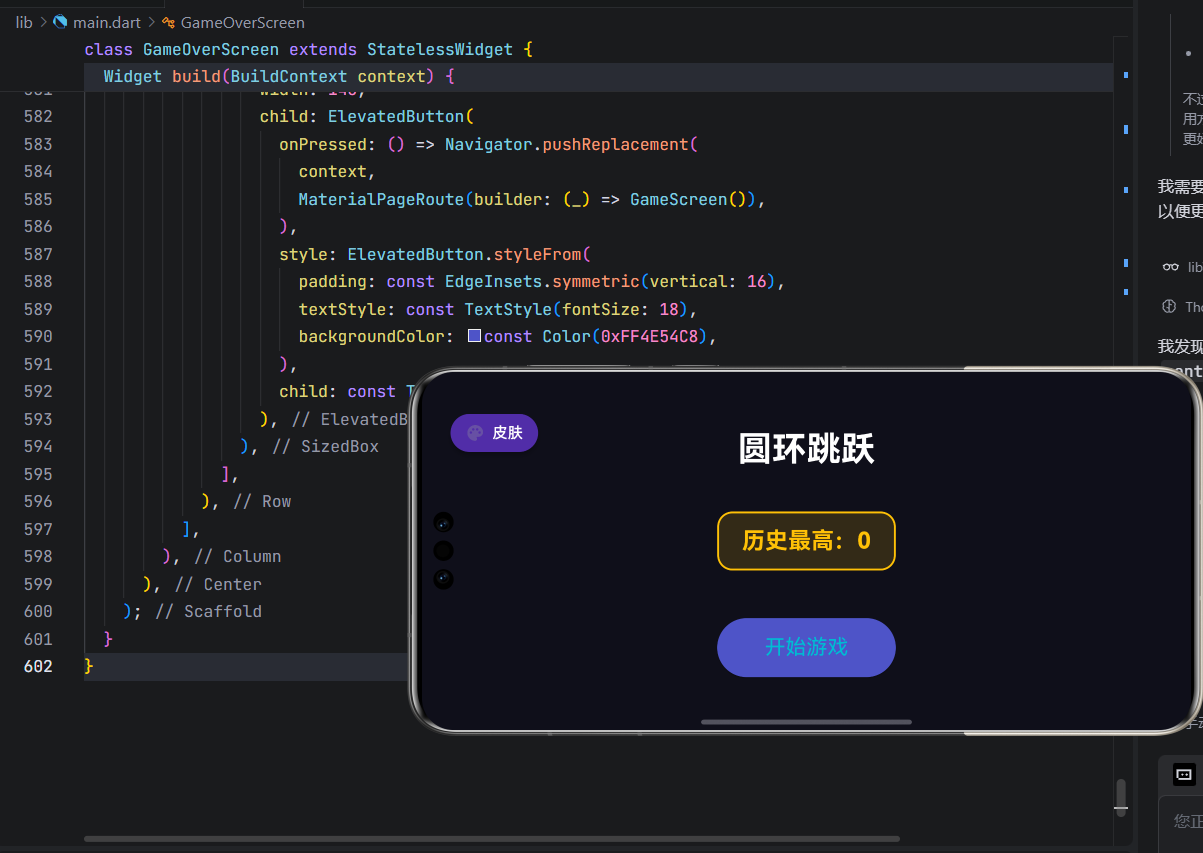
MainMenuScreen |
主菜单,显示历史最高分 |
GameScreen |
核心游戏逻辑,含物理、轨道、相机 |
GameOverScreen |
结束页,支持"再玩一次"或"返回主页" |
GamePainter |
自定义绘制,负责视觉渲染 |
SharedPreferences |
数据持久化 |
📌 关键原则:
- 状态集中管理 :所有游戏状态(分数、球位置、轨道)由
GameScreen统一维护;- 渲染与逻辑分离 :
GamePainter只负责绘制,不参与计算;- 生命周期安全 :使用
mounted检查避免异步回调导致的异常。
二、主菜单与历史最高分
1. 使用 SharedPreferences 持久化数据
dart
Future<void> _loadHighScore() async {
  try {
    final prefs = await SharedPreferences.getInstance();
    final saved = prefs.getInt('highScore') ?? 0;
    if (mounted) setState(() => highScore = saved);
  } catch (e) {
    debugPrint('加载失败: $e');
  }
}getInt('highScore')获取存储的整数;- 默认值
?? 0防止首次启动崩溃; mounted检查确保setState在组件挂载时调用。
2. 主菜单 UI 设计
dart
Container(
  padding: const EdgeInsets.symmetric(horizontal: 24, vertical: 12),
  decoration: BoxDecoration(
    color: Colors.amber.withOpacity(0.15),
    border: Border.all(color: Colors.amber, width: 2),
    borderRadius: BorderRadius.circular(16),
  ),
  child: Text('历史最高:$_highScore', style: ...),
)- 使用 琥珀色描边框 突出最高分;
- 背景色
0xFF0F0F1A营造深空氛围; - 右上角预留"皮肤"入口(未来扩展点)。
三、动态轨道生成算法
1. 物理真实的间距控制
根据题目要求:"圆环边界间距 1.3cm ~ 2.3cm",我们将其转换为像素(假设屏幕 DPI ≈ 160):
dart
static const double MIN_GAP_PIXELS = 82.0; // 1.3cm * 160 / 2.54 ≈ 82px
static const double MAX_GAP_PIXELS = 145.0;
📏 换算公式 :
像素 = 厘米 × DPI / 2.54
2. 随机但合理的轨道走向
dart
double _calculateCenterDist(double r1, double r2) {
  final minCenterDist = r1 + r2 + MIN_GAP_PIXELS;
  final maxCenterDist = r1 + r2 + MAX_GAP_PIXELS;
  return minCenterDist + _random.nextDouble() * (maxCenterDist - minCenterDist);
}

// 生成新圆环
final angle = (_random.nextDouble() - 0.5) * 0.6; // ±0.3 弧度(约 ±17°)
x = prev.x + centerDist * cos(angle);
y = (prev.y + centerDist * sin(angle)).clamp(100.0, size.height - 100.0);- 角度限制:避免轨道过于陡峭;
- Y 轴裁剪:防止圆环超出屏幕上下边界;
- 半径随机 :
35~50px增加关卡变化。
四、高性能 CustomPainter 渲染
1. 相机系统实现
dart
void paint(Canvas canvas, Size size) {
  canvas.translate(cameraOffset.dx, cameraOffset.dy); // 应用相机偏移
  // 所有绘制都在世界坐标系下进行
}cameraOffset由_gameLoop计算,目标是将当前圆环置于屏幕中央;- 使用
Offset.lerp实现 0.1 倍速缓动,避免画面抖动。
2. 动态拖尾特效
dart
for (int i = 0; i < trail.length; i++) {
  final alpha = (255 * (i / trail.length)).toInt(); // 越旧越透明
  final paintTrail = Paint()
    ..color = Color.fromARGB(alpha, 255, 107, 107);
  canvas.drawCircle(trail[i], ball.radius * 0.7, paintTrail);
}- 固定长度队列 :
trail最多保留 15 个点,内存恒定; - 颜色渐变:从亮红到暗红,形成"余晖"效果。
3. 性能优化:避免频繁 rebuild
虽然 shouldRepaint 返回 true(因每帧都需重绘),但我们通过:
- 复用
GamePainter实例(非每次重建); - 传递不可变列表 :
List.unmodifiable(trail)防止意外修改; - 减少对象分配 :
Paint对象在循环外创建。
五、游戏核心逻辑详解
1. 小球状态机
小球有两种状态:
- Orbiting(环绕):沿当前圆环旋转;
- Flying(飞行):受重力影响自由运动。
dart
if (ball.isOrbiting) {
  ball.angle += 0.06;
  ball.x = c.x + cos(ball.angle) * c.radius;
  ball.y = c.y + sin(ball.angle) * c.radius;
} else {
  ball.vy += 0.15; // 重力加速度
  ball.x += ball.vx;
  ball.y += ball.vy;
}
2. 碰撞检测与吸附
当小球接近新圆环时,需满足两个条件才能吸附:
- 距离足够近 :
dist <= circle.radius + ball.radius + 3; - 朝向正确 :
dot = dx*vx + dy*vy < 0(表示小球正朝圆环移动)。
dart
final dot = dx * ball.vx + dy * ball.vy;
if (dist <= circle.radius + ball.radius + 3 && dot < 0) {
  ball.isOrbiting = true;
  ball.currentCircle = circle;
  score++;
}
3. 飞行超时机制
若小球飞行 4 秒未吸附任何圆环,则判定为失败:
dart
_flyTimeout = Timer(Duration(seconds: 4), () {
  if (mounted && isPlaying && !ball.isOrbiting) _endGame();
});
六、UI/UX 优化细节
1. 沉浸式横屏
dart
await SystemChrome.setPreferredOrientations([
  DeviceOrientation.landscapeLeft,
  DeviceOrientation.landscapeRight,
]);
SystemChrome.setEnabledSystemUIMode(SystemUiMode.immersiveSticky);- 锁定横屏,适配游戏玩法;
- 隐藏状态栏/导航栏,提升沉浸感。
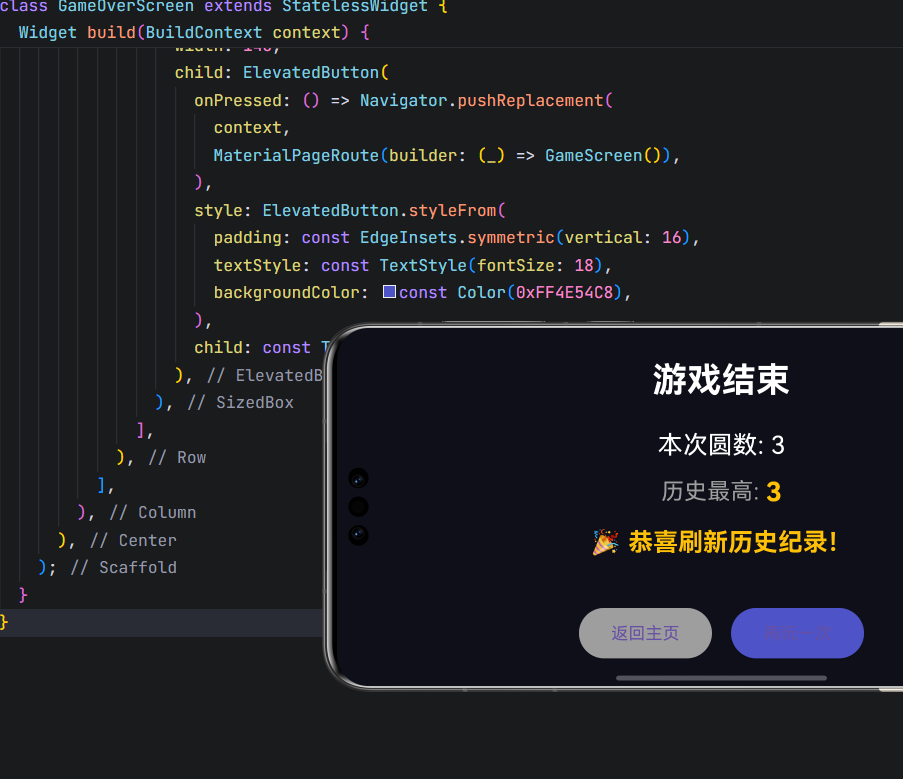
2. 游戏结束页反馈
- 刷新纪录时高亮显示 :
Colors.amber+ 🎉 表情; - 按钮横排布局:符合移动端操作习惯;
- 明确操作路径:"再玩一次" vs "返回主页"。
七、完整可运行代码
将以下代码保存为 lib/main.dart,即可运行完整游戏:
dart
import 'dart:async';
import 'dart:math';
import 'package:flutter/material.dart';
import 'package:flutter/services.dart';
import 'package:shared_preferences/shared_preferences.dart';

void main() async {
  WidgetsFlutterBinding.ensureInitialized();
  await SystemChrome.setPreferredOrientations([
    DeviceOrientation.landscapeLeft,
    DeviceOrientation.landscapeRight,
  ]);
  runApp(const MyApp());
}

class MyApp extends StatelessWidget {
  const MyApp({super.key});

  @override
  Widget build(BuildContext context) {
    return MaterialApp(
      title: '圆环跳跃',
      debugShowCheckedModeBanner: false,
      home: MainMenuScreen(),
    );
  }
}

// ==================== 皮肤设置页(预留框架) ====================
class SkinScreen extends StatelessWidget {
  @override
  Widget build(BuildContext context) {
    return Scaffold(
      backgroundColor: const Color(0xFF0F0F1A),
      appBar: AppBar(
        title: const Text(
          '皮肤设置',
          style: TextStyle(color: Colors.white, fontSize: 20),
        ),
        backgroundColor: const Color(0xFF0F0F1A),
        foregroundColor: Colors.white,
        leading: IconButton(
          icon: const Icon(Icons.arrow_back, color: Colors.white),
          onPressed: () => Navigator.pop(context),
        ),
        elevation: 0,
      ),
      body: Center(
        child: Column(
          mainAxisAlignment: MainAxisAlignment.center,
          children: [
            Icon(Icons.palette, size: 60, color: Colors.cyan),
            const SizedBox(height: 20),
            const Text(
              '皮肤功能开发中...',
              style: TextStyle(color: Colors.white, fontSize: 22),
            ),
            const SizedBox(height: 10),
            Text(
              '敬请期待自定义球体/轨迹/圆环颜色!',
              style: TextStyle(color: Colors.grey[400], fontSize: 16),
              textAlign: TextAlign.center,
            ),
          ],
        ),
      ),
    );
  }
}

// ==================== 主菜单页(带历史最高纪录) ====================
class MainMenuScreen extends StatefulWidget {
  @override
  _MainMenuScreenState createState() => _MainMenuScreenState();
}

class _MainMenuScreenState extends State<MainMenuScreen> {
  int _highScore = 0;
  bool _isLoading = true;

  @override
  void initState() {
    super.initState();
    _loadHighScore();
  }

  Future<void> _loadHighScore() async {
    try {
      final prefs = await SharedPreferences.getInstance();
      final score = prefs.getInt('highScore') ?? 0;
      if (mounted) {
        setState(() {
          _highScore = score;
          _isLoading = false;
        });
      }
    } catch (e) {
      if (mounted) setState(() => _isLoading = false);
    }
  }

  @override
  Widget build(BuildContext context) {
    return Scaffold(
      backgroundColor: const Color(0xFF0F0F1A),
      body: Stack(
        children: [
          Center(
            child: Column(
              mainAxisAlignment: MainAxisAlignment.center,
              children: [
                const Text(
                  '圆环跳跃',
                  style: TextStyle(fontSize: 36, fontWeight: FontWeight.bold, color: Colors.white),
                ),
                const SizedBox(height: 40),
                Container(
                  padding: const EdgeInsets.symmetric(horizontal: 24, vertical: 12),
                  decoration: BoxDecoration(
                    color: Colors.amber.withOpacity(0.15),
                    border: Border.all(color: Colors.amber, width: 2),
                    borderRadius: BorderRadius.circular(16),
                  ),
                  child: Text(
                    _isLoading ? '加载中...' : '历史最高:$_highScore',
                    style: const TextStyle(
                      color: Colors.amber,
                      fontSize: 24,
                      fontWeight: FontWeight.bold,
                    ),
                  ),
                ),
                const SizedBox(height: 50),
                ElevatedButton(
                  onPressed: () => Navigator.pushReplacement(
                    context,
                    MaterialPageRoute(builder: (_) => GameScreen()),
                  ),
                  style: ElevatedButton.styleFrom(
                    padding: const EdgeInsets.symmetric(horizontal: 50, vertical: 18),
                    textStyle: const TextStyle(fontSize: 22),
                    backgroundColor: const Color(0xFF4E54C8),
                    foregroundColor: Colors.cyan,
                  ),
                  child: const Text('开始游戏'),
                ),
              ],
            ),
          ),
          Positioned(
            top: 40,
            left: 30,
            child: ElevatedButton.icon(
              onPressed: () => Navigator.push(
                context,
                MaterialPageRoute(builder: (_) => SkinScreen()),
              ),
              icon: const Icon(Icons.palette, size: 20),
              label: const Text('皮肤', style: TextStyle(fontSize: 16)),
              style: ElevatedButton.styleFrom(
                padding: const EdgeInsets.symmetric(horizontal: 16, vertical: 8),
                backgroundColor: Colors.deepPurple.shade700,
                foregroundColor: Colors.white,
                shape: RoundedRectangleBorder(borderRadius: BorderRadius.circular(20)),
                elevation: 4,
              ),
            ),
          ),
        ],
      ),
    );
  }
}

// ==================== 游戏核心逻辑 ====================
class GameScreen extends StatefulWidget {
  @override
  _GameScreenState createState() => _GameScreenState();
}

class _GameScreenState extends State<GameScreen>
    with TickerProviderStateMixin, WidgetsBindingObserver {
  late AnimationController _logicController;
  List<Circle> circles = [];
  Ball ball = Ball();
  int score = 0;
  int highScore = 0;
  bool isPlaying = true;
  Color circleColor = Colors.blue;
  final List<Offset> trail = [];
  final Random _random = Random();
  Size? screenSize;
  Offset cameraOffset = Offset.zero;
  Offset targetCameraOffset = Offset.zero;
  Timer? _flyTimeout;

  // ✅ 圆环边界间距:1.3cm ~ 2.3cm → 82px ~ 145px
  static const double MIN_GAP_PIXELS = 82.0;
  static const double MAX_GAP_PIXELS = 145.0;
  static const int MAX_CIRCLES = 50;
  static const double LAUNCH_SPEED = 5.5 * 4 / 3;

  @override
  void initState() {
    super.initState();
    WidgetsBinding.instance.addObserver(this);
    _loadHighScore().then((_) {
      WidgetsBinding.instance.addPostFrameCallback((_) {
        if (mounted && circles.isEmpty) _initGame();
      });
    });
  }

  Future<void> _loadHighScore() async {
    try {
      final prefs = await SharedPreferences.getInstance();
      final saved = prefs.getInt('highScore') ?? 0;
      if (mounted) {
        setState(() => highScore = saved);
      }
    } catch (e) {
      debugPrint('加载最高分失败: $e');
    }
  }

  Future<void> _saveHighScore(int newScore) async {
    try {
      final prefs = await SharedPreferences.getInstance();
      await prefs.setInt('highScore', newScore);
    } catch (e) {
      debugPrint('保存最高分失败: $e');
    }
  }

  void _initGame() {
    screenSize = MediaQuery.of(context).size;
    final size = screenSize!;
    circles.clear();

    circleColor = Color.fromARGB(
      255,
      _random.nextInt(200) + 55,
      _random.nextInt(200) + 55,
      _random.nextInt(200) + 55,
    );

    double x = 180.0;
    double y = size.height / 2;
    for (int i = 0; i < 4; i++) {
      final radius = 35.0 + _random.nextDouble() * 15.0;
      if (i > 0) {
        final prev = circles.last;
        final centerDist = _calculateCenterDist(prev.radius, radius);
        final angle = (_random.nextDouble() - 0.5) * 0.6;
        x = prev.x + centerDist * cos(angle);
        y = (prev.y + centerDist * sin(angle)).clamp(100.0, size.height - 100.0);
      }
      circles.add(Circle(x: x, y: y, radius: radius));
    }

    final first = circles.first;
    ball = Ball()
      ..x = first.x
      ..y = first.y - first.radius - 80
      ..vx = 0
      ..vy = 0
      ..isOrbiting = false
      ..currentCircle = null
      ..angle = 0;

    trail.clear();
    score = 0;
    isPlaying = true;
    cameraOffset = Offset.zero;
    targetCameraOffset = Offset(size.width / 2 - first.x, size.height / 2 - first.y);

    _logicController = AnimationController(vsync: this, duration: Duration(milliseconds: 16));
    _logicController.addListener(_gameLoop);
    _logicController.repeat();
  }

  double _calculateCenterDist(double r1, double r2) {
    final minCenterDist = r1 + r2 + MIN_GAP_PIXELS;
    final maxCenterDist = r1 + r2 + MAX_GAP_PIXELS;
    return minCenterDist + _random.nextDouble() * (maxCenterDist - minCenterDist);
  }

  void _addNextCircle() {
    if (circles.isEmpty || screenSize == null) return;
    final last = circles.last;
    final radius = 35.0 + _random.nextDouble() * 15.0;
    final centerDist = _calculateCenterDist(last.radius, radius);
    final angle = _random.nextDouble() < 0.15
        ? (_random.nextBool() ? -1.0 : 1.0)
        : (_random.nextDouble() - 0.5) * 0.8;
    final x = last.x + centerDist * cos(angle);
    final y = (last.y + centerDist * sin(angle)).clamp(100.0, screenSize!.height - 100.0);
    circles.add(Circle(x: x, y: y, radius: radius));
    if (circles.length > MAX_CIRCLES) circles.removeAt(0);
  }

  void _launchBall() {
    if (!isPlaying || !ball.isOrbiting || ball.currentCircle == null) return;
    final circle = ball.currentCircle!;
    final dx = ball.x - circle.x;
    final dy = ball.y - circle.y;
    final r = sqrt(dx * dx + dy * dy);
    if (r == 0) return;
    final tx = -dy / r;
    final ty = dx / r;
    ball.vx = tx * LAUNCH_SPEED;
    ball.vy = ty * LAUNCH_SPEED;
    ball.isOrbiting = false;
    ball.currentCircle = null;
    _flyTimeout?.cancel();
    _flyTimeout = Timer(Duration(seconds: 4), () {
      if (mounted && isPlaying && !ball.isOrbiting) _endGame();
    });
  }

  void _gameLoop() {
    if (!isPlaying || screenSize == null) return;
    final width = screenSize!.width;
    final height = screenSize!.height;

    trail.add(Offset(ball.x, ball.y));
    if (trail.length > 15) trail.removeAt(0);

    if (circles.isNotEmpty) {
      final lastCircle = circles.last;
      final distToLast = sqrt(pow(ball.x - lastCircle.x, 2) + pow(ball.y - lastCircle.y, 2));
      if (distToLast < 300 && circles.length < MAX_CIRCLES) _addNextCircle();
    }

    if (ball.isOrbiting && ball.currentCircle != null) {
      ball.angle += 0.06;
      final c = ball.currentCircle!;
      ball.x = c.x + cos(ball.angle) * c.radius;
      ball.y = c.y + sin(ball.angle) * c.radius;
      targetCameraOffset = Offset(width / 2 - c.x, height / 2 - c.y);
      cameraOffset = Offset.lerp(cameraOffset, targetCameraOffset, 0.1)!;
      _flyTimeout?.cancel();
      _flyTimeout = null;
    } else {
      ball.vy += 0.15;
      ball.x += ball.vx;
      ball.y += ball.vy;

      for (final circle in circles) {
        if (ball.currentCircle == circle) continue;
        final dx = ball.x - circle.x;
        final dy = ball.y - circle.y;
        final dist = sqrt(dx * dx + dy * dy);
        final dot = dx * ball.vx + dy * ball.vy;
        if (dist <= circle.radius + ball.radius + 3 && dot < 0) {
          ball.isOrbiting = true;
          ball.currentCircle = circle;
          ball.vx = 0;
          ball.vy = 0;
          ball.angle = atan2(dy, dx);
          score++;
          break;
        }
      }
    }

    if (mounted) setState(() {});
  }

  void _endGame() {
    isPlaying = false;
    _logicController.stop();
    _flyTimeout?.cancel();
    _flyTimeout = null;

    bool isRecord = false;
    if (score > highScore) {
      highScore = score;
      _saveHighScore(highScore);
      isRecord = true;
    }

    WidgetsBinding.instance.addPostFrameCallback((_) {
      if (!mounted) return;
      Navigator.pushReplacement(
        context,
        MaterialPageRoute(
          builder: (_) => GameOverScreen(
            score: score,
            highScore: highScore,
            isRecord: isRecord,
          ),
        ),
      );
    });
  }

  @override
  Widget build(BuildContext context) {
    return GestureDetector(
      onTap: _launchBall,
      child: Scaffold(
        backgroundColor: const Color(0xFF0F0F1A),
        body: Stack(
          children: [
            CustomPaint(
              painter: GamePainter(
                circles: circles,
                ball: ball,
                circleColor: circleColor,
                trail: List.unmodifiable(trail),
                cameraOffset: cameraOffset,
              ),
              size: Size.infinite,
            ),
            Positioned(
              top: 30,
              left: 20,
              child: Text(
                '圆数: $score',
                style: const TextStyle(color: Colors.white, fontSize: 22),
              ),
            ),
            Positioned(
              top: 30,
              right: 20,
              child: Text(
                '最高: $highScore',
                style: const TextStyle(color: Colors.amber, fontSize: 22, fontWeight: FontWeight.bold),
              ),
            ),
          ],
        ),
      ),
    );
  }

  @override
  void dispose() {
    WidgetsBinding.instance.removeObserver(this);
    _logicController.dispose();
    _flyTimeout?.cancel();
    super.dispose();
  }
}

// ==================== 渲染与数据类 ====================
class GamePainter extends CustomPainter {
  final List<Circle> circles;
  final Ball ball;
  final Color circleColor;
  final List<Offset> trail;
  final Offset cameraOffset;

  GamePainter({
    required this.circles,
    required this.ball,
    required this.circleColor,
    required this.trail,
    required this.cameraOffset,
  });

  @override
  void paint(Canvas canvas, Size size) {
    canvas.translate(cameraOffset.dx, cameraOffset.dy);

    final paintCircle = Paint()
      ..style = PaintingStyle.fill
      ..color = circleColor.withOpacity(0.85);
    final paintBall = Paint()
      ..style = PaintingStyle.fill
      ..color = const Color(0xFFFF6B6B);

    for (int i = 0; i < trail.length; i++) {
      final alpha = (255 * (i / trail.length)).toInt();
      final paintTrail = Paint()
        ..style = PaintingStyle.fill
        ..color = Color.fromARGB(alpha, 255, 107, 107);
      canvas.drawCircle(trail[i], ball.radius * 0.7, paintTrail);
    }

    for (final circle in circles) {
      canvas.drawCircle(Offset(circle.x, circle.y), circle.radius, paintCircle);
    }

    canvas.drawCircle(Offset(ball.x, ball.y), ball.radius, paintBall);
  }

  @override
  bool shouldRepaint(covariant CustomPainter oldDelegate) => true;
}

class Circle {
  double x, y, radius;
  Circle({required this.x, required this.y, required this.radius});
}

class Ball {
  double x = 0, y = 0;
  double vx = 0, vy = 0;
  double radius = 8;
  bool isOrbiting = false;
  Circle? currentCircle;
  double angle = 0;
}

// ==================== 游戏结束页(按钮横排) ====================
class GameOverScreen extends StatelessWidget {
  final int score;
  final int highScore;
  final bool isRecord;

  const GameOverScreen({
    super.key,
    required this.score,
    required this.highScore,
    required this.isRecord,
  });

  @override
  Widget build(BuildContext context) {
    return Scaffold(
      backgroundColor: const Color(0xFF0F0F1A),
      body: Center(
        child: Column(
          mainAxisAlignment: MainAxisAlignment.center,
          children: [
            const Text(
              '游戏结束',
              style: TextStyle(fontSize: 36, fontWeight: FontWeight.bold, color: Colors.white),
            ),
            const SizedBox(height: 25),
            Text(
              '本次圆数: $score',
              style: const TextStyle(fontSize: 26, color: Colors.white),
            ),
            const SizedBox(height: 10),
            Row(
              mainAxisAlignment: MainAxisAlignment.center,
              children: [
                const Text('历史最高: ', style: TextStyle(fontSize: 24, color: Colors.grey)),
                Text(
                  '$highScore',
                  style: TextStyle(
                    fontSize: 28,
                    color: isRecord ? Colors.amber : Colors.white,
                    fontWeight: FontWeight.bold,
                  ),
                ),
              ],
            ),
            if (isRecord) ...[
              const SizedBox(height: 15),
              const Text(
                '🎉 恭喜刷新历史纪录!',
                style: TextStyle(fontSize: 26, color: Colors.amber, fontWeight: FontWeight.bold),
              ),
            ],
            const SizedBox(height: 50),
            // ✅ 按钮横排:返回主页(左),再玩一次(右)
            Row(
              mainAxisAlignment: MainAxisAlignment.center,
              children: [
                SizedBox(
                  width: 140,
                  child: ElevatedButton(
                    onPressed: () => Navigator.pushReplacement(
                      context,
                      MaterialPageRoute(builder: (_) => MainMenuScreen()),
                    ),
                    style: ElevatedButton.styleFrom(
                      padding: const EdgeInsets.symmetric(vertical: 16),
                      textStyle: const TextStyle(fontSize: 18),
                      backgroundColor: Colors.grey,
                    ),
                    child: const Text('返回主页'),
                  ),
                ),
                const SizedBox(width: 20),
                SizedBox(
                  width: 140,
                  child: ElevatedButton(
                    onPressed: () => Navigator.pushReplacement(
                      context,
                      MaterialPageRoute(builder: (_) => GameScreen()),
                    ),
                    style: ElevatedButton.styleFrom(
                      padding: const EdgeInsets.symmetric(vertical: 16),
                      textStyle: const TextStyle(fontSize: 18),
                      backgroundColor: const Color(0xFF4E54C8),
                    ),
                    child: const Text('再玩一次'),
                  ),
                ),
              ],
            ),
          ],
        ),
      ),
    );
  }
}
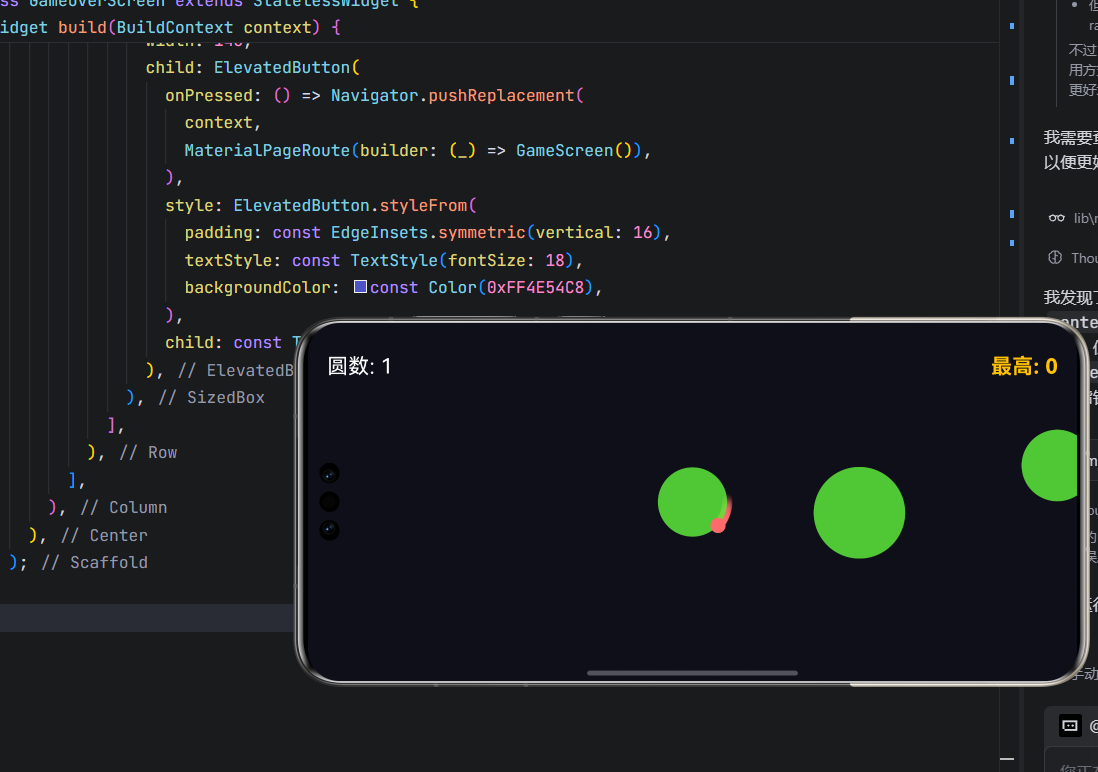
运行界面
结语
本文通过一个完整的小游戏项目,展示了 Flutter 在游戏开发中的强大能力 :从数据持久化到物理模拟,从自定义绘制到用户体验优化。这套架构同样适用于 OpenHarmony 的分布式场景,未来可轻松扩展为多设备协同游戏。
欢迎加入开源鸿蒙跨平台社区: https://openharmonycrossplatform.csdn.net