1、初始化集群环境
准备三台 rocky8.8 操作系统的 linux 机器。每台机器配置:4VCPU/4G 内存/60G 硬盘
环境说明:
IP 主机名 角色 内存 cpu
192.168.1.63 k8s63 master 4G 4vCPU
192.168.1.64 k8s64 worker 4G 4vCPU
192.168.1.62 k8s62 worker 4G 4vCPU
安装 yum install lrzsz vim-enhanced -y
备注:lrzsz 是为了能直接把电脑文件拖拽到 linux 机器的
vim-enhanced 是为了直接能用 vim 命令的,但是如果你装的 linux 系统是 dvd 桌面版,默认是能
直接用 vim 的
2、永久关闭 selinux
root@localhost \~# sed -i 's/SELINUX=enforcing/SELINUX=disabled/g' /etc/selinux/config
#注意:修改 selinux 配置文件之后,重启机器,selinux 才能永久生效
root@localhost\~# getenforce
Disabled
3、配置主机名
在 192.168.1.63 上执行如下:
hostnamectl set-hostname k8s63 && bash
在 192.168.1.64 上执行如下:
hostnamectl set-hostname k8s64 && bash
在 192.168.1.62 上执行如下:
hostnamectl set-hostname k8s62 && bash
4、配置 hosts 文件:
修改每台机器的 vi /etc/hosts 文件,在内容最后增加如下三行:
127.0.0.1 localhost localhost.localdomain localhost4 localhost4.localdomain4
::1 localhost localhost.localdomain localhost6 localhost6.localdomain6
192.168.1.63 k8s63
192.168.1.64 k8s64
192.168.1.62 k8s62
5.安装依赖(3台都执行)
yum install -y device-mapper-persistent-data lvm2 wget net-tools nfs-utils lrzsz gcc gcc-c++ make cmake libxml2-devel openssl-devel curl curl-devel unzip sudo libaio-devel vim ncurses-devel autoconf automake zlib-devel openssh-server socat conntrack telnet ipvsadm6、配置主机之间无密码登录
1)配置 xuegod63 到其他机器免密登录
root@xuegod63 \~# ssh-keygen #一路回车,不输入密码
把本地的 ssh 公钥文件安装到远程主机对应的账户
root@k8s63 \~# ssh-copy-id k8s63
root@k8s63 \~# ssh-copy-id k8s64
root@k8s63 \~# ssh-copy-id k8s62
其他两个也一样。
7、关闭所有主机 firewalld 防火墙
root@xuegod63 \~# systemctl stop firewalld ; systemctl disable firewalld
root@xuegod64 \~# systemctl stop firewalld ; systemctl disable firewalld
root@xuegod62 \~# systemctl stop firewalld ; systemctl disable firewalld
如果生产机器,防火墙开启,不能关,也可以,但是要放行一些端口:
6443:Kubernetes API Server
2379、2380:etcd 服务
10250、10255:kubelet 服务
10257:kube-controller-manager 服务
10259:kube-scheduler 服务
30000-32767:在物理机映射的 NodePort 端口
179、473、4789、9099:Calico 服务端口
8、关闭交换分区 swap
#临时关闭交换分区
root@k8s63 \~# swapoff -a
root@k8s64 \~# swapoff -a
root@k8s62 \~# swapoff -a
root@k8s63 \~# vim /etc/fstab #给 swap 这行开头加一下注释#
#/dev/mapper/rl-swap none swap defaults 0 0
9、修改内核参数:
root@k8s63 \~#modprobe br_netfilter
root@k8s64 \~# modprobe br_netfilter
root@k8s62 \~# modprobe br_netfilter
modprobe 是一个 Linux 命令,它用于动态地加载内核模块到 Linux 内核中。br_netfilter 是
Linux 内核模块之一,它提供了桥接网络设备和 Netfilter 之间的接口。Netfilter 是 Linux 内核中的一个框架,它可以在数据包通过网络协议栈时进行修改或过滤。在 Kubernetes 中,br_netfilter 模块用于实现 Kubernetes 集群中的网络功能。通过加载br_netfilter 模块,我们可以确保在Kubernetes 集群中使用的 iptables 规则正确应用。 (3台都执行)
cat > /etc/sysctl.d/k8s.conf <<EOF
net.bridge.bridge-nf-call-ip6tables = 1
net.bridge.bridge-nf-call-iptables = 1
net.ipv4.ip_forward = 1
EOF

sysctl -p /etc/sysctl.d/k8s.conf
1)net.bridge.bridge-nf-call-ip6tables: 当数据包经过网桥时,是否需要将 IPv6 数据包传递给iptables 进行处理。将其设置为 1 表示启用。
2)net.bridge.bridge-nf-call-iptables: 当数据包经过网桥时,是否需要将 IPv4 数据包传递给iptables 进行处理。将其设置为 1 表示启用。
3)net.ipv4.ip_forward: 是否允许主机转发网络包。将其设置为 1 表示启用。
这些参数是为了让 Linux 系统的网络功能可以更好地支持 Kubernetes 的网络组件(如flannel、Calico 等),启用这些参数可以确保集群中的 Pod 能够正常通信和访问外部网络。
10、配置安装 docker 和 containerd 的需要的阿里云 yum 源(三台都加)
yum-config-manager --add-repo http://mirrors.aliyun.com/docker-ce/linux/centos/docker-ce.repo
11、配置安装 k8s 命令行工具需要的阿里云的 yum 源(3台都执行)
cat > /etc/yum.repos.d/kubernetes.repo <<EOF
[kubernetes]
name=Kubernetes
baseurl=https://mirrors.aliyun.com/kubernetes/yum/repos/kubernetes-el7-x86_64/
enabled=1
gpgcheck=0
EOF
备注:
baseurl=https://mirrors.aliyun.com/kubernetes/yum/repos/kubernetes-el7-x86_64/,
这是 Kubernetes 官方在阿里云上提供的 yum 仓库地址,使用这个地址可以从阿里云上下载和安装Kubernetes 软件包。
12、配置时间同步(3台都执行)
基于 chrony 配置服务器时间跟网络时间同步
以前我们使用 ntpdate 来同步系统时间,但是,ntpdate 是立即同步,在生产环境下,系统时间大范围的跳动,是非常严重的事件。
chrony 是网络时间协议(NTP)的另一种实现,与网络时间协议后台程序(ntpd)不同,它可以更快地且更准确地同步系统时钟。
两个主要程序:chronyd 和 chronyc
chronyd:后台运行的守护进程,用于调整内核中运行的系统时钟和时钟服务器同步。它确定计算机增减时间的比率,并对此进行补偿
chronyc:命令行用户工具,用于监控性能并进行多样化的配置。它在 chronyd 实例控制的计算机上工作服务 unit 文件: /usr/lib/systemd/system/chronyd.service
监听端口: 323/udp,123/udp
配置文件: /etc/chrony.conf
ntpdate 和 chrony 是服务器时间同步的主要工具,两者的主要区别就是:
1、执行 ntpdate 后,时间是立即修整,中间会出现时间断档;
2、而执行 chrony 后,时间也会修正,但是是缓慢将时间追回,并不会断档。
 yum -y install chrony #如果没有该服务安装一下
 systemctl enable chronyd --now #设置 chronyd 开机启动并立即启动 chronyd 服务同步网络时间
配置问价追加内容#文件最后增加如下内容
tee -a /etc/chrony.conf <<EOF
server ntp1.aliyun.com iburst
server ntp2.aliyun.com iburst
server ntp1.tencent.com iburst
server ntp2.tencent.com iburst
EOF
写个计划任务,定时同步时间:
crontab -e
* * * * * /usr/bin/systemctl restart chronyd

systemctl restart crond
查看 timedatectl
13、安装 containerd (3台)
在 Kubernetes 集群中,containerd 是容器运行时,它的主要作用是负责管理节点上的容器,实
现容器的创建、销毁、运行、暂停、恢复等操作。而 Pod 是 Kubernetes 中最基本的调度单元,一个Pod 包含一个或多个紧密关联的容器,在 Kubernetes 集群中,当一个 Pod 被调度到一个节点上时,Kubernetes 就会基于 containerd 在 pod 里运行容器。
我用历史版本:1.6.22
wget https://download.docker.com/linux/centos/7/x86_64/stable/Packages/containerd.io-1.6.22-3.1.el7.x86_64.rpm

yum install containerd.io-1.6.22-3.1.el7.x86_64.rpm -y
# 启动并验证
systemctl enable --now containerd
systemctl status containerd
也可以直接安装:直接安装的是新版本。最新版本的libc需要2.34以上
查看当前 glibc 版本
ldd --version | grep libc
这是直接安装
yum install containerd.io --allowerasing -y

配置 vim /etc/containerd/config.toml
disabled_plugins = []
imports = []
oom_score = 0
plugin_dir = ""
required_plugins = []
root = "/var/lib/containerd"
state = "/run/containerd"
temp = ""
version = 2

[cgroup]
  path = ""

[debug]
  address = ""
  format = ""
  gid = 0
  level = ""
  uid = 0

[grpc]
  address = "/run/containerd/containerd.sock"
  gid = 0
  max_recv_message_size = 16777216
  max_send_message_size = 16777216
  tcp_address = ""
  tcp_tls_ca = ""
  tcp_tls_cert = ""
  tcp_tls_key = ""
  uid = 0

[metrics]
  address = ""
  grpc_histogram = false

[plugins]

  [plugins."io.containerd.gc.v1.scheduler"]
    deletion_threshold = 0
    mutation_threshold = 100
    pause_threshold = 0.02
    schedule_delay = "0s"
    startup_delay = "100ms"

  [plugins."io.containerd.grpc.v1.cri"]
    device_ownership_from_security_context = false
    disable_apparmor = false
    disable_cgroup = false
    disable_hugetlb_controller = true
    disable_proc_mount = false
    disable_tcp_service = true
    enable_selinux = false
    enable_tls_streaming = false
    enable_unprivileged_icmp = false
    enable_unprivileged_ports = false
    ignore_image_defined_volumes = false
    max_concurrent_downloads = 3
    max_container_log_line_size = 16384
    netns_mounts_under_state_dir = false
    restrict_oom_score_adj = false
    sandbox_image = "registry.aliyuncs.com/google_containers/pause:3.7"
    selinux_category_range = 1024
    stats_collect_period = 10
    stream_idle_timeout = "4h0m0s"
    stream_server_address = "127.0.0.1"
    stream_server_port = "0"
    systemd_cgroup = false
    tolerate_missing_hugetlb_controller = true
    unset_seccomp_profile = ""

    [plugins."io.containerd.grpc.v1.cri".cni]
      bin_dir = "/opt/cni/bin"
      conf_dir = "/etc/cni/net.d"
      conf_template = ""
      ip_pref = ""
      max_conf_num = 1

    [plugins."io.containerd.grpc.v1.cri".containerd]
      default_runtime_name = "runc"
      disable_snapshot_annotations = true
      discard_unpacked_layers = false
      ignore_rdt_not_enabled_errors = false
      no_pivot = false
      snapshotter = "overlayfs"

      [plugins."io.containerd.grpc.v1.cri".containerd.default_runtime]
        base_runtime_spec = ""
        cni_conf_dir = ""
        cni_max_conf_num = 0
        container_annotations = []
        pod_annotations = []
        privileged_without_host_devices = false
        runtime_engine = ""
        runtime_path = ""
        runtime_root = ""
        runtime_type = ""

        [plugins."io.containerd.grpc.v1.cri".containerd.default_runtime.options]

      [plugins."io.containerd.grpc.v1.cri".containerd.runtimes]

        [plugins."io.containerd.grpc.v1.cri".containerd.runtimes.runc]
          base_runtime_spec = ""
          cni_conf_dir = ""
          cni_max_conf_num = 0
          container_annotations = []
          pod_annotations = []
          privileged_without_host_devices = false
          runtime_engine = ""
          runtime_path = ""
          runtime_root = ""
          runtime_type = "io.containerd.runc.v2"

          [plugins."io.containerd.grpc.v1.cri".containerd.runtimes.runc.options]
            BinaryName = ""
            CriuImagePath = ""
            CriuPath = ""
            CriuWorkPath = ""
            IoGid = 0
            IoUid = 0
            NoNewKeyring = false
            NoPivotRoot = false
            Root = ""
            ShimCgroup = ""
            SystemdCgroup = true

      [plugins."io.containerd.grpc.v1.cri".containerd.untrusted_workload_runtime]
        base_runtime_spec = ""
        cni_conf_dir = ""
        cni_max_conf_num = 0
        container_annotations = []
        pod_annotations = []
        privileged_without_host_devices = false
        runtime_engine = ""
        runtime_path = ""
        runtime_root = ""
        runtime_type = ""

        [plugins."io.containerd.grpc.v1.cri".containerd.untrusted_workload_runtime.options]

    [plugins."io.containerd.grpc.v1.cri".image_decryption]
      key_model = "node"

    [plugins."io.containerd.grpc.v1.cri".registry]
      config_path = ""

      [plugins."io.containerd.grpc.v1.cri".registry.auths]

      [plugins."io.containerd.grpc.v1.cri".registry.configs]
        [plugins."io.containerd.grpc.v1.cri".registry.configs."192.168.40.62".tls]
            insecure_skip_verify = true
        [plugins."io.containerd.grpc.v1.cri".registry.configs."192.168.40.62".auth]
            username = "admin"
            password = "Harbor12345"

      [plugins."io.containerd.grpc.v1.cri".registry.headers]

      [plugins."io.containerd.grpc.v1.cri".registry.mirrors]
         [plugins."io.containerd.grpc.v1.cri".registry.mirrors."192.168.40.62"]
            endpoint = ["https://192.168.40.62:443"]
          [plugins."io.containerd.grpc.v1.cri".registry.mirrors."docker.io"]
             endpoint = ["https://vh3bm52y.mirror.aliyuncs.com","https://registry.docker-cn.com"]

    [plugins."io.containerd.grpc.v1.cri".x509_key_pair_streaming]
      tls_cert_file = ""
      tls_key_file = ""

  [plugins."io.containerd.internal.v1.opt"]
    path = "/opt/containerd"

  [plugins."io.containerd.internal.v1.restart"]
    interval = "10s"

  [plugins."io.containerd.internal.v1.tracing"]
    sampling_ratio = 1.0
    service_name = "containerd"

  [plugins."io.containerd.metadata.v1.bolt"]
    content_sharing_policy = "shared"

  [plugins."io.containerd.monitor.v1.cgroups"]
    no_prometheus = false

  [plugins."io.containerd.runtime.v1.linux"]
    no_shim = false
    runtime = "runc"
    runtime_root = ""
    shim = "containerd-shim"
    shim_debug = false

  [plugins."io.containerd.runtime.v2.task"]
    platforms = ["linux/amd64"]
    sched_core = false

  [plugins."io.containerd.service.v1.diff-service"]
    default = ["walking"]

  [plugins."io.containerd.service.v1.tasks-service"]
    rdt_config_file = ""

  [plugins."io.containerd.snapshotter.v1.aufs"]
    root_path = ""

  [plugins."io.containerd.snapshotter.v1.btrfs"]
    root_path = ""

  [plugins."io.containerd.snapshotter.v1.devmapper"]
    async_remove = false
    base_image_size = ""
    discard_blocks = false
    fs_options = ""
    fs_type = ""
    pool_name = ""
    root_path = ""

  [plugins."io.containerd.snapshotter.v1.native"]
    root_path = ""

  [plugins."io.containerd.snapshotter.v1.overlayfs"]
    root_path = ""
    upperdir_label = false

  [plugins."io.containerd.snapshotter.v1.zfs"]
    root_path = ""

  [plugins."io.containerd.tracing.processor.v1.otlp"]
    endpoint = ""
    insecure = false
    protocol = ""

[proxy_plugins]

[stream_processors]

  [stream_processors."io.containerd.ocicrypt.decoder.v1.tar"]
    accepts = ["application/vnd.oci.image.layer.v1.tar+encrypted"]
    args = ["--decryption-keys-path", "/etc/containerd/ocicrypt/keys"]
    env = ["OCICRYPT_KEYPROVIDER_CONFIG=/etc/containerd/ocicrypt/ocicrypt_keyprovider.conf"]
    path = "ctd-decoder"
    returns = "application/vnd.oci.image.layer.v1.tar"

  [stream_processors."io.containerd.ocicrypt.decoder.v1.tar.gzip"]
    accepts = ["application/vnd.oci.image.layer.v1.tar+gzip+encrypted"]
    args = ["--decryption-keys-path", "/etc/containerd/ocicrypt/keys"]
    env = ["OCICRYPT_KEYPROVIDER_CONFIG=/etc/containerd/ocicrypt/ocicrypt_keyprovider.conf"]
    path = "ctd-decoder"
    returns = "application/vnd.oci.image.layer.v1.tar+gzip"

[timeouts]
  "io.containerd.timeout.bolt.open" = "0s"
  "io.containerd.timeout.shim.cleanup" = "5s"
  "io.containerd.timeout.shim.load" = "5s"
  "io.containerd.timeout.shim.shutdown" = "3s"
  "io.containerd.timeout.task.state" = "2s"

[ttrpc]
  address = ""
  gid = 0
  uid = 0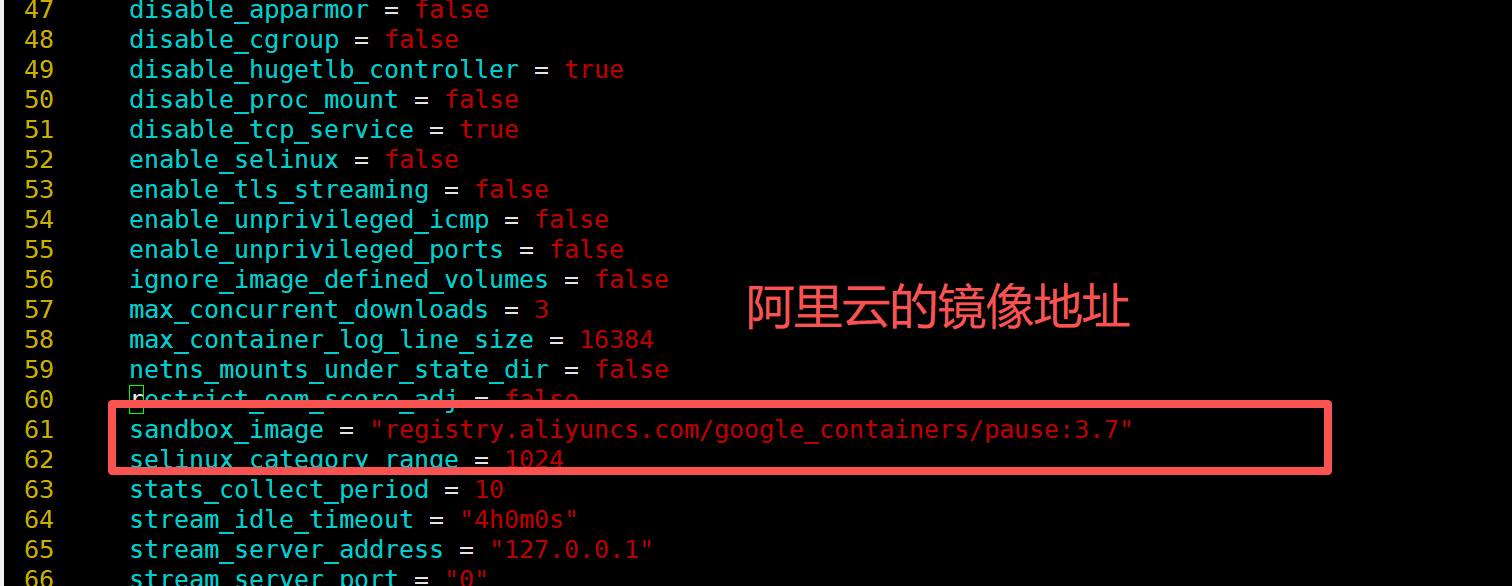
设置开机启动
systemctl restart containerd
systemctl status containerd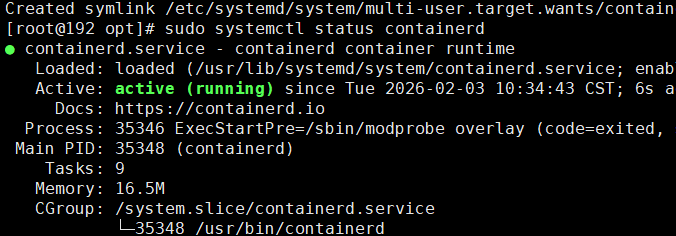
containerd就安装好了。