之前通过脚本实现了将网络设备批量添加到Netbox上,信息都是一对一的。但是IRF成员组的设备不能按照之前的模板添加,因为IP是唯一性的。所有需要通过修改一下脚本的内容
1、获取IRF设备信息,提供全部网络设备里面,找出哪些配置了IRF设备的管理IP
python
#!/usr/bin/env python3
# -*- coding: utf-8 -*-

import concurrent.futures
import time
import os
from netmiko import ConnectHandler

# 登录信息
USERNAME = "xxxx"
PASSWORD = "xxxxx"

# 文件
INPUT_FILE = "switch.txt"   #所有网络设备地址所在信息
OUTPUT_FILE = "IRF_Switch.txt"    #将配置有IRF设备的管理地址写入这个文件

# 设备配置 - 关键:禁用主机密钥检查
device_base = {
    'device_type': 'hp_comware',
    'username': USERNAME,
    'password': PASSWORD,
    'port': 22,
    'timeout': 20,
    'banner_timeout': 15,
    'auth_timeout': 30,
    'blocking_timeout': 20,
    # 关键参数:自动接受未知主机密钥
    'use_keys': False,
}

def read_ips(file_path):
    with open(file_path, 'r') as f:
        return [line.strip() for line in f if line.strip() and not line.startswith('#')]

def check_device(ip):
    device = device_base.copy()
    device['ip'] = ip

    try:
        print(f"[{ip}] 连接中...")

        conn = ConnectHandler(**device)

        # 执行命令
        output = conn.send_command(
            "display irf | include Standby",
            read_timeout=10
        )

        conn.disconnect()

        # 检查输出
        for line in output.split('\n'):
            line = line.strip()
            if 'Standby' in line and 'display' not in line and not line.startswith('<'):
                print(f"[{ip}] ✓ IRF-Standby")
                return ip, True, output

        print(f"[{ip}] ✗ 无")
        return ip, False, None

    except Exception as e:
        error_msg = str(e)
        print(f"[{ip}] ✗ 失败: {error_msg[:80]}")
        return ip, False, error_msg

def main():
    ips = read_ips(INPUT_FILE)
    print(f"共 {len(ips)} 台,每批30台同时执行\n")

    # 清空结果文件
    open(OUTPUT_FILE, 'w').close()

    irf_list = []
    batch_size = 30

    for i in range(0, len(ips), batch_size):
        batch = ips[i:i + batch_size]
        start_ip, end_ip = batch[0], batch[-1]
        print(f"--- 批次 {i//batch_size + 1} ({start_ip} ~ {end_ip}) ---")

        with concurrent.futures.ThreadPoolExecutor(max_workers=10) as executor:
            future_to_ip = {executor.submit(check_device, ip): ip for ip in batch}

            for future in concurrent.futures.as_completed(future_to_ip):
                ip, is_irf, output = future.result()

                if is_irf:
                    with open(OUTPUT_FILE, 'a') as f:
                        f.write(f"{ip}\n")
                    irf_list.append(ip)

        # 批次间隔
        if i + batch_size < len(ips):
            time.sleep(1)

    print(f"\n完成,发现 {len(irf_list)} 台IRF设备")
    print(f"结果已保存至: {OUTPUT_FILE}")

if __name__ == "__main__":
    main()
获取会找出整个网络中哪些设备配置了IRF设备,在IRF_Switch.txt里面
二、下面的脚本通过登录有配置IRF交换机获取IRF相信息(SN)
python
#!/usr/bin/env python3
# -*- coding: utf-8 -*-
"""
H3C 并发采集 v11
- sysname 后面加序号 _1、_2、_3......与 SN 顺序对应
- 其余逻辑同 v10
"""
import os
import re
import time
import paramiko
from concurrent.futures import ThreadPoolExecutor, as_completed

# ================= 可改参数 =================
USER       = "yangwb"
PASSWORD   = "Ywb@zaqwsx"
IP_FILE    = "IRF_Switch.txt"
OUT_DIR    = "/root/switch_config_folder/IRF_informain"
MAX_WORKER = 50
# ==========================================
os.makedirs(OUT_DIR, exist_ok=True)


# --------------------------------------------------
# 读到提示符或期望行立即返回
# --------------------------------------------------
def read_until_prompt(chan, expect_line=None, max_wait=20):
    buf = ""
    start = time.time()
    while True:
        if chan.recv_ready():
            chunk = chan.recv(4096).decode(errors="ignore")
            buf += chunk
            if expect_line and re.search(expect_line, buf):
                return buf
            if re.search(r'[<>\[\]]\s*$', buf.splitlines()[-1]):
                return buf
        if time.time() - start > max_wait:
            break
        time.sleep(0.2)
    return buf


# --------------------------------------------------
# 单台采集
# --------------------------------------------------
def get_info(ip: str):
    ssh = paramiko.SSHClient()
    ssh.set_missing_host_key_policy(paramiko.AutoAddPolicy())
    try:
        ssh.connect(ip, username=USER, password=PASSWORD,
                    look_for_keys=False, allow_agent=False, timeout=10)
    except Exception as e:
        return ip, [], f"SSH_FAIL_{e}"

    chan = ssh.invoke_shell()

    # ① 关分页
    chan.send("screen-length disable\n")
    read_until_prompt(chan)

    # ② 取 sysname
    chan.send("dis cur | i sysname\n")
    out1 = read_until_prompt(chan, expect_line=r"^ sysname\s+", max_wait=20)

    # ③ 取 device man
    chan.send("dis device man\n")
    out2 = read_until_prompt(chan, max_wait=20)
    ssh.close()

    # ---- 调试落盘 ----
    open(f"/tmp/{ip}.debug", "w").write("===sysname===\n" + out1 + "\n===man===\n" + out2)

    # 解析
    sysname = re.search(r"(?m)^ sysname\s+(.+)", out1)
    sysname = sysname.group(1).strip() if sysname else "UNKNOWN"

    sn_list = re.findall(r"(?m)^ Slot \d+.*?(^DEVICE_SERIAL_NUMBER\s*:\s*(\S+))", out2, re.DOTALL)
    sn_list = [m[1] for m in sn_list]
    return ip, sn_list, sysname


# --------------------------------------------------
# 线程池并发
# --------------------------------------------------
def main():
    ips = [l.split("#")[0].strip() for l in open(IP_FILE) if l.strip()]
    ok_cnt = 0
    with ThreadPoolExecutor(max_workers=MAX_WORKER) as pool:
        future_map = {pool.submit(get_info, ip): ip for ip in ips}
        for fut in as_completed(future_map):
            ip, sns, name = fut.result()
            if not sns and name.startswith("SSH_FAIL"):
                print(f"❌ {ip} 失败: {name}")
                continue
            with open(f"{OUT_DIR}/{ip}.txt", "w") as f:
                for idx, sn in enumerate(sns, start=1):   # 从 1 开始
                    f.write(f"{sn},{name}_{idx}\n")
            ok_cnt += 1
            print(f"✅ {ip} 完成  {ok_cnt}/{len(ips)}")

    print(f"全部完成,成功 {ok_cnt}/{len(ips)},结果在 {OUT_DIR}")


if __name__ == "__main__":
    main()
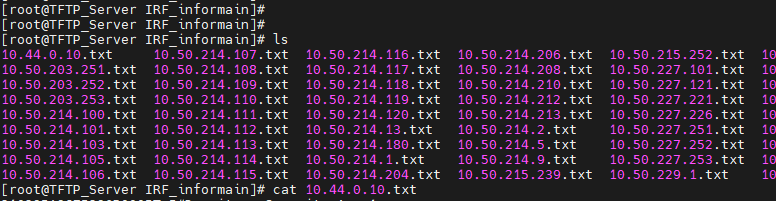
1、获取到设备信息如下格式如下
2、设备信息和IP地址进行对应,并且第一台设备的sysname后面加上_1
10.44.0.10.txt 文件名称
210235A3J75236P0005T,5#Dormitory-Security_Agg_1
210235A3J75236P00060,5#Dormitory-Security_Agg_2
将SN和设备名称进行一对应。
3、通过脚本将获取的的IRF设备信息进行整合
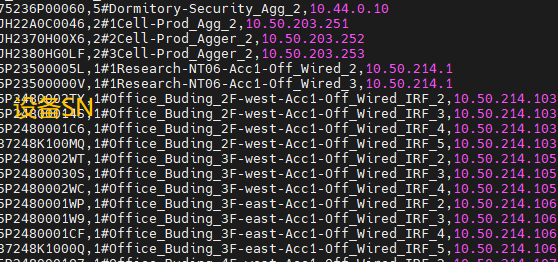
整个要求如下
1、将所有的信息提取到new.txt文档里面
2、将设备的信息进行和IP进行对应
脚本如下
python
#!/usr/bin/env python3
# -*- coding: utf-8 -*-
"""
批量处理IP命名的txt文件,将文件名(IP)追加到每行内容后
使用方法: python3 merge_ip_files.py [可选: 输入目录路径,默认为当前目录]
"""

import os
import glob
import sys
from pathlib import Path

def merge_ip_files(input_dir=".", output_file="new.txt"):
    """
    读取指定目录下所有以IP地址命名的txt文件,
    将IP地址追加到每行内容后,合并到new.txt
    """
    input_path = Path(input_dir).resolve()
    output_path = input_path / output_file

    # 获取所有txt文件
    txt_files = list(input_path.glob("*.txt"))

    # 排除输出文件本身(如果存在)
    txt_files = [f for f in txt_files if f.name != output_file]

    if not txt_files:
        print(f"❌ 在 {input_path} 目录下未找到任何txt文件")
        return

    print(f"📁 扫描到 {len(txt_files)} 个txt文件")
    print(f"📝 输出文件: {output_path}\n")

    total_lines = 0
    processed_files = 0

    try:
        with open(output_path, 'w', encoding='utf-8') as out_f:
            for file_path in sorted(txt_files):
                # 提取IP地址(去掉.txt后缀)
                ip_address = file_path.stem

                try:
                    with open(file_path, 'r', encoding='utf-8') as in_f:
                        lines = in_f.readlines()
                        file_lines = 0

                        for line in lines:
                            line = line.strip()
                            if line:  # 跳过空行
                                # 追加IP地址到行尾
                                new_line = f"{line},{ip_address}\n"
                                out_f.write(new_line)
                                file_lines += 1
                                total_lines += 1

                        processed_files += 1
                        print(f"✅ {file_path.name:<20} → {file_lines:>3} 行")

                except Exception as e:
                    print(f"⚠️  读取 {file_path.name} 失败: {e}")
                    continue

        print(f"\n🎉 完成!处理了 {processed_files} 个文件,共 {total_lines} 行数据")
        print(f"💾 结果保存至: {output_path}")

    except IOError as e:
        print(f"❌ 写入文件失败: {e}")
        sys.exit(1)

def validate_ip(filename):
    """
    简单验证文件名是否符合IP地址格式(可选使用)
    """
    parts = filename.replace('.txt', '').split('.')
    if len(parts) != 4:
        return False
    try:
        return all(0 <= int(p) <= 255 for p in parts)
    except ValueError:
        return False

if __name__ == "__main__":
    # 支持命令行参数指定目录,默认为当前目录
    directory = sys.argv[1] if len(sys.argv) > 1 else "."

    if not os.path.isdir(directory):
        print(f"❌ 目录不存在: {directory}")
        sys.exit(1)

    merge_ip_files(directory)
整合后效果如下
再将这些信息根据前面的批量导入的方式进行导入