flowable快速入门
-
- 一、环境搭建
-
- [1.1 核心依赖引入](#1.1 核心依赖引入)
- [1.2 关键版本适配](#1.2 关键版本适配)
- 二、核心配置(YML+自定义配置类)
-
- [2.1 核心YML配置(application.yml)](#2.1 核心YML配置(application.yml))
- [2.2 自定义配置类(可选)](#2.2 自定义配置类(可选))
- [2.3 Flowable核心组件说明](#2.3 Flowable核心组件说明)
- 三、流程定义相关准备
-
- [3.1 BPMN流程文件编写](#3.1 BPMN流程文件编写)
- [3.2 流程启动请求实体](#3.2 流程启动请求实体)
- 四、核心接口开发(启动流程实例)
- 五、核心流程部署API(RepositoryService)
- 后续扩展方向
Flowable是一款轻量级、高性能的开源工作流引擎,基于Activiti发展而来,完美适配Spring Boot生态,可快速实现企业级审批流程、业务流程的自动化管理。本文以 Flowable 6.8.0 + Spring Boot 2.7.x 为技术栈,从环境搭建到流程实例启动,手把手带你快速入门Flowable核心用法。
一、环境搭建
1.1 核心依赖引入
创建Spring Boot Maven项目,在pom.xml中添加Flowable核心启动器与REST依赖(版本必须完全一致,避免冲突),同时需引入MySQL驱动(流程引擎持久化必备):
xml
<!-- Spring Boot Web Starter -->
<dependency>
    <groupId>org.springframework.boot</groupId>
    <artifactId>spring-boot-starter-web</artifactId>
</dependency>
<!-- Spring Boot JDBC Starter(Flowable数据库操作依赖) -->
<dependency>
    <groupId>org.springframework.boot</groupId>
    <artifactId>spring-boot-starter-jdbc</artifactId>
</dependency>
<!-- Flowable Spring Boot 核心启动器(6.8.0,适配Spring Boot2.7.x) -->
<dependency>
    <groupId>org.flowable</groupId>
    <artifactId>flowable-spring-boot-starter</artifactId>
    <version>6.8.0</version>
</dependency>
<!-- Flowable REST API(与核心版本一致,可选,按需引入) -->
<dependency>
    <groupId>org.flowable</groupId>
    <artifactId>flowable-rest</artifactId>
    <version>6.8.0</version>
</dependency>
<!-- MySQL8驱动 -->
<dependency>
    <groupId>mysql</groupId>
    <artifactId>mysql-connector-java</artifactId>
    <version>8.0.33</version>
    <scope>runtime</scope>
</dependency>
1.2 关键版本适配
| 技术框架 | 版本选择 | 说明 |
|---|---|---|
| Spring Boot | 2.6.x ~ 2.7.x | 与Flowable6.8.0完美适配 |
| Flowable | 6.8.0 | 稳定版,避免7.x(大版本不兼容) |
| JDK | 1.8/11 | Flowable6.x推荐JDK8 |
| MySQL | 5.7+/8.0+ | 主流版本均可兼容 |
二、核心配置(YML+自定义配置类)
Flowable结合Spring Boot时,大部分配置可通过application.yml实现,自定义配置类仅用于扩展,默认配置可省略。
2.1 核心YML配置(application.yml)
配置流程引擎扫描规则、数据库策略、历史级别等,修复BPMN文件扫描为核心要点,同时禁用无关模块轻量化引擎:
yml
# 服务端口(可选,自定义)
server:
  port: 8080
# 数据库配置
spring:
  datasource:
    driver-class-name: com.mysql.cj.jdbc.Driver
    url: jdbc:mysql://localhost:3306/flowable_demo?useUnicode=true&characterEncoding=utf8&serverTimezone=Asia/Shanghai&nullCatalogMeansCurrent=true
    username: root
    password: 123456
# Flowable核心配置
flowable:
  # 数据库策略:启动自动建表/更新表结构(开发环境用,生产建议改为none)
  database-schema-update: true
  database-type: mysql
  db-history-used: true # 启用历史数据存储
  # 流程文件扫描核心配置(修复BPMN文件扫描关键)
  process:
    definition-cache-limit: -1 # 流程定义缓存无限制
    check-process-definitions: false # 关闭启动时自动检查部署,避免重复部署
    deployment-mode: single-resource # 单文件单独部署,便于管理
    definition-location-prefix: classpath:/processes/ # 流程文件扫描目录(手动创建resources/processes/)
    definition-location-suffix: .bpmn,.bpmn20.xml # 扫描后缀(单数suffix,逗号分隔,无需通配符)
  history-level: full # 历史数据级别:完整存储,审批流程必备(溯源/审计)
  app:
    enabled: false # 禁用App引擎,6.x版本避坑关键
  # 禁用无关模块,轻量化引擎
  eventregistry: enabled: false
  form: enabled: false
  dmn: enabled: false
  content: enabled: false
  # 关闭异步执行器(审批流程为人工同步操作,无需异步)
  async-executor-activate: false
目录说明 :需在项目src/main/resources下手动创建processes文件夹,用于存放所有.bpmn/.bpmn20.xml流程文件。
2.2 自定义配置类(可选)
Flowable Starter已自动配置ProcessEngine、各核心Service,此配置类仅作扩展示例,无需自定义时可直接删除:
java
import org.flowable.spring.SpringProcessEngineConfiguration;
import org.flowable.spring.boot.EngineConfigurationConfigurer;
import org.springframework.context.annotation.Configuration;
import org.springframework.core.env.Environment;

import javax.sql.DataSource;
import org.springframework.beans.factory.annotation.Autowired;
import org.springframework.transaction.PlatformTransactionManager;

/**
 * Flowable自定义配置类(可选)
 * 核心说明:
 * 1. Spring Boot Starter已自动配置ProcessEngine、RepositoryService等所有核心组件
 * 2. 此类仅用于个性化扩展,如自定义流程引擎参数、添加全局配置等
 * 3. 基础使用场景下,直接删除此类不影响功能
 */
@Configuration
public class FlowableConfig implements EngineConfigurationConfigurer<SpringProcessEngineConfiguration> {

    // 自动注入数据源和事务管理器(Spring Boot已自动配置)
    @Autowired
    private DataSource dataSource;
    @Autowired
    private PlatformTransactionManager transactionManager;
    @Autowired
    private Environment environment;

    /**
     * 自定义流程引擎配置(按需重写,示例仅作参考)
     */
    @Override
    public void configure(SpringProcessEngineConfiguration config) {
        // 手动指定数据源和事务管理器(默认已配置,可省略)
        config.setDataSource(dataSource);
        config.setTransactionManager(transactionManager);
        // 其他自定义配置:如设置流程名称前缀、自定义字体等
        // config.setProcessDefinitionNamePrefix("flowable-demo-");
    }
}
2.3 Flowable核心组件说明
Spring Boot启动后,以下核心服务会被自动注入,直接@Autowired即可使用:
| 核心服务 | 核心作用 | 操作对象 |
|---|---|---|
| ProcessEngine | 流程引擎核心,管理所有服务 | 全局引擎 |
| RepositoryService | 流程仓库服务,管理流程部署/定义 | 流程定义(静态BPMN) |
| RuntimeService | 运行时服务,管理流程实例 | 流程实例(动态运行) |
| TaskService | 任务服务,管理人工审批任务 | 流程任务 |
| HistoryService | 历史服务,查询流程历史数据 | 历史实例/任务/节点 |
| IdentityService | 身份服务,管理用户/角色/组 | 流程参与人 |
三、流程定义相关准备
3.1 BPMN流程文件编写
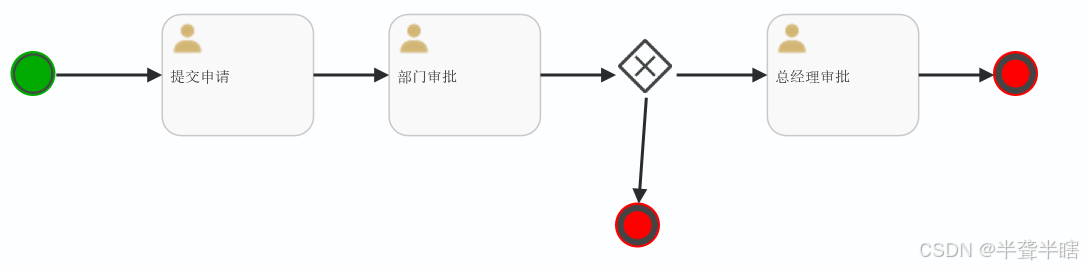
在resources/processes/下创建BPMN流程文件(如simpleApproval.bpmn20.xml),定义流程节点、审批人、流转规则。
关键要点 :BPMN文件的id为流程定义Key (后续启动流程需用到),name为流程名称,示例流程Key为simpleApproval(请假/通用审批流程)。
3.2 流程启动请求实体
创建接收前端请求的实体类,封装流程启动所需参数(流程Key、业务Key、审批人、自定义变量等),使用Lombok简化代码:
java
import lombok.Data;
import java.util.Map;

/**
 * 流程启动请求实体
 * 封装前端传入的流程启动参数
 */
@Data
public class ProcessStartRequest {
    /**
     * 流程定义Key(必填,对应BPMN文件的id属性)
     */
    private String processKey;

    /**
     * 业务Key(可选,关联业务系统单据编号,如APP001)
     */
    private String businessKey;

    /**
     * 申请人(流程变量,按需定义)
     */
    private String applicant;

    /**
     * 部门经理(审批人,流程变量)
     */
    private String deptManager;

    /**
     * 总经理(审批人,流程变量)
     */
    private String generalManager;

    /**
     * 自定义流程变量(可选,存放业务相关参数)
     */
    private Map<String, Object> variables;
}
四、核心接口开发(启动流程实例)
基于RuntimeService实现流程实例启动接口,这是Flowable业务开发的核心入口,接口采用REST风格,支持传入业务Key和自定义变量。
4.1 流程启动Controller
java
import org.flowable.engine.RuntimeService;
import org.flowable.engine.runtime.ProcessInstance;
import org.springframework.beans.factory.annotation.Autowired;
import org.springframework.web.bind.annotation.PostMapping;
import org.springframework.web.bind.annotation.RequestBody;
import org.springframework.web.bind.annotation.RequestMapping;
import org.springframework.web.bind.annotation.RestController;

import java.util.HashMap;
import java.util.Map;

/**
 * Flowable核心业务接口
 * 流程实例启动、查询等操作
 */
@RestController
@RequestMapping("/api/flowable")
public class FlowableProcessController {

    /**
     * 注入运行时服务:核心用于启动流程实例、管理运行时流程
     */
    @Autowired
    private RuntimeService runtimeService;

    /**
     * 启动流程实例
     * POST /api/flowable/process/start
     * @param request 流程启动请求参数
     * @return 流程启动结果(实例ID、定义ID等)
     */
    @PostMapping("/process/start")
    public Map<String, Object> startProcess(@RequestBody ProcessStartRequest request) {
        // 初始化流程变量容器,存放审批人、业务参数等
        Map<String, Object> variables = new HashMap<>();

        // 封装固定流程变量(审批人信息)
        if (request.getApplicant() != null) {
            variables.put("applicant", request.getApplicant());
        }
        if (request.getDeptManager() != null) {
            variables.put("deptManager", request.getDeptManager());
        }
        if (request.getGeneralManager() != null) {
            variables.put("generalManager", request.getGeneralManager());
        }
        // 合并前端传入的自定义流程变量
        if (request.getVariables() != null && !request.getVariables().isEmpty()) {
            variables.putAll(request.getVariables());
        }

        // 启动流程实例(区分是否传入业务Key)
        ProcessInstance processInstance;
        if (request.getBusinessKey() != null && !request.getBusinessKey().isEmpty()) {
            // 关联业务Key启动(推荐,流程与业务单据绑定)
            processInstance = runtimeService.startProcessInstanceByKey(
                    request.getProcessKey(),
                    request.getBusinessKey(),
                    variables
            );
        } else {
            // 不关联业务Key启动
            processInstance = runtimeService.startProcessInstanceByKey(
                    request.getProcessKey(),
                    variables
            );
        }

        // 构造返回结果
        Map<String, Object> result = new HashMap<>(8);
        result.put("code", 200);
        result.put("message", "流程启动成功");
        result.put("data", new HashMap<String, Object>() {{
            put("processInstanceId", processInstance.getId()); // 流程实例唯一ID
            put("processDefinitionId", processInstance.getProcessDefinitionId()); // 流程定义ID
            put("businessKey", processInstance.getBusinessKey()); // 业务关联Key
            put("processKey", request.getProcessKey()); // 流程定义Key
        }});

        return result;
    }
}
4.2 接口调用说明
请求地址
POST http://localhost:8080/api/flowable/process/start
请求头
Content-Type: application/json
请求体示例
json
{
  "processKey": "simpleApproval",
  "businessKey": "APP001",
  "applicant": "张三",
  "deptManager": "李四",
  "generalManager": "王五",
  "variables": {
    "applyReason": "事假3天",
    "applyTime": "2026-02-03"
  }
}
返回结果示例
json
{
  "code": 200,
  "message": "流程启动成功",
  "data": {
    "processInstanceId": "f6be5de5-0a9a-11f1-9578-9a597a032eb0",
    "processDefinitionId": "simpleApproval:1:3cf74465-fcc5-11f0-b097-9a597a032eb0",
    "businessKey": "APP001",
    "processKey": "simpleApproval",
    "message": "流程启动成功"
  }
}
五、核心流程部署API(RepositoryService)
Flowable会通过YML配置自动扫描 resources/processes/下的BPMN文件并完成部署,也可通过RepositoryService手动部署、管理流程定义,核心API如下(按需使用):
java
import org.flowable.engine.RepositoryService;
import org.flowable.engine.repository.Deployment;
import org.flowable.engine.repository.ProcessDefinition;
import org.springframework.beans.factory.annotation.Autowired;
import org.springframework.stereotype.Component;

/**
 * 流程定义管理工具类
 * 基于RepositoryService实现流程部署、查询、挂起/激活、删除
 */
@Component
public class ProcessDefinitionManager {

    @Autowired
    private RepositoryService repositoryService;

    /**
     * 手动部署流程定义
     * @param processName 部署名称
     * @param bpmnPath BPMN文件类路径
     * @return 部署信息
     */
    public Deployment deployProcess(String processName, String bpmnPath) {
        return repositoryService.createDeployment()
                .name(processName)
                .addClasspathResource(bpmnPath)
                .deploy();
    }

    /**
     * 根据流程Key查询最新版本的流程定义
     * @param processKey 流程定义Key
     * @return 流程定义信息
     */
    public ProcessDefinition getLatestProcessDefinition(String processKey) {
        return repositoryService.createProcessDefinitionQuery()
                .processDefinitionKey(processKey)
                .latestVersion()
                .singleResult();
    }

    /**
     * 挂起流程定义(禁止启动新实例,已运行实例不受影响)
     * @param processDefinitionId 流程定义ID
     */
    public void suspendProcessDefinition(String processDefinitionId) {
        repositoryService.suspendProcessDefinitionById(processDefinitionId);
    }

    /**
     * 激活流程定义(恢复启动新实例)
     * @param processDefinitionId 流程定义ID
     */
    public void activateProcessDefinition(String processDefinitionId) {
        repositoryService.activateProcessDefinitionById(processDefinitionId);
    }

    /**
     * 删除流程部署(级联删除:同时删除实例、任务、历史数据)
     * @param deploymentId 部署ID
     */
    public void deleteDeployment(String deploymentId) {
        repositoryService.deleteDeployment(deploymentId, true);
    }
}
后续扩展方向
- 基于
TaskService实现待办任务查询、审批通过/驳回; - 基于
HistoryService实现流程历史轨迹、审批记录查询; - 基于
IdentityService实现用户、角色、组的权限管理; - 集成Swagger/knife4j实现接口文档自动化;
- 实现流程节点监听器、全局拦截器,扩展流程业务逻辑。