一.导入插件SafeArea Helper
链接:
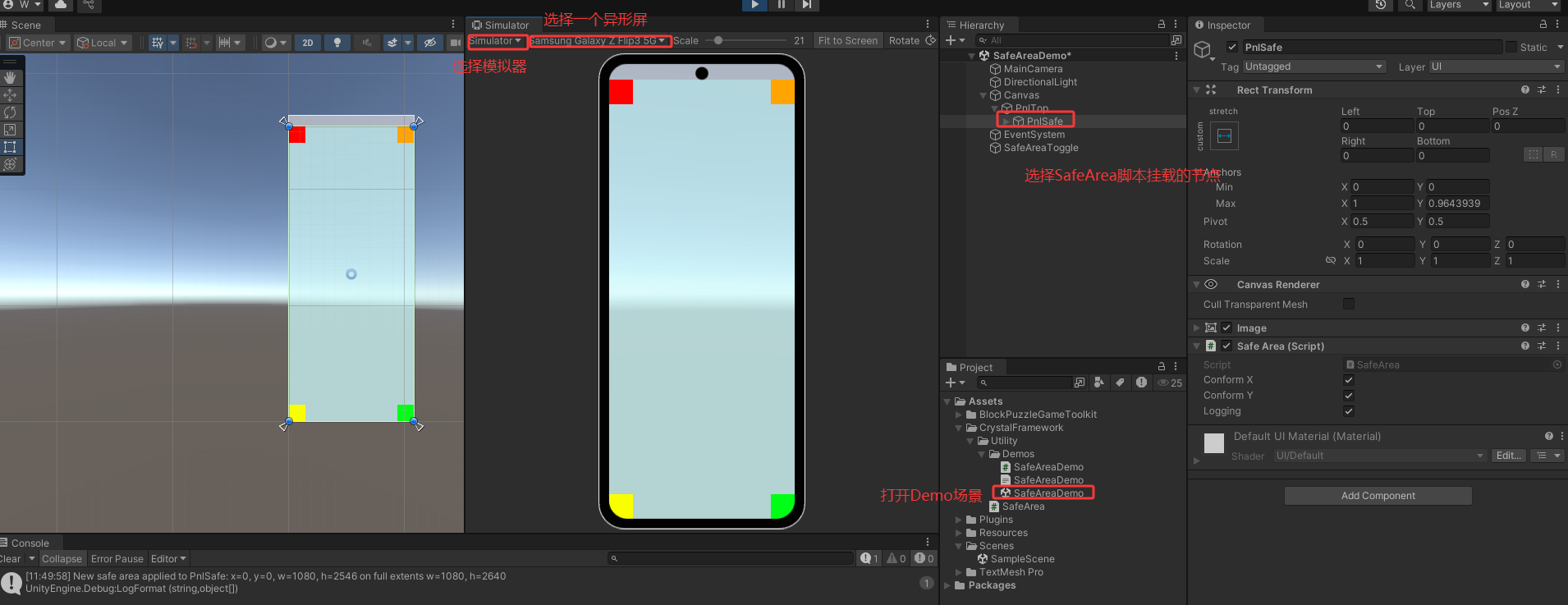
打开SafeAreaDemo场景,打开Simulator视图,切到异形屏机型
二.SafeArea.cs脚本分析
先上代码
cs
using UnityEngine;

namespace Crystal
{
    /// <summary>
    /// Safe area implementation for notched mobile devices. Usage:
    ///  (1) Add this component to the top level of any GUI panel.
    ///  (2) If the panel uses a full screen background image, then create an immediate child and put the component on that instead, with all other elements childed below it.
    ///      This will allow the background image to stretch to the full extents of the screen behind the notch, which looks nicer.
    ///  (3) For other cases that use a mixture of full horizontal and vertical background stripes, use the Conform X & Y controls on separate elements as needed.
    /// </summary>
    public class SafeArea : MonoBehaviour
    {
        #region Simulations
        /// <summary>
        /// Simulation device that uses safe area due to a physical notch or software home bar. For use in Editor only.
        /// </summary>
        public enum SimDevice
        {
            /// <summary>
            /// Don't use a simulated safe area - GUI will be full screen as normal.
            /// </summary>
            None,
            /// <summary>
            /// Simulate the iPhone X and Xs (identical safe areas).
            /// </summary>
            iPhoneX,
            /// <summary>
            /// Simulate the iPhone Xs Max and XR (identical safe areas).
            /// </summary>
            iPhoneXsMax,
            /// <summary>
            /// Simulate the Google Pixel 3 XL using landscape left.
            /// </summary>
            Pixel3XL_LSL,
            /// <summary>
            /// Simulate the Google Pixel 3 XL using landscape right.
            /// </summary>
            Pixel3XL_LSR
        }

        /// <summary>
        /// Simulation mode for use in editor only. This can be edited at runtime to toggle between different safe areas.
        /// </summary>
        public static SimDevice Sim = SimDevice.None;

        /// <summary>
        /// Normalised safe areas for iPhone X with Home indicator (ratios are identical to Xs, 11 Pro). Absolute values:
        ///  PortraitU x=0, y=102, w=1125, h=2202 on full extents w=1125, h=2436;
        ///  PortraitD x=0, y=102, w=1125, h=2202 on full extents w=1125, h=2436 (not supported, remains in Portrait Up);
        ///  LandscapeL x=132, y=63, w=2172, h=1062 on full extents w=2436, h=1125;
        ///  LandscapeR x=132, y=63, w=2172, h=1062 on full extents w=2436, h=1125.
        ///  Aspect Ratio: ~19.5:9.
        /// </summary>
        Rect[] NSA_iPhoneX = new Rect[]
        {
            new Rect (0f, 102f / 2436f, 1f, 2202f / 2436f),  // Portrait
            new Rect (132f / 2436f, 63f / 1125f, 2172f / 2436f, 1062f / 1125f)  // Landscape
        };

        /// <summary>
        /// Normalised safe areas for iPhone Xs Max with Home indicator (ratios are identical to XR, 11, 11 Pro Max). Absolute values:
        ///  PortraitU x=0, y=102, w=1242, h=2454 on full extents w=1242, h=2688;
        ///  PortraitD x=0, y=102, w=1242, h=2454 on full extents w=1242, h=2688 (not supported, remains in Portrait Up);
        ///  LandscapeL x=132, y=63, w=2424, h=1179 on full extents w=2688, h=1242;
        ///  LandscapeR x=132, y=63, w=2424, h=1179 on full extents w=2688, h=1242.
        ///  Aspect Ratio: ~19.5:9.
        /// </summary>
        Rect[] NSA_iPhoneXsMax = new Rect[]
        {
            new Rect (0f, 102f / 2688f, 1f, 2454f / 2688f),  // Portrait
            new Rect (132f / 2688f, 63f / 1242f, 2424f / 2688f, 1179f / 1242f)  // Landscape
        };

        /// <summary>
        /// Normalised safe areas for Pixel 3 XL using landscape left. Absolute values:
        ///  PortraitU x=0, y=0, w=1440, h=2789 on full extents w=1440, h=2960;
        ///  PortraitD x=0, y=0, w=1440, h=2789 on full extents w=1440, h=2960;
        ///  LandscapeL x=171, y=0, w=2789, h=1440 on full extents w=2960, h=1440;
        ///  LandscapeR x=0, y=0, w=2789, h=1440 on full extents w=2960, h=1440.
        ///  Aspect Ratio: 18.5:9.
        /// </summary>
        Rect[] NSA_Pixel3XL_LSL = new Rect[]
        {
            new Rect (0f, 0f, 1f, 2789f / 2960f),  // Portrait
            new Rect (0f, 0f, 2789f / 2960f, 1f)  // Landscape
        };

        /// <summary>
        /// Normalised safe areas for Pixel 3 XL using landscape right. Absolute values and aspect ratio same as above.
        /// </summary>
        Rect[] NSA_Pixel3XL_LSR = new Rect[]
        {
            new Rect (0f, 0f, 1f, 2789f / 2960f),  // Portrait
            new Rect (171f / 2960f, 0f, 2789f / 2960f, 1f)  // Landscape
        };
        #endregion

        RectTransform Panel;
        Rect LastSafeArea = new Rect (0, 0, 0, 0);
        Vector2Int LastScreenSize = new Vector2Int (0, 0);
        ScreenOrientation LastOrientation = ScreenOrientation.AutoRotation;
        [SerializeField] bool ConformX = true;  // Conform to screen safe area on X-axis (default true, disable to ignore)
        [SerializeField] bool ConformY = true;  // Conform to screen safe area on Y-axis (default true, disable to ignore)
        [SerializeField] bool Logging = false;  // Conform to screen safe area on Y-axis (default true, disable to ignore)

        void Awake ()
        {
            Panel = GetComponent<RectTransform> ();

            if (Panel == null)
            {
                Debug.LogError ("Cannot apply safe area - no RectTransform found on " + name);
                Destroy (gameObject);
            }

            Refresh ();
        }

        void Update ()
        {
            Refresh ();
        }

        void Refresh ()
        {
            Rect safeArea = GetSafeArea ();

            if (safeArea != LastSafeArea
                || Screen.width != LastScreenSize.x
                || Screen.height != LastScreenSize.y
                || Screen.orientation != LastOrientation)
            {
                // Fix for having auto-rotate off and manually forcing a screen orientation.
                // See https://forum.unity.com/threads/569236/#post-4473253 and https://forum.unity.com/threads/569236/page-2#post-5166467
                LastScreenSize.x = Screen.width;
                LastScreenSize.y = Screen.height;
                LastOrientation = Screen.orientation;

                ApplySafeArea (safeArea);
            }
        }

        Rect GetSafeArea ()
        {
            Rect safeArea = Screen.safeArea;

            if (Application.isEditor && Sim != SimDevice.None)
            {
                Rect nsa = new Rect (0, 0, Screen.width, Screen.height);

                switch (Sim)
                {
                    case SimDevice.iPhoneX:
                        if (Screen.height > Screen.width)  // Portrait
                            nsa = NSA_iPhoneX[0];
                        else  // Landscape
                            nsa = NSA_iPhoneX[1];
                        break;
                    case SimDevice.iPhoneXsMax:
                        if (Screen.height > Screen.width)  // Portrait
                            nsa = NSA_iPhoneXsMax[0];
                        else  // Landscape
                            nsa = NSA_iPhoneXsMax[1];
                        break;
                    case SimDevice.Pixel3XL_LSL:
                        if (Screen.height > Screen.width)  // Portrait
                            nsa = NSA_Pixel3XL_LSL[0];
                        else  // Landscape
                            nsa = NSA_Pixel3XL_LSL[1];
                        break;
                    case SimDevice.Pixel3XL_LSR:
                        if (Screen.height > Screen.width)  // Portrait
                            nsa = NSA_Pixel3XL_LSR[0];
                        else  // Landscape
                            nsa = NSA_Pixel3XL_LSR[1];
                        break;
                    default:
                        break;
                }

                safeArea = new Rect (Screen.width * nsa.x, Screen.height * nsa.y, Screen.width * nsa.width, Screen.height * nsa.height);
            }

            return safeArea;
        }

        void ApplySafeArea (Rect r)
        {
            LastSafeArea = r;

            // Ignore x-axis?
            if (!ConformX)
            {
                r.x = 0;
                r.width = Screen.width;
            }

            // Ignore y-axis?
            if (!ConformY)
            {
                r.y = 0;
                r.height = Screen.height;
            }

            // Check for invalid screen startup state on some Samsung devices (see below)
            if (Screen.width > 0 && Screen.height > 0)
            {
                // Convert safe area rectangle from absolute pixels to normalised anchor coordinates
                Vector2 anchorMin = r.position;
                Vector2 anchorMax = r.position + r.size;
                anchorMin.x /= Screen.width;
                anchorMin.y /= Screen.height;
                anchorMax.x /= Screen.width;
                anchorMax.y /= Screen.height;

                // Fix for some Samsung devices (e.g. Note 10+, A71, S20) where Refresh gets called twice and the first time returns NaN anchor coordinates
                // See https://forum.unity.com/threads/569236/page-2#post-6199352
                if (anchorMin.x >= 0 && anchorMin.y >= 0 && anchorMax.x >= 0 && anchorMax.y >= 0)
                {
                    Panel.anchorMin = anchorMin;
                    Panel.anchorMax = anchorMax;
                }
            }

            if (Logging)
            {
                Debug.LogFormat ("New safe area applied to {0}: x={1}, y={2}, w={3}, h={4} on full extents w={5}, h={6}",
                name, r.x, r.y, r.width, r.height, Screen.width, Screen.height);
            }
        }
    }
}
其核心逻辑是通过Screen.width, Screen.height获取屏幕宽高,通过Screen.safeArea获取安全区,再通过将safeArea的宽高除以Screen.width, Screen.height获取锚点的Min和Max的x,y值,从而最终将gameObject的位置和尺寸设置好。
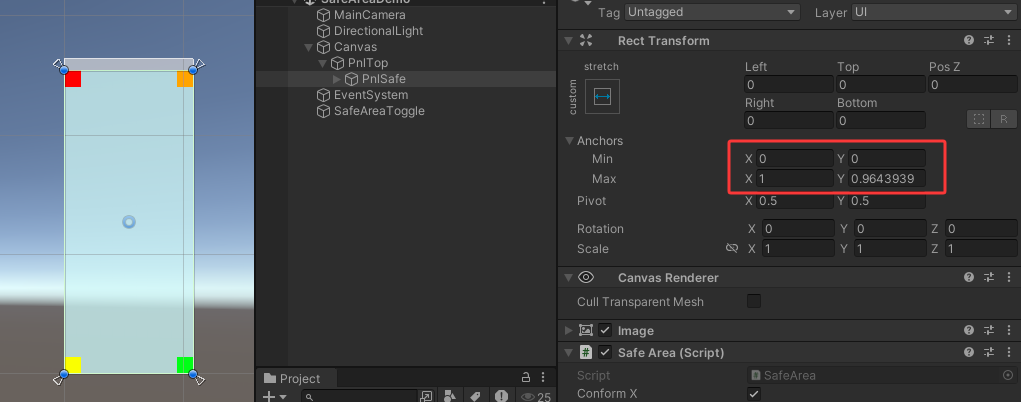
SafeArea的核心逻辑如下,在实际项目中即使不适用SafeArea Helper插件,自己写SafeArea脚本,这段逻辑基本都会应用
cs
            if (Screen.width > 0 && Screen.height > 0)
            {
                // Convert safe area rectangle from absolute pixels to normalised anchor coordinates
                Vector2 anchorMin = r.position;
                Vector2 anchorMax = r.position + r.size;
                anchorMin.x /= Screen.width;
                anchorMin.y /= Screen.height;
                anchorMax.x /= Screen.width;
                anchorMax.y /= Screen.height;

                // Fix for some Samsung devices (e.g. Note 10+, A71, S20) where Refresh gets called twice and the first time returns NaN anchor coordinates
                // See https://forum.unity.com/threads/569236/page-2#post-6199352
                if (anchorMin.x >= 0 && anchorMin.y >= 0 && anchorMax.x >= 0 && anchorMax.y >= 0)
                {
                    Panel.anchorMin = anchorMin;
                    Panel.anchorMax = anchorMax;
                }
            }