进程间通信目的
数据传输:一个进程需要将它的数据发送给另一个进程
资源共享:多个进程之间共享同样的资源。
通知事件:一个进程需要向另一个或一组进程发送消息,通知它(它们)发生了某种事件(如进程终止 时要通知父进程)。
进程控制:有些进程希望完全控制另一个进程的执行(如Debug进程),此时控制进程希望能够拦截另 一个进程的所有陷入和异常,并能够及时知道它的状态改变。
本质
让不同进程看到同一份资源。
"资源"是一种特定形式的内存空间。
这个资源一般是由操作系统提供,而不是两个进程的其中一个,因为假设由一个进程提供,那么这个资源属于谁,是这个进程独有,那么就会破坏进程的独立性。
我们进程访问这个空间进行通信,本质就是访问操作系统,进程代表的就是用户,资源从创建到使用(一般),再到释放,系统会提供一个系统调用接口来实现(从底层设计,从接口设计都要由操作系统独立设计)所以一般操作系统会有一个独立的通信模块,这个模块隶属于文件系统,这个模块叫做IPC通信模块。
IPC的作用:提供一种受控的机制,允许数据跨越进程边界流动,同时不破坏操作系统的隔离保护。
进程间通信发展
管道(基于文件级别的通信)-->System V进程间通信(本机内部通信)-->POSIX进程间通信(网络通信)进程间通信分类
管道
概念
管道是Unix中最古老的进程间通信的形式。 我们把从一个进程连接到另一个进程的一个数据流称为一个"管道"
本质
具有"血缘关系"的进程(通常是父子进程或兄弟进程)间的单向字节流。
接口
pipe
基本语法
#include <unistd.h>

int pipe(int pipefd[2]);
参数
pipefd2:一个包含2个整数的数组
pipefd0:用于读取管道的文件描述符
pipefd1:用于写入管道的文件描述符
若成功则返回0,不成功则返回-1
创建pipe
#include <unistd.h>
#include <stdio.h>

int main() {
    int pipefd[2];

    if (pipe(pipefd) == -1) {
        perror("pipe failed");
        return 1;
    }

    printf("Pipe created successfully!\n");
    printf("Read end: fd = %d\n", pipefd[0]);
    printf("Write end: fd = %d\n", pipefd[1]);

    // 使用管道...

    // 记得关闭文件描述符
    close(pipefd[0]);
    close(pipefd[1]);

    return 0;
}
特点
匿名管道
概念
通过pipe()系统调用创建,存在于内核中,没有文件系统入口。只能用于有亲缘关系的进程。
关键特性
单向性:数据只能从一端写入,从另一端读取。这形成了经典的"生产者-消费者"模型。
亲缘关系限制:通常由父进程创建,然后通过fork()将管道的文件描述符复制给子进程,从而实现通信。
字节流导向:不维护消息边界。写入端多次写入的"Hello"和"World",在读取端可能被一次读取为"HelloWorld"。应用层需要自己定义消息分隔协议。
生命周期随进程:当所有引用该管道的进程都终止后,管道资源会被内核自动回收。
工作原理
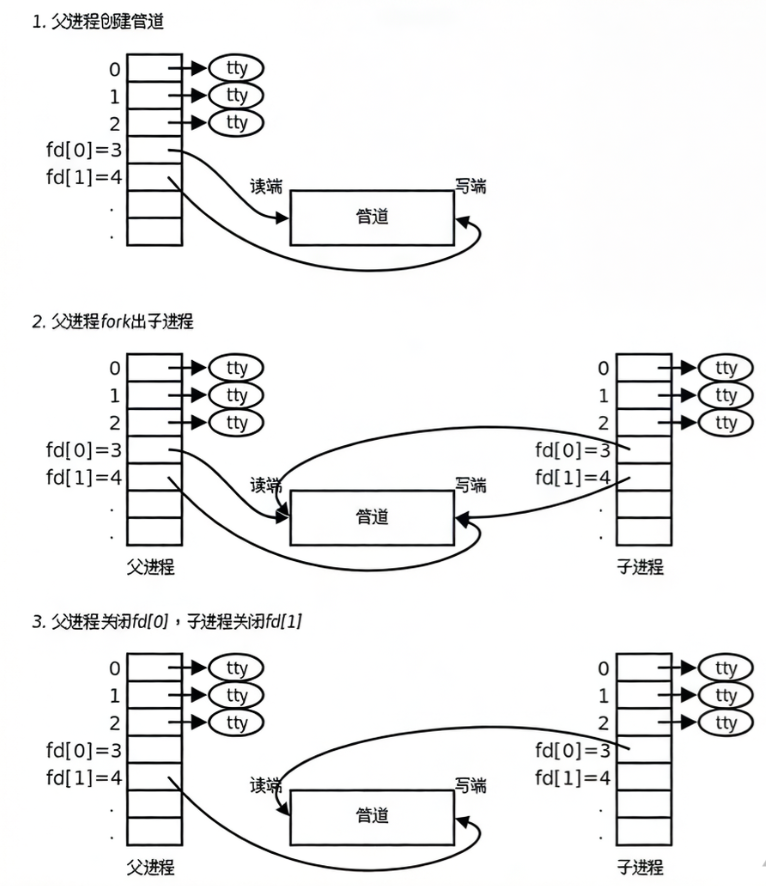
(1)创建管道:父进程调用 int pipe(int fd2)系统调用。内核会创建一个管道,并返回两个文件描述符:fd0:用于读取管道。fd1:用于写入管道。
(2)创建子进程:父进程调用 fork()。此时,子进程继承了父进程打开的文件描述符表,因此它也拥有指向同一个内核管道的fd0和fd1。
(3)关闭不需要的端口:由于管道是单向的,为了让数据从父流向子:父进程关闭它的读端 close(fd0)。子进程关闭它的写端 close(fd1)。反之,如果想让数据从子流向父,则关闭相反的描述符。
(4)进行通信:父进程用 write(fd1, buf, size)向管道写数据。子进程用 read(fd0, buf, size)从管道读数据。
(5)通信结束:进程关闭所有描述符,当没有进程再持有管道的写端描述符时,读端会收到EOF。
站在文件描述符角度理解管道
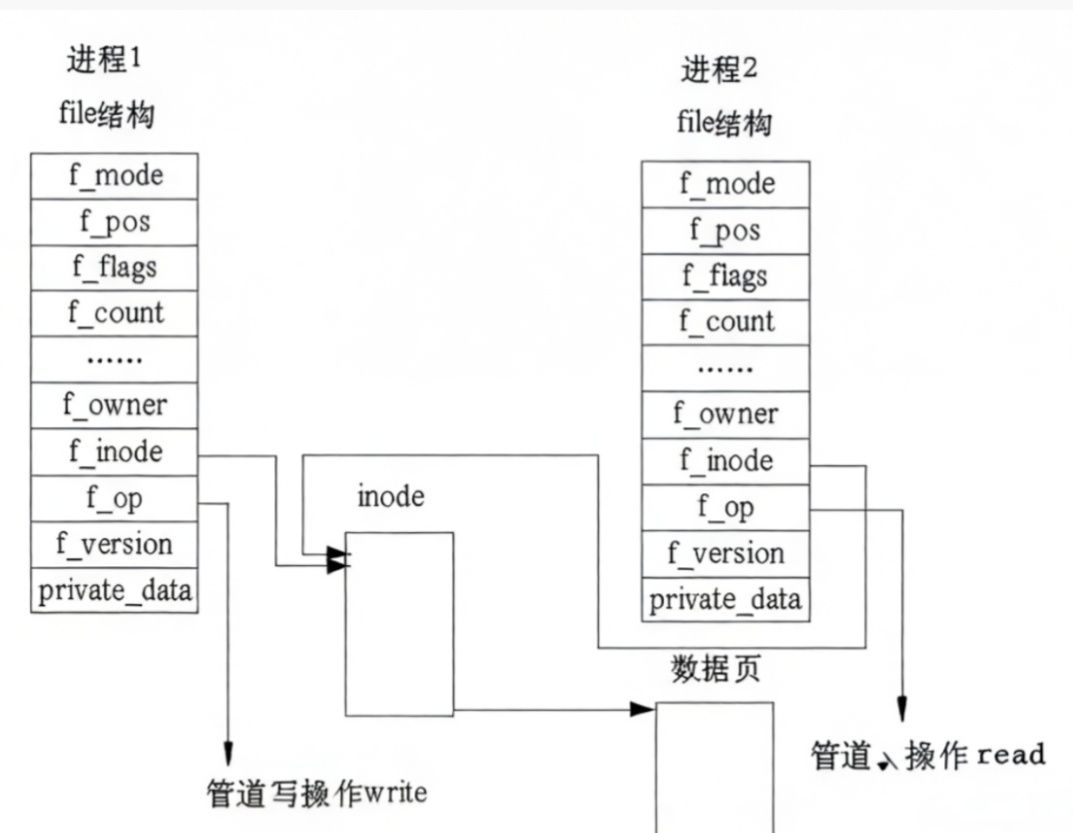
站在内核角度理解管道
内核与底层
缓冲区:管道在内核中有一个固定大小的缓冲区(通常为4KB或64KB,可通过fcntl设置)。写操作将数据复制到内核缓冲区,读操作从缓冲区复制数据到用户空间。
阻塞与非阻塞:
读空管道:如果管道为空,读操作默认阻塞,直到有数据写入。
写满管道:如果管道已满,写操作默认阻塞,直到有数据被读出腾出空间。
可以使用fcntl设置文件描述符为O_NONBLOCK来改为非阻塞模式。
同步与互斥:内核保证了管道读写的原子性。小于管道缓冲区大小(PIPE_BUF,通常是512字节或4KB)的写操作是原子的,即不会被其他写入操作的数据穿插。
优点
(1)简单高效:是系统调用,不涉及磁盘I/O,数据在内核和用户空间间复制一次。
(2)无需同步代码:内核自动处理读写同步(阻塞/唤醒)。
(3)资源自动管理。
缺点
(1)只能用于亲缘进程。
(2)单向通信。要实现双向通信,需要创建两个管道。
(3)传输的是字节流,无消息边界,对结构化数据不友好。
(4)生命周期短,随进程结束。
匿名管道代码
(1)父进程向子进程发送消息
#include <stdio.h>
#include <stdlib.h>
#include <unistd.h>
#include <string.h>
#include <sys/wait.h>

int main() {
    int pipefd[2];
    pid_t pid;
    char buffer[100];

    if (pipe(pipefd) == -1) {
        perror("pipe创建失败");
        exit(EXIT_FAILURE);
    }

    printf("管道创建成功: fd[0]=%d, fd[1]=%d\n", pipefd[0], pipefd[1]);

    pid = fork();

    if (pid < 0) {
        perror("fork失败");
        exit(EXIT_FAILURE);
    }

    if (pid > 0) {
        printf("=== 父进程 (PID=%d) ===\n", getpid());

        close(pipefd[0]);

        char *message = "Hello from parent process!";
        printf("父进程准备发送消息: %s\n", message);

        write(pipefd[1], message, strlen(message) + 1);  // +1包含'\0'
        printf("父进程已发送消息\n");

        close(pipefd[1]);
        printf("父进程关闭了写端 fd[1]\n");

        wait(NULL);
        printf("子进程已结束,父进程退出\n");

    } else {  // 子进程 (pid == 0)
        printf("=== 子进程 (PID=%d) ===\n", getpid());

        close(pipefd[1]);

        ssize_t bytes_read = read(pipefd[0], buffer, sizeof(buffer));
        printf("子进程接收到 %ld 字节数据\n", bytes_read);

        if (bytes_read > 0) {
            printf("子进程收到的消息: %s\n", buffer);
        }

        close(pipefd[0]);
        printf("子进程关闭了读端 fd[0]\n");
        printf("子进程退出\n");
    }

    return 0;
}
(2)父子进程互相发送消息
#include <stdio.h>
#include <stdlib.h>
#include <unistd.h>
#include <string.h>
#include <sys/wait.h>

int main() {
    int pipe1[2];
    int pipe2[2];
    pid_t pid;
    char buffer[100];

    if (pipe(pipe1) == -1 || pipe(pipe2) == -1) {
        perror("管道创建失败");
        exit(EXIT_FAILURE);
    }

    printf("pipe1: 父[%d]->子[%d]\n", pipe1[1], pipe1[0]);
    printf("pipe2: 子[%d]->父[%d]\n", pipe2[1], pipe2[0]);

    pid = fork();

    if (pid < 0) {
        perror("fork失败");
        exit(EXIT_FAILURE);
    }

    if (pid > 0) {
        printf("=== 父进程 (PID=%d) ===\n", getpid());

        close(pipe1[0]);
        close(pipe2[1]);

        char *msg_to_child = "Hello child! This is your parent.";
        printf("父进程发送消息: %s\n", msg_to_child);
        write(pipe1[1], msg_to_child, strlen(msg_to_child) + 1);

        ssize_t bytes = read(pipe2[0], buffer, sizeof(buffer));
        if (bytes > 0) {
            printf("父进程收到子进程消息: %s\n", buffer);
        }

        bytes = read(pipe2[0], buffer, sizeof(buffer));
        if (bytes > 0) {
            printf("父进程收到子进程回复: %s\n", buffer);
        }

        char *end_msg = "Goodbye child!";
        write(pipe1[1], end_msg, strlen(end_msg) + 1);

        close(pipe1[1]);
        close(pipe2[0]);

        wait(NULL);
        printf("父进程退出\n");

    } else {
        printf("=== 子进程 (PID=%d) ===\n", getpid());

        close(pipe1[1]);
        close(pipe2[0]);

        ssize_t bytes = read(pipe1[0], buffer, sizeof(buffer));
        if (bytes > 0) {
            printf("子进程收到父进程消息: %s\n", buffer);
        }

        // 回复父进程
        char *reply1 = "Hi parent! I got your message.";
        printf("子进程回复父进程: %s\n", reply1);
        write(pipe2[1], reply1, strlen(reply1) + 1);

        char *reply2 = "How are you today?";
        write(pipe2[1], reply2, strlen(reply2) + 1);

        bytes = read(pipe1[0], buffer, sizeof(buffer));
        if (bytes > 0) {
            printf("子进程收到父进程消息: %s\n", buffer);
        }

        close(pipe1[0]);
        close(pipe2[1]);

        printf("子进程退出\n");
    }

    return 0;
}
命名管道 (FIFO)
概念
通过mkfifo()创建,在文件系统中有一个路径名(如 /tmp/myfifo)。任何知道该名字的进程都可以打开它进行通信,突破了亲缘关系限制。
关键特性
可以用于任意进程间通信,不限于亲缘关系
遵循先进先出(FIFO)原则
数据在内核中缓冲,不实际写入磁盘
创建命名管道
(1)命令行创建
使用mkfifo命令
$ mkfifo mypipe(2)使用C语言创建
#include <sys/types.h>
#include <sys/stat.h>

// 方法1:使用 mkfifo 函数
int mkfifo(const char *pathname, mode_t mode);

// 方法2:使用 mknod 函数(更通用)
int mknod(const char *pathname, mode_t mode, dev_t dev);
两个独立进程完整通信
(1)写入者
#include <stdio.h>
#include <stdlib.h>
#include <fcntl.h>
#include <sys/stat.h>
#include <unistd.h>
#include <string.h>

#define FIFO_PATH "/tmp/myfifo"

int main() {
    int fd;
    char message[100];

    printf("Writer Process (PID=%d)\n", getpid());

    if (mkfifo(FIFO_PATH, 0666) == -1) {
        if (errno != EEXIST) {
            perror("mkfifo");
            exit(EXIT_FAILURE);
        }
    }

    printf("Opening FIFO for writing...\n");

    fd = open(FIFO_PATH, O_WRONLY);
    if (fd == -1) {
        perror("open");
        exit(EXIT_FAILURE);
    }
    printf("FIFO opened successfully!\n");

    for (int i = 1; i <= 5; i++) {
        snprintf(message, sizeof(message),
                 "Message %d from writer (PID=%d)", i, getpid());

        printf("Writing: %s\n", message);

        ssize_t bytes = write(fd, message, strlen(message) + 1);
        if (bytes == -1) {
            perror("write");
            break;
        }

        sleep(1);
    }

    write(fd, "END", 4);

    close(fd);
    printf("Writer finished.\n");

    return 0;
}
(2)读取者
#include <stdio.h>
#include <stdlib.h>
#include <fcntl.h>
#include <sys/stat.h>
#include <unistd.h>
#include <string.h>

#define FIFO_PATH "/tmp/myfifo"

int main() {
    int fd;
    char buffer[256];

    printf("Reader Process (PID=%d)\n", getpid());

    printf("Opening FIFO for reading...\n");
    fd = open(FIFO_PATH, O_RDONLY);
    if (fd == -1) {
        perror("open");
        exit(EXIT_FAILURE);
    }
    printf("FIFO opened successfully!\n");

    while (1) {
        memset(buffer, 0, sizeof(buffer));

        ssize_t bytes = read(fd, buffer, sizeof(buffer) - 1);
        if (bytes <= 0) {
            printf("EOF reached or error\n");
            break;
        }

        printf("Received: %s\n", buffer);

        if (strcmp(buffer, "END") == 0) {
            printf("Received END signal, exiting...\n");
            break;
        }
    }

    close(fd);

    unlink(FIFO_PATH);

    printf("Reader finished.\n");

    return 0;
}
命名管道与匿名管道区别
|--------|------------|---------------------|
| 特性 | 匿名管道 | 命名管道 |
| 文件系统可见 | 否 | 是 |
| 进程关系 | 必须有亲缘关系 | 任意进程 |
| 创建方式 | pipe()系统调用 | mkfifo()函数或 mknod() |
| 生命周期 | 随进程结束 | 持久存在,直至被删除 |
| 打开方式 | 通过继承的文件描述符 | 通过路径名打开 |