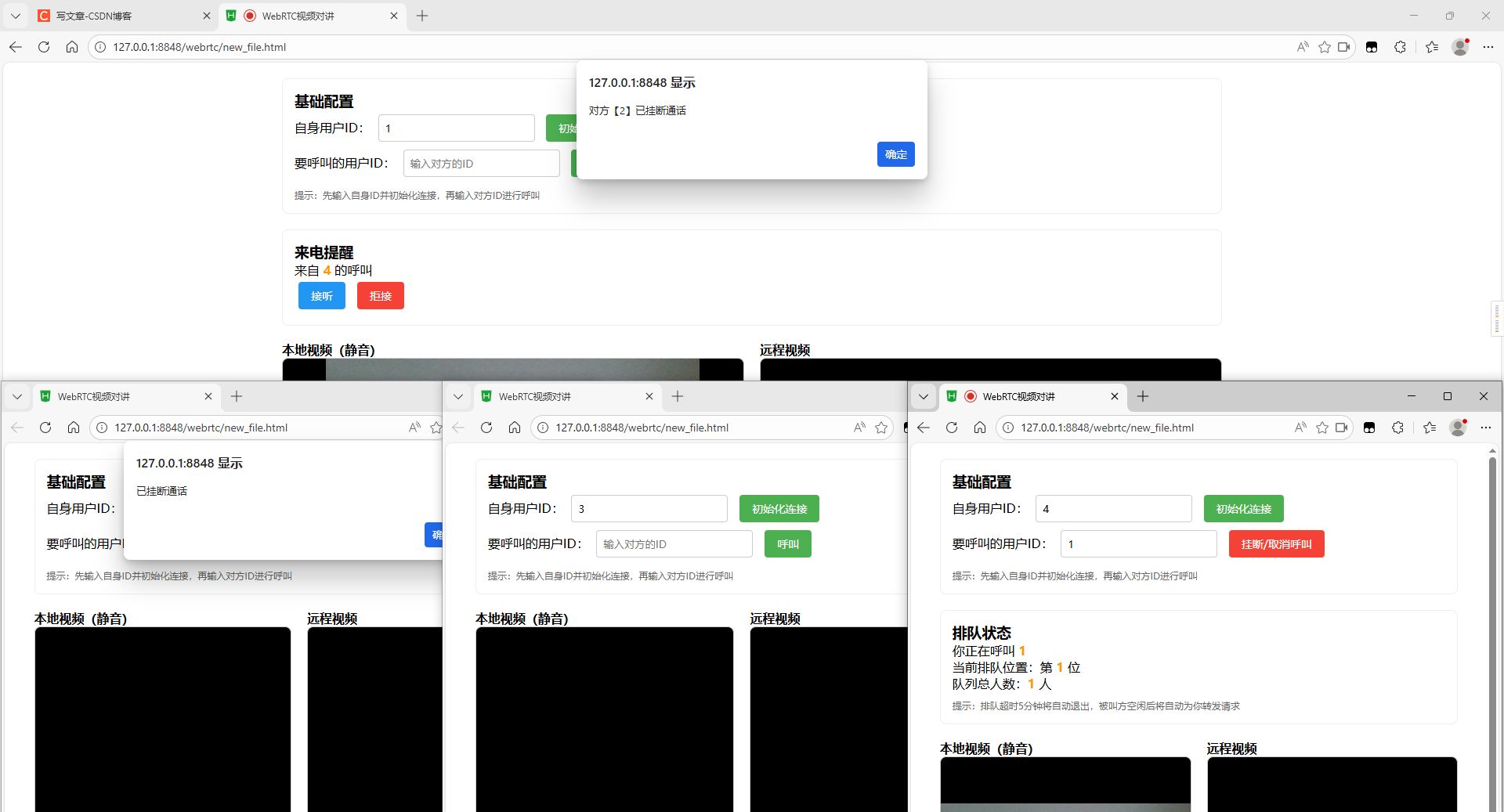
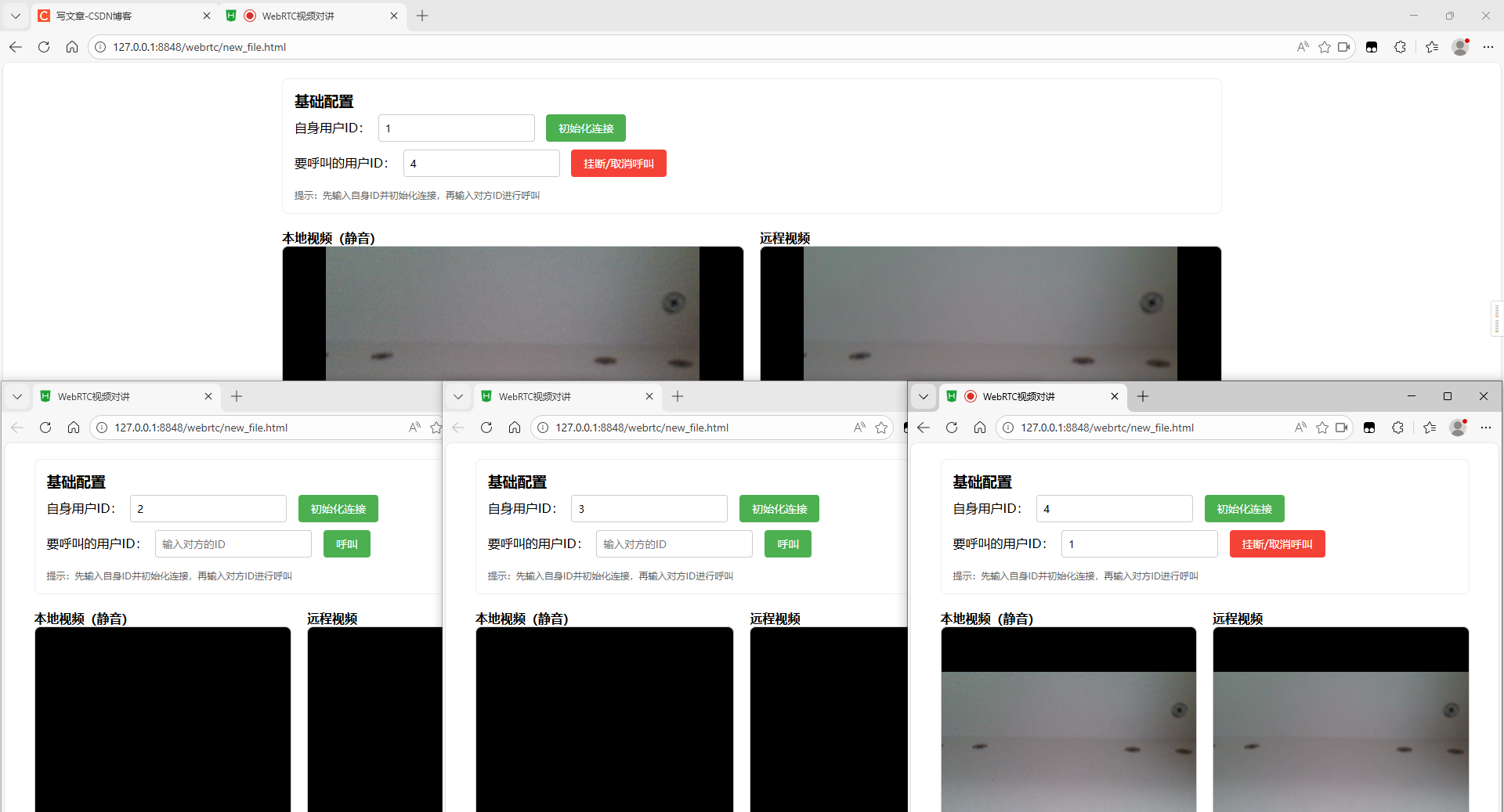
环境
- 前端:HTML5 + jQuery
- 后端:JDK-1.8 + SpringBoot-1.4.2
- 浏览器:谷歌/火狐/360
简介
WebRTC负责浏览器间直接的音视频数据传输,HTML负责前端音视频的采集和展示,信令服务器则是 "牵线搭桥" 的角色,解决WebRTC无法直接交换连接信息的问题。本文以实现网页端之间的视频通话为主,安卓端需要自行开发测试,原理是相通的。
| 概念 | 作用 |
|---|---|
| WebRTC | 浏览器原生的实时通信 API,让两个浏览器(端)直接建立P2P连接,实现无插件传输音视频/数据 |
| RTCPeerConnection | WebRTC 核心对象,负责管理P2P连接、处理音视频数据传输、收集ICE候选 |
| SDP | 描述音视频编码格式、网络信息等会话规则 |
| ICE | 解决NAT/防火墙穿透问题,生成可访问的网络地址(ICE候选),让不同内网的设备能找到彼此 |
| HTML | 通过video标签展示音视频流,配合JavaScript调用WebRTC API完成采集、连接等逻辑 |
| WebSocket | 实现浏览器与信令服务器之间的双向实时通信 |
| 信令服务器 | 负责交换连接参数(如SDP、ICE候选)和通话的处理结果 |
一、信令服务器
1、添加pom依赖(核心是websocket)
	<dependencies>
        <dependency>
            <groupId>com.fasterxml.jackson.core</groupId>
            <artifactId>jackson-databind</artifactId>
        </dependency>

        <dependency>
            <groupId>org.springframework.boot</groupId>
            <artifactId>spring-boot-starter-web</artifactId>
        </dependency>

        <dependency>
            <groupId>org.springframework.boot</groupId>
            <artifactId>spring-boot-starter-websocket</artifactId>
        </dependency>

        <dependency>
            <groupId>org.projectlombok</groupId>
            <artifactId>lombok</artifactId>
            <optional>true</optional>
        </dependency>
        <dependency>
            <groupId>org.springframework.boot</groupId>
            <artifactId>spring-boot-starter-test</artifactId>
            <scope>test</scope>
            <exclusions>
                <exclusion>
                    <groupId>org.junit.vintage</groupId>
                    <artifactId>junit-vintage-engine</artifactId>
                </exclusion>
            </exclusions>
        </dependency>
    </dependencies>
2、配置实体类(呼叫排队、信令消息、消息类型枚举)
/**
 * 呼叫排队
 */
@Data
@NoArgsConstructor
@AllArgsConstructor
public class CallWaitItem {
    private String fromUserId;      // 呼叫方ID
    private String toUserId;        // 被叫方ID
    private String offerData;       // 缓存的Offer数据
    private long queueTime;         // 排队时间戳(毫秒)
    private int queueIndex;         // 队列位置
}


/**
 * WebRTC 信令消息
 */
@Data
@NoArgsConstructor
@AllArgsConstructor
@JsonIgnoreProperties(ignoreUnknown = true)     // 忽略未知字段
public class WebrtcMessage {
    private String type;            // 消息类型(对应WebrtcMessageType)
    private String fromUserId;      // 发送方ID
    private String toUserId;        // 接收方ID
    private String data;            // 核心数据(SDP/ICE/提示信息等)
}


/**
 * WebRTC 消息类型枚举
 */
@Getter
public enum WebrtcMessageType {
    OFFER("offer"),                     // 发起呼叫
    ANSWER("answer"),                   // 接听呼叫
    ICE_CANDIDATE("iceCandidate"),      // 网络候选信息
    LEAVE("leave"),                     // 主动挂断/取消呼叫
    REJECT("reject"),                   // 拒接呼叫
    ERROR("error"),                     // 错误消息
    PING("ping"),                       // 心跳检测
    QUEUE_UPDATE("queueUpdate"),        // 排队状态更新
    QUEUE_TIMEOUT("queueTimeout"),      // 排队超时
    OFFLINE_NOTIFY("offlineNotify");    // 对方离线通知

    private final String type;

    WebrtcMessageType(String type) {
        this.type = type;
    }

    /**
     * 通过字符串获取枚举
     * @param type
     * @return
     */
    public static WebrtcMessageType getByType(String type) {
        for (WebrtcMessageType messageType : values()) {
            if (messageType.getType().equals(type)) {
                return messageType;
            }
        }
        return null;
    }
}
3、添加WebRTC信令消息处理器(转发消息+通话逻辑处理)
/**
* WebRTC 信令消息处理器
*/
@Slf4j
@Component
public class WebrtcSignalingHandler extends TextWebSocketHandler {
// ========== 全局核心映射 ==========
private static final Map<String, WebSocketSession> ONLINE_SESSIONS = new ConcurrentHashMap<>(); // 在线用户会话映射
private static final Map<String, String> CALL_BIND_MAP = new ConcurrentHashMap<>(); // 通话绑定映射
private static final Map<String, List<CallWaitItem>> CALL_WAIT_QUEUE_MAP = new ConcurrentHashMap<>(); // 通话排队队列映射
// ========== 可配置常量 ==========
private static final long QUEUE_TIMEOUT_MS = 5 * 60 * 1000; // 排队超时时间(毫秒)
private static final boolean ENABLE_QUEUE = true; // 排队功能开关
private static final long PING_TIMEOUT_MS = 3000; // WebSocket的超时时间
// ========== 全局工具对象 ==========
private static final ObjectMapper OBJECT_MAPPER = new ObjectMapper(); // JSON映射对象
// ========== WebSocket连接生命周期处理 ==========
/**
* 连接建立后触发
* @param session
* @throws Exception
*/
@Override
public void afterConnectionEstablished(WebSocketSession session) throws Exception {
// 获取并验证用户ID
String userId = getUserIdFromSession(session);
if (userId == null || userId.trim().isEmpty()) {
session.close(CloseStatus.BAD_DATA.withReason("缺少有效的用户ID(URL拼接?userId=[ID])"));
log.warn("【WebSocket 连接失败】缺少有效用户ID,会话URL:{},会话ID:{}", session.getUri(), session.getId());
return;
}
// 重复登录:强制下线旧会话
if (ONLINE_SESSIONS.containsKey(userId)) {
WebSocketSession oldSession = ONLINE_SESSIONS.get(userId);
if (oldSession != null && oldSession.isOpen()) {
oldSession.close(CloseStatus.POLICY_VIOLATION.withReason("该账号在其他设备登录,已被强制下线"));
log.info("【WebSocket 重复登录】用户【{}】在新设备登录,已强制下线旧设备(旧会话ID:{})", userId, oldSession.getId());
}
ONLINE_SESSIONS.remove(userId);
}
ONLINE_SESSIONS.put(userId, session);
session.getAttributes().put("userId", userId);
log.info("【WebSocket 连接成功】用户【{}】,会话ID:{},当前在线人数:{}", userId, session.getId(), ONLINE_SESSIONS.size());
}
/**
* 连接关闭后触发
* @param session
* @param status
* @throws Exception
*/
@Override
public void afterConnectionClosed(WebSocketSession session, CloseStatus status) throws Exception {
// 从会话属性中获取用户ID
String userId = (String) session.getAttributes().get("userId");
if (userId == null) {
log.warn("【WebSocket 连接关闭】会话无有效用户ID,会话ID:{},关闭状态:{}", session.getId(), status);
return;
}
// 清理用户相关所有数据,并通知通话对象
cleanUserRelatedData(userId, true);
log.info("【WebSocket 连接关闭】用户【{}】,会话ID:{},当前在线人数:{},关闭状态:{}", userId, session.getId(), ONLINE_SESSIONS.size(), status);
}
/**
* 连接出现异常后触发
* @param session
* @param exception
* @throws Exception
*/
@Override
public void handleTransportError(WebSocketSession session, Throwable exception) throws Exception {
String userId = (String) session.getAttributes().get("userId");
if (userId != null) {
// 清理用户相关所有数据,不通知通话对象
cleanUserRelatedData(userId, false);
log.error("【WebSocket 会话异常】用户【{}】,会话ID:{},当前在线人数:{}", userId, session.getId(), ONLINE_SESSIONS.size(), exception);
} else {
log.warn("【WebSocket 会话异常】无有效用户ID,会话ID:{}", session.getId(), exception);
}
if (session.isOpen()) {
session.close(CloseStatus.SERVER_ERROR.withReason("会话内部异常,已自动关闭"));
}
}
// ========== 核心消息分发处理 ==========
/**
* 收到消息后触发
* @param session
* @param message
* @throws Exception
*/
@Override
protected void handleTextMessage(WebSocketSession session, TextMessage message) throws Exception {
String fromUserId = (String) session.getAttributes().get("userId");
if (fromUserId == null) {
log.warn("【消息处理失败】发送方会话无有效用户ID,会话ID:{}", session.getId());
return;
}
String rawMessage = message.getPayload();
log.info("【收到信令消息】用户【{}】,会话ID:{},原始消息内容:{}", fromUserId, session.getId(), rawMessage);
try {
// 解析消息并补全数据
WebrtcMessage webrtcMessage = OBJECT_MAPPER.readValue(rawMessage, WebrtcMessage.class);
webrtcMessage.setFromUserId(fromUserId);
// 获取并验证接收方ID
String toUserId = webrtcMessage.getToUserId();
if (toUserId == null || toUserId.trim().isEmpty()) {
sendErrorMsg(session, "缺少接收方用户ID(toUserId)");
return;
}
if (fromUserId.equals(toUserId)) {
sendErrorMsg(session, "无法呼叫自身,请输入其他用户ID");
return;
}
// 统一使用枚举分发消息,避免硬编码错误
WebrtcMessageType msgType = WebrtcMessageType.getByType(webrtcMessage.getType());
if (msgType == null) {
sendErrorMsg(session, "不支持的消息类型:" + webrtcMessage.getType());
return;
}
// 分发消息
switch (msgType) {
case OFFER:
handleOfferMessage(session, webrtcMessage, fromUserId, toUserId);
break;
case ANSWER:
handleAnswerMessage(webrtcMessage, fromUserId, toUserId);
break;
case REJECT:
handleRejectMessage(webrtcMessage, fromUserId, toUserId);
break;
case LEAVE:
handleLeaveMessage(webrtcMessage, fromUserId, toUserId);
break;
case ICE_CANDIDATE:
handleIceCandidateMessage(webrtcMessage, fromUserId, toUserId);
break;
case PING:
// 心跳消息:仅更新会话状态,不做额外处理
break;
default:
sendErrorMsg(session, "暂未实现的消息类型:" + msgType.getType());
}
} catch (Exception e) {
sendErrorMsg(session, "消息处理失败:格式错误或服务器内部异常");
log.error("【消息处理异常】用户【{}】,会话ID:{},原始消息:{}", fromUserId, session.getId(), rawMessage, e);
}
}
// ========== 业务消息处理 ==========
/**
* 处理呼叫请求(Offer):统一处理空闲/占线/排队
* @param session
* @param message
* @param fromUserId
* @param toUserId
* @throws Exception
*/
private void handleOfferMessage(WebSocketSession session, WebrtcMessage message, String fromUserId, String toUserId) throws Exception {
log.info("【处理发起呼叫】呼叫方【{}】→ 被叫方【{}】,开始处理 OFFER 消息", fromUserId, toUserId);
// 判断被叫方是否在线
if (!isUserOnline(toUserId)) {
log.warn("【发起呼叫失败】被叫方【{}】未在线或连接已关闭,呼叫方【{}】", toUserId, fromUserId);
sendErrorMsg(session, "对方【" + toUserId + "】未在线或连接已关闭");
return;
}
// 判断被叫方是否忙线(通话中/正在处理来电)
if (isUserBusy(toUserId)) {
if (!ENABLE_QUEUE) {
log.warn("【发起呼叫失败】被叫方【{}】正忙,未开启排队功能,呼叫方【{}】", toUserId, fromUserId);
sendErrorMsg(session, "对方【" + toUserId + "】正忙,无法接听(未开启排队功能)");
return;
}
log.info("【被叫方忙线】呼叫方【{}】→ 被叫方【{}】,准备加入排队队列", fromUserId, toUserId);
// 被叫方忙线且开启排队,处理排队逻辑(去重+新增排队项)
List<CallWaitItem> waitQueue = CALL_WAIT_QUEUE_MAP.getOrDefault(toUserId, new CopyOnWriteArrayList<>());
// 去重处理,避免重复加入排队队列
boolean isDuplicate = waitQueue.stream().anyMatch(item -> item.getFromUserId().equals(fromUserId));
if (isDuplicate) {
CallWaitItem existItem = waitQueue.stream()
.filter(item -> item.getFromUserId().equals(fromUserId))
.findFirst()
.orElse(null);
if (existItem != null) {
// 已在队列中:更新排队状态提示
sendQueueUpdateMsg(getUserSession(fromUserId), toUserId, existItem.getQueueIndex(), waitQueue.size());
log.debug("【排队去重】呼叫方【{}】已在被叫方【{}】的排队队列中(第{}位),无需重复加入", fromUserId, toUserId, existItem.getQueueIndex());
}
return;
}
// 新增排队项:缓存Offer数据和排队信息
CallWaitItem waitItem = new CallWaitItem();
waitItem.setFromUserId(fromUserId);
waitItem.setToUserId(toUserId);
waitItem.setOfferData(message.getData());
waitItem.setQueueTime(System.currentTimeMillis());
waitItem.setQueueIndex(waitQueue.size() + 1);
// 排队项加入队列,更新队列映射
waitQueue.add(waitItem);
CALL_WAIT_QUEUE_MAP.put(toUserId, waitQueue);
// 通知呼叫方当前排队状态
sendQueueUpdateMsg(session, toUserId, waitItem.getQueueIndex(), waitQueue.size());
log.info("用户【{}】呼叫【{}】:被叫方忙线,已加入排队(第{}位,总{}人)", fromUserId, toUserId, waitItem.getQueueIndex(), waitQueue.size());
return;
}
// 被叫方空闲,转发Offer,绑定临时通话状态
CALL_BIND_MAP.put(toUserId, fromUserId); // 标记被叫方为忙线(处理来电中)
forwardMessage(message, toUserId);
log.info("【转发 Offer 成功】呼叫方【{}】→ 被叫方【{}】,对方空闲,已完成临时通话绑定", fromUserId, toUserId);
}
/**
* 处理接听呼叫(Answer):建立双向通话绑定,完成SDP协商
* @param message
* @param answererId
* @param callerId
* @throws Exception
*/
private void handleAnswerMessage(WebrtcMessage message, String answererId, String callerId) throws Exception {
log.info("【处理接听呼叫】接听方【{}】→ 呼叫方【{}】,开始处理 ANSWER 消息", answererId, callerId);
// 验证双方是否在线
if (!isUserOnline(callerId) || !isUserOnline(answererId)) {
log.warn("【接听呼叫失败】双方或一方已离线,接听方【{}】,呼叫方【{}】", answererId, callerId);
sendErrorMsg(getUserSession(answererId), "对方已离线,无法完成接听");
return;
}
// 建立双向通话绑定
CALL_BIND_MAP.put(callerId, answererId);
CALL_BIND_MAP.put(answererId, callerId);
// 转发Answer给呼叫方,完成通话建立
forwardMessage(message, callerId);
log.info("【建立双向通话成功】接听方【{}】↔ 呼叫方【{}】,已完成双向通话绑定,开始传输媒体流", answererId, callerId);
}
/**
* 处理拒接呼叫(Reject):通知呼叫方,触发下一个排队呼叫
* @param message
* @param rejecterId
* @param callerId
* @throws Exception
*/
private void handleRejectMessage(WebrtcMessage message, String rejecterId, String callerId) throws Exception {
log.info("【处理拒接呼叫】拒接方【{}】→ 呼叫方【{}】,开始处理 REJECT 消息", rejecterId, callerId);
// 通知呼叫方被拒接
WebSocketSession callerSession = getUserSession(callerId);
if (callerSession != null && callerSession.isOpen()) {
message.setData("对方【" + rejecterId + "】已拒接你的呼叫");
forwardMessage(message, callerId);
log.debug("【拒接通知发送成功】拒接方【{}】→ 呼叫方【{}】", rejecterId, callerId);
}
// 清理当前通话绑定,触发下一个排队呼叫
cleanCallBind(rejecterId, callerId);
processNextWaitItem(rejecterId);
log.info("【拒接呼叫处理完成】拒接方【{}】,呼叫方【{}】,已清理通话绑定并触发下一个排队项", rejecterId, callerId);
}
/**
* 处理主动挂断(Leave):通知对方,清理通话状态,触发下一个排队呼叫
* @param message
* @param operatorId
* @param targetId
* @throws Exception
*/
private void handleLeaveMessage(WebrtcMessage message, String operatorId, String targetId) throws Exception {
log.info("【处理主动挂断】操作方【{}】→ 目标方【{}】,开始处理 LEAVE 消息", operatorId, targetId);
if ("cancelCall".equals(message.getData())) {
// 通知目标方对方已取消
if (isUserOnline(targetId)) {
message.setData("对方【" + operatorId + "】已取消呼叫");
forwardMessage(message, targetId);
log.debug("【取消呼叫发送成功】操作方【{}】→ 目标方【{}】", operatorId, targetId);
}
// 从排队列表移除挂断方的数据
for (List<CallWaitItem> waitQueue : CALL_WAIT_QUEUE_MAP.values()) {
waitQueue.removeIf(item -> item.getFromUserId().equals(operatorId));
}
// 触发下一个排队呼叫转发
List<CallWaitItem> updatedWaitQueue = CALL_WAIT_QUEUE_MAP.getOrDefault(targetId, new CopyOnWriteArrayList<>());
// 如果挂断方是当前绑定的通话就移除绑定,然后触发下一个排队项
if (operatorId.equals(CALL_BIND_MAP.get(targetId))) {
cleanCallBind(operatorId, targetId);
}
if (CALL_BIND_MAP.get(targetId)==null){
// 取出队列头部,转发Offer给被叫方
if (updatedWaitQueue.size()>0) {
CallWaitItem nextItem = updatedWaitQueue.remove(0);
try {
// 构建Offer消息,复用缓存的Offer数据
WebrtcMessage offerMsg = new WebrtcMessage();
offerMsg.setType(WebrtcMessageType.OFFER.getType());
offerMsg.setFromUserId(nextItem.getFromUserId());
offerMsg.setToUserId(targetId);
offerMsg.setData(nextItem.getOfferData());
// 标记被叫方为忙线避免重复来电,再转发Offer
CALL_BIND_MAP.put(targetId, nextItem.getFromUserId());
forwardMessage(offerMsg, targetId);
// 更新剩余排队项的索引,通知所有排队用户状态
updateWaitQueueIndex(updatedWaitQueue, targetId);
log.info("【队列调度成功】呼叫方【{}】的 Offer 消息已转发给被叫方【{}】,剩余排队人数:{}", nextItem.getFromUserId(), targetId, updatedWaitQueue.size());
} catch (Exception e) {
log.error("【队列调度失败】转发 Offer 消息给被叫方【{}】异常,排队项:{}", targetId, nextItem, e);
// 异常时:递归处理下一个排队项,避免队列阻塞
processNextWaitItem(targetId);
}
}
}else{
// 取消的不是当前绑定通话,只需要更新排队索引
updateWaitQueueIndex(updatedWaitQueue, targetId);
}
log.info("【主动取消处理完成】操作方【{}】,目标方【{}】,已清理通话绑定并触发排队项调度", operatorId, targetId);
} else {
// 通知目标方对方已挂断
if (isUserOnline(targetId)) {
message.setData("对方【" + operatorId + "】已挂断通话");
forwardMessage(message, targetId);
log.debug("【挂断通知发送成功】操作方【{}】→ 目标方【{}】", operatorId, targetId);
}
// 清理通话绑定,触发下一个排队呼叫
cleanCallBind(operatorId, targetId);
processNextWaitItem(operatorId);
processNextWaitItem(targetId);
log.info("【主动挂断处理完成】操作方【{}】,目标方【{}】,已清理通话绑定并触发排队项调度", operatorId, targetId);
}
}
/**
* 处理ICE候选消息:仅转发
* @param message
* @param fromUserId
* @param toUserId
* @throws Exception
*/
private void handleIceCandidateMessage(WebrtcMessage message, String fromUserId, String toUserId) throws Exception {
log.debug("【处理 ICE 候选消息】发送方【{}】→ 接收方【{}】,准备转发", fromUserId, toUserId);
// 验证接收方是否在线
if (isUserOnline(toUserId)) {
// 转发
forwardMessage(message, toUserId);
log.info("【ICE 候选消息转发成功】发送方【{}】→ 接收方【{}】", fromUserId, toUserId);
} else {
log.warn("【ICE 候选消息转发失败】接收方【{}】已离线,发送方【{}】", toUserId, fromUserId);
sendErrorMsg(getUserSession(fromUserId), "对方已离线,无法转发ICE候选消息");
}
}
// ========== 排队队列逻辑 ==========
/**
* 处理下一个排队项:被叫方空闲后,自动转发下一个呼叫方的Offer消息
* @param toUserId
*/
private void processNextWaitItem(String toUserId) {
if (!ENABLE_QUEUE) {
CALL_WAIT_QUEUE_MAP.remove(toUserId);
log.debug("【排队功能关闭】已清理被叫方【{}】的排队队列", toUserId);
return;
}
// 获取被叫方的排队队列
List<CallWaitItem> waitQueue = CALL_WAIT_QUEUE_MAP.getOrDefault(toUserId, new CopyOnWriteArrayList<>());
if (waitQueue.isEmpty()) {
CALL_WAIT_QUEUE_MAP.remove(toUserId);
log.debug("【排队队列为空】被叫方【{}】无待处理的排队项,已清理队列映射", toUserId);
return;
}
// 取出队列头部,转发Offer给被叫方
CallWaitItem nextItem = waitQueue.remove(0);
try {
// 构建Offer消息,复用缓存的Offer数据
WebrtcMessage offerMsg = new WebrtcMessage();
offerMsg.setType(WebrtcMessageType.OFFER.getType());
offerMsg.setFromUserId(nextItem.getFromUserId());
offerMsg.setToUserId(toUserId);
offerMsg.setData(nextItem.getOfferData());
// 标记被叫方为忙线避免重复来电,再转发Offer
CALL_BIND_MAP.put(toUserId, nextItem.getFromUserId());
forwardMessage(offerMsg, toUserId);
// 更新剩余排队项的索引,通知所有排队用户状态
updateWaitQueueIndex(waitQueue, toUserId);
log.info("【队列调度成功】呼叫方【{}】的 Offer 消息已转发给被叫方【{}】,剩余排队人数:{}", nextItem.getFromUserId(), toUserId, waitQueue.size());
} catch (Exception e) {
log.error("【队列调度失败】转发 Offer 消息给被叫方【{}】异常,排队项:{}", toUserId, nextItem, e);
// 异常时:递归处理下一个排队项,避免队列阻塞
processNextWaitItem(toUserId);
}
// 清理空队列
if (waitQueue.isEmpty()) {
CALL_WAIT_QUEUE_MAP.remove(toUserId);
} else {
CALL_WAIT_QUEUE_MAP.put(toUserId, waitQueue);
}
}
/**
* 更新排队项索引,通知所有排队用户当前状态
* @param waitQueue
* @param toUserId
*/
private void updateWaitQueueIndex(List<CallWaitItem> waitQueue, String toUserId) {
log.debug("【更新排队索引】被叫方【{}】,待更新排队项数量:{}", toUserId, waitQueue.size());
for (int i = 0; i < waitQueue.size(); i++) {
CallWaitItem item = waitQueue.get(i);
item.setQueueIndex(i + 1);
try {
sendQueueUpdateMsg(getUserSession(item.getFromUserId()), toUserId, item.getQueueIndex(), waitQueue.size());
log.debug("【排队状态更新】已通知用户【{}】,当前排队位置:第{}位,总人数:{}", item.getFromUserId(), item.getQueueIndex(), waitQueue.size());
} catch (Exception e) {
log.error("【排队状态更新失败】无法推送消息给排队用户【{}】", item.getFromUserId(), e);
}
}
}
// ========== 辅助工具方法 ==========
/**
* 判断用户是否在线
* @param userId
* @return
*/
private boolean isUserOnline(String userId) {
WebSocketSession session = ONLINE_SESSIONS.get(userId);
boolean isOnline = session != null && session.isOpen();
log.debug("【用户在线判断】用户【{}】,在线状态:{}", userId, isOnline);
return isOnline;
}
/**
* 判断用户是否忙线(通话中/正在处理来电)
* @param userId
* @return
*/
private boolean isUserBusy(String userId) {
boolean isBusy = CALL_BIND_MAP.containsKey(userId);
log.debug("【用户忙线判断】用户【{}】,忙线状态:{}", userId, isBusy);
return isBusy;
}
/**
* 转发消息给目标用户
* @param message
* @param targetId
* @throws Exception
*/
private void forwardMessage(WebrtcMessage message, String targetId) throws Exception {
WebSocketSession targetSession = ONLINE_SESSIONS.get(targetId);
if (targetSession != null && targetSession.isOpen()) {
String msgJson = OBJECT_MAPPER.writeValueAsString(message);
targetSession.sendMessage(new TextMessage(msgJson));
log.debug("【消息转发成功】消息类型:{},转发至用户【{}】,消息内容:{}", message.getType(), targetId, msgJson);
return;
}
log.warn("【消息转发失败】目标用户【{}】未在线或会话已关闭", targetId);
}
/**
* 从会话URL中获取用户ID
* @param session
* @return
*/
private String getUserIdFromSession(WebSocketSession session) {
try {
// 获取URL中的查询参数
String query = session.getUri().getQuery();
if (query == null || query.isEmpty()) {
log.warn("【获取用户ID失败】会话 URL 无查询参数,会话ID:{}", session.getId());
return null;
}
for (String param : query.split("&")) {
String[] keyValue = param.split("=", 2);
if (keyValue.length == 2 && "userId".equals(keyValue[0])) {
String userId = keyValue[1];
log.debug("【提取用户ID成功】会话ID:{},提取到用户ID:{}", session.getId(), userId);
return userId;
}
}
log.warn("【提取用户ID失败】查询参数中无 userId 字段,会话ID:{},查询参数:{}", session.getId(), query);
return null;
} catch (Exception e) {
log.error("【提取用户ID异常】会话ID:{}", session.getId(), e);
return null;
}
}
/**
* 获取用户对应的WebSocket会话对象
* @param userId
* @return
*/
private WebSocketSession getUserSession(String userId) {
WebSocketSession session = ONLINE_SESSIONS.getOrDefault(userId, null);
log.debug("【获取用户会话】用户【{}】,会话是否存在:{}", userId, session != null);
return session;
}
/**
* 发送错误提示消息
*/
private void sendErrorMsg(WebSocketSession session, String errorMsg) throws Exception {
if (session == null || !session.isOpen()) {
log.warn("【发送错误消息失败】会话已关闭或不存在,错误消息:{}", errorMsg);
return;
}
// 构建消息并发送
WebrtcMessage errorMessage = new WebrtcMessage();
errorMessage.setType(WebrtcMessageType.ERROR.getType());
errorMessage.setData(errorMsg);
String msgJson = OBJECT_MAPPER.writeValueAsString(errorMessage);
session.sendMessage(new TextMessage(msgJson));
log.debug("【错误消息发送成功】会话ID:{},错误消息:{}", session.getId(), errorMsg);
}
/**
* 发送排队状态更新消息
* @param session
* @param toUserId
* @param queueIndex
* @param totalCount
* @throws Exception
*/
private void sendQueueUpdateMsg(WebSocketSession session, String toUserId, int queueIndex, int totalCount) throws Exception {
if (session == null || !session.isOpen()) {
log.warn("【发送排队状态消息失败】会话已关闭或不存在,被叫方【{}】,排队位置:{}", toUserId, queueIndex);
return;
}
// 构建消息并发送
WebrtcMessage queueMsg = new WebrtcMessage();
queueMsg.setType(WebrtcMessageType.QUEUE_UPDATE.getType());
queueMsg.setToUserId(toUserId);
String queueData = String.format("{\"queueIndex\":%d,\"totalCount\":%d}", queueIndex, totalCount);
queueMsg.setData(queueData);
String msgJson = OBJECT_MAPPER.writeValueAsString(queueMsg);
session.sendMessage(new TextMessage(msgJson));
log.debug("【排队状态消息发送成功】会话ID:{},被叫方【{}】,排队位置:第{}位,总人数:{}", session.getId(), toUserId, queueIndex, totalCount);
}
/**
* 发送排队超时消息
* @param session
* @throws Exception
*/
private void sendQueueTimeoutMsg(WebSocketSession session) throws Exception {
if (session == null || !session.isOpen()) {
log.warn("【发送排队超时消息失败】会话已关闭或不存在");
return;
}
// 构建消息并发送
WebrtcMessage timeoutMsg = new WebrtcMessage();
timeoutMsg.setType(WebrtcMessageType.QUEUE_TIMEOUT.getType());
timeoutMsg.setData("排队超时,已退出队列");
String msgJson = OBJECT_MAPPER.writeValueAsString(timeoutMsg);
session.sendMessage(new TextMessage(msgJson));
log.debug("【排队超时消息发送成功】会话ID:{}", session.getId());
}
/**
* 发送对方离线通知
* @param targetId
* @param offlineUserId
* @throws Exception
*/
private void sendOfflineNotifyMsg(String targetId, String offlineUserId) throws Exception {
// 构建消息并转发给目标用户
WebrtcMessage offlineMsg = new WebrtcMessage();
offlineMsg.setType(WebrtcMessageType.OFFLINE_NOTIFY.getType());
offlineMsg.setData("对方【" + offlineUserId + "】已掉线,通话已结束");
forwardMessage(offlineMsg, targetId);
log.debug("【对方离线通知发送成功】接收方【{}】,离线用户【{}】", targetId, offlineUserId);
}
/**
* 清理通话绑定关系
* @param userId1
* @param userId2
*/
private void cleanCallBind(String userId1, String userId2) {
CALL_BIND_MAP.remove(userId1);
CALL_BIND_MAP.remove(userId2);
log.debug("【清理通话绑定】已清理用户【{}】和【{}】的通话绑定关系", userId1, userId2);
}
/**
* 清理用户相关所有数据(会话/通话/排队)
* @param userId
* @param notifyPartner
* @throws Exception
*/
private void cleanUserRelatedData(String userId, boolean notifyPartner) throws Exception {
log.info("【清理用户相关数据】开始清理用户【{}】的所有相关数据,是否通知通话对象:{}", userId, notifyPartner);
// 移除在线会话映射,标记用户为离线
ONLINE_SESSIONS.remove(userId);
// 通知通话对象对方离线
String callPartnerId = CALL_BIND_MAP.get(userId);
if (callPartnerId != null && notifyPartner) {
sendOfflineNotifyMsg(callPartnerId, userId);
cleanCallBind(userId, callPartnerId);
// 触发通话对象的下一个排队项调度
processNextWaitItem(callPartnerId);
}
// 清理该用户作为被叫方的排队队列
CALL_WAIT_QUEUE_MAP.remove(userId);
// 清理该用户作为呼叫方的所有排队项(跨所有被叫方队列)
for (List<CallWaitItem> waitQueue : CALL_WAIT_QUEUE_MAP.values()) {
waitQueue.removeIf(item -> item.getFromUserId().equals(userId));
}
log.info("【清理用户相关数据完成】用户【{}】的所有数据已清理完毕", userId);
}
// ========== 定时任务 ==========
/**
* 清理过期排队项
*/
@Scheduled(fixedRate = 10 * 1000)
private void cleanExpiredWaitItems() {
if (!ENABLE_QUEUE) {
return;
}
long currentTime = System.currentTimeMillis();
for (Map.Entry<String, List<CallWaitItem>> entry : CALL_WAIT_QUEUE_MAP.entrySet()) {
String toUserId = entry.getKey();
List<CallWaitItem> waitQueue = entry.getValue();
// 筛选过期排队项
List<CallWaitItem> expiredItems = waitQueue.stream()
.filter(item -> (currentTime - item.getQueueTime()) > QUEUE_TIMEOUT_MS)
.collect(Collectors.toList());
// 清理过期项,通知用户
for (CallWaitItem expiredItem : expiredItems) {
waitQueue.remove(expiredItem);
try {
sendQueueTimeoutMsg(getUserSession(expiredItem.getFromUserId()));
log.debug("【定时任务-清理过期排队项】清理,当前时间戳:{},待处理队列数量:{}", currentTime, CALL_WAIT_QUEUE_MAP.size());
} catch (Exception e) {
log.error("【定时任务-清理过期排队项】推送超时提示给用户【{}】失败", expiredItem.getFromUserId(), e);
}
log.info("【定时任务-清理过期排队项】已清理用户【{}】呼叫【{}】的过期排队项(排队超时)", expiredItem.getFromUserId(), toUserId);
}
// 更新剩余排队项索引
updateWaitQueueIndex(waitQueue, toUserId);
// 移除空队列
if (waitQueue.isEmpty()) {
CALL_WAIT_QUEUE_MAP.remove(toUserId);
}
}
}
/**
* 清理无效WebSocket会话(每10秒执行一次)
*/
@Scheduled(fixedRate = 10 * 1000)
private void cleanInvalidSessions() {
for (String userId : ONLINE_SESSIONS.keySet()) {
WebSocketSession session = ONLINE_SESSIONS.get(userId);
if (session == null || !session.isOpen()) {
try {
cleanUserRelatedData(userId, false);
} catch (Exception e) {
log.error("【定时任务-清理无效会话】清理用户【{}】数据失败", userId, e);
}
log.info("【定时任务-清理无效会话】已清理用户【{}】的无效 WebSocket 会话", userId);
}else{
boolean isSessionValid = sendPingWithTimeout(session);
if (!isSessionValid) {
log.info(String.format("【定时任务-清理无效会话】用户【%s】的 WebSocket 会话 ping 超时,判定为无效并清理", userId));
ONLINE_SESSIONS.remove(userId);
if (session.isOpen()) {
try {
session.close(CloseStatus.GOING_AWAY.withReason("会话超时,已自动关闭"));
} catch (Exception ex) {
log.error("【定时任务-清理无效会话】关闭WebSocket无效会话失败:用户ID【{}】", userId, ex);
}
}
}
}
}
}
private boolean sendPingWithTimeout(WebSocketSession session) {
FutureTask<Boolean> pingTask = new FutureTask<>(() -> {
try {
session.sendMessage(new TextMessage("{\"type\":\"ping\"}"));
return true; // 发送成功,会话有效
} catch (Exception e) {
return false; // 发送异常,会话无效
}
});
Thread pingThread = new Thread(pingTask, "WebSocket-Ping-Thread");
pingThread.start();
try {
return pingTask.get(PING_TIMEOUT_MS, TimeUnit.MILLISECONDS);
} catch (TimeoutException e) {
pingTask.cancel(true);
return false;
} catch (InterruptedException | ExecutionException e) {
// 其他异常(线程中断、任务执行异常):判定会话无效
log.warn(String.format("【定时任务-清理无效会话】ping 操作出现异常:%s", e.getMessage()));
return false;
}
}
}4、添加WebSocket配置类
/**
 * WebSocket 配置类
 */
@Configuration
@EnableWebSocket
@EnableScheduling
public class WebSocketConfig implements WebSocketConfigurer {
    @Resource
    private WebrtcSignalingHandler webrtcSignalingHandler;

    @Override
    public void registerWebSocketHandlers(WebSocketHandlerRegistry webSocketHandlerRegistry) {
        webSocketHandlerRegistry
                .addHandler(webrtcSignalingHandler, "/webrtc")      // 绑定处理器和访问端点
                .setAllowedOrigins("*");        // 允许跨域
    }

    /**
     * 定时任务线程池
     * @return
     */
    @Bean(name = "customWebSocketTaskScheduler")
    public TaskScheduler taskScheduler() {
        ThreadPoolTaskScheduler scheduler = new ThreadPoolTaskScheduler();
        scheduler.setPoolSize(5);                                   // 5个线程处理定时任务
        scheduler.setThreadNamePrefix("websocket-scheduler-");      // 线程名前缀
        scheduler.setAwaitTerminationSeconds(10);                   // 任务关闭时等待秒数
        scheduler.setWaitForTasksToCompleteOnShutdown(true);        // 关闭时等待任务完成
        return scheduler;
    }
}
5、启动类增加注解@EnableScheduling
@SpringBootApplication
@EnableScheduling
public class WebrtcServerApplication {
    private static Logger log = LoggerFactory.getLogger(WebrtcServerApplication.class);

    public static void main(String[] args) {
        SpringApplication.run(WebrtcServerApplication.class, args);

        log.info("========================================================================");
        log.info("=========================WebRTC信令服务器启动成功==========================");
        log.info("--------WebSocket访问端点:ws://[IP]:[Port]/webrtc?userId=[用户ID]");
        log.info("========================================================================");
    }
}
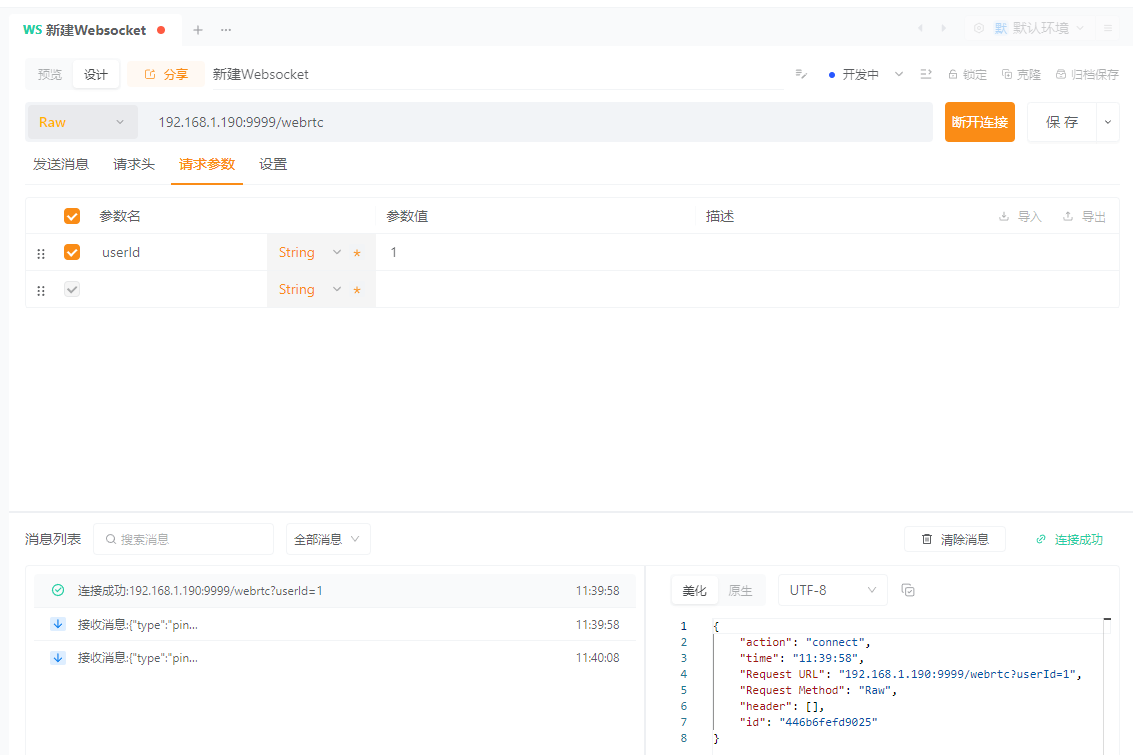
6、测试连接
使用Apipost或其他工具创建WebSocket连接,连接地址(根据实际配置填写):ws://IP:Port/webrtc?userId=用户ID
二、HTML页面
<!DOCTYPE html>
<html>
	<head>
		<meta charset="utf-8">
		<title>WebRTC视频对讲</title>
		<style>
			* {
				margin: 0;
				padding: 0;
				box-sizing: border-box;
				font-family: "Microsoft YaHei", sans-serif;
			}

			.container {
				width: 90%;
				max-width: 1200px;
				margin: 20px auto;
			}

			.input-area,
			.queue-area,
			.call-area {
				margin-bottom: 20px;
				padding: 15px;
				border: 1px solid #eee;
				border-radius: 8px;
			}

			.queue-area,
			.call-area {
				display: none;
			}

			.video-area {
				display: flex;
				gap: 20px;
				flex-wrap: wrap;
			}

			.video-box {
				flex: 1;
				min-width: 320px;
			}

			video {
				width: 100%;
				height: 360px;
				border: 1px solid #ccc;
				border-radius: 8px;
				background-color: #000;
			}

			button {
				padding: 8px 16px;
				margin: 5px;
				border: none;
				border-radius: 4px;
				cursor: pointer;
				font-size: 14px;
			}

			.btn-call {
				background-color: #4CAF50;
				color: white;
			}

			.btn-hangup,
			.btn-reject {
				background-color: #f44336;
				color: white;
			}

			.btn-answer {
				background-color: #2196F3;
				color: white;
			}

			input {
				padding: 8px;
				margin: 5px;
				border: 1px solid #ccc;
				border-radius: 4px;
				width: 200px;
			}

			.tip,
			.queue-tip {
				color: #666;
				font-size: 12px;
				margin-top: 10px;
			}

			.queue-highlight {
				color: #ff9800;
				font-weight: bold;
			}
		</style>
	</head>
	<body>
		<div class="container">
			<!-- 基础输入区域 -->
			<div class="input-area">
				<h3>基础配置</h3>
				<label>自身用户ID:</label>
				<input type="text" id="fromUserId" placeholder="输入自己的ID" required value="">
				<button onclick="initWebSocket()" class="btn-call">初始化连接</button>
				<br>
				<label>要呼叫的用户ID:</label>
				<input type="text" id="toUserId" placeholder="输入对方的ID" value="">
				<button onclick="callUser()" class="btn-call" id="callBtn" style="display: none;">呼叫</button>
				<button onclick="hangupCall()" class="btn-hangup" id="hangupBtn" style="display: none;">挂断/取消呼叫</button>
				<p class="tip">提示:先输入自身ID并初始化连接,再输入对方ID进行呼叫</p>
			</div>

			<!-- 排队状态区域 -->
			<div class="queue-area" id="queueArea">
				<h3>排队状态</h3>
				<p>你正在呼叫 <span id="queueToUserId" class="queue-highlight"></span></p>
				<p>当前排队位置:第 <span id="queueIndex" class="queue-highlight">0</span> 位</p>
				<p>队列总人数:<span id="queueTotal" class="queue-highlight">0</span> 人</p>
				<p class="queue-tip">提示:排队超时5分钟将自动退出,被叫方空闲后将自动为你转发请求</p>
			</div>

			<!-- 来电提示区域 -->
			<div class="call-area" id="callArea">
				<h3>来电提醒</h3>
				<p>来自 <span id="callerUserId" class="queue-highlight"></span> 的呼叫</p>
				<button onclick="answerCall()" class="btn-answer" id="answerBtn">接听</button>
				<button onclick="rejectCall()" class="btn-reject" id="rejectBtn">拒接</button>
			</div>

			<!-- 视频播放区域 -->
			<div class="video-area">
				<div class="video-box">
					<h4>本地视频(静音)</h4>
					<video id="localVideo" autoplay muted playsinline></video>
				</div>
				<div class="video-box">
					<h4>远程视频</h4>
					<video id="remoteVideo" autoplay playsinline></video>
				</div>
			</div>
		</div>

		<script src="js/jquery-3.5.1.min.js"></script>
		<script>
			/************************** 全局变量定义 **************************/
			var webSocket = null; 			// WebSocket实例
			var peerConnection = null; 		// RTCPeerConnection实例
			var localStream = null; 		// 本地媒体流
			var remoteStream = null; 		// 远程媒体流
			var currentCallerId = null; 	// 当前来电方ID
			var isCallValid = false; 		// 通话是否有效
			var isCalling = false; 			// 是否正在呼叫中
			var pendingIceCandidates = []; 	// 待处理ICE候选队列
			var webrtcServerUrl = "ws://192.168.1.190:9999/webrtc"; 	// 信令服务器WebSocket地址
			var RTC_CONFIG = {iceServers: []}; 		// RTC配置,内网环境不需要配置,需要内网穿透可以配置{iceServers: [{urls: "stun:stun.l.google.com:19302"},{urls: "stun:stun1.l.google.com:19302"}]}

			/************************** 浏览器兼容性处理 **************************/
			// 兼容RTCPeerConnection
			window.RTCPeerConnection = window.RTCPeerConnection || window.webkitRTCPeerConnection || window.mozRTCPeerConnection;
			// 兼容RTCSessionDescription
			window.RTCSessionDescription = window.RTCSessionDescription || window.webkitRTCSessionDescription || window.mozRTCSessionDescription;
			// 兼容RTCIceCandidate
			window.RTCIceCandidate = window.RTCIceCandidate || window.webkitRTCIceCandidate || window.mozRTCIceCandidate;
			// 兼容媒体设备接口
			navigator.mediaDevices = navigator.mediaDevices || {};

			// 若浏览器不支持标准的getUserMedia,使用降级兼容方案
			if (!navigator.mediaDevices.getUserMedia) {
				navigator.mediaDevices.getUserMedia = function(constraints) {
					// 获取浏览器私有实现的getUserMedia
					var getUserMedia = navigator.webkitGetUserMedia || navigator.mozGetUserMedia;
					if (!getUserMedia) {
						// 无任何可用实现,返回错误Promise
						return Promise.reject(new Error("当前浏览器不支持获取媒体设备(无getUserMedia实现)"));
					}
					// 封装为标准Promise格式
					return new Promise(function(resolve, reject) {
						getUserMedia.call(navigator, constraints, resolve, reject);
					});
				};
			}

			/************************** 初始化WebSocket连接 **************************/
			function initWebSocket() {
				// 获取自身用户ID
				var fromUserId = $("#fromUserId").val().trim();
				if (!fromUserId) {
					alert("请先输入有效的自身用户ID!");
					console.error("[WebSocket初始化失败] 原因:未输入有效的自身用户ID");
					return;
				}

				// 关闭旧连接
				if (webSocket && webSocket.readyState === WebSocket.OPEN) {
					console.log("[WebSocket] 检测到已有活跃连接,先关闭旧连接");
					webSocket.close();
				}

				// 拼接完整的WebSocket地址
				var wsUrl = webrtcServerUrl + "?userId=" + fromUserId;
				console.log("[WebSocket] 开始创建连接,目标地址:", wsUrl);

				try {
					// 创建WebSocket实例并连接信令服务器
					webSocket = new WebSocket(wsUrl);

					// 连接成功后触发
					webSocket.onopen = function() {
						console.log("[WebSocket] 连接成功!状态:OPEN");
						alert("WebSocket连接成功!可以开始呼叫对方了");
						// 显示"呼叫"按钮
						$("#callBtn").show();
					};

					// 连接关闭后触发
					webSocket.onclose = function(event) {
						console.log("[WebSocket] 连接已关闭,关闭详情:", event);
						// 重置界面状态,隐藏相关功能按钮
						$("#callBtn").hide();
						$("#hangupBtn").hide();
						$("#queueArea").hide();
						console.log("[WebSocket] 关闭状态码:", event.code, ",关闭原因:", event.reason);
						alert("WebSocket连接已关闭,请重新初始化连接");
					};

					// 连接出现异常后触发
					webSocket.onerror = function(error) {
						console.error("[WebSocket] 连接错误,错误详情:", error);
						alert("WebSocket连接失败!请检查信令服务器是否启动");
					};

					// 收到消息后触发
					webSocket.onmessage = function(event) {
						console.log("[WebSocket] 收到服务器消息,原始数据:", event.data);
						try {
							var msg = JSON.parse(event.data);
							console.log("[WebSocket] 消息解析成功,消息内容:", msg);
							// 处理消息
							handleMessage(msg);
						} catch (e) {
							console.error("[WebSocket] 解析信令消息失败,原始数据:", event.data, ",错误详情:", e);
							alert("收到无效的信令消息,无法处理(格式非合法JSON)");
						}
					};
				} catch (e) {
					console.error("[WebSocket] 创建连接实例失败,错误详情:", e);
					alert("无法创建WebSocket连接,请检查浏览器是否支持WebSocket");
				}
			}

			/************************** 处理消息 **************************/
			function handleMessage(msg) {
				var msgType = msg.type;
				var fromUserId = msg.fromUserId;
				var data = msg.data;

				// 心跳消息不处理
				if ("{\"type\":\"ping\"}" == data) {
				    return;
				}

				console.log("[信令消息分发] 收到消息类型:", msgType, ",发送方:", fromUserId, ",消息数据:", data);

				// 根据消息类型处理
				switch (msgType) {
					case "offer": // 对方发起呼叫的Offer消息
						handleOfferMessage(fromUserId, data);
						break;
					case "answer": // 对方接听呼叫的Answer消息
						handleAnswerMessage(data);
						break;
					case "iceCandidate": // 对方发送的ICE候选消息
						handleIceCandidateMessage(data);
						break;
					case "reject": // 对方拒接呼叫的消息
						handleRejectMessage(fromUserId);
						break;
					case "leave": // 对方挂断通话的消息
						handleLeaveMessage(fromUserId, data);
						break;
					case "error": // 服务器返回的错误消息
						handleErrorMessage(data);
						break;
					case "queueUpdate": // 排队状态更新消息
						handleQueueUpdateMessage(data);
						break;
					case "queueTimeout": // 排队超时消息
						handleQueueTimeoutMessage(data);
						break;
					case "offlineNotify": // 对方离线通知消息
						handleOfflineNotifyMessage(data);
						break;
					default: // 未知消息类型
						console.warn("[信令消息分发] 收到未知类型的消息,无法处理,消息类型:", msgType);
				}
			}

			/************************** 各类信令消息具体处理函数 **************************/
			// 处理对方发起呼叫的Offer消息
			function handleOfferMessage(fromUserId, data) {
				console.log("[Offer消息处理] 收到来自", fromUserId, "的呼叫,Offer数据:", data);

				// 校验当前是否已有正在进行的通话
				if (peerConnection) {
					alert("已有正在进行的通话,无法接收新的呼叫");
					console.warn("[Offer消息处理] 处理失败,原因:已有活跃的PeerConnection(存在正在进行的通话)");
					return;
				}

				// 记录当前来电方ID
				currentCallerId = fromUserId;

				// 显示来电提醒区域
				$("#callerUserId").text(fromUserId);
				$("#callArea").show();
				console.log("[Offer消息处理] 已显示来电提醒界面,等待用户接听/拒接");

				// 获取本地媒体流
				getLocalMediaStream(function() {
					// 创建PeerConnection实例
					createPeerConnection();

					// 封装Offer为RTCSessionDescription对象
					var offer = new RTCSessionDescription({
						type: "offer",
						sdp: data
					});

					// 设置远程会话描述
					peerConnection.setRemoteDescription(offer).then(function() {
						console.log("[Offer消息处理] 设置远程Offer描述成功");

						// 处理待排队的ICE候选
						if (pendingIceCandidates.length > 0) {
							console.log("[Offer消息处理] 开始处理待排队的ICE候选,数量:", pendingIceCandidates.length);
							pendingIceCandidates.forEach(function(cacheData) {
								handleIceCandidateMessage(cacheData);
							});
							// 清空待处理队列
							pendingIceCandidates = [];
						}
					}).catch(function(error) {
						console.error("[Offer消息处理] 设置远程Offer描述失败,错误详情:", error);
						alert("处理来电失败,无法建立连接");
						// 重置通话状态,清理资源
						resetCallState();
					});
				});
			}

			// 处理对方接听呼叫的Answer消息
			function handleAnswerMessage(data) {
				console.log("[Answer消息处理] 收到对方接听消息,Answer数据:", data);

				// 校验PeerConnection是否就绪
				if (!peerConnection) {
					console.warn("[Answer消息处理] 处理失败,原因:PeerConnection未初始化(无活跃通话)");
					return;
				}

				// 封装Answer为RTCSessionDescription对象
				var answer = new RTCSessionDescription({
					type: "answer",
					sdp: data
				});

				// 设置远程会话描述
				peerConnection.setRemoteDescription(answer).then(function() {
					console.log("[Answer消息处理] 设置远程Answer描述成功,SDP协商完成,开始建立P2P媒体连接");
					// 更新状态,隐藏排队区域
					isCalling = false;
					$("#queueArea").hide();
				}).catch(function(error) {
					console.error("[Answer消息处理] 设置远程Answer描述失败,错误详情:", error);
					alert("对方接听失败,无法建立通话");
					isCalling = false;
					// 重置通话状态,清理资源
					resetCallState();
				});
			}

			// 处理对方发送的ICE候选消息
			function handleIceCandidateMessage(data) {
				console.log("[ICE候选处理] 收到对方ICE候选消息,候选数据:", data);

				// 校验PeerConnection是否就绪,未就绪则缓存候选
				if (!peerConnection) {
					console.log("[ICE候选处理] PeerConnection未就绪,将候选加入待处理队列,当前队列长度:", pendingIceCandidates.length + 1);
					pendingIceCandidates.push(data);
					return;
				}

				try {
					// 解析ICE候选数据,修改数据(兼容安卓)
					var iceCandidateData = JSON.parse(data);
					var iceCandidateCopy = JSON.parse(JSON.stringify(iceCandidateData));
					if (iceCandidateCopy.sdp) {
						iceCandidateCopy.candidate = iceCandidateCopy.sdp;
						delete iceCandidateCopy.sdp;
					}
					delete iceCandidateCopy.adapterType;
					delete iceCandidateCopy.serverUrl;

					//  校验候选数据是否有效
					if (!iceCandidateCopy.candidate) {
						console.warn("[ICE候选处理] 候选数据无效,无candidate字段,跳过处理");
						return;
					}

					// 封装为RTCIceCandidate对象,并添加到PeerConnection
					var iceCandidate = new RTCIceCandidate(iceCandidateCopy);
					peerConnection.addIceCandidate(iceCandidate).catch(function(error) {
						console.error("[ICE候选处理] 添加远程ICE候选失败,错误详情:", error);
					});

					console.log("[ICE候选处理] 远程ICE候选添加成功");
				} catch (e) {
					console.error("[ICE候选处理] 解析或添加ICE候选失败,错误详情:", e);
				}
			}

			// 处理对方拒接呼叫的消息
			function handleRejectMessage(fromUserId) {
				var rejectMsg = "对方【" + fromUserId + "】已拒接通话";
				console.log("[拒接消息处理] " + rejectMsg);
				alert(rejectMsg);
				// 重置通话状态,清理资源
				resetCallState();
			}

			// 处理对方挂断通话的消息
			function handleLeaveMessage(fromUserId, data) {
				if (data.indexOf("已挂断")!=-1 || fromUserId==currentCallerId) {
					var leaveMsg = "对方【" + fromUserId + "】已挂断通话";
					console.log("[挂断消息处理] " + leaveMsg);
					alert(leaveMsg);
					// 重置通话状态,清理资源
					resetCallState();
				} else {
					var leaveMsg = "对方【" + fromUserId + "】已取消通话";
					console.log("[取消消息处理] " + leaveMsg);
					alert(leaveMsg);
				}
			}

			// 处理服务器返回的错误消息
			function handleErrorMessage(data) {
				console.error("[错误消息处理] 收到服务器错误提示:", data);
				// 若当前通话有效,重置状态并提示用户
				if (isCallValid) {
					isCallValid = false;
					resetCallState();
					alert(data);
				}
			}

			// 处理排队状态更新消息
			function handleQueueUpdateMessage(data) {
				console.log("[排队状态处理] 收到排队状态更新消息,排队数据:", data);
				try {
					// 解析排队信息(队列位置、总人数)
					var queueInfo = JSON.parse(data);
					// 更新界面显示
					$("#queueIndex").text(queueInfo.queueIndex);
					$("#queueTotal").text(queueInfo.totalCount);
					$("#queueToUserId").text($("#toUserId").val().trim());
					$("#queueArea").show();
					console.log("[排队状态处理] 排队界面更新完成,当前位置:第" + queueInfo.queueIndex + "位,总人数:" + queueInfo.totalCount + "人");
				} catch (e) {
					console.error("[排队状态处理] 解析排队状态失败,错误详情:", e);
				}
			}

			// 处理排队超时消息
			function handleQueueTimeoutMessage(data) {
				console.log("[排队超时处理] " + data);
				alert(data);
				// 隐藏排队区域,重置通话状态
				$("#queueArea").hide();
				resetCallState();
			}

			// 处理对方离线通知消息
			function handleOfflineNotifyMessage(data) {
				console.log("[离线通知处理] " + data);
				alert(data);
				// 重置通话状态,清理资源
				resetCallState();
			}

			// 获取本地音视频媒体流
			function getLocalMediaStream(callback) {
				// 定义媒体流约束条件
				var mediaConstraints = {
					video: {
						width: {
							ideal: 640,
							max: 640
						},
						height: {
							ideal: 480,
							max: 480
						},
						frameRate: {
							ideal: 30,
							max: 30
						},
						aspectRatio: 1.3333333333 // 4:3宽高比
					},
					audio: {
						echoCancellation: {
							ideal: true,
							exact: true
						}, // 回声消除
						noiseSuppression: {
							ideal: true,
							exact: true
						}, // 噪声抑制
						autoGainControl: {
							ideal: true,
							exact: true
						}, // 自动增益控制
						highpassFilter: {
							ideal: true,
							exact: true
						} // 高通滤波器(过滤低频噪声)
					}
				};

				console.log("[媒体流获取] 开始获取本地高清媒体流,约束条件:", mediaConstraints);

				// 获取媒体流
				navigator.mediaDevices.getUserMedia(mediaConstraints).then(function(stream) {
					// 保存本地媒体流,绑定到本地视频元素
					localStream = stream;
					$("#localVideo")[0].srcObject = stream;
					console.log("[媒体流获取] 本地高清媒体流获取成功,流包含轨道数:", stream.getTracks().length);

					// 执行回调函数
					if (typeof callback === "function") {
						callback();
					}
				}).catch(function(error) {
					console.error("[媒体流获取] 本地高清媒体流获取失败,错误详情:", error);
					// 按错误类型降级处理或提示用户
					if (error.name === "OverconstrainedError") {
						console.log("[媒体流获取] 高清约束条件不满足,切换为降级模式获取媒体流");
						getLocalMediaStreamDefault(callback);
					} else if (error.name === "NotAllowedError") {
						alert("请授予浏览器麦克风/摄像头的访问权限!");
					} else if (error.name === "NotFoundError") {
						alert("未检测到麦克风/摄像头设备,请检查设备是否连接!");
					} else {
						alert("获取媒体流失败:" + error.message);
					}
				});
			}

			// 降级获取本地媒体流(高清配置失败时使用,兼容更多设备)
			function getLocalMediaStreamDefault(callback) {
				// 定义简化的媒体流约束条件
				var mediaConstraints = {
					video: true, // 使用浏览器默认配置
					audio: {
						echoCancellation: true,
						noiseSuppression: true
					} // 保留基础音频优化
				};

				console.log("[媒体流获取] 开始降级模式获取本地媒体流,约束条件:", mediaConstraints);

				// 获取媒体流
				navigator.mediaDevices.getUserMedia(mediaConstraints).then(function(stream) {
					// 保存本地媒体流,绑定到本地视频元素
					localStream = stream;
					$("#localVideo")[0].srcObject = stream;
					console.log("[媒体流获取] 降级模式本地媒体流获取成功,流包含轨道数:", stream.getTracks().length);

					// 执行回调函数
					if (typeof callback === "function") {
						callback();
					}
				}).catch(function(error) {
					console.error("[媒体流获取] 降级模式本地媒体流获取失败,错误详情:", error);
					alert("获取媒体流失败:" + error.message);
				});
			}

			// 创建RTCPeerConnection实例
			function createPeerConnection() {
				// 关闭旧实例
				if (peerConnection) {
					console.log("[PeerConnection] 检测到已有旧实例,先关闭旧连接");
					peerConnection.close();
				}

				// 创建新的PeerConnection实例
				peerConnection = new RTCPeerConnection(RTC_CONFIG);
				console.log("[PeerConnection] 新实例创建成功");

				// 将轨道添加到PeerConnection
				if (localStream) {
					localStream.getTracks().forEach(function(track) {
						peerConnection.addTrack(track, localStream);
						console.log("[PeerConnection] 已添加本地媒体轨道,轨道类型:", track.kind, ",轨道ID:", track.id);
					});
				}

				// 监听ICE候选收集事件
				peerConnection.onicecandidate = function(event) {
					if (event.candidate) {
						console.log("[PeerConnection] 本地收集到ICE候选,准备发送给对方:", event.candidate);
						// 深拷贝避免修改原始候选数据,兼容安卓
						var iceCandidateCopy = JSON.parse(JSON.stringify(event.candidate));
						iceCandidateCopy.sdp = iceCandidateCopy.candidate;
						delete iceCandidateCopy.candidate;

						// 发送ICE候选消息给对方
						sendMessage({
							type: "iceCandidate",
							data: JSON.stringify(iceCandidateCopy)
						});
					} else {
						console.log("[PeerConnection] ICE候选收集完成,无更多候选数据");
					}
				};

				// 监听远程媒体流到达事件
				peerConnection.ontrack = function(event) {
					console.log("[PeerConnection] 收到远程媒体轨道,轨道类型:", event.track.kind, ",轨道ID:", event.track.id);

					// 初始化远程媒体流
					if (!remoteStream) {
						remoteStream = new MediaStream();
						console.log("[PeerConnection] 远程媒体流初始化成功");
					}

					var track = event.track;
					// 避免重复添加相同轨道
					if (!remoteStream.getTracks().some(t => t.id === track.id)) {
						remoteStream.addTrack(track);
						console.log("[PeerConnection] 已添加远程媒体轨道到远程流");
					}

					// 绑定远程媒体流到视频元素,播放远程视频
					$("#remoteVideo")[0].srcObject = remoteStream;
					$("#remoteVideo")[0].play().catch(function(error) {
						console.warn("[PeerConnection] 远程视频播放触发失败(可能已自动播放),错误详情:", error);
					});
				};

				// 监听连接状态变化事件
				peerConnection.onconnectionstatechange = function() {
					if (!peerConnection) {
						return;
					}

					var connState = peerConnection.connectionState;
					console.log("[PeerConnection] 连接状态变化,当前状态:", connState);

					// 连接关闭或失败时,重置通话状态
					if (connState === "closed" || connState === "failed") {
						console.log("[PeerConnection] 连接已关闭或失败,自动重置通话状态");
						resetCallState();
					}
				};
			}

			// 发送信令消息到服务器
			function sendMessage(msg) {
				// 校验WebSocket连接是否活跃
				if (!webSocket || webSocket.readyState !== WebSocket.OPEN) {
					alert("WebSocket连接已断开,无法发送消息");
					console.error("[消息发送失败] 原因:WebSocket连接未处于OPEN状态,当前状态:", webSocket ? webSocket.readyState : "未初始化");
					return;
				}

				// 获取目标用户ID(优先使用当前来电方ID,其次使用输入框中的目标ID)
				var toUserId = $("#toUserId").val().trim();
				if (msg.type !== "leave" && !toUserId && !currentCallerId) {
					alert("请先输入目标用户ID");
					console.error("[消息发送失败] 原因:未指定目标用户ID");
					return;
				}

				// 构建完整的信令消息
				var fullMsg = {
					type: msg.type,
					fromUserId: $("#fromUserId").val().trim(),
					toUserId: toUserId || currentCallerId,
					data: msg.data
				};

				try {
					var jsonMsg = JSON.stringify(fullMsg);
					webSocket.send(jsonMsg);
					console.log("[消息发送成功] 消息类型:", msg.type, ",目标用户:", fullMsg.toUserId, ",发送内容:", jsonMsg);
				} catch (e) {
					console.error("[消息发送失败] 错误详情:", e);
					alert("无法发送消息,请检查网络连接");
				}
			}

			// 发起呼叫
			function callUser() {
				// 获取并校验目标用户ID
				var toUserId = $("#toUserId").val().trim();
				if (!toUserId) {
					alert("请先输入目标用户ID");
					console.error("[发起呼叫失败] 原因:未输入目标用户ID");
					return;
				}

				console.log("[发起呼叫] 开始呼叫目标用户:", toUserId);

				// 获取本地媒体流,准备建立通话
				getLocalMediaStream(function() {
					// 创建PeerConnection实例
					createPeerConnection();
					// 更新通话状态
					isCallValid = true;
					isCalling = true;

					// 定义Offer选项(表示愿意接收音频和视频)
					var offerOptions = {
						offerToReceiveAudio: true,
						offerToReceiveVideo: true
					};

					console.log("[发起呼叫] 开始创建Offer,选项:", offerOptions);

					// 创建Offer并设置本地会话描述
					peerConnection.createOffer(offerOptions).then(function(offer) {
						return peerConnection.setLocalDescription(offer);
					}).then(function() {
						// 发送Offer消息给目标用户,发起呼叫
						sendMessage({
							type: "offer",
							data: peerConnection.localDescription.sdp
						});

						// 更新界面状态,隐藏呼叫按钮,显示挂断按钮
						$("#callBtn").hide();
						$("#hangupBtn").show();
						console.log("[发起呼叫] Offer消息发送成功,等待对方接听");
					}).catch(function(error) {
						console.error("[发起呼叫] 生成或发送Offer失败,错误详情:", error);
						alert("呼叫失败,无法建立连接");
						isCalling = false;
						// 重置通话状态,清理资源
						resetCallState();
					});
				});
			}

			// 接听呼叫
			function answerCall() {
				// 校验PeerConnection和来电方ID是否有效
				if (!peerConnection || !currentCallerId) {
					alert("无有效来电,无法接听");
					console.error("[接听呼叫失败] 原因:PeerConnection未初始化或无有效来电方ID");
					return;
				}

				console.log("[接听呼叫] 开始接听来自", currentCallerId, "的呼叫");

				// 更新通话状态
				isCallValid = true;

				// 创建Answer并设置本地会话描述
				peerConnection.createAnswer().then(function(answer) {
					return peerConnection.setLocalDescription(answer);
				}).then(function() {
					// 发送Answer消息给来电方,确认接听
					sendMessage({
						type: "answer",
						data: peerConnection.localDescription.sdp
					});

					// 更新界面状态,隐藏来电区域,显示挂断按钮
					$("#callArea").hide();
					$("#callBtn").hide();
					$("#toUserId").val(currentCallerId);
					$("#hangupBtn").show();
					console.log("[接听呼叫] Answer消息发送成功,等待建立媒体连接");
				}).catch(function(error) {
					console.error("[接听呼叫] 生成或发送Answer失败,错误详情:", error);
					alert("接听失败,无法建立通话");
				});
			}

			// 拒绝接听
			function rejectCall() {
				// 若有有效来电方ID,发送拒接消息给对方
				if (currentCallerId && webSocket && webSocket.readyState === WebSocket.OPEN) {
					console.log("[拒接呼叫] 开始拒接来自", currentCallerId, "的呼叫");
					sendMessage({
						type: "reject",
						data: "reject"
					});
				}

				// 重置通话状态,清理资源
				resetCallState();
				alert("已拒接来电");
				console.log("[拒接呼叫] 已完成拒接操作,通话状态已重置");
			}

			// 挂断/取消呼叫
			function hangupCall() {
				if (isCalling) {
					// 正在呼叫中(未被接听),执行取消呼叫逻辑
					console.log("[挂断/取消呼叫] 执行取消呼叫逻辑,当前呼叫目标:", $("#toUserId").val().trim());
					if (webSocket && webSocket.readyState === WebSocket.OPEN) {
						sendMessage({
							type: "leave",
							data: "cancelCall"
						});
					}
					resetCallState();
					alert("已取消呼叫");
				} else {
					// 通话中(已接听),执行挂断通话逻辑
					console.log("[挂断/取消呼叫] 执行挂断通话逻辑,当前通话对象:", $("#toUserId").val().trim());
					if (webSocket && webSocket.readyState === WebSocket.OPEN) {
						sendMessage({
							type: "leave",
							data: "hangup"
						});
					}
					resetCallState();
					alert("已挂断通话");
				}
				console.log("[挂断/取消呼叫] 已完成操作,通话状态已重置");
			}

			// 重置通话状态
			function resetCallState() {
				console.log("[重置通话状态] 开始清理所有通话相关资源和界面状态");

				// 重置全局状态变量
				isCallValid = false;
				isCalling = false;

				// 关闭本地媒体流,释放摄像头/麦克风设备
				if (localStream) {
					localStream.getTracks().forEach(function(track) {
						track.stop();
						console.log("[重置通话状态] 已停止本地媒体轨道,轨道类型:", track.kind);
					});
					localStream = null;
					$("#localVideo")[0].srcObject = null;
					console.log("[重置通话状态] 本地媒体流已清理,本地视频已重置");
				}

				// 关闭PeerConnection
				if (peerConnection) {
					// 移除事件监听
					peerConnection.onicecandidate = null;
					peerConnection.ontrack = null;
					peerConnection.onconnectionstatechange = null;
					// 关闭连接
					peerConnection.close();
					peerConnection = null;
					console.log("[重置通话状态] PeerConnection已关闭并清理");
				}

				// 关闭远程媒体流,清理远程视频
				if (remoteStream) {
					remoteStream.getTracks().forEach(function(track) {
						track.stop();
						console.log("[重置通话状态] 已停止远程媒体轨道,轨道类型:", track.kind);
					});
					remoteStream = null;
					$("#remoteVideo")[0].srcObject = null;
					console.log("[重置通话状态] 远程媒体流已清理,远程视频已重置");
				}

				// 重置界面状态,恢复初始样式
				$("#hangupBtn").hide();
				$("#callArea").hide();
				$("#queueArea").hide();
				$("#callBtn").show();
				$("#toUserId").val("");
				$("#callerUserId").text("");
				console.log("[重置通话状态] 界面状态已恢复初始");

				// 清理全局变量,清空待处理ICE候选队列
				currentCallerId = null;
				pendingIceCandidates = [];
				console.log("[重置通话状态] 所有通话相关资源清理完成");
			}
		</script>
	</body>
</html>
三、配置浏览器
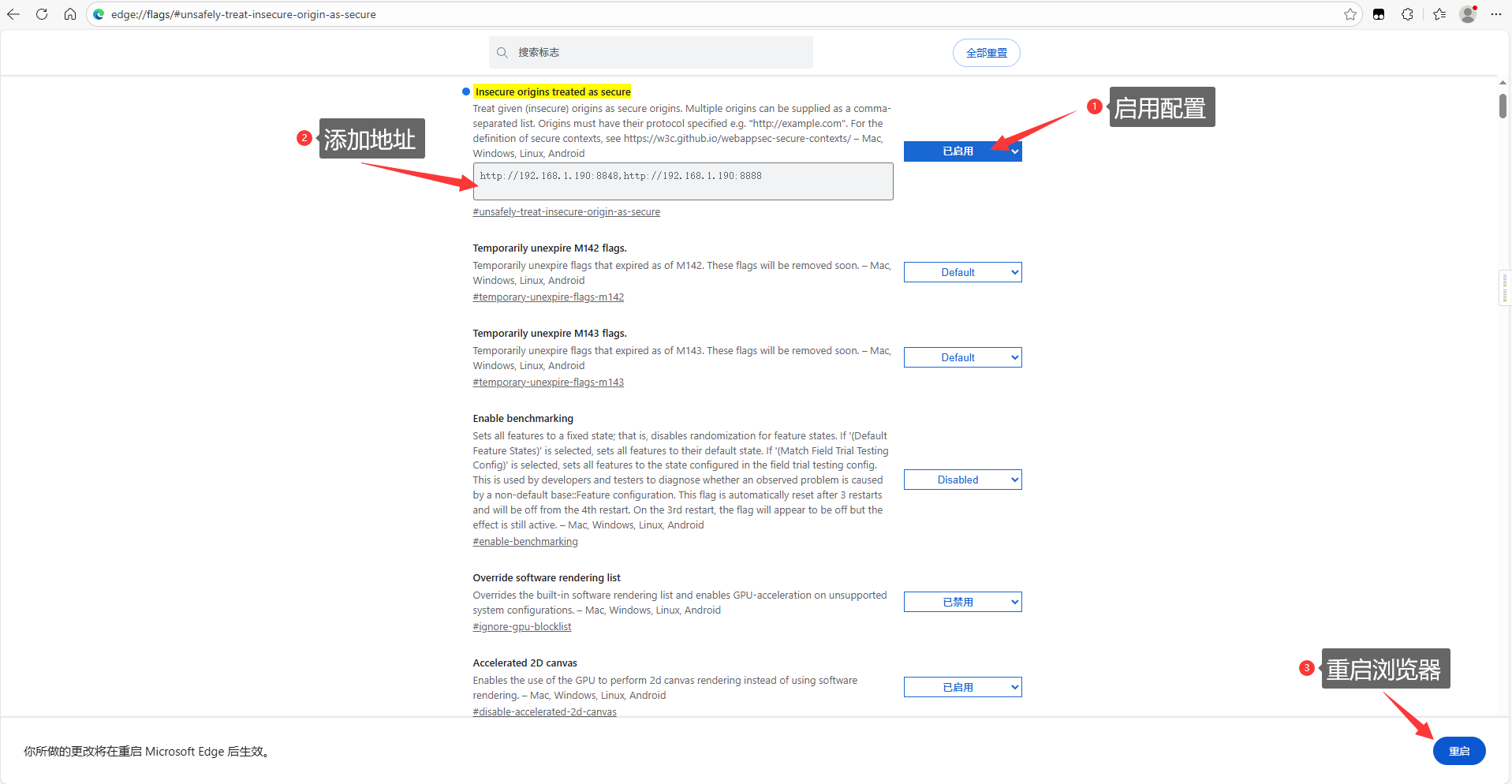
浏览器获取本地摄像头/麦克风需要有限制,地址需要满足任意一项:localhost、127.0.0.1、https,内网环境下想通过IP来访问需要配置unsafely-treat-insecure-origin-as-secure
谷歌、Edge、360浏览器
-
进入浏览器配置页面
谷歌 / 360:chrome://flags/#unsafely-treat-insecure-origin-as-secure
Edge:edge://flags/#unsafely-treat-insecure-origin-as-secure
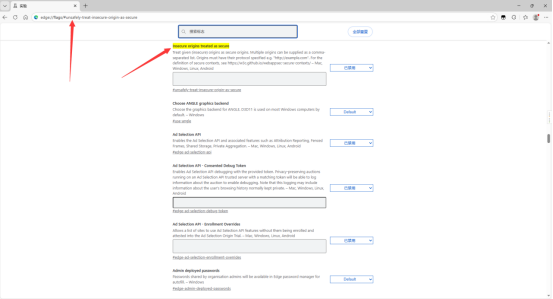
- 启用【Insecure origins treated as secure】项,在输入框中添加需要对讲的系统地址【http://服务器IP:项目端口】,多个地址之间使用英文【,】分隔
火狐浏览器
-
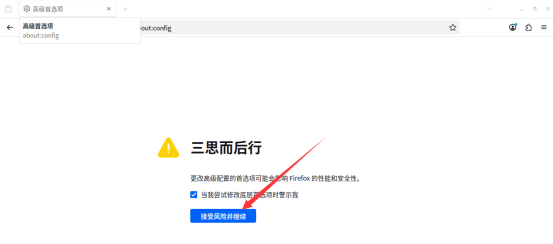
地址栏输入【about:config】
-
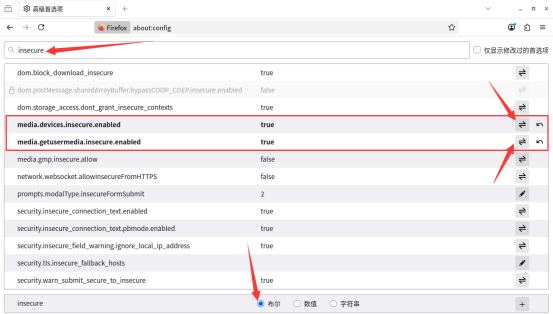
搜索框中输入【insecure】
-
找到【media.devices.insecure.enabled】和【media.getusermedia.insecure.enabled】,点击后面的切换按钮,把值改为true后刷新页面
四、测试视频通话
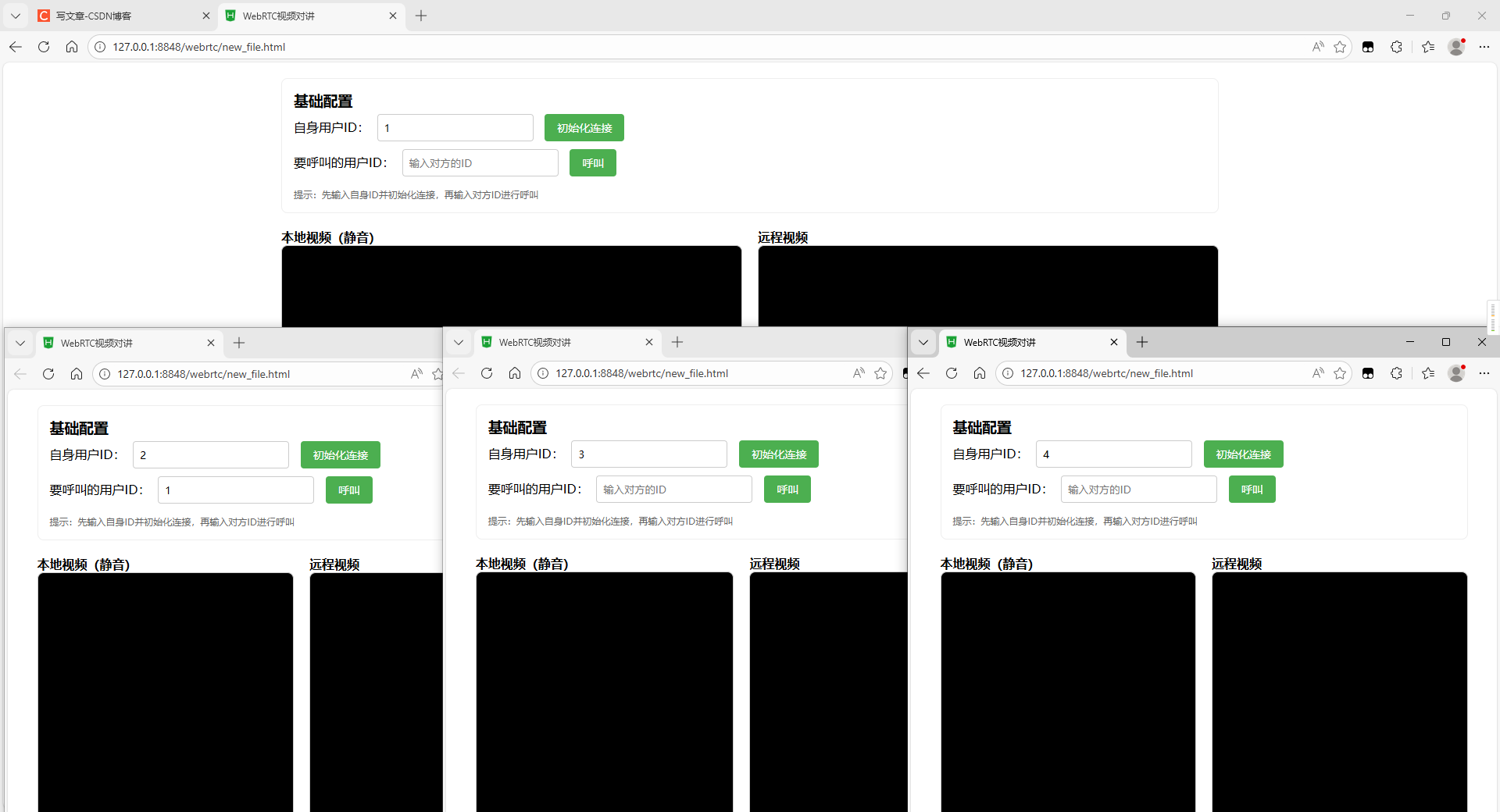
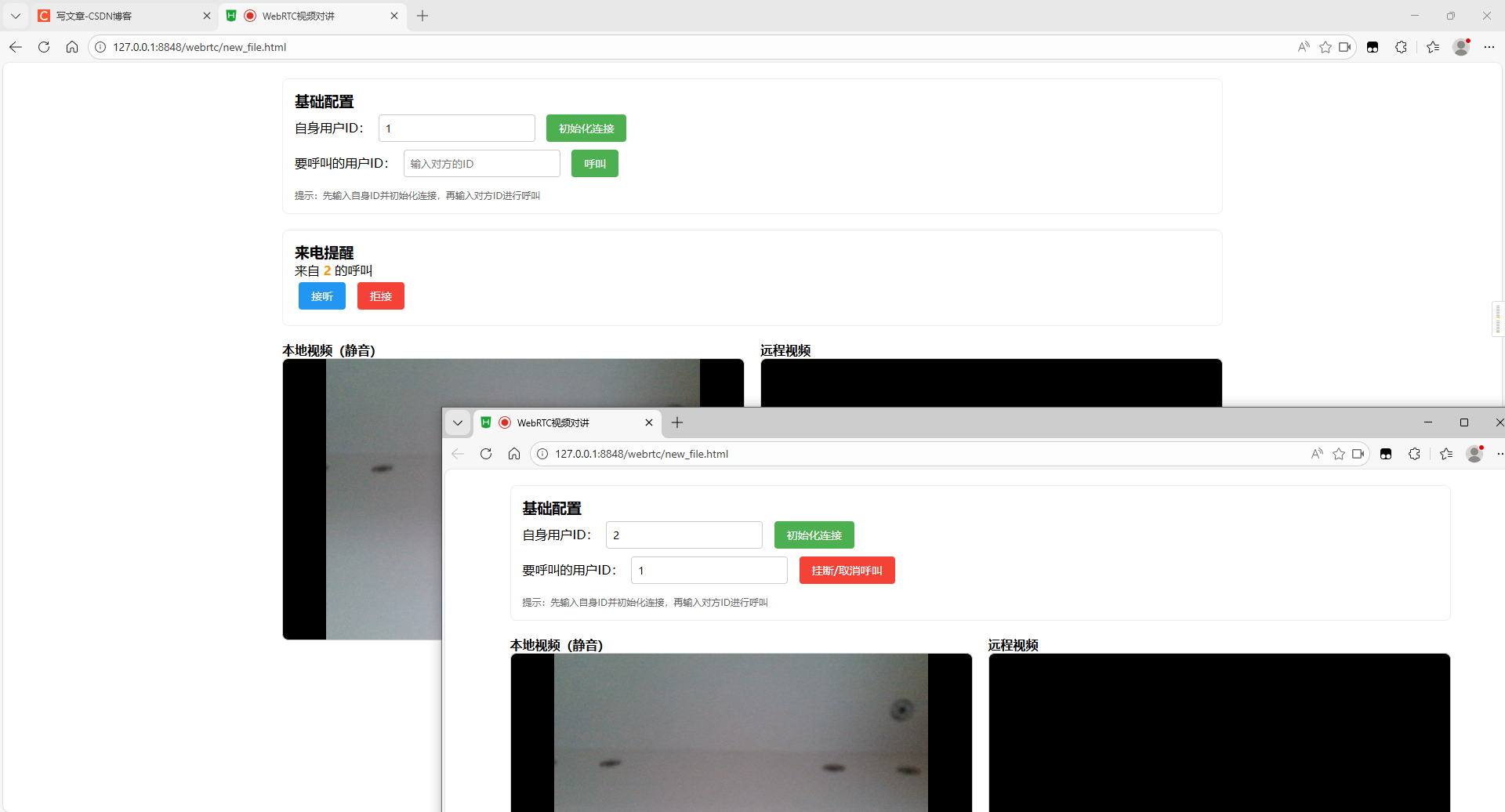
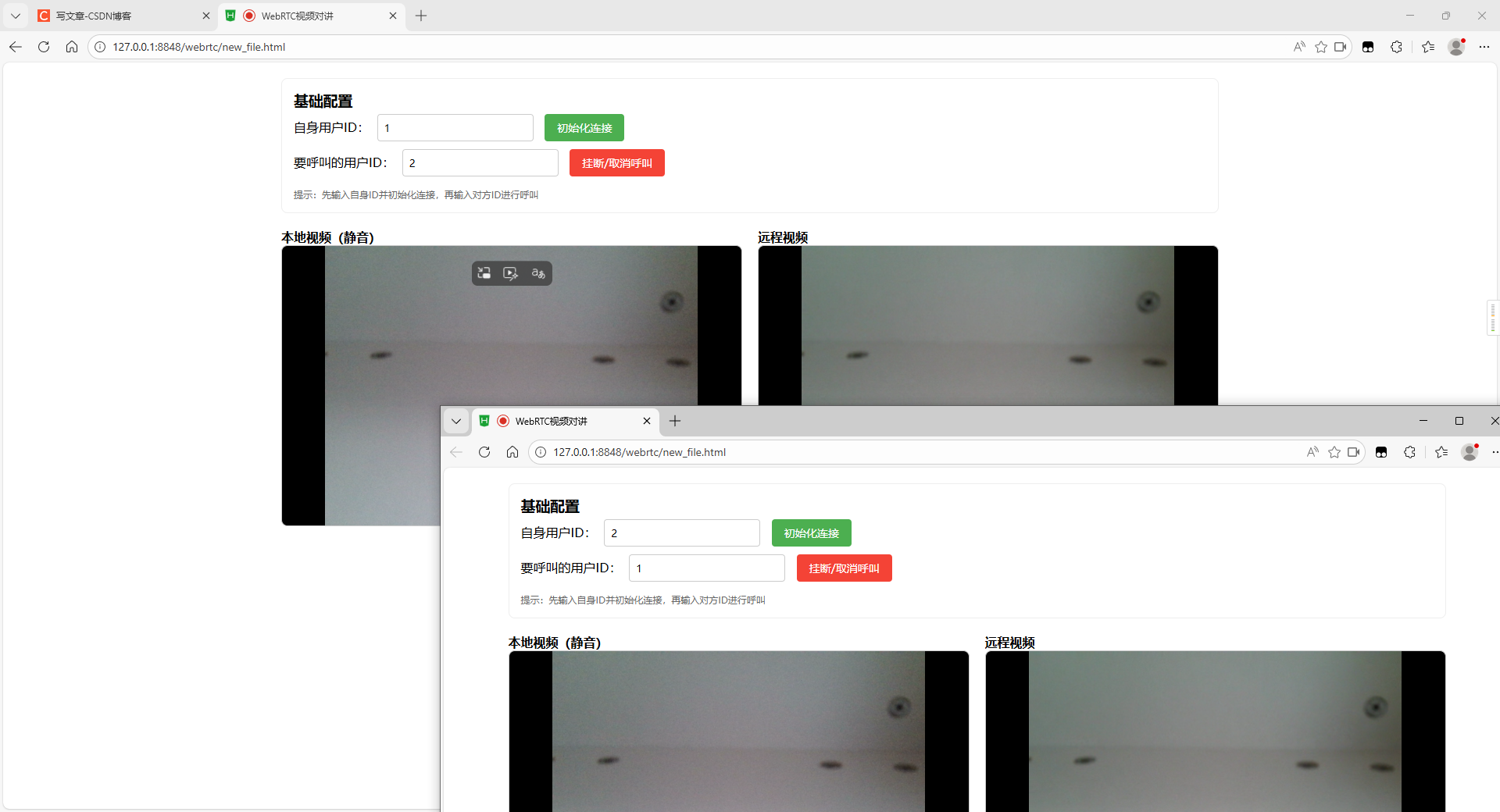
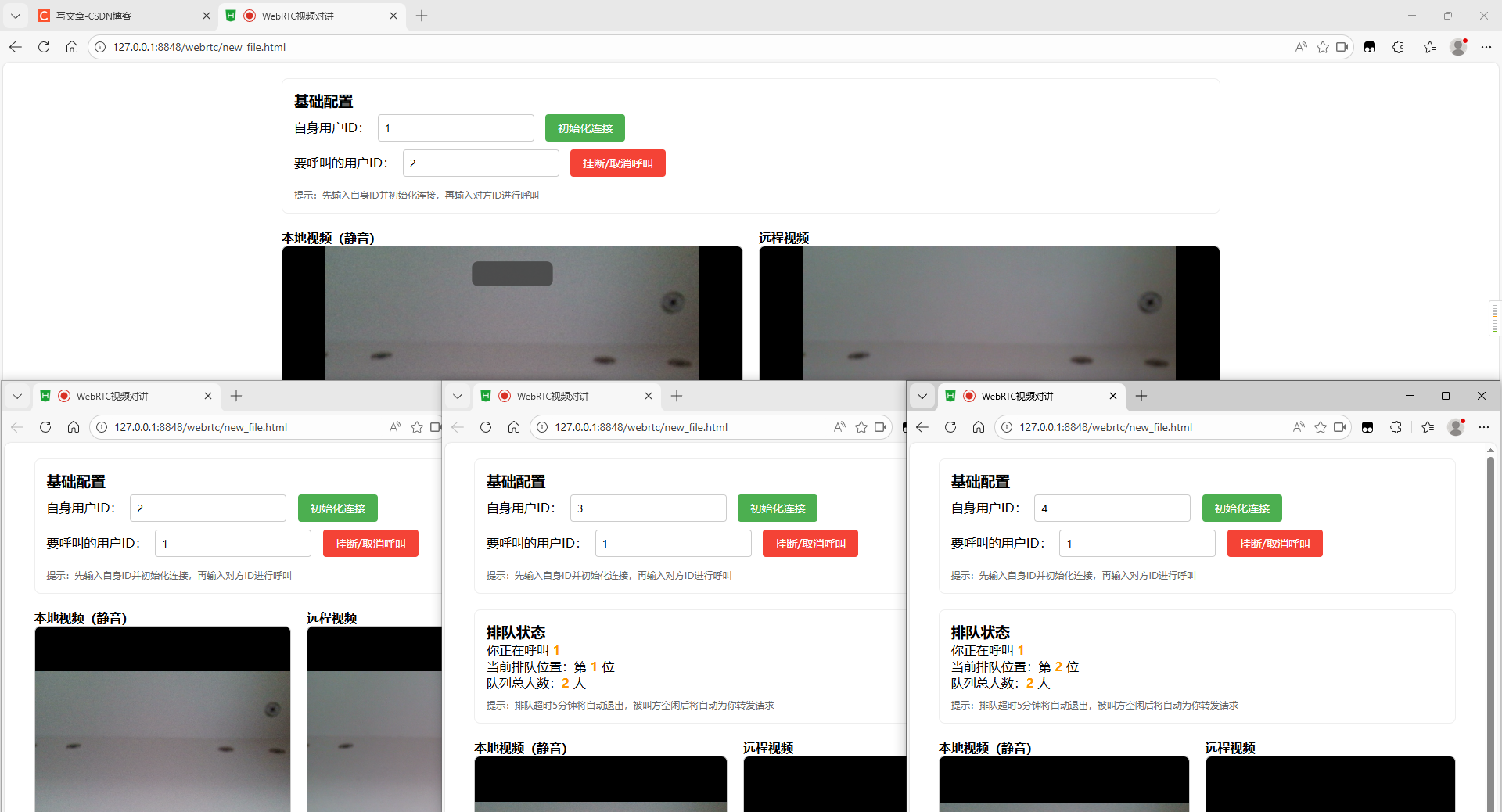
创建了4个浏览器分别登录不同的id,用来模拟一对一呼叫和多对一呼叫的情况
一对一呼叫
2 >>> 1
多对一呼叫(排队功能)
2 >>> 1,3 >>> 1,4 >>> 1
排队列表
用户3取消呼叫,用户4的排队顺位提升
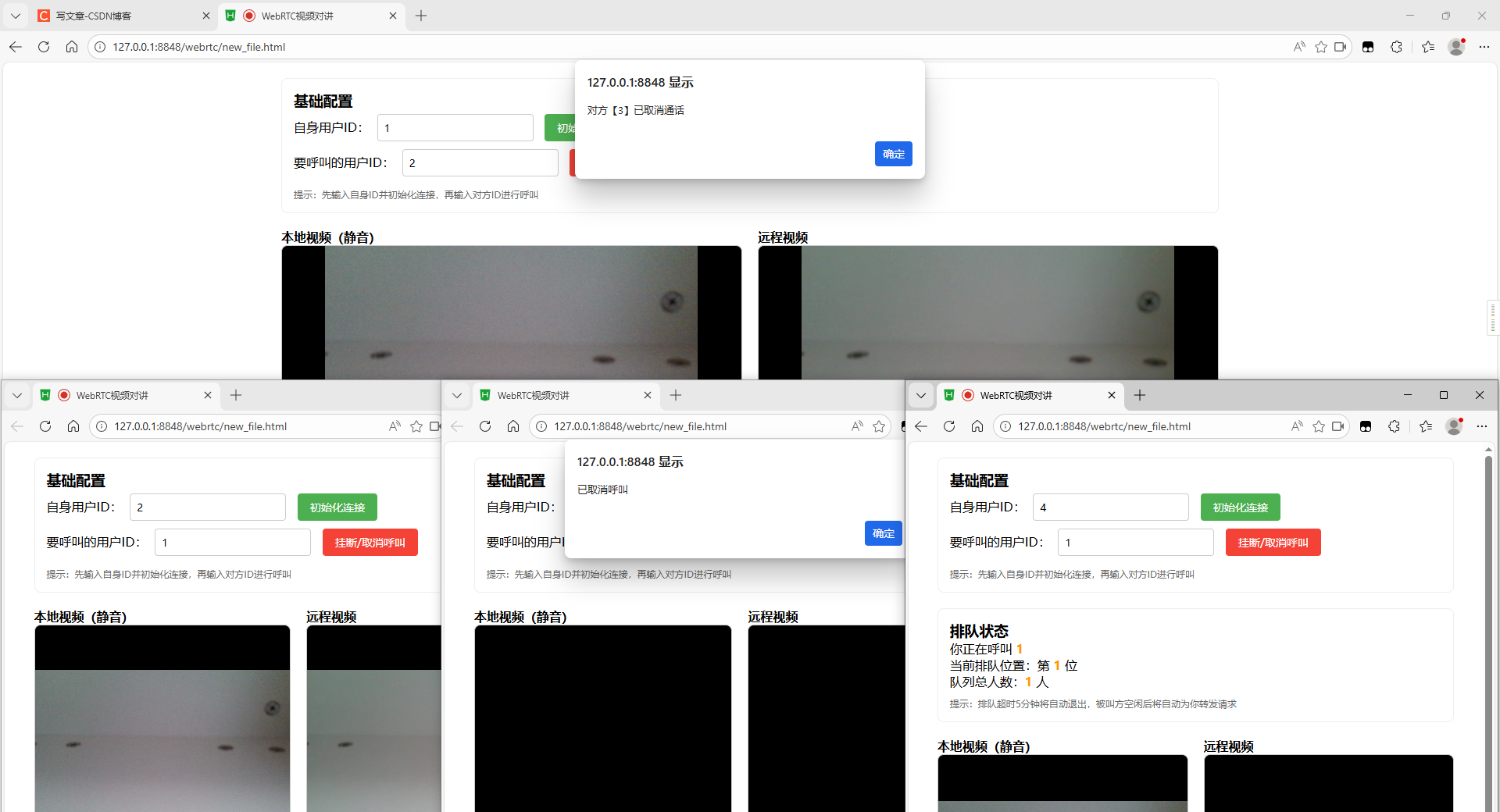
用户2取消呼叫,用户4的呼叫请求传递到用户1并接听成功