-
FileWriter类(神似FileOutputSream)
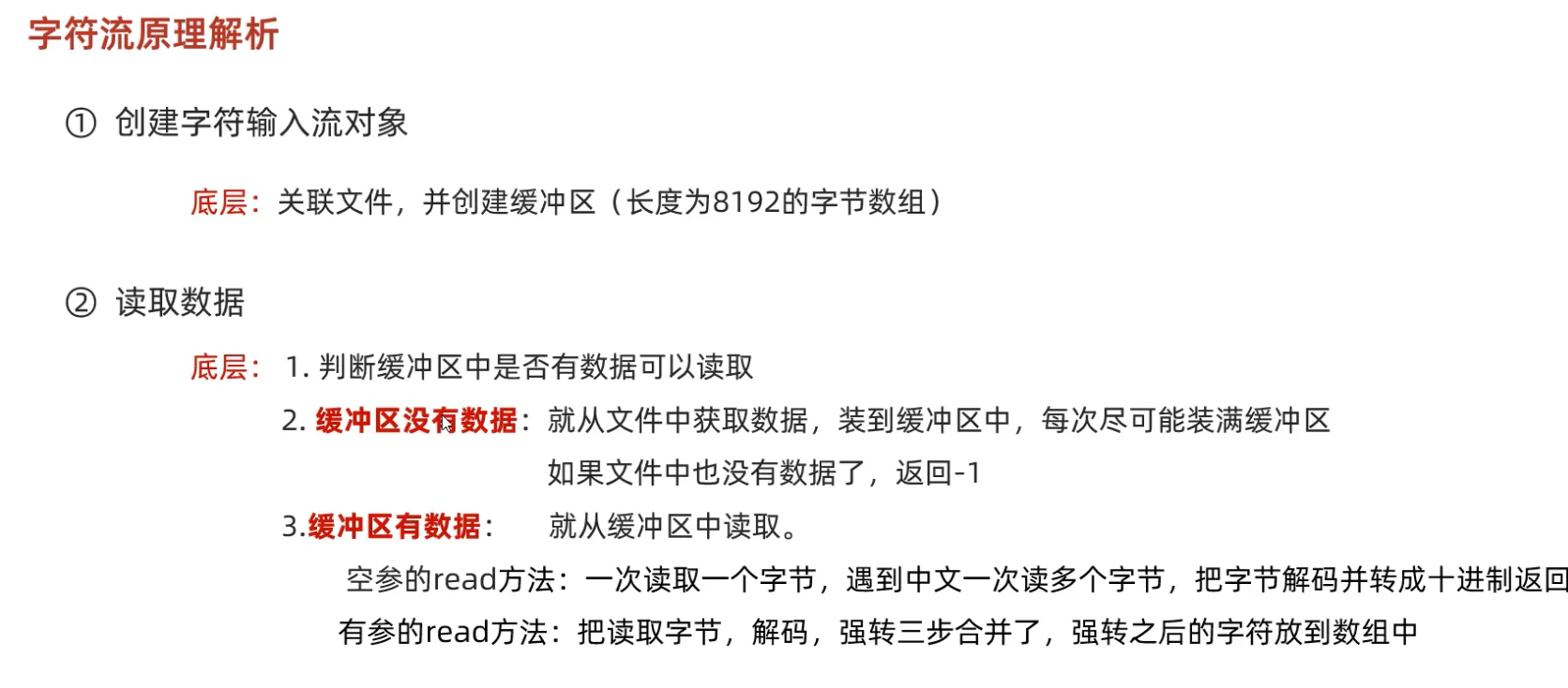
- 也有一个缓冲区,8192个字节,使用flush可以使缓冲区的数据传到文件中,或者关流时也能传到文件中,或者缓冲区满了,自动装到文件中,
- write()方法能把数据放到缓冲区当中
-
字符流底层原理:
-
文件拷贝:
public static void copyDir(File file1,File file2) throws IOException { file2.mkdirs(); File[] files = file1.listFiles(); if(files==null) return ; for (File file : files) { if(file.isFile()){ FileInputStream fr=new FileInputStream(file); FileOutputStream fw=new FileOutputStream(new File(file2,file.getName())); byte[] bytes=new byte[1024*8]; int read; while((read=fr.read(bytes))!=-1) fw.write(bytes,0,read); fr.close(); fw.close(); }else{ String name = file.getName(); File file3=new File(file2,name); copyDir(file,file3); } } -
通过一个数字异或同一个数字两次就能还原的特性实现文件加密
-
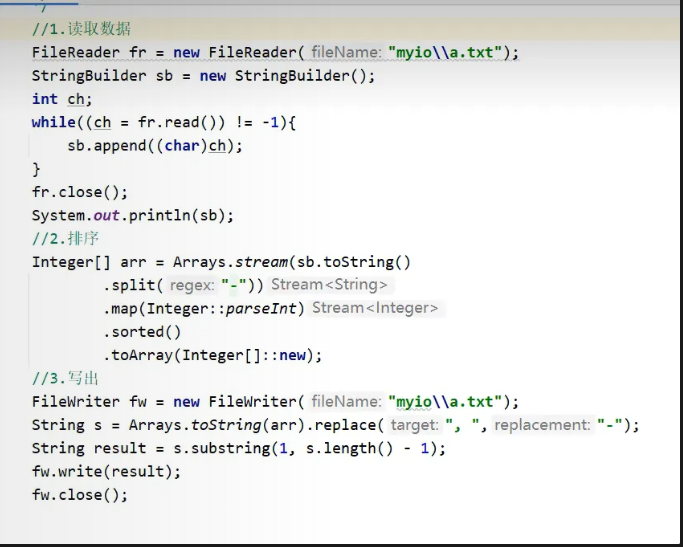
实现文件修改: 1.
27.初识缓冲流:
-
字节缓冲输入流(Java在底层维护了一个长度为8192的字节数组缓冲区)
-
字节缓冲输出流
//他会很快嘛,为什么呢,底层是什么实现呢
public static void bufferHighCopy(File file1,File file2) throws IOException {
BufferedInputStream bis=new BufferedInputStream(new FileInputStream(file1));
BufferedOutputStream bos=new BufferedOutputStream(new FileOutputStream(file2));
int len=0;
while((len=bis.read())!=-1){
bos.write(len);
}
bos.close();
bis.close();
} -
字符缓冲流
- 字符缓冲输入流BufferedReader
- 字符缓冲输出流BufferedWriter
底层有一个长度为8192的字符数组(char类型的),Java中一个char表示2个字符
有两个方法
- newLine(),输出时跨平台实现换行功能
- readLine():输入时一读读一行,不读取换行符,没什么能读的就返回null
-
转换流
-
在字节流和字符流之间进行转换
-
InputStreamReader和OutputStreamWriter
//使用指定的编码规则打开文件
FileReader fr=new FileReader("C:\\ai-output\\test\\xilu.txt",Charset.forName("GBK"));
int b;
while((b=fr.read())!=-1){
System.out.print((char)b);
}
fr.close();
-
-
题目:使用字节流打开纯文本文件,要求不能出现乱码,一下子能读取一行
BufferedReader br=new BufferedReader(new InputStreamReader(new FileInputStream("C:\\\\ai-output\\\\test\\\\xilu.txt"),Charset.forName("GBK"))); String str; while((str=br.readLine())!=null){ System.out.println(str); } br.close(); -
序列化流/对象操作输出流
- 把Java对象写到文件中
- 对象要实现
Serializable接口 - 要有一个
private static final long serialVersionUID = 7310462743447418622L;然后就能保证序列化时写入对象,然后修改对象,然后反序列化后不报错 transient int age;使用transient瞬态关键字可以把这个字段不序列化到文件中
反序列化流/对象操作输入流,将文件变成java对象
Student s=new Student("Rance",23); ObjectOutputStream oos=new ObjectOutputStream(new FileOutputStream("javabean.txt")); oos.writeObject(s); oos.close(); ObjectInputStream ois=new ObjectInputStream(new FileInputStream("javabean.txt")); Object o = ois.readObject(); System.out.println(o); ois.close(); -
在使用序列化流和反序列化流的时候,如果需要序列化多个对象,需要把所有的对象放到一个集合中,然后序列化集合,以此来解决反序列化时不知道该调用几次readObject()方法的问题
Student s1=new Student("Rance",10);
Student s2=new Student("Xilu",20);
Student s3=new Student("Zhijinxiang",30);
ArrayListlist=new ArrayList<>();
list.add(s1);
list.add(s2);
list.add(s3);
ObjectOutputStream oos=new ObjectOutputStream(new FileOutputStream("rance.txt"));
oos.writeObject(list);
oos.close();
ObjectInputStream ois=new ObjectInputStream(new FileInputStream("rance.txt"));
ArrayListo = (ArrayList ) ois.readObject();
System.out.println(o);
ois.close(); -
字节输出流PrintStream
PrintStream ps=new PrintStream(new FileOutputStream("rance.txt"),true,"GBK");
ps.println(98982543d);
ps.println("java");
ps.print(true);
ps.printf("%s 重击","兰斯");
ps.close(); -
System.out.println()是标准输出流,是PrintStream类型的,系统唯一,不可关闭