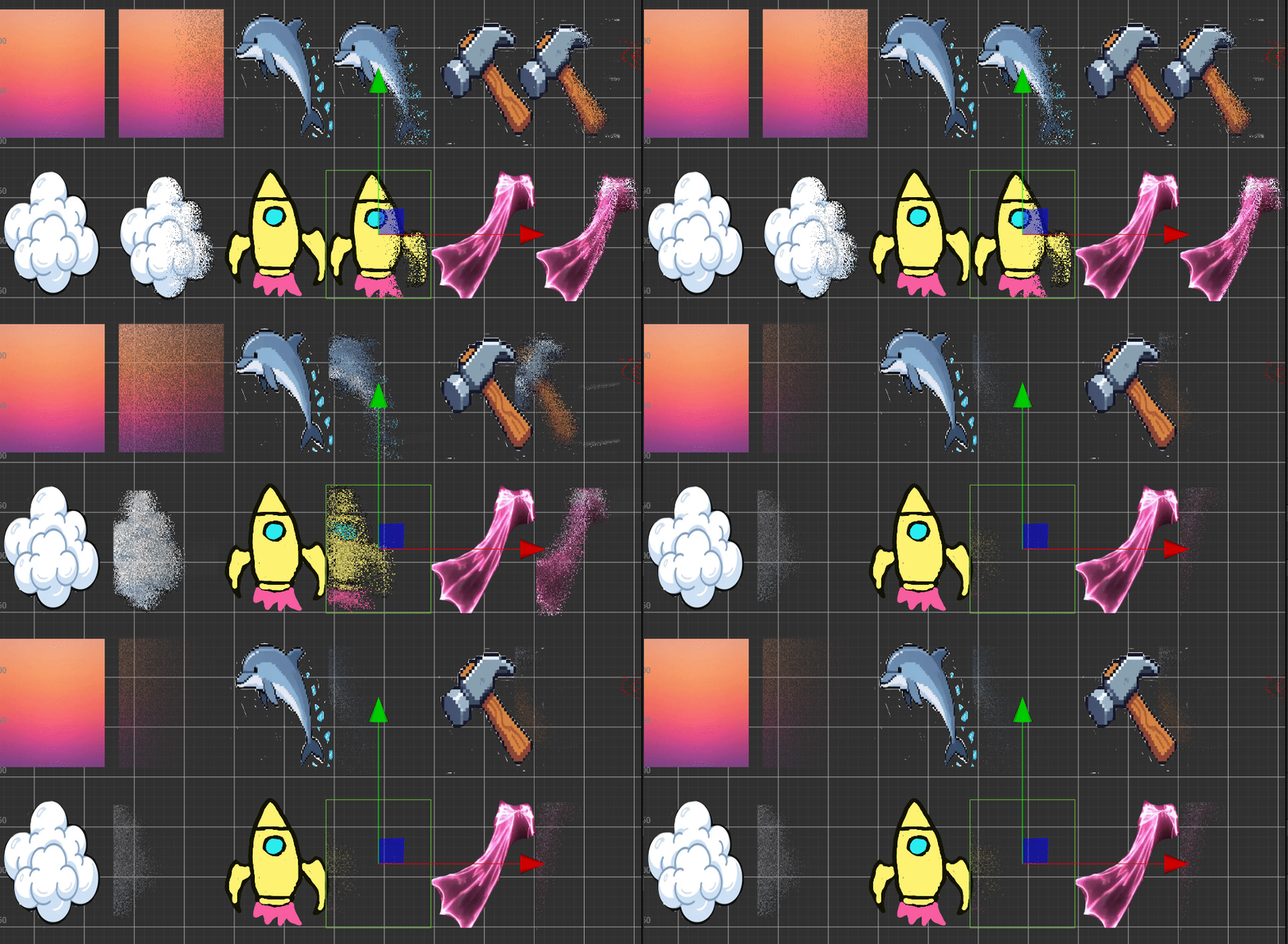
完整工程 https://pan.baidu.com/s/15CmKj4Y4-SuJ4F5KhFfGvQ?pwd=6666
演示请前往演示
go
// Effect Syntax Guide: https://docs.cocos.com/creator/manual/zh/shader/index.html

CCEffect %{
  techniques:
  - name: minimalSand
    passes:
    - vert: vs:vert
      frag: fs:frag
      blendState:
        targets:
        - blend: true
          blendSrc: src_alpha
          blendDst: one_minus_src_alpha
      depthStencilState:
        depthTest: false
        depthWrite: false
      rasterizerState:
        cullMode: none
      properties:

        windSpeed: { value: 1.0, editor: { slide: true, range: [0.1, 7.0] } }
        windPower: { value: 0.5, editor: { slide: true, range: [0, 170] } }
        sandSize: { value: 20.0, editor: { slide: true, range: [5, 170] } }
        sandDensity: { value: 0.7, editor: { slide: true, range: [0, 1] } }
        dispersionCurve: { value: 0.7, editor: { slide: true, range: [0, 1] } }
        autoAnimate: { value: 0.0, editor: { tooltip: "1=自动动画,0=手动控制" } }

}%

CCProgram vs %{
  precision highp float;
  #include <cc-global>

  #if USE_LOCAL
    #include <builtin/uniforms/cc-local>
  #endif

  in vec3 a_position;
  in vec2 a_texCoord;
  out vec2 uv;

  #if USE_LOCAL
    in vec4 a_color;
    out vec4 v_color;
  #endif

  vec4 vert() {
    vec4 pos = vec4(a_position, 1);

    #if USE_LOCAL
      pos = cc_matWorld * pos;
      v_color = a_color;
    #endif

    pos = cc_matViewProj * pos;
    uv = a_texCoord;

    return pos;
  }
}%

CCProgram fs %{
  precision highp float;
  #include <sprite-texture>
  #include <cc-global>

  in vec2 uv;
  uniform sampler2D mainTexture;

  uniform UBO {
    float windSpeed;
    float windPower;
    float sandSize;
    float sandDensity;       // 沙子密度,影响哪些颗粒会被"破碎"
    float dispersionCurve;
    float autoAnimate;
  };

  //float rand(vec2 p) {
    //return fract(sin(dot(p, vec2(12.9898, 78.233))) * 43768.7473);
  //}

  //vec4 frag() {
    // 计算当前属于哪个沙子颗粒
    float rand(vec2 p) {
    return fract(sin(dot(p, vec2(12.9898, 78.233))) * 43768.7473);
  }

  float noise(vec2 p) {
    vec2 i = floor(p);
    vec2 f = fract(p);

    // 2D 双线性插值
    float a = rand(i);
    float b = rand(i + vec2(1.0, 0.0));
    float c = rand(i + vec2(0.0, 1.0));
    float d = rand(i + vec2(1.0, 1.0));

    vec2 u = f * f * (3.0 - 2.0 * f);

    return mix(mix(a, b, u.x), mix(c, d, u.x), u.y);
  }

  vec4 frag() {
    // 1. 计算当前属于哪个沙子颗粒
    vec2 sandID = floor(uv * sandSize);
    float sandSeed = rand(sandID);

    // 2. 计算动态的风力效果(添加时间维度)
    float timeComponent = 0.0;
    if (autoAnimate > 0.5) {
      // 自动动画:使用时间驱动
      timeComponent = cc_time.x * windSpeed;
    } else {
      // 手动控制:使用windPower
      timeComponent = windPower * 0.1;
    }

    // 3. 右向左的吹散效果:越靠左的部分,需要越长时间才会开始吹散
    //    同时添加风力波动的随机性
    float screenPosMod = (1.0 - uv.x); // 1.0表示最左边,0.0表示最右边

    // 基础风力强度:右边的先开始被吹
    float baseWindThreshold = screenPosMod * 3.0;

    // 添加风力波动效果
    float windNoise = noise(vec2(uv.x * 0.2, timeComponent * 0.3)) * 2.0 - 1.0;

    // 计算这个粒子是否应该开始移动
    float activationTime = baseWindThreshold + sandSeed * 2.0 + windNoise * 0.5;

    // 4. 动态旋风效果:随着时间,风力逐渐增强
    float windProgress = 0.0;
    float remainingWind = timeComponent - activationTime;

    if (remainingWind > 0.0) {
      // 计算移动进度
      float maxMoveDist = 20.0;
      windProgress = min(remainingWind / 10.0, 1.0);

      // 超过最大距离的颗粒完全消散
      if (remainingWind > maxMoveDist) {
        return vec4(0.0);
      }
    } else {
      // 还没开始吹散,正常显示
      return texture(cc_spriteTexture, uv);
    }

    // 5. 计算向右移动的轨迹(加入更多动态效果)
    // 基础的向右移动
    float horizontalMove = windProgress * 1.0;

    // 向上的飘散效果(被风吹起)
    float verticalLift = 0.0;
    float windOscillation = 0.0;

    // 添加涡流效果:粒子会旋转
    if (windProgress > 0.1) {
      // 粒子上升位移
      verticalLift = windProgress * windProgress * 0.4;

      // 添加正弦波动,模拟风力变化
      float waveFreq = 3.0 + sandSeed * 7.0;
      float wavePhase = sandSeed * 3.14159 * 2.0;
      windOscillation = sin(wavePhase + timeComponent * waveFreq) * 0.15 * windProgress;
    }

    // 6. 涡流旋转效果
    vec2 uvOffset = vec2(0.0);
    if (windProgress > 0.2) {
      float rotateAmount = windProgress * (sandSeed - 0.5) * 0.3;

      // 以颗粒位置为中心旋转
      vec2 center = vec2(0.5, 0.5);
      vec2 delta = uv - center;

      // 旋转矩阵
      float cosRot = cos(rotateAmount);
      float sinRot = sin(rotateAmount);
      uvOffset = vec2(
        delta.x * cosRot - delta.y * sinRot,
        delta.x * sinRot + delta.y * cosRot
      ) - delta;
    }

    // 7. 计算最终位移
    float newX = uv.x + horizontalMove + uvOffset.x + windOscillation;
    float newY = uv.y + verticalLift + uvOffset.y;

    // 边界处理
    newX = min(newX, 1.0);
    newY = clamp(newY, 0.0, 1.0);

    // 8. 采样颜色
    vec2 newUV = vec2(newX, newY);
    vec4 color = texture(cc_spriteTexture, newUV);

    // 9. 消散效果
    if (windProgress > 0.05) {
      // 透明度根据距离逐渐降低
      float alphaFade = 1.0 - smoothstep(0.0, 0.8, windProgress);
      color.a *= alphaFade * (0.7 + sandSeed * 0.3);

      // 颜色淡化效果
      float colorFade = 1.0 - smoothstep(0.0, 1.0, windProgress) * 0.4;
      color.rgb *= colorFade;

      // 风和噪波混合效果(用于产生沙尘拖尾)
      if (windProgress > 0.3) {
        // 采样多个位置混合,产生运动模糊
        float blurAmount = windProgress * 0.2;
        vec4 blurColor1 = texture(cc_spriteTexture, newUV + vec2(-blurAmount * 0.5, 0.0));
        vec4 blurColor2 = texture(cc_spriteTexture, newUV + vec2(-blurAmount, 0.0));

        // 加权混合:当前颜色+2个历史位置
        color = mix(color, (blurColor1 * 0.6 + blurColor2 * 0.4) * alphaFade,
                   min(blurAmount * 0.7, 0.5));
      }

      // 粒子尾部添加轻微的光晕效果
      if (windProgress > 0.5) {
        float trailGlow = (1.0 - windProgress) * 0.3;
        color.rgb = color.rgb * (1.0 + trailGlow);
      }
    }

    // 完全吹散后消失
    if (windProgress > 0.95) {
      color.a *= 0.2; // 几乎透明
    }

    return color;
  }
}%