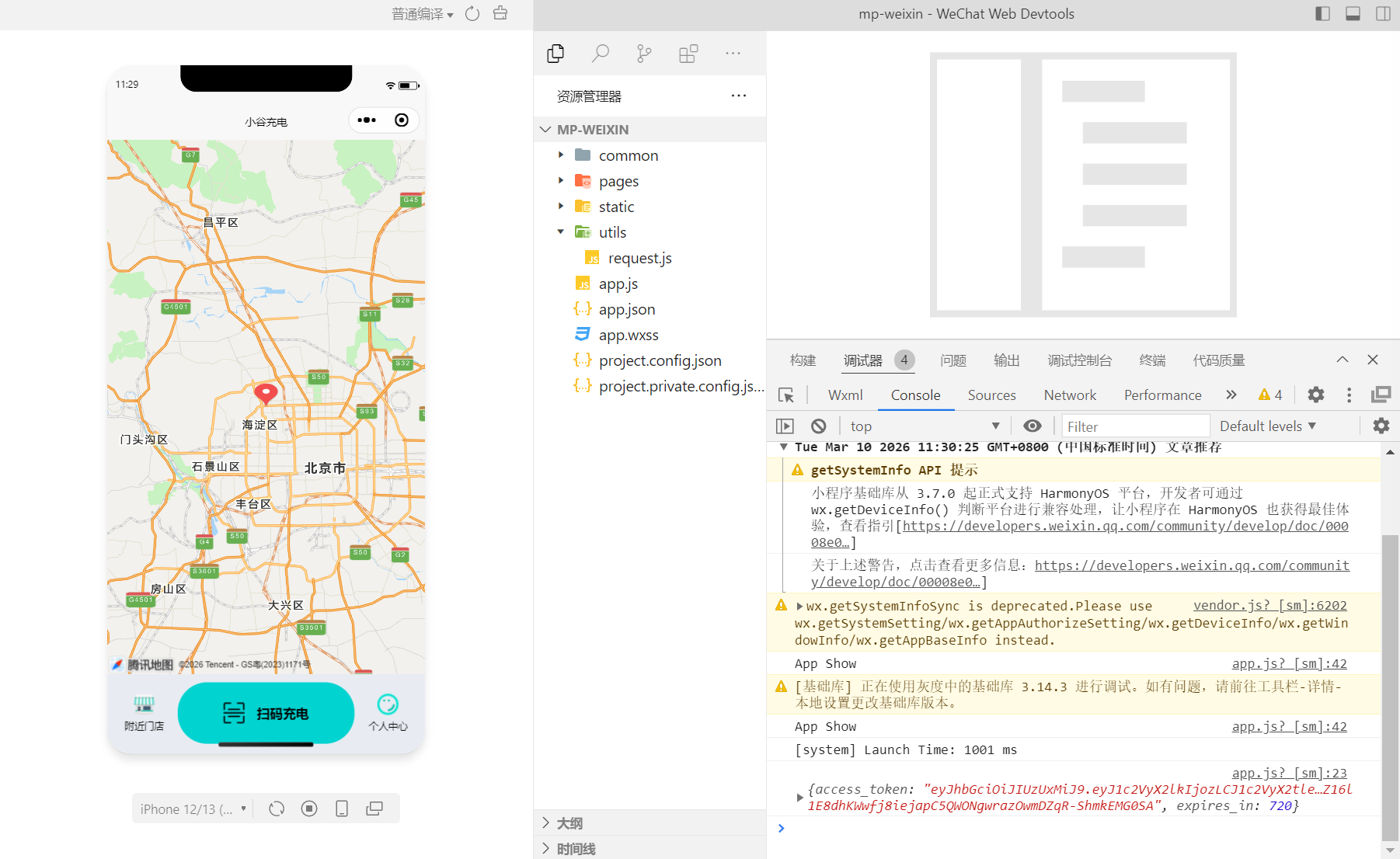
七、权限管理,日志,代码生成
若依-权限控制
完善系统权限功能
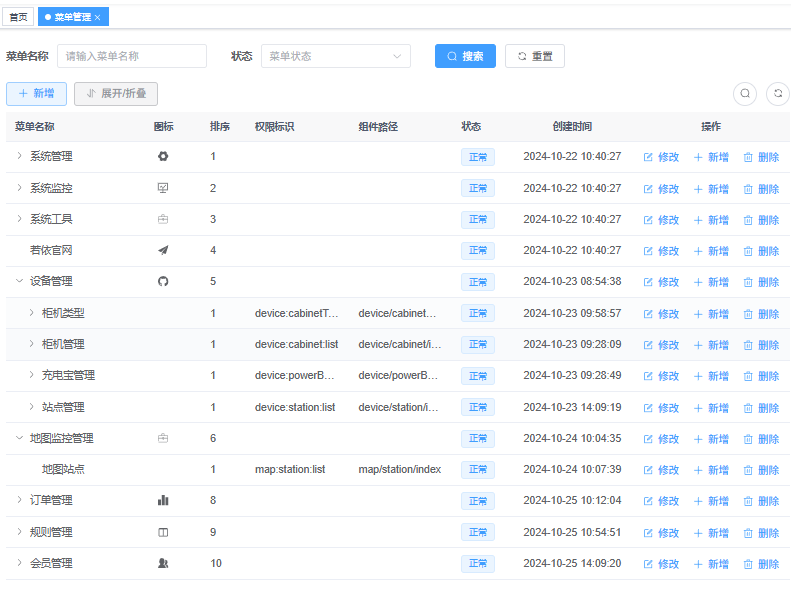
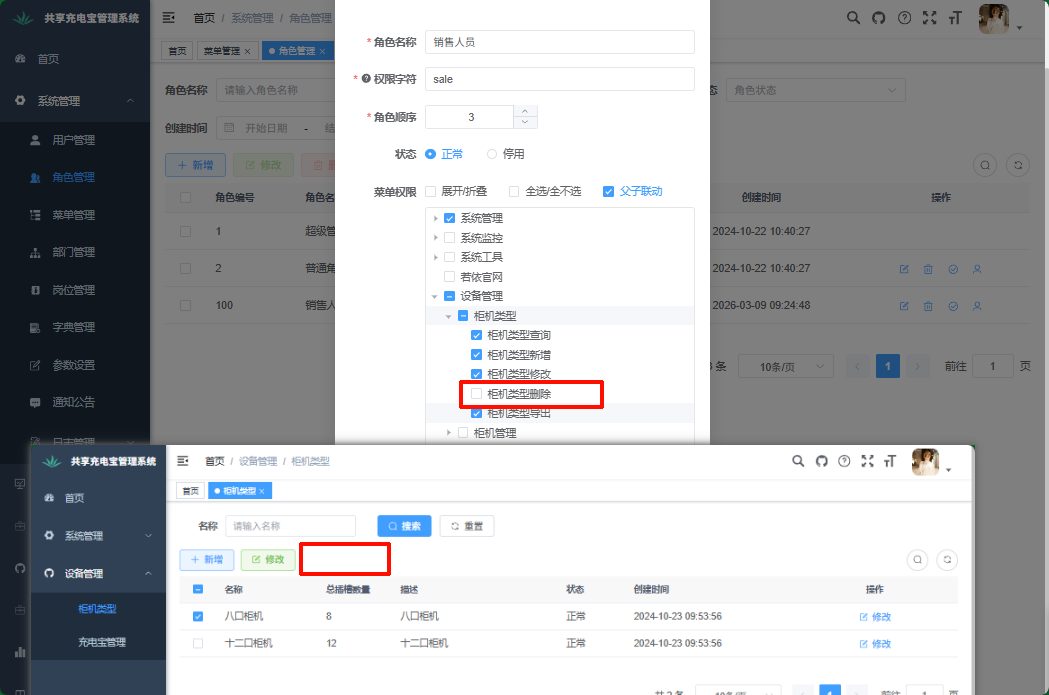
添加按钮权限数据
添加按钮权限
添加注解
@RequiresPermissions("")CabinetTypeController.java
java
package com.share.device.controller;

import com.share.common.core.web.controller.BaseController;
import com.share.common.core.web.domain.AjaxResult;
import com.share.common.core.web.page.TableDataInfo;
import com.share.common.security.annotation.RequiresPermissions;
import com.share.device.domain.CabinetType;
import com.share.device.service.ICabinetTypeService;
import io.swagger.v3.oas.annotations.Operation;
import io.swagger.v3.oas.annotations.tags.Tag;
import org.springframework.beans.factory.annotation.Autowired;
import org.springframework.web.bind.annotation.*;

import java.util.Arrays;
import java.util.List;

@Tag(name = "柜机类型接口管理")
@RestController
@RequestMapping("/cabinetType")
public class CabinetTypeController extends BaseController {
    @Autowired
    private ICabinetTypeService cabinetTypeService;

    /**
     * 查询柜机类型列表
     */
    @Operation(summary = "查询柜机类型列表")
    @RequiresPermissions("device:cabinetType:list")
    @GetMapping("/list")
    public TableDataInfo list(CabinetType cabinetType) {
        //封装分页参数数据
        startPage();
        //调用service查询数据库
        List<CabinetType> list = cabinetTypeService.selectCabinetTypeList(cabinetType);
        TableDataInfo dataTable = getDataTable(list);
        return dataTable;
    }

    /**
     * 根据id查询详情
     */
    @Operation(summary = "获取柜机类型详细信息")
    @RequiresPermissions("device:cabinetType:query")
    @GetMapping(value = "/{id}")
    public AjaxResult getCabinetType(@PathVariable Long id) {
        CabinetType cabinetType = cabinetTypeService.getById(id);
        AjaxResult ajaxResult = success(cabinetType);
        return ajaxResult;
    }


    /**
     * 新增柜机类型
     */
    @Operation(summary = "新增柜机类型")
    @RequiresPermissions("device:cabinetType:add")
    @PostMapping
    public AjaxResult add(@RequestBody CabinetType cabinetType) {
        boolean is_Success = cabinetTypeService.save(cabinetType);
        AjaxResult ajaxResult = toAjax(is_Success);
        return ajaxResult;
    }

    /**
     * 修改柜机类型
     */
    @Operation(summary = "修改柜机类型")
    @RequiresPermissions("device:cabinetType:edit")
    @PutMapping
    public AjaxResult edit(@RequestBody CabinetType cabinetType) {
        boolean is_Success = cabinetTypeService.updateById(cabinetType);
        AjaxResult ajaxResult = toAjax(is_Success);
        return ajaxResult;
    }

    /**
     * 删除柜机类型
     * 根据id删除某个数据,或者根据多个id删除多个数据
     */
    @Operation(summary = "删除柜机类型")
    @RequiresPermissions("device:cabinetType:remove")
    @DeleteMapping("/{ids}")
    public AjaxResult remove(@PathVariable Long[] ids) {
        boolean is_Success = cabinetTypeService.removeByIds(Arrays.asList(ids));
        AjaxResult ajaxResult = toAjax(is_Success);
        return ajaxResult;
    }


    /**
     * 查询全部柜机类型列表
     *
     * @return
     */
    @Operation(summary = "查询全部柜机类型列表")
    @GetMapping("/getCabinetTypeList")
    public AjaxResult getCabinetTypeList() {
        return success(cabinetTypeService.list());
    }

}
vue页面按钮控制
javascript
v-hasPermi="['device:cabinetType:add']"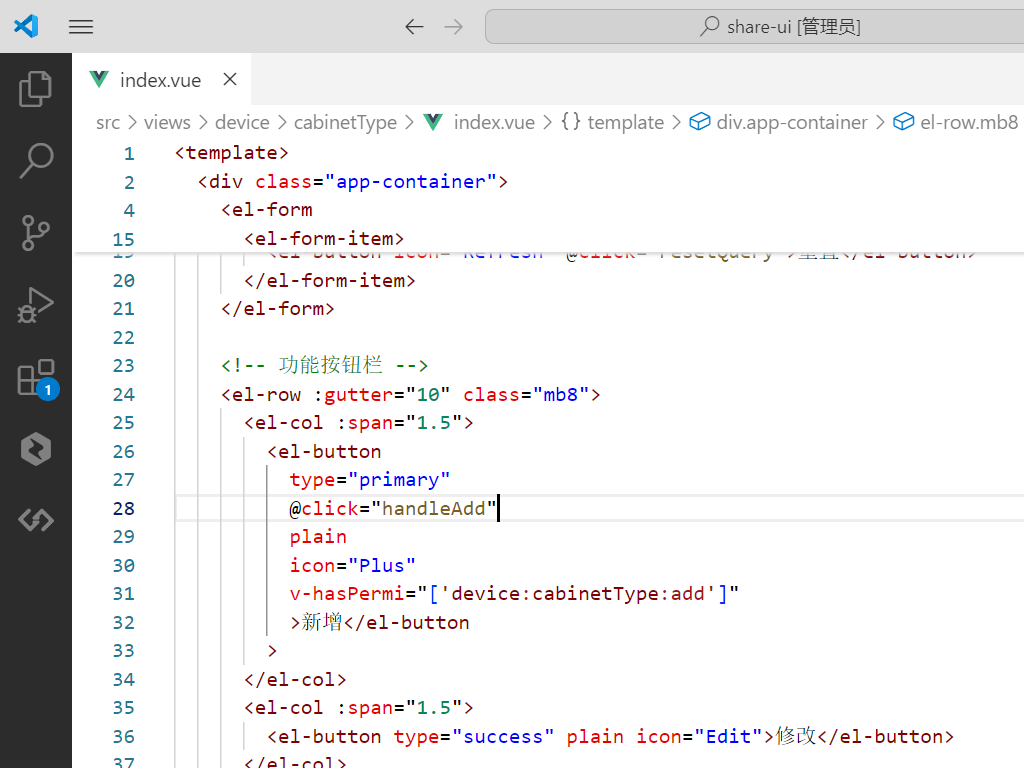
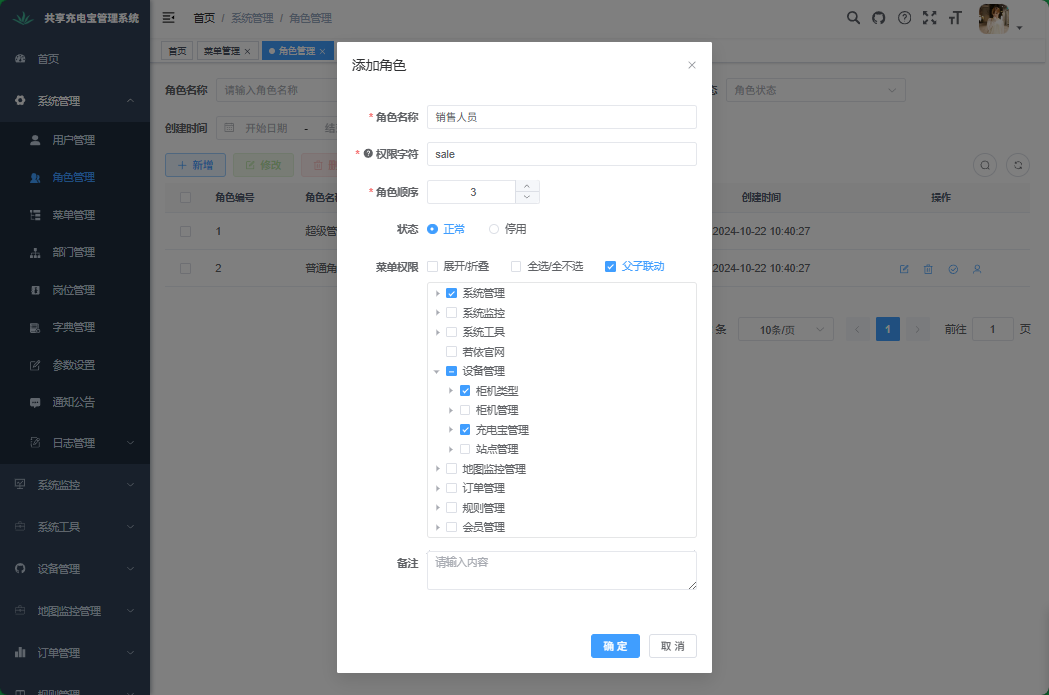
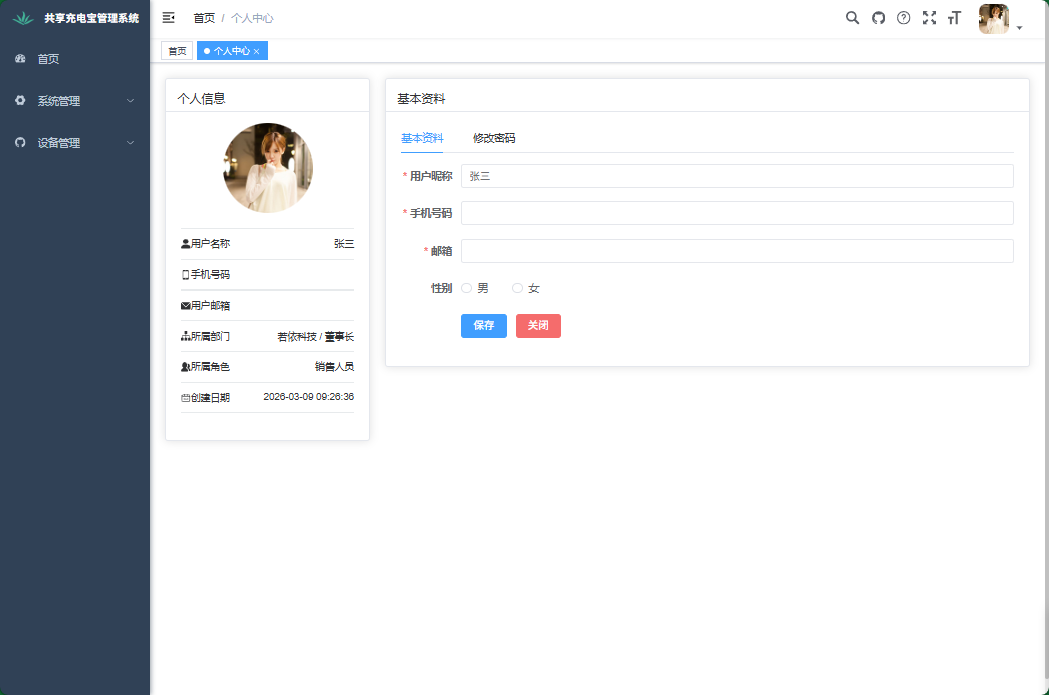
通过管理系统进行菜单访问控制
新建角色
新建用户

登录
若依-系统日志
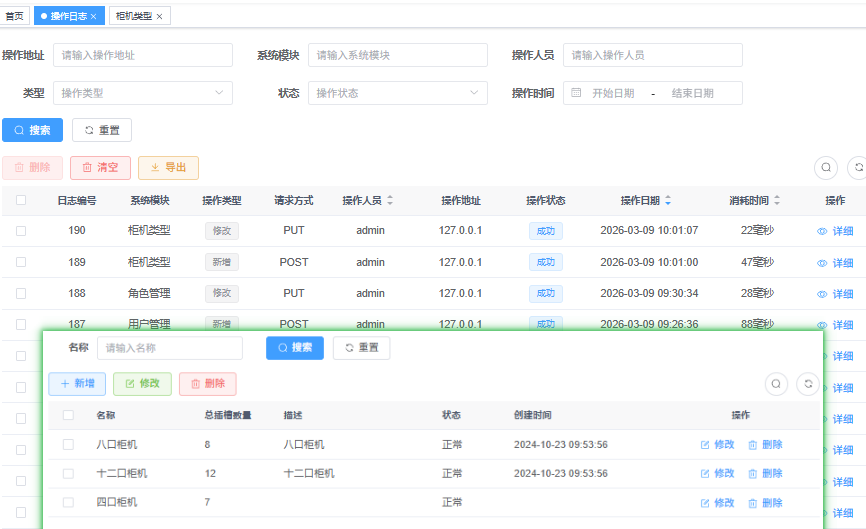
完善系统日志
java
/**
     * 新增柜机类型
     */
    @Operation(summary = "新增柜机类型")
    @RequiresPermissions("device:cabinetType:add")
    @Log(title = "柜机类型", businessType = BusinessType.INSERT)
    @PostMapping
    public AjaxResult add(@RequestBody CabinetType cabinetType) {
        boolean is_Success = cabinetTypeService.save(cabinetType);
        AjaxResult ajaxResult = toAjax(is_Success);
        return ajaxResult;
    }

    /**
     * 修改柜机类型
     */
    @Operation(summary = "修改柜机类型")
    @RequiresPermissions("device:cabinetType:edit")
    @Log(title = "柜机类型", businessType = BusinessType.UPDATE)
    @PutMapping
    public AjaxResult edit(@RequestBody CabinetType cabinetType) {
        boolean is_Success = cabinetTypeService.updateById(cabinetType);
        AjaxResult ajaxResult = toAjax(is_Success);
        return ajaxResult;
    }

    /**
     * 删除柜机类型
     * 根据id删除某个数据,或者根据多个id删除多个数据
     */
    @Operation(summary = "删除柜机类型")
    @RequiresPermissions("device:cabinetType:remove")
    @Log(title = "柜机类型", businessType = BusinessType.DELETE)
    @DeleteMapping("/{ids}")
    public AjaxResult remove(@PathVariable Long[] ids) {
        boolean is_Success = cabinetTypeService.removeByIds(Arrays.asList(ids));
        AjaxResult ajaxResult = toAjax(is_Success);
        return ajaxResult;
    }
若依-代码生成
会员管理模块
需要对哪个数据库表生成代码,那么就连接哪个数据库
share.user
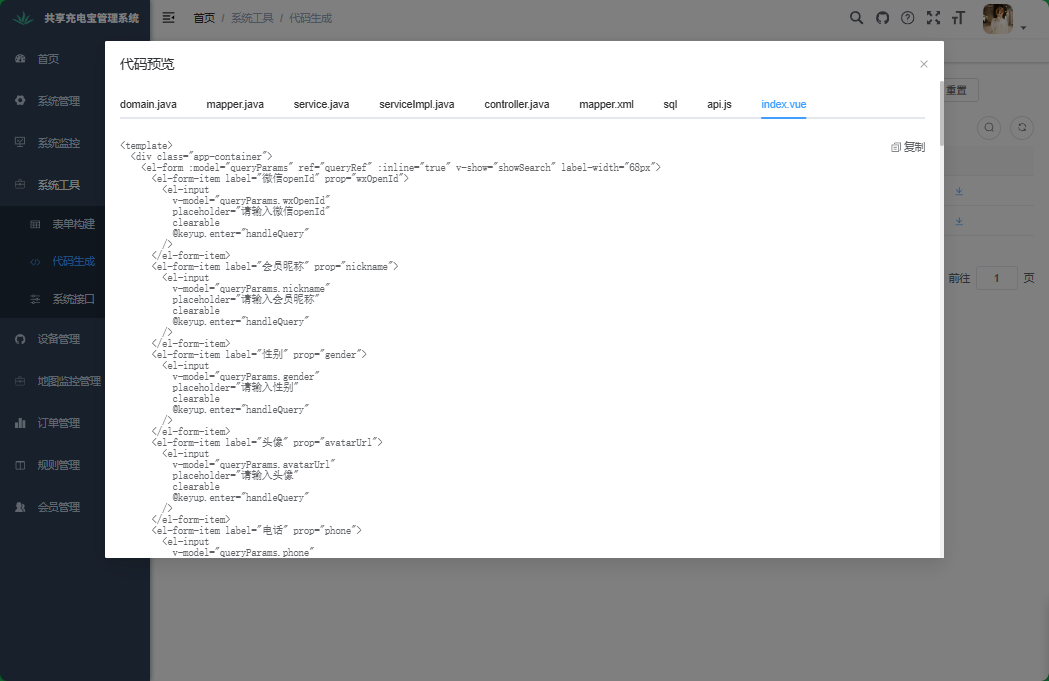
进入系统工具-代码生成页面,勾选user_info表并生成
预览
会员管理
新建share-user模块
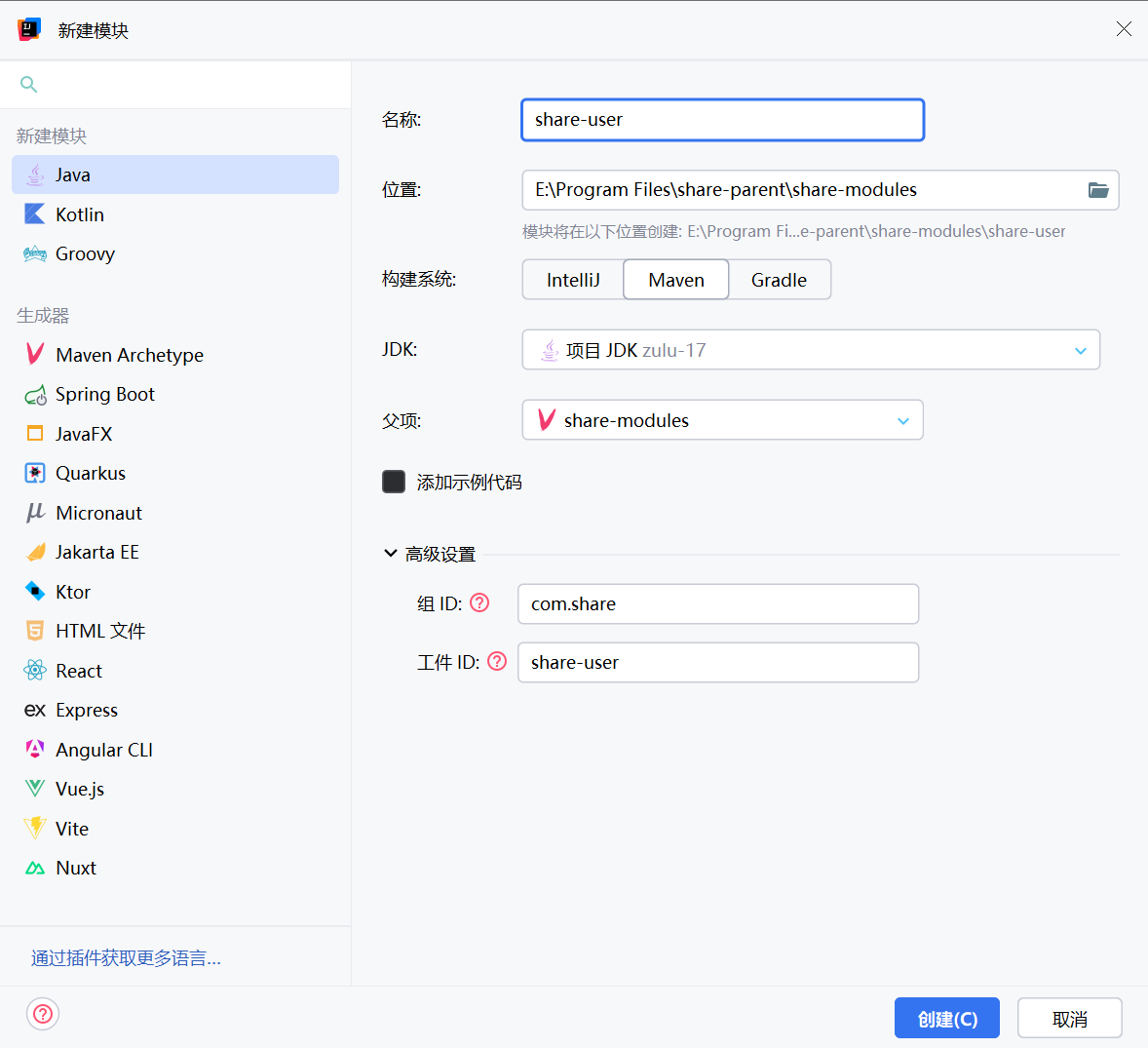
pom.xml
java
<?xml version="1.0" encoding="UTF-8"?>
<project xmlns="http://maven.apache.org/POM/4.0.0"
         xmlns:xsi="http://www.w3.org/2001/XMLSchema-instance"
         xsi:schemaLocation="http://maven.apache.org/POM/4.0.0 http://maven.apache.org/xsd/maven-4.0.0.xsd">
    <modelVersion>4.0.0</modelVersion>
    <parent>
        <groupId>com.share</groupId>
        <artifactId>share-modules</artifactId>
        <version>3.6.3</version>
    </parent>

    <artifactId>share-user</artifactId>
    <description>
        share-user会员模块
    </description>
    <properties>
        <maven.compiler.source>17</maven.compiler.source>
        <maven.compiler.target>17</maven.compiler.target>
        <project.build.sourceEncoding>UTF-8</project.build.sourceEncoding>
    </properties>
    <dependencies>
        <!-- SpringCloud Alibaba Nacos -->
        <dependency>
            <groupId>com.alibaba.cloud</groupId>
            <artifactId>spring-cloud-starter-alibaba-nacos-discovery</artifactId>
        </dependency>

        <!-- SpringCloud Alibaba Nacos Config -->
        <dependency>
            <groupId>com.alibaba.cloud</groupId>
            <artifactId>spring-cloud-starter-alibaba-nacos-config</artifactId>
        </dependency>

        <!-- SpringCloud Alibaba Sentinel -->
        <dependency>
            <groupId>com.alibaba.cloud</groupId>
            <artifactId>spring-cloud-starter-alibaba-sentinel</artifactId>
        </dependency>

        <!-- SpringBoot Actuator -->
        <dependency>
            <groupId>org.springframework.boot</groupId>
            <artifactId>spring-boot-starter-actuator</artifactId>
        </dependency>

        <!-- Mysql Connector -->
        <dependency>
            <groupId>com.mysql</groupId>
            <artifactId>mysql-connector-j</artifactId>
        </dependency>

        <!-- RuoYi Common DataSource -->
        <!--        <dependency>-->
        <!--            <groupId>com.share</groupId>-->
        <!--            <artifactId>share-common-datasource</artifactId>-->
        <!--        </dependency>-->

        <!-- RuoYi Common DataScope -->
        <dependency>
            <groupId>com.share</groupId>
            <artifactId>share-common-datascope</artifactId>
        </dependency>

        <!-- RuoYi Common Log -->
        <dependency>
            <groupId>com.share</groupId>
            <artifactId>share-common-log</artifactId>
        </dependency>

    </dependencies>

    <build>
        <finalName>${project.artifactId}</finalName>
        <plugins>
            <plugin>
                <groupId>org.springframework.boot</groupId>
                <artifactId>spring-boot-maven-plugin</artifactId>
                <executions>
                    <execution>
                        <goals>
                            <goal>repackage</goal>
                        </goals>
                    </execution>
                </executions>
            </plugin>
            <plugin>
                <groupId>org.apache.maven.plugins</groupId>
                <artifactId>maven-compiler-plugin</artifactId>
                <configuration>
                    <source>17</source>
                    <target>17</target>
                </configuration>
            </plugin>
        </plugins>
    </build>

</project>
banner.txt、bootstrap.yml、logback.xml
share-user-dev.yml
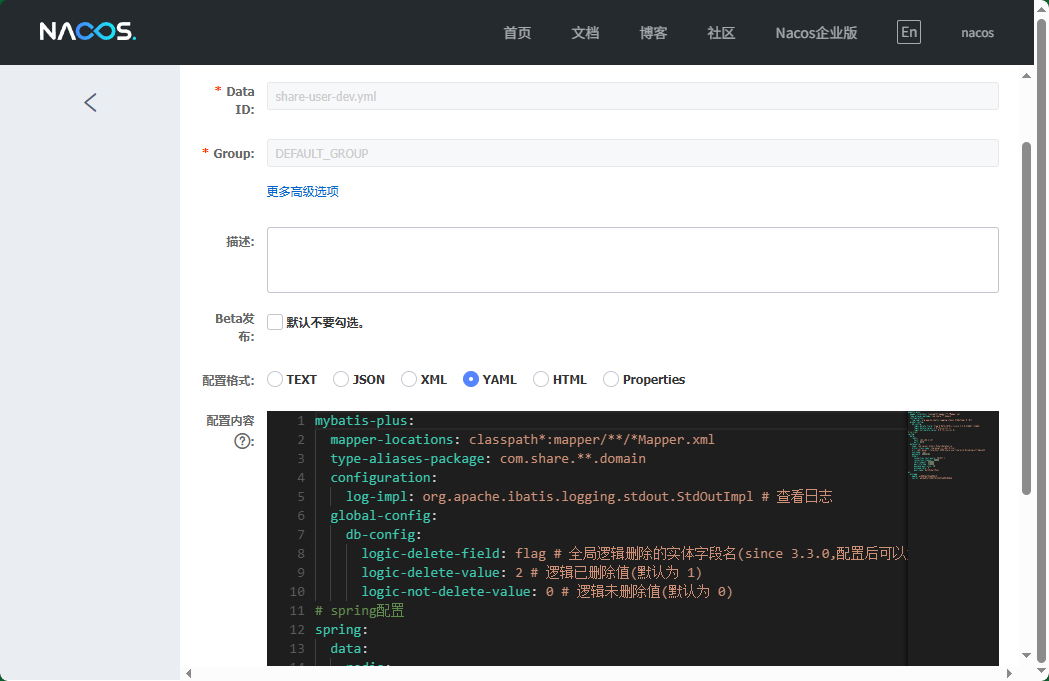
启动类ShareUserApplication
java
package com.share.user;

import com.share.common.security.annotation.EnableCustomConfig;
import com.share.common.security.annotation.EnableRyFeignClients;
import org.springframework.boot.SpringApplication;
import org.springframework.boot.autoconfigure.SpringBootApplication;

@EnableCustomConfig
@EnableRyFeignClients
@SpringBootApplication
public class ShareUserApplication
{
    public static void main(String[] args)
    {
        SpringApplication.run(ShareUserApplication.class, args);
        System.out.println("(♥◠‿◠)ノ゙  会员模块启动成功   ლ(´ڡ`ლ)゙  \n" +
                " .-------.       ____     __        \n" +
                " |  _ _   \\      \\   \\   /  /    \n" +
                " | ( ' )  |       \\  _. /  '       \n" +
                " |(_ o _) /        _( )_ .'         \n" +
                " | (_,_).' __  ___(_ o _)'          \n" +
                " |  |\\ \\  |  ||   |(_,_)'         \n" +
                " |  | \\ `'   /|   `-'  /           \n" +
                " |  |  \\    /  \\      /           \n" +
                " ''-'   `'-'    `-..-'              ");
    }
}
share-gateway-dev.yml
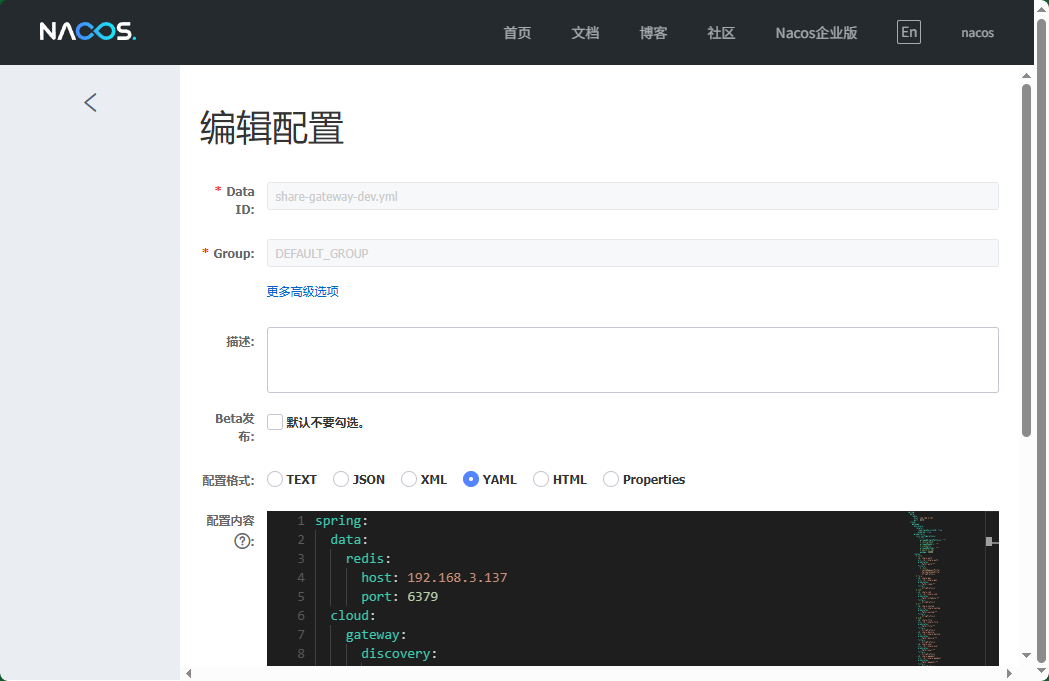
生成代码main文件夹放入share-user模块,生成代码vue文件夹放入share-ui模块
拷贝代码生成的userInfoMenu.sql文件中的sql
java
-- 菜单 SQL
insert into sys_menu (menu_name, parent_id, order_num, path, component, is_frame, is_cache, menu_type, visible, status, perms, icon, create_by, create_time, update_by, update_time, remark)
values('用户', '2013', '1', 'userInfo', 'user/userInfo/index', 1, 0, 'C', '0', '0', 'device:userInfo:list', '#', 'admin', sysdate(), '', null, '用户菜单');

-- 按钮父菜单ID
SELECT @parentId := LAST_INSERT_ID();

-- 按钮 SQL
insert into sys_menu (menu_name, parent_id, order_num, path, component, is_frame, is_cache, menu_type, visible, status, perms, icon, create_by, create_time, update_by, update_time, remark)
values('用户查询', @parentId, '1',  '#', '', 1, 0, 'F', '0', '0', 'device:userInfo:query',        '#', 'admin', sysdate(), '', null, '');

insert into sys_menu (menu_name, parent_id, order_num, path, component, is_frame, is_cache, menu_type, visible, status, perms, icon, create_by, create_time, update_by, update_time, remark)
values('用户新增', @parentId, '2',  '#', '', 1, 0, 'F', '0', '0', 'device:userInfo:add',          '#', 'admin', sysdate(), '', null, '');

insert into sys_menu (menu_name, parent_id, order_num, path, component, is_frame, is_cache, menu_type, visible, status, perms, icon, create_by, create_time, update_by, update_time, remark)
values('用户修改', @parentId, '3',  '#', '', 1, 0, 'F', '0', '0', 'device:userInfo:edit',         '#', 'admin', sysdate(), '', null, '');

insert into sys_menu (menu_name, parent_id, order_num, path, component, is_frame, is_cache, menu_type, visible, status, perms, icon, create_by, create_time, update_by, update_time, remark)
values('用户删除', @parentId, '4',  '#', '', 1, 0, 'F', '0', '0', 'device:userInfo:remove',       '#', 'admin', sysdate(), '', null, '');

insert into sys_menu (menu_name, parent_id, order_num, path, component, is_frame, is_cache, menu_type, visible, status, perms, icon, create_by, create_time, update_by, update_time, remark)
values('用户导出', @parentId, '5',  '#', '', 1, 0, 'F', '0', '0', 'device:userInfo:export',       '#', 'admin', sysdate(), '', null, '');
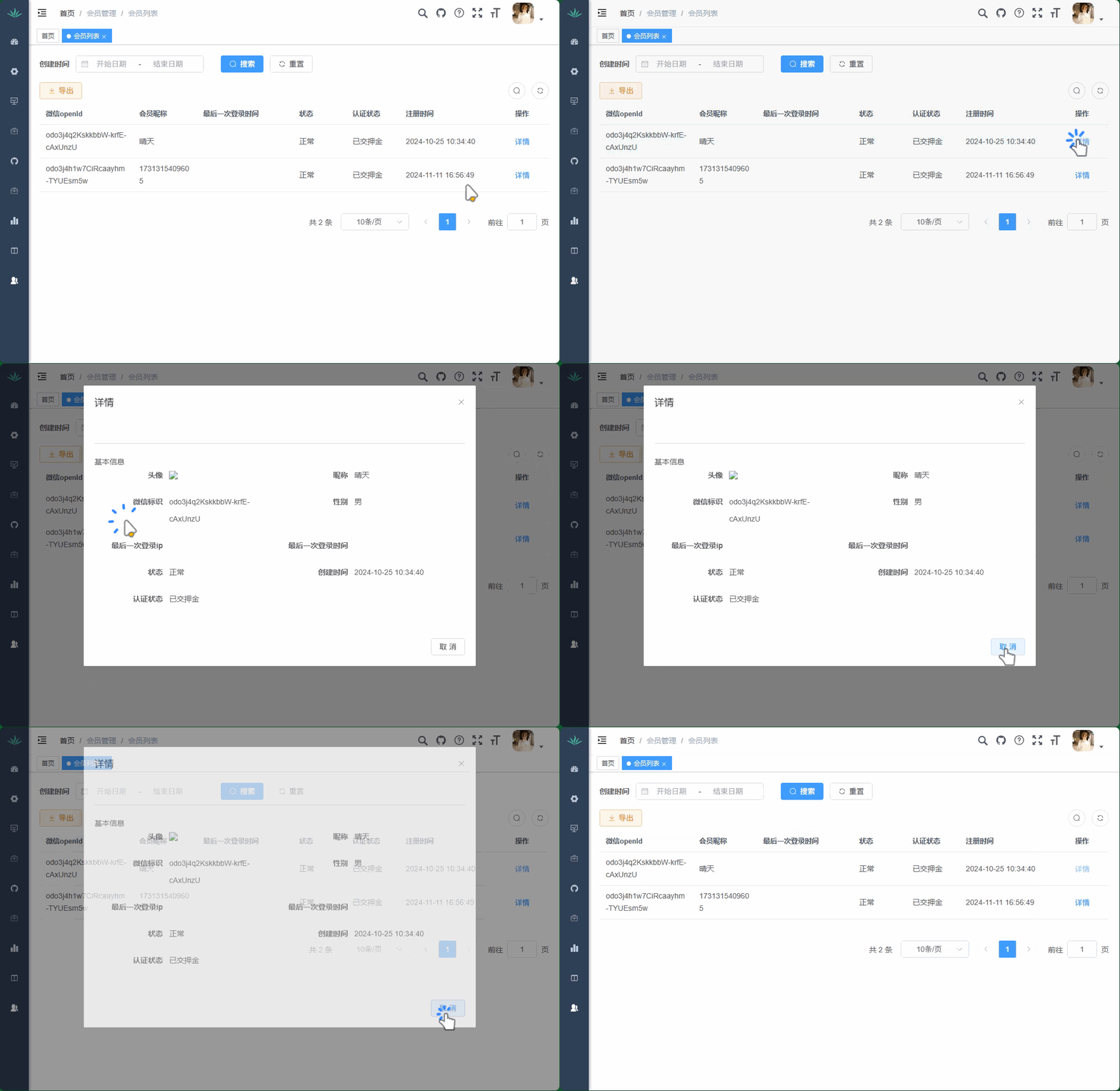
添加动态菜单
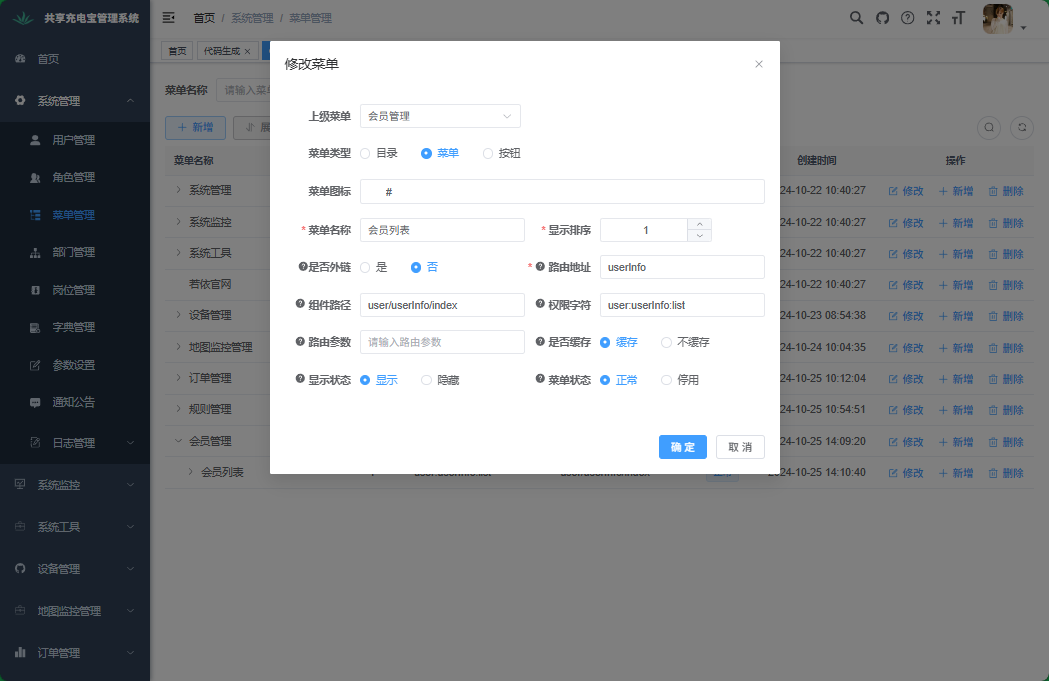
八、微信授权登录
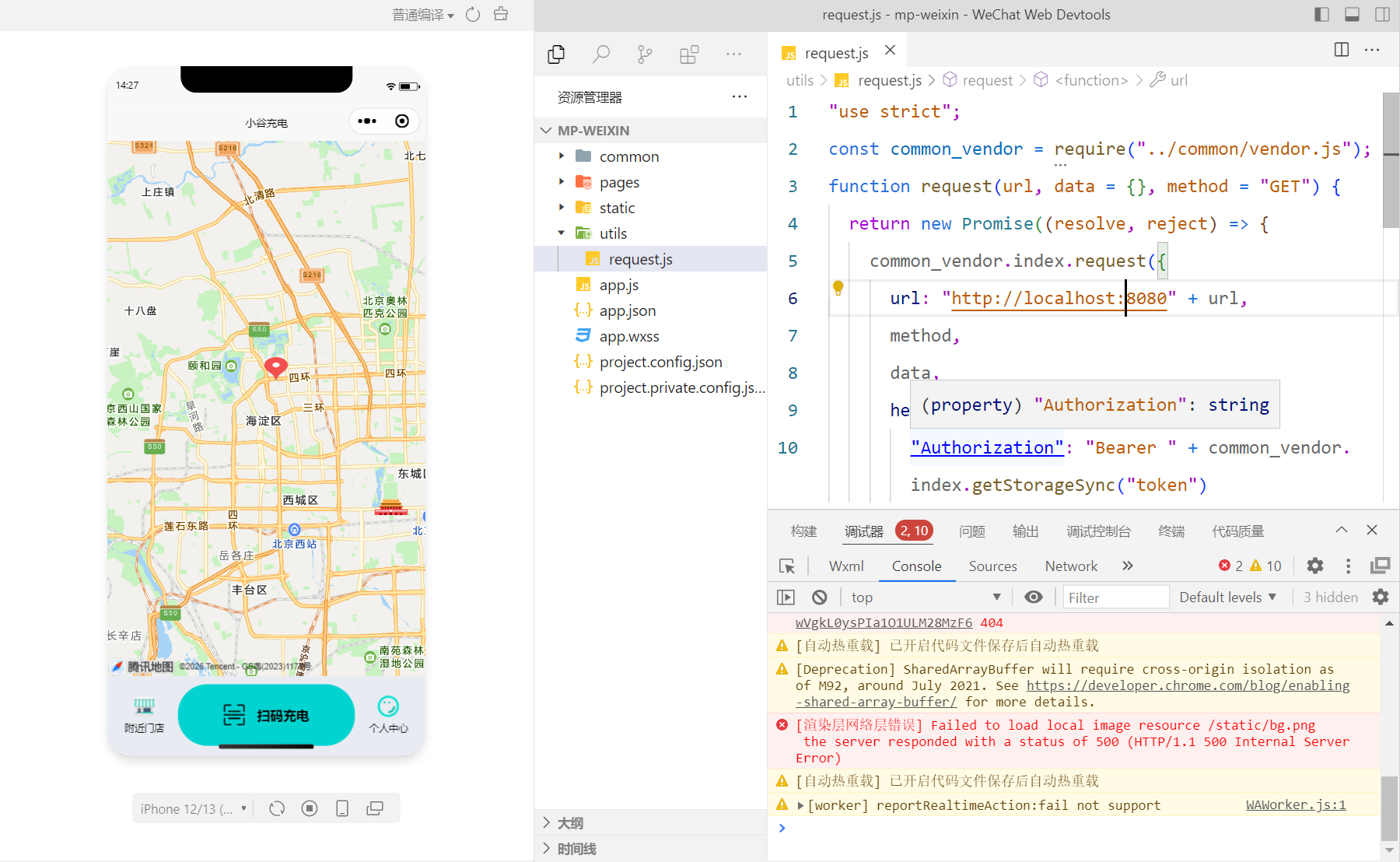
用户登录
远程接口开发
pom.xml
微信Java开发工具包
java
<dependency>
    <groupId>com.github.binarywang</groupId>
    <artifactId>weixin-java-miniapp</artifactId>
</dependency>
share-user-dev.yml
java
wx:
  miniapp:
    appId: wxcc651fcbab275e33
    secret: 5f353399a2eae7ff6ceda383e924c5f6
WxMaProperties
java
package com.share.user.config;

import lombok.Data;
import org.springframework.boot.context.properties.ConfigurationProperties;
import org.springframework.stereotype.Component;

@Data
@Component
@ConfigurationProperties(prefix = "wx.miniapp")
public class WxMaProperties {
    private String appId;
    private String secret;
}
WxMaConfig
java
package com.share.user.config;

import cn.binarywang.wx.miniapp.api.WxMaService;
import cn.binarywang.wx.miniapp.api.impl.WxMaServiceImpl;
import cn.binarywang.wx.miniapp.config.impl.WxMaDefaultConfigImpl;
import org.springframework.beans.factory.annotation.Autowired;
import org.springframework.context.annotation.Bean;
import org.springframework.stereotype.Component;

@Component
public class WxMaConfig {
    @Autowired
    private WxMaProperties wxMaProperties;

    @Bean
    public WxMaService wxMaService() {
        WxMaDefaultConfigImpl config = new WxMaDefaultConfigImpl();
        config.setAppid(wxMaProperties.getAppId());
        config.setSecret(wxMaProperties.getSecret());

        WxMaService service = new WxMaServiceImpl();
        service.setWxMaConfig(config);
        return service;
    }
}
UpdateUserLogin
java
package com.share.user.api.domain;

import com.fasterxml.jackson.annotation.JsonFormat;
import lombok.Data;

import java.util.Date;

@Data
public class UpdateUserLogin {
    private Long userId;

    /** 最后一次登录ip */
    private String lastLoginIp;

    /** 最后一次登录时间 */
    @JsonFormat(pattern = "yyyy-MM-dd")
    private Date lastLoginTime;
}
UserInfoApiController
java
package com.share.user.api;

import com.share.common.core.domain.R;
import com.share.common.core.web.controller.BaseController;
import com.share.common.security.annotation.InnerAuth;
import com.share.user.api.domain.UpdateUserLogin;
import com.share.user.domain.UserInfo;
import com.share.user.service.IUserInfoService;
import io.swagger.v3.oas.annotations.Operation;
import org.springframework.beans.factory.annotation.Autowired;
import org.springframework.web.bind.annotation.*;

@RestController
@RequestMapping("/userInfo")
public class UserInfoApiController extends BaseController {
    @Autowired
    private IUserInfoService userInfoService;


}
小程序授权登录
UserInfoApiController.java
java
    @Operation(summary = "小程序授权登录")
    @GetMapping("/wxLogin/{code}")
    public R<UserInfo> wxLogin(@PathVariable String code) {
        return R.ok(userInfoService.wxLogin(code));
    }
在'UserlnfoService'中创建方法'wxLogin
java
    //微信授权登录-远程调用
    UserInfo wxLogin(String code);
实现方法
java
package com.share.user.service.impl;

import java.util.List;

import cn.binarywang.wx.miniapp.api.WxMaService;
import cn.binarywang.wx.miniapp.bean.WxMaJscode2SessionResult;
import com.baomidou.mybatisplus.core.conditions.query.LambdaQueryWrapper;
import org.springframework.beans.factory.annotation.Autowired;
import org.springframework.stereotype.Service;
import com.share.user.mapper.UserInfoMapper;
import com.share.user.domain.UserInfo;
import com.share.user.service.IUserInfoService;
import com.baomidou.mybatisplus.extension.service.impl.ServiceImpl;

/**
 * 用户Service业务层处理
 *
 * @author atguigu
 * @date 2026-03-09
 */
@Service
public class UserInfoServiceImpl extends ServiceImpl<UserInfoMapper, UserInfo> implements IUserInfoService {
    @Autowired
    private UserInfoMapper userInfoMapper;
    @Autowired
    private WxMaService wxMaService;

    /**
     * 查询用户列表
     *
     * @param userInfo 用户
     * @return 用户
     */
    @Override
    public List<UserInfo> selectUserInfoList(UserInfo userInfo) {
        return userInfoMapper.selectUserInfoList(userInfo);
    }

    @Override
    public UserInfo wxLogin(String code) {

        //code+微信公众平台id+秘钥,返回openid
        try {
            WxMaJscode2SessionResult sessionInfo = wxMaService.getUserService().getSessionInfo(code);
            String openId = sessionInfo.getOpenid();
            //openid查询数据库表
            LambdaQueryWrapper<UserInfo> queryWrapper = new LambdaQueryWrapper<>();
            queryWrapper.eq(UserInfo::getWxOpenId, openId);
            //添加用户信息到数据库
            UserInfo userInfo = userInfoMapper.selectOne(queryWrapper);
            //判断
            if (userInfo == null) {
                //如果表里面没有openid值,表示第一次登录
                //添加用户信息到数据库表
                userInfo = new UserInfo();
                userInfo.setNickname(String.valueOf(System.currentTimeMillis()));
                userInfo.setAvatarUrl("https://oss.aliyuncs.com/aliyun_id_photo_bucket/default_handsome.jpg");
                userInfo.setWxOpenId(openId);
                userInfoMapper.insert(userInfo);
            }
            //返回userInfo用户信息
            return userInfo;
        } catch (Exception e) {
            e.printStackTrace();
            throw new RuntimeException(e);
        }

    }

}
更新用户登录信息
openFeign接口定义
操作模块:share-api-user
com/share/common/core/constant/ServiceNameConstants.java
java
    /**
     * 用户服务
     */
    public static final String SHARE_USER = "share-user";
RemoteUserService
java
package com.share.user.api;

import com.share.user.domain.UserInfo;
import org.springframework.cloud.openfeign.FeignClient;
import org.springframework.web.bind.annotation.*;
import com.share.common.core.constant.ServiceNameConstants;
import com.share.common.core.domain.R;
import com.share.system.api.factory.RemoteUserFallbackFactory;

/**
 * 用户服务
 *
 * @author share
 */
@FeignClient(contextId = "remoteUserInfoService",
        value = ServiceNameConstants.SHARE_USER,
        fallbackFactory = RemoteUserFallbackFactory.class)
public interface RemoteUserService {
    }
RemoteUserInfoFallbackFactory
java
package com.share.user.factory;

import com.share.common.core.exception.ServiceException;
import com.share.system.api.RemoteUserService;
import org.slf4j.Logger;
import org.slf4j.LoggerFactory;
import org.springframework.cloud.openfeign.FallbackFactory;
import org.springframework.stereotype.Component;

/**
 * 用户服务降级处理
 *
 * @author share
 */
@Component
public class RemoteUserFallbackFactory implements FallbackFactory<RemoteUserService> {
    private static final Logger log = LoggerFactory.getLogger(RemoteUserFallbackFactory.class);

    @Override
    public RemoteUserService create(Throwable throwable) {
        log.error("用户服务调用失败:{}", throwable.getMessage());
        throw new ServiceException("调用出现错误");

    }
}
share-user\pom.xml
java
<dependency>
    <groupId>com.share</groupId>
    <artifactId>share-api-user</artifactId>
    <version>3.6.3</version>
</dependency>
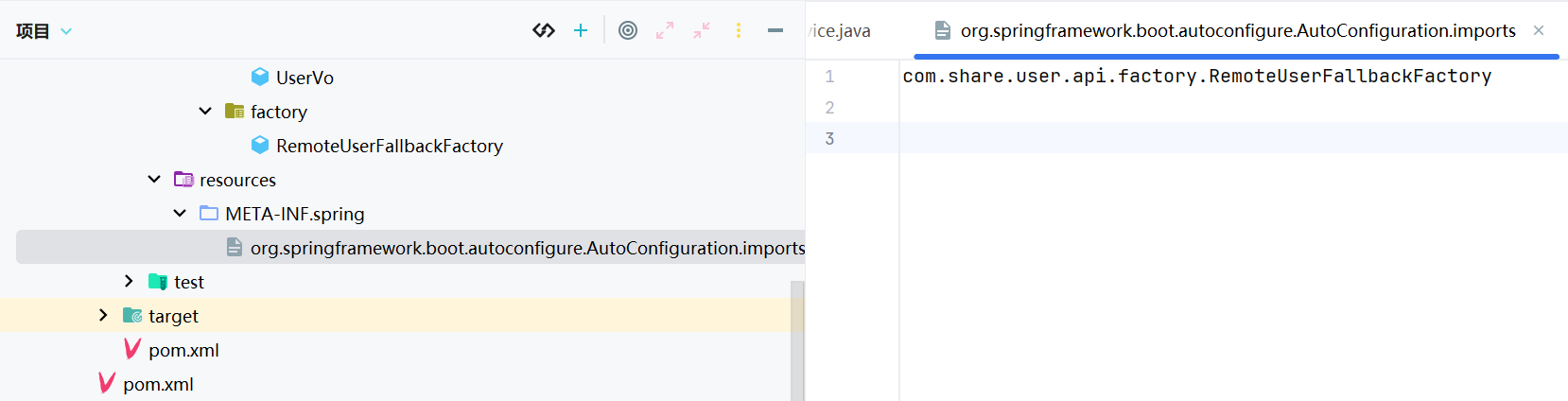
META-INF
RemoteUserService
java
    /**
     *
     *
     * @param code 请求来源
     * @return 结果
     */
    @GetMapping("/userInfo/wxLogin/{code}")
    public R<UserInfo> wxLogin(@PathVariable("code") String code);
开发登录业务接口
操作模块:share-auth
H5TokenController
java
package com.share.auth.controller;


import org.springframework.web.bind.annotation.RestController;

@RestController
public class H5TokenController {

}
pom.xml
java
<dependency>
    <groupId>com.share</groupId>
    <artifactId>share-api-user</artifactId>
    <version>3.6.3</version>
</dependency>
H5LoginService
java
package com.share.auth.service;

import org.springframework.stereotype.Component;

@Component
public class H5LoginService {
}
H5TokenController
java
package com.share.auth.controller;


import com.share.auth.service.H5LoginService;
import com.share.common.core.domain.R;
import com.share.common.security.service.TokenService;
import com.share.system.api.model.LoginUser;
import org.springframework.beans.factory.annotation.Autowired;
import org.springframework.web.bind.annotation.GetMapping;
import org.springframework.web.bind.annotation.PathVariable;
import org.springframework.web.bind.annotation.RestController;


/**
 * H5TokenController类
 * 处理H5端登录相关的请求
 */
@RestController
public class H5TokenController {
    @Autowired
    private H5LoginService h5LoginService;

    @Autowired
    private TokenService tokenService;

    /**
     * 处理H5端登录请求
     *
     * @param code 登录授权码
     * @return 返回包含登录token的响应结果
     */
    @GetMapping("/h5/login/{code}")
    public R<?> login(@PathVariable String code) {
        // 用户登录,使用授权码获取用户信息
        LoginUser userInfo = h5LoginService.login(code);
        // 获取登录token并返回成功响应
        return R.ok(tokenService.createToken(userInfo));
    }

}
在'H5LoginService'中创建方法"login'
java
package com.share.auth.service;

import com.share.common.core.domain.R;
import com.share.common.core.exception.ServiceException;
import com.share.common.core.utils.StringUtils;
import com.share.system.api.model.LoginUser;
import com.share.user.api.RemoteUserService;
import com.share.user.domain.UserInfo;
import org.springframework.beans.factory.annotation.Autowired;
import org.springframework.stereotype.Component;

@Component
public class H5LoginService {
    @Autowired
    private RemoteUserService remoteUserService;


    /**
     * 登录
     */
    public LoginUser login(String code) {
        //判断code值是否为空
        if (StringUtils.isAnyBlank(code)) {

            throw new ServiceException("数据为空");
        }
        //进行远程调用完成登录,返回userInfo对象
        R<UserInfo> userResult = remoteUserService.wxLogin(code);
        UserInfo userInfo = userResult.getData();
        //判断返回的userInfo是否为空
        if (userInfo == null) {
            throw new ServiceException("数据为空");
        }
        String status = userInfo.getStatus();
        if ("2".equals(status)){
            throw new ServiceException("账号被禁用");
        }
        //封装数据到LoginUser对象里面
        LoginUser loginUser = new LoginUser();
        loginUser.setUserid(userInfo.getId());
        loginUser.setUsername(userInfo.getWxOpenId());
        loginUser.setStatus(userInfo.getStatus() + "");
        //返回数据
        return loginUser;
    }
}
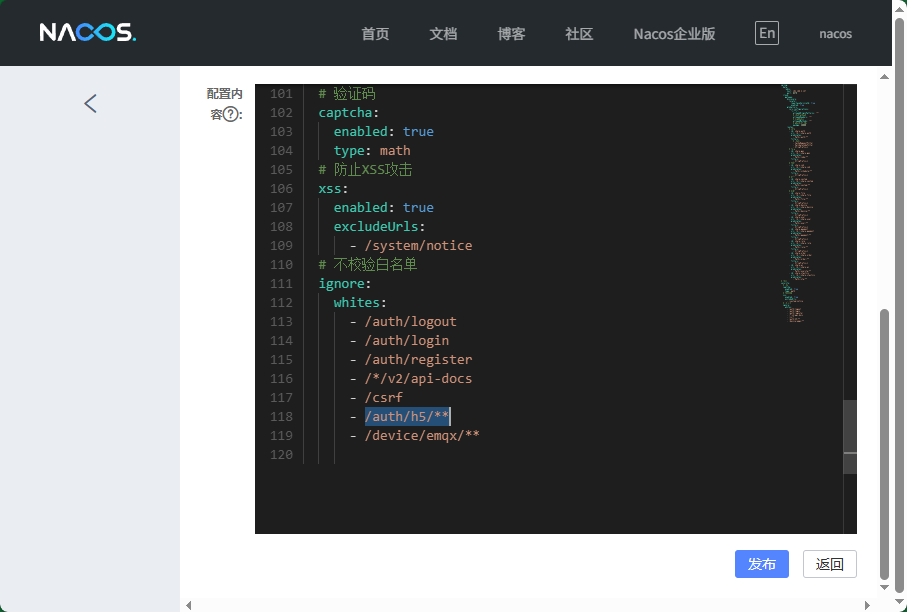
share-gateway-dev.yml
排除登录认证
根据token获取用户基本信息
实体类UserVo
操作模块:share-api-user
java
package com.share.user.domain;

import io.swagger.v3.oas.annotations.media.Schema;
import lombok.Data;

@Data
@Schema(description = "用户类")
public class UserVo {
    @Schema(description = "昵称")
    private String nickname;

    @Schema(description = "头像")
    private String avatar;

    @Schema(description = "微信open id")
    private String wxOpenId;

    @Schema(description = "押金状态(0:未验证 1:免押金 2:已交押金)")
    private String depositStatus;
}
UserInfoApiController
操作模块:share-user
java
@Operation(summary = "获取当前登录用户信息")
@RequiresLogin
@GetMapping("/getLoginUserInfo")
public AjaxResult getLoginUserInfo(HttpServletRequest request) {
    Long userId = SecurityContextHolder.getUserId();
    UserInfo userInfo = userInfoService.getById(userId);
    UserVo userInfoVo = new UserVo();
    BeanUtils.copyProperties(userInfo, userInfoVo);
    return success(userInfoVo);
}
启动
- 小程序请求 →
/auth/h5/login/{code} H5LoginService.login()调用RemoteUserService.wxLogin(code)- 远程调用 →
share-user服务的UserInfoApiController.wxLogin(code) UserInfoServiceImpl.wxLogin()中使用WxMaService通过 code 换取 openid- 用 openid 查询数据库,不存在则创建新用户
- 返回
UserInfo