文章目录
- [1. oneof 类型](#1. oneof 类型)
- [2. 升级通讯录至 2.3 版本](#2. 升级通讯录至 2.3 版本)
1. oneof 类型
如果消息中有很多可选字段,并且将来同时只有一个字段会被设置,那么就可以使用 oneof 加强这个行为,也能有节约内存的效果。
2. 升级通讯录至 2.3 版本
通讯录 2.3 版本想新增联系人的其他联系方式,比如 qq 或者 wechat 二选一,我们就可以使用 oneof 字段来加强多选一这个行为。
oneof 字段定义的格式为:
proto
oneof 字段名 { 字段1; 字段2; ... }2.1 更新 contacts.proto 文件
代码如下:
proto
syntax = "proto3";
package contacts; // package 是一个可选的声明符, 声明其命名空间

// 引入 any.proto 文件
import "google/protobuf/any.proto";

// 地址
message Address
{
    string home_address = 1; // 家庭地址
    string unit_address = 2; // 单位地址
}

// 定义联系人message
message PeopleInfo
{
    string name = 1;    // 姓名
    int32 age = 2;      // 年龄

    message Phone
    {
        string number = 1;      // 电话号码
        enum PhoneType
        {
            MP = 0; // 移动电话
            TEL = 1; // 固定电话
        }
        PhoneType type = 2;
    }

    repeated Phone phone = 3;   // 电话

    google.protobuf.Any data = 4; // 地址

    // 社交联系方式 (多选一)
    oneof other_contact
    {
        string qq = 5;
        string wechat = 6;
    }
}

// 通讯录:修改消息名为ContactBook(大驼峰,避免和字段名contacts冲突)
message ContactBook
{
    repeated PeopleInfo contacts = 1;
}
更新内容如下:
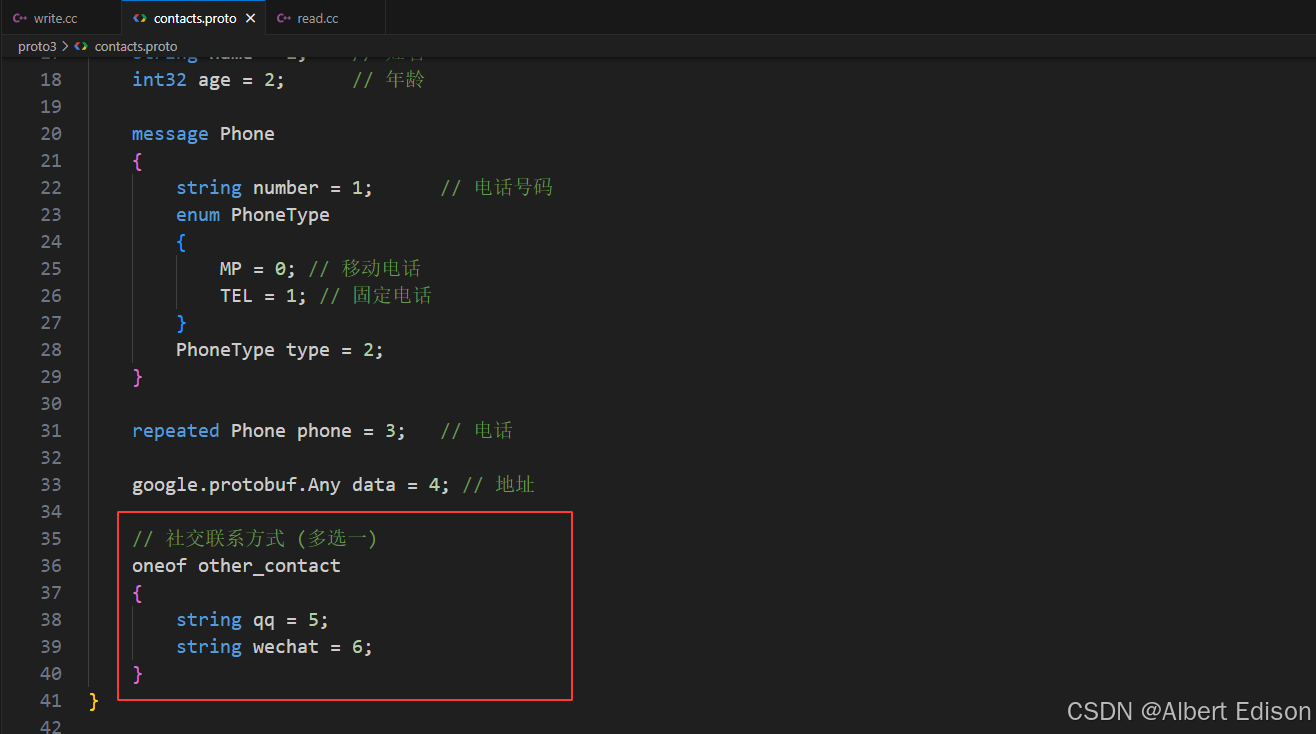
注意:
- 可选字段中的字段编号,不能与非可选字段的编号冲突。
- 不能在 oneof 中使用 repeated 字段。
- 将来在设置 oneof 字段中值时,如果将 oneof 中的字段设置多个,那么只会保留最后一次设置的成员,之前设置的 oneof 成员会自动清除。
然后更新代码:
bash
protoc --cpp_out=. contacts.proto在 contacts.pb.h 更新的代码中,对于 oneof 字段:
- 会将 oneof 中的多个字段定义为一个枚举类型。
- 设置和获取:对 oneof 内的字段进行常规的设置和获取即可,但要注意只能设置一个。如果设置多个,那么只会保留最后一次设置的成员。
- 清空 oneof 字段:
clear_方法 - 获取当前设置了哪个字段:
_case方法
2.2 更新 write.cc 文件
代码如下:
cpp
#include <iostream>
#include <fstream>
#include "contacts.pb.h"

using namespace std;
using namespace contacts; // 把命名空间展开

// --- 强行补齐缺失的 Arena 模板实现 ---
#include <google/protobuf/any.pb.h>
namespace google
{
    namespace protobuf
    {
        template <>
        Any *Arena::CreateMaybeMessage<Any>(Arena *arena)
        {
            return Arena::CreateMessageInternal<Any>(arena);
        }
    }
}
// ----------------------------------

// 新增联系人
void AddPeopleInfo(PeopleInfo *people)
{
    cout << "-------------新增联系人-------------" << endl;

    cout << "请输入联系人姓名: ";
    string name;
    getline(cin, name);
    people->set_name(name);

    cout << "请输入联系人年龄: ";
    int age;
    cin >> age;
    people->set_age(age);
    cin.ignore(256, '\n'); // 清除回车

    for (int i = 0;; i++)
    {
        cout << "请输入联系人电话" << i + 1 << " (输入回车即可完成电话新增): ";
        string number;
        getline(cin, number);
        if (number.empty())
        {
            break;
        }
        PeopleInfo_Phone *phone = people->add_phone();
        phone->set_number(number);

        cout << "请输入该电话类型 (1、移动电话  2、固定电话): ";
        int type;
        cin >> type;
        cin.ignore(256, '\n'); // 清除回车
        switch (type)
        {
        case 1:
            phone->set_type(PeopleInfo_Phone_PhoneType::PeopleInfo_Phone_PhoneType_MP); // 设置移动电话
            break;
        case 2:
            phone->set_type(PeopleInfo_Phone_PhoneType::PeopleInfo_Phone_PhoneType_TEL); // 设置固定电话
            break;
        default:
            cout << "选择有误! " << endl;
            break;
        }
    }

    Address address; // 定义一个地址对象

    cout << "请输入联系人家庭地址: ";
    string homeAddress;
    getline(cin, homeAddress);
    address.set_home_address(homeAddress);

    cout << "请输入联系人单位地址: ";
    string unitAddress;
    getline(cin, unitAddress);
    address.set_unit_address(unitAddress);

    // 把Address类型的对象转化为Any类型
    people->mutable_data()->PackFrom(address);

    cout << "选择添加一个其他联系方式 (1、qq号  2、微信号): ";
    int otherContact;
    cin >> otherContact;
    cin.ignore(256, '\n');
    if (1 == otherContact)
    {
        cout << "请输入qq号: ";
        string qq;
        getline(cin, qq);
        people->set_qq(qq);
    }
    else if(2 == otherContact)
    {
        cout << "请输入微信号: ";
        string wechat;
        getline(cin, wechat);
        people->set_wechat(wechat);
    }
    else
    {
        cout << "非法选择, 该项设置失败! " << endl;
    }


    cout << "-----------添加联系人成功-----------" << endl;
}

int main()
{
    GOOGLE_PROTOBUF_VERIFY_VERSION;

    ContactBook contacts;

    // 读取本地已存在的通讯录文件
    fstream input("contacts.bin", ios::in | ios::binary);
    if (!input)
    {
        cout << "contacts.bin not find, create new file!" << endl;
    }
    else if (!contacts.ParseFromIstream(&input))
    {
        cerr << "parse error!" << endl;
        input.close();
        return -1;
    }

    // 向通讯录中添加一个联系人
    AddPeopleInfo(contacts.add_contacts());

    // 将通讯录写入本地文件中
    fstream output("contacts.bin", ios::out | ios::trunc | ios::binary);
    if (!contacts.SerializeToOstream(&output))
    {
        cerr << "write error!" << endl;
        input.close();
        output.close();
        return -1;
    }
    cout << "write success!" << endl;
    input.close();
    output.close();

    google::protobuf::ShutdownProtobufLibrary();
    return 0;
}
更新内容如下:
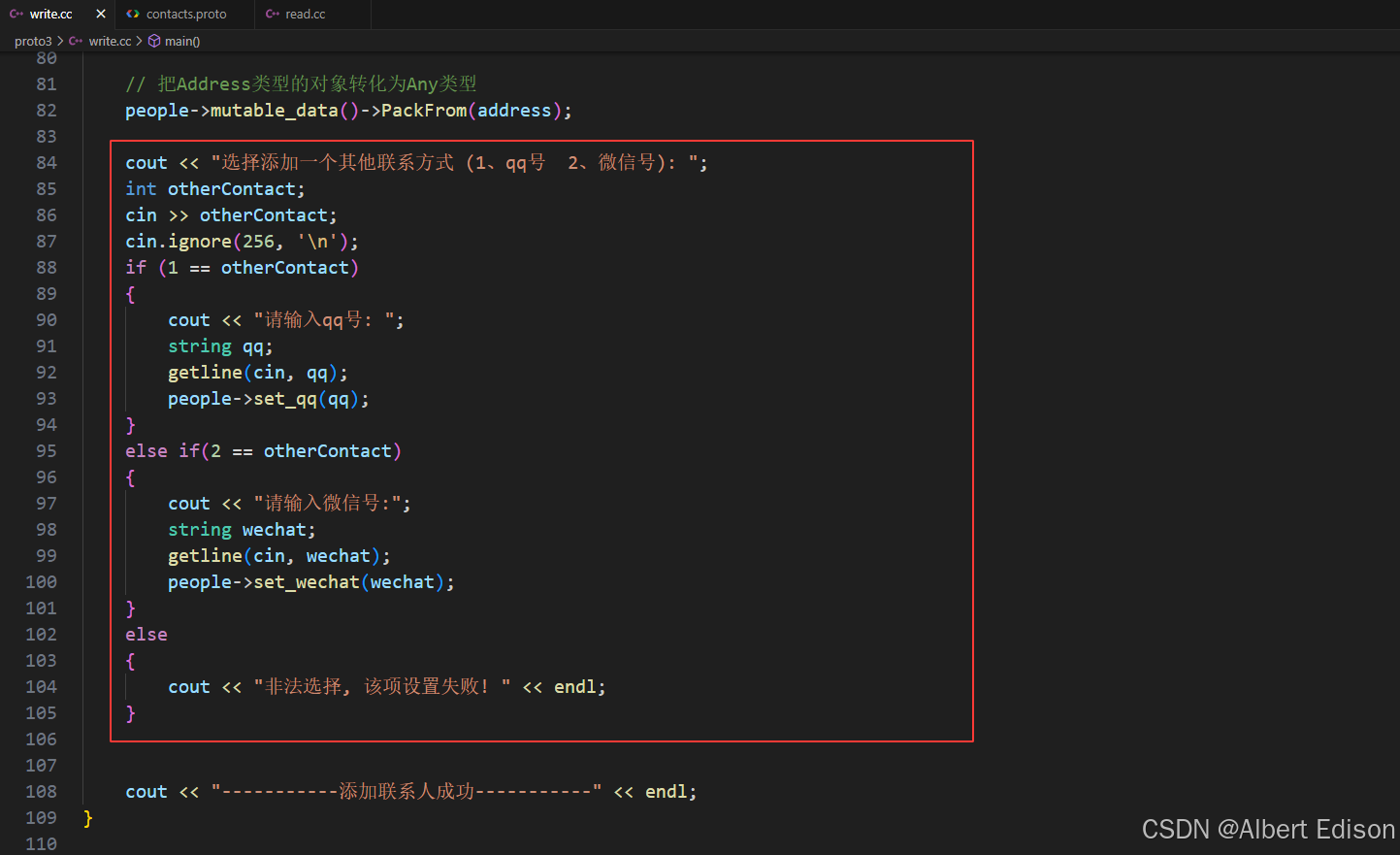
2.3 更新 read.cc 文件
代码如下:
cpp
#include <iostream>
#include <fstream>
#include "contacts.pb.h"

using namespace std;
using namespace contacts; // 把命名空间展开

// --- 强行补齐缺失的 Arena 模板实现 ---
#include <google/protobuf/any.pb.h>
namespace google
{
    namespace protobuf
    {
        template <>
        Any *Arena::CreateMaybeMessage<Any>(Arena *arena)
        {
            return Arena::CreateMessageInternal<Any>(arena);
        }
    }
}
// ----------------------------------

// 打印联系人列表
void PrintContacts(ContactBook& contacts)
{
    for (int i = 0; i < contacts.contacts_size(); i++)
    {
        cout << "---------------联系人" << i+1 << "---------------" << endl;

        const PeopleInfo& people = contacts.contacts(i);

        cout << "联系人姓名: " << people.name() << endl;
        cout << "联系人年龄: " << people.age() << endl;

        for (int j = 0; j < people.phone_size() ; j++)
        {
            // 打印联系人电话
            const PeopleInfo_Phone& phone = people.phone(j);
            cout << "联系人电话" << j+1 << ": " << phone.number(); // 这里不需要换行符

            // 打印联系人电话类型
            cout << " (" << phone.PhoneType_Name(phone.type()) << ")" << endl;
        }

        // 如果data有数据 并且 data的数据类型是Address, 那么就打印联系人地址
        if (people.has_data() && people.data().Is<Address>())
        {
            Address address;
            people.data().UnpackTo(&address);

            if (!address.home_address().empty())
            {
                cout << "联系人家庭地址: " << address.home_address() << endl;
            }
            if (!address.unit_address().empty())
            {
                cout << "联系人单位地址: " << address.unit_address() << endl;
            }
        }

        // 打印qq号或者微信号
        switch (people.other_contact_case())
        {
            case PeopleInfo::OtherContactCase::kQq:
                cout << "qq号: " << people.qq() << endl;
                break;
            case PeopleInfo::OtherContactCase::kWechat:
                cout << "微信号: " << people.wechat() << endl;
                break;
            default:
                break;
        }
    }
}


int main()
{
    GOOGLE_PROTOBUF_VERIFY_VERSION;

    ContactBook contacts;

    // 读取本地已存在的通讯录文件(以二进制方式读取)
    fstream input("contacts.bin", ios::in | ios::binary);
    if (!contacts.ParseFromIstream(&input))
    {
        cerr << "parse error!" << endl;
        input.close();
        return -1;
    }
    // 打印通讯录列表
    PrintContacts(contacts);

    google::protobuf::ShutdownProtobufLibrary();
    return 0;
}
更新内容如下:
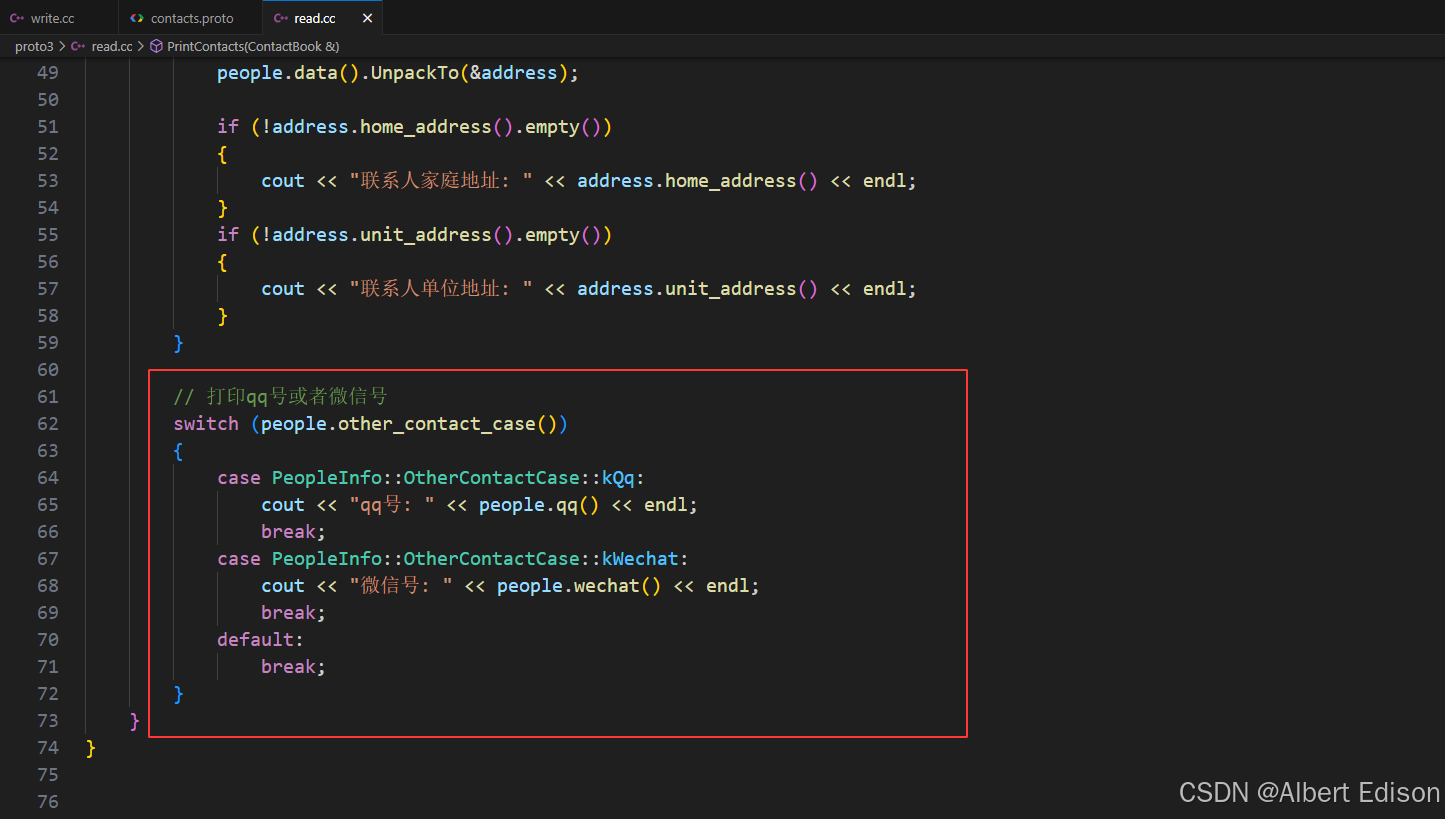
2.4 编译运行
make 编译以后,新增一个联系人。
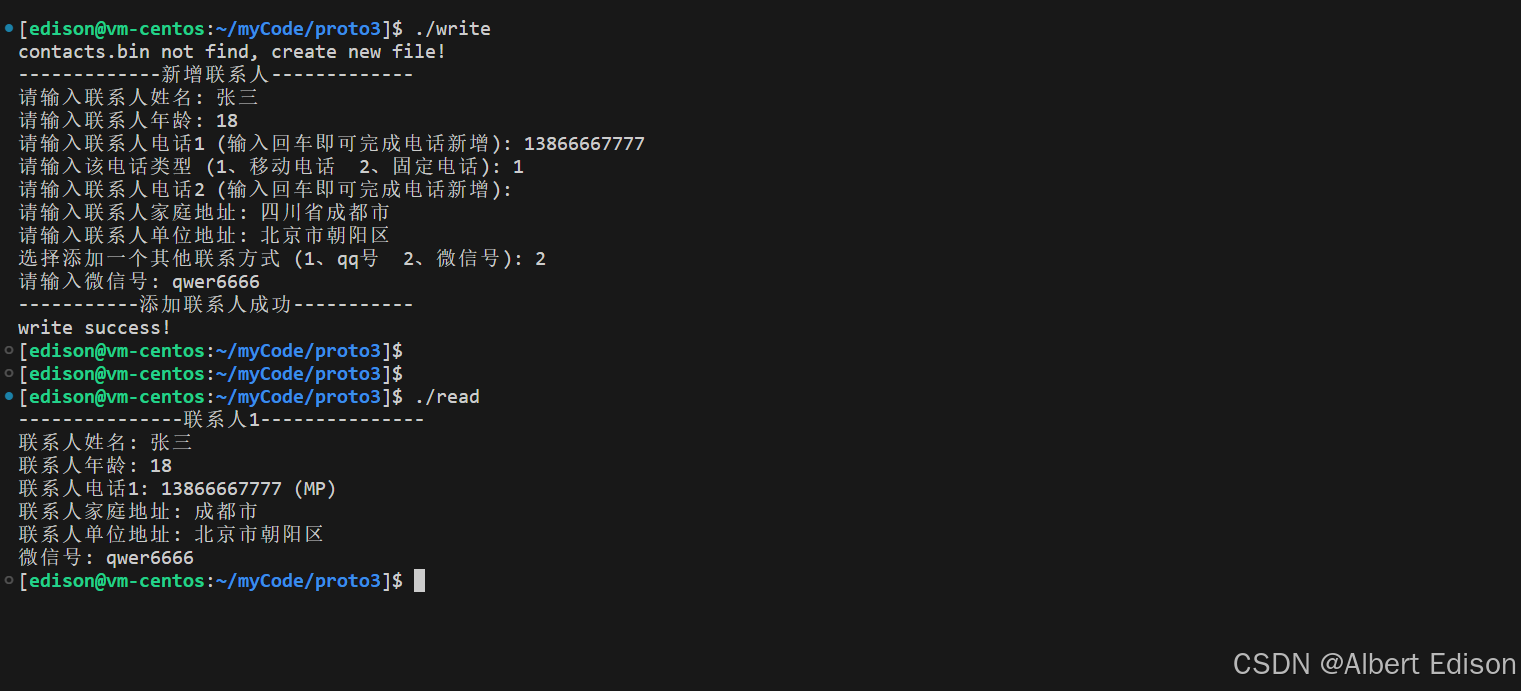
以上就是 oneof 语法的详细用法。