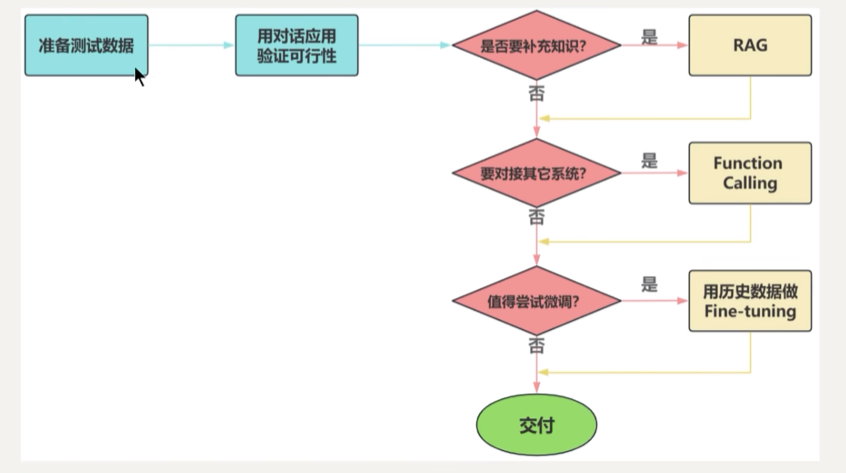
1. 大模型应用开发的四个场景
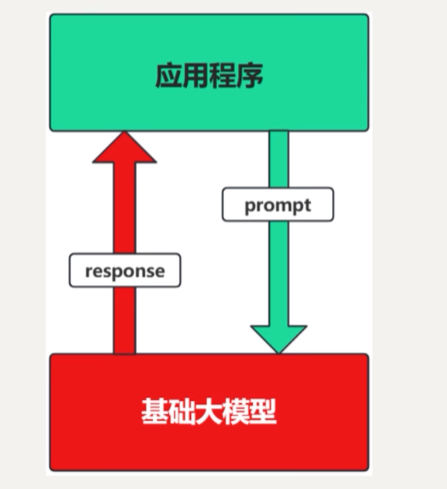
1.1. 纯Prompt
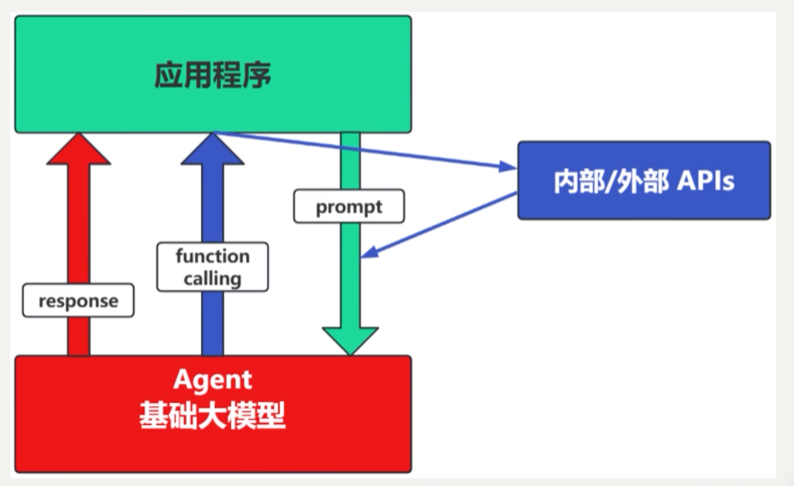
1.2. Agent + Function Calling
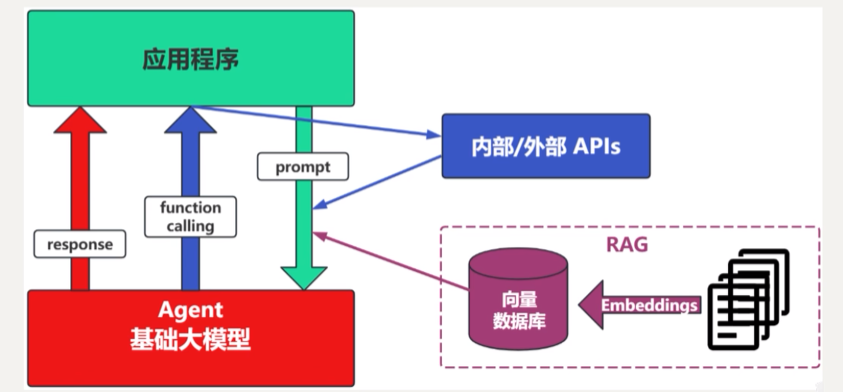
1.3. RAG
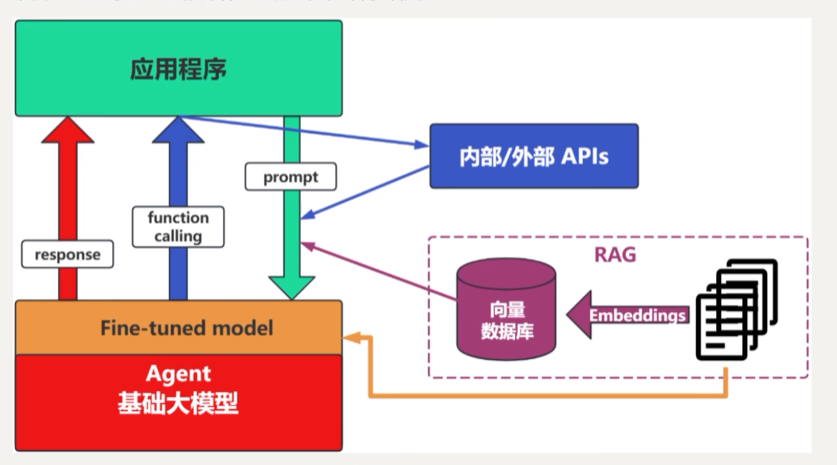
1.4. Fine-tuning
1.5. 如何选择?
2. 基于RAG架构的开发
何为RAG?
Retrieval-Augmented Generation(检索增强生成)
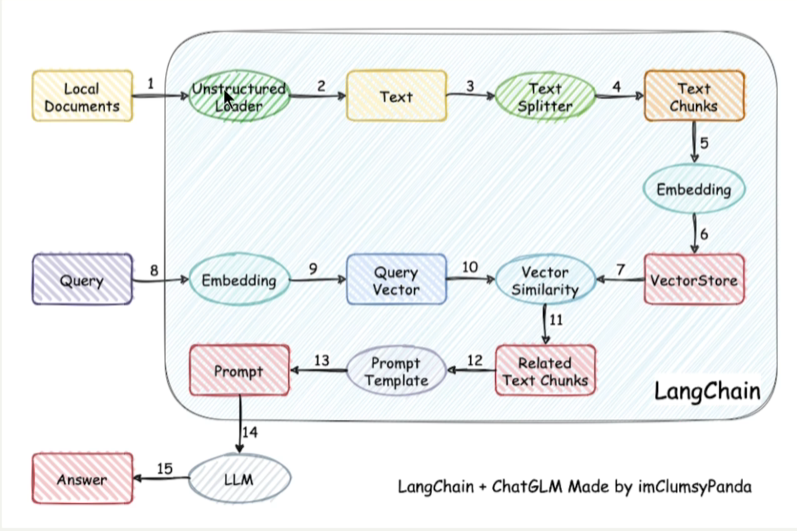
检索可以理解为第10步,增强理解为第12步,生成理解为第15步
过程中的难点:1.文件解析 2.文件切割 3.知识检索 4.知识重排序
Reranker的使用场景:
- 适合:追求高精度和高相关性的场景中特别适合使用Reranker,列如专业知识库或者客服系统等应用
- 不适合:引入reranker会增加召回时间,增加检索延迟。服务对响应时间要求高,使用reranker可能不太合适
这里有三个位置需要使用大模型:
- 第三步向量化时,需要使用EmbeddinModels
- 第七步重排序时,需要使用RerankModels
- 第九步生成答案时,需要使用LLM
3. 基于Agent架构的开发
何为Agent?
充分利用LLM的推理决策能力,通过增加规划,记忆和工具调用的能力,构造一个能够独立思考,逐步完成给定目标的智能体。
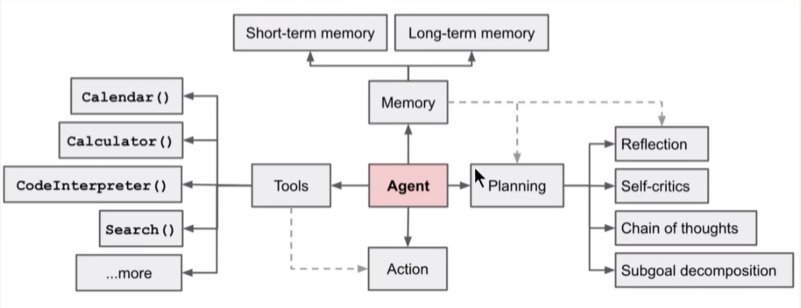
Agent = LLM + Memory + Tools + Planning + Action
LLM: "大脑",指挥中枢。
Memory: "记忆" ,分为短期记忆和长期记忆。
Tools: 调用外部工具扩展能力边界。
Planning: 通过任务分解,反思与自省框架实现复杂任务处理。
Action: 实现执行决策的模块
4. Why LangChain?
LangChain 提供的价值:
- 统一接口
无论是 OpenAI、Claude、Gemini 还是本地模型,用同一套代码调用,切换只改一行。 - Chain(链式调用)
把多个步骤串起来,比如:
用户问题 → 检索相关文档 → 填入 Prompt → 调用 LLM → 格式化输出 - RAG(检索增强生成)
内置向量数据库集成、文档分块、相似度检索,几十行代码就能让 LLM 回答你私有文档里的问题。 - Memory(记忆管理)
自动管理对话历史,处理 context 太长时的压缩策略。 - Agent(智能体)
让 LLM 自主决定调用哪些工具、调用几次,直到完成任务。
什么时候不需要 LangChain?
- 只是做简单的单次问答
- 团队对其抽象层感到困惑(LangChain 的 API 变化很频繁,学习曲线陡)
- 追求极致性能和可控性,更愿意自己写底层逻辑
很多团队的路径是:先用 LangChain 快速验证想法,成熟后替换为自己写的精简版。
简单说,LangChain 是 AI 应用的"脚手架"------不是必须的,但能让你快很多。
5. LangChain的核心组件概述
官方文档:https://docs.langchain.com/oss/python/langchain/overview
5.1. 组织一个ai应用,开发者一般需要什么?
- 提示词模板的构建,不仅仅只包含用户输入
- 模型调用与返回,参数设置,返回内容的格式化输出
- 知识库查询,这里会包含文档加载,切割,以及转化为词嵌入向量
- 其他三方工具调用
- 记忆获取,每一个对话都有上下文
5.2. 核心组件概述
5.2.1. Agents(智能体)
LangChain 的 Agent 底层构建在 LangGraph 之上,以提供持久化执行、流式输出、human-in-the-loop、状态持久化等能力。
from langchain.agents import create_agent

agent = create_agent(
    model="claude-sonnet-4-6",
    tools=[get_weather],
    system_prompt="You are a helpful assistant",
)
agent.invoke({"messages": [{"role": "user", "content": "..."}]})
5.2.2. Models(模型)
Models 是 Agent 的推理引擎,驱动 Agent 的决策过程,决定调用哪些工具、如何解读结果、何时给出最终答案。LangChain 提供统一的模型接口,方便在不同提供商之间切换,避免厂商锁定。
主要能力包括:结构化输出、多模态(图像/音频/视频)、多步推理。
5.2.3. Messages(消息)
消息是 Agent 与模型之间通信的标准单元,也是 Agent 状态的核心载体,所有交互通过 messages 列表传递。
5.2.4. Tools(工具)
LangChain 提供大量预构建工具和工具包,涵盖网页搜索、代码解释、数据库访问等常见任务,可直接集成到 Agent 中无需编写自定义代码。
工具的三种返回方式:
- 返回字符串 --- 适合人类可读结果
- 返回对象/字典 --- 适合结构化数据,模型可按字段推理
- 返回 Command --- 工具需要直接更新 Agent 状态时使用
5.2.5. Short-term Memory(短期记忆)
LangChain 的 Agent 将短期记忆作为 Agent 状态的一部分进行管理。通过将对话历史存储在图的状态中,Agent 可以访问某次对话的完整上下文,同时保持不同线程之间的隔离。状态通过 checkpointer 持久化到数据库,线程可在任意时间恢复。
agent = create_agent(
    "gpt-5",
    tools=[...],
    checkpointer=InMemorySaver(),  # 生产环境用 PostgresSaver
)
5.2.6. Streaming(流式输出)
Agent 遵循 LangGraph Graph API,支持 stream 和 invoke 等所有相关方法。可以在 Agent 执行多步骤时流式返回中间消息,展示执行进度。
5.2.7. Structured Output(结构化输出)
结构化输出允许 Agent 以特定可预测的格式返回数据。支持的格式包括:Pydantic 模型、Python dataclass、TypedDict、JSON Schema。
两种策略:
- ProviderStrategy --- 模型原生支持(OpenAI、Anthropic、Gemini 等),最可靠
- ToolStrategy --- 通过工具调用模拟结构化输出,适用于不支持原生结构化输出的模型
5.2.8. 整体关系
用户输入 (Messages)
      ↓
   Agents  ←→  Short-term Memory
      ↓
   Models(推理决策)
      ↓
   Tools(执行动作)
      ↓
Streaming 输出 / Structured Output
5.3. 快速启动
5.3.1. 环境准备
# 创建虚拟环境
conda create -n env_name python=3.10

# 导入包
pip install langchain
pip install langchain-anthropic
pip install langchain-openai
pip install langchain-deepseek

# 获取你需要使用的api_key
https://platform.claude.com/settings/keys
https://platform.openai.com/api-keys
https://platform.deepseek.com/usage

# 创建配置文件.env
OPENAI_API_KEY = sk-fpsucagq***********pmyjegwpdvpx

# 导入配置文件
from dotenv import  load_dotenv
load_dotenv()
5.3.2. demo
- Detailed system prompts for better agent behavior
- Create tools that integrate with external data
- Model configuration for consistent responses
- Structured output for predictable results
- Conversational memory for chat-like interactions
- Create and run the agent to test the fully functional agent
vb
``from dotenv import load_dotenv
load_dotenv()

from dataclasses import dataclass

from langchain.agents import create_agent
from langchain.chat_models import init_chat_model
from langchain.tools import tool, ToolRuntime
from langgraph.checkpoint.memory import InMemorySaver
from langchain.agents.structured_output import ToolStrategy


# Define system prompt
SYSTEM_PROMPT = """You are an expert weather forecaster, who speaks in puns.
You have access to two tools:
- get_weather_for_location: use this to get the weather for a specific location
- get_user_location: use this to get the user's location
If a user asks you for the weather, make sure you know the location.
 If you can tell from the question that they mean wherever they are, use the get_user_location tool to find their location."""

# dataclass 是 Python 的一个装饰器,用来快速定义只存储数据的类,省去写 __init__ 的麻烦。
@dataclass
class Context:
    user_id: str

# Define tools
@tool
def get_weather_for_location(city: str) -> str:
    """Get weather for a given city."""
    return f"It's always sunny in {city}!"

@tool
def get_user_location(runtime: ToolRuntime[Context]) -> str:
    """Retrieve user information based on user ID."""
    user_id = runtime.context.user_id
    return "Florida" if user_id == "1" else "SF"

# Configure model
model = init_chat_model(
    model="deepseek-chat",
    model_provider="deepseek",
    temperature=0
)

# Define response format
@dataclass
class ResponseFormat:
    """Response schema for the agent."""
    punny_response: str
    weather_conditions: str | None = None

# Set up memory
checkpointer = InMemorySaver()

# Create agent
agent = create_agent(
    model=model,
    system_prompt=SYSTEM_PROMPT,
    tools=[get_user_location, get_weather_for_location],
    context_schema=Context,
    response_format=ToolStrategy(ResponseFormat),
    checkpointer=checkpointer
)

# Run agent
config = {"configurable": {"thread_id": "1"}}
response = agent.invoke(
    {"messages": [{"role": "user", "content": "what is the weather outside?"}]},
    config=config,
    context=Context(user_id="1")
)
print(response['structured_response'])


# Note that we can continue the conversation using the same `thread_id`.
response = agent.invoke(
    {"messages": [{"role": "user", "content": "thank you!"}]},
    config=config,
    context=Context(user_id="1")
)
print(response['structured_response'])``
6. 核心组件详解
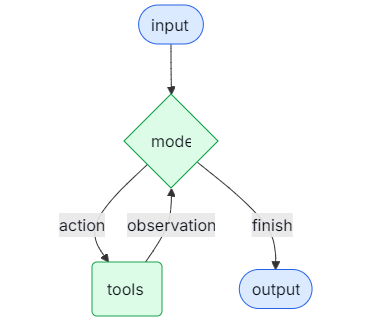
6.1. Agents
大型语言模型(LLM)代理在循环中运行工具以实现目标。代理会一直运行,直到满足停止条件------即模型输出最终结果或达到迭代限制。
6.2. Models
模型是智能体的推理引擎。它可以通过多种方式指定,支持静态和动态模型选择。
6.2.1. 关键方法
Invoke
调用模型最直接的方式是使用带有单个消息或消息列表的invoke()方法。
from langchain.messages import HumanMessage, AIMessage, SystemMessage

conversation = [
    SystemMessage("You are a helpful assistant that translates English to French."),
    HumanMessage("Translate: I love programming."),
    AIMessage("J'adore la programmation."),
    HumanMessage("Translate: I love building applications.")
]

response = model.invoke(conversation)
print(response)  # AIMessage("J'adore créer des applications.")
Stream
大多数模型在生成输出内容时可以进行流式处理。通过逐步显示输出,流式处理显著提升了用户体验,尤其是在处理较长的响应时。
调用stream()会返回一个迭代器,该迭代器会在输出块生成时立即返回。您可以使用循环来实时处理每个块:
full = None  # None | AIMessageChunk
for chunk in model.stream("What color is the sky?"):
    full = chunk if full is None else full + chunk
    print(full.text)

# The
# The sky
# The sky is
# The sky is typically
# The sky is typically blue
# ...

print(full.content_blocks)
# [{"type": "text", "text": "The sky is typically blue..."}]
Batch
将一组独立的请求批量处理到模型中可以显著提高性能并降低成本,因为处理过程可以并行进行:
responses = model.batch([
    "Why do parrots have colorful feathers?",
    "How do airplanes fly?",
    "What is quantum computing?"
])
for response in responses:
    print(response)
6.2.2. 参数
model:选择的模型
api_key:用于向模型提供者进行身份验证所需的密钥。这通常在您注册以获取模型访问权限时颁发。通常通过设置环境变量来访问。
temperature:控制模型输出的随机性。数值越高,响应越具创造性;数值越低,响应越具有确定性。
max_tokens:限制响应中的标记总数,从而有效地控制输出的长度。
timeout:在取消请求之前,等待模型响应的最长时间(以秒为单位)。
max_retries:如果请求因网络超时或速率限制等问题失败,系统将尝试重新发送该请求的最大次数。重试采用带有抖动的指数退避策略。网络错误、速率限制(429)和服务器错误(5xx)会自动重试。客户端错误(如401(未授权)或404)则不会重试。对于在不可靠网络上长时间运行的代理任务,建议将此值增加到10-15。
model = init_chat_model(
    "claude-sonnet-4-6",
    # Kwargs passed to the model:
    temperature=0.7,
    timeout=30,
    max_tokens=1000,
    max_retries=6,  # Default; increase for unreliable networks
)
6.2.3. 静态模型
静态模型在创建代理时配置一次,并在整个执行过程中保持不变。这是最常见且最直接的方法。
from langchain.agents import create_agent
from langchain_openai import ChatOpenAI

model = ChatOpenAI(
    model="gpt-5",
    temperature=0.1,
    max_tokens=1000,
    timeout=30
    # ... (other params)
)
agent = create_agent(model, tools=tools)
6.2.4. 动态模型
在运行时,会根据当前状态和上下文选择动态模型。这使得能够实现复杂的路由逻辑和成本优化。
要使用动态模型,请使用@wrap_model_call装饰器创建中间件,该装饰器会在请求中修改模型:
from langchain_openai import ChatOpenAI
from langchain.agents import create_agent
from langchain.agents.middleware import wrap_model_call, ModelRequest, ModelResponse


basic_model = ChatOpenAI(model="gpt-4.1-mini")
advanced_model = ChatOpenAI(model="gpt-4.1")

@wrap_model_call
def dynamic_model_selection(request: ModelRequest, handler) -> ModelResponse:
    """Choose model based on conversation complexity."""
    message_count = len(request.state["messages"])

    if message_count > 10:
        # Use an advanced model for longer conversations
        model = advanced_model
    else:
        model = basic_model

    return handler(request.override(model=model))

agent = create_agent(
    model=basic_model,  # Default model
    tools=tools,
    middleware=[dynamic_model_selection]
)
6.2.5. Tool calling
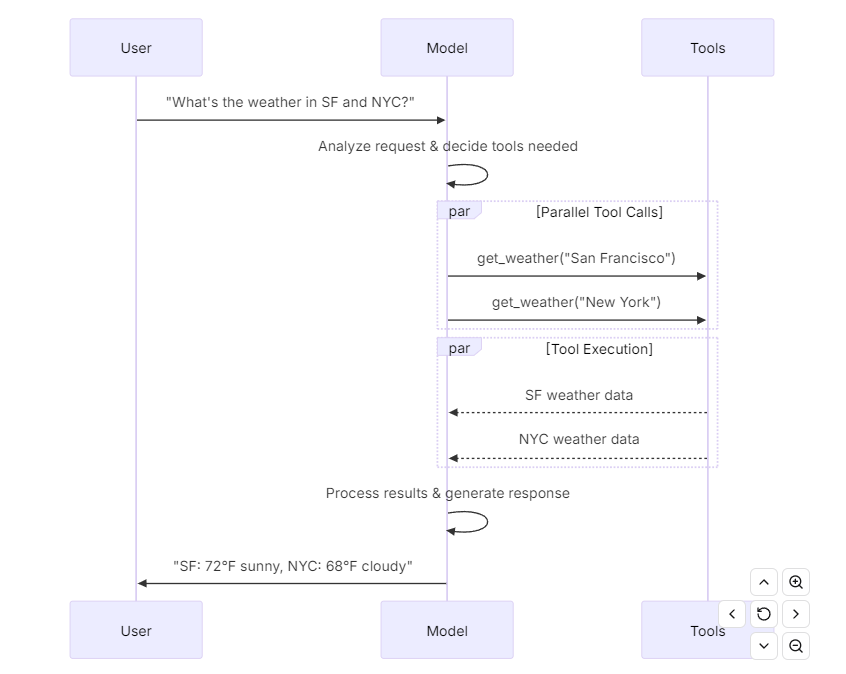
模型可以请求调用执行任务的工具,如从数据库中获取数据、搜索网络或运行代码。工具由以下部分组成:
1.一个模式,包括工具名称、描述和/或参数定义(通常为JSON模式)
2.要执行的函数或协程。
6.2.6. Structured output
可以要求模型以与给定模式相匹配的格式提供其响应。这有助于确保输出能够被轻松解析并在后续处理中使用。LangChain支持多种模式类型和方法来强制执行结构化输出。
# Define response format
@dataclass
class ResponseFormat:
    """Response schema for the agent."""
    punny_response: str
    weather_conditions: str | None = None
6.2.7. Advanced topics
Model profiles
LangChain chat models can expose a dictionary of supported features and capabilities through a .profile attribute:
model.profile
# {
#   "max_input_tokens": 400000,
#   "image_inputs": True,
#   "reasoning_output": True,
#   "tool_calling": True,
#   ...
# }
Multimodal
某些模型可以处理并返回非文本数据,如图像、音频和视频。您可以通过提供内容块来向模型传递非文本数据。
response = model.invoke("Create a picture of a cat")
print(response.content_blocks)
# [
#     {"type": "text", "text": "Here's a picture of a cat"},
#     {"type": "image", "base64": "...", "mime_type": "image/jpeg"},
# ]
Reasoning
许多模型都能够进行多步推理以得出结论。这涉及将复杂问题分解为更小、更易管理的步骤。
response = model.invoke("Why do parrots have colorful feathers?")
reasoning_steps = [b for b in response.content_blocks if b["type"] == "reasoning"]
print(" ".join(step["reasoning"] for step in reasoning_steps))
Prompt caching
许多提供商提供即时缓存功能,以减少对相同令牌进行重复处理的延迟和成本。这些功能可以是隐式的,也可以是显式的:
隐式提示缓存:如果请求命中缓存,提供者将自动传递成本节约。
显式缓存:提供程序允许您手动指定缓存点,以便更好地控制或确保节省成本。
Server-side tool use
一些提供商支持服务器端工具调用循环:模型可以与网络搜索、代码解释器和其他工具进行交互,并在一次对话回合中分析结果。
如果模型在服务器端调用工具,则响应消息的内容将包含表示工具调用和结果的内容。访问响应的内容块将以与提供者无关的格式返回服务器端工具调用和结果:
from langchain.chat_models import init_chat_model

model = init_chat_model("gpt-4.1-mini")

tool = {"type": "web_search"}
model_with_tools = model.bind_tools([tool])

response = model_with_tools.invoke("What was a positive news story from today?")
print(response.content_blocks)
Rate limiting
许多聊天模型提供商对在给定时间段内可进行的调用次数设置了限制。若达到速率限制,您通常会从提供商那里收到速率限制错误响应,并且需要等待一段时间后才能发出更多请求。
为了帮助管理速率限制,聊天模型集成会接受一个rate_limiter参数,该参数可在初始化过程中提供,用于控制请求的发出速率。
Token usage
许多模型提供者会在调用响应中返回令牌使用信息。当该信息可用时,它将包含在相应模型生成的AIMessage对象中。
from langchain.chat_models import init_chat_model
from langchain_core.callbacks import UsageMetadataCallbackHandler

model_1 = init_chat_model(model="gpt-4.1-mini")
model_2 = init_chat_model(model="claude-haiku-4-5-20251001")

callback = UsageMetadataCallbackHandler()
result_1 = model_1.invoke("Hello", config={"callbacks": [callback]})
result_2 = model_2.invoke("Hello", config={"callbacks": [callback]})
print(callback.usage_metadata)
6.3. Messages
消息是LangChain中模型上下文的基本单元。它们代表模型的输入和输出,在与大型语言模型(LLM)交互时,携带表示对话状态所需的内容和元数据。
消息是包含以下内容的对象:
- 角色 - 标识消息类型(例如,系统、用户)
- 内容- 代表消息的实际内容(如文本、图片、音频、文档等)
- 元数据 - 响应信息、消息ID和令牌使用等可选字段
LangChain 提供了一种标准消息类型,该类型适用于所有模型提供者,从而确保无论调用哪个模型,其行为都能保持一致。
6.3.1. Basic usage
使用消息的最简单方法就是创建消息对象,并在调用时将它们传递给模型。
from langchain.chat_models import init_chat_model
from langchain.messages import HumanMessage, AIMessage, SystemMessage

model = init_chat_model("gpt-5-nano")

system_msg = SystemMessage("You are a helpful assistant.")
human_msg = HumanMessage("Hello, how are you?")

# Use with chat models
messages = [system_msg, human_msg]
response = model.invoke(messages)  # Returns AIMessage
6.3.2. Text prompts
文本提示
文本提示是字符串------非常适合不需要保留对话历史的简单生成任务。
response = model.invoke("Write a haiku about spring")6.3.3. Message prompts
或者,您可以通过提供一系列消息对象来向模型传入一系列消息。
from langchain.messages import SystemMessage, HumanMessage, AIMessage

messages = [
    SystemMessage("You are a poetry expert"),
    HumanMessage("Write a haiku about spring"),
    AIMessage("Cherry blossoms bloom...")
]
response = model.invoke(messages)
6.3.4. Dictionary format
您还可以直接以OpenAI聊天补全格式指定消息。
messages = [
    {"role": "system", "content": "You are a poetry expert"},
    {"role": "user", "content": "Write a haiku about spring"},
    {"role": "assistant", "content": "Cherry blossoms bloom..."}
]
response = model.invoke(messages)
6.3.5. Message types
-
System message - 告诉模型如何表现,并为交互提供上下文
system_msg = SystemMessage("You are a helpful coding assistant.")
messages = [
system_msg,
HumanMessage("How do I create a REST API?")
]
response = model.invoke(messages) -
Human message - 表示用户输入以及与模型的交互
response = model.invoke([
HumanMessage("What is machine learning?")
]) -
AI message - 模型生成的响应,包括文本内容、工具调用和元数据
response = model.invoke("Explain AI")
print(type(response)) # <class 'langchain.messages.AIMessage'> -
Tool message - 表示工具调用的输出结果
from langchain.chat_models import init_chat_model
model = init_chat_model("gpt-5-nano")
def get_weather(location: str) -> str:
"""Get the weather at a location."""
...model_with_tools = model.bind_tools([get_weather])
response = model_with_tools.invoke("What's the weather in Paris?")for tool_call in response.tool_calls:
print(f"Tool: {tool_call['name']}")
print(f"Args: {tool_call['args']}")
print(f"ID: {tool_call['id']}")
6.3.6. Streaming and chunks
在流式传输过程中,您将接收到AIMessageChunk对象,这些对象可以组合成一个完整的消息对象:
chunks = []
full_message = None
for chunk in model.stream("Hi"):
    chunks.append(chunk)
    print(chunk.text)
    full_message = chunk if full_message is None else full_message + chunk
6.3.7. Message content
你可以将消息的内容视为发送给模型的数据有效载荷。消息具有一个内容属性,该属性是松散类型的,支持字符串和未类型化对象(例如,字典)的列表。这使得LangChain聊天模型可以直接支持提供者本地的结构,如多模态内容和其他数据。
另外,LangChain为文本、推理、引用、多模态数据、服务器端工具调用以及其他消息内容提供了专门的内容类型。请参阅下面的内容块。
LangChain聊天模型在内容属性中接受消息内容。
这可能包含以下任一内容:
-
一个字符串
-
以提供者原生格式呈现的内容块列表
-
LangChain标准内容块列表
from langchain.messages import HumanMessage
String content
human_message = HumanMessage("Hello, how are you?")
Provider-native format (e.g., OpenAI)
human_message = HumanMessage(content=[
{"type": "text", "text": "Hello, how are you?"},
{"type": "image_url", "image_url": {"url": "https://example.com/image.jpg"}}
])List of standard content blocks
human_message = HumanMessage(content_blocks=[
{"type": "text", "text": "Hello, how are you?"},
{"type": "image", "url": "https://example.com/image.jpg"},
])
6.3.8. Standard content blocks
LangChain为跨提供商的消息内容提供了一种标准表示形式。
消息对象实现了一个content_blocks属性,该属性会惰性地解析内容属性,将其转换为标准的、类型安全的表示形式。例如,由ChatAnthropic或ChatOpenAI生成的消息将以各自提供者的格式包含思考或推理块,但可以惰性地解析为一致的ReasoningContentBlock表示形式:
from langchain.messages import AIMessage

message = AIMessage(
    content=[
        {"type": "thinking", "thinking": "...", "signature": "WaUjzkyp..."},
        {"type": "text", "text": "..."},
    ],
    response_metadata={"model_provider": "anthropic"}
)
message.content_blocks
6.3.9. Multimodal
多模态指的是处理不同形式数据的能力,如文本、音频、图像和视频。LangChain为这些数据提供了标准类型,这些类型可在不同提供商间通用。
聊天模型可以接受多模态数据作为输入,并生成相应的输出。下面我们展示了包含多模态数据的输入消息的简短示例。
# From URL
message = {
    "role": "user",
    "content": [
        {"type": "text", "text": "Describe the content of this image."},
        {"type": "image", "url": "https://example.com/path/to/image.jpg"},
    ]
}

# From base64 data
message = {
    "role": "user",
    "content": [
        {"type": "text", "text": "Describe the content of this image."},
        {
            "type": "image",
            "base64": "AAAAIGZ0eXBtcDQyAAAAAGlzb21tcDQyAAACAGlzb2...",
            "mime_type": "image/jpeg",
        },
    ]
}

# From provider-managed File ID
message = {
    "role": "user",
    "content": [
        {"type": "text", "text": "Describe the content of this image."},
        {"type": "image", "file_id": "file-abc123"},
    ]
}
6.4. Tools
工具拓展了代理的能力------让它们能够获取实时数据、执行代码、查询外部数据库,并在现实世界中采取行动。
在底层,工具是具有明确定义输入和输出的可调用函数,这些输入和输出会被传递给聊天模型。模型会根据对话上下文决定何时调用工具,以及提供哪些输入参数。
6.4.1. Basic tool definition
创建工具最简单的方法是使用@tool装饰器。默认情况下,函数的文档字符串将成为工具的描述,帮助模型理解何时使用它:
from langchain.tools import tool

@tool
def search_database(query: str, limit: int = 10) -> str:
    """Search the customer database for records matching the query.

    Args:
        query: Search terms to look for
        limit: Maximum number of results to return
    """
    return f"Found {limit} results for '{query}'"
6.4.2. Customize tool properties
Custom tool name
默认情况下,工具名称来源于函数名称。若需要更具描述性的名称,请对其进行重写:
@tool("web_search")  # Custom name
def search(query: str) -> str:
    """Search the web for information."""
    return f"Results for: {query}"

print(search.name)  # web_search
Custom tool description
覆盖自动生成的工具描述,以提供更清晰的模型指导:
@tool("calculator", description="Performs arithmetic calculations. Use this for any math problems.")
def calc(expression: str) -> str:
    """Evaluate mathematical expressions."""
    return str(eval(expression))
Advanced schema definition
使用Pydantic模型或JSON模式定义复杂输入:
weather_schema = {
    "type": "object",
    "properties": {
        "location": {"type": "string"},
        "units": {"type": "string"},
        "include_forecast": {"type": "boolean"}
    },
    "required": ["location", "units", "include_forecast"]
}

@tool(args_schema=weather_schema)
def get_weather(location: str, units: str = "celsius", include_forecast: bool = False) -> str:
    """Get current weather and optional forecast."""
    temp = 22 if units == "celsius" else 72
    result = f"Current weather in {location}: {temp} degrees {units[0].upper()}"
    if include_forecast:
        result += "\nNext 5 days: Sunny"
    return result
6.4.3. Access context
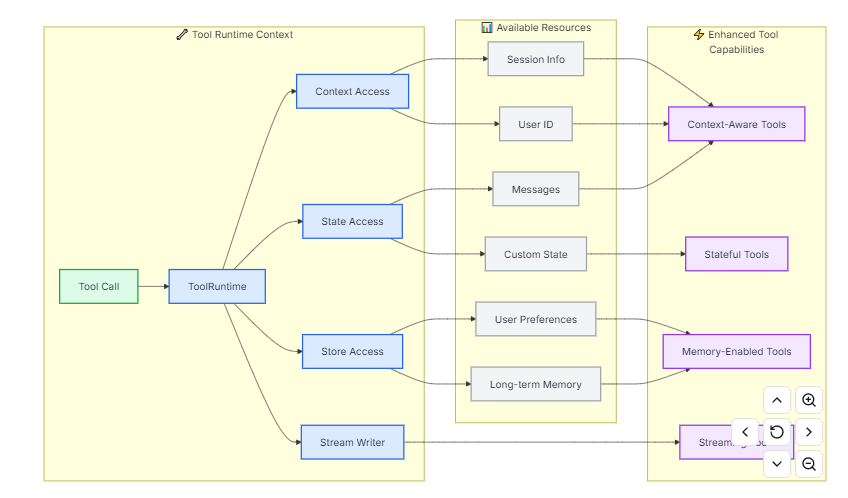
当工具能够访问会话历史、用户数据和持久内存等运行时信息时,它们将发挥最大的作用。本节将介绍如何在工具中访问和更新这些信息。
|---------------|--------------------------------------|-----------------|
| Component | Description | Use case |
| State | 短期记忆------当前会话中存在的可变数据(消息、计数器、自定义字段) | 访问对话历史,跟踪工具调用次数 |
| Context | 调用时传递的不可变配置(用户ID、会话信息) | 根据用户身份定制化回复 |
| Store | 长期记忆------在对话中持续存在的持久数据 | 保存用户偏好,维护知识库 |
| Stream Writer | 在工具执行过程中实时更新 | 显示长时间运行操作的进度 |
| Config | 用于执行的RunnableConfig | 访问回调、标签和元数据 |
| Tool Call ID | 当前工具调用的唯一标识符 | 将工具调用日志与模型调用相关联 |
6.5. Short-term memory
记忆是一个系统,用于记住先前交互的信息。对于人工智能代理而言,记忆至关重要,因为它能让它们记住先前的交互,从反馈中学习,并适应用户偏好。随着代理处理更多复杂的任务,与用户进行大量交互,这种能力对于效率和用户满意度都变得至关重要。短期记忆使你的应用程序能够记住单个线程或对话中的先前交互。
对话历史是短期记忆中最常见的形式。长对话对当今的大型语言模型(LLM)构成了挑战;完整的对话历史可能无法完全纳入LLM的上下文窗口,从而导致上下文丢失或错误。即使你的模型支持完整的上下文长度,大多数大型语言模型(LLM)在处理长上下文时仍然表现不佳。它们会被过时或偏离主题的内容"分散注意力",同时还会面临响应速度变慢和成本增加的问题。
聊天模型通过消息接收上下文,这些消息包括指令(系统消息)和输入(人类消息)。在聊天应用程序中,消息在人类输入和模型回复之间交替,从而形成随时间推移而不断增多的消息列表。由于上下文窗口是有限的,许多应用程序可以通过使用技术来删除或"遗忘"过时信息,从而受益。
6.5.1. Usage
要为代理添加短期内存(线程级持久化),需要在创建代理时指定一个检查指针。
from langchain.agents import create_agent
from langgraph.checkpoint.memory import InMemorySaver


agent = create_agent(
    "gpt-5",
    tools=[get_user_info],
    checkpointer=InMemorySaver(),
)

agent.invoke(
    {"messages": [{"role": "user", "content": "Hi! My name is Bob."}]},
    # 必须传threadid,模型才会知道是哪个会话
    {"configurable": {"thread_id": "1"}},
)
6.5.2. In production
在生产环境中,使用由数据库支持的校验指针:
pip install langgraph-checkpoint-postgres

from langchain.agents import create_agent
from langgraph.checkpoint.postgres import PostgresSaver


DB_URI = "postgresql://postgres:postgres@localhost:5442/postgres?sslmode=disable"
with PostgresSaver.from_conn_string(DB_URI) as checkpointer:
    checkpointer.setup() # auto create tables in PostgreSQL
    agent = create_agent(
        "gpt-5",
        tools=[get_user_info],
        checkpointer=checkpointer,
    )
6.5.3. Customizing agent memory
默认情况下,代理使用AgentState来管理短期记忆,特别是通过messages键来管理对话历史。
你可以扩展AgentState以添加额外的字段。自定义状态模式通过state_schema参数传递给create_agent。
from langchain.agents import create_agent, AgentState
from langgraph.checkpoint.memory import InMemorySaver


class CustomAgentState(AgentState):
    user_id: str
    preferences: dict

agent = create_agent(
    "gpt-5",
    tools=[get_user_info],
    state_schema=CustomAgentState,
    checkpointer=InMemorySaver(),
)

# Custom state can be passed in invoke
result = agent.invoke(
    {
        "messages": [{"role": "user", "content": "Hello"}],
        "user_id": "user_123",
        "preferences": {"theme": "dark"}
    },
    {"configurable": {"thread_id": "1"}})
6.5.4. Common patterns
在启用短期记忆功能的情况下,长对话可能会超出大型语言模型(LLM)的上下文窗口。常见的解决方案有:
- Trim messages
大多数大型语言模型(LLM)都有一个最大支持的上下文窗口(以词元为单位)。决定何时截断消息的一种方法是统计消息历史中的标记数量,并在接近该限制时进行截断。如果你在使用LangChain,可以使用trim messages实用程序,并从列表中指定要保留的标记数量,以及用于处理边界的策略(例如,保留最后的max_tokens)。
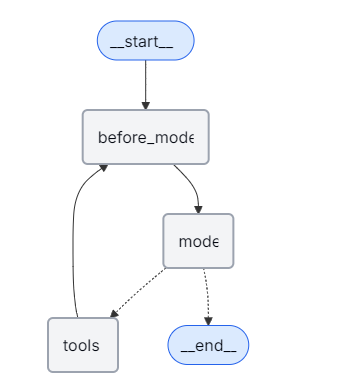
要在代理中修剪消息历史记录,请使用@before_model中间件装饰器:
from langchain.messages import RemoveMessage
from langgraph.graph.message import REMOVE_ALL_MESSAGES
from langgraph.checkpoint.memory import InMemorySaver
from langchain.agents import create_agent, AgentState
from langchain.agents.middleware import before_model
from langgraph.runtime import Runtime
from langchain_core.runnables import RunnableConfig
from typing import Any


@before_model
def trim_messages(state: AgentState, runtime: Runtime) -> dict[str, Any] | None:
    """Keep only the last few messages to fit context window."""
    messages = state["messages"]

    if len(messages) <= 3:
        return None  # No changes needed

    first_msg = messages[0]
    recent_messages = messages[-3:] if len(messages) % 2 == 0 else messages[-4:]
    new_messages = [first_msg] + recent_messages

    return {
        "messages": [
            RemoveMessage(id=REMOVE_ALL_MESSAGES),
            *new_messages
        ]
    }

agent = create_agent(
    your_model_here,
    tools=your_tools_here,
    middleware=[trim_messages],
    checkpointer=InMemorySaver(),
)

config: RunnableConfig = {"configurable": {"thread_id": "1"}}

agent.invoke({"messages": "hi, my name is bob"}, config)
agent.invoke({"messages": "write a short poem about cats"}, config)
agent.invoke({"messages": "now do the same but for dogs"}, config)
final_response = agent.invoke({"messages": "what's my name?"}, config)

final_response["messages"][-1].pretty_print()
"""
================================== Ai Message ==================================

Your name is Bob. You told me that earlier.
If you'd like me to call you a nickname or use a different name, just say the word.
"""- Delete messages
你可以从图形状态中删除消息,以管理消息历史记录。
当你想删除特定消息或清除整个消息历史记录时,这将非常有用。
要从图状态中删除消息,可以使用RemoveMessage。
为了让RemoveMessage生效,你需要为add_messages reducer使用一个状态键。
默认的AgentState提供了这一点。
要删除特定消息:
from langchain.messages import RemoveMessage

def delete_messages(state):
    messages = state["messages"]
    if len(messages) > 2:
        # remove the earliest two messages
        return {"messages": [RemoveMessage(id=m.id) for m in messages[:2]]}
要删除所以消息
from langgraph.graph.message import REMOVE_ALL_MESSAGES

def delete_messages(state):
    return {"messages": [RemoveMessage(id=REMOVE_ALL_MESSAGES)]}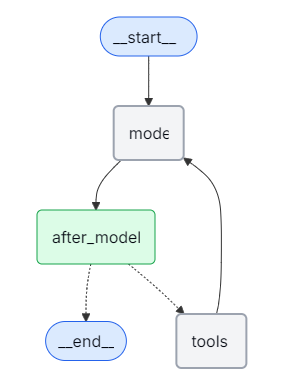
from langchain.messages import RemoveMessage
from langchain.agents import create_agent, AgentState
from langchain.agents.middleware import after_model
from langgraph.checkpoint.memory import InMemorySaver
from langgraph.runtime import Runtime
from langchain_core.runnables import RunnableConfig


@after_model
def delete_old_messages(state: AgentState, runtime: Runtime) -> dict | None:
    """Remove old messages to keep conversation manageable."""
    messages = state["messages"]
    if len(messages) > 2:
        # remove the earliest two messages
        return {"messages": [RemoveMessage(id=m.id) for m in messages[:2]]}
    return None


agent = create_agent(
    "gpt-5-nano",
    tools=[],
    system_prompt="Please be concise and to the point.",
    middleware=[delete_old_messages],
    checkpointer=InMemorySaver(),
)

config: RunnableConfig = {"configurable": {"thread_id": "1"}}

for event in agent.stream(
    {"messages": [{"role": "user", "content": "hi! I'm bob"}]},
    config,
    stream_mode="values",
):
    print([(message.type, message.content) for message in event["messages"]])

for event in agent.stream(
    {"messages": [{"role": "user", "content": "what's my name?"}]},
    config,
    stream_mode="values",
):
print([(message.type, message.content) for message in event["messages"]])- Summarize messages
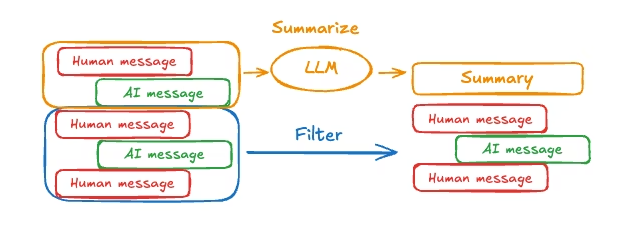
如上所示,修剪或移除消息的问题在于,可能会因消息队列的筛选而丢失信息。因此,一些应用程序采用更复杂的方法,即使用聊天模型来总结消息历史,从而获益。
from langchain.agents import create_agent
from langchain.agents.middleware import SummarizationMiddleware
from langgraph.checkpoint.memory import InMemorySaver
from langchain_core.runnables import RunnableConfig


checkpointer = InMemorySaver()

agent = create_agent(
    model="gpt-4.1",
    tools=[],
    middleware=[
        SummarizationMiddleware(
            model="gpt-4.1-mini",
            trigger=("tokens", 4000),
            keep=("messages", 20)
        )
    ],
    checkpointer=checkpointer,
)

config: RunnableConfig = {"configurable": {"thread_id": "1"}}
agent.invoke({"messages": "hi, my name is bob"}, config)
agent.invoke({"messages": "write a short poem about cats"}, config)
agent.invoke({"messages": "now do the same but for dogs"}, config)
final_response = agent.invoke({"messages": "what's my name?"}, config)

final_response["messages"][-1].pretty_print()
"""
================================== Ai Message ==================================

Your name is Bob!
"""- Custom Strategies
6.6. Streaming
LangChain实现了一个流式处理系统,以呈现实时更新。
流式处理对于增强基于大型语言模型(LLM)构建的应用程序的响应能力至关重要。通过逐步显示输出,甚至在完整响应准备好之前,流式处理就能显著提升用户体验(UX),尤其是在处理大型语言模型的延迟问题时。
6.6.1. Supported stream modes
将以下一个或多个流模式作为列表传递给stream或astream方法:
|------------|--------------------------------------------------------------|
| Mode | Description |
| updates | 在每个代理步骤后,对状态进行更新。如果在同一步骤中进行了多次更新(例如,运行了多个节点),则这些更新将分别进行流式传输。 |
| messages | 从任何调用大型语言模型(LLM)的图节点中,流式传输由(标记,元数据)组成的元组。 |
| custom | 使用流写入器从图节点内部输出自定义数据。 |
6.6.2. Agent progress
要流式传输代理进度,请使用带有stream_mode="updates"的stream或astream方法。这会在每个代理步骤后触发一个事件。
例如,如果你有一个代理调用了一个工具一次,你应该会看到以下更新:LLM节点:包含工具调用请求的AI消息 工具节点:包含执行结果的ToolMessage LLM节点:最终AI响应
from langchain.agents import create_agent


def get_weather(city: str) -> str:
    """Get weather for a given city."""

    return f"It's always sunny in {city}!"

agent = create_agent(
    model="gpt-5-nano",
    tools=[get_weather],
)
for chunk in agent.stream(
    {"messages": [{"role": "user", "content": "What is the weather in SF?"}]},
    stream_mode="updates",
    version="v2",
):
    if chunk["type"] == "updates":
        for step, data in chunk["data"].items():
            print(f"step: {step}")
            print(f"content: {data['messages'][-1].content_blocks}")
6.6.3. LLM tokens
要在大型语言模型(LLM)生成标记时进行流式传输,请使用stream_mode="messages"。下面您可以看到代理流式传输工具调用的输出和最终响应。
from langchain.agents import create_agent


def get_weather(city: str) -> str:
    """Get weather for a given city."""
    return f"It's always sunny in {city}!"

agent = create_agent(
    model="gpt-5-nano",
    tools=[get_weather],
)
for chunk in agent.stream(
    {"messages": [{"role": "user", "content": "What is the weather in SF?"}]},
    stream_mode="messages",
    version="v2",
):
    if chunk["type"] == "messages":
        token, metadata = chunk["data"]
        print(f"node: {metadata['langgraph_node']}")
        print(f"content: {token.content_blocks}")
        print("\n")
6.6.4. Custom updates
要在工具执行时实时更新,您可以使用get_stream_writer。
from langchain.agents import create_agent
from langgraph.config import get_stream_writer


def get_weather(city: str) -> str:
    """Get weather for a given city."""
    writer = get_stream_writer()
    # stream any arbitrary data
    writer(f"Looking up data for city: {city}")
    writer(f"Acquired data for city: {city}")
    return f"It's always sunny in {city}!"

agent = create_agent(
    model="claude-sonnet-4-6",
    tools=[get_weather],
)

for chunk in agent.stream(
    {"messages": [{"role": "user", "content": "What is the weather in SF?"}]},
    stream_mode="custom",
    version="v2",
):
    if chunk["type"] == "custom":
        print(chunk["data"])
6.6.5. Stream multiple modes
您可以通过将流模式作为列表传递来指定多种流模式:stream_mode="updates","custom"。
每个流式数据块都是一个带有类型、ns和数据键的StreamPart字典。使用chunk"type"确定流模式,使用chunk"data"访问有效载荷。
from langchain.agents import create_agent
from langgraph.config import get_stream_writer


def get_weather(city: str) -> str:
    """Get weather for a given city."""
    writer = get_stream_writer()
    writer(f"Looking up data for city: {city}")
    writer(f"Acquired data for city: {city}")
    return f"It's always sunny in {city}!"

agent = create_agent(
    model="gpt-5-nano",
    tools=[get_weather],
)

for chunk in agent.stream(
    {"messages": [{"role": "user", "content": "What is the weather in SF?"}]},
    stream_mode=["updates", "custom"],
    version="v2",
):
    print(f"stream_mode: {chunk['type']}")
    print(f"content: {chunk['data']}")
    print("\n")
6.6.6. Common patterns
下面是显示流媒体常见用例的示例。
流式思维/推理令牌
一些模型在产生最终答案之前会进行内部推理。您可以流式传输这些思维/推理令牌,因为它们是通过过滤"推理"类型的标准内容块生成的。
from langchain.agents import create_agent
from langchain.messages import AIMessageChunk
from langchain_anthropic import ChatAnthropic
from langchain_core.runnables import Runnable


def get_weather(city: str) -> str:
    """Get weather for a given city."""
    return f"It's always sunny in {city}!"


model = ChatAnthropic(
    model_name="claude-sonnet-4-6",
    timeout=None,
    stop=None,
    thinking={"type": "enabled", "budget_tokens": 5000},
)
agent: Runnable = create_agent(
    model=model,
    tools=[get_weather],
)

for token, metadata in agent.stream(
    {"messages": [{"role": "user", "content": "What is the weather in SF?"}]},
    stream_mode="messages",
):
    if not isinstance(token, AIMessageChunk):
        continue
    reasoning = [b for b in token.content_blocks if b["type"] == "reasoning"]
    text = [b for b in token.content_blocks if b["type"] == "text"]
    if reasoning:
        print(f"[thinking] {reasoning[0]['reasoning']}", end="")
    if text:
        print(text[0]["text"], end="")
6.6.7. Streaming tool calls
您可能希望同时流式传输以下两种内容:
- 生成部分JSON作为工具调用
- 已执行的已完成、已解析的工具调用
指定stream_mode="messages"将流式传输代理中所有LLM调用生成的增量消息块。要使用解析的工具调用访问已完成的消息,请执行以下操作:
-
如果这些消息在状态中被跟踪(如create_agent的模型节点),则使用stream_mode="messages","updates"通过状态更新访问已完成的消息(如下所示)。
-
如果这些消息在状态中没有被跟踪,请在流循环期间使用自定义更新或聚合块(下一节)。
from typing import Any
from langchain.agents import create_agent
from langchain.messages import AIMessage, AIMessageChunk, AnyMessage, ToolMessagedef get_weather(city: str) -> str:
"""Get weather for a given city."""return f"It's always sunny in {city}!"agent = create_agent("openai:gpt-5.2", tools=[get_weather])
def _render_message_chunk(token: AIMessageChunk) -> None:
if token.text:
print(token.text, end="|")
if token.tool_call_chunks:
print(token.tool_call_chunks)
# N.B. all content is available through token.content_blocksdef _render_completed_message(message: AnyMessage) -> None:
if isinstance(message, AIMessage) and message.tool_calls:
print(f"Tool calls: {message.tool_calls}")
if isinstance(message, ToolMessage):
print(f"Tool response: {message.content_blocks}")input_message = {"role": "user", "content": "What is the weather in Boston?"}
for chunk in agent.stream(
{"messages": [input_message]},
stream_mode=["messages", "updates"],
version="v2",
):
if chunk["type"] == "messages":
token, metadata = chunk["data"]
if isinstance(token, AIMessageChunk):
_render_message_chunk(token)
elif chunk["type"] == "updates":
for source, update in chunk["data"].items():
if source in ("model", "tools"): #sourcecaptures node name
_render_completed_message(update["messages"][-1])
6.6.8. Accessing completed messages
在某些情况下,完成的消息不会反映在状态更新中。如果您可以访问代理内部,则可以在流式传输期间使用自定义更新来访问这些消息。否则,您可以在流循环中聚合消息块(见下文)。
考虑下面的示例,我们将流写入器合并到简化的护栏中间件中。此中间件演示了如何调用工具来生成结构化的"安全/不安全"评估(也可以使用结构化输出):
from typing import Any, Literal

from langchain.agents.middleware import after_agent, AgentState
from langgraph.runtime import Runtime
from langchain.messages import AIMessage
from langchain.chat_models import init_chat_model
from langgraph.config import get_stream_writer
from pydantic import BaseModel


class ResponseSafety(BaseModel):
    """Evaluate a response as safe or unsafe."""
    evaluation: Literal["safe", "unsafe"]


safety_model = init_chat_model("openai:gpt-5.2")

@after_agent(can_jump_to=["end"])
def safety_guardrail(state: AgentState, runtime: Runtime) -> dict[str, Any] | None:
    """Model-based guardrail: Use an LLM to evaluate response safety."""
    stream_writer = get_stream_writer()
    # Get the model response
    if not state["messages"]:
        return None

    last_message = state["messages"][-1]
    if not isinstance(last_message, AIMessage):
        return None

    # Use another model to evaluate safety
    model_with_tools = safety_model.bind_tools([ResponseSafety], tool_choice="any")
    result = model_with_tools.invoke(
        [
            {
                "role": "system",
                "content": "Evaluate this AI response as generally safe or unsafe."
            },
            {
                "role": "user",
                "content": f"AI response: {last_message.text}"
            }
        ]
    )
    stream_writer(result)

    tool_call = result.tool_calls[0]
    if tool_call["args"]["evaluation"] == "unsafe":
        last_message.content = "I cannot provide that response. Please rephrase your request."

    return None
6.6.9. Streaming with human-in-the-loop
为了处理人在循环中的中断,我们基于上述示例进行构建:
-
我们使用人在环中间件和检查指针配置代理
-
我们收集在"更新"流模式下产生的中断
-
我们用命令来响应这些中断
from typing import Any
from langchain.agents import create_agent
from langchain.agents.middleware import HumanInTheLoopMiddleware
from langchain.messages import AIMessage, AIMessageChunk, AnyMessage, ToolMessage
from langgraph.checkpoint.memory import InMemorySaver
from langgraph.types import Command, Interruptdef get_weather(city: str) -> str:
"""Get weather for a given city."""return f"It's always sunny in {city}!"checkpointer = InMemorySaver()
agent = create_agent(
"openai:gpt-5.2",
tools=[get_weather],
middleware=[
HumanInTheLoopMiddleware(interrupt_on={"get_weather": True}),
],
checkpointer=checkpointer,
)def _render_message_chunk(token: AIMessageChunk) -> None:
if token.text:
print(token.text, end="|")
if token.tool_call_chunks:
print(token.tool_call_chunks)def _render_completed_message(message: AnyMessage) -> None:
if isinstance(message, AIMessage) and message.tool_calls:
print(f"Tool calls: {message.tool_calls}")
if isinstance(message, ToolMessage):
print(f"Tool response: {message.content_blocks}")def _render_interrupt(interrupt: Interrupt) -> None:
interrupts = interrupt.value
for request in interrupts["action_requests"]:
print(request["description"])input_message = {
"role": "user",
"content": (
"Can you look up the weather in Boston and San Francisco?"
),
}
config = {"configurable": {"thread_id": "some_id"}}
interrupts = []
for chunk in agent.stream(
{"messages": [input_message]},
config=config,
stream_mode=["messages", "updates"],
version="v2",
):
if chunk["type"] == "messages":
token, metadata = chunk["data"]
if isinstance(token, AIMessageChunk):
_render_message_chunk(token)
elif chunk["type"] == "updates":
for source, update in chunk["data"].items():
if source in ("model", "tools"):
_render_completed_message(update["messages"][-1])
if source == "interrupt":
interrupts.extend(update)
_render_interrupt(update[0])
6.6.10. Disable streaming
在某些应用程序中,您可能需要禁用给定模型的单个令牌流。这在以下情况下很有用:
- 使用多代理系统来控制哪些代理流式传输其输出
- 将支持流媒体的型号与不支持流媒体功能的型号混合在一起
- 部署到LangSmith并希望阻止某些模型输出流式传输到客户端
初始化模型时,将流设置为False。
from langchain_openai import ChatOpenAI

model = ChatOpenAI(
    model="gpt-4.1",
    streaming=False
)
6.6.11. v2 streaming format
将version="v2"传递给stream()或astream()以获得统一的输出格式。每个块都是一个具有类型、ns和数据键的StreamPart字典------无论流模式或模式数量如何,形状都是相同的:
# Unified format --- no more tuple unpacking
for chunk in agent.stream(
    {"messages": [{"role": "user", "content": "What is the weather in SF?"}]},
    stream_mode=["updates", "custom"],
    version="v2",
):
    print(chunk["type"])  # "updates" or "custom"
    print(chunk["data"])  # payload
6.7. Structured output
结构化输出允许代理以特定的、可预测的格式返回数据。您可以获得JSON对象、Pydantic模型或应用程序可以直接使用的数据类形式的结构化数据,而不是解析自然语言响应。
LangChain的create_agent自动处理结构化输出。用户设置他们想要的结构化输出模式,当模型生成结构化数据时,它会被捕获、验证,并在代理状态的"structured_response"键中返回。
def create_agent(
    ...
    response_format: Union[
        ToolStrategy[StructuredResponseT],
        ProviderStrategy[StructuredResponseT],
        type[StructuredResponseT],
        None,
    ]
6.7.1. Response format
使用response_format控制代理返回结构化数据的方式:
- ToolStrategy[StructuredResponseT]: 使用工具调用实现结构化输出
- ProviderStrategy[StructuredResponseT]: 使用提供者本机结构化输出
- type[StructuredResponseT]: 模式类型-根据模型能力自动选择最佳策略
- None: 未明确请求结构化输出
当直接提供模式类型时,LangChain会自动选择:
ProviderStrategy如果所选的模型和提供者支持原生结构化输出(例如OpenAI、Anthropic(Claude)或xAI(Grok))。ToolStrategy适用于所有其他模型的工具策略。
6.7.2. Provider strategy
一些模型提供者通过其API原生支持结构化输出(例如OpenAI、xAI(Grok)、Gemini、Anthropic(Claude))。这是最可靠的方法。
要使用此策略,请配置ProviderStrategy:
class ProviderStrategy(Generic[SchemaT]):
    schema: type[SchemaT]
    strict: bool | None = None
定义结构化输出格式的模式。支持:
-
Pydantic models: 具有字段验证的BaseModel子类。返回已验证的Pydantic实例。
-
Dataclasses: 带有类型注释的Python数据类。返回一个字典
-
TypedDict: 类型化的字典类。返回一个字典。
-
JSON Schema: JSON模式规范。返回字典。
from langchain.agents import create_agent
contact_info_schema = {
"type": "object",
"description": "Contact information for a person.",
"properties": {
"name": {"type": "string", "description": "The name of the person"},
"email": {"type": "string", "description": "The email address of the person"},
"phone": {"type": "string", "description": "The phone number of the person"}
},
"required": ["name", "email", "phone"]
}agent = create_agent(
model="gpt-5",
tools=tools,
response_format=ProviderStrategy(contact_info_schema)
)result = agent.invoke({
"messages": [{"role": "user", "content": "Extract contact info from: John Doe, john@example.com, (555) 123-4567"}]
})result["structured_response"]
{'name': 'John Doe', 'email': 'john@example.com', 'phone': '(555) 123-4567'}
6.7.3. Tool calling strategy
对于不支持本机结构化输出的模型,LangChain使用工具调用来实现相同的结果。这适用于支持工具调用的所有模型(大多数现代模型)。
要使用此策略,请配置工具策略:
class ToolStrategy(Generic[SchemaT]):
    schema: type[SchemaT]
    tool_message_content: str | None
    handle_errors: Union[
        bool,
        str,
        type[Exception],
        tuple[type[Exception], ...],
        Callable[[Exception], str],
    ]