目录
[2. 添加下载任务](#2. 添加下载任务)
[3. 控制下载任务](#3. 控制下载任务)
[4. 查询任务信息](#4. 查询任务信息)
[5. 自定义下载代理辅助器](#5. 自定义下载代理辅助器)
[1. TaskPool](#1. TaskPool)
[2. DownloadTask 与 DownloadAgent](#2. DownloadTask 与 DownloadAgent)
[3. UnityWebRequestDownloadAgentHelper 实现细节](#3. UnityWebRequestDownloadAgentHelper 实现细节)
[4. DownloadCounter 滑动窗口计速器](#4. DownloadCounter 滑动窗口计速器)
[5. DownloadManager](#5. DownloadManager)
一、架构一览
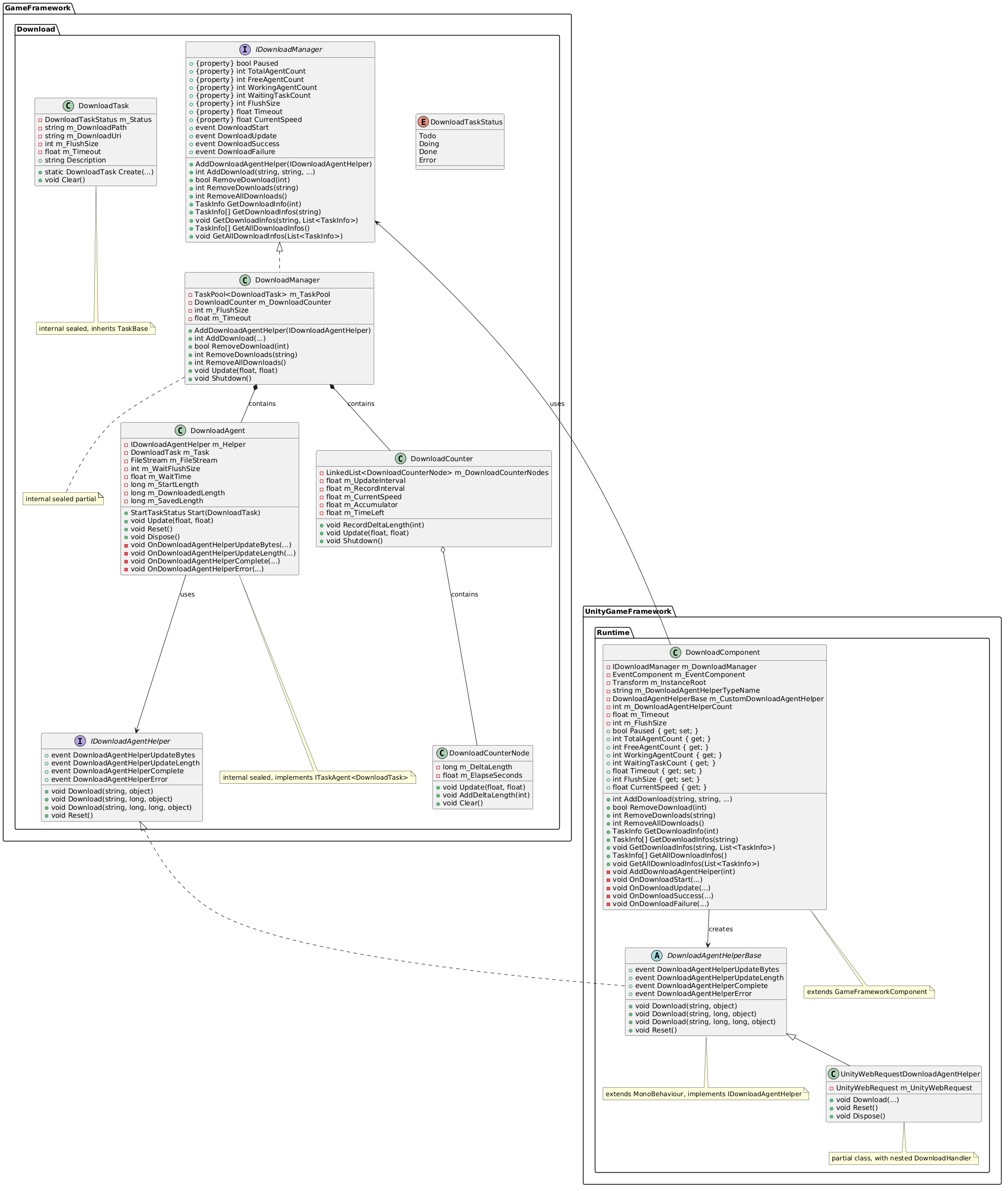
Download 模块 由 DownloadManager 统一管理,内部使用 TaskPool 实现任务队列和代理调度,支持优先级排序和断点续传;同时借助 DownloadCounter 基于滑动窗口计算实时平均下载速度。
模块通过抽象基类 DownloadAgentHelperBase 和接口 IDownloadAgentHelper 允许用户自定义底层网络实现(如 UnityWebRequest 或 HttpClient),极大增强了扩展性。此外,该模块内部已经实现了常用的下载事件参数,可供外部注册。
该模块在资源模块(Resource)中被大量用于资源热更新,同时在 Unity 项目中可通过 DownloadComponent 组件快速使用。
二、快速入门
1.初始化与事件监听
cs
using GameFramework;
using GameFramework.Download;
using UnityEngine;
using UnityGameFramework.Runtime;

public class DownloadTest : MonoBehaviour
{
    private DownloadComponent m_DownloadComponent;
    private EventComponent m_EventComponent;

    private void Start()
    {
        // 获取组件
        m_DownloadComponent = GameEntry.GetComponent<DownloadComponent>();
        m_EventComponent = GameEntry.GetComponent<EventComponent>();

        // 订阅下载事件
        m_EventComponent.Subscribe(DownloadStartEventArgs.EventId, OnDownloadStart);
        m_EventComponent.Subscribe(DownloadUpdateEventArgs.EventId, OnDownloadUpdate);
        m_EventComponent.Subscribe(DownloadSuccessEventArgs.EventId, OnDownloadSuccess);
        m_EventComponent.Subscribe(DownloadFailureEventArgs.EventId, OnDownloadFailure);
    }

    private void OnDownloadStart(object sender, GameEventArgs e)
    {
        DownloadStartEventArgs ne = e as DownloadStartEventArgs;
        Debug.Log($"下载开始:序列号 {ne.SerialId},路径 {ne.DownloadPath}");
    }

    private void OnDownloadUpdate(object sender, GameEventArgs e)
    {
        DownloadUpdateEventArgs ne = e as DownloadUpdateEventArgs;
        // 可以在此更新 UI 进度
    }

    private void OnDownloadSuccess(object sender, GameEventArgs e)
    {
        DownloadSuccessEventArgs ne = e as DownloadSuccessEventArgs;
        Debug.Log($"下载成功:序列号 {ne.SerialId},保存至 {ne.DownloadPath}");
    }

    private void OnDownloadFailure(object sender, GameEventArgs e)
    {
        DownloadFailureEventArgs ne = e as DownloadFailureEventArgs;
        Debug.LogError($"下载失败:序列号 {ne.SerialId},错误 {ne.ErrorMessage}");
    }
}
2. 添加下载任务
cs
// 最简单的调用
int serialId = m_DownloadComponent.AddDownload(
    Application.persistentDataPath + "/test.zip",
    "http://example.com/test.zip"
);

// 带标签、优先级和自定义数据
int serialId2 = m_DownloadComponent.AddDownload(
    Application.persistentDataPath + "/res.zip",
    "http://example.com/res.zip",
    "res_update",    // 标签,可用于批量操作
    10,              // 优先级(数值越大越优先)
    "myUserData"     // 自定义数据,会在事件中返回
);
3. 控制下载任务
cs
// 暂停/恢复所有下载
m_DownloadComponent.Paused = true;   // 暂停
m_DownloadComponent.Paused = false;  // 恢复

// 移除单个任务
bool removed = m_DownloadComponent.RemoveDownload(serialId);

// 移除所有带某标签的任务
int removedCount = m_DownloadComponent.RemoveDownloads("res_update");

// 移除所有任务
int allRemoved = m_DownloadComponent.RemoveAllDownloads();
4. 查询任务信息
cs
// 根据序列号获取信息
TaskInfo info = m_DownloadComponent.GetDownloadInfo(serialId);
if (info != null)
{
    Debug.Log($"状态:{info.Status},已下载:{info.CurrentLength}");
}

// 根据标签获取信息列表
TaskInfo[] infos = m_DownloadComponent.GetDownloadInfos("res_update");
foreach (var i in infos)
{
    Debug.Log($"任务 {i.SerialId}:{i.DownloadUri}");
}

// 获取所有任务
TaskInfo[] all = m_DownloadComponent.GetAllDownloadInfos();
5. 自定义下载代理辅助器
cs
using GameFramework.Download;
using UnityEngine;
using UnityGameFramework.Runtime;

public class MyDownloadAgentHelper : DownloadAgentHelperBase
{
    // 实现抽象方法,使用自己的网络请求
    public override void Download(string downloadUri, object userData)
    {
        // 自定义实现
    }

    public override void Download(string downloadUri, long fromPosition, object userData)
    {
        // 自定义实现(断点续传)
    }

    public override void Download(string downloadUri, long fromPosition, long toPosition, object userData)
    {
        // 自定义实现(范围下载)
    }

    public override void Reset()
    {
        // 重置状态
    }

    // 触发事件时,通过事件参数传递数据
    // 示例:
    // DownloadAgentHelperUpdateBytesEventArgs e = DownloadAgentHelperUpdateBytesEventArgs.Create(data, offset, length);
    // DownloadAgentHelperUpdateBytes?.Invoke(this, e);
}
三、源码分析
DownloadManager 核心数据结构与工作流程
1. TaskPool<DownloadTask>
DownloadManager 内部持有 TaskPool<DownloadTask> 类型成员 m_TaskPool。
TaskPool<T> 是一个泛型类,泛型约束为 TaskBase。其核心字段:
-
private readonly Stack<ITaskAgent<T>> m_FreeAgents:空闲代理栈,存放可用的任务代理。 -
private readonly LinkedList<ITaskAgent<T>> m_WorkingAgents:工作中代理链表,存放正在执行任务的代理。 -
private readonly LinkedList<T> m_WaitingTasks:等待任务链表,存放尚未分配代理的任务。 -
private bool m_Paused:暂停标志。
主要方法:
-
Update(elapseSeconds, realElapseSeconds):任务池轮询入口。-
先调用
ProcessRunningTasks:遍历m_WorkingAgents,检查每个代理的任务是否完成(Task.Done)。若完成,则重置代理、移入m_FreeAgents,并释放任务(归还引用池);否则调用代理的Update方法。 -
再调用
ProcessWaitingTasks:遍历m_WaitingTasks,尝试从m_FreeAgents弹出空闲代理。若成功,则将代理移入m_WorkingAgents,调用agent.Start(task)开始执行;若无可空闲代理则跳出循环。
-
-
AddAgent(ITaskAgent<T> agent):增加任务代理。调用代理的Initialize方法,并将其压入m_FreeAgents。 -
AddTask(T task):添加任务。根据task.Priority(数值越大优先级越高)插入到m_WaitingTasks的合适位置。 -
RemoveTask(int serialId):根据序列号移除任务。会分别在m_WaitingTasks和m_WorkingAgents中查找,若在工作链表中找到,则重置对应代理并移入空闲栈,最后释放任务。 -
RemoveAllTasks/GetAllTaskInfos等辅助方法。
2. DownloadTask 与 DownloadAgent
-
DownloadTask继承TaskBase,实现IReference。包含字段:
DownloadTaskStatus m_Status(Todo / Doing / Done / Error)、
string m_DownloadPath(下载后存放路径)、
string m_DownloadUri(下载地址)、
int m_FlushSize(缓冲区刷盘临界大小)、
float m_Timeout(超时秒数)、
object m_UserData(自定义数据)。通过
Create静态方法从引用池获取实例。 -
DownloadAgent实现ITaskAgent<DownloadTask>接口。核心字段:
IDownloadAgentHelper m_Helper(外部注入的辅助器,负责底层网络)、
DownloadTask m_Task(当前处理的任务)、
FileStream m_FileStream(写入临时文件的流)、
int m_WaitFlushSize(累计未刷盘数据)、
float m_WaitTime(等待数据的时间,用于超时检测)、
long m_StartLength(续传起始偏移)、
long m_DownloadedLength(本次下载量)、
long m_SavedLength(已落盘数据量)。
主要方法:
-
Initialize():为m_Helper注册事件(UpdateBytes、UpdateLength、Complete、Error)。 -
Update():若任务状态为Doing,累加m_WaitTime,超时则触发错误事件。 -
Start(DownloadTask task):-
确定临时文件路径
{DownloadPath}.download。 -
若文件存在则以追加模式打开,记录
m_StartLength为已有长度;否则创建新文件。 -
触发
DownloadAgentStart委托。 -
若
m_StartLength > 0,调用m_Helper.Download(uri, fromPosition, userData)实现断点续传;否则调用普通下载。
-
-
Reset()/Dispose():关闭文件流、清空状态、释放资源。
3. UnityWebRequestDownloadAgentHelper 实现细节
-
继承
DownloadAgentHelperBase,内部使用UnityWebRequest执行下载。 -
内部嵌套类
DownloadHandler继承DownloadHandlerScript,重写ReceiveData(byte[] data, int dataLength)方法。在该方法中触发
DownloadAgentHelperUpdateBytes和DownloadAgentHelperUpdateLength事件,将接收到的原始数据及长度向上传递(更新字段、写入文件流)。 -
在
Update()方法中检测UnityWebRequest的完成状态,触发Complete或Error事件。
4. DownloadCounter 滑动窗口计速器
-
内部类
DownloadCounterNode记录一个时间片段内的下载字节数(m_DeltaLength)和经过时间(m_ElapseSeconds)。 -
DownloadCounter维护一个LinkedList<DownloadCounterNode>作为滑动窗口。 -
速度计算逻辑 :将时间划分为固定长度(
UpdateInterval)的片段,每个片段用一个DownloadCounterNode记录该片段内累计的下载字节数,从而方便后续滑动窗口计算速度。-
每次收到增量数据时相应事件调用
RecordDeltaLength(int deltaLength):将增量加到当前滑动窗口最右端节点(若当前节点存在且未超过UpdateInterval),否则创建新节点并加入链表末尾。 -
每帧调用
Update:-
遍历更新所有节点的
ElapseSeconds,移除超时节点(ElapseSeconds超过RecordInterval)。 -
当
m_TimeLeft倒计时归零时(默认每UpdateInterval秒一次),计算窗口内总下载字节和总时间(m_Accumulator,但最大不超过RecordInterval),得到CurrentSpeed = totalBytes / totalTime,然后重置倒计时。
-
-
m_Accumulator会限制最大为RecordInterval,确保速度计算只考虑最近一个窗口。
-
5. DownloadManager
Update(elapseSeconds, realElapseSeconds) 中依次调用:
cs
m_TaskPool.Update(elapseSeconds, realElapseSeconds);
m_DownloadCounter.Update(elapseSeconds, realElapseSeconds);
Shutdown() 中调用:
cs
m_TaskPool.Shutdown();
m_DownloadCounter.Shutdown();AddDownloadAgentHelper(IDownloadAgentHelper helper):创建 DownloadAgent,订阅其 DownloadAgentStart、Update、Success、Failure 委托,然后调用 m_TaskPool.AddAgent(agent)。
AddDownload(...):通过 DownloadTask.Create 获取任务,调用 m_TaskPool.AddTask(task),返回任务的序列号。
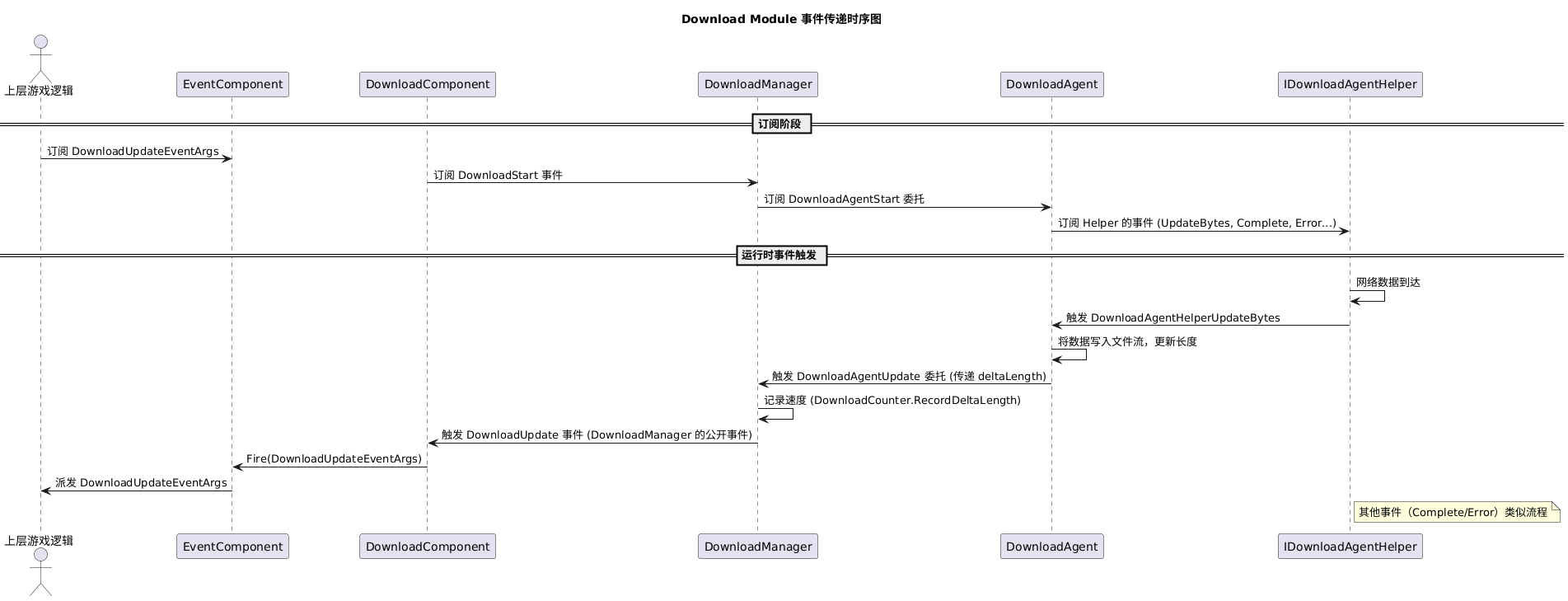
6.事件传递流程