
🙇♀ 安装solidworks_urdf插件
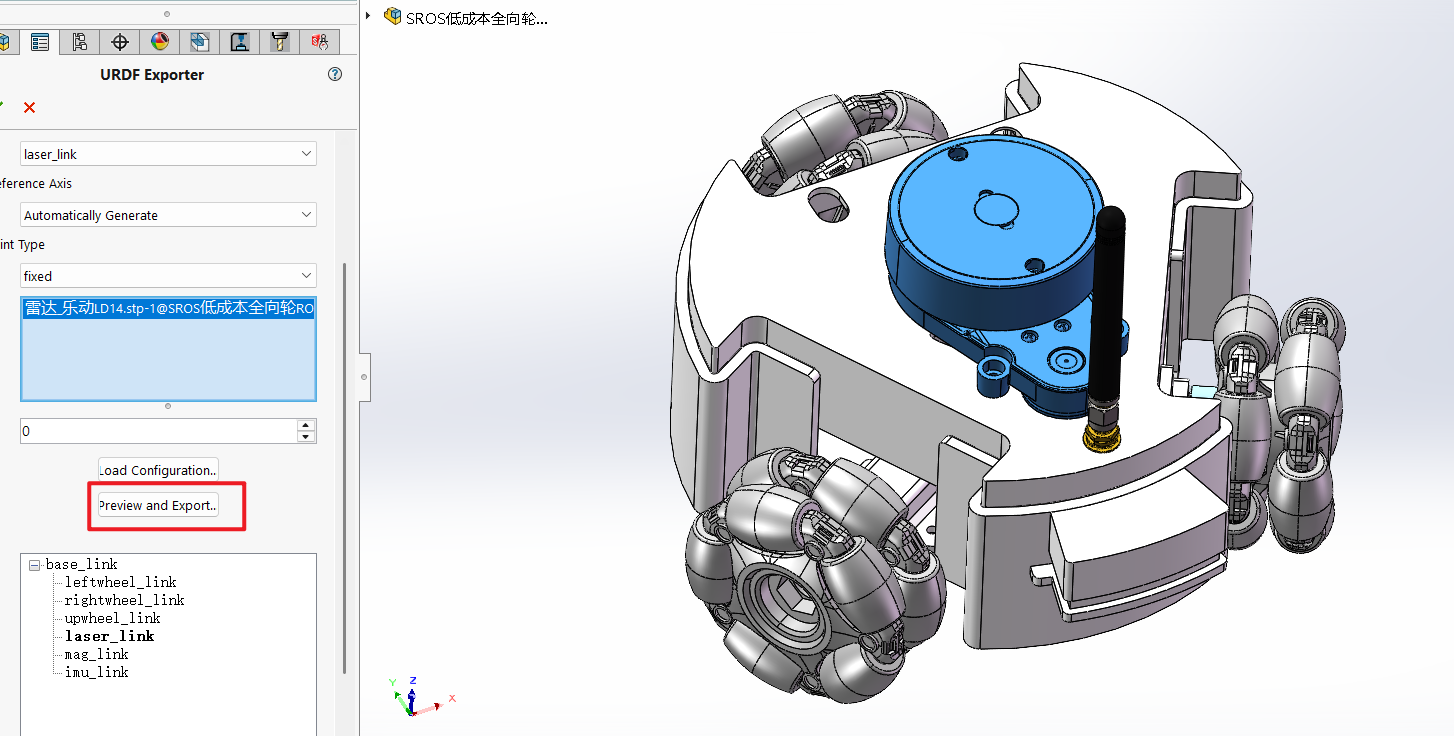
在添加过点和坐标系后,点击工具->tools(在最下面)
如何转为URDF请看这个视频点击
☕ 为ROS2配置
安装相关依赖
sudo apt install ros-humble-joint-state-publisher-gui
sudo apt install ros-humble-xacrosolidworks导出的URDF文件是ROS1 版本的,所以要改装为ROS2
在你的工作空间src目录中新建一个C++的功能包
bash
ros2 pkg create looraysbot_model --build-type ament_cmake --license Apache-2.0分别在改包下面创建launch,meshes,rviz,urdf这四个文件夹
- 在
launch文件夹下创建 文件[display.launch.py](<http://display.launch.py/>),插入一下代码
bash
from ament_index_python.packages import get_package_share_path

from launch import LaunchDescription
from launch.actions import DeclareLaunchArgument
from launch.conditions import IfCondition, UnlessCondition
from launch.substitutions import Command, LaunchConfiguration

from launch_ros.actions import Node
from launch_ros.parameter_descriptions import ParameterValue

def generate_launch_description():
    urdf_tutorial_path = get_package_share_path('looraysbot_model')
    default_model_path = urdf_tutorial_path / 'urdf/looraysbot_model.urdf'
    default_rviz_config_path = urdf_tutorial_path / 'rviz/looraysbot_model.rviz'

    gui_arg = DeclareLaunchArgument(name='gui', default_value='true', choices=['true', 'false'],
                                    description='Flag to enable joint_state_publisher_gui')
    model_arg = DeclareLaunchArgument(name='model', default_value=str(default_model_path),
                                      description='Absolute path to robot urdf file')
    rviz_arg = DeclareLaunchArgument(name='rvizconfig', default_value=str(default_rviz_config_path),
                                     description='Absolute path to rviz config file')

    robot_description = ParameterValue(Command(['xacro ', LaunchConfiguration('model')]),
                                       value_type=str)

    robot_state_publisher_node = Node(
        package='robot_state_publisher',
        executable='robot_state_publisher',
        parameters=[{'robot_description': robot_description}]
    )

    # Depending on gui parameter, either launch joint_state_publisher or joint_state_publisher_gui
    joint_state_publisher_node = Node(
        package='joint_state_publisher',
        executable='joint_state_publisher',
        condition=UnlessCondition(LaunchConfiguration('gui'))
    )

    joint_state_publisher_gui_node = Node(
        package='joint_state_publisher_gui',
        executable='joint_state_publisher_gui',
        condition=IfCondition(LaunchConfiguration('gui'))
    )

    rviz_node = Node(
        package='rviz2',
        executable='rviz2',
        name='rviz2',
        output='screen',
        arguments=['-d', LaunchConfiguration('rvizconfig')],
    )

    return LaunchDescription([
        gui_arg,
        model_arg,
        rviz_arg,
        joint_state_publisher_node,
        joint_state_publisher_gui_node,
        robot_state_publisher_node,
        rviz_node
])按ctrl+f搜索looraysbot_model,并替换为你的包名称,其他不变
- 将solidworks生成的urdf包中的
meshes文件夹下的所有stl文件复制到你的对应文件夹下 - 和solidworks生成的urdf包中的
urdf文件夹下的所有文件直接复制到你的对应文件夹下
可以执行urdf_to_graphviz looraysbot_model.urdf 生成pdf(要在终端进入urdf目录下)
CMakeLists.txt配置
bash
cmake_minimum_required(VERSION 3.8)
project(looraysbot_model)

if(CMAKE_COMPILER_IS_GNUCXX OR CMAKE_CXX_COMPILER_ID MATCHES "Clang")
  add_compile_options(-Wall -Wextra -Wpedantic)
endif()

# find dependencies
find_package(ament_cmake REQUIRED)
# uncomment the following section in order to fill in
# further dependencies manually.
# find_package(<dependency> REQUIRED)
install(
  DIRECTORY launch meshes urdf rviz
  DESTINATION share/${PROJECT_NAME}
)
if(BUILD_TESTING)
  find_package(ament_lint_auto REQUIRED)
  # the following line skips the linter which checks for copyrights
  # comment the line when a copyright and license is added to all source files
  set(ament_cmake_copyright_FOUND TRUE)
  # the following line skips cpplint (only works in a git repo)
  # comment the line when this package is in a git repo and when
  # a copyright and license is added to all source files
  set(ament_cmake_cpplint_FOUND TRUE)
  ament_lint_auto_find_test_dependencies()
endif()

ament_package()按ctrl+f搜索looraysbot_model,并替换为你的包名称,其他不变
package.xml配置
bash
<?xml version="1.0"?>
<?xml-model href="<http://download.ros.org/schema/package_format3.xsd>" schematypens="<http://www.w3.org/2001/XMLSchema>"?>
<package format="3">
  <name>looraysbot_model</name>
  <version>0.0.0</version>
  <description>
    <p>URDF Description package for looraysbot_model</p>
    <p>This package contains configuration data, 3D models and launch files
      for looraysbot_model robot</p>
  </description>
  <maintainer email="rqtz@todo.todo">rqtz</maintainer>
  <license>Apache-2.0</license>

  <buildtool_depend>ament_cmake</buildtool_depend>

  <test_depend>ament_lint_auto</test_depend>
  <test_depend>ament_lint_common</test_depend>

  <export>
    <build_type>ament_cmake</build_type>
  </export>
</package>按ctrl+f搜索looraysbot_model,并替换为你的包名称,其他不变(其实这个文件不改也不影响)
🥦rviz2配置
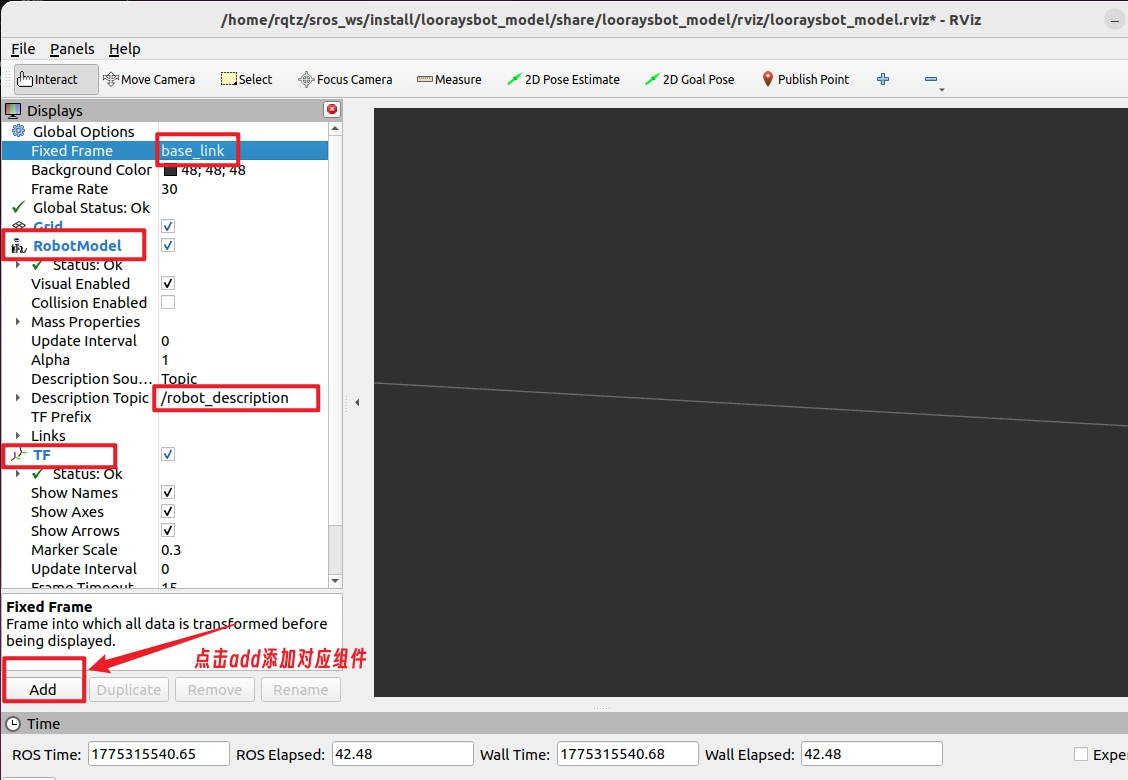
打开rviz2,按照上图所示,配置完成后保存并将其保存到该包下的rviz目录中
🦐 运行并显示URDF模型
执行编译colcon build后,更新环境变量
bash
ros2 launch looraysbot_model display.launch.py 执行成功
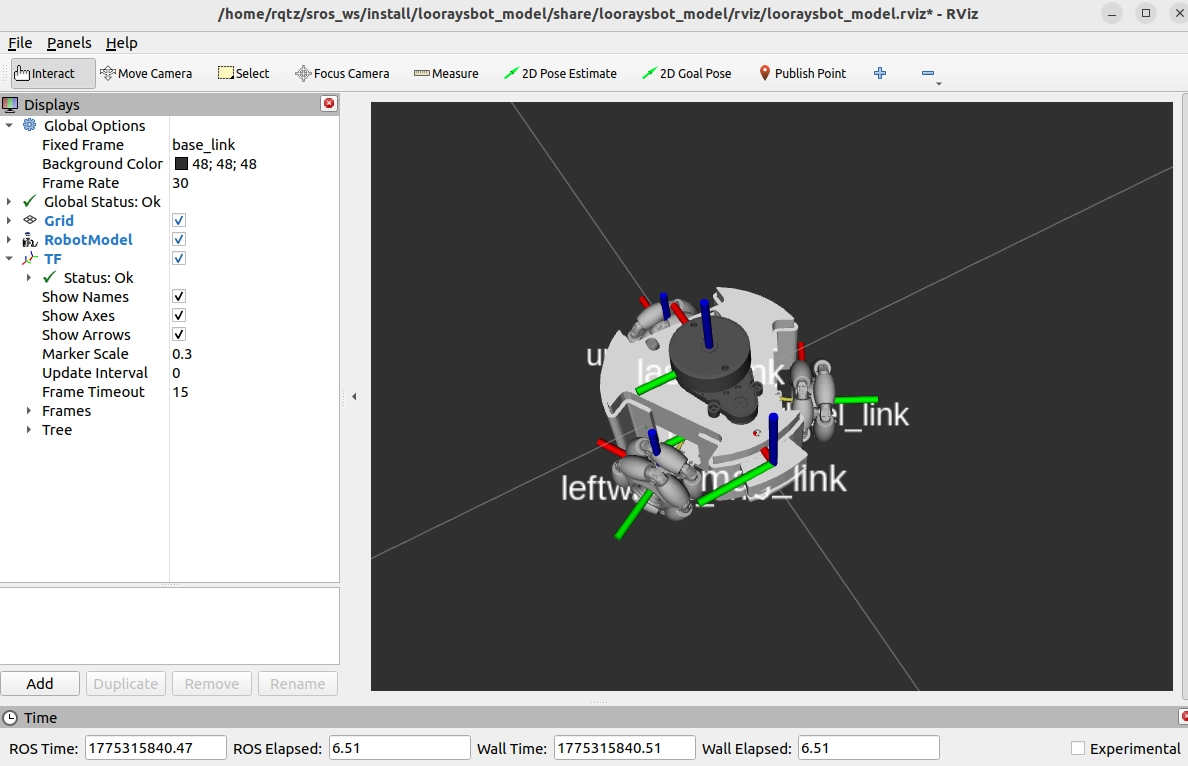
安装tf树
sudo apt install ros-humble-rqt-tf-tree
rm -rf ~/.config/ros.org/rqt_gui.ini
生成当前tf树的pdf
ros2 run tf2_tools view_frames