本文介绍使用开源项目Psi0,微调训练Unitree G1人形机器人流程。
- 首先详细说明了代码下载、uv安装和环境搭建步骤,包括Python依赖管理和虚拟环境配置。
- 然后介绍了9个真实世界操作任务的数据集,包含双臂协调、精细操作、行走搬运、移动+操作等技能,并提供了批量下载脚本。
- 文章还展示了数据可视化方法,通过修改代码解决兼容性问题。
- 最后详细描述了模型微调和离线推理过程,包括模拟数据和真实数据的处理方式。
开源地址:https://github.com/physical-superintelligence-lab/Psi0?tab=readme-ov-file#training-real
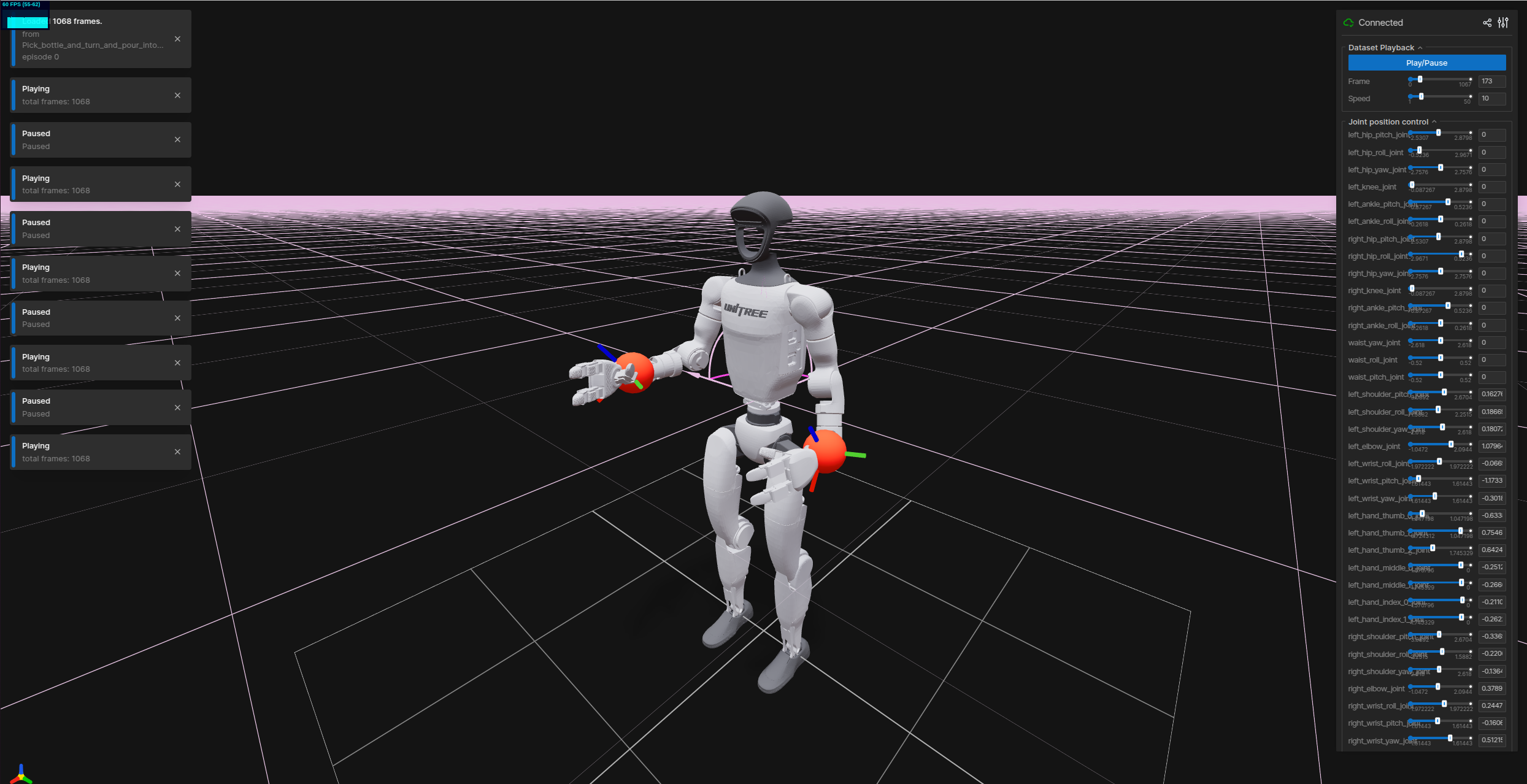
Unitree G1 人形机器人,操作数据示例:
1、下载代码 & uv安装 &搭建环境
1.1 下载代码
下载项目的代码到本地,然后进入项目
git clone https://github.com/physical-superintelligence-lab/Psi0.git
cd Psi0
1.2 uv安装
我们使用uv来管理 Python 依赖项,uv如果尚未安装,需要先安装:
curl -LsSf https://astral.sh/uv/install.sh | sh安装过程,可以默认选择y
安成完成后,打印信息:
(base) lgp@lgp-MS-7E07:~/2026/openpi$ curl -LsSf https://astral.sh/uv/install.sh | sh
downloading uv 0.11.3 x86_64-unknown-linux-gnu
installing to /home/lgp/.local/bin
uv
uvx
everything's installed!
uv安装参考:https://docs.astral.sh/uv/getting-started/installation/
使用命令uv --version,能看到:uv 0.11.3 (x86_64-unknown-linux-gnu)
为了后面方便使用uv,需要添加到系统环境变量中:export PATH="HOME/.local/bin:PATH"
bash
echo 'export PATH="$HOME/.local/bin:$PATH"' >> ~/.bashrc
source ~/.bashrc
1.3 搭建环境
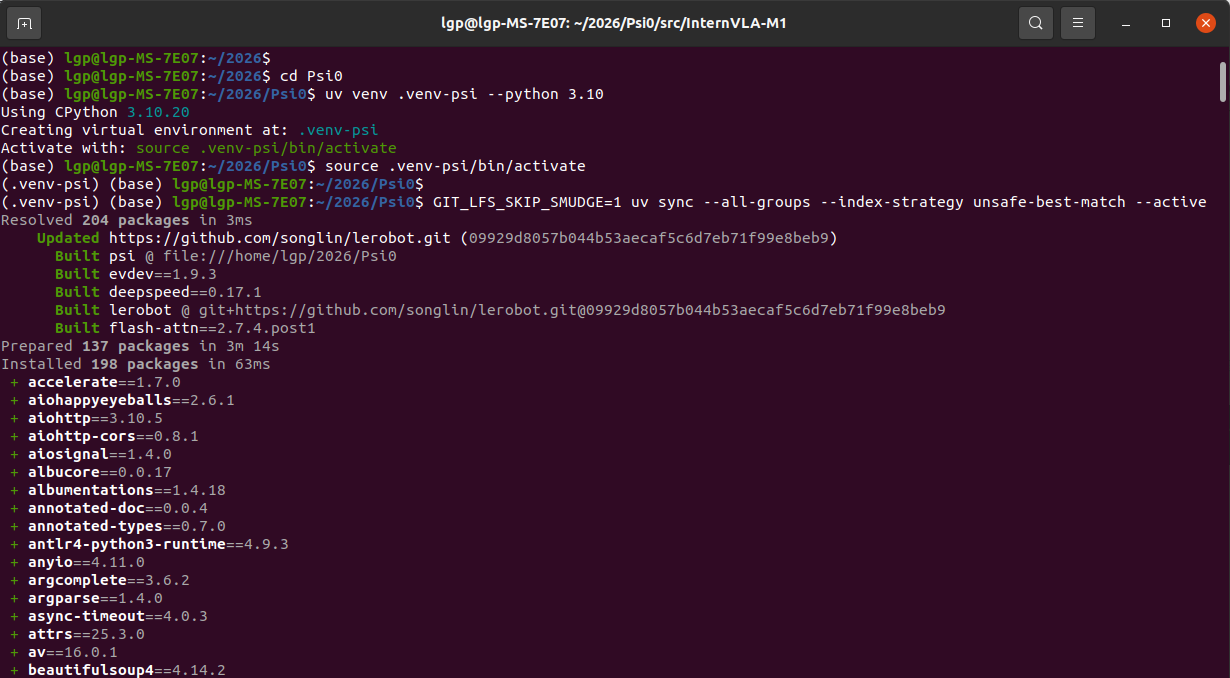
使用uv搭建开发环境,执行下面命令:
bash
uv venv .venv-psi --python 3.10
source .venv-psi/bin/activate
GIT_LFS_SKIP_SMUDGE=1 uv sync --all-groups --index-strategy unsafe-best-match --active
uv pip install flash_attn==2.7.4.post1 --no-build-isolation
运行信息:
再安装"flash_attn"加速库:
bash
uv pip install flash_attn==2.7.4.post1 --no-build-isolation安装好后,可以测试psi的版本,以及lerobot能否导入:
python -c "import psi;print(psi.version)"
python -c "from psi.data.lerobot.compat import LEROBOT_LAYOUT; print(LEROBOT_LAYOUT)"
运行信息:
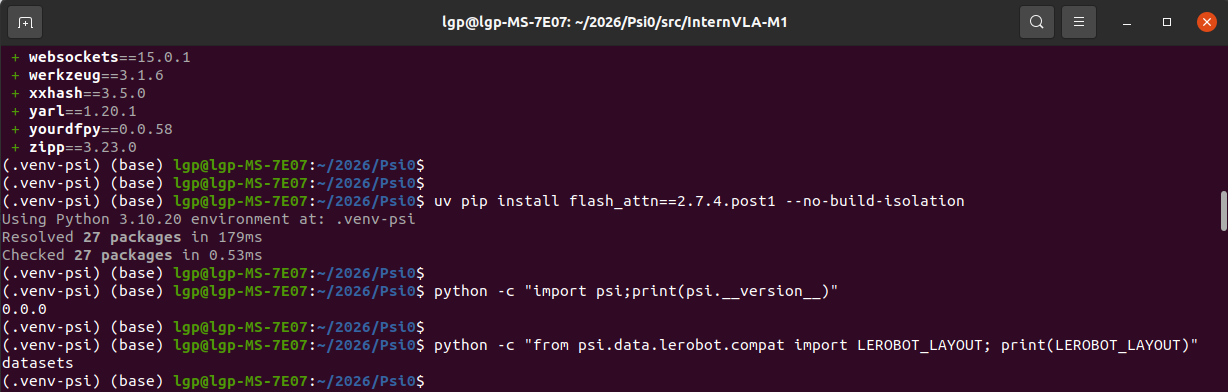
显示psi版本是0.0.0,lerobot导入成功啦~
2、准备"Unitree G1 人形机器人"真实数据
我们使用开源的 Ψ₀ (Psi-Zero) 人形机器人基础模型的真实世界任务数据集
- 包含 9个真实世界操作任务 的遥操作演示数据
- 这些数据用于微调 Ψ₀ 模型在 Unitree G1 人形机器人(配备两只 Dex3-1 灵巧手)上的操作能力
- 每个任务包含约 80个遥操作演示,通过 Apple Vision Pro + MANUS 数据手套进行全身遥操作采集
数据地址:https://huggingface.co/datasets/USC-PSI-Lab/psi-data/tree/main/real
| 序号 | 任务名称 (Task Name) | 任务描述 | 关键操作技能 |
|---|---|---|---|
| 1 | Hug_box_and_move | 环抱箱子并移动 | 双臂协调抱持、行走搬运 |
| 2 | Pick_bottle_and_turn_and_pour_into_cup | 拿起瓶子、旋转并倒入杯中 | 单臂抓取、旋转操作、倾倒控制 |
| 3 | Pick_up_lunchbox_and_put_on_desk | 拿起午餐盒并放到桌上 | 抓取、行走、放置定位 |
| 4 | Push_cart | 推动推车 | 接触式推动、持续力控制、导航 |
| 5 | Push_cart_and_serve_food | 推车并上菜 | 复合任务:推车+取物+放置 |
| 6 | Pick_up_basket_walk_to_person | 拿起篮子走向人员 | 抓取、行走导航、面向人员交接 |
| 7 | Turn_faucet | 旋转水龙头 | 精细手指操作(单指旋转)、关节控制 |
| 8 | Pull_tray_from_chip_can | 从薯片罐中拉出托盘 | 狭小空间操作、拉取动作 |
| 9 | Stabilize_bowl_during_wiping | 擦拭时稳定碗 | 双手协调(一手稳定一手擦拭)、力控制 |
2.1 单个数据下载
比如,我们选择**"Pick_bottle_and_turn_and_pour_into_cup"任务**,下载并提取收集到的真实世界数据:
bash
export task=Pick_bottle_and_turn_and_pour_into_cup

hf download USC-PSI-Lab/psi-data \
  real/$task.zip \
  --local-dir=$PSI_HOME/data \
  --repo-type=dataset

unzip $PSI_HOME/data/real/$task.zip -d $PSI_HOME/data/real
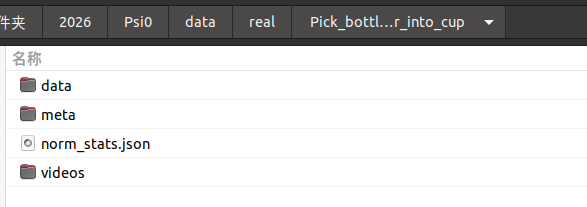
执行完上面三条命令后,能看到:
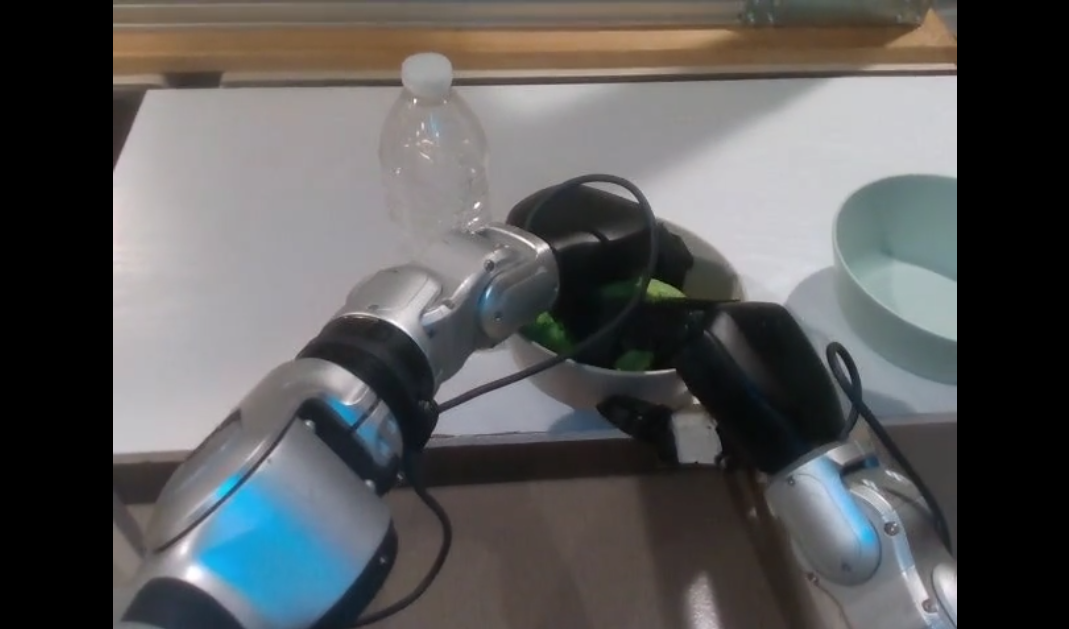
mp4示例:(双手协调,一手稳定,一手擦拭)
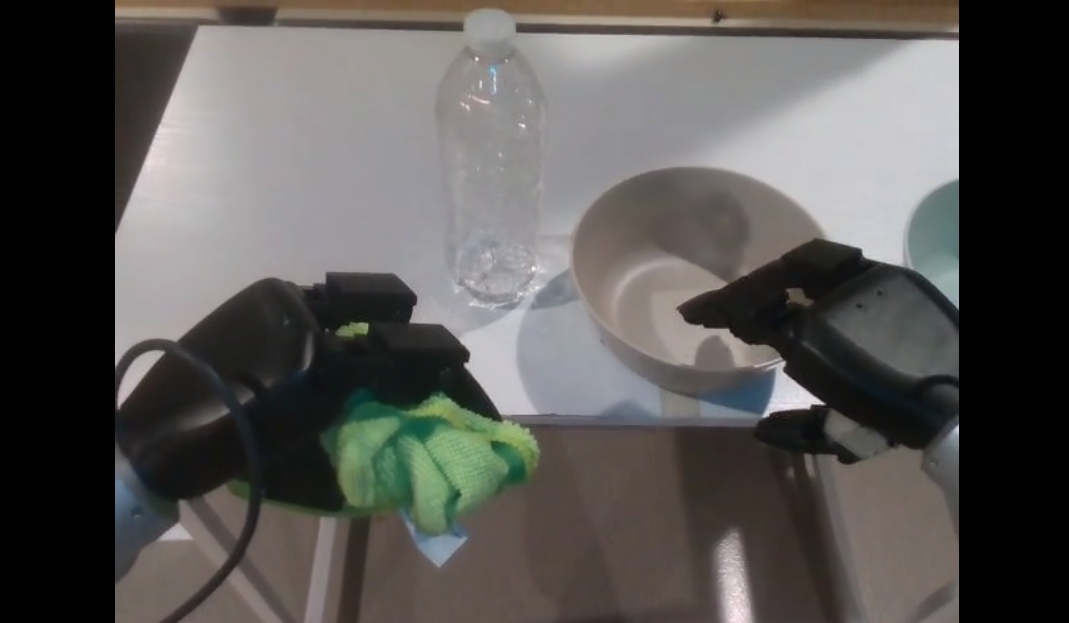
双手协调,开始擦拭
2.2 下载所有数据
为了方便,编写了一个sh脚本,一次下载9个任务数据
bash
#!/bin/bash
# download_psi_tasks.sh
# 下载 Psi0 全部 9 个真实世界任务数据集

# 9 个任务名称列表(根据 HuggingFace 实际文件名)
tasks=(
    "Hold_lunch_bag_with_both_hands_and_squat_to_put_on_the_coffee_table"
    "Pick_bottle_and_turn_and_pour_into_cup"
    "Pick_toys_into_box_and_lift_and_turn_and_put_on_the_chair_new_target_yaw"
    "Pull_the_tray_out_of_chips_can_and_throw_the_can_into_trash_bin"
    "Push_cart_grasp_and_place_grapes_on_plate"
    "Put_dumpling_into_blanket_and_turn_around_and_pass_to_human"
    "Remove_the_cap_turn_on_the_faucet_and_fill_the_bottle_with_water"
    "Rotate_to_pour_ham_into_plate_and_push_the_cart_forward"
    "Spray_the_bowl_and_wipe_it_and_stack_it_up"
)

# 检查环境变量
if [ -z "$PSI_HOME" ]; then
    echo "❌ 错误: 请设置 PSI_HOME 环境变量"
    echo "   例如: export PSI_HOME=/path/to/psi0"
    exit 1
fi

# 创建数据目录
mkdir -p "$PSI_HOME/data/real"

echo "=========================================="
echo "Psi0 数据集下载工具"
echo "=========================================="

# 统计变量
skipped=0
downloaded=0
failed=0

# 遍历处理每个任务
for task in "${tasks[@]}"; do
    task_dir="$PSI_HOME/data/real/$task"
    zip_file="$PSI_HOME/data/real/${task}.zip"

    echo ""

    # 检查:如果目标目录已存在且非空,则跳过
    if [ -d "$task_dir" ] && [ "$(ls -A "$task_dir" 2>/dev/null)" ]; then
        echo "⏭️  跳过: $task (已存在)"
        ((skipped++))
        continue
    fi

    echo ">>> 开始下载: $task"
    echo "------------------------------------------"

    # 使用与你成功命令完全相同的格式
    export task

    hf download USC-PSI-Lab/psi-data \
        real/$task.zip \
        --local-dir=$PSI_HOME/data \
        --repo-type=dataset

    # 检查下载结果
    if [ $? -eq 0 ] && [ -f "$zip_file" ]; then
        echo "✅ 下载成功: $task.zip"
        echo "   正在解压..."

        unzip $PSI_HOME/data/real/$task.zip -d $PSI_HOME/data/real

        if [ $? -eq 0 ]; then
            echo "✅ 解压成功: $task"
            ((downloaded++))
        else
            echo "❌ 解压失败: $task"
            ((failed++))
        fi
    else
        echo "❌ 下载失败: $task"
        ((failed++))
    fi
done

echo ""
echo "=========================================="
echo "处理完成!"
echo "=========================================="
echo "  跳过: $skipped 个"
echo "  成功: $downloaded 个"
echo "  失败: $failed 个"
echo ""
echo "数据保存在: $PSI_HOME/data/real"
echo "=========================================="

# 显示最终状态
echo ""
echo "任务状态清单:"
for task in "${tasks[@]}"; do
    if [ -d "$PSI_HOME/data/real/$task" ]; then
        echo "  ✅ $task"
    else
        echo "  ❌ $task"
    fi
done
运行信息:
数据保存在: /home/lgp/2026/Psi0/data/real
==========================================
任务状态清单:
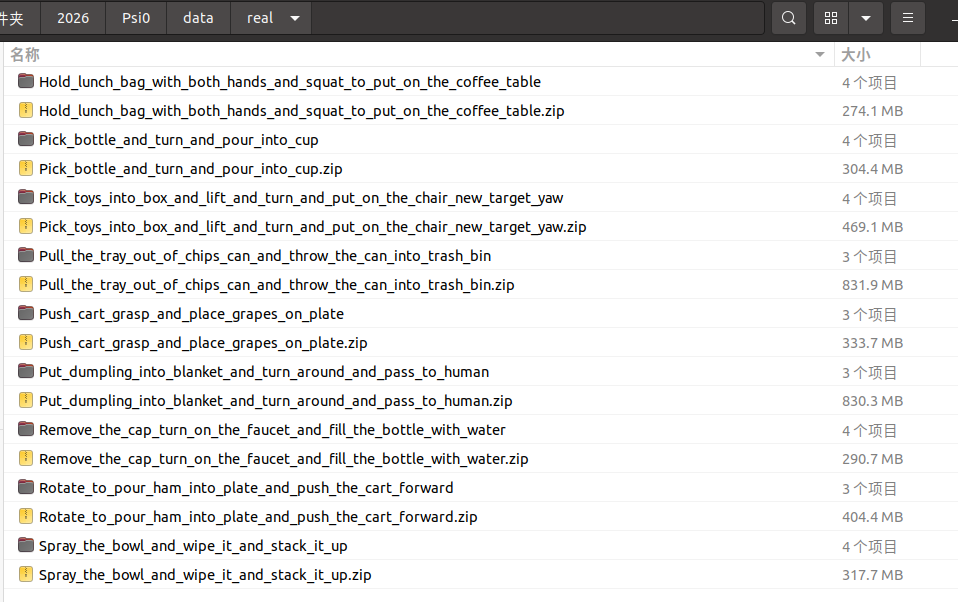
✅ Hold_lunch_bag_with_both_hands_and_squat_to_put_on_the_coffee_table
✅ Pick_bottle_and_turn_and_pour_into_cup
✅ Pick_toys_into_box_and_lift_and_turn_and_put_on_the_chair_new_target_yaw
✅ Pull_the_tray_out_of_chips_can_and_throw_the_can_into_trash_bin
✅ Push_cart_grasp_and_place_grapes_on_plate
✅ Put_dumpling_into_blanket_and_turn_around_and_pass_to_human
✅ Remove_the_cap_turn_on_the_faucet_and_fill_the_bottle_with_water
✅ Rotate_to_pour_ham_into_plate_and_push_the_cart_forward
✅ Spray_the_bowl_and_wipe_it_and_stack_it_up
运行后的data目录:
3、数据可视化
上面我们下载了 Unitree G1 人形机器人的真实数据,现在可视化看一下
需要安装库pin依赖库,以及确认numpy==1.26.4:
bash
uv pip install "pin>=3.8.0" numpy==1.26.4再安装 FFmpeg 库
bash
sudo apt update
sudo apt install ffmpeg libavcodec-dev libavformat-dev libavutil-dev libswscale-dev libavdevice-dev -y
由于项目依赖 datasets==3.6.0,LeRobot 使用的是 songlin 的分支版本(非官方版):
lerobot @ git+https://github.com/songlin/lerobot.git@09929d8057b044b53aecaf5c6d7eb71f99e8beb9
所以在不改变datasets==3.6.0情况下,修改LeRobot 的特征解析代码,添加对 'List' 类型的兼容:
bash
# 编辑文件
vim /home/lgp/2026/Psi0/.venv-psi/lib/python3.10/site-packages/datasets/features/features.py
在 generate_from_dict 函数(约第 1474 行)之前,添加类型映射:
bash
    # ===== 添加的兼容性修复:将 'List' 映射为 'Sequence' =====
    if isinstance(obj, dict) and "_type" in obj and obj["_type"] == "List":
obj["_type"] = "Sequence"修改后的generate_from_dict 完整函数:
bash
def generate_from_dict(obj: Any):
    """Regenerate the nested feature object from a deserialized dict.
    We use the '_type' fields to get the dataclass name to load.

    generate_from_dict is the recursive helper for Features.from_dict, and allows for a convenient constructor syntax
    to define features from deserialized JSON dictionaries. This function is used in particular when deserializing
    a :class:`DatasetInfo` that was dumped to a JSON object. This acts as an analogue to
    :meth:`Features.from_arrow_schema` and handles the recursive field-by-field instantiation, but doesn't require any
    mapping to/from pyarrow, except for the fact that it takes advantage of the mapping of pyarrow primitive dtypes
    that :class:`Value` automatically performs.
    """
    # ===== 添加的兼容性修复:将 'List' 映射为 'Sequence' =====
    if isinstance(obj, dict) and "_type" in obj and obj["_type"] == "List":
        obj["_type"] = "Sequence"


    # Nested structures: we allow dict, list/tuples, sequences
    if isinstance(obj, list):
        return [generate_from_dict(value) for value in obj]
    # Otherwise we have a dict or a dataclass
    if "_type" not in obj or isinstance(obj["_type"], dict):
        return {key: generate_from_dict(value) for key, value in obj.items()}
    obj = dict(obj)
    _type = obj.pop("_type")
    class_type = _FEATURE_TYPES.get(_type, None) or globals().get(_type, None)

    if class_type is None:
        raise ValueError(f"Feature type '{_type}' not found. Available feature types: {list(_FEATURE_TYPES.keys())}")

    if class_type == LargeList:
        feature = obj.pop("feature")
        return LargeList(feature=generate_from_dict(feature), **obj)
    if class_type == Sequence:
        feature = obj.pop("feature")
        return Sequence(feature=generate_from_dict(feature), **obj)

    field_names = {f.name for f in fields(class_type)}
    return class_type(**{k: v for k, v in obj.items() if k in field_names})
数据可视化
比如任务"Pick_bottle_and_turn_and_pour_into_cup",指定数据路径就可以了
bash
python scripts/viz/viz_episode_real.py --args.data-dir=data/real/Pick_bottle_and_turn_and_pour_into_cup --args.port=9000 --args.episode_idx=0打印信息:
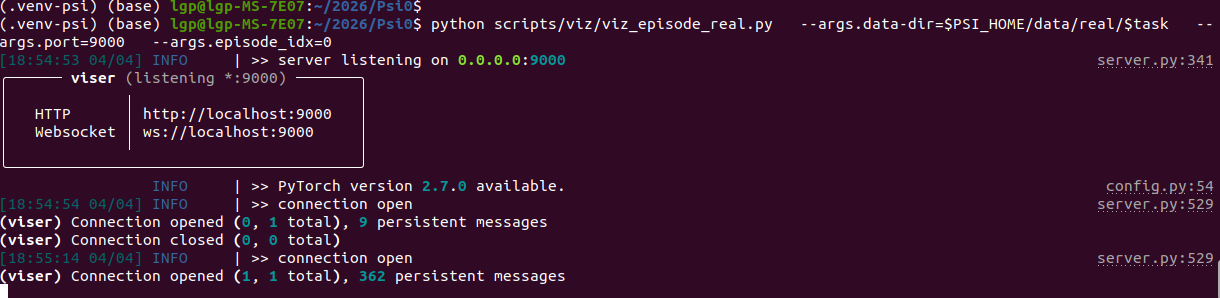
然后在浏览器,打开链接:http://localhost:9000/
能看到机器人,以及点击播放动作的过程:
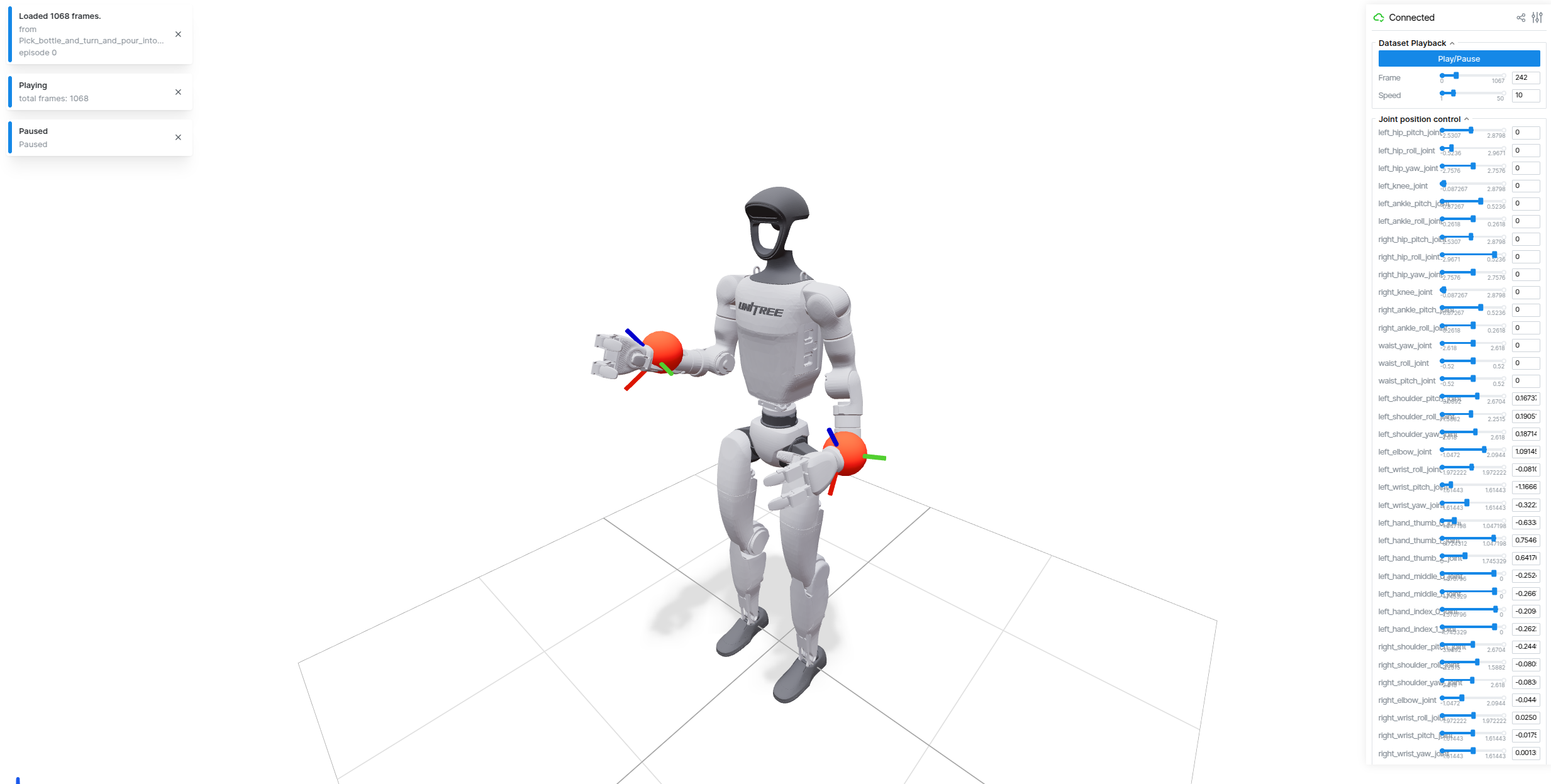
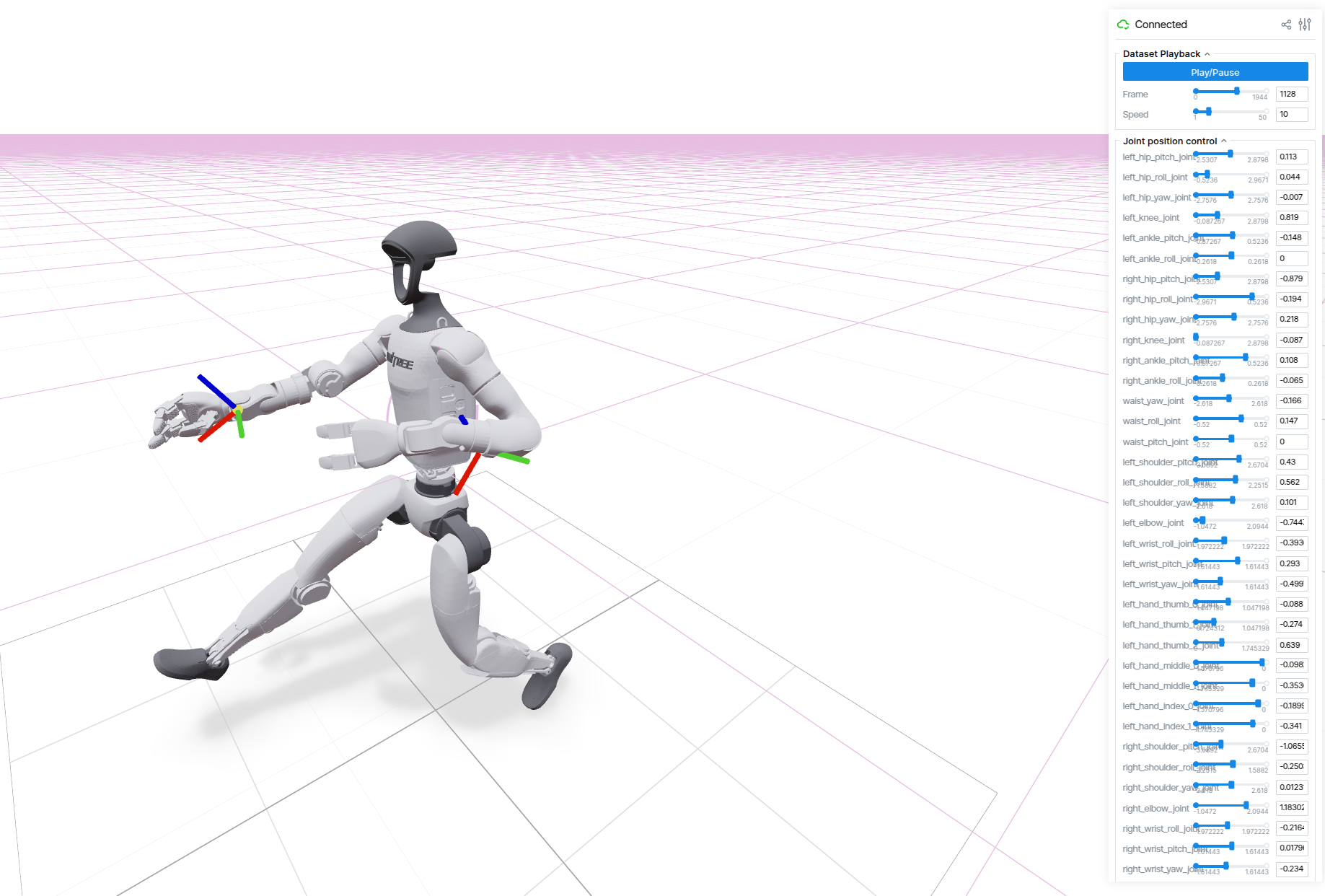
其实也可以基于这个可视化,测试一下不同的关节自由度~
4、模型微调
首先我们确定训练的任务,比如:Pick_bottle_and_turn_and_pour_into_cup
export task=Pick_bottle_and_turn_and_pour_into_cup然后,执行微调训练:
scripts/train/psi0/finetune-real-psi0.sh $task说明:
- 可以随时更换 GPU,例如,
CUDA_VISIBLE_DEVICES=0,1,2,3 scripts/train/... - 尽量保持合理的 全局批处理大小(global batch size) = 设备批处理大小 × GPU 数量 × 梯度累积步长
- 默认的global batch size 128,可以根据显存大小来调整
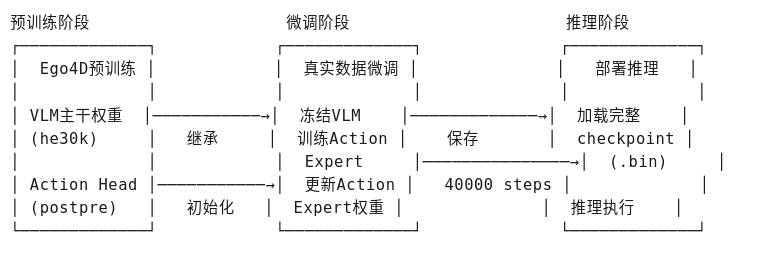
思路流程:( 微调训练的代码 scripts/train.py )
5、下载模型权重
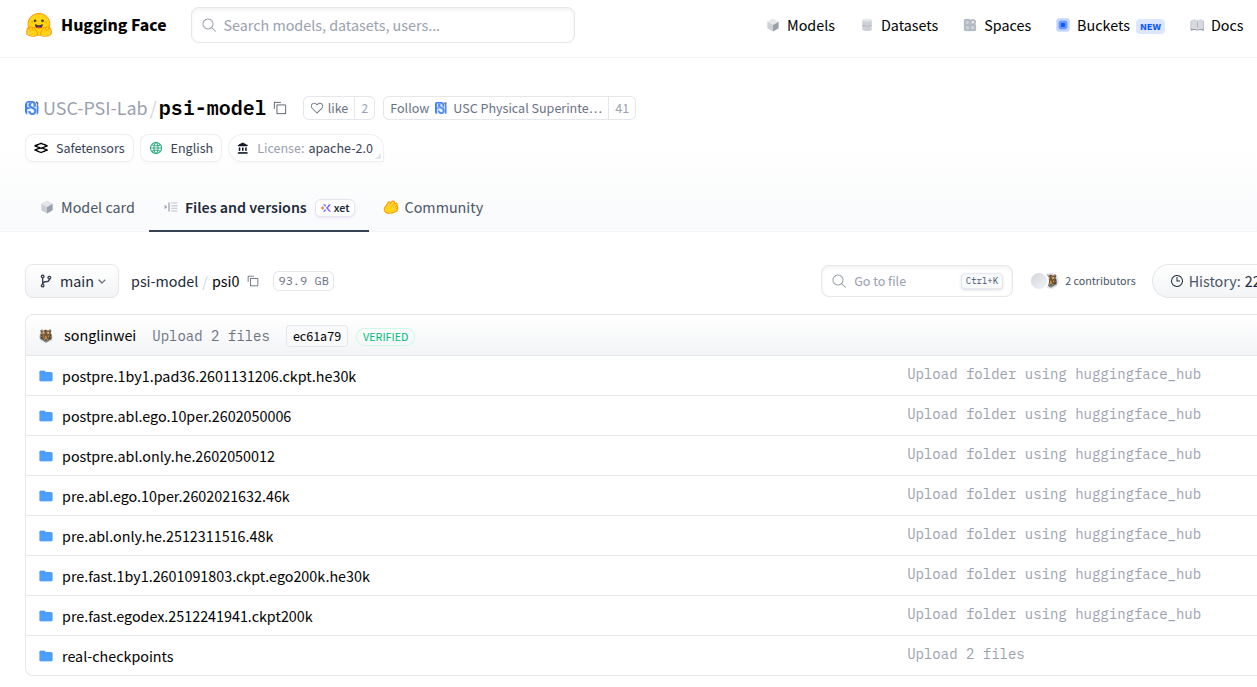
HuggingFace Psi-Model已发布了模型权重:
基线模型 (Baseline)
| 检查点 | 描述 | 远程目录 |
|---|---|---|
| Ψ₀ VLM (Baseline) | 预训练VLM主干网络 (EgoDex 200K步 + HE 30K步) | psi0/pre.fast.1by1.2601091803.ckpt.ego200k.he30k |
| Ψ₀ Action Expert (Baseline) | 在HE数据集上后训练的动作专家 | psi0/postpre.1by1.pad36.2601131206.ckpt.he30k |
消融研究变体 (Ablation Study Variants)
| 检查点 | 描述 | 远程目录 |
|---|---|---|
| Ψ₀ VLM (Ablation Study) | 仅在EgoDex上预训练200K步的VLM主干 | psi0/pre.fast.egodex.2512241941.ckpt200k |
| Ψ₀ VLM (Ablation Study) | 仅在HE上预训练48K步的VLM主干 | psi0/pre.abl.only.he.2512311516.48k |
| Ψ₀ VLM (Ablation Study) | 仅在10% EgoDex上预训练的VLM主干 | psi0/pre.abl.ego.10per.2602021632.46k |
| Ψ₀ Action Expert (Ablation Study) | 基于psi0/pre.abl.only.he.2512311516.48k在HE上后训练 |
psi0/postpre.abl.only.he.2602050012 |
| Ψ₀ Action Expert (Ablation Study) | 基于psi0/pre.abl.ego.10per.2602021632.46k在HE上后训练 |
psi0/postpre.abl.ego.10per.2602050006 |
变量说明:
-
EgoDex: 第一人称视角灵巧操作数据集
-
HE: Humanoid Everyday(人形机器人日常任务数据集)
-
Pre-trained: 预训练
-
Post-trained: 后训练/微调
模型权重下载
**方式1:**Psi0 提供了专门的下载代码(scripts/data/download.py)
比如,需要下载 psi0/pre.fast.1by1.2601091803.ckpt.ego200k.he30k
bash
python scripts/data/download.py \
  --repo-id=USC-PSI-Lab/psi-model \
  --remote-dir=psi0/pre.fast.1by1.2601091803.ckpt.ego200k.he30k \
  --local-dir=$PSI_HOME/cache/checkpoints/psi0/psi0/pre.fast.1by1.2601091803.ckpt.ego200k.he30k \
  --repo-type=model
比如,需要下载 psi0/postpre.1by1.pad36.2601131206.ckpt.he30k
bash
python scripts/data/download.py \
  --repo-id=USC-PSI-Lab/psi-model \
  --remote-dir=psi0/postpre.1by1.pad36.2601131206.ckpt.he30k \
  --local-dir=$PSI_HOME/cache/checkpoints/psi0/postpre.1by1.pad36.2601131206.ckpt.he30k \
  --repo-type=model
方式2:使用 huggingface-cli,比如下载 psi0/pre.fast.1by1.2601091803.ckpt.ego200k.he30k
bash
# 设置环境变量
export PSI_HOME=/home/lgp/2026/Psi0
mkdir -p $PSI_HOME/cache/checkpoints/psi0

# 下载 VLM 预训练权重(完整仓库)
huggingface-cli download USC-PSI-Lab/psi-model \
  --include "psi0/pre.fast.1by1.2601091803.ckpt.ego200k.he30k/*" \
  --local-dir $PSI_HOME/cache/checkpoints \
  --local-dir-use-symlinks False \
  --repo-type model
6、权重合并(可选)
这里实现 Psi0 模型权重合并,用于将两个分离的权重文件合并成一个完整的模型权重文件。
比如,使用默认的VLM +Action Head
| 组件 | 路径 | 作用 |
|---|---|---|
| VLM Backbone | pre.fast.1by1.2601091803.ckpt.ego200k.he30k |
视觉语言模型主干(冻结部分) |
| Action Head | postpre.1by1.pad36.2601131206.ckpt.he30k |
动作预测头(可训练部分) |
输出结果
-
文件 :
/psi0_merged_original/psi0_merged_original.ckpt -
包含 : 完整的
state_dict+ 元数据(来源路径、版本信息) -
验证: 自动加载验证合并是否成功
运行代码:
python
#!/usr/bin/env python3
"""
Psi0 原始权重合并脚本
合并 pre.fast (VLM主干目录) + postpre (Action Head目录) → 单个完整权重文件
"""

import os
import sys
import json
import torch
from pathlib import Path
from typing import Dict
from safetensors.torch import load_file

# ============ 路径设置 ============
SCRIPT_DIR = Path(__file__).parent.absolute()
PROJECT_ROOT = SCRIPT_DIR
sys.path.insert(0, str(PROJECT_ROOT / "src"))

import psi
from psi.utils import initialize_overwatch

overwatch = initialize_overwatch(__name__)


def load_safetensors_from_dir(dir_path: str, desc: str) -> Dict:
    """从目录加载safetensors格式权重"""
    overwatch.info(f"Loading {desc} from directory: {dir_path}")

    if not os.path.isdir(dir_path):
        raise NotADirectoryError(f"Expected directory, got: {dir_path}")

    # 查找safetensors文件
    safetensors_files = sorted(Path(dir_path).glob("*.safetensors"))

    if not safetensors_files:
        # 尝试加载pytorch bin文件
        bin_files = sorted(Path(dir_path).glob("*.bin"))
        if bin_files:
            return load_pytorch_bins(bin_files, desc)
        raise FileNotFoundError(f"No .safetensors or .bin files found in {dir_path}")

    # 加载所有safetensors文件并合并
    state_dict = {}
    for f in safetensors_files:
        overwatch.info(f"  Loading: {f.name}")
        part_dict = load_file(str(f), device="cpu")
        state_dict.update(part_dict)

    overwatch.info(f"  → Loaded {len(state_dict)} tensors from {len(safetensors_files)} file(s)")
    return state_dict


def load_pytorch_bins(bin_files, desc: str) -> Dict:
    """加载pytorch .bin格式文件"""
    state_dict = {}
    for f in bin_files:
        overwatch.info(f"  Loading: {f.name}")
        part_dict = torch.load(str(f), map_location="cpu", weights_only=False)
        if "state_dict" in part_dict:
            part_dict = part_dict["state_dict"]
        state_dict.update(part_dict)

    overwatch.info(f"  → Loaded {len(state_dict)} tensors from {len(bin_files)} file(s)")
    return state_dict


def load_raw_checkpoint(path: str, desc: str) -> Dict:
    """
    智能加载checkpoint:
    - 如果是目录,加载其中的safetensors/bin文件
    - 如果是文件,直接加载
    """
    if os.path.isdir(path):
        return load_safetensors_from_dir(path, desc)
    else:
        # 单个文件模式
        overwatch.info(f"Loading {desc} from file: {path}")
        checkpoint = torch.load(path, map_location="cpu", weights_only=False)

        if "state_dict" in checkpoint:
            state_dict = checkpoint["state_dict"]
        elif "model" in checkpoint:
            state_dict = checkpoint["model"]
        else:
            state_dict = checkpoint

        overwatch.info(f"  → Loaded {len(state_dict)} tensors")
        return state_dict


def analyze_weights(vlm_dict: Dict, action_dict: Dict):
    """分析两个权重文件的键空间"""
    vlm_keys = set(vlm_dict.keys())
    action_keys = set(action_dict.keys())

    overlap = vlm_keys & action_keys
    vlm_only = vlm_keys - action_keys
    action_only = action_keys - vlm_keys

    overwatch.info("Weight Analysis:")
    overwatch.info(f"  VLM unique keys: {len(vlm_only)}")
    overwatch.info(f"  Action Head unique keys: {len(action_only)}")
    overwatch.info(f"  Overlapping keys: {len(overlap)}")

    if overlap:
        overwatch.warning(f"  Overlapping (will use Action Head): {list(overlap)[:3]}...")

    # 显示样例键名
    overwatch.info(f"  VLM sample: {list(vlm_only)[:2]}")
    overwatch.info(f"  Action sample: {list(action_only)[:2]}")

    return overlap, vlm_only, action_only


def merge_weights(vlm_dict: Dict, action_dict: Dict) -> Dict:
    """
    合并策略:
    1. 使用所有VLM权重(冻结部分)
    2. 使用所有Action Head权重(覆盖冲突键)
    """
    overwatch.info("Merging weights...")

    overlap, vlm_only, action_only = analyze_weights(vlm_dict, action_dict)

    # 合并:先放VLM,再用Action Head覆盖
    merged = {}

    # 1. 添加VLM独有权重
    for key in vlm_only:
        merged[key] = vlm_dict[key]

    # 2. 添加所有Action Head权重(覆盖冲突)
    for key, value in action_dict.items():
        merged[key] = value

    overwatch.info(f"Merged total: {len(merged)} tensors")
    return merged


def save_merged_checkpoint(merged_dict: Dict, save_path: str, vlm_path: str, action_path: str):
    """保存合并后的权重"""
    os.makedirs(os.path.dirname(save_path) if os.path.dirname(save_path) else ".", exist_ok=True)

    checkpoint = {
        "state_dict": merged_dict,
        "metadata": {
            "vlm_backbone": vlm_path,
            "action_head": action_path,
            "merged_keys": len(merged_dict),
            "psi_version": psi.__version__,
        }
    }

    torch.save(checkpoint, save_path)

    # 计算文件大小
    file_size = os.path.getsize(save_path) / 1024**3
    overwatch.info(f"Saved merged checkpoint to: {save_path}")
    overwatch.info(f"File size: {file_size:.2f} GB")

    return save_path


def main():
    # ============ 配置路径(来自finetune-real-psi0.sh) ============
    vlm_backbone_path = "/home/lgp/2026/Psi0/cache/checkpoints/psi0/pre.fast.1by1.2601091803.ckpt.ego200k.he30k"
    action_head_path = "/home/lgp/2026/Psi0/cache/checkpoints/psi0/postpre.1by1.pad36.2601131206.ckpt.he30k"
    merged_save_path = "/home/lgp/2026/Psi0/cache/checkpoints/psi0/psi0_merged_original/psi0_merged_original.ckpt"

    overwatch.info("=" * 60)
    overwatch.info("Psi0 原始权重合并")
    overwatch.info("=" * 60)

    # 1. 加载两个原始权重(支持目录格式)
    vlm_dict = load_raw_checkpoint(vlm_backbone_path, "VLM Backbone")
    action_dict = load_raw_checkpoint(action_head_path, "Action Head")

    # 2. 合并权重
    merged = merge_weights(vlm_dict, action_dict)

    # 3. 保存合并后的权重
    save_merged_checkpoint(merged, merged_save_path, vlm_backbone_path, action_head_path)

    overwatch.info("=" * 60)
    overwatch.info("合并完成!")
    overwatch.info(f"输出文件: {merged_save_path}")
    overwatch.info("=" * 60)

    # 4. 验证:加载合并后的权重检查
    overwatch.info("验证合并后的权重...")
    verify_checkpoint = torch.load(merged_save_path, map_location="cpu", weights_only=False)
    verify_dict = verify_checkpoint.get("state_dict", verify_checkpoint)
    overwatch.info(f"  ✓ 验证通过,包含 {len(verify_dict)} 个tensors")

    return merged_save_path


if __name__ == "__main__":
    main()
7、模型推理------离线推理
这里使用微调后的权重,或者上面合成的权重,进行模型推理。
提供一个 Psi0 人形机器人 VLA 模型的推理测试代码,使用模拟数据进行前向推理,并分析预测的动作分布。
核心模块:
| 模块 | 功能描述 |
|---|---|
load_merged_psi0() |
从单文件 .ckpt 加载 VLM + Action Head 合并权重 |
create_mock_data() |
生成模拟观测数据(图像、状态、指令) |
denormalize_action() |
将模型输出的 -1, 1 动作反归一化到实际关节范围 |
main() |
主流程:配置 → 加载 → 推理 → 分析 |
思路流程:
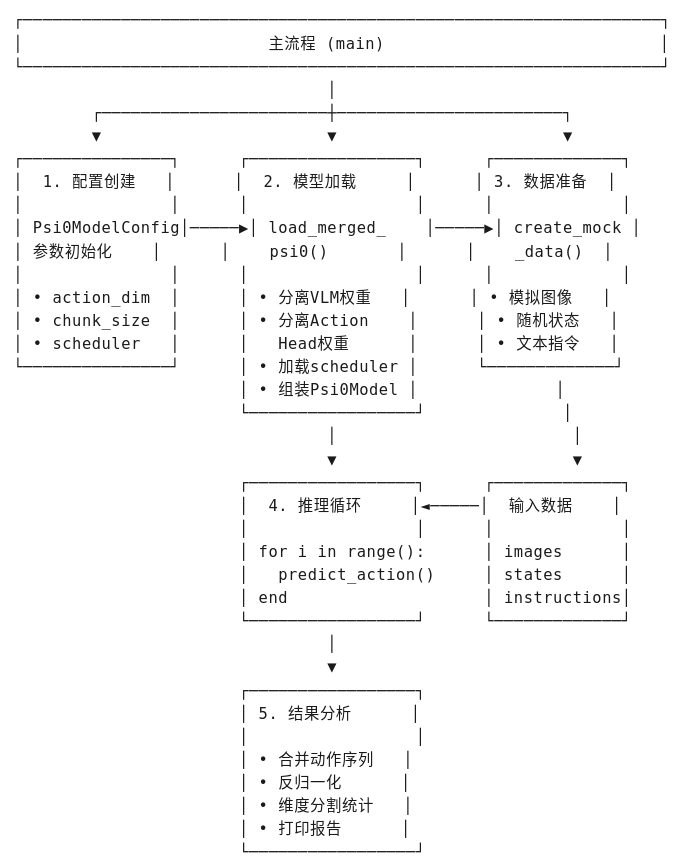
📥 输入信息
| 输入项 | 来源/类型 | 说明 |
|---|---|---|
| 合并权重文件 | psi0_merged_original.ckpt |
包含 VLM + Action Head 的完整权重 |
| 模拟图像 | Image.new('RGB', (320, 240), color=(128, 128, 128)) |
灰色占位图,batch_size=1,1个视角 |
| 模拟状态 | torch.randn(1, 1, 36) |
随机生成的状态向量,observation_horizon=1 |
| 模拟指令 | "Pick up the bottle and pour into cup." |
固定文本指令 |
| 模型配置 | Psi0ModelConfig |
包含 action_chunk_size=16, action_dim=36 等参数 |
📤 输出信息
| 输出项 | 类型 | 说明 |
|---|---|---|
| 预测动作序列 | Tensor(num_frames, 16, 36) |
每帧预测未来16个时间步的动作 |
| 反归一化动作 | 实际物理值 | 映射到真实关节/速度范围 |
| 统计信息 | 各动作维度的 Mean/Std | 按类别分组 (hand_joints, arm_joints等) |
| 动作范围 | [min, max] |
验证输出合理性 |
运行代码:
python
#!/usr/bin/env python3
"""
Psi0 合并权重推理脚本 - 使用模拟数据
基于 openloop_eval.ipynb,适配 psi0_merged_original.ckpt 单文件加载
使用模拟数据进行推理测试,无需真实数据集
"""

import os
import sys
import torch
import numpy as np
from pathlib import Path
from typing import Dict, List, Optional
from PIL import Image

# ============ 路径设置 ============
project_root = Path(__file__).parent.resolve()
while project_root != project_root.parent and not (project_root / "pyproject.toml").exists():
    project_root = project_root.parent

os.chdir(project_root)
sys.path.insert(0, str(project_root / "src"))

import psi
from psi.utils import seed_everything
from psi.config.config import LaunchConfig
from psi.config.model_psi0 import Psi0ModelConfig
from psi.models.psi0 import Psi0Model, QWEN3VL_VARIANT
from transformers import AutoConfig, Qwen3VLForConditionalGeneration, AutoProcessor

print(f"✅ Psi0 version: {psi.__version__}")


def load_merged_psi0(merged_ckpt_path: str, model_cfg: Psi0ModelConfig, device: str = "cuda:0"):
    """
    从合并后的单文件权重加载 Psi0Model
    """
    print(f"\n🔧 Loading merged checkpoint: {merged_ckpt_path}")

    # 加载合并后的权重
    checkpoint = torch.load(merged_ckpt_path, map_location="cpu", weights_only=False)
    state_dict = checkpoint.get("state_dict", checkpoint)

    # 分析权重键名
    print("  分析权重结构...")
    sample_keys = list(state_dict.keys())[:20]
    for k in sample_keys:
        print(f"    {k}")

    # 分离 VLM 和 Action Head 权重
    vlm_state_dict = {}
    action_head_state_dict = {}

    for k, v in state_dict.items():
        # Action Head 的典型键名
        if any(k.startswith(prefix) for prefix in [
            "transformer_blocks.",
            "obs_proj.",
            "action_proj_",
            "time_ins_embed.",
            "norm1_",
            "attn.",
            "ff_",
        ]):
            action_head_state_dict[k] = v
        # VLM 的典型键名
        elif k.startswith("model.") or k.startswith("visual.") or k.startswith("lm_head."):
            vlm_state_dict[k] = v
        else:
            vlm_state_dict[k] = v

    print(f"  VLM weights: {len(vlm_state_dict)} tensors")
    print(f"  Action Head weights: {len(action_head_state_dict)} tensors")

    # 创建 VLM 配置(使用 eager attention,避免 flash_attn 问题)
    vlm_config = AutoConfig.from_pretrained(QWEN3VL_VARIANT)
    vlm_config._attn_implementation = "eager"  # 关键修复:不使用 flash_attention_2
    vlm_model = Qwen3VLForConditionalGeneration(vlm_config)
    vlm_model = vlm_model.to(dtype=torch.bfloat16)

    # 处理 lm_head 权重
    if "lm_head.weight" not in vlm_state_dict and "model.language_model.embed_tokens.weight" in vlm_state_dict:
        vlm_state_dict["lm_head.weight"] = vlm_state_dict["model.language_model.embed_tokens.weight"]

    # 调整 token embeddings 大小
    if "lm_head.weight" in vlm_state_dict:
        if vlm_state_dict["lm_head.weight"].shape[0] != vlm_model.lm_head.weight.shape[0]:
            vlm_model.resize_token_embeddings(
                vlm_state_dict["lm_head.weight"].shape[0],
                pad_to_multiple_of=192,
                mean_resizing=True
            )

    # 加载 VLM 权重
    missing, unexpected = vlm_model.load_state_dict(vlm_state_dict, strict=False)
    if missing:
        print(f"  ⚠️ VLM Missing keys ({len(missing)}): {list(missing)[:5]}...")
    if unexpected:
        print(f"  ⚠️ VLM Unexpected keys ({len(unexpected)}): {list(unexpected)[:5]}...")
    print("  ✅ Loaded VLM weights")

    # 创建 Psi0Model
    psi0 = Psi0Model(model_cfg, vlm_model=vlm_model)

    # 加载 Action Head 权重
    if action_head_state_dict:
        missing, unexpected = psi0.action_header.load_state_dict(action_head_state_dict, strict=False)
        if missing:
            print(f"  ⚠️ Action Head Missing keys ({len(missing)}): {list(missing)[:5]}...")
        if unexpected:
            print(f"  ⚠️ Action Head Unexpected keys ({len(unexpected)}): {list(unexpected)[:5]}...")
        print("  ✅ Loaded Action Head weights")
    else:
        print("  ⚠️ No Action Head weights found!")

    # 加载 processor 和 scheduler
    psi0.vlm_processor = AutoProcessor.from_pretrained(QWEN3VL_VARIANT)

    # 使用 model_cfg 的 noise_scheduler 属性
    if model_cfg.noise_scheduler == "flow":
        from diffusers.schedulers.scheduling_flow_match_euler_discrete import FlowMatchEulerDiscreteScheduler
        scheduler = FlowMatchEulerDiscreteScheduler(
            num_train_timesteps=model_cfg.train_diffusion_steps,
        )
    else:
        from diffusers.schedulers.scheduling_ddim import DDIMScheduler
        scheduler = DDIMScheduler(
            num_train_timesteps=model_cfg.train_diffusion_steps,
            beta_start=0.0001,
            beta_end=0.02,
            beta_schedule="squaredcos_cap_v2",
        )

    psi0.noise_scheduler = scheduler
    psi0.action_horizon = model_cfg.action_chunk_size
    psi0.action_dim = model_cfg.action_dim
    psi0.device = device

    psi0.to(device)
    psi0.eval()

    total_params = sum(p.numel() for p in psi0.parameters())
    print(f"✅ Model loaded. Total parameters: {total_params:,}")

    return psi0


def create_mock_data(batch_size: int = 1, action_dim: int = 36, observation_horizon: int = 1):
    """
    创建模拟数据用于推理测试

    Returns:
        dict: 包含模拟的 images, states, instruction
    """
    # 创建模拟图像 (RGB, 240x320)
    images = [[Image.new('RGB', (320, 240), color=(128, 128, 128)) for _ in range(1)]]  # batch_size=1, 1个视角

    # 创建模拟状态 (observation_horizon, state_dim)
    # 状态维度与 action_dim 相同 (36)
    states = torch.randn(batch_size, observation_horizon, action_dim)

    # 模拟指令
    instructions = ["Pick up the bottle and pour into cup."]

    return {
        "images": images,
        "states": states,
        "instructions": instructions,
    }


def denormalize_action(action: torch.Tensor,
                       action_min: np.ndarray,
                       action_max: np.ndarray) -> torch.Tensor:
    """
    简单的反归一化:从 [-1, 1] 映射到 [min, max]
    """
    action_np = action.cpu().numpy()
    action_min = action_min.reshape(1, 1, -1)
    action_max = action_max.reshape(1, 1, -1)

    # 从 [-1, 1] 映射到 [0, 1]
    normalized_01 = (action_np + 1) / 2
    # 映射到 [min, max]
    denormed = normalized_01 * (action_max - action_min) + action_min

    return torch.from_numpy(denormed).to(action.device)


def main():
    # ============ 配置 ============
    merged_ckpt = "/home/lgp/2026/Psi0/cache/checkpoints/psi0/psi0_merged_original/psi0_merged_original.ckpt"

    device = "cuda:0"
    seed = 42
    num_inference_steps = 10
    num_test_frames = 10  # 模拟的测试帧数

    seed_everything(seed)

    # ============ 创建模型配置 ============
    print("\n" + "="*60)
    print("🔧 创建模型配置")
    print("="*60)

    model_cfg = Psi0ModelConfig(
        model_name_or_path="USC-PSI-Lab/psi0",
        noise_scheduler="flow",
        train_diffusion_steps=1000,
        n_conditions=0,
        action_chunk_size=16,
        action_dim=36,
        action_exec_horizon=16,
        observation_horizon=1,
        odim=36,
        view_feature_dim=2048,
        tune_vlm=False,
        use_film=False,
        combined_temb=False,
        rtc=True,
        max_delay=8,
    )
    print("✅ 模型配置创建完成")

    # ============ 加载模型 ============
    print("\n" + "="*60)
    print("🔧 加载模型")
    print("="*60)

    psi0 = load_merged_psi0(merged_ckpt, model_cfg, device)

    # ============ 创建模拟数据 ============
    print("\n" + "="*60)
    print("📂 创建模拟数据")
    print("="*60)

    mock_data = create_mock_data(
        batch_size=1,
        action_dim=model_cfg.action_dim,
        observation_horizon=model_cfg.observation_horizon
    )

    # 将 states 移到设备
    batch_states = mock_data["states"].to(device)

    print(f"✅ 模拟数据创建完成")
    print(f"   图像批次: {len(mock_data['images'])} 个样本")
    print(f"   状态形状: {batch_states.shape}")
    print(f"   指令: {mock_data['instructions'][0][:50]}...")

    # ============ 模拟动作范围(用于反归一化)============
    # 基于论文定义的动作维度 (36维):
    # {q_hand(14), q_arm(14), torso_rpy(3), h_b(1), v_x(1), v_y(1), v_yaw(1), p_yaw(1)}
    action_min = np.array([
        # hand_joints (14) - 双手关节
        -1.0, -1.0, -1.0, -1.0, -1.0, -1.0, -1.0,  # 左手7个
        -1.0, -1.0, -1.0, -1.0, -1.0, -1.0, -1.0,  # 右手7个
        # arm_joints (14) - 双臂关节
        -1.0, -1.0, -1.0, -1.0, -1.0, -1.0, -1.0,  # 左臂7个
        -1.0, -1.0, -1.0, -1.0, -1.0, -1.0, -1.0,  # 右臂7个
        # torso_rpy (3) - 躯干 roll, pitch, yaw
        -0.5, -0.3, -0.5,
        # height (1) - 基座高度
        0.5,
        # v_x (1) - 水平线速度 x
        -0.5,
        # v_y (1) - 水平线速度 y
        -0.5,
        # torso_vyaw (1) - 偏航角速度
        -0.5,
        # target_yaw (1) - 目标偏航旋转
        -0.5,
    ])

    action_max = np.array([
        # hand_joints (14) - 双手关节
        1.0, 1.0, 1.0, 1.0, 1.0, 1.0, 1.0,   # 左手7个
        1.0, 1.0, 1.0, 1.0, 1.0, 1.0, 1.0,   # 右手7个
        # arm_joints (14) - 双臂关节
        1.0, 1.0, 1.0, 1.0, 1.0, 1.0, 1.0,   # 左臂7个
        1.0, 1.0, 1.0, 1.0, 1.0, 1.0, 1.0,   # 右臂7个
        # torso_rpy (3) - 躯干 roll, pitch, yaw
        0.5, 0.3, 0.5,
        # height (1) - 基座高度
        1.0,
        # v_x (1) - 水平线速度 x
        0.5,
        # v_y (1) - 水平线速度 y
        0.5,
        # torso_vyaw (1) - 偏航角速度
        0.5,
        # target_yaw (1) - 目标偏航旋转
        0.5,
    ])

    # ============ 推理循环 ============
    print("\n" + "="*60)
    print("🚀 开始推理测试")
    print("="*60)

    # 修正后的动作维度标签和分割索引
    # 36维 = 14(hand) + 14(arm) + 3(torso_rpy) + 1(height) + 1(vx) + 1(vy) + 1(vyaw) + 1(pyaw)
    labels_denormed = [
        "hand_joints",      # dim 14
        "arm_joints",       # dim 14
        "torso_rpy",        # dim 3 (roll, pitch, yaw)
        "height",           # dim 1
        "vx",               # dim 1
        "vy",               # dim 1
        "torso_vyaw",       # dim 1 (偏航角速度)
        "target_yaw",       # dim 1 (目标偏航旋转)
    ]

    # 分割索引 (累积维度)
    # 14, 28, 31, 32, 33, 34, 35, 36
    split_indices = [14, 28, 31, 32, 33, 34, 35]

    all_pred_actions = []

    for i in range(num_test_frames):
        # 推理
        with torch.no_grad():
            pred_actions = psi0.predict_action(
                observations=mock_data["images"],
                states=batch_states,
                instructions=mock_data["instructions"],
                num_inference_steps=num_inference_steps,
                traj2ds=None,
            )

        all_pred_actions.append(pred_actions.cpu())

        if i % 5 == 0:
            print(f"   Progress: {i}/{num_test_frames} frames")

    # ============ 分析结果 ============
    print("\n" + "="*60)
    print("📊 推理结果分析")
    print("="*60)

    # 合并所有预测
    all_pred_actions = torch.cat(all_pred_actions, dim=0)  # (num_frames, Tp, Da)

    # 反归一化
    denormalized_actions = denormalize_action(all_pred_actions, action_min, action_max)

    # 计算统计信息
    action_mean = denormalized_actions.mean(dim=(0, 1)).cpu().numpy()  # (Da,)
    action_std = denormalized_actions.std(dim=(0, 1)).cpu().numpy()

    # 分割动作维度
    action_mean_split = np.split(action_mean, split_indices, axis=-1)
    action_std_split = np.split(action_std, split_indices, axis=-1)

    print(f"\n预测动作统计(反归一化后):")
    print("-" * 60)
    print(f"{'Component':<20} {'Shape':<15} {'Mean':<12} {'Std':<12}")
    print("-" * 60)

    for i in range(len(action_mean_split)):
        label = labels_denormed[i] if i < len(labels_denormed) else f"dim_{i}"
        shape = str(action_mean_split[i].shape)
        mean_val = np.mean(action_mean_split[i])
        std_val = np.mean(action_std_split[i])
        print(f"{label:<20} {shape:<15} {mean_val:>10.4f}  {std_val:>10.4f}")

    # 预测动作范围
    print("\n" + "-" * 60)
    print(f"预测动作范围: [{denormalized_actions.min():.3f}, {denormalized_actions.max():.3f}]")
    print(f"预测动作形状: {denormalized_actions.shape}")
    print(f"  - 批次大小: {denormalized_actions.shape[0]}")
    print(f"  - 时间步 (chunk size): {denormalized_actions.shape[1]}")
    print(f"  - 动作维度: {denormalized_actions.shape[2]}")

    # 详细维度分解
    print("\n" + "-" * 60)
    print("动作维度详细分解 (36维):")
    print("  - hand_joints:  14维 (双手)")
    print("  - arm_joints:   14维 (双臂)")
    print("  - torso_rpy:     3维 (躯干 roll/pitch/yaw)")
    print("  - height:        1维 (基座高度)")
    print("  - vx:            1维 (水平线速度 x)")
    print("  - vy:            1维 (水平线速度 y)")
    print("  - torso_vyaw:    1维 (偏航角速度)")
    print("  - target_yaw:    1维 (目标偏航旋转)")

    print("\n" + "="*60)
    print("✅ 推理测试完成!模型工作正常")
    print("="*60)


if __name__ == "__main__":
    main()
打印信息:
✅ Psi0 version: 0.0.0
============================================================
🔧 创建模型配置
============================================================
✅ 模型配置创建完成
============================================================
🔧 加载模型
============================================================
🔧 Loading merged checkpoint: /home/lgp/2026/Psi0/cache/checkpoints/psi0/psi0_merged_original/psi0_merged_original.ckpt
分析权重结构...
model.language_model.embed_tokens.weight
model.language_model.layers.14.input_layernorm.weight
model.language_model.layers.9.mlp.down_proj.weight
model.visual.blocks.17.norm2.weight
model.language_model.layers.12.mlp.gate_proj.weight
model.visual.blocks.0.norm2.weight
model.language_model.layers.5.post_attention_layernorm.weight
model.language_model.layers.17.self_attn.k_proj.weight
model.visual.blocks.2.norm2.bias
model.language_model.layers.10.mlp.down_proj.weight
model.language_model.layers.15.self_attn.q_proj.weight
model.language_model.layers.6.input_layernorm.weight
model.language_model.layers.11.mlp.up_proj.weight
model.visual.blocks.6.attn.qkv.bias
model.language_model.layers.9.mlp.up_proj.weight
model.language_model.layers.2.self_attn.o_proj.weight
model.visual.blocks.2.mlp.linear_fc1.bias
model.language_model.layers.17.input_layernorm.weight
model.language_model.layers.23.self_attn.k_norm.weight
model.visual.blocks.1.attn.qkv.weight
VLM weights: 625 tensors
Action Head weights: 181 tensors
The new embeddings will be initialized from a multivariate normal distribution that has old embeddings' mean and covariance. As described in this article: https://nlp.stanford.edu/\~johnhew/vocab-expansion.html. To disable this, use `mean_resizing=False`
✅ Loaded VLM weights
17:30:17 04/05 INFO | >> \* Total ActionTransformerModel parameters: 497,697,752 psi0.py:1510
INFO | >> \* Total VLM Backbone parameters: 2,131,333,120 psi0.py:1514
✅ Loaded Action Head weights
✅ Model loaded. Total parameters: 2,629,030,872
============================================================
📂 创建模拟数据
============================================================
✅ 模拟数据创建完成
图像批次: 1 个样本
状态形状: torch.Size(1, 1, 36)
指令: Pick up the bottle and pour into cup....
============================================================
🚀 开始推理测试
============================================================
Progress: 0/10 frames
Progress: 5/10 frames
============================================================
📊 推理结果分析
============================================================
预测动作统计(反归一化后):
Component Shape Mean Std
hand_joints (14,) -0.0004 0.2358
arm_joints (14,) -0.0056 0.1964
torso_rpy (3,) 0.0006 0.0624
height (1,) 0.7483 0.0360
vx (1,) -0.0073 0.0726
vy (1,) 0.0003 0.0701
torso_vyaw (1,) -0.0017 0.0776
target_yaw (1,) -0.0054 0.0729
预测动作范围: -0.992, 1.008
预测动作形状: torch.Size(10, 16, 36)
批次大小: 10
时间步 (chunk size): 16
动作维度: 36
动作维度详细分解 (36维):
hand_joints: 14维 (双手)
arm_joints: 14维 (双臂)
torso_rpy: 3维 (躯干 roll/pitch/yaw)
height: 1维 (基座高度)
vx: 1维 (水平线速度 x)
vy: 1维 (水平线速度 y)
torso_vyaw: 1维 (偏航角速度)
target_yaw: 1维 (目标偏航旋转)
============================================================
✅ 推理测试完成!模型工作正常
============================================================
📐 36维动作分解
| 类别 | 维度 | 说明 |
|---|---|---|
| hand_joints | 14 | 双手关节 (左7 + 右7) |
| arm_joints | 14 | 双臂关节 (左7 + 右7) |
| torso_rpy | 3 | 躯干 roll/pitch/yaw |
| height | 1 | 基座高度 |
| vx | 1 | 水平线速度 x |
| vy | 1 | 水平线速度 y |
| torso_vyaw | 1 | 偏航角速度 |
| target_yaw | 1 | 目标偏航旋转 |
有待更新~