欢迎加入开源鸿蒙跨平台社区:
https://openharmonycrossplatform.csdn.net
一、项目概述
运行效果图
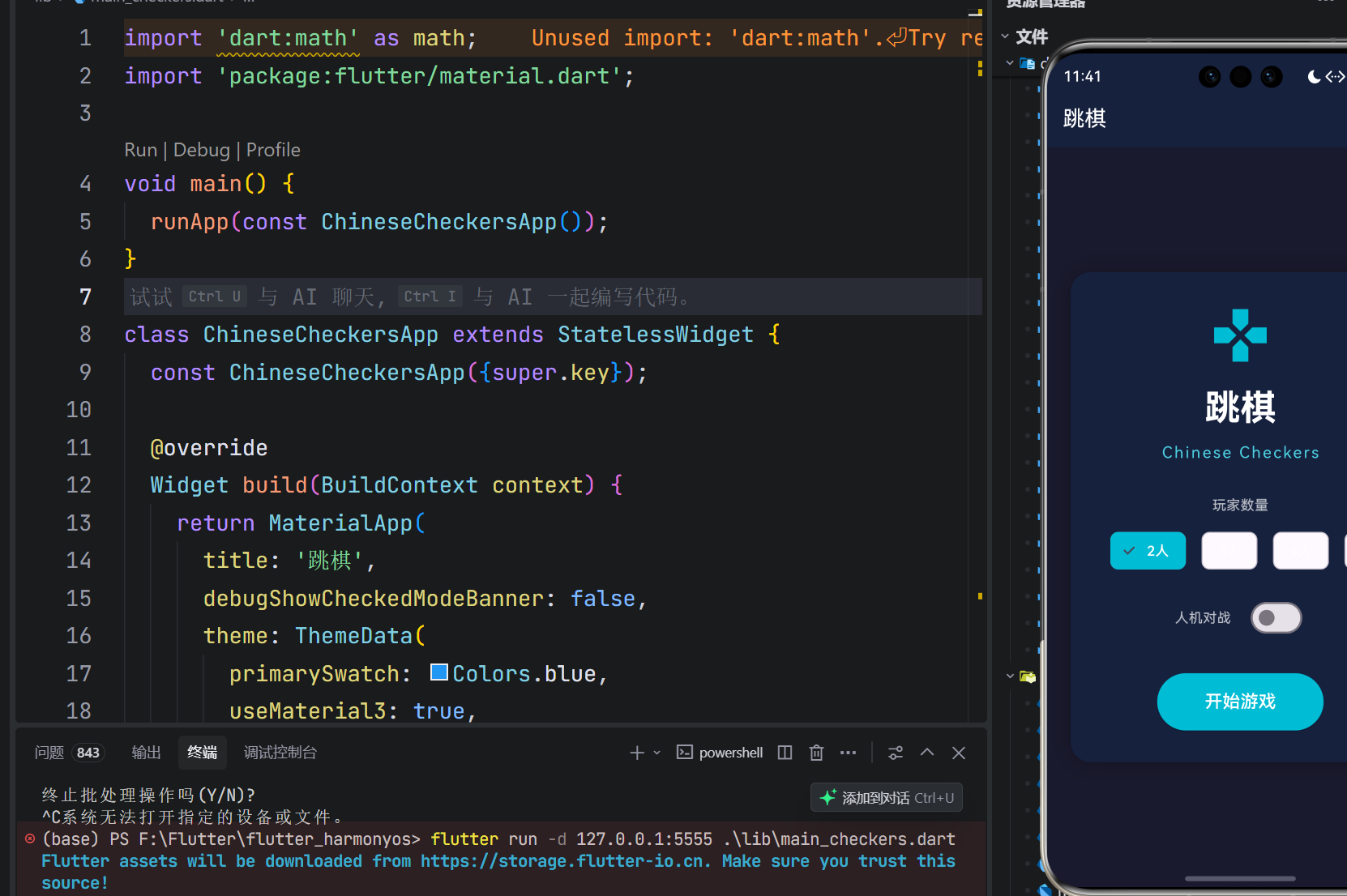
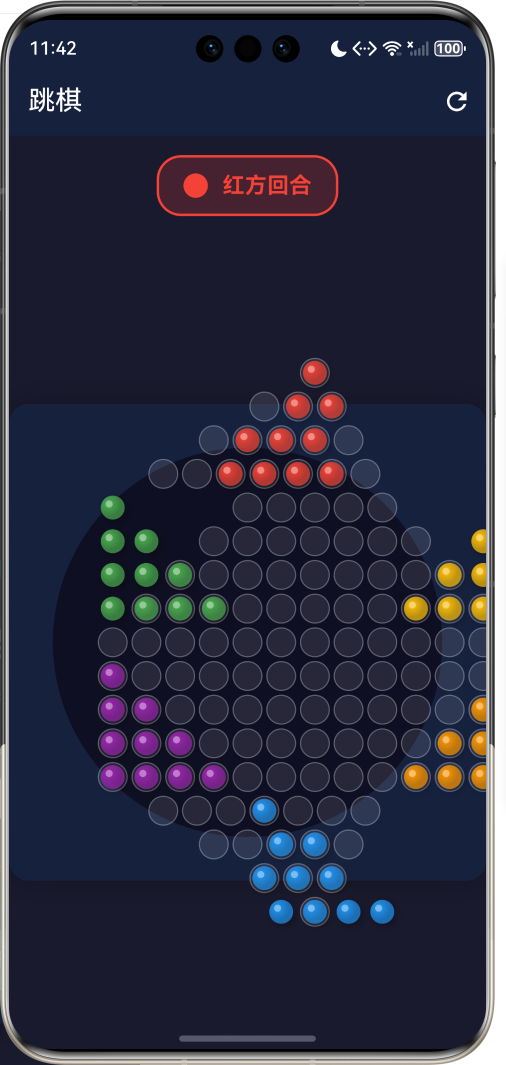
1.1 应用简介
跳棋(Chinese Checkers)是一款经典的策略性棋类游戏,起源于中国的跳井棋,后经改良成为风靡全球的六角星形跳棋。游戏采用六角星形棋盘,支持2至6人同时对战,每位玩家需要将自己阵营的所有棋子从起始区域移动到对角的目标区域,最先完成任务的玩家获胜。
本应用采用Flutter框架开发,实现了完整的跳棋游戏功能,包括六角星形棋盘绘制、多人对战模式、人机对战功能、连续跳跃机制等核心特性。游戏界面采用深色主题设计,视觉效果精美,操作流畅便捷,为玩家提供沉浸式的游戏体验。
1.2 核心功能
| 功能模块 | 功能描述 | 实现方式 |
|---|---|---|
| 棋盘绘制 | 六角星形棋盘渲染 | CustomPaint |
| 棋子管理 | 六种颜色棋子展示 | 状态管理 |
| 移动逻辑 | 相邻移动和跳跃移动 | 算法实现 |
| 连续跳跃 | 多次连续跳跃机制 | 递归检测 |
| 多人对战 | 2-6人游戏模式 | 回合制管理 |
| 人机对战 | AI对手功能 | 简单AI算法 |
| 胜利检测 | 完成目标区域检测 | 条件判断 |
| 游戏状态 | 开始、进行、结束状态 | 状态机 |
1.3 游戏规则
1.3.1 基本规则
跳棋游戏的基本规则简单易懂,但策略性极强:
| 规则项 | 详细说明 |
|---|---|
| 游戏目标 | 将己方所有棋子移动到对角的目标区域 |
| 移动方式 | 可以移动到相邻空格,或跳过相邻棋子 |
| 跳跃规则 | 可以连续跳跃,每次跳跃必须跨过一个棋子 |
| 回合制 | 玩家轮流进行,每回合可选择移动或跳跃 |
| 胜利条件 | 最先将所有棋子移入目标区域的玩家获胜 |
1.3.2 棋盘布局
六角星形棋盘由以下区域组成:
        △ 红方起始区
       ● ● ● ●
      ● ● ● ● ●
     ● ● ● ● ● ●
    ─ ─ ─ ─ ─ ─ ─
   ─ ─ ─ ─ ─ ─ ─ ─
  ─ ─ ─ ─ ─ ─ ─ ─ ─
 ─ ─ ─ ─ ─ ─ ─ ─ ─ ─
  ─ ─ ─ ─ ─ ─ ─ ─ ─
   ─ ─ ─ ─ ─ ─ ─ ─
    ─ ─ ─ ─ ─ ─ ─
     ● ● ● ● ● ●
      ● ● ● ● ●
       ● ● ● ●
        ▽ 蓝方起始区
1.3.3 玩家配置
| 玩家数 | 阵营分布 | 特点 |
|---|---|---|
| 2人 | 对角阵营 | 经典对战模式 |
| 3人 | 间隔120度 | 三方博弈 |
| 4人 | 对角两组 | 团队协作 |
| 6人 | 全部阵营 | 混战模式 |
1.4 技术栈
| 技术领域 | 技术选型 | 版本要求 |
|---|---|---|
| 开发框架 | Flutter | >= 3.0.0 |
| 编程语言 | Dart | >= 2.17.0 |
| 设计规范 | Material Design 3 | - |
| 状态管理 | setState | - |
| 绘图引擎 | CustomPaint | - |
| 目标平台 | 鸿蒙OS | API 21+ |
1.5 项目结构
lib/
└── main_checkers.dart
    ├── ChineseCheckersApp      # 应用入口
    ├── PlayerColor             # 玩家颜色枚举
    ├── Position                # 位置数据类
    ├── GamePage                # 游戏主页面
    └── BoardPainter            # 棋盘绘制器
二、系统架构
2.1 整体架构图
Game Logic
Data Layer
Presentation Layer
GamePage
开始界面
游戏界面
结束界面
玩家数量选择
人机对战开关
开始按钮
游戏头部
棋盘区域
跳跃控制
胜利提示
重新开始
棋盘状态
_board
玩家列表
_players
当前位置
_selectedPosition
有效移动
_validMoves
移动检测
_getValidMoves
跳跃检测
_addJumpMoves
胜利检测
_checkWin
AI移动
_makeAIMove
2.2 类图设计
creates
uses
uses
creates
uses
ChineseCheckersApp
+Widget build()
<<enumeration>>
PlayerColor
+Color color
+String name
red
blue
green
yellow
purple
orange
Position
+int row
+int col
+operator ==()
+hashCode()
+copyWith()
GamePage
+Widget build()
_GamePageState
-List<List> _board
-List<PlayerColor> _players
-int _currentPlayerIndex
-Position? _selectedPosition
-List<Position> _validMoves
-bool _isJumping
-bool _gameStarted
-bool _gameOver
-int _playerCount
-bool _vsAI
+void _startGame()
+void _handleCellTap()
+List<Position> _getValidMoves()
+void _movePiece()
+void _endTurn()
+bool _checkWin()
+void _makeAIMove()
BoardPainter
+List<List> board
+Position? selectedPosition
+List<Position> validMoves
+double cellSize
+Function onTap
+void paint()
+bool shouldRepaint()
2.3 游戏流程图
选择玩家数
人机对战
人类玩家
AI玩家
点击己方棋子
点击无效位置
有效移动
取消选择
是
否
是
否
胜利
未胜利
重新开始
返回主页
应用启动
显示开始界面
玩家设置
设置玩家数量
设置AI模式
点击开始
初始化棋盘
放置棋子
游戏开始
当前玩家
等待操作
AI自动移动
选择棋子
显示有效移动
选择目标
移动棋子
是否跳跃?
可继续跳跃?
结束回合
继续跳跃
检查胜利
显示胜利界面
切换玩家
玩家选择
2.4 移动检测流程
状态更新 跳跃检测 移动检测 游戏界面 用户 状态更新 跳跃检测 移动检测 游戏界面 用户 alt 为空 loop 六个方向 alt 中间有棋子- 且目标为空- loop 六个方向 alt 是跳跃移动 普通移动 点击棋子 获取有效移动 检查相邻格子 判断是否为空 添加到移动列表 检查跳跃移动 检查中间格子 添加到跳跃列表 返回有效移动列表 高亮显示有效位置 点击目标位置 执行移动 更新棋盘状态 检查继续跳跃 允许继续跳跃 结束回合
三、核心模块设计
3.1 数据模型设计
3.1.1 玩家颜色枚举 (PlayerColor)
dart
enum PlayerColor {
  red(Colors.red, '红方'),
  blue(Colors.blue, '蓝方'),
  green(Colors.green, '绿方'),
  yellow(Colors.amber, '黄方'),
  purple(Colors.purple, '紫方'),
  orange(Colors.orange, '橙方');

  final Color color;    // 棋子颜色
  final String name;    // 显示名称
}
3.1.2 位置数据类 (Position)
dart
class Position {
  final int row;    // 行坐标
  final int col;    // 列坐标

  const Position(this.row, this.col);

  @override
  bool operator ==(Object other) =>
      identical(this, other) ||
      other is Position && row == other.row && col == other.col;

  @override
  int get hashCode => row.hashCode ^ col.hashCode;

  Position copyWith({int? row, int? col}) {
    return Position(row ?? this.row, col ?? this.col);
  }
}
3.1.3 棋盘状态
dart
// 二维数组表示棋盘,null表示空位
List<List<PlayerColor?>> _board = List.generate(
  boardSize,
  (i) => List.generate(boardSize, (j) => null),
);
3.2 棋盘布局设计
3.2.1 有效格子判断
六角星形棋盘的有效格子判断算法:
dart
bool _isValidCell(int row, int col) {
  // 边界检查
  if (row < 0 || row >= boardSize || col < 0 || col >= boardSize) {
    return false;
  }

  // 中心区域 (行 4-12)
  if (row >= 4 && row <= 12) {
    int minCol = 4 - (row - 4).abs();
    int maxCol = 12 + (row - 8);
    return col >= minCol && col <= maxCol;
  }

  // 顶部三角形 (行 0-3)
  if (row < 4) {
    return col >= 4 - row && col <= 4 + row;
  }

  // 底部三角形 (行 13-16)
  if (row > 12) {
    int offset = row - 13;
    return col >= 4 - (3 - offset) && col <= 4 + (3 - offset);
  }

  return false;
}
3.2.2 棋盘区域划分
棋盘区域
顶部三角形
红方起始区
中心六边形
公共区域
底部三角形
蓝方起始区
左上三角形
绿方起始区
右下三角形
黄方起始区
左下三角形
紫方起始区
右上三角形
橙方起始区
3.3 游戏逻辑设计
3.3.1 核心状态变量
dart
class _GamePageState extends State<GamePage> {
  static const int boardSize = 17;        // 棋盘大小
  static const int maxPlayers = 6;        // 最大玩家数

  List<List<PlayerColor?>> _board = [];   // 棋盘状态
  List<PlayerColor> _players = [];        // 玩家列表
  int _currentPlayerIndex = 0;            // 当前玩家索引
  Position? _selectedPosition;            // 选中的棋子位置
  List<Position> _validMoves = [];        // 有效移动位置列表
  List<Position> _jumpPath = [];          // 跳跃路径
  bool _isJumping = false;                // 是否正在跳跃
  bool _gameStarted = false;              // 游戏是否开始
  bool _gameOver = false;                 // 游戏是否结束
  PlayerColor? _winner;                   // 获胜者
  int _playerCount = 2;                   // 玩家数量
  bool _vsAI = false;                     // 是否人机对战
}
3.3.2 移动方向定义
六角形棋盘的六个移动方向:
dart
final directions = [
  (-1, 0),   // 上
  (-1, 1),   // 右上
  (0, -1),   // 左
  (0, 1),    // 右
  (1, -1),   // 左下
  (1, 0),    // 下
];
四、UI设计规范
4.1 配色方案
游戏采用深色主题设计,营造沉浸式游戏体验:
| 颜色类型 | 色值 | 用途 |
|---|---|---|
| 页面背景 | #1A1A2E | 整体背景 |
| 卡片背景 | #16213E | 内容卡片 |
| 棋盘背景 | #0F0F23 | 棋盘区域 |
| 强调色 | #00BCD4 | 高亮选中 |
| 成功色 | #4CAF50 | 有效移动 |
| 警告色 | #FF9800 | 结束跳跃 |
4.1.1 棋子颜色
| 玩家 | 颜色 | 色值 |
|---|---|---|
| 红方 | 红色 | #F44336 |
| 蓝方 | 蓝色 | #2196F3 |
| 绿方 | 绿色 | #4CAF50 |
| 黄方 | 黄色 | #FFC107 |
| 紫方 | 紫色 | #9C27B0 |
| 橙方 | 橙色 | #FF9800 |
4.2 字体规范
| 元素 | 字号 | 字重 | 颜色 |
|---|---|---|---|
| 游戏标题 | 36px | Bold | 白色 |
| 英文副标题 | 16px | Regular | 青色 |
| 玩家回合 | 18px | Bold | 对应颜色 |
| 按钮文字 | 18px | Regular | 白色 |
| 标签文字 | 14px | Regular | 白色70% |
4.3 组件规范
4.3.1 开始界面布局
┌─────────────────────────────────────────────────────────────┐
│                                                             │
│                         🎮                                 │
│                                                             │
│                       跳棋                                 │
│                  Chinese Checkers                          │
│                                                             │
│                     玩家数量                               │
│               [2人] [3人] [4人] [6人]                      │
│                                                             │
│                     人机对战  [○]                          │
│                                                             │
│                   [开始游戏]                                │
│                                                             │
└─────────────────────────────────────────────────────────────┘
4.3.2 游戏界面布局
┌─────────────────────────────────────────────────────────────┐
│  跳棋                                              [刷新]   │
├─────────────────────────────────────────────────────────────┤
│                                                             │
│                   [● 红方回合]                              │
│                                                             │
│                                                             │
│                         △                                   │
│                        ●●●●                                │
│                       ●●●●●                                │
│                      ●●●●●●                                │
│                     ─────────                              │
│                    ───────────                             │
│                   ─────────────                            │
│                  ───────────────                           │
│                   ─────────────                            │
│                    ───────────                             │
│                     ─────────                              │
│                      ●●●●●●                                │
│                       ●●●●●                                │
│                        ●●●●                                │
│                         ▽                                  │
│                                                             │
│                   [结束跳跃]                                │
│                                                             │
└─────────────────────────────────────────────────────────────┘
4.3.3 棋子绘制效果
    ┌─────────────┐
    │    ╭───╮    │  ← 高光效果
    │   ╱     ╲   │
    │  │   ●   │  │  ← 渐变填充
    │   ╲     ╱   │
    │    ╰───╯    │
    └─────────────┘
         ↓
    阴影效果
五、核心功能实现
5.1 有效移动计算
5.1.1 获取有效移动
dart
List<Position> _getValidMoves(int row, int col) {
  final moves = <Position>[];

  // 如果正在跳跃中,只能继续跳跃
  if (_isJumping) {
    _addJumpMoves(row, col, moves, {});
  } else {
    // 添加相邻移动
    _addAdjacentMoves(row, col, moves);
    // 添加跳跃移动
    _addJumpMoves(row, col, moves, {Position(row, col)});
  }

  return moves;
}
5.1.2 相邻移动检测
dart
void _addAdjacentMoves(int row, int col, List<Position> moves) {
  // 六个方向的相邻格子
  final directions = [
    (-1, 0), (-1, 1), (0, -1), (0, 1), (1, -1), (1, 0),
  ];

  for (final (dr, dc) in directions) {
    final newRow = row + dr;
    final newCol = col + dc;

    // 检查是否为有效格子且为空
    if (_isValidCell(newRow, newCol) && _board[newRow][newCol] == null) {
      moves.add(Position(newRow, newCol));
    }
  }
}
5.1.3 跳跃移动检测
dart
void _addJumpMoves(int row, int col, List<Position> moves, Set<Position> visited) {
  final directions = [
    (-1, 0), (-1, 1), (0, -1), (0, 1), (1, -1), (1, 0),
  ];

  for (final (dr, dc) in directions) {
    // 中间位置
    final midRow = row + dr;
    final midCol = col + dc;
    // 目标位置
    final newRow = row + dr * 2;
    final newCol = col + dc * 2;

    // 检查跳跃条件:
    // 1. 中间位置有效且有棋子
    // 2. 目标位置有效且为空
    // 3. 目标位置未被访问过
    if (_isValidCell(midRow, midCol) &&
        _board[midRow][midCol] != null &&
        _isValidCell(newRow, newCol) &&
        _board[newRow][newCol] == null &&
        !visited.contains(Position(newRow, newCol))) {
      moves.add(Position(newRow, newCol));
    }
  }
}
5.2 棋子移动
5.2.1 移动执行
dart
void _movePiece(Position from, Position to) {
  setState(() {
    // 移动棋子
    _board[to.row][to.col] = _board[from.row][from.col];
    _board[from.row][from.col] = null;
    _jumpPath.add(from);

    // 检查是否可以继续跳跃
    final jumpMoves = <Position>[];
    _addJumpMoves(to.row, to.col, jumpMoves, Set.from(_jumpPath)..add(to));

    if (jumpMoves.isNotEmpty && _isJumpDistance(from, to)) {
      // 可以继续跳跃
      _isJumping = true;
      _selectedPosition = to;
      _validMoves = jumpMoves;
    } else {
      // 结束回合
      _endTurn();
    }
  });
}
5.2.2 跳跃距离判断
dart
bool _isJumpDistance(Position from, Position to) {
  return (from.row - to.row).abs() == 2 || (from.col - to.col).abs() == 2;
}
5.3 胜利检测
dart
bool _checkWin(PlayerColor player) {
  // 根据玩家确定目标区域
  int targetRow, targetCol;
  switch (player) {
    case PlayerColor.red:
      targetRow = 13;  // 蓝方起始区
      targetCol = 4;
      break;
    case PlayerColor.blue:
      targetRow = 0;   // 红方起始区
      targetCol = 4;
      break;
    default:
      return false;
  }

  // 计算目标区域内的棋子数量
  int count = 0;
  for (int i = 0; i < 4; i++) {
    for (int j = 0; j <= i; j++) {
      int row = targetRow + i;
      int col = targetCol + j - (i ~/ 2);
      if (row >= 0 && row < boardSize && col >= 0 && col < boardSize) {
        if (_board[row][col] == player) count++;
      }
    }
  }

  // 至少10个棋子进入目标区域即获胜
  return count >= 10;
}
5.4 AI实现
5.4.1 简单AI算法
dart
void _makeAIMove() {
  final currentPlayer = _players[_currentPlayerIndex];
  final pieces = <Position>[];

  // 收集所有己方棋子
  for (int i = 0; i < boardSize; i++) {
    for (int j = 0; j < boardSize; j++) {
      if (_board[i][j] == currentPlayer) {
        pieces.add(Position(i, j));
      }
    }
  }

  // 随机打乱棋子顺序
  pieces.shuffle();

  // 尝试找到可移动的棋子
  for (final piece in pieces) {
    final moves = _getValidMoves(piece.row, piece.col);
    if (moves.isNotEmpty) {
      setState(() {
        _selectedPosition = piece;
        _validMoves = moves;
      });

      // 延迟执行移动,增加视觉效果
      Future.delayed(const Duration(milliseconds: 300), () {
        if (_validMoves.isNotEmpty) {
          _movePiece(piece, _validMoves.first);
        }
      });
      return;
    }
  }

  // 无法移动,跳过回合
  _endTurn();
}
5.5 棋盘绘制
5.5.1 CustomPaint实现
dart
class BoardPainter extends CustomPainter {
  final List<List<PlayerColor?>> board;
  final Position? selectedPosition;
  final List<Position> validMoves;
  final double cellSize;
  final Function(int, int) onTap;

  @override
  void paint(Canvas canvas, Size size) {
    final center = Offset(size.width / 2, size.height / 2);
    final radius = size.width / 2 - 20;

    // 绘制棋盘背景
    final bgPaint = Paint()
      ..color = const Color(0xFF0F0F23)
      ..style = PaintingStyle.fill;
    canvas.drawCircle(center, radius, bgPaint);

    // 绘制棋盘格子
    _drawCells(canvas, size);

    // 绘制棋子
    _drawPieces(canvas, size);
  }

  void _drawCells(Canvas canvas, Size size) {
    for (int row = 0; row < boardSize; row++) {
      for (int col = 0; col < boardSize; col++) {
        if (!_isValidCell(row, col)) continue;

        final pos = _getCellPosition(row, col, size);
        final isSelected = selectedPosition?.row == row && selectedPosition?.col == col;
        final isValidMove = validMoves.any((p) => p.row == row && p.col == col);

        // 绘制格子
        final cellPaint = Paint()
          ..color = isSelected
              ? Colors.cyan.withValues(alpha: 0.5)
              : isValidMove
                  ? Colors.green.withValues(alpha: 0.5)
                  : Colors.white.withValues(alpha: 0.1)
          ..style = PaintingStyle.fill;

        canvas.drawCircle(pos, cellRadius, cellPaint);
      }
    }
  }

  void _drawPieces(Canvas canvas, Size size) {
    for (int row = 0; row < boardSize; row++) {
      for (int col = 0; col < boardSize; col++) {
        final piece = board[row][col];
        if (piece == null) continue;

        final pos = _getCellPosition(row, col, size);

        // 绘制棋子阴影
        final shadowPaint = Paint()
          ..color = Colors.black.withValues(alpha: 0.3)
          ..maskFilter = const MaskFilter.blur(BlurStyle.normal, 3);
        canvas.drawCircle(Offset(pos.dx + 2, pos.dy + 2), cellRadius, shadowPaint);

        // 绘制棋子(渐变效果)
        final piecePaint = Paint()
          ..shader = RadialGradient(
            colors: [
              piece.color.withValues(alpha: 1),
              piece.color.withValues(alpha: 0.7),
            ],
            center: const Alignment(-0.3, -0.3),
          ).createShader(Rect.fromCircle(center: pos, radius: cellRadius));
        canvas.drawCircle(pos, cellRadius, piecePaint);

        // 绘制高光
        final highlightPaint = Paint()
          ..color = Colors.white.withValues(alpha: 0.4)
          ..style = PaintingStyle.fill;
        canvas.drawCircle(
          Offset(pos.dx - cellRadius * 0.3, pos.dy - cellRadius * 0.3),
          cellRadius * 0.3,
          highlightPaint,
        );
      }
    }
  }
}
六、游戏策略分析
6.1 基本策略
| 策略名称 | 策略描述 | 适用场景 |
|---|---|---|
| 直线推进 | 沿直线方向快速推进 | 开局阶段 |
| 连跳优先 | 优先选择可连续跳跃的棋子 | 全程 |
| 中路突破 | 控制中心区域 | 中盘阶段 |
| 阻挡对手 | 阻止对手的跳跃路径 | 对战模式 |
| 分散布局 | 避免棋子过于集中 | 全程 |
6.2 高级技巧
6.2.1 连跳规划
连续跳跃是跳棋的核心技巧,一次成功的连跳可以大幅推进棋子位置:
起始位置 → 跳跃1 → 跳跃2 → 跳跃3 → 目标位置
   ●    →   ○    →   ○    →   ○    →    ●
6.2.2 搭桥技巧
通过己方棋子搭建跳跃桥梁:
    ●
   ↗ ↘
  ●   ●
  ↑    ↓
桥梁  目标
6.3 开局布局
开局阶段
快速推进
建立桥梁
控制中心
中盘对抗
七、扩展功能规划
7.1 后续版本规划
2024-01-07 2024-01-14 2024-01-21 2024-01-28 2024-02-04 2024-02-11 2024-02-18 2024-02-25 2024-03-03 2024-03-10 2024-03-17 2024-03-24 2024-03-31 2024-04-07 2024-04-14 核心游戏 多人模式 AI对战 智能AI 悔棋功能 游戏记录 在线对战 好友系统 排行榜 教学模式 复盘功能 主题皮肤 V1.0 基础版本 V1.1 增强版本 V1.2 社交版本 V2.0 高级版本 跳棋游戏开发路线图
7.2 功能扩展建议
7.2.1 智能AI
- 使用Minimax算法
- 添加Alpha-Beta剪枝
- 实现难度分级
7.2.2 悔棋功能
- 保存移动历史
- 支持多步悔棋
- 限制悔棋次数
7.2.3 在线对战
- WebSocket实时通信
- 房间匹配系统
- 断线重连机制
八、注意事项
8.1 开发注意事项
-
棋盘坐标:六角形棋盘的坐标计算需要特别注意偏移
-
连续跳跃:需要正确处理跳跃路径,避免重复跳跃
-
状态同步:AI移动时需要延迟执行,确保UI更新
-
胜利检测:需要正确判断目标区域
8.2 性能优化
| 优化点 | 方法 |
|---|---|
| 棋盘绘制 | 使用CustomPaint缓存 |
| 移动计算 | 提前计算有效移动 |
| AI决策 | 限制搜索深度 |
| 状态更新 | 避免不必要的setState |
8.3 常见问题
| 问题 | 原因 | 解决方案 |
|---|---|---|
| 棋子无法移动 | 有效移动计算错误 | 检查方向向量 |
| 跳跃中断 | 跳跃路径未正确记录 | 使用Set记录已访问位置 |
| AI卡顿 | 搜索深度过大 | 限制搜索深度 |
| 胜利误判 | 目标区域计算错误 | 验证区域坐标 |
九、运行说明
9.1 环境要求
| 环境 | 版本要求 |
|---|---|
| Flutter SDK | >= 3.0.0 |
| Dart SDK | >= 2.17.0 |
| 鸿蒙OS | API 21+ |
9.2 运行命令
bash
# 查看可用设备
flutter devices

# 运行到鸿蒙设备
flutter run -d 127.0.0.1:5555 lib/main_checkers.dart

# 运行到Web服务器
flutter run -d web-server -t lib/main_checkers.dart --web-port 8085

# 运行到Windows
flutter run -d windows -t lib/main_checkers.dart

# 代码分析
flutter analyze lib/main_checkers.dart
十、总结
跳棋游戏应用通过完整的游戏规则实现、精美的视觉设计和流畅的交互体验,为玩家提供了一个经典的策略棋类游戏平台。游戏支持2-6人对战和人机对战模式,满足不同玩家的需求。
核心功能包括六角星形棋盘绘制、棋子移动和跳跃逻辑、连续跳跃机制、多人回合制管理、简单AI对战、胜利条件检测等。游戏采用深色主题设计,棋子具有渐变和高光效果,视觉效果精美。通过CustomPaint实现高效的棋盘绘制,确保游戏运行流畅。
通过本游戏,希望能够让玩家体验跳棋的策略乐趣,在方寸棋盘间感受智慧的碰撞。
策略博弈,智慧对决