一、疲劳检测(基于 dlib 的人脸检测与 68 点关键点定位)
1.1摘要
疲劳检测是一类通过分析人体行为(如眼睛闭合、头部姿态、打哈欠等)来判断个体是否处于疲劳或注意力不集中的技术。它在驾驶员监控、驾驶安全、课堂学员状态检测、远程办公督导等场景中具有重要应用价值。本文以基于人脸关键点的眼睛纵横比(EAR, Eye Aspect Ratio)方法为基础,详细介绍原理、代码实现、参数调优等。
1.2方法介绍
眼睛纵横比(EAR)由Soukupová 和 Čech 提出,基于眼睛的 6 个关键点位置计算。EAR 的优点在于:计算量小、对头部轻微转动具有鲁棒性、实时性好。其计算公式为:
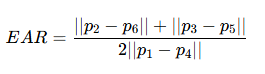
其中,p1,p2,p3,p4,p5,p6是眼睛轮廓上的6个特征点,∣∣p2-p6∣∣,∣∣p3-p5∣∣,||p1-p4|| 表示两点之间的欧氏距离。
1.3优缺点介绍
优点:无需训练复杂模型,简单高效,适合资源受限场景。
局限:对遮挡(手、眼镜的强反光)、极端侧脸与光照变化敏感;单纯使用 EAR 无法区分打瞌睡与短暂低头等情况,通常需要结合头部姿态与 yaw/pitch/roll 或面部表情(如打哈欠)来提升准确率。
1.4代码说明(含讲解)
下面的示例代码实现了基于 dlib 的人脸检测与 68 点关键点定位,计算左右眼 EAR,绘制眼睛凸包并在疲劳(连续闭眼超过阈值)时给出中文报警提示。
python
import numpy as np
import dlib
from sklearn.metrics.pairwise import euclidean_distances  # 计算欧式距离
from PIL import Image, ImageDraw, ImageFont  # pip install pillow -i https://pypi.tuna.tsinghua.edu.cn/simple
import cv2


def eye_aspect_ratio(eye):
    # 计算眼睛纵横比
    '''-------------计算眼睛纵横比-------------
        #    1   2
        # 0         3   <----这是眼睛的6个关键点
        #    5   4
    '''
    A = euclidean_distances(eye[1].reshape(1, 2), eye[5].reshape(1, 2))
    B = euclidean_distances(eye[2].reshape(1, 2), eye[4].reshape(1, 2))
    C = euclidean_distances(eye[0].reshape(1, 2), eye[3].reshape(1, 2))
    ear = ((A + B) / 2.0) / C  # EAR 纵横比
    return ear


def cv2AddChineseText(img, text, position, textColor=(0, 255, 0), textSize=30):
    """向图片中添加中文"""
    if isinstance(img, np.ndarray):  # 判断是否OpenCV图片类型
        img = Image.fromarray(cv2.cvtColor(img, cv2.COLOR_BGR2RGB))#实现array到image的转换
    draw = ImageDraw.Draw(img) #在img图片上创建一个绘图的对象
    # 字体的格式
    fontStyle = ImageFont.truetype( "simsun.ttc", textSize, encoding="utf-8")
    draw.text(position, text, textColor, font=fontStyle) # 绘制文本
    return cv2.cvtColor(np.asarray(img), cv2.COLOR_RGB2BGR)# 转换回OpenCV格式


def drawEye(eye):  # 绘制眼眶
    eyeHull = cv2.convexHull(eye)
    cv2.drawContours(frame, [eyeHull], -1, color=(0, 255, 0), thickness=-1)


COUNTER = 0
# 初始化检测器
detector = dlib.get_frontal_face_detector()  # 构造脸部检测器
predictor = dlib.shape_predictor('shape_predictor_68_face_landmarks.dat')  # 获取人脸关键点定位模型
cap = cv2.VideoCapture(0)

while True:
    ret, frame = cap.read()  # 获取帧
    if not ret:
        break
    faces = detector(frame, 0)  # 检测每一个人脸

    for face in faces:  # 循环遍历每一个人脸
        shape = predictor(frame, face)  # 获取关键点
        # 将关键点转为坐标(x,y)的形式
        shape = np.array([[p.x, p.y] for p in shape.parts()])
        rightEye = shape[36:42]  # 右眼,关键点索引从36到41(不包含42)
        leftEye = shape[42:48]  # 左眼,关键点索引从42到47(不包含48)

        rightEAR = eye_aspect_ratio(rightEye)  # 计算右眼纵横比
        leftEAR = eye_aspect_ratio(leftEye)  # 计算左眼纵横比
        ear = (leftEAR + rightEAR) / 2.0  # 均值

        if ear < 0.3:  # 小于0.3认为闭眼,很可能是犯困
            COUNTER += 1
            if COUNTER >= 50:  # 持续50帧则报警
                frame = cv2AddChineseText(frame, text="!!!危险!!!", position=(250, 250))
                # 若连续N>50,则计数清零并重置,解除疲劳标志
        else:
            COUNTER = 0  # 闭眼次数清零
            drawEye(leftEye)  # 绘制左眼
            drawEye(rightEye)  # 绘制右眼
            info = 'EAR:{:.2f}'.format(ear[0][0])
            frame = cv2AddChineseText(frame, info, position=(0, 30))  # 显示眼睛闭合程度

        cv2.imshow("name", frame)

    if cv2.waitKey(1) == 27:
        break

cv2.destroyAllWindows()
cap.release()
1.5参数调整建议
EAR 阈值(示例中为 0.3):该值与拍摄角度、相机分辨率、被检测者眼型有关。可通过离线标注数据集(含张眼、闭眼样本)计算 ROC 曲线以选取最优阈值。
连续帧数阈值(示例中为 50 帧):与摄像头帧率相关。若帧率为 30 FPS,50 帧约为 1.6 秒;对于疲劳检测通常选择 1--2 秒范围来区分眨眼(短于 0.4s)与长时间闭眼。
二、基于DNN的年龄性别预测
这里导入DNN模块中的年龄、性别、人脸的模型
python
faceProto = "./dlib_model/opencv_face_detector.pbtxt"
faceModel = "./dlib_model/opencv_face_detector_uint8.pb"
ageProto = "./dlib_model/deploy_age.prototxt"
ageModel = "./dlib_model/age_net.caffemodel"
genderProto = "./dlib_model/deploy_gender.prototxt"
genderModel = "./dlib_model/gender_net.caffemodel"
2.1重要函数
2.1.1 绘制人脸函数
python
def getBoxes(net, frame):
    frameHeight, frameWidth = frame.shape[:2]  # 获取高度、宽度

    blob = cv2.dnn.blobFromImage(frame,  1.0, (300, 300),[104, 117, 123],  True, False)

    net.setInput(blob)# 调用网络模型,输入图片进行人脸检测
    detections = net.forward()  # 四维:批次,第一个表格,行数,列数

    faceBoxes = []  # faceBoxes存储检测到的人脸
    xx=detections.shape[2]
    for i in range(detections.shape[2]):
        # detections中每一行保存了7个数据,第3个数据表示置信度,第4,5,6,7分别表示人脸'归一化'后的坐标位置
        confidence = detections[0, 0, i, 2]

        if confidence > 0.7:  # 筛选一下,将置信度大于0.7侧保留,其余不要了
            x1 = int(detections[0, 0, i, 3] * frameWidth)
            y1 = int(detections[0, 0, i, 4] * frameHeight)
            x2 = int(detections[0, 0, i, 5] * frameWidth)
            y2 = int(detections[0, 0, i, 6] * frameHeight)
            faceBoxes.append((x1, y1, x2, y2))  # 人脸框的坐标
            # 绘制人脸框
            cv2.rectangle(frame,(x1, y1), (x2, y2), (0, 255, 0), int(round(frameHeight / 150)),  6)

    # 返回绘制了人脸框的frame、人脸包围框faceBoxes
    return frame, faceBoxes
这里的detections时四维:

python
detections = net.forward()detections.shape为四维数据:对于此案例分别表示:(批次, 类别, 目标数量, 每个目标7个数据)
2.1.2 图片中添加中文字符
python
def cv2AddChineseText(img, text, position, textColor=(0, 255, 0), textSize=30):
    """向图片中添加中文"""
    if isinstance(img, np.ndarray):  # 判断是否OpenCV图片类型
        img = Image.fromarray(cv2.cvtColor(img, cv2.COLOR_BGR2RGB))#实现array到image的转换
    draw = ImageDraw.Draw(img) #在img图片上创建一个绘图的对象
    # 字体的格式
    fontStyle = ImageFont.truetype( "simsun.ttc", textSize, encoding="utf-8")
    draw.text(position, text, textColor, font=fontStyle) # 绘制文本
    return cv2.cvtColor(np.asarray(img), cv2.COLOR_RGB2BGR)# 转换回OpenCV格式
完整代码:
python
import cv2
from PIL import Image, ImageDraw, ImageFont  # pip install pillow
import numpy as np

# =====模型初始化=======
# 模型(网络模型/预训练模型):face/age/gender(脸、年龄、性别)
faceProto = "./dlib_model/opencv_face_detector.pbtxt"
faceModel = "./dlib_model/opencv_face_detector_uint8.pb"
ageProto = "./dlib_model/deploy_age.prototxt"
ageModel = "./dlib_model/age_net.caffemodel"
genderProto = "./dlib_model/deploy_gender.prototxt"
genderModel = "./dlib_model/gender_net.caffemodel"

# 加载网络
ageNet = cv2.dnn.readNet(ageModel, ageProto)  # 模型的权重参数、模型的配置。年龄
genderNet = cv2.dnn.readNet(genderModel, genderProto)  # 性别
faceNet = cv2.dnn.readNet(faceModel, faceProto)  # 人脸

# ===========变量初始化============
# 年龄段和性别
ageList = ['0-2岁', '4-6岁', '8-12岁', '15-20岁', '25-32岁', '38-43岁', '48-53岁', '60-100岁']
genderList = ['男性', '女性']
mean = (78.4263377603, 87.7689143744, 114.895847746)  # 模型均值

# ========自定义函数,获取人脸包围框=============
def getBoxes(net, frame):
    frameHeight, frameWidth = frame.shape[:2]  # 获取高度、宽度

    blob = cv2.dnn.blobFromImage(frame,  1.0, (300, 300),[104, 117, 123],  True, False)

    net.setInput(blob)# 调用网络模型,输入图片进行人脸检测
    detections = net.forward()  # 四维:批次,第一个表格,行数,列数

    faceBoxes = []  # faceBoxes存储检测到的人脸
    xx=detections.shape[2]
    for i in range(detections.shape[2]):
        # detections中每一行保存了7个数据,第3个数据表示置信度,第4,5,6,7分别表示人脸'归一化'后的坐标位置
        confidence = detections[0, 0, i, 2]

        if confidence > 0.7:  # 筛选一下,将置信度大于0.7侧保留,其余不要了
            x1 = int(detections[0, 0, i, 3] * frameWidth)
            y1 = int(detections[0, 0, i, 4] * frameHeight)
            x2 = int(detections[0, 0, i, 5] * frameWidth)
            y2 = int(detections[0, 0, i, 6] * frameHeight)
            faceBoxes.append((x1, y1, x2, y2))  # 人脸框的坐标
            # 绘制人脸框
            cv2.rectangle(frame,(x1, y1), (x2, y2), (0, 255, 0), int(round(frameHeight / 150)),  6)

    # 返回绘制了人脸框的frame、人脸包围框faceBoxes
    return frame, faceBoxes


def cv2AddChineseText(img, text, position, textColor=(0, 255, 0), textSize=30):
    """向图片中添加中文"""
    if isinstance(img, np.ndarray):  # 判断是否OpenCV图片类型
        img = Image.fromarray(cv2.cvtColor(img, cv2.COLOR_BGR2RGB))#实现array到image的转换
    draw = ImageDraw.Draw(img) #在img图片上创建一个绘图的对象
    # 字体的格式
    fontStyle = ImageFont.truetype( "simsun.ttc", textSize, encoding="utf-8")
    draw.text(position, text, textColor, font=fontStyle) # 绘制文本
    return cv2.cvtColor(np.asarray(img), cv2.COLOR_RGB2BGR)# 转换回OpenCV格式

"""打开摄像头,将每一帧画面传入神经网络中"""
cap = cv2.VideoCapture(0)  # 装载摄像头
while True:
    _, frame = cap.read()
    frame = cv2.flip(frame, 1) #镜像处理

    # 获取人脸包围框、绘制人脸包围框(可能多个)
    frame, faceBoxes = getBoxes(faceNet, frame)
    if not faceBoxes:  # 没有人脸时检测下一帧,后续循环操作不再继续。
        print("当前镜头中没有人")
        continue

    # 遍历每一个人脸包围框
    for faceBox in faceBoxes:
        # 处理frame,将其处理为符合DNN输入的格式
        x1,y1,x2,y2=faceBox
        face=frame[y1:y2,x1:x2]
        blob = cv2.dnn.blobFromImage(face,  1.0, (227, 227),mean)#模型输入为227*277,参考论文
        # 调用模型,预测性别
        genderNet.setInput(blob)
        genderOuts = genderNet.forward()
        gender = genderList[genderOuts[0].argmax()]

        # 调用模型,预测年龄
        ageNet.setInput(blob)
        ageOuts = ageNet.forward()
        age = ageList[ageOuts[0].argmax()]

        result = "{},{}".format( gender, age)# 格式化文本(年龄、性别)
        frame = cv2AddChineseText(frame, result, (x1, y1-30))  #输出中文性别和年龄
        cv2.imshow( "result", frame)

    # if cv2.imshow("face", face)
    if cv2.waitKey(1) == 27:# 按下Esc键,退出程序
        break

cv2.destroyAllWindows()
cap.release()