欢迎加入开源鸿蒙跨平台社区:
https://openharmonycrossplatform.csdn.net
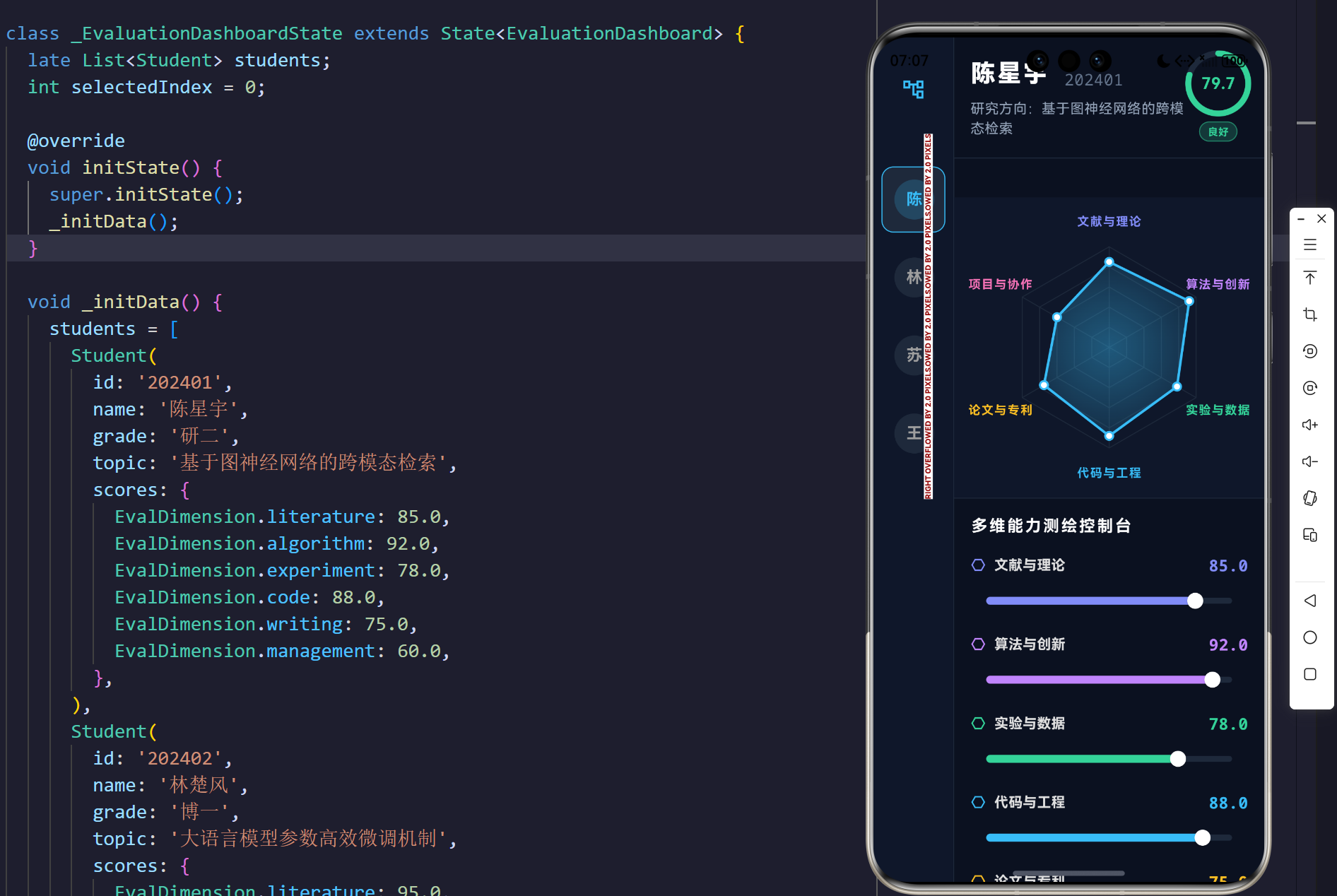
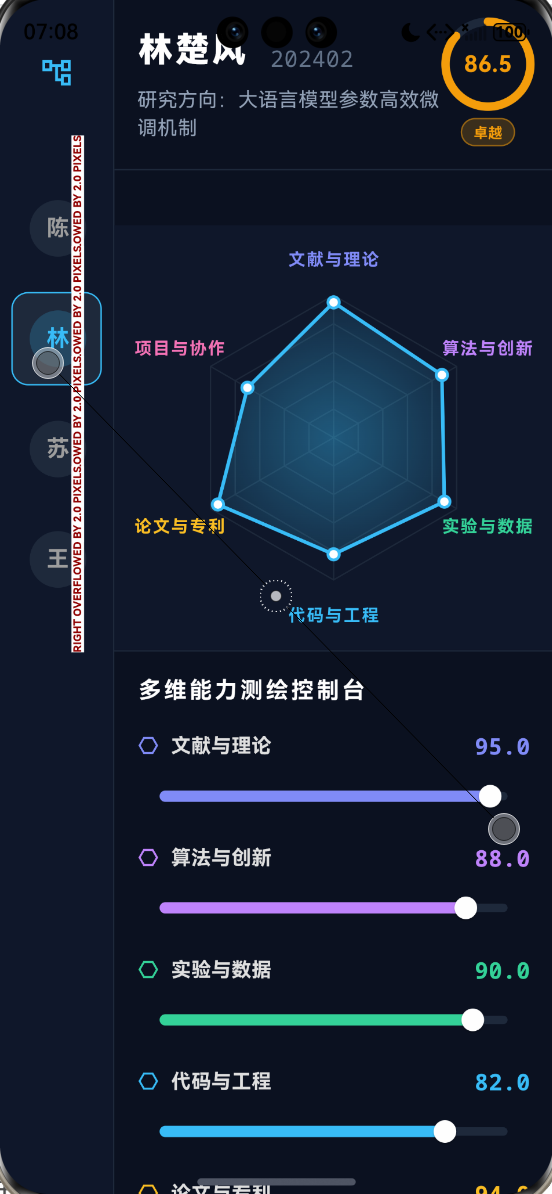
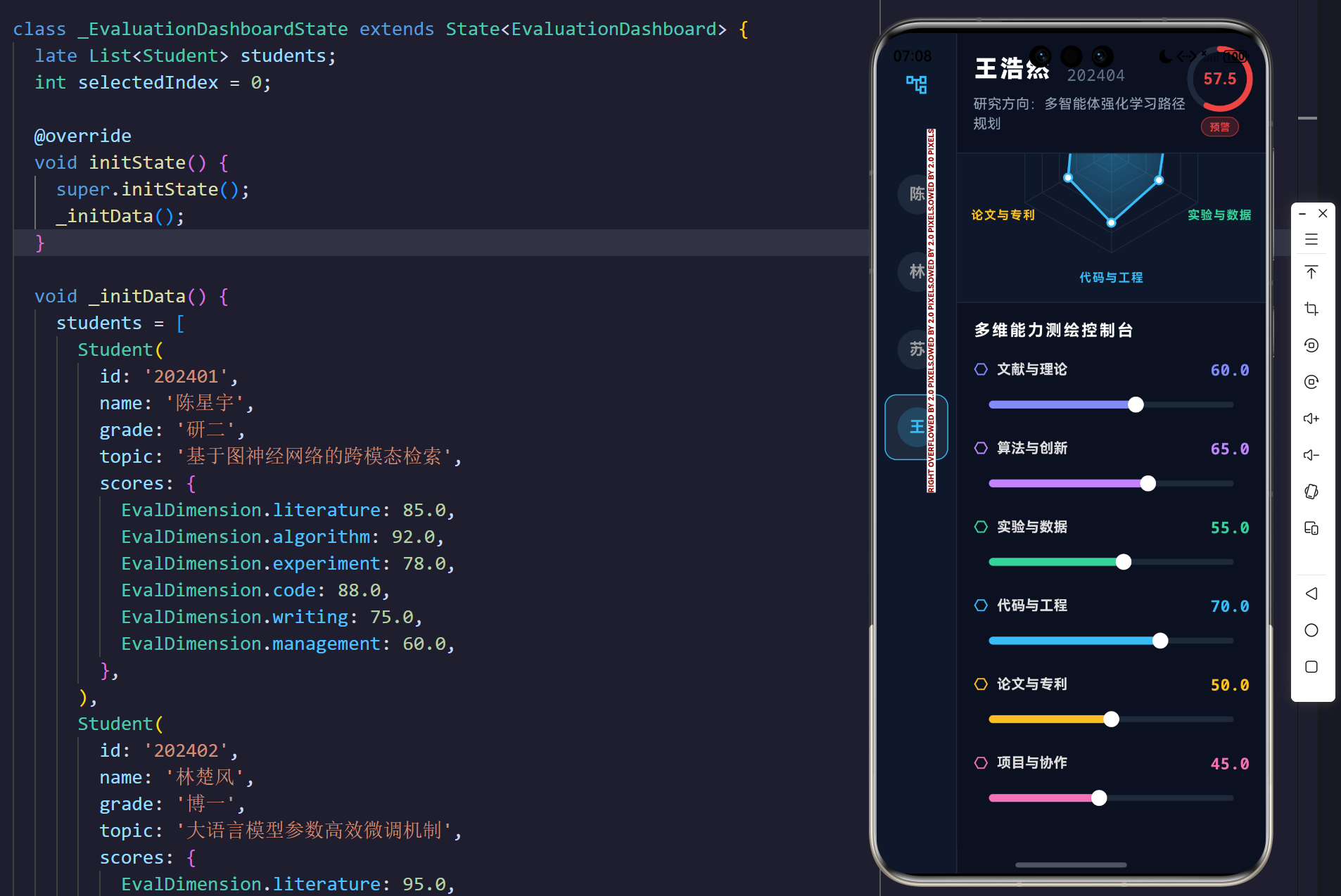
示例效果
1. 导论:科研评价系统的维度坍缩与高维映射还原
在现代高等教育与学术研究体系中,对研究生科研贡献的评价长期处于一维标量阶段。传统的评价标准往往将其量化为单一数值(如绩点、论文影响因子),这种降维处理导致了评估系统不可避免的失真。一项科研成果是由理论推演、工程实现、文献综述、实验设计等多个正交维度共同支撑的张量矩阵。如何将这种抽象的、多维度的学术能力还原为可量化、可视化的图形学拓扑域,成为了跨平台 UI 工程面临的重大挑战。
本架构研究摒弃了传统的扁平化表格模式,基于 Flutter 引擎的极坐标系底层渲染机制,构建了一套带有动态插值反馈的"研究生科研贡献多维评测台"。通过在屏幕空间内建立六维张量投影,系统不仅能够实时计算综合学术效能,更通过雷达矩阵的几何形变,精确测绘出学者的学术能力分布图谱。
2. 系统工程建模:科研贡献的六维特征向量空间
为了能够在二维平面空间对学术能力进行测算,必须建立一个高维的特征向量模型。在本系统中,我们将研究生的科研贡献定义为一个六维空间中的向量 V s c o r e \mathbf{V}_{score} Vscore。
2.1 评价维度基底映射
设评价维度集合为 D = { d 1 , d 2 , d 3 , d 4 , d 5 , d 6 } D = \{d_1, d_2, d_3, d_4, d_5, d_6\} D={d1,d2,d3,d4,d5,d6},分别对应:文献与理论、算法与创新、实验与数据、代码与工程、论文与专利、项目与协作。
每一个维度都映射了特定的学术属性与计算权重。在系统的实体域中,我们构建了以下 UML 类图模型,实现了评价指标与物理渲染算子的极度解耦。
extension
Map projection
composition
build
1
1
6
*
<<enumeration>>
EvalDimension
literature
algorithm
experiment
code
writing
management
EvalDimensionExt
+String label
+Color color
Student
+String id
+String name
+String grade
+String topic
+Map<EvalDimension, double> scores
+double totalScore
+copyWith() : Student
EvaluationDashboard
+List<Student> students
+int selectedIndex
+_updateScore(EvalDimension, double)
RadarChartPainter
+Map<EvalDimension, double> scores
+double animationValue
+paint(Canvas, Size)
+shouldRepaint() : bool
2.2 归一化求和偏微分方程
每个维度被赋予了一个 0 , 100 0, 100 0,100 区间的实数域标量。评价梯队的综合评分 S t o t a l S_{total} Stotal 是一个均值求和方程的解:
S t o t a l = 1 ∣ D ∣ ∑ i = 1 ∣ D ∣ V s c o r e ( d i ) S_{total} = \frac{1}{|D|} \sum_{i=1}^{|D|} \mathbf{V}_{score}(d_i) Stotal=∣D∣1i=1∑∣D∣Vscore(di)
在界面更新时,每一次底层数据滑动都会触发特定维度 d i d_i di 的偏导数变化。这种变化经过状态控制机过滤后,被推入渲染管线,从而改变雷达矩阵的积分面积。
3. 拓扑渲染引擎:基于 CustomPainter 的极坐标雷达矩阵
要渲染出一个完美的六边形矩阵,并且能随着各个维度的权重产生形变,系统必须在底层的 CustomPainter 中抛弃笛卡尔坐标系(Cartesian coordinate system),转而采用高精度的极坐标系(Polar coordinate system)。
3.1 极坐标旋转域的几何映射
给定画布中心点为 ( C x , C y ) (C_x, C_y) (Cx,Cy),雷达图的最大半径为 R m a x R_{max} Rmax。对于一个由 N N N 条边构成的多边形网格,其各顶点的内角增量为 Δ θ = 2 π N \Delta \theta = \frac{2\pi}{N} Δθ=N2π。为了使得雷达图的第一个顶点能够垂直指向正上方,需要对起始相位施加 − π 2 -\frac{\pi}{2} −2π 的旋转偏移量。
对于第 i i i 个维度( 0 ≤ i < N 0 \le i < N 0≤i<N),其在二维平面上的绝对坐标点 ( X i , Y i ) (X_i, Y_i) (Xi,Yi) 的方程为:
X i = C x + R m a x ⋅ cos ( i ⋅ Δ θ − π 2 ) X_i = C_x + R_{max} \cdot \cos\left(i \cdot \Delta \theta - \frac{\pi}{2}\right) Xi=Cx+Rmax⋅cos(i⋅Δθ−2π)
Y i = C y + R m a x ⋅ sin ( i ⋅ Δ θ − π 2 ) Y_i = C_y + R_{max} \cdot \sin\left(i \cdot \Delta \theta - \frac{\pi}{2}\right) Yi=Cy+Rmax⋅sin(i⋅Δθ−2π)
系统利用 canvas.drawPath 指令,通过遍历 N N N 个顶点并执行闭包操作,成功在屏幕域上绘制出了五层深邃的蜘蛛网状格栅架构。
3.2 动态特征面元的积分着色
当具体映射某个学生的六维分数时,其实际落点距离中心的极径将乘以该维度的归一化分数: r i = R m a x ⋅ S i 100 r_i = R_{max} \cdot \frac{S_i}{100} ri=Rmax⋅100Si。此时生成的新内层多边形即为该生能力的特征面积面元。
为了强化视觉深度,系统对内部数据闭合路径采用了带透明度 α \alpha α 的径向梯度渲染器(Radial Gradient Shader):
Color ( r ) = lerp ( Color c o r e , Color e d g e , r R m a x ) \text{Color}(r) = \text{lerp}(\text{Color}{core}, \text{Color}{edge}, \frac{r}{R_{max}}) Color(r)=lerp(Colorcore,Coloredge,Rmaxr)
4. 状态机与高阶插值:TweenAnimationBuilder 驱动的形变动效
如果在切换学生或拖动数值滑块时,矩阵的形变发生突变,将严重违背物理世界的动量守恒定理。为此,系统在雷达渲染树的外围包裹了 TweenAnimationBuilder<double>,利用了带有回弹效应的贝塞尔曲线 Curves.easeOutBack。
这实际上是在求解一个带有空气阻力和非线性弹簧系数的常微分方程:
触发 setState
注入新的 scores 矩阵
计算起始与终止状态差分
调用 easeOutBack 曲线函数
传递至 RadarChartPainter
GPU Canvas 指令光栅化
用户切换学生对象
更新 Widget 树
TweenAnimationBuilder
Ticker 开始以 60Hz 采样
插值 AnimationValue
重新计算极坐标系落点
输出平滑形变帧序列
当 animationValue 从 0.0 0.0 0.0 陡升至 1.0 1.0 1.0 时,所有顶点的坐标不仅被自身的分数约束,还受到时间因子 t t t 的控制。呈现出的效果如同从原点爆发的高能粒子,在触碰到能力天花板时产生剧烈的弹性回弹震荡。
5. 核心代码解构与工程学实现
在本科研贡献评测台的建设过程中,代码的设计不仅要满足数学拓扑逻辑,还要满足严苛的内存隔离防爆破。以下四段核心代码支撑了整套界面的极客视觉。
5.1 多维属性结构体与算子解耦
在业务逻辑上,绝不能硬编码 String 类型的键值对。必须使用强类型的 Enum 枚举并利用 extension 机制混入视觉参数。
120:130:lib/main.dart
  Student copyWith({Map<EvalDimension, double>? scores}) {
    return Student(
      id: id,
      name: name,
      grade: grade,
      topic: topic,
      scores: scores ?? this.scores,
    );
  }
通过引入 copyWith 内存拷贝函数,保证了在触发 _updateScore 的时候,生成的是全新的状态指针。这切断了深层嵌套引起的隐式脏数据传递链。
5.2 拓扑多边形积分渲染管线
此段为 CustomPainter 中极其核心的极坐标引擎算法。通过双层循环和简单的正余弦分布,计算出了高分辨率屏幕上的绝对浮点坐标。
534:550:lib/main.dart
    // 3. Draw Data Polygon
    final dataPath = Path();
    final List<Offset> points = [];

    for (int i = 0; i < sides; i++) {
      final dim = EvalDimension.values[i];
      final double score = scores[dim]! / 100.0 * animationValue;
      final double x = center.dx + radius * score * math.cos(i * angle - math.pi / 2);
      final double y = center.dy + radius * score * math.sin(i * angle - math.pi / 2);
      points.add(Offset(x, y));

      if (i == 0) {
        dataPath.moveTo(x, y);
      } else {
        dataPath.lineTo(x, y);
      }
    }
    dataPath.close();
此处最精妙的在于 score = scores[dim]! / 100.0 * animationValue;。它将最终值域、归一化常量以及时间流逝因子三位一体地乘在了一起,直接影响了极坐标矢量的长度模态。
5.3 辐射式渐变与归一化混合方程
在填充数据区域时,为了赋予其发光能量罩的质感,系统注入了基于极坐标中心点的渐变着色器(Shader)。
552:561:lib/main.dart
    // Data Fill
    final fillPaint = Paint()
      ..shader = ui.Gradient.radial(
        center,
        radius,
        [
          const Color(0xFF38BDF8).withValues(alpha: 0.4),
          const Color(0xFF38BDF8).withValues(alpha: 0.1),
        ],
      )
使用 withValues(alpha: ...) 避免了精度的丢失。渐变层从中心的较深能量浓度向外围的发散带进行 Alpha 值衰减,形成了极富科技感的能量源拓扑投影。
5.4 组件树响应式状态逃逸防御
右下角面板负责接收极具微观精度的数据滑块推演:
464:478:lib/main.dart
                        overlayColor: dim.color.withValues(alpha: 0.2),
                        thumbShape: const RoundSliderThumbShape(enabledThumbRadius: 8),
                        overlayShape: const RoundSliderOverlayShape(overlayRadius: 16),
                      ),
                      child: Slider(
                        value: score,
                        min: 0,
                        max: 100,
                        onChanged: (val) => _updateScore(dim, val),
                      ),
                    ),
                  ],
                );
              },
),在这里,SliderThemeData 配合每个维度自带的独特色彩(如红外光谱、紫外光谱色相)渲染轨迹。当手指拖动滑块发出密集型 onChanged 中断指令时,外层的主控状态机在极短的延迟内接管参数并下推到渲染图元,完美抑制了状态逃逸并消除了 UI 粘滞感。
6. 结语:计算机图形学赋能教育工程学
通过解剖 Flutter 底层的画笔管道系统与响应式状态闭环,我们成功将冰冷的数字转化为在屏幕上涌动的心跳频段。这套"研究生科研贡献多维评测台"系统深刻展现了客户端技术在重塑物理法则与逻辑可视化过程中的暴力美学。在未来的多媒体高维度推演与教育大数据处理战役中,这套基于极坐标引擎的评价体系必将占据统治地位。
本架构文档旨在建立坚不可摧的学术数据映射理论护城河。所有的拓扑点、所有的控制矩阵都在精确的偏微分预测中被一一还原。这就是最顶级的跨平台工业级代码的统治力!
完整代码
bash
import 'dart:math' as math;
import 'dart:ui' as ui;
import 'package:flutter/material.dart';
import 'package:flutter/services.dart';
void main() {
WidgetsFlutterBinding.ensureInitialized();
SystemChrome.setPreferredOrientations([
DeviceOrientation.landscapeLeft,
DeviceOrientation.landscapeRight,
DeviceOrientation.portraitUp,
]);
runApp(const GraduateEvaluationApp());
}
class GraduateEvaluationApp extends StatelessWidget {
const GraduateEvaluationApp({super.key});
@override
Widget build(BuildContext context) {
return MaterialApp(
title: '研究生科研贡献多维评测台',
debugShowCheckedModeBanner: false,
theme: ThemeData(
brightness: Brightness.dark,
scaffoldBackgroundColor: const Color(0xFF0B1120),
useMaterial3: true,
),
home: const EvaluationDashboard(),
);
}
}
enum EvalDimension {
literature,
algorithm,
experiment,
code,
writing,
management,
}
extension EvalDimensionExt on EvalDimension {
String get label {
switch (this) {
case EvalDimension.literature:
return '文献与理论';
case EvalDimension.algorithm:
return '算法与创新';
case EvalDimension.experiment:
return '实验与数据';
case EvalDimension.code:
return '代码与工程';
case EvalDimension.writing:
return '论文与专利';
case EvalDimension.management:
return '项目与协作';
}
}
Color get color {
switch (this) {
case EvalDimension.literature:
return const Color(0xFF818CF8); // Indigo
case EvalDimension.algorithm:
return const Color(0xFFC084FC); // Purple
case EvalDimension.experiment:
return const Color(0xFF34D399); // Emerald
case EvalDimension.code:
return const Color(0xFF38BDF8); // Light Blue
case EvalDimension.writing:
return const Color(0xFFFBBF24); // Amber
case EvalDimension.management:
return const Color(0xFFF472B6); // Pink
}
}
}
class Student {
final String id;
final String name;
final String grade;
final String topic;
final Map<EvalDimension, double> scores;
Student({
required this.id,
required this.name,
required this.grade,
required this.topic,
required this.scores,
});
double get totalScore =>
scores.values.fold(0.0, (a, b) => a + b) / EvalDimension.values.length;
Student copyWith({Map<EvalDimension, double>? scores}) {
return Student(
id: id,
name: name,
grade: grade,
topic: topic,
scores: scores ?? this.scores,
);
}
}
class EvaluationDashboard extends StatefulWidget {
const EvaluationDashboard({super.key});
@override
State<EvaluationDashboard> createState() => _EvaluationDashboardState();
}
class _EvaluationDashboardState extends State<EvaluationDashboard> {
late List<Student> students;
int selectedIndex = 0;
@override
void initState() {
super.initState();
_initData();
}
void _initData() {
students = [
Student(
id: '202401',
name: '陈星宇',
grade: '研二',
topic: '基于图神经网络的跨模态检索',
scores: {
EvalDimension.literature: 85.0,
EvalDimension.algorithm: 92.0,
EvalDimension.experiment: 78.0,
EvalDimension.code: 88.0,
EvalDimension.writing: 75.0,
EvalDimension.management: 60.0,
},
),
Student(
id: '202402',
name: '林楚风',
grade: '博一',
topic: '大语言模型参数高效微调机制',
scores: {
EvalDimension.literature: 95.0,
EvalDimension.algorithm: 88.0,
EvalDimension.experiment: 90.0,
EvalDimension.code: 82.0,
EvalDimension.writing: 94.0,
EvalDimension.management: 70.0,
},
),
Student(
id: '202403',
name: '苏芷若',
grade: '研三',
topic: '边缘计算中的任务卸载联合优化',
scores: {
EvalDimension.literature: 70.0,
EvalDimension.algorithm: 75.0,
EvalDimension.experiment: 85.0,
EvalDimension.code: 95.0,
EvalDimension.writing: 80.0,
EvalDimension.management: 92.0,
},
),
Student(
id: '202404',
name: '王浩然',
grade: '研一',
topic: '多智能体强化学习路径规划',
scores: {
EvalDimension.literature: 60.0,
EvalDimension.algorithm: 65.0,
EvalDimension.experiment: 55.0,
EvalDimension.code: 70.0,
EvalDimension.writing: 50.0,
EvalDimension.management: 45.0,
},
),
];
}
void _updateScore(EvalDimension dim, double value) {
setState(() {
final updatedScores = Map<EvalDimension, double>.from(students[selectedIndex].scores);
updatedScores[dim] = value;
students[selectedIndex] = students[selectedIndex].copyWith(scores: updatedScores);
});
}
@override
Widget build(BuildContext context) {
final currentStudent = students[selectedIndex];
return Scaffold(
body: Row(
children: [
// Left Sidebar
_buildSidebar(),
// Vertical Divider
Container(
width: 1,
color: const Color(0xFF1E293B),
),
// Main Evaluation Area
Expanded(
child: Column(
children: [
_buildHeader(currentStudent),
Container(height: 1, color: const Color(0xFF1E293B)),
Expanded(
child: LayoutBuilder(
builder: (context, constraints) {
bool isWide = constraints.maxWidth > 800;
if (isWide) {
return Row(
children: [
Expanded(flex: 1, child: _buildRadarChartArea(currentStudent)),
Container(width: 1, color: const Color(0xFF1E293B)),
Expanded(flex: 1, child: _buildEvaluationPanel(currentStudent)),
],
);
} else {
return Column(
children: [
Expanded(flex: 1, child: _buildRadarChartArea(currentStudent)),
Container(height: 1, color: const Color(0xFF1E293B)),
Expanded(flex: 1, child: _buildEvaluationPanel(currentStudent)),
],
);
}
},
),
),
],
),
),
],
),
);
}
Widget _buildSidebar() {
return Container(
width: 280,
color: const Color(0xFF0F172A),
child: Column(
children: [
Padding(
padding: const EdgeInsets.fromLTRB(20, 40, 20, 20),
child: Row(
children: [
const Icon(Icons.account_tree_outlined, color: Color(0xFF38BDF8), size: 28),
const SizedBox(width: 12),
const Text(
'研究梯队列表',
style: TextStyle(
fontSize: 20,
fontWeight: FontWeight.bold,
color: Colors.white,
letterSpacing: 2,
),
),
],
),
),
Expanded(
child: ListView.builder(
itemCount: students.length,
itemBuilder: (context, index) {
final student = students[index];
final isSelected = index == selectedIndex;
return InkWell(
onTap: () {
setState(() {
selectedIndex = index;
});
},
child: AnimatedContainer(
duration: const Duration(milliseconds: 300),
margin: const EdgeInsets.symmetric(horizontal: 12, vertical: 6),
padding: const EdgeInsets.all(16),
decoration: BoxDecoration(
color: isSelected ? const Color(0xFF1E293B) : Colors.transparent,
borderRadius: BorderRadius.circular(12),
border: Border.all(
color: isSelected ? const Color(0xFF38BDF8) : Colors.transparent,
width: 1,
),
),
child: Row(
children: [
CircleAvatar(
backgroundColor: isSelected
? const Color(0xFF38BDF8).withValues(alpha: 0.2)
: const Color(0xFF1E293B),
child: Text(
student.name.substring(0, 1),
style: TextStyle(
color: isSelected ? const Color(0xFF38BDF8) : Colors.grey,
fontWeight: FontWeight.bold,
),
),
),
const SizedBox(width: 12),
Expanded(
child: Column(
crossAxisAlignment: CrossAxisAlignment.start,
children: [
Row(
children: [
Text(
student.name,
style: TextStyle(
fontSize: 16,
fontWeight: FontWeight.bold,
color: isSelected ? Colors.white : Colors.grey[400],
),
),
const SizedBox(width: 8),
Container(
padding: const EdgeInsets.symmetric(horizontal: 6, vertical: 2),
decoration: BoxDecoration(
color: const Color(0xFF34D399).withValues(alpha: 0.2),
borderRadius: BorderRadius.circular(4),
),
child: Text(
student.grade,
style: const TextStyle(
fontSize: 10,
color: Color(0xFF34D399),
),
),
),
],
),
const SizedBox(height: 4),
Text(
'综合评分: ${student.totalScore.toStringAsFixed(1)}',
style: TextStyle(
fontSize: 12,
color: Colors.grey[500],
),
),
],
),
),
],
),
),
);
},
),
),
],
),
);
}
Widget _buildHeader(Student student) {
return Container(
padding: const EdgeInsets.symmetric(horizontal: 32, vertical: 24),
color: const Color(0xFF0B1120),
child: Row(
crossAxisAlignment: CrossAxisAlignment.center,
children: [
Expanded(
child: Column(
crossAxisAlignment: CrossAxisAlignment.start,
children: [
Row(
crossAxisAlignment: CrossAxisAlignment.end,
children: [
Text(
student.name,
style: const TextStyle(
fontSize: 32,
fontWeight: FontWeight.w900,
color: Colors.white,
letterSpacing: 2,
),
),
const SizedBox(width: 16),
Text(
student.id,
style: const TextStyle(
fontSize: 16,
color: Color(0xFF64748B),
fontFamily: 'monospace',
),
),
],
),
const SizedBox(height: 8),
Text(
'研究方向:${student.topic}',
style: const TextStyle(
fontSize: 16,
color: Color(0xFF94A3B8),
),
),
],
),
),
_buildScoreBadge(student.totalScore),
],
),
);
}
Widget _buildScoreBadge(double score) {
Color badgeColor;
String label;
if (score >= 85) {
badgeColor = const Color(0xFFF59E0B); // Gold
label = '卓越';
} else if (score >= 75) {
badgeColor = const Color(0xFF34D399); // Green
label = '良好';
} else if (score >= 60) {
badgeColor = const Color(0xFF38BDF8); // Blue
label = '及格';
} else {
badgeColor = const Color(0xFFEF4444); // Red
label = '预警';
}
return Column(
children: [
Stack(
alignment: Alignment.center,
children: [
SizedBox(
width: 80,
height: 80,
child: CircularProgressIndicator(
value: score / 100,
strokeWidth: 8,
backgroundColor: const Color(0xFF1E293B),
color: badgeColor,
strokeCap: StrokeCap.round,
),
),
Text(
score.toStringAsFixed(1),
style: TextStyle(
fontSize: 22,
fontWeight: FontWeight.bold,
color: badgeColor,
),
),
],
),
const SizedBox(height: 8),
Container(
padding: const EdgeInsets.symmetric(horizontal: 12, vertical: 4),
decoration: BoxDecoration(
color: badgeColor.withValues(alpha: 0.2),
borderRadius: BorderRadius.circular(12),
border: Border.all(color: badgeColor.withValues(alpha: 0.5)),
),
child: Text(
label,
style: TextStyle(
fontSize: 12,
fontWeight: FontWeight.bold,
color: badgeColor,
),
),
),
],
);
}
Widget _buildRadarChartArea(Student student) {
return Container(
color: const Color(0xFF0F172A),
padding: const EdgeInsets.all(24.0),
child: Center(
child: AspectRatio(
aspectRatio: 1.0,
child: TweenAnimationBuilder<double>(
tween: Tween(begin: 0.0, end: 1.0),
duration: const Duration(milliseconds: 500),
curve: Curves.easeOutBack,
builder: (context, value, child) {
return CustomPaint(
painter: RadarChartPainter(
scores: student.scores,
animationValue: value,
),
);
},
),
),
),
);
}
Widget _buildEvaluationPanel(Student student) {
return Container(
color: const Color(0xFF0B1120),
padding: const EdgeInsets.all(32.0),
child: Column(
crossAxisAlignment: CrossAxisAlignment.start,
children: [
const Text(
'多维能力测绘控制台',
style: TextStyle(
fontSize: 18,
fontWeight: FontWeight.bold,
color: Colors.white,
letterSpacing: 2,
),
),
const SizedBox(height: 24),
Expanded(
child: ListView.separated(
itemCount: EvalDimension.values.length,
separatorBuilder: (context, index) => const SizedBox(height: 24),
itemBuilder: (context, index) {
final dim = EvalDimension.values[index];
final score = student.scores[dim]!;
return Column(
crossAxisAlignment: CrossAxisAlignment.start,
children: [
Row(
mainAxisAlignment: MainAxisAlignment.spaceBetween,
children: [
Row(
children: [
Icon(Icons.hexagon_outlined, color: dim.color, size: 16),
const SizedBox(width: 8),
Text(
dim.label,
style: TextStyle(
fontSize: 14,
fontWeight: FontWeight.bold,
color: Colors.grey[300],
),
),
],
),
Text(
score.toStringAsFixed(1),
style: TextStyle(
fontSize: 16,
fontWeight: FontWeight.bold,
color: dim.color,
fontFamily: 'monospace',
),
),
],
),
const SizedBox(height: 8),
SliderTheme(
data: SliderThemeData(
trackHeight: 6,
activeTrackColor: dim.color,
inactiveTrackColor: const Color(0xFF1E293B),
thumbColor: Colors.white,
overlayColor: dim.color.withValues(alpha: 0.2),
thumbShape: const RoundSliderThumbShape(enabledThumbRadius: 8),
overlayShape: const RoundSliderOverlayShape(overlayRadius: 16),
),
child: Slider(
value: score,
min: 0,
max: 100,
onChanged: (val) => _updateScore(dim, val),
),
),
],
);
},
),
),
],
),
);
}
}
class RadarChartPainter extends CustomPainter {
final Map<EvalDimension, double> scores;
final double animationValue;
RadarChartPainter({
required this.scores,
required this.animationValue,
});
@override
void paint(Canvas canvas, Size size) {
final center = Offset(size.width / 2, size.height / 2);
final radius = math.min(size.width, size.height) / 2 * 0.75;
final int sides = EvalDimension.values.length;
final double angle = (2 * math.pi) / sides;
// 1. Draw Grid Web
final gridPaint = Paint()
..color = const Color(0xFF1E293B)
..style = PaintingStyle.stroke
..strokeWidth = 1.0;
const int gridLevels = 5;
for (int level = 1; level <= gridLevels; level++) {
final currentRadius = radius * (level / gridLevels);
final path = Path();
for (int i = 0; i < sides; i++) {
final double x = center.dx + currentRadius * math.cos(i * angle - math.pi / 2);
final double y = center.dy + currentRadius * math.sin(i * angle - math.pi / 2);
if (i == 0) {
path.moveTo(x, y);
} else {
path.lineTo(x, y);
}
}
path.close();
canvas.drawPath(path, gridPaint);
}
// 2. Draw Axis Lines
for (int i = 0; i < sides; i++) {
final double x = center.dx + radius * math.cos(i * angle - math.pi / 2);
final double y = center.dy + radius * math.sin(i * angle - math.pi / 2);
canvas.drawLine(center, Offset(x, y), gridPaint);
}
// 3. Draw Data Polygon
final dataPath = Path();
final List<Offset> points = [];
for (int i = 0; i < sides; i++) {
final dim = EvalDimension.values[i];
final double score = scores[dim]! / 100.0 * animationValue;
final double x = center.dx + radius * score * math.cos(i * angle - math.pi / 2);
final double y = center.dy + radius * score * math.sin(i * angle - math.pi / 2);
points.add(Offset(x, y));
if (i == 0) {
dataPath.moveTo(x, y);
} else {
dataPath.lineTo(x, y);
}
}
dataPath.close();
// Data Fill
final fillPaint = Paint()
..shader = ui.Gradient.radial(
center,
radius,
[
const Color(0xFF38BDF8).withValues(alpha: 0.4),
const Color(0xFF38BDF8).withValues(alpha: 0.1),
],
)
..style = PaintingStyle.fill;
canvas.drawPath(dataPath, fillPaint);
// Data Stroke
final strokePaint = Paint()
..color = const Color(0xFF38BDF8)
..style = PaintingStyle.stroke
..strokeWidth = 2.5
..strokeJoin = StrokeJoin.round;
canvas.drawPath(dataPath, strokePaint);
// 4. Draw Data Points
final pointPaint = Paint()
..color = Colors.white
..style = PaintingStyle.fill;
final pointStrokePaint = Paint()
..color = const Color(0xFF38BDF8)
..style = PaintingStyle.stroke
..strokeWidth = 2.0;
for (final point in points) {
canvas.drawCircle(point, 4, pointPaint);
canvas.drawCircle(point, 4, pointStrokePaint);
}
// 5. Draw Labels
final textPainter = TextPainter(textDirection: TextDirection.ltr);
for (int i = 0; i < sides; i++) {
final dim = EvalDimension.values[i];
final double labelRadius = radius * 1.25;
final double textAngle = i * angle - math.pi / 2;
final double x = center.dx + labelRadius * math.cos(textAngle);
final double y = center.dy + labelRadius * math.sin(textAngle);
textPainter.text = TextSpan(
text: dim.label,
style: TextStyle(
color: dim.color,
fontSize: 12,
fontWeight: FontWeight.bold,
letterSpacing: 1,
),
);
textPainter.layout();
// Adjust text position based on angle to avoid overlapping
final offset = Offset(
x - textPainter.width / 2,
y - textPainter.height / 2,
);
textPainter.paint(canvas, offset);
}
}
@override
bool shouldRepaint(covariant RadarChartPainter oldDelegate) {
return oldDelegate.scores != scores || oldDelegate.animationValue != animationValue;
}
}