1、Tool 的说明
没有工具的加持,再强大的AI都只是"思想上的巨人",借助工具才能让AI应用的能力真正达到无限的可能。Tools用于扩展大语言模型的能力,使其能够与外部系统、API或自定义函数进行交互,从而完成仅靠文本生成无法实现的任务。
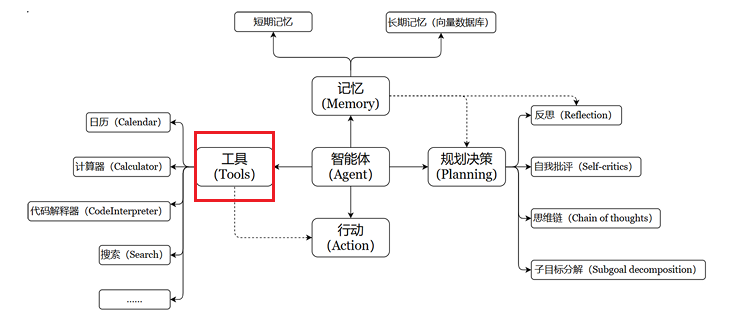
LangChain拥有大量的第三方工具,工具集列表:
https://python.langchain.com/v0.2/docs/integrations/tools/
2、Tool 的要素
工具通常包含如下几个核心元素:
- name:工具的名称;
- description:工具的功能描述;
- 工具输入的JSON模式;
- 要调用的函数;
- 与Agent相关:return_direct 是否将工具的结果直接给用户。
使用步骤:
- 步骤一:将name、description与JSON模式作为上下文提供给LLM;
- 步骤二:LLM根据提示词推断出要调用的工具,提出具体的参数调用信息;
- 步骤三:用户需要根据返回的工具调用信息,自行触发工具的回调。
Tool的常用属性:
| 属性 | 类型 | 描述 |
|---|---|---|
| name | str | 必须要,在提供给LLM或Agent的工具集中必须是唯一的 |
| description | str | 描述工具的功能。LLM或Agent将使用此描述作为上下文,使用它确定工具的使用 |
| args_schema | Pydantic BaseModel | 可用于提供更多信息(例如,few-shot示例) 或验证预期参数 |
| return_direct | bool | 仅对Agent相关。当为True时,在调用给定工具后,Agent将停止并将结果直接返回给用户 |
3、自定义工具
3.1 使用@tool装饰器定义工具
说明:装饰器默认使用函数的名称作为工具名称 ,也可以通过参数 name_or_callable 来覆盖此设置;装饰器将使用函数的文档字符串作为工具的描述,因此必须给函数提供文档字符串。
示例1:创建一个计算两数之和的工具
python
from langchain_core.tools import tool
@tool
def add_num(a:int,b:int) -> int:
    """计算两数之和"""  #必须要有
    return a+b

print(f"name={add_num.name}") # 默认是函数名称
print(f"args={add_num.args}")
print(f"description={add_num.description}") # 默认是函数的说明信息
print(f"return_direct={add_num.return_direct}") # 默认值是false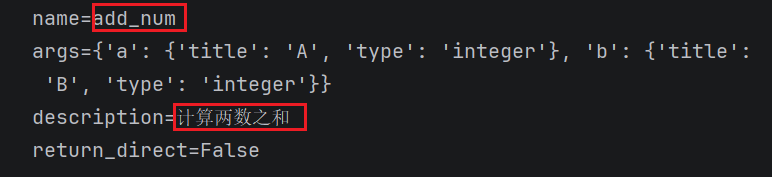
示例2:手动设置一些默认的参数
python
from langchain_core.tools import tool
@tool(name_or_callable = "add_two_number",description="add two number",return_direct = True)
def add_num(a:int,b:int) -> int:
    """计算两数之和"""  #必须要有
    return a+b

print(f"name={add_num.name}")
print(f"args={add_num.args}")
print(f"description={add_num.description}") # 默认是函数的说明信息
print(f"return_direct={add_num.return_direct}") # 默认值是false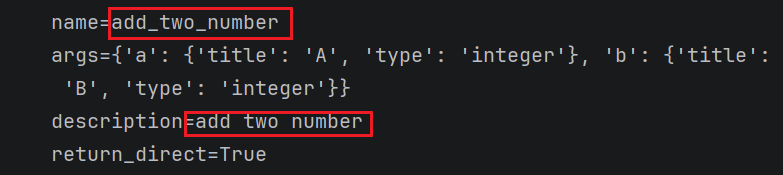
工具的调用:
python
# 调用工具
add_num.invoke({"a":10,"b":10}) #20
示例3:修改args参数
python
from pydantic import Field,BaseModel
from langchain_core.tools import tool

class FieldInfo(BaseModel):
    a:int = Field(description="第1个整形参数")
    b:int = Field(description="第2个整形参数")

@tool(name_or_callable = "add_two_number",description="add two number",return_direct = True,args_schema=FieldInfo)
def add_num(a:int,b:int) -> int:
    """计算两数之和"""  #必须要有
    return a+b

print(f"name={add_num.name}")
print(f"args={add_num.args}")
print(f"description={add_num.description}") # 默认是函数的说明信息
print(f"return_direct={add_num.return_direct}") # 默认值是false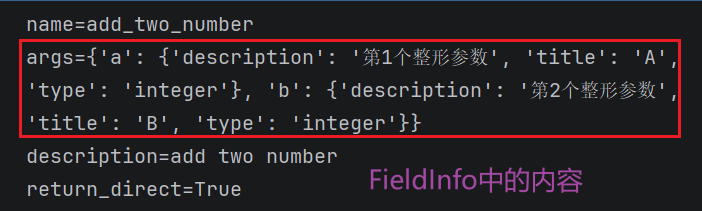
3.2 使用StructuredTool.from_function类方法
相比于第一种方式,这允许更多的配置和同步/异步实现的规范。
示例1:
python
from langchain_core.tools import StructuredTool

# 声明一个函数
def search_google(query:str):
    return "最后查询的结果"

# 定义一个工具
search01 = StructuredTool.from_function(
    func = search_google,
    name="Search",
    description = "查询谷歌搜索引擎,并将结果返回"
)
print(f"name={search01.name}")
print(f"args={search01.args}")
print(f"description={search01.description}")
print(f"return_direct={search01.return_direct}")
示例2:修改args参数
python
from langchain_core.tools import StructuredTool

# 声明一个函数
def search_google(query:str):
    return "最后查询的结果"

class FieldInfo(BaseModel):
    query:str = Field(description="检索的关键词")

# 定义一个工具
search02 = StructuredTool.from_function(
    func = search_google,
    name="Search",
    description = "查询谷歌搜索引擎,并将结果返回",
    return_direct = True,
    args_schema = FieldInfo
)
print(f"name={search02.name}")
print(f"args={search02.args}")
print(f"description={search02.description}")
print(f"return_direct={search02.return_direct}")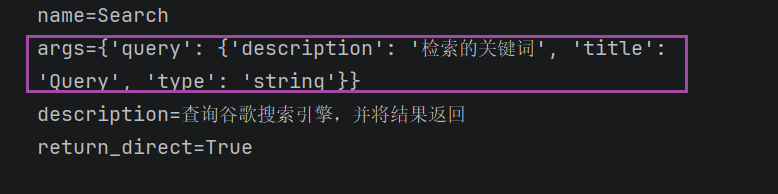
4、工具调用实例
4.1 大模型分析工具的调用
python
# 1、获取大模型
#1.导入相关依赖
from langchain_community.tools import MoveFileTool
from langchain_core.messages import HumanMessage
from langchain_core.utils.function_calling import convert_to_openai_function
import os
import dotenv
dotenv.load_dotenv()
from langchain_openai import ChatOpenAI
os.environ['OPENAI_API_KEY'] = os.getenv("OPENAI_API_KEY")
os.environ['OPENAI_BASE_URL'] = os.getenv("OPENAI_BASE_URL")
# 定义LLM模型
chat_model =ChatOpenAI(model="gpt-4o-mini",temperature=0)

# 2、获取工具的列表
tools = [MoveFileTool()]
# 3、这里需要将工具转换为openai函数,后续再将函数传入模型调用
functions = [convert_to_openai_function(t) for t in tools]
# 4、获取消息列表
messages = [HumanMessage(content = "将当前目录下的a.txt文件移动到C:\\桌面")]
# 5、调用大模型(传入消息列表、工具列表)
response = chat_model.invoke(input=messages,functions=functions) # invoke调用要传入函数的列表
print(response)
最终的结果就是分析出了需要调用的工具:move_file

如果继续查询天气情况呢?
python
functions = [convert_to_openai_function(t) for t in tools]
# 4、获取消息列表
messages = [HumanMessage(content = "明天天气怎么样")]
# 5、调用大模型(传入消息列表、工具列表)
response = chat_model.invoke(input=messages,functions=functions) # invoke调用要传入函数的列表
print(response)

# 输出:content='抱歉,我无法提供实时天气信息。建议您查看天气预报网站或使用天气应用程序获取最新的天气情况。
# additional_kwargs={'refusal': None} 总结:根据上述代码可以发现AIMessage的核心属性
(1)如果分析出需要调用对应的工具时:
- content:信息为空,因为大模型要调用工具,因此不会直接返回信息给用户;
- additional_kwargs:包含function_call字段,指明了具体的函数调用参数和函数名;
(2)如果分析出不需要调用对应的工具:
- content:信息不为空;
- additional_kwargs:不包含调用字段;
4.2 如何调用具体大模型分析出来的工具
接着4.1的后续:
步骤一:分析出需要调用哪个工具或函数
python
import json
if "function_call" in response.additional_kwargs:
    tool_name = response.additional_kwargs["function_call"]["name"]
    tool_args = json.loads(response.additional_kwargs["function_call"]["arguments"])
    print(f"调用工具:{tool_name} \n 参数:{tool_args}")

else:
    print(f"模型回复:{response.content}")

# 输出:调用工具:move_file
# 参数:{'source_path': 'a.txt', 'destination_path': 'C:\\桌面\\a.txt'}
步骤二:调用对应的工具
python
if "move_file" in response.additional_kwargs["function_call"]["name"]:
    tool = MoveFileTool()
    result = tool.run(tool_args) #调用工具
    print(result)

# 输出:File moved successfully from a.txt to C:\桌面\a.txt.