欢迎回来! 今天我们来搞定 C# 中最常用的几个"工具箱": 集合(List、Dictionary)、字符串、随机数、还有 Unity 专属的 Mathf。 学会这些,写代码效率直接翻倍!
一、集合是什么?为什么要用集合?
1.1 生活类比:排队的奶茶店
想象你去奶茶店点单:
-
数组 :店员只准备了 5 个固定号码牌,来第 6 个人就没法排队了
-
List :店员准备了一个 动态叫号本,来多少人就能排多少人,随时可以加塞
数组:提前固定大小,不够用会报错 ❌
List:自动扩容,用多少扩多少 ✅
1.2 集合家族一览
| 集合类型 | 结构 | 查找方式 | 效率 | 重复键 |
|---|---|---|---|---|
| List | 有序列表 | 按索引 list[0] |
O(n) 逐个找 | 允许 |
| Dictionary | 键值对 | 按键 dict["name"] |
O(1) 直接映射 | 不允许 |
| 数组 | 固定长度 | 按索引 arr[0] |
O(1) 最快 | 允许 |
二、List:动态数组
2.1 声明与基础操作
cs
// 声明一个整数列表
List<int> scores = new List<int>();

// 添加元素
scores.Add(100);
scores.Add(85);
scores.Add(92);

// 按索引访问(从 0 开始)
Debug.Log(scores[0]);  // 输出 100
Debug.Log(scores[1]);  // 输出 85

// 获取元素数量
Debug.Log(scores.Count);  // 输出 3
2.2 常用 API 一览表
| 方法 | 说明 | 示例 |
|---|---|---|
Add(item) |
末尾添加 | list.Add(100); |
Insert(i, item) |
指定索引插入 | list.Insert(1, 15); |
Remove(item) |
删除指定值 | list.Remove(20); |
RemoveAt(i) |
删除指定索引 | list.RemoveAt(0); |
Contains(item) |
是否包含 | list.Contains(30); → true |
IndexOf(item) |
查找索引 | list.IndexOf(30); → 2 |
Sort() |
升序排序 | list.Sort(); |
Reverse() |
反转顺序 | list.Reverse(); |
Clear() |
清空 | list.Clear(); |
Count |
数量 | list.Count; |
2.3 两种遍历方式对比
cs
List<int> list = new List<int> { 10, 20, 30 };

// 方式一:普通 for 循环
for (int i = 0; i < list.Count; i++)
{
    Debug.Log($"第 {i} 个元素 = {list[i]}");
}

// 方式二:foreach 循环(更简洁)
foreach (int item in list)
{
    Debug.Log(item);
}
什么时候用哪个?
for:需要知道索引,或需要边遍历边修改foreach:纯读取遍历,更安全、更简洁
2.4 Unity 思路拓展:敌人管理器
cs
public class EnemyManager : MonoBehaviour
{
    // 场景中的敌人列表
    private List<GameObject> enemies = new List<GameObject>();

    void Start()
    {
        // 找出所有标签为 Enemy 的物体,加入列表
        GameObject[] foundEnemies = GameObject.FindGameObjectsWithTag("Enemy");
        foreach (GameObject enemy in foundEnemies)
        {
            enemies.Add(enemy);
        }
    }

    void Update()
    {
        // 遍历所有敌人

    }

    // 当敌人被消灭时,从列表移除
    public void RemoveEnemy(GameObject enemy)
    {
    }
}
三、Dictionary:键值对字典
3.1 生活类比:查字典
- List 找东西 → 从第一页翻到最后一页,一个个对比
- Dictionary → 按拼音/偏旁直接翻到那一页
3.2 声明与基础操作
cs
// 声明:Dictionary<键类型, 值类型>
Dictionary<string, int> inventory = new Dictionary<string, int>();

// 添加键值对
inventory["sword"] = 1;    // 剑 × 1
inventory["potion"] = 10; // 药水 × 10
inventory["gold"] = 500;   // 金币 × 500

// 读取
Debug.Log(inventory["sword"]);  // 输出 1

// 修改
inventory["potion"] = 20;

// 是否存在该键
if (inventory.ContainsKey("sword"))
{
    Debug.Log("你有一把剑!");
}
3.3 常用 API 一览表
| 方法 | 说明 | 示例 |
|---|---|---|
Add(key, value) |
添加(键不能重复) | dict.Add("a", 1); |
dict[key] = value |
添加或修改 | dict["b"] = 2; |
dict[key] |
读取值 | dict["a"]; |
Remove(key) |
删除键值对 | dict.Remove("a"); |
ContainsKey(key) |
键是否存在 | dict.ContainsKey("b"); |
ContainsValue(v) |
值是否存在 | dict.ContainsValue(2); |
Keys |
所有键 | dict.Keys |
Values |
所有值 | dict.Values |
3.4 遍历键值对
cs
Dictionary<string, int> dict = new Dictionary<string, int>
{
    { "hp", 100 },
    { "mp", 50 },
    { "atk", 25 }
};

// 遍历键值对
foreach (KeyValuePair<string, int> kv in dict)
{
    Debug.Log($"{kv.Key} = {kv.Value}");
}

// 单独遍历键
foreach (string key in dict.Keys)
{
    Debug.Log($"键: {key}");
}

// 单独遍历值
foreach (int val in dict.Values)
{
    Debug.Log($"值: {val}");
}
3.5 List vs Dictionary 核心对比
| 对比项 | List | Dictionary |
|---|---|---|
| 查找方式 | 索引 list[0] |
键 dict["hp"] |
| 查找效率 | O(n) 逐个遍历 | O(1) 直接映射 |
| 顺序 | 保持添加顺序 | 无序(但按添加顺序迭代) |
| 重复键 | 允许 | 不允许 |
| 典型用途 | 敌人列表、背包格子 | 道具数量、角色属性 |
3.6 Unity 思路拓展:道具背包系统
cs
public class InventorySystem : MonoBehaviour
{
    // 道具ID → 持有数量
    private Dictionary<string, int> inventory = new Dictionary<string, int>();

    void Start()
    {
        inventory["coin"] = 0;
        inventory["key"] = 0;
        inventory["potion"] = 0;
    }

    // 获取道具数量
    public int GetCount(string itemId)
    {
        if (inventory.ContainsKey(itemId))
            return inventory[itemId];
        return 0;
    }

    // 添加道具
    public void AddItem(string itemId, int count = 1)
    {
        if (inventory.ContainsKey(itemId))
            inventory[itemId] += count;
        else
            inventory[itemId] = count;

        Debug.Log($"获得 {itemId} × {count}");
    }

    // 使用道具
    public bool UseItem(string itemId)
    {
        if (!inventory.ContainsKey(itemId) || inventory[itemId] <= 0)
            return false;

        inventory[itemId]--;
        Debug.Log($"使用了 {itemId},剩余 {inventory[itemId]}");
        return true;
    }
}
四、字符串:文字处理
4.1 基础操作一览
| 方法 | 说明 | 示例 |
|---|---|---|
+ |
拼接 | "Hi" + ", " + "Unity" → "Hi, Unity" |
$"{a} {b}" |
插值拼接(推荐) | $"HP: {hp}/{maxHp}" |
.Length |
长度 | "Unity".Length → 5 |
.Split(c) |
按字符分割 | "a/b/c".Split('/') → "a","b","c" |
.Substring(i) |
截取子串 | "Unity".Substring(2) → "ity" |
.Contains(s) |
是否包含 | "Unity".Contains("it") → true |
.Replace(a, b) |
替换 | "Unity".Replace("U","X") → "Xnity" |
.ToUpper() |
转大写 | "abc".ToUpper() → "ABC" |
.Trim() |
去除首尾空格 | " hi ".Trim() → "hi" |
string.IsNullOrEmpty(s) |
是否为空 | --- |
string.IsNullOrWhiteSpace(s) |
是否为空或纯空格 | --- |
4.2 格式化输出
cs
int hp = 85;
int maxHp = 100;
float percent = 0.85f;

// 插值 + ToString 格式化
$"HP: {hp}/{maxHp}"              // "HP: 85/100"
percent.ToString("P0")           // "85%"    (P = Percent)
(3.14159).ToString("F2")        // "3.14"   (F = Fixed)
(0.5).ToString("P0")            // "50%"
(255).ToString("X")             // "FF"     (X = Hex十六进制)
五、随机数
5.1 Unity 随机数
cs
// 整数:返回 [min, max](两端都包含)
int dice = Random.Range(1, 7);  // 掷骰子,1~6

// 浮点数:返回 [min, max)(包含min,不包含max)
float f = Random.Range(0f, 10f); // 0.0 ~ 9.999...

// 随机取数组元素
string[] enemies = { "哥布林", "狼人", "龙" };
string random = enemies[Random.Range(0, enemies.Length)];
5.2 随机数 API 对比
| 场景 | Unity | C# 原生 |
|---|---|---|
| 整数 | Random.Range(1, 7) |
rand.Next(1, 7) |
| 浮点 | Random.Range(0f, 1f) |
rand.NextDouble() |
| 取数组元素 | arr[Random.Range(0, arr.Length)] |
arr[rand.Next(arr.Length)] |
六、Mathf:Unity 数学工具箱
6.1 常用常量
cs
Mathf.PI          // π = 3.14159...
Mathf.Deg2Rad     // 角度 → 弧度 = π/180
Mathf.Rad2Deg     // 弧度 → 角度 = 180/π
Mathf.Epsilon     // 极小正数 ≈ 0
Mathf.Infinity    // 正无穷
6.2 角度与弧度互转
cs
float degrees = 90f;
float radians = degrees * Mathf.Deg2Rad;   // 90° → 1.571rad

float back = radians * Mathf.Rad2Deg;      // 1.571rad → 90°
6.3 插值(Lerp 系列)--- 最重要!
插值 = 在两个值之间平滑过渡,做动画、移动跟随的必备技能!
cs
float current = 0f;
float target = 10f;

// Lerp:每帧向目标靠近 t 的距离(永远达不到,但越来越近)
current = Mathf.Lerp(current, target, 0.1f);
// current = 0 + (10-0) × 0.1 = 1(第一帧)
// current = 1 + (10-1) × 0.1 = 1.9(第二帧)
// current = 1.9 + (10-1.9) × 0.1 ≈ 2.71(第三帧)
// ......越来越慢,慢慢停下来

// LerpUnclamped:t 可以超过 1,可以冲出范围
current = Mathf.LerpUnclamped(0f, 10f, 2f);  // = 20,超出了!

// MoveTowards:朝目标移动,最多走 maxDelta,超不出
current = Mathf.MoveTowards(current, target, 2f); // 每帧最多走2,不会冲过头

// SmoothDamp:带惯性的平滑(摄像机跟随常用)
Vector3 velocity;
Vector3 smoothPos = Vector3.SmoothDamp(currentPos, targetPos, ref velocity, 0.3f);
6.4 取整函数对比
| 方法 | 说明 | 示例 |
|---|---|---|
Round |
四舍五入 | Mathf.Round(3.5f) → 4 |
Ceil |
向上取整 | Mathf.Ceil(3.1f) → 4 |
Floor |
向下取整 | Mathf.Floor(3.9f) → 3 |
FloorToInt |
向下取整返回 int | Mathf.FloorToInt(3.9f) → 3 |
6.5 Clamp 范围限制
cs
// Clamp:限制值在 [min, max]
int hp = Mathf.Clamp(playerHP, 0, 100);
// hp < 0 → 0;hp > 100 → 100

// Clamp01:限制在 [0, 1]
float t = Mathf.Clamp01(percent);
// 等价于 Mathf.Clamp(percent, 0f, 1f)
6.6 其他常用运算
| 方法 | 说明 | 示例 |
|---|---|---|
Abs(x) |
绝对值 | Mathf.Abs(-5) → 5 |
Sign(x) |
符号(±1) | Mathf.Sign(-5) → -1 |
Min(a, b) |
最小值 | Mathf.Min(3, 7) → 3 |
Max(a, b) |
最大值 | Mathf.Max(3, 7) → 7 |
Pow(a, b) |
a 的 b 次方 | Mathf.Pow(2, 8) → 256 |
Sqrt(x) |
平方根 | Mathf.Sqrt(16) → 4 |
PingPong(t, len) |
往返运动 | 见下方 |
Approximately(a, b) |
浮点近似比较 | Approximately(0.1+0.2, 0.3) → true |
6.7 PingPong:往返运动
cs
// t 在 0~10 之间往返移动:0→10→0→10→...
float t = Mathf.PingPong(Time.time, 10f);

// 应用:物体在原地左右往返
transform.position = new Vector3(Mathf.PingPong(Time.time, 5f), 0, 0);
到这里我们就基本学完了集合和常用类啦!那么接下来就来完成我们本章的任务吧!
七、随机物体生成脚本
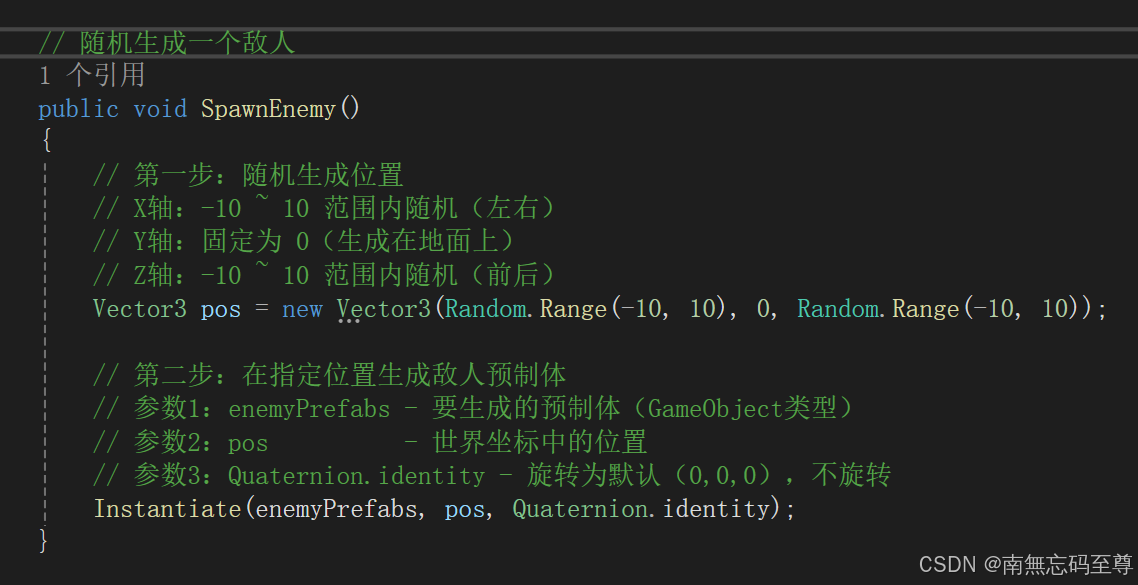
首先我们要有一个清晰的思路,我们要用到什么:
- 我们要设置生成的物体对象。
- 我们要使用随机值来获取一个随机的三维坐标,为了不随机过远我们要限制XYZ轴。
那么接下来我们就来编写代码吧!首先设置好我们的生成物体的预制体或模型,然后设置一个变量用于记录生成了多少个对象,这里也可用集合把生成的对象都装进去。
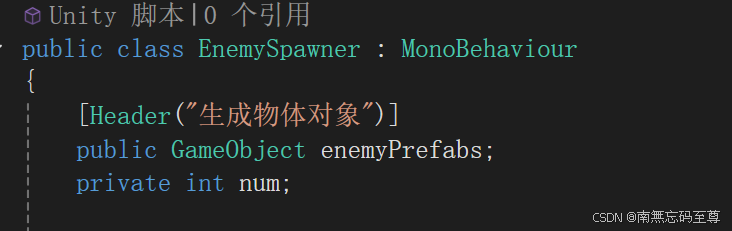
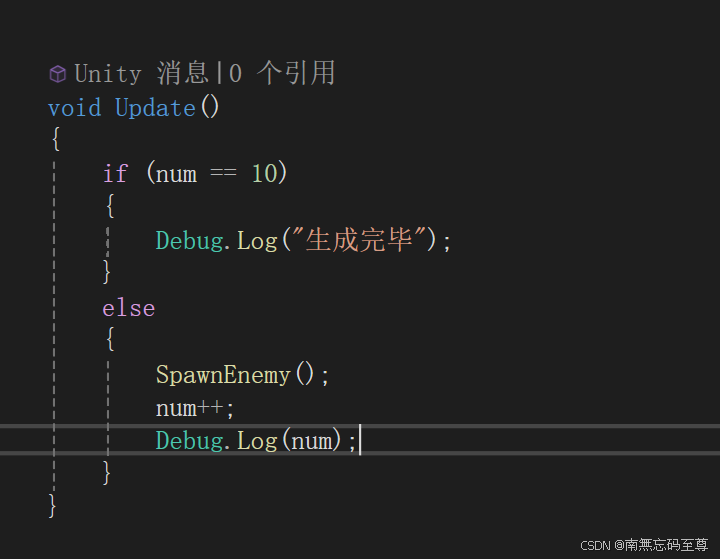
然后我们在Update方法中进行每帧检测他是否生成满了10个对象,满了就不再生成,没满就继续生成并进行一个自增计数。
最后我们编写一个自定义方法来实现我们的随机生成方便在Update方法中进行调用
最后在场景中创建一个空对象,将脚本挂载上去,接下来看效果呈现:
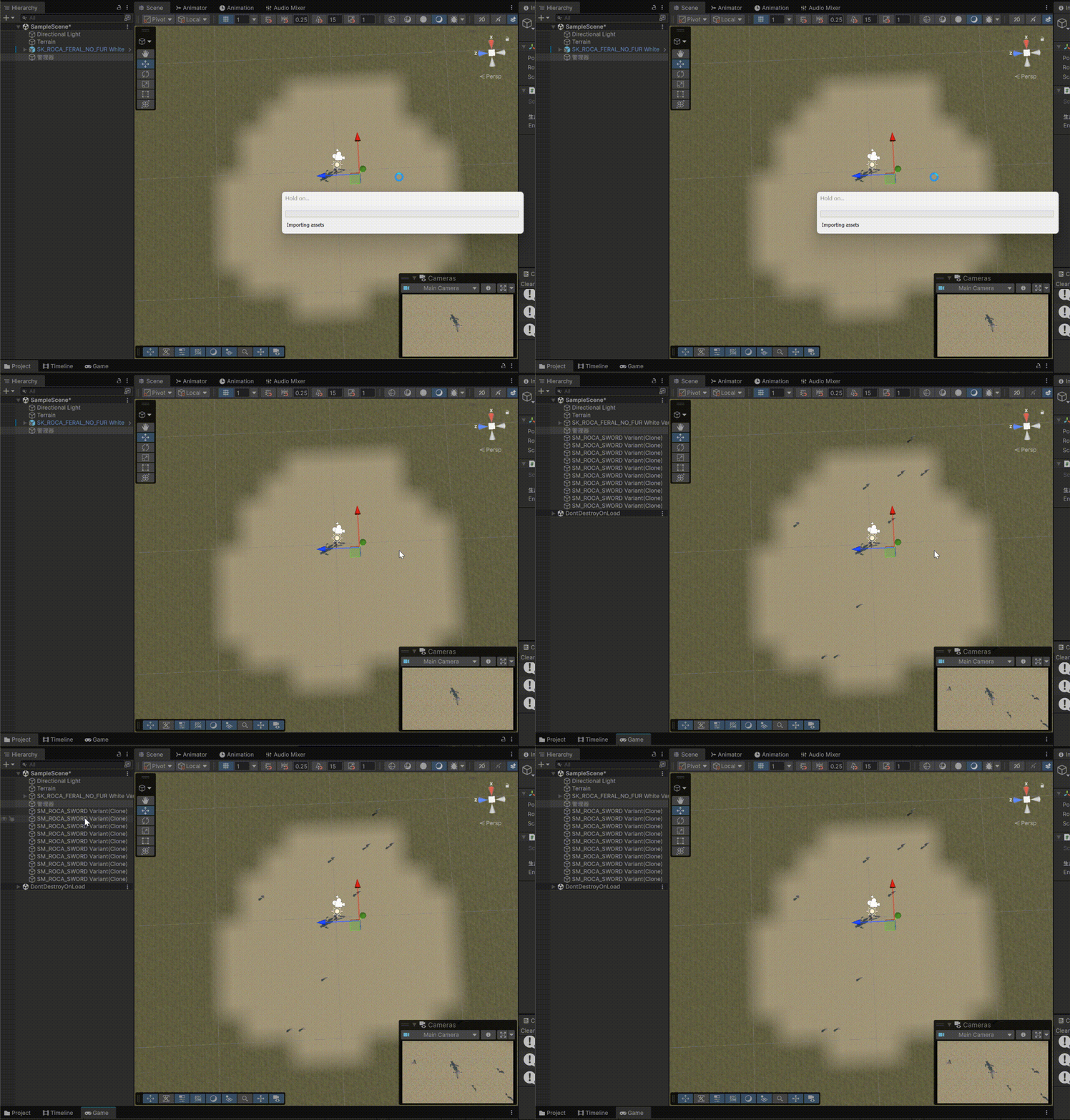
可以看到成功生成并截至在10个那么看些各位的观看!
今天的内容就到这里! 接下来我将连续更新90天的Untiy教程从基础到一个网络部分,有兴趣的朋友们可以收藏关注,谢谢!如果有疑问,评论区见。