【LangGraph】本文主要内容: LangGraph真正上手,以及做一些简单的案例
- 前言
-
- 一、先看一个场景
- [二、条件分支 ≈ 智能分流](#二、条件分支 ≈ 智能分流)
- [三、LangGraph 里怎么写条件分支?](#三、LangGraph 里怎么写条件分支?)
- 四、案例:智能客服路由系统
-
- [4.1 定义状态(State)](#4.1 定义状态(State))
- [4.2 路由决策节点(核心)](#4.2 路由决策节点(核心))
- [4.3 处理节点](#4.3 处理节点)
- 五、条件分支的优缺点
- 六、总结
上一章内容在这-> 【工作流的常见模式】LangGraph 常用模式:并行化
前言
LangGraph 常用模式:条件分支(Conditional Routing)
前两篇聊了「提示链」(一步一步走)和「并行化」(多任务一起上)
今天讲一个更"聪明"的模式:
条件分支(路由模式) 它让 AI 不再是闷头按流程走,而是会根据当前情况,自己决定下一步去哪
一、先看一个场景
假设你要写一个智能客服系统
用户可能问三类问题:
 "这个多少钱?" → 售前

 "我要退货" → 售后

-"软件报错 404" → 技术支持
如果不用条件分支,你会怎么写?
可能是一个巨大的 prompt,告诉模型:
"如果是价格问题,你就怎么回答;如果是退货,你就怎么回答......"
结果 prompt 越来越长,模型越来越容易混乱
我们有更合理的设计是:
先让模型判断用户问题属于哪一类,然后交给对应的专业节点去处理
这就是条件分支模式(路由模式)
二、条件分支 ≈ 智能分流
一句话总结:
根据不同的输入,动态选择不同的处理路径
我们可以举个例子:
医院的导诊台:
护士问哪不舒服,然后分去内科、外科、儿科
公司的客服转接:
按 1 是售前
按 2 是售后
在 LangGraph 里,实现这个靠的是 条件边(Conditional Edges)
三、LangGraph 里怎么写条件分支?
核心代码只有几行:
python
builder.add_conditional_edges(
    "router_node",           # 从哪个节点出发
    route_decision,          # 决策函数(返回下一个节点的名字)
    {
        "pre_sale": "pre_sale_handler",
        "after_sale": "after_sale_handler",
        "technical": "technical_handler"
    }
)
route_decision 函数接收当前状态,根据状态里的某个字段(比如 decision)返回一个字符串,这个字符串必须匹配上面字典的 key
LangGraph 就会把流程转到对应的节点
重点:和普通 add_edge 不同,条件边是运行时动态决定的
四、案例:智能客服路由系统
下面是一个完整可跑的示例
4.1 定义状态(State)
我们需要三个字段:
input:用户输入
decision:模型分类结果(售前/售后/技术)
output:最终回复
代码实现:
css
from typing import TypedDict, Literal
from pydantic import BaseModel

class State(TypedDict):
    input: str
    decision: str   # "pre_sale", "after_sale", "technical"
    output: str
4.2 路由决策节点(核心)
这个节点我们调用 LLM,让模型输出结构化分类结果
代码实现:
python
from langchain_core.messages import HumanMessage
from langchain_core.output_parsers import PydanticOutputParser

# 定义模型输出的结构
class RouteDecision(BaseModel):
    step: Literal["pre_sale", "after_sale", "technical"]

parser = PydanticOutputParser(pydantic_object=RouteDecision)

def router_node(state: State):
    print(" 正在分析用户问题类型...")
    prompt = f"""
		    判断以下用户问题属于哪个类别:
		    - pre_sale:咨询产品功能、价格、购买方式
		    - after_sale:退货、物流、投诉
		    - technical:报错、配置、bug

		    用户问题:{state['input']}

		    只输出一个类别,不要解释。
    		"""
    # 请求模型,并强制结构化输出
    response = model.invoke([HumanMessage(content=prompt)])
    # 这里假设模型直接返回 "pre_sale" 等字符串,或者用 parser 解析
    decision = response.content.strip().lower()
    if "pre_sale" in decision:
        decision = "pre_sale"
    elif "after_sale" in decision:
        decision = "after_sale"
    else:
        decision = "technical"

    print(f" 分类结果:{decision}")
    return {"decision": decision}
实际生产里,更推荐用 with_structured_output 来强制模型返回 JSON,避免解析错误
4.3 处理节点
每个节点只处理一类问题:
代码是实现:
python
def pre_sale_handler(state: State):
    print(" 进入售前处理节点...")
    prompt = f"作为售前客服,回答用户问题:{state['input']},要热情、突出产品优点。"
    response = model.invoke([HumanMessage(content=prompt)])
    return {"output": response.content}

def after_sale_handler(state: State):
    print(" 进入售后处理节点...")
    prompt = f"作为售后客服,处理用户问题:{state['input']},要耐心、讲清楚退换规则。"
    response = model.invoke([HumanMessage(content=prompt)])
    return {"output": response.content}

def technical_handler(state: State):
    print(" 进入技术支持节点...")
    prompt = f"作为技术支持工程师,解决用户问题:{state['input']},给出具体步骤。"
    response = model.invoke([HumanMessage(content=prompt)])
    return {"output": response.content}
4.4 路由决策函数(
python
def route_decision(state: State):
    # 根据 decision 字段返回对应的节点名
    result= {
        "pre_sale": "pre_sale_handler",
        "after_sale": "after_sale_handler",
        "technical": "technical_handler"
    }
    return result.get(state["decision"], "pre_sale_handler")
4.5 构图
python
from langgraph.graph import StateGraph, START, END

builder = StateGraph(State)

# 添加节点
builder.add_node("router", router_node)
builder.add_node("pre_sale_handler", pre_sale_handler)
builder.add_node("after_sale_handler", after_sale_handler)
builder.add_node("technical_handler", technical_handler)

# 从 START 进入路由节点
builder.add_edge(START, "router")

# 添加条件边:路由节点结束后,根据 route_decision 决定下一步
builder.add_conditional_edges(
    "router",
    route_decision,
    {
        "pre_sale_handler": "pre_sale_handler",
        "after_sale_handler": "after_sale_handler",
        "technical_handler": "technical_handler"
    }
)

# 三个处理节点都指向 END
builder.add_edge("pre_sale_handler", END)
builder.add_edge("after_sale_handler", END)
builder.add_edge("technical_handler", END)

graph = builder.compile()
4.6 运行结果
python
result = graph.invoke({"input": "我的订单已经一周了还没发货"})
print(result["output"])
你会看到:
正在分析用户问题类型...
分类结果:after_sale
进入售后处理节点...(模型生成的售后回复)
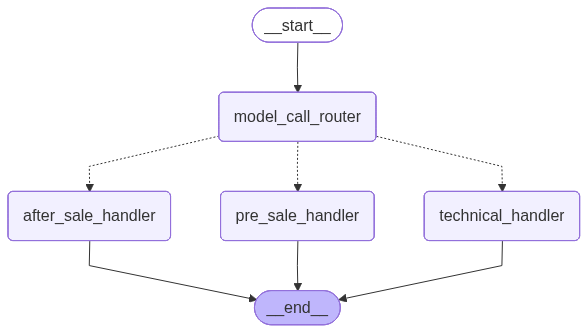
五、流程图(直观理解)
代码生成mermaid图:
python
 with open("../Docs/pdf/graph3.png", "wb") as f:
        f.write(workflows.get_graph().draw_mermaid_png())
这个工作流长这样:
五、条件分支的优缺点
5.1优点
-
智能:让 LLM 参与决策,而不是硬编码 if-else
-
专业:每个分支可以用不同的 prompt、不同的模型、不同的工具。
-
比如技术分支可以绑定代码解释器,售前分支可以挂产品数据库
-
易扩展:想加一个"投诉升级"分支?加一个节点 + 改一下分类 prompt 就行,老分支不用动
5.2缺点
1.分类可能出错:如果模型把售后问题误判成技术支持,回复就会跑偏
解决办法:在路由节点后加一个"人工确认"或者让模型输出置信度
2.增加了延迟:多调一次 LLM 做分类,会增加几百毫秒到一两秒,不过大多数业务场景可以接受
3.需要设计好分类体系:类别太少不够用,太多模型容易混淆
六、总结
条件分支模式是构建 Agent(智能体) 的关键一步
因为真正的 Agent 不是死板的流程图,而是能观察当前状态、做出判断、选择行动
不过要提醒一下:条件分支虽然灵活,但别滥用
如果你的流程只有两三种变化,用 if-else 更简单;
分支超过 5 个,建议重新设计分类体系,或者改用更高级的"路由 + 多 Agent"架构
ok啊~ 今天的分享就到了,拜拜~