1. Softmax回归
① Softmax回归虽然它的名字是回归,其实它是一个分类问题。
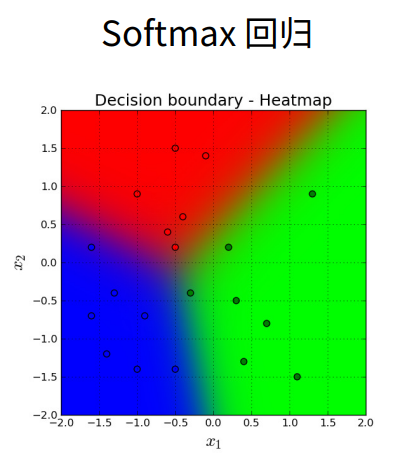
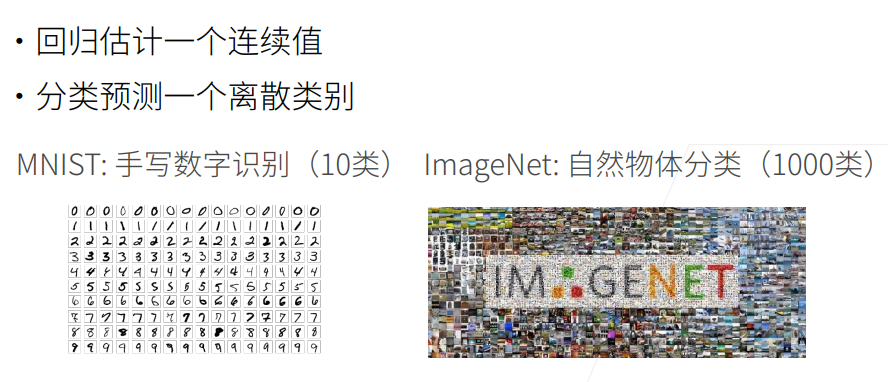
2. 回归VS分类
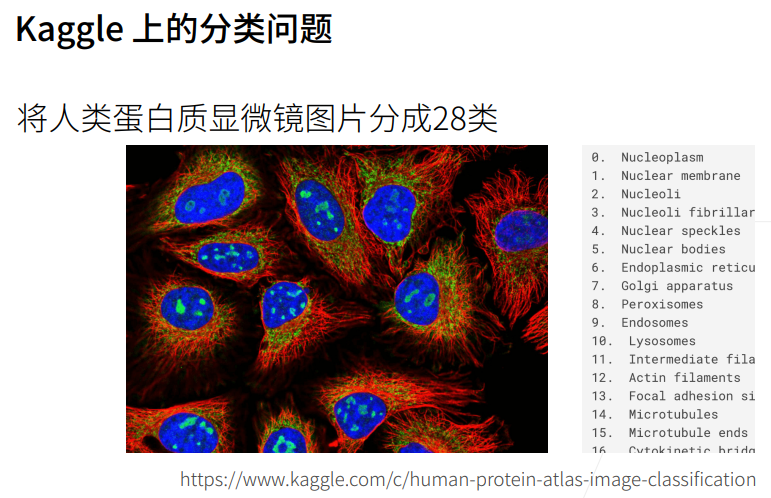
3. Kaggle分类问题


4. 回归到分类
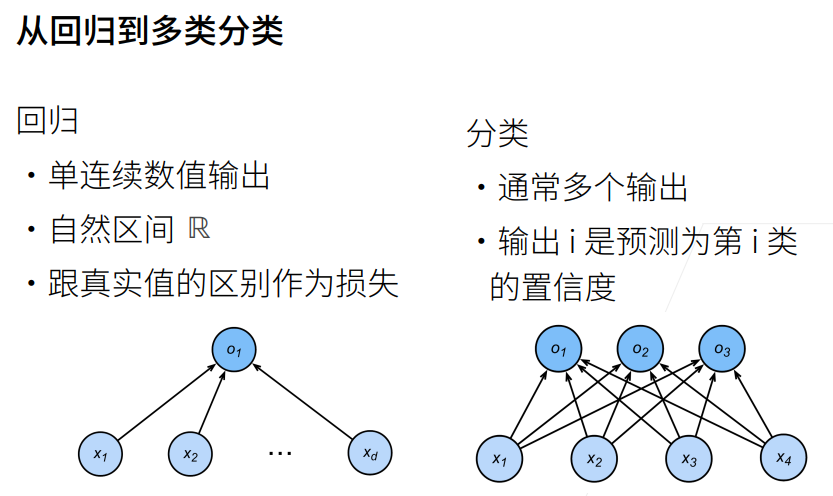
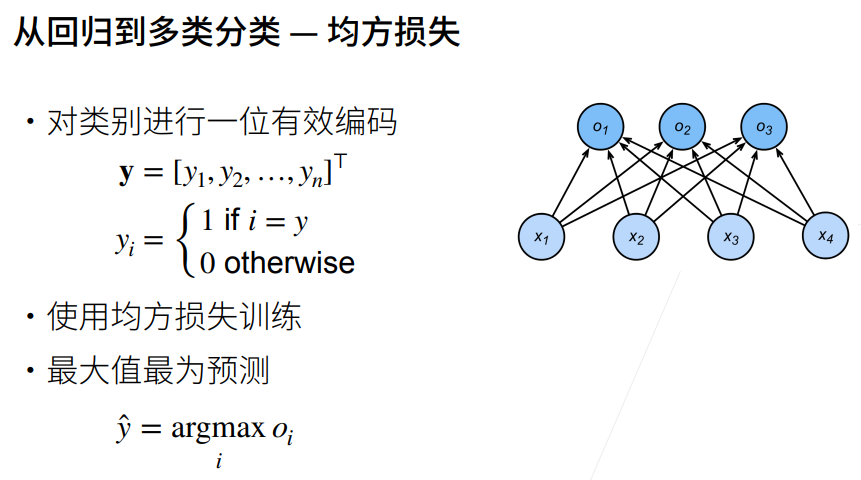
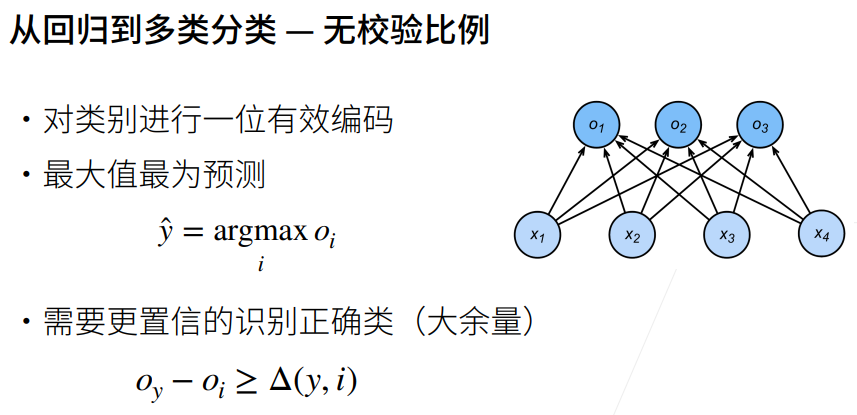
分类时,我们不关系实际的值,我们关心的是能不能对正确的类的置信度特别大,比如将正确的类的置信度写成Oy,那么要远远大于其他非正确类的Oy,也就是二者相减大于一个阈值。
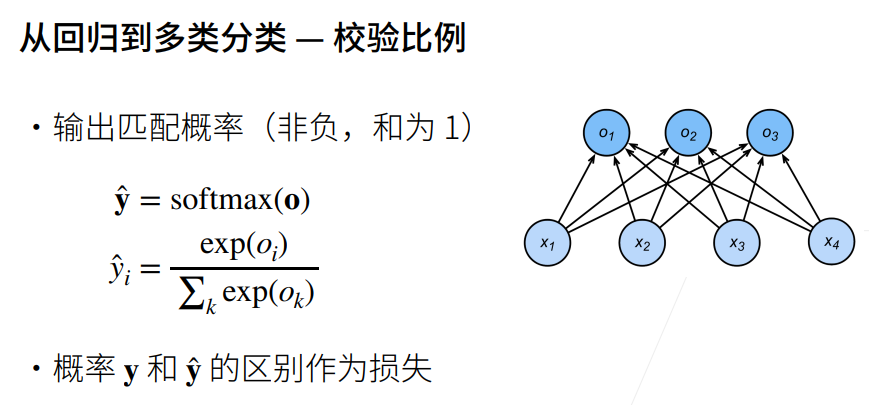
我们希望我们的输出是一个概率,就使用softmax;指数运算的好处就是,不管什么值,都可以变成非负
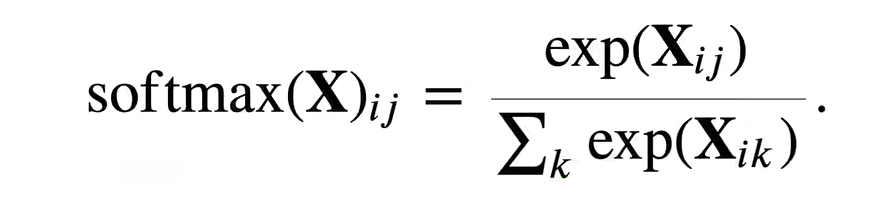
y^i=(Oi做指数运算)/(所有的Ok做指数相加)这样y_hat就是一个概率了,
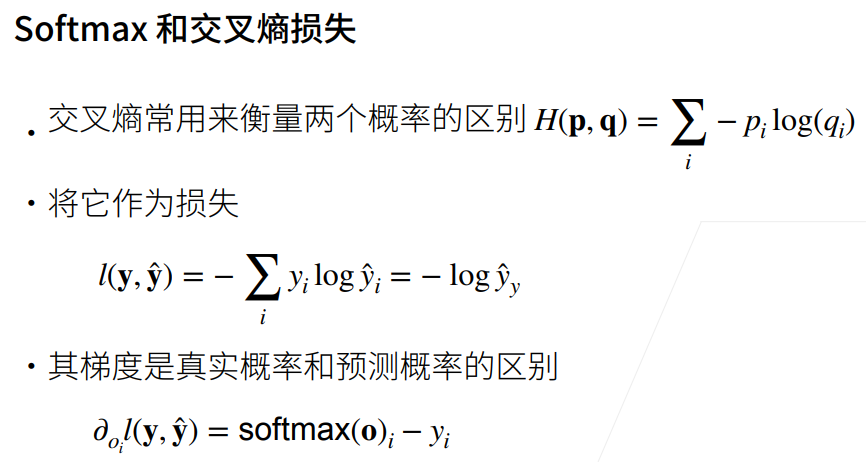
5. 交叉熵损失
6. 总结

7. 损失函数
① 三个常用的损失函数 L2 loss、L1 loss、Huber's Robust loss。
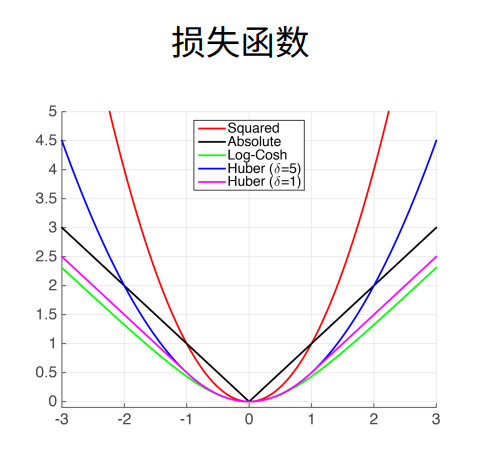
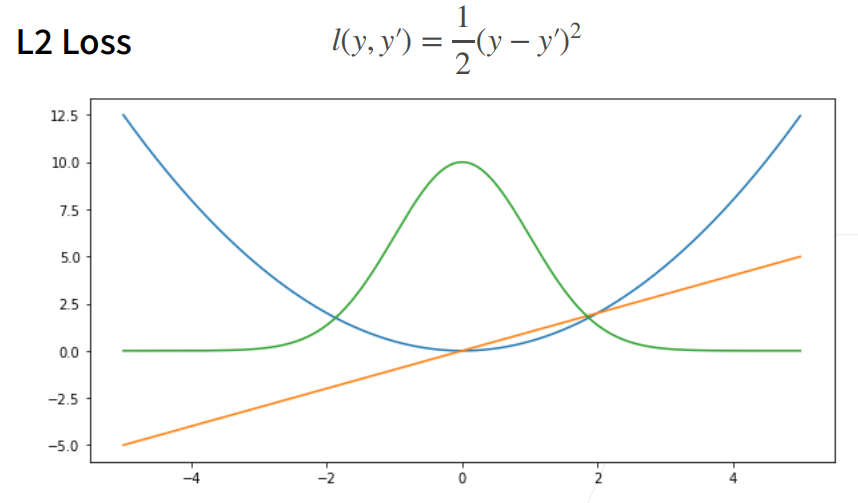
8. L2 Loss均方损失
① 蓝色曲线为当y=0时,变换y'所获得的曲线。
② 绿色曲线为当y=0时,变换y'所获得的曲线的似然函数,即,似然函数呈高斯分布。最小化损失函数就是最大化似然函数。
③ 橙色曲线为损失函数的梯度,梯度是一次函数,所以穿过原点。
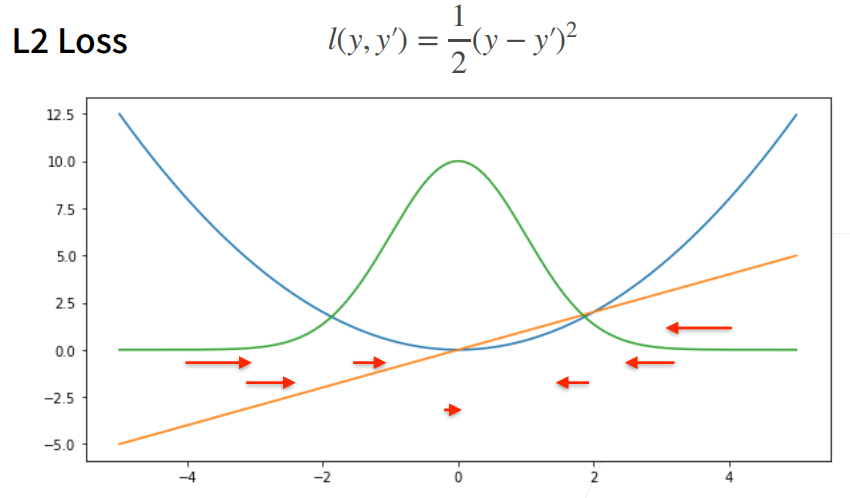
④ 当预测值y'跟真实值y隔的比较远的时候,(真实值y为0,预测值就是下面的曲线里的x轴),梯度比较大,所以参数更新比较多。
⑤ 随着预测值靠近真实值时,梯度越来越小,参数的更新越来越小。
9. L1 Loss绝对值损失函数
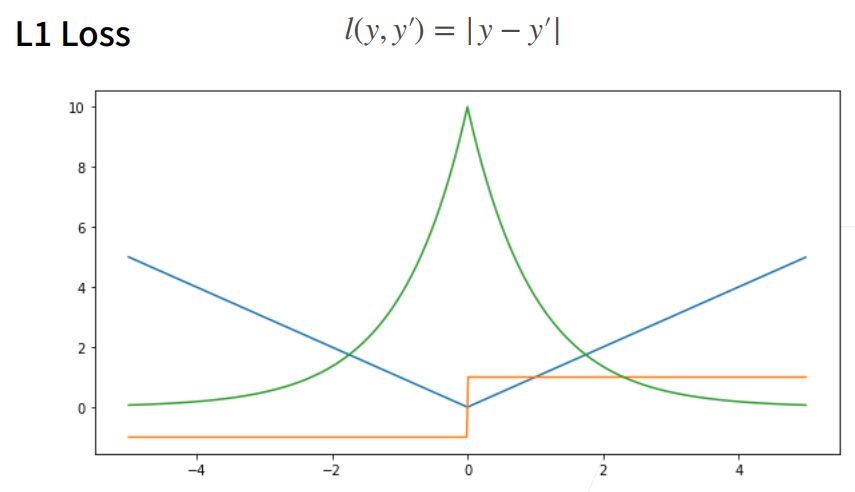
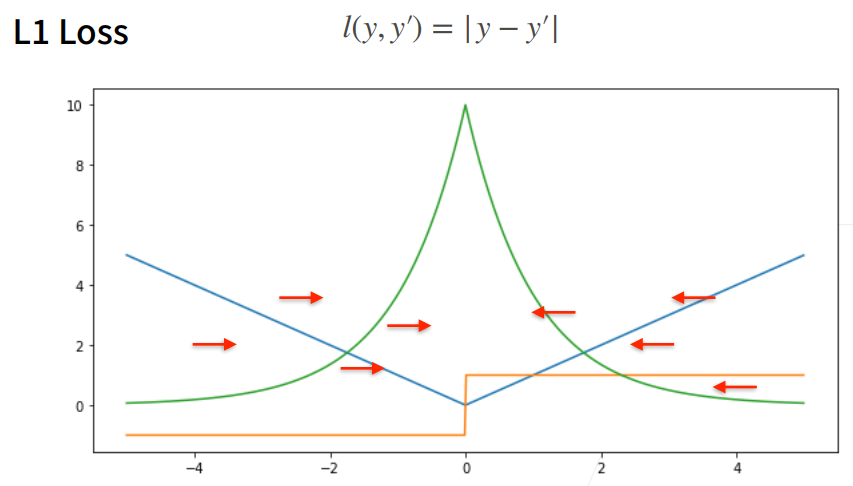
① 相对L2 loss,L1 loss的梯度就是距离原点时,梯度也不是特别大,权重的更新也不是特别大。会带来很多稳定性的好处。
② 他的缺点是在零点处不可导,并在零点处左右有±1的变化,这个不平滑性导致预测值与真实值靠的比较近的时候,优化到末期的时候,可能会不那么稳定。
10. Huber's Robust Loss
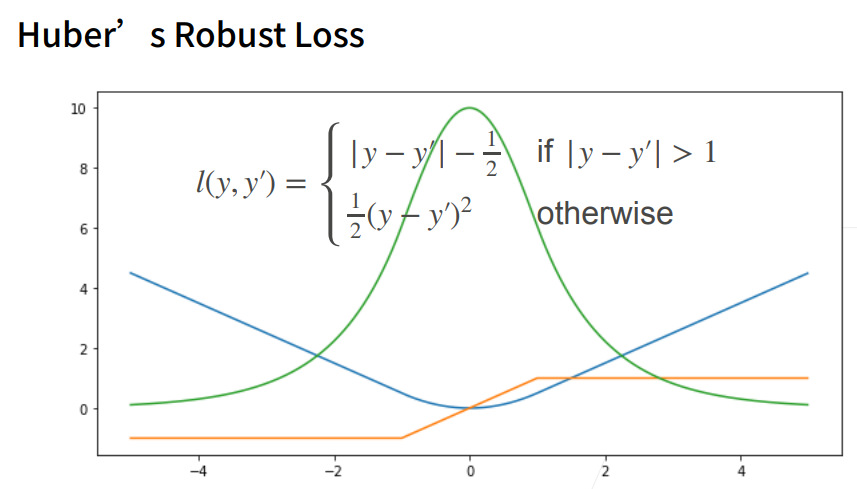
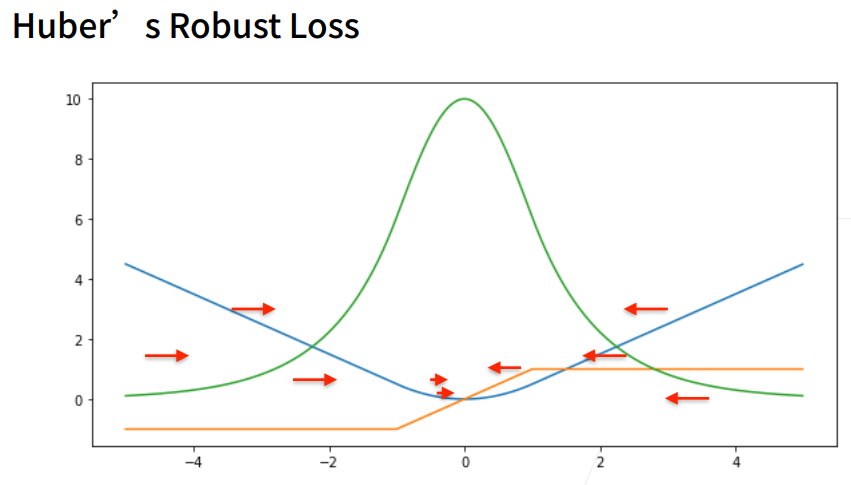
① 结合L1 loss 和L2 loss损失。
当预测值和真实值差的比较大的时候绝对值\>1时,我是一个绝对值误差;
当预测值和真实值靠的比较近的时候绝对值\<=1时,就是平方误差
这样保证优化是比较平滑的,
1. 图像分类数据集
① MINIST数据集是图像分类中广泛使用的数据集之一,但作为基准数据集过于简单。
② 下面将使用类似但更复杂的Fashion-MNIST数据集。
1.1 显示图片
python
%matplotlib inline
import torch
import torchvision #对计算机视觉模型实现的库
from torch.utils import data
from torchvision import transforms
from d2l import torch as d2l

# SVG是一种无损格式 -- 意味着它在压缩时不会丢失任何数据,可以呈现无限数量的颜色。
# SVG最常用于网络上的图形、徽标可供其他高分辨率屏幕上查看。
d2l.use_svg_display() # 使用svg来显示图片,这样清晰度高一些。
help(d2l.use_svg_display)
Help on function use_svg_display in module d2l.torch:

use_svg_display()
    Use the svg format to display a plot in Jupyter.
库/模块 作用 %matplotlib inlineJupyter魔法命令,让matplotlib绘制的图形直接显示在网页中(不弹出新窗口) torchPyTorch深度学习框架,提供张量计算、自动求导、神经网络模块等核心功能 torchvisionPyTorch的计算机视觉扩展库,提供经典数据集(如CIFAR、MNIST)、预训练模型、图像变换工具 torch.utils.data数据加载工具,提供 Dataset(数据集类)和DataLoader(批量数据加载器)torchvision.transforms图像预处理工具,支持裁剪、缩放、归一化、转张量等常见数据增强操作 d2l(torch版)《动手学深度学习》配套工具库,封装了绘图简化、数据加载、训练循环、天气等辅助函数 d2l.use_svg_display()d2l库中的函数,设置matplotlib使用SVG矢量格式显示图形(缩放不失真,适合高清展示)
SVG vs 普通图片
特性 SVG PNG/JPG 缩放 无限放大不失真 放大变模糊 文件大小 较小(图形简单时) 较大 适用场景 图表、logo、矢量图 照片、复杂图像
1.2 数据集下载
通过框架中的内置函数将Fashion-MNIST数据集下载并读取到内存中
python
%matplotlib inline
import torch
import torchvision
from torch.utils import data
from torchvision import transforms
from d2l import torch as d2l

d2l.use_svg_display()

# 通过ToTensor实例将图像数据从PIL类型变换成32位浮点数格式
# 并除以255使得所有像素的数值均在0到1之间
trans = transforms.ToTensor()
#训练集
mnist_train = torchvision.datasets.FashionMNIST(
    root="G:/database/01_DataSet_FashionMNIST",  # 数据集将下载到这里
    train=True,   # True=训练集,False=测试集
    transform=trans,  # 应用上面定义的预处理
    download=True    # 如果本地没有就自动下载
)
#测试集
mnist_test = torchvision.datasets.FashionMNIST(
    root="G:/database/01_DataSet_FashionMNIST",
    train=False,
    transform=trans,
    download=True
)
print(len(mnist_train)) # 训练数据集长度
print(len(mnist_test))  # 测试数据集长度

print(mnist_train[0][0].shape) # 黑白图片,所以channel为1。
print(mnist_train[0][1]) # [0][0]表示第一个样本的图片信息,[0][1]表示该样本对应的标签值
60000
10000
torch.Size([1, 28, 28])
9
1.3 可视化数据集
第一个函数:把数字标签(0-9)转换成对应的服装名称
第二个函数:显示图片网格:
imgs:要显示的图片列表
num_rows:网格行数
num_cols:网格列数
titles:每张图片的标题
scale:图片缩放比例第1步:创建画布;
第2步:将二维数组展平成一维;
第3步:在每张子图上显示图片
获取数据
python# DataLoader:批量加载数据 loader = data.DataLoader(mnist_train, batch_size=18) # 每次加载18张图片和对应的标签 # iter():创建迭代器 iterator = iter(loader) # next():取一批数据 X, y = next(iterator) # X: 18张图片,形状 [18, 1, 28, 28] (批大小, 通道, 高, 宽) # y: 18个标签,形状 [18]显示图片
X.reshape(18,28,28):去掉通道维度[18,1,28,28]→[18,28,28]
2, 9:2行9列,总共显示18张图
titles=get_fashion_mnist_labels(y):把数字标签转成文字作为标题
python
%matplotlib inline
import torch
import torchvision
from torch.utils import data
from torchvision import transforms
from d2l import torch as d2l

d2l.use_svg_display()

# 通过ToTensor实例将图像数据从PIL类型变换成32位浮点数格式
# 并除以255使得所有像素的数值均在0到1之间
trans = transforms.ToTensor()
mnist_train = torchvision.datasets.FashionMNIST(root="01_data/01_DataSet_FashionMNIST",train=True,transform=trans,download=True)
mnist_test = torchvision.datasets.FashionMNIST(root="01_data/01_DataSet_FashionMNIST",train=False,transform=trans,download=True)

def get_fashion_mnist_labels(labels):
    """返回Fashion-MNIST数据集的文本标签"""
    text_labels = ['t-shirt','trouser','pullover','dress','coat',
                   'sandal','shirt','sneaker','bag','ankle boot']
    return [text_labels[int(i)] for i in labels]

def show_images(imgs, num_rows, num_cols, titles=None, scale=1.5):
    """Plot a list of images."""
    figsize = (num_cols * scale, num_rows * scale) # 传进来的图像尺寸,scale 为放缩比例因子
    _, axes = d2l.plt.subplots(num_rows,num_cols,figsize=figsize)
# subplots创建2行9列的子图网格,返回(图形对象, 坐标轴数组)
    print(_)
    print(axes) # axes 为构建的两行九列的画布
#将二维数组展平成一维
    axes = axes.flatten()
    print(axes) # axes 变成一维数据
    for i,(ax,img) in enumerate(zip(axes,imgs)):
        if(i<1):
            print("i:",i)
            print("ax,img:",ax,img)
        if torch.is_tensor(img):
            # 图片张量
            ax.imshow(img.numpy())  # 张量→numpy数组→显示
            ax.set_title(titles[i])
        else:
            # PIL图片
            ax.imshow(img) # 直接显示PIL图片

X, y = next(iter(data.DataLoader(mnist_train,batch_size=18))) # X,y 为仅抽取一次的18个样本的图片、以及对应的标签值
show_images(X.reshape(18,28,28),2,9,titles=get_fashion_mnist_labels(y))Figure(972x216)
[[<AxesSubplot:> <AxesSubplot:> <AxesSubplot:> <AxesSubplot:>
<AxesSubplot:> <AxesSubplot:> <AxesSubplot:> <AxesSubplot:>
<AxesSubplot:>]
[<AxesSubplot:> <AxesSubplot:> <AxesSubplot:> <AxesSubplot:>
<AxesSubplot:> <AxesSubplot:> <AxesSubplot:> <AxesSubplot:>
<AxesSubplot:>]]
[<AxesSubplot:> <AxesSubplot:> <AxesSubplot:> <AxesSubplot:>
<AxesSubplot:> <AxesSubplot:> <AxesSubplot:> <AxesSubplot:>
<AxesSubplot:> <AxesSubplot:> <AxesSubplot:> <AxesSubplot:>
<AxesSubplot:> <AxesSubplot:> <AxesSubplot:> <AxesSubplot:>
<AxesSubplot:> <AxesSubplot:>]
i: 0
ax,img: AxesSubplot(0.125,0.536818;0.0731132x0.343182) tensor([[0.0000, 0.0000, 0.0000, 0.0000, 0.0000, 0.0000, 0.0000, 0.0000, 0.0000,
0.0000, 0.0000, 0.0000, 0.0000, 0.0000, 0.0000, 0.0000, 0.0000, 0.0000,
0.0000, 0.0000, 0.0000, 0.0000, 0.0000, 0.0000, 0.0000, 0.0000, 0.0000,
0.0000],
[0.0000, 0.0000, 0.0000, 0.0000, 0.0000, 0.0000, 0.0000, 0.0000, 0.0000,
0.0000, 0.0000, 0.0000, 0.0000, 0.0000, 0.0000, 0.0000, 0.0000, 0.0000,
0.0000, 0.0000, 0.0000, 0.0000, 0.0000, 0.0000, 0.0000, 0.0000, 0.0000,
0.0000],
[0.0000, 0.0000, 0.0000, 0.0000, 0.0000, 0.0000, 0.0000, 0.0000, 0.0000,
0.0000, 0.0000, 0.0000, 0.0000, 0.0000, 0.0000, 0.0000, 0.0000, 0.0000,
0.0000, 0.0000, 0.0000, 0.0000, 0.0000, 0.0000, 0.0000, 0.0000, 0.0000,
0.0000],
[0.0000, 0.0000, 0.0000, 0.0000, 0.0000, 0.0000, 0.0000, 0.0000, 0.0000,
0.0000, 0.0000, 0.0000, 0.0039, 0.0000, 0.0000, 0.0510, 0.2863, 0.0000,
0.0000, 0.0039, 0.0157, 0.0000, 0.0000, 0.0000, 0.0000, 0.0039, 0.0039,
0.0000],
[0.0000, 0.0000, 0.0000, 0.0000, 0.0000, 0.0000, 0.0000, 0.0000, 0.0000,
0.0000, 0.0000, 0.0000, 0.0118, 0.0000, 0.1412, 0.5333, 0.4980, 0.2431,
0.2118, 0.0000, 0.0000, 0.0000, 0.0039, 0.0118, 0.0157, 0.0000, 0.0000,
0.0118],
[0.0000, 0.0000, 0.0000, 0.0000, 0.0000, 0.0000, 0.0000, 0.0000, 0.0000,
0.0000, 0.0000, 0.0000, 0.0235, 0.0000, 0.4000, 0.8000, 0.6902, 0.5255,
0.5647, 0.4824, 0.0902, 0.0000, 0.0000, 0.0000, 0.0000, 0.0471, 0.0392,
0.0000],
[0.0000, 0.0000, 0.0000, 0.0000, 0.0000, 0.0000, 0.0000, 0.0000, 0.0000,
0.0000, 0.0000, 0.0000, 0.0000, 0.0000, 0.6078, 0.9255, 0.8118, 0.6980,
0.4196, 0.6118, 0.6314, 0.4275, 0.2510, 0.0902, 0.3020, 0.5098, 0.2824,
0.0588],
[0.0000, 0.0000, 0.0000, 0.0000, 0.0000, 0.0000, 0.0000, 0.0000, 0.0000,
0.0000, 0.0000, 0.0039, 0.0000, 0.2706, 0.8118, 0.8745, 0.8549, 0.8471,
0.8471, 0.6392, 0.4980, 0.4745, 0.4784, 0.5725, 0.5529, 0.3451, 0.6745,
0.2588],
[0.0000, 0.0000, 0.0000, 0.0000, 0.0000, 0.0000, 0.0000, 0.0000, 0.0000,
0.0039, 0.0039, 0.0039, 0.0000, 0.7843, 0.9098, 0.9098, 0.9137, 0.8980,
0.8745, 0.8745, 0.8431, 0.8353, 0.6431, 0.4980, 0.4824, 0.7686, 0.8980,
0.0000],
[0.0000, 0.0000, 0.0000, 0.0000, 0.0000, 0.0000, 0.0000, 0.0000, 0.0000,
0.0000, 0.0000, 0.0000, 0.0000, 0.7176, 0.8824, 0.8471, 0.8745, 0.8941,
0.9216, 0.8902, 0.8784, 0.8706, 0.8784, 0.8667, 0.8745, 0.9608, 0.6784,
0.0000],
[0.0000, 0.0000, 0.0000, 0.0000, 0.0000, 0.0000, 0.0000, 0.0000, 0.0000,
0.0000, 0.0000, 0.0000, 0.0000, 0.7569, 0.8941, 0.8549, 0.8353, 0.7765,
0.7059, 0.8314, 0.8235, 0.8275, 0.8353, 0.8745, 0.8627, 0.9529, 0.7922,
0.0000],
[0.0000, 0.0000, 0.0000, 0.0000, 0.0000, 0.0000, 0.0000, 0.0000, 0.0000,
0.0039, 0.0118, 0.0000, 0.0471, 0.8588, 0.8627, 0.8314, 0.8549, 0.7529,
0.6627, 0.8902, 0.8157, 0.8549, 0.8784, 0.8314, 0.8863, 0.7725, 0.8196,
0.2039],
[0.0000, 0.0000, 0.0000, 0.0000, 0.0000, 0.0000, 0.0000, 0.0000, 0.0000,
0.0000, 0.0235, 0.0000, 0.3882, 0.9569, 0.8706, 0.8627, 0.8549, 0.7961,
0.7765, 0.8667, 0.8431, 0.8353, 0.8706, 0.8627, 0.9608, 0.4667, 0.6549,
0.2196],
[0.0000, 0.0000, 0.0000, 0.0000, 0.0000, 0.0000, 0.0000, 0.0000, 0.0000,
0.0157, 0.0000, 0.0000, 0.2157, 0.9255, 0.8941, 0.9020, 0.8941, 0.9412,
0.9098, 0.8353, 0.8549, 0.8745, 0.9176, 0.8510, 0.8510, 0.8196, 0.3608,
0.0000],
[0.0000, 0.0000, 0.0039, 0.0157, 0.0235, 0.0275, 0.0078, 0.0000, 0.0000,
0.0000, 0.0000, 0.0000, 0.9294, 0.8863, 0.8510, 0.8745, 0.8706, 0.8588,
0.8706, 0.8667, 0.8471, 0.8745, 0.8980, 0.8431, 0.8549, 1.0000, 0.3020,
0.0000],
[0.0000, 0.0118, 0.0000, 0.0000, 0.0000, 0.0000, 0.0000, 0.0000, 0.0000,
0.2431, 0.5686, 0.8000, 0.8941, 0.8118, 0.8353, 0.8667, 0.8549, 0.8157,
0.8275, 0.8549, 0.8784, 0.8745, 0.8588, 0.8431, 0.8784, 0.9569, 0.6235,
0.0000],
[0.0000, 0.0000, 0.0000, 0.0000, 0.0706, 0.1725, 0.3216, 0.4196, 0.7412,
0.8941, 0.8627, 0.8706, 0.8510, 0.8863, 0.7843, 0.8039, 0.8275, 0.9020,
0.8784, 0.9176, 0.6902, 0.7373, 0.9804, 0.9725, 0.9137, 0.9333, 0.8431,
0.0000],
[0.0000, 0.2235, 0.7333, 0.8157, 0.8784, 0.8667, 0.8784, 0.8157, 0.8000,
0.8392, 0.8157, 0.8196, 0.7843, 0.6235, 0.9608, 0.7569, 0.8078, 0.8745,
1.0000, 1.0000, 0.8667, 0.9176, 0.8667, 0.8275, 0.8627, 0.9098, 0.9647,
0.0000],
[0.0118, 0.7922, 0.8941, 0.8784, 0.8667, 0.8275, 0.8275, 0.8392, 0.8039,
0.8039, 0.8039, 0.8627, 0.9412, 0.3137, 0.5882, 1.0000, 0.8980, 0.8667,
0.7373, 0.6039, 0.7490, 0.8235, 0.8000, 0.8196, 0.8706, 0.8941, 0.8824,
0.0000],
[0.3843, 0.9137, 0.7765, 0.8235, 0.8706, 0.8980, 0.8980, 0.9176, 0.9765,
0.8627, 0.7608, 0.8431, 0.8510, 0.9451, 0.2549, 0.2863, 0.4157, 0.4588,
0.6588, 0.8588, 0.8667, 0.8431, 0.8510, 0.8745, 0.8745, 0.8784, 0.8980,
0.1137],
[0.2941, 0.8000, 0.8314, 0.8000, 0.7569, 0.8039, 0.8275, 0.8824, 0.8471,
0.7255, 0.7725, 0.8078, 0.7765, 0.8353, 0.9412, 0.7647, 0.8902, 0.9608,
0.9373, 0.8745, 0.8549, 0.8314, 0.8196, 0.8706, 0.8627, 0.8667, 0.9020,
0.2627],
[0.1882, 0.7961, 0.7176, 0.7608, 0.8353, 0.7725, 0.7255, 0.7451, 0.7608,
0.7529, 0.7922, 0.8392, 0.8588, 0.8667, 0.8627, 0.9255, 0.8824, 0.8471,
0.7804, 0.8078, 0.7294, 0.7098, 0.6941, 0.6745, 0.7098, 0.8039, 0.8078,
0.4510],
[0.0000, 0.4784, 0.8588, 0.7569, 0.7020, 0.6706, 0.7176, 0.7686, 0.8000,
0.8235, 0.8353, 0.8118, 0.8275, 0.8235, 0.7843, 0.7686, 0.7608, 0.7490,
0.7647, 0.7490, 0.7765, 0.7529, 0.6902, 0.6118, 0.6549, 0.6941, 0.8235,
0.3608],
[0.0000, 0.0000, 0.2902, 0.7412, 0.8314, 0.7490, 0.6863, 0.6745, 0.6863,
0.7098, 0.7255, 0.7373, 0.7412, 0.7373, 0.7569, 0.7765, 0.8000, 0.8196,
0.8235, 0.8235, 0.8275, 0.7373, 0.7373, 0.7608, 0.7529, 0.8471, 0.6667,
0.0000],
[0.0078, 0.0000, 0.0000, 0.0000, 0.2588, 0.7843, 0.8706, 0.9294, 0.9373,
0.9490, 0.9647, 0.9529, 0.9569, 0.8667, 0.8627, 0.7569, 0.7490, 0.7020,
0.7137, 0.7137, 0.7098, 0.6902, 0.6510, 0.6588, 0.3882, 0.2275, 0.0000,
0.0000],
[0.0000, 0.0000, 0.0000, 0.0000, 0.0000, 0.0000, 0.0000, 0.1569, 0.2392,
0.1725, 0.2824, 0.1608, 0.1373, 0.0000, 0.0000, 0.0000, 0.0000, 0.0000,
0.0000, 0.0000, 0.0000, 0.0000, 0.0000, 0.0000, 0.0000, 0.0000, 0.0000,
0.0000],
[0.0000, 0.0000, 0.0000, 0.0000, 0.0000, 0.0000, 0.0000, 0.0000, 0.0000,
0.0000, 0.0000, 0.0000, 0.0000, 0.0000, 0.0000, 0.0000, 0.0000, 0.0000,
0.0000, 0.0000, 0.0000, 0.0000, 0.0000, 0.0000, 0.0000, 0.0000, 0.0000,
0.0000],
[0.0000, 0.0000, 0.0000, 0.0000, 0.0000, 0.0000, 0.0000, 0.0000, 0.0000,
0.0000, 0.0000, 0.0000, 0.0000, 0.0000, 0.0000, 0.0000, 0.0000, 0.0000,
0.0000, 0.0000, 0.0000, 0.0000, 0.0000, 0.0000, 0.0000, 0.0000, 0.0000,
0.0000]])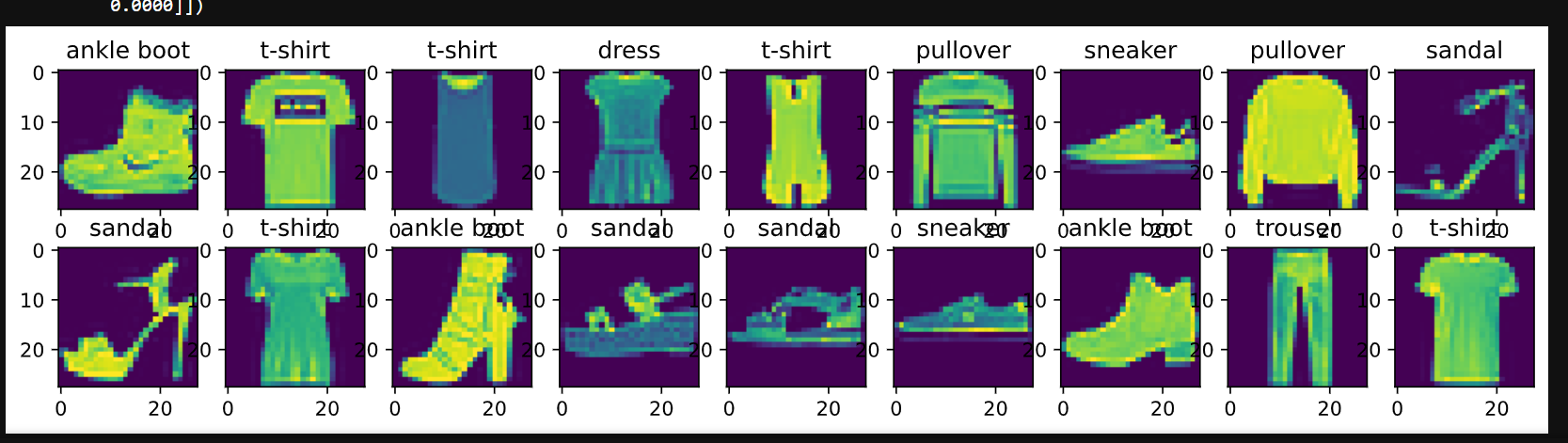
1.4 小批量数据集
python
%matplotlib inline
import torch
import torchvision
from torch.utils import data
from torchvision import transforms
from d2l import torch as d2l

d2l.use_svg_display()

# 通过ToTensor实例将图像数据从PIL类型变换成32位浮点数格式
# 并除以255使得所有像素的数值均在0到1之间
trans = transforms.ToTensor()
mnist_train = torchvision.datasets.FashionMNIST(root="01_data/01_DataSet_FashionMNIST",train=True,transform=trans,download=True)
mnist_test = torchvision.datasets.FashionMNIST(root="01_data/01_DataSet_FashionMNIST",train=False,transform=trans,download=True)

def get_fashion_mnist_labels(labels):
    """返回Fashion-MNIST数据集的文本标签"""
    text_labels = ['t-shirt','trouser','pullover','dress','coat',
                   'sandal','shirt','sneaker','bag','ankle boot']
    return [text_labels[int(i)] for i in labels]

def show_images(imgs, num_rows, num_cols, titles=None, scale=1.5):
    """Plot a list of images."""
    figsize = (num_cols * scale, num_rows * scale) # 传进来的图像尺寸,scale 为放缩比例因子
    _, axes = d2l.plt.subplots(num_rows,num_cols,figsize=figsize)
    print(_)
    print(axes) # axes 为构建的两行九列的画布
    axes = axes.flatten()
    print(axes) # axes 变成一维数据
    for i,(ax,img) in enumerate(zip(axes,imgs)):
        if torch.is_tensor(img):
            # 图片张量
            ax.imshow(img.numpy())
            ax.set_title(titles[i])
        else:
            # PIL图片
            ax.imshow(img)

X, y = next(iter(data.DataLoader(mnist_train,batch_size=18))) # X,y 为仅抽取一次的18个样本的图片、以及对应的标签值
show_images(X.reshape(18,28,28),2,9,titles=get_fashion_mnist_labels(y))

#设置批量大小;每次从数据集中取 256张图片 进行处理
batch_size = 256

# 设置数据加载进程数
def get_dataloader_workers():
    """使用4个进程来读取的数据"""
    return 4   #多进程可以加快数据读取速度(特别是数据量大或图片需要预处理时)

# 创建数据加载器
train_iter = data.DataLoader(
    mnist_train,           # 数据集
    batch_size,            # 256,批量大小
    shuffle=True,          # 打乱顺序,避免模型记住数据顺序
    num_workers=get_dataloader_workers()  # 4个进程
)

#计时测试
timer = d2l.Timer() # 计时器对象实例化,开始计时
for X,y in train_iter:  # 遍历一个batch_size数据的时间
    continue        # 什么都不做,只是读取数据
f'{timer.stop():.2f}sec' # 计时器停止时,返回停止与开始的时间间隔事件Figure(972x216)
[[<AxesSubplot:> <AxesSubplot:> <AxesSubplot:> <AxesSubplot:>
<AxesSubplot:> <AxesSubplot:> <AxesSubplot:> <AxesSubplot:>
<AxesSubplot:>]
[<AxesSubplot:> <AxesSubplot:> <AxesSubplot:> <AxesSubplot:>
<AxesSubplot:> <AxesSubplot:> <AxesSubplot:> <AxesSubplot:>
<AxesSubplot:>]]
[<AxesSubplot:> <AxesSubplot:> <AxesSubplot:> <AxesSubplot:>
<AxesSubplot:> <AxesSubplot:> <AxesSubplot:> <AxesSubplot:>
<AxesSubplot:> <AxesSubplot:> <AxesSubplot:> <AxesSubplot:>
<AxesSubplot:> <AxesSubplot:> <AxesSubplot:> <AxesSubplot:>
<AxesSubplot:> <AxesSubplot:>]'1.62sec'会显示
d2l库中Timer类的文档说明
python
help(d2l.Timer)
Help on class Timer in module d2l.torch: class Timer(builtins.object) | Record multiple running times. | | Methods defined here: | | __init__(self) | Initialize self. See help(type(self)) for accurate signature. | | avg(self) | Return the average time. | | cumsum(self) | Return the accumulated time. | | start(self) | Start the timer. | | stop(self) | Stop the timer and record the time in a list. | | sum(self) | Return the sum of time. | | ---------------------------------------------------------------------- | Data descriptors defined here: | | __dict__ | dictionary for instance variables (if defined) | | __weakref__ | list of weak references to the object (if defined)
class Timer(d2l.torch.Timer)
| 记录多次运行时间的类。
|
| 方法:
| init(self)
| 初始化一个计时器,记录开始时间。
|
| start(self)
| 启动计时器,记录开始时间。
|
| stop(self)
| 停止计时器,返回经过的时间间隔(秒)。
|
| reset(self)
| 重置计时器,归零并重新开始。
|
| times(self)
| 返回所有记录的时间列表。
|
| avg(self)
| 返回平均耗时。
|
| sum(self)
| 返回总耗时。
|
| cumsum(self)
| 返回累计时间列表。
|
| enter(self)
| 支持上下文管理器(with语句)。
|
| exit(self, *args)
| 退出上下文管理器时自动停止。**Example:
timer = d2l.Timer()执行某个操作
print(f'{timer.stop():.2f} sec')
或使用上下文管理器
with d2l.Timer() as timer:
执行操作
pass
print(f'{timer.stop():.2f} sec')**
1.5 加载数据集
python
%matplotlib inline
import torch
import torchvision
from torch.utils import data
from torchvision import transforms
from d2l import torch as d2l
d2l.use_svg_display()
# 通过ToTensor实例将图像数据从PIL类型变换成32位浮点数格式
# 并除以255使得所有像素的数值均在0到1之间
trans = transforms.ToTensor()
mnist_train = torchvision.datasets.FashionMNIST(root="01_data/01_DataSet_FashionMNIST",train=True,transform=trans,download=True)
mnist_test = torchvision.datasets.FashionMNIST(root="01_data/01_DataSet_FashionMNIST",train=False,transform=trans,download=True)
def get_fashion_mnist_labels(labels):
"""返回Fashion-MNIST数据集的文本标签"""
text_labels = ['t-shirt','trouser','pullover','dress','coat',
'sandal','shirt','sneaker','bag','ankle boot']
return [text_labels[int(i)] for i in labels]
def show_images(imgs, num_rows, num_cols, titles=None, scale=1.5):
"""Plot a list of images."""
figsize = (num_cols * scale, num_rows * scale) # 传进来的图像尺寸,scale 为放缩比例因子
_, axes = d2l.plt.subplots(num_rows,num_cols,figsize=figsize)
print(_)
print(axes) # axes 为构建的两行九列的画布
axes = axes.flatten()
print(axes) # axes 变成一维数据
for i,(ax,img) in enumerate(zip(axes,imgs)):
if torch.is_tensor(img):
# 图片张量
ax.imshow(img.numpy())
ax.set_title(titles[i])
else:
# PIL图片
ax.imshow(img)
X, y = next(iter(data.DataLoader(mnist_train,batch_size=18))) # X,y 为仅抽取一次的18个样本的图片、以及对应的标签值
show_images(X.reshape(18,28,28),2,9,titles=get_fashion_mnist_labels(y))
batch_size = 256
def get_dataloader_workers():
"""使用4个进程来读取的数据"""
return 4
train_iter = data.DataLoader(mnist_train, batch_size, shuffle=True,
num_workers=get_dataloader_workers())
timer = d2l.Timer()
for X,y in train_iter:
continue
f'{timer.stop():.2f}sec' # 扫一边数据集的事件
def load_data_fashion_mnist(batch_size, resize=None):
"""下载Fashion-MNIST数据集,然后将其加载到内存中"""
trans = [transforms.ToTensor()] # 创建列表,包含一个预处理操作:将图片转成张量
if resize: # 如果有缩放需求,就在列表开头插入缩放操作
trans.insert(0, transforms.Resize(resize)) # 如果有Resize参数传进来,就进行resize操作
# 将多个预处理操作组合成一个流水线
trans = transforms.Compose(trans)
data_path = "G:/database/01_DataSet_FashionMNIST" # 改成你的路径
# 加载数据集 - 注意这里需要缩进
mnist_train = torchvision.datasets.FashionMNIST(
root=data_path, # 使用 data_path,不是 root_data_path
train=True, # 训练集
transform=trans, # 使用 trans,不是 transform_trans
download=True
)
mnist_test = torchvision.datasets.FashionMNIST(
root=data_path, # 使用 data_path
train=False, # 测试集
transform=trans, # 使用 trans
download=True
)
# 返回数据加载器 - 注意缩进与函数体对齐
return (data.DataLoader(mnist_train, batch_size, shuffle=True, num_workers=get_dataloader_workers()),
data.DataLoader(mnist_test, batch_size, shuffle=False, num_workers=get_dataloader_workers()))函数定义
def load_data_fashion_mnist(batch_size, resize=None): 作用:定义一个函数,可以方便地加载Fashion-MNIST数据集 参数: batch_size每批加载多少张图片(如256) resize=None可选参数,如果提供就缩放图片尺寸
Figure(972x216)
[[<AxesSubplot:> <AxesSubplot:> <AxesSubplot:> <AxesSubplot:>
  <AxesSubplot:> <AxesSubplot:> <AxesSubplot:> <AxesSubplot:>
  <AxesSubplot:>]
 [<AxesSubplot:> <AxesSubplot:> <AxesSubplot:> <AxesSubplot:>
  <AxesSubplot:> <AxesSubplot:> <AxesSubplot:> <AxesSubplot:>
  <AxesSubplot:>]]
[<AxesSubplot:> <AxesSubplot:> <AxesSubplot:> <AxesSubplot:>
 <AxesSubplot:> <AxesSubplot:> <AxesSubplot:> <AxesSubplot:>
 <AxesSubplot:> <AxesSubplot:> <AxesSubplot:> <AxesSubplot:>
 <AxesSubplot:> <AxesSubplot:> <AxesSubplot:> <AxesSubplot:>
<AxesSubplot:> <AxesSubplot:>]2. Softmax回归(使用自定义)
① 就像从零开始实现线性回归一样,应该知道softmax的细节。
2.1 训练集、测试集抽取
python
import torch
from IPython import display
from d2l import torch as d2l

def load_data_fashion_mnist(batch_size, resize=None):
    """下载Fashion-MNIST数据集,然后将其加载到内存中"""
    trans = [transforms.ToTensor()]
    if resize:
        trans.insert(0,transforms.Resize(resize)) # 如果有Resize参数传进来,就进行resize操作
    trans = transforms.Compose(trans)
    mnist_train = torchvision.datasets.FashionMNIST(root="01_data/01_DataSet_FashionMNIST",train=True,transform=trans,download=True)
    mnist_test = torchvision.datasets.FashionMNIST(root="01_data/01_DataSet_FashionMNIST",train=False,transform=trans,download=True)
    return (data.DataLoader(mnist_train, batch_size, shuffle=True, num_workers=get_dataloader_workers()),
           data.DataLoader(mnist_train, batch_size, shuffle=True, num_workers=get_dataloader_workers()))

batch_size = 256
train_iter, test_iter = load_data_fashion_mnist(batch_size) # 返回训练集、测试集的迭代器
① 将展平每个图像,将它们视为长度784的向量。向量的每个元素与w相乘,所以w也需要784行。
② 因为数据集有10个类别,所以网络输出维度为10.
2.2 初始化参数
python
import torch
from IPython import display
from d2l import torch as d2l

def load_data_fashion_mnist(batch_size, resize=None):
    """下载Fashion-MNIST数据集,然后将其加载到内存中"""
    trans = [transforms.ToTensor()]
    if resize:
        trans.insert(0,transforms.Resize(resize)) # 如果有Resize参数传进来,就进行resize操作
    trans = transforms.Compose(trans)
    mnist_train = torchvision.datasets.FashionMNIST(root="01_data/01_DataSet_FashionMNIST",train=True,transform=trans,download=True)
    mnist_test = torchvision.datasets.FashionMNIST(root="01_data/01_DataSet_FashionMNIST",train=False,transform=trans,download=True)
    return (data.DataLoader(mnist_train, batch_size, shuffle=True, num_workers=get_dataloader_workers()),
           data.DataLoader(mnist_train, batch_size, shuffle=True, num_workers=get_dataloader_workers()))

batch_size = 256
train_iter, test_iter = load_data_fashion_mnist(batch_size) # 返回训练集、测试集的迭代器

#因为是将28*28的拉平成了一维向量
num_inputs = 784
num_outputs = 10#一共有10类
w = torch.normal(0,0.01,size=(num_inputs,num_outputs),requires_grad=True)
b = torch.zeros(num_outputs,requires_grad=True)
print(w.shape)
print(b.shape)torch.Size([784, 10])
torch.Size([10])2.3 Softmax回归
① 给定一个矩阵X,可以对所有元素求和。
python
import torch
from IPython import display
from d2l import torch as d2l

x = torch.tensor([[1.0,2.0,3.0],[4.0,5.0,6.0]])
print(x)
print(x.sum(0,keepdim=True)) # 按照列求和
print(x.sum(1,keepdim=True)) # 按照行求和tensor([[1., 2., 3.],
[4., 5., 6.]])
tensor([[5., 7., 9.]])
tensor([[ 6.],
[15.]])② 实现softmax:
python
import torch
from IPython import display
from d2l import torch as d2l

def softmax(X):
    X_exp = torch.exp(X) # 每个都进行指数运算
    partition = X_exp.sum(1,keepdim=True) #对每一行进行求和
    return X_exp / partition # 这里应用了广播机制

# 将每个元素变成一个非负数。此外,依据概率原理,每行总和为1。
#均值为0,方差为1
X = torch.normal(0,1,(2,5))  # 两行五列的数,数符合标准正态分布
print(X)
X_prob = softmax(X)
print(X_prob) # 形状没有发生变化,还是一个两行五列的矩阵,Softmax转换后所有值为正的
print(X_prob.sum(1)) # 相当于 X_prob.sum(axis=1) 按行求和,概率和为1tensor([[ 1.6039, -0.1675, 0.8108, -0.1188, 0.9389],
[ 0.5993, 0.0179, -1.6758, 1.4489, -1.1852]])
tensor([[0.4319, 0.0735, 0.1954, 0.0771, 0.2221],
[0.2399, 0.1341, 0.0247, 0.5610, 0.0403]])
tensor([1., 1.])
python
import torch
from IPython import display
from d2l import torch as d2l

def load_data_fashion_mnist(batch_size, resize=None):
    """下载Fashion-MNIST数据集,然后将其加载到内存中"""
    trans = [transforms.ToTensor()]
    if resize:
        trans.insert(0,transforms.Resize(resize)) # 如果有Resize参数传进来,就进行resize操作
    trans = transforms.Compose(trans)
    mnist_train = torchvision.datasets.FashionMNIST(root="01_data/01_DataSet_FashionMNIST",train=True,transform=trans,download=True)
    mnist_test = torchvision.datasets.FashionMNIST(root="01_data/01_DataSet_FashionMNIST",train=False,transform=trans,download=True)
    return (data.DataLoader(mnist_train, batch_size, shuffle=True, num_workers=get_dataloader_workers()),
           data.DataLoader(mnist_train, batch_size, shuffle=True, num_workers=get_dataloader_workers()))

batch_size = 256
train_iter, test_iter = load_data_fashion_mnist(batch_size) # 返回训练集、测试集的迭代器

num_inputs = 784
num_outputs = 10
w = torch.normal(0,0.01,size=(num_inputs,num_outputs),requires_grad=True)
b = torch.zeros(num_outputs,requires_grad=True)
print(w.shape)
print(b.shape)

def softmax(X):
    X_exp = torch.exp(X) # 每个都进行指数运算
    partition = X_exp.sum(1,keepdim=True)
    return X_exp / partition # 这里应用了广播机制

# 实现softmax回归模型
print(w.shape[0]) # w.shape里面的第0个元素,该值为784
def net(X):
return softmax(torch.matmul(X.reshape((-1,w.shape[0])),w)+b) # -1为默认的批量大小,表示有多少个图片,每个图片用一维的784列个元素表示 torch.Size([784, 10])
torch.Size([10])
7842.4 交叉熵损失
① 创建一个数据y_hat,其中包含2个样本在3个类别的预测概率,使用y作为y_hat中概率的索引。
交叉熵损失 = -log(真实类别的预测概率)
python
y = torch.tensor([0,2]) # 标号索引
y_hat = torch.tensor([[0.1,0.3,0.6],[0.3,0.2,0.5]]) # 两个样本在3个类别的预测概率
# 提取真实类别的预测概率
y_hat[[0,1],y] # 把第0个样本对应标号"0"的预测值拿出来、第1个样本对应标号"2"的预测值拿出来tensor([0.1000, 0.5000])⑧ 实现交叉熵损失函数。
python
y = torch.tensor([0,2]) # 标号索引
y_hat = torch.tensor([[0.1,0.3,0.6],[0.3,0.2,0.5]]) # 两个样本在3个类别的预测概率
y_hat[[0,1],y] # 把第0个样本对应标号的预测值拿出来、第1个样本对应标号的预测值拿出来

def cross_entropy(y_hat, y):
    print(list(range(len(y_hat))))
            # 计算损失
    return -torch.log(y_hat[range(len(y_hat)),y]) # y_hat[range(len(y_hat)),y]为把y的标号列表对应的值拿出来。传入的y要是最大概率的标号

print(y_hat.shape)
print(y.shape)
cross_entropy(y_hat,y)torch.Size([2, 3])
torch.Size([2])
[0, 1]tensor([2.3026, 0.6931])2.5 准确率
③ 将预测类别与真实y元素进行比较。
python
import torch
from IPython import display
from d2l import torch as d2l

y = torch.tensor([0,2]) # 标号索引
y_hat = torch.tensor([[0.1,0.3,0.6],[0.3,0.2,0.5]]) # 两个样本在3个类别的预测概率
y_hat[[0,1],y] # 把第0个样本对应标号的预测值拿出来、第1个样本对应标号的预测值拿出来
print(y_hat.shape)
print(len(y_hat.shape)) # 两个样本
def accuracy(y_hat,y):
    """计算预测正确的数量"""
    if len(y_hat.shape) > 1 and y_hat.shape[1] > 1: # y_hat.shape[1]>1表示不止一个类别,每个类别有各自的概率
        y_hat = y_hat.argmax(axis=1) # y_hat.argmax(axis=1)为求行最大值的索引
        print("y_hat:",y_hat)
    cmp = y_hat.type(y.dtype) == y # 先判断逻辑运算符==,再赋值给cmp,cmp为布尔类型的数据
    print("cmp:",cmp)
    return float(cmp.type(y.dtype).sum()) # 获得y.dtype的类型作为传入参数,将cmp的类型转为y的类型(int型),然后再求和

print("accuracy(y_hat,y) / len(y):",accuracy(y_hat,y) / len(y))
print("accuracy(y_hat,y):",accuracy(y_hat,y))
print("len(y):",len(y))torch.Size([2, 3])
2
y_hat: tensor([2, 2])
cmp: tensor([False, True])
accuracy(y_hat,y) / len(y): 0.5
y_hat: tensor([2, 2])
cmp: tensor([False, True])
accuracy(y_hat,y): 1.0
len(y): 22.6 任意模型
python
%matplotlib inline
import torch
import torchvision
from torch.utils import data
from torchvision import transforms
from d2l import torch as d2l

def get_dataloader_workers():
    """使用4个进程来读取的数据"""
    return 4

def load_data_fashion_mnist(batch_size, resize=None):
    """下载Fashion-MNIST数据集,然后将其加载到内存中"""
    trans = [transforms.ToTensor()]
    if resize:
        trans.insert(0,transforms.Resize(resize)) # 如果有Resize参数传进来,就进行resize操作
    trans = transforms.Compose(trans)
    mnist_train = torchvision.datasets.FashionMNIST(root="01_data/01_DataSet_FashionMNIST",train=True,transform=trans,download=True)
    mnist_test = torchvision.datasets.FashionMNIST(root="01_data/01_DataSet_FashionMNIST",train=False,transform=trans,download=True)
    return (data.DataLoader(mnist_train, batch_size, shuffle=True, num_workers=get_dataloader_workers()),
           data.DataLoader(mnist_train, batch_size, shuffle=True, num_workers=get_dataloader_workers()))


batch_size = 256
train_iter, test_iter = load_data_fashion_mnist(batch_size) # 返回训练集、测试集的迭代器

num_inputs = 784
num_outputs = 10
w = torch.normal(0,0.01,size=(num_inputs,num_outputs),requires_grad=True)
b = torch.zeros(num_outputs,requires_grad=True)

def softmax(X):
    X_exp = torch.exp(X) # 每个都进行指数运算
    partition = X_exp.sum(1,keepdim=True)
    return X_exp / partition # 这里应用了广播机制

# 实现softmax回归模型
def net(X):
    return softmax(torch.matmul(X.reshape((-1,w.shape[0])),w)+b) # -1为默认的批量大小,表示有多少个图片,每个图片用一维的784列个元素表示

def cross_entropy(y_hat, y):
    return -torch.log(y_hat[range(len(y_hat)),y]) # y_hat[range(len(y_hat)),y]为把y的标号列表对应的值拿出来。传入的y要是最大概率的标号

def accuracy(y_hat,y):
    """计算预测正确的数量"""
    if len(y_hat.shape) > 1 and y_hat.shape[1] > 1: # y_hat.shape[1]>1表示不止一个类别,每个类别有各自的概率
        y_hat = y_hat.argmax(axis=1) # y_hat.argmax(axis=1)为求行最大值的索引
    cmp = y_hat.type(y.dtype) == y # 先判断逻辑运算符==,再赋值给cmp,cmp为布尔类型的数据
    return float(cmp.type(y.dtype).sum()) # 获得y.dtype的类型作为传入参数,将cmp的类型转为y的类型(int型),然后再求和

# 可以评估在任意模型net的准确率
def evaluate_accuracy(net,data_iter):
    """计算在指定数据集上模型的精度"""
    if isinstance(net,torch.nn.Module): # 如果net模型是torch.nn.Module实现的神经网络的话,将它变成评估模式
        net.eval()  # 将模型设置为评估模式
    metric = Accumulator(2) # 正确预测数、预测总数,metric为累加器的实例化对象,里面存了两个数
    for X, y in data_iter:
        metric.add(accuracy(net(X),y),y.numel()) # net(X)将X输入模型,获得预测值。y.numel()为样本总数
    return metric[0] / metric[1] # 分类正确的样本数 / 总样本数

# Accumulator实例中创建了2个变量,用于分别存储正确预测的数量和预测的总数量
class Accumulator:
    """在n个变量上累加"""
    def __init__(self,n):
        self.data = [0,0] * n

    def add(self, *args):
        self.data = [a+float(b) for a,b in zip(self.data,args)] # zip函数把两个列表第一个位置元素打包、第二个位置元素打包....

    def reset(self):
        self.data = [0.0] * len(self.data)

    def __getitem__(self,idx):
        return self.data[idx]

print(evaluate_accuracy(net, test_iter))0.095366666666666672.7 训练函数
python
%matplotlib inline
import torch
import torchvision
from torch.utils import data
from torchvision import transforms
from d2l import torch as d2l
from IPython import display

def get_dataloader_workers():
    """使用4个进程来读取的数据"""
    return 4

def load_data_fashion_mnist(batch_size, resize=None):
    """下载Fashion-MNIST数据集,然后将其加载到内存中"""
    trans = [transforms.ToTensor()]
    if resize:
        trans.insert(0,transforms.Resize(resize)) # 如果有Resize参数传进来,就进行resize操作
    trans = transforms.Compose(trans)
    mnist_train = torchvision.datasets.FashionMNIST(root="01_data/01_DataSet_FashionMNIST",train=True,transform=trans,download=True)
    mnist_test = torchvision.datasets.FashionMNIST(root="01_data/01_DataSet_FashionMNIST",train=False,transform=trans,download=True)
    return (data.DataLoader(mnist_train, batch_size, shuffle=True, num_workers=get_dataloader_workers()),
           data.DataLoader(mnist_train, batch_size, shuffle=True, num_workers=get_dataloader_workers()))


batch_size = 256
train_iter, test_iter = load_data_fashion_mnist(batch_size) # 返回训练集、测试集的迭代器

num_inputs = 784
num_outputs = 10
w = torch.normal(0,0.01,size=(num_inputs,num_outputs),requires_grad=True)
b = torch.zeros(num_outputs,requires_grad=True)

def softmax(X):
    X_exp = torch.exp(X) # 每个都进行指数运算
    partition = X_exp.sum(1,keepdim=True)
    return X_exp / partition # 这里应用了广播机制

# 实现softmax回归模型
def net(X):
    return softmax(torch.matmul(X.reshape((-1,w.shape[0])),w)+b) # -1为默认的批量大小,表示有多少个图片,每个图片用一维的784列个元素表示

def cross_entropy(y_hat, y):
    return -torch.log(y_hat[range(len(y_hat)),y]) # y_hat[range(len(y_hat)),y]为把y的标号列表对应的值拿出来。传入的y要是最大概率的标号

def accuracy(y_hat,y):
    """计算预测正确的数量"""
    if len(y_hat.shape) > 1 and y_hat.shape[1] > 1: # y_hat.shape[1]>1表示不止一个类别,每个类别有各自的概率
        y_hat = y_hat.argmax(axis=1) # y_hat.argmax(axis=1)为求行最大值的索引
    cmp = y_hat.type(y.dtype) == y # 先判断逻辑运算符==,再赋值给cmp,cmp为布尔类型的数据
    return float(cmp.type(y.dtype).sum()) # 获得y.dtype的类型作为传入参数,将cmp的类型转为y的类型(int型),然后再求和

# 可以评估在任意模型net的准确率
def evaluate_accuracy(net,data_iter):
    """计算在指定数据集上模型的精度"""
    if isinstance(net,torch.nn.Module): # 如果net模型是torch.nn.Module实现的神经网络的话,将它变成评估模式
        net.eval()  # 将模型设置为评估模式
    metric = Accumulator(2) # 正确预测数、预测总数,metric为累加器的实例化对象,里面存了两个数
    for X, y in data_iter:
        metric.add(accuracy(net(X),y),y.numel()) # net(X)将X输入模型,获得预测值。y.numel()为样本总数
    return metric[0] / metric[1] # 分类正确的样本数 / 总样本数

# Accumulator实例中创建了2个变量,用于分别存储正确预测的数量和预测的总数量
class Accumulator:
    """在n个变量上累加"""
    def __init__(self,n):
        self.data = [0,0] * n

    def add(self, *args):
        self.data = [a+float(b) for a,b in zip(self.data,args)] # zip函数把两个列表第一个位置元素打包、第二个位置元素打包....

    def reset(self):
        self.data = [0.0] * len(self.data)

    def __getitem__(self,idx):
        return self.data[idx]

# 训练函数
def train_epoch_ch3(net, train_iter, loss, updater):
    if isinstance(net, torch.nn.Module):
        net.train() # 开启训练模式
#用长度为3的迭代器,来累加需要的信息,
    metric = Accumulator(3)
    for X, y in train_iter:
        y_hat = net(X)
        l = loss(y_hat,y) # 计算损失
        if isinstance(updater, torch.optim.Optimizer): # 如果updater是pytorch的优化器的话
            updater.zero_grad()#先把梯度设为0
            l.backward()  #计算梯度
            updater.step()#对参数进行更新
            metric.add(float(l)*len(y),accuracy(y_hat,y),y.size().numel()) # 总的训练损失、样本正确数、样本总数
        else:
            l.sum().backward()
            updater(X.shape[0])
            metric.add(float(l.sum()),accuracy(y_hat,y),y.numel())
    return metric[0] / metric[2], metric[1] / metric[2] # 所有loss累加除以样本总数,总的正确个数除以样本总数
2.8 动画绘制
python
%matplotlib inline
import torch
import torchvision
from torch.utils import data
from torchvision import transforms
from d2l import torch as d2l

class Animator:
    def __init__(self, xlabel=None, ylabel=None, legend=None, xlim=None,
                ylim=None, xscale='linear',yscale='linear',
                fmts=('-','m--','g-.','r:'),nrows=1,ncols=1,
                figsize=(3.5,2.5)):
        if legend is None:
            legend = []
        d2l.use_svg_display()
        self.fig, self.axes = d2l.plt.subplots(nrows,ncols,figsize=figsize)
        if nrows * ncols == 1:
            self.axes = [self.axes,]
        self.config_axes = lambda: d2l.set_axes(self.axes[0],xlabel,ylabel,xlim,ylim,xscale,yscale,legend)
        self.X, self.Y, self.fmts = None, None, fmts

    def add(self, x, y):
        if not hasattr(y, "__len__"):
            y = [y]
        n = len(y)
        if not hasattr(x, "__len__"):
            x = [x] * n
        if not self.X:
            self.X = [[] for _ in range(n)]
        if not self.Y:
            self.Y = [[] for _ in range(n)]
        for i, (a,b) in enumerate(zip(x,y)):
            if a is not None and b is not None:
                self.X[i].append(a)
                self.Y[i].append(b)
        self.axes[0].cla()
        for x, y, fmt in zip(self.X, self.Y, self.fmts):
            self.axes[0].plot(x, y, fmt)
        self.config_axes()
        display.display(self.fig)
        display.clear_output(wait=True)
2.9 轮次总训练函数
python
%matplotlib inline
import torch
import torchvision
from torch.utils import data
from torchvision import transforms
from d2l import torch as d2l
from IPython import display

def get_dataloader_workers():
    """使用4个进程来读取的数据"""
    return 0

def load_data_fashion_mnist(batch_size, resize=None):
    """下载Fashion-MNIST数据集,然后将其加载到内存中"""
    trans = [transforms.ToTensor()]
    if resize:
        trans.insert(0,transforms.Resize(resize)) # 如果有Resize参数传进来,就进行resize操作
    trans = transforms.Compose(trans)
    mnist_train = torchvision.datasets.FashionMNIST(root="01_data/01_DataSet_FashionMNIST",train=True,transform=trans,download=True)
    mnist_test = torchvision.datasets.FashionMNIST(root="01_data/01_DataSet_FashionMNIST",train=False,transform=trans,download=True)
    return (data.DataLoader(mnist_train, batch_size, shuffle=True, num_workers=get_dataloader_workers()),
           data.DataLoader(mnist_train, batch_size, shuffle=True, num_workers=get_dataloader_workers()))


batch_size = 256
train_iter, test_iter = load_data_fashion_mnist(batch_size) # 返回训练集、测试集的迭代器

num_inputs = 784
num_outputs = 10
w = torch.normal(0,0.01,size=(num_inputs,num_outputs),requires_grad=True)
b = torch.zeros(num_outputs,requires_grad=True)

def softmax(X):
    X_exp = torch.exp(X) # 每个都进行指数运算
    partition = X_exp.sum(1,keepdim=True)
    return X_exp / partition # 这里应用了广播机制

# 实现softmax回归模型
def net(X):
    return softmax(torch.matmul(X.reshape((-1,w.shape[0])),w)+b) # -1为默认的批量大小,表示有多少个图片,每个图片用一维的784列个元素表示

def cross_entropy(y_hat, y):
    return -torch.log(y_hat[range(len(y_hat)),y]) # y_hat[range(len(y_hat)),y]为把y的标号列表对应的值拿出来。传入的y要是最大概率的标号

def accuracy(y_hat,y):
    """计算预测正确的数量"""
    if len(y_hat.shape) > 1 and y_hat.shape[1] > 1: # y_hat.shape[1]>1表示不止一个类别,每个类别有各自的概率
        y_hat = y_hat.argmax(axis=1) # y_hat.argmax(axis=1)为求行最大值的索引
    cmp = y_hat.type(y.dtype) == y # 先判断逻辑运算符==,再赋值给cmp,cmp为布尔类型的数据
    return float(cmp.type(y.dtype).sum()) # 获得y.dtype的类型作为传入参数,将cmp的类型转为y的类型(int型),然后再求和

# 可以评估在任意模型net的准确率
def evaluate_accuracy(net,data_iter):
    """计算在指定数据集上模型的精度"""
    if isinstance(net,torch.nn.Module): # 如果net模型是torch.nn.Module实现的神经网络的话,将它变成评估模式
        net.eval()  # 将模型设置为评估模式
    metric = Accumulator(2) # 正确预测数、预测总数,metric为累加器的实例化对象,里面存了两个数
    for X, y in data_iter:
        metric.add(accuracy(net(X),y),y.numel()) # net(X)将X输入模型,获得预测值。y.numel()为样本总数
    return metric[0] / metric[1] # 分类正确的样本数 / 总样本数

# Accumulator实例中创建了2个变量,用于分别存储正确预测的数量和预测的总数量
class Accumulator:
    """在n个变量上累加"""
    def __init__(self,n):
        self.data = [0,0] * n

    def add(self, *args):
        self.data = [a+float(b) for a,b in zip(self.data,args)] # zip函数把两个列表第一个位置元素打包、第二个位置元素打包....

    def reset(self):
        self.data = [0.0] * len(self.data)

    def __getitem__(self,idx):
        return self.data[idx]

# 训练函数
def train_epoch_ch3(net, train_iter, loss, updater):
    if isinstance(net, torch.nn.Module):
        net.train() # 开启训练模式
    metric = Accumulator(3)
    for X, y in train_iter:
        y_hat = net(X)
        l = loss(y_hat,y) # 计算损失
        if isinstance(updater, torch.optim.Optimizer): # 如果updater是pytorch的优化器的话
            updater.zero_grad()
            l.mean().backward()  # 这里对loss取了平均值出来
            updater.step()
            metric.add(float(l)*len(y),accuracy(y_hat,y),y.size().numel()) # 总的训练损失、样本正确数、样本总数
        else:
            l.sum().backward()
            updater(X.shape[0])
            metric.add(float(l.sum()),accuracy(y_hat,y),y.numel())
    return metric[0] / metric[2], metric[1] / metric[2] # 所有loss累加除以样本总数,总的正确个数除以样本总数


class Animator:
    def __init__(self, xlabel=None, ylabel=None, legend=None, xlim=None,
                ylim=None, xscale='linear',yscale='linear',
                fmts=('-','m--','g-.','r:'),nrows=1,ncols=1,
                figsize=(3.5,2.5)):
        if legend is None:
            legend = []
        d2l.use_svg_display()
        self.fig, self.axes = d2l.plt.subplots(nrows,ncols,figsize=figsize)
        if nrows * ncols == 1:
            self.axes = [self.axes,]
        self.config_axes = lambda: d2l.set_axes(self.axes[0],xlabel,ylabel,xlim,ylim,xscale,yscale,legend)
        self.X, self.Y, self.fmts = None, None, fmts

    def add(self, x, y):
        if not hasattr(y, "__len__"):
            y = [y]
        n = len(y)
        if not hasattr(x, "__len__"):
            x = [x] * n
        if not self.X:
            self.X = [[] for _ in range(n)]
        if not self.Y:
            self.Y = [[] for _ in range(n)]
        for i, (a,b) in enumerate(zip(x,y)):
            if a is not None and b is not None:
                self.X[i].append(a)
                self.Y[i].append(b)
        self.axes[0].cla()
        for x, y, fmt in zip(self.X, self.Y, self.fmts):
            self.axes[0].plot(x, y, fmt)
        self.config_axes()
        display.display(self.fig)
        display.clear_output(wait=True)

# 总训练函数
def train_ch3(net,train_iter,test_iter,loss,num_epochs,updater):
    animator = Animator(xlabel='epoch',xlim=[1,num_epochs],ylim=[0.3,0.9],
                       legend=['train loss','train acc','test acc'])
    for epoch in range(num_epochs):  # 变量num_epochs遍数据
        train_metrics = train_epoch_ch3(net,train_iter,loss,updater) # 返回两个值,一个总损失、一个总正确率
        test_acc = evaluate_accuracy(net, test_iter) # 测试数据集上评估精度,仅返回一个值,总正确率
        animator.add(epoch+1,train_metrics+(test_acc,)) # train_metrics+(test_acc,) 仅将两个值的正确率相加,
    train_loss, train_acc = train_metrics

# 小批量随即梯度下降来优化模型的损失函数
lr = 0.1
def updater(batch_size):
    return d2l.sgd([w,b],lr,batch_size)

#训练模型10个迭代周期
num_epochs = 10
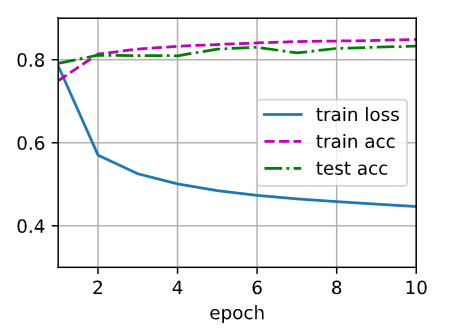
train_ch3(net,train_iter,test_iter,cross_entropy,num_epochs,updater)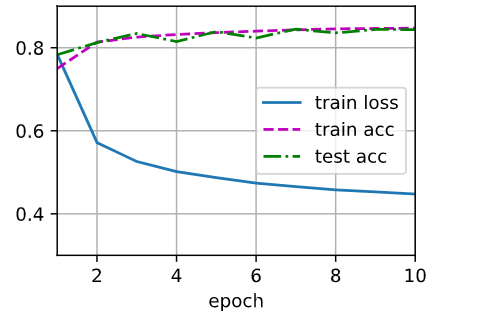
2.10 预测数据
python
def predict_ch3(net,test_iter,n=6):
    for X, y in test_iter:
        break # 仅拿出一批六个数据
    trues = d2l.get_fashion_mnist_labels(y)
    preds = d2l.get_fashion_mnist_labels(net(X).argmax(axis=1))
    titles = [true + '\n' + pred for true, pred in zip(trues,preds)]
    d2l.show_images(X[0:n].reshape((n,28,28)),1,n,titles=titles[0:n])

predict_ch3(net,test_iter)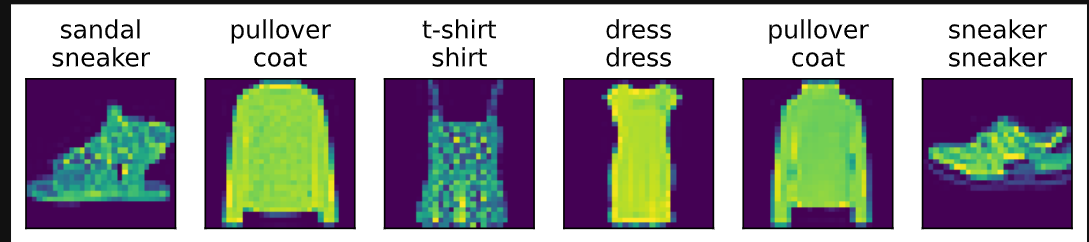
3. Sofmax回归(使用框架)
① 通过深度学习框架的高级API能够使实现softmax回归变得更加容易。
python
import torch
from torch import nn
from d2l import torch as d2l

batch_size = 256
train_iter, test_iter = d2l.load_data_fashion_mnist(batch_size)

# Softmax回归的输出是一个全连接层
# PyTorch不会隐式地调整输入的形状
# 因此,我们定义了展平层(flatten)在线性层前调整网络输入的形状
net = nn.Sequential(nn.Flatten(),nn.Linear(784,10))

def init_weights(m):
    if type(m) == nn.Linear:
        nn.init.normal_(m.weight, std=0.01) # 方差为0.01

net.apply(init_weights)
print(net.apply(init_weights)) # net网络的参数用的是init_weights初始化参数

# 在交叉熵损失函数中传递未归一化的预测,并同时计算softmax及其对数
loss = nn.CrossEntropyLoss()
# 使用学习率为0.1的小批量随即梯度下降作为优化算法
trainer = torch.optim.SGD(net.parameters(),lr=0.1)

#训练的论数
num_epochs = 10
d2l.train_ch3(net,train_iter,test_iter,loss,num_epochs,trainer)