1. 概述
CAPL 支持调用 .NET DLL ,即用**C#**开发的类库,对于一些在CAPL中不容易实现的功能,可以考虑使用这种方法开发。例如,可以用 C# 封装读取 Excel,供CAPL中使用,这个在后面我会具体讲如何做,本篇文章侧重提供一些简单的功能做演示。
2. 开发 DLL(C#)
2.1 设计要求
如下规定了C# 程序的语法要求:
函数必须定义在一个 public 类中,且该函数本身也是 public
函数必须是 static(静态方法)
函数名称必须是合法的 CAPL 标识符
函数及其所在的类都不能包含泛型参数
函数的返回类型必须是 void 、int 、bool 或 double
所有参数类型必须是int 、bool 、double 、string ,或由 int / double的一维数组
注意:C# 中的bool 参数对应于 CAPL 中的 dword 类型,因为 CAPL 中没有 bool 类型。
2.2 范例开发
这里我们以【判断路径是否存在的函数】作为范例,设计一个C# 程序:
如下程序就是严格按照了上面的规则,在visual studio 选择类库类型编译成dll,在CAPL中即可调用这个dll,相比 CAPL cpp dll,格式要简单很多。
csnamespace CommonUtils { public static class FileUtils { public static int DirectExists(string filePath) { if (string.IsNullOrWhiteSpace(filePath)) { return 0; } try { var fullPath = Path.GetFullPath(filePath); return File.Exists(fullPath) || Directory.Exists(fullPath) ? 1 : 0; } catch (Exception) { return 0; } } } }
2.3 注意事项
在visual studio中编译时
- 输出类型选择"类库"
- 目标平台选择"Any CPU"
- 目标框架选择 .NET 4.0 及以上

3. 调用 DLL(CAPL)
下面在CAPL中演示如何调用这个dll。这个生成好的 dll文件我会放到文章末尾,供大家参考。
3.1 调用说明
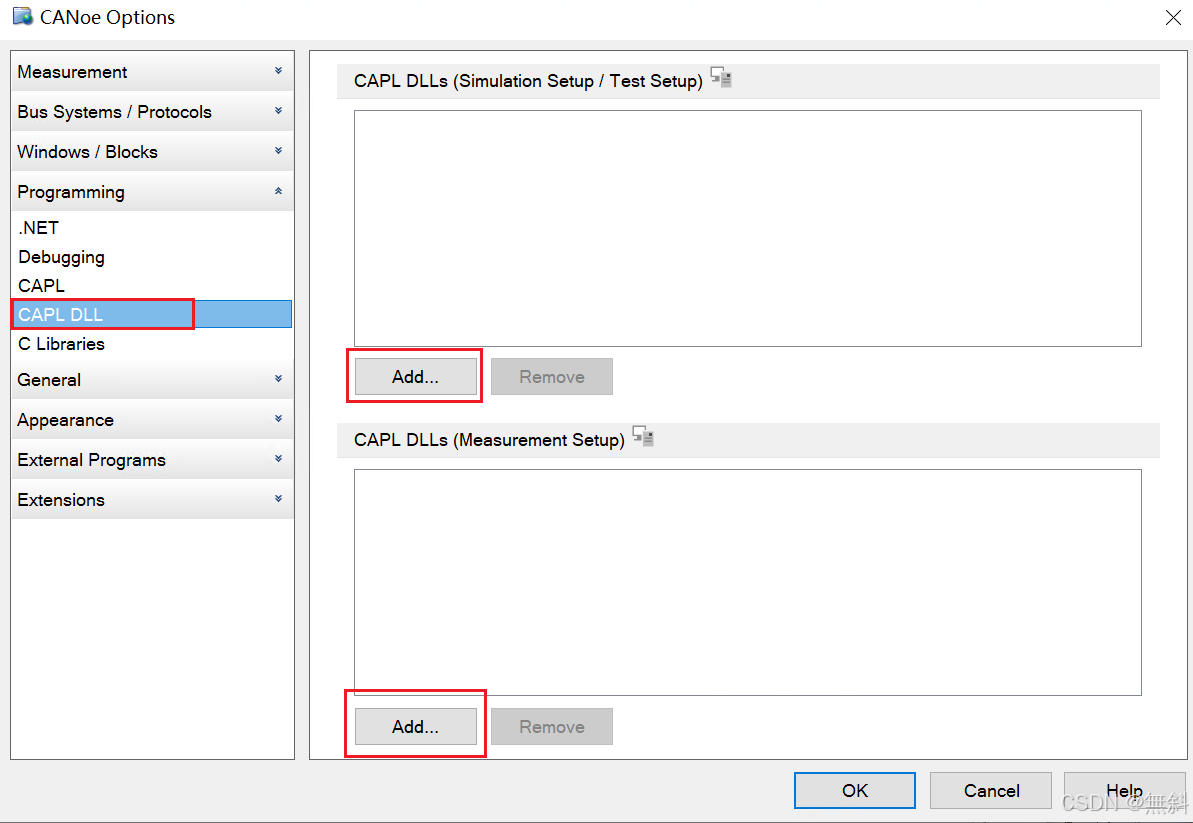
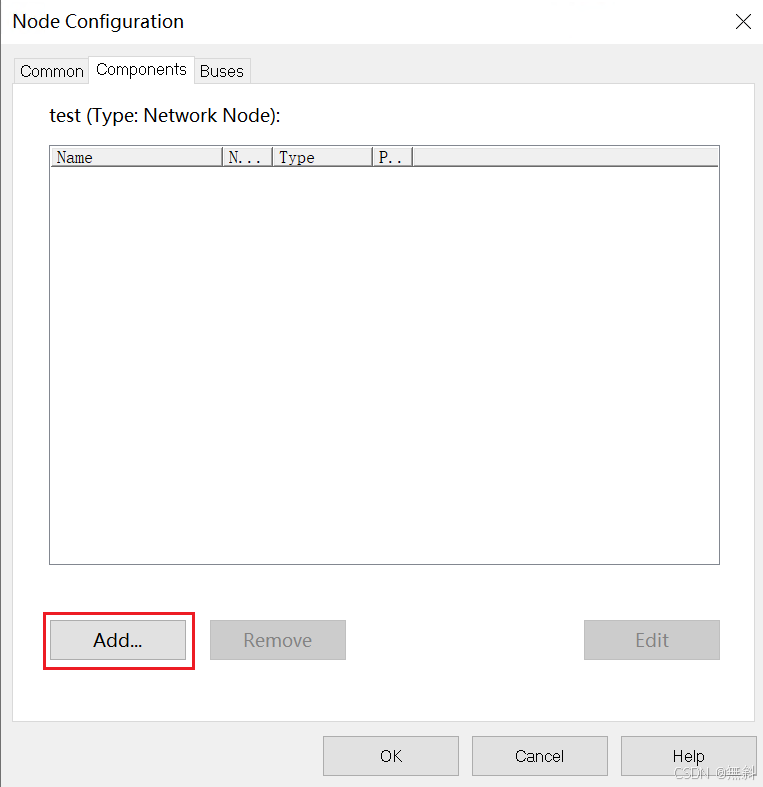
CANoe中可以用如下3种方式加载DLL。
- CANoe的配置选项的CAPL DLL 列表中选择加载
- 可以在 CAPL 程序的 includes 部分使用 #pragma netlibrary 指令来引入 DLL。
在这种情况下,该 DLL 只对当前这个 CAPL 程序可用。
cpp
includes
{
  #pragma netlibrary("netdll\CommonUtils.dll")
}- 在node或test module 的 Components 中 加载
3.2 范例开发
这里使用直接在CAPL中加载的方法。
cppincludes { #pragma netlibrary("netdll\CommonUtils.dll") } on key '1' { char sourcePath[1024] = "<填写本地的路径>"; long res; // 1:路径存在, 0:路径不存在 res = CommonUtils::FileUtils::DirectExists(sourcePath); write("res:%d", res); }
3.3 注意事项
重要:CAPL调用C# DLL时,函数中的字符串参数需要**显式预设大小,**主要体现在对dll中的函数二次封装时。如下面这个程序示例,这样是错误的。
cpp
// 这是错误代码示例,只做演示
long DirectExists_func(char path[])
{
  return CommonUtils::FileUtils::DirectExists(path);
}
编译会报如下错误:
Error 1000 at (39,42): 139 1 Internal error in compiler. Module: D:\CANwin\BaseLine_14.0.83\Projects_Source\capl_compiler\Source\Expression\MemberCallExpression.cpp, line: 139. ExcelDataReader.cin
可以修改为如下:
cpp// 正确代码示例 long DirectExists_func(char path[]) { char tempPath[255]; snprintf(tempPath, elCount(tempPath), "%s", path); return CommonUtils::FileUtils::DirectExists(tempPath); }
4. 结论
以上为 CAPL 中调用 .NET DLL 的范例演示,包括了C#和CAPL中的程序。相比与CAPL cpp dll,这种 .NET dll 开发相对简单,也能补充一些CAPL不具备的能力,个人比较推荐。欢迎大家评论区讨论。