需要用到的硬件配件有 esp32cc3 suppermini,SHT40温湿度模块,tp4056充电保护模块,1000毫安电池,两个100k电阻,一个拨动开关,还有一个2.13寸黑白屏的墨水屏,
这个温湿度计的特点就是极致的省电,1000毫安电池,充满电用个7-8个月没问题,采用深度睡眠模式+局部刷新,每隔60秒探测一次温湿度,如果温湿度变化小于阈值,继续沉睡,如果大于阈值才会局部刷新。电池电压和电量通过分压电阻,用引脚1做了ADC检测来显示电量。后付代码,包括外壳也是我用Fusion自己画的,做完的成品效果如图:
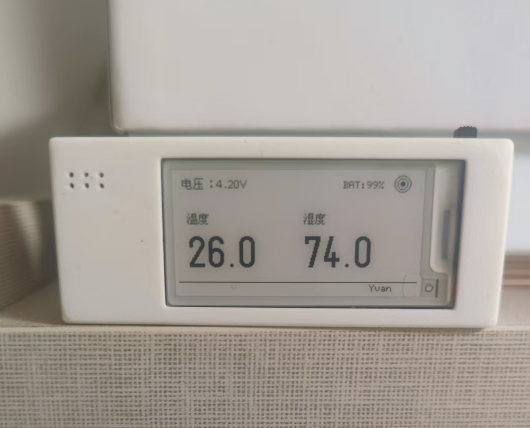
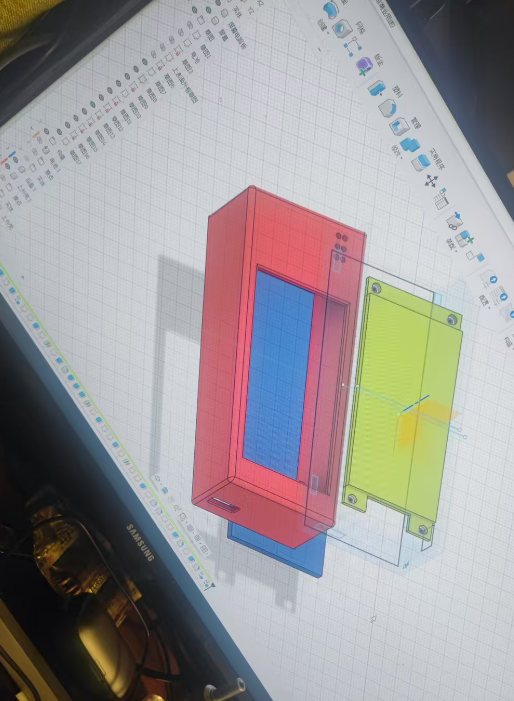
接线:墨水屏 ESP32-C3
VCC → 3.3V
GND → GND
SCL → GPIO4 (时钟)
SDA → GPIO6 (数据)
CS → GPIO7
DC → GPIO3
RES → GPIO2
BUSY → GPIO8
SHT40 ESP32-C3
VCC → 3.3V
GND → GND
SDA → GPIO9
SCL → GPIO10
tp4056
OUT+ → ESP32 5V
OUT- → GND
TP4056 OUT+
│
│
100k ← 第一个电阻(上拉电阻)
│
├────────→ ESP32 GPIO1(A1,ADC测量点)
│
100k ← 第二个电阻(下拉电阻)
│
│
TP4056 OUT-(GND)
你可以把它理解成三段:
第一段
OUT+ → 100k电阻 → 中间节点
第二段
中间节点 → 接到 ESP32 的 ADC 引脚(GPIO1)
第三段
中间节点 → 100k电阻 → GND(OUT-)
====
开关接法
你就把开关串在 TP4056 OUT+ 到 ESP32 5V 之间:
TP4056 OUT+ → 开关中间脚
开关一侧脚 → ESP32 5V
开关另一侧脚 → 悬空不接
TP4056 OUT- → ESP32 GND
这样:
开关拨到导通那边:ESP32 开机
开关拨到另一边:ESP32 断电关机
cpp
#include <GxEPD2_BW.h>
#include <SPI.h>
#include <U8g2_for_Adafruit_GFX.h>
#include <Wire.h>
#include <Adafruit_SHT4x.h>
#include "esp_sleep.h"

//================ 引脚定义 ================
#define EPD_CS      7
#define EPD_DC      3
#define EPD_RST     2
#define EPD_BUSY    8
#define BAT_ADC_PIN 1   // GPIO1(A1)用于测量电池电压

//================ 睡眠时间(秒) ================
#define SLEEP_TIME 60
#define DEBUG_MODE 0

#define CALIBRATION_FACTOR 0.97f   // 根据万用表校准得到:3.99 / 4.28 ≈ 0.932
#define TEMP_REFRESH_THRESHOLD 0.3f
#define HUM_REFRESH_THRESHOLD  1.0f
#define BATTERY_CHECK_INTERVAL 20     // 每10次唤醒测一次电池

//================ 屏幕初始化 ================
GxEPD2_BW<GxEPD2_213_B74, GxEPD2_213_B74::HEIGHT> display(
  GxEPD2_213_B74(EPD_CS, EPD_DC, EPD_RST, EPD_BUSY)
);

//================ SHT40 ================
Adafruit_SHT4x sht4 = Adafruit_SHT4x();

//================ U8G2 ================
U8G2_FOR_ADAFRUIT_GFX u8g2Fonts;

//================ 数据变量(RTC保存) ================
RTC_DATA_ATTR float lastTemp = -100;
RTC_DATA_ATTR float lastHum  = -100;
RTC_DATA_ATTR int wakeCount = 0;                 // 记录深睡唤醒次数
RTC_DATA_ATTR float lastBatteryVoltage = 0.0f;   // 上一次电池电压
RTC_DATA_ATTR int lastBattery = -1;              // 上一次电量百分比

float temperature = 0;
float humidity = 0;
int battery = 0;
float batteryVoltage = 0.0f;   // 当前电池电压,用于界面显示

//================ 电压读取(校准版) =================
// 说明:
// 1. 电池电压先经过 100k + 100k 分压,再进入 ADC 引脚
// 2. 所以 ADC 实际读到的是"电池电压的一半"
// 3. 乘以 2 是把分压还原回真实电池电压
// 4. 再乘以 CALIBRATION_FACTOR,是根据万用表实测做校准

float readBatteryVoltage() {
  int sum = 0;

  // 多次采样求平均,减少抖动
  for (int i = 0; i < 8; i++) {
    sum += analogRead(BAT_ADC_PIN);
    delay(1);
  }

  // ADC平均原始值
  float raw = sum / 8.0f;

  // 先换算出 ADC 引脚上的实际电压
  float adcVoltage = (raw / 4095.0f) * 3.3f;

  // 再根据分压关系还原电池电压,并乘以校准系数
  float batteryVoltage = adcVoltage * 2.0f * CALIBRATION_FACTOR;

  // 串口输出调试信息
  Serial.print("ADC原始值: ");
  Serial.println(raw);

  Serial.print("ADC脚电压: ");
  Serial.println(adcVoltage, 3);

  Serial.print("校准后电池电压: ");
  Serial.println(batteryVoltage, 3);

  return batteryVoltage;
}

//================ 电量换算 =================
// 这是简化算法:
// 4.2V 视为满电
// 3.0V 视为空电
// 中间按线性换算
int voltageToPercent(float voltage) {
  if (voltage >= 4.20f) return 100;
  if (voltage <= 3.00f) return 0;

  return (int)((voltage - 3.00f) / (4.20f - 3.00f) * 100.0f);
}

// 单独测试电量函数
void testBatteryVoltage() {
  float v = readBatteryVoltage();
  int p = voltageToPercent(v);

  Serial.print("换算后的电量百分比: ");
  Serial.print(p);
  Serial.println("%");
}

//================ 局部刷新:温湿度 =================
void updateTempHumUI() {
  display.setPartialWindow(0, 65, 250, 35);

  display.firstPage();
  do {
    u8g2Fonts.begin(display);
    u8g2Fonts.setFontMode(0);
    u8g2Fonts.setForegroundColor(GxEPD_BLACK);
    u8g2Fonts.setBackgroundColor(GxEPD_WHITE);

    display.fillRect(0, 65, 250, 35, GxEPD_WHITE);

    u8g2Fonts.setFont(u8g2_font_logisoso32_tn);

    u8g2Fonts.setCursor(10, 95);
    u8g2Fonts.print(temperature, 1);
    u8g2Fonts.print("C");

    u8g2Fonts.setCursor(130, 95);
    u8g2Fonts.print(humidity, 1);
    u8g2Fonts.print("%");

  } while (display.nextPage());
}

//================ 局部刷新:电量 =================
void updateBatteryUI() {
  display.setPartialWindow(150, 0, 100, 30);

  display.firstPage();
  do {
    u8g2Fonts.begin(display);
    u8g2Fonts.setFontMode(0);
    u8g2Fonts.setForegroundColor(GxEPD_BLACK);
    u8g2Fonts.setBackgroundColor(GxEPD_WHITE);

    display.fillRect(150, 0, 100, 30, GxEPD_WHITE);

    u8g2Fonts.setFont(u8g2_font_6x12_tf);
    u8g2Fonts.setCursor(170, 15);
    u8g2Fonts.print("BAT:");
    u8g2Fonts.print(battery);
    u8g2Fonts.print("%");

  } while (display.nextPage());
}

//================ 局部刷新:电压 =================
void updateVoltageUI() {
  display.setPartialWindow(0, 0, 140, 30);

  display.firstPage();
  do {
    u8g2Fonts.begin(display);
    u8g2Fonts.setFontMode(0);
    u8g2Fonts.setForegroundColor(GxEPD_BLACK);
    u8g2Fonts.setBackgroundColor(GxEPD_WHITE);

    // 清除左上角区域
    display.fillRect(0, 0, 140, 30, GxEPD_WHITE);

    // 显示中文电压
    u8g2Fonts.setFont(u8g2_font_wqy12_t_gb2312);
    u8g2Fonts.setCursor(5, 15);
    u8g2Fonts.print("电压:");
    u8g2Fonts.print(batteryVoltage, 2);
    u8g2Fonts.print("V");

  } while (display.nextPage());
}

//================ 全屏UI =================
void drawUI() {
  display.setFullWindow();

  display.firstPage();
  do {
    display.fillScreen(GxEPD_WHITE);

    u8g2Fonts.begin(display);
    u8g2Fonts.setFontMode(0);
    u8g2Fonts.setForegroundColor(GxEPD_BLACK);
    u8g2Fonts.setBackgroundColor(GxEPD_WHITE);

    // 左上角显示电压(中文)
    u8g2Fonts.setFont(u8g2_font_wqy12_t_gb2312);
    u8g2Fonts.setCursor(5, 15);
    u8g2Fonts.print("电压:");
    u8g2Fonts.print(batteryVoltage, 2);
    u8g2Fonts.print("V");

    // WiFi图标
    display.drawCircle(230, 10, 8, GxEPD_BLACK);
    display.drawCircle(230, 10, 5, GxEPD_BLACK);
    display.fillCircle(230, 10, 2, GxEPD_BLACK);

    // 中文标签
    u8g2Fonts.setFont(u8g2_font_wqy12_t_gb2312);
    u8g2Fonts.setCursor(10, 50);
    u8g2Fonts.print("温度");

    u8g2Fonts.setCursor(130, 50);
    u8g2Fonts.print("湿度");

    // 数值
    u8g2Fonts.setFont(u8g2_font_logisoso32_tn);

    u8g2Fonts.setCursor(10, 95);
    u8g2Fonts.print(temperature, 1);
    u8g2Fonts.print("C");

    u8g2Fonts.setCursor(130, 95);
    u8g2Fonts.print(humidity, 1);
    u8g2Fonts.print("%");

    // 电量
    u8g2Fonts.setFont(u8g2_font_6x12_tf);
    u8g2Fonts.setCursor(170, 15);
    u8g2Fonts.print("BAT:");
    u8g2Fonts.print(battery);
    u8g2Fonts.print("%");

    // 分割线
    display.drawLine(0, 110, 250, 110, GxEPD_BLACK);

    // 签名
    u8g2Fonts.setCursor(200, 120);
    u8g2Fonts.print("Yvan");

  } while (display.nextPage());
}
//================ 进入深度睡眠 ================
void goToSleep() {
  display.hibernate();   // 让墨水屏控制器进入低功耗
  Serial.flush();
  delay(200);

  esp_sleep_enable_timer_wakeup((uint64_t)SLEEP_TIME * 1000000ULL);
  esp_deep_sleep_start();
}

void updateTopUI() {
  display.setPartialWindow(0, 0, 250, 30);

  display.firstPage();
  do {
    u8g2Fonts.begin(display);
    u8g2Fonts.setFontMode(0);
    u8g2Fonts.setForegroundColor(GxEPD_BLACK);
    u8g2Fonts.setBackgroundColor(GxEPD_WHITE);

    display.fillRect(0, 0, 250, 30, GxEPD_WHITE);

    u8g2Fonts.setFont(u8g2_font_wqy12_t_gb2312);
    u8g2Fonts.setCursor(5, 15);
    u8g2Fonts.print("电压:");
    u8g2Fonts.print(batteryVoltage, 2);
    u8g2Fonts.print("V");

    u8g2Fonts.setFont(u8g2_font_6x12_tf);
    u8g2Fonts.setCursor(170, 15);
    u8g2Fonts.print("BAT:");
    u8g2Fonts.print(battery);
    u8g2Fonts.print("%");

  } while (display.nextPage());
}
//是否初始化屏幕
void initDisplay(bool fullInit) {
  display.init(9600, fullInit, 2, false);
  display.setRotation(1);
}
bool initSHT40() {
  for (int i = 0; i < 3; i++) {
    if (sht4.begin()) {
      return true;
    }

    Serial.print("SHT40初始化失败,重试次数=");
    Serial.println(i + 1);

    Wire.end();
    delay(100);
    Wire.begin(9, 10);
    Wire.setClock(50000);
    delay(100);
  }

  return false;
}
bool readSHT40(sensors_event_t &humidity_event, sensors_event_t &temp_event) {
  for (int i = 0; i < 3; i++) {
    if (sht4.getEvent(&humidity_event, &temp_event)) {
      return true;
    }

    Serial.print("SHT40读取失败,重试次数=");
    Serial.println(i + 1);
    delay(100);
  }

  return false;
}
//================ 主程序 =================
void setup() {
  Serial.begin(9600);
  SPI.begin(4, -1, 6, 7);
  delay(2000);
  // 先判断唤醒原因
  esp_sleep_wakeup_cause_t wakeup_reason = esp_sleep_get_wakeup_cause();

  /* if (wakeup_reason == ESP_SLEEP_WAKEUP_TIMER) {
    Serial.println("定时唤醒");
    display.init(9600, false, 2, false); // 关键:定时唤醒不要走首次初始化
  } else {
    Serial.println("首次开机");
    display.init(9600, true, 2, false);  // 首次开机完整初始化

  }
  display.setRotation(1); */

Wire.begin(9, 10);
Wire.setClock(50000);
delay(100);
// 如果初始化失败,直接进入深度睡眠,避免板子一直空耗电
if (!initSHT40()) {
  Serial.println("找不到SHT40!");
  goToSleep();
}


  sht4.setPrecision(SHT4X_LOW_PRECISION); // 当前精度:中等精度
  sht4.setHeater(SHT4X_NO_HEATER);        // 关闭加热器(省电)

  delay(50);  // 给传感器一点稳定时间
  // 设置 ADC 分辨率为 12 位
  // 读取范围对应 0 ~ 4095
  analogReadResolution(12);
  //设置 ADC 衰减为 11dB 这样可以测更高一点的电压,
  analogSetAttenuation(ADC_11db);

  // 读取温湿度
 sensors_event_t humidity_event, temp_event;

if (!readSHT40(humidity_event, temp_event)) {
  Serial.println("SHT40连续读取失败,进入睡眠");
  Wire.end();
  goToSleep();
}

float newTemp = temp_event.temperature;
float newHum  = humidity_event.relative_humidity;

Wire.end();
delay(1000);
  Serial.print("温湿度=");
  Serial.println(newTemp);
  Serial.println(newHum);


  // 首次开机:强制全刷
  if (wakeup_reason != ESP_SLEEP_WAKEUP_TIMER) {
    Serial.println("进入首次开机");

    temperature = newTemp;
    humidity = newHum;

    batteryVoltage = readBatteryVoltage();
    battery = voltageToPercent(batteryVoltage);
    // 保存首次电池数据,后面定时唤醒时可以复用
    lastBatteryVoltage = batteryVoltage;
    lastBattery = battery;

    lastTemp = temperature;
    lastHum  = humidity;
    initDisplay(true);//初始化屏幕
    drawUI(); //全刷
     delay(10000);//首次开机增加延迟,方便我烧录,不然端口总消失
  } else {
  Serial.println("进入定时唤醒");

  // 每次定时唤醒,计数 +1
  wakeCount++;
  if (wakeCount >= 10000) {
  wakeCount = 0;
 }

  Serial.print("当前唤醒次数 wakeCount=");
  Serial.println(wakeCount);

  Serial.println("开始判断是否需要局部刷新");

 Serial.println("准备局部刷新温湿度");
  temperature = newTemp;
  humidity = newHum;
  //只有变化超过阈值才刷新。
  bool tempChanged = abs(newTemp - lastTemp) > TEMP_REFRESH_THRESHOLD;
  bool humChanged  = abs(newHum - lastHum) > HUM_REFRESH_THRESHOLD;
  bool needRefreshTempHum = tempChanged || humChanged;

  // 判断这次是否需要检测电池
  bool needCheckBattery = (wakeCount % BATTERY_CHECK_INTERVAL == 0);

if (needRefreshTempHum || needCheckBattery) {
  initDisplay(false);
}


  if (needRefreshTempHum) {
    updateTempHumUI();
    lastTemp = newTemp;
    lastHum  = newHum;
    } else {
      Serial.println("温湿度变化不大,本次不刷新温湿度");
    }


  if (needCheckBattery) {
    Serial.println("达到电池检测间隔,本次读取电池电压");

    batteryVoltage = readBatteryVoltage();
    battery = voltageToPercent(batteryVoltage);

    lastBatteryVoltage = batteryVoltage;
    lastBattery = battery;
  } else {
    Serial.println("未达到电池检测间隔,本次复用上一次电池数据");

    batteryVoltage = lastBatteryVoltage;
    battery = lastBattery;
  }


  if (needCheckBattery) {
    Serial.println("本次刷新电池区域");
   // updateBatteryUI();
    //updateVoltageUI();
    updateTopUI();
  } else {
    Serial.println("本次不刷新电池区域");
  }
}

#if DEBUG_MODE
  Serial.println("调试模式,不进入睡眠");
  testBatteryVoltage();

#else
  Serial.println("进入深度睡眠");
  delay(4000);
  goToSleep();
#endif
}

void loop() {}
在附上一个监视串口的脚本代码:运行命令为:powershell -ExecutionPolicy Bypass -File .\monitor_com4.ps1
因为深度睡眠模式,只要一睡着了就关闭串口了,就没办法通过串口打印来观察日志进行调试了,很麻烦,所以写了一个脚本来循环链接串口:
powershell
$pio = "C:\Users\liuyifeng\.platformio\penv\Scripts\platformio.exe"
$port = "COM11"
$baud = "9600"

function Port-Exists {
    return [System.IO.Ports.SerialPort]::GetPortNames() -contains $port
}

while ($true) {
    Write-Host "等待 $port 出现..."

    while (-not (Port-Exists)) {
        Start-Sleep -Milliseconds 200
    }

    Write-Host "$port 已出现,启动串口监视..."

    $process = Start-Process `
        -FilePath $pio `
        -ArgumentList "device monitor --port $port --baud $baud" `
        -NoNewWindow `
        -PassThru

    # 只要端口还存在,就继续让 monitor 运行
    while ((Port-Exists) -and (-not $process.HasExited)) {
        Start-Sleep -Milliseconds 200
    }

    Write-Host "$port 已断开,关闭旧 monitor..."

    if (-not $process.HasExited) {
        Stop-Process -Id $process.Id -Force
    }

    Start-Sleep -Milliseconds 300
}