对于互联网上常提到的很多名词,例如容器化、微服务、前后端等,在工业信息化领域其实提及的相对要少一些,今天笔者通过一个简单的实例来阐述一下。
比如现在对于3D模型轻量化展示上,很多单位的信息化产品都有提及,主要是在网页端展示3D模型、3D网格和仿真计算结果,那么这些数据在后台转换后需要显示在网页上,这就是一个典型的前后端数据处理和展示的问题。
1、【前后端】是如何定义的?
**代码最终在哪里跑,它就叫什么!**并不是放在哪,因为开发的系统都是部署在服务器上的,浏览器只是发送访问请求。
- 跑在浏览器里 → 叫前端
- 跑在服务器里 → 叫后端
2、【后端】用户在提交模型到后端处理。
用户通过网页上将本地的模型提交到服务器上,往往是一些原始格式的数据,例如prt、stp、x_t以及inp、bdf、op2、hdf5等,这些数据提交后在服务器上转换为轻量化的stl、vtk等格式的文件,这些文件的特点是非常小,非常利于在网络上传播和网页上展示。这个处理过程完全是在后端服务器上进行的,
后端代码:
- 永远在服务器里跑
- 从不下载到浏览器
- 处理数据库、读取文件、转 VTK、提供接口
3、【前端】服务器收到请求后把模型发往前端。
要在网页上显示模型,那么需要将vtk文件发送到浏览器上显示,单独发送一个文件是不能显示在网页上的,因为没有容器展示这个模型,正如你一个txt文件,如果没有记事本这样的容器,在哪里查看呢?因此需要首先在前端有一个容器去展示这个模型,这样的前端有three.js、vtk.js等。下载的vtk模型驻守在浏览器内存然后加载到vtk这样的容器中。
4、【前端】执行顺序是怎么样的?
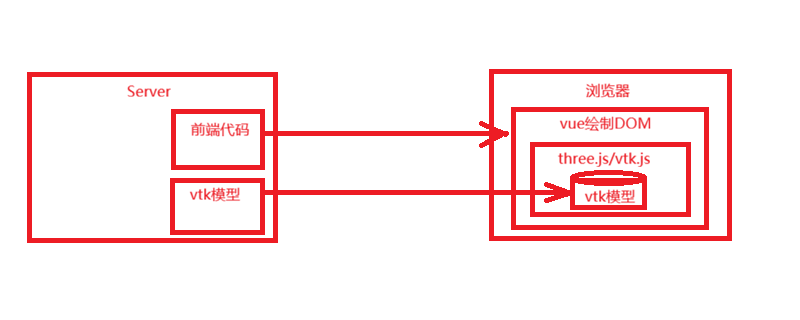
1)首先指出的是服务器上放着所有代码:
- 页面代码
- 前端框架vue、react或angular代码
- Three.js / VTK.js(3D 查看器)代码
- 样式文件代码
2)用户打开浏览器:
- 下载所有前端代码到内存(浏览器内存),浏览器相当于一个空盒子。
3)前端代码运行:
- 前端框架、three.js/vtk.js库都是运行在前段的代码。
- 请求服务器上的vtk文件。
4)vtk下载到内存(浏览器内存)
5)three.js/vtk.js解析内存中的vtk:
- 显示在网页中。
如下图所示:
- 提交inp、bdf、op2等原模型文件到服务器 → 后端转成 .vtk / .vtu
- 后端把完整的 VTK 文件通过接口 / URL 返回给前端
- 前端通过接口请求文件
- 文件以二进制流的形式传输到浏览器
- 浏览器直接在内存里解析、渲染
- 全程不写入硬盘
- 关闭标签页 → 内存释放 → 文件彻底消失
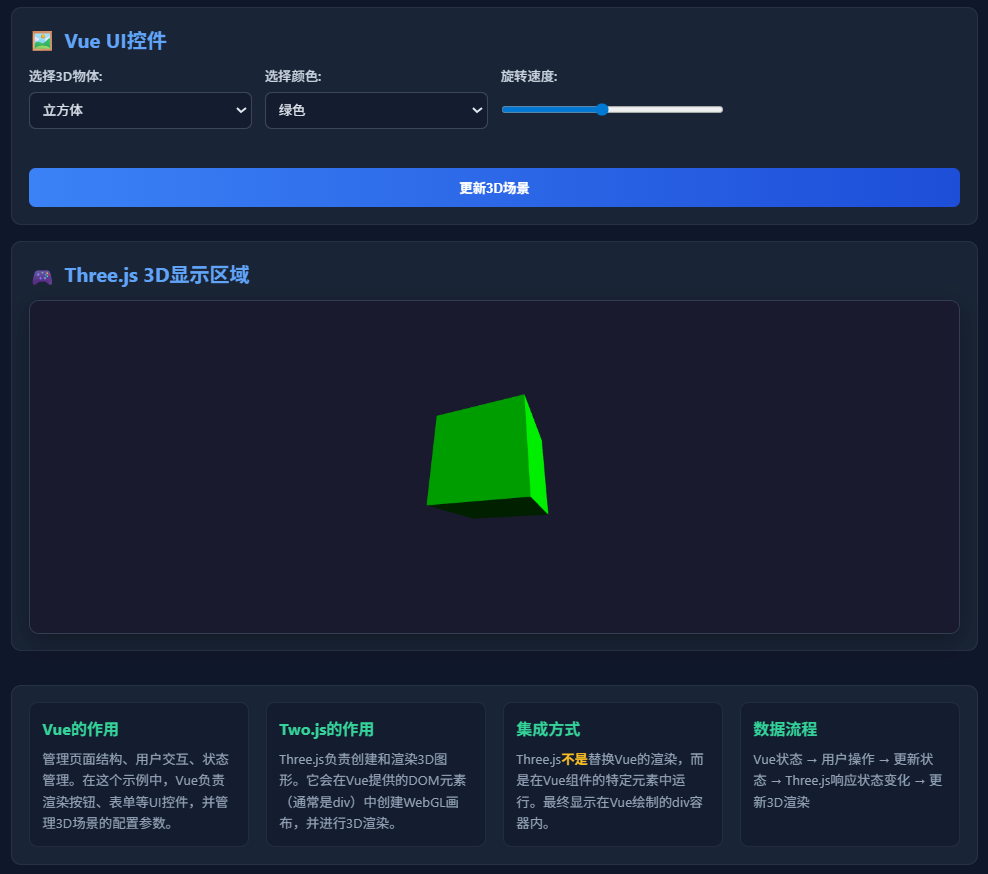
5、【示例代码】和显示结果
直接写一个包含前端代码的html页面运行,如下:
html
<!DOCTYPE html>
<html lang="zh-CN">
<head>
<meta charset="UTF-8">
<meta name="viewport" content="width=device-width, initial-scale=1.0">
<title>Vue + Three.js 3D模型显示示例</title>
<style>
* {
margin: 0;
padding: 0;
box-sizing: border-box;
}
body {
font-family: 'Segoe UI', Tahoma, Geneva, Verdana, sans-serif;
background: #0f172a;
color: #e2e8f0;
min-height: 100vh;
}
.app-container {
max-width: 1200px;
margin: 0 auto;
padding: 20px;
}
header {
text-align: center;
margin-bottom: 30px;
padding: 20px;
background: rgba(30, 41, 59, 0.7);
border-radius: 12px;
backdrop-filter: blur(10px);
}
h1 {
font-size: 2.5rem;
margin-bottom: 10px;
background: linear-gradient(90deg, #60a5fa, #34d399);
-webkit-background-clip: text;
-webkit-text-fill-color: transparent;
}
.subtitle {
color: #94a3b8;
font-size: 1.1rem;
}
.content-wrapper {
display: flex;
flex-direction: column;
gap: 20px;
}
.vue-ui-section {
background: rgba(30, 41, 59, 0.7);
border-radius: 12px;
padding: 20px;
backdrop-filter: blur(10px);
border: 1px solid rgba(148, 163, 184, 0.1);
}
.section-title {
font-size: 1.5rem;
margin-bottom: 15px;
color: #60a5fa;
display: flex;
align-items: center;
gap: 10px;
}
.section-title i {
font-size: 1.8rem;
}
.form-container {
display: grid;
grid-template-columns: repeat(auto-fit, minmax(200px, 1fr));
gap: 15px;
margin-bottom: 20px;
}
.form-group {
margin-bottom: 15px;
}
label {
display: block;
margin-bottom: 8px;
color: #cbd5e1;
font-weight: 500;
}
input, select, button {
width: 100%;
padding: 12px;
border-radius: 8px;
border: 1px solid rgba(148, 163, 184, 0.3);
background: rgba(15, 23, 42, 0.5);
color: #e2e8f0;
font-size: 1rem;
transition: all 0.3s ease;
}
input:focus, select:focus {
outline: none;
border-color: #60a5fa;
box-shadow: 0 0 0 3px rgba(96, 165, 250, 0.2);
}
button {
background: linear-gradient(90deg, #3b82f6, #1d4ed8);
color: white;
font-weight: 600;
cursor: pointer;
border: none;
margin-top: 10px;
}
button:hover {
transform: translateY(-2px);
box-shadow: 0 4px 12px rgba(59, 130, 246, 0.4);
}
button:active {
transform: translateY(0);
}
.three-container {
width: 100%;
height: 400px;
border-radius: 12px;
overflow: hidden;
position: relative;
box-shadow: 0 10px 30px rgba(0, 0, 0, 0.3);
border: 1px solid rgba(148, 163, 184, 0.2);
}
canvas {
display: block;
width: 100% !important;
height: 100% !important;
}
.info-panel {
background: rgba(30, 41, 59, 0.7);
border-radius: 12px;
padding: 20px;
margin-top: 20px;
backdrop-filter: blur(10px);
border: 1px solid rgba(148, 163, 184, 0.1);
}
.info-grid {
display: grid;
grid-template-columns: repeat(auto-fit, minmax(250px, 1fr));
gap: 20px;
}
.info-card {
background: rgba(15, 23, 42, 0.5);
padding: 15px;
border-radius: 10px;
border: 1px solid rgba(148, 163, 184, 0.1);
}
.info-card h3 {
color: #34d399;
margin-bottom: 10px;
font-size: 1.2rem;
}
.info-card p {
color: #94a3b8;
line-height: 1.6;
}
.highlight {
color: #fbbf24;
font-weight: bold;
}
footer {
text-align: center;
margin-top: 30px;
color: #64748b;
font-size: 0.9rem;
}
</style>
</head>
<body>
<div id="app">
<div class="app-container">
<header>
<h1>Vue + Three.js 3D集成示例</h1>
<p class="subtitle">3D模型显示在Vue绘制的div容器中</p>
</header>
<div class="content-wrapper">
<!-- Vue UI部分 -->
<div class="vue-ui-section">
<h2 class="section-title">
<span>🖼️</span> Vue UI控件
</h2>
<div class="form-container">
<div class="form-group">
<label>选择3D物体:</label>
<select v-model="selectedShape">
<option value="cube">立方体</option>
<option value="sphere">球体</option>
<option value="torus">圆环</option>
</select>
</div>
<div class="form-group">
<label>选择颜色:</label>
<select v-model="selectedColor">
<option value="0x00ff00">绿色</option>
<option value="0xff0000">红色</option>
<option value="0x0000ff">蓝色</option>
<option value="0xffff00">黄色</option>
</select>
</div>
<div class="form-group">
<label>旋转速度:</label>
<input type="range" v-model="rotationSpeed" min="0.01" max="0.1" step="0.01">
</div>
<div class="form-group">
</div>
</div>
<button @click="update3DScene">更新3D场景</button>
</div>
<!-- Three.js容器部分 -->
<div class="vue-ui-section">
<h2 class="section-title">
<span>🎮</span> Three.js 3D显示区域
</h2>
<!-- 3D模型将显示在这个div中 -->
<div ref="threeContainer" class="three-container" id="threejs-container"></div>
</div>
<!-- 说明信息 -->
<div class="info-panel">
<div class="info-grid">
<div class="info-card">
<h3>Vue的作用</h3>
<p>管理页面结构、用户交互、状态管理。在这个示例中,Vue负责渲染按钮、表单等UI控件,并管理3D场景的配置参数。</p>
</div>
<div class="info-card">
<h3>Two.js的作用</h3>
<p>Three.js负责创建和渲染3D图形。它会在Vue提供的DOM元素(通常是div)中创建WebGL画布,并进行3D渲染。</p>
</div>
<div class="info-card">
<h3>集成方式</h3>
<p>Three.js<span class="highlight">不是</span>替换Vue的渲染,而是在Vue组件的特定元素中运行。最终显示在Vue绘制的div容器内。</p>
</div>
<div class="info-card">
<h3>数据流程</h3>
<p>Vue状态 → 用户操作 → 更新状态 → Three.js响应状态变化 → 更新3D渲染</p>
</div>
</div>
</div>
</div>
<footer>
<p>Vue负责UI | Three.js负责3D渲染 | 协同工作</p>
</footer>
</div>
</div>
<!-- 引入Vue -->
<script src="https://cdn.jsdelivr.net/npm/vue@2.6.14/dist/vue.js"></script>
<!-- 引入Three.js -->
<script src="https://cdnjs.cloudflare.com/ajax/libs/three.js/r128/three.min.js"></script>
<script>
new Vue({
el: '#app',
data: {
selectedShape: 'cube',
selectedColor: '0x00ff00',
rotationSpeed: 0.05,
scene: null,
camera: null,
renderer: null,
currentMesh: null,
animationId: null
},
mounted() {
this.initThreeJS();
},
methods: {
// 初始化Three.js场景
initThreeJS() {
const container = this.$refs.threeContainer;
// 创建场景
this.scene = new THREE.Scene();
this.scene.background = new THREE.Color(0x1a1a2e);
// 创建相机
this.camera = new THREE.PerspectiveCamera(
75,
container.clientWidth / container.clientHeight,
0.1,
1000
);
this.camera.position.z = 5;
// 创建渲染器
this.renderer = new THREE.WebGLRenderer({ antialias: true });
this.renderer.setSize(container.clientWidth, container.clientHeight);
this.renderer.setPixelRatio(window.devicePixelRatio);
container.appendChild(this.renderer.domElement);
// 添加光源
const light = new THREE.DirectionalLight(0xffffff, 1);
light.position.set(5, 5, 5);
this.scene.add(light);
const ambientLight = new THREE.AmbientLight(0x404040, 0.5);
this.scene.add(ambientLight);
// 创建初始物体
this.createObject();
// 开始动画循环
this.animate();
},
// 创建3D物体
createObject() {
// 移除当前物体
if (this.currentMesh) {
this.scene.remove(this.currentMesh);
}
// 根据选择创建不同几何体
let geometry;
switch(this.selectedShape) {
case 'cube':
geometry = new THREE.BoxGeometry(2, 2, 2);
break;
case 'sphere':
geometry = new THREE.SphereGeometry(1.5, 32, 32);
break;
case 'torus':
geometry = new THREE.TorusGeometry(1, 0.4, 16, 100);
break;
}
// 创建材质
const material = new THREE.MeshPhongMaterial({
color: parseInt(this.selectedColor),
shininess: 100
});
// 创建网格
this.currentMesh = new THREE.Mesh(geometry, material);
this.scene.add(this.currentMesh);
},
// 更新3D场景
update3DScene() {
this.createObject();
},
// 动画循环
animate() {
this.animationId = requestAnimationFrame(this.animate);
if (this.currentMesh) {
this.currentMesh.rotation.x += this.rotationSpeed;
this.currentMesh.rotation.y += this.rotationSpeed;
}
this.renderer.render(this.scene, this.camera);
}
},
// 组件销毁时清理资源
beforeDestroy() {
if (this.animationId) {
cancelAnimationFrame(this.animationId);
}
if (this.renderer) {
this.renderer.dispose();
}
}
});
</script>
</body>
</html>通过在线运行html网页显示效果