一、介绍
给大家安利一个我亲手打磨封装的宝藏工具类 PTcpClient基于.NET 原生的 TcpClient 撸出来的自用 TCP 客户端,自己用着直呼真香,索性拿出来分享给大伙。
直接帮你把底层 NetworkStream 字节发送、UTF-8 编码全都包办了,发消息不用再折腾底层细节;还自带连接状态、IP 端口、线程间隔这些全套状态管理,省心又好控。支持优雅启停,靠着取消令牌和全局运行状态,随时能安稳暂停、恢复消息监听,不用粗暴断开。内置日志联动,调试报错一键打印,接收的数据还能通过通知中心自动广播分发,其他模块直接就能订阅使用。
不管是设备通讯、数据采集还是远程指令交互这种 TCP 长连接场景,拿过来就能直接用,稳定又省事,再也不用每次项目都重复写一套 TCP 客户端逻辑了~
二、代码
cs
using System;
using System.Collections.Generic;
using System.Net.Sockets;
using System.Text;
using System.Threading;

namespace PiFramework
{
    public class PTcpClient
    {
        private Thread receiveThread;
        private int ReceiveThreadSleep = 150;
        private TcpClient client;
        private NetworkStream stream;
        private string serverIp = null;
        private int serverPort = 0;
        private bool m_IsRunConnect = false;

        public string objectname { get; set; }
        protected CancellationTokenSource _cts = new CancellationTokenSource();
        private string _NowReceivedMessage = "";

        public string NowReceivedMessage
        {
            get
            {
                while (!_cts.IsCancellationRequested )
                {
                    //string.IsNullOrEmpty(_NowReceivedMessage)
                    Thread.Sleep(ReceiveThreadSleep);
                    if (string.IsNullOrEmpty(_NowReceivedMessage))
                    {
                        continue;
                    }
                    string temp = _NowReceivedMessage;
                    _NowReceivedMessage = "";
                     return temp;
                }
               throw (new Exception("线程停止"));
            }
        }

        public bool IsRunConnect
        {
            get
            {
                return m_IsRunConnect;
            }
            set
            {
                m_IsRunConnect = value;
            }
        }
        public string Ip
        {
            get
            {
                return serverIp;
            }
            set
            {
                serverIp = value;
            }

        }
        public int Port
        {
            get
            {
                return serverPort;
            }
            set
            {
                serverPort = value;
            }

        }
        public string Name
        {
            get
            {
                return objectname;
            }
            set
            {
                objectname = value;
            }
        }
        public int ThreadSleepTime
        {
            get
            {
                return ReceiveThreadSleep;

            }
            set
            {
                ReceiveThreadSleep = value;
            }
        }


        public PTcpClient(string ip, int port, string name, int threadSleepTime = 150)
        {
            serverIp = ip;
            serverPort = port;
            ReceiveThreadSleep = threadSleepTime;
            objectname = name;
            PNotificationCenter.Instance().AddObserver("SysRunstatus", this.OnNotification);
        }


        public bool Connect()
        {
            CloseConnection();
            client = new TcpClient();

            if (client != null && client.Connected)
            {
                PLog.Instance.Debug("已连接到服务器。");
                return true;
            }
            if (serverIp == null || serverPort == 0)
            {
                PLog.Instance.Warning("服务器地址或端口错误。");
                return false;
            }
            try
            {
                PLog.Instance.Debug("正在连接服务器...");
                IAsyncResult result = client.BeginConnect(serverIp, serverPort, null, null);
                bool success = result.AsyncWaitHandle.WaitOne(TimeSpan.FromSeconds(2));
                if (!success)
                {
                    // 连接超时,关闭连接并抛出异常或者进行其他处理
                    client.Close();
                    throw new Exception("连接超时");
                }
                else
                {
                    // 连接成功,结束连接操作
                    client.EndConnect(result);
                    stream = client.GetStream();
                    PLog.Instance.Debug("已连接到服务器。");
                    receiveThread = new Thread(ReceiveLoop);
                    receiveThread.IsBackground = true;
                    receiveThread.Start();
                    m_IsRunConnect = true;
                    _cts = new CancellationTokenSource();
                    return true;
                }
            }
            catch (Exception ex)
            {
                PLog.Instance.Error($"连接错误: {ex.Message}");
                return false;
            }
        }

        public bool isConnected()
        {
            if (client != null && client.Connected)
            {
                //  PLog.Instance.Debug("已连接到服务器。");
                return true;
            }
            return false;
        }
        public void SendData(string message)
        {
            if (client == null || !client.Connected)
            {
                PLog.Instance.Error("未连接到服务器。");
                return;
            }
            try
            {
                byte[] data = Encoding.UTF8.GetBytes(message);
                stream.Write(data, 0, data.Length);
                PLog.Instance.Debug($"已发送: {message}");
            }
            catch (Exception ex)
            {
                PLog.Instance.Error($"发送错误: {ex.Message}");
            }
        }

        public void OnNotification(string name, object sender, Dictionary<string, object> userInfo)
        {
            if (name == "SysRunstatus")
            {
                bool sysStatus = Convert.ToBoolean(userInfo["status"]);
                PLog.Instance.Debug("接受到信号:" + sysStatus);
                if (sysStatus)
                {
                    _cts = new CancellationTokenSource();
                    return;
                }
                _cts.Cancel();
            }
        }


        protected void ReceiveLoop()
        {
            try
            {
                while (client != null && client.Connected)
                {
                    if (stream.DataAvailable)
                    {
                        byte[] buffer = new byte[1024];
                        int bytesRead = stream.Read(buffer, 0, buffer.Length);
                        if (bytesRead > 0)
                        {
                            string receivedMessage = Encoding.UTF8.GetString(buffer, 0, bytesRead);
                            _NowReceivedMessage = receivedMessage;
                            PLog.Instance.Debug(this.objectname +"收到: " + receivedMessage);
                            PNotificationCenter.Instance().PostNotification(objectname, this, new Dictionary<string, object> { { "message", receivedMessage } });
                        }
                    }
                    Thread.Sleep(ReceiveThreadSleep);
                }
            }
            catch (Exception ex)
            {
                PLog.Instance.Error($"接收错误: {ex.Message}");
            }
        }
        public void CloseConnection()
        {
            try
            {
                stream?.Close();
                client?.Close();
                m_IsRunConnect = false;
                PLog.Instance.Debug("连接已关闭。");
            }
            catch (Exception ex)
            {
                PLog.Instance.Error($"关闭错误: {ex.Message}");
            }
        }
    }
}
三、主要接口 说明
public PTcpClient(string ip, int port, string name, int threadSleepTime = 150)
ip:服务器 IP 地址。
port:服务器端口。
name:客户端标识名称,用于通知消息的发送者名称。
threadSleepTime:接收线程的休眠间隔(毫秒),默认 150ms。值越小,消息响应越快,但 CPU 占用越高。
public void SendData(string message)
功能:向服务器发送 UTF-8 编码的字符串消息。
条件:必须已连接,否则记录错误并返回。
异常:发送过程中异常会被捕获并记录。
public void CloseConnection()
功能:关闭网络流和 TcpClient,将 IsRunConnect 设为 false。
注意:该方法不会自动停止接收线程,但接收线程中的 client.Connected 检测会因连接关闭而退出循环。
public bool isConnected()
功能:返回当前是否处于连接状态(基于 TcpClient.Connected 属性)
四、使用
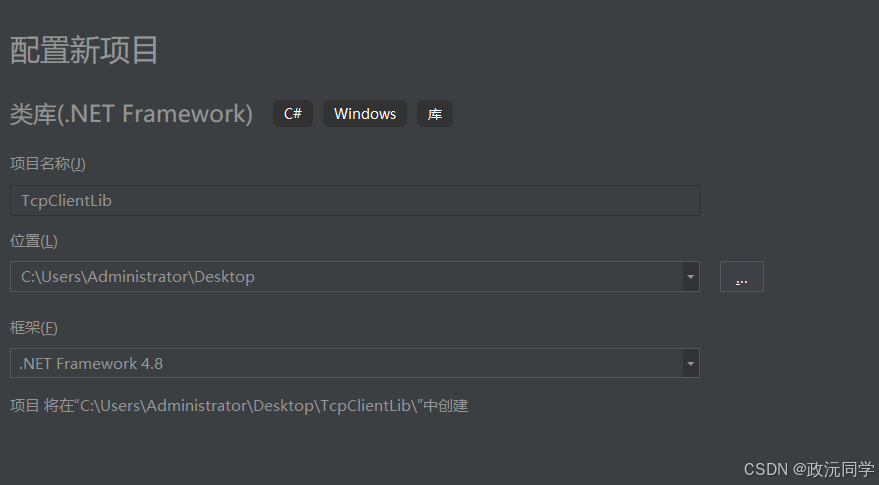
1.创建DLL

2.DLL名称
3.创建类
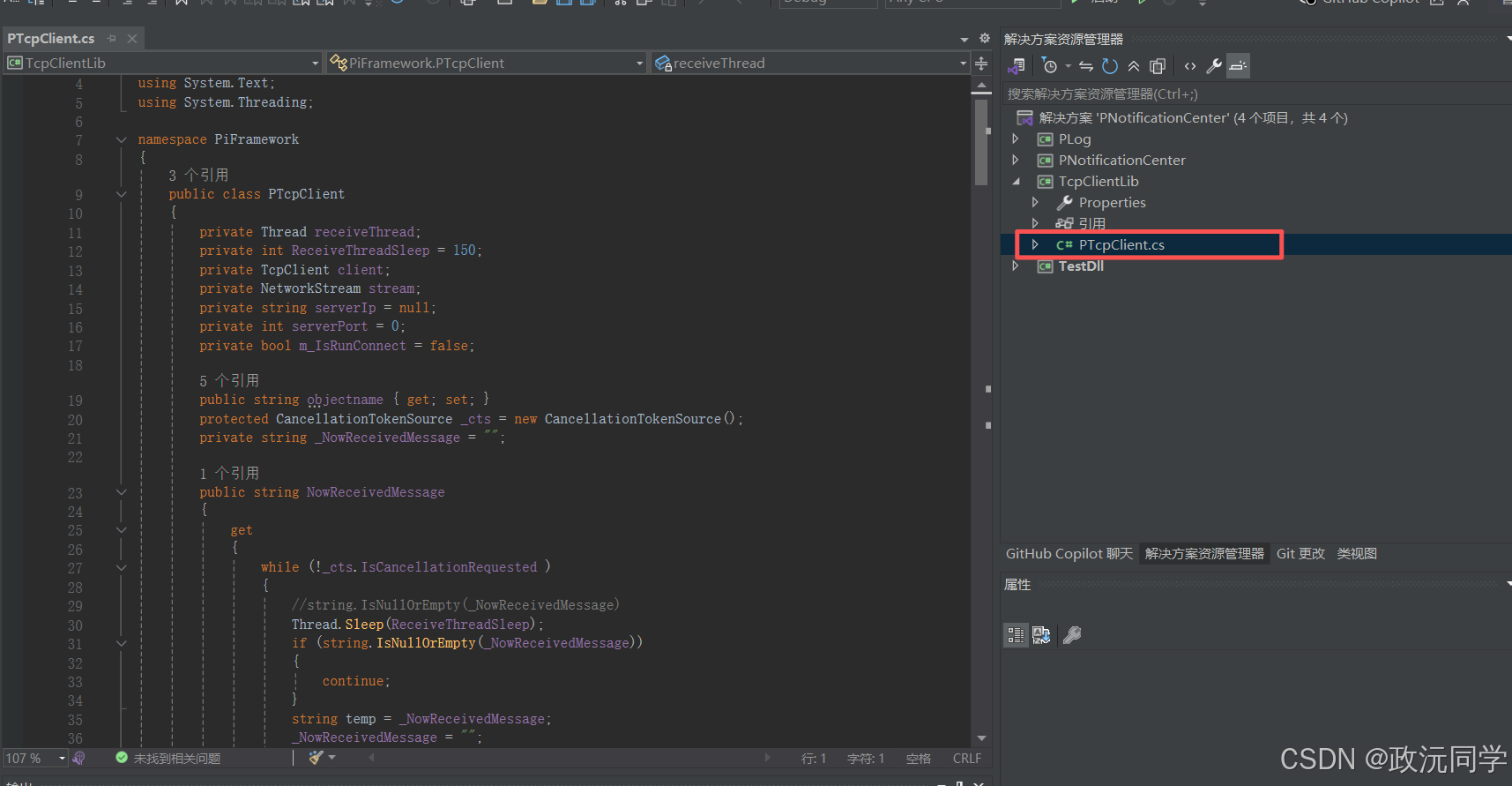
把代码复制上去,PLog (日志)、PNotificationCenter(观察者)、TestDll (测试程序) 这些都用得上,上一章有说明
一种很好用的设计模式 https://blog.csdn.net/qq_54122623/article/details/160167275?spm=1011.2124.3001.6209
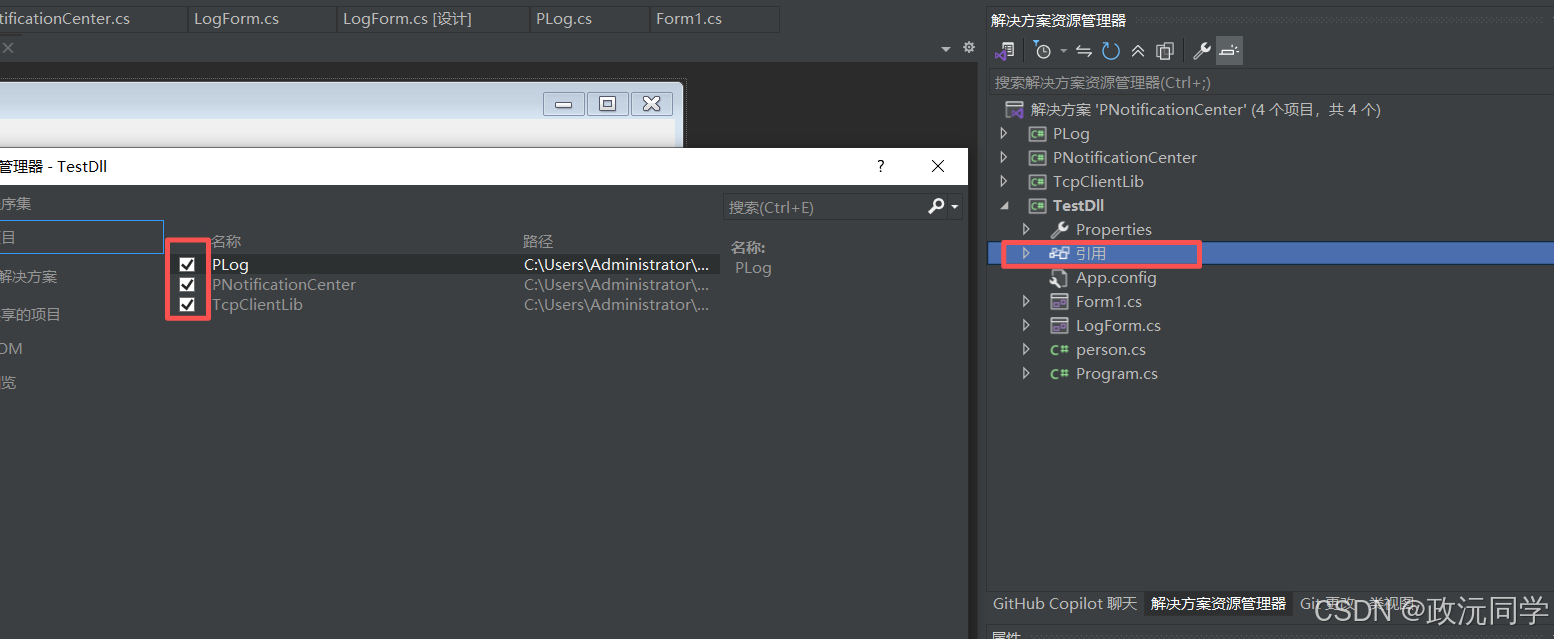
引用DLL
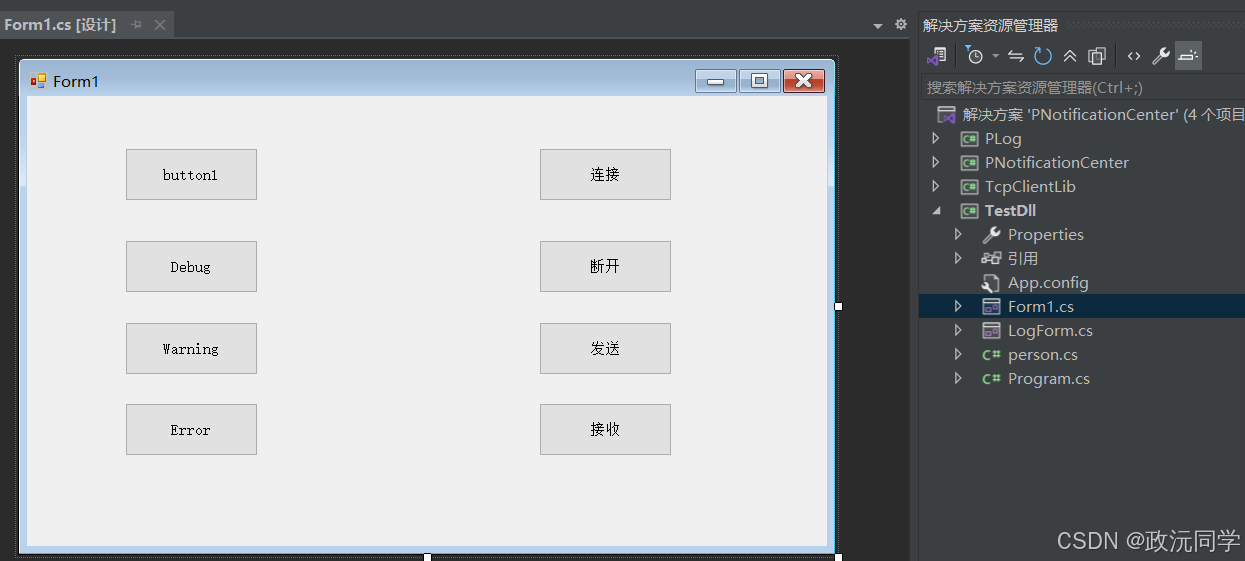
4.添加按钮
创建连接、断开、发送、接收 这几个按钮来调试它。
cs
       PTcpClient pTcpClient = null;
       private void Form1_Load(object sender, EventArgs e)
       {
           //创建对象
           pTcpClient = new PTcpClient("127.0.0.1",8080,"myClient");
       }

       private void button5_Click(object sender, EventArgs e)
       {

           //  连接服务器
           bool isok  =  pTcpClient.Connect();
           if (isok)
           {
               PLog.Instance.Debug("连接成功过");
               return;
           }
           PLog.Instance.Error("连接失败!");
           return ;
       }

       private void button7_Click(object sender, EventArgs e)
       {

           //  发送数据
           bool isok = pTcpClient.isConnected();
           if (!isok) {

               PLog.Instance.Error("未连接!");
               return;
           }
           pTcpClient.SendData(pTcpClient.Name + "发送了数据");
       }

       private void button6_Click(object sender, EventArgs e)
       {
           //断开连接
           pTcpClient.CloseConnection();
       }

       private void button8_Click(object sender, EventArgs e)
       {
           //接收数据
           Task task = Task.Run(DoWork);
       }

       void DoWork()
       {
           string mess = pTcpClient.NowReceivedMessage;
           if (mess == "A") {
               PLog.Instance.Log("接受到我想要的信息:" + mess);
           }
       }
5.接收数据有两种方法
一种是加个线程等待数据。
cs
    private void button8_Click(object sender, EventArgs e)
    {
        //接收数据
        Task task = Task.Run(DoWork);
    }

    void DoWork()
    {
        string mess = pTcpClient.NowReceivedMessage;
        if (mess == "A") {
            PLog.Instance.Log("接受到我想要的信息:" + mess);
        }
    }
另一种是PNotificationCenter。
发布事件
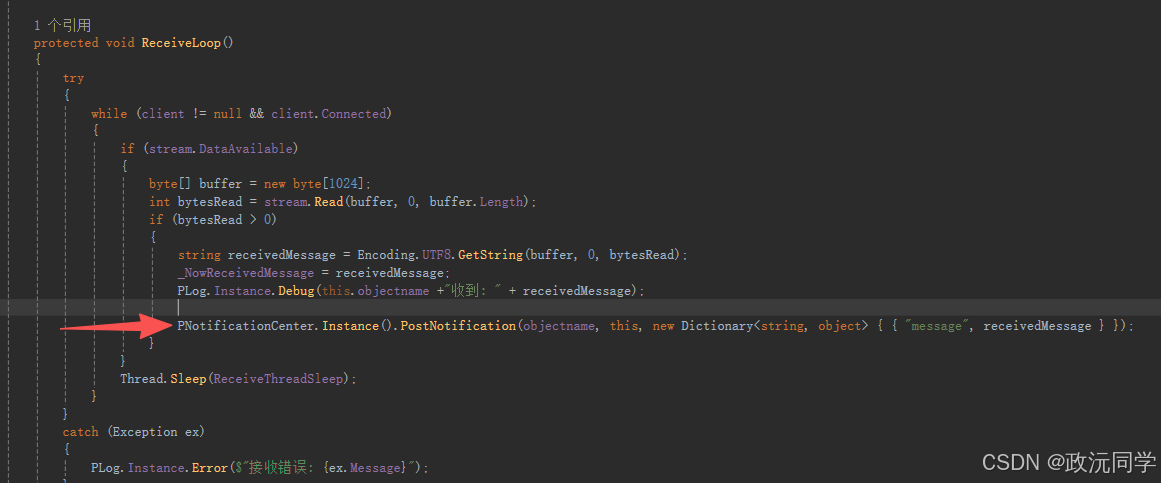
订阅事件
cs
PNotificationCenter.Instance().AddObserver(tcpid, this.OnNotification);接收事件
cs
    public void OnNotification(string name, object sender, Dictionary<string, object> userInfo)
    {

        if (name == tcpid) {


            string mess = userInfo["message"].ToString();

            PLog.Instance.Log( mess);


        }

    }
五、效果
C# TCP通讯(客户端)例子