/* input 调试工具(自动识别 键盘,鼠标的位移和按键,屏幕的单点触摸)*/
#include <stdio.h>
#include <stdlib.h>
#include <unistd.h>
#include <fcntl.h>
#include <linux/input.h>
#include <sys/ioctl.h>
#include <string.h>

static const char *ev_type(int type)
{
    switch(type)
    {
        case EV_SYN: return "SYN";  // 同步事件:一批输入事件结束了
        case EV_KEY: return "KEY";  // 按键事件:键盘,鼠标的按键,触摸按下
        case EV_REL: return "REL";  // 相对坐标事件:鼠标
        case EV_ABS: return "ABS";  // 绝对坐标事件:触摸屏,摇杆,多点触摸
        case EV_MSC: return "MSC";  // 杂项事件:原始硬件扫描码,特殊输入设备信息
        default: return "UNKNOWN";
    }
}

static const char *key_state(int v)
{
    if (v == 0) return "up";    // 松开
    if (v == 1) return "down";  // 按下
    if (v == 2) return "REPEAT"; // 长按
    return "?";
}

static void print_device_name(int fd)
{
    char name[256] = "unknown";
    /* ioctl: 从 /dev/input/eventX 获取输入设备名字 input_dev->name,
        例如: "gpio_keys"  "gt9147" */
    if (ioctl(fd, EVIOCGNAME(sizeof(name)), name) >= 0)
    {
        printf("Device Name: %s\n", name);
    }
}

int main(int argc, char *argv[])
{
    if (argc < 2)
    {
        fprintf(stderr, "Usage: %s /dev/input/eventX\n", argv[0]);
        return -1;
    }

    int fd = open(argv[1], O_RDONLY);
    if (fd < 0)
    {
        perror("open");
        return -1;
    }

    print_device_name(fd);

    struct input_event ev;

    printf("Start reading input events...\n");

    while (1)
    {
        ssize_t ret = read(fd, &ev, sizeof(ev));
        if (ret < 0)
        {
            perror("read");
            break;
        }
        else if(ret == 0){
            printf("device closed\n");
            break;
        }
        else if(ret != sizeof(ev))
            continue;
/*
        printf("type=%d(%s) code=%d value=%d\n",
            ev.type, ev_type(ev.type), ev.code, ev.value);
*/
        switch (ev.type){
            case  EV_SYN:
                break;
            case EV_KEY: // 键盘,开发板的按键,鼠标的左右按键 中键
                if(ev.code == BTN_LEFT){
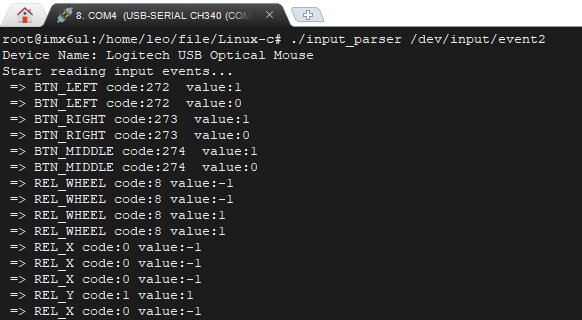
                    printf(" => BTN_LEFT code:%d  value:%d\n",ev.code,ev.value);
                }
                else if (ev.code == BTN_RIGHT)
                {
                    printf(" => BTN_RIGHT code:%d  value:%d\n",ev.code,ev.value);
                }
                else if (ev.code == BTN_MIDDLE)
                {
                    printf(" => BTN_MIDDLE code:%d  value:%d\n",ev.code,ev.value);
                }
                else{
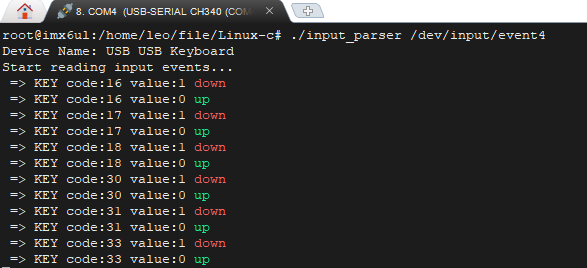
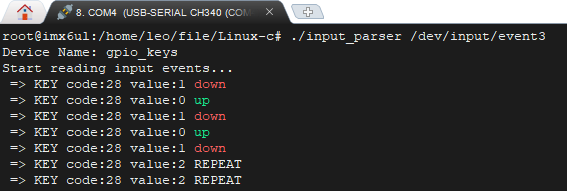
                    printf(" => KEY code:%d value:%d %s\n", ev.code,ev.value, key_state(ev.value));
                }
                break;
            case EV_REL:    // 鼠标
                switch(ev.code){
                    case REL_WHEEL: // 滚轮
                        printf(" => REL_WHEEL code:%d value:%d\n", ev.code, ev.value);
                        break;
                    case REL_X: // 鼠标X方向 相对移动
                        printf(" => REL_X code:%d value:%d\n", ev.code, ev.value);
                        break;
                    case REL_Y:
                        printf(" => REL_Y code:%d value:%d\n", ev.code, ev.value);
                        break;
                    default:
                        printf(" => REL code=%d value=%d\n", ev.code, ev.value);
                        break;
                }
                break;
            case EV_ABS: // 单点触摸
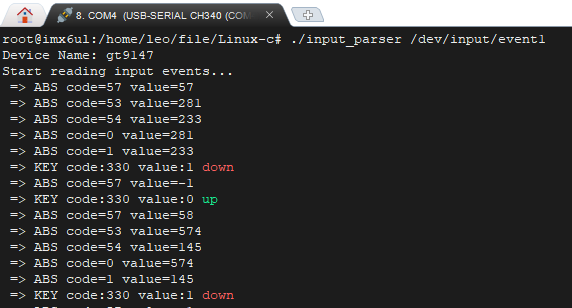
                printf(" => ABS code=%d value=%d\n", ev.code, ev.value);
                break;
            default:break;
        }
    }

    close(fd);
    return 0;
}
有线键盘、鼠标插入开发板后,输入下面的命令,查看设备信息:
cat /proc/bus/input/devices
确认 键盘、鼠标、触摸屏 对应的 /dev/input/eventX
键盘:
鼠标:
开发板的gpio按键
触摸屏的单点触摸: