Whisper系列文章目录
第一章 Whisper 库
文章目录
- Whisper系列文章目录
- 前言
- Whisper库
- 一、Whisper简介
- 二、调用openai的whisper的两种方式
- 三、whisper安装
- 四、whisper简单使用
- 五、whisper使用
-
- 1.使用whisper.load_model()方法,生成whisper的模型对象model。
- 2.使用whisper.load_audio()方法,读取音频信号,并返回numpy数组。
- 3.使用whisper.pad_or_trim()方法,将音频数组剪切或补长到30秒的数组数据。
- 4.使用whisper.log_mel_spectrogram()方法,将音频数组转为Log-Mel频谱图的向量。
- 5.返回模型后,使用detect_language()方法,获取模型的语言种类名称。
- 6.使用whisper.DecodingOptions()方法,获取whisper模块的选项信息对象options。
- 7.使用whisper.decode()方法,将Log-Mel频谱图的向量翻译。
- 8.实例
- 总结
前言
本文主要整理 Whisper 库相关内容,包括 Whisper 简介、可用模型与语言、模型下载地址、Whisper 安装、zhconv 简繁转换库、Whisper 简单使用、转录与解码方法,以及完整代码示例和运行结果。
Whisper库
一、Whisper简介
1.Whisper
- Whisper是OpenAI的一种语音识别系统,能把语音转换为文字,在英语语音识别方面的稳健性和准确性接近人类水平
- Whisper还支持多种语言转录和语言翻译。
- 与DALLE-2和GPT-3不同,Whisper是一种免费的开源模型。OpenAI发布了模型和代码,作为构建利用语音识别的有用应用程序的基础。
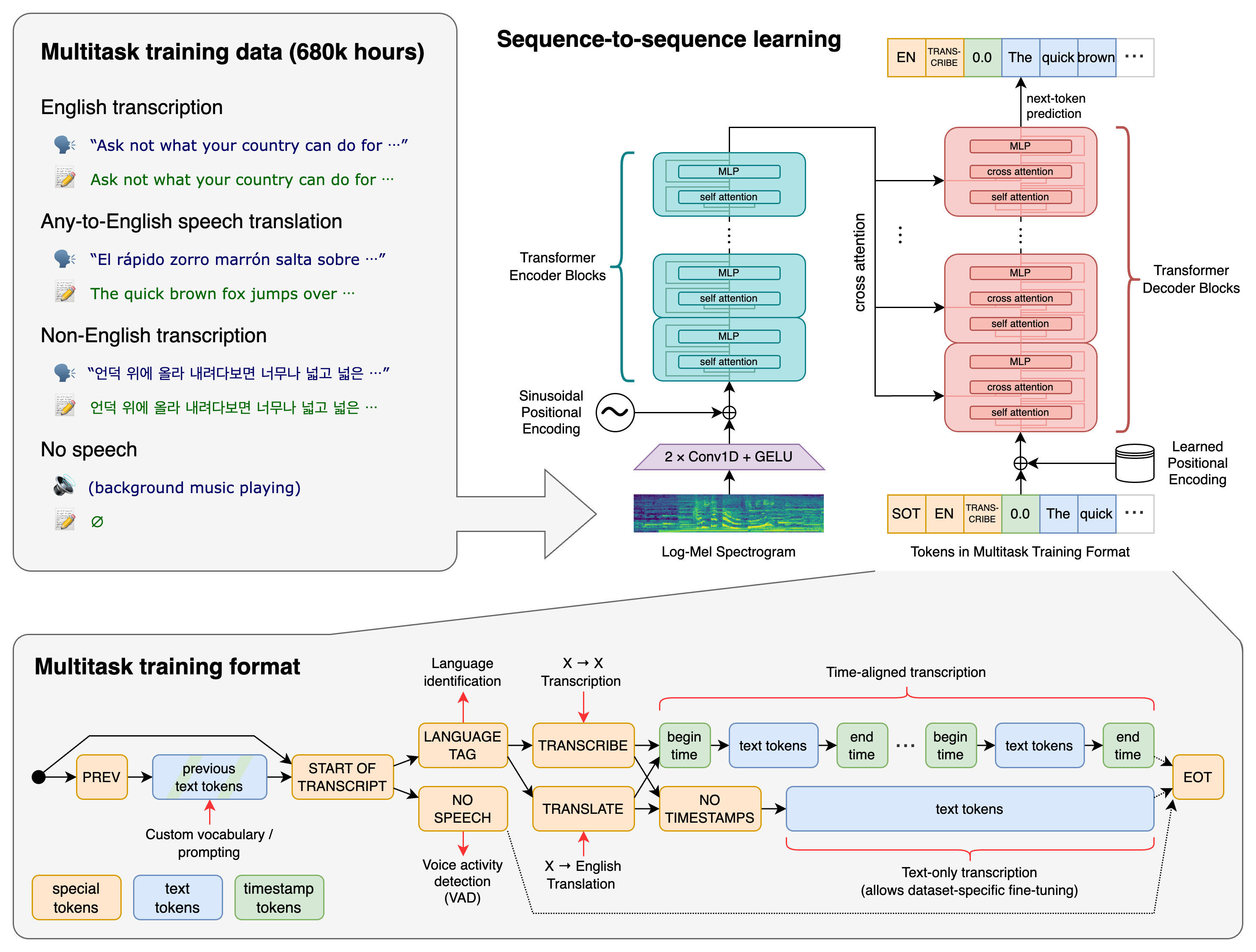
- Transformer序列到序列模型针对各种语音处理任务进行训练,包括多语言语音识别、语音翻译、口语识别和语音活动检测。这些任务共同表示为由解码器预测的一系列标记,允许单个模型取代传统语音处理管道的多个阶段。多任务训练格式使用一组特殊标记作为任务说明符或分类目标。
2.Whisper可用的模型和语言
- Whisper提供了五种型号尺寸,其中四种有纯英文版本。其他的为多语言版本。
- 纯英语应用程序的模型往往性能更好,尤其是对于tiny.en和base.en模型。
| 尺寸 | 参数量 | 纯英文版 | 多语言版 | 所需显存 | 相对速度 |
|---|---|---|---|---|---|
| tiny | 39 M | tiny.en | tiny | 1 GB | 32倍 |
| base | 74 M | base.en | base | 1 GB | 16倍 |
| small | 244 M | small.en | small | 2 GB | 6倍 |
| medium | 769 M | medium.en | medium | 5 GB | 2倍 |
| large | 1550 M | N/A | large | 10 GB | 1倍 |
3.模型.pt格式模型下载地址
- tiny.en:https://openaipublic.azureedge.net/main/whisper/models/d3dd57d32accea0b295c96e26691aa14d8822fac7d9d27d5dc00b4ca2826dd03/tiny.en.pt
- tiny:https://openaipublic.azureedge.net/main/whisper/models/65147644a518d12f04e32d6f3b26facc3f8dd46e5390956a9424a650c0ce22b9/tiny.pt
- base.en:https://openaipublic.azureedge.net/main/whisper/models/25a8566e1d0c1e2231d1c762132cd20e0f96a85d16145c3a00adf5d1ac670ead/base.en.pt
- base:https://openaipublic.azureedge.net/main/whisper/models/ed3a0b6b1c0edf879ad9b11b1af5a0e6ab5db9205f891f668f8b0e6c6326e34e/base.pt
- small.en:https://openaipublic.azureedge.net/main/whisper/models/f953ad0fd29cacd07d5a9eda5624af0f6bcf2258be67c92b79389873d91e0872/small.en.pt
- small:https://openaipublic.azureedge.net/main/whisper/models/9ecf779972d90ba49c06d968637d720dd632c55bbf19d441fb42bf17a411e794/small.pt
- medium.en:https://openaipublic.azureedge.net/main/whisper/models/d7440d1dc186f76616474e0ff0b3b6b879abc9d1a4926b7adfa41db2d497ab4f/medium.en.pt
- medium:https://openaipublic.azureedge.net/main/whisper/models/345ae4da62f9b3d59415adc60127b97c714f32e89e936602e85993674d08dcb1/medium.pt
- large-v1:https://openaipublic.azureedge.net/main/whisper/models/e4b87e7e0bf463eb8e6956e646f1e277e901512310def2c24bf0e11bd3c28e9a/large-v1.pt
- large-v2:https://openaipublic.azureedge.net/main/whisper/models/81f7c96c852ee8fc832187b0132e569d6c3065a3252ed18e56effd0b6a73e524/large-v2.pt
4.language目前支持99种语言(不分大小写)
text
"en":"english", "zh":"chinese",   "de":"german",    "es":"spanish",   "ru":"russian",
"ko":"korean",  "fr":"french",    "ja":"japanese",  "pt":"portuguese","tr":"turkish",
"pl":"polish",  "ca":"catalan",   "nl":"dutch",     "ar":"arabic",    "sv":"swedish",
"it":"italian", "id":"indonesian","hi":"hindi",     "fi":"finnish",   "vi":"vietnamese",
"he":"hebrew",  "uk":"ukrainian", "el":"greek",     "ms":"malay",     "cs":"czech",
"ro":"romanian","da":"danish",    "hu":"hungarian", "ta":"tamil",     "no":"norwegian",
"th":"thai",    "ur":"urdu",      "hr":"croatian",  "bg":"bulgarian", "lt":"lithuanian",
"la":"latin",   "mi":"maori",     "ml":"malayalam", "cy":"welsh",     "te":"telugu",
"fa":"persian", "lv":"latvian",   "bn":"bengali",   "sr":"serbian",   "az":"azerbaijani",
"sl":"slovenian", "kn":"kannada", "et":"estonian",  "mk":"macedonian","br":"breton",
"eu":"basque",  "is":"icelandic", "hy":"armenian",  "ne":"nepali",    "mn":"mongolian",
"bs":"bosnian", "kk":"kazakh",    "sq":"albanian",  "sw":"swahili",   "gl":"galician",
"mr":"marathi", "pa":"punjabi",   "si":"sinhala",   "km":"khmer",     "sn":"shona",
"yo":"yoruba",  "so":"somali",    "af":"afrikaans", "oc":"occitan",   "ka":"georgian",
"be":"belarusian", "tg":"tajik",  "sd":"sindhi",    "gu":"gujarati",  "am":"amharic",
"yi":"yiddish", "lo":"lao",       "uz":"uzbek",     "fo":"faroese",   "ht":"haitian creole",
"ps":"pashto",  "tk":"turkmen",   "mt":"maltese",   "lb":"luxembourgish", "my":"myanmar",
"bo":"tibetan", "tl":"tagalog",   "mg":"malagasy",  "as":"assamese",  "tt":"tatar",
"haw":"hawaiian","ln":"lingala",  "ha":"hausa",     "ba":"bashkir",   "jw":"javanese",
"su":"sundanese"
二、调用openai的whisper的两种方式
1.使用whisper库,读取whisper的.pt单个模型文件。
2.使用transformers库,读取whisper的.bin或.safetensor模型文件。
whisper库调用
三、whisper安装
1.安装whisper:
- python版本3.8-3.11
- 系统安装ffmpeg工具
- 安装gpu版本的pytorch(可以不安装,默认是安装cpu版本)
text
pip3 install torch torchvision torchaudio --index-url https://download.pytorch.org/whl/cu118- 安装whisper库
text
pip install -U openai-whisper- 或者
text
pip install git+https://github.com/openai/whisper.git2.简繁转换zhconv库
- 安装zhconv库
text
pip install zhconv- 使用:
- 使用zhconv.convert(s, locale)方法,将中文字符串,简繁转换,返回目标字符串。
- 公式:
text
convert(s, locale)- 参数:
- s为需要转换的字符串
- locale为转换的方式。'zh-hans'为简体字转为繁体字。'zh-cn'为繁体字转为简体字。
四、whisper简单使用
1.使用whisper.load_model()方法,生成whisper的模型对象model。
- 公式:
text
model = whisper.load_model(name, device)- 参数:
- name:为模型的名称或者.pt模型的路径字符串。模型名称如"base",.pt模型路径如:"d:/python/envs/whisp/pt/large-v2.pt"
- device:为使用的是cpu还是gpu。默认"cpu"。一般可以:
text
device = torch.device('cuda' if torch.cuda.is_available() else 'cpu')- 返回模型对象
- 返回模型对象,使用model.device属性,获取模型device属性对象。
2.返回模型对象model后,使用transcribe()方法,将音频(或者带音频的视频)转换为文字。
- 公式:
text
text = model.transcribe(audio, fp16=False, language)- 参数:
- audio要打开的音频文件的路径字符串或音频波形。可以是str,np.ndarray,torch.Tensor
- fp16:是否fp16压缩,默认为False
- language:为转为文字同时,需要翻译的目标语言。
- 返回翻译结果字典
- text:为整个文件的翻译内容
- segments:为分段的翻译内容
- start和end:为分段语言的时间起止。
- text:为分段翻译内容字符串
- temperature:在语音转文本模型生成结果时,控制输出随机性和多样性的参数。
- avg_logprob:语音转文字模型预测的置信度评分的平均值。
- compression_ratio:音频信号压缩的比率。
- no_speech_prob:模型在某段时间内检测到没有语音信号的概率。
- language:为翻译的目标语言。
结果字典
json
{
"text":"...",
"segments":[
    {"id":0,
     "seek":0,
     "start":0.0,
     "end":1.64000,
     "text":"...",
     "token":[...,...,...],
     "temperature":0.0,
     "avg_logprob":...,
     "compression_ratio":...,
     "no_speech_prob":...
    },
    {"id":1,
     "seek":0,
     "start":1.64000,
     "end":3.43020,
     "text":"...",
     "token":[...,...,...],
     "temperature":0.0,
     "avg_logprob":...,
     "compression_ratio":...,
     "no_speech_prob":...
    },
    ...
    ],
"language":"zh"
}
3.实例
- 简易使用
代码
python
import whisper
import torch
import zhconv

modelName = "d:/python/envs/whisp/pt/tiny.pt"
filePath = r"d:/python/envs/whisp/video/3.mp4"
torch.cuda.empty_cache()
device = torch.device('cuda' if torch.cuda.is_available() else 'cpu')
model = whisper.load_model(modelName, device)
language = "zh"
text = model.transcribe(audio=filePath, fp16=False, language=language)
res = zhconv.convert(text['text'], 'zh-cn')
print(res)
结果
text
那两万块钱超古三个月上一巴了今天我外的一万区而水到细中心中一半送一半平常了不回来等应- 生成txt文件,和vtt(网络字幕)文件
代码
python
import whisper
import os
import zhconv
import pathlib
import torch

modelName = "d:/python/envs/whisp/pt/small.pt"
torch.cuda.empty_cache()
device = torch.device('cuda' if torch.cuda.is_available() else 'cpu')
outputFolder = "output"
filePath = r"d:/python/envs/whisp/video/4.mp4"
fileNameStem = pathlib.Path(filePath).stem            # 获取文件名
vttName = f"{fileNameStem}.vtt"
txtName = f"{fileNameStem}.txt"
model = whisper.load_model(modelName, device)
result = model.transcribe(audio=filePath, language="Chinese", fp16=False)
text = zhconv.convert(result['text'], 'zh-cn')
print(text)

segments = result["segments"]
all_seg = ", ".join([i["text"] for i in segments if i is not None])
all_seg = zhconv.convert(all_seg, 'zh-cn')
with open(os.path.join(outputFolder, txtName), "w", encoding="utf-8") as file:
    file.write(all_seg)

with open(os.path.join(outputFolder, vttName), "w", encoding="utf-8") as f:
    # f.write("WEBVTT\n\n")                          # 写入第一行
    for cue in result["segments"]:                   # 遍历字典中的每个提示
        # 获取开始时间和结束时间,并转换成vtt格式
        start = cue["start"]
        end = cue["end"]
        start_h = int(start // 3600)
        start_m = int((start % 3600) // 60)
        start_s = int(start % 60)
        start_ms = int((start % 1) * 1000)
        end_h = int(end // 3600)
        end_m = int((end % 3600) // 60)
        end_s = int(end % 60)
        end_ms = int((end % 1) * 1000)
        start_str = f"{start_h:02}:{start_m:02}:{start_s:02}.{start_ms:03}"
        end_str = f"{end_h:02}:{end_m:02}:{end_s:02}.{end_ms:03}"
        # 获取文本内容,并去掉空格和换行符
        one_text = cue["text"].strip().replace("\n", " ")
        one_text = zhconv.convert(one_text, 'zh-cn')        # 繁体字转为简体字
        # 写入时间标记和文本内容,并加上空行
        f.write(f"{start_str} --> {end_str}\n")
        f.write(f"{one_text}\n\n")
结果
text
输出结果
量子计算究竟有什么优势其运算效率远远大于普通的计算机...有着巨大的优势

生成txt文件:
量子计算究竟有什么优势, 其运算效率远远大于普通的计算机, ...有着巨大的优势

生成vtt文件:
00:00:00.000 --> 00:00:02.000
量子计算究竟有什么优势

00:00:02.000 --> 00:00:05.000
首先量子底特是它的基本信息单元
...
00:01:59.200 --> 00:02:01.200
量子计算有着巨大的优势
五、whisper使用
1.使用whisper.load_model()方法,生成whisper的模型对象model。
- 公式:
text
model = whisper.load_model(name, device)- 参数:
- name:为模型的名称或者.pt模型的路径字符串。模型名称如"base",.pt模型路径如:"d:/python/envs/whisp/pt/large-v2.pt"
- device:为使用的是cpu还是gpu。默认"cpu"。一般可以:
text
device = torch.device('cuda' if torch.cuda.is_available() else 'cpu')- 返回模型对象
- 返回模型对象后,使用model.device属性,获取模型device属性对象。
2.使用whisper.load_audio()方法,读取音频信号,并返回numpy数组。
- 公式:
text
audio = whisper.load_audio(file)- 参数:
- file:为音频(或者带音频的视频文件)文件字符串。
- 返回音频的numpy数组
3.使用whisper.pad_or_trim()方法,将音频数组剪切或补长到30秒的数组数据。
- 公式:
text
audio = whisper.pad_or_trim(array)- 参数:
- array:为音频numpy数组。
- 返回30秒的音频numpy数组
4.使用whisper.log_mel_spectrogram()方法,将音频数组转为Log-Mel频谱图的向量。
- Log-Mel频谱图:声音在时间和频率上的分布图
- 公式:
text
mel = whisper.log_mel_spectrogram(audio)- 参数:
- audio:为音频数组,或在音频向量。
- 返回Log-Mel频谱图的音频向量mel。
- 返回Log-Mel频谱图的音频向量后,使用to(model.device)来定义向量保存的设备,cpu或gpu
text
audio = whisper.log_mel_spectrogram(audio).to(model.device)5.返回模型后,使用detect_language()方法,获取模型的语言种类名称。
- 公式:
text
res = model.detect_language(mel)- 参数:
- mel:为Log-Mel频谱图的音频向量
- 返回一个两元素的元组。
- 第一个元素:为Log-Mel频谱图的音频向量的统计值向量,一般没有用。
- 第二个元素:为不同语言的得分的字典,键为语言名字符,如"zh",值为该语言的得分,如:0.87551。所有语言的得分综合为1。得分最高的说明为该语言的机率最大。
- 返回一个两元素的元组,可以使用{max(res1, key=res1.get)}返回最高得分语言的键名。
6.使用whisper.DecodingOptions()方法,获取whisper模块的选项信息对象options。
- 公式:
text
options = whisper.DecodingOptions(fp16=True)- 返回whisper模块的选项信息对象options
7.使用whisper.decode()方法,将Log-Mel频谱图的向量翻译。
- 公式:
text
text = whisper.decode(model, mel, options)- 参数:
- model:为模型对象
- mel:为Log-Mel频谱图的音频向量
- options:为whisper模块的选项信息对象options。默认为whisper.DecodingOptions()
- 返回翻译结果对象,对象的属性:
- 属性text:为整个文件的翻译内容字符串。
- 属性language:为翻译的目标语言字符串。
8.实例
代码
python
import whisper
import torch

modelName = "d:/python/envs/whisp/pt/base.pt"
torch.cuda.empty_cache()
device = torch.device('cuda' if torch.cuda.is_available() else 'cpu')
model = whisper.load_model(modelName, device)
filePath = r"d:/python/envs/whisp/video/3.mp4"
audio = whisper.load_audio(filePath)
audio = whisper.pad_or_trim(audio)
mel = whisper.log_mel_spectrogram(audio).to(model.device)
res = model.detect_language(mel)

print(max(res[1], key=res[1].get))
options = whisper.DecodingOptions()
result = whisper.decode(model, mel)
print(result.text)
print(result.language)
结果
text
zh
那两万混进超古三个月生一万了今天我把那一万取得水到习于中心中一万送一万平臟了不亏了等音
zh
总结
本文整理了 Whisper 库的基础知识与使用方式,包括模型规格、支持语言、模型下载、安装依赖、音频转文字、语言检测、Log-Mel 频谱处理、DecodingOptions 解码配置,以及生成 txt/vtt 字幕文件的示例。实际使用时,可以根据机器显存和识别精度需求选择 tiny、base、small、medium 或 large 模型。