目录
[3.1 卷积神经网络(CNN)](#3.1 卷积神经网络(CNN))
[3.2 VGG模型](#3.2 VGG模型)
[3.3 车牌图像选取、分割](#3.3 车牌图像选取、分割)
[3.3.2 车牌字符分割](#3.3.2 车牌字符分割)
[4.1 数据集准备](#4.1 数据集准备)
[4.2 车牌图像定位](#4.2 车牌图像定位)
[4.3 车牌图像字符分割](#4.3 车牌图像字符分割)
[4.4 深度学习网络设计](#4.4 深度学习网络设计)
[4.4.1 第一代浅层网络](#4.4.1 第一代浅层网络)
[4.4.2 第二代深层改进型VGG网络](#4.4.2 第二代深层改进型VGG网络)
[4.4.3 第三代轻量改进型深度VGG网络](#4.4.3 第三代轻量改进型深度VGG网络)
[4.5 GUI界面设计](#4.5 GUI界面设计)
[5.1 结果评估与提升](#5.1 结果评估与提升)
[5.1.1 整体运行结果分析](#5.1.1 整体运行结果分析)
[5.1.2 车牌定位与分割分析](#5.1.2 车牌定位与分割分析)
[5.1.3 字符识别结果分析](#5.1.3 字符识别结果分析)
[5.2 功能拓展延伸(手写字符识别)](#5.2 功能拓展延伸(手写字符识别))
[5.3 简单CNN网络的局限性](#5.3 简单CNN网络的局限性)
[5.4 设计的不足和局限](#5.4 设计的不足和局限)
[5.5 改进方案](#5.5 改进方案)
[5.6 与老师的交流与反馈](#5.6 与老师的交流与反馈)
[附录1 参考文献](#附录1 参考文献)
[附录2 核心概念名词解释](#附录2 核心概念名词解释)
[附录3 程序代码](#附录3 程序代码)
一、前言
本文为 23级电科 周海芳老师指导下的系统建模仿真设计实践课,课题为基于CNN的车牌识别定位仿真(2026年度的新题目),仅供学弟学妹参考学习使用,请勿抄袭。有志于学习计算机视觉的同学可以在本文的基础上在进行探索,欢迎来信交流。
二、主要任务
(1)读取拍摄的包含车牌的图像,并对图像进行预处理;
(2)实现图像中车牌区域的定位与分割;
(3)学习使用Matlab的深度网络设计器组件,根据需求自主设计CNN卷积神经网络以适配要求。
(4)准备合适、充足、可靠的数据集,并进行相应的数据增强(如高斯模糊、仿射变换、轻度旋转、加入噪点等)以增强泛化能力。
(5)选择合适的训练参数(学习率、轮数等),并不断调整以训练最佳模型。
(6)尝试组合分割程序和识别模型程序,观察效果并调整。
(7)在识别基本车牌的基础上,进一步完成对黄色车牌、新能源车牌的识别。
(8)设计GUI界面,选择卷积核、池化层、步长和连接层连接方式等对结果的影响,并按要求显示原图像与车牌识别图像。
三、项目知识简介
3.1 卷积神经网络(CNN)
卷积神经网络(Convolutional Neural Network,CNN)是一类常用于图像识别、目标检测和字符分类等任务的深度学习模型。与传统人工特征提取方法相比,CNN 能够通过训练自动学习图像中的边缘、纹理、形状以及更高层次的语义特征 ,因此在车牌字符识别任务中具有较好的适应性和识别精度。
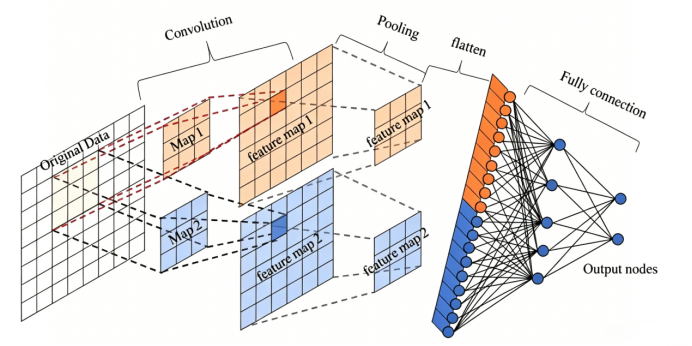
图 1 CNN卷积神经网络
CNN 的核心思想是利用卷积运算对图像局部区域进行特征提取。输入图像通常可以看作一个二维或三维矩阵,卷积核在图像上按照一定步长滑动,并与局部像素区域进行加权求和,从而得到特征图。其基本卷积过程可表示为:

其中,X表示输入图像或上一层特征图,k表示卷积核,b表示偏置项,y表示输出特征图。卷积核的作用类似于特征检测器,不同卷积核可以提取不同类型的图像特征,例如字符边缘、笔画方向、局部纹理等。
CNN通常由卷积层、激活函数层、池化层、连接层和分类层组成。卷积层 是 CNN的核心部分,它通过多个卷积核在输入图像上滑动,对局部区域进行特征提取。不同卷积核可以学习到不同类型的图像特征,例如横向边缘、纵向边缘、斜线、弯曲结构等。对于车牌字符识别而言,卷积层能够提取字符的笔画形状、边缘结构和局部纹理特征,从而为后续分类提供依据。对于车牌字符识别 而言,卷积层能够提取字符的笔画形状、边缘结构和局部纹理特征,从而为后续分类提供依据。
在卷积层之后,通常会加入激活函数 。常用的激活函数是 ReLU 函数,它能够增强神经网络的非线性表达能力,使网络不仅能学习简单的线性关系,还能学习更加复杂的图像特征。车牌字符中不同数字、字母和汉字之间可能只有局部笔画差异,例如"8"与"B"、"0"与"D"、"1"与"I"等,激活函数可以帮助网络更好地区分这些细微差别,这也是CNN最大的优势。
池化层的作用是对特征图进行降采样,减少数据维度和计算量,同时保留主要特征。常见的池化方式包括最大池化和平均池化。最大池化能够突出局部区域中最明显的特征,对字符边缘和笔画识别具有较好的效果。池化层大小和池化步长会影响特征压缩程度:池化大小较大或步长较大时,特征图尺寸下降更快,计算量减少,但可能丢失部分细节;池化大小较小或步长较小时,可以保留更多字符细节,但计算量相对增加。
在池化层之后,现代的CNN网络中通常还会加入正则化层次(BN、Dropout层),BN层全称批量归一化,对一个批次 (batch) 内的特征做标准化,解决内部协变量偏移的问题,同时附带加速训练的效果;Dropout层在训练阶段随机临时关闭一部分神经元,强制网络不依赖局部少数神经元,防过拟合(强正则)。最后的连接层负责将前面提取到的特征进行整合;最终通过 Softmax 分类器输出每个字符类别的概率。
常见的 CNN 网络结构包括 LeNet 风格和 VGG 风格。LeNet 是较早用于手写数字识别的经典卷积神经网络,结构相对简单,通常由少量卷积层、池化层和全连接层组成,适合小尺寸字符图像识别。VGG 风格网络通常使用多个小卷积核堆叠的方式提取更丰富的图像特征,网络层次更深,表达能力更强,但计算量和参数量也相对更大。
3.2 VGG模型
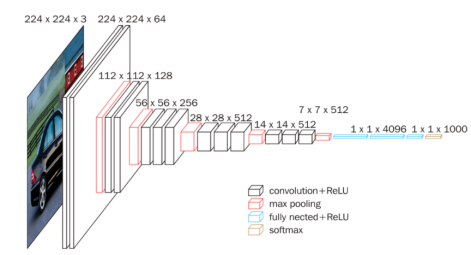
图 2 VGG16原生模型
VGGNet的提出源于对一个基本问题的系统性探究:在给定合理的计算预算下,增加网络深度持续提升分类性能的可能。Simonyan和Zisserman在论文1中提出了一系列具有不同深度的网络配置,并通过严格的对比实验验证了网络深度对表征能力的关键作用。
具体而言,VGG摒弃了此前AlexNet等网络中使用的大尺寸卷积核(如11×11、5×5),全部采用统一的3×3小卷积核并逐层堆叠------两个3×3卷积层的感受野等效于一个5×5卷积层,三个3×3卷积层等效于一个7×7卷积层,而参数量减少约45%,感受野的具体计算公式:

且每多一层便多引入一次ReLU非线性变换 ,显著增强了模型的判别能力。在网络整体架构上,VGG将卷积层组织为若干结构完全相同的卷积块(每个块由若干3×3卷积层加一个2×2最大池化层构成),不同块之间仅改变输出通道数(64→128→256→512),形成"空间分辨率逐层减半、特征通道逐层倍增"的规则化数据流,最终通过全连接层输出分类结果。这种高度模块化、规则化的设计使得VGG在证明"网络深度是提升表征能力的关键因素"这一核心论点的同时,也为后续各类视觉任务的特征提取和迁移学习提供了一个结构清晰、易于理解和复用的经典骨干网络范式。
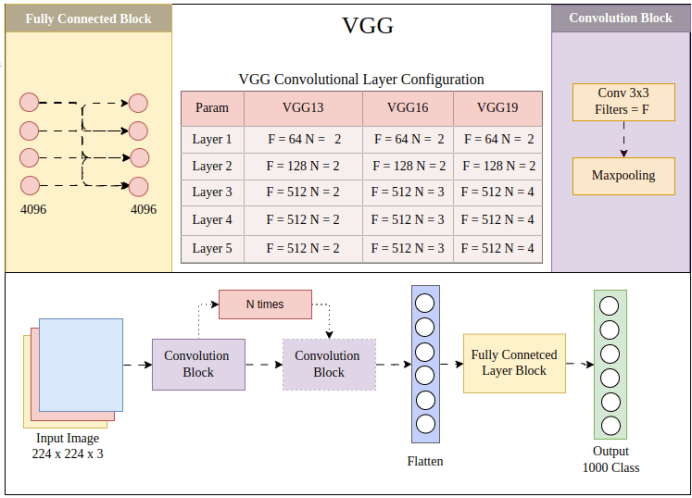
图 3 VGG型卷积神经网络
车牌识别在字符识别阶段,需要对分割后的单个字符图像进行分类,识别结果通常为34类至65类(包括省/直辖市简称31类、英文字母24类和阿拉伯数字10类。本文选择65类)。本项目基于VGG模型的核心设计范式,参考了相关论文,提出一种面向车牌字符识别的简化改进型VGG卷积神经网络,保留VGG的核心结构范式的同时,减少网络深度为5个卷积块,以适应小尺寸输入图像(32×32经3次池化后变为4×4,具备足够的全局感受野),将4096节点缩减为256节点,大幅减少参数量;在每个卷积层后添加批归一化(Batch Normalization)层,加速训练收敛并提升泛化性能。
3.3 车牌图像选取、分割
3.3.1车牌自动定位
车牌自动定位是车牌识别系统的首要环节,其任务是从包含复杂背景的整车图像中准确地检测并框选出车牌区域。定位的精度直接决定了后续所有环节的上限------若车牌区域未能被正确截取,后续的字符分割与识别将无从谈起。
中国机动车号牌具有以下先验特征,可作为定位算法的设计依据:
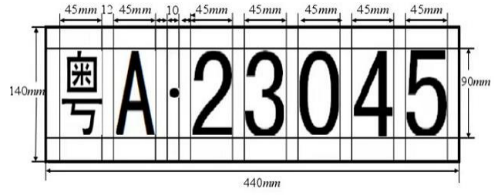
图 4 车牌构造图
①几何特征:标准车牌的宽高比约为3.0:1(普通牌)或3.4:1(新能源牌),面积在整幅图像中占有一定比例范围;
②颜色特征:车牌底色具有鲜明的颜色------蓝色(普通小型车)、黄色(大型车/教练车)、绿色(新能源车),与车身和背景形成显著色差;
③纹理特征:车牌区域内含有排列规则的字符,形成高密度的边缘和丰富的水平/垂直纹理,与车身的光滑表面形成对比。
采用基于颜色分割与形状筛选的车牌定位方法,其核心思路是:利用车牌底色的先验知识在颜色空间中提取候选区域,再通过几何约束和结构评分从候选中筛选出真正的车牌。
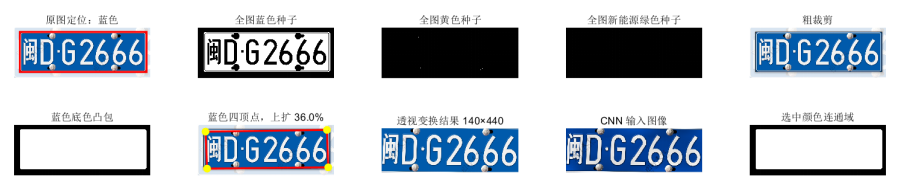
图 5 车牌定位与连通域凸包
根据定位结果获得的车牌包围盒(Bounding Box),在原始分辨率图像上进行带有边距的粗裁剪。裁剪区域在水平和垂直方向分别向外扩展一定比例的边距,以确保车牌的完整区域(包括可能略微超出包围盒的边缘部分)被完整截取。
在粗裁剪区域内,系统重新进行一次更严格的局部颜色分割,得到更精确的车牌底色掩膜。与全局检测相比,局部场景更简单(已大致包含车牌区域),因此可以使用更严格的阈值,减少背景干扰。
对精确掩膜执行凸包处理后,提取边界轮廓。由于拍摄角度的差异,车牌在图像中通常呈现为不规则的四边形(而非标准矩形)。系统通过多边形简化算法(Douglas-Peucker算法的变体)将轮廓逐步简化,直至拟合为一个四边形。
由于摄像头视角的倾斜,车牌在原始图像中往往存在透视畸变------近端大、远端小,或左右不对称。系统利用四边形的四个顶点作为源点,标准矩形的四个角点作为目标点,通过投影变换(Projective Transformation)将倾斜的车牌区域拉正为规则的长方形。投影变换的数学模型为:
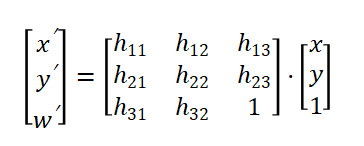
变换后的坐标为(x'/w′, y'/w')。变换矩阵H由四对对应点通过最小二乘法求解。该变换将图像中的任意四边形映射为目标矩形,实现车牌的透视校正。变换后的标准车牌尺寸为:普通蓝/黄牌:140×440 像素;新能源绿牌:140×480 像素。
3.3.2 车牌字符分割
字符分割的第一步是将预处理后的车牌图像转换为二值图像,使白色字符与深色背景形成鲜明对比。
由于车牌图像中可能存在残余的光照不均(如车灯光斑、阴影),全局固定阈值可能造成部分区域字符断裂或背景误判。系统采用自适应阈值法,为每个像素根据其局部邻域的亮度统计特性计算独立的阈值。
设灰度图像为I(x,y),对每个像素取其 w×w 邻域内灰度均值(x,y)作为局部参考亮度。二值化判决公式为:

其中w=31,C=10。对于蓝牌和绿牌,白色字符在原始图像中灰度值较高,二值化后需取反,使统一为"字符为黑(0)、背景为白(255)"的标准形式。
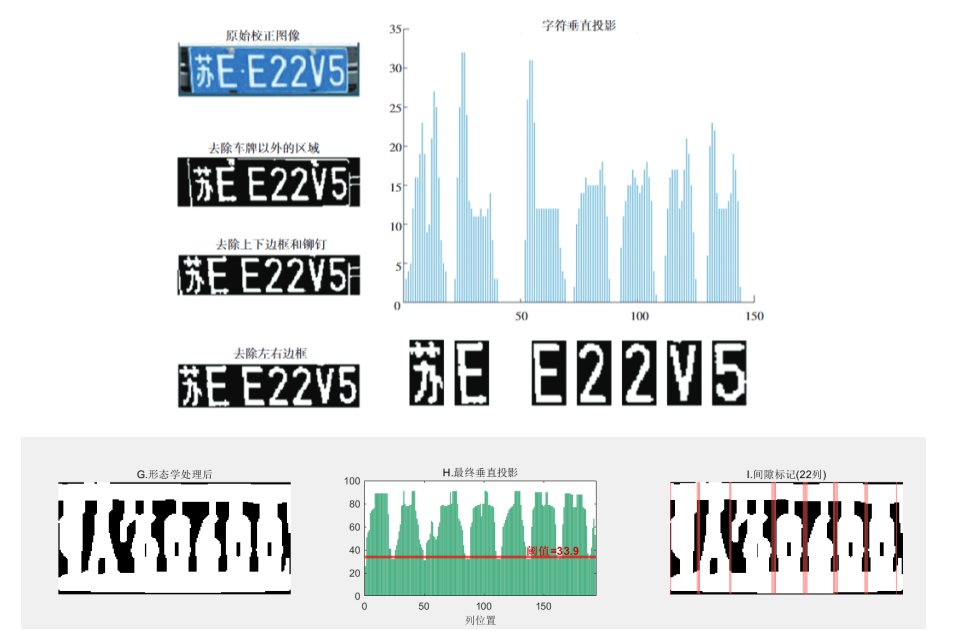
图 6 垂直投影法切割字符
其次,垂直投影法是车牌字符分割中最经典的方法。其基本思想是:将二值图像沿水平方向逐列统计黑色像素(前景像素)的累积数量,形成一条垂直投影曲线。曲线的峰谷分布直接反映了字符的列向分布规律------峰值区域对应字符所在列,谷值区域对应字符间的空白间隙。
第 j 列的垂直投影值定义为:

对于标准车牌(如"京A·12345"),投影曲线呈现以下规律:第一个峰对应汉字字符(笔画复杂,峰宽且高),第二个峰对应英文字母,第三个窄峰对应分隔符"·",随后若干个均匀分布的峰对应数字字符。
而后系统对候选区间按宽度进行分类处理:
宽度过窄(Wm < 0.3 × W/N):若投影峰值低于字符平均峰值的30%,判定为分隔符",跳过不输出,否则视为噪声,丢弃;
宽度合理(0.3 × W/N ≤ Wm ≤ 2.2 × W/N):判定为有效字符;
宽度过宽(Wm > 2.2 × W/N):可能为粘连字符,执行递归二分------在该区间内寻找投影值最小的位置作为分割点,将区间一分为二,直至所有子区间的宽度均在合理范围内。
对每个字符确定左右边界后,截取该范围内的水平切片,逐行统计前景像素数,找到字符的上下边界,获得完整的单字符子图。最后将各字符子图等比缩放至较长边等于32像素,居中放置于 32×32 的白色画布上,保持纵横比不变,作为CNN的标准化输入。
四、设计思路
4.1 数据集准备
针对车牌字符识别任务,设计了一套基于程序化渲染的数据集生成方案。字符混合了如下多种字体:
'CN License','SimHei', 'Microsoft YaHei','Microsoft YaHei UI', 'PingFang SC', 'Heiti SC', 'Songti SC', 'STHeiti', 'Arial Unicode MS'
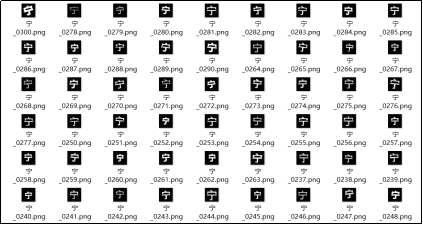
图 7 混合增强数据集生成效果
共涵盖31个省份简称、24个英文字母以及10个阿拉伯数字,共计65个类别,每类生成500个样本。渲染过程采用MATLAB图形引擎,首先在260×260像素的高分辨率画布上绘制字符,通过随机扰动字号、字重及位置偏移以模拟真实场景中的字符形变,其中中文字符与英文数字分别采用专用字体渲染以保证字形规范性。
在图像后处理阶段,采用多级增强策略提升样本的多样性和鲁棒性。首先对渲染结果进行前景区域检测与安全裁剪,经64×64中间画布保持比例缩放后,施加随机旋转(±4°)、纵横向拉伸(缩放因子0.88~1.28)等几何变换,以及腐蚀、膨胀、开闭运算等形态学操作模拟笔画粗细变化与断裂。在此基础上叠加高斯模糊(σ = 0.25~0.90)、高斯噪声、对比度衰减及边缘干扰等灰度扰动,最终缩放至32×32像素作为模型输入。为保证样本质量,引入基于边缘像素统计的贴边检测机制,自动过滤严重截断的无效样本。
4.2 车牌图像定位
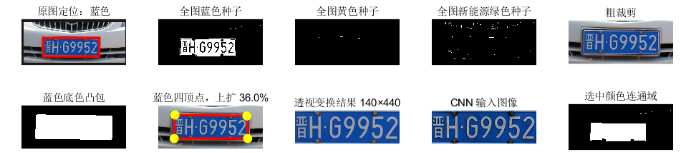
图 8 蓝色车牌定位与提取
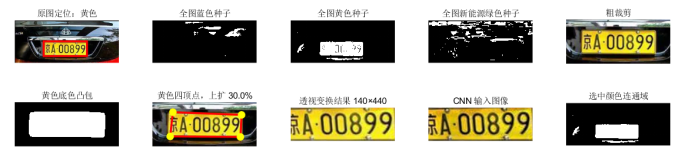
图 9 黄色车牌定位与提取
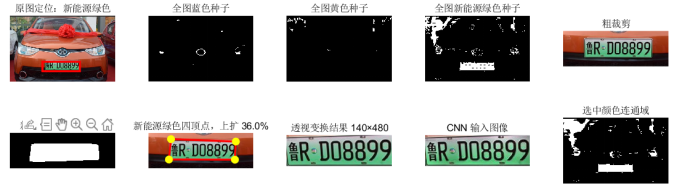
图 10 新能源车牌定位与提取
根据前文3.3所阐述的原理,利用颜色种子掩膜得到图像中的车牌底色凸包,再根据凸包的轮廓寻找四边形定点,根据定位到的四边形顶点位置,执行透视变换(变换为正视二维标准车牌尺寸140x440/140x480),几种车牌的定位与变换结果如图6-图8所示。
预处理阶段的任务是将定位到的车牌区域转换为尺寸标准、光照均匀、色彩一致的图像,为后续字符分割提供高质量输入。
蓝色(普通小型车)、黄色(大型车)、绿色(新能源车),但单一色彩空间难以全面表征。例如HSV空间对色相敏感但在低饱和度下不稳定,YCbCr空间对蓝黄分离良好但对绿色区分度有限。因此,系统同时在HSV、YCbCr、Lab和RGB四个色彩空间中设定阈值条件,对每个像素进行联合判决------只有同时满足所有空间条件的像素才被标记为颜色种子像素,生成颜色种子掩膜。这种多空间"与"逻辑的联合策略虽然可能遗漏少量边缘像素,但能有效排除大量伪阳性干扰(如蓝色车身、天空等)。
种子掩膜生成后,依次进行中值滤波去噪、面积开运算删除微小碎片、形态学闭运算将断裂区域重新连接、孔洞填充消除字符造成的内部空洞,最终得到各颜色的候选连通域。
由于每种颜色可能存在多个候选(如车身同色区域),系统对每个候选计算综合评分,评分综合考虑五项因素:长宽比匹配度(与标准车牌比例3.0:1或3.4:1的吻合程度,用高斯衰减函数衡量)、颜色密度(区域内种子像素占比)、颜色统计特征(区域内像素在各色彩空间的统计均值是否符合该颜色车牌的典型分布)、形状规整度(矩形度与凸性的乘积)以及面积合理性。评分最高者被选为该颜色的最佳候选。在自动检测模式下,蓝、黄、绿三种颜色各自的最佳候选相互竞争,评分最高者确定为最终车牌位置,同时确定车牌的颜色类型。
确定完车牌类型和车牌底色凸包之后,接下来要进行粗裁剪与局部精确分割。系统首先根据定位结果在原始分辨率图像上进行带有边距的粗裁剪,随后在裁剪区域内重新进行一次更严格的局部颜色分割,得到更精确的车牌底色掩膜。由于局部场景更简单,可以使用更严格的阈值以减少背景干扰。
由于拍摄角度差异,车牌在图像中通常呈现为不规则四边形。系统对精确掩膜提取边界轮廓后,通过多边形简化算法逐步降低轮廓精度,直至拟合为四个顶点(左上、右上、右下、左下)。若简化后顶点多于4个,则删除最接近共线的顶点逐步收缩。对于新能源绿牌,顶点会额外向上扩展一定比例,以弥补绿牌顶部渐变接近白色导致的掩膜漏检。
最后系统利用四个顶点作为源点,标准矩形的角点作为目标点,通过投影变换将倾斜的车牌拉正为规则长方形,作为接下来的车牌字符分割输入。
4.3 车牌图像字符分割
字符分割的任务是将预处理后的车牌图像中的每一个字符独立切分出来。根据前文3.3.2所提到的原理,本系统采用自适应阈值二值化结合垂直投影分析的方法,进行字符的分割提取。
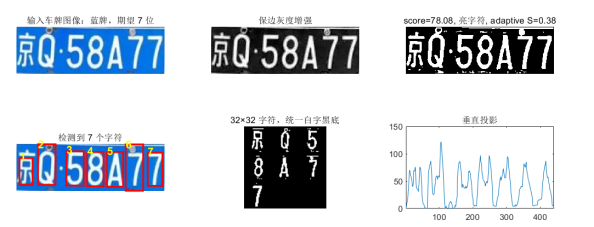
图 11 车牌图像二值化与投影分割
****自适应阈值二值化:****由于车牌图像中可能残余光照不均,系统采用自适应阈值法为每个像素根据其局部邻域计算独立阈值,把输入的图像统一为"字符黑、背景白"的标准形式。
****垂直投影分割:****对二值图像逐列统计前景像素数,得到垂直投影曲线。该曲线的峰值对应字符列,谷值对应字符间间隙。经一维均值平滑后,设定阈值提取连通的字符区间,再按宽度进行分类筛选:过窄区间判断为分隔符或噪声并跳过;宽度合理区间判定为有效字符;过宽区间(粘连字符)通过递归二分------在区间内寻找投影最小位置作为分割点------逐步切分为单个字符。
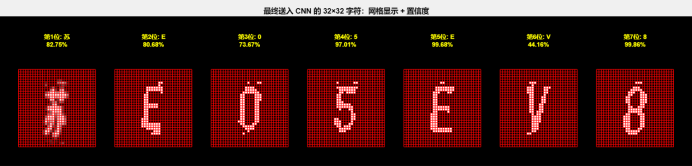
图 12 字符网格像素化输入
水平裁剪与归一化。确定每个字符的左右边界后,截取水平切片并逐行扫描确定上下边界,获得完整的单字符子图。最后将子图等比缩放至较长边为32像素,居中放置于32×32的白色画布上,作为CNN的标准化输入。
4.4 深度学习网络设计
4.4.1 第一代浅层网络
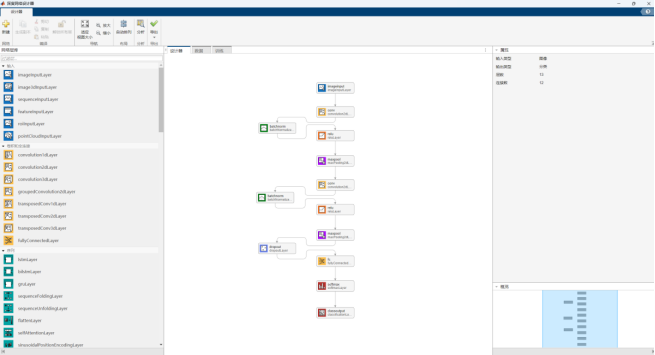
图 13 深度网络设计器
通过Matlab自带的深度网络设计器,可以实现对已有网络模板(CNN、RNN等)的调用、以及自建网络的搭建。这里我并没有使用网络模板,而是从空白开始搭建卷积神经网络。这样做是因为项目目标是实现对车牌字符的识别。车牌所有的字符一共65类,对于分类模型来说,只需要一个简单的浅层网络即可实现精准识别,过大的模型、过深的网络对于识别效果来说不会有很好的提升,更可能会引入过拟合的问题,同时对硬件训练的负担较大。
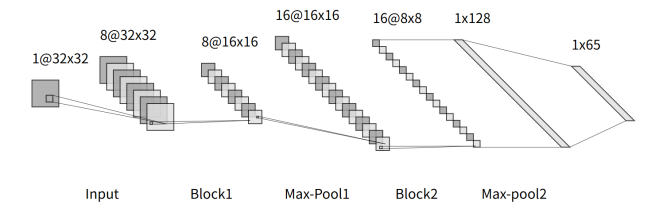
图 14 浅层卷积神经网络设计
起初设计的一个浅层简单网络(13层)如图6所示,采用常规的"Conv-BN-ReLU" 结构,为了快速验证数据集的有效性,一个迷你型的网络结构即使精度不高,但是胜在速度快,可以满足基本的要求,并且后续可以进行扩容拓展。利用作图工具,做出一代浅层卷积神经网络示意图如图12所示。
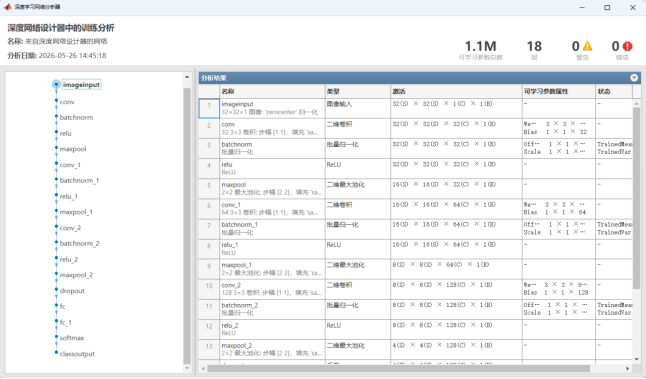
图 15 深度网络性能分析
经过简单的训练之后,得到一代模型,模型的性能分析如图13所示。由于这一代网络只有2个卷积层(3×3)+ 2个池化层,特征提取能力非常有限,面对稍复杂的图像任务(哪怕是 CIFAR-10 这种中等难度数据集)都会欠拟合,很难学到有效特征。并且池化层会持续压缩空间维度,两层池化后特征图尺寸会被压得很小,后续全连接层能利用的空间信息极少。
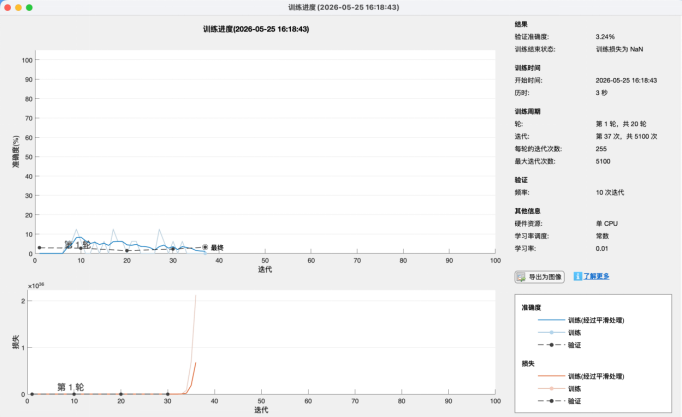
图 16 训练时发生梯度消失
在训练的过程中,对于训练参数的选择也很重要。尤其是对于学习率这个参数的设置:当学习率过大的时候,就容易出现梯度消失、震荡、不收敛的情况。但是学习率过小又会导致模型学习过慢、不收敛的情况。在4月份的时候,同济大学的徐老师在面试我的时候就提出了这个问题,在深度学习训练过程中,出现震荡、不收敛的情况,原因和解决办法是什么。当时回答的是替换激活函数(Sigmoid to Relu),但其实主要原因是学习率过大,并且在之前的学习中没有遇到过梯度消失的情况,是因为用的是比较成熟的成品深度网络(YOLO系列),这些网络对于梯度消失的情况有做对应的优化处理,参数都设置的比较合理。此外,徐老师指导我还可以通过优化数据集、减小训练轮数的方式来防止过拟合的情况。
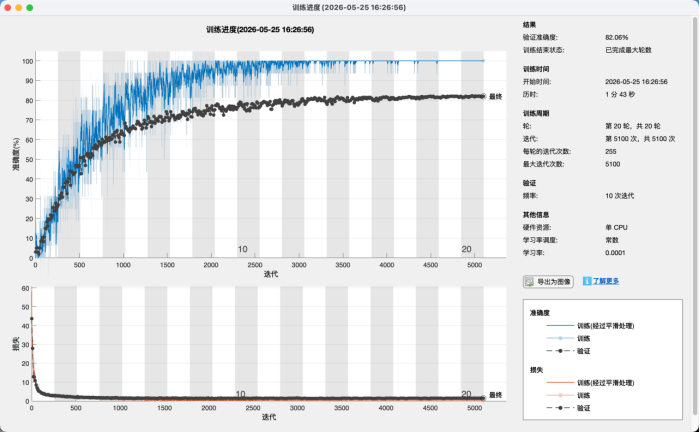
图 17 初代模型的训练结果
·蓝色(训练准确率):冲到了接近 100%,几乎贴顶了
·黑色(验证准确率):最高只到 82% 左右,两条曲线差距非常大
·训练损失(橙色):很早就下降到了接近 0,后续几乎不再下降
·验证损失(黑色):前期下降后就基本停滞,甚至有抬头趋势
由图可以观察到,在训练的过程中,曲线的震荡比较剧烈,整体的损失函数还是不断在下降的,但是观察损失曲线发现,训练损失(橙色)虽然降到了接近 0,但下降过程很快,而且后期几乎没有下降空间,说明模型已经到了它的能力上限,没法再学到更复杂的特征了。验证损失(黑色)前期下降后很快就停滞,甚至有轻微抬头,说明模型在第 10 轮左右就已经 "学不动了",后续训练没有任何有效泛化能力的提升,这是典型的欠拟合特征。
而且训练准确率和验证准确率的差距,并不是因为模型太强而 "背住了训练集",而是因为模型太弱,连训练集的通用特征都没学到,只能学到训练集里的局部噪声。
结论为:模型容量太小,连训练集的分布都拟合不好,只能靠死记硬背少量样本,所以训练集的准确率看起来高,但泛化能力极差。原因是只有 2 个卷积层,只能提取非常基础的边缘、纹理特征,没法学到更复杂的模式,比如不同类别的关键差异。
4.4.2 第二代深层改进型VGG网络
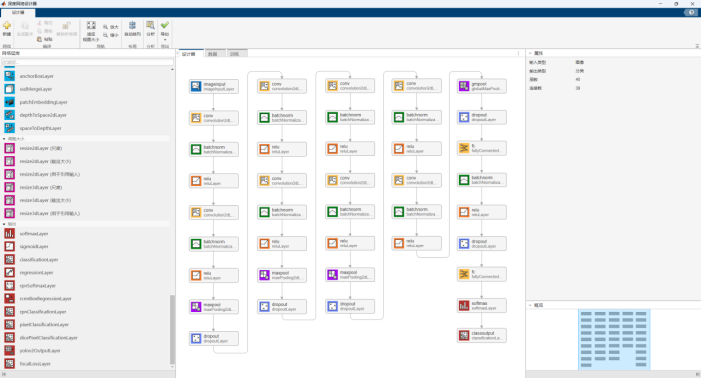
图 18 40层改进型VGG深度网络
对于模型的选择,我通过对人工智能、论文的查阅,在《基于改进CNN的车牌定位与识别研究》一文中,根据其结论可以了解到,在加入BN之后的改进型VGG模型2在小型分类模型上的独特优势,结合论文结论和AI辅助,我修改了基本VGG-16网络,设计了面向 32×32 灰度图的轻量化 VGG-style CNN:VGG 堆叠卷积思想 + BatchNorm + Dropout + GAP 分类头,既具备简单的网络结构,减少了网络的学习参数量,又有极高的结果识别率。
我在原版的VGG-16网络上做了如下改动:
|------------------|----------------------------|----------------------|
| 改动点 | 改进设计 | 相比VGG的意义 |
| 输入尺寸 | 32×32×1 | 小尺寸灰度图任务,减少冗余参数 |
| 网络大小 | 通道数 32→64→128→256 | 更适合小图像,降低过拟合和计算量 |
| 卷积块 | Conv-BN-ReLU ×2 | 保留 VGG 的双卷积块思想 |
| 加入 BatchNorm | 卷积后加入BN,FC 后也有BN | 改善训练稳定性,加快收敛 |
| 加入 Dropout | 0.10,0.15,0.25,0.40 逐步增强 | 针对小数据集做正则化,抑制过拟合 |
| 用 GAP 替代 Flatten | 4×4×256 → GAP → 256 | 显著减少全连接层参数 |
| 分类头更轻 | GAP → FC256 → FCnumClasses | 比 VGG 的大规模 FC 分类头更轻量 |
| 使用 He 初始化 | WeightsInitializer="he" | 更适合 ReLU 网络训练 |
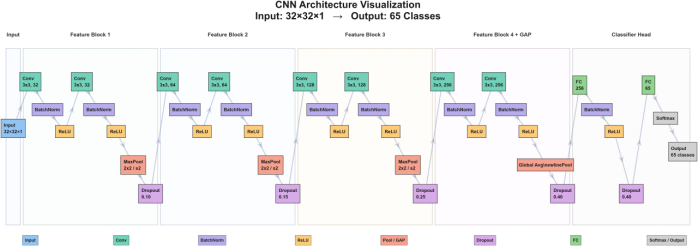
图 19 改进型网络结构示意图
模型设计的优点:
- 适合 32×32 小图像。原始 VGG 是为大尺寸自然图像设计的,我设计的输入只有 32×32×1,如果照搬 VGG16 很容易参数过多、训练慢、过拟合。把最大通道数控制在 256,并只保留 8 个卷积层,是一个更合理的小型 VGG-like 版本。
- 我的最后一层卷积输出是GAP而不是Flatten,仅这一处分类头就减少了约 98.3 万个参数,大约是原来的 1/16。这对小数据集非常有利。GAP 最早在 Network in Network 中被系统使用,论文3中也指出它比传统全连接层更不容易过拟合。
- Conv-BN-ReLU 结构比原始 VGG 更容易训练。原始 VGG 没有在每个卷积后使用 BatchNorm,而本设计加入了BN。Batch Normalization论文4指出 BN 可以缓解训练中各层输入分布变化的问题,并允许使用更高学习率,同时也有一定正则化效果。
- Dropout 对小样本分类有帮助。在池化后和全连接层后加入 Dropout,相当于在不同语义层级做正则化。Dropout 原论文5的核心目的就是减少神经网络过拟合,并在视觉、语音、文本等监督学习任务中提升泛化能力。
- 所有卷积层和 FC1 都用了 "HE" 初始化,这和 ReLU 激活函数是配套的。He 初始化(也叫 Kaiming 初始化),由何恺明(Kaiming He)等人在 2015 年提出6,是专门为 ReLU 及其变体(PReLU、Leaky ReLU) 激活函数设计的神经网络权重初始化方法,也是目前 CNN、VGG 等使用 ReLU 网络的首选初始化方案。使较深的 ReLU 网络可以更稳定地从头训练。
总的来说,本设计构建了一种轻量化 VGG-style 卷积神经网络。该网络借鉴 VGGNet 中连续堆叠小尺寸 3×3 卷积核的思想,通过四个卷积特征提取阶段逐步增加通道数,并采用 Conv-BN-ReLU 结构提高训练稳定性。为降低小样本任务中的过拟合风险,网络在不同阶段引入 Dropout,并使用 Global Average Pooling 替代传统 Flatten 操作,从而显著减少全连接层参数量。最后通过一个轻量级全连接分类头完成分类。
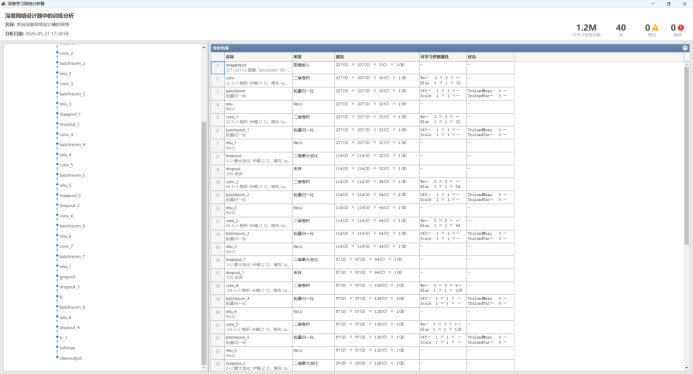
图 20 网络参数分析
|--------------|-----------------|
| 阶段 | 输出尺寸 |
| Input | 32×32×1 |
| Conv Block 1 | 32×32×32 |
| Pool1 | 16×16×32 |
| Conv Block 2 | 16×16×64 |
| Pool2 | 8×8×64 |
| Conv Block 3 | 8×8×128 |
| Pool3 | 4×4×128 |
| Conv Block 4 | 4×4×256 |
| GAP | 1×1×256 |
| FC1 | 256 |
| FC out | numClasses (65) |
这样的网络设计是比较合理的,网络前段保持较高分辨率提取低级纹理,后面逐渐增加通道数提取高级语义特征。
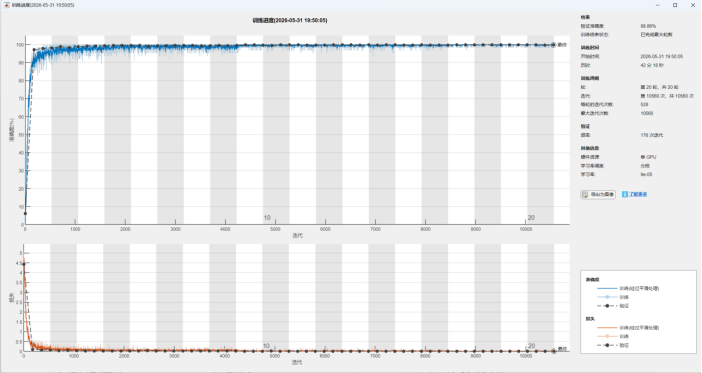
图 21 模型训练过程图
通过训练图可以观察到,这个模型的收敛速度比较快(大约在4500轮左右已经收敛),并且训练集、验证集的准确度比较高(均达到95及以上)。
4.4.3 第三代轻量改进型深度VGG网络
虽然之前的VGG卷积神经网络效果已经很好,但是我想把这个CNN部署在FPGA上,实现边缘处理,考虑到算力约束、推理速度、片上资源,不得不对权重进行进一步的优化。我想在FPGA-ZynQ-7020开发板上部署实现这个CNN模型,但是考虑到偏上大约只有53000的LUT、85k的逻辑单元,原来的VGG模型通道数偏大、权重偏多,不进行简化是无法部署到边缘端的。
在这一版网络设计中,把原先的32→64→128→256卷积通道化简为16→32→64→128,这样计算量大概从 52.27 M MAC/字符降到13.14 M MAC/字符,参数量从 1.25 M降到约0.31 M,总参数约减少4倍。
经过训练测试,发现精度有一定的损失,尤其是对于汉字的识别。不过为了减小参数量,损失一些精度是必要的。
|------------------------|------------|--------|-------|
| 模型名称 | 模型大小(.mat) | 参数量 | 识别准确率 |
| plate_char_cnn_lite | 1.15MB | 0.31MB | 76.5% |
| plate_char_cnn | 4.55MB | 1.25MB | 92.7% |
| plate_char_cnn_flatten | 64.8MB | 17.8MB | 86.3% |
4.5 GUI界面设计
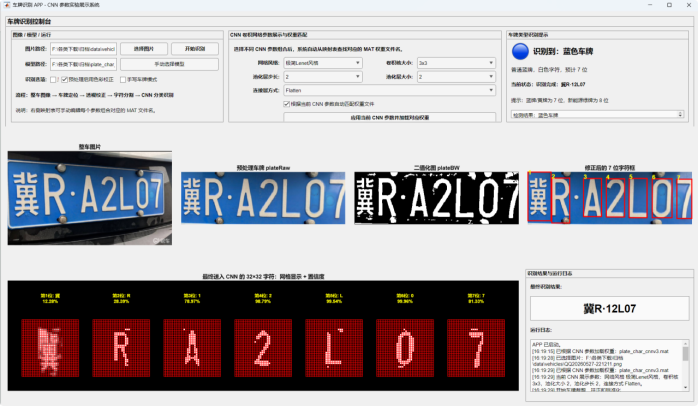
图 22 Matlab UI界面设计
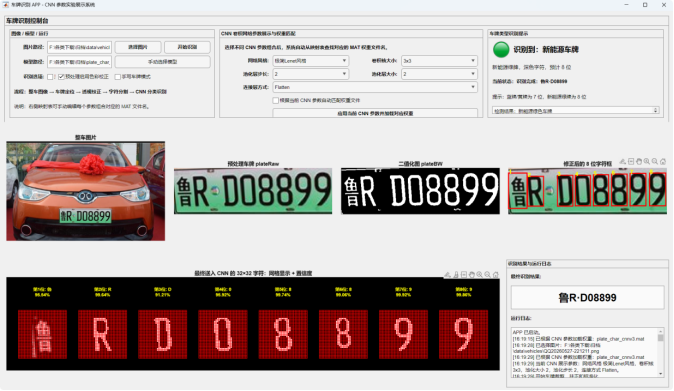
根据题目要求,设计GUI界面,需要界面可以对卷积核、池化层、步长和连接层连接方式等进行选择,以观察其对结果的影响。为实现车牌识别系统的可视化交互与功能验证,在设计工具中完成了一套完整的图形用户界面(GUI),将图像输入、参数配置选择、处理流程可视化、识别结果反馈等功能集成于统一操作界面。
系统控制与参数配置模块位于界面左侧与中上部,支持用户进行基础路径设置与算法参数调整:提供本地图片加载与模型权重文件(.mat)导入功能,支持自定义路径配置;可对 CNN 网络结构参数进行可视化配置,包括网络风格(lite/ 标准)、卷积核大小、池化步长、连接方式(Flatten/GAP)等,实现不同模型的快速切换与对比验证;并提供预处理选项(如颜色校正、手写车牌模式),适配不同场景的车牌图像输入。
车牌信息反馈模块位于界面右上方,实时反馈车牌类型与状态信息:自动识别车牌底色(蓝色 / 黄色 / 绿色)并提示车牌标准格式(普通蓝牌 7 位字符、新能源绿牌 8 位字符);实时显示当前识别进度与状态,为调试过程提供直观的状态提示。
结果输出与日志模块位于界面右下方,负责最终识别结果与运行信息的输出:显示最终拼接完成的车牌号码;记录完整的系统运行日志,包含模型加载时间、图片加载路径、参数配置、识别耗时等信息,为算法优化与问题定位提供依据。
五、结果与不足之处
5.1 结果评估与提升
本章主要对车牌识别系统的运行效果进行分析。系统整体流程包括图像输入、车牌定位与裁剪、车牌颜色判断、车牌图像预处理、字符分割、CNN 字符识别以及最终结果可视化展示。通过对蓝色车牌、黄色车牌和新能源绿色车牌进行测试,可以验证本文所设计方法在不同车牌类型下的适应能力。
5.1.1 整体运行结果分析
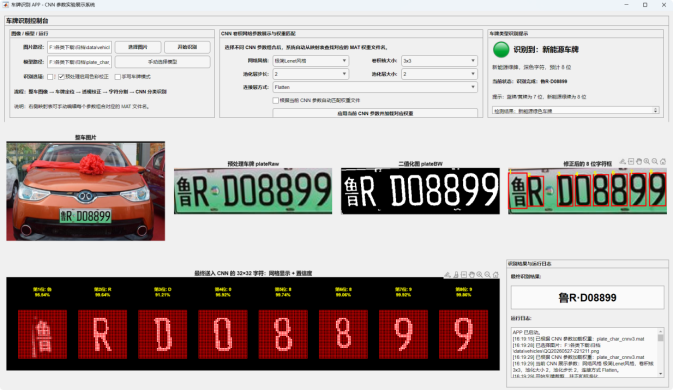
图 23 新能源车牌定位、分割与识别
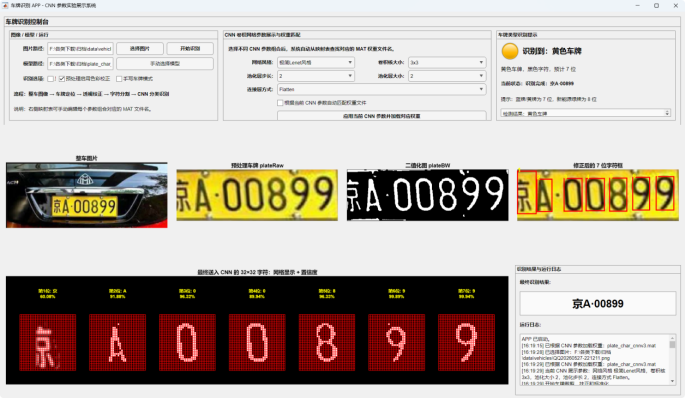
图 24 黄牌+反光下的车牌识别
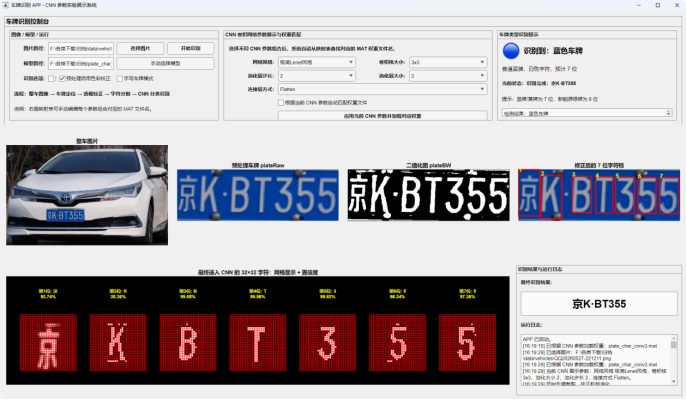
图 25 小区域蓝底车牌定位识别
从整体运行结果来看,本文设计的车牌识别系统能够完成从整车图像到最终车牌号码输出的完整识别流程。系统界面依次显示整车原图、预处理后的车牌区域、二值化图像、字符框选结果以及最终输入 CNN 网络的 32×32 字符图像,使识别过程更加直观。相比只输出最终字符串的传统显示方式,本系统能够展示车牌定位、字符分割和字符识别的中间结果,便于观察识别错误产生的位置,也有利于后续算法调试。同时,系统界面中加入了 CNN 网络参数选择模块,可以通过加载不同 .mat 权重文件的方式,对不同卷积核大小、池化层大小、池化层步长以及连接层方式下的识别效果进行对比展示。
在测试过程中,系统能够根据车牌颜色自动判断当前车牌类型,并在界面中给出"识别到蓝色车牌""识别到黄色车牌"或"识别到新能源车牌"的提示。其中,普通蓝牌和黄色车牌按照 7 位字符进行识别,新能源绿色车牌按照 8 位字符进行识别。该设计提高了系统对不同车牌类型的适应性,避免了新能源车牌被误按 7 位字符处理的问题。
5.1.2 车牌定位与分割分析
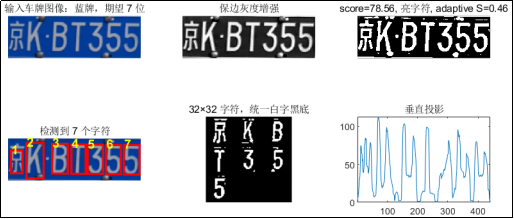
图 26 蓝色车牌定位与分割效果
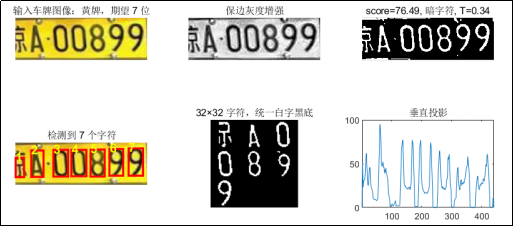
图 27 黄色车牌定位与分割效果
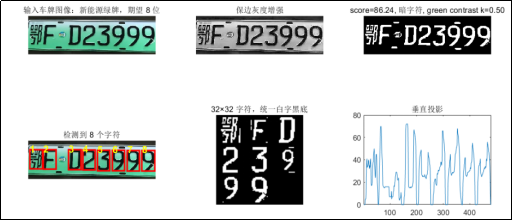
图 28 新能源车牌定位与分割效果
对于蓝色车牌,背景颜色较深,字符通常为白色,字符与背景之间对比度较高。因此,在光照条件较好的情况下,蓝牌的定位和字符分割效果较稳定,识别结果也较为准确。对于黄色车牌,背景颜色较亮,字符通常为黑色,系统需要提取暗色字符。测试结果表明,黄色车牌在背景均匀时能够获得较好的识别效果,但当图像存在反光或阴影时,部分字符笔画容易与背景发生粘连,从而影响分割结果。
新能源绿色车牌的处理难度相对较高。新能源车牌不仅字符数量为 8 位,而且车牌背景存在浅绿色渐变,首位汉字区域上方容易受到边框、渐变背景和光照变化的影响。如果首位汉字裁剪范围过大,可能会截入多余背景区域,导致 CNN 对首位汉字识别错误。
针对这一问题,本文在首位汉字框修正过程中对新能源车牌采用了独立的上边界补偿参数,即通过减小 provinceTopExtraRatio 的方式控制首位汉字向上扩展的范围,从而减少多余背景对识别结果的干扰。实际测试表明,该调整能够改善新能源车牌首位汉字的输入图像质量,使字符区域更加集中。
字符分割是影响车牌识别准确率的关键步骤。本文系统在完成车牌裁剪和标准化后,首先对车牌图像进行灰度化、增强和二值化处理,再通过连通域分析和几何约束提取字符框。对于普通蓝牌和黄牌,系统按照 7 位车牌格式修正字符框;对于新能源车牌,系统按照 8 位车牌格式修正字符框。
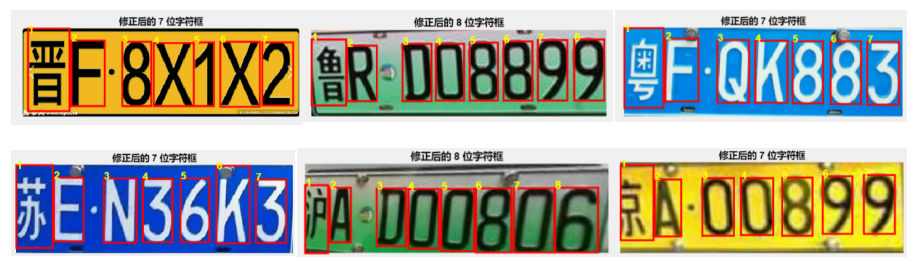
图 29 字符分割
从分割结果来看,当车牌区域定位准确、图像清晰且字符间距明显时,系统能够较好地得到每个字符的独立区域。字符框选结果能够在界面中直接显示,便于判断字符是否存在漏分割、过分割或字符框偏移等问题。
在测试过程中,主要的字符分割误差来源包括以下几类:第一,车牌倾斜或透视变形较明显时,字符上下边界可能不一致,导致部分字符裁剪不完整;第二,光照过强或车牌反光时,二值化后字符笔画可能断裂;第三,新能源车牌首位汉字结构复杂,且上方背景容易干扰字符区域,导致首位汉字识别难度较大;第四,当字符之间距离较近或字符笔画较粗时,二值图中可能出现粘连现象,影响单字符切分效果。
针对上述问题,本文系统在字符框修正阶段加入了字符数量约束、字符几何特征估计和首位汉字独立处理策略。通过对字符高度、字符宽度、字符中心间距等信息进行估计,系统能够在检测框数量不足或过多时进行一定程度的补偿和修正,从而提高字符输入 CNN 前的一致性。
5.1.3 字符识别结果分析
在字符分割完成后,系统将每个字符统一归一化为 32×32 的图像,并输入训练好的 CNN 模型进行分类识别。CNN 网络能够自动提取字符的局部笔画特征,相比传统模板匹配方法,对字体变化、轻微形变和局部噪声具有更好的适应能力。
|---------------------------------|------------|------------|------------|
| 模型名称 | 数字 | 英文 | 汉字 |
| vgg_gap_5x5_pool2_stride2 | 99.2% | 97.8% | 90.5% |
| lenet_gap_3x3_pool2_stride2 | 98.7% | 96.2% | 89.1% |
| vgg_gap_7x7_pool2_stride2 | 98.5% | 95.7% | 88.3% |
| vgg_gap_3x3_pool2_stride1 | 97.1% | 93.5% | 85.2% |
| lenet_flatten_3x3_pool2_stride2 | 96.8% | 92.3% | 82.5% |
| gap_lite_3x3_pool2_stride2 | 95.2% | 89.7% | 78.6% |
从识别结果来看,数字和英文字母的识别效果相对较好,原因是这些字符的结构较为规则,笔画差异明显。而首位汉字的识别难度较高,主要原因是汉字类别数量较多,结构复杂,且车牌首位汉字在图像中往往比后续字母和数字更容易受到边框、光照和裁剪偏差的影响。因此,首位汉字的预处理质量对最终识别结果影响较大。
系统在界面中显示每个字符输入 CNN 前的 32×32 图像,并显示识别标签和置信度。通过观察这些字符图像可以发现,当字符图像居中、笔画完整且背景干扰较少时,CNN 输出的置信度通常较高;当字符存在断裂、粘连、裁剪偏移或背景噪声时,置信度会下降,错误识别概率也会增加。因此,字符分割和字符归一化质量直接决定了 CNN 模型的实际识别效果。
|---------------------------------|------------|--------|-------|
| 模型名称 | 模型大小(.mat) | 参数量 | 识别准确率 |
| lenet_gap_3x3_pool2_stride2 | 4.55MB | 1.25MB | 92.7% |
| lenet_gap_5x5_pool2_stride2 | 4.20MB | 1.15MB | 91.8% |
| lenet_flatten_3x3_pool2_stride2 | 64.8MB | 17.8MB | 86.3% |
| vgg_gap_3x3_pool2_stride2 | 5.11MB | 1.40MB | 93.1% |
| vgg_gap_3x3_pool2_stride1 | 3.82MB | 1.05MB | 90.2% |
| vgg_gap_3x3_pool2_stride4 | 1.09MB | 0.30MB | 78.3% |
| vgg_gap_3x3_pool1_stride2 | 3.98MB | 1.10MB | 89.5% |
| vgg_gap_3x3_pool4_stride2 | 1.16MB | 0.32MB | 77.8% |
| vgg_gap_5x5_pool2_stride2 | 5.84MB | 1.60MB | 93.5% |
| vgg_gap_7x7_pool2_stride2 | 6.57MB | 1.80MB | 92.2% |
| vgg_flatten_3x3_pool2_stride2 | 89.6MB | 24.6MB | 87.5% |
| vgg_flatten_3x3_pool2_stride1 | 102.4MB | 28.1MB | 84.7% |
| gap_lite_3x3_pool2_stride2 | 1.15MB | 0.31MB | 76.5% |
由表可知,Flatten 结构虽然增加了模型参数量,但识别准确率并未提升,说明直接展开高维特征容易导致过拟合。相比之下,采用全局平均池化的 LeNet_VGG 结构在较低参数量下取得了最高识别准确率,表明该结构在模型复杂度和分类性能之间具有更好的平衡。卷积核尺寸增大后模型参数量显著增加,但准确率提升不明显,说明 3×3 小卷积核更适合本文任务。池化步长为 2、池化核大小为 2×2 时模型表现最佳,过小或过大的池化设置都会影响特征提取效果。
|----------|-----------|----------|----------|----------|--------------------------|
| 网络风格 | 卷积核大小 | 池化大小 | 池化步长 | 连接方式 | 识别效果分析 |
| LeNet型 | 3×3 | 2 | 2 | Flatten | 结构简单,识别速度较快,适合基础实验展示 |
| LeNet型 | 5×5 | 2 | 2 | Flatten | 感受野适中,对常规字符具有较好识别效果 |
| VGG型 | 3×3 | 2 | 2 | Flatten | 特征提取能力较强,但模型复杂度相对较高 |
| VGG型 | 3×3 | 2 | 2 | GAP | 参数量较少,泛化能力较好,但细节区分能力可能略低 |
| VGG型 | 8×8 | 4 | 4 | GAP | 特征压缩较强,可能导致字符细节损失 |
5.2 功能拓展延伸(手写字符识别)
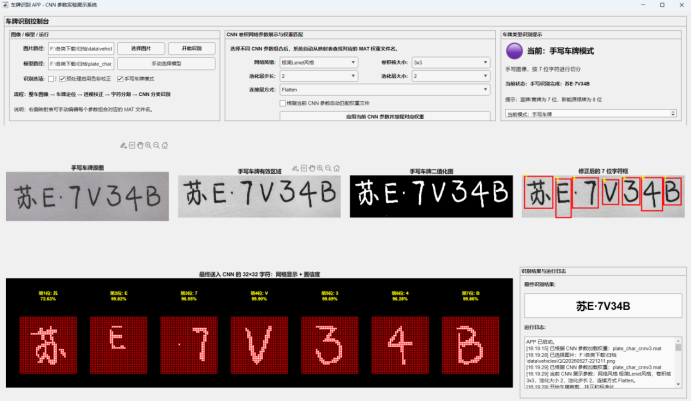
图 30 手写车牌识别
对于CNN来说,评价一个模型的重要指标就在于其的泛化能力(指对训练数据集之外的样本的识别能力)。因此,如果能实现对手写车牌的识别,那么这个模型的泛化能力无疑是十分强大的,这依托于优质的数据集和足够深度的网络,能准确地提取字符的细节特征而不发生过拟合。
由图30所示可知,当打开手写车牌识别模式的时候(没有改变模型,只是修改图形的分割逻辑),可以对手写车牌的每一个字符进行准确的识别。这不仅完成了基本的车牌识别,更超额完成了《随机手写数字识别仿真》课题的任务,不仅能对数字进行识别,更涵盖英文字母和省份简称汉字的识别,效果良好。
5.3 简单CNN网络的局限性
简单 CNN 网络的主要局限性在于:它只解决"分类"问题,不解决"定位"问题。也就是说,CNN 可以判断一张裁剪好的字符图像是数字 3 还是字母 B,但它不能自动告诉你原图中字符在哪里。如果输入图像中有多个目标、背景复杂、目标位置不固定,普通 CNN 往往需要依赖额外的预处理步骤,例如目标检测、图像裁剪、字符分割和尺寸归一化。
对于我设计的这个网络来说,它更接近一种轻量化 VGG-style 分类网络。它适合处理已经裁剪好的 32×32 灰度图,例如单个字符、局部缺陷、小尺寸图像块等。网络的目标是判断"这张图属于哪一类",而不是判断"图中哪里有目标"。因此,如果前端已经完成了车牌定位、字符分割或图像裁剪,这类 CNN 是非常合适的。
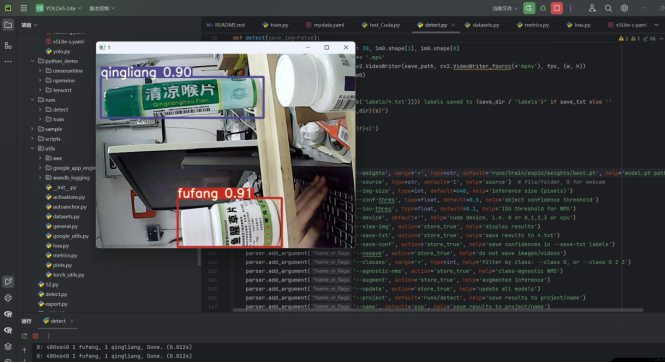
图 31 YOLOv5模型在电脑的部署效果(示例为药品识别)
而YOLO模型更适合用于复杂场景下的目标定位与识别。比如在一张完整车辆图像中,YOLO可以直接找出车牌位置;如果进一步训练字符检测模型,也可以直接找出每个字符的位置和类别。YOLOv3 以后还引入了多尺度预测思想,在不同尺度的特征图上预测目标框,从而增强不同大小目标的检测能力。
普通 VGG 型 CNN 主要面向图像分类任务,其通过多层卷积和池化操作提取图像特征,并利用分类层输出最终类别。该类网络结构简单、训练稳定、参数量相对可控,适用于已完成目标裁剪或字符分割后的分类识别任务。然而,普通 CNN 不具备目标定位能力,当输入图像中存在复杂背景、多个目标或目标位置不固定时,需要依赖额外的检测和分割步骤,限制了其在真实复杂场景中的应用。相比之下,YOLO 模型将目标检测建模为端到端回归问题,可以在一次前向传播中同时预测目标边界框和类别信息,具有较强的实时检测能力和场景适应性。因此,在完整图像的目标定位任务中,YOLO 更具优势;而在单个目标已经被准确裁剪后的分类任务中,轻量化 VGG 型 CNN 则具有结构简单、部署方便和计算成本较低的优点。
5.4 设计的不足和局限
首先,车牌定位和字符分割过程仍然依赖较多经验设定的图像处理参数。例如车牌裁剪比例、二值化阈值、字符框修正比例、首位汉字上下扩展比例等参数,都会直接影响最终识别结果。当图像存在光照不均、车牌倾斜、反光、模糊、遮挡或背景复杂等情况时,经验参数可能无法适应所有场景,容易出现车牌区域裁剪不完整、字符粘连、字符断裂或首位汉字截取异常等问题。尤其是新能源车牌由于底色较浅、字符颜色较深,首位汉字区域容易受到背景和边框影响,导致分割结果不稳定。
其次,当前系统虽然能够根据车牌颜色区分蓝牌、黄牌和新能源绿牌,并分别采用不同的字符位数和部分处理参数,但颜色检测仍主要依赖图像颜色特征和经验规则。在光照偏色、夜间拍摄、车牌污损或图像经过压缩处理的情况下,车牌颜色可能被误判,从而导致后续字符数量选择和分割策略出现偏差。因此,车牌类型判断的准确性仍有待提高。
最后,当前 CNN 网络部分主要用于对已经分割好的单字符图像进行分类,系统整体效果很大程度上依赖前端字符分割质量。一旦字符分割错误,即使 CNN 分类器本身性能较好,也难以得到正确结果。也就是说,该方案属于"先分割、后识别"的流程,前后步骤之间误差会逐级传递,整体鲁棒性不如端到端识别方法。
5.5 改进方案
首先,可以进一步优化车牌定位与字符分割算法,引入更自适应的图像处理方法。例如根据图像亮度、对比度和颜色分布自动调整二值化阈值,根据车牌类型自动调整字符框扩展比例,并增加对倾斜、反光和边框噪声的处理机制,从而减少人工参数对识别效果的影响。
其次,可以提升车牌类型检测的稳定性。除了使用颜色特征外,还可以结合车牌长宽比、字符数量、颜色区域比例和候选车牌区域特征进行综合判断。对于新能源车牌,可以重点利用其车牌尺寸较长、字符数量为 8 位、背景为绿色渐变等特点,提高新能源车牌识别流程的准确性。可以考虑引入端到端的深度学习识别方法。例如使用目标检测网络定位车牌区域,再使用 CRNN、Transformer 或注意力机制模型直接识别整串车牌字符,减少传统字符分割带来的误差传播问题。这类方法能够在复杂场景下获得更好的整体识别效果。
5.6 与老师的交流与反馈
在网络输入形式的讨论过程中,海芳老师提出:本研究的输入图像是否可以采用 32×32×3 的三通道彩色图像,而不是 32×32×1 的灰度图像,这样模型在进行字符识别的同时,是否也能够附带学习车牌颜色信息。
针对该问题,我的回答是:本研究当前网络的任务是识别车牌,在该场景下不适用RGB颜色输入的图像,选用三通道颜色输入无法得到很好的效果提升,还会导致过拟合、增加参数量等弊端。
如果直接采用 32×32×3 彩色输入,虽然可以保留 RGB 颜色信息,但对于已经切割出的单个字符图像而言,颜色信息并不一定稳定。车牌颜色通常属于整幅车牌区域的全局属性 ,而不是单个字符区域的局部属性。字符分割、裁剪、缩放和归一化过程可能会削弱甚至破坏原始车牌背景的颜色分布,同时还会引入不同光照、环境影响下的无关特征(如反光、污染等),此时强行让字符分类网络同时学习颜色特征,可能导致模型学习到与字符类别无关的冗余信息,增加过拟合风险。
从参数角度看,若第一层卷积核为 3×3、输出通道数为 32,则灰度输入时第一层卷积参数量为 (3×3×1+1)×32=320;若改为 RGB 输入,则参数量为 (3×3×3+1)×32=896。虽然相对于整个网络而言,这部分参数增加并不算大,但输入通道数增加后,网络需要同时处理颜色和形状两类信息。在当前数据量有限、任务目标为字符分类的情况下,额外颜色通道可能并不能有效提升字符识别准确率,反而可能引入颜色分布差异带来的干扰。
所以本次设计的CNN网络是对已经分割、归一化后的车牌字符进行分类识别,其核心识别依据是字符的笔画形状、边缘结构和空间纹理特征,而不是车牌背景颜色。因此,将输入设置为 32×32×1 灰度图像更符合当前字符识别任务的目标。灰度化处理能够保留字符轮廓、边缘和明暗结构,同时减少由光照变化、相机白平衡、曝光差异以及车牌反光等因素引入的颜色干扰,有利于提升模型在复杂环境下的泛化能力。
因此,本研究选择 32×32×1 灰度输入,主要是为了突出字符结构特征,降低输入冗余,增强模型对光照和颜色变化的鲁棒性。若后续研究需要对车牌颜色进行识别,更合理的方案 是单独设计车牌颜色识别模块,或者在完整车牌区域上建立多任务网络 :一个分支用于字符识别,另一个分支用于车牌颜色分类。这样既能保留字符识别网络的稳定性,又能在完整车牌图像中充分利用颜色信息,实现颜色识别与字符识别的功能解耦。
六、 心得体会
通过本次车牌识别系统的设计与实现,我对计算机视觉中的图像处理、字符分割以及卷积神经网络识别流程有了更加直观和深入的理解。整个系统需要将图像预处理、车牌定位、颜色判断、字符分割、字符归一化和模型分类等多个环节结合起来。每一个环节的处理效果都会影响最终结果,因此系统开发过程中不仅要关注模型本身的准确率,也要重视前端图像处理的稳定性。
在实现过程中,我体会最深的是CNN网络的设计。在实现过程中,我体会最深的是 CNN 网络的设计与优化。最初我认为只要增加卷积层数或提高通道数,就能够获得更高的识别准确率,但在实际实验中发现,网络性能并不是单纯由模型复杂度决定的。对于车牌字符这类尺寸较小、结构较规则的图像,网络既要具备足够的特征提取能力,又不能引入过多冗余参数,否则容易出现训练时间增加、模型过拟合以及识别速度下降等问题。
因此,在网络设计时,我借鉴了 VGG 网络中连续使用小尺寸卷积核提取特征的思想,采用多组 Conv-BN-ReLU 结构逐层提取字符的边缘、笔画和局部纹理特征。同时,通过最大池化层逐步降低特征图尺寸,使网络能够在保留主要形状信息的同时减少计算量。为了提高模型的泛化能力,我在不同阶段加入 Dropout,并使用全局平均池化代替传统 Flatten 展开方式,从而明显减少全连接层参数量,降低过拟合风险。
在参数对比过程中,我还分析了卷积核大小、池化层大小、池化步长以及 Flatten 和全局平均池化等不同结构对识别结果的影响。实验结果让我认识到,较大的卷积核虽然能够扩大感受野,但也会显著增加参数量,不一定带来更高的识别准确率;池化步长过小会导致特征压缩不足,步长过大又可能造成字符细节信息丢失。因此,CNN 网络设计需要在识别准确率、模型大小、计算速度和泛化能力之间进行平衡,而不是盲目追求更深或更复杂的结构。
同时也不能忽略车牌图像预处理和字符分割的重要性。实际图像往往存在光照不均、角度倾斜、背景复杂、车牌颜色差异等问题,如果直接进行识别,效果并不理想。通过对车牌进行裁剪、扶正、二值化和字符框修正,可以明显提高后续 CNN 识别的准确率。我还发现不同类型车牌的处理方式要分类讨论,例如蓝牌、黄牌和新能源绿牌在底色、字符颜色、字符数量等方面都存在差异,因此需要针对不同颜色车牌设置不同的处理策略。
界面设计方面,我也学到了一个完整系统不仅要能够完成算法功能,还需要具备良好的可视化展示效果。通过在界面中加入整车图像、车牌区域、二值化结果、字符框选、CNN 输入字符以及伪真实车牌结果展示,可以让整个识别过程更加清晰直观。尤其是车牌类型提示窗口和伪真实车牌展示,使系统更具有演示性和交互性,也更符合课程设计或实验展示的要求。
同时,在调试过程中我也认识到,工程实现往往比理论设计更加复杂。很多参数在理论上看起来合理,但在不同图片上会出现不同效果,需要不断测试和调整。例如首位汉字的裁剪范围、新能源车牌的顶部补偿、字符框上下扩展比例等参数,都需要根据实际识别效果进行优化。这让我意识到,在实际项目中,算法设计和工程调试是相互结合的过程,只有不断观察结果、分析问题并修改方案,才能逐步提高系统的稳定性。
总体来说,本次项目让我系统地掌握了一个车牌识别系统从输入图像到最终输出结果的完整流程,也提高了我使用 MATLAB 进行图像处理、界面设计和 CNN 模型调用的能力。通过本次实践,我不仅加深了对数字图像处理和卷积神经网络的理解,也提升了分析问题、解决问题和系统整合的能力。后续希望能够进一步优化车牌定位和字符分割算法,并尝试引入端到端识别模型。
七、 PPT报告
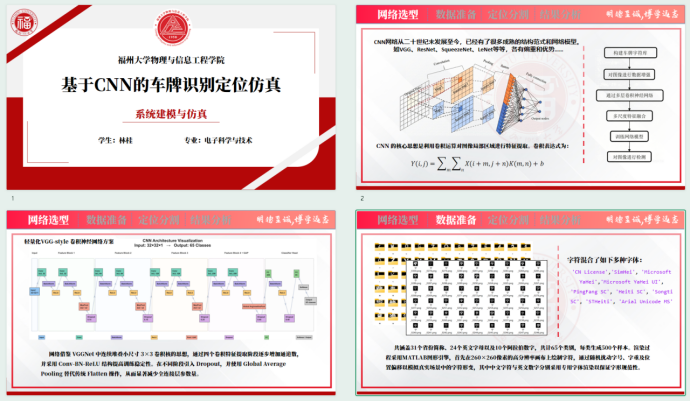
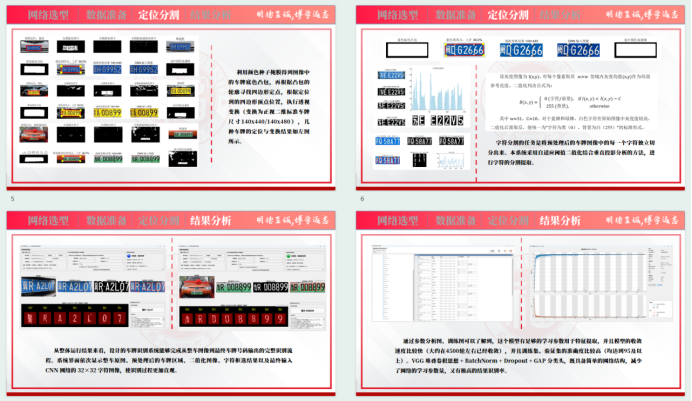
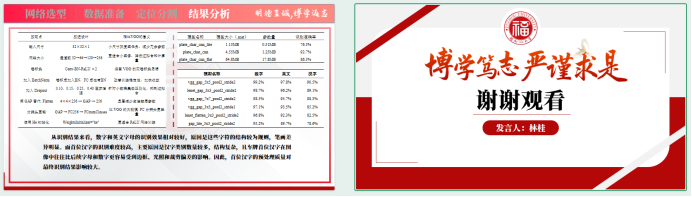
八、参考资料
附录1 参考文献
1 Simonyan K, Zisserman A. Very Deep Convolutional Networks for Large-Scale Image Recognition. ICLR 2015. (arXiv:1409.1556)
2 张士豹.基于改进CNN的车牌定位与识别研究D.南京信息工程大学,2022
3 林敏,陈强,严水成. Network in network EB/OL. (2013-12-16). https://doi.org/10.48550/arXiv.1312.4400.
4 伊奥费 S, 塞格迪 C. Batch normalization: 基于减少内部协变量偏移加速深度网络训练 EB/OL. (2015-03-02). https://doi.org/10.48550/arXiv.1502.03167.
5 SRIVASTAVA N, HINTON G, KRIZHEVSKY A, et al. Dropout: A simple way to prevent neural networks from overfittingJ. Journal of Machine Learning Research, 2014, 15(56): 1929-1958.
6 何恺明,张祥雨,任少卿,等. Delving deep into rectifiers: surpassing human-level performance on ImageNet classification EB/OL. (2015-02-06). https://doi.org/10.48550/arXiv.1502.01852.
附录2 核心概念名词解释
- 卷积核(Convolutional Kernel / Filter),卷积层中用于提取局部特征的小型矩阵,通过滑动遍历输入图像,与局部像素做加权求和,生成特征图。
- 卷积层(Convolutional Layer),由多个卷积核组成的网络层,是 CNN 的核心组件,对输入特征图进行卷积运算,提取不同层级的特征。
- 池化层(Pooling Layer),对特征图进行下采样的操作,降低特征图空间尺寸,减少计算量;同时扩大感受野,保留关键特征。
- 激活函数(Activation Function),给卷积/全连接层的输出加入非线性变换的函数,引入非线性,使网络能学习复杂特征,避免线性模型的表达局限。
- 全连接层(Fully Connected Layer, FC),将卷积/池化输出的二维特征图展平为一维向量,再进行全连接运算的网络层,将特征映射到最终输出空间。
- 感受野(Receptive Field),CNN 中某一层特征图上的一个神经元,对应输入图像上的区域大小,感受野越大,能捕捉的全局信息越多。
- 特征图(Feature Map),卷积层/池化层输出的二维矩阵,每个通道对应一种特定特征的响应,存储网络在不同层级提取到的特征,低层级特征图对应边缘、纹理,高层级对应语义信息。
- 填充(Padding),通过在图像边缘补像素维持特征图尺寸、保留边缘信息。
- 步长(Stride),控制卷积核与池化核的滑动距离,决定特征图的下采样幅度;池化层采用最大池化等下采样方式压缩特征图尺寸、减少网络参数量与计算量。
- 批量归一化(BN),通过标准化特征数据加速网络训练、提升模型稳定性。
- Dropout层,通过随机失效部分神经元有效抑制模型过拟合。
- 损失函数(Loss Function),衡量模型预测结果与真实标签之间误差的函数,提供优化目标,通过反向传播更新参数,分类任务使用交叉熵损失函数。
- 过拟合(Overfitting),模型在训练集上表现优异,但在测试集上表现不佳的现象,反映模型泛化能力不足,过度学习了训练数据中的噪声和无关特征。
附录3 程序代码
1.主程序代码
Matlab
classdef PlateRecognitionApp < matlab.apps.AppBase
properties (Access = public)
UIFigure
ImagePathEditField
SelectImageButton
ModelPathEditField
SelectModelButton
RecognizeButton
DebugCheckBox
UseColorCorrectCheckBox
HandwrittenPlateCheckBox
NetworkStyleDropDown
KernelSizeDropDown
PoolStrideDropDown
PoolSizeDropDown
ConnectionModeDropDown
AutoModelCheckBox
ApplyCNNConfigButton
CNNConfigTextArea
ModelMappingTextArea
SaveMappingButton
PlateTipPanel
PlateTypeLamp
PlateTypeLabel
PlateTypeDetailLabel
StageLabel
PlateTypeHintTextArea
VehicleAxes
PlateAxes
BinaryAxes
BoxAxes
CharsAxes
ResultEditField
StatusTextArea
end
properties (Access = private)
Net = []
DebugDir = ''
ModelNameMapping % containers.Map 键='lenet_k3_p2_s2_flatten' 值='plate_char_cnnv6.mat'
end
%% ============================================================
% APP 初始化与界面
% ============================================================
methods (Access = private)
function startupFcn(app)
app.DebugDir = fullfile(tempdir, 'plate_app_debug');
if ~exist(app.DebugDir, 'dir')
mkdir(app.DebugDir);
end
app.initDefaultModelNameMapping();
app.StatusTextArea.Value = {'APP 已启动。'};
app.updatePlateTypeTip('unknown', 0);
app.refreshMappingTextArea();
app.updateCNNConfigSummary();
app.setStage('等待选择图片');
if app.AutoModelCheckBox.Value
loaded = app.ensureModelLoadedForCurrentCNNConfig(true);
if ~loaded
app.logStatus('未能根据 CNN 参数自动加载模型,尝试加载默认模型。');
app.loadDefaultModelIfExists();
end
else
app.loadDefaultModelIfExists();
end
app.resetAxes();
end
function initDefaultModelNameMapping(app)
app.ModelNameMapping = containers.Map();
% ---------- 极简Lenet风格 ----------
app.ModelNameMapping('lenet_k3_p2_s2_flatten') = 'plate_char_cnnv3.mat';
app.ModelNameMapping('lenet_k3_p2_s2_gap') = 'plate_char_cnnv3.mat';
app.ModelNameMapping('lenet_k3_p2_s1_flatten') = 'plate_char_cnnv3.mat';
app.ModelNameMapping('lenet_k3_p2_s1_gap') = 'plate_char_cnnv3.mat';
app.ModelNameMapping('lenet_k3_p1_s1_flatten') = 'plateCharCNN2.mat';
app.ModelNameMapping('lenet_k3_p1_s1_gap') = 'plate_char_cnn.mat';
app.ModelNameMapping('lenet_k3_p4_s4_flatten') = 'plate_char_cnnv6.mat';
app.ModelNameMapping('lenet_k3_p4_s4_gap') = 'plate_char_cnnv6.mat';
app.ModelNameMapping('lenet_k5_p2_s2_flatten') = 'plate_char_cnnv6.mat';
app.ModelNameMapping('lenet_k5_p2_s2_gap') = 'plate_char_cnnv6.mat';
app.ModelNameMapping('lenet_k5_p2_s1_flatten') = 'plate_char_cnnv6.mat';
app.ModelNameMapping('lenet_k5_p2_s1_gap') = 'plate_char_cnnv6.mat';
app.ModelNameMapping('lenet_k5_p1_s1_flatten') = 'plate_char_cnn.mat';
app.ModelNameMapping('lenet_k5_p1_s1_gap') = 'plate_char_cnn.mat';
app.ModelNameMapping('lenet_k8_p2_s2_flatten') = 'plate_char_cnnv6.mat';
app.ModelNameMapping('lenet_k8_p2_s2_gap') = 'plate_char_cnnv6.mat';
app.ModelNameMapping('lenet_k8_p2_s1_flatten') = 'plate_char_cnnv6.mat';
app.ModelNameMapping('lenet_k8_p2_s1_gap') = 'plate_char_cnnv6.mat';
app.ModelNameMapping('lenet_k8_p1_s1_flatten') = 'plate_char_cnn.mat';
app.ModelNameMapping('lenet_k8_p1_s1_gap') = 'plate_char_cnn.mat';
app.ModelNameMapping('lenet_k8_p4_s4_flatten') = 'plate_char_cnnv6.mat';
app.ModelNameMapping('lenet_k8_p4_s4_gap') = 'plate_char_cnnv6.mat';
app.ModelNameMapping('lenet_k5_p4_s4_flatten') = 'plate_char_cnnv6.mat';
app.ModelNameMapping('lenet_k5_p4_s4_gap') = 'plate_char_cnnv6.mat';
% ---------- VGG风格 ----------
app.ModelNameMapping('vgg_k3_p2_s2_flatten') = 'plate_char_cnnv6.mat';
app.ModelNameMapping('vgg_k3_p2_s2_gap') = 'plate_char_cnnv6.mat';
app.ModelNameMapping('vgg_k3_p2_s1_flatten') = 'plate_char_cnnv6.mat';
app.ModelNameMapping('vgg_k3_p2_s1_gap') = 'plate_char_cnnv6.mat';
app.ModelNameMapping('vgg_k3_p1_s1_flatten') = 'plate_char_cnn.mat';
app.ModelNameMapping('vgg_k3_p1_s1_gap') = 'plate_char_cnn.mat';
app.ModelNameMapping('vgg_k5_p2_s2_flatten') = 'plate_char_cnnv6.mat';
app.ModelNameMapping('vgg_k5_p2_s2_gap') = 'plate_char_cnnv6.mat';
app.ModelNameMapping('vgg_k5_p2_s1_flatten') = 'plate_char_cnnv6.mat';
app.ModelNameMapping('vgg_k5_p2_s1_gap') = 'plate_char_cnnv6.mat';
app.ModelNameMapping('vgg_k5_p1_s1_flatten') = 'plate_char_cnn.mat';
app.ModelNameMapping('vgg_k5_p1_s1_gap') = 'plate_char_cnn.mat';
app.ModelNameMapping('vgg_k8_p2_s2_flatten') = 'plate_char_cnnv6.mat';
app.ModelNameMapping('vgg_k8_p2_s2_gap') = 'plate_char_cnnv6.mat';
app.ModelNameMapping('vgg_k8_p2_s1_flatten') = 'plate_char_cnnv6.mat';
app.ModelNameMapping('vgg_k8_p2_s1_gap') = 'plate_char_cnnv6.mat';
app.ModelNameMapping('vgg_k8_p1_s1_flatten') = 'plate_char_cnn.mat';
app.ModelNameMapping('vgg_k8_p1_s1_gap') = 'plate_char_cnn.mat';
app.ModelNameMapping('vgg_k8_p4_s4_flatten') = 'plate_char_cnnv6.mat';
app.ModelNameMapping('vgg_k8_p4_s4_gap') = 'plate_char_cnnv6.mat';
app.ModelNameMapping('vgg_k3_p4_s4_flatten') = 'plate_char_cnnv6.mat';
app.ModelNameMapping('vgg_k3_p4_s4_gap') = 'plate_char_cnnv6.mat';
app.ModelNameMapping('vgg_k5_p4_s4_flatten') = 'plate_char_cnnv6.mat';
app.ModelNameMapping('vgg_k5_p4_s4_gap') = 'plate_char_cnnv6.mat';
end
function refreshMappingTextArea(app)
keys = app.ModelNameMapping.keys();
values = app.ModelNameMapping.values();
lines = cell(numel(keys), 1);
for i = 1:numel(keys)
lines{i} = sprintf('%s = %s', keys{i}, values{i});
end
if isempty(lines)
lines = {'(映射表为空,请手动添加)'};
end
app.ModelMappingTextArea.Value = lines;
end
function saveMappingFromTextArea(app)
lines = app.ModelMappingTextArea.Value;
newMap = containers.Map();
for i = 1:numel(lines)
line = strtrim(lines{i});
if isempty(line) || startsWith(line, '%') || startsWith(line, '#')
continue;
end
eqIdx = strfind(line, '=');
if isempty(eqIdx)
continue;
end
key = strtrim(line(1:eqIdx(1)-1));
val = strtrim(line(eqIdx(1)+1:end));
if ~isempty(key) && ~isempty(val)
newMap(key) = val;
end
end
app.ModelNameMapping = newMap;
app.logStatus(sprintf('模型文件名映射已保存,共 %d 条记录。', newMap.Count));
end
function loadDefaultModelIfExists(app)
defaultModel = which('plate_char_cnnv6.mat');
if isempty(defaultModel)
defaultModel = fullfile(pwd, 'plate_char_cnnv6.mat');
end
if exist(defaultModel, 'file')
app.ModelPathEditField.Value = defaultModel;
try
app.loadModel(defaultModel);
app.logStatus('已自动加载默认 CNN 模型 plate_char_cnnv6.mat。');
catch ME
app.logStatus(['默认模型加载失败:', ME.message]);
end
else
app.logStatus('未找到 plate_char_cnnv6.mat,请手动选择模型文件,或在映射表中配置对应文件名。');
end
app.updateCNNConfigSummary();
end
function bringAppToFront(app)
try
app.UIFigure.WindowState = 'normal';
catch
end
try
figure(app.UIFigure);
drawnow;
catch
try
currentVisible = app.UIFigure.Visible;
app.UIFigure.Visible = 'off';
drawnow;
app.UIFigure.Visible = currentVisible;
drawnow;
catch
end
end
end
function createComponents(app)
app.UIFigure = uifigure( ...
'Name', '车牌识别 APP - CNN 参数实验展示系统', ...
'Position', [50 35 1680 950]);
mainGrid = uigridlayout(app.UIFigure, [2 1]);
mainGrid.RowHeight = {265, '1x'};
mainGrid.ColumnWidth = {'1x'};
mainGrid.Padding = [12 12 12 12];
mainGrid.RowSpacing = 12;
topPanel = uipanel(mainGrid, ...
'Title', '车牌识别控制台', ...
'FontSize', 15, ...
'FontWeight', 'bold');
topPanel.Layout.Row = 1;
topPanel.Layout.Column = 1;
topGrid = uigridlayout(topPanel, [1 3]);
topGrid.ColumnWidth = {'1.05x', '1.35x', '0.90x'};
topGrid.RowHeight = {'1x'};
topGrid.Padding = [12 10 12 10];
topGrid.ColumnSpacing = 12;
%% 左侧:文件与运行控制
filePanel = uipanel(topGrid, ...
'Title', '图像 / 模型 / 运行', ...
'FontWeight', 'bold');
filePanel.Layout.Row = 1;
filePanel.Layout.Column = 1;
fileGrid = uigridlayout(filePanel, [6 6]);
fileGrid.RowHeight = {30, 30, 30, 30, 30, '1x'};
fileGrid.ColumnWidth = {75, '1x', '1x', 105, 115, 115};
fileGrid.Padding = [10 8 10 8];
fileGrid.RowSpacing = 7;
fileGrid.ColumnSpacing = 8;
uilabel(fileGrid, ...
'Text', '图片路径:', ...
'FontWeight', 'bold', ...
'HorizontalAlignment', 'right');
app.ImagePathEditField = uieditfield(fileGrid, 'text');
app.ImagePathEditField.Editable = 'off';
app.ImagePathEditField.Layout.Row = 1;
app.ImagePathEditField.Layout.Column = [2 4];
app.SelectImageButton = uibutton(fileGrid, 'push');
app.SelectImageButton.Text = '选择图片';
app.SelectImageButton.FontWeight = 'bold';
app.SelectImageButton.Layout.Row = 1;
app.SelectImageButton.Layout.Column = 5;
app.SelectImageButton.ButtonPushedFcn = @(src, event) app.selectImageButtonPushed();
app.RecognizeButton = uibutton(fileGrid, 'push');
app.RecognizeButton.Text = '开始识别';
app.RecognizeButton.FontWeight = 'bold';
app.RecognizeButton.Layout.Row = 1;
app.RecognizeButton.Layout.Column = 6;
app.RecognizeButton.ButtonPushedFcn = @(src, event) app.recognizeButtonPushed();
uilabel(fileGrid, ...
'Text', '模型路径:', ...
'FontWeight', 'bold', ...
'HorizontalAlignment', 'right');
app.ModelPathEditField = uieditfield(fileGrid, 'text');
app.ModelPathEditField.Editable = 'off';
app.ModelPathEditField.Layout.Row = 2;
app.ModelPathEditField.Layout.Column = [2 4];
app.SelectModelButton = uibutton(fileGrid, 'push');
app.SelectModelButton.Text = '手动选择模型';
app.SelectModelButton.Layout.Row = 2;
app.SelectModelButton.Layout.Column = [5 6];
app.SelectModelButton.ButtonPushedFcn = @(src, event) app.selectModelButtonPushed();
uilabel(fileGrid, ...
'Text', '识别选项:', ...
'FontWeight', 'bold', ...
'HorizontalAlignment', 'right');
app.DebugCheckBox = uicheckbox(fileGrid);
app.DebugCheckBox.Text = '显示调试窗口';
app.DebugCheckBox.Value = false;
app.DebugCheckBox.Layout.Row = 3;
app.DebugCheckBox.Layout.Column = 2;
app.UseColorCorrectCheckBox = uicheckbox(fileGrid);
app.UseColorCorrectCheckBox.Text = '预处理启用色彩校正';
app.UseColorCorrectCheckBox.Value = true;
app.UseColorCorrectCheckBox.Layout.Row = 3;
app.UseColorCorrectCheckBox.Layout.Column = [3 4];
app.HandwrittenPlateCheckBox = uicheckbox(fileGrid);
app.HandwrittenPlateCheckBox.Text = '手写车牌模式';
app.HandwrittenPlateCheckBox.Value = false;
app.HandwrittenPlateCheckBox.Layout.Row = 3;
app.HandwrittenPlateCheckBox.Layout.Column = [5 6];
infoLabel1 = uilabel(fileGrid);
infoLabel1.Text = '流程:整车图像 → 车牌定位 → 透视校正 → 字符分割 → CNN 分类识别';
infoLabel1.FontWeight = 'bold';
infoLabel1.Layout.Row = 4;
infoLabel1.Layout.Column = [1 6];
infoLabel2 = uilabel(fileGrid);
infoLabel2.Text = '说明:右侧映射表可手动编辑每个参数组合对应的 MAT 文件名。';
infoLabel2.Layout.Row = 5;
infoLabel2.Layout.Column = [1 6];
%% 中间:CNN 参数展示配置
cnnPanel = uipanel(topGrid, ...
'Title', 'CNN 卷积网络参数展示与权重匹配', ...
'FontWeight', 'bold');
cnnPanel.Layout.Row = 1;
cnnPanel.Layout.Column = 2;
cnnGrid = uigridlayout(cnnPanel, [10 4]);
cnnGrid.RowHeight = {28, 28, 28, 28, 28, 28, 30, 30, '1x', 36};
cnnGrid.ColumnWidth = {110, '1x', 110, '1x'};
cnnGrid.Padding = [12 10 12 10];
cnnGrid.RowSpacing = 5;
cnnGrid.ColumnSpacing = 10;
hint = uilabel(cnnGrid);
hint.Text = '选择不同 CNN 参数组合后,系统自动从映射表查找对应的 MAT 权重文件名。';
hint.FontWeight = 'bold';
hint.Layout.Row = 1;
hint.Layout.Column = [1 4];
uilabel(cnnGrid, ...
'Text', '网络风格:', ...
'FontWeight', 'bold', ...
'HorizontalAlignment', 'right');
app.NetworkStyleDropDown = uidropdown(cnnGrid);
app.NetworkStyleDropDown.Items = {'极简Lenet风格', 'VGG风格'};
app.NetworkStyleDropDown.Value = '极简Lenet风格';
app.NetworkStyleDropDown.Layout.Row = 2;
app.NetworkStyleDropDown.Layout.Column = 2;
app.NetworkStyleDropDown.ValueChangedFcn = @(src, event) app.cnnConfigChanged();
uilabel(cnnGrid, ...
'Text', '卷积核大小:', ...
'FontWeight', 'bold', ...
'HorizontalAlignment', 'right');
app.KernelSizeDropDown = uidropdown(cnnGrid);
app.KernelSizeDropDown.Items = {'3x3', '5x5', '8x8'};
app.KernelSizeDropDown.Value = '3x3';
app.KernelSizeDropDown.Layout.Row = 2;
app.KernelSizeDropDown.Layout.Column = 4;
app.KernelSizeDropDown.ValueChangedFcn = @(src, event) app.cnnConfigChanged();
uilabel(cnnGrid, ...
'Text', '池化层步长:', ...
'FontWeight', 'bold', ...
'HorizontalAlignment', 'right');
app.PoolStrideDropDown = uidropdown(cnnGrid);
app.PoolStrideDropDown.Items = {'1', '2', '4'};
app.PoolStrideDropDown.Value = '2';
app.PoolStrideDropDown.Layout.Row = 3;
app.PoolStrideDropDown.Layout.Column = 2;
app.PoolStrideDropDown.ValueChangedFcn = @(src, event) app.cnnConfigChanged();
uilabel(cnnGrid, ...
'Text', '池化层大小:', ...
'FontWeight', 'bold', ...
'HorizontalAlignment', 'right');
app.PoolSizeDropDown = uidropdown(cnnGrid);
app.PoolSizeDropDown.Items = {'1', '2', '4'};
app.PoolSizeDropDown.Value = '2';
app.PoolSizeDropDown.Layout.Row = 3;
app.PoolSizeDropDown.Layout.Column = 4;
app.PoolSizeDropDown.ValueChangedFcn = @(src, event) app.cnnConfigChanged();
uilabel(cnnGrid, ...
'Text', '连接层方式:', ...
'FontWeight', 'bold', ...
'HorizontalAlignment', 'right');
app.ConnectionModeDropDown = uidropdown(cnnGrid);
app.ConnectionModeDropDown.Items = {'Flatten', '全局平均池化GAP'};
app.ConnectionModeDropDown.Value = 'Flatten';
app.ConnectionModeDropDown.Layout.Row = 4;
app.ConnectionModeDropDown.Layout.Column = [2 4];
app.ConnectionModeDropDown.ValueChangedFcn = @(src, event) app.cnnConfigChanged();
app.AutoModelCheckBox = uicheckbox(cnnGrid);
app.AutoModelCheckBox.Text = '根据当前 CNN 参数自动匹配权重文件';
app.AutoModelCheckBox.Value = true;
app.AutoModelCheckBox.Layout.Row = 5;
app.AutoModelCheckBox.Layout.Column = [2 4];
app.AutoModelCheckBox.ValueChangedFcn = @(src, event) app.cnnConfigChanged();
app.ApplyCNNConfigButton = uibutton(cnnGrid, 'push');
app.ApplyCNNConfigButton.Text = '应用当前 CNN 参数并加载对应权重';
app.ApplyCNNConfigButton.FontWeight = 'bold';
app.ApplyCNNConfigButton.Layout.Row = 6;
app.ApplyCNNConfigButton.Layout.Column = [2 4];
app.ApplyCNNConfigButton.ButtonPushedFcn = @(src, event) app.applyCNNConfigButtonPushed();
labelSummary = uilabel(cnnGrid);
labelSummary.Text = '当前 CNN 参数与权重文件:';
labelSummary.FontWeight = 'bold';
labelSummary.Layout.Row = 7;
labelSummary.Layout.Column = [1 4];
app.CNNConfigTextArea = uitextarea(cnnGrid);
app.CNNConfigTextArea.Editable = 'off';
app.CNNConfigTextArea.FontSize = 13;
app.CNNConfigTextArea.Layout.Row = 8;
app.CNNConfigTextArea.Layout.Column = [1 4];
% --- 映射表可编辑区 ---
mappingLabel = uilabel(cnnGrid);
mappingLabel.Text = '↓ 模型文件名映射表(可直接编辑,格式:参数键 = 文件名.mat)';
mappingLabel.FontWeight = 'bold';
mappingLabel.Layout.Row = 9;
mappingLabel.Layout.Column = [1 4];
app.ModelMappingTextArea = uitextarea(cnnGrid);
app.ModelMappingTextArea.Editable = 'on';
app.ModelMappingTextArea.FontSize = 12;
app.ModelMappingTextArea.Layout.Row = 9;
app.ModelMappingTextArea.Layout.Column = [1 4];
app.SaveMappingButton = uibutton(cnnGrid, 'push');
app.SaveMappingButton.Text = '保存映射表修改';
app.SaveMappingButton.FontWeight = 'bold';
app.SaveMappingButton.Layout.Row = 10;
app.SaveMappingButton.Layout.Column = [1 2];
app.SaveMappingButton.ButtonPushedFcn = @(src, event) app.saveMappingButtonPushed();
% 重新初始化映射表按钮
resetMapButton = uibutton(cnnGrid, 'push');
resetMapButton.Text = '恢复默认映射';
resetMapButton.Layout.Row = 10;
resetMapButton.Layout.Column = [3 4];
resetMapButton.ButtonPushedFcn = @(src, event) app.resetMappingButtonPushed();
%% 右侧:车牌类型提示窗口
app.PlateTipPanel = uipanel(topGrid, ...
'Title', '车牌类型识别提示', ...
'FontWeight', 'bold');
app.PlateTipPanel.Layout.Row = 1;
app.PlateTipPanel.Layout.Column = 3;
tipGrid = uigridlayout(app.PlateTipPanel, [5 2]);
tipGrid.RowHeight = {42, 30, 30, 32, '1x'};
tipGrid.ColumnWidth = {45, '1x'};
tipGrid.Padding = [10 8 10 8];
tipGrid.RowSpacing = 7;
tipGrid.ColumnSpacing = 8;
app.PlateTypeLamp = uilamp(tipGrid);
app.PlateTypeLamp.Color = [0.55 0.55 0.55];
app.PlateTypeLamp.Layout.Row = 1;
app.PlateTypeLamp.Layout.Column = 1;
app.PlateTypeLabel = uilabel(tipGrid);
app.PlateTypeLabel.Text = '尚未识别车牌类型';
app.PlateTypeLabel.FontSize = 18;
app.PlateTypeLabel.FontWeight = 'bold';
app.PlateTypeLabel.Layout.Row = 1;
app.PlateTypeLabel.Layout.Column = 2;
app.PlateTypeDetailLabel = uilabel(tipGrid);
app.PlateTypeDetailLabel.Text = '等待输入图像';
app.PlateTypeDetailLabel.FontSize = 13;
app.PlateTypeDetailLabel.Layout.Row = 2;
app.PlateTypeDetailLabel.Layout.Column = [1 2];
app.StageLabel = uilabel(tipGrid);
app.StageLabel.Text = '当前状态:等待选择图片';
app.StageLabel.FontWeight = 'bold';
app.StageLabel.Layout.Row = 3;
app.StageLabel.Layout.Column = [1 2];
featureLabel = uilabel(tipGrid);
featureLabel.Text = '提示:蓝牌/黄牌为 7 位,新能源绿牌为 8 位';
featureLabel.Layout.Row = 4;
featureLabel.Layout.Column = [1 2];
app.PlateTypeHintTextArea = uitextarea(tipGrid);
app.PlateTypeHintTextArea.Editable = 'off';
app.PlateTypeHintTextArea.FontSize = 12;
app.PlateTypeHintTextArea.Value = {
'识别提示窗口:'
'1. 自动检测蓝色、黄色、新能源绿色车牌。'
'2. 根据车牌颜色自动选择 7 位或 8 位字符流程。'
'3. 车牌类型提示只改变文字和指示灯,不改变背景颜色。'
};
app.PlateTypeHintTextArea.Layout.Row = 5;
app.PlateTypeHintTextArea.Layout.Column = [1 2];
%% 下半区:图像展示
bottomGrid = uigridlayout(mainGrid, [2 4]);
bottomGrid.Layout.Row = 2;
bottomGrid.Layout.Column = 1;
bottomGrid.RowHeight = {'1x', '1x'};
bottomGrid.ColumnWidth = {'1x', '1x', '1x', '1x'};
bottomGrid.Padding = [0 0 0 0];
bottomGrid.RowSpacing = 12;
bottomGrid.ColumnSpacing = 12;
app.VehicleAxes = uiaxes(bottomGrid);
app.VehicleAxes.Layout.Row = 1;
app.VehicleAxes.Layout.Column = 1;
app.PlateAxes = uiaxes(bottomGrid);
app.PlateAxes.Layout.Row = 1;
app.PlateAxes.Layout.Column = 2;
app.BinaryAxes = uiaxes(bottomGrid);
app.BinaryAxes.Layout.Row = 1;
app.BinaryAxes.Layout.Column = 3;
app.BoxAxes = uiaxes(bottomGrid);
app.BoxAxes.Layout.Row = 1;
app.BoxAxes.Layout.Column = 4;
app.CharsAxes = uiaxes(bottomGrid);
app.CharsAxes.Layout.Row = 2;
app.CharsAxes.Layout.Column = [1 3];
resultPanel = uipanel(bottomGrid, ...
'Title', '识别结果与运行日志', ...
'FontWeight', 'bold');
resultPanel.Layout.Row = 2;
resultPanel.Layout.Column = 4;
resultGrid = uigridlayout(resultPanel, [5 1]);
resultGrid.RowHeight = {26, 58, 26, '1x', 5};
resultGrid.ColumnWidth = {'1x'};
resultGrid.Padding = [10 8 10 8];
uilabel(resultGrid, ...
'Text', '最终识别结果:', ...
'FontWeight', 'bold');
app.ResultEditField = uieditfield(resultGrid, 'text');
app.ResultEditField.Editable = 'off';
app.ResultEditField.FontSize = 26;
app.ResultEditField.FontWeight = 'bold';
app.ResultEditField.HorizontalAlignment = 'center';
uilabel(resultGrid, ...
'Text', '运行日志:', ...
'FontWeight', 'bold');
app.StatusTextArea = uitextarea(resultGrid);
app.StatusTextArea.Editable = 'off';
end
function resetAxes(app)
app.clearAxes(app.VehicleAxes, '整车图片');
app.clearAxes(app.PlateAxes, '预处理车牌 / 手写有效区域');
app.clearAxes(app.BinaryAxes, '二值化图');
app.clearAxes(app.BoxAxes, '字符框选');
app.clearAxes(app.CharsAxes, '最终送入 CNN 的 32×32 字符');
end
function clearAxes(app, ax, titleText)
cla(ax);
title(ax, titleText, 'FontWeight', 'bold');
ax.XTick = [];
ax.YTick = [];
ax.Box = 'on';
axis(ax, 'off');
end
end
%% ============================================================
% CNN 参数与权重文件匹配
% ============================================================
methods (Access = private)
function config = getCNNConfigInfo(app)
networkValue = app.NetworkStyleDropDown.Value;
kernelValue = app.KernelSizeDropDown.Value;
poolStrideValue = app.PoolStrideDropDown.Value;
poolSizeValue = app.PoolSizeDropDown.Value;
connectionValue = app.ConnectionModeDropDown.Value;
switch networkValue
case '极简Lenet风格'
networkCode = 'lenet';
case 'VGG风格'
networkCode = 'vgg';
otherwise
networkCode = 'lenet';
end
switch kernelValue
case '3x3'
kernelCode = 'k3';
case '5x5'
kernelCode = 'k5';
case '8x8'
kernelCode = 'k8';
otherwise
kernelCode = 'k3';
end
switch poolSizeValue
case '1'
poolSizeCode = 'p1';
case '2'
poolSizeCode = 'p2';
case '4'
poolSizeCode = 'p4';
otherwise
poolSizeCode = 'p2';
end
switch poolStrideValue
case '1'
poolStrideCode = 's1';
case '2'
poolStrideCode = 's2';
case '4'
poolStrideCode = 's4';
otherwise
poolStrideCode = 's2';
end
switch connectionValue
case 'Flatten'
connectionCode = 'flatten';
case '全局平均池化GAP'
connectionCode = 'gap';
otherwise
connectionCode = 'flatten';
end
config = struct();
config.networkValue = networkValue;
config.kernelValue = kernelValue;
config.poolStrideValue = poolStrideValue;
config.poolSizeValue = poolSizeValue;
config.connectionValue = connectionValue;
config.networkCode = networkCode;
config.kernelCode = kernelCode;
config.poolSizeCode = poolSizeCode;
config.poolStrideCode = poolStrideCode;
config.connectionCode = connectionCode;
config.signature = sprintf('%s_%s_%s_%s_%s', ...
networkCode, kernelCode, poolSizeCode, poolStrideCode, connectionCode);
% ★ 从映射表中查找对应的模型文件名
if app.ModelNameMapping.isKey(config.signature)
config.expectedFile = app.ModelNameMapping(config.signature);
else
config.expectedFile = sprintf('(映射表中无条目:%s)', config.signature);
end
end
function updateCNNConfigSummary(app)
config = app.getCNNConfigInfo();
modelPath = app.ModelPathEditField.Value;
if isempty(modelPath)
modelLine = '当前模型:尚未加载';
else
[~, modelName, ext] = fileparts(modelPath);
modelLine = ['当前模型:', modelName, ext];
end
inMap = app.ModelNameMapping.isKey(config.signature);
if inMap
mapStatus = '✓ 映射表中已配置';
else
mapStatus = '✗ 映射表中未配置';
end
app.CNNConfigTextArea.Value = {
['网络风格:', config.networkValue]
['卷积核大小:', config.kernelValue]
['池化层大小:', config.poolSizeValue, ' 池化层步长:', config.poolStrideValue]
['连接层方式:', config.connectionValue]
['参数键:', config.signature]
['映射文件名:', config.expectedFile]
['映射状态:', mapStatus]
modelLine
};
end
function cnnConfigChanged(app)
app.updateCNNConfigSummary();
if app.AutoModelCheckBox.Value
app.ensureModelLoadedForCurrentCNNConfig(false);
else
app.logStatus('CNN 参数已修改,但当前为手动模型模式,未自动加载权重。');
end
end
function applyCNNConfigButtonPushed(app)
% 先保存映射表的修改
app.saveMappingFromTextArea();
app.updateCNNConfigSummary();
if app.AutoModelCheckBox.Value
loaded = app.ensureModelLoadedForCurrentCNNConfig(false);
if ~loaded
config = app.getCNNConfigInfo();
msg = sprintf(['没有找到当前 CNN 参数对应的权重文件:\n\n%s\n\n', ...
'请把该 MAT 文件放到当前目录、APP 文件目录,或模型路径所在目录。\n', ...
'你也可以在映射表中修改该参数组合对应的文件名。'], ...
config.expectedFile);
try
uialert(app.UIFigure, msg, '未找到匹配权重');
catch
end
end
else
app.logStatus('当前为手动模型模式,请使用"手动选择模型"加载权重文件。');
end
end
function saveMappingButtonPushed(app)
app.saveMappingFromTextArea();
app.updateCNNConfigSummary();
app.logStatus('映射表已保存。');
try
uialert(app.UIFigure, ...
sprintf('映射表已保存,共 %d 条记录。', app.ModelNameMapping.Count), ...
'保存成功');
catch
end
end
function resetMappingButtonPushed(app)
app.initDefaultModelNameMapping();
app.refreshMappingTextArea();
app.updateCNNConfigSummary();
app.logStatus('已恢复为默认映射表。');
try
uialert(app.UIFigure, '已恢复为默认映射表。', '已重置');
catch
end
end
function loaded = ensureModelLoadedForCurrentCNNConfig(app, allowDefaultFallback)
if nargin < 2
allowDefaultFallback = false;
end
loaded = false;
config = app.getCNNConfigInfo();
[modelPath, searchedNames] = app.findModelPathForCurrentCNNConfig(allowDefaultFallback);
if isempty(modelPath)
app.logStatus(['未找到当前 CNN 参数对应模型:', config.expectedFile]);
if ~isempty(searchedNames)
app.logStatus(['已搜索文件名:', strjoin(searchedNames, ', ')]);
end
app.updateCNNConfigSummary();
return;
end
try
app.loadModel(modelPath);
app.ModelPathEditField.Value = modelPath;
app.updateCNNConfigSummary();
[~, modelName, ext] = fileparts(modelPath);
app.logStatus(['已根据 CNN 参数加载权重:', modelName, ext]);
loaded = true;
catch ME
app.logStatus(['CNN 参数权重加载失败:', ME.message]);
loaded = false;
end
end
function [modelPath, searchedNames] = findModelPathForCurrentCNNConfig(app, allowDefaultFallback)
config = app.getCNNConfigInfo();
% 搜索文件名列表:优先使用映射表中的名称
searchedNames = {};
if app.ModelNameMapping.isKey(config.signature)
searchedNames{end+1} = config.expectedFile;
end
% 补充一些通用备选文件名
fallbackNames = {
sprintf('plate_char_cnn_%s.mat', config.signature)
sprintf('cnn_%s.mat', config.signature)
sprintf('model_%s.mat', config.signature)
};
for k = 1:numel(fallbackNames)
if ~ismember(fallbackNames{k}, searchedNames)
searchedNames{end+1} = fallbackNames{k}; %#ok<AGROW>
end
end
if allowDefaultFallback
defaultNames = {
'plate_char_cnnv6.mat'
'plate_char_cnnv4.mat'
};
for k = 1:numel(defaultNames)
if ~ismember(defaultNames{k}, searchedNames)
searchedNames{end+1} = defaultNames{k}; %#ok<AGROW>
end
end
end
searchDirs = app.getModelSearchDirs();
modelPath = '';
for i = 1:numel(searchedNames)
fileName = searchedNames{i};
p = which(fileName);
if ~isempty(p) && exist(p, 'file')
modelPath = p;
return;
end
for d = 1:numel(searchDirs)
candidate = fullfile(searchDirs{d}, fileName);
if exist(candidate, 'file')
modelPath = candidate;
return;
end
end
end
end
function dirs = getModelSearchDirs(app)
dirs = {};
currentModelPath = app.ModelPathEditField.Value;
if ~isempty(currentModelPath)
try
[modelDir, ~, ~] = fileparts(currentModelPath);
if exist(modelDir, 'dir')
dirs{end + 1} = modelDir;
end
catch
end
end
try
dirs{end + 1} = pwd;
catch
end
try
appFilePath = mfilename('fullpath');
[appDir, ~, ~] = fileparts(appFilePath);
if exist(appDir, 'dir')
dirs{end + 1} = appDir;
end
catch
end
try
classPath = which('PlateRecognitionApp');
if ~isempty(classPath)
[classDir, ~, ~] = fileparts(classPath);
if exist(classDir, 'dir')
dirs{end + 1} = classDir;
end
end
catch
end
dirs = unique(dirs, 'stable');
end
end
%% ============================================================
% 按钮回调
% ============================================================
methods (Access = private)
function selectImageButtonPushed(app)
defaultImageDir = 'F:\各类下载\归档\data\vehicles';
if ~exist(defaultImageDir, 'dir')
defaultImageDir = pwd;
end
app.bringAppToFront();
[file, path] = uigetfile( ...
{'*.jpg;*.jpeg;*.png;*.bmp;*.tif;*.tiff', '图像文件'}, ...
'选择待识别图片', ...
defaultImageDir);
app.bringAppToFront();
if isequal(file, 0)
return;
end
imgPath = fullfile(path, file);
app.ImagePathEditField.Value = imgPath;
try
img = imread(imgPath);
app.showImage(app.VehicleAxes, img, '已选择图片');
app.logStatus(['已选择图片:', imgPath]);
app.setStage('已选择图片,等待开始识别');
app.bringAppToFront();
catch ME
app.logStatus(['图片读取失败:', ME.message]);
app.setStage('图片读取失败');
end
end
function selectModelButtonPushed(app)
app.bringAppToFront();
[file, path] = uigetfile( ...
{'*.mat', 'MATLAB 模型文件 (*.mat)'}, ...
'选择 CNN 模型文件');
app.bringAppToFront();
if isequal(file, 0)
return;
end
modelPath = fullfile(path, file);
app.ModelPathEditField.Value = modelPath;
try
app.loadModel(modelPath);
app.AutoModelCheckBox.Value = false;
app.updateCNNConfigSummary();
app.logStatus(['已手动加载模型:', modelPath]);
app.logStatus('已切换为手动模型模式,如需参数自动匹配,请重新勾选"自动匹配权重"。');
app.bringAppToFront();
catch ME
app.logStatus(['模型加载失败:', ME.message]);
uialert(app.UIFigure, ME.message, '模型加载失败');
end
end
function recognizeButtonPushed(app)
app.RecognizeButton.Enable = 'off';
cleanupObj = onCleanup(@() set(app.RecognizeButton, 'Enable', 'on')); %#ok<NASGU>
try
app.runRecognition();
catch ME
app.logStatus(['识别失败:', ME.message]);
app.setStage('识别失败');
try
uialert(app.UIFigure, ME.message, '识别失败');
catch
end
end
end
end
%% ============================================================
% 核心识别流程
% ============================================================
methods (Access = private)
function runRecognition(app)
imgPath = app.ImagePathEditField.Value;
if isempty(imgPath) || ~exist(imgPath, 'file')
error('请先选择待识别图片。');
end
if app.AutoModelCheckBox.Value
app.ensureModelLoadedForCurrentCNNConfig(true);
end
if isempty(app.Net)
modelPath = app.ModelPathEditField.Value;
if isempty(modelPath) || ~exist(modelPath, 'file')
error('请先选择 CNN 模型文件,或在映射表中配置对应文件名。');
end
app.loadModel(modelPath);
end
if app.HandwrittenPlateCheckBox.Value
app.runHandwrittenRecognition();
return;
end
app.ResultEditField.Value = '';
app.resetAxes();
app.updatePlateTypeTip('unknown', 0);
config = app.getCNNConfigInfo();
app.logStatus(sprintf('当前 CNN 展示参数:网络风格 %s,卷积核 %s,池化大小 %s,池化步长 %s,连接方式 %s。', ...
config.networkValue, ...
config.kernelValue, ...
config.poolSizeValue, ...
config.poolStrideValue, ...
config.connectionValue));
vehicleImg = imread(imgPath);
app.showImage(app.VehicleAxes, vehicleImg, '整车图片');
if ~exist(app.DebugDir, 'dir')
mkdir(app.DebugDir);
end
app.setStage('正在进行车牌定位与透视校正');
app.logStatus('开始车牌裁剪、扶正和标准化...');
[plateForSegment, plateRaw, plateInfo] = preprocessBluePlateForCNN( ...
imgPath, ...
'ShowDebug', app.DebugCheckBox.Value, ...
'SaveDebug', true, ...
'OutDir', app.DebugDir, ...
'TargetSize', [140 440], ...
'NewEnergyTargetSize', [140 480], ...
'NewEnergyTopExpandRatio', 0.30, ...
'ShrinkRatio', 0.970, ...
'UseColorCorrect', app.UseColorCorrectCheckBox.Value, ...
'PlateColor', 'auto');
if isfield(plateInfo, 'plateColor')
plateColor = lower(char(plateInfo.plateColor));
else
plateColor = 'auto';
end
if isfield(plateInfo, 'expectedCharCount')
expectedCharCount = round(plateInfo.expectedCharCount);
else
if strcmp(plateColor, 'green')
expectedCharCount = 8;
else
expectedCharCount = 7;
end
end
if ~ismember(expectedCharCount, [7 8])
expectedCharCount = 7;
end
app.updatePlateTypeTip(plateColor, expectedCharCount);
app.showPlateTypeWindow(plateColor, expectedCharCount);
if isfield(plateInfo, 'plateColorCN')
app.logStatus(['检测到车牌颜色:', plateInfo.plateColorCN]);
else
app.logStatus(['检测到车牌颜色:', plateColor]);
end
app.logStatus(sprintf('期望字符位数:%d 位', expectedCharCount));
if isfield(plateInfo, 'isNewEnergy') && plateInfo.isNewEnergy
app.logStatus('已启用新能源绿牌 8 位识别流程。');
if isfield(plateInfo, 'newEnergyTopExpandPixelsInRoughCrop')
app.logStatus(sprintf('新能源顶部补偿:%.2f 像素。', ...
plateInfo.newEnergyTopExpandPixelsInRoughCrop));
end
end
app.showImage(app.PlateAxes, plateRaw, '预处理车牌 plateRaw');
prePlatePath = fullfile(app.DebugDir, '00_preprocessed_plate_for_recognition.jpg');
imwrite(plateRaw, prePlatePath);
imwrite(plateForSegment, fullfile(app.DebugDir, '00_color_corrected_reference.jpg'));
app.setStage('正在进行字符分割');
app.logStatus('开始字符分割...');
[~, plateBW, boxes0] = preprocessPlate( ...
prePlatePath, ...
app.DebugCheckBox.Value, ...
'PlateColor', plateColor, ...
'ExpectedCharCount', expectedCharCount);
if isempty(boxes0)
error('preprocessPlate 没有检测到字符框。');
end
app.showImage(app.BinaryAxes, plateBW, '二值化图 plateBW');
app.logStatus(sprintf('开始修正 %d 位字符框...', expectedCharCount));
[charImgs, boxes] = app.forcePlateChars( ...
plateBW, ...
boxes0, ...
plateRaw, ...
plateColor, ...
expectedCharCount);
if isempty(charImgs)
error('修正后没有得到字符图像。');
end
app.drawBoxes(plateRaw, boxes, expectedCharCount);
app.setStage('正在进行 CNN 字符分类');
app.logStatus('开始 CNN 逐字符识别...');
[recognizedStr, labels, confidences] = app.recognizeCharImages(charImgs, '字符');
displayStr = app.formatPlateResult(recognizedStr, expectedCharCount);
app.ResultEditField.Value = displayStr;
app.drawChars(charImgs, labels, confidences);
app.setStage(['识别完成:', displayStr]);
app.logStatus(['识别完成:', displayStr]);
app.bringAppToFront();
end
function runHandwrittenRecognition(app)
imgPath = app.ImagePathEditField.Value;
if isempty(imgPath) || ~exist(imgPath, 'file')
error('请先选择手写车牌图片。');
end
if app.AutoModelCheckBox.Value
app.ensureModelLoadedForCurrentCNNConfig(true);
end
if isempty(app.Net)
modelPath = app.ModelPathEditField.Value;
if isempty(modelPath) || ~exist(modelPath, 'file')
error('请先选择 CNN 模型文件。');
end
app.loadModel(modelPath);
end
app.ResultEditField.Value = '';
app.resetAxes();
rawImg = imread(imgPath);
app.showImage(app.VehicleAxes, rawImg, '手写车牌原图');
app.updatePlateTypeTip('handwritten', 7);
app.setStage('手写车牌模式:正在切分字符');
app.logStatus('已启用手写车牌模式。');
app.logStatus('开始手写车牌二值化与 7 位字符切分...');
[charImgs, boxes, handCrop, handBW] = app.segmentHandwrittenPlateChars(rawImg);
if isempty(charImgs)
error('手写模式没有得到有效字符图像。');
end
app.showImage(app.PlateAxes, handCrop, '手写车牌有效区域');
app.showImage(app.BinaryAxes, handBW, '手写车牌二值化图');
app.drawBoxes(handCrop, boxes, 7);
app.setStage('手写车牌模式:正在 CNN 分类');
app.logStatus('开始 CNN 逐字符识别手写车牌...');
[recognizedStr, labels, confidences] = app.recognizeCharImages(charImgs, '手写字符');
displayStr = app.formatPlateResult(recognizedStr, 7);
app.ResultEditField.Value = displayStr;
app.drawChars(charImgs, labels, confidences);
app.setStage(['手写识别完成:', displayStr]);
app.logStatus(['手写车牌识别完成:', displayStr]);
app.bringAppToFront();
end
function displayStr = formatPlateResult(~, recognizedStr, expectedCharCount) %#ok<INUSD>
if isempty(recognizedStr)
displayStr = '';
return;
end
if length(recognizedStr) == 7 || length(recognizedStr) == 8
displayStr = [recognizedStr(1:2), '·', recognizedStr(3:end)];
elseif expectedCharCount == 7 || expectedCharCount == 8
if length(recognizedStr) >= 3
displayStr = [recognizedStr(1:2), '·', recognizedStr(3:end)];
else
displayStr = recognizedStr;
end
else
displayStr = recognizedStr;
end
end
function [recognizedStr, labels, confidences] = recognizeCharImages(app, charImgs, logPrefix)
recognizedStr = '';
numChars = numel(charImgs);
labels = strings(1, numChars);
confidences = nan(1, numChars);
for i = 1:numChars
charInput = app.prepareInputForNet(charImgs{i});
try
[label, scores] = classify(app.Net, charInput);
confidences(i) = app.extractTopConfidence(scores);
catch
label = classify(app.Net, charInput);
confidences(i) = NaN;
end
labelChar = char(label);
labels(i) = string(labelChar);
recognizedStr = [recognizedStr, labelChar]; %#ok<AGROW>
if isnan(confidences(i))
app.logStatus(sprintf('%s %d/%d → %s,置信度 --', ...
logPrefix, i, numChars, labelChar));
else
app.logStatus(sprintf('%s %d/%d → %s,置信度 %.2f%%', ...
logPrefix, i, numChars, labelChar, confidences(i)));
end
end
end
function loadModel(app, modelPath)
modelData = load(modelPath);
names = fieldnames(modelData);
netFound = [];
for k = 1:numel(names)
tempObj = modelData.(names{k});
tempClass = class(tempObj);
if isa(tempObj, 'SeriesNetwork') || ...
isa(tempObj, 'DAGNetwork') || ...
isa(tempObj, 'dlnetwork') || ...
contains(tempClass, 'Network') || ...
contains(tempClass, 'dlnetwork')
netFound = tempObj;
break;
end
end
if isempty(netFound)
if isfield(modelData, 'net')
netFound = modelData.net;
else
netFound = modelData.(names{1});
warning('未找到变量 net,已自动使用 MAT 文件中的第一个变量:%s', names{1});
end
end
app.Net = netFound;
end
function charInput = prepareInputForNet(app, charImg)
try
inputSize = app.Net.Layers(1).InputSize;
catch
inputSize = [32 32 1];
end
charInput = charImg;
if ndims(charInput) == 2
charInput = reshape(charInput, [size(charInput, 1), size(charInput, 2), 1]);
end
if numel(inputSize) >= 2
if size(charInput, 1) ~= inputSize(1) || size(charInput, 2) ~= inputSize(2)
charInput = imresize(charInput, inputSize(1:2));
if ndims(charInput) == 2
charInput = reshape(charInput, [inputSize(1), inputSize(2), 1]);
end
end
end
if numel(inputSize) >= 3
if inputSize(3) == 3 && size(charInput, 3) == 1
charInput = repmat(charInput, 1, 1, 3);
elseif inputSize(3) == 1 && size(charInput, 3) == 3
charInput = rgb2gray(charInput);
charInput = reshape(charInput, [size(charInput, 1), size(charInput, 2), 1]);
end
end
end
function conf = extractTopConfidence(~, scores) %#ok<INUSD>
conf = NaN;
if isempty(scores)
return;
end
try
if isa(scores, 'dlarray')
scores = extractdata(scores);
end
catch
end
try
scores = gather(scores);
catch
end
try
scores = double(scores);
scores = scores(:);
scores = scores(isfinite(scores));
if isempty(scores)
return;
end
topScore = max(scores);
if topScore <= 1.0001
conf = topScore * 100;
else
conf = topScore;
end
catch
conf = NaN;
end
end
end
%% ============================================================
% 车牌类型提示窗口
% ============================================================
methods (Access = private)
function updatePlateTypeTip(app, plateColor, expectedCharCount)
if nargin < 3
expectedCharCount = 0;
end
plateColor = lower(char(plateColor));
switch plateColor
case 'blue'
app.PlateTypeLabel.Text = '识别到:蓝色车牌';
app.PlateTypeDetailLabel.Text = sprintf('普通蓝牌,白色字符,预计 %d 位', expectedCharCount);
app.PlateTypeLamp.Color = [0.00 0.25 0.90];
app.PlateTypeHintTextArea.Value = {
'检测结果:蓝色车牌'
'字符极性:白字 / 亮字符'
'识别流程:普通 7 位车牌流程'
'提示:系统自动使用蓝牌分割参数'
};
case 'yellow'
app.PlateTypeLabel.Text = '识别到:黄色车牌';
app.PlateTypeDetailLabel.Text = sprintf('黄色车牌,黑色字符,预计 %d 位', expectedCharCount);
app.PlateTypeLamp.Color = [1.00 0.72 0.00];
app.PlateTypeHintTextArea.Value = {
'检测结果:黄色车牌'
'字符极性:黑字 / 暗字符'
'识别流程:普通 7 位车牌流程'
'提示:系统自动使用黄牌分割参数'
};
case 'green'
app.PlateTypeLabel.Text = '识别到:新能源车牌';
app.PlateTypeDetailLabel.Text = sprintf('新能源绿牌,深色字符,预计 %d 位', expectedCharCount);
app.PlateTypeLamp.Color = [0.00 0.65 0.20];
app.PlateTypeHintTextArea.Value = {
'检测结果:新能源绿色车牌'
'字符极性:深色字 / 暗字符'
'识别流程:新能源 8 位车牌流程'
'提示:系统自动切换为 8 位字符识别'
};
case 'handwritten'
app.PlateTypeLabel.Text = '当前:手写车牌模式';
app.PlateTypeDetailLabel.Text = '手写图像,按 7 位字符进行切分';
app.PlateTypeLamp.Color = [0.45 0.20 0.70];
app.PlateTypeHintTextArea.Value = {
'当前模式:手写车牌'
'处理方式:二值化后按 7 位字符切分'
'提示:该模式不进行车牌颜色检测'
};
otherwise
app.PlateTypeLabel.Text = '尚未识别车牌类型';
app.PlateTypeDetailLabel.Text = '等待输入图像';
app.PlateTypeLamp.Color = [0.55 0.55 0.55];
app.PlateTypeHintTextArea.Value = {
'识别提示窗口:'
'1. 自动检测蓝色、黄色、新能源绿色车牌。'
'2. 根据车牌颜色自动选择 7 位或 8 位字符流程。'
'3. 车牌类型提示只改变文字和指示灯,不改变背景颜色。'
};
end
drawnow;
end
function showPlateTypeWindow(app, plateColor, expectedCharCount)
plateColor = lower(char(plateColor));
switch plateColor
case 'blue'
msg = sprintf('已识别到蓝色车牌。\n系统将使用普通 7 位蓝牌识别流程。');
case 'yellow'
msg = sprintf('已识别到黄色车牌。\n系统将使用普通 7 位黄牌识别流程。');
case 'green'
msg = sprintf('已识别到新能源绿色车牌。\n系统将自动切换为 8 位新能源车牌识别流程。');
otherwise
msg = sprintf('已完成车牌颜色检测。\n预计字符位数:%d 位。', expectedCharCount);
end
try
uialert(app.UIFigure, msg, '车牌类型提示');
catch
end
end
function setStage(app, stageText)
try
app.StageLabel.Text = ['当前状态:', char(stageText)];
drawnow;
catch
end
end
end
%% ============================================================
% 手写车牌识别辅助函数
% ============================================================
methods (Access = private)
function [charImgs7, boxes7, plateCrop, BWCrop] = segmentHandwrittenPlateChars(app, img)
if ischar(img) || isstring(img)
img = imread(img);
end
img = im2uint8(img);
if size(img, 3) == 3
grayImg = rgb2gray(img);
else
grayImg = img;
end
grayImg = im2uint8(grayImg);
try
grayAdj = imadjust(grayImg);
catch
grayAdj = grayImg;
end
try
BW = imbinarize(grayAdj, ...
'adaptive', ...
'ForegroundPolarity', 'dark', ...
'Sensitivity', 0.48);
catch
BW = ~imbinarize(grayAdj);
end
if mean(BW(:)) > 0.45
BW = ~BW;
end
minArea = max(3, round(numel(BW) * 0.00002));
BW = bwareaopen(BW, minArea);
BW = imclose(BW, strel('rectangle', [2 2]));
BW = app.removeHandwritingBorderNoise(BW);
[r, c] = find(BW);
if isempty(r)
charImgs7 = {};
boxes7 = [];
plateCrop = grayImg;
BWCrop = BW;
return;
end
[H0, W0] = size(BW);
padX = max(6, round(0.03 * W0));
padY = max(6, round(0.08 * H0));
x1 = max(1, min(c) - padX);
x2 = min(W0, max(c) + padX);
y1 = max(1, min(r) - padY);
y2 = min(H0, max(r) + padY);
BWCrop = BW(y1:y2, x1:x2);
plateCrop = grayImg(y1:y2, x1:x2);
BWCrop = bwareaopen(BWCrop, 2);
BWCrop = imclose(BWCrop, strel('rectangle', [2 2]));
[H, W] = size(BWCrop);
proj = sum(BWCrop, 1);
win = max(3, round(W / 80));
projSmooth = movmean(proj, win);
gapThr = max(1, 0.03 * max(projSmooth));
gapMask = projSmooth <= gapThr;
d = diff([false, gapMask, false]);
runStart = find(d == 1);
runEnd = find(d == -1) - 1;
runWidth = runEnd - runStart + 1;
minGapW = max(2, round(0.006 * W));
validGap = runWidth >= minGapW & ...
runStart > round(0.03 * W) & ...
runEnd < round(0.97 * W);
gapCenters = round((runStart(validGap) + runEnd(validGap)) / 2);
gapWidths = runWidth(validGap);
expectedSep = round((1:6) * W / 7);
separators = zeros(1, 6);
used = false(size(gapCenters));
tol = round(0.11 * W);
for k = 1:6
if isempty(gapCenters)
separators(k) = expectedSep(k);
continue;
end
candIdx = find(~used & abs(gapCenters - expectedSep(k)) <= tol);
if isempty(candIdx)
separators(k) = expectedSep(k);
else
distScore = abs(gapCenters(candIdx) - expectedSep(k));
widthScore = gapWidths(candIdx);
score = distScore - 0.20 * widthScore;
[~, bestLocal] = min(score);
bestIdx = candIdx(bestLocal);
separators(k) = gapCenters(bestIdx);
used(bestIdx) = true;
end
end
separators = unique(sort(round(separators)));
minSegW = max(5, round(0.05 * W));
if numel(separators) ~= 6 || any(diff([1, separators, W]) < minSegW)
separators = round((1:6) * W / 7);
end
edges = [1, separators + 1, W + 1];
charImgs7 = cell(1, 7);
boxes7 = zeros(7, 4);
for i = 1:7
sx1 = edges(i);
sx2 = edges(i + 1) - 1;
sx1 = max(1, min(W, sx1));
sx2 = max(1, min(W, sx2));
if sx2 < sx1
temp = sx1;
sx1 = sx2;
sx2 = temp;
end
seg = BWCrop(:, sx1:sx2);
[rr, cc] = find(seg);
if isempty(rr)
boxes7(i, :) = [sx1, 1, max(2, sx2 - sx1 + 1), H];
charImgs7{i} = zeros(32, 32, 1);
continue;
end
bx1 = sx1 + min(cc) - 1;
bx2 = sx1 + max(cc) - 1;
by1 = min(rr);
by2 = max(rr);
bw = bx2 - bx1 + 1;
bh = by2 - by1 + 1;
padCharX = max(1, round(0.10 * bw));
padCharY = max(1, round(0.12 * bh));
bx1 = max(1, bx1 - padCharX);
bx2 = min(W, bx2 + padCharX);
by1 = max(1, by1 - padCharY);
by2 = min(H, by2 + padCharY);
boxes7(i, :) = [
bx1, ...
by1, ...
max(2, bx2 - bx1 + 1), ...
max(2, by2 - by1 + 1)
];
charImgs7{i} = app.cropBoxTo32Original(BWCrop, boxes7(i, :));
end
end
function BWout = removeHandwritingBorderNoise(~, BW) %#ok<INUSD>
BWout = BW;
[H, W] = size(BWout);
CC = bwconncomp(BWout);
stats = regionprops(CC, 'BoundingBox', 'Area');
for i = 1:CC.NumObjects
bb = stats(i).BoundingBox;
area = stats(i).Area;
bw = bb(3);
bh = bb(4);
x = bb(1);
y = bb(2);
removeFlag = false;
isLongHorizontal = bw > 0.65 * W && bh < 0.10 * H;
isLongVertical = bh > 0.65 * H && bw < 0.10 * W;
nearTopOrBottom = y < 0.18 * H || y + bh > 0.82 * H;
nearLeftOrRight = x < 0.12 * W || x + bw > 0.88 * W;
if isLongHorizontal && nearTopOrBottom
removeFlag = true;
end
if isLongVertical && nearLeftOrRight
removeFlag = true;
end
if area > 0.75 * H * W
removeFlag = true;
end
if removeFlag
BWout(CC.PixelIdxList{i}) = false;
end
end
BWout = bwareaopen(BWout, 2);
end
end
%% ============================================================
% 显示工具
% ============================================================
methods (Access = private)
function showImage(app, ax, img, titleText)
cla(ax);
imshow(img, [], 'Parent', ax);
title(ax, titleText, 'FontWeight', 'bold');
axis(ax, 'image');
ax.XTick = [];
ax.YTick = [];
ax.Box = 'on';
end
function drawBoxes(app, plateImg, boxes, expectedCharCount)
if nargin < 4 || isempty(expectedCharCount)
expectedCharCount = size(boxes, 1);
end
cla(app.BoxAxes);
imshow(plateImg, [], 'Parent', app.BoxAxes);
title(app.BoxAxes, sprintf('修正后的 %d 位字符框', expectedCharCount), 'FontWeight', 'bold');
axis(app.BoxAxes, 'image');
app.BoxAxes.XTick = [];
app.BoxAxes.YTick = [];
app.BoxAxes.Box = 'on';
hold(app.BoxAxes, 'on');
for i = 1:size(boxes, 1)
rectangle( ...
'Parent', app.BoxAxes, ...
'Position', boxes(i, :), ...
'EdgeColor', 'r', ...
'LineWidth', 2);
text( ...
app.BoxAxes, ...
boxes(i, 1), ...
max(1, boxes(i, 2) - 5), ...
num2str(i), ...
'Color', 'y', ...
'FontSize', 14, ...
'FontWeight', 'bold');
end
hold(app.BoxAxes, 'off');
end
function drawChars(app, charImgs, labels, confidences)
if nargin < 4 || isempty(confidences)
confidences = nan(1, numel(charImgs));
end
[stripImg, layout] = app.makeCharStripImage(charImgs);
cla(app.CharsAxes);
imshow(stripImg, [], 'Parent', app.CharsAxes);
title(app.CharsAxes, '最终送入 CNN 的 32×32 字符:网格显示 + 置信度', 'FontWeight', 'bold');
axis(app.CharsAxes, 'image');
app.CharsAxes.XTick = [];
app.CharsAxes.YTick = [];
app.CharsAxes.Box = 'on';
hold(app.CharsAxes, 'on');
s = layout.Scale;
tileW = layout.TileW;
tileH = layout.TileH;
for i = 1:numel(charImgs)
x1 = layout.X1(i);
y1 = layout.Y1;
gridX1 = (x1 - 1) * s + 0.5;
gridY1 = (y1 - 1) * s + 0.5;
gridX2 = (x1 - 1 + tileW) * s + 0.5;
gridY2 = (y1 - 1 + tileH) * s + 0.5;
for k = 0:tileW
xg = (x1 - 1 + k) * s + 0.5;
plot(app.CharsAxes, [xg xg], [gridY1 gridY2], ...
'r-', 'LineWidth', 0.35);
end
for k = 0:tileH
yg = (y1 - 1 + k) * s + 0.5;
plot(app.CharsAxes, [gridX1 gridX2], [yg yg], ...
'r-', 'LineWidth', 0.35);
end
centerX = (gridX1 + gridX2) / 2;
textY = max(10, round(layout.TopGap * s * 0.45));
if i <= numel(labels)
labelChar = char(labels(i));
else
labelChar = '?';
end
if i <= numel(confidences) && ~isnan(confidences(i))
infoText = {
sprintf('第%d位: %s', i, labelChar)
sprintf('%.2f%%', confidences(i))
};
else
infoText = {
sprintf('第%d位: %s', i, labelChar)
'--'
};
end
text(app.CharsAxes, centerX, textY, infoText, ...
'Color', 'y', ...
'FontSize', 11, ...
'FontWeight', 'bold', ...
'HorizontalAlignment', 'center', ...
'VerticalAlignment', 'middle', ...
'BackgroundColor', 'k', ...
'Margin', 2);
end
hold(app.CharsAxes, 'off');
end
function [stripImg, layout] = makeCharStripImage(~, charImgs) %#ok<INUSD>
numChars = numel(charImgs);
tileH = 32;
tileW = 32;
gap = 8;
topGap = 22;
bottomGap = 8;
scale = 5;
canvasH = tileH + topGap + bottomGap;
canvasW = numChars * tileW + (numChars + 1) * gap;
canvas = zeros(canvasH, canvasW);
xList = zeros(1, numChars);
y1 = topGap + 1;
for i = 1:numChars
img = charImgs{i};
if ndims(img) == 3
img = img(:, :, 1);
end
img = im2double(img);
x1 = gap + (i - 1) * (tileW + gap) + 1;
xList(i) = x1;
canvas(y1:y1 + tileH - 1, x1:x1 + tileW - 1) = img;
end
stripImg = imresize(canvas, scale, 'nearest');
layout.TileH = tileH;
layout.TileW = tileW;
layout.Gap = gap;
layout.TopGap = topGap;
layout.BottomGap = bottomGap;
layout.Scale = scale;
layout.X1 = xList;
layout.Y1 = y1;
end
function logStatus(app, msg)
timeStr = datestr(now, 'HH:MM:SS');
newLine = sprintf('[%s] %s', timeStr, msg);
oldValue = app.StatusTextArea.Value;
if ischar(oldValue)
oldValue = {oldValue};
end
oldValue = oldValue(:);
if numel(oldValue) == 1 && isempty(oldValue{1})
app.StatusTextArea.Value = {newLine};
else
app.StatusTextArea.Value = [oldValue; {newLine}];
end
drawnow;
end
end
%% ============================================================
% 车牌 7/8 位字符修正
% ============================================================
methods (Access = private)
function [charImgsN, boxesN] = forcePlateChars(app, plateBW, boxesIn, plateGrayInput, plateColor, expectedCharCount)
if nargin < 5 || isempty(plateColor)
plateColor = 'blue';
end
plateColor = lower(strtrim(char(plateColor)));
if ismember(plateColor, {'newenergy', 'nev', 'greenplate', 'newenergygreen', '新能源', '绿牌'})
plateColor = 'green';
end
if nargin < 6 || isempty(expectedCharCount)
if strcmp(plateColor, 'green')
expectedCharCount = 8;
else
expectedCharCount = 7;
end
end
expectedCharCount = round(expectedCharCount);
if ~ismember(expectedCharCount, [7 8])
expectedCharCount = 7;
end
BW = plateBW;
if ndims(BW) == 3
BW = rgb2gray(BW);
end
if ~islogical(BW)
BW = imbinarize(BW);
end
if mean(BW(:)) > 0.5
BW = ~BW;
end
BW = bwareaopen(BW, 1);
[H, W] = size(BW);
plateGray = app.convertToGrayUint8(plateGrayInput);
if size(plateGray, 1) ~= H || size(plateGray, 2) ~= W
plateGray = imresize(plateGray, [H W]);
end
boxes = round(boxesIn(:, 1:4));
boxes = boxes(boxes(:, 3) > 0 & boxes(:, 4) > 0, :);
boxes = sortrows(boxes, 1);
if isempty(boxes)
charImgsN = {};
boxesN = [];
return;
end
[charH, charW, charY, charBottom, pitch] = app.estimateCharGeometry(boxes);
boxes = app.repairProvinceBoxBySlotNarrow( ...
BW, boxes, charH, charW, charY, charBottom, pitch);
boxes = sortrows(boxes, 1);
[charH, charW, charY, ~, pitch] = app.estimateCharGeometry(boxes); %#ok<ASGLU>
while size(boxes, 1) > expectedCharCount
boxes = app.removeOneExtraBox(boxes, charH, charW);
boxes = sortrows(boxes, 1);
end
while size(boxes, 1) < expectedCharCount
newBox = app.makeMissingBox(BW, boxes, charH, charW, charY, pitch);
boxes = [boxes; newBox]; %#ok<AGROW>
boxes = sortrows(boxes, 1);
end
boxes = sortrows(boxes, 1);
boxesN = boxes(1:expectedCharCount, :);
boxesN = app.normalizeProvinceBoxOnly(BW, boxesN, plateColor);
charImgsN = cell(1, expectedCharCount);
for i = 1:expectedCharCount
if i == 1
charImgsN{i} = app.cropProvinceTo32Improved( ...
plateGray, BW, boxesN(i, :), plateColor);
else
charImgsN{i} = app.cropBoxTo32Original(BW, boxesN(i, :));
end
end
end
function [charImgs7, boxes7] = forceSevenPlateChars(app, plateBW, boxesIn, plateGrayInput, plateColor)
[charImgs7, boxes7] = app.forcePlateChars( ...
plateBW, ...
boxesIn, ...
plateGrayInput, ...
plateColor, ...
7);
end
function grayImg = convertToGrayUint8(~, img) %#ok<INUSD>
if ischar(img) || isstring(img)
img = imread(img);
end
img = im2uint8(img);
if size(img, 3) == 3
grayImg = rgb2gray(img);
else
grayImg = img;
end
grayImg = im2uint8(grayImg);
end
function [charH, charW, charY, charBottom, pitch] = estimateCharGeometry(~, boxes) %#ok<INUSD>
boxes = sortrows(boxes, 1);
hList = boxes(:, 4);
wList = boxes(:, 3);
areaList = boxes(:, 3) .* boxes(:, 4);
maxH = max(hList);
medArea = median(areaList);
normalMask = hList > 0.55 * maxH & areaList > 0.25 * medArea;
if nnz(normalMask) < 3
normalMask = hList > 0.65 * median(hList);
end
if nnz(normalMask) < 3
normalMask = true(size(hList));
end
charH = median(hList(normalMask));
charW = median(wList(normalMask));
charY = median(boxes(normalMask, 2));
charBottom = median(boxes(normalMask, 2) + boxes(normalMask, 4) - 1);
centers = boxes(normalMask, 1) + boxes(normalMask, 3) / 2;
centers = sort(centers);
if numel(centers) >= 2
gaps = diff(centers);
gaps = gaps(gaps > 0.45 * charW);
if isempty(gaps)
pitch = charW * 1.35;
else
pitch = median(gaps);
end
else
pitch = charW * 1.35;
end
charH = max(charH, 1);
charW = max(charW, 1);
pitch = max(pitch, charW * 1.1);
end
function boxesOut = repairProvinceBoxBySlotNarrow(~, BW, boxes, charH, charW, charY, charBottom, pitch) %#ok<INUSD>
[H, W] = size(BW);
boxes = sortrows(boxes, 1);
boxesOut = boxes;
if isempty(boxes)
return;
end
centers = boxes(:, 1) + boxes(:, 3) / 2;
firstBox = boxes(1, :);
firstCenter = centers(1);
firstLooksPartial = firstBox(3) < 0.80 * charW || firstBox(4) < 0.75 * charH;
missingProvinceOnLeft = boxes(1, 1) > 0.10 * W || firstCenter > 1.35 * pitch;
gapMargin = max(2, round(0.07 * charW));
if missingProvinceOnLeft
rightLimit = max(1, round(firstBox(1) - gapMargin));
slotW = round(min(max(1.15 * charW, 0.88 * pitch), 1.30 * charW));
sx2 = rightLimit;
sx1 = max(1, sx2 - slotW + 1);
else
candNext = find(centers > firstCenter + 0.55 * pitch, 1, 'first');
if isempty(candNext) && size(boxes, 1) >= 2
if boxes(2, 1) - firstBox(1) > 0.65 * charW
candNext = 2;
end
end
if ~isempty(candNext)
rightLimit = max(1, round(boxes(candNext, 1) - gapMargin));
else
rightLimit = min(W, round(firstBox(1) + max(1.05 * charW, 0.85 * pitch) - 1));
end
slotW = round(min(max(1.15 * charW, 0.88 * pitch), 1.30 * charW));
sx1BySlot = max(1, rightLimit - slotW + 1);
sx1ByComponent = max(1, round(firstBox(1) - 0.22 * charW));
sx1 = min(sx1BySlot, sx1ByComponent);
sx2 = min(W, rightLimit);
end
sy1 = max(1, round(charY - 0.45 * charH));
sy2 = min(H, round(charBottom + 0.14 * charH));
if sx2 <= sx1 + 2 || sy2 <= sy1 + 2
return;
end
roi = BW(sy1:sy2, sx1:sx2);
roi = bwareaopen(roi, 1);
roi = imclose(roi, strel('rectangle', [2 2]));
[r, ~] = find(roi);
if isempty(r)
if ~(missingProvinceOnLeft || firstLooksPartial)
return;
end
else
roiArea = nnz(roi);
minArea = max(4, round(0.012 * charH * charW));
if roiArea < minArea && ~(missingProvinceOnLeft || firstLooksPartial)
return;
end
end
py1 = max(1, round(charY - 0.34 * charH));
py2 = min(H, round(charBottom + 0.08 * charH));
provinceBox = [
sx1, ...
py1, ...
sx2 - sx1 + 1, ...
py2 - py1 + 1
];
centers = boxes(:, 1) + boxes(:, 3) / 2;
inProvinceSlot = centers >= sx1 & centers <= sx2;
boxesOut = boxes(~inProvinceSlot, :);
boxesOut = [provinceBox; boxesOut]; %#ok<AGROW>
boxesOut = sortrows(boxesOut, 1);
end
function boxesOut = normalizeProvinceBoxOnly(~, BW, boxesIn, plateColor) %#ok<INUSD>
if nargin < 4 || isempty(plateColor)
plateColor = 'blue';
end
plateColor = lower(strtrim(char(plateColor)));
if ismember(plateColor, {'newenergy', 'nev', 'greenplate', 'newenergygreen', '新能源', '绿牌'})
plateColor = 'green';
end
[H, W] = size(BW);
boxes = round(sortrows(boxesIn, 1));
n = size(boxes, 1);
boxesOut = boxes;
if n < 2
return;
end
refIdx = (2:n)';
hList = boxes(:, 4);
wList = boxes(:, 3);
areaList = boxes(:, 3) .* boxes(:, 4);
refH = hList(refIdx);
refArea = areaList(refIdx);
maxH = max(refH);
normalMask = refH > 0.60 * maxH & refArea > 0.25 * median(refArea);
if nnz(normalMask) < 3
normalMask = true(size(refIdx));
end
goodIdx = refIdx(normalMask);
yTop = median(boxes(goodIdx, 2));
yBottom = median(boxes(goodIdx, 2) + boxes(goodIdx, 4) - 1);
stdH = yBottom - yTop + 1;
switch plateColor
case 'green'
provinceTopExtraRatio = 0.05;
provinceBottomExtraRatio = 0.08;
case 'yellow'
provinceTopExtraRatio = 0.22;
provinceBottomExtraRatio = 0.08;
case 'blue'
provinceTopExtraRatio = 0.40;
provinceBottomExtraRatio = 0.08;
otherwise
provinceTopExtraRatio = 0.20;
provinceBottomExtraRatio = 0.08;
end
yTop = round(yTop - provinceTopExtraRatio * stdH);
yBottom = round(yBottom + provinceBottomExtraRatio * stdH);
yTop = max(1, yTop);
yBottom = min(H, yBottom);
stdH = yBottom - yTop + 1;
stdW = median(wList(goodIdx));
gapMargin = max(2, round(0.07 * stdW));
rightLimit = max(1, round(boxes(2, 1) - gapMargin));
minProvinceW = round(0.95 * stdW);
maxProvinceW = round(1.30 * stdW);
oldX1 = max(1, round(boxes(1, 1)));
oldW = boxes(1, 3);
leftCompensation = round(0.25 * stdW);
x1ByDetected = max(1, oldX1 - leftCompensation);
desiredW = round(min(max(oldW + leftCompensation, minProvinceW), maxProvinceW));
x2 = min(W, rightLimit);
x1BySlot = max(1, x2 - desiredW + 1);
x1 = min(x1ByDetected, x1BySlot);
if x2 - x1 + 1 > maxProvinceW
x1 = max(1, x2 - maxProvinceW + 1);
end
boxesOut(1, :) = [
x1, ...
yTop, ...
max(2, x2 - x1 + 1), ...
stdH
];
end
function img32 = cropProvinceTo32Improved(app, plateGray, BW, box, plateColor)
if nargin < 5 || isempty(plateColor)
plateColor = 'blue';
end
plateColor = lower(char(plateColor));
[H, W] = size(BW);
x = round(box(1));
y = round(box(2));
w = round(box(3));
h = round(box(4));
if strcmp(plateColor, 'yellow') || strcmp(plateColor, 'green')
padLeft = max(6, round(0.25 * w));
else
padLeft = max(4, round(0.18 * w));
end
padRight = 0;
if strcmp(plateColor, 'green')
padTop = max(3, round(0.10 * h));
else
padTop = max(6, round(0.42 * h));
end
padBottom = max(2, round(0.10 * h));
x1 = max(1, x - padLeft);
y1 = max(1, y - padTop);
x2 = min(W, x + w - 1 + padRight);
y2 = min(H, y + h - 1 + padBottom);
roiGray = plateGray(y1:y2, x1:x2);
roiBW = BW(y1:y2, x1:x2);
charMask = app.localProvinceMaskFromGray(roiGray, roiBW, plateColor);
[r, c] = find(charMask);
if isempty(r)
img32 = zeros(32, 32, 1);
return;
end
crop = charMask(min(r):max(r), min(c):max(c));
crop = padarray(crop, [3 2], false, 'both');
crop = imclose(crop, strel('rectangle', [2 2]));
fgRatio = nnz(crop) / numel(crop);
if fgRatio < 0.14
crop = imdilate(crop, strel('diamond', 1));
end
[ch, cw] = size(crop);
targetSize = 32;
canvas = zeros(targetSize, targetSize);
targetOccupy = 28;
scale = targetOccupy / max(ch, cw);
newH = max(1, round(ch * scale));
newW = max(1, round(cw * scale));
resized = imresize(double(crop), [newH, newW], 'bilinear');
resized = min(max(resized, 0), 1);
provinceDownShift = 2;
yy = floor((targetSize - newH) / 2) + 1 + provinceDownShift;
xx = floor((targetSize - newW) / 2) + 1;
yy = max(1, yy);
xx = max(1, xx);
if yy + newH - 1 > targetSize
yy = targetSize - newH + 1;
end
if xx + newW - 1 > targetSize
xx = targetSize - newW + 1;
end
yy = max(1, yy);
xx = max(1, xx);
canvas(yy:yy + newH - 1, xx:xx + newW - 1) = resized;
img32 = im2double(canvas);
img32 = reshape(img32, [32, 32, 1]);
end
function mask = localProvinceMaskFromGray(~, roiGray, roiBW, plateColor)
if nargin < 4 || isempty(plateColor)
plateColor = 'blue';
end
plateColor = lower(char(plateColor));
isDarkCharPlate = strcmp(plateColor, 'yellow') || strcmp(plateColor, 'green');
G = im2double(roiGray);
try
G = imadjust(G, stretchlim(G, [0.01 0.995]), []);
catch
end
try
G8 = im2uint8(G);
G8 = adapthisteq(G8, ...
'ClipLimit', 0.004, ...
'NumTiles', [4 4]);
G = im2double(G8);
catch
end
level = graythresh(G);
if isnan(level) || level <= 0 || level >= 1
level = mean(G(:));
end
topEnd = max(1, round(0.60 * size(G, 1)));
topRows = 1:topEnd;
if isDarkCharPlate
thr = 1.05 * level;
thr = max(0.05, min(0.92, thr));
maskOtsu = G < thr;
try
sigma = max(3, round(min(size(G)) / 10));
localBg = imgaussfilt(G, sigma);
darkContrast = localBg - G;
cThr = mean(darkContrast(:)) + 0.35 * std(darkContrast(:));
cThr = max(0.018, cThr);
maskContrast = darkContrast > cThr;
catch
maskContrast = false(size(G));
end
maskGray = maskOtsu | maskContrast;
topThrLoose = 1.10 * level;
topThrLoose = max(0.05, min(0.94, topThrLoose));
topThrSafe = 1.02 * level;
topThrSafe = max(0.05, min(0.90, topThrSafe));
topMaskLoose = G(topRows, :) < topThrLoose;
topMaskLoose = topMaskLoose | maskContrast(topRows, :);
topMaskLoose = topMaskLoose | logical(roiBW(topRows, :));
topMaskSafe = G(topRows, :) < topThrSafe;
topMaskSafe = topMaskSafe | maskContrast(topRows, :);
topMaskSafe = topMaskSafe | logical(roiBW(topRows, :));
maskGray(topRows, :) = maskGray(topRows, :) | topMaskLoose;
if nnz(maskGray) / numel(maskGray) > 0.58
thr2 = mean(G(:)) - 0.10 * std(G(:));
thr2 = min(thr2, level);
thr2 = max(0.05, min(0.90, thr2));
maskGray = G < thr2;
maskGray = maskGray | maskContrast;
maskGray(topRows, :) = maskGray(topRows, :) | topMaskSafe;
end
else
thr = 0.70 * level;
thr = max(0.05, min(0.95, thr));
maskGray = G > thr;
topThrLoose = 0.48 * level;
topThrLoose = max(0.04, min(0.95, topThrLoose));
topThrSafe = 0.58 * level;
topThrSafe = max(0.04, min(0.95, topThrSafe));
topMaskLoose = G(topRows, :) > topThrLoose;
topMaskLoose = topMaskLoose | logical(roiBW(topRows, :));
topMaskSafe = G(topRows, :) > topThrSafe;
topMaskSafe = topMaskSafe | logical(roiBW(topRows, :));
maskGray(topRows, :) = maskGray(topRows, :) | topMaskLoose;
if nnz(maskGray) / numel(maskGray) > 0.58
thr2 = mean(G(:)) + 0.18 * std(G(:));
thr2 = max(thr2, level);
thr2 = max(0.05, min(0.95, thr2));
maskGray = G > thr2;
maskGray(topRows, :) = maskGray(topRows, :) | topMaskSafe;
end
end
mask = maskGray | logical(roiBW);
mask = bwareaopen(mask, 1);
mask = removeBadComponentsInProvinceRoi(mask, size(mask));
if nnz(mask) / numel(mask) > 0.58
if isDarkCharPlate
mask = logical(roiBW) | bwareaopen(maskGray, 1);
if nnz(mask) / numel(mask) > 0.58
mask = logical(roiBW);
end
else
mask = logical(roiBW);
end
mask = bwareaopen(mask, 1);
end
mask = imclose(mask, strel('rectangle', [2 2]));
end
function img32 = cropBoxTo32Original(~, BW, box) %#ok<INUSD>
[H, W] = size(BW);
x = round(box(1));
y = round(box(2));
w = round(box(3));
h = round(box(4));
padX = max(2, round(0.12 * w));
padY = max(2, round(0.10 * h));
x1 = max(1, x - padX);
y1 = max(1, y - padY);
x2 = min(W, x + w - 1 + padX);
y2 = min(H, y + h - 1 + padY);
crop = BW(y1:y2, x1:x2);
crop = bwareaopen(crop, 2);
[r, c] = find(crop);
if isempty(r)
img32 = zeros(32, 32, 1);
return;
end
crop = crop(min(r):max(r), min(c):max(c));
[ch, cw] = size(crop);
canvasSize = 40;
canvas = false(canvasSize, canvasSize);
scale = 28 / max(ch, cw);
newH = max(1, round(ch * scale));
newW = max(1, round(cw * scale));
cropResize = imresize(crop, [newH, newW]);
cropResize = cropResize > 0.5;
yy = floor((canvasSize - newH) / 2) + 1;
xx = floor((canvasSize - newW) / 2) + 1;
canvas(yy:yy + newH - 1, xx:xx + newW - 1) = cropResize;
img32 = imresize(canvas, [32, 32]);
img32 = im2double(img32);
img32 = reshape(img32, [32, 32, 1]);
end
function boxesOut = removeOneExtraBox(~, boxes, charH, charW) %#ok<INUSD>
boxes = sortrows(boxes, 1);
n = size(boxes, 1);
w = boxes(:, 3);
h = boxes(:, 4);
area = w .* h;
preferredRange = 3:min(4, n);
dotLike = h < 0.70 * charH & w < 0.85 * charW;
preferredIdx = preferredRange(dotLike(preferredRange));
if ~isempty(preferredIdx)
score = area(preferredIdx) .* h(preferredIdx);
[~, k] = min(score);
removeIdx = preferredIdx(k);
else
cand = 3:n;
if isempty(cand)
[~, removeIdx] = min(area);
else
score = area(cand) .* h(cand);
[~, k] = min(score);
removeIdx = cand(k);
end
end
boxes(removeIdx, :) = [];
boxesOut = boxes;
end
function newBox = makeMissingBox(~, BW, boxes, charH, charW, charY, pitch) %#ok<INUSD>
[~, W] = size(BW);
boxes = sortrows(boxes, 1);
centers = boxes(:, 1) + boxes(:, 3) / 2;
if boxes(1, 1) > 0.10 * W
newX = round(boxes(1, 1) - pitch);
else
gaps = diff(centers);
if isempty(gaps)
newX = round(boxes(end, 1) + pitch);
else
[~, idx] = max(gaps);
newCenter = (centers(idx) + centers(idx + 1)) / 2;
newX = round(newCenter - charW / 2);
end
end
newX = max(1, newX);
newY = max(1, round(charY));
newBox = [
newX, ...
newY, ...
round(charW), ...
round(charH)
];
end
end
%% ============================================================
% APP 构造与删除
% ============================================================
methods (Access = public)
function app = PlateRecognitionApp
createComponents(app)
registerApp(app, app.UIFigure)
startupFcn(app)
if nargout == 0
clear app
end
end
function delete(app)
if isvalid(app.UIFigure)
delete(app.UIFigure)
end
end
end
end
%% ============================================================
% 辅助函数(非类方法)
% ============================================================
function maskOut = removeBadComponentsInProvinceRoi(mask, sz) %#ok<INUSD>
maskOut = mask;
rh = sz(1);
rw = sz(2);
CC = bwconncomp(mask);
stats = regionprops(CC, 'BoundingBox', 'Area');
for i = 1:CC.NumObjects
bb = stats(i).BoundingBox;
area = stats(i).Area;
w = bb(3);
h = bb(4);
y = bb(2);
removeFlag = false;
yBottom = y + h - 1;
touchVerticalBorder = (y <= 2.5) || (yBottom >= rh - 1.5);
if w > 0.96 * rw && h < 0.10 * rh && touchVerticalBorder
removeFlag = true;
end
if area > 0.72 * rh * rw
removeFlag = true;
end
if removeFlag
maskOut(CC.PixelIdxList{i}) = false;
end
end
end- 车牌定位代码
Matlab
function [plateImg, plateRaw, info] = preprocessBluePlateForCNN(inputImage, varargin)
% preprocessBluePlateForCNN
% ------------------------------------------------------------
% 蓝色 / 黄色 / 新能源绿色车牌 CNN 预处理函数
%
% 功能:
%   1. 从整车图像中自动定位蓝色、黄色或新能源绿色车牌
%   2. 提取车牌底色 mask
%   3. 从车牌底色轮廓获取四个顶点
%   4. 透视变换拉正为标准长方形
%   5. 光照 / 色彩校正
%
% 可选参数:
%   'PlateColor'              'auto' / 'blue' / 'yellow' / 'green'
%                             也支持 'newenergy' / 'nev' / '绿牌' / '新能源'
%
%   'TargetSize'              普通蓝牌/黄牌输出尺寸,默认 [140 440]
%
%   'NewEnergyTargetSize'     新能源绿牌输出尺寸,默认 [140 480]
%
%   'NewEnergyTopExpandRatio' 新能源绿牌顶部额外向上扩展比例,默认 0.10
%                             用于补偿绿牌顶部渐变接近白色导致的 mask 漏检
%
% 输出:
%   plateImg:
%       最终 CNN 预处理图像,uint8
%
%   plateRaw:
%       透视拉正但未做光照色彩校正的车牌图
%
%   info:
%       中间信息结构体
%       info.plateColor
%       info.plateColorCN
%       info.expectedCharCount
%       info.isNewEnergy
%
% ------------------------------------------------------------

%% 参数解析
parser = inputParser;

addParameter(parser, 'ShowDebug', false, @(x)islogical(x) || isnumeric(x));
addParameter(parser, 'SaveDebug', false, @(x)islogical(x) || isnumeric(x));
addParameter(parser, 'OutDir', fullfile(pwd, 'plate_preprocess_debug'), @(x)ischar(x) || isstring(x));

% 普通蓝牌 / 黄牌输出尺寸
addParameter(parser, 'TargetSize', [140 440], @(x)isnumeric(x) && numel(x) == 2);

% 新能源绿牌输出尺寸。新能源小型车号牌通常更长,这里用 480 宽度。
addParameter(parser, 'NewEnergyTargetSize', [140 480], @(x)isnumeric(x) && numel(x) == 2);

% 新能源绿牌顶部额外向上扩展比例。
% 绿牌顶部渐变接近白色时,颜色 mask 可能漏掉上沿。
addParameter(parser, 'NewEnergyTopExpandRatio', 0.36, ...
    @(x)isnumeric(x) && isscalar(x) && x >= 0 && x <= 0.40);

% 用于候选比例评分的参考尺寸
addParameter(parser, 'BlueSize', [120 420], @(x)isnumeric(x) && numel(x) == 2);
addParameter(parser, 'NewEnergySize', [140 480], @(x)isnumeric(x) && numel(x) == 2);

addParameter(parser, 'MaxDetectSide', 1200, @(x)isnumeric(x) && isscalar(x));
addParameter(parser, 'ShrinkRatio', 1.05, @(x)isnumeric(x) && isscalar(x));
addParameter(parser, 'UseColorCorrect', true, @(x)islogical(x) || isnumeric(x));
addParameter(parser, 'PlateColor', 'auto', @(x)ischar(x) || isstring(x));

parse(parser, varargin{:});
opt = parser.Results;

showDebug = logical(opt.ShowDebug);
saveDebug = logical(opt.SaveDebug);
outDir = char(opt.OutDir);

normalTargetSize = opt.TargetSize;
greenTargetSize = opt.NewEnergyTargetSize;
newEnergyTopExpandRatio = opt.NewEnergyTopExpandRatio;

normalRefH = opt.BlueSize(1);
normalRefW = opt.BlueSize(2);
normalPlateRatio = normalRefW / normalRefH;

greenRefH = opt.NewEnergySize(1);
greenRefW = opt.NewEnergySize(2);
greenPlateRatio = greenRefW / greenRefH;

maxDetectSide = opt.MaxDetectSide;
shrinkRatio = opt.ShrinkRatio;
useColorCorrect = logical(opt.UseColorCorrect);

plateMode = normalizePlateMode(opt.PlateColor);

if ~ismember(plateMode, {'auto', 'blue', 'yellow', 'green'})
    error('PlateColor 只能是 auto、blue、yellow、green、newenergy、nev、绿牌 或 新能源。');
end

detectBlue = strcmp(plateMode, 'auto') || strcmp(plateMode, 'blue');
detectYellow = strcmp(plateMode, 'auto') || strcmp(plateMode, 'yellow');
detectGreen = strcmp(plateMode, 'auto') || strcmp(plateMode, 'green');

if saveDebug && ~exist(outDir, 'dir')
    mkdir(outDir);
end

%% 读取图像
if ischar(inputImage) || isstring(inputImage)
    I0 = imread(inputImage);
else
    I0 = inputImage;
end

if size(I0, 3) == 1
    I0 = repmat(I0, 1, 1, 3);
end

I0 = im2uint8(I0);
[origH, origW, ~] = size(I0);

%% 缩放用于检测
longSide = max(origH, origW);

if longSide > maxDetectSide
    scaleFactor = maxDetectSide / longSide;
    I = imresize(I0, scaleFactor);
else
    scaleFactor = 1;
    I = I0;
end

[imgH, imgW, ~] = size(I);

%% 全图提取蓝色 / 黄色 / 新能源绿色候选
[blueSeed, blueConn] = makePlateColorMasks(I, 'blue', true);
[yellowSeed, yellowConn] = makePlateColorMasks(I, 'yellow', true);
[greenSeed, greenConn] = makePlateColorMasks(I, 'green', true);

blueScore = -inf;
blueIdx = 0;
blueStats = [];

yellowScore = -inf;
yellowIdx = 0;
yellowStats = [];

greenScore = -inf;
greenIdx = 0;
greenStats = [];

if detectBlue
    [blueScore, blueIdx, blueStats] = findBestPlateCandidate( ...
        blueConn, blueSeed, I, 'blue', normalPlateRatio, 0.04, 0.012);
end

if detectYellow
    [yellowScore, yellowIdx, yellowStats] = findBestPlateCandidate( ...
        yellowConn, yellowSeed, I, 'yellow', normalPlateRatio, 0.04, 0.012);
end

if detectGreen
    [greenScore, greenIdx, greenStats] = findBestPlateCandidate( ...
        greenConn, greenSeed, I, 'green', greenPlateRatio, 0.045, 0.012);
end

if blueIdx == 0 && yellowIdx == 0 && greenIdx == 0
    error('没有找到符合比例和颜色特征的蓝色、黄色或新能源绿色车牌区域。');
end

scores = [blueScore, yellowScore, greenScore];
colors = {'blue', 'yellow', 'green'};
idxList = [blueIdx, yellowIdx, greenIdx];

[~, bestColorId] = max(scores);

selectedColor = colors{bestColorId};
selectedScore = scores(bestColorId);
selectedIdx = idxList(bestColorId);

switch selectedColor
    case 'blue'
        selectedStats = blueStats;
        selectedGlobalSeed = blueSeed;
        selectedGlobalConn = blueConn;
        selectedRatio = normalPlateRatio;

    case 'yellow'
        selectedStats = yellowStats;
        selectedGlobalSeed = yellowSeed;
        selectedGlobalConn = yellowConn;
        selectedRatio = normalPlateRatio;

    case 'green'
        selectedStats = greenStats;
        selectedGlobalSeed = greenSeed;
        selectedGlobalConn = greenConn;
        selectedRatio = greenPlateRatio;

    otherwise
        error('未知车牌颜色。');
end

if selectedIdx == 0 || isempty(selectedStats)
    error('颜色候选存在,但没有筛出稳定车牌区域。');
end

if strcmp(selectedColor, 'green')
    targetSizeFinal = greenTargetSize;
    expectedCharCount = 8;
    isNewEnergy = true;
else
    targetSizeFinal = normalTargetSize;
    expectedCharCount = 7;
    isNewEnergy = false;
end

targetH = targetSizeFinal(1);
targetW = targetSizeFinal(2);

plateBoxSmall = selectedStats(selectedIdx).BoundingBox;
plateBoxOriginal = plateBoxSmall ./ scaleFactor;

%% 原图粗裁剪
x = plateBoxOriginal(1);
y = plateBoxOriginal(2);
w = plateBoxOriginal(3);
h = plateBoxOriginal(4);

if strcmp(selectedColor, 'green')
    % 新能源牌更长,左右不要裁太紧。
    % 顶部渐变接近白色,mask 容易漏掉上沿,所以粗裁剪向上多留。
    padX = 0.22 * w;
    padTopY = 0.55 * h;
    padBottomY = 0.35 * h;
else
    padX = 0.18 * w;
    padTopY = 0.35 * h;
    padBottomY = 0.35 * h;
end

rx1 = max(1, floor(x - padX));
ry1 = max(1, floor(y - padTopY));
rx2 = min(origW, ceil(x + w - 1 + padX));
ry2 = min(origH, ceil(y + h - 1 + padBottomY));

roughCrop = I0(ry1:ry2, rx1:rx2, :);
[cropH, cropW, ~] = size(roughCrop);

%% 局部精确提取选中颜色车牌底
[localSeed, localConn] = makePlateColorMasks(roughCrop, selectedColor, false);

[bestLocalScore, bestLocalIdx, localStats] = findBestPlateCandidate( ...
    localConn, localSeed, roughCrop, selectedColor, selectedRatio, 0, 0);

if bestLocalIdx == 0
    error('粗裁剪区域内没有找到稳定%s车牌底。', colorNameCN(selectedColor));
end

plateMask = false(cropH, cropW);
plateMask(localStats(bestLocalIdx).PixelIdxList) = true;

if strcmp(selectedColor, 'green')
    plateMask = imclose(plateMask, strel('rectangle', [5 23]));
else
    plateMask = imclose(plateMask, strel('rectangle', [3 13]));
end

plateMask = imfill(plateMask, 'holes');
plateMask = bwareafilt(plateMask, 1);
plateMask = bwconvhull(plateMask);

%% 从车牌 mask 获取四边形顶点
maskQuad = plateMask;

maskQuad = imfill(maskQuad, 'holes');
maskQuad = bwareafilt(maskQuad, 1);
maskQuad = bwconvhull(maskQuad);

Blist = bwboundaries(maskQuad, 'noholes');

if isempty(Blist)
    error('没有找到%s车牌边界。', colorNameCN(selectedColor));
end

lenList = cellfun(@(x) size(x, 1), Blist);
[~, bid] = max(lenList);
bd = Blist{bid};

boundaryXY = [bd(:, 2), bd(:, 1)];

bestPoly = [];
lastPoly = [];

for tol = linspace(0.001, 0.08, 120)

    p = reducepoly(boundaryXY, tol);

    if size(p, 1) > 1 && norm(p(1, :) - p(end, :)) < 1e-6
        p(end, :) = [];
    end

    if size(p, 1) >= 4
        lastPoly = p;
    end

    if size(p, 1) == 4
        bestPoly = p;
        break;
    end

    if size(p, 1) < 4
        break;
    end
end

if isempty(bestPoly)

    if isempty(lastPoly)
        error('%s车牌轮廓无法简化为四边形。', colorNameCN(selectedColor));
    end

    p = lastPoly;

    while size(p, 1) > 4

        n = size(p, 1);
        angleDiff = zeros(n, 1);

        for i = 1:n
            i1 = mod(i - 2, n) + 1;
            i2 = i;
            i3 = mod(i, n) + 1;

            v1 = p(i1, :) - p(i2, :);
            v2 = p(i3, :) - p(i2, :);

            ang = acosd(dot(v1, v2) / (norm(v1) * norm(v2) + eps));
            angleDiff(i) = abs(180 - ang);
        end

        [~, removeIdx] = min(angleDiff);
        p(removeIdx, :) = [];
    end

    bestPoly = p;
end

corners = bestPoly;

s = corners(:, 1) + corners(:, 2);
d = corners(:, 1) - corners(:, 2);

[~, idxTL] = min(s);
[~, idxBR] = max(s);
[~, idxTR] = max(d);
[~, idxBL] = min(d);

corners = [
    corners(idxTL, :);
    corners(idxTR, :);
    corners(idxBR, :);
    corners(idxBL, :)
];

centerPt = mean(corners, 1);
corners = centerPt + shrinkRatio * (corners - centerPt);

% 新能源绿牌顶部补偿:
% 由于绿牌上半部分渐变接近白色,颜色 mask 可能只覆盖到偏下区域,
% 导致透视变换后车牌上方约 10% 被裁掉。
% 这里在四边形层面把上边两个点向上扩展。
greenTopExpandPixels = 0;

if strcmp(selectedColor, 'green')

    topY = mean(corners(1:2, 2));
    bottomY = mean(corners(3:4, 2));
    plateHInCrop = max(1, bottomY - topY);

    greenTopExpandPixels = newEnergyTopExpandRatio * plateHInCrop;

    % corners 顺序为:
    % 1 左上,2 右上,3 右下,4 左下
    corners(1:2, 2) = corners(1:2, 2) - greenTopExpandPixels;
end

corners(:, 1) = min(max(corners(:, 1), 1), cropW);
corners(:, 2) = min(max(corners(:, 2), 1), cropH);

%% 透视变换
dst = [
    1,       1;
    targetW, 1;
    targetW, targetH;
    1,       targetH
];

tform = fitgeotrans(corners, dst, 'projective');

plateRaw = imwarp(roughCrop, tform, 'cubic', ...
    'OutputView', imref2d([targetH, targetW]));

%% 光照 / 色彩校正
if useColorCorrect
    plateImg = correctPlateColorForCNN(plateRaw, selectedColor, targetH);
else
    plateImg = plateRaw;
end

%% 输出调试信息
info = struct();

info.success = true;
info.plateColor = selectedColor;
info.plateColorCN = colorNameCN(selectedColor);
info.expectedCharCount = expectedCharCount;
info.isNewEnergy = isNewEnergy;

info.selectedScore = selectedScore;
info.localScore = bestLocalScore;
info.scaleFactor = scaleFactor;

info.plateBoxOriginal = plateBoxOriginal;
info.roughCropBox = [rx1, ry1, rx2 - rx1 + 1, ry2 - ry1 + 1];

info.cornersInRoughCrop = corners;
info.cornersInOriginal = corners + [rx1 - 1, ry1 - 1];
info.tform = tform;

info.blueSeed = blueSeed;
info.blueConn = blueConn;
info.yellowSeed = yellowSeed;
info.yellowConn = yellowConn;
info.greenSeed = greenSeed;
info.greenConn = greenConn;

info.selectedGlobalSeed = selectedGlobalSeed;
info.selectedGlobalConn = selectedGlobalConn;

info.localSeed = localSeed;
info.localConn = localConn;
info.plateMask = plateMask;
info.roughCrop = roughCrop;
info.targetSize = [targetH, targetW];

info.newEnergyTopExpandRatio = newEnergyTopExpandRatio;
info.newEnergyTopExpandPixelsInRoughCrop = greenTopExpandPixels;

%% 保存调试图
if saveDebug
    imwrite(blueSeed, fullfile(outDir, '01_global_blue_seed.png'));
    imwrite(blueConn, fullfile(outDir, '02_global_blue_connected.png'));

    imwrite(yellowSeed, fullfile(outDir, '03_global_yellow_seed.png'));
    imwrite(yellowConn, fullfile(outDir, '04_global_yellow_connected.png'));

    imwrite(greenSeed, fullfile(outDir, '05_global_green_seed.png'));
    imwrite(greenConn, fullfile(outDir, '06_global_green_connected.png'));

    imwrite(selectedGlobalSeed, fullfile(outDir, '07_selected_global_seed.png'));
    imwrite(selectedGlobalConn, fullfile(outDir, '08_selected_global_connected.png'));

    imwrite(roughCrop, fullfile(outDir, '09_rough_crop.jpg'));
    imwrite(localSeed, fullfile(outDir, '10_local_selected_seed.png'));
    imwrite(localConn, fullfile(outDir, '11_local_selected_connected.png'));
    imwrite(plateMask, fullfile(outDir, '12_plate_convex_hull.png'));
    imwrite(plateRaw, fullfile(outDir, '13_standard_plate_raw.jpg'));
    imwrite(plateImg, fullfile(outDir, '14_standard_plate_for_cnn.jpg'));
end

%% 调试显示
if showDebug

    figure('Name', '蓝色 / 黄色 / 新能源绿色车牌 CNN 预处理', ...
        'Color', 'w', ...
        'Position', [60, 60, 1500, 780]);

    subplot(2, 5, 1);
    imshow(I0);
    hold on;
    rectangle('Position', plateBoxOriginal, ...
        'EdgeColor', 'r', ...
        'LineWidth', 2);
    title(['原图定位:', colorNameCN(selectedColor)]);
    hold off;

    subplot(2, 5, 2);
    imshow(blueSeed);
    title('全图蓝色种子');

    subplot(2, 5, 3);
    imshow(yellowSeed);
    title('全图黄色种子');

    subplot(2, 5, 4);
    imshow(greenSeed);
    title('全图新能源绿色种子');

    subplot(2, 5, 5);
    imshow(roughCrop);
    title('粗裁剪');

    subplot(2, 5, 6);
    imshow(plateMask);
    title([colorNameCN(selectedColor), '底色凸包']);

    subplot(2, 5, 7);
    imshow(roughCrop);
    hold on;
    plot([corners(:, 1); corners(1, 1)], ...
         [corners(:, 2); corners(1, 2)], ...
         'r-', ...
         'LineWidth', 2);
    scatter(corners(:, 1), corners(:, 2), 60, 'y', 'filled');
    title(sprintf('%s四顶点,上扩 %.1f%%', ...
        colorNameCN(selectedColor), 100 * newEnergyTopExpandRatio));
    hold off;

    subplot(2, 5, 8);
    imshow(plateRaw);
    title(sprintf('透视变换结果 %d×%d', targetH, targetW));

    subplot(2, 5, 9);
    imshow(plateImg);
    title('CNN 输入图像');

    subplot(2, 5, 10);
    imshow(selectedGlobalConn);
    title('选中颜色连通域');
end

end


%% ============================================================
%  子函数 1:规范 PlateColor 输入
% ============================================================

function mode = normalizePlateMode(inputMode)

    mode = lower(strtrim(char(inputMode)));
    mode = strrep(mode, '-', '');
    mode = strrep(mode, '_', '');
    mode = strrep(mode, ' ', '');

    if ismember(mode, {'newenergy', 'nev', 'greenplate', 'newenergygreen', '新能源', '绿牌'})
        mode = 'green';
    end
end


%% ============================================================
%  子函数 2:生成蓝色 / 黄色 / 绿色 mask
% ============================================================

function [seed, conn] = makePlateColorMasks(I, colorName, isGlobal)

    [h, w, ~] = size(I);

    seed = makePlateColorSeed(I, colorName, false);

    if isGlobal
        minPix = 40;
        seedArea = max(8, round(0.00001 * h * w));
        connArea = max(15, round(0.00002 * h * w));
    else
        minPix = 30;
        seedArea = max(5, round(0.0002 * h * w));
        connArea = max(8, round(0.0003 * h * w));
    end

    if nnz(seed) < minPix
        seed = makePlateColorSeed(I, colorName, true);
    end

    seed = medfilt2(seed, [3 3]);
    seed = bwareaopen(seed, seedArea);

    switch lower(colorName)
        case 'green'
            % 新能源牌有渐变,绿色区域可能断裂,横向连接稍强
            seed = imclose(seed, strel('rectangle', [3 9]));
            conn = imclose(seed, strel('rectangle', [5 23]));

        otherwise
            conn = imclose(seed, strel('rectangle', [3 13]));
    end

    conn = imfill(conn, 'holes');
    conn = bwareaopen(conn, connArea);
end


%% ============================================================
%  子函数 3:颜色阈值
% ============================================================

function seed = makePlateColorSeed(I, colorName, relaxed)

    Iu = im2uint8(I);
    Id = im2double(Iu);

    R = Id(:, :, 1);
    G = Id(:, :, 2);
    B = Id(:, :, 3);

    HSV = rgb2hsv(Id);
    H = HSV(:, :, 1);
    S = HSV(:, :, 2);
    V = HSV(:, :, 3);

    YCBCR = rgb2ycbcr(Iu);
    Cb = double(YCBCR(:, :, 2)) / 255;
    Cr = double(YCBCR(:, :, 3)) / 255;

    LAB = rgb2lab(Id);
    labA = LAB(:, :, 2);
    labB = LAB(:, :, 3);

    switch lower(colorName)

        case 'blue'

            if ~relaxed
                seed = ...
                    H  > 0.52 & H  < 0.72 & ...
                    S  > 0.28 & ...
                    V  > 0.08 & ...
                    Cb > 0.555 & ...
                    Cr < 0.560 & ...
                    labB < -3.0 & ...
                    B > R + 0.035 & ...
                    B > G - 0.045;
            else
                seed = ...
                    H  > 0.50 & H  < 0.75 & ...
                    S  > 0.22 & ...
                    V  > 0.06 & ...
                    Cb > 0.535 & ...
                    Cr < 0.580 & ...
                    labB < -1.5 & ...
                    B > R + 0.020 & ...
                    B > G - 0.060;
            end

        case 'yellow'

            if ~relaxed
                seed = ...
                    H  > 0.085 & H  < 0.205 & ...
                    S  > 0.26 & ...
                    V  > 0.16 & ...
                    Cb < 0.535 & ...
                    Cr > 0.380 & Cr < 0.680 & ...
                    labB > 7.0 & ...
                    R > B + 0.045 & ...
                    G > B + 0.025 & ...
                    max(R, G) > 0.22;
            else
                seed = ...
                    H  > 0.065 & H  < 0.235 & ...
                    S  > 0.18 & ...
                    V  > 0.11 & ...
                    Cb < 0.555 & ...
                    Cr > 0.350 & Cr < 0.710 & ...
                    labB > 3.5 & ...
                    R > B + 0.025 & ...
                    G > B + 0.010 & ...
                    max(R, G) > 0.16;
            end

        case 'green'

            if ~relaxed
                % 新能源绿色车牌:
                % 颜色可能是浅绿、黄绿、青绿,并且有渐变。
                % 不能只靠单一 Hue,需要结合 G 通道、Lab a*、Cr。
                seed = ...
                    H  > 0.18 & H  < 0.55 & ...
                    S  > 0.09 & ...
                    V  > 0.13 & ...
                    Cr < 0.585 & ...
                    labA < -1.5 & ...
                    G > R + 0.005 & ...
                    G > B - 0.080;
            else
                seed = ...
                    H  > 0.15 & H  < 0.58 & ...
                    S  > 0.055 & ...
                    V  > 0.10 & ...
                    Cr < 0.625 & ...
                    labA < 2.5 & ...
                    G > R - 0.015 & ...
                    G > B - 0.120;
            end

        otherwise
            error('未知车牌颜色:%s', colorName);
    end
end


%% ============================================================
%  子函数 4:从颜色连通域中选最佳车牌候选
% ============================================================

function [bestScore, bestIdx, stats] = findBestPlateCandidate( ...
    connMask, seedMask, I, colorName, plateRatio, minWidthRatio, minHeightRatio)

    stats = regionprops(connMask, ...
        'BoundingBox', ...
        'Area', ...
        'Extent', ...
        'Solidity', ...
        'PixelIdxList');

    bestScore = -inf;
    bestIdx = 0;

    if isempty(stats)
        return;
    end

    Iu = im2uint8(I);
    Id = im2double(Iu);

    R = Id(:, :, 1);
    G = Id(:, :, 2);
    B = Id(:, :, 3);

    [imgH, imgW, ~] = size(Iu);

    HSV = rgb2hsv(Id);
    H = HSV(:, :, 1);
    S = HSV(:, :, 2);
    V = HSV(:, :, 3);

    YCBCR = rgb2ycbcr(Iu);
    Cb = double(YCBCR(:, :, 2)) / 255;
    Cr = double(YCBCR(:, :, 3)) / 255;

    LAB = rgb2lab(Id);
    labA = LAB(:, :, 2);
    labB = LAB(:, :, 3);

    switch lower(colorName)
        case 'green'
            ratioMin = 2.55;
            ratioMax = 5.80;
            densityMin = 0.075;
            densityNorm = 0.28;
            ratioSigma = 1.20;

        otherwise
            ratioMin = 2.20;
            ratioMax = 5.20;
            densityMin = 0.12;
            densityNorm = 0.35;
            ratioSigma = 1.00;
    end

    for k = 1:numel(stats)

        bb = stats(k).BoundingBox;

        x = floor(bb(1));
        y = floor(bb(2));
        w = ceil(bb(3));
        h = ceil(bb(4));

        x1 = max(1, x);
        y1 = max(1, y);
        x2 = min(imgW, x + w - 1);
        y2 = min(imgH, y + h - 1);

        w2 = x2 - x1 + 1;
        h2 = y2 - y1 + 1;

        if h2 <= 0
            continue;
        end

        ratio = w2 / h2;

        if ratio < ratioMin || ratio > ratioMax
            continue;
        end

        if w2 < minWidthRatio * imgW || h2 < minHeightRatio * imgH
            continue;
        end

        roiSeed = seedMask(y1:y2, x1:x2);
        colorDensity = nnz(roiSeed) / numel(roiSeed);

        if colorDensity < densityMin
            continue;
        end

        pix = stats(k).PixelIdxList;

        meanH = mean(H(pix));
        meanS = mean(S(pix));
        meanV = mean(V(pix));
        meanCb = mean(Cb(pix)); %#ok<NASGU>
        meanCr = mean(Cr(pix));
        meanLabA = mean(labA(pix));
        meanLabB = mean(labB(pix));

        meanR = mean(R(pix));
        meanG = mean(G(pix));
        meanB = mean(B(pix));

        ratioScore = exp(-((ratio - plateRatio) / ratioSigma)^2);
        densityScore = min(colorDensity / densityNorm, 1);
        areaScore = sqrt(stats(k).Area / (imgH * imgW));
        extentScore = stats(k).Extent;
        solidScore = stats(k).Solidity;

        switch lower(colorName)

            case 'blue'
                meanNegLabB = max(-meanLabB, 0);

                colorScore = ...
                    0.40 * meanS + ...
                    0.35 * mean(Cb(pix)) + ...
                    0.25 * min(meanNegLabB / 20, 1);

            case 'yellow'
                meanPosLabB = max(meanLabB, 0);
                hueScore = exp(-((meanH - 0.135) / 0.065)^2);
                crScore = exp(-((meanCr - 0.50) / 0.20)^2);

                colorScore = ...
                    0.28 * meanS + ...
                    0.20 * meanV + ...
                    0.28 * min(meanPosLabB / 45, 1) + ...
                    0.16 * hueScore + ...
                    0.08 * crScore;

            case 'green'
                meanNegLabA = max(-meanLabA, 0);
                hueScore = exp(-((meanH - 0.34) / 0.13)^2);

                greenDominance = meanG - 0.5 * (meanR + meanB);
                greenDominanceScore = min(max(greenDominance, 0) / 0.18, 1);

                crScore = exp(-((meanCr - 0.42) / 0.20)^2);

                colorScore = ...
                    0.22 * meanS + ...
                    0.18 * meanV + ...
                    0.28 * min(meanNegLabA / 35, 1) + ...
                    0.16 * hueScore + ...
                    0.10 * greenDominanceScore + ...
                    0.06 * crScore;

            otherwise
                colorScore = 0;
        end

        score = ratioScore * densityScore^2 * areaScore * ...
                colorScore * extentScore * solidScore;

        if score > bestScore
            bestScore = score;
            bestIdx = k;
        end
    end
end


%% ============================================================
%  子函数 5:蓝牌 / 黄牌 / 绿牌色彩校正
% ============================================================

function plateImg = correctPlateColorForCNN(plateRaw, colorName, plateHeight)

    P = im2double(plateRaw);

    PHSV = rgb2hsv(P);

    pH = PHSV(:, :, 1);
    pS = PHSV(:, :, 2);
    pV = PHSV(:, :, 3);

    sigma = max(10, round(plateHeight / 4));

    illum = imgaussfilt(pV, sigma);
    illum(illum < 0.05) = 0.05;

    vFlat = pV ./ illum;
    vFlat = mat2gray(vFlat);

    vEnh = adapthisteq(vFlat, ...
        'NumTiles', [8 4], ...
        'ClipLimit', 0.008);

    try
        vEnh = imadjust(vEnh, stretchlim(vEnh, 0.01), []);
    catch
        vEnh = imadjust(vEnh);
    end

    vOrig = mat2gray(pV);

    switch lower(colorName)

        case 'blue'
            vFinal = 0.50 * vEnh + 0.50 * vOrig;

            rectColor = ...
                pH > 0.50 & pH < 0.75 & ...
                pS > 0.18 & ...
                pV > 0.06;

            targetHue = 0.60;
            maxHueShift = 0.020;
            satGain = 1.04;

        case 'yellow'
            % 黄牌黑字较多,亮度增强不要过猛,避免黑字变浅
            vFinal = 0.45 * vEnh + 0.55 * vOrig;

            rectColor = ...
                pH > 0.065 & pH < 0.235 & ...
                pS > 0.14 & ...
                pV > 0.08;

            targetHue = 0.135;
            maxHueShift = 0.025;
            satGain = 1.05;

        case 'green'
            % 新能源绿牌通常是深浅渐变,不要强行统一成一种绿色。
            % 这里只做温和光照校正和轻微色相校正。
            vFinal = 0.42 * vEnh + 0.58 * vOrig;

            rectColor = ...
                pH > 0.15 & pH < 0.58 & ...
                pS > 0.055 & ...
                pV > 0.08;

            targetHue = 0.34;
            maxHueShift = 0.015;
            satGain = 1.03;

        otherwise
            vFinal = 0.50 * vEnh + 0.50 * vOrig;
            rectColor = false(size(pH));
            targetHue = 0.60;
            maxHueShift = 0.020;
            satGain = 1.00;
    end

    vFinal = min(max(vFinal, 0), 1);

    if nnz(rectColor) > 0.08 * numel(rectColor)

        medianHue = median(pH(rectColor));
        hueShift = targetHue - medianHue;
        hueShift = max(min(hueShift, maxHueShift), -maxHueShift);

        highSat = pS > 0.12;
        pH(highSat) = mod(pH(highSat) + hueShift, 1);
    end

    pS = min(max(satGain * pS, 0), 1);

    PHSV(:, :, 1) = pH;
    PHSV(:, :, 2) = pS;
    PHSV(:, :, 3) = vFinal;

    plateImg = im2uint8(hsv2rgb(PHSV));
end


%% ============================================================
%  子函数 6:颜色中文名
% ============================================================

function name = colorNameCN(colorName)

    switch lower(colorName)
        case 'blue'
            name = '蓝色';
        case 'yellow'
            name = '黄色';
        case 'green'
            name = '新能源绿色';
        otherwise
            name = '未知颜色';
    end
end- 车牌分割代码
Matlab
function [charImgs, plateBW, boxes] = preprocessPlate(imgPath, showFlag, varargin)
% preprocessPlate 蓝牌 / 黄牌 / 新能源绿牌字符预处理
%
% 输入:
% imgPath:
% 车牌图片路径,或已经读入的车牌图像矩阵
%
% showFlag:
% 是否显示调试图
%
% 可选参数:
% 'PlateColor' 'auto' / 'blue' / 'yellow' / 'green'
% 也支持 'newenergy' / 'nev' / '绿牌' / '新能源'
% 默认 'auto'
%
% 'ExpectedCharCount' 7 / 8 / []
% 普通蓝黄牌 7 位,新能源绿牌 8 位
% 默认 [],根据 PlateColor 自动决定
%
% 'ForcePolarity' 'auto' / 'bright' / 'dark'
% bright = 提取亮字符,适合蓝牌白字
% dark = 提取暗字符,适合黄牌黑字 / 绿牌深色字
% 默认 'auto'
%
% 'ReturnDouble' true / false
% true 输出 double 0~1
% false 输出 uint8 0/255
% 默认 false
%
% 输出:
% charImgs:
% cell,每个元素为 32×32×1 字符图,统一白字黑底
%
% plateBW:
% 最优二值图,logical,统一白字黑底
%
% boxes:
% 字符外接框
%% ===================== 0. 参数兼容处理 =====================
if nargin < 2 || isempty(showFlag)
showFlag = true;
end
% 兼容 preprocessPlate(imgPath, 'PlateColor', 'yellow') 这种写法
if ischar(showFlag) || isstring(showFlag)
varargin = [{showFlag}, varargin];
showFlag = true;
end
parser = inputParser;
addParameter(parser, 'PlateColor', 'auto', ...
@(x)ischar(x) || isstring(x));
addParameter(parser, 'ExpectedCharCount', [], ...
@(x)isempty(x) || (isnumeric(x) && isscalar(x)));
addParameter(parser, 'ForcePolarity', 'auto', ...
@(x)ischar(x) || isstring(x));
addParameter(parser, 'ReturnDouble', false, ...
@(x)islogical(x) || isnumeric(x));
parse(parser, varargin{:});
opt = parser.Results;
plateColorOpt = localNormalizePlateColor(opt.PlateColor);
forcePolarity = lower(char(opt.ForcePolarity));
returnDouble = logical(opt.ReturnDouble);
if ~ismember(plateColorOpt, {'auto', 'blue', 'yellow', 'green'})
error('PlateColor 只能是 auto、blue、yellow、green、newenergy 或 nev。');
end
if ~ismember(forcePolarity, {'auto', 'bright', 'dark'})
error('ForcePolarity 只能是 auto、bright 或 dark。');
end
%% ===================== 1. 基本参数 =====================
targetSize = 32;
%% ===================== 2. 读取图像 =====================
if ischar(imgPath) || isstring(imgPath)
img = imread(imgPath);
else
img = imgPath;
end
img = im2uint8(img);
if size(img, 3) == 1
imgRGB = repmat(img, 1, 1, 3);
else
imgRGB = img;
end
if size(img, 3) == 3
grayImg = rgb2gray(img);
else
grayImg = img;
end
grayImg = im2uint8(grayImg);
[imgH, imgW] = size(grayImg);
%% ===================== 3. 自动判断车牌颜色与字符数量 =====================
if strcmp(plateColorOpt, 'auto')
plateColor = localEstimatePlateColor(imgRGB);
else
plateColor = plateColorOpt;
end
if isempty(opt.ExpectedCharCount)
if strcmp(plateColor, 'green')
expectedCharCount = 8;
else
expectedCharCount = 7;
end
else
expectedCharCount = round(opt.ExpectedCharCount);
if ~ismember(expectedCharCount, [7 8])
error('ExpectedCharCount 当前建议只能是 7 或 8。');
end
end
if strcmp(forcePolarity, 'auto')
if strcmp(plateColor, 'blue')
expectedPolarity = 'bright'; % 蓝牌白字
elseif strcmp(plateColor, 'yellow')
expectedPolarity = 'dark'; % 黄牌黑字
elseif strcmp(plateColor, 'green')
expectedPolarity = 'dark'; % 新能源绿牌深色字
else
expectedPolarity = 'auto';
end
else
expectedPolarity = forcePolarity;
end
%% ===================== 4. 灰度增强 =====================
grayRaw = grayImg;
try
grayAdj = imadjust(grayRaw, stretchlim(grayRaw, [0.01 0.995]), []);
catch
grayAdj = grayRaw;
end
try
enhImg = adapthisteq(grayAdj, ...
'ClipLimit', 0.006, ...
'NumTiles', [8 4]);
catch
enhImg = histeq(grayAdj);
end
try
enhImg = imsharpen(enhImg, ...
'Radius', 0.8, ...
'Amount', 1.2, ...
'Threshold', 0.02);
catch
end
enhImg = im2uint8(enhImg);
%% ===================== 5. 多阈值 + 极性搜索 =====================
bestScore = -inf;
bestBW = false(imgH, imgW);
bestBoxes = zeros(0, 4);
bestThreshold = NaN;
bestPolarity = 'unknown';
bestMethod = 'unknown';
if strcmp(plateColor, 'green')
thresholds = 0.08 : 0.02 : 0.86;
else
thresholds = 0.10 : 0.02 : 0.90;
end
if strcmp(expectedPolarity, 'dark')
polarityList = {'dark', 'bright'};
elseif strcmp(expectedPolarity, 'bright')
polarityList = {'bright', 'dark'};
else
polarityList = {'bright', 'dark'};
end
if strcmp(forcePolarity, 'bright')
polarityList = {'bright'};
elseif strcmp(forcePolarity, 'dark')
polarityList = {'dark'};
end
for t = thresholds
thrVal = uint8(round(t * 255));
for p = 1:numel(polarityList)
polarityName = polarityList{p};
switch polarityName
case 'bright'
bw0 = enhImg > thrVal;
case 'dark'
bw0 = enhImg < thrVal;
end
[bwClean, candidateBoxes] = localCleanAndGetBoxes( ...
bw0, imgH, imgW, expectedCharCount);
score = localCandidateScore( ...
candidateBoxes, ...
bwClean, ...
imgH, ...
imgW, ...
expectedCharCount, ...
expectedPolarity, ...
polarityName, ...
plateColor, ...
'global');
if score > bestScore
bestScore = score;
bestBW = bwClean;
bestBoxes = candidateBoxes;
bestThreshold = t;
bestPolarity = polarityName;
bestMethod = 'global threshold';
end
end
end
%% ===================== 6. 自适应阈值兜底 =====================
if strcmp(plateColor, 'green')
adaptiveSensList = [0.36 0.44 0.52 0.60 0.68];
else
adaptiveSensList = [0.38 0.46 0.54 0.62];
end
for p = 1:numel(polarityList)
polarityName = polarityList{p};
for s = adaptiveSensList
try
bw0 = imbinarize(enhImg, ...
'adaptive', ...
'ForegroundPolarity', polarityName, ...
'Sensitivity', s);
catch
continue;
end
[bwClean, candidateBoxes] = localCleanAndGetBoxes( ...
bw0, imgH, imgW, expectedCharCount);
score = localCandidateScore( ...
candidateBoxes, ...
bwClean, ...
imgH, ...
imgW, ...
expectedCharCount, ...
expectedPolarity, ...
polarityName, ...
plateColor, ...
'adaptive');
if strcmp(polarityName, expectedPolarity)
score = score + 2;
end
if score > bestScore
bestScore = score;
bestBW = bwClean;
bestBoxes = candidateBoxes;
bestThreshold = NaN;
bestPolarity = polarityName;
bestMethod = sprintf('adaptive S=%.2f', s);
end
end
end
%% ===================== 7. 新能源绿牌局部暗对比兜底 =====================
% 绿牌背景有渐变,单纯灰度阈值容易漏掉局部较浅区域的深色字。
% 这里用局部背景 - 当前灰度,提取"比周围背景更暗"的笔画。
if strcmp(plateColor, 'green') && any(strcmp(polarityList, 'dark'))
Gd = im2double(enhImg);
try
sigma = max(5, round(imgH / 5));
localBg = imgaussfilt(Gd, sigma);
darkContrast = localBg - Gd;
contrastKList = [0.20 0.30 0.40 0.50];
for kk = contrastKList
cThr = mean(darkContrast(:)) + kk * std(darkContrast(:));
cThr = max(0.012, cThr);
bw0 = darkContrast > cThr;
[bwClean, candidateBoxes] = localCleanAndGetBoxes( ...
bw0, imgH, imgW, expectedCharCount);
score = localCandidateScore( ...
candidateBoxes, ...
bwClean, ...
imgH, ...
imgW, ...
expectedCharCount, ...
expectedPolarity, ...
'dark', ...
plateColor, ...
'contrast');
score = score + 3;
if score > bestScore
bestScore = score;
bestBW = bwClean;
bestBoxes = candidateBoxes;
bestThreshold = NaN;
bestPolarity = 'dark';
bestMethod = sprintf('green contrast k=%.2f', kk);
end
end
catch
end
end
plateBW = bestBW;
boxes = bestBoxes;
%% ===================== 8. 排序、去重、补漏、拆宽框 =====================
if ~isempty(boxes)
[~, idx] = sort(boxes(:, 1), 'ascend');
boxes = boxes(idx, :);
boxes = localRemoveOverlappingBoxes(boxes);
boxes = localRecoverMissingByGaps(plateBW, boxes, imgH, imgW, expectedCharCount);
boxes = localRecoverMissingBySlots(plateBW, boxes, imgH, imgW, expectedCharCount);
boxes = localSplitWideBoxes(plateBW, boxes, imgH, imgW, expectedCharCount);
boxes = localRemoveOverlappingBoxes(boxes);
if size(boxes, 1) > expectedCharCount
boxes = localSelectBestBoxes(boxes, plateBW, imgH, imgW, expectedCharCount);
end
[~, idx] = sort(boxes(:, 1), 'ascend');
boxes = boxes(idx, :);
end
%% ===================== 9. 字符归一化 =====================
charImgs = cell(1, size(boxes, 1));
for i = 1:size(boxes, 1)
bb = boxes(i, :);
x = round(bb(1));
y = round(bb(2));
w = round(bb(3));
h = round(bb(4));
padX = max(2, round(0.16 * w));
padY = max(2, round(0.14 * h));
x1 = max(1, x - padX);
y1 = max(1, y - padY);
x2 = min(imgW, x + w - 1 + padX);
y2 = min(imgH, y + h - 1 + padY);
charCrop = plateBW(y1:y2, x1:x2);
charImg = localNormalizeChar(charCrop, targetSize);
if returnDouble
charImgs{i} = reshape(im2double(charImg), [targetSize targetSize 1]);
else
charImgs{i} = reshape(charImg, [targetSize targetSize 1]);
end
end
%% ===================== 10. 调试显示 =====================
if showFlag
figure('Name', '蓝牌 / 黄牌 / 新能源绿牌字符分割', 'Color', 'white');
subplot(2, 3, 1);
imshow(img);
title(sprintf('输入车牌图像:%s,期望 %d 位', ...
localColorNameCN(plateColor), expectedCharCount));
subplot(2, 3, 2);
imshow(enhImg);
title('保边灰度增强');
subplot(2, 3, 3);
imshow(plateBW);
if isnan(bestThreshold)
title(sprintf('score=%.2f, %s, %s', ...
bestScore, localPolarityNameCN(bestPolarity), bestMethod));
else
title(sprintf('score=%.2f, %s, T=%.2f', ...
bestScore, localPolarityNameCN(bestPolarity), bestThreshold));
end
subplot(2, 3, 4);
imshow(img);
hold on;
for k = 1:size(boxes, 1)
rectangle('Position', boxes(k, :), ...
'EdgeColor', 'r', ...
'LineWidth', 2);
text(boxes(k,1), max(1, boxes(k,2)-5), num2str(k), ...
'Color', 'y', ...
'FontSize', 12, ...
'FontWeight', 'bold');
end
title(sprintf('检测到 %d 个字符', size(boxes, 1)));
hold off;
subplot(2, 3, 5);
if isempty(charImgs)
imshow(zeros(32, 32), []);
title('未检测到字符');
else
showImgs = cell(size(charImgs));
for k = 1:numel(charImgs)
showImgs{k} = charImgs{k}(:, :, 1);
end
montage(showImgs, ...
'BackgroundColor', 'black', ...
'BorderSize', [4 4]);
title('32×32 字符,统一白字黑底');
end
subplot(2, 3, 6);
colProj = sum(plateBW, 1);
plot(colProj);
title('垂直投影');
xlim([1 imgW]);
end
end
%% ========================================================================
% 辅助函数
% ========================================================================
function mode = localNormalizePlateColor(inputMode)
mode = lower(strtrim(char(inputMode)));
mode = strrep(mode, '-', '');
mode = strrep(mode, '_', '');
mode = strrep(mode, ' ', '');
if ismember(mode, {'newenergy', 'nev', 'greenplate', 'newenergygreen', '新能源', '绿牌'})
mode = 'green';
end
end
function plateColor = localEstimatePlateColor(imgRGB)
imgRGB = im2uint8(imgRGB);
Id = im2double(imgRGB);
R = Id(:, :, 1);
G = Id(:, :, 2);
B = Id(:, :, 3);
HSV = rgb2hsv(Id);
H = HSV(:, :, 1);
S = HSV(:, :, 2);
V = HSV(:, :, 3);
try
LAB = rgb2lab(Id);
labA = LAB(:, :, 2);
labB = LAB(:, :, 3);
catch
labA = zeros(size(H));
labB = zeros(size(H));
end
blueMask = ...
H > 0.50 & H < 0.75 & ...
S > 0.16 & ...
V > 0.06 & ...
B > R + 0.015 & ...
labB < 2;
yellowMask = ...
H > 0.055 & H < 0.245 & ...
S > 0.14 & ...
V > 0.08 & ...
R > B + 0.015 & ...
G > B + 0.005 & ...
labB > 1.5;
greenMask = ...
H > 0.15 & H < 0.58 & ...
S > 0.055 & ...
V > 0.08 & ...
labA < 2.5 & ...
G > R - 0.015 & ...
G > B - 0.120;
blueCount = nnz(blueMask);
yellowCount = nnz(yellowMask);
greenCount = nnz(greenMask);
counts = [blueCount, yellowCount, greenCount];
[maxCount, idx] = max(counts);
if maxCount <= 0
plateColor = 'blue';
return;
end
secondCount = max(counts(counts < maxCount));
if isempty(secondCount)
secondCount = 0;
end
if maxCount > 1.10 * max(secondCount, 1)
switch idx
case 1
plateColor = 'blue';
case 2
plateColor = 'yellow';
case 3
plateColor = 'green';
end
else
meanR = mean(R(:));
meanG = mean(G(:));
meanB = mean(B(:));
meanA = mean(labA(:));
if meanG > meanR - 0.01 && meanG > meanB - 0.08 && meanA < 3.5
plateColor = 'green';
elseif meanR > meanB + 0.03 && meanG > meanB + 0.02
plateColor = 'yellow';
else
plateColor = 'blue';
end
end
end
function name = localColorNameCN(plateColor)
switch lower(plateColor)
case 'blue'
name = '蓝牌';
case 'yellow'
name = '黄牌';
case 'green'
name = '新能源绿牌';
otherwise
name = '未知颜色';
end
end
function name = localPolarityNameCN(polarityName)
switch lower(polarityName)
case 'bright'
name = '亮字符';
case 'dark'
name = '暗字符';
otherwise
name = '未知极性';
end
end
function score = localCandidateScore( ...
boxes, bw, imgH, imgW, expectedCharCount, ...
expectedPolarity, polarityName, plateColor, methodName)
score = localEvaluateSegmentation(boxes, bw, imgH, imgW, expectedCharCount);
if strcmp(expectedPolarity, polarityName)
score = score + 5;
elseif ~strcmp(expectedPolarity, 'auto')
score = score - 2;
end
fgRatio = nnz(bw) / numel(bw);
if strcmp(polarityName, 'dark')
if strcmp(plateColor, 'green')
if fgRatio > 0.36
score = score - 15;
elseif fgRatio >= 0.018 && fgRatio <= 0.28
score = score + 4;
end
else
if fgRatio > 0.34
score = score - 12;
end
end
end
if strcmp(polarityName, 'bright') && fgRatio > 0.34
score = score - 8;
end
if strcmp(plateColor, 'green') && strcmp(polarityName, 'dark')
score = score + 2;
end
if strcmp(methodName, 'adaptive') && strcmp(plateColor, 'green')
score = score + 1;
end
end
function [bwClean, boxes] = localCleanAndGetBoxes(bw0, imgH, imgW, expectedCharCount)
bw = logical(bw0);
topCut = max(0, round(0.006 * imgH));
bottomCut = max(0, round(0.006 * imgH));
leftCut = max(0, round(0.003 * imgW));
rightCut = max(0, round(0.003 * imgW));
if topCut > 0
bw(1:topCut, :) = false;
end
if bottomCut > 0
bw(end-bottomCut+1:end, :) = false;
end
if leftCut > 0
bw(:, 1:leftCut) = false;
end
if rightCut > 0
bw(:, end-rightCut+1:end) = false;
end
minNoiseArea = max(3, round(0.00008 * imgH * imgW));
bw = bwareaopen(bw, minNoiseArea);
bw = imclose(bw, strel('rectangle', [2 1]));
bw = imclose(bw, strel('rectangle', [1 2]));
bw = localRemoveFrameComponents(bw, imgH, imgW);
bw = bwareaopen(bw, minNoiseArea);
bwClean = bw;
stats = regionprops(bwClean, ...
'BoundingBox', ...
'Area', ...
'Extent');
boxes = localFilterChars(stats, imgH, imgW);
if ~isempty(boxes)
[~, idx] = sort(boxes(:, 1), 'ascend');
boxes = boxes(idx, :);
boxes = localRemoveOverlappingBoxes(boxes);
end
boxes = localRecoverMissingByGaps(bwClean, boxes, imgH, imgW, expectedCharCount);
boxes = localSplitWideBoxes(bwClean, boxes, imgH, imgW, expectedCharCount);
if size(boxes, 1) > expectedCharCount
boxes = localSelectBestBoxes(boxes, bwClean, imgH, imgW, expectedCharCount);
end
if ~isempty(boxes)
[~, idx] = sort(boxes(:, 1), 'ascend');
boxes = boxes(idx, :);
end
end
function bwOut = localRemoveFrameComponents(bw, imgH, imgW)
bwOut = bw;
CC = bwconncomp(bw);
stats = regionprops(CC, 'BoundingBox', 'Area');
for i = 1:CC.NumObjects
bb = stats(i).BoundingBox;
area = stats(i).Area;
w = bb(3);
h = bb(4);
removeFlag = false;
if w > 0.45 * imgW && h < 0.20 * imgH
removeFlag = true;
end
if w > 0.68 * imgW
removeFlag = true;
end
if h > 0.90 * imgH && w > 0.05 * imgW
removeFlag = true;
end
if area > 0.18 * imgH * imgW
removeFlag = true;
end
if removeFlag
bwOut(CC.PixelIdxList{i}) = false;
end
end
end
function boxes = localFilterChars(stats, imgH, imgW)
boxes = zeros(0, 4);
minArea = max(5, imgH * imgW * 0.00035);
maxArea = imgH * imgW * 0.12;
for i = 1:length(stats)
bb = stats(i).BoundingBox;
area = stats(i).Area;
extent = stats(i).Extent;
x = bb(1); %#ok<NASGU>
y = bb(2);
w = bb(3);
h = bb(4);
if w <= 0 || h <= 0
continue;
end
ar = h / max(w, 1);
centerY = y + h / 2;
heightRatio = h / imgH;
widthRatio = w / imgW;
if area >= minArea && area <= maxArea && ...
heightRatio >= 0.18 && heightRatio <= 0.95 && ...
widthRatio >= 0.006 && widthRatio <= 0.24 && ...
ar >= 0.55 && ar <= 10.5 && ...
extent >= 0.030 && ...
centerY >= 0.13 * imgH && centerY <= 0.90 * imgH
boxes = [boxes; bb]; %#ok<AGROW>
end
end
end
function score = localEvaluateSegmentation(boxes, bw, imgH, imgW, expectedCharCount)
n = size(boxes, 1);
if n == 0
score = -100;
return;
end
score = 0;
score = score + max(0, 25 - abs(n - expectedCharCount) * 6);
if n == expectedCharCount
score = score + 16;
elseif abs(n - expectedCharCount) == 1
score = score + 6;
elseif abs(n - expectedCharCount) == 2
score = score + 2;
end
fgRatio = nnz(bw) / numel(bw);
if fgRatio >= 0.012 && fgRatio <= 0.34
score = score + 6;
else
score = score - 8;
end
if n < 2
return;
end
heights = boxes(:, 4);
widths = boxes(:, 3);
centersX = boxes(:, 1) + boxes(:, 3) / 2;
centersY = boxes(:, 2) + boxes(:, 4) / 2;
heightCV = std(heights) / max(mean(heights), 1);
score = score + max(0, 8 * (1 - heightCV));
yCV = std(centersY) / max(mean(heights), 1);
score = score + max(0, 6 * (1 - yCV));
widthCV = std(widths) / max(mean(widths), 1);
score = score + max(0, 4 * (1 - widthCV));
gaps = diff(sort(centersX));
if ~isempty(gaps) && mean(gaps) > 0
gapCV = std(gaps) / mean(gaps);
score = score + max(0, 5 * (1 - gapCV));
end
totalBoxArea = sum(boxes(:, 3) .* boxes(:, 4));
boxAreaRatio = totalBoxArea / (imgH * imgW);
if boxAreaRatio >= 0.030 && boxAreaRatio <= 0.62
score = score + 4;
end
end
function boxes = localRecoverMissingByGaps(bw, boxes, imgH, imgW, expectedCharCount)
if isempty(boxes) || size(boxes, 1) >= expectedCharCount
return;
end
if size(boxes, 1) < 2
return;
end
[~, idx] = sort(boxes(:, 1), 'ascend');
boxes = boxes(idx, :);
heights = boxes(:, 4);
widths = boxes(:, 3);
medH = median(heights);
medW = median(widths);
medY1 = median(boxes(:, 2));
medY2 = median(boxes(:, 2) + boxes(:, 4) - 1);
y1Search = max(1, round(medY1 - 0.25 * medH));
y2Search = min(imgH, round(medY2 + 0.25 * medH));
newBoxes = boxes;
for i = 1:size(boxes, 1)-1
if size(newBoxes, 1) >= expectedCharCount
break;
end
prevRight = boxes(i, 1) + boxes(i, 3) - 1;
nextLeft = boxes(i+1, 1);
gapX1 = round(prevRight + 1);
gapX2 = round(nextLeft - 1);
if gapX2 <= gapX1
continue;
end
gapW = gapX2 - gapX1 + 1;
if gapW < 0.50 * medW
continue;
end
sub = bw(y1Search:y2Search, gapX1:gapX2);
sub = bwareaopen(sub, max(2, round(0.00008 * imgH * imgW)));
proj = sum(sub, 1);
if isempty(proj) || max(proj) == 0
continue;
end
colThr = max(1, 0.08 * max(proj));
colMask = proj > colThr;
colMask = localFillSmallGaps1D(colMask, max(2, round(0.10 * medW)));
colMask = localRemoveShortRuns1D(colMask, max(1, round(0.08 * medW)));
runs = localGetRuns1D(colMask);
if isempty(runs)
continue;
end
cand = zeros(0, 5);
for r = 1:size(runs, 1)
sx = runs(r, 1);
ex = runs(r, 2);
seg = sub(:, sx:ex);
[rr, cc] = find(seg);
if isempty(rr)
continue;
end
localX1 = sx + min(cc) - 1;
localX2 = sx + max(cc) - 1;
localY1 = min(rr);
localY2 = max(rr);
gx = gapX1 + localX1 - 1;
gy = y1Search + localY1 - 1;
gw = localX2 - localX1 + 1;
gh = localY2 - localY1 + 1;
area = nnz(seg);
ar = gh / max(gw, 1);
if gh >= 0.34 * medH && ...
gw >= max(2, 0.12 * medW) && ...
gw <= 1.75 * medW && ...
ar >= 0.55 && ar <= 10.5 && ...
area >= max(4, 0.030 * medH * medW)
candidateScore = gh + 0.25 * area - abs(gw - medW);
cand = [cand; gx, gy, gw, gh, candidateScore]; %#ok<AGROW>
end
end
if ~isempty(cand)
[~, bestIdx] = max(cand(:, 5));
newBoxes = [newBoxes; cand(bestIdx, 1:4)]; %#ok<AGROW>
end
end
boxes = newBoxes;
[~, idx] = sort(boxes(:, 1), 'ascend');
boxes = boxes(idx, :);
end
function boxes = localRecoverMissingBySlots(bw, boxes, imgH, imgW, expectedCharCount)
if isempty(boxes) || size(boxes, 1) >= expectedCharCount
return;
end
[~, idx] = sort(boxes(:, 1), 'ascend');
boxes = boxes(idx, :);
centers = boxes(:, 1) + boxes(:, 3) / 2;
medH = median(boxes(:, 4));
medW = median(boxes(:, 3));
yTop = max(1, round(median(boxes(:, 2)) - 0.25 * medH));
yBottom = min(imgH, round(median(boxes(:, 2) + boxes(:, 4) - 1) + 0.25 * medH));
leftMargin = round(0.025 * imgW);
rightMargin = round(0.025 * imgW);
xStart = max(1, leftMargin);
xEnd = min(imgW, imgW - rightMargin);
edges = round(linspace(xStart, xEnd + 1, expectedCharCount + 1));
newBoxes = boxes;
for k = 1:expectedCharCount
if size(newBoxes, 1) >= expectedCharCount
break;
end
slotX1 = edges(k);
slotX2 = edges(k + 1) - 1;
slotW = slotX2 - slotX1 + 1;
if any(centers >= slotX1 & centers <= slotX2)
continue;
end
searchX1 = max(1, round(slotX1 - 0.18 * slotW));
searchX2 = min(imgW, round(slotX2 + 0.18 * slotW));
sub = bw(yTop:yBottom, searchX1:searchX2);
sub = bwareaopen(sub, max(2, round(0.00006 * imgH * imgW)));
[rr, cc] = find(sub);
if isempty(rr)
continue;
end
gx1 = searchX1 + min(cc) - 1;
gx2 = searchX1 + max(cc) - 1;
gy1 = yTop + min(rr) - 1;
gy2 = yTop + max(rr) - 1;
gw = gx2 - gx1 + 1;
gh = gy2 - gy1 + 1;
area = nnz(sub);
if gh >= 0.28 * medH && ...
gw >= max(2, 0.10 * medW) && ...
gw <= 1.85 * medW && ...
area >= max(3, 0.020 * medH * medW)
newBoxes = [newBoxes; gx1, gy1, gw, gh]; %#ok<AGROW>
end
end
boxes = newBoxes;
boxes = localRemoveOverlappingBoxes(boxes);
if size(boxes, 1) > expectedCharCount
boxes = localSelectBestBoxes(boxes, bw, imgH, imgW, expectedCharCount);
end
[~, idx] = sort(boxes(:, 1), 'ascend');
boxes = boxes(idx, :);
end
function boxes = localSplitWideBoxes(bw, boxes, imgH, imgW, expectedCharCount)
if isempty(boxes) || size(boxes, 1) >= expectedCharCount
return;
end
widths = boxes(:, 3);
medW = median(widths);
newBoxes = zeros(0, 4);
for i = 1:size(boxes, 1)
box = boxes(i, :);
x = max(1, round(box(1)));
y = max(1, round(box(2)));
w = round(box(3));
h = round(box(4));
x2 = min(imgW, x + w - 1);
y2 = min(imgH, y + h - 1);
if w > 1.65 * medW && size(boxes, 1) < expectedCharCount
sub = bw(y:y2, x:x2);
proj = sum(sub, 1);
if max(proj) > 0
mask = proj > max(1, 0.15 * max(proj));
mask = localRemoveShortRuns1D(mask, max(1, round(0.08 * medW)));
runs = localGetRuns1D(mask);
if size(runs, 1) >= 2
for r = 1:size(runs, 1)
sx = runs(r, 1);
ex = runs(r, 2);
seg = sub(:, sx:ex);
[rr, cc] = find(seg);
if isempty(rr)
continue;
end
gx = x + sx + min(cc) - 2;
gy = y + min(rr) - 1;
gw = max(cc) - min(cc) + 1;
gh = max(rr) - min(rr) + 1;
if gh >= 0.30 * h && gw >= 0.10 * medW
newBoxes = [newBoxes; gx, gy, gw, gh]; %#ok<AGROW>
end
end
else
newBoxes = [newBoxes; box]; %#ok<AGROW>
end
else
newBoxes = [newBoxes; box]; %#ok<AGROW>
end
else
newBoxes = [newBoxes; box]; %#ok<AGROW>
end
end
boxes = newBoxes;
[~, idx] = sort(boxes(:, 1), 'ascend');
boxes = boxes(idx, :);
end
function boxes = localSelectBestBoxes(boxes, bw, imgH, imgW, expectedCharCount)
n = size(boxes, 1);
if n <= expectedCharCount
return;
end
scores = zeros(n, 1);
heights = boxes(:, 4);
medH = median(heights);
centersY = boxes(:, 2) + boxes(:, 4) / 2;
medCY = median(centersY);
for i = 1:n
x = max(1, round(boxes(i, 1)));
y = max(1, round(boxes(i, 2)));
w = round(boxes(i, 3));
h = round(boxes(i, 4));
x2 = min(imgW, x + w - 1);
y2 = min(imgH, y + h - 1);
area = nnz(bw(y:y2, x:x2));
fillRatio = area / max(1, w * h);
heightScore = 1 - abs(h - medH) / max(medH, 1);
alignScore = 1 - abs((y + h / 2) - medCY) / max(medH, 1);
scores(i) = 3.0 * heightScore + ...
2.0 * alignScore + ...
1.0 * fillRatio + ...
0.001 * area;
end
[~, idx] = sort(scores, 'descend');
idx = idx(1:expectedCharCount);
boxes = boxes(idx, :);
[~, order] = sort(boxes(:, 1), 'ascend');
boxes = boxes(order, :);
end
function boxes = localRemoveOverlappingBoxes(boxes)
if size(boxes, 1) <= 1
return;
end
[~, idx] = sort(boxes(:, 1), 'ascend');
boxes = boxes(idx, :);
keep = true(size(boxes, 1), 1);
for i = 2:size(boxes, 1)
if ~keep(i-1)
continue;
end
x1a = boxes(i-1, 1);
x2a = boxes(i-1, 1) + boxes(i-1, 3) - 1;
x1b = boxes(i, 1);
x2b = boxes(i, 1) + boxes(i, 3) - 1;
overlapX = min(x2a, x2b) - max(x1a, x1b) + 1;
if overlapX <= 0
continue;
end
minW = min(boxes(i-1, 3), boxes(i, 3));
if overlapX > 0.45 * minW
areaA = boxes(i-1, 3) * boxes(i-1, 4);
areaB = boxes(i, 3) * boxes(i, 4);
if areaA >= areaB
keep(i) = false;
else
keep(i-1) = false;
end
end
end
boxes = boxes(keep, :);
end
function charImg = localNormalizeChar(charBW, targetSize)
charBW = logical(charBW);
charBW = bwareaopen(charBW, 1);
[rList, cList] = find(charBW);
if isempty(rList)
charImg = zeros(targetSize, targetSize, 'uint8');
return;
end
r1 = min(rList);
r2 = max(rList);
c1 = min(cList);
c2 = max(cList);
crop = charBW(r1:r2, c1:c2);
crop = imclose(crop, strel('rectangle', [2 1]));
crop = imclose(crop, strel('rectangle', [1 2]));
[h, w] = size(crop);
targetRatio = 0.86;
scale = targetRatio * min(targetSize / h, targetSize / w);
newH = max(1, round(h * scale));
newW = max(1, round(w * scale));
resized = imresize(crop, [newH newW], 'nearest');
resized = resized > 0;
canvas = false(targetSize, targetSize);
yStart = floor((targetSize - newH) / 2) + 1;
xStart = floor((targetSize - newW) / 2) + 1;
canvas(yStart:yStart+newH-1, xStart:xStart+newW-1) = resized;
fgRatio = nnz(canvas) / numel(canvas);
if fgRatio < 0.075
canvas = imdilate(canvas, strel('rectangle', [2 2]));
end
charImg = uint8(canvas) * 255;
end
function maskOut = localFillSmallGaps1D(maskIn, maxGap)
maskOut = logical(maskIn(:)');
gapMask = ~maskOut;
runs = localGetRuns1D(gapMask);
for i = 1:size(runs, 1)
s = runs(i, 1);
e = runs(i, 2);
len = e - s + 1;
if s > 1 && e < numel(maskOut) && len <= maxGap
maskOut(s:e) = true;
end
end
end
function maskOut = localRemoveShortRuns1D(maskIn, minLen)
maskOut = logical(maskIn(:)');
runs = localGetRuns1D(maskOut);
for i = 1:size(runs, 1)
s = runs(i, 1);
e = runs(i, 2);
len = e - s + 1;
if len < minLen
maskOut(s:e) = false;
end
end
end
function runs = localGetRuns1D(mask)
mask = logical(mask(:)');
d = diff([false, mask, false]);
starts = find(d == 1);
ends = find(d == -1) - 1;
runs = [starts(:), ends(:)];
end- 增强数据集生成代码
Matlab
% 中间画布改大,最终仍输出 32x32
% 自动丢弃贴边严重的字符
clear;
clc;
close all;

rng('shuffle');

outputDir = fullfile('F:\各类下载\data\chars_improved_fixed');

samplesPerClass = 500;


cleanOutputDir = false;

% CNN 最终输入尺寸
finalSize = 32;

% 中间画布尺寸,调大可以避免字符贴边或被裁掉
workSize = 64;

% 字符渲染的大画布尺寸
renderCanvasSize = 260;

% figure 是否可见
figureVisible = 'off';

% 输出极性
% true  = 白色字符 + 黑色背景
% false = 黑色字符 + 白色背景
saveForegroundWhite = true;

% 是否启用故意缺边增强
% 前期建议 false,等模型稳定后再开
enableEdgeCutAug = false;

% 是否加入轻微边框干扰
enableBorderNoise = true;

% 贴边过滤阈值 越小越严格
maxEdgeTouchCount = 6;
%En Font
requiredLatinFont = 'CN License';

%% ===================== 字符类别 =====================

provinces = {'京', '津', '沪', '渝', '冀', '豫', '云', '辽', '黑', '湘', ...
             '皖', '鲁', '新', '苏', '浙', '赣', '鄂', '桂', '甘', '晋', ...
             '蒙', '陕', '吉', '闽', '贵', '粤', '川', '青', '藏', '琼', '宁'};

letters = {'A', 'B', 'C', 'D', 'E', 'F', 'G', 'H', 'J', 'K', ...
           'L', 'M', 'N', 'P', 'Q', 'R', 'S', 'T', 'U', 'V', ...
           'W', 'X', 'Y', 'Z'};

digits = {'0', '1', '2', '3', '4', '5', '6', '7', '8', '9'};

allChars = [provinces, letters, digits];
numClasses = numel(allChars);

fprintf('总类别数:%d\n', numClasses);
fprintf('每类目标样本数:%d\n', samplesPerClass);
fprintf('预计目标总样本数:%d\n\n', numClasses * samplesPerClass);

%% ===================== 输出目录处理 =====================

if cleanOutputDir && exist(outputDir, 'dir')
    fprintf('正在删除旧目录:%s\n', outputDir);
    rmdir(outputDir, 's');
end

if ~exist(outputDir, 'dir')
    mkdir(outputDir);
end

%% ===================== 字体设置 =====================

availableFonts = listfonts;

cnFontCandidates = { ...
    'CN License',...
    'SimHei', ...
    'Microsoft YaHei', ...
    'Microsoft YaHei UI', ...
    'PingFang SC', ...
    'Heiti SC', ...
    'Songti SC', ...
    'STHeiti', ...
    'Arial Unicode MS' ...
};

cnFonts = intersect(cnFontCandidates, availableFonts, 'stable');

defaultFont = get(groot, 'DefaultAxesFontName');

if isempty(cnFonts)
    cnFonts = {defaultFont};
end

% 英文字母和数字强制使用 Gilroy Medium
enFonts = intersect({requiredLatinFont}, availableFonts, 'stable');

if isempty(enFonts)

    gilroyRelated = availableFonts(contains(lower(availableFonts), 'gilroy'));

    if ~isempty(gilroyRelated)
        fprintf('\n检测到和 Gilroy 相关的字体名:\n');
        fprintf('%s\n', strjoin(gilroyRelated, ', '));
        error(['没有找到精确字体名 "%s"。', ...
               '请把 requiredLatinFont 改成上面 MATLAB 实际识别到的字体名。'], ...
               requiredLatinFont);
    else
        error(['没有在 MATLAB listfonts 中找到 "%s"。', ...
               '请确认 Gilroy Medium 已经安装,并重启 MATLAB 后再运行。'], ...
               requiredLatinFont);
    end
end

fprintf('可用中文字体:%s\n', strjoin(cnFonts, ', '));
fprintf('英文数字字体:%s\n\n', strjoin(enFonts, ', '));


hFig = figure( ...
    'Visible', figureVisible, ...
    'Units', 'pixels', ...
    'Position', [100, 100, renderCanvasSize, renderCanvasSize], ...
    'Color', 'white', ...
    'MenuBar', 'none', ...
    'ToolBar', 'none', ...
    'NumberTitle', 'off', ...
    'Name', 'Character Renderer');

hAx = axes( ...
    'Parent', hFig, ...
    'Units', 'normalized', ...
    'Position', [0, 0, 1, 1], ...
    'XLim', [0, 1], ...
    'YLim', [0, 1], ...
    'Visible', 'off', ...
    'Color', 'white');

axis(hAx, 'off');

%% ===================== 主生成循环 =====================

totalSaved = 0;

for c = 1:numClasses

    charStr = allChars{c};
    classDir = fullfile(outputDir, charStr);

    if ~exist(classDir, 'dir')
        mkdir(classDir);
    end

    %% ---------- 统计当前类别已有样本 ----------

    existingFiles = dir(fullfile(classDir, '*.png'));
    existingCount = numel(existingFiles);

    % 找到当前类别已有文件的最大编号,避免覆盖旧文件
    existingMaxIndex = 0;
    namePrefix = [charStr '_'];

    for f = 1:numel(existingFiles)

        [~, nameOnly, ~] = fileparts(existingFiles(f).name);

        if length(nameOnly) > length(namePrefix) && strcmp(nameOnly(1:length(namePrefix)), namePrefix)

            idxStr = nameOnly(length(namePrefix) + 1:end);
            idxVal = str2double(idxStr);

            if ~isnan(idxVal)
                existingMaxIndex = max(existingMaxIndex, idxVal);
            end
        end
    end

    % 如果目录里有 png,但命名不完全符合 字符_编号.png,也尽量避免覆盖
    existingMaxIndex = max(existingMaxIndex, existingCount);

    needToGenerate = samplesPerClass - existingCount;

    if needToGenerate <= 0
        fprintf('类别 %2d/%2d:%s 已有 %d 张,目标 %d 张,跳过。\n\n', ...
            c, numClasses, charStr, existingCount, samplesPerClass);
        continue;
    end

    isChinese = any(double(charStr) > 127);

    % savedCount 表示本次新增数量,不再表示该类总数量
    savedCount = 0;
    attemptCount = 0;

    fprintf('正在生成类别 %2d/%2d:%s,已有 %d 张,目标 %d 张,本次补充 %d 张\n', ...
        c, numClasses, charStr, existingCount, samplesPerClass, needToGenerate);

    while savedCount < needToGenerate

        attemptCount = attemptCount + 1;

        if attemptCount > max(50, needToGenerate * 12)
            warning('类别 %s 多次生成失败,目标补充 %d 张,当前只补充了 %d 张。', ...
                charStr, needToGenerate, savedCount);
            break;
        end

        %% ---------- 1. 渲染字符到大画布 ----------

        cla(hAx);
        set(hAx, 'XLim', [0, 1], 'YLim', [0, 1], 'Visible', 'off');
        axis(hAx, 'off');

        if isChinese
            fontList = cnFonts;

            % 中文字体大小
            fontSize = randi([105, 140]);

            if rand < 0.70
                fontWeight = 'bold';
            else
                fontWeight = 'normal';
            end

        else
            fontList = enFonts;

            % 英文字母和数字字体大小
            fontSize = randi([115, 150]);

            % 为了确保使用 Gilroy Medium 本身,不再额外随机 bold
            fontWeight = 'normal';
        end

        fontName = fontList{randi(numel(fontList))};

        % 字符位置偏移减小,避免渲染阶段就贴边
        xPos = 0.5 + (rand * 2 - 1) * 0.018;
        yPos = 0.5 + (rand * 2 - 1) * 0.022;

        text(hAx, xPos, yPos, charStr, ...
            'FontSize', fontSize, ...
            'FontName', fontName, ...
            'FontWeight', fontWeight, ...
            'HorizontalAlignment', 'center', ...
            'VerticalAlignment', 'middle', ...
            'Color', 'black', ...
            'Interpreter', 'none');

        drawnow;

        try
            frame = getframe(hAx);
        catch ME
            close(hFig);
            error('getframe 失败。可以把 figureVisible 改为 ''on'' 后重试。错误信息:%s', ME.message);
        end

        if size(frame.cdata, 3) == 3
            grayImg = rgb2gray(frame.cdata);
        else
            grayImg = frame.cdata;
        end

        grayImg = im2double(grayImg);

        [imgH, imgW] = size(grayImg);

        if max(grayImg(:)) - min(grayImg(:)) < 0.05
            continue;
        end

        %% ---------- 2. 找字符区域并安全裁剪 ----------

        level = graythresh(grayImg);
        fgMask = grayImg < level;
        fgMask = bwareaopen(fgMask, 5);

        [rList, cList] = find(fgMask);

        if isempty(rList) || isempty(cList)
            continue;
        end

        rMin = min(rList);
        rMax = max(rList);
        cMin = min(cList);
        cMax = max(cList);

        % 裁剪边距加大,避免把字符切掉
        baseMargin = randi([24, 38]);

        marginTop = baseMargin + randi([-4, 8]);
        marginBottom = baseMargin + randi([-4, 8]);
        marginLeft = baseMargin + randi([-4, 8]);
        marginRight = baseMargin + randi([-4, 8]);

        marginTop = max(16, marginTop);
        marginBottom = max(16, marginBottom);
        marginLeft = max(16, marginLeft);
        marginRight = max(16, marginRight);

        r1 = max(1, rMin - marginTop);
        r2 = min(imgH, rMax + marginBottom);
        c1 = max(1, cMin - marginLeft);
        c2 = min(imgW, cMax + marginRight);

        if r2 <= r1 || c2 <= c1
            continue;
        end

        cropGray = grayImg(r1:r2, c1:c2);

        %% ---------- 3. 保持比例缩放到 workSize 画布 ----------

        [h0, w0] = size(cropGray);

        if h0 < 5 || w0 < 5
            continue;
        end

        % 字符最大边只占中间画布的一部分
        % 这样最终 32x32 里一般不会贴边
        targetOccupiedRatio = 0.78 + 0.14 * rand;

        scaleFit = targetOccupiedRatio * min(workSize / h0, workSize / w0);

        newH = max(3, round(h0 * scaleFit));
        newW = max(3, round(w0 * scaleFit));

        resizedGray = imresize(cropGray, [newH, newW]);

        workGray = ones(workSize, workSize);

        % 轻微位置偏移
        yStart = floor((workSize - newH) / 2) + 1 + randi([-2, 2]);
        xStart = floor((workSize - newW) / 2) + 1 + randi([-2, 2]);

        dstY1 = max(1, yStart);
        dstX1 = max(1, xStart);
        dstY2 = min(workSize, yStart + newH - 1);
        dstX2 = min(workSize, xStart + newW - 1);

        srcY1 = dstY1 - yStart + 1;
        srcX1 = dstX1 - xStart + 1;
        srcY2 = srcY1 + (dstY2 - dstY1);
        srcX2 = srcX1 + (dstX2 - dstX1);

        if dstY1 <= dstY2 && dstX1 <= dstX2
            workGray(dstY1:dstY2, dstX1:dstX2) = resizedGray(srcY1:srcY2, srcX1:srcX2);
        else
            continue;
        end

        %% ---------- 4. 转成前景 mask ----------

        if max(workGray(:)) - min(workGray(:)) < 0.03
            continue;
        end

        level2 = graythresh(workGray);
        bw = workGray < level2;
        bw = bwareaopen(bw, 2);

        if nnz(bw) < 10
            continue;
        end

        %% ---------- 5. 几何增强 ----------

        % 轻微旋转
        if rand < 0.70
            angle = randn * 4;
            bw = imrotate(double(bw), angle, 'bilinear', 'crop') > 0.35;
        end

        % 横向 / 纵向轻微拉伸
        if rand < 0.45

            sx = 0.88 + 0.24 * rand;
            sy = 0.92 + 0.16 * rand;

            stretchH = max(3, round(workSize * sy));
            stretchW = max(3, round(workSize * sx));

            tmp = imresize(double(bw), [stretchH, stretchW]) > 0.35;

            tmpCanvas = false(workSize, workSize);

            yStart2 = floor((workSize - stretchH) / 2) + 1 + randi([-1, 1]);
            xStart2 = floor((workSize - stretchW) / 2) + 1 + randi([-1, 1]);

            dstY1 = max(1, yStart2);
            dstX1 = max(1, xStart2);
            dstY2 = min(workSize, yStart2 + stretchH - 1);
            dstX2 = min(workSize, xStart2 + stretchW - 1);

            srcY1 = dstY1 - yStart2 + 1;
            srcX1 = dstX1 - xStart2 + 1;
            srcY2 = srcY1 + (dstY2 - dstY1);
            srcX2 = srcX1 + (dstX2 - dstX1);

            if dstY1 <= dstY2 && dstX1 <= dstX2
                tmpCanvas(dstY1:dstY2, dstX1:dstX2) = tmp(srcY1:srcY2, srcX1:srcX2);
                bw = tmpCanvas;
            end
        end

        %% ---------- 6. 形态学增强 ----------

        morphRand = rand;

        if morphRand < 0.10
            bw = imerode(bw, strel('square', 2));
        elseif morphRand < 0.22
            bw = imdilate(bw, strel('square', 2));
        elseif morphRand < 0.30
            bw = imopen(bw, strel('square', 2));
        elseif morphRand < 0.38
            bw = imclose(bw, strel('square', 2));
        end

        % 模拟轻微断笔,概率降低
        if rand < 0.08
            scratch = false(workSize, workSize);

            if rand < 0.5
                rr = randi(workSize);
                scratch(max(1, rr - 1):min(workSize, rr + 1), :) = true;
            else
                cc = randi(workSize);
                scratch(:, max(1, cc - 1):min(workSize, cc + 1)) = true;
            end

            dropMask = scratch & (rand(workSize, workSize) < 0.25);
            bw(dropMask) = false;
        end

        % 前期关闭故意切边
        if enableEdgeCutAug
            if rand < 0.03
                edgeId = randi(4);
                cutWidth = randi([1, 2]);

                switch edgeId
                    case 1
                        bw(1:cutWidth, :) = false;
                    case 2
                        bw(end-cutWidth+1:end, :) = false;
                    case 3
                        bw(:, 1:cutWidth) = false;
                    case 4
                        bw(:, end-cutWidth+1:end) = false;
                end
            end
        end

        %% ---------- 7. 贴边检查,丢弃不完整字符 ----------

        edgeTouchCount = nnz(bw(1, :)) + ...
                         nnz(bw(end, :)) + ...
                         nnz(bw(:, 1)) + ...
                         nnz(bw(:, end));

        if edgeTouchCount > maxEdgeTouchCount
            continue;
        end

        if nnz(bw) < 10
            continue;
        end

        %% ---------- 8. 灰度化、模糊、噪声、边框干扰 ----------

        outImg = double(bw);

        % 高斯模糊
        if rand < 0.30
            sigma = 0.25 + 0.65 * rand;

            if exist('imgaussfilt', 'file')
                outImg = imgaussfilt(outImg, sigma);
            else
                hGaussian = fspecial('gaussian', [3, 3], sigma);
                outImg = imfilter(outImg, hGaussian, 'replicate');
            end
        end

        % 高斯噪声
        if rand < 0.40
            noiseSigma = 0.015 + 0.055 * rand;
            outImg = outImg + randn(size(outImg)) * noiseSigma;
        end

        % 对比度变化
        if rand < 0.30
            contrastScale = 0.78 + 0.22 * rand;
            outImg = outImg * contrastScale;
        end

        % 轻微边框残留,模拟真实分割时带到边缘噪声
        if enableBorderNoise && rand < 0.12
            lineVal = 0.12 + 0.22 * rand;
            lineWidth = 1;
            edgeId = randi(4);

            switch edgeId
                case 1
                    outImg(1:lineWidth, :) = max(outImg(1:lineWidth, :), lineVal);
                case 2
                    outImg(end-lineWidth+1:end, :) = max(outImg(end-lineWidth+1:end, :), lineVal);
                case 3
                    outImg(:, 1:lineWidth) = max(outImg(:, 1:lineWidth), lineVal);
                case 4
                    outImg(:, end-lineWidth+1:end) = max(outImg(:, end-lineWidth+1:end), lineVal);
            end
        end

        % 随机亮点
        if rand < 0.18
            speckleMask = rand(workSize, workSize) < (0.001 + 0.004 * rand);
            outImg(speckleMask) = 1;
        end

        % 随机黑点
        if rand < 0.18
            holeMask = rand(workSize, workSize) < (0.001 + 0.004 * rand);
            outImg(holeMask) = 0;
        end

        outImg = min(max(outImg, 0), 1);

        % 极性控制
        if ~saveForegroundWhite
            outImg = 1 - outImg;
        end

        %% ---------- 9. 缩放到最终尺寸并保存 ----------

        finalImg = imresize(outImg, [finalSize, finalSize]);
        finalImg = min(max(finalImg, 0), 1);

        % 从已有最大编号后继续保存
        fileIndex = existingMaxIndex + 1;
        filename = fullfile(classDir, sprintf('%s_%04d.png', charStr, fileIndex));

        % 极端情况下如果文件已存在,继续往后找编号
        while exist(filename, 'file')
            fileIndex = fileIndex + 1;
            filename = fullfile(classDir, sprintf('%s_%04d.png', charStr, fileIndex));
        end

        imwrite(finalImg, filename);

        existingMaxIndex = fileIndex;
        savedCount = savedCount + 1;
        totalSaved = totalSaved + 1;

    end

    fprintf('完成 %2d/%2d 类:%s,原有 %d 张,本次新增 %d 张,当前约 %d 张\n\n', ...
        c, numClasses, charStr, existingCount, savedCount, existingCount + savedCount);

end

close(hFig);

%% ===================== 保存标签映射 =====================

labelFile = fullfile(outputDir, 'label_map.txt');

fid = fopen(labelFile, 'w', 'n', 'UTF-8');

fprintf(fid, 'index\tchar\ttype\n');

for i = 1:numClasses

    if i <= numel(provinces)
        charType = 'province';
    elseif i <= numel(provinces) + numel(letters)
        charType = 'letter';
    else
        charType = 'digit';
    end

    fprintf(fid, '%d\t%s\t%s\n', i, allChars{i}, charType);

end

fclose(fid);

save(fullfile(outputDir, 'label_map.mat'), ...
    'allChars', 'provinces', 'letters', 'digits');

%% ===================== 生成预览图 =====================

try
    imdsPreview = imageDatastore(outputDir, ...
        'IncludeSubfolders', true, ...
        'LabelSource', 'foldernames');

    previewCount = min(64, numel(imdsPreview.Files));

    if previewCount > 0

        idx = randperm(numel(imdsPreview.Files), previewCount);
        previewImgs = cell(1, previewCount);

        for k = 1:previewCount
            previewImgs{k} = readimage(imdsPreview, idx(k));
        end

        hPreview = figure('Name', 'Dataset Preview', 'Color', 'white');

        montage(previewImgs, ...
            'Size', [8, 8], ...
            'BackgroundColor', 'white', ...
            'BorderSize', [1, 1]);

        if saveForegroundWhite
            title('预览:白色字符 + 黑色背景');
        else
            title('预览:黑色字符 + 白色背景');
        end

        saveas(hPreview, fullfile(outputDir, 'preview.png'));
    end

catch ME
    warning('预览图生成失败:%s', ME.message);
end

%% ===================== 完成提示 =====================

fprintf('\n数据集生成完成!\n');
fprintf('输出目录:%s\n', outputDir);
fprintf('本次新增样本数:%d\n', totalSaved);
fprintf('标签映射文件:%s\n', labelFile);

if saveForegroundWhite
    fprintf('当前输出格式:白色字符 + 黑色背景\n');
else
    fprintf('当前输出格式:黑色字符 + 白色背景\n');
end- 模型训练代码
Matlab
clear;
clc;
close all;

%% ============================================================
%  1. 数据集路径:两批不同字体数据合并
% ============================================================

dataDir1 = 'F:\各类下载\data\chars_improved_fixed';
dataDir2 = 'F:\各类下载\归档\data\chars';

inputSize = [32 32 1];

imdsAll = imageDatastore({dataDir1, dataDir2}, ...
    'IncludeSubfolders', true, ...
    'LabelSource', 'foldernames');

% 查看类别数量和每类样本数
allClasses = categories(imdsAll.Labels);
numClasses = numel(allClasses);

fprintf('检测到类别数:%d\n', numClasses);
disp('每类样本数量:');
disp(countEachLabel(imdsAll));

if numClasses ~= 65
    warning('当前检测到的类别数不是 65,请检查数据集文件夹名称是否完整。');
end

%% ============================================================
%  2. 按类别比例划分训练集、验证集、测试集
%     80% train,10% val,10% test
% ============================================================

rng(2026);  % 固定随机种子,保证每次划分一致

[imdsTrain, imdsTemp] = splitEachLabel(imdsAll, 0.80, 'randomized');
[imdsVal, imdsTest] = splitEachLabel(imdsTemp, 0.50, 'randomized');

% 强制验证集、测试集类别顺序与训练集一致
trainClasses = categories(imdsTrain.Labels);

imdsVal.Labels = categorical(string(imdsVal.Labels), trainClasses);
imdsTest.Labels = categorical(string(imdsTest.Labels), trainClasses);

% 设置统一读取函数
imdsTrain.ReadFcn = @(fn) readCharImage(fn, inputSize);
imdsVal.ReadFcn   = @(fn) readCharImage(fn, inputSize);
imdsTest.ReadFcn  = @(fn) readCharImage(fn, inputSize);

fprintf('\n训练集数量:%d\n', numel(imdsTrain.Files));
fprintf('验证集数量:%d\n', numel(imdsVal.Files));
fprintf('测试集数量:%d\n', numel(imdsTest.Files));

disp('训练集类别分布:');
disp(countEachLabel(imdsTrain));

disp('验证集类别分布:');
disp(countEachLabel(imdsVal));

disp('测试集类别分布:');
disp(countEachLabel(imdsTest));

%% ============================================================
%  3. 定义 CNN 网络
% ============================================================

layers = [
    imageInputLayer([32 32 1], ...
        "Name","input", ...
        "Normalization","none")

    convolution2dLayer(3,32, ...
        "Padding","same", ...
        "WeightsInitializer","he", ...
        "Name","conv1_1")
    batchNormalizationLayer("Name","bn1_1")
    reluLayer("Name","relu1_1")

    convolution2dLayer(3,32, ...
        "Padding","same", ...
        "WeightsInitializer","he", ...
        "Name","conv1_2")
    batchNormalizationLayer("Name","bn1_2")
    reluLayer("Name","relu1_2")

    maxPooling2dLayer(2, ...
        "Stride",2, ...
        "Name","pool1")
    dropoutLayer(0.10,"Name","drop1")


    convolution2dLayer(3,64, ...
        "Padding","same", ...
        "WeightsInitializer","he", ...
        "Name","conv2_1")
    batchNormalizationLayer("Name","bn2_1")
    reluLayer("Name","relu2_1")

    convolution2dLayer(3,64, ...
        "Padding","same", ...
        "WeightsInitializer","he", ...
        "Name","conv2_2")
    batchNormalizationLayer("Name","bn2_2")
    reluLayer("Name","relu2_2")

    maxPooling2dLayer(2, ...
        "Stride",2, ...
        "Name","pool2")
    dropoutLayer(0.15,"Name","drop2")


    convolution2dLayer(3,128, ...
        "Padding","same", ...
        "WeightsInitializer","he", ...
        "Name","conv3_1")
    batchNormalizationLayer("Name","bn3_1")
    reluLayer("Name","relu3_1")

    convolution2dLayer(3,128, ...
        "Padding","same", ...
        "WeightsInitializer","he", ...
        "Name","conv3_2")
    batchNormalizationLayer("Name","bn3_2")
    reluLayer("Name","relu3_2")

    maxPooling2dLayer(2, ...
        "Stride",2, ...
        "Name","pool3")
    dropoutLayer(0.25,"Name","drop3")


    convolution2dLayer(3,256, ...
        "Padding","same", ...
        "WeightsInitializer","he", ...
        "Name","conv4_1")
    batchNormalizationLayer("Name","bn4_1")
    reluLayer("Name","relu4_1")

    convolution2dLayer(3,256, ...
        "Padding","same", ...
        "WeightsInitializer","he", ...
        "Name","conv4_2")
    batchNormalizationLayer("Name","bn4_2")
    reluLayer("Name","relu4_2")

    % ---- 改动开始 ----
    % globalAveragePooling2dLayer("Name","gap")    % 原来
    flattenLayer("Name","flatten")                  % 改为 flatten
    dropoutLayer(0.40,"Name","drop_final")
    % fullyConnectedLayer(256, ...                  % 原来输入 256
    fullyConnectedLayer(4096, ...                   % 改为 4×4×256 = 4096
        "WeightsInitializer","he", ...
        "Name","fc1")
    % ---- 改动结束 ----

    batchNormalizationLayer("Name","bn_fc1")
    reluLayer("Name","relu_fc1")
    dropoutLayer(0.40,"Name","drop_fc1")

    fullyConnectedLayer(numClasses,"Name","fc_out")
    softmaxLayer("Name","softmax")
    classificationLayer("Name","classoutput")
];

lgraph = layerGraph(layers);

% 绘制网络结构
figure;
plot(lgraph);
title('plate char CNN v5 mixed dataset');

%% ============================================================
%  4. 数据增强
%     只增强训练集,验证集和测试集不增强
% ============================================================

augmenter = imageDataAugmenter( ...
'RandRotation', [-8 8], ...
'RandXTranslation', [-2 2], ...
'RandYTranslation', [-2 2], ...
'RandXScale', [0.85 1.15], ...
'RandYScale', [0.85 1.15]);


augimdsTrain = augmentedImageDatastore(inputSize, imdsTrain, ...
    'DataAugmentation', augmenter);

augimdsVal = augmentedImageDatastore(inputSize, imdsVal);

augimdsTest = augmentedImageDatastore(inputSize, imdsTest);

%% ============================================================
%  5. 训练参数
% ============================================================

miniBatchSize = 64;

numTrainImages = numel(imdsTrain.Files);
iterationsPerEpoch = ceil(numTrainImages / miniBatchSize);

% 每个 epoch 验证 3 次左右
validationsPerEpoch = 3;
validationFrequency = max(1, floor(iterationsPerEpoch / validationsPerEpoch));

% ValidationPatience 统计的是"验证次数",不是 epoch 数
patienceEpochs = 8;
validationPatience = patienceEpochs * validationsPerEpoch;

fprintf('\n每轮迭代次数:%d\n', iterationsPerEpoch);
fprintf('验证频率:每 %d 次迭代验证一次\n', validationFrequency);
fprintf('早停耐心:%d 次验证约等于 %d 个 epoch\n', ...
    validationPatience, patienceEpochs);

options = trainingOptions('adam', ...
    'InitialLearnRate', 0.001, ...
    'LearnRateSchedule', 'piecewise', ...
    'LearnRateDropPeriod', 8, ...
    'LearnRateDropFactor', 0.3, ...
    'MaxEpochs', 20, ...
    'MiniBatchSize', miniBatchSize, ...
    'Shuffle', 'every-epoch', ...
    'ValidationData', augimdsVal, ...
    'ValidationFrequency', validationFrequency, ...
    'ValidationPatience', validationPatience, ...
    'L2Regularization', 5e-4, ...
    'Verbose', true, ...
    'Plots', 'training-progress', ...
    'ExecutionEnvironment', 'gpu');

%% ============================================================
%  6. 开始训练
% ============================================================

net = trainNetwork(augimdsTrain, lgraph, options);

%% ============================================================
%  7. 保存模型
% ============================================================

save('plate_char_cnn_flatten_v6.mat', 'net', 'trainClasses', 'inputSize');

fprintf('\n模型已保存为:plate_char_cnnv6_mixed.mat\n');

%% ============================================================
%  8. 验证集评估
% ============================================================

YPredVal = classify(net, augimdsVal);
YTrueVal = imdsVal.Labels;

valAcc = mean(YPredVal == YTrueVal);
fprintf('\n验证集准确率:%.2f%%\n', valAcc * 100);

figure;
confusionchart(YTrueVal, YPredVal);
title(sprintf('验证集混淆矩阵,Accuracy = %.2f%%', valAcc * 100));

%% ============================================================
%  9. 测试集最终评估
% ============================================================

YPredTest = classify(net, augimdsTest);
YTrueTest = imdsTest.Labels;

testAcc = mean(YPredTest == YTrueTest);
fprintf('\n最终测试集准确率:%.2f%%\n', testAcc * 100);

figure;
confusionchart(YTrueTest, YPredTest);
title(sprintf('测试集混淆矩阵,Accuracy = %.2f%%', testAcc * 100));

%% ============================================================
%  10. 找出测试集中预测错误的样本
% ============================================================

wrongIdx = find(YPredTest ~= YTrueTest);

fprintf('\n测试集中错误样本数量:%d / %d\n', ...
    numel(wrongIdx), numel(YTrueTest));

if ~isempty(wrongIdx)

    maxShow = min(25, numel(wrongIdx));

    figure;
    tiledlayout(5, 5, 'Padding', 'compact', 'TileSpacing', 'compact');

    for k = 1:maxShow

        idx = wrongIdx(k);

        img = readCharImage(imdsTest.Files{idx}, inputSize);

        nexttile;
        imshow(img, []);
        title(sprintf('真:%s  预:%s', ...
            string(YTrueTest(idx)), string(YPredTest(idx))), ...
            'FontSize', 8);
    end

    sgtitle('测试集部分识别错误样本');
end

%% ============================================================
%  本脚本用到的读取函数
%  功能:
%  1. 统一灰度
%  2. 统一成黑底白字
%  3. 自动裁剪字符前景
%  4. 居中缩放到 32×32×1
% ============================================================

function imgOut = readCharImage(filename, inputSize)

    img = imread(filename);

    if size(img, 3) == 3
        img = rgb2gray(img);
    end

    img = im2double(img);

    % ------------------------------------------------------------
    % 1. 统一极性:黑色背景 + 白色字符
    % 如果图片整体偏亮,通常说明是白底黑字,需要反相
    % ------------------------------------------------------------
    if mean(img(:)) > 0.5
        img = 1 - img;
    end

    img = mat2gray(img);

    % ------------------------------------------------------------
    % 2. 提取字符前景
    % ------------------------------------------------------------
    try
        level = graythresh(img);
    catch
        level = 0.3;
    end

    if isnan(level) || level <= 0 || level >= 1
        level = 0.3;
    end

    BW = img > max(0.08, level * 0.6);
    BW = bwareaopen(BW, 2);

    [r, c] = find(BW);

    % 如果没有找到前景,就退回普通 resize
    if isempty(r)
        imgResize = imresize(img, inputSize(1:2));
        imgOut = reshape(imgResize, inputSize);
        return;
    end

    % ------------------------------------------------------------
    % 3. 按字符前景裁剪
    % ------------------------------------------------------------
    y1 = min(r);
    y2 = max(r);
    x1 = min(c);
    x2 = max(c);

    crop = img(y1:y2, x1:x2);

    % 加一点边距,避免字符贴边
    crop = padarray(crop, [2 2], 0, 'both');

    [ch, cw] = size(crop);

    targetH = inputSize(1);
    targetW = inputSize(2);

    canvas = zeros(targetH, targetW);

    % ------------------------------------------------------------
    % 4. 居中缩放
    % 字符最大占据约 28 像素,和 APP 里的 cropBoxTo32Original 接近
    % ------------------------------------------------------------
    targetOccupy = 28;

    scale = targetOccupy / max(ch, cw);

    newH = max(1, round(ch * scale));
    newW = max(1, round(cw * scale));

    newH = min(newH, targetH);
    newW = min(newW, targetW);

    resized = imresize(crop, [newH, newW], 'bilinear');
    resized = min(max(resized, 0), 1);

    yy = floor((targetH - newH) / 2) + 1;
    xx = floor((targetW - newW) / 2) + 1;

    canvas(yy:yy + newH - 1, xx:xx + newW - 1) = resized;

    imgOut = reshape(canvas, inputSize);
end