欢迎加入开源鸿蒙PC社区:
atomgit仓库地址: https://atomgit.com/YM52e/qinqijisuanqi
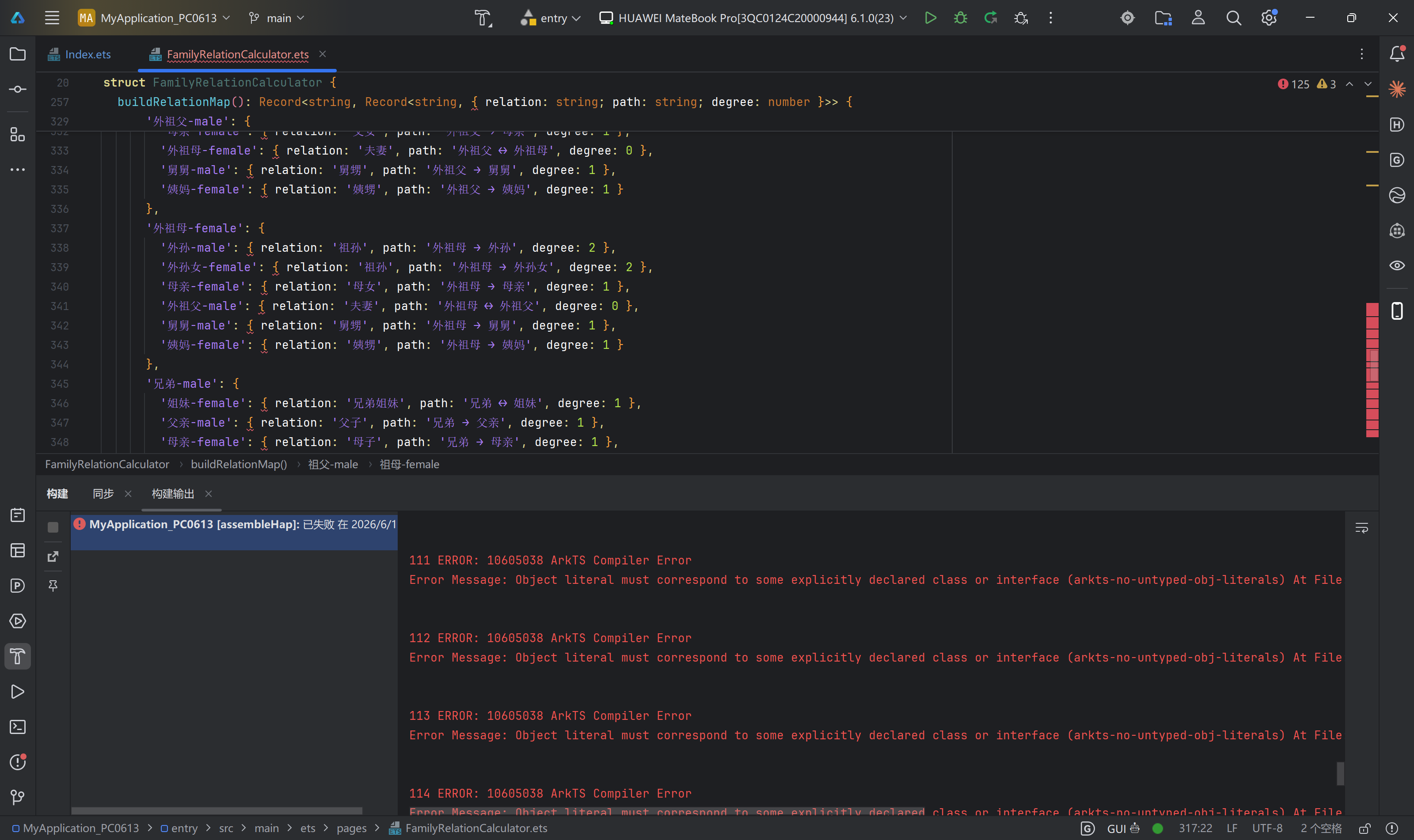
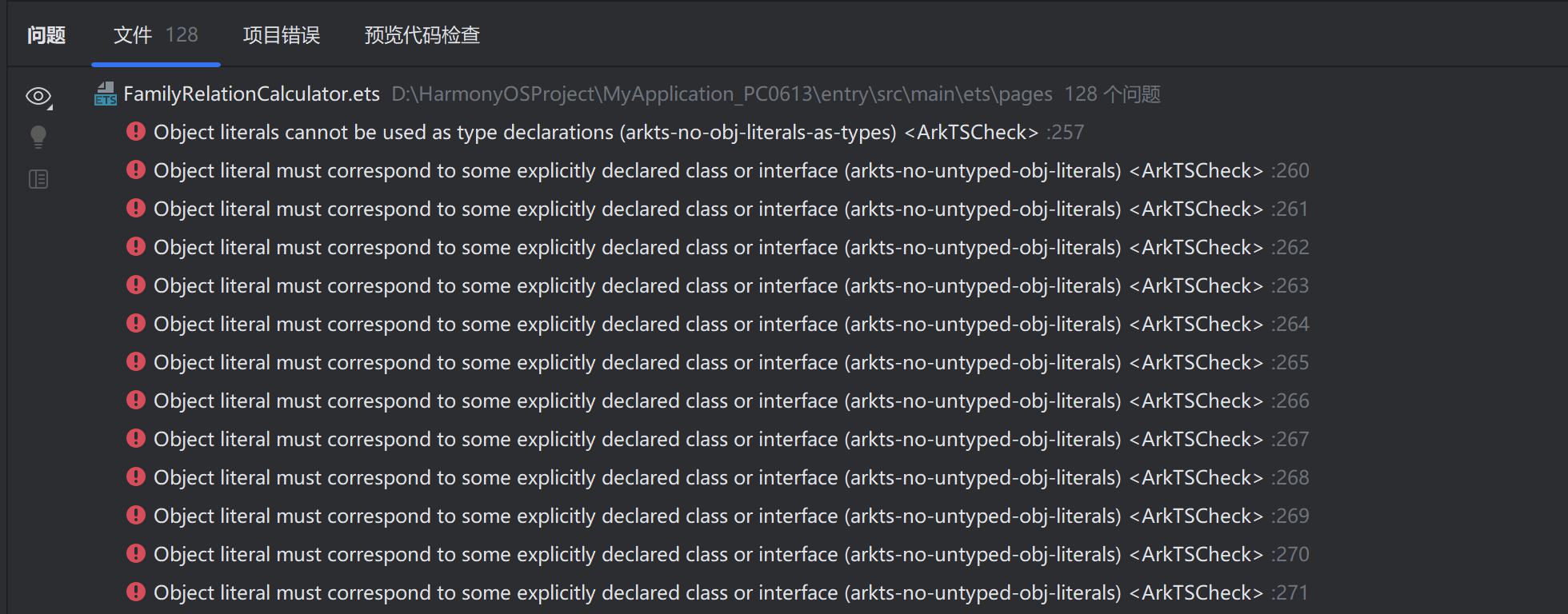
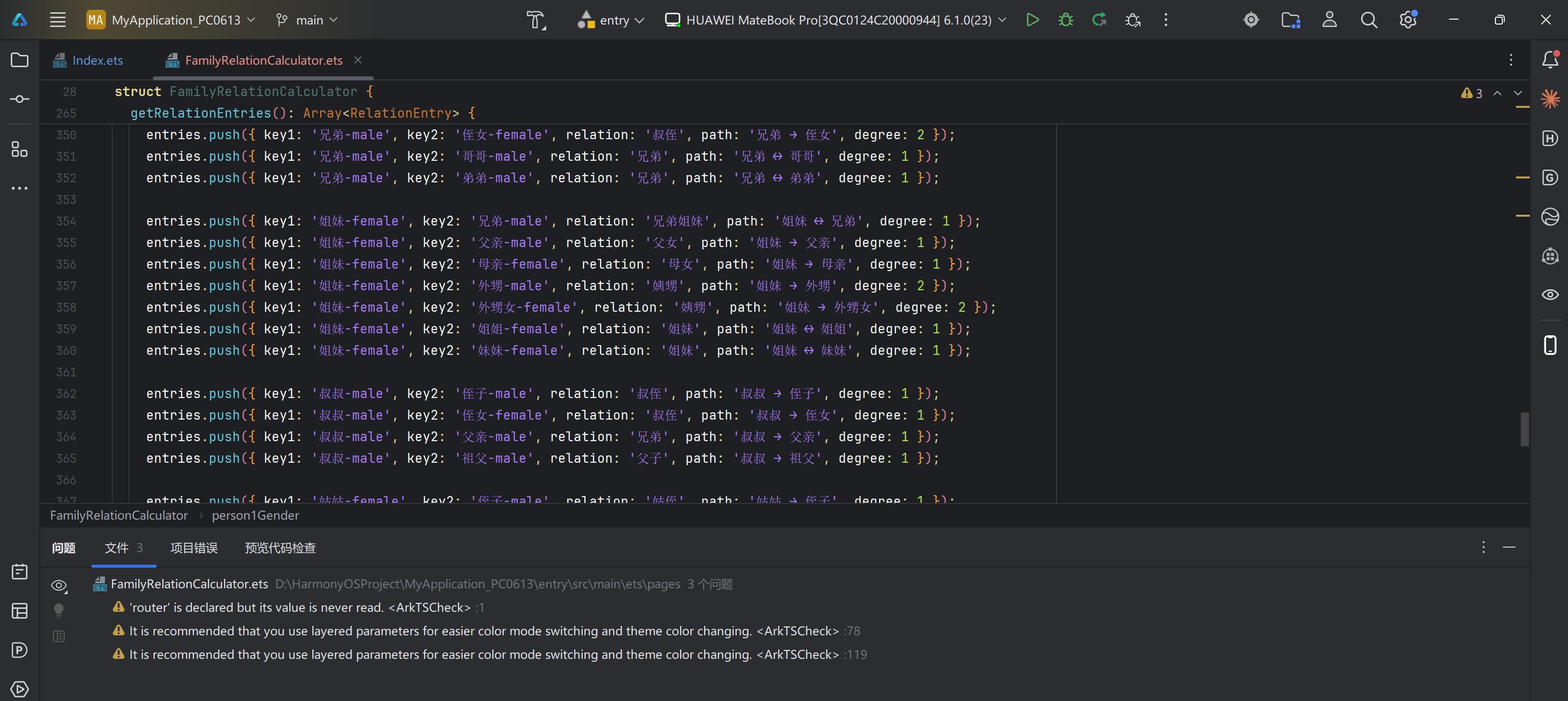
解决完毕效果:
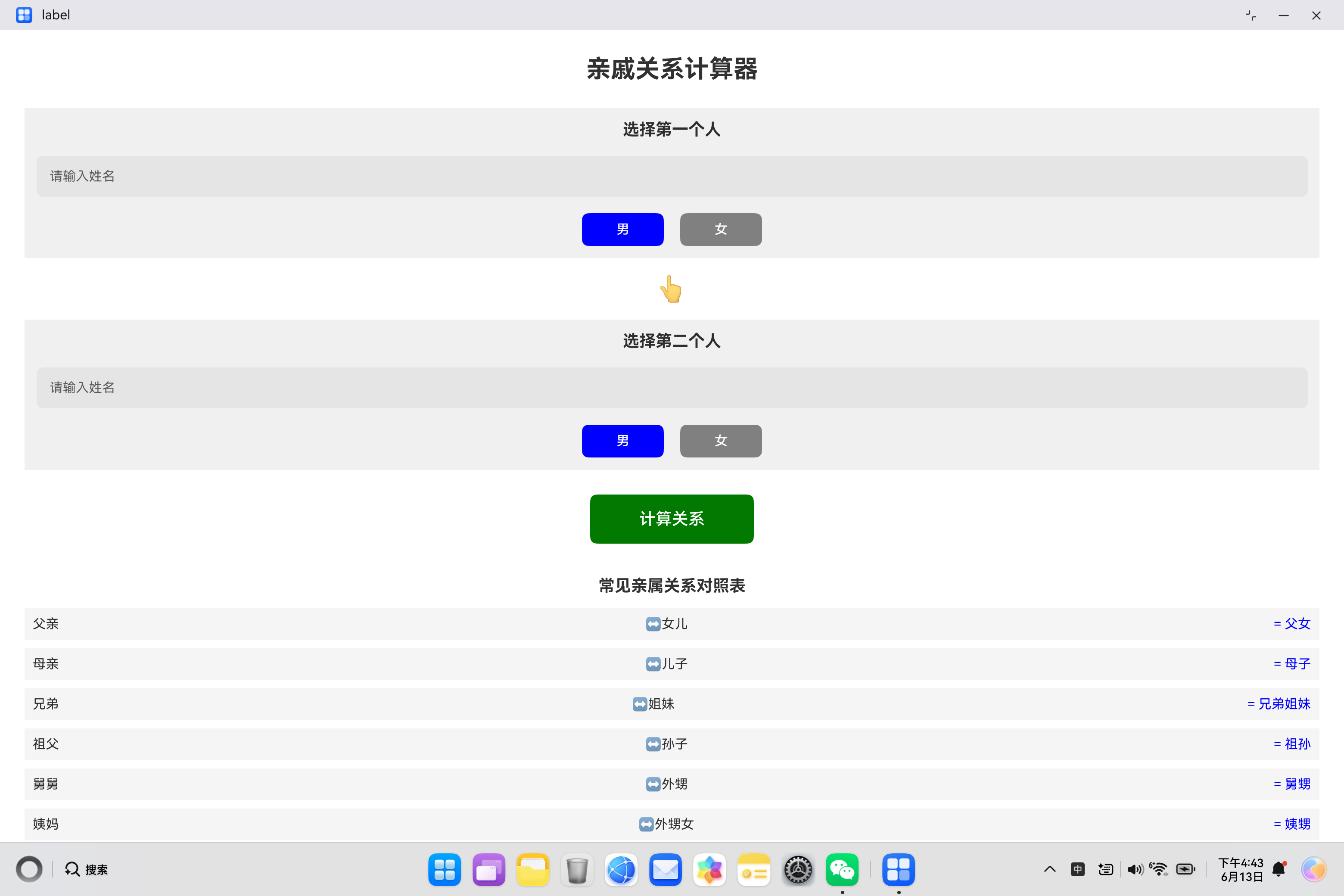
项目运行效果:
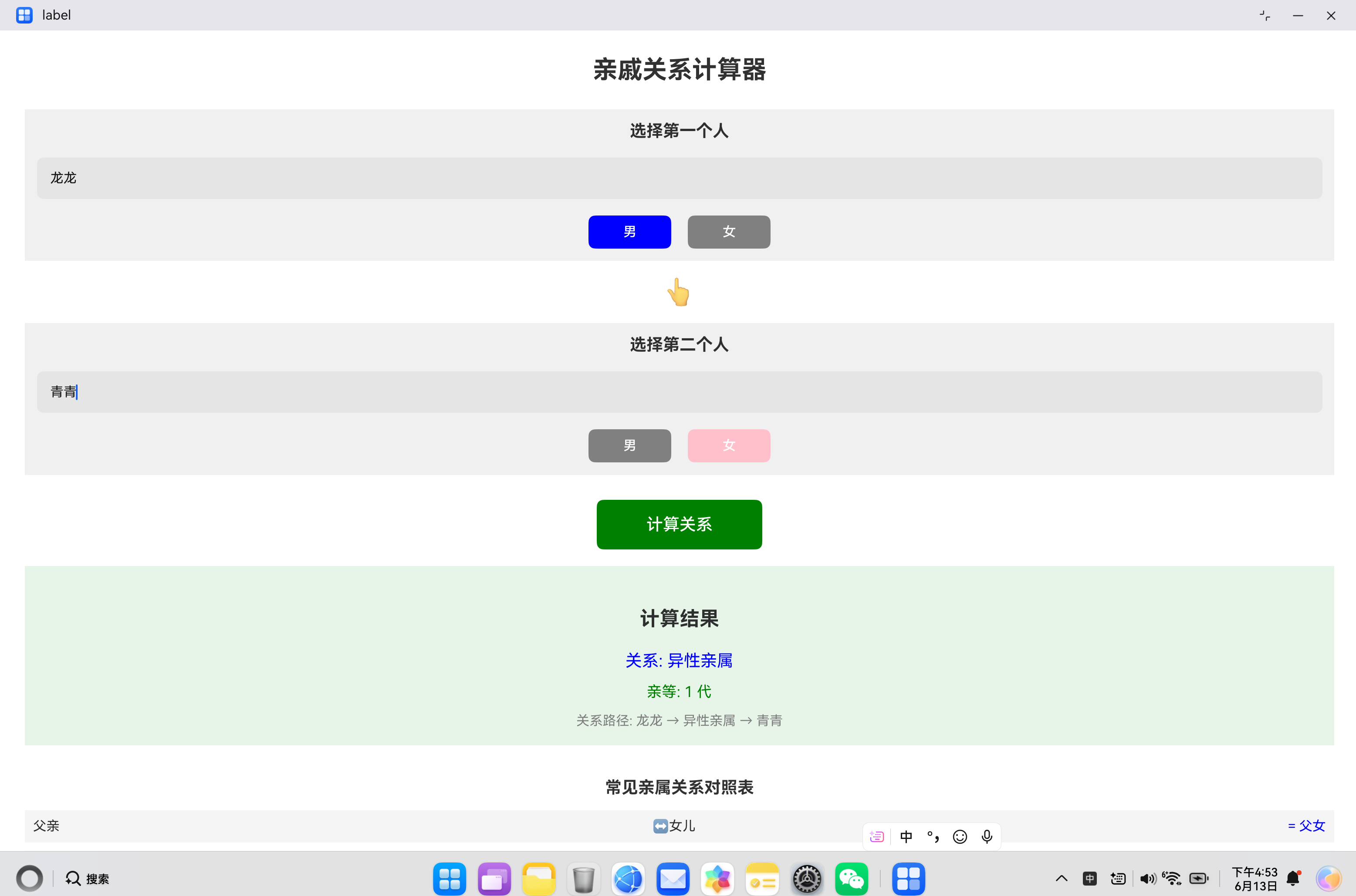
引言
在HarmonyOS应用开发中,ArkTS作为一种静态类型语言,对对象字面量的使用有着严格的约束。开发者在从TypeScript迁移到ArkTS时,常常会遇到"Object literals cannot be used as type declarations"和"Object literal must correspond to some explicitly declared class or interface"等编译错误。本文将深入探究这些约束的背景、原因、影响以及完整的解决方案。
第一章 ArkTS类型系统概述
1.1 ArkTS与TypeScript的核心差异
ArkTS作为HarmonyOS的专用开发语言,在TypeScript基础上进行了针对性优化,核心差异体现在以下几个方面:
| 特性 | TypeScript | ArkTS |
|---|---|---|
| 对象字面量类型 | ✅ 支持匿名类型 | ❌ 必须显式声明 |
| 声明合并 | ✅ 支持接口合并 | ❌ 不支持 |
| any/unknown类型 | ✅ 支持 | ❌ 不支持 |
| 动态属性访问 | ✅ 支持 | ❌ 不支持 |
| 解构赋值 | ✅ 支持 | ❌ 不支持 |
1.2 ArkTS类型系统设计理念
静态类型安全:ArkTS采用严格的静态类型检查,在编译期就确保类型安全,避免运行时类型错误。
性能优化:通过消除动态类型特性,ArkTS可以生成更高效的原生代码,提升应用运行性能。
可预测性:明确的类型声明使代码更易于理解和维护,降低团队协作成本。
跨平台一致性:严格的类型约束确保代码在不同HarmonyOS设备上行为一致。
第二章 对象字面量约束详解
2.1 错误类型分析
错误1:对象字面量不能作为类型声明
ERROR: Object literals cannot be used as type declarations (arkts-no-obj-literals-as-types)错误2:对象字面量必须对应显式声明
ERROR: Object literal must correspond to some explicitly declared class or interface (arkts-no-no-untyped-obj-literals)2.2 约束的具体场景
场景1:函数返回类型中的对象字面量
typescript
// ❌ 错误:返回类型使用对象字面量
function getRelation(): { relation: string; path: string; degree: number } {
  return { relation: '父子', path: '父亲 → 儿子', degree: 1 };
}

// ✅ 正确:使用显式接口
interface RelationResult {
  relation: string;
  path: string;
  degree: number;
}

function getRelation(): RelationResult {
  return { relation: '父子', path: '父亲 → 儿子', degree: 1 };
}
场景2:嵌套对象字面量
typescript
// ❌ 错误:嵌套对象字面量
function buildRelationMap(): Record<string, Record<string, { relation: string; path: string; degree: number }>> {
  return {
    '父亲-male': {
      '儿子-male': { relation: '父子', path: '父亲 → 儿子', degree: 1 }
    }
  };
}

// ✅ 正确:使用接口
interface RelationEntry {
  key1: string;
  key2: string;
  relation: string;
  path: string;
  degree: number;
}

function buildRelationMap(): Array<RelationEntry> {
  let entries: Array<RelationEntry> = [];
  entries.push({ key1: '父亲-male', key2: '儿子-male', relation: '父子', path: '父亲 → 儿子', degree: 1 });
  return entries;
}
场景3:函数参数中的对象字面量
typescript
// ❌ 错误:参数类型使用对象字面量
function printPerson(person: { name: string; age: number }): void {
  console.log(`${person.name}, ${person.age}`);
}

// ✅ 正确:使用接口
interface Person {
  name: string;
  age: number;
}

function printPerson(person: Person): void {
  console.log(`${person.name}, ${person.age}`);
}
2.3 约束的技术原因
编译期类型检查:ArkTS需要在编译期确定所有类型信息,匿名对象字面量无法提供完整的类型信息。
内存布局优化:明确的接口定义允许编译器优化内存布局,提升运行时性能。
代码可维护性:显式的类型声明使代码更易于理解和维护。
跨语言互操作:明确的类型定义便于与其他语言(如C/C++)进行互操作。
第三章 实际案例分析:亲戚关系计算器
3.1 问题场景
在开发亲戚关系计算器时,需要存储大量的亲属关系映射数据:
typescript
// ❌ 原始错误代码
buildRelationMap(): Record<string, Record<string, { relation: string; path: string; degree: number }>> {
  return {
    '父亲-male': {
      '儿子-male': { relation: '父子', path: '父亲 → 儿子', degree: 1 },
      '女儿-female': { relation: '父女', path: '父亲 → 女儿', degree: 1 },
      // ... 更多关系
    },
    // ... 更多亲属
  };
}
编译错误:
ERROR: Object literals cannot be used as type declarations (arkts-no-obj-literals-as-types)
ERROR: Object literal must correspond to some explicitly declared class or interface (arkts-no-no-untyped-obj-literals)
3.2 解决方案设计
方案1:数组存储方式
typescript
interface RelationEntry {
  key1: string;
  key2: string;
  relation: string;
  path: string;
  degree: number;
}

function getRelationEntries(): Array<RelationEntry> {
  let entries: Array<RelationEntry> = [];

  entries.push({ key1: '父亲-male', key2: '儿子-male', relation: '父子', path: '父亲 → 儿子', degree: 1 });
  entries.push({ key1: '父亲-male', key2: '女儿-female', relation: '父女', path: '父亲 → 女儿', degree: 1 });
  // ... 更多关系

  return entries;
}
方案2:类存储方式
typescript
class RelationEntry {
  key1: string;
  key2: string;
  relation: string;
  path: string;
  degree: number;

  constructor(key1: string, key2: string, relation: string, path: string, degree: number) {
    this.key1 = key1;
    this.key2 = key2;
    this.relation = relation;
    this.path = path;
    this.degree = degree;
  }
}

function getRelationEntries(): Array<RelationEntry> {
  let entries: Array<RelationEntry> = [];

  entries.push(new RelationEntry('父亲-male', '儿子-male', '父子', '父亲 → 儿子', 1));
  entries.push(new RelationEntry('父亲-male', '女儿-female', '父女', '父亲 → 女儿', 1));
  // ... 更多关系

  return entries;
}
3.3 查询逻辑重构
原查询逻辑(使用对象键值):
typescript
// ❌ 错误:使用对象键值查询
function findRelation(key1: string, key2: string) {
  let relationMap = this.buildRelationMap();
  if (relationMap[key1] && relationMap[key1][key2]) {
    return relationMap[key1][key2];
  }
}
重构后查询逻辑(使用数组遍历):
typescript
// ✅ 正确:使用数组遍历
function findRelation(key1: string, key2: string): RelationEntry | null {
  let entries = this.getRelationEntries();

  for (let i: number = 0; i < entries.length; i++) {
    let entry = entries[i];
    if (entry.key1 === key1 && entry.key2 === key2) {
      return entry;
    }
    if (entry.key1 === key2 && entry.key2 === key1) {
      return entry;
    }
  }

  return null;
}
3.4 性能优化考虑
数据预加载:将关系数据作为静态常量在应用启动时加载。
索引优化:对于大量数据,可以构建索引数组提高查询效率。
二分查找:如果数据有序,可以使用二分查找算法。
typescript
class RelationIndex {
  private index: Record<string, Array<RelationEntry>> = {};

  constructor(entries: Array<RelationEntry>) {
    for (let i: number = 0; i < entries.length; i++) {
      let entry = entries[i];
      if (!this.index[entry.key1]) {
        this.index[entry.key1] = [];
      }
      this.index[entry.key1].push(entry);
    }
  }

  find(key1: string, key2: string): RelationEntry | null {
    let entries = this.index[key1];
    if (!entries) {
      return null;
    }

    for (let i: number = 0; i < entries.length; i++) {
      let entry = entries[i];
      if (entry.key2 === key2) {
        return entry;
      }
    }

    return null;
  }
}
第四章 类型定义最佳实践
4.1 类型文件组织
entry/src/main/ets/
├── common/
│   ├── types/
│   │   ├── index.ets          # 类型导出入口
│   │   ├── relation.ts        # 亲属关系类型
│   │   └── user.ts            # 用户相关类型
└── pages/
    └── FamilyRelationCalculator.ets
类型导出入口:
typescript
// File: common/types/index.ets
export { RelationEntry, RelationResult } from './relation';
export { User, UserProfile } from './user';
4.2 接口设计原则
单一职责原则:每个接口只定义一个概念。
typescript
// ✅ 推荐
interface RelationEntry {
  key1: string;
  key2: string;
  relation: string;
  path: string;
  degree: number;
}

// ❌ 不推荐:混合多个概念
interface MixedData {
  name: string;
  age: number;
  relation: string;
  path: string;
  isValid: boolean;
}可扩展性:考虑未来扩展需求。
typescript
interface RelationEntry {
  key1: string;
  key2: string;
  relation: string;
  path: string;
  degree: number;
  extendedInfo?: Record<string, string>;  // 预留扩展字段
}类型安全:使用严格的类型定义。
typescript
type Gender = 'male' | 'female';

interface Person {
  id: string;
  name: string;
  gender: Gender;
}
4.3 类型命名规范
| 类型 | 命名规则 | 示例 |
|---|---|---|
| 接口 | PascalCase,以大写字母开头 | RelationEntry |
| 类 | PascalCase,以大写字母开头 | RelationIndex |
| 类型别名 | PascalCase | `type Gender = 'male' |
| 属性 | camelCase | relationType |
| 方法 | camelCase | findRelation() |
第五章 常见错误模式与解决方案
5.1 错误模式一:嵌套对象字面量
错误代码:
typescript
function getData(): { outer: { inner: { value: string } } } {
  return { outer: { inner: { value: 'test' } } };
}
解决方案:
typescript
interface InnerData {
  value: string;
}

interface OuterData {
  inner: InnerData;
}

interface RootData {
  outer: OuterData;
}

function getData(): RootData {
  return { outer: { inner: { value: 'test' } } };
}
5.2 错误模式二:Record类型中的对象字面量
错误代码:
typescript
function getConfig(): Record<string, { enabled: boolean; value: number }> {
  return {
    'feature1': { enabled: true, value: 10 },
    'feature2': { enabled: false, value: 20 }
  };
}
解决方案:
typescript
interface ConfigEntry {
  enabled: boolean;
  value: number;
}

function getConfig(): Record<string, ConfigEntry> {
  let config: Record<string, ConfigEntry> = {};
  config['feature1'] = { enabled: true, value: 10 };
  config['feature2'] = { enabled: false, value: 20 };
  return config;
}
5.3 错误模式三:函数参数中的匿名对象
错误代码:
typescript
function process(data: { items: Array<{ id: number; name: string }> }): void {
  // 处理数据
}
解决方案:
typescript
interface Item {
  id: number;
  name: string;
}

interface ProcessData {
  items: Array<Item>;
}

function process(data: ProcessData): void {
  // 处理数据
}
第六章 与TypeScript的迁移策略
6.1 迁移准备工作
步骤1:识别问题代码
使用代码扫描工具识别项目中使用对象字面量类型的地方:
bash
# 搜索对象字面量类型声明
grep -r "\{.*:.*\}" --include="*.ets" . | grep -E "(function|return|=)"
步骤2:制定迁移计划
| 文件 | 问题数量 | 优先级 | 预计时间 |
|---|---|---|---|
| utils/relation.ts | 15 | 高 | 1小时 |
| pages/calculator.ets | 8 | 高 | 30分钟 |
| services/api.ts | 12 | 中 | 1.5小时 |
6.2 迁移模式
模式1:接口提取
typescript
// TypeScript代码
function getPerson(): { name: string; age: number } {
  return { name: '张三', age: 25 };
}

// ArkTS代码
interface Person {
  name: string;
  age: number;
}

function getPerson(): Person {
  return { name: '张三', age: 25 };
}
模式2:数组替代对象
typescript
// TypeScript代码
const config = {
  'key1': { value: 1 },
  'key2': { value: 2 }
};

// ArkTS代码
interface ConfigItem {
  key: string;
  value: number;
}

let config: Array<ConfigItem> = [
  { key: 'key1', value: 1 },
  { key: 'key2', value: 2 }
];
模式3:类替代匿名对象
typescript
// TypeScript代码
function createPoint(x: number, y: number) {
  return { x, y, distance: () => Math.sqrt(x * x + y * y) };
}

// ArkTS代码
class Point {
  x: number;
  y: number;

  constructor(x: number, y: number) {
    this.x = x;
    this.y = y;
  }

  distance(): number {
    return Math.sqrt(this.x * this.x + this.y * this.y);
  }
}

function createPoint(x: number, y: number): Point {
  return new Point(x, y);
}
6.3 自动化迁移工具
代码转换脚本:
typescript
// 简化的代码转换示例
function transformObjectLiteralType(code: string): string {
  // 匹配对象字面量类型声明
  let pattern = /(\w+)\s*:\s*\{([^}]+)\}/g;

  return code.replace(pattern, (match, name, content) => {
    // 提取属性定义
    let properties = content.split(',').map(p => p.trim());

    // 生成接口定义
    let interfaceDef = `interface ${name} {\n`;
    for (let prop of properties) {
      interfaceDef += `  ${prop};\n`;
    }
    interfaceDef += `}\n\n`;

    return interfaceDef + `${name}: ${name}`;
  });
}
第七章 性能优化与最佳实践
7.1 数据结构选择
数组 vs 对象
| 场景 | 推荐数据结构 | 原因 |
|---|---|---|
| 遍历操作多 | 数组 | 顺序访问效率高 |
| 随机访问多 | 对象/Map | 键值查找效率高 |
| 数据量大 | 数组+索引 | 平衡遍历和查找 |
| 动态添加 | 数组 | 易于扩展 |
索引优化策略
typescript
class RelationStore {
  private entries: Array<RelationEntry> = [];
  private keyIndex: Record<string, Array<number>> = {};

  addEntry(entry: RelationEntry): void {
    let index = this.entries.length;
    this.entries.push(entry);

    if (!this.keyIndex[entry.key1]) {
      this.keyIndex[entry.key1] = [];
    }
    this.keyIndex[entry.key1].push(index);

    if (!this.keyIndex[entry.key2]) {
      this.keyIndex[entry.key2] = [];
    }
    this.keyIndex[entry.key2].push(index);
  }

  findByKey(key: string): Array<RelationEntry> {
    let indices = this.keyIndex[key];
    if (!indices) {
      return [];
    }

    let result: Array<RelationEntry> = [];
    for (let i: number = 0; i < indices.length; i++) {
      result.push(this.entries[indices[i]]);
    }

    return result;
  }
}
7.2 内存管理
对象池模式
typescript
class ObjectPool<T> {
  private pool: Array<T> = [];
  private createFn: () => T;

  constructor(createFn: () => T) {
    this.createFn = createFn;
  }

  acquire(): T {
    if (this.pool.length > 0) {
      return this.pool.pop() as T;
    }
    return this.createFn();
  }

  release(obj: T): void {
    this.pool.push(obj);
  }
}

// 使用示例
let entryPool = new ObjectPool<RelationEntry>(() => ({
  key1: '',
  key2: '',
  relation: '',
  path: '',
  degree: 0
}));

let entry = entryPool.acquire();
// 使用完毕
entryPool.release(entry);
7.3 编译期优化
常量折叠
typescript
// 在编译期计算常量
const MAX_ITERATIONS = 1000;
const TIMEOUT_MS = 5000;
类型断言优化
typescript
// ✅ 避免不必要的类型断言
let value: number = 42;

// ❌ 不推荐:多余的断言
let result = value as number;
第八章 类型系统进阶
8.1 泛型类型
泛型接口
typescript
interface Result<T> {
  success: boolean;
  data: T;
  message: string;
}

function fetchData<T>(url: string): Result<T> {
  // 获取数据
  return {
    success: true,
    data: {} as T,
    message: 'success'
  };
}

// 使用
let userResult = fetchData<User>('/api/user');
泛型类
typescript
class DataStore<T> {
  private items: Array<T> = [];

  add(item: T): void {
    this.items.push(item);
  }

  get(index: number): T | null {
    if (index >= 0 && index < this.items.length) {
      return this.items[index];
    }
    return null;
  }

  find(predicate: (item: T) => boolean): T | null {
    for (let i: number = 0; i < this.items.length; i++) {
      if (predicate(this.items[i])) {
        return this.items[i];
      }
    }
    return null;
  }
}
8.2 联合类型与交叉类型
联合类型
typescript
type Gender = 'male' | 'female';
type Status = 'active' | 'inactive' | 'pending';

interface Person {
  gender: Gender;
  status: Status;
}
交叉类型
typescript
interface Base {
  id: string;
  createdAt: string;
}

interface User {
  name: string;
  email: string;
}

type UserWithBase = User & Base;

let user: UserWithBase = {
  id: '1',
  createdAt: '2024-01-01',
  name: '张三',
  email: 'zhang@example.com'
};
8.3 类型守卫
typescript
function isString(value: unknown): value is string {
  return typeof value === 'string';
}

function isNumber(value: unknown): value is number {
  return typeof value === 'number';
}

function processValue(value: unknown): void {
  if (isString(value)) {
    console.log('字符串:', value.length);
  } else if (isNumber(value)) {
    console.log('数字:', value.toFixed(2));
  }
}
第九章 调试与诊断
9.1 编译错误诊断
错误信息解析
ERROR: Object literals cannot be used as type declarations (arkts-no-obj-literals-as-types)
At File: D:/Project/entry/src/main/ets/pages/FamilyRelationCalculator.ets:257:1
定位步骤:
- 确认文件和行号:定位到第257行
- 分析上下文:查看该行及其周围的代码
- 识别问题:找到对象字面量类型声明
- 应用解决方案:创建显式接口
9.2 类型检查工具
使用hvigor进行类型检查
bash
# 执行类型检查
hvigor check

# 生成类型报告
hvigor check --report
IDE支持
- DevEco Studio:提供实时类型检查和错误提示
- 代码补全:基于类型信息提供智能补全
- 重构支持:支持接口重命名和引用更新
9.3 常见问题排查
问题1:接口未找到
ERROR: Cannot find name 'RelationEntry'解决方案:
- 检查import语句
- 确认接口已正确导出
- 检查文件路径
问题2:属性不匹配
ERROR: Property 'relation' does not exist on type 'Object'解决方案:
- 使用显式类型声明
- 避免使用Object类型
- 检查类型定义
第十章 总结与展望
10.1 核心要点回顾
- 对象字面量约束:ArkTS不允许使用对象字面量作为类型声明
- 显式类型声明:所有对象必须对应显式声明的接口或类
- 数据结构选择:根据场景选择数组或对象存储方式
- 性能优化:使用索引和对象池提升性能
- 迁移策略:从TypeScript迁移时需要进行类型声明转换
10.2 实践建议
- 代码审查:将类型约束检查作为代码审查的重要部分
- 编码规范:制定团队级别的类型定义规范
- 工具辅助:使用IDE和构建工具进行类型检查
- 持续学习:关注ArkTS最新特性和最佳实践
10.3 未来发展
随着HarmonyOS生态的发展,ArkTS可能会在未来版本中:
- 增强类型推断:提供更智能的类型推断能力
- 简化类型声明:提供更简洁的类型定义语法
- 性能分析工具:提供更强大的性能分析和优化建议
附录:类型定义模板
A.1 接口定义模板
typescript
// 基础接口模板
export interface InterfaceName {
  // 必填字段
  field1: Type1;
  field2: Type2;

  // 可选字段
  field3?: Type3;

  // 只读字段
  readonly field4: Type4;

  // 数组字段
  items: Array<ItemType>;

  // 对象字段
  nested: NestedInterface;
}

// 泛型接口模板
export interface GenericInterface<T> {
  data: T;
  metadata: Metadata;
}
A.2 类定义模板
typescript
// 基础类模板
export class ClassName {
  // 实例字段
  private field1: Type1;
  protected field2: Type2;
  public field3: Type3;

  // 构造函数
  constructor(param1: Type1, param2: Type2) {
    this.field1 = param1;
    this.field2 = param2;
  }

  // 实例方法
  public method1(): ReturnType {
    // 方法实现
  }

  protected method2(param: ParamType): void {
    // 方法实现
  }

  private method3(): void {
    // 方法实现
  }
}

// 泛型类模板
export class GenericClass<T> {
  private items: Array<T> = [];

  add(item: T): void {
    this.items.push(item);
  }

  get(index: number): T | null {
    return index >= 0 && index < this.items.length ? this.items[index] : null;
  }
}
A.3 类型别名模板
typescript
// 联合类型
export type UnionType = Type1 | Type2 | Type3;

// 交叉类型
export type IntersectionType = Type1 & Type2;

// 字符串字面量类型
export type LiteralType = 'value1' | 'value2' | 'value3';

// 函数类型
export type FunctionType = (param1: Type1, param2: Type2) => ReturnType;