前言
在证件识别、OCR 文字检测项目开发中,拍摄得到的社保卡、身份证照片往往存在倾斜、透视形变问题,直接送入识别模型会造成文字扭曲、识别率大幅下降。常规 SURF 特征匹配矫正依赖模板图像,通用性受限;而基于轮廓 + 霍夫直线检测的方案,能自动定位证件四个角点,完成自适应透视变换,无需提前准备模板,是工业证件预处理的主流思路。本文结合社保卡实拍案例,完整拆解从边缘提取、直线检测、角点求解到透视转正的全流程,附带直方图均衡辅助优化图像质量的代码实现。
一、技术整体方案思路
本次社保卡矫正分为五大步骤:
- 图像预处理:灰度转换、高斯模糊降噪,通过直方图分析图像明暗分布,可选均衡化提升边缘对比度;
- 边缘检测:Canny 算子提取社保卡卡片轮廓边缘;
- 霍夫直线检测:HoughLinesP 提取卡片四条边界直线,过滤杂线仅保留最长四边;
- 四角交点求解:通过四条直线两两相交,计算出社保卡左上、右上、左下、右下四个顶点;
- 透视变换矫正:将四个畸变角点映射为标准矩形坐标,输出横平竖直的标准社保卡图像。
配套封装了showHist直方图可视化函数,用于调试阶段直观观察图像像素明暗分布,判断是否需要做亮度均衡优化,方便排查边缘提取失效问题。
二、直方图可视化函数解析
文中提供的showHist函数是调试利器,核心作用是分离 BGR 三通道,分别计算像素灰度分布并绘制直方图。
- 通过
split拆分彩色图像蓝、绿、红三个通道,使用calcHist统计 0~255 每个灰度值的像素数量; - 利用
normalize将直方图数据归一化到画布高度区间,避免数值溢出无法绘制; - 按通道配色绘制折线直方图,蓝色代表 B 通道、绿色 G 通道、红色 R 通道。 在社保卡场景中,卡片底色大面积浅蓝色,直方图蓝色通道峰值会明显更高;若拍摄画面偏暗、边缘模糊,直方图整体会集中在低灰度区间,此时可增加 CLAHE 均衡化步骤,拉高边缘对比度,保证后续霍夫直线能完整检出卡片四边。
三、霍夫直线 + 四角定位核心逻辑(结合效果图)
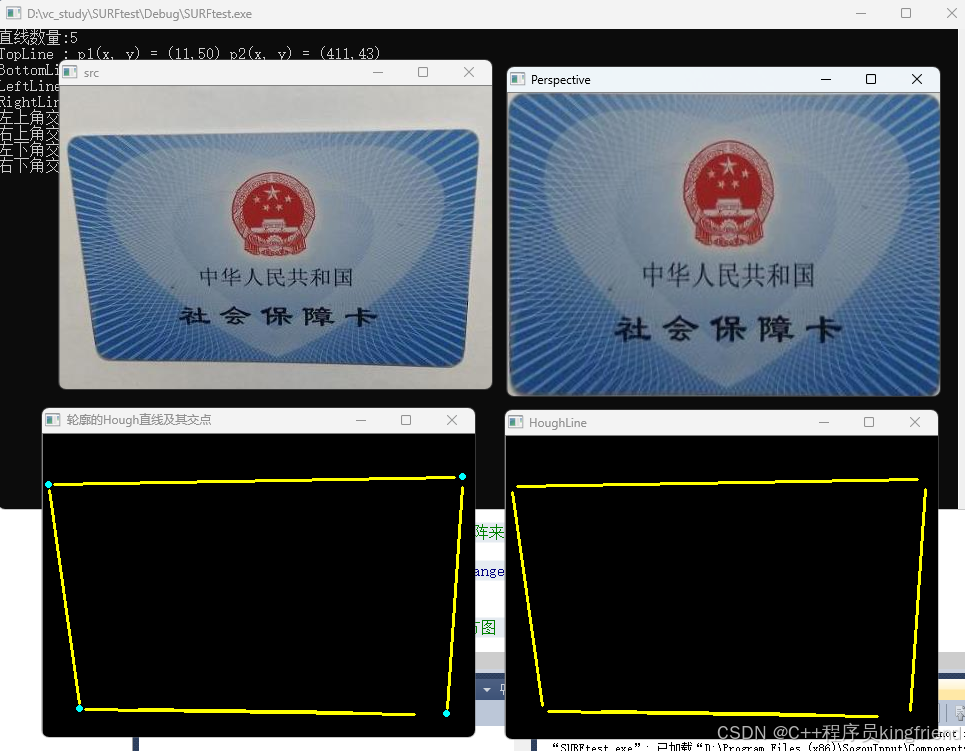
从运行截图可见,程序成功检出社保卡四条黄色边界直线,并计算出四个蓝色交点,对应卡片真实四个顶点。
- 轮廓与直线过滤:原始图像存在背景杂色、卡片纹路干扰,霍夫检测会生成数十条短线,代码中增加线段长度阈值过滤,仅保留长度匹配卡片长宽的四条直线,分为上下左右四边;
- 直线交点计算:四条边界直线两两配对,上左 + 上右取顶部两角,下左 + 下右取底部两角,排序后得到有序四顶点;
- 透视变换映射 :设定标准社保卡矩形目标坐标,使用
warpPerspective生成变换矩阵,将畸变图像拉伸转正。 对比右侧 Perspective 窗口输出,矫正后的社保卡国徽、文字无拉伸形变,四边完全水平垂直,满足 OCR 识别前置要求。
四、方案优势与落地适配场景
- 无模板依赖:区别于 SURF、ORB 特征匹配矫正,不需要提前存储标准社保卡模板,现场任意角度拍摄均可自动定位,适配流水线、手持拍摄等多变场景;
- 鲁棒性更强:搭配直方图调试工具,针对逆光、暗光拍摄的社保卡,可通过均衡化预处理强化边缘,降低漏检直线、角点偏移问题;
- 轻量化易集成:霍夫直线计算开销远小于特征匹配,适合 MFC、Qt 上位机实时证件处理,文中代码可直接嵌入 C++ 工控视觉程序;
- 通用性广:逻辑可无缝迁移至身份证、营业执照、各类卡片矫正,仅需微调直线长度过滤阈值。
五、开发踩坑总结
- 霍夫直线检测易受卡片内部防伪纹路干扰,必须增加线段长度筛选,否则会提取大量内部短线干扰四角计算;
- 角点求解时需对四条直线分类上下左右,若直接两两求交点会生成多余无效交点,造成透视变换错乱;
- 图像过曝 / 过暗会导致 Canny 边缘断裂,直方图函数可快速定位明暗问题,预处理阶段增加均衡化能显著提升稳定性。
cpp
#include "StdAfx.h"


#include <iostream>
#include <opencv2/opencv.hpp>

using namespace std;
using namespace cv;

//显示直方图
void showHist(Mat &img,Mat &dst)
{
	//1、创建3个矩阵来处理每个通道输入图像通道。
	//我们用向量类型变量来存储每个通道,并用split函数将输入图像划分成3个通道。
	vector<Mat>bgr;
	split(img, bgr);

	//2、定义直方图的区间数
	int numbers = 256;

	//3、定义变量范围并创建3个矩阵来存储每个直方图
	float range[] = { 0,256 };
	const float* histRange = { range };
	Mat b_hist, g_hist, r_hist;

	//4、使用calcHist函数计算直方图
	int numbins = 256;
	calcHist(&bgr[0], 1, 0, Mat(), b_hist, 1, &numbins, &histRange);
	calcHist(&bgr[1], 1, 0, Mat(), g_hist, 1, &numbins, &histRange);
	calcHist(&bgr[2], 1, 0, Mat(), r_hist, 1, &numbins, &histRange);

	//5、创建一个512*300像素大小的彩色图像,用于绘制显示
	int width = 512;
	int height = 300;
	Mat histImage(height, width, CV_8UC3, Scalar(20, 20, 20));

	//6、将最小值与最大值标准化直方图矩阵
	normalize(b_hist, b_hist, 0, height, NORM_MINMAX);
	normalize(g_hist, g_hist, 0, height, NORM_MINMAX);
	normalize(r_hist, r_hist, 0, height, NORM_MINMAX);

	//7、使用彩色通道绘制直方图
	int binStep = cvRound((float)width / (float)numbins);  //通过将宽度除以区间数来计算binStep变量

	for (int i = 1; i < numbins; i++)
	{
		line(histImage,
			Point(binStep * (i - 1), height - cvRound(b_hist.at<float>(i - 1))),
			Point(binStep * (i), height - cvRound(b_hist.at<float>(i))),
			Scalar(255, 0, 0)
			);
		line(histImage,
			Point(binStep * (i - 1), height - cvRound(g_hist.at<float>(i - 1))),
			Point(binStep * (i), height - cvRound(g_hist.at<float>(i))),
			Scalar(0, 255, 0)
			);
		line(histImage,
			Point(binStep * (i - 1), height - cvRound(r_hist.at<float>(i - 1))),
			Point(binStep * (i), height - cvRound(r_hist.at<float>(i))),
			Scalar(0, 0, 255)
			);
	}
	dst = histImage;
	return;
}
//图像校正技术
#include <opencv2/opencv.hpp>
#include <iostream>

using namespace std;
using namespace cv;
RNG rng;

int main(int argc, char** argv)
{
	Mat src,temp_threshold,temp_mor,temp_contours,temp_hough,dst;
	src = imread("card.jpg");
	if (src.empty())
	{
		cout << "could not load image1..." << endl;
		return -1;
	}

	namedWindow("src", WINDOW_AUTOSIZE);
	imshow("src", src);
	cvtColor(src, temp_threshold, COLOR_BGR2GRAY);
	//通过二值分割
	threshold(temp_threshold,temp_threshold, 0, 255, THRESH_BINARY_INV | THRESH_OTSU);
	//imshow("Threshold", temp_threshold);

	//形态学方法
	Mat kernel = getStructuringElement(MORPH_RECT, Size(5, 5), Point(-1, -1));
	morphologyEx(temp_threshold,temp_mor,MORPH_CLOSE,kernel, Point(-1, -1), 3);
	//imshow("Morphology", temp_mor);

	//寻找轮廓
	bitwise_not(temp_mor, temp_mor, Mat());
	vector<vector<Point>> contours;
	vector<Vec4i> hireachy;
	findContours(temp_mor, contours, hireachy, RETR_TREE, CHAIN_APPROX_SIMPLE, Point());

	//绘制轮廓
	temp_contours = Mat::zeros(src.size(), CV_8UC3);
	for (size_t i = 0; i < contours.size(); i++)
	{
		Rect rect = boundingRect(contours[i]);//boundingRect计算轮廓的垂直边界最小矩形,矩形是与图像上下边界平行的
		if (rect.width > (src.cols / 2) && rect.width < src.cols - 5)
		{
			drawContours(temp_contours, contours, static_cast<int>(i), Scalar(255,0,255), 2, 8, hireachy, 0, Point());
		}
	}
	//imshow("Contours", temp_contours);

	//Hough直线检测
	cvtColor(temp_contours, temp_contours, COLOR_BGR2GRAY);
	vector<Vec4i> plines;//STL
	HoughLinesP(temp_contours, plines, 1, CV_PI / 180.0, min(src.cols*0.5, src.rows*0.5), min(src.cols*0.5, src.rows*0.5), 0);
	temp_hough = Mat::zeros(src.size(), CV_8UC3);
	for (size_t j = 0; j < plines.size(); j++)
	{
		Vec4i Lines = plines[j];//plines[j]在STL的vector容器里
		//画直线
		line(temp_hough, Point(Lines[0], Lines[1]), Point(Lines[2], Lines[3]), Scalar(0,255,255), 2, 8, 0);
	}
	cout << "直线数量:" << plines.size() << endl;
	imshow("HoughLine", temp_hough);


	// 寻找与定位上下左右四条直线的端点坐标
	int height = src.rows;
	int width  = src.cols;
	Vec4i LeftLine, RightLine, TopLine, BottomLine;
	int delta_h = 0;//y2 - y1//用来判断是竖线还是横线
	for (int k = 0; k < plines.size(); k++)
	{
		Vec4i Lines_temp = plines[k];//plines[k]在STL的vector容器里
		delta_h = abs(Lines_temp[3] - Lines_temp[1]);//y2 - y1
		//y2 < (h/2) && y1 < (h/2) && y2 - y1很小
		if (Lines_temp[3] < height / 2.0 && Lines_temp[1] < height / 2.0 && delta_h < min(height*0.5,width*0.5) - 1)
		{
			TopLine = plines[k];
		}
		//y2 > (h/2) && y1 > (h/2) && y2 - y1很小
		if (Lines_temp[3] > height / 2.0 && Lines_temp[1] > height / 2.0 && delta_h < min(height*0.5, width*0.5) - 1)
		{
			BottomLine = plines[k];
		}
		//x1 < (w/2) && x2 < (h/2)
		if (Lines_temp[0] < width / 2.0 && Lines_temp[2] < width / 2.0)
		{
			LeftLine = plines[k];
		}
		//x1 > (w/2) && x2 > (h/2)
		if (Lines_temp[0] > width / 2.0 && Lines_temp[2] > width / 2.0)
		{
			RightLine = plines[k];
		}
	}
	//显示四条直线的端点坐标
	cout << "TopLine	: p1(x, y) = (" << TopLine[0]		<< "," << TopLine[1]		<< ") p2(x, y) = (" << TopLine[2]		<< "," << TopLine[3]	<< ")"	<< endl;
	cout << "BottomLine	: p1(x, y) = ("	<< BottomLine[0]	<< "," << BottomLine[1]		<< ") p2(x, y) = (" << BottomLine[2]	<< "," << BottomLine[3]	<< ")"	<< endl;
	cout << "LeftLine	: p1(x, y) = ("	<< LeftLine[0]		<< "," << LeftLine[1]		<< ") p2(x, y) = (" << LeftLine[2]		<< "," << LeftLine[3]	<< ")"	<< endl;
	cout << "RightLine	: p1(x, y) = ("	<< RightLine[0]		<< "," << RightLine[1]		<< ") p2(x, y) = (" << RightLine[2]		<< "," << RightLine[3]	<< ")"	<< endl;

	//拟合四条直线方程,写成 y = m * x + b//其实应该写成x=ay+b的形式,以防斜率不存在
	float m1, m2, m3, m4, b1, b2, b3, b4;//这里的代码非常辣鸡,可以用for循环
	m1 = float(TopLine[3]	 - TopLine[1])	  / float(TopLine[2]	- TopLine[0]);	 //m=(y2-y1)/(x2-x1)
	m2 = float(BottomLine[3] - BottomLine[1]) / float(BottomLine[2] - BottomLine[0]);
	m3 = float(LeftLine[3]	 - LeftLine[1])   / float(LeftLine[2]	- LeftLine[0]);
	m4 = float(RightLine[3]	 - RightLine[1])  / float(RightLine[2]	- RightLine[0]);
	b1 = TopLine[1]		- m1	* TopLine[0]; //b = y1 - m * x1
	b2 = BottomLine[1]	- m2	* BottomLine[0];
	b3 = LeftLine[1]	- m3	* LeftLine[0];
	b4 = RightLine[1]	- m4	* RightLine[0];

	//求四条直线的交点
	Point p1, p2, p3, p4;
	p1.x = static_cast<int>((b3 - b1) / (m1 - m3));//左上角交点 x = (b3 - b1)/(m1 - m3)
	p1.y = static_cast<int>(m1 * p1.x + b1);//左上角交点 y = m1 * p1.x + b1
	p2.x = static_cast<int>((b4 - b1) / (m1 - m4));//右上角交点
	p2.y = static_cast<int>(m1 * p2.x + b1);
	p3.x = static_cast<int>((b3 - b2) / (m2 - m3));//左下角交点
	p3.y = static_cast<int>(m2 * p3.x + b2);
	p4.x = static_cast<int>((b4 - b2) / (m2 - m4));//右下角交点
	p4.y = static_cast<int>(m2 * p4.x + b2);
	//显示四个交点坐标
	cout << "左上角交点p1的坐标为;(" << p1.x << "," << p1.y << ")" << endl;
	cout << "右上角交点p2的坐标为;(" << p2.x << "," << p2.y << ")" << endl;
	cout << "左下角交点p3的坐标为;(" << p3.x << "," << p3.y << ")" << endl;
	cout << "右下角交点p4的坐标为;(" << p4.x << "," << p4.y << ")" << endl;
	//绘制四个交点
	circle(temp_hough, p1, 2, Scalar(255,255,0), 2, 8);
	circle(temp_hough, p2, 2, Scalar(255,255,0), 2, 8);
	circle(temp_hough, p3, 2, Scalar(255,255,0), 2, 8);
	circle(temp_hough, p4, 2, Scalar(255,255,0), 2, 8);
	imshow("轮廓的Hough直线及其交点", temp_hough);

	//透视变换
	vector<Point2f> From_corners(4);//当前获取的四边形
	From_corners[0] = p1;
	From_corners[1] = p2;
	From_corners[2] = p3;
	From_corners[3] = p4;

	vector<Point2f> To_corners(4);//即将生成的四边形
	To_corners[0] = Point(0, 0);//左上角
	To_corners[1] = Point(width, 0);//右上角
	To_corners[2] = Point(0, height);//左下角
	To_corners[3] = Point(width, height);//右下角

	//获取透视变换矩阵
	Mat WarpMatrix = getPerspectiveTransform(From_corners, To_corners);
	//透视变换
	warpPerspective(src, dst, WarpMatrix, src.size(), INTER_LINEAR);
	imshow("Perspective", dst);

	waitKey(0);
	return 0;
}