一: 简介
configmap与secret共同点:
- ConfigMap与 Secret 类似, 用来存储配置文件的kubernetes资源对象 , 所有的配置内容都存储在etcd中。
configMap:
- ConfigMap 保存的是不需要加密的、应用所需的配置信息
- ConfigMap 适合存储非敏感配置,敏感信息应使用 Secret 替代
二: configmap创建方式
1.0 通过命令来创建
- 创建字面量:定义了一个名为 test-configmap 的 ConfigMap,核心作用是存储 user: admin 和 pass: 11223344 两组明文配置
bash
[root@k8s-master configmap]# kubectl create configmap test-configmap --from-literal=user=admin --from-literal=pass=1234    # literal指定的字面量
configmap/test-configmap created
[root@k8s-master configmap]# - 查看字面量
bash
[root@k8s-master configmap]# kubectl get configmap test-configmap -o yaml
apiVersion: v1
data:
  pass: "1234"
  user: admin
kind: ConfigMap
metadata:
  creationTimestamp: "2026-08-09T13:17:57Z"
  managedFields:
  - apiVersion: v1
    fieldsType: FieldsV1
    fieldsV1:
      f:data:
        .: {}
        f:pass: {}
        f:user: {}
    manager: kubectl-create
    operation: Update
    time: "2026-08-09T13:17:57Z"
  name: test-configmap
  namespace: default
  resourceVersion: "97320"
  uid: b0863b23-2eab-4ff5-a263-cca83cef26fc
[root@k8s-master configmap]# 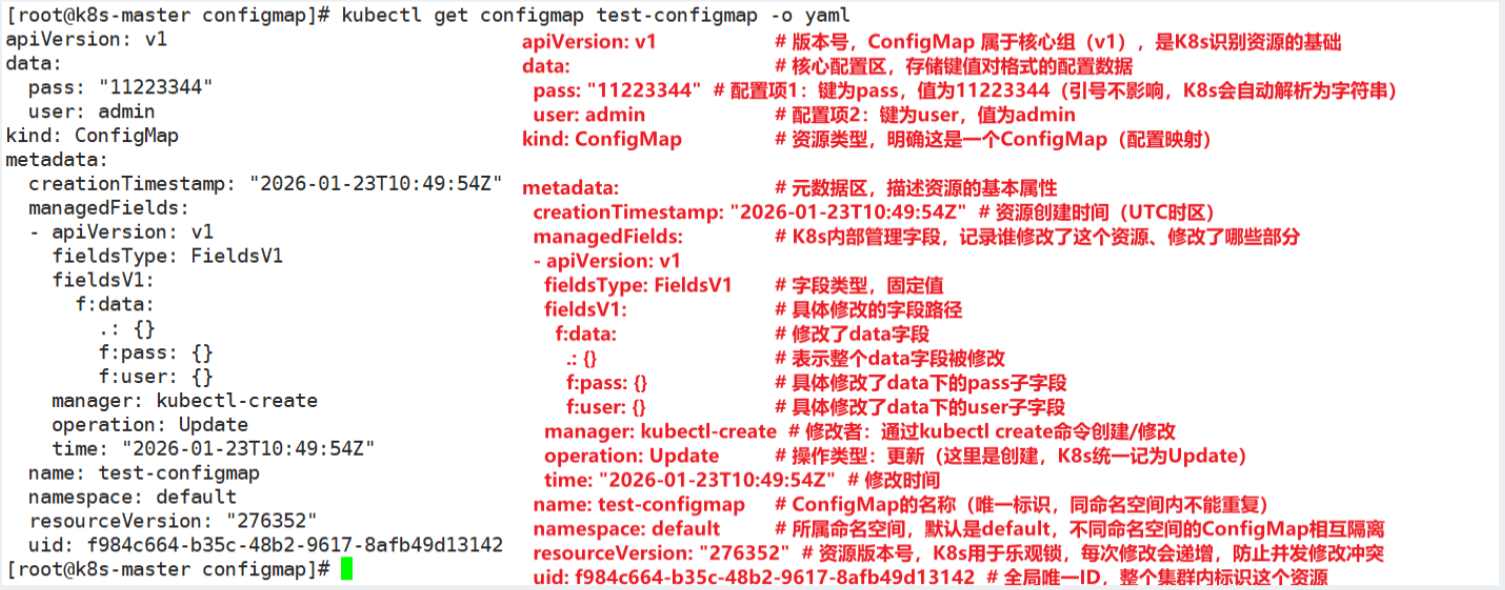
2.0 通过指定文件创建
- 创建配置文件
bash
[root@k8s-master configmap]# touch server.conf
[root@k8s-master configmap]# vim server.conf

server {
listen 80;
server_name localhost;
location / {
root /var/www/html;
index index.html index.htm;
}
}- 创建configmap, 并查看内容
bash
[root@k8s-master configmap]# kubectl create configmap test-config2 --from-file=server.conf
configmap/test-config2 created
[root@k8s-master configmap]# kubectl get configmap test-config2 -o yaml
apiVersion: v1     # 版本号
data:              # 内容
  server.conf: |+
    server {
    listen 80;
    server_name localhost;
    location / {
    root /var/www/html;
    index index.html index.htm;
    }
    }

kind: ConfigMap    # 创建的资源类型是configmap
metadata:  # 元数据,描述资源基本属性
  creationTimestamp: "2026-08-09T13:37:24Z"   # 创建资源时间
  managedFields:   # 管理字段: 用来表示谁修改这个字段,修改字段的哪些部分
  - apiVersion: v1
    fieldsType: FieldsV1
    fieldsV1:
      f:data:
        .: {}
        f:server.conf: {}
    manager: kubectl-create
    operation: Update
    time: "2026-08-09T13:37:24Z"
  name: test-config2   # 资源名字
  namespace: default    # 所属空间
  resourceVersion: "98963"  # 版本号
  uid: 9054328a-4aa0-437f-98bb-37d116c5f6cf   # uid值
[root@k8s-master configmap]#
3.0 通过指定目录创建
- 创建目录
bash
[root@k8s-master configmap]# mkdir config
[root@k8s-master configmap]# cd config/
[root@k8s-master config]# vim config1
[root@k8s-master config]# cat config1
123456

[root@k8s-master config]# touch config2
[root@k8s-master config]# echo "789" >> config2
[root@k8s-master config]# cat config2
789
[root@k8s-master config]# - 创建configmap,并查看
bash
[root@k8s-master configmap]# kubectl get configmap test-config3 -o yaml
apiVersion: v1
data:
  config1: |+
    123456

  config2: |
    789
kind: ConfigMap
metadata:
  creationTimestamp: "2026-08-09T13:49:55Z"
  managedFields:
  - apiVersion: v1
    fieldsType: FieldsV1
    fieldsV1:
      f:data:
        .: {}
        f:config1: {}
        f:config2: {}
    manager: kubectl-create
    operation: Update
    time: "2026-08-09T13:49:55Z"
  name: test-config3
  namespace: default
  resourceVersion: "100018"
  uid: 2022795c-1dc9-4a59-9246-6770442c7b23
[root@k8s-master configmap]#
4.0 通过yaml文件创建
- 准备yaml文件
bash
[root@k8s-master configmap]# vim configmap.yaml
[root@k8s-master configmap]# cat configmap.yaml
---
apiVersion: v1
kind: ConfigMap
metadata:
  name: test-config4
  namespace: default
data:
  cache_host: memcached-gcxt
  cache_port: "11211"
  cache_prefix: gcxt   # 以上三个都是在data中存储键值对
  my.cnf: |                     # | 多行文本内容保留符
   [mysqld]
   log-bin = mysql-bin
   haha = hehe                  # 有了 | 文本内容保留符,我们的的[mysqld],log-bin,haha将会作my.cnf键的值
[root@k8s-master configmap]# - 创建并查看
bash
[root@k8s-master configmap]# kubectl apply -f configmap.yaml
configmap/test-config4 created
[root@k8s-master configmap]# kubectl get configmap test-config4 -o yaml
apiVersion: v1
data:
  cache_host: memcached-gcxt
  cache_port: "11211"
  cache_prefix: gcxt
  my.cnf: |
    [mysqld]
    log-bin = mysql-bin
    haha = hehe
kind: ConfigMap
metadata:
  annotations:
    kubectl.kubernetes.io/last-applied-configuration: |
      {"apiVersion":"v1","data":{"cache_host":"memcached-gcxt","cache_port":"11211","cache_prefix":"gcxt","my.cnf":"[mysqld]\nlog-bin = mysql-bin\nhaha = hehe\n"},"kind":"ConfigMap","metadata":{"annotations":{},"name":"test-config4","namespace":"default"}}
  creationTimestamp: "2026-08-09T14:13:08Z"
  managedFields:
  - apiVersion: v1
    fieldsType: FieldsV1
    fieldsV1:
      f:data:
        .: {}
        f:cache_host: {}
        f:cache_port: {}
        f:cache_prefix: {}
        f:my.cnf: {}
      f:metadata:
        f:annotations:
          .: {}
          f:kubectl.kubernetes.io/last-applied-configuration: {}
    manager: kubectl-client-side-apply
    operation: Update
    time: "2026-08-09T14:13:08Z"
  name: test-config4
  namespace: default
  resourceVersion: "101988"
  uid: 441c8e09-5d98-4e96-a9df-f5e63e1bbe80
[root@k8s-master configmap]#
三: configmap使用方式
使用ConfigMap的方式, 一种是通过环境变量的方式,直接传递pod, 另一种是使用volume的方式挂载入到pod内
1.0 环境变量
- 创建configmap
bash
---
apiVersion: v1
kind: ConfigMap
metadata:
  name: use-configmap
  namespace: default
data:
  special.how: very
  special.type: charm


[root@k8s-master configmap]# vim user-configmap.yml
[root@k8s-master configmap]# kubectl apply -f user-configmap.yml
configmap/use-configmap created
[root@k8s-master configmap]#
(1) 设置自定义变量的方式
- 定义pod的yaml文件,里面指定变量
bash
[root@k8s-master configmap]# vim user-configmap-pod.yml
[root@k8s-master configmap]#


---
apiVersion: v1
kind: Pod
metadata:
  name: use-configmap-pod
spec:
  containers:
    - name: configmap-container
      image: nginx
      env:                          #专门在容器里面设置变量的关键字
        - name: SPECIAL_LEVEL_KEY   #这里的- name,是容器里设置的新变量1的名字
          valueFrom:
            configMapKeyRef:
              name: use-configmap      #这里是来源于哪个configMap
              key: special.how         #configMap里的key1

        - name: SPECIAL_TYPE_KEY    #这里的- name,是容器里设置的新变量2的名字
          valueFrom:
            configMapKeyRef:
              name: use-configmap
key: special.type #configMap里的key2- 应用
bash
[root@k8s-master configmap]# kubectl apply -f user-configmap-pod.yml
pod/use-configmap-pod created
[root@k8s-master configmap]# kubectl get pods
NAME                READY   STATUS              RESTARTS   AGE
my-mysql            1/1     Running             1          3d1h
use-configmap-pod   0/1     ContainerCreating   0          12s
[root@k8s-master configmap]# kubectl get pods -o wide
NAME                READY   STATUS    RESTARTS   AGE    IP               NODE        NOMINATED NODE   READINESS GATES
my-mysql            1/1     Running   1          3d1h   10.244.36.68     k8s-node1   <none>           <none>
use-configmap-pod   1/1     Running   0          20s    10.244.169.131   k8s-node2   <none>           <none>
[root@k8s-master configmap]# - 测试
bash
[root@k8s-master configmap]# kubectl exec -it use-configmap-pod  /bin/bash
kubectl exec [POD] [COMMAND] is DEPRECATED and will be removed in a future version. Use kubectl exec [POD] -- [COMMAND] instead.
root@use-configmap-pod:/#  echo $SPECIAL_TYPE_KEY
charm
root@use-configmap-pod:/#  echo $SPECIAL_LEVEL_KEY
very
root@use-configmap-pod:/#
(2) 设置环境变量的方式
bash
[root@k8s-master configmap]# vim user-configmap-pod2.yaml
[root@k8s-master configmap]#


---
apiVersion: v1
kind: Pod
metadata:
  name: use-configmap-pod
spec:
  containers:
    - name: configmap-container
      image: nginx
      envFrom:                      #通过环境变量引用configmap
      - configMapRef:               #引用的关键字
          name: use-configmap       #已经定义好的configmap的名字
#     env:                          #上一个例子中,自定义变量的内容
#       - name: SPECIAL_LEVEL_KEY   #新变量的名字
#         valueFrom:
#           configMapKeyRef:
#             name: use-configmap      #configMap的名字
#             key: special.how         #configMap里的key
#       - name: SPECIAL_TYPE_KEY
#         valueFrom:
#           configMapKeyRef:
#             name: use-configmap
# key: special.type- 应用并查看
bash
[root@k8s-master configmap]# kubectl apply -f user-configmap-pod2.yaml
pod/use-configmap-pod created
[root@k8s-master configmap]# kubectl get pods  -o wide
NAME                READY   STATUS    RESTARTS   AGE    IP             NODE        NOMINATED NODE   READINESS GATES
my-mysql            1/1     Running   1          3d1h   10.244.36.68   k8s-node1   <none>           <none>
use-configmap-pod   1/1     Running   0          21s    10.244.36.69   k8s-node1   <none>           <none>
[root@k8s-master configmap]# kubectl exec -it use-configmap-pod /bin/bash
kubectl exec [POD] [COMMAND] is DEPRECATED and will be removed in a future version. Use kubectl exec [POD] -- [COMMAND] instead.
root@use-configmap-pod:/# env
special.type=charm
special.how=very
KUBERNETES_SERVICE_PORT_HTTPS=443
KUBERNETES_SERVICE_PORT=443
HOSTNAME=use-configmap-pod
PWD=/
ACME_VERSION=0.4.1
PKG_RELEASE=1~trixie
HOME=/root
KUBERNETES_PORT_443_TCP=tcp://10.96.0.1:443
DYNPKG_RELEASE=1~trixie
NJS_VERSION=1.0.0
TERM=xterm
SHLVL=1
KUBERNETES_PORT_443_TCP_PROTO=tcp
KUBERNETES_PORT_443_TCP_ADDR=10.96.0.1
KUBERNETES_SERVICE_HOST=10.96.0.1
KUBERNETES_PORT=tcp://10.96.0.1:443
KUBERNETES_PORT_443_TCP_PORT=443
PATH=/usr/local/sbin:/usr/local/bin:/usr/sbin:/usr/bin:/sbin:/bin
NGINX_VERSION=1.31.3
NJS_RELEASE=1~trixie
_=/usr/bin/env
root@use-configmap-pod:/#
2.0 volume挂载
- 创建configmap
bash
[root@k8s-master configmap]# cat configmap.yaml
---
apiVersion: v1
kind: ConfigMap
metadata:
  name: test-config4
  namespace: default
data:
  cache_host: memcached-gcxt
  cache_port: "11211"
  cache_prefix: gcxt
  my.cnf: |                     # | 多行文本内容保留换行符
   [mysqld]
   log-bin = mysql-bin
   haha = hehe
[root@k8s-master configmap]# kubectl apply -f  configmap.yaml
configmap/test-config4 created
[root@k8s-master configmap]# - 定义Pod.yaml文件
bash
[root@k8s-master configmap]# vim volupod.yml
[root@k8s-master configmap]# cat volupod.yml
---
apiVersion: v1
kind: Pod
metadata:
  name: nginx-configmap
spec:
  containers:
  - name: nginx-configmap
    image: nginx
    volumeMounts:  # 将pod里面config-volume4的卷,挂载到容器里面的/tmp/config4目录下面
    - name: config-volume4
      mountPath: "/tmp/config4"
  volumes:  # 先在pod里面创建名为config-volume4的卷,
  - name: config-volume4
    configMap:
      name: test-config4
[root@k8s-master configmap]# - 应用并查看
bash
[root@k8s-master configmap]# kubectl apply -f volupod.yml
pod/nginx-configmap created
[root@k8s-master configmap]# kubectl get pods
NAME              READY   STATUS    RESTARTS   AGE
my-mysql          1/1     Running   1          3d2h
nginx-configmap   1/1     Running   0          8s

[root@k8s-master configmap]# kubectl exec -it nginx-configmap /bin/bash
kubectl exec [POD] [COMMAND] is DEPRECATED and will be removed in a future version. Use kubectl exec [POD] -- [COMMAND] instead.
root@nginx-configmap:~# cd /tmp/config4/
root@nginx-configmap:/tmp/config4# ls
cache_host  cache_port	cache_prefix  my.cnf
root@nginx-configmap:/tmp/config4# cat cache_host
memcached-gcxtroot@nginx-configmap:/tmp/config4#
四: 生产实战
bash
创建configmap
[root@k8s-master 8configmap]# vim configmap1.yaml
---
apiVersion: v1
kind: ConfigMap
metadata:
 name: nginx-server-conf
 namespace: default
data:
 index.html: |
  Hello, cloud computing
  Hello, Mr. Xu
[root@k8s-master 8configmap]# kubectl apply -f configmap1.yaml
configmap/nginx-server-conf created

[root@k8s-master 8configmap]# kubectl get configmap
NAME                DATA   AGE
nginx-server-conf   2      7s
[root@k8s-master 8configmap]# kubectl get configmap nginx-server-conf -o yaml

卷挂载方式使用configmap
[root@k8s-master 8configmap]# vim pod.yaml
---
apiVersion: v1
kind: Pod
metadata:
 name: test-webapp
spec:
 containers:
 - name: nginx-app
   image: nginx
   ports:
    - containerPort: 80
   volumeMounts:
   - name: nginx-volume
     mountPath: "/usr/share/nginx/html"
 volumes:
 - name: nginx-volume
   configMap:
    name: nginx-server-conf
[root@k8s-master 8configmap]# kubectl apply -f pod.yaml
[root@k8s-master 8configmap]# kubectl get pod
NAME          READY   STATUS    RESTARTS   AGE
test-webapp   1/1     Running   0          6s
[root@k8s-master 8configmap]# kubectl exec -it test-webapp /bin/bash
root@test-webapp:/# cat  /usr/share/nginx/html/index.html
Hello, cloud computing
Hello, Mr. Xu
root@test-webapp:/# exit
[root@k8s-master 8configmap]# kubectl get pods -o wide
[root@k8s-master 8configmap]# curl 10.244.169.190
Hello, cloud computing
Hello, Mr. Xu
[root@k8s-master 8configmap]# kubectl delete -f pod.yaml