作者:来自 Elastic David Pilato
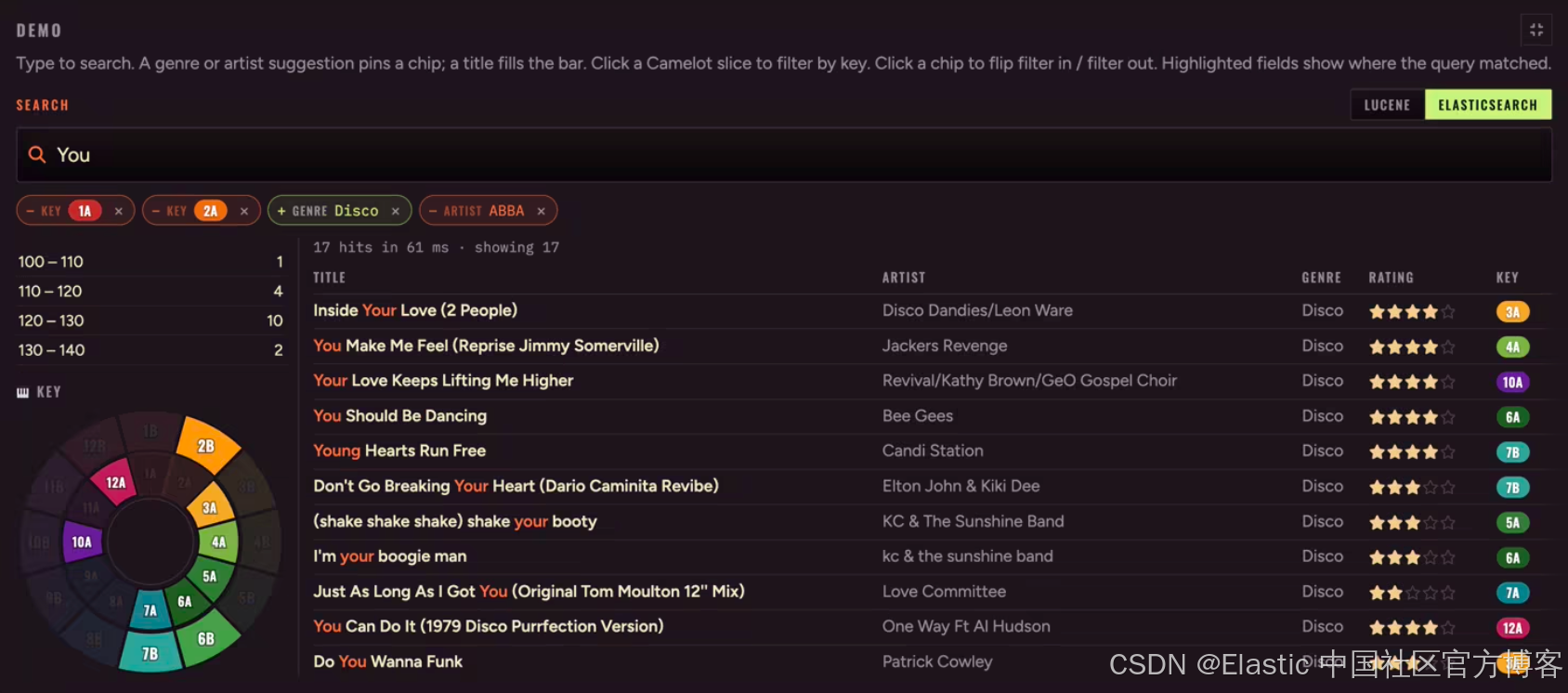
我们完成了 Bean 的映射,拥有一个 writer,输入了 Bob,筛选了 Club,统计了 facets,提供了前缀建议,并绘制了搜索结果。这就是 JVM 旁边的 Lucene。
使用相同的 Track Bean。使用相同的验收目标。当倒排索引不再位于 IndexWriter 后面,而是位于一个集群 URL 后面时,会发生什么变化?
将 Elasticsearch 添加到 Maven
Lucene 是一次添加一个 artifact(lucene-core,然后是 analysis-common、suggest、facet、highlighter)逐步构建起来的。Elasticsearch 则只有一个 Java 客户端坐标。实现时请查阅当前的稳定版本;本系列使用 9.5.4。
<dependency>
  <groupId>co.elastic.clients</groupId>
  <artifactId>elasticsearch-java</artifactId>
  <version>9.5.4</version>
</dependency>
没有 Directory。没有 IndexWriter。也不需要在 Java 中手动构建 Analyzer 图。
连接集群
让客户端指向一个 URL 并进行身份验证 ------ 生产环境使用 API key:
ElasticsearchClient client = ElasticsearchClient.of(b -> b
        .host(System.getenv("ES_URL"))          // e.g. https://es.example.com:9200
        .apiKey(System.getenv("ES_API_KEY")));  // the API Key
只声明一次映射
在 Lucene 中,你需要逐个字段构建 Document:使用 TextField 进行搜索,使用 StringField 保存原始标签,使用另一个 StringField 保存经过大小写折叠处理的过滤字段,再加上一个保留原始大小写的 facet 字段。在 Elasticsearch 中,你只需要将这种结构一次性声明为 index template ------ analyzer、normalizer、properties ------ 然后重新创建索引:
        // The index template name
        .name("tracks")
        // The index patterns this template applies
        .indexPatterns("tracks*")
        .template(te -> te
                .settings(s -> s.analysis(a -> a
                        // The custom "track" analyzer
                        .analyzer("track", an -> an.custom(c -> c
                                .tokenizer("standard")
                                .filter("lowercase", "asciifolding")))
                        // The custom "keyword_ci" normalizer
                        .normalizer("keyword_ci", n -> n.custom(c -> c
                                .filter("lowercase", "asciifolding")))))
                .mappings(m -> m
                        .properties("title", textWithRaw())
                        .properties("artist", textWithRaw())
                        .properties("genre", textWithRaw())
                        // album, label, comment...
                        .properties("key", p -> p.keyword(k -> k
                                .normalizer("keyword_ci")
                                .fields("raw", f -> f.keyword(kw -> kw))))
                        .properties("bpm", p -> p.double_(d -> d))
                        .properties("rating", p -> p.integer(i -> i))
                        .properties("year", p -> p.integer(i -> i)))));

if (client.indices().exists(e -> e.index("tracks")).value()) {
    // This is only if you need to start from scratch at every run.
    client.indices().delete(d -> d.index("tracks"));
}
// This can be omitted actually as the first sent document
// will create the index automatically.
client.indices().create(c -> c.index("tracks"));
textWithRaw() 是在一个 helper 中完成 Mapping 的核心方法 ------ 三个作用:
private static Property textWithRaw() {
    return Property.of(p -> p.text(t -> t
            .analyzer("track")
            .fields("raw", f -> f.keyword(k -> k))
            .fields("normalized", f -> f.keyword(k -> k.normalizer("keyword_ci")))));
}| 作用 | Lucene(你编写) | Elasticsearch(你声明) |
|---|---|---|
| 全文搜索 | TextField("genre", ...) |
genre text,analyzer track |
| Facet / UI 标签 | SortedSetDocValuesFacetField("genre") |
genre.raw keyword(不使用 normalizer) |
| 过滤器 / 标签 | StringField("genre.raw.normalized") |
genre.normalized + keyword_ci |
这与 Facets 文章中的 Lucene 拆分方式相同:显示 和过滤 是两个字段。terms 聚合返回的是已索引 的 term,因此 facet 标签需要在 .raw 中保留原始大小写(Club)。过滤则通过带有 keyword_ci 的 .normalized 进行,因此 Club、club 和 CLUB 都能匹配相同的文档。
key 遵循相同的思路,用于 Camelot code:在经过规范化的父字段(4a)上进行过滤,在轮盘上通过 key.raw 显示 10A。修改 mapping 后重新创建索引 ------ normalizer 位于 mapping 中,而不是查询中。
注意,这段 Java 代码实际上可以直接替换为纯 JSON curl 请求:
curl -X PUT "http://localhost:9200/_index_template/tracks" \
  -H "Content-Type: application/json" \
  -d '<JSON MAPPING HERE>'
以下 JSON 展示了 tracks 索引的完整 mapping(<JSON MAPPING HERE>)。
```json
{
  "index_patterns": [ "tracks*" ],
  "template": {
    "settings": {
      "analysis": {
        "analyzer": {
          "track": {
            "type": "custom",
            "tokenizer": "standard",
            "filter": [ "lowercase", "asciifolding" ]
          }
        },
        "normalizer": {
          "keyword_ci": {
            "type": "custom",
            "filter": [ "lowercase", "asciifolding" ]
          }
        }
      }
    },
    "mappings": {
      "properties": {
        "title": {
          "type": "text",
          "analyzer": "track",
          "fields": {
            "raw": {
              "type": "keyword"
            },
            "normalized": {
              "type": "keyword",
              "normalizer": "keyword_ci"
            }
          }
        },
        "artist": {
          "type": "text",
          "analyzer": "track",
          "fields": {
            "raw": {
              "type": "keyword"
            },
            "normalized": {
              "type": "keyword",
              "normalizer": "keyword_ci"
            }
          }
        },
        "genre": {
          "type": "text",
          "analyzer": "track",
          "fields": {
            "raw": {
              "type": "keyword"
            },
            "normalized": {
              "type": "keyword",
              "normalizer": "keyword_ci"
            }
          }
        },
        "key": {
          "type": "keyword",
          "normalizer": "keyword_ci",
          "fields": {
            "raw": {
              "type": "keyword"
            }
          }
        },
        "bpm": {
          "type": "double"
        },
        "rating": {
          "type": "integer"
        },
        "year": {
          "type": "integer"
        }
      }
    }
  }
}
```
假设你有一个 Elasticsearch 管理团队(类似 DBA),你可以把 JSON 交给他们,让他们管理 index template。这意味着那些"Java"调用其实毫无用处。
原样批量写入 Bean
不需要 TrackDocumentMapper.toDocument。Bean 就是 document:
try (BulkIngester<Void> ingester = BulkIngester.of(b -> b
        .client(client)
        .maxOperations(500)
        .globalSettings(s -> s.index("tracks")))) {
    for (Track track : tracks) {
        ingester.add(op -> op.index(idx -> idx.id(track.id()).document(track)));
    }
}
client.indices().refresh(r -> r.index("tracks"));
我们每执行 500 个操作就刷新一次 bulk,并依靠 try-with-resources 代码块自动刷新剩余的操作并关闭 ingester。refresh 会让 bulk 对搜索可见 ------ 这与 Lucene 在新的 DirectoryReader 之前需要执行 commit 的时机相同。
一个小技巧:使用 .globalSettings(s -> s.index("tracks")) 可以避免在 bulk ingester 中为每个操作重复指定索引名称。这样可以节省网络带宽。
输入"Bob"
在 Lucene 中,你构建了一个 BooleanQuery:每个字段使用 BoostQuery,并在最后一个 token 上使用尾随的 PrefixQuery。Elasticsearch 则将这种结构表示为一个 multi_match,类型为 bool_prefix,并设置 operator: and:
Query bob = Query.of(qb -> qb.bool(b -> b
        .must(m -> m.multiMatch(mm -> mm
                .query("Bob")
                .type(TextQueryType.BoolPrefix)
                .operator(Operator.And)
                .fields("title^4", "artist^3", "genre^2",
                        "album^1.5", "label^1", "comment^0.5")))));

SearchResponse<Track> response = client.search(s -> s
                .index("tracks")
                .query(bob),
        Track.class);
与之前相同的 boost 层级。规则也相同:多个 token 使用 AND 连接;只有最后一个 token 是前缀。搜索结果直接反序列化回 Track ------ 在这个演示中,不需要通过存储的 id 再执行一次关联。
| 查询 | Lucene 行为 | Elasticsearch |
|---|---|---|
Bob |
62 个结果 | 62 个结果 |
bob sincla |
bob + sincla... 前缀 |
bool_prefix + and |
bo sinclar |
空结果(单独的 bo 太弱) |
空结果 |
ouse |
找不到 House |
相同 ------ 不是中间匹配 |
添加过滤器(包含 Club)
将全文搜索子句包装为 must,并在规范化 的对应字段上添加 filter ------ 进行约束,而不是评分:
Query bool = Query.of(qb -> qb.bool(b -> b
        .must(m -> m.multiMatch(mm -> mm
                .query("Bob")
                .type(TextQueryType.BoolPrefix)
                .operator(Operator.And)
                .fields("title^4", "artist^3", "genre^2",
                        "album^1.5", "label^1", "comment^0.5")))
        .filter(f -> f.term(t -> t
                .field("genre.normalized")
                .value("club")))));
Club 和 club 会匹配相同的文档,因为 keyword_ci 会在索引时对 .normalized 进行小写转换(并进行折叠)。不要对它使用 wildcard。除非你希望进行区分大小写的精确标签匹配,否则不要在 .raw 上进行过滤。
如果你还希望获得保留同级 genre 可见性的facet 直方图,那么这个 genre 筛选项将从 query 移到 post_filter ------ 下一节会介绍。
排除两个 key(4A 和 4B)
使用相同的 must + filter,再加上 must_not。同一维度上的多个 key 使用 OR (should、minimum_should_match = 1)。排除条件始终保留在 query 中(它们会缩小每个面板的结果范围):
Query bool = Query.of(qb -> qb.bool(b -> b
        .must(m -> m.multiMatch(mm -> mm
                .query("Bob")
                .type(TextQueryType.BoolPrefix)
                .operator(Operator.And)
                .fields("title^4", "artist^3", "genre^2",
                        "album^1.5", "label^1", "comment^0.5")))
        .filter(f -> f.term(t -> t.field("genre.normalized").value("club")))
        .mustNot(mn -> mn.bool(k -> k
                .should(s -> s.term(t -> t.field("key").value("4a")))
                .should(s -> s.term(t -> t.field("key").value("4b")))
.minimumShouldMatch("1")))));| UI | 结果 | Elasticsearch 子句 |
|---|---|---|
| 输入"Bob" | 62 个结果 | must multi_match bool_prefix |
| 包含 Club | 26 个结果 | genre 上的 filter / post_filter |
| 排除 4A 或 4B | 23 个结果 | must_not(4a should 4b) |
Facets:一次 _search,Query DSL 中的 Lucene DrillSideways
Lucene 需要 FacetsCollector、range readers,以及一个 DrillSideways 子类,以便在选中某个 chip 后,genre 和 key 仍然保持可见,同时 BPM / rating / year 的范围随之缩小。
Elasticsearch 则在一次 _search 中同时返回结果表和直方图:
-
query ------ 全文搜索、非 sideways 的包含条件(bpm、rating、year),以及所有排除条件;
-
post_filter ------ 仅包含 genre 和 key 的 includes (缩小搜索结果,但不会缩小聚合的基础数据集);
-
filter aggregations ------ 重新创建 sideways 映射:genre 根据 key 过滤(不根据 genre 过滤),key 根据 genre 过滤(不根据 key 过滤),bpm/rating/year 同时根据两者过滤。
Genre bucket 读取 genre.raw 。Key bucket 读取 key.raw。用于缩小搜索结果的 chip 使用规范化字段:
client.search(s -> {
            s.index("tracks")
                    .size(25)
                    .query(query)   // Bob + excludes; no genre/key includes
                    .aggregations("genre", a -> a
                            .filter(keyChip)      // omit genre
                            .aggregations("genre", m -> m.terms(t -> t
                                    .field("genre.raw").size(50))))
                    .aggregations("key", a -> a
                            .filter(genreChip)    // omit key
                            .aggregations("key", m -> m.terms(t -> t
                                    .field("key.raw").size(50))))
                    .aggregations("drill", a -> a
                            .filter(genreAndKey)
                            .aggregations("bpm", /* ranges */)
                            .aggregations("rating", /* terms */)
                            .aggregations("year", /* decade histogram */));
            s.postFilter(genreAndKey);   // hits only
            return s;
        },
        Track.class);
在 q=Bob 下:Club 为 26 个(不是 club),BPM 120--130 为 52 ,rating 5 为 13 ,按十年划分的结果符合预期------与 Lucene 具有相同的数字和相同的标签。点击 Club:BPM 范围会缩小;Dance 仍然保留在 genre 面板中。点击一个 Camelot 切片:key 轮盘会以相同的原因保留其同级选项。
| 作用 | Lucene | Elasticsearch |
|---|---|---|
| 复选框标签 + 计数 | SortedSetDocValuesFacetField → $facets |
对 genre.raw / key.raw 使用 terms |
| Chip(sideways include) | DrillDownQuery.add |
post_filter + filter aggs |
| Chip(非 sideways / out) | 基础 BooleanQuery FILTER / MUST_NOT |
query filter / must_not |
| 数值直方图 | *RangeFacetCounts |
range / histogram aggs |
size = 0 表示仅返回聚合结果(没有搜索结果页面,也没有 highlight)。该 session 仍然会报告 totalHits。
Suggest:搜索 + highlight,不需要第二个 Directory
Lucene 在自己的 Directory 上运行 AnalyzingInfixSuggester。这里的自动补全会复用 track 索引:对 title / artist / genre 使用 multi_match bool_prefix,请求 highlights,然后去重生成建议。空 scope 仍然不会返回任何结果。(与 Lucene 不同,非空 scope 不会用于限制 ES query ------ Demo 仍然会从 suggestion payload 中固定使用 chips。)
SearchResponse<Track> response = client.search(s -> s
                .index("tracks")
                .size(200)
                .query(q -> q.multiMatch(mm -> mm
                        .query("club")
                        .type(TextQueryType.BoolPrefix)
                        .operator(Operator.And)
                        .fields("title", "artist", "genre")))
                .highlight(h -> h.fields(
                        NamedValue.of("title", HighlightField.of(f -> f.numberOfFragments(0))),
                        NamedValue.of("artist", HighlightField.of(f -> f.numberOfFragments(0))),
                        NamedValue.of("genre", HighlightField.of(f -> f.numberOfFragments(0))))),
        Track.class);
输入 club → 会返回一个 genre 结果,其中包含你可以显示为 Club House 的 markup。选择它仍然意味着:在 genre 上添加一个 FILTER chip,然后执行搜索 ------ 无需在每次发生变更后重新构建第二个 dictionary,同时保持相同的 UI contract。
用数字说话
相同的 TrackSearch contract,相同的测试,两个实现类。两边都已经超越了最初的草稿(session、完整的 facet 映射、搜索结果上的 highlights)。两者之间的差异仍然在于你需要负责什么 :Lucene 将 analyzer、Document、collectors、DrillSideways 和第二个用于 suggest 的 Directory 都内联到应用中;Elasticsearch 则声明一个 template 和一个 Query DSL body,然后对 buckets 和 highlights 进行组织。
性能 是另一回事,而且比"cluster = 更慢"要复杂得多。在相同的 4,322 首曲目上,本地测量结果如下:
| 步骤 | Lucene(RAM) | Elasticsearch(localhost:9200) |
|---|---|---|
| 索引 / 重建所有曲目 | 523 ms | 639 ms |
MatchAll 搜索 |
~5 ms | ~16 ms |
q=Bob 搜索 |
~15--30 ms | ~15--30 ms |
索引开销很小 ------ 对完整曲库来说只多了一点 100 ms 左右,其中还包括网络往返和 bulk 路径。搜索方面,Lucene-in-RAM 在 MatchAll 上仍然更快(~5 ms 对比 ~16 ms):没有序列化,也没有 HTTP。一旦查询包含实际工作(q=Bob),在这个数据集上两者都落在相同的 15--30 ms 区间。
因此,Elasticsearch 在这里并没有带来更快的微基准测试结果。但你真正获得的是运维能力:
-
索引可以跨进程重启继续存在(除非你主动选择,否则无需启动时重新构建);
-
副本可以在某个节点宕机时继续提供服务;
-
扩展搜索和索引容量属于 cluster 层面的工作,而不是在应用中再增加一个
Directory; -
多个应用实例可以共享一个搜索层,而不是每个实例都持有一个可能逐渐产生偏差的 cache。
相关性也并不完全相同。 相同的验收计数(Bob → 62、Club → 26、......)并不意味着相同的 top-N 排序。输入 joe:两个搜索引擎都会返回相同的 11 个标题 ,但 Lucene 会将 Joe Smooth / Joe Killington 排得更高,而 Elasticsearch 更倾向于 Miss You (Joe Liggins) 或 Joey Negro。这不是过滤器 bug ------ 而是 query 结构造成的。
Lucene 实现会将 q=joe 打印为每个字段上的 term 加上 prefix(SHOULD 子句会累加;term leaf 使用 BM25):
((title:joe)^4.0 (title:joe*)^1.0 (artist:joe)^3.0 (artist:joe*)^0.75
 (genre:joe)^2.0 (genre:joe*)^0.5 (album:joe)^1.5 (album:joe*)^0.375
 (label:joe)^1.0 (label:joe*)^0.25 (comment:joe)^0.5 (comment:joe*)^0.125)~1
Elasticsearch 的 multi_match bool_prefix 在只有一个 token 时,并不是这样的 query。_validate/query?rewrite=true 会将其重写为仅 prefix ------ 这里仍然使用 Lucene 的 query syntax 展示:
(title:joe*)^4.0 (artist:joe*)^3.0 (genre:joe*)^2.0
(album:joe*)^1.5 label:joe* (comment:joe*)^0.5
_explain 随后会显示一个常数评分 = 字段 boost ,而不是 BM25 ------ 因此 title^4 上的 Joey / JOEL 可以超过 Lucene 中使用 tf/idf 进行评分的精确 artist:joe。
你可以在 Elasticsearch 上组装出 Lucene 形状的 bool(对每个 token 使用 term + 仅对最后一个 token 使用 prefix,使用相同的 boost,以及会累加的子句)。它永远不会做到 bit-identical,但排序会更加接近。在本系列中,我们保留 Elasticsearch 默认的 bool_prefix 行为 ------ 如实呈现这种排序差异。
在 Demo 中试用
playground Demo 标签页可以在 Lucene-in-RAM 和 Elasticsearch 之间切换,同时使用相同的 TrackSearch contract。设置 cluster URL(默认为 http://localhost:9200/)和 API key,然后点击保存并建立索引 。LCD 会将 printQuery() 显示为可以复制粘贴的 curl(执行后还会显示 JSON 响应)。修改 mapping 后,请重新建立索引,这样 tracks 上才会真正存在 .raw / .normalized。
当曲库可以放入内存,并且"JVM 旁边的 embedded cache"就是产品时,就继续在进程内使用 Lucene。当相同的 Bean contract 应该超越单个进程而存在时,就使用 Elasticsearch ------ 此时 replicas、共享状态,以及"URL + API key"比将倒排索引保留在 heap 中更加重要。
相同的 Bean。相同的 Bob → Club → facets 流程。减少你与倒排索引之间的 plumbing ------ 但并不是 bit-identical 的评分。
完整 Demo 位于 GitHub:lucene-search-tracks。
原文:Search your beans with Lucene --- Elasticsearch | David Pilato