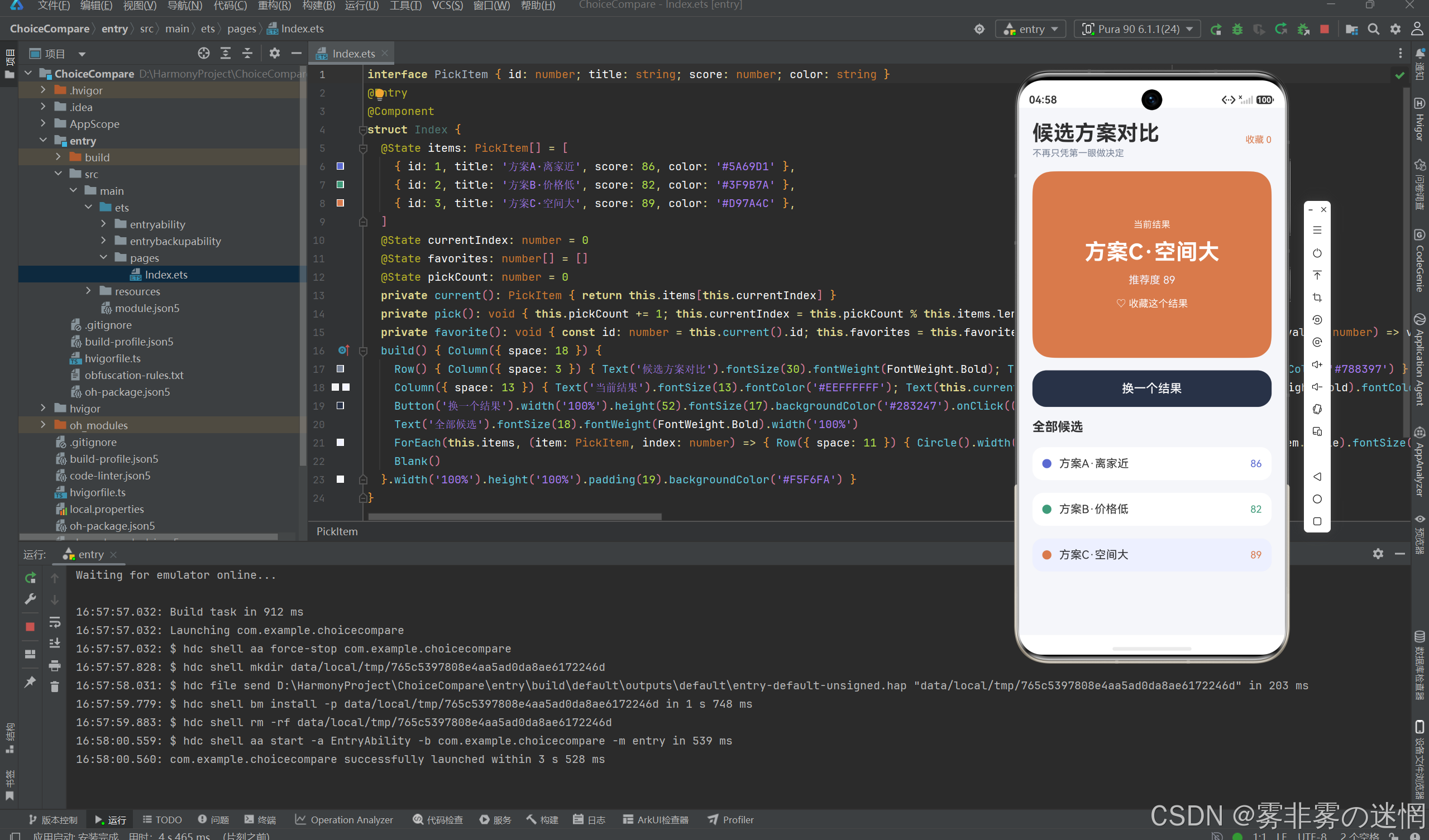
候选对比页面需要让大卡片和下方列表保持同一选择。页面只保存 currentIndex,当前标题、分数与颜色都从 items[currentIndex] 读取;列表点击和"换一个结果"最终都只修改这个索引。
typescript
interface PickItem {
  id: number
  title: string
  score: number
  color: string
}

@State currentIndex: number = 0
@State favorites: number[] = []
@State pickCount: number = 0

private current(): PickItem {
  return this.items[this.currentIndex]
}
轮换逻辑对数组长度取模,到最后一项后回到第一项。
typescript
private choiceById(id: number): PickItem | undefined {
  return this.items.find((choice: PickItem) =>
    choice.id === id
  )
}

private requireChoice(id: number): PickItem {
  const target: PickItem | undefined = this.choiceById(id)
  if (!target) {
    throw new Error('Choice not found: ' + id)
  }
  return target
}
保留计数只在需要记录操作次数时才有意义。
typescript
private pick(): void {
  this.pickCount += 1
  this.currentIndex = this.pickCount % this.items.length
}
目前手动点击列表只更新 currentIndex,不会同步 pickCount。例如先手动选中第三项,再点击"换一个结果",结果仍按旧计数计算,可能跳回第二项。
typescript
private replaceChoice(
  id: number,
  updater: (source: PickItem) => PickItem
): void {
  this.items = this.items.map((choice: PickItem) =>
    choice.id === id ? updater(choice) : choice
  )
}

private updateChoiceMessage(id: number): void {
  const target: PickItem | undefined = this.choiceById(id)
  this.message = target ? '状态已更新' : '目标记录不存在'
}
收藏保存候选ID,不保存索引。数组重新排序时,ID仍能识别原项目。
typescript
private favorite(): void {
  const id: number = this.current().id
  this.favorites = this.favorites.includes(id)
    ? this.favorites.filter((value: number) => value !== id)
    : [...this.favorites, id]
}
当前分数是预设值,页面还没有比较维度与评分输入,因此它展示的是候选浏览和收藏流程,不是完整决策模型。加入维度后,应保存每个方案在各维度的分值和权重,再派生总分;总分不应手动重复录入。
typescript
private removeChoice(id: number): void {
  const before: number = this.items.length
  this.items = this.items.filter((choice: PickItem) =>
    choice.id !== id
  )
  this.message = this.items.length < before
    ? '记录已删除'
    : '没有找到要删除的记录'
}

private hasChoice(id: number): boolean {
  return this.items.some((choice: PickItem) => choice.id === id)
}
大卡片和候选列表都直接读取当前索引。手动点击列表修改 currentIndex,按钮则调用 pick()。
typescript
Text(this.current().title)
  .fontSize(31)
  .fontWeight(FontWeight.Bold)

Text(`推荐度 ${this.current().score}`)

ForEach(this.items, (item: PickItem, index: number) => {
  Row({ space: 11 }) {
    Circle().fill(item.color)
    Text(item.title).layoutWeight(1)
    Text(item.score.toString())
  }
  .backgroundColor(
    this.currentIndex === index ? '#EEF0FF' : Color.White
  )
  .onClick(() => {
    this.currentIndex = index
  })
})
当前存在一处状态分叉:手动点击只改 currentIndex,pickCount 没有同步。先点第三项再点"换一个",结果仍根据旧计数计算。删除重复计数、直接基于当前索引前进会更稳定。
typescript
private choiceKey(choice: PickItem): string {
  return String(choice.id)
}

private allChoiceKeys(): string[] {
  return this.items.map((choice: PickItem) =>
    this.choiceKey(choice)
  )
}

private hasDuplicateChoiceKey(): boolean {
  const keys: string[] = this.allChoiceKeys()
  return new Set(keys).size !== keys.length
}
收藏状态只影响当前卡片文案和顶部数量,不会改变候选排序。
typescript
Text(
  this.favorites.includes(this.current().id)
    ? '♥ 已收藏'
    : '♡ 收藏这个结果'
)
  .onClick(() => {
    this.favorite()
  })

Text(`收藏 ${this.favorites.length}`)
收藏数组使用展开和过滤返回新数组,ArkUI可以观察引用变化。候选ID与索引职责不同:ID用于跨排序识别记录,索引用于当前固定数组定位。编辑能力加入后,应尽量把当前选择也迁移到ID。
所有选择入口最终只改一个索引
候选卡片点击和"换一个"按钮都更新 currentIndex。当前结果、卡片高亮和收藏按钮读取同一索引:
typescript
private current(): PickItem {
  return this.items[this.currentIndex]
}

private pick(): void {
  this.currentIndex = (this.currentIndex + 1) % this.items.length
  this.message = `已选择:${this.current().title}`
}

private favorite(): void {
  const id: number = this.current().id
  this.favorites = this.favorites.includes(id)
    ? this.favorites.filter((item: number) => item !== id)
    : [...this.favorites, id]
}
如果按钮单独保存一份"推荐结果",列表点击另存一份"当前项",两个入口迟早会显示不同内容。现在索引是唯一选择状态,按钮只是按固定规则计算下一个索引。
typescript
private filterChoice(
  predicate: (source: PickItem) => boolean
): PickItem[] {
  return this.items.filter((choice: PickItem) =>
    predicate(choice)
  )
}

private countChoice(
  predicate: (source: PickItem) => boolean
): number {
  return this.filterChoice(predicate).length
}
删除当前项时选择相邻候选,数组为空时 current() 返回可空结果并进入空状态。
顺序轮换与随机选择的差异
当前 pick() 是可预测轮换,每个候选都会依次出现,适合"换一个"。如果界面文案改成随机,就应使用真正的随机索引,并决定是否允许连续两次相同。候选大于一条时可以从除当前项外的范围抽取,只有一条时保持原项并提示。
typescript
private copyChoiceList(): PickItem[] {
  return this.items.map((choice: PickItem) => ({
    ...choice
  }))
}

private restoreChoiceList(snapshot: PickItem[]): void {
  this.items = snapshot.map((choice: PickItem) => ({
    ...choice
  }))
  this.message = '数据已恢复'
}
点击列表属于明确选择,不应同时推动随机历史。收藏也不改变当前项,只更新收藏集合。把三类事件分开以后,消息文字才能准确说明发生的是主动选择、换项还是收藏切换。
候选编辑与持久化
新增候选先校验空名称,生成稳定 ID。标题可以按需求允许重复,例如两个同名餐厅位于不同地点;唯一性仍依靠 ID。编辑名称不改变收藏关系,删除时同步移除收藏 ID,避免收藏计数包含不存在记录。
typescript
private firstChoice(): PickItem | undefined {
  return this.items.length > 0 ? this.items[0] : undefined
}

private lastChoice(): PickItem | undefined {
  const index: number = this.items.length - 1
  return index >= 0 ? this.items[index] : undefined
}

private isChoiceListEmpty(): boolean {
  return this.items.length === 0
}
空数组时 pick() 不访问索引,一条记录时换项保持原值,多条记录的轮换经过末项后准确回到首项。这些用例能同时覆盖两个选择入口的同步问题。
候选编辑后仍按 ID 选择
排序、删除和收藏都使用稳定对象身份:
typescript
private current(): PickItem | undefined {
  return this.items.find((item: PickItem) =>
    item.id === this.currentId
  )
}

private remove(id: number): void {
  const index: number = this.items.findIndex(
    (item: PickItem) => item.id === id
  )
  this.items = this.items.filter((item: PickItem) => item.id !== id)
  this.favorites = this.favorites.filter((value: number) => value !== id)
  if (id === this.currentId) {
    this.currentId = this.items[Math.min(index, this.items.length - 1)]?.id ?? -1
  }
}
删除当前项时选择相邻候选,收藏集合也不会留下失效 ID。