海康威视二次开发相机管理

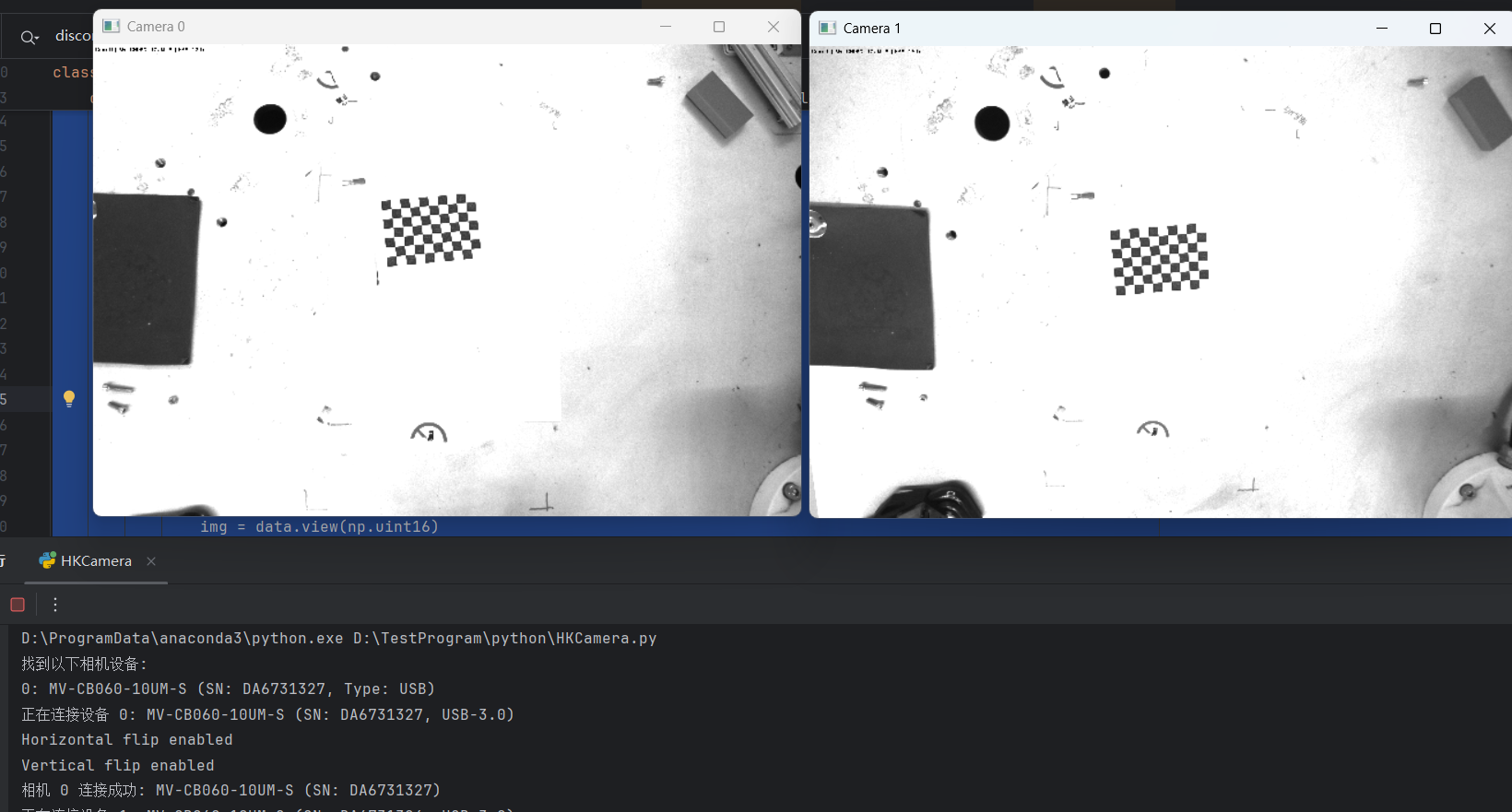
这段代码基于python开发的,用了opencv的一些库函数。实现了一个完整的海康机器人相机管理工具,支持多相机连接、参数配置、图像采集和实时显示功能。目前USB相机测试无误,除了丢一些包。
1. 主要类结构
HKCameraManager 类
这是整个系统的核心类,负责管理所有相机的生命周期和操作。
全局可调参数
bash
# 相机参数配置
EXPOSURE_MODE = 0  # 曝光模式:0:关闭;1:一次;2:自动曝光
EXPOSURE_TIME = 40000 # 曝光时间
GAIN_VALUE = 10 #增益值
ReverseX_enable = True # 水平翻转
ReverseY_enable = True # 垂直翻转
#图像显示大小
scale_width = 0.2  # 宽度缩放因子
scale_height = 0.2  # 高度缩放因子
PacketSizeLog = True  # 启用丢包信息检测
主要属性:
cameras: 字典,存储所有已连接相机的信息和句柄_last_error: 记录最后一次错误信息_running: 字典,记录每个相机的运行状态_lock: 线程锁,保证线程安全_display_threads: 字典,存储每个相机的显示线程_fps: 字典,记录每个相机的帧率
bash
 def __init__(self):
        """初始化相机管理器"""
        self.cameras: Dict[int, Dict] = {}  # 存储所有相机实例和信息
        self._last_error: str = ""
        self._running = {}  # 每个相机的运行状态
        self._lock = threading.Lock()
        self._display_threads = {}  # 每个相机的显示线程
        self._fps = {}  # 每个相机的FPS
2. 核心功能流程
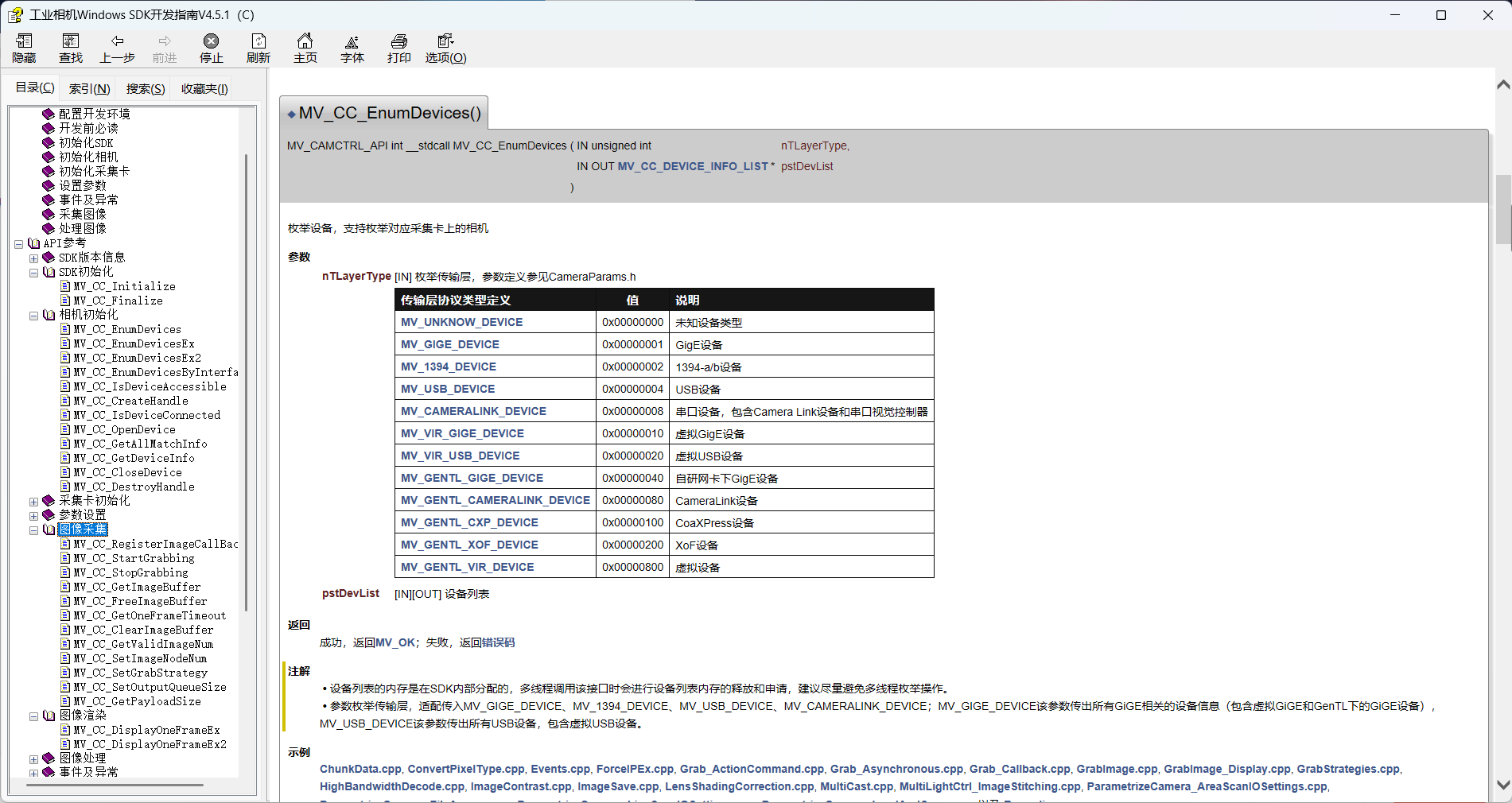
2.1 设备枚举
- 通过
enumerate_devices()方法枚举所有可用设备 - 支持GigE和USB两种接口类型的相机
- 返回设备列表,包含型号、序列号、IP地址等信息
bash
    def enumerate_devices(self) -> Optional[List[dict]]:
        """枚举所有可用设备"""
        try:
            # 设置要枚举的设备类型
            tlayer_type = MV_GIGE_DEVICE | MV_USB_DEVICE | MV_GENTL_CAMERALINK_DEVICE | MV_GENTL_CXP_DEVICE | MV_GENTL_XOF_DEVICE
            # 初始化设备列表结构体
            device_list = MV_CC_DEVICE_INFO_LIST()
            memset(byref(device_list), 0, sizeof(device_list))

            # 创建临时相机实例用于枚举
            temp_cam = MvCamera()
            # 枚举设备
            ret = temp_cam.MV_CC_EnumDevices(tlayer_type, device_list)
            if ret != 0:
                self._log_error("枚举设备", ret)
                return None

            # 检查找到的设备数量
            if device_list.nDeviceNum == 0:
                print("未检测到任何相机设备")
                return []

            devices = []
            for i in range(device_list.nDeviceNum):
                # 获取设备信息指针
                device_info = cast(device_list.pDeviceInfo[i], POINTER(MV_CC_DEVICE_INFO)).contents
                # 根据传输层类型处理设备信息
                if device_info.nTLayerType == MV_GIGE_DEVICE:
                    # GigE设备
                    device_data = {
                        'model': ctypes.string_at(device_info.SpecialInfo.stGigEInfo.chModelName).decode('utf-8'),
                        'serial': ctypes.string_at(device_info.SpecialInfo.stGigEInfo.chSerialNumber).decode('utf-8'),
                        'ip': ".".join(map(str, device_info.SpecialInfo.stGigEInfo.nCurrentIp)),
                        'type': 'GigE',
                        'index': i
                    }
                elif device_info.nTLayerType == MV_USB_DEVICE:
                    # USB设备
                    # 修正USB设备信息获取方式
                    usb_info = device_info.SpecialInfo.stUsb3VInfo
                    # 使用ctypes的string_at函数获取字符串
                    model_name = string_at(usb_info.chModelName).decode('utf-8', errors='ignore')
                    serial_num = string_at(usb_info.chSerialNumber).decode('utf-8', errors='ignore')
                    device_data = {
                        'model': model_name.strip('\x00'),
                        'serial': serial_num.strip('\x00'),
                        'type': 'USB',
                        'index': i
                    }
                else:
                    continue

                devices.append(device_data)

            return devices

        except Exception as e:
            self._last_error = f"枚举设备时发生异常: {str(e)}"
            print(self._last_error)
            import traceback
            traceback.print_exc()  # 打印完整的错误堆栈
            return None
2.2 相机连接
connect_camera()方法连接指定索引的相机- 步骤:
- 检查相机是否已连接
- 枚举设备并选择指定索引的设备
- 创建相机句柄
- 打开设备
- 配置相机参数(曝光、增益等)
- 开始采集图像
- 存储相机信息到字典中
bash
    def connect_camera(self, device_index: int) -> bool:
            """连接指定索引的相机设备"""
            try:
                with self._lock:

                    if device_index in self.cameras and self.cameras[device_index]['connected']:
                        print(f"相机 {device_index} 已连接")
                        return True

                    # 枚举设备
                    tlayerType = MV_GIGE_DEVICE | MV_USB_DEVICE | MV_GENTL_CAMERALINK_DEVICE | MV_GENTL_CXP_DEVICE | MV_GENTL_XOF_DEVICE
                    deviceList = MV_CC_DEVICE_INFO_LIST()
                    memset(byref(deviceList), 0, sizeof(deviceList))

                    # 实例化相机
                    cam = MvCamera()

                    # 枚举设备
                    ret = cam.MV_CC_EnumDevices(tlayerType, deviceList)
                    if ret != 0:
                        self._log_error("枚举设备", ret)
                        return False

                    if deviceList.nDeviceNum == 0:
                        self._last_error = "未找到任何设备"
                        print(self._last_error)
                        return False

                    if device_index >= deviceList.nDeviceNum:
                        self._last_error = f"设备索引超出范围,最大可用索引: {deviceList.nDeviceNum - 1}"
                        print(self._last_error)
                        return False

                    # 选择指定设备
                    stDeviceList = cast(deviceList.pDeviceInfo[device_index], POINTER(MV_CC_DEVICE_INFO)).contents

                    # 创建句柄
                    ret = cam.MV_CC_CreateHandleWithoutLog(stDeviceList)
                    if ret != MV_OK:
                        self._log_error("创建句柄", ret)
                        return False

                        # 获取设备信息
                    if stDeviceList.nTLayerType == MV_GIGE_DEVICE:
                        model_name = ctypes.string_at(stDeviceList.SpecialInfo.stGigEInfo.chModelName).decode('utf-8')
                        serial_num = ctypes.string_at(stDeviceList.SpecialInfo.stGigEInfo.chSerialNumber).decode(
                            'utf-8')
                        ip_addr = ".".join(map(str, stDeviceList.SpecialInfo.stGigEInfo.nCurrentIp))
                        device_type = 'GigE'
                        print(f"正在连接设备 {device_index}: {model_name} (SN: {serial_num}, IP: {ip_addr}。GiGe)")
                    else:
                        usb_info = stDeviceList.SpecialInfo.stUsb3VInfo
                        model_name = string_at(usb_info.chModelName).decode('utf-8', errors='ignore')
                        serial_num = string_at(usb_info.chSerialNumber).decode('utf-8', errors='ignore')
                        ip_addr = None
                        device_type = 'USB'
                        print(f"正在连接设备 {device_index}: {model_name} (SN: {serial_num}, USB-3.0)")

                    # 打开相机
                    ret = cam.MV_CC_OpenDevice(MV_ACCESS_Exclusive, 0)
                    if ret != MV_OK:
                        # 特别处理USB相机连接问题
                        if stDeviceList.nTLayerType == MV_USB_DEVICE:
                            # 尝试设置USB传输大小(海康USB相机常见问题)
                            ret = cam.MV_CC_SetIntValue("TransferSize", 0x100000)
                            if ret == MV_OK:
                                ret = cam.MV_CC_SetIntValue("NumTransferBuffers", 8)
                                if ret == MV_OK:
                                    ret = cam.MV_CC_OpenDevice(MV_ACCESS_Exclusive, 0)
                        if ret != 0:
                            self._log_error("打开设备", ret)
                            return False

                    # 配置相机参数
                    if not self._configure_camera(cam):
                        cam.MV_CC_CloseDevice()
                        cam.MV_CC_DestroyHandle()
                        return False

                    # 开始取流
                    ret = cam.MV_CC_StartGrabbing()
                    if ret != 0:
                        self._log_error("开始取流", ret)
                        cam.MV_CC_CloseDevice()
                        cam.MV_CC_DestroyHandle()
                        return False

                # 存储相机信息 - 确保所有必要字段都正确设置
                self.cameras[device_index] = {
                    'handle': cam,
                    'model': model_name.strip('\x00') if isinstance(model_name, str) else model_name,
                    'serial': serial_num.strip('\x00') if isinstance(serial_num, str) else serial_num,
                    'type': device_type,
                    'ip': ip_addr,
                    'connected': True,  # 确保连接状态正确设置为True
                    'frame_count': 0,
                    'last_frame_time': time.time()
                }

                # 初始化FPS计数器
                self._fps[device_index] = 0
                print(f"相机 {device_index} 连接成功: {model_name} (SN: {serial_num})")
                return True
            except Exception as e:
                self._last_error = f"连接相机时发生异常: {str(e)}"
                print(self._last_error)
                if 'cam' in locals():
                    cam.MV_CC_DestroyHandle()
                return False
2.3 相机参数配置
_configure_camera()私有方法处理相机参数配置- 可配置项:
- 触发模式(连续采集)
- 曝光模式(手动/自动)
- 增益设置
- 图像翻转(水平/垂直)
bash
    def _configure_camera(self, cam: MvCamera) -> bool:
        """配置相机参数"""
        try:
            # 设置触发方式为连续采集
            ret = cam.MV_CC_SetEnumValue("TriggerMode", MV_TRIGGER_MODE_OFF)
            if ret != 0:
                self._log_error("设置触发模式", ret)
                return False

            # 设置曝光模式
            match EXPOSURE_MODE:
                case 0:  # 手动设置参数
                    ret = cam.MV_CC_SetEnumValue("ExposureAuto", MV_EXPOSURE_AUTO_MODE_OFF)
                    if ret != 0:
                        print("警告: 关闭自动曝光设置失败,将采用自动曝光")
                    # 设置曝光时间
                    exposure = float(EXPOSURE_TIME)
                    ret = cam.MV_CC_SetFloatValue("ExposureTime", exposure)
                    if ret != 0:
                        raise RuntimeError(f"Set ExposureTime failed with error {ret}")
                case 1:  # 一次曝光
                    ret = cam.MV_CC_SetEnumValue("ExposureAuto", MV_EXPOSURE_AUTO_MODE_ONCE)
                    if ret != 0:
                        print("警告: 一次曝光设置失败,将继续使用手动曝光")
                case 2:  # 自动曝光
                    ret = cam.MV_CC_SetEnumValue("ExposureAuto", MV_EXPOSURE_AUTO_MODE_CONTINUOUS)
                    if ret != 0:
                        print("警告: 自动曝光设置失败,将继续使用手动曝光")

            # 设置增益
            ret = cam.MV_CC_SetEnumValue("GainAuto", MV_GAIN_MODE_OFF)
            if ret != 0:
                print("警告: 手动增益设置失败,将采用自动增益")
            gain_val = float(GAIN_VALUE)
            ret = cam.MV_CC_SetFloatValue("Gain", gain_val)
            if ret != 0:
                raise RuntimeError(f"Set gain failed with error {ret}")

            # 设置水平翻转
            flip = c_int(1 if ReverseX_enable else 0)
            ret = cam.MV_CC_SetBoolValue("ReverseX", flip)
            if ret != 0:
                raise RuntimeError(f"Set horizontal flip failed with error {ret}")
            print(f"Horizontal flip {'enabled' if ReverseX_enable else 'disabled'}")

            # 设置垂直翻转
            flip = c_int(1 if ReverseY_enable else 0)
            ret = cam.MV_CC_SetBoolValue("ReverseY", flip)
            if ret != 0:
                raise RuntimeError(f"Set vertical flip failed with error {ret}")
            print(f"Vertical flip {'enabled' if ReverseY_enable else 'disabled'}")

            return True
        except Exception as e:
            self._last_error = f"配置相机时发生异常: {str(e)}"
            print(self._last_error)
            return False
2.4 图像获取
get_image()方法获取指定相机的图像- 步骤:
- 获取图像缓冲区
- 复制图像数据
- 根据像素类型处理图像数据
- 转换为灰度图像
- 释放图像缓冲区
- 更新帧统计信息
bash
    def get_image(self, device_index: int, timeout: int = 300) -> Optional[Tuple[np.ndarray, np.ndarray]]:
        """获取指定相机的图像并返回原始图像和灰度图像"""
        with self._lock:
            if device_index not in self.cameras or not self.cameras[device_index]['connected']:
                self._last_error = f"相机 {device_index} 未连接"
                print(self._last_error)
                return None

            cam = self.cameras[device_index]['handle']
            try:
                # 初始化帧输出结构
                stOutFrame = MV_FRAME_OUT()
                memset(byref(stOutFrame), 0, sizeof(stOutFrame))

                # 获取图像
                ret = cam.MV_CC_GetImageBuffer(stOutFrame, timeout)
                if ret != 0:
                    self._log_error(f"相机 {device_index} 获取图像", ret)
                    return None

                # 获取图像信息
                frame_info = stOutFrame.stFrameInfo
                nPayloadSize = frame_info.nFrameLen
                pData = stOutFrame.pBufAddr
                # 打印调试信息
                # print(f"相机 {device_index} 图像信息: "
                #       f"Width={frame_info.nWidth}, Height={frame_info.nHeight}, "
                #       f"PixelType={frame_info.enPixelType}, Size={nPayloadSize}")

                # 复制图像数据
                data_buf = (c_ubyte * nPayloadSize)()
                cdll.msvcrt.memcpy(byref(data_buf), pData, nPayloadSize)

                # 转换为numpy数组
                temp = np.frombuffer(data_buf, dtype=np.uint8)

                # 获取图像参数
                width = frame_info.nWidth
                height = frame_info.nHeight
                pixel_type = frame_info.enPixelType

                # 根据像素类型处理图像
                img = self._process_image_data(temp, width, height, pixel_type)
                if img is None:
                    if PacketSizeLog:
                        print(f"相机 {device_index} 图像处理失败 - 数据大小: {len(temp)}, "
                          f"预期大小: {width * height * (3 if pixel_type in [PixelType_Gvsp_RGB8_Packed, PixelType_Gvsp_BGR8_Packed] else 1)}")
                    cam.MV_CC_FreeImageBuffer(stOutFrame)
                    return None

                # 转换为灰度图像
                if len(img.shape) == 2:  # 已经是灰度图像
                    gray = img.copy()
                else:
                    gray = cv2.cvtColor(img, cv2.COLOR_BGR2GRAY)

                # 释放图像缓存
                cam.MV_CC_FreeImageBuffer(stOutFrame)

                # 更新帧统计信息
                self.cameras[device_index]['frame_count'] += 1
                self.cameras[device_index]['last_frame_time'] = time.time()

                return img, gray

            except Exception as e:
                self._last_error = f"相机 {device_index} 获取图像时发生异常: {str(e)}"
                print(self._last_error)
                if 'stOutFrame' in locals():
                    cam.MV_CC_FreeImageBuffer(stOutFrame)
                return None
2.5 图像显示
start_display()启动相机实时显示- 为每个相机创建独立的显示线程
- 显示线程中:
- 循环获取图像
- 计算并显示FPS
- 显示图像到窗口
- 处理用户按键(ESC退出)
bash
    def start_display(self,device_index: int) -> bool:
        """启动所有已连接相机的实时显示"""
        with self._lock:  # 添加线程锁
            # 检查相机是否已连接
            if device_index not in self.cameras or not self.cameras[device_index]['connected']:
                print(f"相机 {device_index} 未连接,无法启动显示")
                return False

            if device_index in self._running and self._running[device_index]:
                print(f"相机 {device_index} 显示已启动")
                return True

            # 设置运行标志
            self._running[device_index] = True

            # 创建并启动显示线程
            display_thread = threading.Thread(
                target=self._display_thread,
                args=(device_index,),
                daemon=True
            )
            self._display_threads[device_index] = display_thread
            display_thread.start()

            print(f"相机 {device_index} 显示线程已启动")
            return True
2.6 断开连接
disconnect_camera()断开单个相机连接disconnect_all()断开所有相机连接- 释放所有资源
bash
    def disconnect_camera(self, device_index: int) -> bool:
        """断开指定相机的连接"""
        with self._lock:
            if device_index not in self.cameras or not self.cameras[device_index]['connected']:
                print(f"相机 {device_index} 未连接")
                return True

            cam = self.cameras[device_index]['handle']
            try:
                success = True

                # 停止取流
                ret = cam.MV_CC_StopGrabbing()
                if ret != 0:
                    self._log_error(f"相机 {device_index} 停止取流", ret)
                    success = False

                # 关闭设备
                ret = cam.MV_CC_CloseDevice()
                if ret != 0:
                    self._log_error(f"相机 {device_index} 关闭设备", ret)
                    success = False

                # 销毁句柄
                ret = cam.MV_CC_DestroyHandle()
                if ret != 0:
                    self._log_error(f"相机 {device_index} 销毁句柄", ret)
                    success = False

                if success:
                    print(f"相机 {device_index} 已成功断开连接")
                    self.cameras[device_index]['connected'] = False
                    # 从字典中移除相机
                    del self.cameras[device_index]
                    # 停止显示线程
                    if device_index in self._running:
                        self._running[device_index] = False
                return success

            except Exception as e:
                self._last_error = f"断开相机 {device_index} 连接时发生异常: {str(e)}"
                print(self._last_error)
                return False

    def disconnect_all(self) -> None:
        """断开所有相机的连接"""
        self.stop_display()  # 先停止所有显示
        for device_index in list(self.cameras.keys()):
            if self.cameras[device_index]['connected']:
                self.disconnect_camera(device_index)
3. 目前程序的一些功能和特点如下
-
多线程支持:
- 每个相机的显示使用独立线程
- 使用线程锁保证线程安全
-
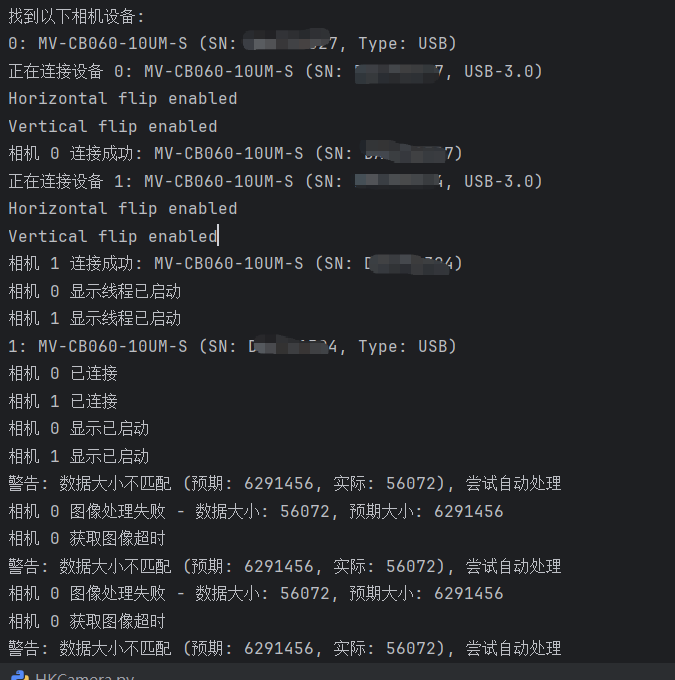
错误处理:
- 详细的错误日志记录
- 异常捕获和处理
-
相机参数配置:
- 支持多种曝光模式
- 可配置增益、翻转等参数
-
图像处理:
- 支持多种像素格式(Mono8, RGB8, BGR8等)
- 自动处理数据大小不匹配的情况
- 图像缩放显示
-
性能监控:
- 实时计算和显示FPS
- 帧计数统计
4. 完整代码如下
python
from HK_Camera.MvCameraControl_class import *
from ctypes import *
from typing import Optional, Tuple, List, Dict
import time
import cv2
import numpy as np
import threading
# 相机参数配置
EXPOSURE_MODE = 0 # 曝光模式:0:关闭;1:一次;2:自动曝光
EXPOSURE_TIME = 40000 # 曝光时间
GAIN_VALUE = 10 #增益值
ReverseX_enable = True # 水平翻转
ReverseY_enable = True # 垂直翻转
#图像显示大小
scale_width = 0.2 # 宽度缩放因子
scale_height = 0.2 # 高度缩放因子
PacketSizeLog = True # 启用丢包信息检测
class HKCameraManager:
def __init__(self):
"""初始化相机管理器"""
self.cameras: Dict[int, Dict] = {} # 存储所有相机实例和信息
self._last_error: str = ""
self._running = {} # 每个相机的运行状态
self._lock = threading.Lock()
self._display_threads = {} # 每个相机的显示线程
self._fps = {} # 每个相机的FPS
@property
def last_error(self) -> str:
"""获取最后一次错误信息"""
return self._last_error
def _log_error(self, operation: str, ret: int) -> None:
"""记录错误日志"""
self._last_error = f"{operation}失败,错误码: 0x{ret:x}"
print(self._last_error)
def enumerate_devices(self) -> Optional[List[dict]]:
"""枚举所有可用设备"""
try:
# 设置要枚举的设备类型
tlayer_type = MV_GIGE_DEVICE | MV_USB_DEVICE | MV_GENTL_CAMERALINK_DEVICE | MV_GENTL_CXP_DEVICE | MV_GENTL_XOF_DEVICE
# 初始化设备列表结构体
device_list = MV_CC_DEVICE_INFO_LIST()
memset(byref(device_list), 0, sizeof(device_list))
# 创建临时相机实例用于枚举
temp_cam = MvCamera()
# 枚举设备
ret = temp_cam.MV_CC_EnumDevices(tlayer_type, device_list)
if ret != 0:
self._log_error("枚举设备", ret)
return None
# 检查找到的设备数量
if device_list.nDeviceNum == 0:
print("未检测到任何相机设备")
return []
devices = []
for i in range(device_list.nDeviceNum):
# 获取设备信息指针
device_info = cast(device_list.pDeviceInfo[i], POINTER(MV_CC_DEVICE_INFO)).contents
# 根据传输层类型处理设备信息
if device_info.nTLayerType == MV_GIGE_DEVICE:
# GigE设备
device_data = {
'model': ctypes.string_at(device_info.SpecialInfo.stGigEInfo.chModelName).decode('utf-8'),
'serial': ctypes.string_at(device_info.SpecialInfo.stGigEInfo.chSerialNumber).decode('utf-8'),
'ip': ".".join(map(str, device_info.SpecialInfo.stGigEInfo.nCurrentIp)),
'type': 'GigE',
'index': i
}
elif device_info.nTLayerType == MV_USB_DEVICE:
# USB设备
# 修正USB设备信息获取方式
usb_info = device_info.SpecialInfo.stUsb3VInfo
# 使用ctypes的string_at函数获取字符串
model_name = string_at(usb_info.chModelName).decode('utf-8', errors='ignore')
serial_num = string_at(usb_info.chSerialNumber).decode('utf-8', errors='ignore')
device_data = {
'model': model_name.strip('\x00'),
'serial': serial_num.strip('\x00'),
'type': 'USB',
'index': i
}
else:
continue
devices.append(device_data)
return devices
except Exception as e:
self._last_error = f"枚举设备时发生异常: {str(e)}"
print(self._last_error)
import traceback
traceback.print_exc() # 打印完整的错误堆栈
return None
def connect_camera(self, device_index: int) -> bool:
"""连接指定索引的相机设备"""
try:
with self._lock:
if device_index in self.cameras and self.cameras[device_index]['connected']:
print(f"相机 {device_index} 已连接")
return True
# 枚举设备
tlayerType = MV_GIGE_DEVICE | MV_USB_DEVICE | MV_GENTL_CAMERALINK_DEVICE | MV_GENTL_CXP_DEVICE | MV_GENTL_XOF_DEVICE
deviceList = MV_CC_DEVICE_INFO_LIST()
memset(byref(deviceList), 0, sizeof(deviceList))
# 实例化相机
cam = MvCamera()
# 枚举设备
ret = cam.MV_CC_EnumDevices(tlayerType, deviceList)
if ret != 0:
self._log_error("枚举设备", ret)
return False
if deviceList.nDeviceNum == 0:
self._last_error = "未找到任何设备"
print(self._last_error)
return False
if device_index >= deviceList.nDeviceNum:
self._last_error = f"设备索引超出范围,最大可用索引: {deviceList.nDeviceNum - 1}"
print(self._last_error)
return False
# 选择指定设备
stDeviceList = cast(deviceList.pDeviceInfo[device_index], POINTER(MV_CC_DEVICE_INFO)).contents
# 创建句柄
ret = cam.MV_CC_CreateHandleWithoutLog(stDeviceList)
if ret != MV_OK:
self._log_error("创建句柄", ret)
return False
# 获取设备信息
if stDeviceList.nTLayerType == MV_GIGE_DEVICE:
model_name = ctypes.string_at(stDeviceList.SpecialInfo.stGigEInfo.chModelName).decode('utf-8')
serial_num = ctypes.string_at(stDeviceList.SpecialInfo.stGigEInfo.chSerialNumber).decode(
'utf-8')
ip_addr = ".".join(map(str, stDeviceList.SpecialInfo.stGigEInfo.nCurrentIp))
device_type = 'GigE'
print(f"正在连接设备 {device_index}: {model_name} (SN: {serial_num}, IP: {ip_addr}。GiGe)")
else:
usb_info = stDeviceList.SpecialInfo.stUsb3VInfo
model_name = string_at(usb_info.chModelName).decode('utf-8', errors='ignore')
serial_num = string_at(usb_info.chSerialNumber).decode('utf-8', errors='ignore')
ip_addr = None
device_type = 'USB'
print(f"正在连接设备 {device_index}: {model_name} (SN: {serial_num}, USB-3.0)")
# 打开相机
ret = cam.MV_CC_OpenDevice(MV_ACCESS_Exclusive, 0)
if ret != MV_OK:
# 特别处理USB相机连接问题
if stDeviceList.nTLayerType == MV_USB_DEVICE:
# 尝试设置USB传输大小(海康USB相机常见问题)
ret = cam.MV_CC_SetIntValue("TransferSize", 0x100000)
if ret == MV_OK:
ret = cam.MV_CC_SetIntValue("NumTransferBuffers", 8)
if ret == MV_OK:
ret = cam.MV_CC_OpenDevice(MV_ACCESS_Exclusive, 0)
if ret != 0:
self._log_error("打开设备", ret)
return False
# 配置相机参数
if not self._configure_camera(cam):
cam.MV_CC_CloseDevice()
cam.MV_CC_DestroyHandle()
return False
# 开始取流
ret = cam.MV_CC_StartGrabbing()
if ret != 0:
self._log_error("开始取流", ret)
cam.MV_CC_CloseDevice()
cam.MV_CC_DestroyHandle()
return False
# 存储相机信息 - 确保所有必要字段都正确设置
self.cameras[device_index] = {
'handle': cam,
'model': model_name.strip('\x00') if isinstance(model_name, str) else model_name,
'serial': serial_num.strip('\x00') if isinstance(serial_num, str) else serial_num,
'type': device_type,
'ip': ip_addr,
'connected': True, # 确保连接状态正确设置为True
'frame_count': 0,
'last_frame_time': time.time()
}
# 初始化FPS计数器
self._fps[device_index] = 0
print(f"相机 {device_index} 连接成功: {model_name} (SN: {serial_num})")
return True
except Exception as e:
self._last_error = f"连接相机时发生异常: {str(e)}"
print(self._last_error)
if 'cam' in locals():
cam.MV_CC_DestroyHandle()
return False
def _configure_camera(self, cam: MvCamera) -> bool:
"""配置相机参数"""
try:
# 设置触发方式为连续采集
ret = cam.MV_CC_SetEnumValue("TriggerMode", MV_TRIGGER_MODE_OFF)
if ret != 0:
self._log_error("设置触发模式", ret)
return False
# 设置曝光模式
match EXPOSURE_MODE:
case 0: # 手动设置参数
ret = cam.MV_CC_SetEnumValue("ExposureAuto", MV_EXPOSURE_AUTO_MODE_OFF)
if ret != 0:
print("警告: 关闭自动曝光设置失败,将采用自动曝光")
# 设置曝光时间
exposure = float(EXPOSURE_TIME)
ret = cam.MV_CC_SetFloatValue("ExposureTime", exposure)
if ret != 0:
raise RuntimeError(f"Set ExposureTime failed with error {ret}")
case 1: # 一次曝光
ret = cam.MV_CC_SetEnumValue("ExposureAuto", MV_EXPOSURE_AUTO_MODE_ONCE)
if ret != 0:
print("警告: 一次曝光设置失败,将继续使用手动曝光")
case 2: # 自动曝光
ret = cam.MV_CC_SetEnumValue("ExposureAuto", MV_EXPOSURE_AUTO_MODE_CONTINUOUS)
if ret != 0:
print("警告: 自动曝光设置失败,将继续使用手动曝光")
# 设置增益
ret = cam.MV_CC_SetEnumValue("GainAuto", MV_GAIN_MODE_OFF)
if ret != 0:
print("警告: 手动增益设置失败,将采用自动增益")
gain_val = float(GAIN_VALUE)
ret = cam.MV_CC_SetFloatValue("Gain", gain_val)
if ret != 0:
raise RuntimeError(f"Set gain failed with error {ret}")
# 设置水平翻转
flip = c_int(1 if ReverseX_enable else 0)
ret = cam.MV_CC_SetBoolValue("ReverseX", flip)
if ret != 0:
raise RuntimeError(f"Set horizontal flip failed with error {ret}")
print(f"Horizontal flip {'enabled' if ReverseX_enable else 'disabled'}")
# 设置垂直翻转
flip = c_int(1 if ReverseY_enable else 0)
ret = cam.MV_CC_SetBoolValue("ReverseY", flip)
if ret != 0:
raise RuntimeError(f"Set vertical flip failed with error {ret}")
print(f"Vertical flip {'enabled' if ReverseY_enable else 'disabled'}")
return True
except Exception as e:
self._last_error = f"配置相机时发生异常: {str(e)}"
print(self._last_error)
return False
def get_image(self, device_index: int, timeout: int = 300) -> Optional[Tuple[np.ndarray, np.ndarray]]:
"""获取指定相机的图像并返回原始图像和灰度图像"""
with self._lock:
if device_index not in self.cameras or not self.cameras[device_index]['connected']:
self._last_error = f"相机 {device_index} 未连接"
print(self._last_error)
return None
cam = self.cameras[device_index]['handle']
try:
# 初始化帧输出结构
stOutFrame = MV_FRAME_OUT()
memset(byref(stOutFrame), 0, sizeof(stOutFrame))
# 获取图像
ret = cam.MV_CC_GetImageBuffer(stOutFrame, timeout)
if ret != 0:
self._log_error(f"相机 {device_index} 获取图像", ret)
return None
# 获取图像信息
frame_info = stOutFrame.stFrameInfo
nPayloadSize = frame_info.nFrameLen
pData = stOutFrame.pBufAddr
# 打印调试信息
# print(f"相机 {device_index} 图像信息: "
# f"Width={frame_info.nWidth}, Height={frame_info.nHeight}, "
# f"PixelType={frame_info.enPixelType}, Size={nPayloadSize}")
# 复制图像数据
data_buf = (c_ubyte * nPayloadSize)()
cdll.msvcrt.memcpy(byref(data_buf), pData, nPayloadSize)
# 转换为numpy数组
temp = np.frombuffer(data_buf, dtype=np.uint8)
# 获取图像参数
width = frame_info.nWidth
height = frame_info.nHeight
pixel_type = frame_info.enPixelType
# 根据像素类型处理图像
img = self._process_image_data(temp, width, height, pixel_type)
if img is None:
if PacketSizeLog:
print(f"相机 {device_index} 图像处理失败 - 数据大小: {len(temp)}, "
f"预期大小: {width * height * (3 if pixel_type in [PixelType_Gvsp_RGB8_Packed, PixelType_Gvsp_BGR8_Packed] else 1)}")
cam.MV_CC_FreeImageBuffer(stOutFrame)
return None
# 转换为灰度图像
if len(img.shape) == 2: # 已经是灰度图像
gray = img.copy()
else:
gray = cv2.cvtColor(img, cv2.COLOR_BGR2GRAY)
# 释放图像缓存
cam.MV_CC_FreeImageBuffer(stOutFrame)
# 更新帧统计信息
self.cameras[device_index]['frame_count'] += 1
self.cameras[device_index]['last_frame_time'] = time.time()
return img, gray
except Exception as e:
self._last_error = f"相机 {device_index} 获取图像时发生异常: {str(e)}"
print(self._last_error)
if 'stOutFrame' in locals():
cam.MV_CC_FreeImageBuffer(stOutFrame)
return None
def _process_image_data(self, data: np.ndarray, width: int, height: int, pixel_type: int) -> Optional[np.ndarray]:
"""根据像素类型处理原始图像数据"""
try:
if PacketSizeLog:
# 首先检查数据大小是否匹配预期
expected_size = width * height
if pixel_type in [PixelType_Gvsp_Mono8, PixelType_Gvsp_RGB8_Packed, PixelType_Gvsp_BGR8_Packed]:
if pixel_type == PixelType_Gvsp_Mono8:
expected_size = width * height
else:
expected_size = width * height * 3
if len(data) != expected_size:
print(f"警告: 数据大小不匹配 (预期: {expected_size}, 实际: {len(data)}), 尝试自动处理")
# 尝试自动计算正确的高度
if pixel_type == PixelType_Gvsp_Mono8:
actual_height = len(data) // width
if actual_height * width == len(data):
return data.reshape((actual_height, width))
else:
actual_height = len(data) // (width * 3)
if actual_height * width * 3 == len(data):
img = data.reshape((actual_height, width, 3))
if pixel_type == PixelType_Gvsp_RGB8_Packed:
return cv2.cvtColor(img, cv2.COLOR_RGB2BGR)
return img
return None
# 正常处理流程
if pixel_type == PixelType_Gvsp_Mono8:
return data.reshape((height, width))
elif pixel_type == PixelType_Gvsp_RGB8_Packed:
img = data.reshape((height, width, 3))
return cv2.cvtColor(img, cv2.COLOR_RGB2BGR)
elif pixel_type == PixelType_Gvsp_BGR8_Packed:
return data.reshape((height, width, 3))
elif pixel_type in [PixelType_Gvsp_Mono10, PixelType_Gvsp_Mono12]:
# 对于10位或12位图像,需要进行位转换
img = data.view(np.uint16)
img = (img >> (pixel_type - PixelType_Gvsp_Mono8)).astype(np.uint8)
return img.reshape((height, width))
else:
self._last_error = f"不支持的像素格式: {pixel_type}"
print(self._last_error)
return None
except Exception as e:
self._last_error = f"图像处理错误: {str(e)}"
if PacketSizeLog:
print(self._last_error)
return None
def disconnect_camera(self, device_index: int) -> bool:
"""断开指定相机的连接"""
with self._lock:
if device_index not in self.cameras or not self.cameras[device_index]['connected']:
print(f"相机 {device_index} 未连接")
return True
cam = self.cameras[device_index]['handle']
try:
success = True
# 停止取流
ret = cam.MV_CC_StopGrabbing()
if ret != 0:
self._log_error(f"相机 {device_index} 停止取流", ret)
success = False
# 关闭设备
ret = cam.MV_CC_CloseDevice()
if ret != 0:
self._log_error(f"相机 {device_index} 关闭设备", ret)
success = False
# 销毁句柄
ret = cam.MV_CC_DestroyHandle()
if ret != 0:
self._log_error(f"相机 {device_index} 销毁句柄", ret)
success = False
if success:
print(f"相机 {device_index} 已成功断开连接")
self.cameras[device_index]['connected'] = False
# 从字典中移除相机
del self.cameras[device_index]
# 停止显示线程
if device_index in self._running:
self._running[device_index] = False
return success
except Exception as e:
self._last_error = f"断开相机 {device_index} 连接时发生异常: {str(e)}"
print(self._last_error)
return False
###########################图像视频流显示部分################################################
def start_display(self,device_index: int) -> bool:
"""启动所有已连接相机的实时显示"""
with self._lock: # 添加线程锁
# 检查相机是否已连接
if device_index not in self.cameras or not self.cameras[device_index]['connected']:
print(f"相机 {device_index} 未连接,无法启动显示")
return False
if device_index in self._running and self._running[device_index]:
print(f"相机 {device_index} 显示已启动")
return True
# 设置运行标志
self._running[device_index] = True
# 创建并启动显示线程
display_thread = threading.Thread(
target=self._display_thread,
args=(device_index,),
daemon=True
)
self._display_threads[device_index] = display_thread
display_thread.start()
print(f"相机 {device_index} 显示线程已启动")
return True
def stop_display(self, device_index: int = None) -> None:
"""停止指定相机的显示或停止所有相机显示"""
if device_index is None:
# 停止所有显示
for idx in list(self._running.keys()):
self._running[idx] = False
for idx, thread in self._display_threads.items():
if thread.is_alive():
thread.join()
self._display_threads.clear()
cv2.destroyAllWindows()
else:
# 停止指定相机显示
if device_index in self._running:
self._running[device_index] = False
if device_index in self._display_threads:
if self._display_threads[device_index].is_alive():
self._display_threads[device_index].join()
del self._display_threads[device_index]
cv2.destroyWindow(f"Camera {device_index}")
def _display_thread(self, device_index: int) -> None:
"""单个相机的显示线程"""
frame_count = 0
last_time = time.time()
window_name = f"Camera {device_index}"
def _window_exists(window_name):
"""检查OpenCV窗口是否存在"""
try:
return cv2.getWindowProperty(window_name, cv2.WND_PROP_VISIBLE) >= 0
except:
return False
try:
while self._running.get(device_index, False):
try:
# 获取图像
result = self.get_image(device_index)
if result is None:
if PacketSizeLog:
print(f"相机 {device_index} 获取图像超时")
time.sleep(0.1)
continue
img, _ = result
# 计算FPS
frame_count += 1
current_time = time.time()
if current_time - last_time >= 1.0:
self._fps[device_index] = frame_count / (current_time - last_time)
frame_count = 0
last_time = current_time
# 在图像上显示信息
info = f"Cam {device_index} | {self.cameras[device_index]['model']} | FPS: {self._fps[device_index]:.1f}"
cv2.putText(img, info, (10, 30), cv2.FONT_HERSHEY_SIMPLEX, 0.7, (0, 255, 0), 2)
resized_image_by_scale = cv2.resize(img, None, fx=scale_width, fy=scale_height)
# 显示图像
cv2.imshow(window_name, resized_image_by_scale)
# 检查按键
key = cv2.waitKey(1) & 0xFF
if key == 27: # ESC键退出
self._running[device_index] = False
break
except Exception as e:
print(f"相机 {device_index} 显示线程异常: {str(e)}")
time.sleep(0.1)
finally:
# 线程结束时清理
if _window_exists(window_name):
cv2.destroyWindow(window_name)
print(f"相机 {device_index} 显示线程已停止")
def disconnect_all(self) -> None:
"""断开所有相机的连接"""
self.stop_display() # 先停止所有显示
for device_index in list(self.cameras.keys()):
if self.cameras[device_index]['connected']:
self.disconnect_camera(device_index)
def __del__(self):
"""析构函数,确保资源释放"""
self.disconnect_all()
def main():
# 创建相机管理器
cam_manager = HKCameraManager()
# 枚举设备
devices = cam_manager.enumerate_devices()
if not devices:
print("未找到任何相机设备")
return
print("找到以下相机设备:")
for i, dev in enumerate(devices):
# 根据设备类型显示不同信息
if dev['type'] == 'GigE':
print(f"{i}: {dev['model']} (SN: {dev['serial']}, IP: {dev['ip']})")
else: # USB设备
print(f"{i}: {dev['model']} (SN: {dev['serial']}, Type: USB)")
# 先连接所有相机
for i in range(len(devices)):
if not cam_manager.connect_camera(i):
print(f"无法连接相机 {i}")
continue # 即使一个相机连接失败,也继续尝试其他相机
# 确认连接状态后再启动显示
for i in range(len(devices)):
if i in cam_manager.cameras and cam_manager.cameras[i]['connected']:
cam_manager.start_display(i)
try:
# 主线程等待
while any(cam_manager._running.values()):
time.sleep(0.1)
except KeyboardInterrupt:
print("用户中断...")
finally:
# 清理资源
cam_manager.disconnect_all()
print("程序退出")
if __name__ == "__main__":
main()5. 写在最后
目前程序还有一些未增加的功能,后续会增加补充
- 相机参数动态调整功能
- 图像保存功能
- 支持更多像素格式
- 网络相机重连机制
- 日志系统替代print输出