ansible介绍
ansible是新出现的自动化运维工具,基于Python开发,集合了众多运维工具的优点,实现批量系统配置,批量程序部署,批量运行命令等功能。无客户端。
命令执行过程
1.加载自己的配置文件,默认/etc/ansible/ansible.cfg
2.查找对应的主机配置文件,找到要执行的主机或组。
3.加载自己对应的模块文件
4.通过ansible将模块或命令生成对应的临时py文件,并将该文件传输至远程服务器
5.对应执行用户目录的ansible/tmp/xxx.py文件
6.给文件+x执行
7.执行并返回结果
8.删除临时py文件,sleep 0退出
工作原理
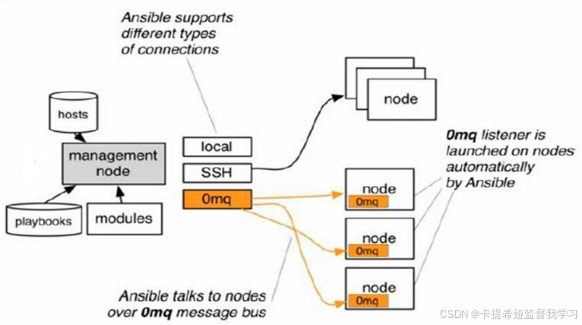
ansible环境部署
1.在ansible服务器上做域名解析,客户端什么都不需要做(有些基础配置IP,YUM源)。
2.服务器上下载ansible
yum -y install ansible

rpm -ql ansible #列出所有文件
rpm -qc ansible #查看配置文件
ansible --help #查看ansible帮助
ansible-doc -l #查看模块
ansible-doc -s yum #查看yum模块
免密操作(选)
ssh-keygen
ssh-copy-id 目的主机 #推送公钥
ansible基础
主机清单位置
vim /etc/ansible/hosts语法
ansible 主机 -m 命令 -u 用户 -k -o

-m #指定模块
-o #简介输出

#做了免密就不需要
-u #用户
-k #密码选项
ping和ansible中的ping的区别
ping #ICMP:网际消息管理协议

ansible的ping是探测sshd是否连接。不是icmp协议
主机清单
#主机组
[webserver]
host1
host2

#添加用户名和密码
#ansible_ssh_user:自定义变量
host1 ansible_ssh_user='root' ansible_ssh_user='666666'

#添加端口
host1 ansible_ssh_port='22'

#组:变量
vars: Ansible的保留关键字,用于标识变量定义区块
[webserver:vars]
ansible_ssh_user='root'
ansible_ssh_user='666666'

#子分组
#组:children
[webserver:children]
apache
nginx

#自定义主机列表
ansible -i 主机列表文件 主机组 -m ping -o
点对点模式
临时的,在ansible中是指需要快速执行的单条命令,并不需要保存的命令。对于复杂的命令则为playbook
shell模块
#shell模块
ansible-doc-shells #帮助文档

ansible 主机 -m shell -a 'hostname' -o
-a #传递参数
复制模块
#复制模块
ansible-doc copy #帮助文档

ansible 主机 -m copy -a 'src=/etc/hosts dest=/tmp2.txt owner=root group=bin mode=777 backup=yes'
src=/etc/hosts #ansible服务端上的文件
dest=/tmp2.txt #传输到ansible客户端上
backup=yes #文件有多分,可以备份
用户模块
#用户模块
ansible-doc user

ansible 主机 -m user -a 'name=用户 state=present'
state=present #创建用户
state=absent #删除用户
shell=/sbin/nologin append=yes #修改shell

#修改密码
echo '1111111' | openssl passwd -1 -stdin#生成密码
password="密码"
软件包管理
#软件包管理
ansible-doc yum #帮助文档
ansible 主机 -m yum -a 'name="*" state=latest' #升级所有包

state=latest #更新
服务模块
#服务模块
ansible-doc service

ansible 主机 -m service -a 'name=httpd state=started'
state=started #启动
state=started enabled=yes #开机自启
state=stop #停止
state=restarted #重启
state=stop enabled=no #停止禁止开机自启
文件模块
#文件模块
ansible-doc file

ansible 主机 -m file -a 'path=/tmp/88.txt mode=777 state=touch'

state=touch #创建文件
state=directory #创建目录
收集模块
#收集模块
ansible-doc setup #帮助文档

ansible 主机 -m setup #查询所有信息 -a 'filter=ansible_all_ipv4_addresses'
fetch
#fetch远程主机文件发往本地
ansible-doc fetch #帮助文档


ansible 主机 -m fetch -a 'src=/tmp/1.txt dest=/root'
src=/tmp/1.txt #远程主机的
dest=/root #本地的
cron模块
#cron模块
ansible-doc cron #帮助文档

ansible host1 -m cron -a 'name="sync time from ntpserver" minute="*/10" job="/sbin/ntpdate 172.17.0.1 &> /dev/null" '

name="sync time from ntpserver" #计划任务名字
group模块
#group模块
ansible-doc group #帮助文档

ansible 主机 -m group -a 'name=nihao state=present'

state=present #创建
state=absent #删除
system=yes #系统组
script模块
#script模块
ansible-doc script #帮助文档

ansible 主机 -m script -a "脚本" #将脚本放到节点机器上执行
unarchive模块
#unarchive模块
ansible-doc unarchive #帮助文档

ansible 主机 -m unarchive -a 'src=/root/1.tar dest=/tmp' #将本地的压缩包拷贝到远程主机上解压

src=/root/1.tar #需要解压的包
dest=/tmp #解压到远程主机的位置
remote_src #yes:解压远程主机上的包 no:将管理机上的包传到远程主机上解压
YAML-YAML Ain't Markup Language-非标记语言
语法
列表
app:
 - douyin
 - kuaishou
字典
app:
 name: wangzherongyao
 job: develop
使用yaml语言编写部署web服务器
bash
vim apache.yaml

---
- hosts: host2
  become: yes # 使用sudo权限
  vars:
    apache_package: httpd
    apache_service: httpd
    conf_dest: /etc/httpd/conf/httpd.conf

  tasks:
    - name: Install Apache package
      yum:
        name: "{{ apache_package }}"
        state: present

    - name: Copy Apache configuration
      copy:
        src: ./httpd.conf
        dest: "{{ conf_dest }}"
        owner: root
        group: root
        mode: 0644
        backup: yes
      notify: restart apache service

    - name: Ensure Apache is running and enabled
      service:
        name: "{{ apache_service }}"
        state: started
        enabled: yes

  handlers: #只在被notify通知时才会执行
    - name: restart apache service
      service:
        name: "{{ apache_service }}"
        state: restarted
测试文件
ansible-playbook apache.yaml --syntax-check #检验语法

ansible-playbook apache.yaml --list-tasks #列出任务

ansible-playbook apache.yaml --list-hosts #列出主机

ansible-playbook apache.yaml #执行
Role-角色扮演
roles则是在ansible中,playbooks的目录组织结构。将代码或文件进行模块化,成为roles的文件目录组织结构,易读,代码可重用性,层次清晰
目录结构
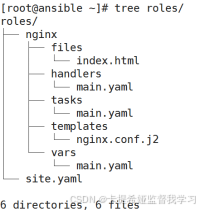
nginx 角色名,files 普通文件,handler 触发器程序,tasks 主任务,template 金甲模板(有变量的文件),vars 自定义变量,site.yaml 主Playbook文件
tasks 主任务
bash
vim roles/nginx/tasks/main.yaml

---
- name: install epel-release package
  yum:
    name=epel-release
    state=latest

- name: install nginx package
  yum:
    name=nginx
    state=latest

- name: copy index.html
  copy:
    src=index.html
    dest=/usr/share/nginx/html/index.html

- name: copy nginx.conf template
  template:
    src=nginx.conf.j2
    dest=/etc/nginx/nginx.conf
  notify: restart nginx

- name: make sure nginx service running
  service:
    name=nginx
    state=started
    enabled=yes
template 金甲模板(有变量的文件)
bash
Jinja2 是一个用Python编写的现代模板引擎,在Ansible中用于:

动态生成配置文件

根据变量条件化内容

循环生成重复内容

使用过滤器处理数据
将nginx主配置文件拷贝到template中,修改一下文件
bash
vim roles/nginx/templates/nginx.conf.j2

worker_processes  {{ ansible_processor_cores }}; #调用内部已知变量
worker_connections {{ worker_connections }}; #自定义变量
vars 自定义变量
bash
vim roles/nginx/vars/main.yaml

worker_connections: 10240
handler 触发器程序
bash
vim roles/nginx/handlers/main.yaml

---
- name: restart nginx
  service:
    name=nginx
    state=restarted
site.yaml 主Playbook文件
bash
在Ansible中,site.yaml(或 site.yml)通常是一个主Playbook文件,用于定义整个基础设施的配置和部署流程。
site.yaml 通常作为:
入口点:执行Ansible的主要入口文件
编排文件:协调多个角色和任务的编排文件
基础设施即代码:整个系统配置的声明式定义
bash
vim roles/site.yaml

- name: nginx download
  hosts: host4
  become: yes
  roles:
  - nginx