Git 多人协作全流程实战:分支协同 + 冲突解决 + 跨分支协助


🔥草莓熊Lotso: 个人主页
❄️个人专栏: 《C++知识分享》 《Linux 入门到实践:零基础也能懂》
✨生活是默默的坚持,毅力是永久的享受!


🎬 博主简介:


文章目录

  • 前言:
  • [一. 多人协作模式一:同一分支协同开发(简单场景)](#一. 多人协作模式一:同一分支协同开发(简单场景))
  • [二. 协作模式二:多分支并行开发(推荐场景)](#二. 协作模式二:多分支并行开发(推荐场景))
  • [三. 远程分支删除后,本地 git branch -a 依然能看到的解决办法](#三. 远程分支删除后,本地 git branch -a 依然能看到的解决办法)
  • 结尾:

前言:

单人开发时,Git 的本地分支管理已能满足版本控制需求,但进入团队协作后,核心痛点变成了 "如何有序同步代码、避免冲突、高效协作"。Git 的分布式特性让多人开发灵活高效,但缺乏规范流程会导致代码混乱、冲突频发。本文结合 多人协作的两大核心场景(同一分支协同、多分支并行开发),拆解从分支创建、代码同步到冲突解决的完整流程,附具体命令和实操案例,帮你快速掌握企业级 Git 协作规范,让团队开发有序高效。


一. 多人协作模式一:同一分支协同开发(简单场景)

适用于小团队、短期迭代,多人基于同一dev分支或同一feature分支开发(需高频同步,减少冲突)。
核心流程"拉取→开发→提交→推送" 闭环,注意拉取这一步不要少

目前,我们所完成的工作如下

  • 基本完成 Git 的所有本地库的相关操作,git基本操作,分支理解,版本回退,冲突解决等等。
  • 申请码云账号,将远端信息clone到本地,以及推送和拉取。

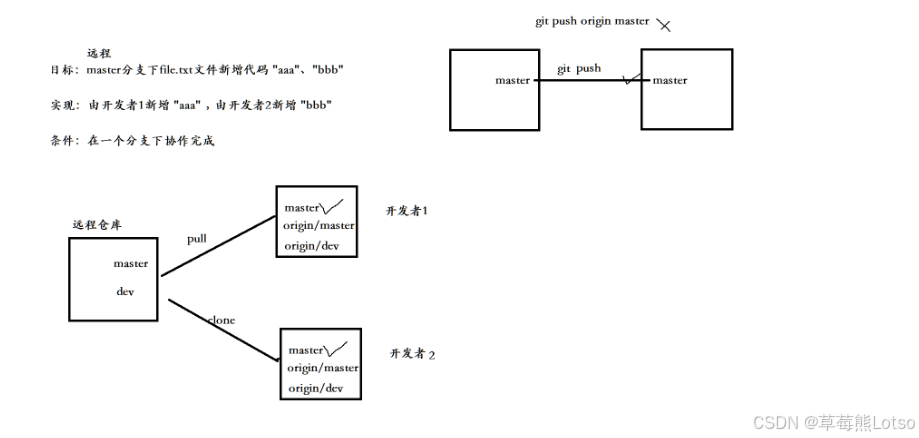
是时候干最重要的一件事情了,实现多人协作开发!为了做这些事情,我们需要先做一些准备工作。我们之前已经将项目 clone 到了指定目录,如:

bash 复制代码
[Lotso@VM-4-4-centos git_studying]$ pwd
/home/Lotso/git_studying

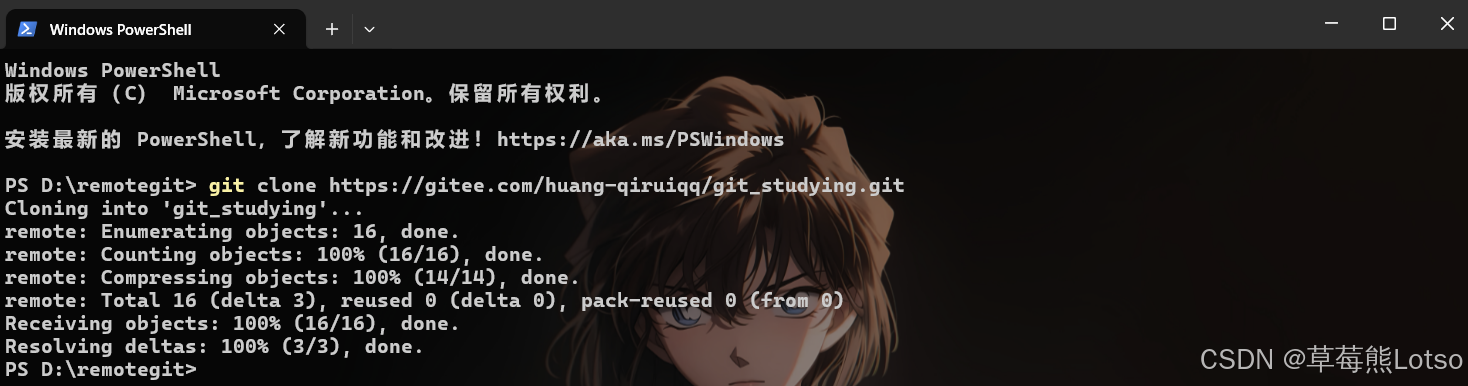
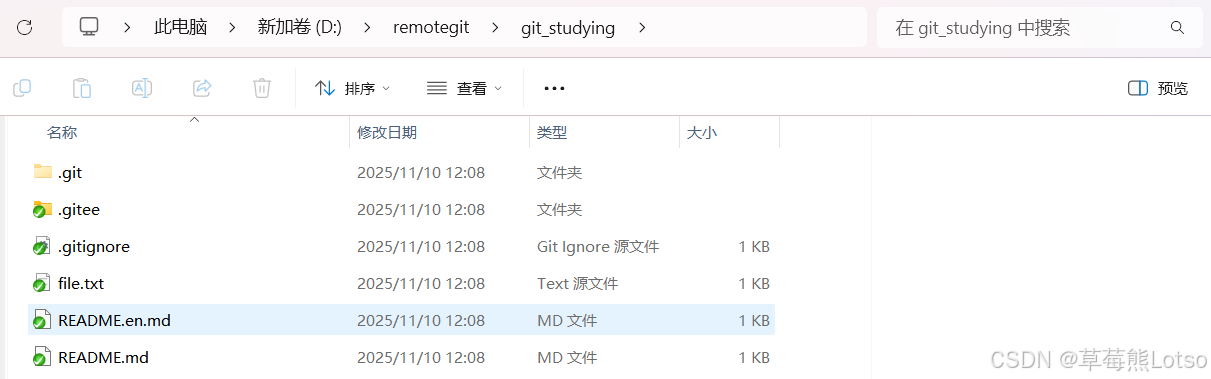
我们在 windows 环境下,再 clone 同一个项目仓库,来模拟和你一起协作开发的另一名小伙伴:

Clone 成功

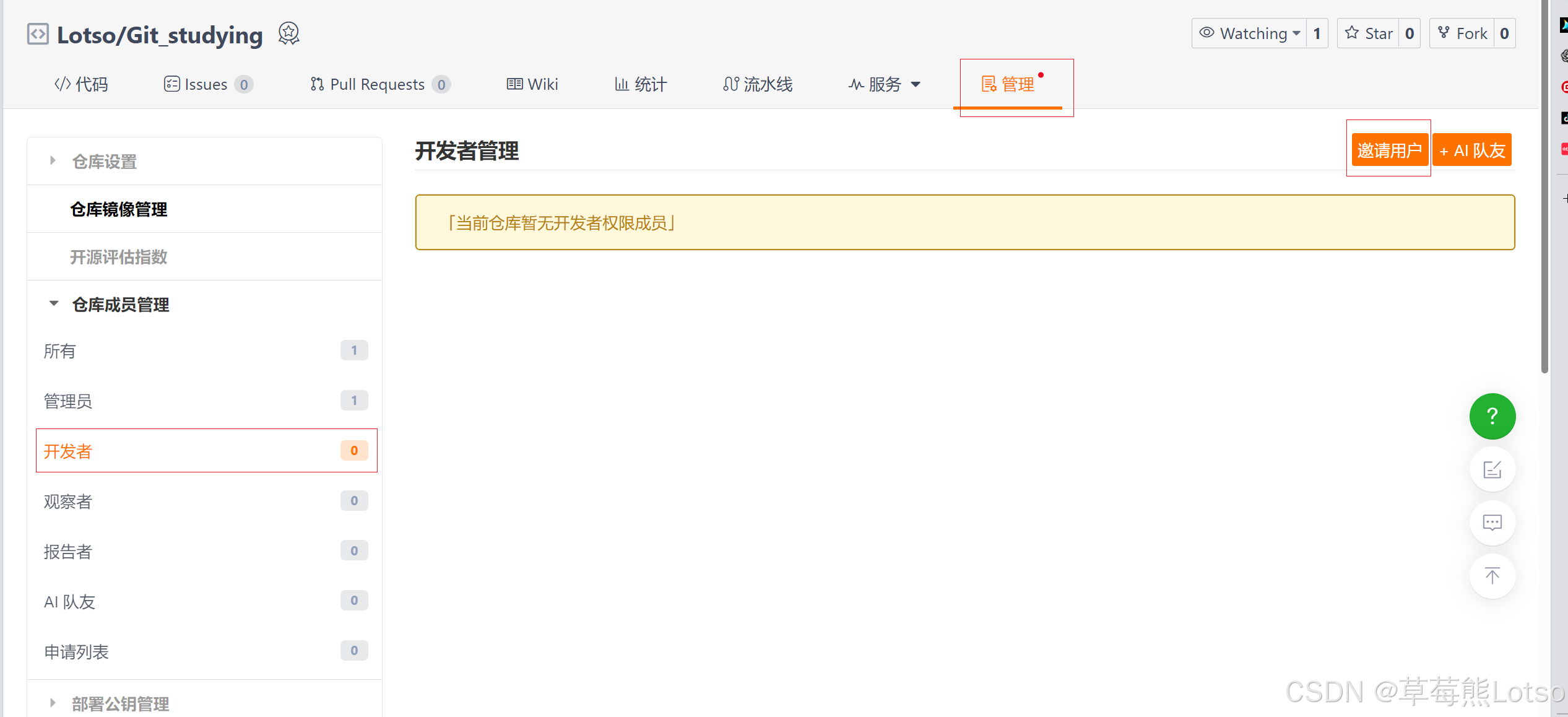
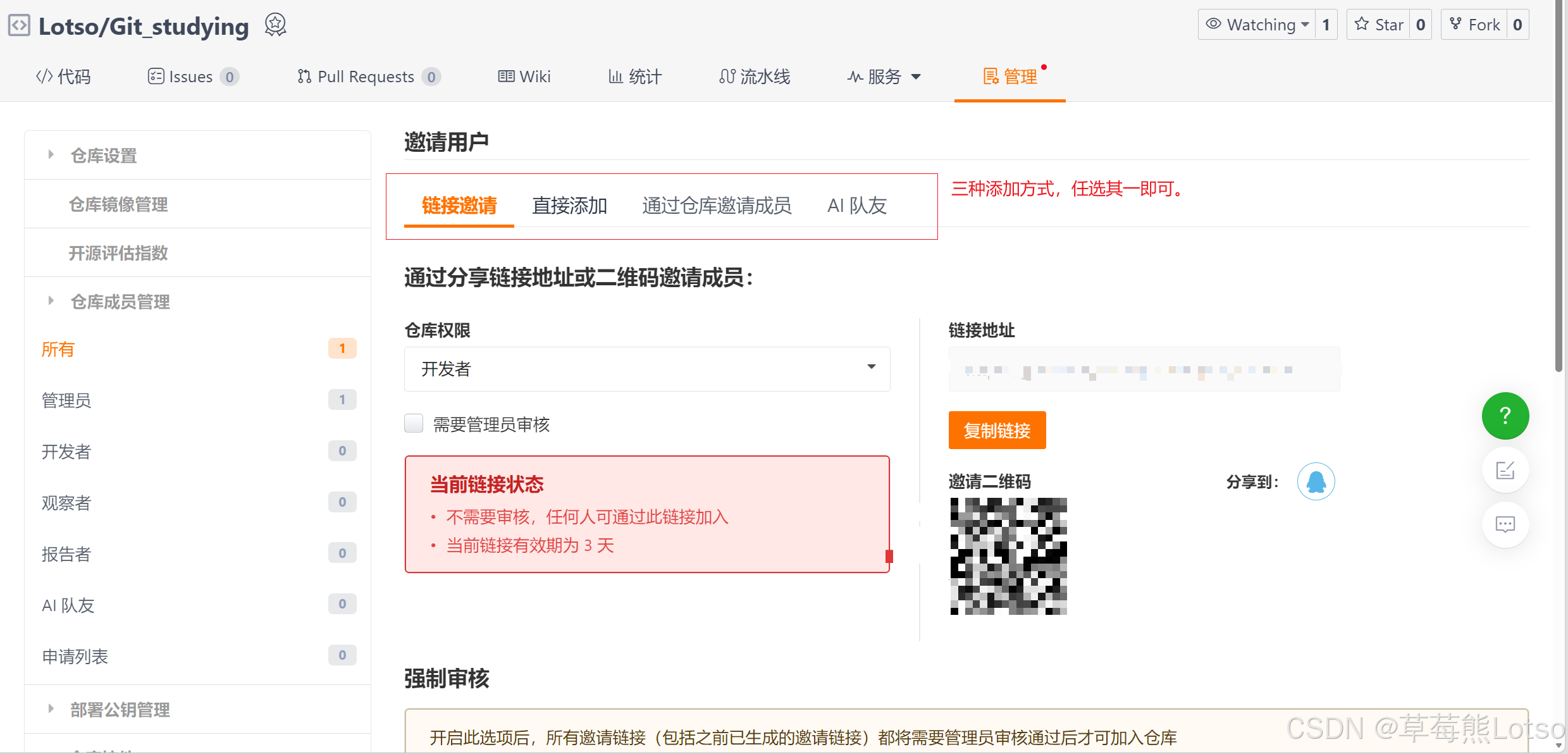
注意,我们这里是模拟了两个用户,实际开发中,每个用户都有自己的gitee/github账号,如果要多人进行协同开发,必须要将用户添加进开发者,用户才有权限进行代码提交:

邀请用户:

到此,我们就相当于有了两个用户,分别在 Linux 和 windows 上针对于同项目进行协作开发,我们的准本工作到此结束。

目前,我们的仓库中只有一个 master 主分支,但在实际的项目开发中,在任何情况下其实都是不允许直接在 master 分支上修改代码的,这里为了保证主分支的稳定。所以在开发新功能时,常常会新建其他分支,供开发时进行迭代使用。

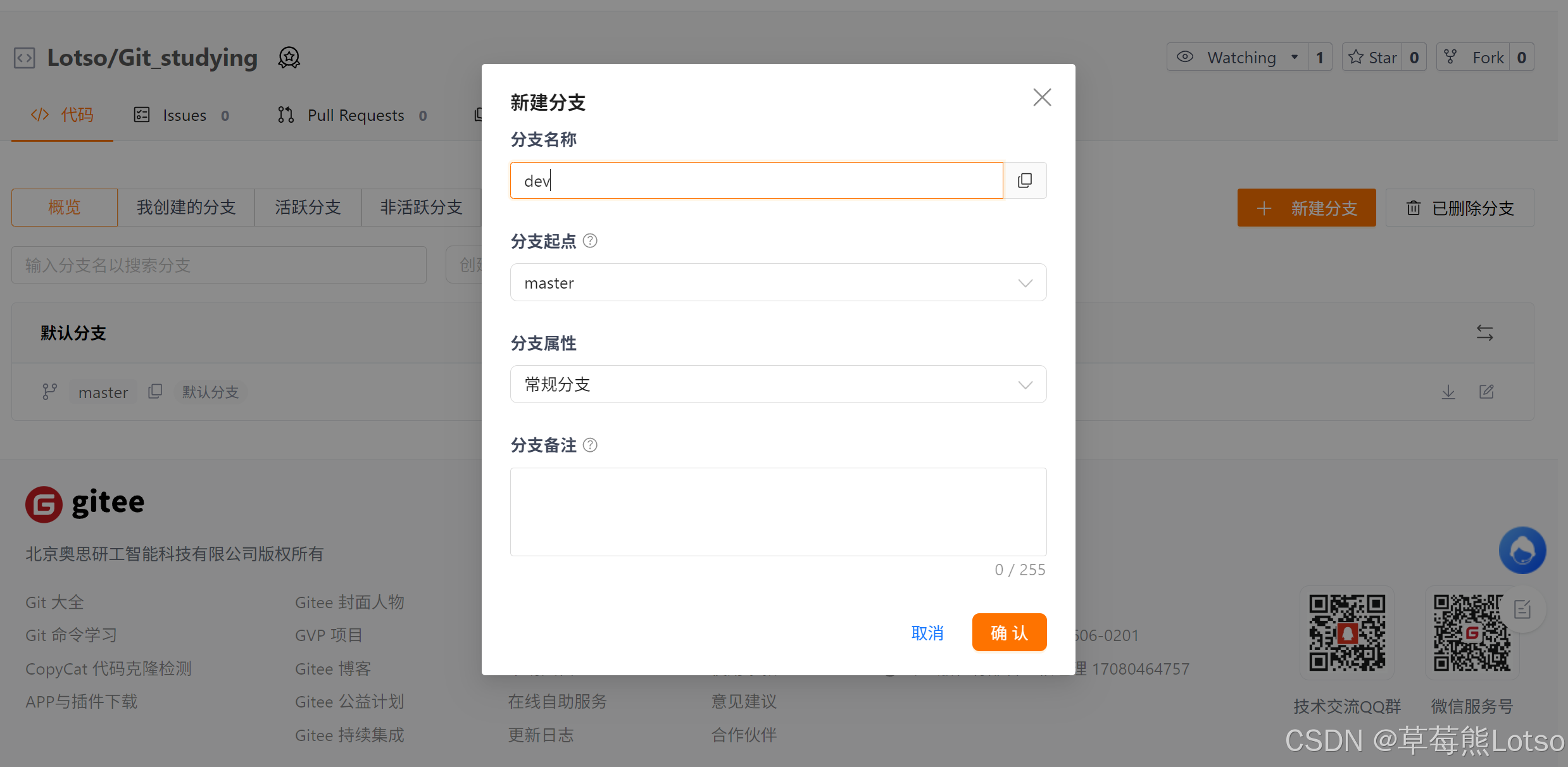
那么接下来,就让我们在 gitee 上新建 dev 远程分支供我们使用:

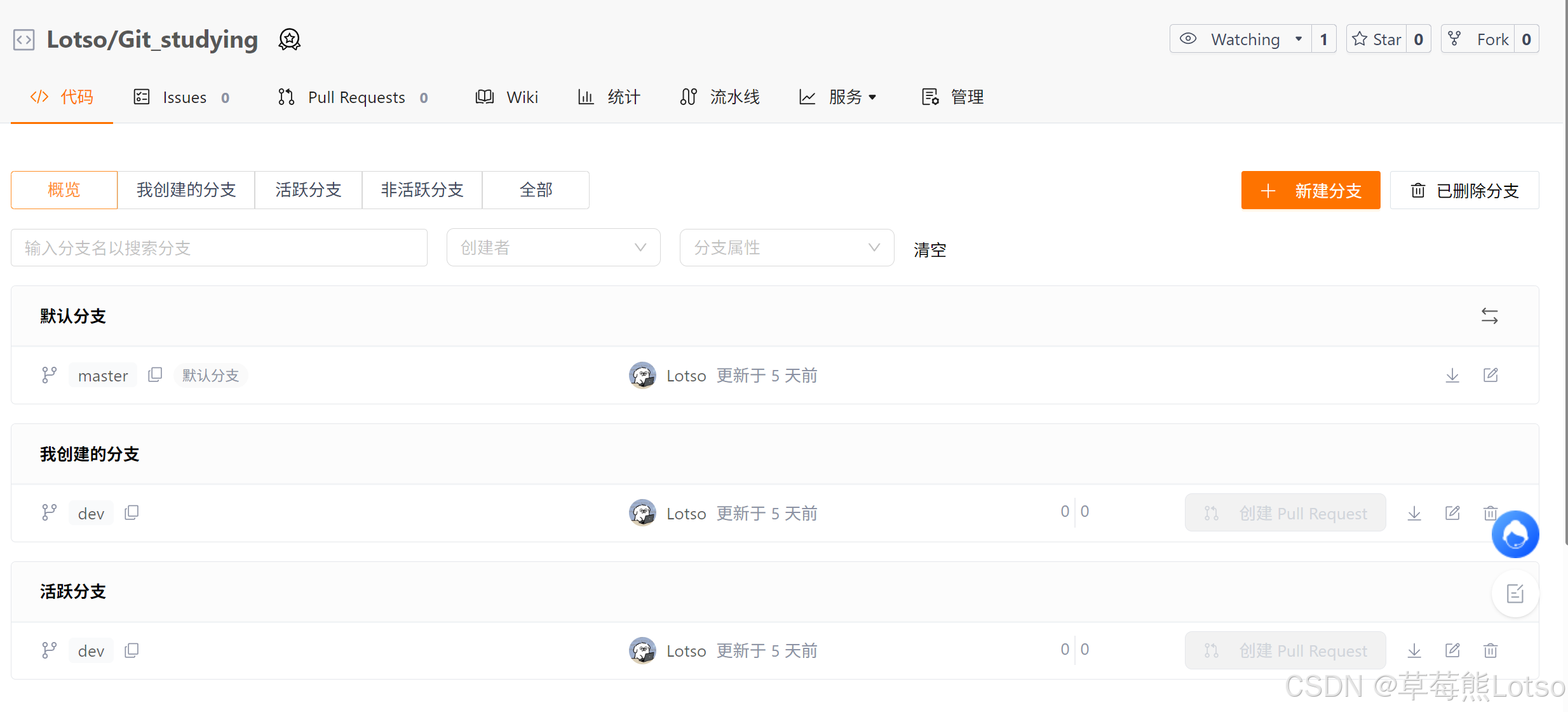
创建成功:

创建成功的远程分支是可以通过 Git 拉取到本地来,以实现完成本地开发工作。

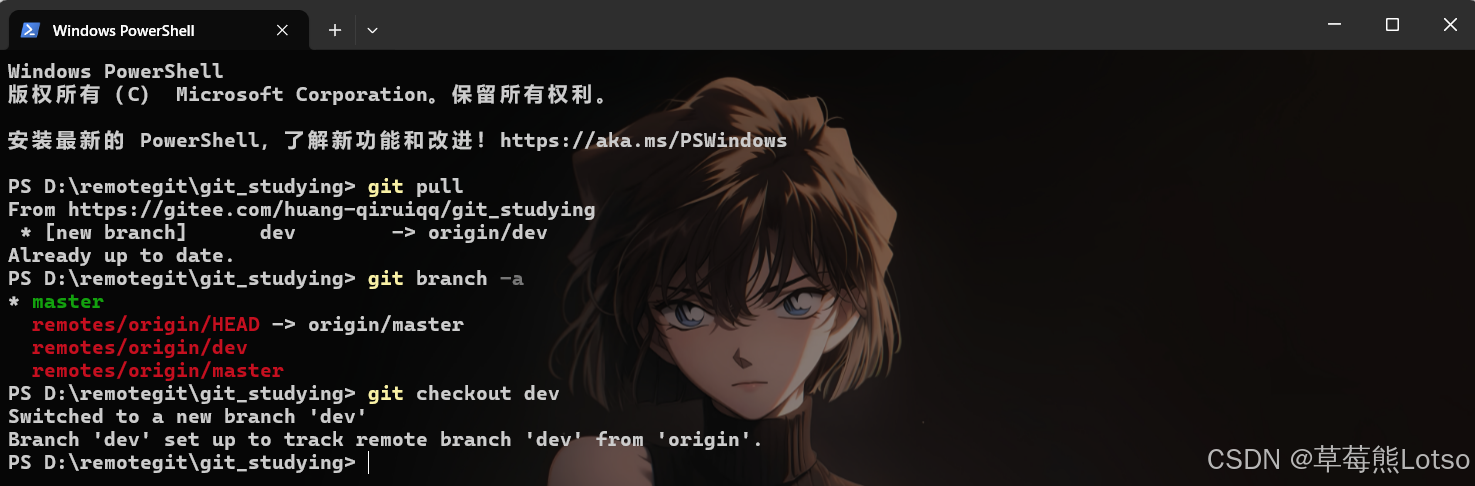
接下来让我们和另一名开发的小伙伴都将远程仓库进行一次拉取操作,并观察结果;

  • 对于我们要操作的是:
bash 复制代码
# 先 pull 一下拉取最新的远端仓库
[Lotso@VM-4-4-centos git_studying]$ git pull
From gitee.com:huang-qiruiqq/git_studying
 * [new branch]      dev        -> origin/dev
Already up-to-date.、

# 之前讲的 git branch 只能看到本地分支
[Lotso@VM-4-4-centos git_studying]$ git branch -a
* master
  remotes/origin/HEAD -> origin/master
  remotes/origin/dev
  remotes/origin/master

# 创建并切换分支
[Lotso@VM-4-4-centos git_studying]$ git checkout -b dev origin/dev
Branch dev set up to track remote branch dev from origin.
Switched to a new branch 'dev'

拉取后便可以看到远程的 dev 分支,接着切换到 dev 分支供我们进行本地开发。要说明的是,我们切换到的是本地的 dev 分支,根据示例中的操作,会将本地分支和远程分支进行关系链接。

  • 对于小伙伴要操作的是:

    现在,你和小伙伴就可以在 dev 上完成开发。
    首先,让我们在 dev 分支上进行一次开发,并 push 到远程,例如:
bash 复制代码
[Lotso@VM-4-4-centos git_studying]$ vim file.txt
[Lotso@VM-4-4-centos git_studying]$ cat file.txt
hello git
complete the first function!
[Lotso@VM-4-4-centos git_studying]$ git add file.txt
[Lotso@VM-4-4-centos git_studying]$ git commit -m "first function"
[dev 1658f31] first function
 1 file changed, 1 insertion(+), 1 deletion(-)
[Lotso@VM-4-4-centos git_studying]$ git push
warning: push.default is unset; its implicit value is changing in
Git 2.0 from 'matching' to 'simple'. To squelch this message
and maintain the current behavior after the default changes, use:

  git config --global push.default matching

To squelch this message and adopt the new behavior now, use:

  git config --global push.default simple

See 'git help config' and search for 'push.default' for further information.
(the 'simple' mode was introduced in Git 1.7.11. Use the similar mode
'current' instead of 'simple' if you sometimes use older versions of Git)

Counting objects: 5, done.
Delta compression using up to 2 threads.
Compressing objects: 100% (2/2), done.
Writing objects: 100% (3/3), 289 bytes | 0 bytes/s, done.
Total 3 (delta 1), reused 0 (delta 0)
remote: Powered by GITEE.COM [1.1.5]
remote: Set trace flag 8a450c88
To git@gitee.com:huang-qiruiqq/git_studying.git
   97a0741..1658f31  dev -> dev

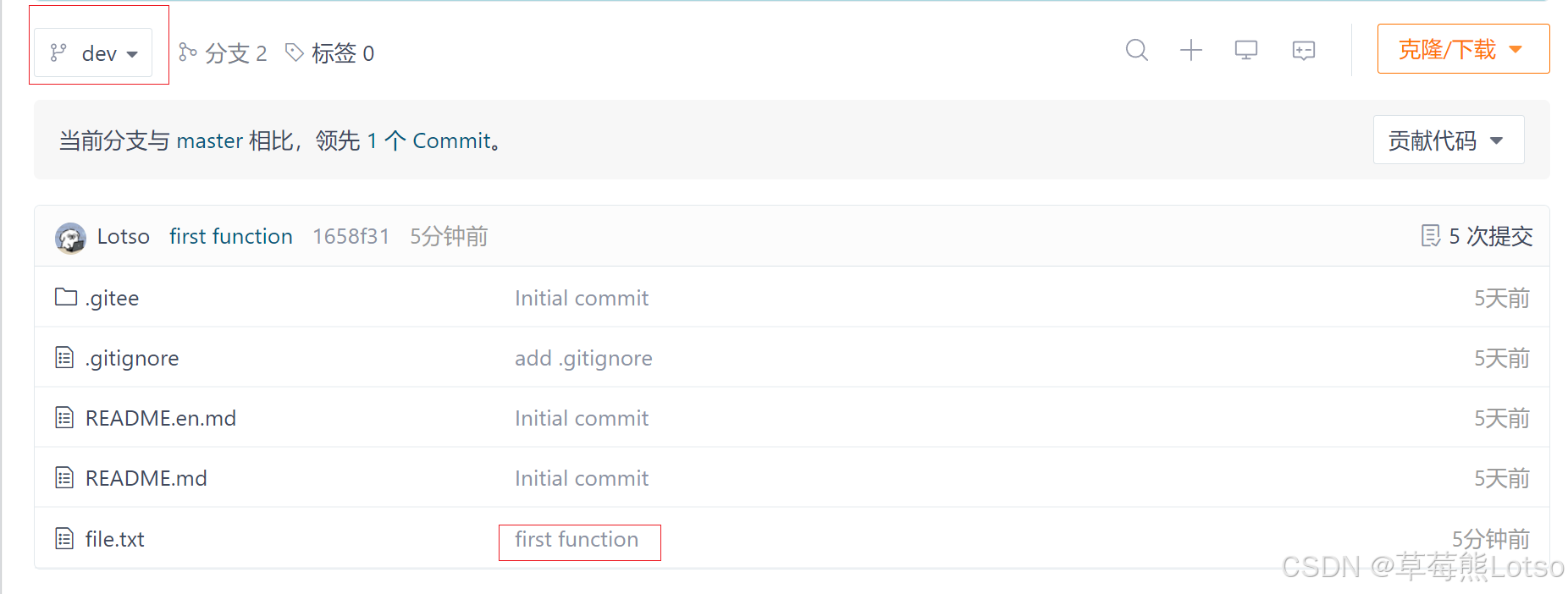
让我们来看看码云上目前仓库的状态:

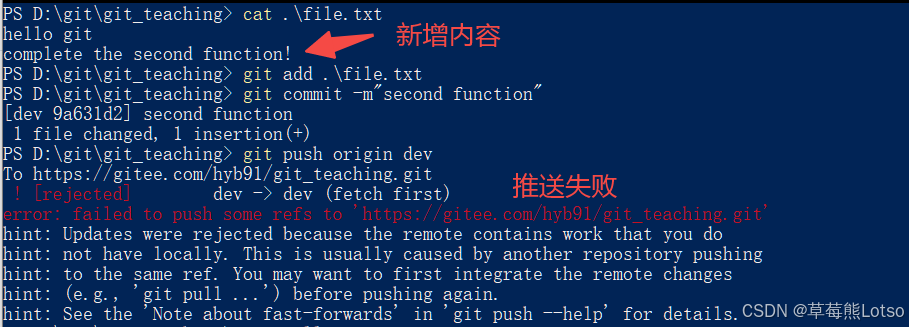
至此,我们已经将代码推送至码云,接下来假如你的小伙伴要和你协同开发,碰巧也要对 file.txt 文件作修改,并试图推送,例如:

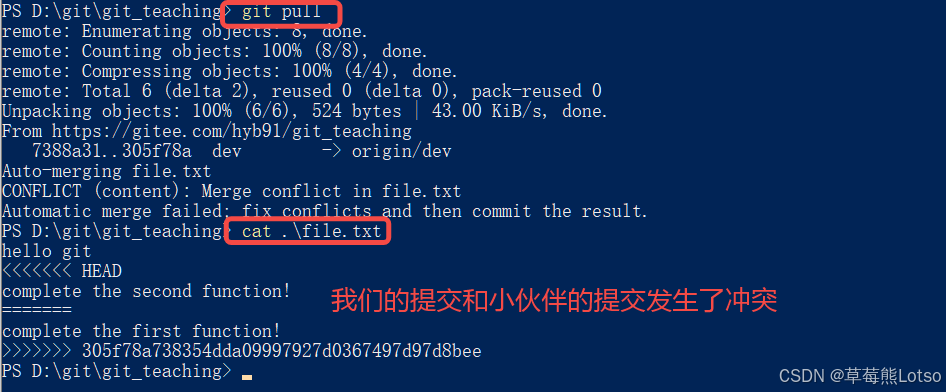
这时推送失败,因为你的小伙伴的最新提交和你推送的有冲突,解决办法也很简单,Git已经提示我们,先用 git pull 把最新的提交从 origin/dev 抓下来,然后在本地进行合并,并解决冲突,再推送,操作如下:

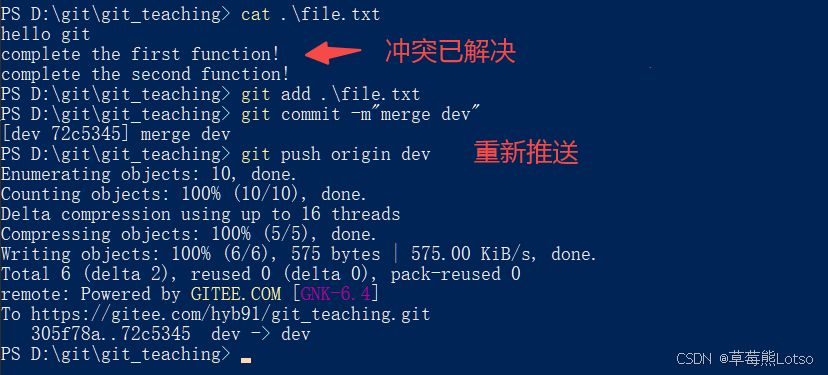
解决冲突,重新推送:

此时,我们看到远端的码云已经能看到我们的新提交了!

由此,两名开发者已经开始可以协同开发了,不断的 git pull/add/commit/push ,遇到了冲突就使用我们之前讲的冲突解决解决冲突。

对于你来说,要想看到小伙伴的代码,只需要 pull 一下就行,例如:

bash 复制代码
[Lotso@VM-4-4-centos git_studying]$ git pull
remote: Enumerating objects: 8, done.
remote: Counting objects: 100% (8/8), done.
remote: Compressing objects: 100% (6/6), done.
remote: Total 6 (delta 2), reused 0 (delta 0), pack-reused 0 (from 0)
Unpacking objects: 100% (6/6), done.
From gitee.com:huang-qiruiqq/git_studying
   1658f31..5a136de  dev        -> origin/dev
Updating 1658f31..5a136de
Fast-forward
 file.txt | 3 +++
 1 file changed, 3 insertions(+)
[Lotso@VM-4-4-centos git_studying]$ cat file.txt
hello git
complete the first function!
complete the second function! 

最后不要忘记,虽然我们是分支上进行多人协作开发,但最终的目的是要将开发后的代码合并到master上去,让我们项目运行最新的代码,接下来我们就需要进行这件事情了:

bash 复制代码
# 切换至 master分支,pull一下,保证本地的 mater是最新内容
 [Lotso@VM-4-4-centos git_studying]$ git checkout master
Switched to branch 'master'
[Lotso@VM-4-4-centos git_studying]$ git pull
Already up-to-date.

# 切换至 dev分支,合并 master分支
# 这么做是因为如果有冲突,可以在 dev分支上进行处理,而不是在 master分支上解决冲突。
# 这是一个很好的习惯
[Lotso@VM-4-4-centos git_studying]$ git checkout dev
Switched to branch 'dev'
[Lotso@VM-4-4-centos git_studying]$ git merge master
Already up-to-date.

# 切换至 master分支,合并 dev分支
[Lotso@VM-4-4-centos git_studying]$ git checkout master
Switched to branch 'master'
[Lotso@VM-4-4-centos git_studying]$ git merge dev
Updating 97a0741..5a136de
Fast-forward
 file.txt | 5 ++++-
 1 file changed, 4 insertions(+), 1 deletion(-)
[Lotso@VM-4-4-centos git_studying]$ cat file.txt
hello git
complete the first function!
complete the second function! 
 
 # 将 master分支推送至远端
 [Lotso@VM-4-4-centos git_studying]$ git status
# On branch master
# Your branch is ahead of 'origin/master' by 3 commits.
#   (use "git push" to publish your local commits)
#
nothing to commit, working directory clean
[Lotso@VM-4-4-centos git_studying]$ git push
warning: push.default is unset; its implicit value is changing in
Git 2.0 from 'matching' to 'simple'. To squelch this message
and maintain the current behavior after the default changes, use:

  git config --global push.default matching

To squelch this message and adopt the new behavior now, use:

  git config --global push.default simple

See 'git help config' and search for 'push.default' for further information.
(the 'simple' mode was introduced in Git 1.7.11. Use the similar mode
'current' instead of 'simple' if you sometimes use older versions of Git)

Total 0 (delta 0), reused 0 (delta 0)
remote: Powered by GITEE.COM [1.1.5]
remote: Set trace flag 3045cfbe
To git@gitee.com:huang-qiruiqq/git_studying.git
   97a0741..5a136de  master -> master
[Lotso@VM-4-4-centos git_studying]$ git status
# On branch master
nothing to commit, working directory clean

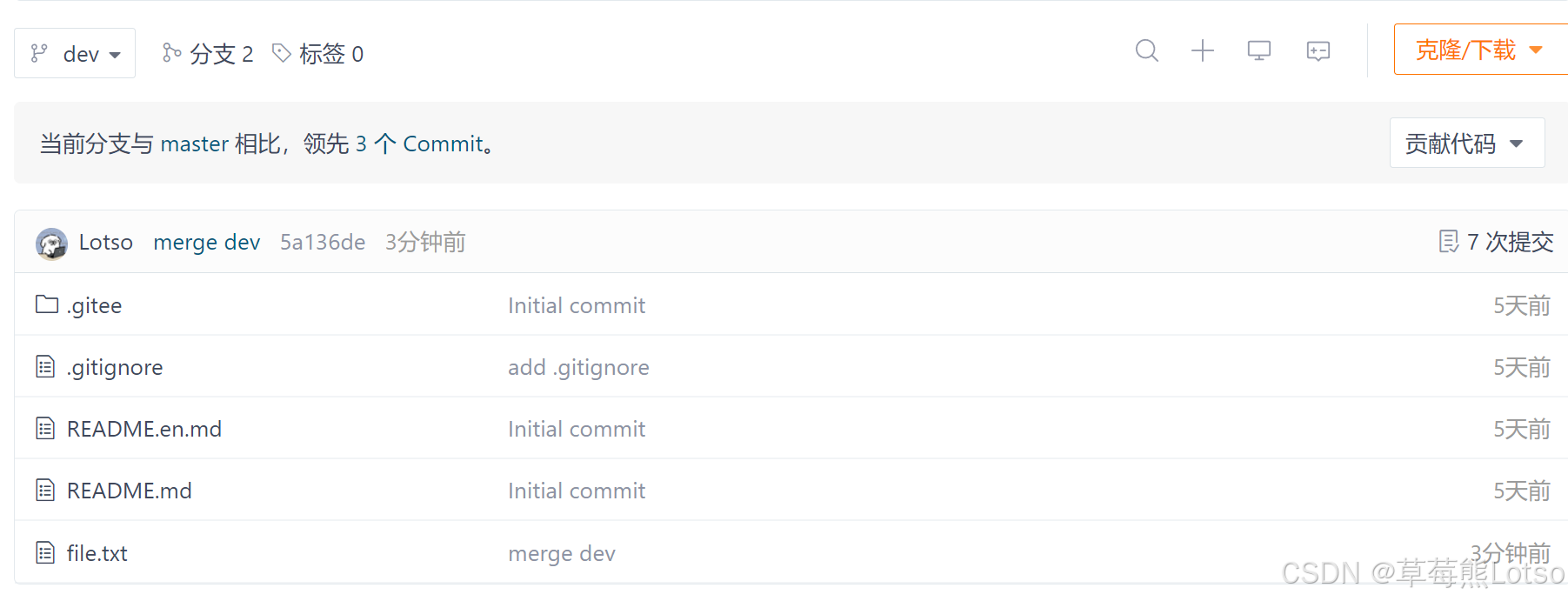
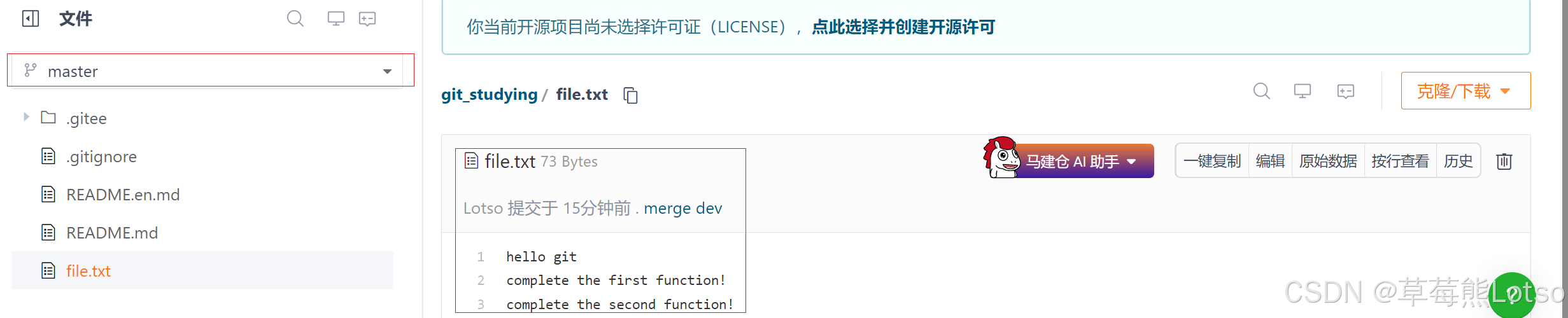
此时,查看远端仓库,mater已经是最新代码了:

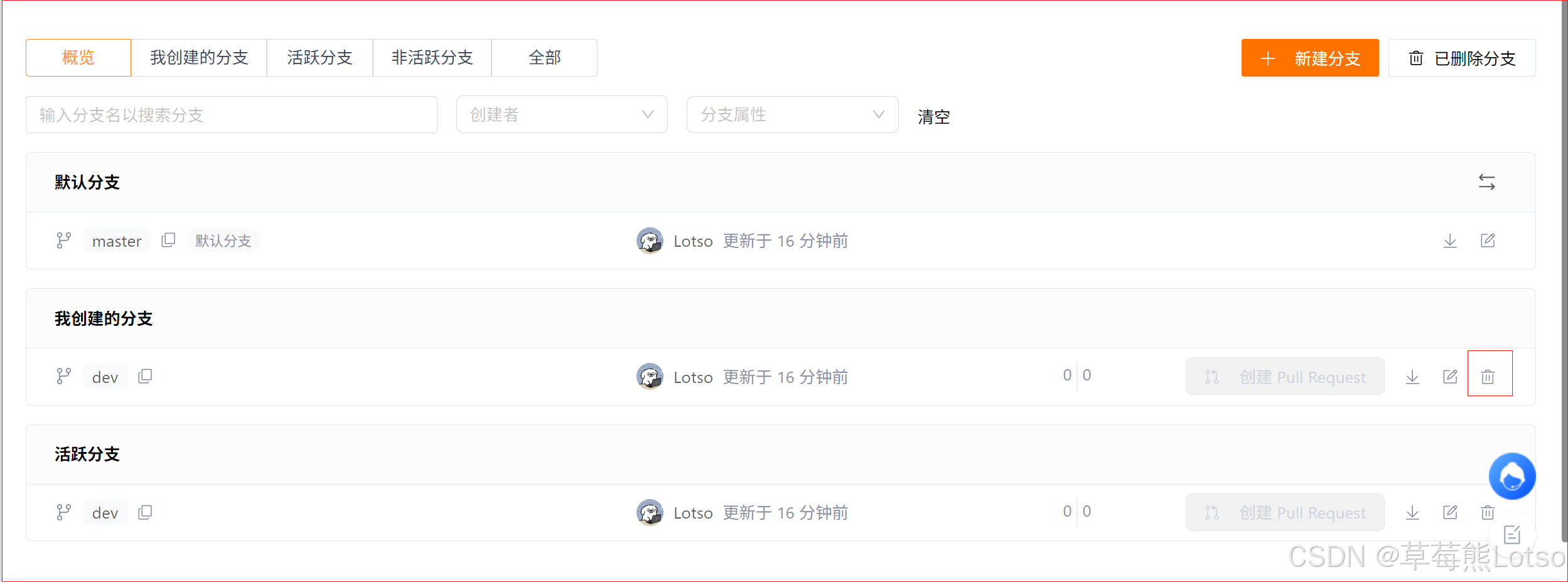
此时,dev分支对于我们来说就没用了,那么dev分支就可以被删除掉,我们可以直接在远程仓库中将dev分支删除掉:

总结一下,在同一分支下进行多人协作的工作模式通常是这样:

  • 首先,可以试图用 git push origin branch-name 推送自己的修改;
  • 如果推送失败,则因为远程分支比你的本地的更新,需要先用 git pull(这里建议可以每次推送前都用用,好习惯)
  • 如果合并有冲突,则解决冲突,并在本地提交;
  • 没有冲突或者解决冲突后,再用 git push origin branch-name 推送就能成功!
  • 功能开发完毕,将分支 merge 进 master,最后删除分支

二. 协作模式二:多分支并行开发(推荐场景)

企业级协作主流模式,每人基于dev创建独立feature分支,开发完成后合并到dev,避免相互干扰。

完整流程 :从功能开发到合并上线

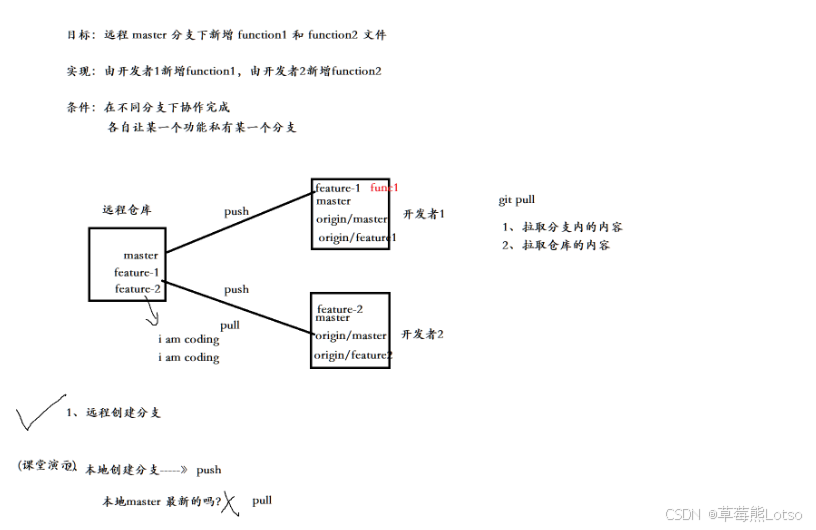
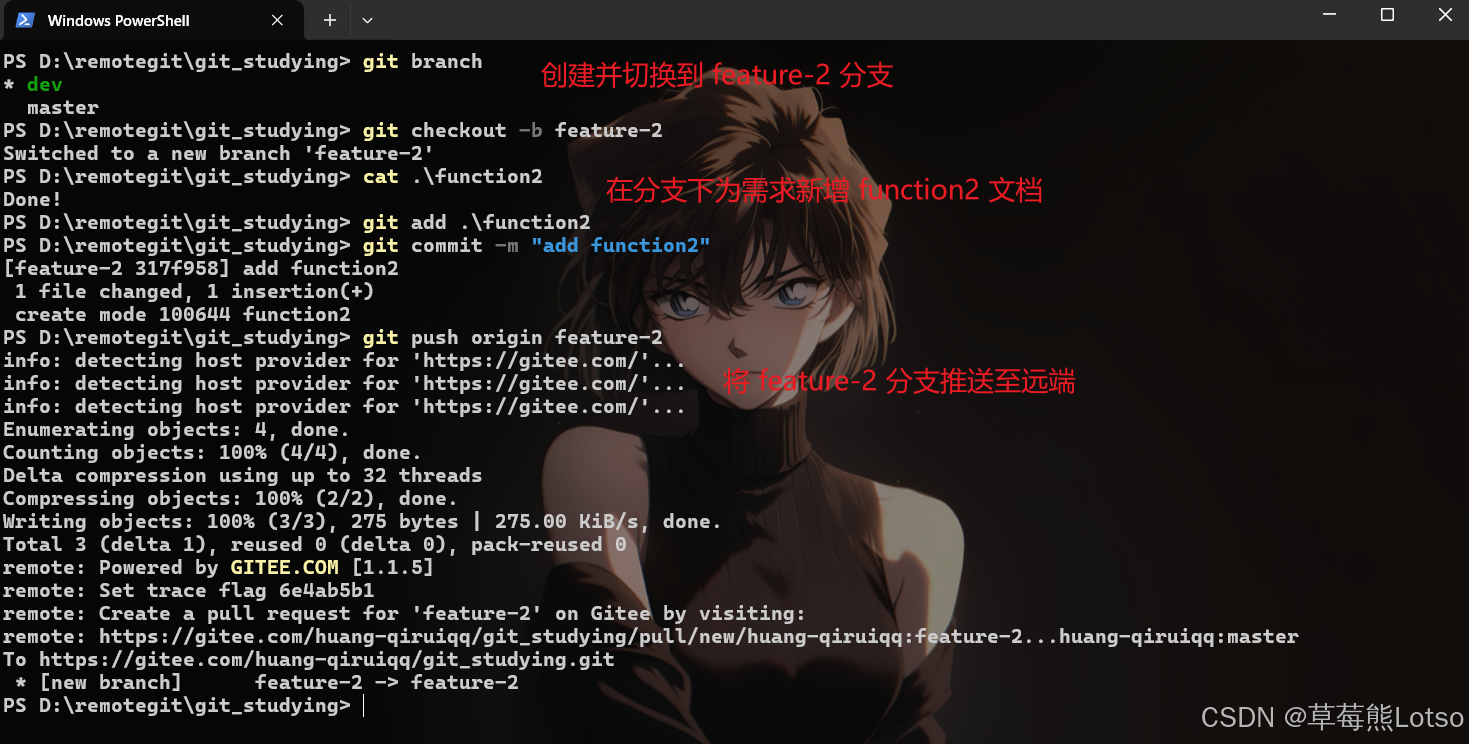
一般情况下,如果有多需求需要多人同时进行开发,是不会在一个分支上进行多人开发,而是需要一个需求或一个功能点就要创建一个 feature 分支。

现在同时有两个需求需要你和你的小伙伴进行开发,那么你们俩便可以各自创建一个分支来完成自己的工作。在上过部分我们已经了解了可以从码云上直接创建远程分支,其实在本地创建的分支来可以通过推送的方式发送到远端,在这个部分我们就来用一下这种方式。

  • 对于你来说,可以进行以下操作:
bash 复制代码
# 新增本地分支 feature-1 并切换
[Lotso@VM-4-4-centos git_studying]$ git branch
  dev
* master
[Lotso@VM-4-4-centos git_studying]$ git checkout -b feature-1
Switched to a new branch 'feature-1'

# 新增需求内容-创建function1文件
[Lotso@VM-4-4-centos git_studying]$ vim function1
[Lotso@VM-4-4-centos git_studying]$ cat function1
Done!

# 将 feature-1 分支推送到远端
[Lotso@VM-4-4-centos git_studying]$ git add function1
[Lotso@VM-4-4-centos git_studying]$ git commit -m "add function1"
[feature-1 1aeffd5] add function1
 1 file changed, 1 insertion(+)
 create mode 100644 function1
[Lotso@VM-4-4-centos git_studying]$ git push origin feature-1 
Counting objects: 4, done.
Delta compression using up to 2 threads.
Compressing objects: 100% (2/2), done.
Writing objects: 100% (3/3), 271 bytes | 0 bytes/s, done.
Total 3 (delta 1), reused 0 (delta 0)
remote: Powered by GITEE.COM [1.1.5]
remote: Set trace flag 504cedb0
remote: Create a pull request for 'feature-1' on Gitee by visiting:
remote: https://gitee.com/huang-qiruiqq/git_studying/pull/new/huang-qiruiqq:feature-1...huang-qiruiqq:master
To git@gitee.com:huang-qiruiqq/git_studying.git
 * [new branch]      feature-1 -> feature-1
  • 对于小伙伴来说,可以进行以下操作:

此时,在本地,你看不见他新建的文档,他看不见你新建的文档。并且推送各自的分支时,并没有任何冲突,你俩互不影响,用起来很舒服!!

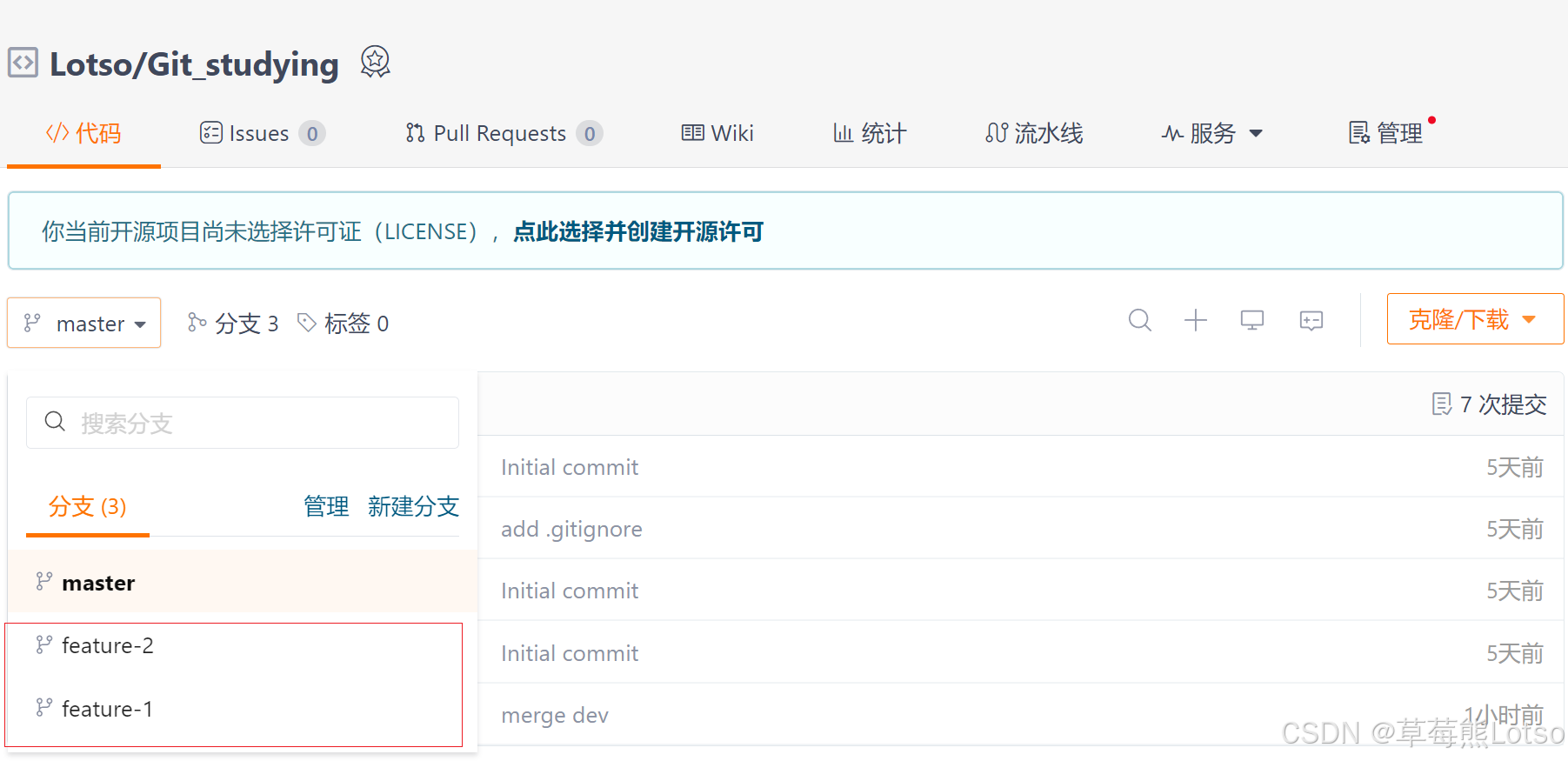
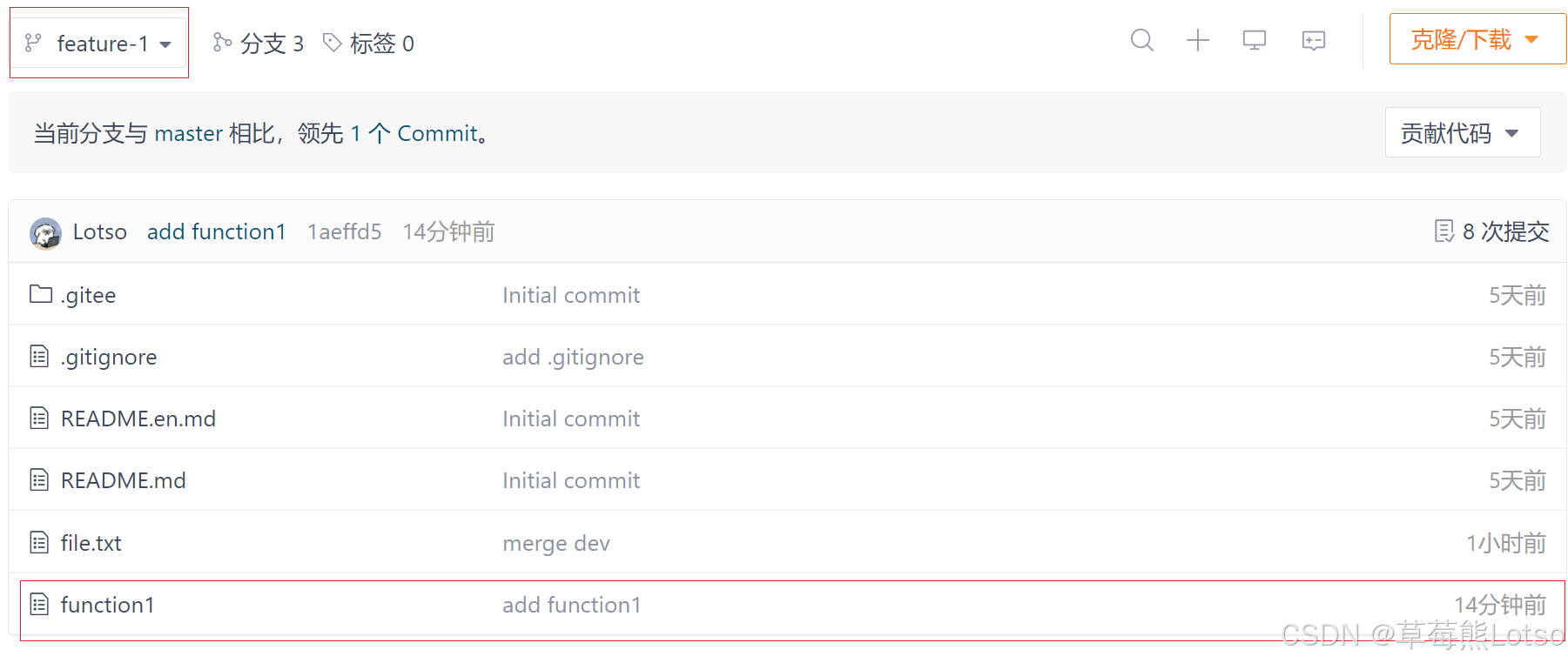
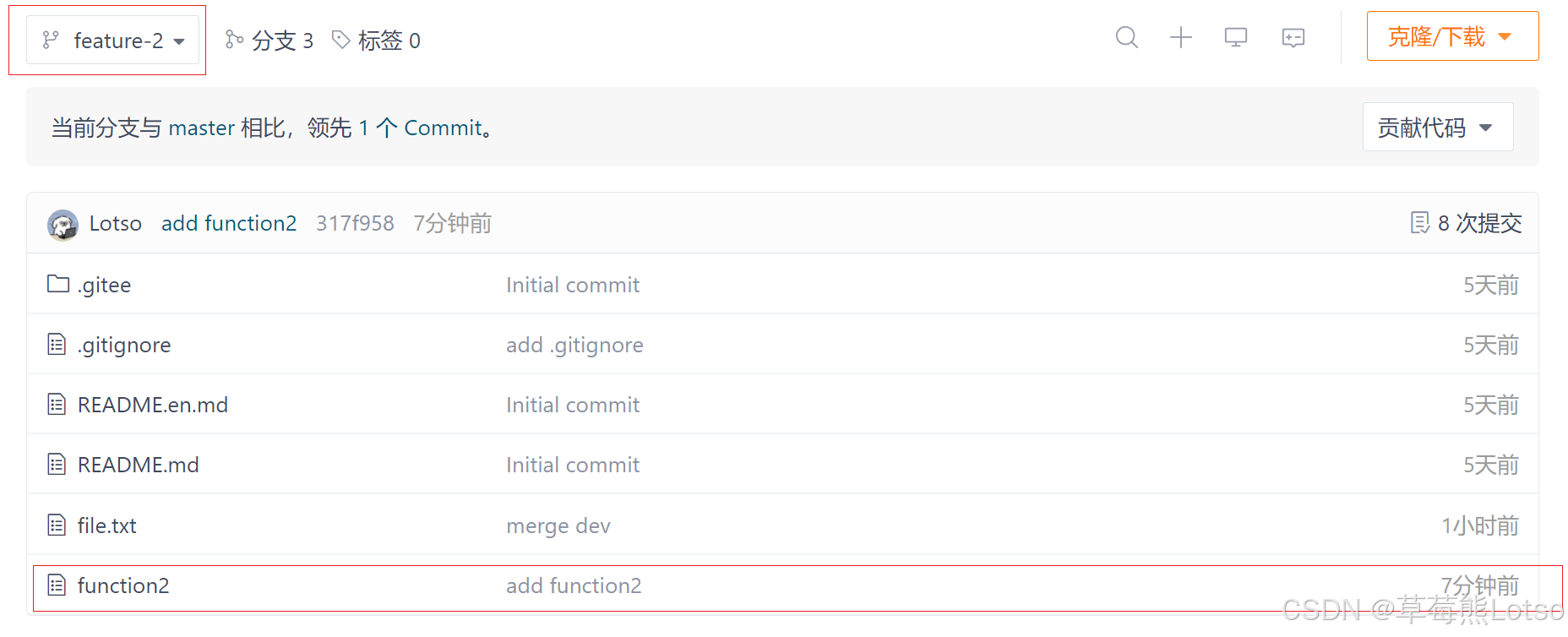
再来看下远端码云上此时的状态:

对于你的 feature-1 分支:

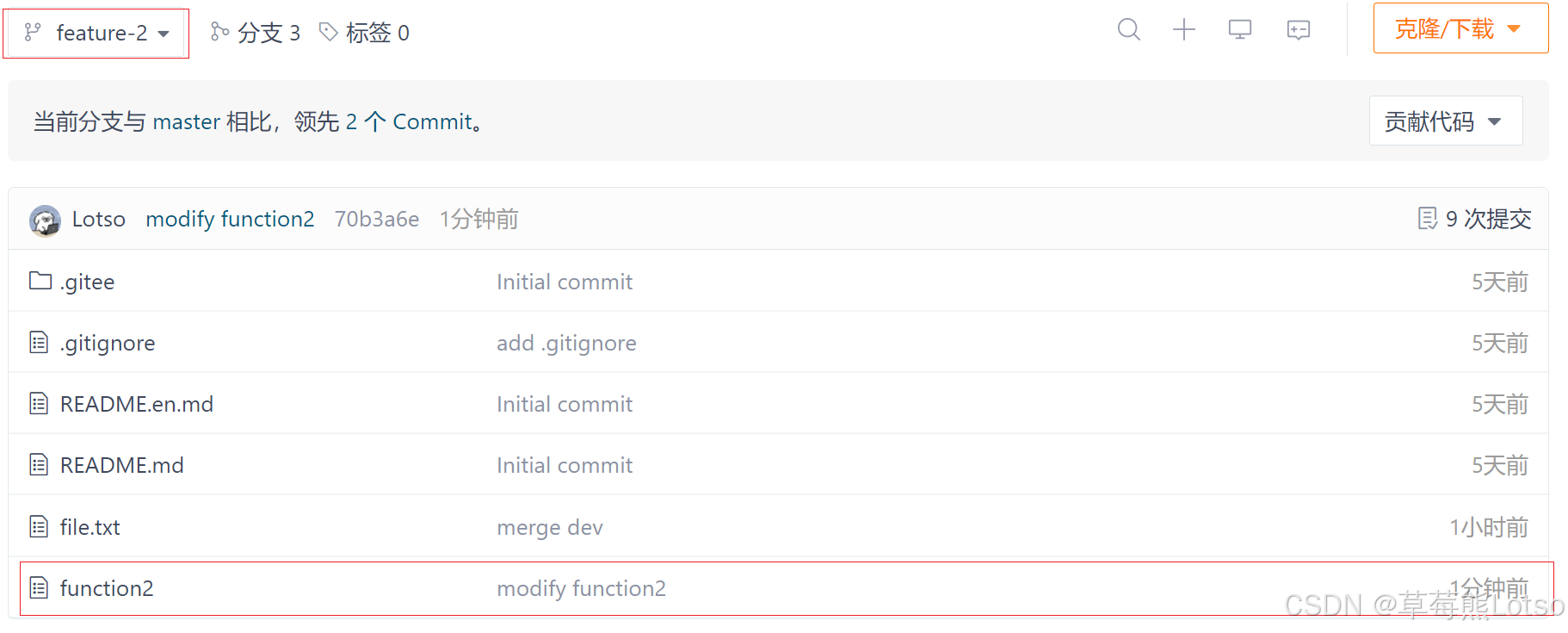
对于小伙伴的 feature-2 分支:

正常情况下,你们俩就可以在自己的分支上进行专业的开发了!

但天有不测风云,你的小伙伴突然生病了,但需求还没开发完,需要你帮他继续开发,于是他便把 feature-2 分支名告诉你了。这时你就需要在自己的机器上切换到 feature-2 分支帮忙继续开发,要做的操作如下:

bash 复制代码
# 必须先拉取远端仓库内容
[Lotso@VM-4-4-centos git_studying]$ git pull
remote: Enumerating objects: 4, done.
remote: Counting objects: 100% (4/4), done.
remote: Compressing objects: 100% (2/2), done.
remote: Total 3 (delta 1), reused 0 (delta 0), pack-reused 0 (from 0)
Unpacking objects: 100% (3/3), done.
From gitee.com:huang-qiruiqq/git_studying
 * [new branch]      feature-2  -> origin/feature-2
There is no tracking information for the current branch.
Please specify which branch you want to merge with.
See git-pull(1) for details

    git pull <remote> <branch>

If you wish to set tracking information for this branch you can do so with:

    git branch --set-upstream-to=origin/<branch> feature-1

# 可以看到远程已经有了 feature-2
[Lotso@VM-4-4-centos git_studying]$ git branch -a
  dev
* feature-1
  master
  remotes/origin/HEAD -> origin/master
  remotes/origin/dev
  remotes/origin/feature-1
  remotes/origin/feature-2
  remotes/origin/master

# 切换到 feature-2 分支上,可以和远程的 feature-2 分支关联起来
# 否则将来只使用 git push
[Lotso@VM-4-4-centos git_studying]$ git checkout -b feature-2 origin/feature-2
Branch feature-2 set up to track remote branch feature-2 from origin.
Switched to a new branch 'feature-2'
[Lotso@VM-4-4-centos git_studying]$ ls
a.so  b.ini  file.txt  function2  README.en.md  README.md

切换成功后,便可以看见 feature-2 分支中的function2文件了,接着就可以帮小伙伴进行开发:

bash 复制代码
# 继续开发
[Lotso@VM-4-4-centos git_studying]$ vim function2
[Lotso@VM-4-4-centos git_studying]$ cat function2
Done!
Help done!

# 推送内容
[Lotso@VM-4-4-centos git_studying]$ git add function2
[Lotso@VM-4-4-centos git_studying]$ git commit -m "modify function2"
[feature-2 70b3a6e] modify function2
 1 file changed, 2 insertions(+), 1 deletion(-)
[Lotso@VM-4-4-centos git_studying]$ git push origin feature-2
Counting objects: 5, done.
Delta compression using up to 2 threads.
Compressing objects: 100% (2/2), done.
Writing objects: 100% (3/3), 266 bytes | 0 bytes/s, done.
Total 3 (delta 1), reused 0 (delta 0)
remote: Powered by GITEE.COM [1.1.5]
remote: Set trace flag 32470791
To git@gitee.com:huang-qiruiqq/git_studying.git
   317f958..70b3a6e  feature-2 -> feature-2

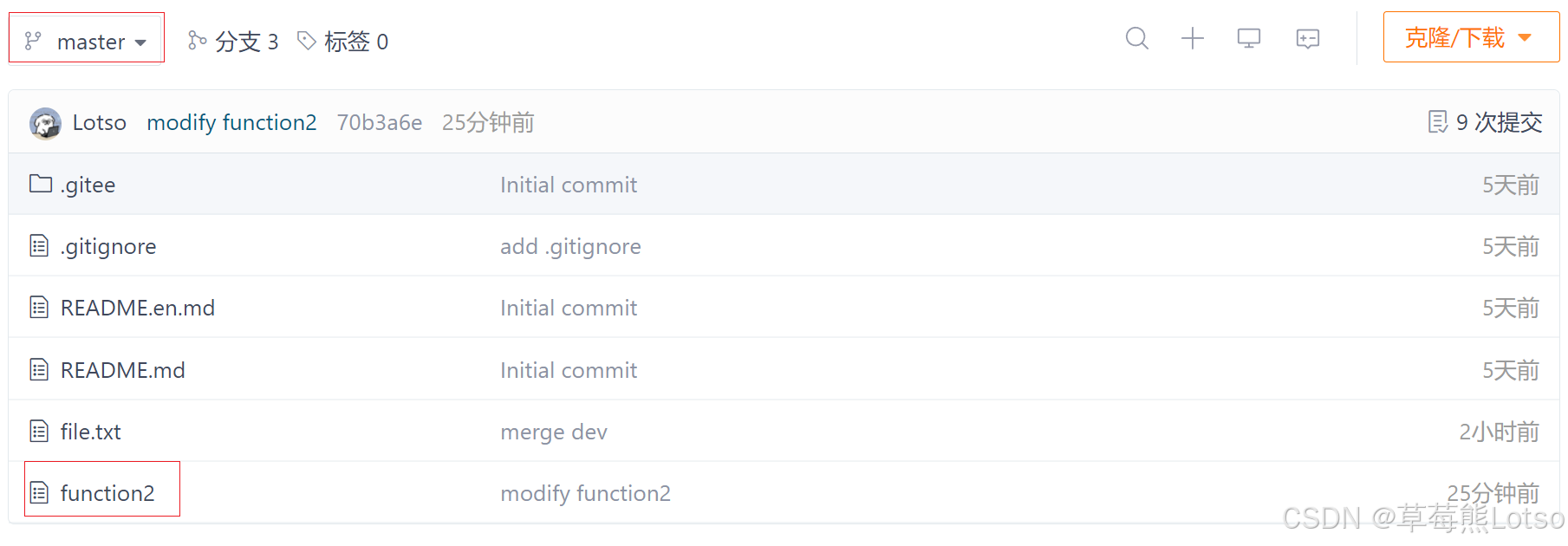
查看远程状态,推送成功了:

这时,你的小伙伴已经修养的差不多,可以继续进行自己的开发工作,那么他首先要获取到你帮他开发的内容,然后接着你的代码继续开发。或者你已经帮他开发完了,那他也需要在你自己的电脑上看看你帮他写的代码:

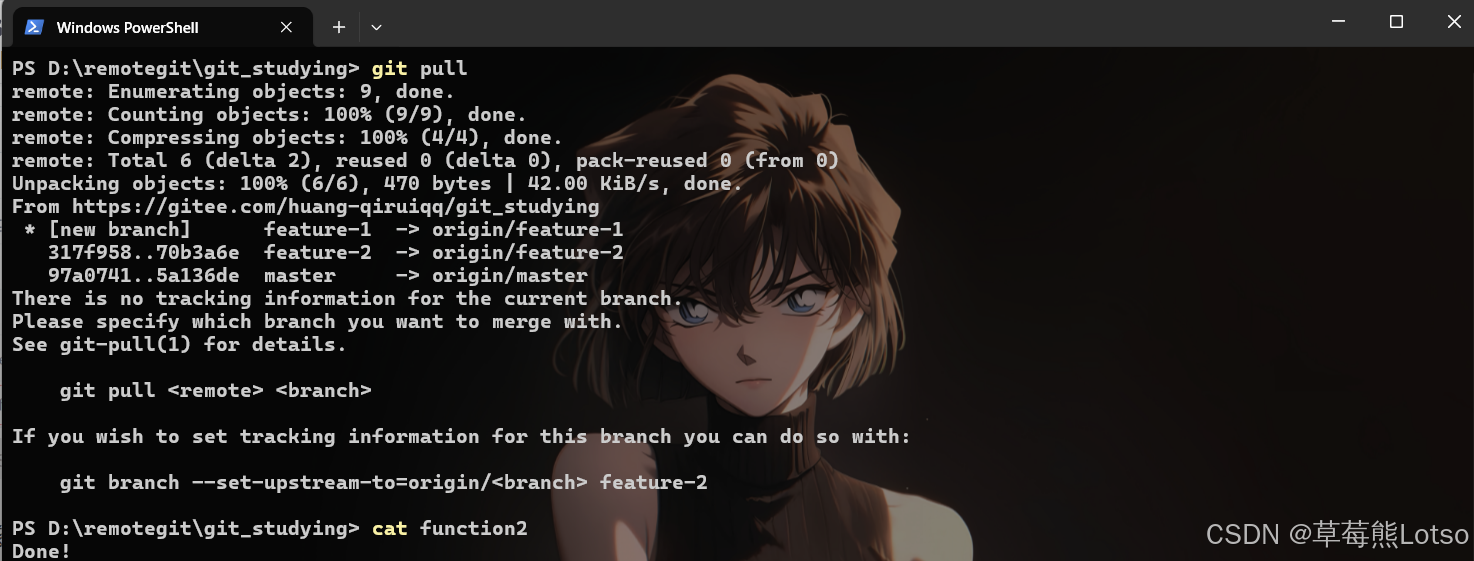
Pull 无效的原因是小伙伴没有指定本地 feature-2 分支与远程 origin/feature-2 分支的链接,根据提示,设置 feature-2 和 origin/feature-2 的链接即可。

目前,小伙伴的本地代码和远端保持严格一致。你和你的小伙伴可以继续在不同的分支下进行协同开发了。

各自功能开发完毕后,不要忘记我们需要将代码合并到master中才算真正意义上的开发完毕。

由于你的小伙伴率先开发完毕,于是开始 merge

此时远程仓库的状态:

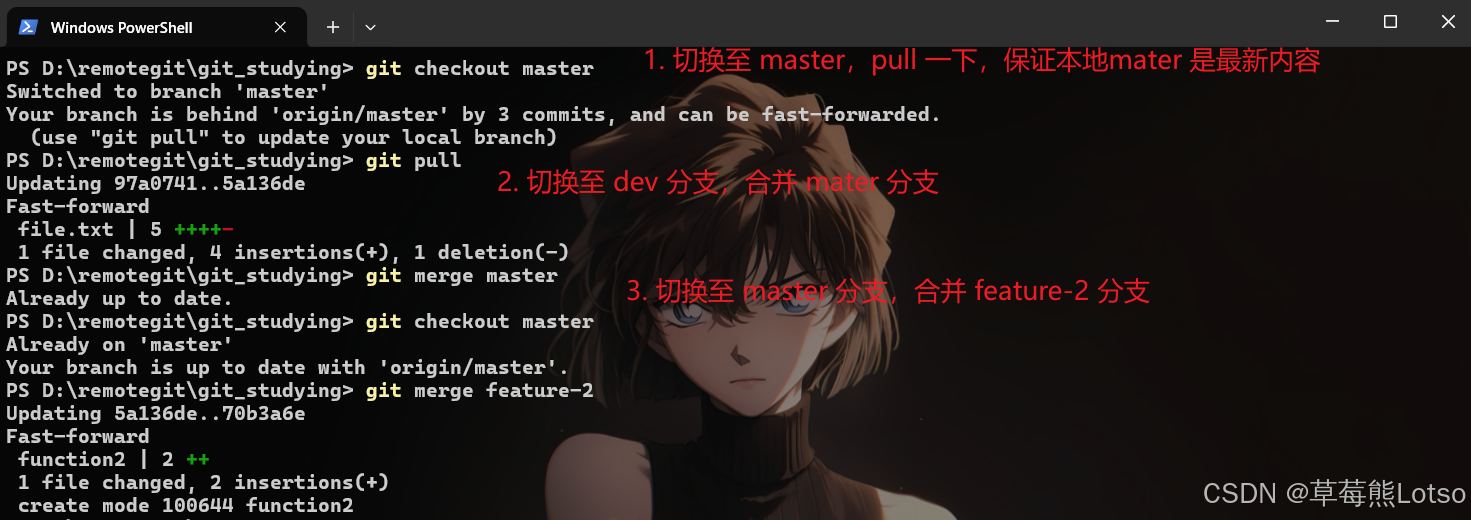
当你的小伙伴将其代码 mergemaster 后,这是你也开发完成了,也需要进行 mergemaster 操作,于是你:

bash 复制代码
# 切换至 master分子,pull 一下,保证本地的 master是最新内容
# 合并前这么做是一个好习惯
[Lotso@VM-4-4-centos git_studying]$ git checkout master
Switched to branch 'master'
[Lotso@VM-4-4-centos git_studying]$ git pull
From gitee.com:huang-qiruiqq/git_studying
   5a136de..70b3a6e  master     -> origin/master
Updating 5a136de..70b3a6e
Fast-forward
 function2 | 2 ++
 1 file changed, 2 insertions(+)
 create mode 100644 function2

# 切换至 feature-1 分支,合并 master 分支
# 这么做是因为如果有冲突,可以在 feature-1 分支上进行处理,而不是在在master上解决冲突
# 这么做是一个好习惯
[Lotso@VM-4-4-centos git_studying]$ git checkout feature-1
Switched to branch 'feature-1'
[Lotso@VM-4-4-centos git_studying]$ git merge master
Merge made by the 'recursive' strategy.
 function2 | 2 ++
 1 file changed, 2 insertions(+)
 create mode 100644 function2
[Lotso@VM-4-4-centos git_studying]$ ls
a.so  b.ini  file.txt  function1  function2  README.en.md  README.md

# 1. 由于feature-1分支已经merge进来了新内容,为了保证远程分支最新,所以最好push一下。
# 2. 要push的另一个原因是因为在实际的开发中,master的merge操作一般不是由我们自己在本地进行操作,其他人员或某些平台merge时,操作的肯定是远程分支,所以就要保持远程分支的最新。
# 3. 如果 merge 出现冲突,不要忘记需要commit才可以push!!
[Lotso@VM-4-4-centos git_studying]$ git status
# On branch feature-1
nothing to commit, working directory clean
[Lotso@VM-4-4-centos git_studying]$ git push origin feature-1
Counting objects: 4, done.
Delta compression using up to 2 threads.
Compressing objects: 100% (2/2), done.
Writing objects: 100% (2/2), 301 bytes | 0 bytes/s, done.
Total 2 (delta 1), reused 0 (delta 0)
remote: Powered by GITEE.COM [1.1.5]
remote: Set trace flag 7e43c285
To git@gitee.com:huang-qiruiqq/git_studying.git
   1aeffd5..05e93ec  feature-1 -> feature-1

# 切换至 master 分支,合并 feature-1 分支
[Lotso@VM-4-4-centos git_studying]$ git checkout master
Switched to branch 'master'
[Lotso@VM-4-4-centos git_studying]$ git merge feature-1
Updating 70b3a6e..05e93ec
Fast-forward
 function1 | 1 +
 1 file changed, 1 insertion(+)
 create mode 100644 function1
[Lotso@VM-4-4-centos git_studying]$ ls
a.so  b.ini  file.txt  function1  function2  README.en.md  README.md

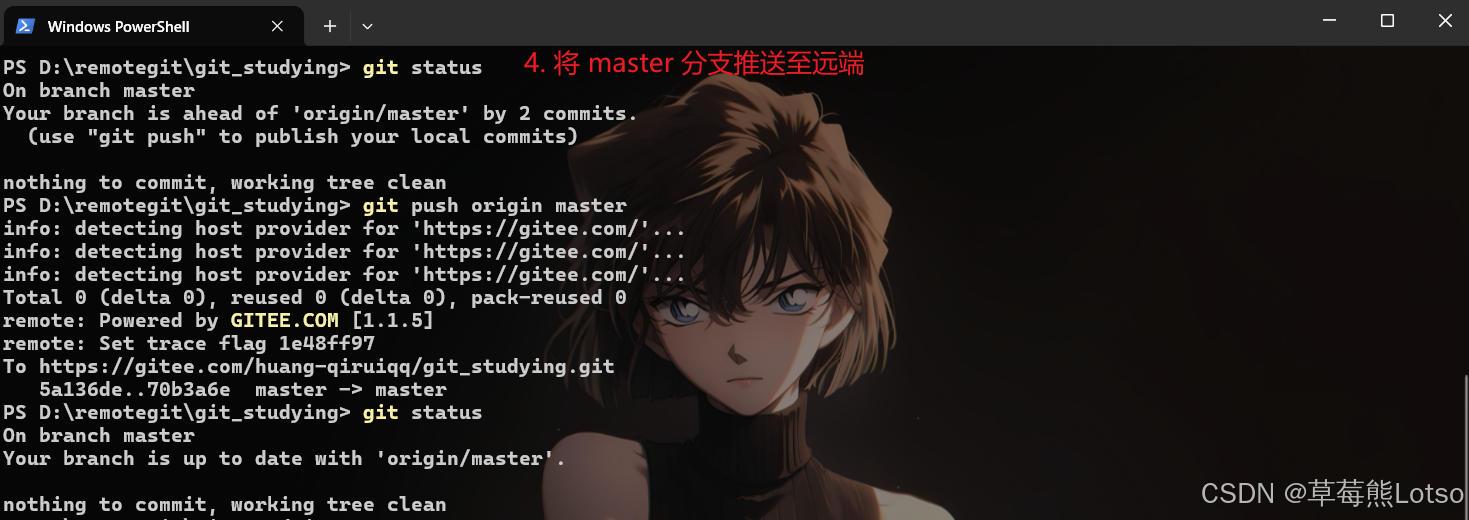
# 将master分支推送至远端
[Lotso@VM-4-4-centos git_studying]$ git status
# On branch master
# Your branch is ahead of 'origin/master' by 2 commits.
#   (use "git push" to publish your local commits)
#
nothing to commit, working directory clean
[Lotso@VM-4-4-centos git_studying]$ git push origin master
Total 0 (delta 0), reused 0 (delta 0)
remote: Powered by GITEE.COM [1.1.5]
remote: Set trace flag af4f78a4
To git@gitee.com:huang-qiruiqq/git_studying.git
   70b3a6e..05e93ec  master -> master
[Lotso@VM-4-4-centos git_studying]$ git status
# On branch master
nothing to commit, working directory clean

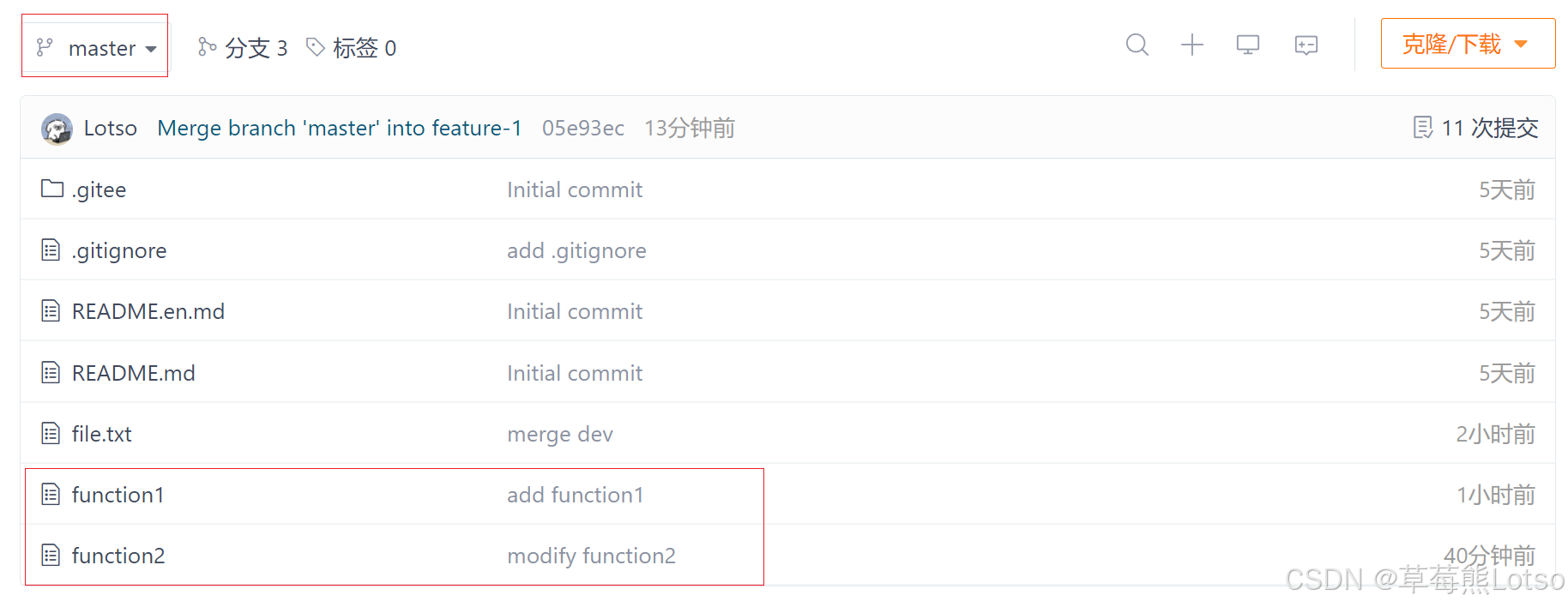
此时远程仓库的状态:

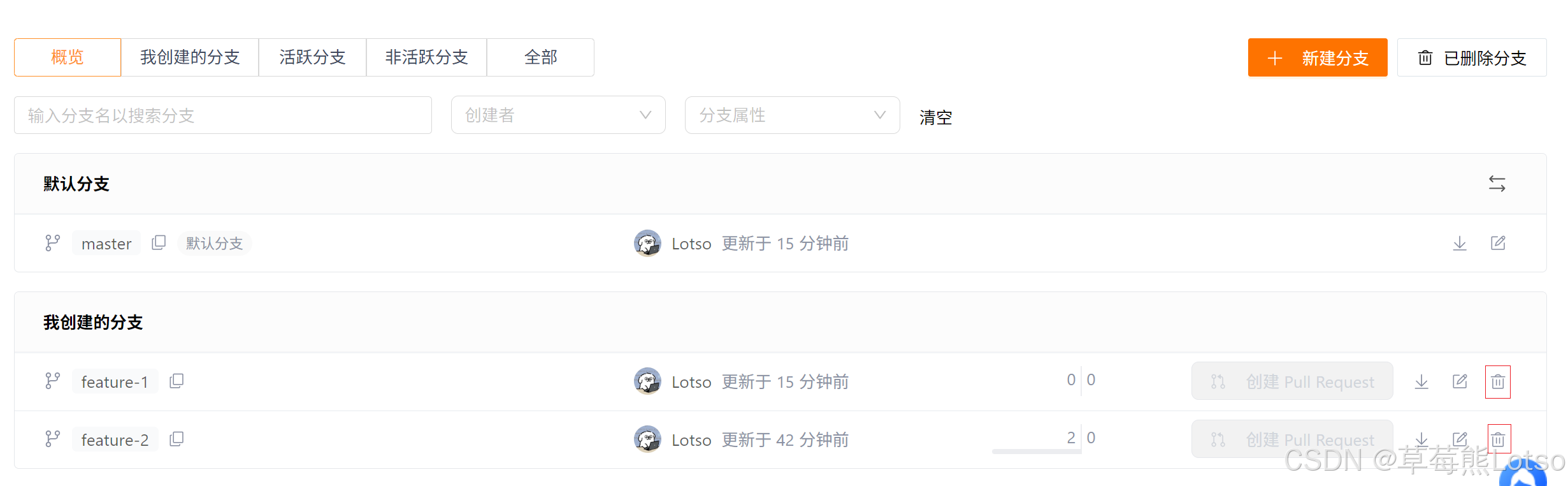
此时,feature-1feature-2 分支对于我们来说就没用了,那么我们可以直接在远程仓库中将dev分支删除掉:

这就算多人协作的工作模式,一旦熟悉了,就非常简单。


三. 远程分支删除后,本地 git branch -a 依然能看到的解决办法

当前我们已经删除了远程的几个分支,使用 git branch -a 命令可以查看所有本地分支和远程分支,但发现很多在远程仓库已经删除的分支依然可以看到。例如:

bash 复制代码
[Lotso@VM-4-4-centos git_studying]$ git pull
Already up-to-date.
[Lotso@VM-4-4-centos git_studying]$ git branch -a
  dev
  feature-1
  feature-2
* master
  remotes/origin/HEAD -> origin/master
  remotes/origin/dev
  remotes/origin/feature-1
  remotes/origin/feature-2
  remotes/origin/master

使用命令 git remote show origin ,可以查看 remote 地址,远程分子,还有本地分子与之相对应关系等信息。

bash 复制代码
[Lotso@VM-4-4-centos git_studying]$ git remote show origin
* remote origin
  Fetch URL: git@gitee.com:huang-qiruiqq/git_studying.git
  Push  URL: git@gitee.com:huang-qiruiqq/git_studying.git
  HEAD branch: master
  Remote branches:
    master                        tracked
    refs/remotes/origin/dev       stale (use 'git remote prune' to remove)
    refs/remotes/origin/feature-1 stale (use 'git remote prune' to remove)
    refs/remotes/origin/feature-2 stale (use 'git remote prune' to remove)
  Local branches configured for 'git pull':
    dev       merges with remote dev
    feature-2 merges with remote feature-2
    master    merges with remote master
  Local ref configured for 'git push':
    master pushes to master (up to date)


此时我们可以看到那些远程仓库已经不存在的分支,根据提示,使用 git remote prune origin 命令:

bash 复制代码
[Lotso@VM-4-4-centos git_studying]$ git remote prune origin
Pruning origin
URL: git@gitee.com:huang-qiruiqq/git_studying.git
 * [pruned] origin/dev
 * [pruned] origin/feature-1
 * [pruned] origin/feature-2
[Lotso@VM-4-4-centos git_studying]$ git branch -a
  dev
  feature-1
  feature-2
* master
  remotes/origin/HEAD -> origin/master
  remotes/origin/master

这样就删除了那些·远程仓库不存在的分支。对于本地仓库的删除,之前的课程已经学过了,大家可以自行操作。


结尾:

html 复制代码
🍓 我是草莓熊 Lotso!若这篇技术干货帮你打通了学习中的卡点:
👀 【关注】跟我一起深耕技术领域,从基础到进阶,见证每一次成长
❤️ 【点赞】让优质内容被更多人看见,让知识传递更有力量
⭐ 【收藏】把核心知识点、实战技巧存好,需要时直接查、随时用
💬 【评论】分享你的经验或疑问(比如曾踩过的技术坑?),一起交流避坑
🗳️ 【投票】用你的选择助力社区内容方向,告诉大家哪个技术点最该重点拆解
技术之路难免有困惑,但同行的人会让前进更有方向~愿我们都能在自己专注的领域里,一步步靠近心中的技术目标!

结语:Git 多人协作的核心是 "分支规范 + 高频同步 + 冲突合理解决"。无论是同一分支协同还是多分支并行,都要遵循 "先同步再开发、小步提交、清晰命名" 的原则。掌握本文的流程和技巧后,能有效减少团队协作中的代码混乱和冲突问题。实际开发中,可根据团队规模和项目需求调整分支策略,但核心逻辑不变 ------ 让 Git 成为团队效率的 "加速器",而非 "绊脚石"。

✨把这些内容吃透超牛的!放松下吧✨ ʕ˘ᴥ˘ʔ づきらど

相关推荐
橘颂TA34 分钟前
【Linux】进程池
linux·运维·服务器·c++
p***323534 分钟前
Nginx 配置前端后端服务
运维·前端·nginx
王火火(DDoS CC防护)35 分钟前
服务器隐藏源IP要如何操作呢?
服务器·ddos攻击
All The Way North-35 分钟前
PyTorch 二分类损失函数详解:BCELoss vs BCEWithLogitsLoss 最佳实践指南
人工智能·pytorch·深度学习·机器学习·二分类损失函数
盛码笔记36 分钟前
部署Django+React项目到服务器
服务器·react.js·django
丝斯201136 分钟前
AI学习笔记整理(28)—— 计算机视觉之姿态估计与动作识别
人工智能·笔记·学习
严文文-Chris37 分钟前
神经网络的前向传播、反向传播、优化器分别是什么?有什么关系?
人工智能·深度学习·神经网络
老蒋新思维38 分钟前
创客匠人峰会深度解析:创始人 IP 打造的 “情绪 + 技术” 双引擎
大数据·网络·人工智能·网络协议·tcp/ip·重构·创客匠人
编程小Y38 分钟前
Nginx 反向代理
运维·nginx