
得益于 Lucene 7.1 中的新特性 CoveringQuery,以及 Elasticsearch 6.1 中随之发布的新 terms_set 查询对该特性的暴露,现在可以为存储在 Elasticsearch 中的文档设置基于属性的访问控制(ABAC)方案。这通过利用 X-Pack 安全角色基于访问控制(RBAC)功能中的文档级安全模板化角色查询(templated role query)机制实现。
背景
描述和实现一个完整一致的访问控制方案有着漫长、复杂且分支的历史。为保护信息访问而使用加密,为保护空间访问而使用物理安全,使用堡垒和城墙保护土地访问,等等。围绕这些都有标准、最佳实践和商业秘密,并且相关研究仍在进行:完美的安全尚未被找到。
除了认证 ------ 你是否有钥匙进入门? ------ 还有授权:你进去后可以做什么?
RBAC
在计算机安全中,授权,即访问控制,有多种方式。基于角色的访问控制(Role-based access control - RBAC)是一种方案,也是 X-Pack 使用的主要方案。RBAC 的特点是将权限(即你可以做的具体事情列表)集合到角色中,用户获得权限的唯一途径是被分配到一个或多个角色中。这种方法在传统的层级环境中很有意义,这种环境中有清晰的权力和职责线,并且不同的工作类型数量相对较少。一个简单的例子是员工记录:HR 总监角色可以查看和编辑所有员工记录,经理角色可以查看其管理员工的记录,而员工只能查看自己的记录。
RBAC 很好,但有一些限制:
- 随着组织规模和数据种类的增长,角色数量会膨胀,管理起来很麻烦
- 保持角色互斥且完全覆盖(MECE)很难,这意味着可能会授予某人一些互相矛盾的角色,从而导致数据泄漏或其他意外行为
- 角色设计为通用且适用于多人:它们不考虑用户特定的信息
最后一点的例子是健康记录:要查看一个人的私人健康信息,需要满足多个条件,包括最近的 HIPAA 培训证书。由于每个人参加培训的日期不同,没有单一角色能考虑到一个人的培训状态。培训状态是用户的一个属性。
有关 RBAC 的更多阅读,请详细阅读文章 "Elasticsearch:用户安全设置"。
ABAC
基于属性的访问控制(Attribute-based access control - ABAC)依赖于分配给用户、对象和操作的属性,以及基于这些属性做出决策的策略。对于用户,属性可以包括他们参与的项目、团队成员身份、认证、服务年限和物理位置。对于对象(即资源),属性可以是敏感级别、PII 状态、生存时间(TTL)或物理位置。
一个更容易在 ABAC 中建模的现实控制策略是安全环境中的打印信息:你只能从特定打印机(资源)打印(操作),前提是你被允许打印(操作属性 + 用户属性),该打印机在你的工作区域附近(资源属性 + 用户属性),并且你的安全培训是最新的(上下文信息:当前日期 + 用户属性)。在 RBAC 中,你需要一个打印角色,每台打印机一个角色(大组织有多少台?),每天更新打印角色成员资格以保持培训合规性,并随着人员加入、离开和调动,每天更新打印机角色的成员资格。
Elasticsearch 中的 ABAC
terms_set
为什么以前无法实现?主要原因在于值列表 ------ 列表是 ABAC 属性中非常常见的类型 ------ 的处理方式。Lucene 源于信息检索领域,其设计偏向"贪心"地查找内容。单个字段的值列表被当作逻辑 OR 使用;没有逻辑 AND。需要明确的是,我指的不是使用全文搜索的分析字段,而是像 int 和 keyword 这样的结构化字段。
例如:
PUT my_index_abac
{
  "mappings": {
    "properties": {
      "body": {
        "type": "text"
      },
      "security_attributes": {
        "type": "keyword"
      }
    }
  }
}

PUT my_index_abac/_doc/1
{
  "security_attributes": [
    "living",
    "in a van",
    "down by the river"
  ],
  "body": "you're not going to amount to jack squat"
}

PUT my_index_abac/_doc/2
{
  "security_attributes": [
    "living",
    "in a house",
    "down by the river"
  ],
  "body": "keep calm, carry on"
}

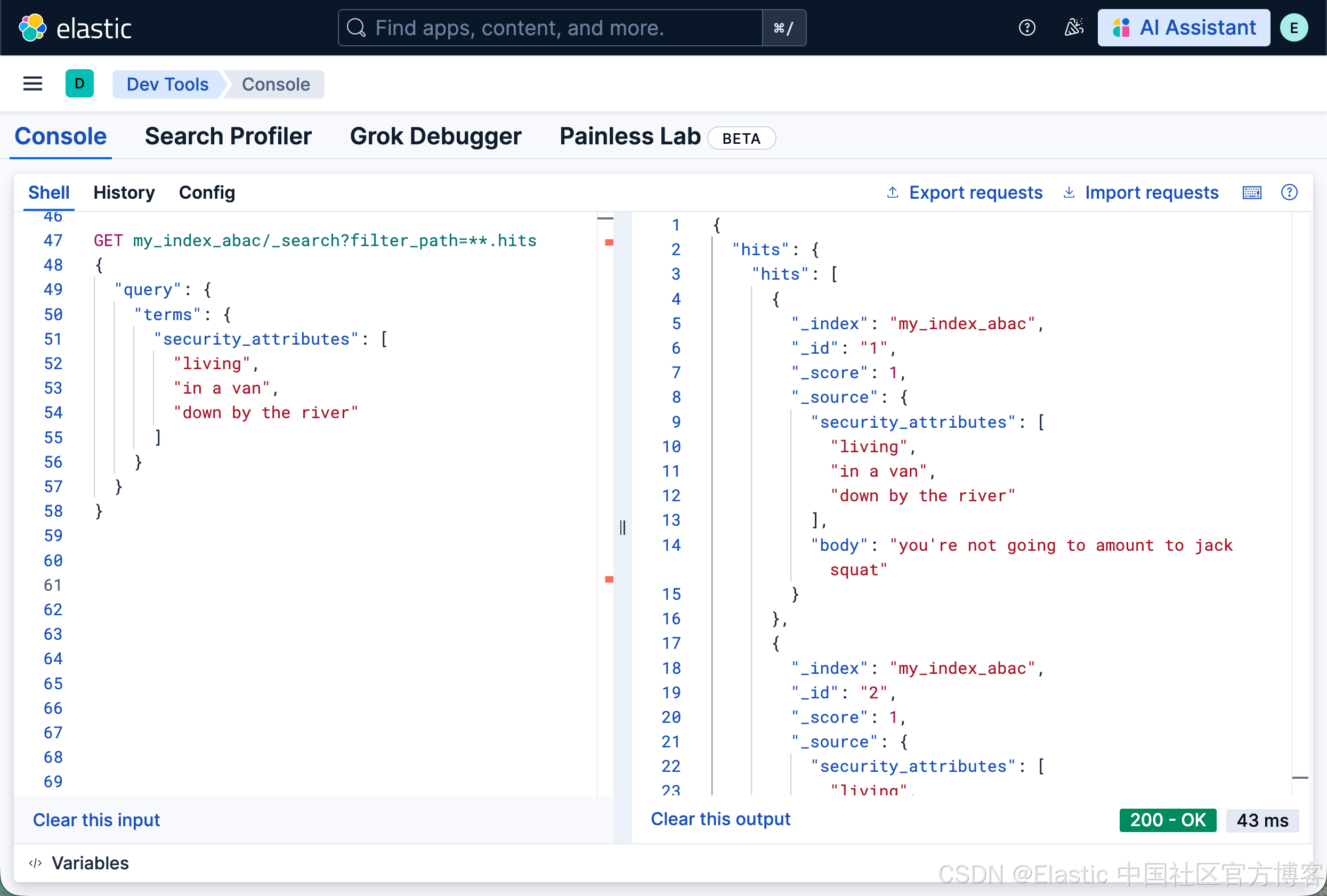
GET my_index_abac/_search?filter_path=**.hits
{
  "query": {
    "terms": {
      "security_attributes": [
        "living",
        "in a van",
        "down by the river"
      ]
    }
  }
}
...会返回两个文档。
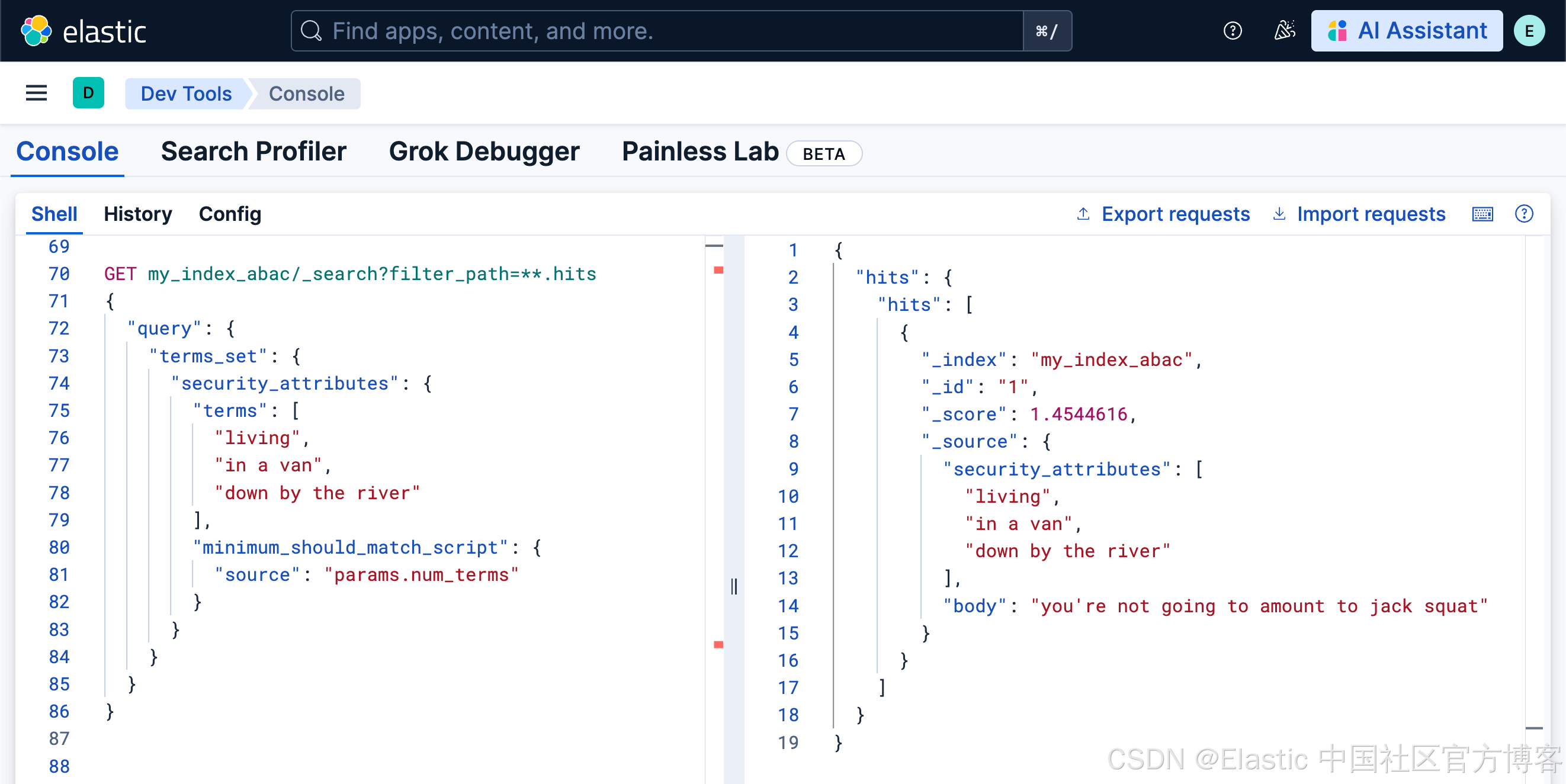
使用 terms_set,你现在可以强制要求所有三个属性都存在。对于前一个例子中创建的两个文档,以下查询只会返回第一个文档:
GET my_index_abac/_search?filter_path=**.hits
{
  "query": {
    "terms_set": {
      "security_attributes": {
        "terms": [
          "living",
          "in a van",
          "down by the river"
        ],
        "minimum_should_match_script": {
          "source": "params.num_terms"
        }
      }
    }
  }
}
注意:虽然在上例中我使用了 minimum_should_match_script,但这并不是一个非常高效的模式。更好的方法是使用 minimum_should_match_field,但在示例中使用它会意味着需要多执行几次 PUTs 来为文档添加必要字段,所以我选择了简洁写法。它使用脚本的方法来活动最少匹配的项。否则,我们需要像下面的代码,特别使用一个字段 min_programs 来定义这个值。
terms_set + 模板化角色查询
在使用 X-Pack 安全功能定义角色时,你可以选择指定一个查询模板,该模板会应用于该角色用户发出的每个查询。这是一种文档级安全控制,可以限制搜索查询和聚合中对文档的访问。模板可以通过 Mustache 模板使用用户属性。是的,全程都是模板。通过将用户属性与角色查询模板结合,可以在 X-Pack 的 RBAC 方案上创建 ABAC 逻辑。通过模板将用户属性注入角色查询一直是可能的,但大多数安全策略需要这种 "列表 ANDed" 逻辑。
让我们扩展示例。我们保持同样的两个文档,并添加两个用户和一个角色:
PUT /_security/role/my_policy
{
  "cluster": [ "monitor" ],
  "indices": [
    {
      "names": [
        "my_index_abac"
      ],
      "privileges": [
        "read"
      ],
      "query": {
        "template": {
          "source": "{\"bool\": {\"filter\": [{\"terms_set\": {\"security_attributes\": {\"terms\": {{#toJson}}_user.metadata.security_attributes{{/toJson}},\"minimum_should_match_script\":{\"source\":\"params.num_terms\"}}}}]}}"
        }
      }
    }
  ]
}

PUT _security/user/jack_black
{
  "username": "jack_black",
  "password": "testtest",
  "roles": [
    "my_policy"
  ],
  "full_name": "Jack Black",
  "email": "jb@tenaciousd.com",
  "metadata": {
    "security_attributes": [
      "living",
      "in a house",
      "down by the river"
    ]
  }
}

PUT _security/user/matt_foley
{
  "username": "matt_foley",
  "password": "testtest",
  "roles": [
    "my_policy"
  ],
  "full_name": "Matt Foley",
  "email": "mf@rivervan.com",
  "metadata": {
    "security_attributes": [
      "living",
      "in a van",
      "down by the river"
    ]
  }
}
...是的,解码这个角色模板查询就像在看《黑客帝国》(关于为什么会这样以及如何解决的提议可见此 issue),但它本质上与上面的 terms_set 查询相同。唯一的区别是使用了 {{_user.metadata.security_attributes}} Mustache 模板来替代硬编码的属性列表。需要明确的是,通过从用户元数据中添加这些安全属性,我们使得该角色在每个用户发出的查询中应用了用户特定的属性:即基于属性的访问控制查询。
如果 Matt Foley 登录并运行查询,他唯一能看到的文档是文档 1。他看不到文档 2,因为他只有三个安全属性中的两个,而角色查询模板中的 terms_set 过滤器要求匹配的最小数量是全部(params.num_terms 等于列表中属性的数量,这里是 3)。同样,Jack Black 只能看到文档 2。
我们在电脑的 terminal 中打入如下的命令来进行测试:
curl -k -u matt_foley:testtest https://localhost:9200/my_index_abac/_search | jq .

$ curl -k -u matt_foley:testtest https://localhost:9200/my_index_abac/_search | jq .
  % Total    % Received % Xferd  Average Speed   Time    Time     Time  Current
                                 Dload  Upload   Total   Spent    Left  Speed
100   355    0   355    0     0   4297      0 --:--:-- --:--:-- --:--:--  4329
{
  "took": 5,
  "timed_out": false,
  "_shards": {
    "total": 1,
    "successful": 1,
    "skipped": 0,
    "failed": 0
  },
  "hits": {
    "total": {
      "value": 1,
      "relation": "eq"
    },
    "max_score": 1.0,
    "hits": [
      {
        "_index": "my_index_abac",
        "_id": "1",
        "_score": 1.0,
        "_source": {
          "security_attributes": [
            "living",
            "in a van",
            "down by the river"
          ],
          "body": "you're not going to amount to jack squat"
        }
      }
    ]
  }
}

curl -k -u jack_black:testtest https://localhost:9200/my_index_abac/_search | jq .

$ curl -k -u jack_black:testtest https://localhost:9200/my_index_abac/_search | jq .
  % Total    % Received % Xferd  Average Speed   Time    Time     Time  Current
                                 Dload  Upload   Total   Spent    Left  Speed
100   336    0   336    0     0   4280      0 --:--:-- --:--:-- --:--:--  4307
{
  "took": 0,
  "timed_out": false,
  "_shards": {
    "total": 1,
    "successful": 1,
    "skipped": 0,
    "failed": 0
  },
  "hits": {
    "total": {
      "value": 1,
      "relation": "eq"
    },
    "max_score": 1.0,
    "hits": [
      {
        "_index": "my_index_abac",
        "_id": "2",
        "_score": 1.0,
        "_source": {
          "security_attributes": [
            "living",
            "in a house",
            "down by the river"
          ],
          "body": "keep calm, carry on"
        }
      }
    ]
  }
}
但是我不能已经用 bool 对列表值做 AND 吗?
确实可以!长期以来,可以通过将每个列表项拆分到 bool 查询的各自 must 子句中来实现列表 AND。在 X-Pack 中,主要问题是如何对该查询进行模板化:如何编写一个单一的查询模板,使其包含每个文档所需的正确数量的 must 子句?文档 1 可能有三个必需属性,文档 2 可能有四个。但是,如果在开源 Elasticsearch 上构建自己的 ABAC 逻辑,为每个用户和文档生成正确的查询呢?问题在于用户属性既可能是文档属性的子集,也可能是超集。当是子集时,一切正常。但当是超集时,做一个简单的多 must bool 查询 ------ 每个用户属性一个 ------ 会导致没有文档返回。在上面的例子中,假设用户属性为 "I am 35", "living", "in a van", "down by the river":是文档属性的超集。如果为每个属性做 must,则不会返回任何文档。然而,访问控制策略几乎总是 "至少这些属性" 而不是 "正好是这份列表且没有其他"。为了使其可行,我们需要将每个可能的属性列表值拆分为单独的属性,完全去掉列表。然后逻辑就会变得复杂,因为你必须做大量存在性检查来解决同样的超集问题;最终组合的 bool、must、should 和 exist 子句非常复杂,令人畏惧。你可以在我同事 Dave Erickson 的博客上看到一个示例。
最后一个示例
让我们用一个稍微复杂一些的例子把所有逻辑结合起来。有三种逻辑:安全级别用于确保用户的级别大于或等于文档级别,项目列表用于检查用户是否有访问所需项目的权限,以及日期用于判断他们是否在过去一年内完成了必需的认证培训。
注意 1:日期比较是通过嵌入脚本完成的,这并不是最有效的解决方案(并且使用 LocalDateTime 而不是 ZonedDateTime),但我认为能说明问题。
注意 2 :考虑到文档本身包含安全 "策略",应注意更新这些文档的权限。我的建议是使用字段级安全(Field Level Security)来保护安全字段......在最后 8 个单词中有 5 个是 "field" 或 "security",不如 buffalo buffalo 那么巧妙。
查看这个 gist 获取 bash 脚本版本。
PUT my_index_abac_1
{
  "mappings": {
    "properties": {
      "body": {
        "type": "text"
      },
      "security_attributes": {
        "properties": {
          "certification_date": {
            "type": "date"
          },
          "level": {
            "type": "short"
          },
          "min_programs": {
            "type": "short"
          },
          "programs": {
            "type": "keyword"
          }
        }
      }
    }
  }
}

PUT my_index_abac_1/_doc/1
{
  "security_attributes": {
    "level": 2,
    "programs": [
      "alpha",
      "beta"
    ],
    "min_programs": 2,
    "certification_date": "2025-01-02T00:00:00"
  },
  "body": "This document contains information that should only be visible to those at level 2 or higher, with access to both the alpha and beta programs"
}

PUT my_index_abac_1/_doc/2
{
  "security_attributes": {
    "level": 2,
    "programs": [
      "alpha",
      "beta",
      "charlie"
    ],
    "min_programs": 3,
    "certification_date": "2025-01-02T00:00:00"
  },
  "body": "This document contains information that should only be visible to those at level 2 or higher, with access to the alpha, beta, and charlie programs"
}

PUT my_index_abac_1/_doc/3
{
  "security_attributes": {
    "level": 3,
    "programs": [
      "charlie"
    ],
    "min_programs": 1,
    "certification_date": "2025-01-02T00:00:00"
  },
  "body": "This document contains information that should only be visible to those at level 3 or higher, with access to the charlie program"
}

DELETE _security/role/my_policy

PUT _security/role/my_policy
{
  "cluster": [
    "monitor"
  ],
  "indices": [
    {
      "names": [
        "my_index_abac_1"
      ],
      "privileges": [
        "read"
      ],
      "query": {
        "template": {
          "source": "{\"bool\": {\"filter\": [{\"range\": {\"security_attributes.level\": {\"lte\": \"{{_user.metadata.level}}\"}}},{\"terms_set\": {\"security_attributes.programs\": {\"terms\": {{#toJson}}_user.metadata.programs{{/toJson}},\"minimum_should_match_field\": \"security_attributes.min_programs\"}}}, {\"script\": {\"script\": {\"inline\": \"!LocalDateTime.ofInstant(Calendar.getInstance().toInstant(), ZoneId.systemDefault()).isAfter(LocalDateTime.parse('{{_user.metadata.certification_date}}').plusYears(1))\"}}}]}}"
        }
      }
    }
  ]
}
接下来,我们创建 4 个用户:
jack_black
PUT _security/user/jack_black
{
    "username": "jack_black",
    "password": "testtest",
    "roles": ["my_policy"],
    "full_name": "Jack Black",
    "email": "jb@tenaciousd.com",
    "metadata": {
        "programs": ["alpha", "beta"],
        "level": 2,
        "certification_date": "2025-01-02T00:00:00"
    }
}
我们尝试在 terminal 中进行访问:
curl -k -u jack_black:testtest https://localhost:9200/my_index_abac_1/_search | jq .

$ curl -k -u jack_black:testtest https://localhost:9200/my_index_abac_1/_search | jq .
  % Total    % Received % Xferd  Average Speed   Time    Time     Time  Current
                                 Dload  Upload   Total   Spent    Left  Speed
100   540    0   540    0     0   6551      0 --:--:-- --:--:-- --:--:--  6585
{
  "took": 1,
  "timed_out": false,
  "_shards": {
    "total": 1,
    "successful": 1,
    "skipped": 0,
    "failed": 0
  },
  "hits": {
    "total": {
      "value": 1,
      "relation": "eq"
    },
    "max_score": 1.0,
    "hits": [
      {
        "_index": "my_index_abac_1",
        "_id": "1",
        "_score": 1.0,
        "_source": {
          "security_attributes": {
            "level": 2,
            "programs": [
              "alpha",
              "beta"
            ],
            "min_programs": 2,
            "certification_date": "2025-01-02T00:00:00"
          },
          "body": "This document contains information that should only be visible to those at level 2 or higher, with access to both the alpha and beta programs"
        }
      }
    ]
  }
}
假如我们把 certification_date 的时间改动一下:
PUT _security/user/jack_black
{
    "username": "jack_black",
    "password": "testtest",
    "roles": ["my_policy"],
    "full_name": "Jack Black",
    "email": "jb@tenaciousd.com",
    "metadata": {
        "programs": ["alpha", "beta"],
        "level": 2,
        "certification_date": "2023-01-02T00:00:00"
    }
}
在上面,我们把时间修改到 2023 年,那么我们再次进行查询:
$ curl -k -u jack_black:testtest https://localhost:9200/my_index_abac_1/_search | jq .
  % Total    % Received % Xferd  Average Speed   Time    Time     Time  Current
                                 Dload  Upload   Total   Spent    Left  Speed
100   160    0   160    0     0   1960      0 --:--:-- --:--:-- --:--:--  2000
{
  "took": 1,
  "timed_out": false,
  "_shards": {
    "total": 1,
    "successful": 1,
    "skipped": 0,
    "failed": 0
  },
  "hits": {
    "total": {
      "value": 0,
      "relation": "eq"
    },
    "max_score": null,
    "hits": []
  }
}
我们可以看到它不会返回任何的结果,这是因为它的时间不是在一年内的时间。
barry_white
PUT _security/user/barry_white
{
    "username": "barry_white",
    "password": "testtest",
    "roles": ["my_policy"],
    "full_name": "Barry White",
    "email": "bw@cantgetenough.com",
    "metadata": {
        "programs": ["alpha", "beta", "charlie"],
        "level": 2,
        "certification_date": "2025-01-02T00:00:00"
    }
}
我们进行如下的测试:
curl -k -u barry_white:testtest https://localhost:9200/my_index_abac_1/_search | jq .

$ curl -k -u barry_white:testtest https://localhost:9200/my_index_abac_1/_search | jq .
  % Total    % Received % Xferd  Average Speed   Time    Time     Time  Current
                                 Dload  Upload   Total   Spent    Left  Speed
100   943    0   943    0     0  12018      0 --:--:-- --:--:-- --:--:-- 12089
{
  "took": 1,
  "timed_out": false,
  "_shards": {
    "total": 1,
    "successful": 1,
    "skipped": 0,
    "failed": 0
  },
  "hits": {
    "total": {
      "value": 2,
      "relation": "eq"
    },
    "max_score": 1.0,
    "hits": [
      {
        "_index": "my_index_abac_1",
        "_id": "1",
        "_score": 1.0,
        "_source": {
          "security_attributes": {
            "level": 2,
            "programs": [
              "alpha",
              "beta"
            ],
            "min_programs": 2,
            "certification_date": "2025-01-02T00:00:00"
          },
          "body": "This document contains information that should only be visible to those at level 2 or higher, with access to both the alpha and beta programs"
        }
      },
      {
        "_index": "my_index_abac_1",
        "_id": "2",
        "_score": 1.0,
        "_source": {
          "security_attributes": {
            "level": 2,
            "programs": [
              "alpha",
              "beta",
              "charlie"
            ],
            "min_programs": 3,
            "certification_date": "2025-01-02T00:00:00"
          },
          "body": "This document contains information that should only be visible to those at level 2 or higher, with access to the alpha, beta, and charlie programs"
        }
      }
    ]
  }
}
earl_grey
PUT _security/user/earl_grey
{
    "username": "earl_grey",
    "password": "testtest",
    "roles": ["my_policy"],
    "full_name": "Earl Grey",
    "email": "eg@hot.com",
    "metadata": {
        "programs": ["charlie"],
        "level": 3,
        "certification_date": "2025-01-02T00:00:00"
    }
}

curl -k -u earl_grey:testtest https://localhost:9200/my_index_abac_1/_search | jq .

$ curl -k -u earl_grey:testtest https://localhost:9200/my_index_abac_1/_search | jq .
  % Total    % Received % Xferd  Average Speed   Time    Time     Time  Current
                                 Dload  Upload   Total   Spent    Left  Speed
100   516    0   516    0     0   6482      0 --:--:-- --:--:-- --:--:--  6531
{
  "took": 0,
  "timed_out": false,
  "_shards": {
    "total": 1,
    "successful": 1,
    "skipped": 0,
    "failed": 0
  },
  "hits": {
    "total": {
      "value": 1,
      "relation": "eq"
    },
    "max_score": 1.0,
    "hits": [
      {
        "_index": "my_index_abac_1",
        "_id": "3",
        "_score": 1.0,
        "_source": {
          "security_attributes": {
            "level": 3,
            "programs": [
              "charlie"
            ],
            "min_programs": 1,
            "certification_date": "2025-01-02T00:00:00"
          },
          "body": "This document contains information that should only be visible to those at level 3 or higher, with access to the charlie program"
        }
      }
    ]
  }
}
james_brown
PUT _security/user/james_brown
{
    "username": "james_brown",
    "password": "testtest",
    "roles": ["my_policy"],
    "full_name": "James Brown",
    "email": "jb2@newbag.com",
    "metadata": {
        "programs": ["alpha", "beta", "charlie"],
        "level": 5,
        "certification_date": "2025-01-02T00:00:00"
    }
}

curl -k -u james_brown:testtest https://localhost:9200/my_index_abac_1/_search | jq .

$ curl -k -u james_brown:testtest https://localhost:9200/my_index_abac_1/_search | jq .
  % Total    % Received % Xferd  Average Speed   Time    Time     Time  Current
                                 Dload  Upload   Total   Spent    Left  Speed
100  1301    0  1301    0     0  14708      0 --:--:-- --:--:-- --:--:-- 14784
{
  "took": 7,
  "timed_out": false,
  "_shards": {
    "total": 1,
    "successful": 1,
    "skipped": 0,
    "failed": 0
  },
  "hits": {
    "total": {
      "value": 3,
      "relation": "eq"
    },
    "max_score": 1.0,
    "hits": [
      {
        "_index": "my_index_abac_1",
        "_id": "1",
        "_score": 1.0,
        "_source": {
          "security_attributes": {
            "level": 2,
            "programs": [
              "alpha",
              "beta"
            ],
            "min_programs": 2,
            "certification_date": "2025-01-02T00:00:00"
          },
          "body": "This document contains information that should only be visible to those at level 2 or higher, with access to both the alpha and beta programs"
        }
      },
      {
        "_index": "my_index_abac_1",
        "_id": "2",
        "_score": 1.0,
        "_source": {
          "security_attributes": {
            "level": 2,
            "programs": [
              "alpha",
              "beta",
              "charlie"
            ],
            "min_programs": 3,
            "certification_date": "2025-01-02T00:00:00"
          },
          "body": "This document contains information that should only be visible to those at level 2 or higher, with access to the alpha, beta, and charlie programs"
        }
      },
      {
        "_index": "my_index_abac_1",
        "_id": "3",
        "_score": 1.0,
        "_source": {
          "security_attributes": {
            "level": 3,
            "programs": [
              "charlie"
            ],
            "min_programs": 1,
            "certification_date": "2025-01-02T00:00:00"
          },
          "body": "This document contains information that should only be visible to those at level 3 or higher, with access to the charlie program"
        }
      }
    ]
  }
}
如果我们把它的 level 设置为 1:
PUT _security/user/james_brown
{
    "username": "james_brown",
    "password": "testtest",
    "roles": ["my_policy"],
    "full_name": "James Brown",
    "email": "jb2@newbag.com",
    "metadata": {
        "programs": ["alpha", "beta", "charlie"],
        "level": 1,
        "certification_date": "2025-01-02T00:00:00"
    }
}
我们再次查询:
$ curl -k -u james_brown:testtest https://localhost:9200/my_index_abac_1/_search | jq .
  % Total    % Received % Xferd  Average Speed   Time    Time     Time  Current
                                 Dload  Upload   Total   Spent    Left  Speed
100   160    0   160    0     0   2016      0 --:--:-- --:--:-- --:--:--  2000
{
  "took": 1,
  "timed_out": false,
  "_shards": {
    "total": 1,
    "successful": 1,
    "skipped": 0,
    "failed": 0
  },
  "hits": {
    "total": {
      "value": 0,
      "relation": "eq"
    },
    "max_score": null,
    "hits": []
  }
}
很多显然什么也没有。
原文:https://www.elastic.co/blog/attribute-based-access-control-elasticsearch