系列文章目录
目录
[0.1 关键特性](#0.1 关键特性)
[0.2 高层架构](#0.2 高层架构)
[1.1 前提条件](#1.1 前提条件)
[1.2 选择您的模拟器(s)](#1.2 选择您的模拟器(s))
[1.2.1 IsaacGym](#1.2.1 IsaacGym)
[1.2.2 IsaacLab](#1.2.2 IsaacLab)
[1.2.3 Genesis(实验版)](#1.2.3 Genesis(实验版))
[1.2.4 Newton](#1.2.4 Newton)
[1.3 故障排除](#1.3 故障排除)
[1.3.1 IsaacGym 问题](#1.3.1 IsaacGym 问题)
[1.3.1.1 libpython 错误](#1.3.1.1 libpython 错误)
[1.3.1.2 内存问题](#1.3.1.2 内存问题)
[2.1 运行预训练模型](#2.1 运行预训练模型)
[2.1.1 可用预训练模型:](#2.1.1 可用预训练模型:)
[2.1.2 示例运动数据:](#2.1.2 示例运动数据:)
[2.1.3 运行推理:](#2.1.3 运行推理:)
[2.2 训练你的第一个智能体](#2.2 训练你的第一个智能体)
[2.2.1 基于DeepMimic的动作模仿训练](#2.2.1 基于DeepMimic的动作模仿训练)
[2.3 选择仿真器和机器人](#2.3 选择仿真器和机器人)
[2.3.1 仿真器选择](#2.3.1 仿真器选择)
[2.3.2 机器人选择](#2.3.2 机器人选择)
[2.4 实验管理](#2.4 实验管理)
[2.5 训练配置](#2.5 训练配置)
[2.5.1 配置覆盖](#2.5.1 配置覆盖)
[2.6 使用Weights & Biases进行日志记录](#2.6 使用Weights & Biases进行日志记录)
[2.7 评估](#2.7 评估)
[2.8 键盘控制](#2.8 键盘控制)
[3.1 概述](#3.1 概述)
[3.2 前提条件](#3.2 前提条件)
[3.2.1 下载SMPL body 模型](#3.2.1 下载SMPL body 模型)
[3.3 快速入门:便捷脚本](#3.3 快速入门:便捷脚本)
[3.4 分步指南](#3.4 分步指南)
[3.4.1 将 AMASS 转换为 .motion 文件](#3.4.1 将 AMASS 转换为 .motion 文件)
[3.4.2 打包为MotionLib文件](#3.4.2 打包为MotionLib文件)
[3.4.3 使用动作可视化工具验证](#3.4.3 使用动作可视化工具验证)
[3.5 YAML动作配置格式](#3.5 YAML动作配置格式)
[3.6 SMPL 与 SMPL-X 对比](#3.6 SMPL 与 SMPL-X 对比)
[3.7 使用 MotionLib 进行训练](#3.7 使用 MotionLib 进行训练)
[3.8 基于分片运动库的多GPU训练](#3.8 基于分片运动库的多GPU训练)
[3.9 故障排除](#3.9 故障排除)
前言
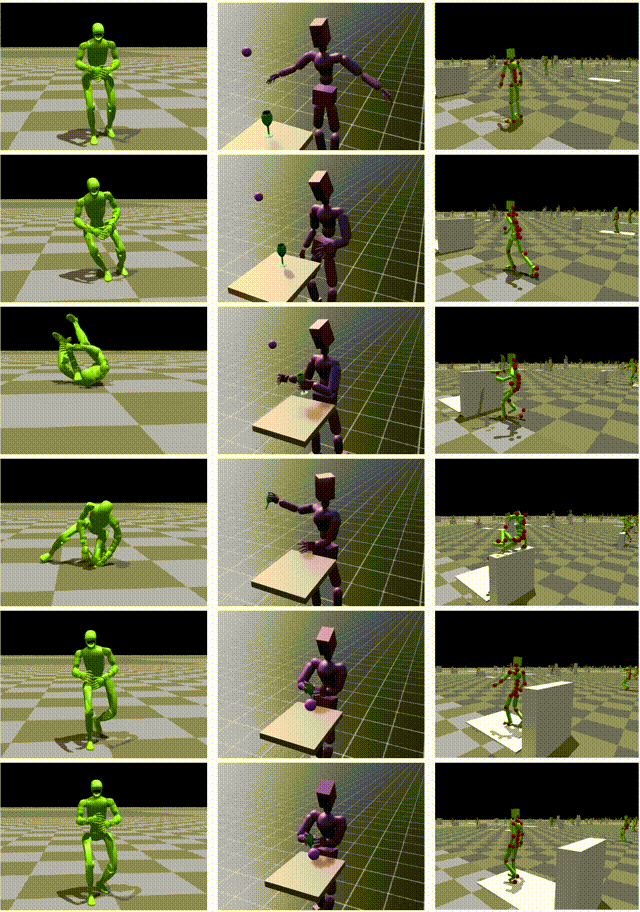
ProtoMotions 是一个基于 GPU 加速的仿真与学习框架,用于训练物理模拟的数字人类和类人机器人。我们的使命是为各类类人学习任务和环境提供快速原型设计平台,连接基于物理的动画、数字人类与类人机器人技术领域的研发工作。
注意
本项目将下载并安装额外的第三方开源软件项目。使用前请仔细阅读这些开源项目的许可条款。
0.1 关键特性
- GPU加速:通过NVIDIA Newton(测试版)、IsaacGym、IsaacLab和Genesis后端,为强化学习工作流提供快速可扩展的仿真支持
- 模块化设计:内置支持多种仿真后端、机器人形态、RL环境及算法。轻松添加自定义机器人、任务或算法
- 丰富工具集:内置过程化地形生成、动作重定位(基于PyRoki)、场景与物体生成。所有功能均可扩展至大规模训练任务
- 前沿算法:支持MaskedMimic、AMP、ASE、PPO算法实现
- 多机器人支持:SMPL、SMPL-X、Unitree G1、H1及自定义形态
- 开源许可:采用宽松的Apache-2.0许可证
0.2 高层架构
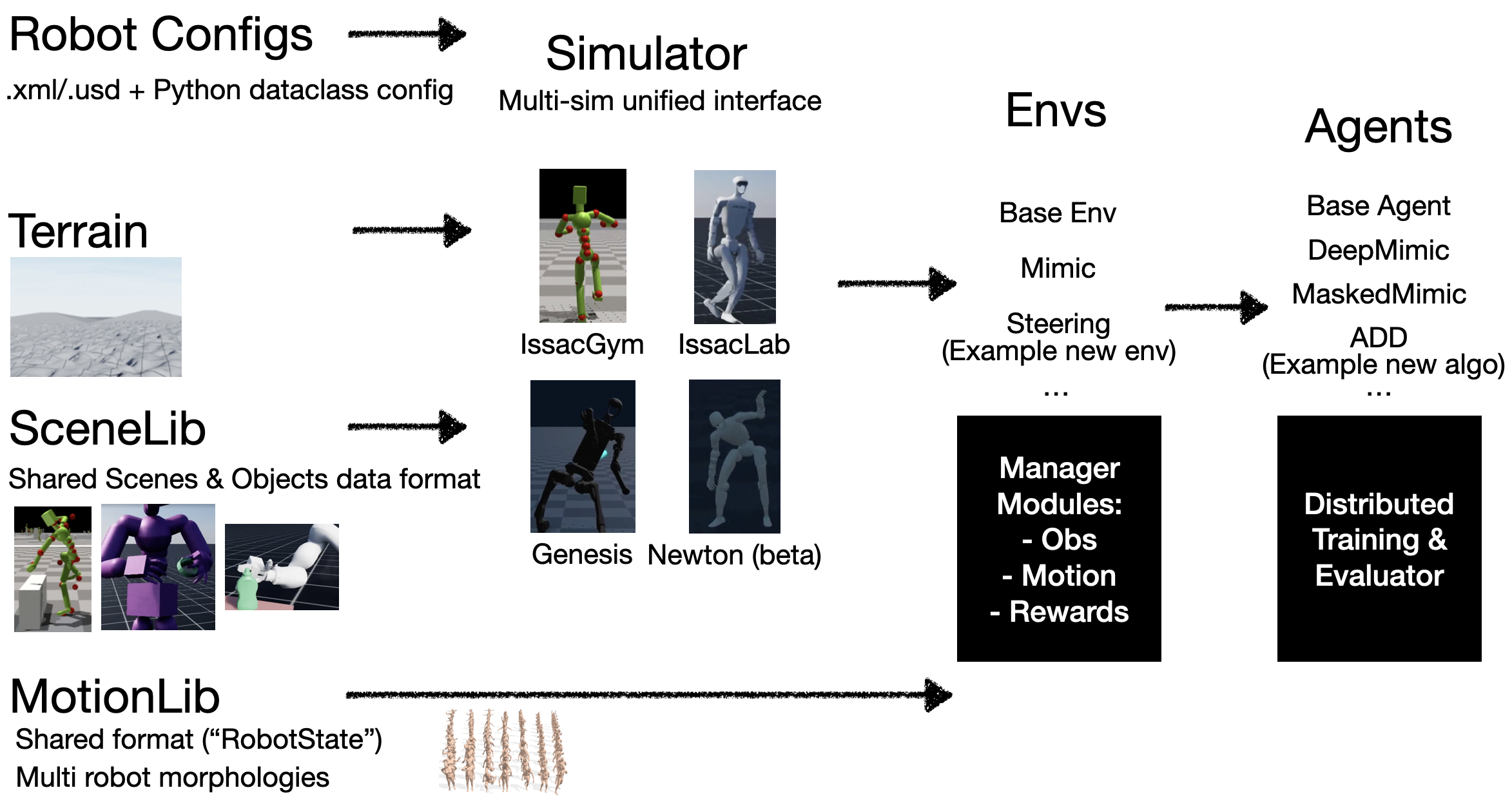
**一、**安装
ProtoMotions支持四种仿真后端:IsaacGym、IsaacLab、Genesis和Newton。您可以安装任意一种仿真引擎,并通过配置文件选择相应的仿真后端。
注意
建议为每款仿真器创建独立的虚拟环境以避免依赖冲突。推荐使用conda或venv管理IsaacGym和Genesis的依赖,使用uv管理IsaacLab和Newton的依赖。
1.1 前提条件
克隆仓库后,获取git-lfs中存储的所有文件:
bash
git lfs fetch --all1.2 选择您的模拟器(s)
1.2.1 IsaacGym
IsaacGym 需要 Python 3.8。
-
创建一个 conda 环境:
bashconda create -n isaacgym python=3.8 conda activate isaacgym -
下载 IsaacGym 预览版 4:
bashwget https://developer.nvidia.com/isaac-gym-preview-4 tar -xvzf isaac-gym-preview-4 -
安装 IsaacGym Python API:
bashpip install -e isaacgym/python -
安装 ProtoMotions 及其依赖项:
bashpip install -e /path/to/protomotions pip install -r /path/to/protomotions/requirements_isaacgym.txt
1.2.2 IsaacLab
我们建议使用 uv 安装 IsaacLab。IsaacLab 2.x 需要 Python 3.11。完整安装说明请参阅 IsaacLab Pip 安装指南。
-
使用 uv 创建虚拟环境:
bashuv venv --python 3.11 env_isaaclab source env_isaaclab/bin/activate -
安装 PyTorch 和 IsaacLab:
bashuv pip install torch==2.7.0 torchvision==0.22.0 --index-url https://download.pytorch.org/whl/cu128 uv pip install isaaclab[isaacsim,all]==2.3.0 --extra-index-url https://pypi.nvidia.com -
安装 ProtoMotions 及其依赖项:
bashuv pip install -e /path/to/protomotions uv pip install -r /path/to/protomotions/requirements_isaaclab.txt
1.2.3 Genesis(实验版)
Genesis 需要 Python 3.10。
-
创建一个 conda 环境:
bashconda create -n genesis python=3.10 conda activate genesis -
安装Genesis
-
安装ProtoMotions及其依赖项:
bashpip install -e /path/to/protomotions pip install -r /path/to/protomotions/requirements_genesis.txt
1.2.4 Newton
Newton(当前处于测试阶段)是一款基于NVIDIA Warp构建的GPU加速物理模拟器。我们建议使用uv进行安装。完整安装说明请参阅《Newton安装指南》。
系统要求:Python 3.10+,NVIDIA GPU(计算能力≥5.0),驱动程序545+
-
克隆 Newton 代码库并创建虚拟环境:
bashgit clone git@github.com:newton-physics/newton.git cd newton uv venv source .venv/bin/activate -
安装 Newton 依赖项:
bashuv pip install mujoco --pre -f https://py.mujoco.org/ uv pip install warp-lang --pre -U -f https://pypi.nvidia.com/warp-lang/ uv pip install git+https://github.com/google-deepmind/mujoco_warp.git@main uv pip install -e .[examples] -
安装 ProtoMotions 及其依赖项:
bashuv pip install -e /path/to/protomotions uv pip install -r /path/to/protomotions/requirements_newton.txt
1.3 故障排除
1.3.1 IsaacGym 问题
1.3.1.1 libpython 错误
若遇到 libpython 相关错误,需将 LD_LIBRARY_PATH 设置为您的 conda 环境:
bash
# First, check your conda environment path
conda info -e

# Then set LD_LIBRARY_PATH (replace with your actual conda env path)
export LD_LIBRARY_PATH=/path/to/conda/envs/your_env/lib:$LD_LIBRARY_PATH

# For example:
export LD_LIBRARY_PATH=${CONDA_PREFIX}/lib:$LD_LIBRARY_PATH
要使此设置永久生效,请将导出命令添加到你的 ~/.bashrc 或 ~/.zshrc 文件中:要使此设置永久生效,请将导出命令添加到你的 ~/.bashrc 或 ~/.zshrc 文件中:
bash
echo 'export LD_LIBRARY_PATH=${CONDA_PREFIX}/lib:$LD_LIBRARY_PATH' >> ~/.bashrc
source ~/.bashrc
1.3.1.2 内存问题
若在训练过程中遇到内存问题:
bash
# Reduce number of environments in your training command
--num-envs 1024
二、快速入门
本指南将帮助您运行预训练模型并开始训练自己的智能体。
2.1 运行预训练模型
我们为各类机器人和任务提供了预训练检查点。下载后运行推理即可查看结果。
2.1.1 可用预训练模型:
以下前四款模型均为通用动作追踪器------基于DeepMimic策略在完整AMASS数据集上训练而成,可追踪多种人体动作。所有模型均使用4块A100 GPU训练约24小时完成。
| Model | Description | Checkpoint Path |
|---|---|---|
| SMPL AMASS (flat) | 通用动作追踪器:SMPL人形模型在平坦地形 | data/pretrained_models/motion_tracker/smpl/last.ckpt |
| SMPL AMASS (terrain) | 通用动作追踪器:SMPL人形模型在复杂地形 | data/pretrained_models/motion_tracker/smpl-terrains/last.ckpt |
| G1 AMASS | 通用动作追踪器:Unitree G1模型在重新定位的AMASS系统 | data/pretrained_models/motion_tracker/g1-amass/last.ckpt |
| H1_2 AMASS | 通用动作追踪器:Unitree H1(v2)模型在重新定位的AMASS系统 | data/pretrained_models/motion_tracker/h1_2-amass/last.ckpt |
| Vaulting | 跳跃动作的DeepMimic策略 | [PLACEHOLDER: download link] |
| MaskedMimic SMPL | SMPL模型的MaskedMimic策略 | [PLACEHOLDER: download link] |
| MaskedMimic G1 | G1模型的MaskedMimic策略 | [PLACEHOLDER: download link] |
2.1.2 示例运动数据:
我们提供小型示例运动文件用于机器人模型测试:
- data/motions/g1_random_subset_tiny.pt - G1重定位AMASS数据的小型子集
- data/motions/h1_2_random_subset_tiny.pt - H1_2重定位AMASS数据的小型子集
有关SMPL运动数据,请参阅AMASS数据准备指南,学习如何从AMASS生成自定义MotionLib。若本地GPU内存不足以加载完整的AMASS运动库,可使用简单脚本subset_motion_lib.py将运动库裁剪为更小尺寸。
2.1.3 运行推理:
bash
# Run G1 on retargeted AMASS subset
python protomotions/inference_agent.py \
    --checkpoint data/pretrained_models/motion_tracker/g1-amass/last.ckpt \
    --motion-file data/motions/g1_random_subset_tiny.pt \
    --simulator isaacgym

# Run H1_2 on retargeted AMASS subset
python protomotions/inference_agent.py \
    --checkpoint data/pretrained_models/motion_tracker/h1_2-amass/last.ckpt \
    --motion-file data/motions/h1_2_random_subset_tiny.pt \
    --simulator isaacgym

# Run SMPL (requires AMASS MotionLib, see amass_preparation)
python protomotions/inference_agent.py \
    --checkpoint data/pretrained_models/motion_tracker/smpl/last.ckpt \
    --motion-file path/to/your/amass_motionlib.pt \
    --simulator isaacgym

# Test sim2sim transfer - run IsaacGym-trained policy in Newton
# We have not yet tuned Newton's parameters, so some artifects are there.
python protomotions/inference_agent.py \
    --checkpoint data/pretrained_models/motion_tracker/g1-amass/last.ckpt \
    --motion-file data/motions/g1_random_subset_tiny.pt \
    --simulator newton
2.2 训练你的第一个智能体
2.2.1 基于DeepMimic的动作模仿训练
使用多层感知器策略训练动作模仿智能体:
bash
python protomotions/train_agent.py \
    --robot-name smpl \
    --simulator isaacgym \
    --experiment-path examples/experiments/mimic/mlp.py \
    --experiment-name smpl_mimic_example \
    --motion-file path/to/your/motion_lib.pt \
    --num-envs 4096 \
    --batch-size 16384 \
    --ngpu 1
关于运动数据准备,请参阅AMASS数据准备。
2.3 选择仿真器和机器人
2.3.1 仿真器选择
使用--simulator参数:
- isaacgym - NVIDIA IsaacGym(推荐用于训练)
- isaaclab - NVIDIA IsaacLab/IsaacSim
- newton - NVIDIA Newton(基于MuJoCo Warp构建,当前为测试版)
- genesis - Genesis仿真器
2.3.2 机器人选择
使用--robot-name参数:
| Robot | Description |
|---|---|
smpl |
SMPL人形机器人(数字人类) |
smplx |
SMPL-X带手人形机器人 |
g1 |
Unitree G1人形机器人 |
h1_2 |
Unitree H1人形机器人(第二版) |
amp |
AMP人形机器人 |
rigv1 |
定制绑定角色 |
2.4 实验管理
--experiment-name 参数决定结果的保存位置。使用现有实验名称进行训练时,训练将自动从上次检查点继续。
结果保存至:
bash
results/<experiment_name>/
├── config.yaml                      # CLI arguments and wandb ID
├── resolved_configs.pt              # Full config objects (for exact reproducibility)
├── resolved_configs.yaml            # Human-readable configs
├── resolved_configs_inference.pt    # Inference-time configs (largely same as training configs)
├── resolved_configs_inference.yaml  # Human-readable inference configs
├── experiment_config.py             # Copy of experiment file
├── last.ckpt                        # Latest model checkpoint
├── score_based.ckpt                 # Best-performing checkpoint (by eval score)
├── epoch_100.ckpt                   # Intermediate checkpoints (if configured)
└── env_<task_id>.ckpt               # Environment state for exact resume
注意
恢复(若实验名称相同)将使用精确保存的配置------恢复过程中将忽略命令行覆盖设置。此设计有助于集群上多GPU运行的自动恢复。
若需修改配置,请使用新实验名称。在云端/集群训练时,也可将源代码复制到新目录,并使用任意实验名称进行训练。
警告切勿修改resolved_configs.yaml文件。这些文件仅供人类阅读------真实配置源为.pt文件。若需修改配置,请使用--overrides(小幅修改)或--create-config-only并复制新.pt文件至检查点目录(大幅修改)。详见配置系统说明。
2.5 训练配置
常见配置选项:
bash
python protomotions/train_agent.py \
    --robot-name smpl \
    --simulator isaacgym \
    --experiment-path examples/experiments/mimic/mlp.py \
    --experiment-name my_experiment \
    --motion-file path/to/motions.pt \
    --num-envs 4096 \
    --batch-size 16384 \
    --ngpu 1 \
    --training-max-steps 10000000
2.5.1 配置覆盖
使用 --overrides 在运行时修改配置值:
bash
--overrides "agent.num_mini_epochs=4" "env.max_episode_length=500"- 支持的覆盖格式:config_type.field.subfield=value
- 支持的配置类型:env, simulator, robot, agent, terrain, motion_lib, scene_lib
- 支持的值类型:int, float, bool, str, None
限制:覆盖仅支持简单的标量值。列表、嵌套对象或数据类实例等复杂类型无法通过命令行界面覆盖。此类变更需创建新的实验文件------这也是管理和追踪不同实验配置的良好实践。
有关配置系统的更多详情,请参阅配置系统文档。
2.6 使用Weights & Biases进行日志记录
首先,设置wandb身份验证:
bash
wandb login然后启用实验跟踪:
bash
python protomotions/train_agent.py \
    ... \
    --use-wandb
关键监测指标:
- Eval/gt_err - 位置追踪误差(无偏置,平等评估所有动作)
- Eval/success_rate - 动作完成率(无偏置)
- Train/episode_reward - 训练奖励(可能因优先采样而波动)
- Train/actor_grad_norm / Train/critic_grad_norm - 训练/演员梯度范数 / 训练/批评者梯度范数(需保持低于~0.3以确保训练稳定,若持续偏高则降低学习率)
- Train/clip_frac - 训练/片段比例(需保持在~0.3以下以确保训练稳定,若持续偏高则降低学习率)
- 训练/剪辑比例 - 保持在~0.3以下以确保训练稳定(若持续偏高则降低学习率)
- 训练/演员梯度范数 / 训练/批评者梯度范数 - 警惕梯度爆炸
提示
Weights & Biases 不仅提供基础指标图表,还具备诸多实用功能。您可通过任意配置参数搜索筛选运行记录,并行比较不同运行结果,并创建自定义仪表板。建议花些时间探索界面功能,充分利用实验追踪系统。
2.7 评估
评估训练完成的智能体:
bash
# Evaluate a pretrained model
python protomotions/inference_agent.py \
    --checkpoint data/pretrained_models/motion_tracker/g1-amass/last.ckpt \
    --motion-file data/motions/g1_random_subset_tiny.pt \
    --simulator isaacgym

# Or evaluate your own trained model
python protomotions/inference_agent.py \
    --checkpoint results/my_experiment/last.ckpt \
    --motion-file data/motions/g1_random_subset_tiny.pt \
    --simulator isaacgym
2.8 键盘控制
在可视化过程中:
| Key | Description |
|---|---|
J |
对所有机器人施加物理力(测试鲁棒性) |
R |
重置任务 |
O |
切换摄像头(循环切换实体) |
L |
切换视频录制 |
Q |
Quit |
三、AMASS数据预处理
本指南涵盖将原始AMASS运动数据转换为ProtoMotions格式用于训练的过程。
3.1 概述
转换流程将AMASS .npz文件(轴角姿态+根端平移)转换为包含完整刚体状态(位置、旋转、速度、接触)的ProtoMotions .motion文件。这些文件随后被打包为单个.pt MotionLib文件,以实现高效训练。
bash
AMASS .npz files
     │
     ▼ (convert_amass_to_proto.py)
ProtoMotions .motion files
     │
     ▼ (motion_lib.py --motion-path)
Packaged .pt MotionLib
3.2 前提条件
- 下载AMASS:在AMASS官网注册并下载
- SMPL/SMPL-X模型:用于 body 模型转换(详见下文)
3.2.1 下载SMPL body 模型
从SMPL和SMPL-X下载 body 模型。将其解压至data/smpl/文件夹。
SMPL版:下载v1.1.0版本(含中性模型)。重命名文件:
- basicmodel_neutral_lbs_10_207_0_v1.1.0.pkl → SMPL_NEUTRAL.pkl
- basicmodel_m_lbs_10_207_0_v1.1.0.pkl → SMPL_MALE.pkl
- basicmodel_f_lbs_10_207_0_v1.1.0.pkl → SMPL_FEMALE.pkl
对于SMPL-X:下载v1.1版本。将文件重命名为SMPLX_NEUTRAL.pkl、SMPLX_MALE.pkl、SMPLX_FEMALE.pkl。
文件结构应如下所示:
bash
data/smpl/
  ├── SMPL_NEUTRAL.pkl
  ├── SMPL_MALE.pkl
  ├── SMPL_FEMALE.pkl
  ├── SMPLX_NEUTRAL.pkl   # Only needed for --humanoid-type smplx
  ├── SMPLX_MALE.pkl
  └── SMPLX_FEMALE.pkl
3.3 快速入门:便捷脚本
若需一键式解决方案,请使用提供的便捷脚本,该脚本将运行完整的转换和打包流程:
bash
python data/scripts/convert_amass_to_motionlib.py <amass_root_dir> <output_dir> \
    --motion-config <config1.yaml> [--motion-config <config2.yaml> ...]
参数:
- amass_root_dir:包含AMASS子文件夹及.npz文件的根目录
- output_dir:打包后的.pt MotionLib文件存放目录
- --motion-config:包含动作配置的YAML文件。每个文件生成独立的.pt文件。可多次指定。
- --humanoid-type: 人形类型(smpl 24关节或 smplx 52关节)。默认值:smpl
- --output-fps: 动作文件目标输出帧率。默认值:30
- --force-remake: 覆盖现有.motion文件
- --device: 打包时使用的设备(cpu或cuda)。默认:cpu
示例:
bash
# Create train/test/validation splits from YAML configs
python data/scripts/convert_amass_to_motionlib.py /path/to/amass_root /path/to/output \
    --motion-config data/yaml_files/amass_smpl_train.yaml \
    --motion-config data/yaml_files/amass_smpl_test.yaml \
    --motion-config data/yaml_files/amass_smpl_validation.yaml

# Use SMPL-X humanoid
python data/scripts/convert_amass_to_motionlib.py /path/to/amass_root /path/to/output \
    --humanoid-type smplx \
    --motion-config data/yaml_files/amass_smplx_train.yaml
脚本将自动执行所有步骤,并输出最终的MotionLib .pt文件:
bash
output/
  ├── amass_smpl_train.pt
  ├── amass_smpl_test.pt
  └── amass_smpl_validation.pt
3.4 分步指南
3.4.1 将 AMASS 转换为 .motion 文件
将 AMASS .npz 文件转换为 ProtoMotions .motion 格式:
bash
python data/scripts/convert_amass_to_proto.py \
    /path/to/amass_root \
    --humanoid-type smpl \
    --output-fps 30 \
    --motion-config data/yaml_files/amass_smpl_train.yaml \
    --motion-config data/yaml_files/amass_smpl_test.yaml \
    --motion-config data/yaml_files/amass_smpl_validation.yaml \
    --force-remake
参数:
- amass_root_dir:包含AMASS子文件夹的根目录
- --humanoid-type:smpl(24关节)或smplx(52关节)
- --output-fps:目标输出帧率(默认:30)
- --force-remake:覆盖现有转换文件
- --motion-config:用于动作选择与切片的YAML配置文件。可多次指定。
- --motion-config YAML文件定义每个动作的起止时间。这些时间范围用于标记原始AMASS记录中物理上合理的片段(例如排除T姿势校准帧或问题区域)。
脚本功能:
- 加载AMASS数据:读取包含以下内容的.npz文件:
- 姿势:关节旋转(轴角格式)
- 位移:根节点平移量
- 动作捕捉帧率:原始采集帧率
- 降采样:寻找源帧率中最大且≥目标帧率的整除数。例如120帧源数据配30帧目标时,每4帧取1帧。
- 正向运动学:计算完整刚体状态:
- 所有刚体的世界坐标与旋转
- 线速度与角速度(通过有限差分计算)
- 自由度位置与速度
- 接触检测:通过阈值标记地面接触点:
- 速度阈值:0.15 m/s
- 高度阈值:0.1 m
- 高度修正:调整运动使足部避免穿透地面或悬浮于地面之上。通过垂直偏移整个运动轨迹,使运动过程中最低关节高度匹配脚趾偏移量(T姿态下脚趾距地高度):SMPL为0.015m,SMPL-X为0.017m。
3.4.2 打包为MotionLib文件
将独立的.motion文件打包为单个.pt文件。YAML配置文件决定每个包包含哪些动作:
bash
# Package training set
python protomotions/components/motion_lib.py \
    --motion-path data/yaml_files/amass_smpl_train.yaml \
    --output-file /path/to/amass_smpl_train.pt \
    --device cpu

# Package test set
python protomotions/components/motion_lib.py \
    --motion-path data/yaml_files/amass_smpl_test.yaml \
    --output-file /path/to/amass_smpl_test.pt \
    --device cpu
参数:
- --motion-path:包含待打包动作的YAML配置文件路径(或.motion文件所在目录)
- --output-file:打包后.pt文件的输出路径
- --device:使用设备(cpu或cuda)
YAML配置文件指定每个分割集(训练/测试/验证)对应的运动数据,因此需按配置文件分别执行此步骤以生成独立的.pt文件。
为何需要打包?虽然可直接从YAML文件加载动作数据,但打包操作会预处理数据集并将其保存为单个.pt文件。这能显著提升后续加载速度,因为动作数据无需每次重新处理。
输出:
bash
Loading motions from yaml/npy file or Directory of motions which is slower
Loaded 1234 motions with a total length of 12345.6s.
Motion library saved to amass_train.pt
3.4.3 使用动作可视化工具验证
训练前,请通过动作可视化工具验证转换后的动作是否正确:
bash
python examples/motion_libs_visualizer.py \
    --motion_files /path/to/amass_smpl_train.pt \
    --robot smpl \
    --simulator isaaclab
控制:
- R:切换至下一个动作
- 1/2:增加/减少播放速度
- 3/4:调整高亮显示的平滑度阈值
3.5 YAML动作配置格式
YAML配置文件定义包含哪些动作,可选添加时间片段和采样权重:
bash
motions:
  - file: CMU/45/45_01_poses.motion
    fps: 120.0
    weight: 1.0
    sub_motions:
      - timings:
          start: 0.0
          end: 3.8
  - file: CMU/138/138_06_poses.motion
    fps: 120.0
    weight: 2.0  # Sample this motion twice as often
    sub_motions:
      - timings:
          start: 0.5
          end: 3.0
字段:
- file:动作文件路径(相对于amass_root_dir)
- fps:原始动作捕捉帧率
- weight:采样权重(数值越高表示训练期间采样频率越高)
- sub_motions:待提取的时间片段列表
- timings.start:开始时间(秒)
- timings.end:结束时间(秒)
提示:
标准AMASS训练/测试/验证集划分的预构建YAML配置文件位于data/yaml_files/目录:
- amass_smpl_train.yaml
- amass_smpl_test.yaml
- amass_smpl_validation.yaml
- amass_smplx_train.yaml
- amass_smplx_validation.yaml
- amass_smplx_test.yaml
- amass_smplx_validation.yaml
3.6 SMPL 与 SMPL-X 对比
- SMPL:24 个关节(23 个非根关节)。更简化的身体模型。
- SMPL-X:52 个关节(51 个非根关节)。包含带手指的手部结构。
对于 SMPL-X,当 .npz 文件中未包含帧率信息时,将从 data/yaml_files/motion_fps_amassx.yaml 加载帧率数据。
3.7 使用 MotionLib 进行训练
打包完成后,在训练中使用:
bash
python protomotions/train_agent.py \
    --robot-name smpl \
    --simulator isaacgym \
    --experiment-path examples/experiments/mimic/mlp.py \
    --experiment-name smpl_amass \
    --motion-file /path/to/amass_train.pt \
    --num-envs 4096 \
    --batch-size 16384
3.8 基于分片运动库的多GPU训练
对于超大规模数据集,可将运动库分片部署至多张GPU。文件命名需遵循*_slurmrank.pt模式:
bash
amass_0.pt  # Loaded by rank 0
amass_1.pt  # Loaded by rank 1
amass_2.pt  # Loaded by rank 2
amass_3.pt  # Loaded by rank 3
使用 amass_slurmrank.pt 作为动作文件路径,每个计算节点将自动加载对应的分片。
3.9 故障排除
- SMPL-X 文件中缺少帧率:确保 data/yaml_files/motion_fps_amassx.yaml 包含动作的帧率条目。
- 内存不足:处理动作子集或使用 --device cpu 选项。
- 动作显示异常:确认人形机器人类型与AMASS下载版本匹配(SMPL与SMPL-X)。