目录
一、前言
Unity中默认按钮可以提供按钮行为,按钮样式。当我们点击按钮的时候,需要播放音效,当然我们可以用一个总的管理器去播放,或者说是继承Button来扩展点击函数,但此篇是新建一个自定义的MButton,来实现一个新按钮。
二、实现
较多的实现实际参考源码就可以,我直接复制源码,在Press函数中调用了我们的音效播放:
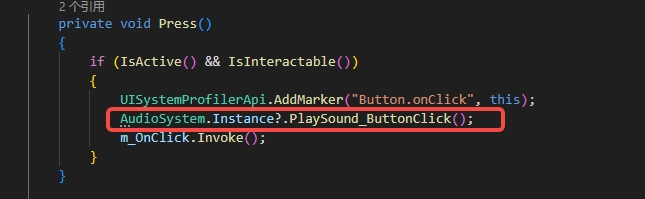
namespace UnityEngine.UI
{
    [AddComponentMenu("UI/MButton", 30)]
    public class MButton : Selectable, IPointerClickHandler, IEventSystemHandler, ISubmitHandler
    {
        [Serializable]
        public class ButtonClickedEvent : UnityEvent
        {
        }

        [FormerlySerializedAs("onClick")]
        [SerializeField]
        private ButtonClickedEvent m_OnClick = new ButtonClickedEvent();

        public ButtonClickedEvent onClick
        {
            get
            {
                return m_OnClick;
            }
            set
            {
                m_OnClick = value;
            }
        }

        protected MButton()
        {
        }

        private void Press()
        {
            if (IsActive() && IsInteractable())
            {
                UISystemProfilerApi.AddMarker("Button.onClick", this);
                AudioSystem.Instance?.PlaySound_ButtonClick();
                m_OnClick.Invoke();
            }
        }

        public virtual void OnPointerClick(PointerEventData eventData)
        {
            if (eventData.button == PointerEventData.InputButton.Left)
            {
                Press();
            }
        }

        public virtual void OnSubmit(BaseEventData eventData)
        {
            Press();
            if (IsActive() && IsInteractable())
            {
                DoStateTransition(SelectionState.Pressed, instant: false);
                StartCoroutine(OnFinishSubmit());
            }
        }

        private IEnumerator OnFinishSubmit()
        {
            float fadeTime = base.colors.fadeDuration;
            float elapsedTime = 0f;
            while (elapsedTime < fadeTime)
            {
                elapsedTime += Time.unscaledDeltaTime;
                yield return null;
            }

            DoStateTransition(base.currentSelectionState, instant: false);
        }
    }
}
其次是扩展UI创建,这里可以直接复制以下代码,其中就是对按钮Text的创建,对画布的创建,设置按钮位置等。
  public static class UIEditor
    {
        public static void PlaceUIElementRoot(GameObject element, MenuCommand menuCommand)
        {
            GameObject parent = menuCommand.context as GameObject;
            if (parent == null || parent.GetComponentInParent<Canvas>() == null)
            {
                parent = GetOrCreateCanvasGameObject();
            }

            string uniqueName = GameObjectUtility.GetUniqueNameForSibling(parent.transform, element.name);
            element.name = uniqueName;
            Undo.RegisterCreatedObjectUndo(element, "Create " + element.name);
            Undo.SetTransformParent(element.transform, parent.transform, "Parent " + element.name);
            GameObjectUtility.SetParentAndAlign(element, parent);
            if (parent != menuCommand.context) // not a context click, so center in sceneview
                SetPositionVisibleinSceneView(parent.GetComponent<RectTransform>(), element.GetComponent<RectTransform>());

            Selection.activeGameObject = element;
        }

        public static GameObject GetOrCreateCanvasGameObject()
        {
            GameObject selectedGo = Selection.activeGameObject;

            // Try to find a gameobject that is the selected GO or one if its parents.
            Canvas canvas = (selectedGo != null) ? selectedGo.GetComponentInParent<Canvas>() : null;
            if (canvas != null && canvas.gameObject.activeInHierarchy)
                return canvas.gameObject;

            // No canvas in selection or its parents? Then use just any canvas..
            canvas = Object.FindObjectOfType(typeof(Canvas)) as Canvas;
            if (canvas != null && canvas.gameObject.activeInHierarchy)
                return canvas.gameObject;

            // No canvas in the scene at all? Then create a new one.
            return CreateNewUI();
        }

        private static void SetPositionVisibleinSceneView(RectTransform canvasRTransform, RectTransform itemTransform)
        {
            // Find the best scene view
            SceneView sceneView = SceneView.lastActiveSceneView;
            if (sceneView == null && SceneView.sceneViews.Count > 0)
                sceneView = SceneView.sceneViews[0] as SceneView;

            // Couldn't find a SceneView. Don't set position.
            if (sceneView == null || sceneView.camera == null)
                return;

            // Create world space Plane from canvas position.
            Vector2 localPlanePosition;
            Camera camera = sceneView.camera;
            Vector3 position = Vector3.zero;
            if (RectTransformUtility.ScreenPointToLocalPointInRectangle(canvasRTransform, new Vector2(camera.pixelWidth / 2, camera.pixelHeight / 2), camera, out localPlanePosition))
            {
                // Adjust for canvas pivot
                localPlanePosition.x = localPlanePosition.x + canvasRTransform.sizeDelta.x * canvasRTransform.pivot.x;
                localPlanePosition.y = localPlanePosition.y + canvasRTransform.sizeDelta.y * canvasRTransform.pivot.y;

                localPlanePosition.x = Mathf.Clamp(localPlanePosition.x, 0, canvasRTransform.sizeDelta.x);
                localPlanePosition.y = Mathf.Clamp(localPlanePosition.y, 0, canvasRTransform.sizeDelta.y);

                // Adjust for anchoring
                position.x = localPlanePosition.x - canvasRTransform.sizeDelta.x * itemTransform.anchorMin.x;
                position.y = localPlanePosition.y - canvasRTransform.sizeDelta.y * itemTransform.anchorMin.y;

                Vector3 minLocalPosition;
                minLocalPosition.x = canvasRTransform.sizeDelta.x * (0 - canvasRTransform.pivot.x) + itemTransform.sizeDelta.x * itemTransform.pivot.x;
                minLocalPosition.y = canvasRTransform.sizeDelta.y * (0 - canvasRTransform.pivot.y) + itemTransform.sizeDelta.y * itemTransform.pivot.y;

                Vector3 maxLocalPosition;
                maxLocalPosition.x = canvasRTransform.sizeDelta.x * (1 - canvasRTransform.pivot.x) - itemTransform.sizeDelta.x * itemTransform.pivot.x;
                maxLocalPosition.y = canvasRTransform.sizeDelta.y * (1 - canvasRTransform.pivot.y) - itemTransform.sizeDelta.y * itemTransform.pivot.y;

                position.x = Mathf.Clamp(position.x, minLocalPosition.x, maxLocalPosition.x);
                position.y = Mathf.Clamp(position.y, minLocalPosition.y, maxLocalPosition.y);
            }

            itemTransform.anchoredPosition = position;
            itemTransform.localRotation = Quaternion.identity;
            itemTransform.localScale = Vector3.one;
        }

        public static GameObject CreateNewUI()
        {
            // Root for the UI
            var root = new GameObject("Canvas");
            root.layer = LayerMask.NameToLayer("UI");
            Canvas canvas = root.AddComponent<Canvas>();
            canvas.renderMode = RenderMode.ScreenSpaceOverlay;
            root.AddComponent<CanvasScaler>();
            root.AddComponent<GraphicRaycaster>();
            Undo.RegisterCreatedObjectUndo(root, "Create " + root.name);
            // if there is no event system add one...
            CreateEventSystem(false, null);
            return root;
        }

        public static void CreateEventSystem(bool select, GameObject parent)
        {
            var esys = Object.FindObjectOfType<EventSystem>();
            if (esys == null)
            {
                var eventSystem = new GameObject("EventSystem");
                GameObjectUtility.SetParentAndAlign(eventSystem, parent);
                esys = eventSystem.AddComponent<EventSystem>();
                eventSystem.AddComponent<StandaloneInputModule>();

                Undo.RegisterCreatedObjectUndo(eventSystem, "Create " + eventSystem.name);
            }

            if (select && esys != null)
            {
                Selection.activeGameObject = esys.gameObject;
            }
        }

        public static GameObject CreateUIElementRoot(string name, Vector2 size)
        {
            GameObject go = new GameObject(name);
            RectTransform rect = go.AddComponent<RectTransform>();
            rect.sizeDelta = size;
            return go;
        }
        public static GameObject CreateUIElementRoot(string name, float w, float h)
        {
            return CreateUIElementRoot(name, new Vector2(w, h));
        }

        public static GameObject CreateUIText(string name, string text, GameObject parent)
        {
            GameObject childText = CreateUIObject(name, parent);
            Text v = childText.AddComponent<Text>();
            v.text = text;
            v.alignment = TextAnchor.MiddleCenter;
            SetDefaultTextValues(v);

            RectTransform r = childText.GetComponent<RectTransform>();
            r.anchorMin = Vector2.zero;
            r.anchorMax = Vector2.one;
            r.sizeDelta = Vector2.zero;

            return childText;
        }

        public static GameObject CreateUIObject(string name, GameObject parent)
        {
            GameObject go = new GameObject(name);
            go.AddComponent<RectTransform>();
            SetParentAndAlign(go, parent);
            return go;
        }

        public static void SetDefaultTextValues(Text lbl)
        {
            lbl.color = new Color(50f / 255f, 50f / 255f, 50f / 255f, 1f);
        }

        public static void SetParentAndAlign(GameObject child, GameObject parent)
        {
            if (parent == null)
                return;

            child.transform.SetParent(parent.transform, false);
            SetLayerRecursively(child, parent.layer);
        }
        public static void SetLayerRecursively(GameObject go, int layer)
        {
            go.layer = layer;
            Transform t = go.transform;
            for (int i = 0; i < t.childCount; i++)
                SetLayerRecursively(t.GetChild(i).gameObject, layer);
        }

        public static T findRes<T>(string name) where T : Object
        {
            T[] objs = Resources.FindObjectsOfTypeAll<T>();
            if (objs != null && objs.Length > 0)
            {
                foreach (Object obj in objs)
                {
                    if (obj.name == name)
                        return obj as T;
                }
            }
            objs = AssetBundle.FindObjectsOfType<T>();
            if (objs != null && objs.Length > 0)
            {
                foreach (Object obj in objs)
                {
                    if (obj.name == name)
                        return obj as T;
                }
            }
            return default(T);
        }

        [MenuItem("GameObject/UI/MButton")]
        static void CreateMButton(MenuCommand menuCmd)
        {
            // 创建游戏对象
            float w = 160f;
            float h = 30f;
            GameObject btnRoot = CreateUIElementRoot("MButton", w, h);

            // 创建Text对象
            CreateUIText("Text", "Button", btnRoot);

            // 添加脚本
            btnRoot.AddComponent<CanvasRenderer>();
            Image img = btnRoot.AddComponent<Image>();
            img.color = Color.white;
            img.fillCenter = true;
            img.raycastTarget = true;
            img.sprite = findRes<Sprite>("UISprite");
            if (img.sprite != null)
                img.type = Image.Type.Sliced;

            btnRoot.AddComponent<MButton>();
            btnRoot.GetComponent<Selectable>().image = img;

            // 放入到UI Canvas中
            PlaceUIElementRoot(btnRoot, menuCmd);
        }
}