【实验4-1】创建视图
(1)单源视图:
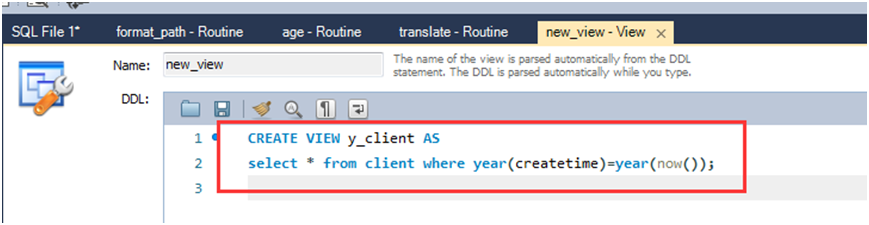
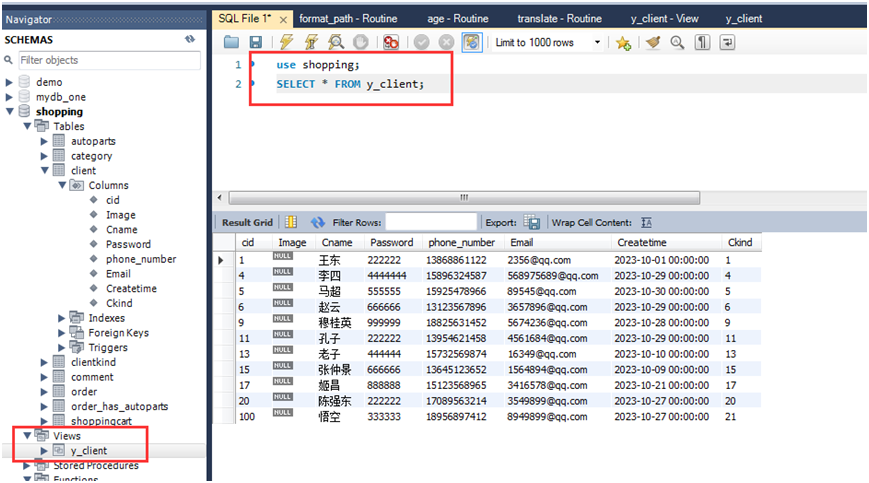
1.建立今年新增的会员的视图;
2.建立"奔驰"品牌的汽车配件视图,并要求进行修改和插入操作时仍需保证该视图只能是"奔驰"品牌。
(2)多源视图:
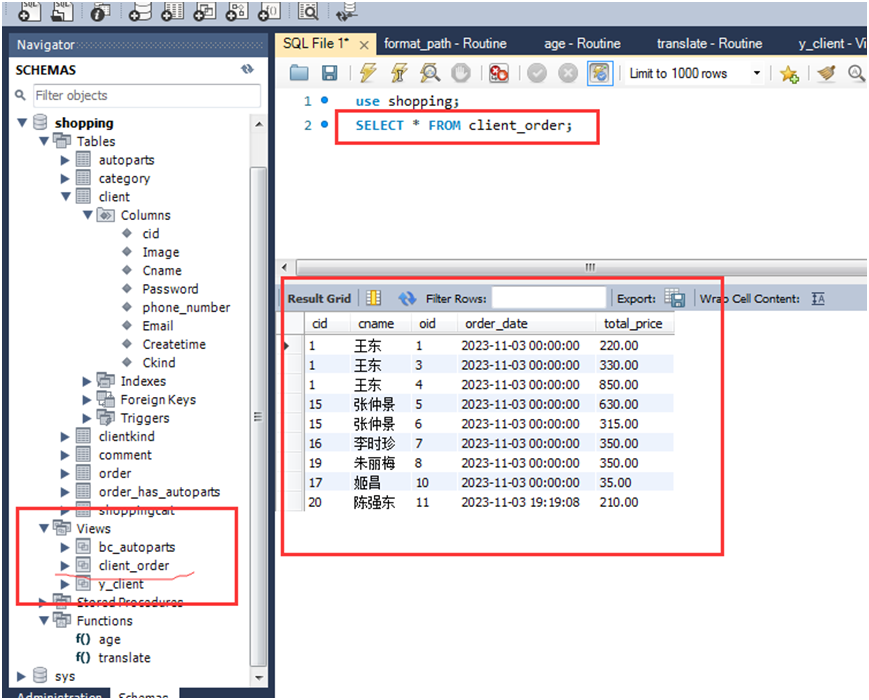
建立每个会员的订单视图(包含会员编号、会员名称、订单编号、下单日期、货品总价)。

(3)在已有视图上定义的新视图:
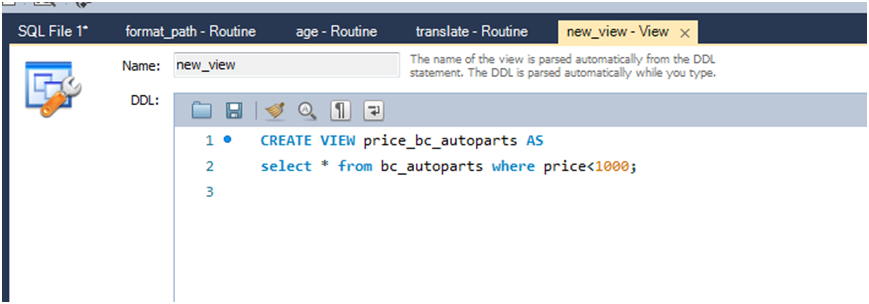
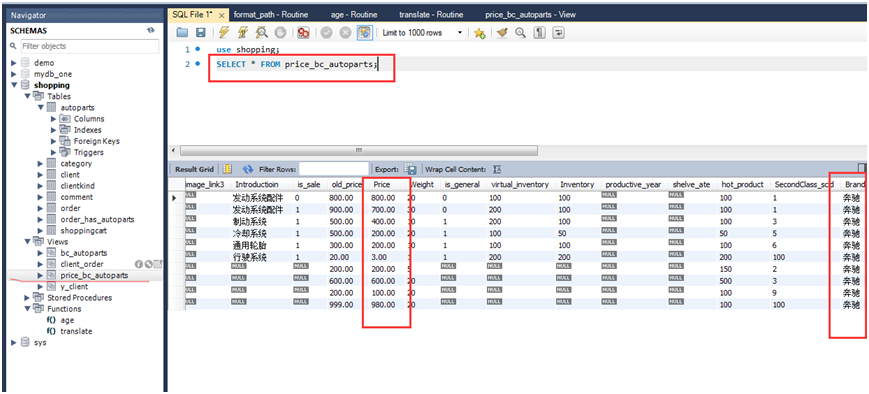
建立价格小于1000元的'奔驰'品牌的汽车配件视图。
(4)表达式的视图:
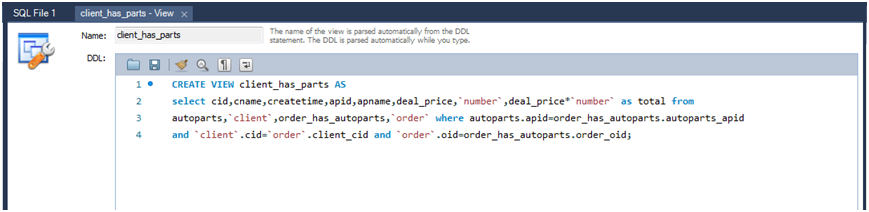
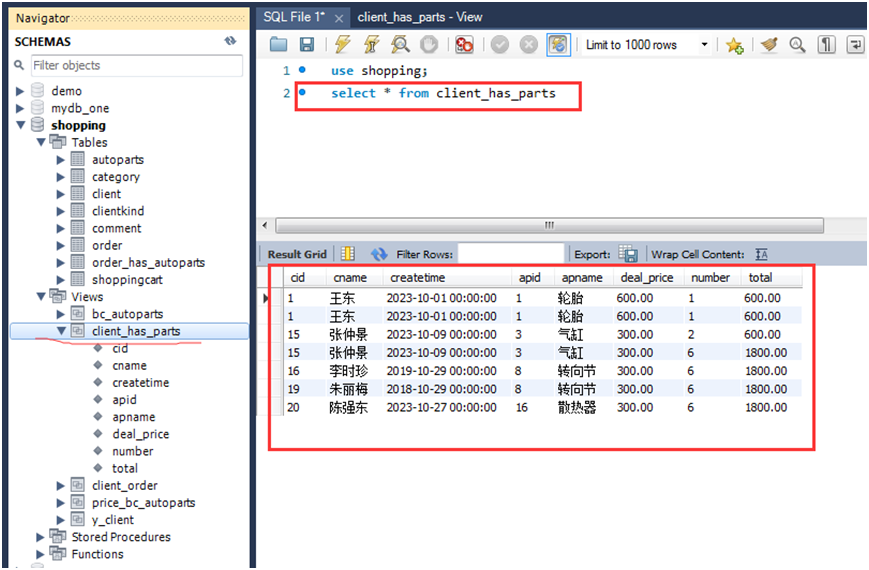
建立每个会员的购物信息视图(包含会员编号、会员名称、创建时间、汽车配件编号、汽车配件名称、单价、数量、金额)。
(5)分组视图:
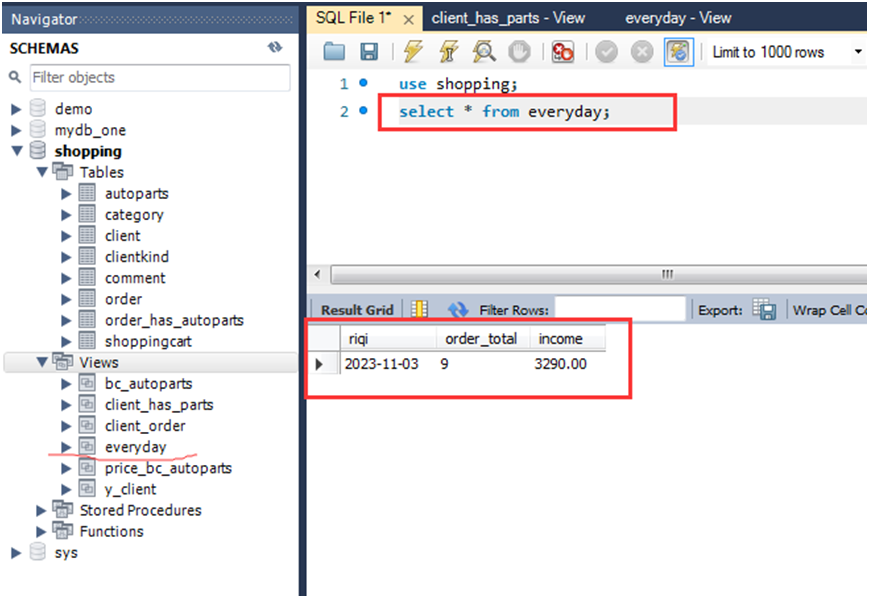
1.定义一个视图可以看出每天的销售数量和销售收入;

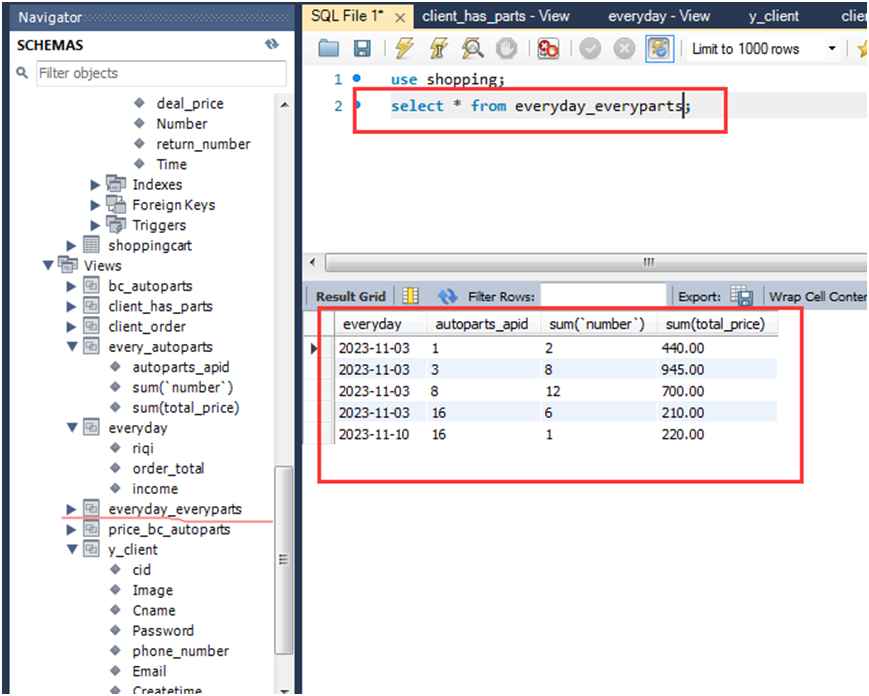
2.定义一个视图可以看出每天每一种汽车配件的销售数量和销售收入。

【实验4-2】查询视图
在实验4-1中定义的视图或者与基表上共同完成查询:
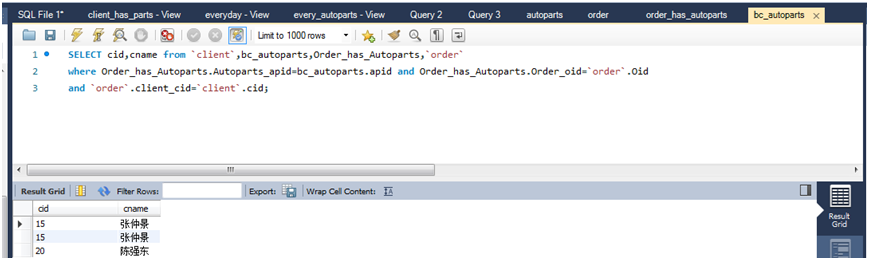
(1)检索采购了'奔驰'品牌的汽车配件的会员编号、会员名称。
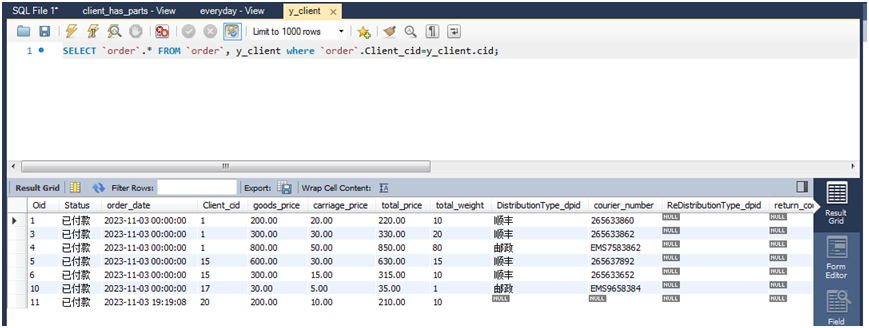
(2)查询今年新增会员的订单信息。
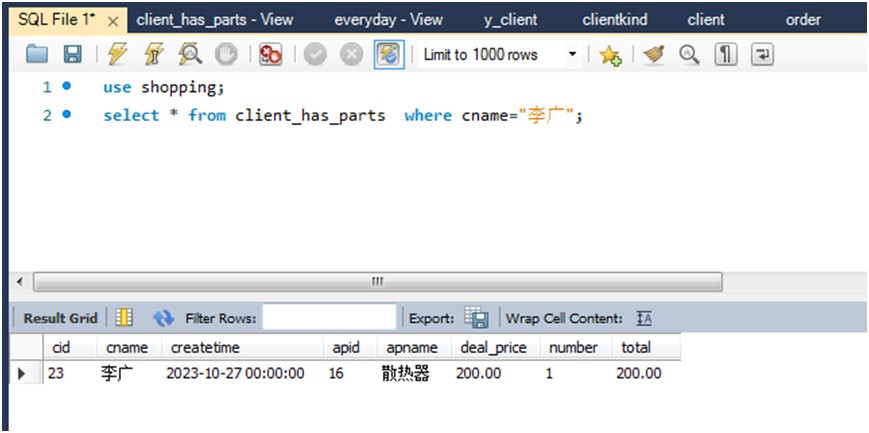
(3)查询会员名称为'李广'的购物信息(包含会员编号、会员名称、创建时间、汽车配件编号、汽车配件名称、单价、数量、金额)。
(4)查看本月的每一种汽车配件的销售数量和销售收入
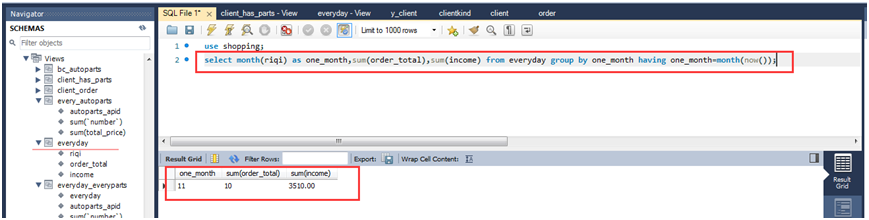
1.查看本月的销售数量和销售收入
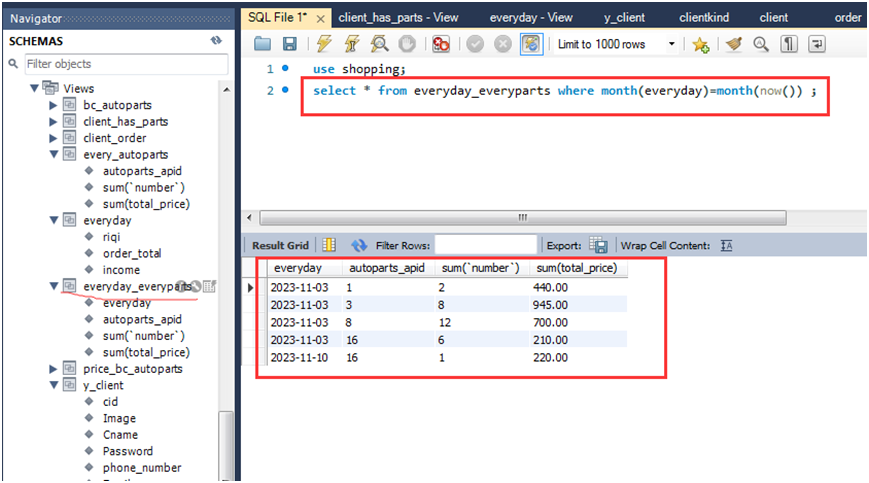
2.查看本月的每一种汽车配件的销售数量和销售收入
【实验4-3】更新视图
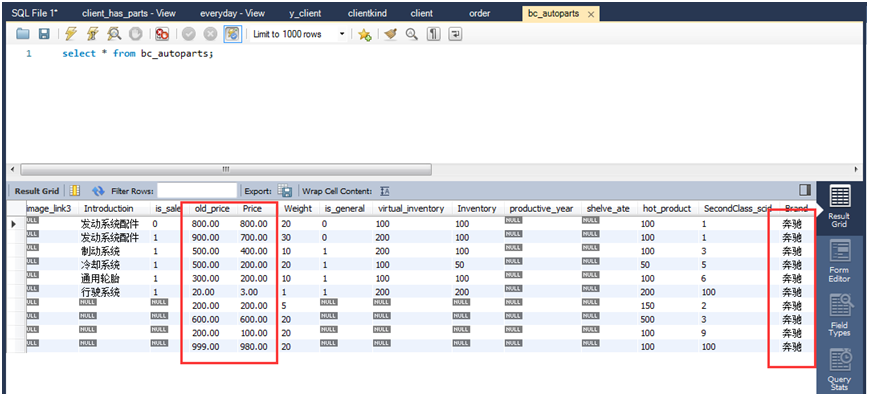
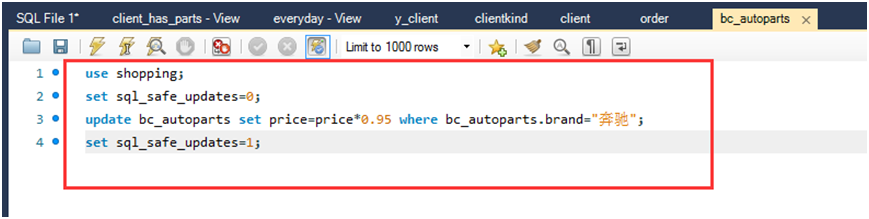
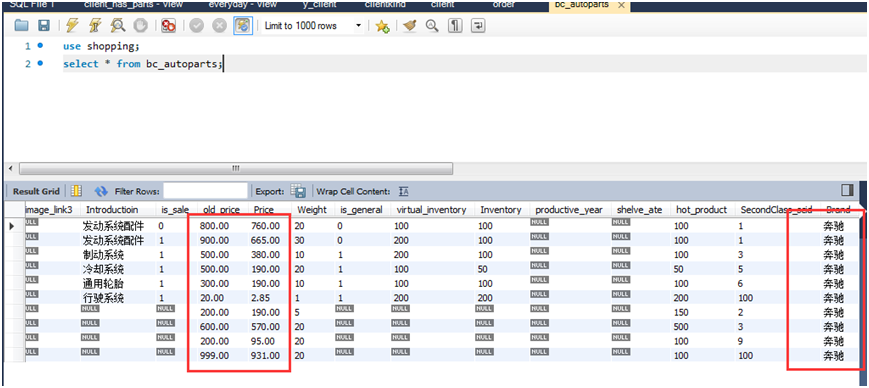
(1)将'奔驰'品牌的价格下调5%,用Select查询更新前后结果。
价格下调前:
价格下调中:
价格下调后:
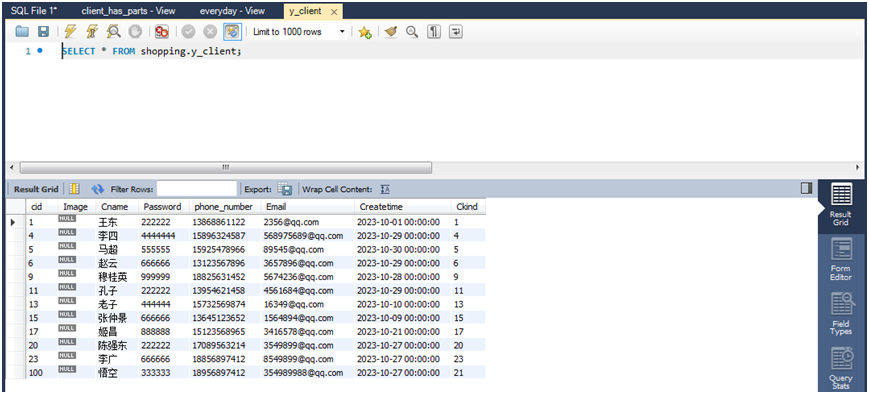
(2)在今年新增会员视图中,插入一个新会员的记录,其中会员名称为'张飞',密码为999999,邮箱为123456@163.com。用Select查询更新前后结果。
插入新会员前:
插入新会员中:

插入新会员后:
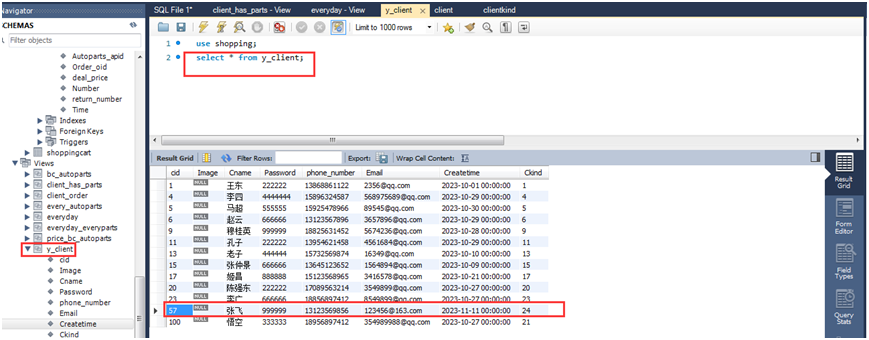
(3)在今年新增会员视图中,删除会员名称为'张飞'的会员信息。用Select查询更新前后结果。
删除'张飞'会员前:
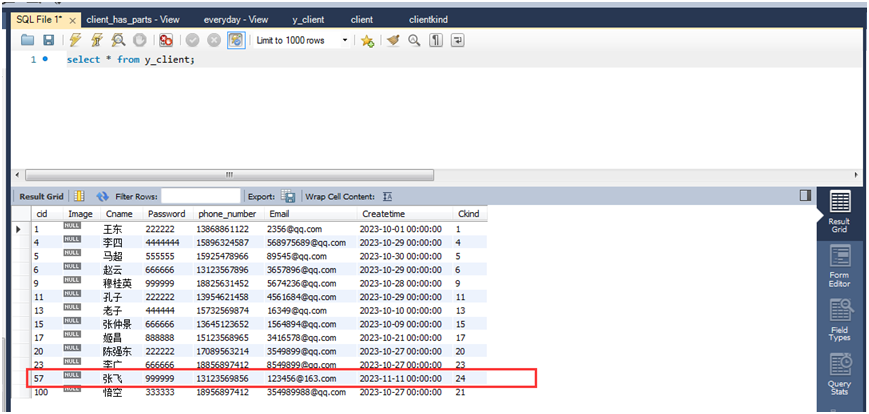
删除'张飞'会员中:

删除'张飞'会员后:
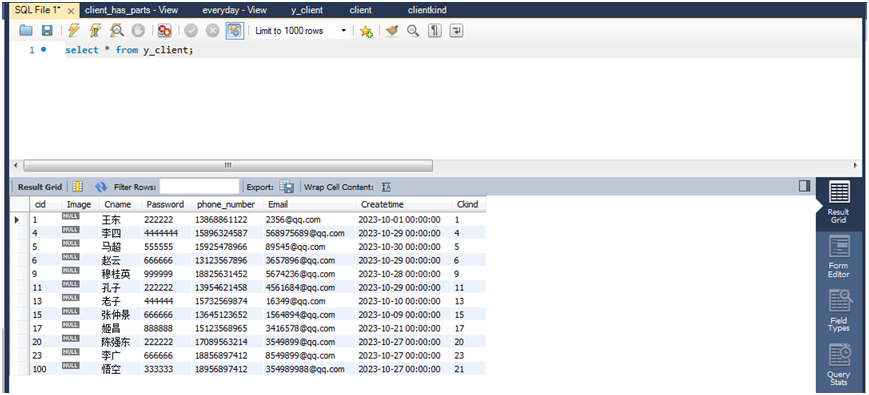
【实验4-4】删除视图
删除今年新增会员视图:

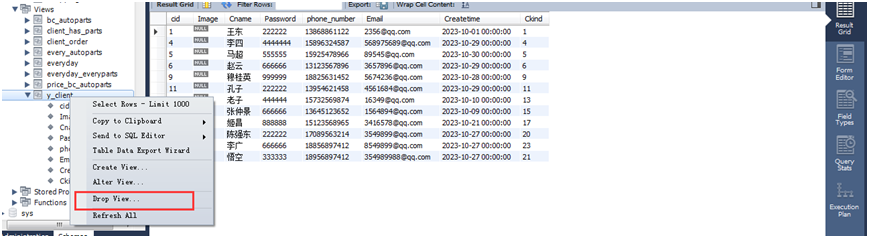
【实验4-5】创建索引
(1)创建汽车配件表上的汽车配件编号的索引(聚簇索引)。

(2)创建会员表上的会员编号的索引(聚簇索引)。

(3)创建汽车配件表上的汽车配件名称的索引。

(4)创建订单表上的订单号的索引。
 (5)创建订单明细表上的订单号的索引。

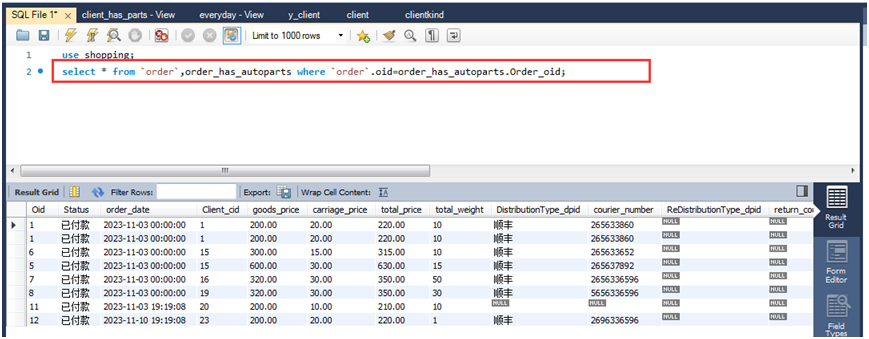
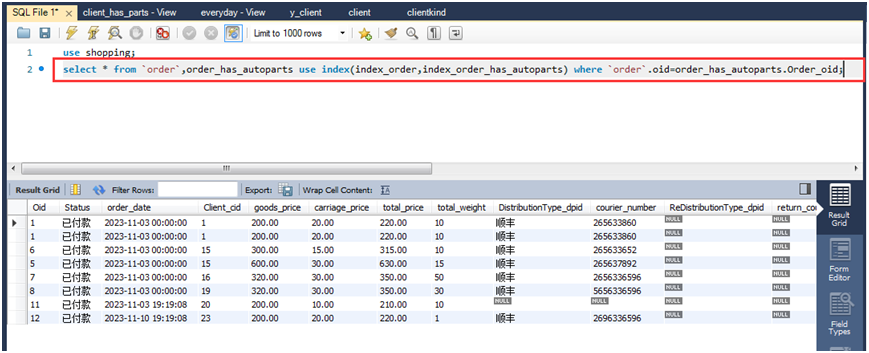
(6)完成订单表和订单明细表的连接查询,在有索引和无索引2种情况下完成查询。
1.无索引时的查询:
2.有索引时的查询:
【实验4-6】删除索引
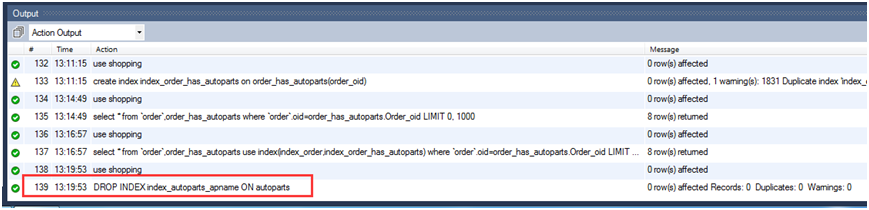
删除汽车配件表上的汽车配件名称的索引。

以下是相关代码:
【实验4-1】创建视图
(1)单源视图:
1.建立今年新增的会员的视图;
create view y_client as select * from client where year(createtime)=year(now);
use shopping;
select * from y_client;
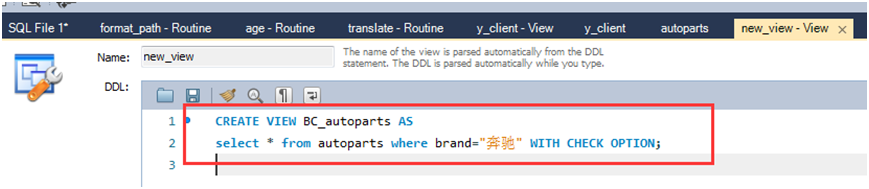
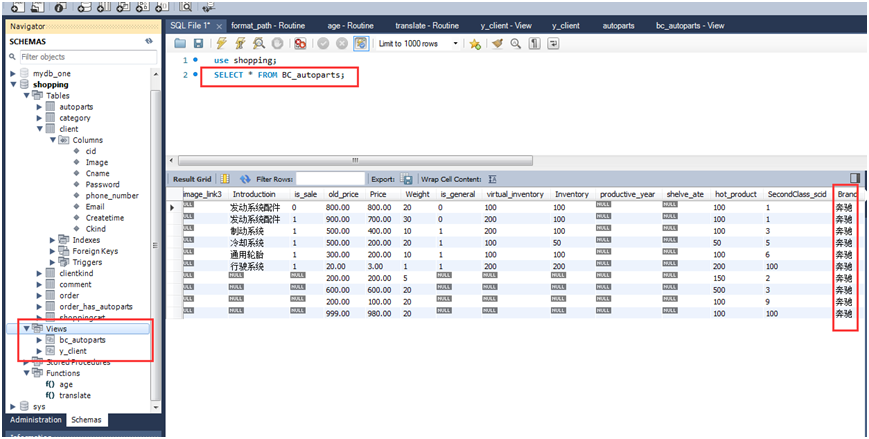
2.建立"奔驰"品牌的汽车配件视图,并要求进行修改和插入操作时仍需保证该视图只能是"奔驰"品牌。
create view BC_autoparts as select * from autoparts where brand="奔驰" with check option;
use shopping;
select * from BC_autoparts;
(2)多源视图:
建立每个会员的订单视图(包含会员编号、会员名称、订单编号、下单日期、货品总价)。
create view client_order(cid,cname,oid,order_date,total_price) as select cid,cname,oid,order_date,total_price from `client`,`order` where `client`.cid=`order`.client_cid;
use shopping;
select * from client_order;
(3)在已有视图上定义的新视图:
建立价格小于1000元的'奔驰'品牌的汽车配件视图。
create view price_bc_autoparts as select * from bc_autoparts where price<1000;
use shopping;
select * from price_bc_autoparts
(4)表达式的视图:
建立每个会员的购物信息视图(包含会员编号、会员名称、创建时间、汽车配件编号、汽车配件名称、单价、数量、金额)。
create view client_has_parts as select cid,cname,createtime,apid,apname,deal_price,`number`,deal_price* `number` as total from autoparts,	`client`,order_has_autoparts,`order` where autoparts.apid=order_has_autoparts.autoparts_apid and `client`.cid=`order`.client_cid and `order`.oid=order_has_autoparts.order_oid;
use shopping;
select * from client_has_parts
(5)分组视图:
1.定义一个视图可以看出每天的销售数量和销售收入;
create view everyday as select date(order_date) as riqi,count(oid) as order_total,sum(total_price) as income from `order` group by riqi;
use shopping;
select * from everyday
2.定义一个视图可以看出每天每一种汽车配件的销售数量和销售收入。
create view everyday_everyparts as select date(order_date) as everyday,autoparts_apid,sum(`number`),sum(total_price) from `order`,order_has_autoparts where `order`.oid=order_has_autoparts.order_oid group by everyday,autoparts_apid;
use shopping;
select * from everyday_everyparts;
【实验4-2】查询视图
在实验4-1中定义的视图或者与基表上共同完成查询:
(1)检索采购了'奔驰'品牌的汽车配件的会员编号、会员名称。
select cid,cname from `client`,bc_autoparts,order_has_autoparts,`order` where order_has_autoparts.autoparts_apid=bc_autoparts.apid and order_has_autoparts.order_oid=`order`.oid and `order`.client_cid=`client`.cid;
(2)查询今年新增会员的订单信息。
select `order`.* from `order`,y_client where `order`.client_cid=y_client.cid;
(3)查询会员名称为'李广'的购物信息(包含会员编号、会员名称、创建时间、汽车配件编号、汽车配件名称、单价、数量、金额)。
use shopping;
select * from client_has_parts where cname="李广";
(4)查看本月的每一种汽车配件的销售数量和销售收入
1.查看本月的销售数量和销售收入
use shopping;
select month(riqi) as one_month,sum(order_total),sum(income) from everyday group by one_month having one_month=month(now());
2.查看本月的每一种汽车配件的销售数量和销售收入
use shopping;
select * from everyday_everyparts where month(everyday)=month(now());
【实验4-3】更新视图
(1)将'奔驰'品牌的价格下调5%,用Select查询更新前后结果。
价格下调前:
select * from bc_autoparts;
(2)在今年新增会员视图中,插入一个新会员的记录,其中会员名称为'张飞',密码为999999,邮箱为123456@163.com。用Select查询更新前后结果。
插入新会员前:
use shopping;
insert into y_client(cid,cname,`password`,phone_number,email,createtime,ckind) values(57,"张飞","999999","131235698856","123456@163.com",date(now()),24);
(3)在今年新增会员视图中,删除会员名称为'张飞'的会员信息。用Select查询更新前后结果。
use shopping;
set sql_safe_updates=0;
delete from y_client where cname="张飞";
set sql_safe_updates=1;
【实验4-4】删除视图
删除今年新增会员视图:
use shopping;
drop view y_client;
【实验4-5】创建索引
(1)创建汽车配件表上的汽车配件编号的索引(聚簇索引)。
use shopping;
create index_autoparts on autoparts(apid);
(2)创建会员表上的会员编号的索引(聚簇索引)。
use shopping;
create index index_client on client(cid);
(3)创建汽车配件表上的汽车配件名称的索引。
use shopping;
create index index_autoparts_apname on autoparts(apname(10) asc)
(4)创建订单表上的订单号的索引。
use shopping;
create index index_order on `order`(oid);
(5)创建订单明细表上的订单号的索引。
use shopping;
create index index_order_has_autoparts on order_has_autoparts(order_oid);
(6)完成订单表和订单明细表的连接查询,在有索引和无索引2种情况下完成查询。
1.无索引时的查询:
use shopping;
select * from `order`,order_has_autoparts where `order`.oid=order_has_autoparts.order_oid;
2.有索引时的查询:
use shopping;
select * from `order`,order_has_autoparts use index(index_order,index_order_has_autoparts) where `order`.order_has_autoparts.order_oid;
【实验4-6】删除索引
删除汽车配件表上的汽车配件名称的索引。
use shopping;
drop index index_autoparts_apname on autoparts;
sql
【实验4-1】创建视图
(1)单源视图:
1.建立今年新增的会员的视图;
create view y_client as select * from client where year(createtime)=year(now);
use shopping;
select * from y_client;
2.建立"奔驰"品牌的汽车配件视图,并要求进行修改和插入操作时仍需保证该视图只能是"奔驰"品牌。
create view BC_autoparts as select * from autoparts where brand="奔驰" with check option;
use shopping;
select * from BC_autoparts;
(2)多源视图:
建立每个会员的订单视图(包含会员编号、会员名称、订单编号、下单日期、货品总价)。
create view client_order(cid,cname,oid,order_date,total_price) as select cid,cname,oid,order_date,total_price from `client`,`order` where `client`.cid=`order`.client_cid;
use shopping;
select * from client_order;
(3)在已有视图上定义的新视图:
建立价格小于1000元的'奔驰'品牌的汽车配件视图。
create view price_bc_autoparts as select * from bc_autoparts where price<1000;
use shopping;
select * from price_bc_autoparts
(4)表达式的视图:
建立每个会员的购物信息视图(包含会员编号、会员名称、创建时间、汽车配件编号、汽车配件名称、单价、数量、金额)。
create view client_has_parts as select cid,cname,createtime,apid,apname,deal_price,`number`,deal_price* `number` as total from autoparts, `client`,order_has_autoparts,`order` where autoparts.apid=order_has_autoparts.autoparts_apid and `client`.cid=`order`.client_cid and `order`.oid=order_has_autoparts.order_oid;
use shopping;
select * from client_has_parts
(5)分组视图:
1.定义一个视图可以看出每天的销售数量和销售收入;
create view everyday as select date(order_date) as riqi,count(oid) as order_total,sum(total_price) as income from `order` group by riqi;
use shopping;
select * from everyday
2.定义一个视图可以看出每天每一种汽车配件的销售数量和销售收入。
create view everyday_everyparts as select date(order_date) as everyday,autoparts_apid,sum(`number`),sum(total_price) from `order`,order_has_autoparts where `order`.oid=order_has_autoparts.order_oid group by everyday,autoparts_apid;
use shopping;
select * from everyday_everyparts;
【实验4-2】查询视图
在实验4-1中定义的视图或者与基表上共同完成查询:
(1)检索采购了'奔驰'品牌的汽车配件的会员编号、会员名称。
select cid,cname from `client`,bc_autoparts,order_has_autoparts,`order` where order_has_autoparts.autoparts_apid=bc_autoparts.apid and order_has_autoparts.order_oid=`order`.oid and `order`.client_cid=`client`.cid;
(2)查询今年新增会员的订单信息。
select `order`.* from `order`,y_client where `order`.client_cid=y_client.cid;
(3)查询会员名称为'李广'的购物信息(包含会员编号、会员名称、创建时间、汽车配件编号、汽车配件名称、单价、数量、金额)。
use shopping;
select * from client_has_parts where cname="李广";
(4)查看本月的每一种汽车配件的销售数量和销售收入
1.查看本月的销售数量和销售收入
use shopping;
select month(riqi) as one_month,sum(order_total),sum(income) from everyday group by one_month having one_month=month(now());
2.查看本月的每一种汽车配件的销售数量和销售收入
use shopping;
select * from everyday_everyparts where month(everyday)=month(now());
【实验4-3】更新视图
(1)将'奔驰'品牌的价格下调5%,用Select查询更新前后结果。
价格下调前:
select * from bc_autoparts;
(2)在今年新增会员视图中,插入一个新会员的记录,其中会员名称为'张飞',密码为999999,邮箱为123456@163.com。用Select查询更新前后结果。
插入新会员前:
use shopping;
insert into y_client(cid,cname,`password`,phone_number,email,createtime,ckind) values(57,"张飞","999999","131235698856","123456@163.com",date(now()),24);
(3)在今年新增会员视图中,删除会员名称为'张飞'的会员信息。用Select查询更新前后结果。
use shopping;
set sql_safe_updates=0;
delete from y_client where cname="张飞";
set sql_safe_updates=1;
【实验4-4】删除视图
删除今年新增会员视图:
use shopping;
drop view y_client;
【实验4-5】创建索引
(1)创建汽车配件表上的汽车配件编号的索引(聚簇索引)。
use shopping;
create index_autoparts on autoparts(apid);
(2)创建会员表上的会员编号的索引(聚簇索引)。
use shopping;
create index index_client on client(cid);
(3)创建汽车配件表上的汽车配件名称的索引。
use shopping;
create index index_autoparts_apname on autoparts(apname(10) asc)
(4)创建订单表上的订单号的索引。
use shopping;
create index index_order on `order`(oid);
(5)创建订单明细表上的订单号的索引。
use shopping;
create index index_order_has_autoparts on order_has_autoparts(order_oid);
(6)完成订单表和订单明细表的连接查询,在有索引和无索引2种情况下完成查询。
1.无索引时的查询:
use shopping;
select * from `order`,order_has_autoparts where `order`.oid=order_has_autoparts.order_oid;
2.有索引时的查询:
use shopping;
select * from `order`,order_has_autoparts use index(index_order,index_order_has_autoparts) where `order`.order_has_autoparts.order_oid;
【实验4-6】删除索引
删除汽车配件表上的汽车配件名称的索引。
use shopping;
drop index index_autoparts_apname on autoparts;