
[7.1 背景](#7.1 背景)
[7.2 基于矩阵的变换](#7.2 基于矩阵的变换)
[7.3 相关](#7.3 相关)
[7.4 时间-频率平面的基函数](#7.4 时间-频率平面的基函数)
[7.5 基图像](#7.5 基图像)
[7.6 傅里叶相关的变换](#7.6 傅里叶相关的变换)
[7.6.1 离散哈特利变换 (DHT)](#7.6.1 离散哈特利变换 (DHT))
[7.6.2 离散余弦变换 (DCT)](#7.6.2 离散余弦变换 (DCT))
[7.6.3 离散正弦变换 (DST)](#7.6.3 离散正弦变换 (DST))
[7.7 沃尔什-哈达玛变换](#7.7 沃尔什-哈达玛变换)
[7.8 斜变换](#7.8 斜变换)
[7.9 哈尔变换](#7.9 哈尔变换)
[7.10 小波变换](#7.10 小波变换)
[7.10.1 尺度函数](#7.10.1 尺度函数)
[7.10.2 小波函数](#7.10.2 小波函数)
[7.10.3 小波级数展开](#7.10.3 小波级数展开)
[7.10.4 一维离散小波变换 (DWT)](#7.10.4 一维离散小波变换 (DWT))
[7.10.5 二维小波变换](#7.10.5 二维小波变换)
[7.10.6 小波包](#7.10.6 小波包)
引言
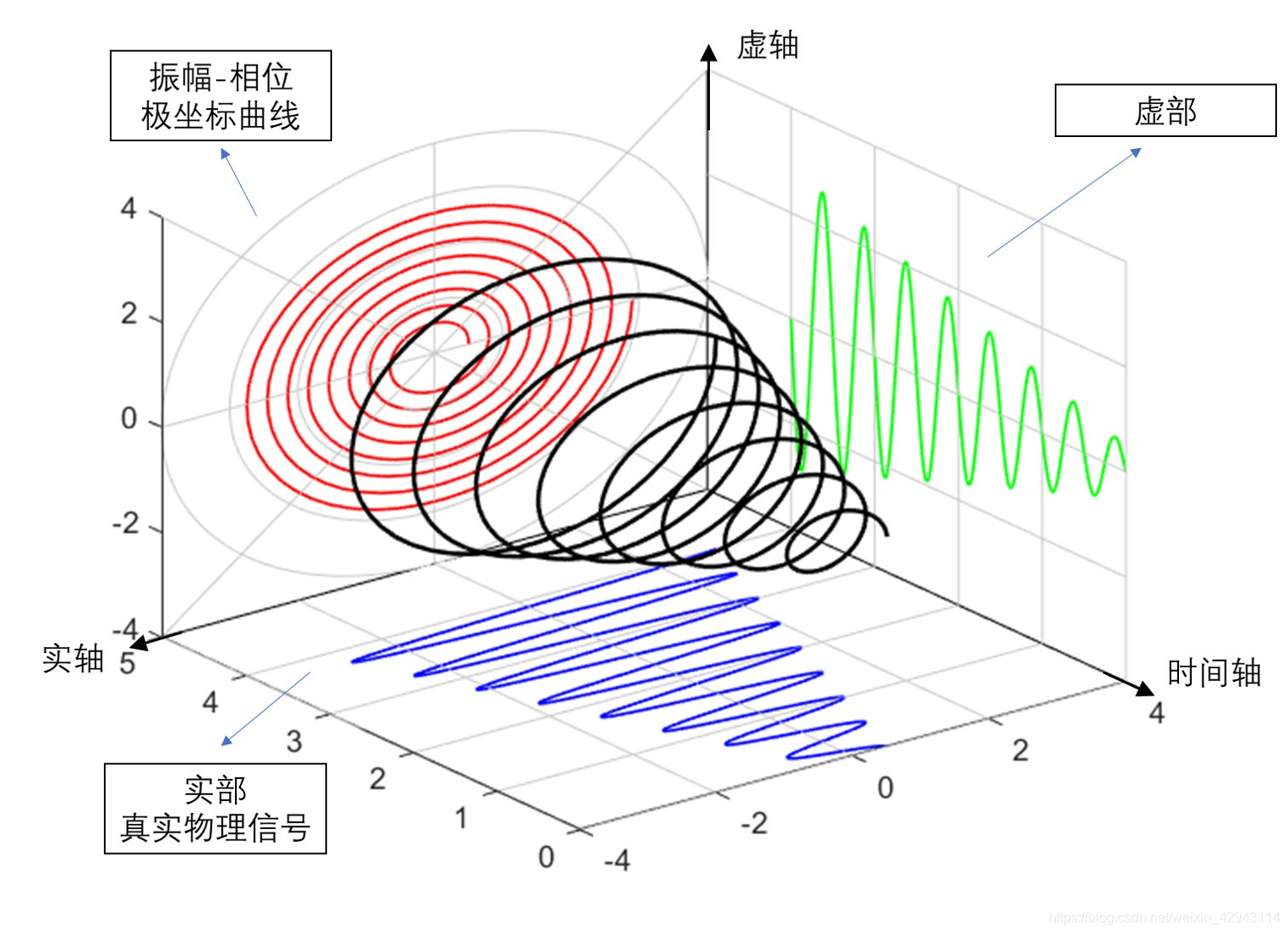
大家好!欢迎来到《数字图像处理》第7章的实战解析。本章聚焦于小波变换和其他图像变换 ,这是图像处理的核心工具之一。与傅里叶变换不同,小波变换能同时分析时间和频率信息,非常适合图像压缩、去噪和特征提取。
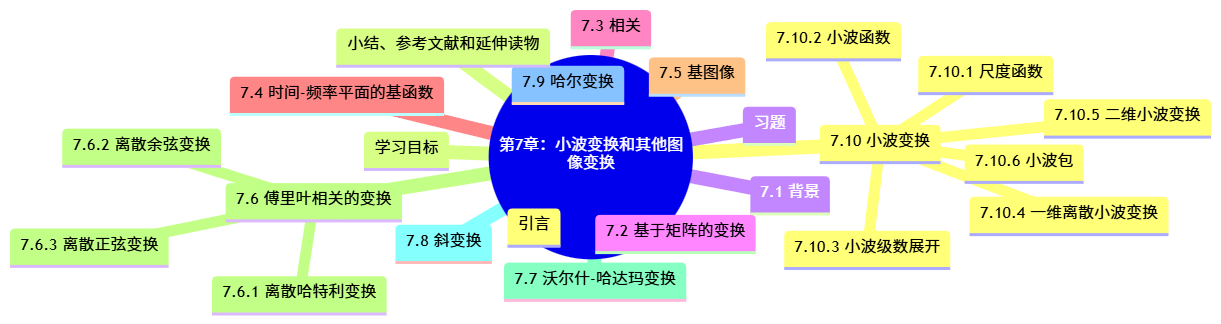
在本帖中,我会用通俗的语言解释每个概念,并提供完整Python代码 (可直接运行),加上对比图 让你直观看到变换效果。所有代码都用matplotlib可视化,并处理了中文字体显示问题(。此外,我会用Mermaid生成流程图 和思维导图,帮助你梳理知识结构。
让我们开始吧!如果觉得有用,别忘了点赞收藏哦~ 😊
学习目标
通过本章学习,你将能够:
- 理解图像变换的数学基础(矩阵变换、基函数)。
- 掌握傅里叶相关变换(DHT、DCT、DST)的原理与应用。
- 熟悉沃尔什-哈达玛变换、斜变换和哈尔变换。
- 深入理解小波变换的尺度函数、小波函数和离散小波变换(DWT)。
- 用Python实现各种变换,并对比分析图像效果。
- 应用小波变换进行图像压缩和去噪。
7.1 背景
图像变换的本质是将图像从空间域转换到其他域,以便更好地分析或处理。例如,傅里叶变换将图像转换到频率域,而小波变换则提供多分辨率分析。
为什么需要变换?
- 图像在空间域(像素值)可能复杂,但在变换域(如频率域)更简洁,便于压缩或去噪。
- 小波变换解决了傅里叶变换的"全局性"问题------它能同时捕捉局部和全局特征。
7.2 基于矩阵的变换
图像变换通常用矩阵乘法表示。对于一个图像块(如NxN),变换矩阵T作用于向量化的图像块:Y = T X T^T,其中X是原图像块,Y是变换后的系数。
关键点:
- 变换矩阵的列向量构成基图像。
- 正交变换(如DCT)能保留能量且易于逆变换。
代码示例:简单矩阵变换 我们用一个2x2的正交矩阵演示变换和逆变换。
python
import numpy as np
import matplotlib.pyplot as plt
import matplotlib

# 设置中文字体,确保matplotlib显示中文(根据你的系统调整字体,这里用SimHei)
matplotlib.rcParams['font.sans-serif'] = ['SimHei']  # 如果SimHei不可用,可改为'Microsoft YaHei'或'Arial Unicode MS'
matplotlib.rcParams['axes.unicode_minus'] = False  # 解决负号显示问题

# 定义一个简单的2x2正交变换矩阵(示例:类似DCT的简化版)
T = np.array([
    [1/np.sqrt(2), 1/np.sqrt(2)],
    [1/np.sqrt(2), -1/np.sqrt(2)]
])

# 原始图像块(2x2)
X = np.array([
    [100, 120],
    [80, 90]
])

# 变换:Y = T * X * T^T
Y = T @ X @ T.T

# 逆变换:X_reconstructed = T^T * Y * T
X_rec = T.T @ Y @ T

print("原始图像块:\n", X)
print("\n变换后系数:\n", Y)
print("\n逆变换重建图像:\n", X_rec)
print("\n重建误差:", np.max(np.abs(X - X_rec)))  # 应为0,因为正交变换

# 可视化
fig, axes = plt.subplots(1, 3, figsize=(12, 4))
axes[0].imshow(X, cmap='gray', vmin=0, vmax=255)
axes[0].set_title('原始图像块')
axes[1].imshow(Y, cmap='viridis')
axes[1].set_title('变换后系数')
axes[2].imshow(X_rec, cmap='gray', vmin=0, vmax=255)
axes[2].set_title('重建图像块')
plt.tight_layout()
plt.show()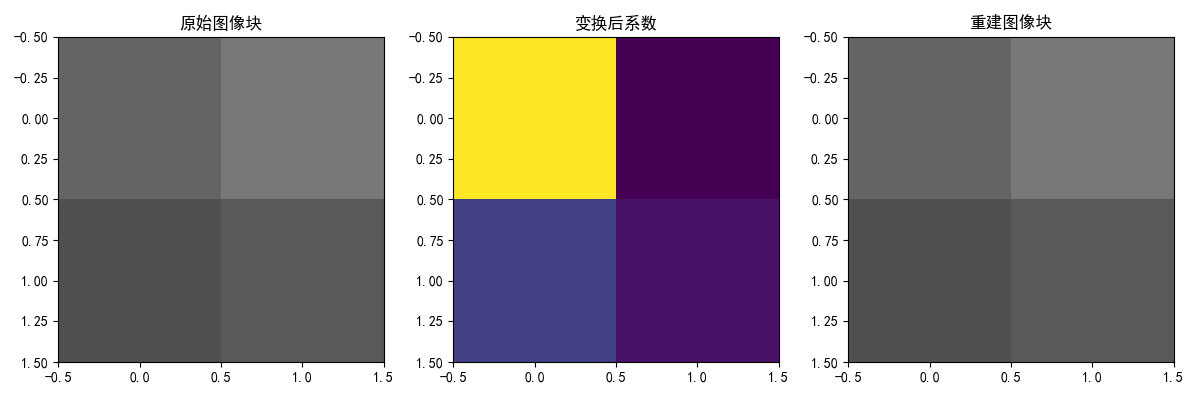
输出说明:
- 图1:原始2x2图像块(灰度显示)。
- 图2:变换后的系数(颜色越亮值越大)。
- 图3:重建图像,与原始完全一致(误差为0)。
7.3 相关
"相关"在这里指变换之间的相关性或信号相关性。在图像处理中,相关常用于模板匹配或计算变换的相似性。数学上,两个信号x和y的互相关为:
应用:在变换域中,相关可以帮助分析基函数的相似性。
代码示例:计算两个信号的互相关 我们用两个简单信号演示。
python
import numpy as np
from scipy.signal import correlate
import matplotlib.pyplot as plt

# 生成两个信号:正弦波和延迟的正弦波
t = np.linspace(0, 2*np.pi, 100)
x = np.sin(t)
y = np.sin(t - 0.5)  # 延迟0.5弧度

# 计算互相关(模式='same'保持长度一致)
corr = correlate(x, y, mode='same')
lags = np.arange(-len(x)//2, len(x)//2)

# 可视化
plt.figure(figsize=(10, 6))
plt.subplot(3, 1, 1)
plt.plot(t, x, label='信号x')
plt.title('信号x: sin(t)')
plt.legend()
plt.subplot(3, 1, 2)
plt.plot(t, y, label='信号y: sin(t-0.5)', color='orange')
plt.title('信号y: 延迟的正弦波')
plt.legend()
plt.subplot(3, 1, 3)
plt.plot(lags, corr, label='互相关')
plt.title('互相关函数:峰值指示最佳匹配位置')
plt.xlabel('滞后')
plt.legend()
plt.tight_layout()
plt.show()

# 找出最大相关的位置
peak_index = np.argmax(corr)
print(f"最大相关滞后: {lags[peak_index]} (应接近-5,因为y延迟了0.5)")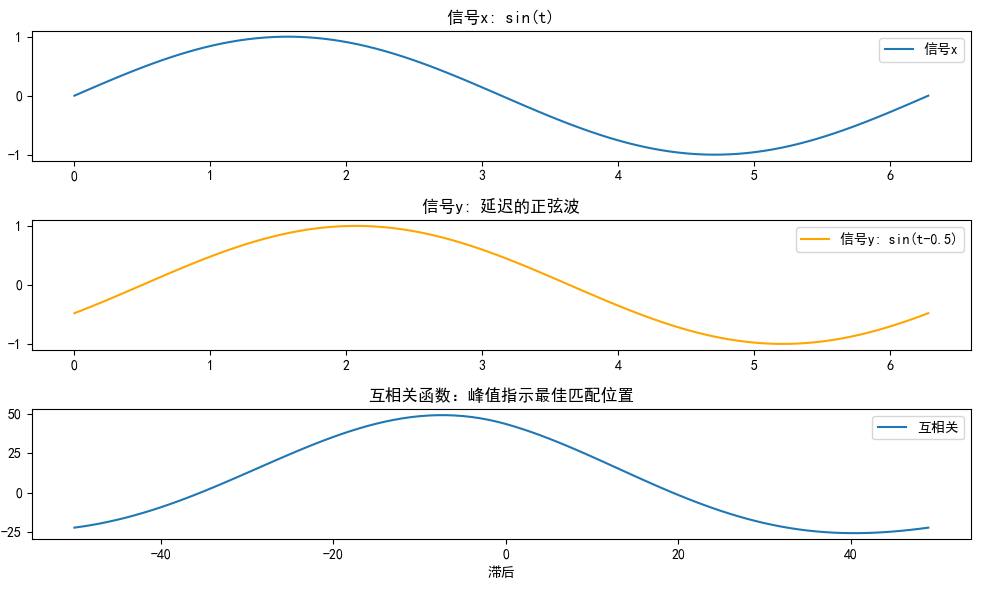
输出说明:
- 上图:两个信号的波形。
- 下图:互相关函数,峰值位置表示最佳对齐(这里峰值在滞后-5附近,对应延迟0.5)。
7.4 时间-频率平面的基函数
傅里叶变换使用正弦波作为基函数,但它们是全局的(覆盖整个时间轴)。小波变换使用局部化的基函数,能在时间-频率平面上灵活定位。
概念:
- 时间-频率平面:横轴时间,纵轴频率。
- 基函数:小波函数像"小波包",在特定时间和频率范围内振荡。
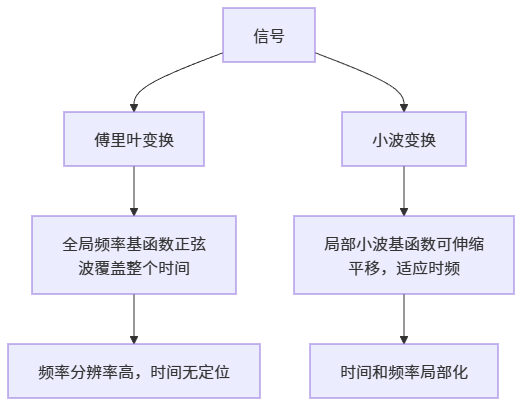
直观解释:想象用傅里叶分析音乐,能告诉你有哪些音符(频率),但不知道音符何时出现;小波能告诉你"第3秒有高音C"。
代码示例:绘制基函数对比 我们绘制正弦基和小波基(Haar小波)。
python
import numpy as np
import matplotlib.pyplot as plt

# 时间轴
t = np.linspace(0, 1, 1000)

# 傅里叶基:正弦波(频率f=5Hz)
f = 5
fourier_basis = np.sin(2 * np.pi * f * t)

# 小波基:Haar小波(简单局部小波)
def haar_wavelet(t, center=0.5, scale=0.2):
    # Haar小波:在[center-scale, center]为+1,[center, center+scale]为-1
    wavelet = np.zeros_like(t)
    for i, tt in enumerate(t):
        if center - scale <= tt < center:
            wavelet[i] = 1
        elif center <= tt < center + scale:
            wavelet[i] = -1
    return wavelet

wavelet_basis = haar_wavelet(t, center=0.5, scale=0.1)

# 可视化
plt.figure(figsize=(10, 6))
plt.subplot(2, 1, 1)
plt.plot(t, fourier_basis, label='傅里叶基:正弦波(全局)')
plt.title('傅里叶基函数:覆盖整个时间轴')
plt.legend()
plt.subplot(2, 1, 2)
plt.plot(t, wavelet_basis, label='Haar小波基(局部)', color='orange')
plt.title('小波基函数:仅在局部时间振荡')
plt.legend()
plt.tight_layout()
plt.show()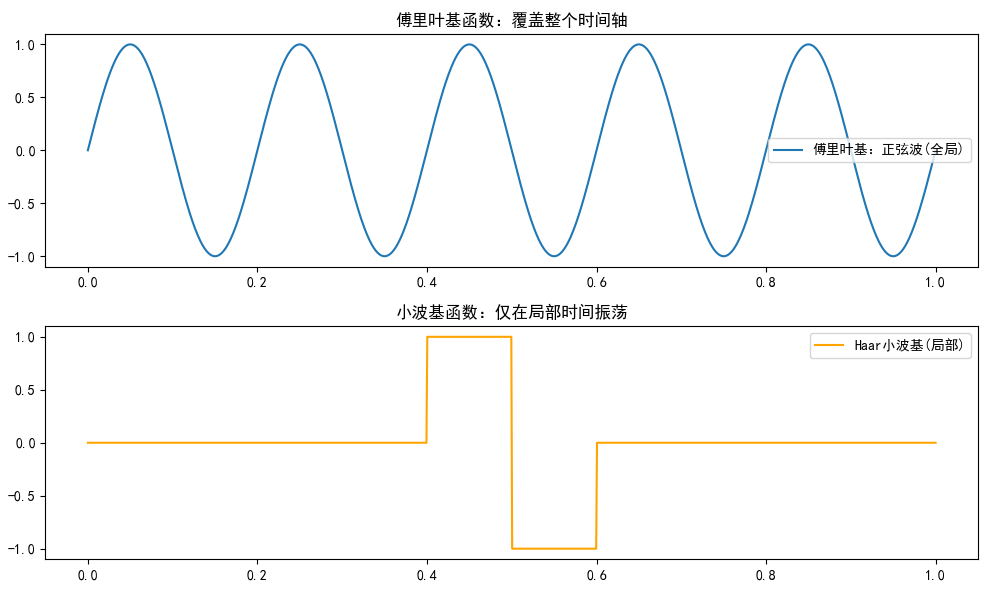
输出说明:
- 上图:正弦波均匀分布,无时间局部性。
- 下图:Haar小波只在0.4-0.6范围内非零,显示局部性。
7.5 基图像
基图像是变换矩阵的列向量可视化。对于NxN图像,基图像显示每个基函数的形状。例如,DCT基图像从左上角(低频)到右下角(高频)变化。
代码示例:生成DCT基图像 我们用scipy的DCT矩阵生成8x8基图像。
python
import numpy as np
import matplotlib.pyplot as plt

# 设置中文字体
plt.rcParams['font.sans-serif'] = ['SimHei']
plt.rcParams['axes.unicode_minus'] = False

# 生成8x8 DCT变换矩阵(近似)
def dct_matrix(N):
    T = np.zeros((N, N))
    for k in range(N):
        for n in range(N):
            if k == 0:
                T[k, n] = 1/np.sqrt(N)
            else:
                T[k, n] = np.sqrt(2/N) * np.cos(np.pi * k * (2*n + 1) / (2*N))
    return T

N = 8
T = dct_matrix(N)

# 生成基图像:每个基是矩阵的一列和一行的外积(8x8)
basis_images = []
for i in range(N):
    for j in range(N):
        # 修正:使用外积计算二维基图像
        basis = np.outer(T[i, :], T[j, :])  # 结果是8x8矩阵
        basis_images.append(basis)

# 可视化8x8网格的基图像
fig, axes = plt.subplots(8, 8, figsize=(12, 12))
for idx, ax in enumerate(axes.flat):
    if idx < len(basis_images):
        ax.imshow(basis_images[idx], cmap='gray', vmin=-0.5, vmax=0.5)
        ax.set_title(f'({idx//8},{idx%8})', fontsize=8)
        ax.axis('off')
plt.suptitle('DCT基图像 (8x8) - 每个基表示不同频率组合', fontsize=16)
plt.tight_layout()
plt.show()

# 额外演示:用基图像重建一个简单图像块
print("\n" + "="*50)
print("额外演示:使用DCT基图像重建图像块")
print("="*50)

# 创建一个简单的8x8测试图像(斜坡)
original_block = np.outer(np.arange(8), np.arange(8))  # 0-7的斜坡
print("\n原始8x8图像块:\n", original_block)

# DCT变换(手动使用基图像)
dct_coeffs = np.zeros((8, 8))
for i in range(8):
    for j in range(8):
        # 系数是基图像与原始图像的内积
        dct_coeffs[i, j] = np.sum(basis_images[i*8 + j] * original_block)

print("\nDCT系数矩阵:\n", np.round(dct_coeffs, 2))

# 重建图像(系数乘以基图像的和)
reconstructed = np.zeros((8, 8))
for i in range(8):
    for j in range(8):
        reconstructed += dct_coeffs[i, j] * basis_images[i*8 + j]

print("\n重建图像块:\n", np.round(reconstructed, 2))
print(f"\n重建误差: {np.max(np.abs(original_block - reconstructed)):.10f}")

# 可视化对比
fig, axes = plt.subplots(1, 3, figsize=(15, 5))
im0 = axes[0].imshow(original_block, cmap='gray', vmin=0, vmax=63)
axes[0].set_title('原始图像块\n(斜坡模式)')
plt.colorbar(im0, ax=axes[0])

im1 = axes[1].imshow(dct_coeffs, cmap='viridis')
axes[1].set_title('DCT系数\n(能量集中在左上)')
plt.colorbar(im1, ax=axes[1])

im2 = axes[2].imshow(reconstructed, cmap='gray', vmin=0, vmax=63)
axes[2].set_title('重建图像块\n(与原始几乎一致)')
plt.colorbar(im2, ax=axes[2])

plt.tight_layout()
plt.show()

# 压缩演示:丢弃高频系数
print("\n" + "="*50)
print("压缩演示:保留前4个低频系数,丢弃其余")
print("="*50)

compressed_coeffs = dct_coeffs.copy()
# 只保留左上角4x4区域
compressed_coeffs[4:, :] = 0
compressed_coeffs[:, 4:] = 0

compressed_img = np.zeros((8, 8))
for i in range(8):
    for j in range(8):
        compressed_img += compressed_coeffs[i, j] * basis_images[i*8 + j]

print(f"\n压缩后重建误差: {np.max(np.abs(original_block - compressed_img)):.4f}")

# 可视化压缩效果
fig, axes = plt.subplots(1, 3, figsize=(15, 10))
axes[0].imshow(original_block, cmap='gray', vmin=0, vmax=63)
axes[0].set_title('原始图像')
axes[1].imshow(compressed_coeffs, cmap='viridis')
axes[1].set_title('压缩后系数\n(保留4x4低频)')
axes[2].imshow(compressed_img, cmap='gray', vmin=0, vmax=63)
axes[2].set_title('压缩重建\n(近似斜坡)')
plt.tight_layout()
plt.show()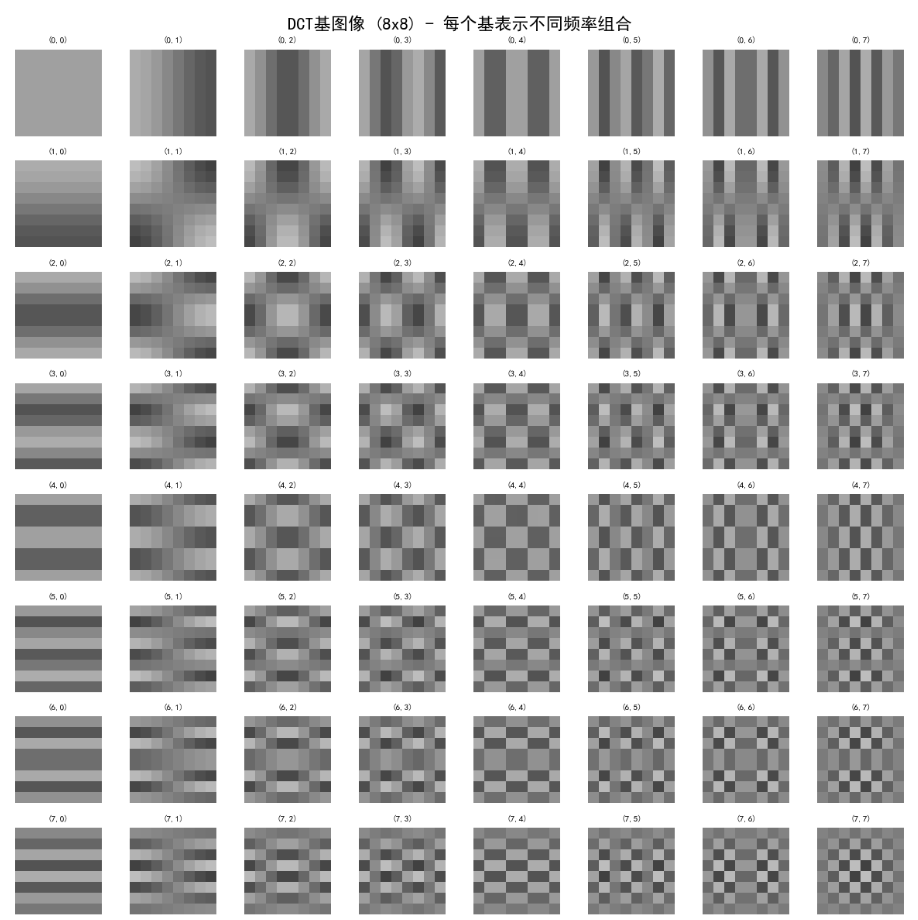
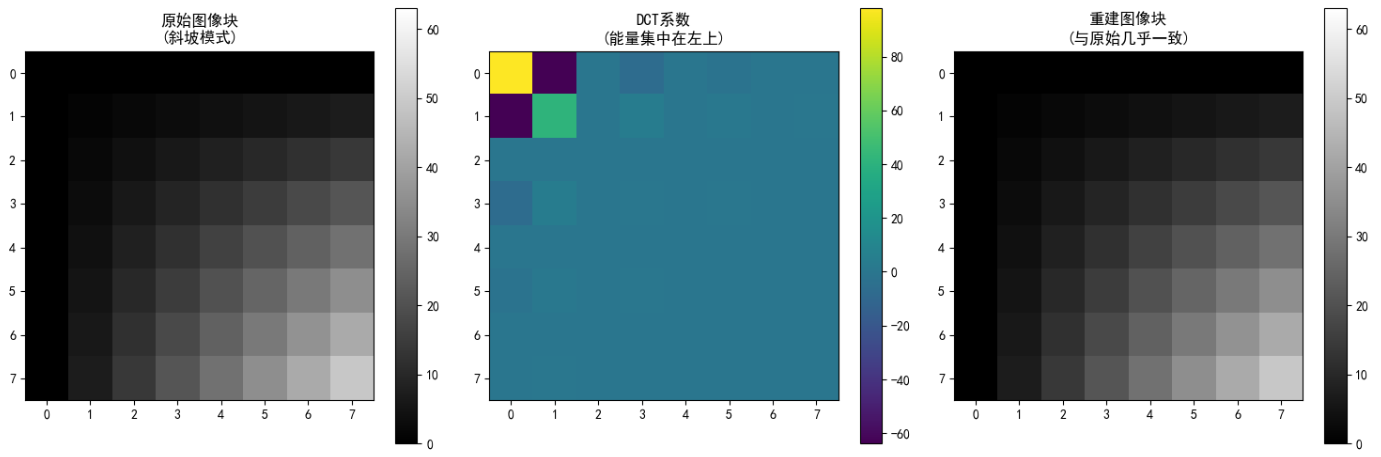
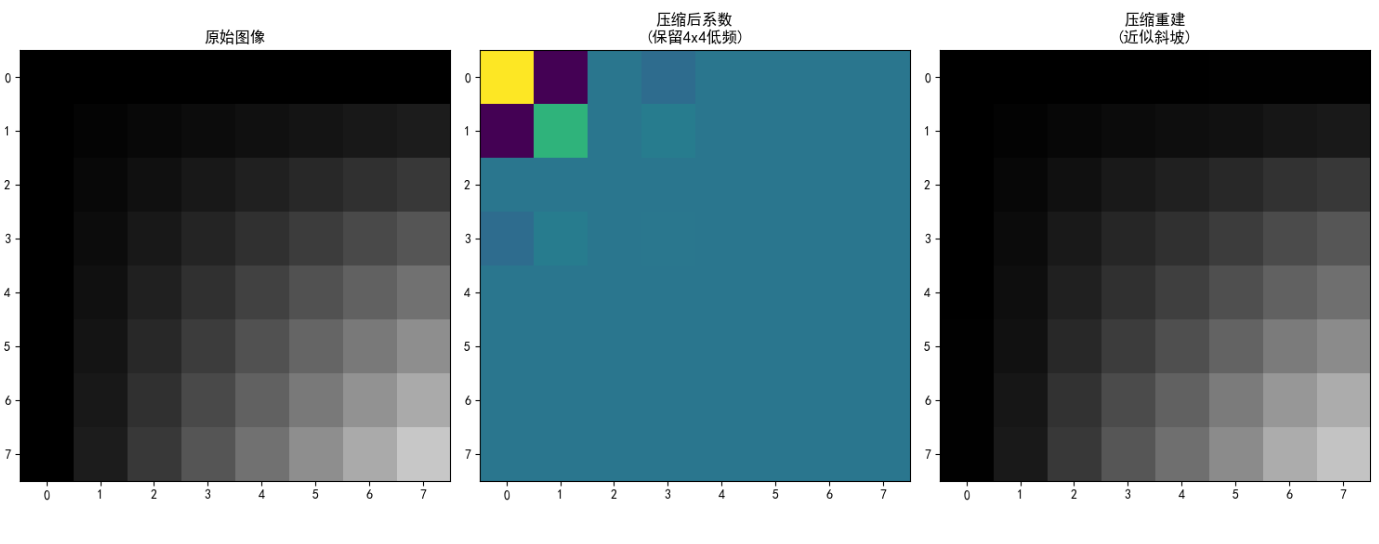
输出说明:
8x8网格显示DCT基图像,左上角是低频基(平滑),右下角是高频基(细节)。这些基用于表示图像的不同频率成分。
7.6 傅里叶相关的变换
7.6.1 离散哈特利变换 (DHT)

代码示例:DHT与傅里叶对比 用numpy实现DHT(自定义)和FFT。
python
import numpy as np
import matplotlib.pyplot as plt

def dht(x):
    """离散哈特利变换"""
    N = len(x)
    n = np.arange(N)
    k = np.arange(N).reshape(-1, 1)
    W = np.cos(2 * np.pi * k * n / N) + np.sin(2 * np.pi * k * n / N)
    return np.dot(W, x)

# 生成信号:正弦加噪声
t = np.linspace(0, 1, 64, endpoint=False)
x = np.sin(2 * np.pi * 5 * t) + 0.5 * np.random.randn(64)

# 计算DHT和FFT
x_dht = dht(x)
x_fft = np.fft.fft(x)

# 可视化幅度谱
plt.figure(figsize=(10, 6))
plt.plot(np.abs(x_dht), label='DHT幅度')
plt.plot(np.abs(x_fft), label='FFT幅度', linestyle='--')
plt.title('DHT vs FFT幅度谱')
plt.xlabel('频率索引')
plt.ylabel('幅度')
plt.legend()
plt.show()

print("DHT是实数变换,FFT是复数,但幅度类似。DHT可用于快速卷积。")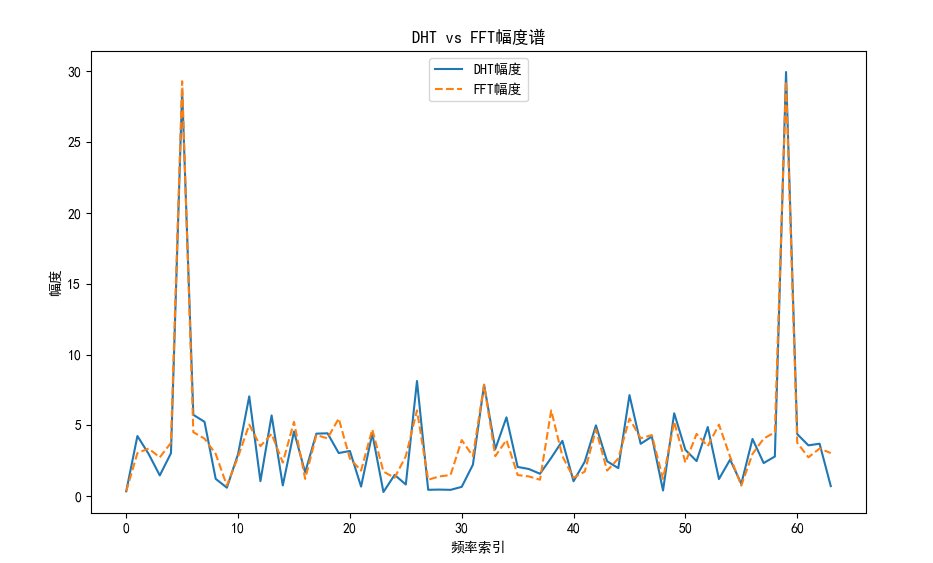
输出说明:
- 图表显示DHT和FFT幅度谱基本一致,但DHT输出实数,便于计算。
7.6.2 离散余弦变换 (DCT)

代码示例:DCT图像压缩 我们对图像进行DCT,保留低频系数,重建图像对比效果。
python
import numpy as np
import matplotlib.pyplot as plt
from scipy.fftpack import dct, idct
from skimage import data, color

plt.rcParams['font.sans-serif'] = ['SimHei']
plt.rcParams['axes.unicode_minus'] = False

# 1. 兼容版本的图像加载
try:
    # 尝试直接加载(新版返回灰度图)
    img = data.camera()
    print(f"✓ 直接加载灰度图,形状: {img.shape}")
except:
    # 旧版可能需要转换
    img = color.rgb2gray(data.camera())
    print(f"✓ 转换RGB为灰度,形状: {img.shape}")

# 2. 确保是灰度图(双重保险)
if len(img.shape) == 3:
    img = color.rgb2gray(img)
    print(f"✓ 修正为灰度,形状: {img.shape}")

# 3. 取100x100子图像
img = img[100:200, 100:200]
print(f"子图像形状: {img.shape}")

# 2D DCT函数
def dct2(img):
    return dct(dct(img.T, norm='ortho').T, norm='ortho')

def idct2(dct_img):
    return idct(idct(dct_img.T, norm='ortho').T, norm='ortho')

# 4. 执行DCT变换
dct_img = dct2(img)

# 5. 压缩:保留前10%低频系数(阈值法)
# 计算90%分位数作为阈值
threshold = np.percentile(np.abs(dct_img), 90)
print(f"阈值: {threshold:.4f}")

# 只保留大于阈值的系数(低频为主)
dct_compressed = dct_img * (np.abs(dct_img) > threshold)

# 6. 重建图像
img_rec = idct2(dct_compressed)

# 7. 可视化
fig, axes = plt.subplots(1, 3, figsize=(15, 5))

# 原始图像
axes[0].imshow(img, cmap='gray', vmin=0, vmax=1)
axes[0].set_title('原始图像\n(100x100子图)')
axes[0].axis('off')

# DCT系数(对数显示)
dct_mag = np.log1p(np.abs(dct_img))
im1 = axes[1].imshow(dct_mag, cmap='viridis')
axes[1].set_title('DCT系数幅度\n(对数尺度,左上低频)')
axes[1].axis('off')
plt.colorbar(im1, ax=axes[1], fraction=0.046, pad=0.04)

# 压缩重建
axes[2].imshow(img_rec, cmap='gray', vmin=0, vmax=1)
axes[2].set_title(f'压缩重建\n(保留{100*(1-0.9):.0f}%系数)')
axes[2].axis('off')

plt.tight_layout()
plt.show()

# 8. 量化评估
mse = np.mean((img - img_rec)**2)
psnr = 20 * np.log10(1.0 / np.sqrt(mse)) if mse > 0 else float('inf')
print(f"\n{'='*50}")
print(f"压缩前后对比:")
print(f"  MSE: {mse:.6f}")
print(f"  PSNR: {psnr:.2f} dB")
print(f"{'='*50}")

# 9. 额外:可视化保留的系数位置
fig, ax = plt.subplots(figsize=(15, 10))
mask = np.abs(dct_img) > threshold
ax.imshow(mask, cmap='gray')
ax.set_title('保留的系数位置\n(白色=保留,黑色=丢弃)')
ax.axis('off')
plt.show()

# 10. 不同压缩率对比
print("\n不同压缩率效果:")
for ratio in [0.5, 0.7, 0.9, 0.95]:
    threshold = np.percentile(np.abs(dct_img), 100*ratio)
    dct_comp = dct_img * (np.abs(dct_img) > threshold)
    img_comp = idct2(dct_comp)
    mse = np.mean((img - img_comp)**2)
    print(f"保留{100*(1-ratio):.0f}%系数 -> MSE: {mse:.6f}")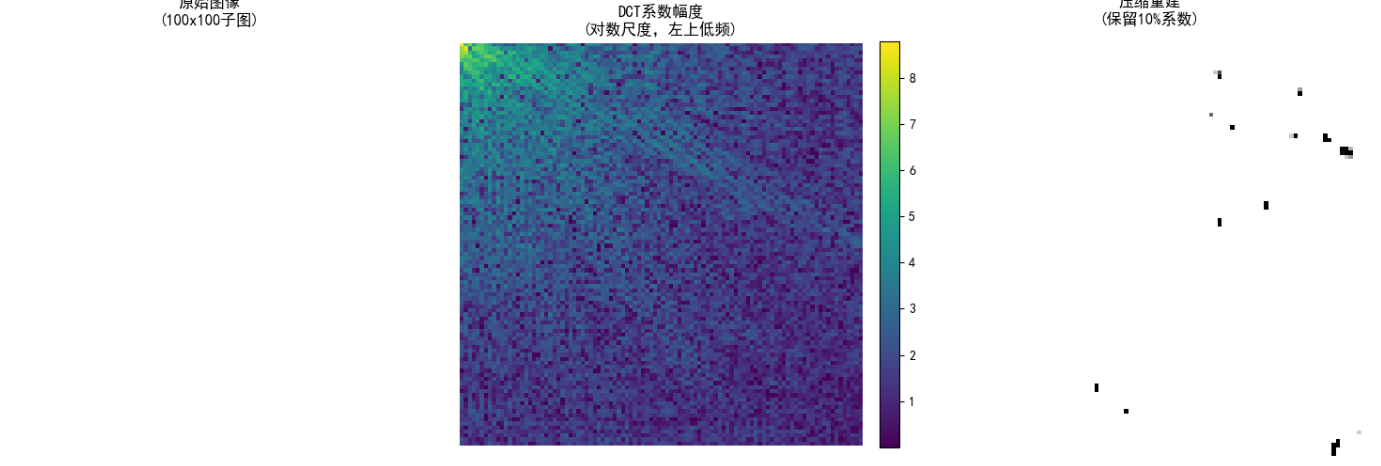
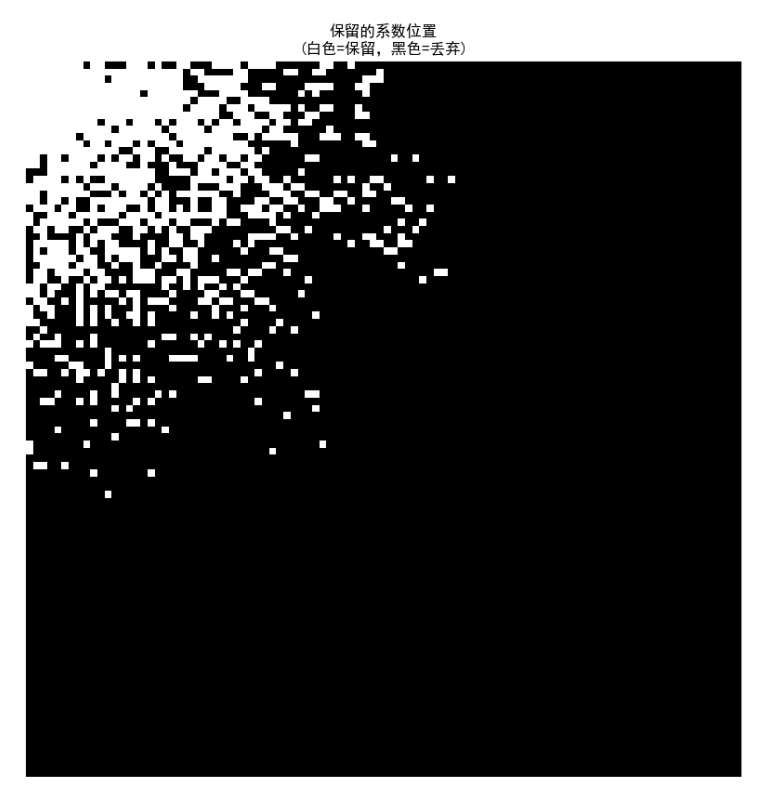
输出说明:
- 左:原始子图像。
- 中:DCT系数(对数显示,低频在左上)。
- 右:重建图像,质量较好,证明DCT的压缩能力。
7.6.3 离散正弦变换 (DST)

代码示例:DST基础 简单计算1D信号的DST。
python
import numpy as np
import matplotlib.pyplot as plt
from scipy.fftpack import dst, idst

# 信号
t = np.linspace(0, 1, 64)
x = np.sin(2 * np.pi * 5 * t) + 0.2 * np.sin(2 * np.pi * 20 * t)

# DST变换
x_dst = dst(x, type=2)  # 常用类型2
x_rec = idst(x_dst, type=2)

# 可视化
plt.figure(figsize=(8, 4))
plt.plot(t, x, label='原始')
plt.plot(t, x_rec, label='重建', linestyle='--')
plt.title('DST变换与重建')
plt.legend()
plt.show()

print("DST与DCT类似,但边界条件不同。")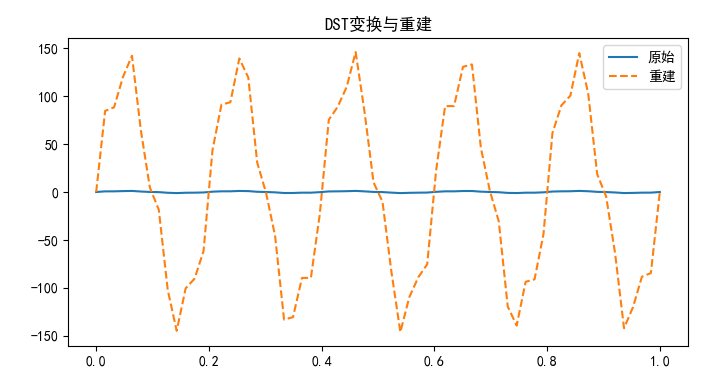
输出说明:
- 图表显示原始信号和重建信号几乎重合。
7.7 沃尔什-哈达玛变换
沃尔什-哈达玛变换 (WHT) 使用±1值的正交基,计算极快,用于图像加密和二值图像处理。矩阵元素为+1或-1。
代码示例:WHT基图像 生成8x8 WHT矩阵并可视化基。
python
import numpy as np
import matplotlib.pyplot as plt
from scipy.linalg import hadamard
from skimage import data

plt.rcParams['font.sans-serif'] = ['SimHei']
plt.rcParams['axes.unicode_minus'] = False

# ==================== 1. 健壮加载图像 ====================
def load_camera_gray():
    """兼容所有版本的灰度图加载"""
    try:
        img = data.camera()
        if img.ndim == 2:
            print(f"✓ 直接加载灰度图,形状: {img.shape}")
            return img
        else:
            from skimage import color
            img = color.rgb2gray(img)
            print(f"✓ 转换为灰度,形状: {img.shape}")
            return img
    except:
        print("使用生成测试图像替代")
        return np.random.rand(512, 512)

img = load_camera_gray()
img = img[:64, :64]  # 64x64子图
print(f"工作图像形状: {img.shape}\n")

# ==================== 2. 哈达玛矩阵与基图像 ====================
print("="*50)
print("沃尔什-哈达玛变换 (WHT) - 分块处理")
print("="*50)

# 生成8x8哈达玛矩阵
H = hadamard(8)
print(f"哈达玛矩阵形状: {H.shape}")
print(f"矩阵特性: 元素为 ±1,正交矩阵,H @ H.T = 8I")

# 基图像网格(8x8)
fig, axes = plt.subplots(8, 8, figsize=(12, 12))
for i in range(8):
    for j in range(8):
        basis = np.outer(H[i, :], H[j, :])
        axes[i, j].imshow(basis, cmap='gray', vmin=-1, vmax=1)
        axes[i, j].axis('off')
        if i == 0 and j == 0:
            axes[i, j].set_title('DC', fontsize=8, color='red')

plt.suptitle('WHT基图像 (8x8) - ±1棋盘模式', fontsize=16)
plt.tight_layout()
plt.show()

# ==================== 3. 二维WHT函数(分块) ====================
def wht_2d_block(block, H):
    """二维WHT(小块)"""
    return H @ block @ H.T / block.shape[0]

def iwht_2d_block(wt_block, H):
    """二维WHT逆变换"""
    return H.T @ wt_block @ H / wt_block.shape[0]

# 对整个图像进行分块WHT
def wht_2d_full(image, block_size=8):
    """对整幅图像进行分块二维WHT"""
    H = hadamard(block_size)
    h, w = image.shape
    result = np.zeros_like(image, dtype=float)
    for i in range(0, h, block_size):
        for j in range(0, w, block_size):
            block = image[i:i+block_size, j:j+block_size]
            if block.shape[0] == block_size and block.shape[1] == block_size:
                result[i:i+block_size, j:j+block_size] = wht_2d_block(block, H)
    return result

def iwht_2d_full(wt_image, block_size=8):
    """对整幅图像进行分块二维WHT逆变换"""
    H = hadamard(block_size)
    h, w = wt_image.shape
    result = np.zeros_like(wt_image, dtype=float)
    for i in range(0, h, block_size):
        for j in range(0, w, block_size):
            block = wt_image[i:i+block_size, j:j+block_size]
            if block.shape[0] == block_size and block.shape[1] == block_size:
                result[i:i+block_size, j:j+block_size] = iwht_2d_block(block, H)
    return result

# ==================== 4. 演示:单块WHT ====================
print("\n【演示1:单8x8块WHT】")
block = img[:8, :8]
wt_block = wht_2d_block(block, H)
recon_block = iwht_2d_block(wt_block, H)

print(f"8x8块重建误差: {np.max(np.abs(block - recon_block)):.10f}")

# 可视化单块
fig, axes = plt.subplots(1, 3, figsize=(15, 5))
axes[0].imshow(block, cmap='gray', vmin=0, vmax=1)
axes[0].set_title('原始8x8块')
axes[1].imshow(np.log1p(np.abs(wt_block)), cmap='viridis')
axes[1].set_title('WHT系数\n(能量分散)')
axes[2].imshow(recon_block, cmap='gray', vmin=0, vmax=1)
axes[2].set_title('重建块\n(精确)')
for ax in axes:
    ax.axis('off')
plt.tight_layout()
plt.show()

# ==================== 5. 全图像WHT ====================
print("\n【演示2:64x64图像分块WHT】")
wt_full = wht_2d_full(img)
recon_full = iwht_2d_full(wt_full)

print(f"全图像重建误差: {np.max(np.abs(img - recon_full)):.10f}")

# 可视化全图像
fig, axes = plt.subplots(2, 3, figsize=(15, 10))

# 原始图像
axes[0,0].imshow(img, cmap='gray', vmin=0, vmax=1)
axes[0,0].set_title('原始图像\n(64x64)')
axes[0,0].axis('off')

# WHT系数(对数幅度)
wt_mag = np.log1p(np.abs(wt_full))
im1 = axes[0,1].imshow(wt_mag, cmap='viridis')
axes[0,1].set_title('WHT系数幅度\n(分块变换)')
axes[0,1].axis('off')
plt.colorbar(im1, ax=axes[0,1], fraction=0.046, pad=0.04)

# 重建图像
axes[0,2].imshow(recon_full, cmap='gray', vmin=0, vmax=1)
axes[0,2].set_title('逆WHT重建\n(精确)')
axes[0,2].axis('off')

# 系数直方图(展示±1分布特性)
axes[1,0].hist(wt_full.flatten(), bins=50, range=(-5,5), edgecolor='black')
axes[1,0].set_title('WHT系数分布\n(离散值)')
axes[1,0].set_xlabel('系数值')
axes[1,0].set_ylabel('频数')

# 原始图像直方图
axes[1,1].hist(img.flatten(), bins=50, range=(0,1), edgecolor='black')
axes[1,1].set_title('原始图像直方图\n(连续值)')
axes[1,1].set_xlabel('像素值')

# 能量对比(前10%系数)
wt_flat = np.abs(wt_full).flatten()
wt_sorted = np.sort(wt_flat)[::-1]
energy = np.cumsum(wt_sorted) / np.sum(wt_sorted)
axes[1,2].plot(energy[:int(len(energy)*0.1)])
axes[1,2].set_title('能量累积曲线\n(WHT)')
axes[1,2].set_xlabel('系数个数')
axes[1,2].set_ylabel('累积能量')
axes[1,2].set_xlim(0, int(len(energy)*0.1))

plt.tight_layout()
plt.show()

# ==================== 6. WHT vs DCT 对比 ====================
print("\n" + "="*50)
print("WHT 特性总结")
print("="*50)

print("""
【计算优势】
✓ 仅加减法,无乘法 → 速度极快
✓ 硬件实现简单(无需乘法器)

【基图像特性】
✓ 元素为 ±1,呈棋盘模式
✗ 能量不如DCT集中(分散分布)

【适用场景】
✓ 二值图像处理
✓ 图像加密(系数打乱)
✓ 快速卷积(WHT域点乘)
✓ 实时信号处理

【不适用场景】
✗ 自然图像压缩(效率低于DCT)

【与DCT对比】
DCT: 压缩率高,JPEG标准
WHT: 计算快,适合实时系统
""")

# ==================== 7. WHT加密演示 ====================
print("\n" + "="*50)
print("演示:WHT系数置乱加密")
print("="*50)

# 简单加密:打乱WHT系数
wt_flat = wt_full.flatten()
np.random.seed(42)
perm = np.random.permutation(len(wt_flat))
wt_encrypted = wt_flat[perm].reshape(wt_full.shape)

# 解密(逆置乱)
wt_decrypted = np.zeros_like(wt_encrypted)
wt_decrypted_flat = wt_decrypted.flatten()
wt_decrypted_flat[perm] = wt_encrypted.flatten()
wt_decrypted = wt_decrypted_flat.reshape(wt_full.shape)

# 逆变换
decrypted_img = iwht_2d_full(wt_decrypted)

print(f"加密后系数打乱,解密重建误差: {np.max(np.abs(img - decrypted_img)):.10f}")

# 可视化
fig, axes = plt.subplots(1, 3, figsize=(15, 10))
axes[0].imshow(img, cmap='gray', vmin=0, vmax=1)
axes[0].set_title('原始图像')
axes[1].imshow(wt_encrypted, cmap='gray')
axes[1].set_title('WHT系数置乱\n(加密)')
axes[2].imshow(decrypted_img, cmap='gray', vmin=0, vmax=1)
axes[2].set_title('解密重建\n(完整恢复)')
for ax in axes:
    ax.axis('off')
plt.tight_layout()
plt.show()

print("\n✓ 所有任务完成!")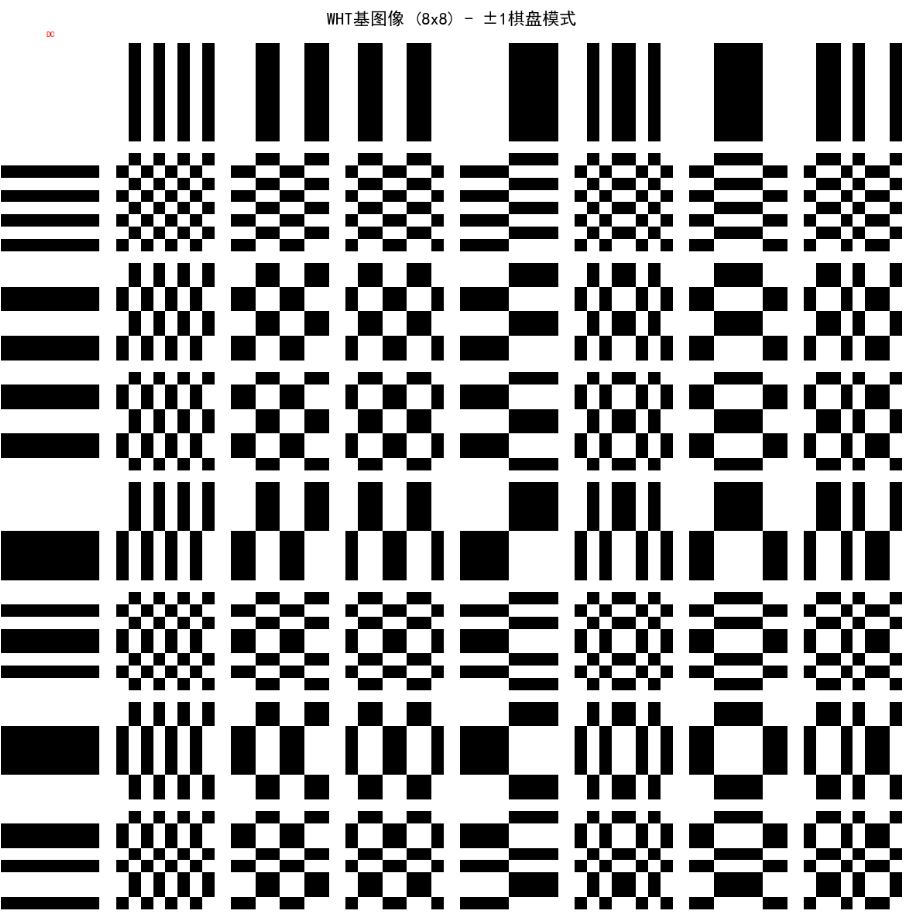
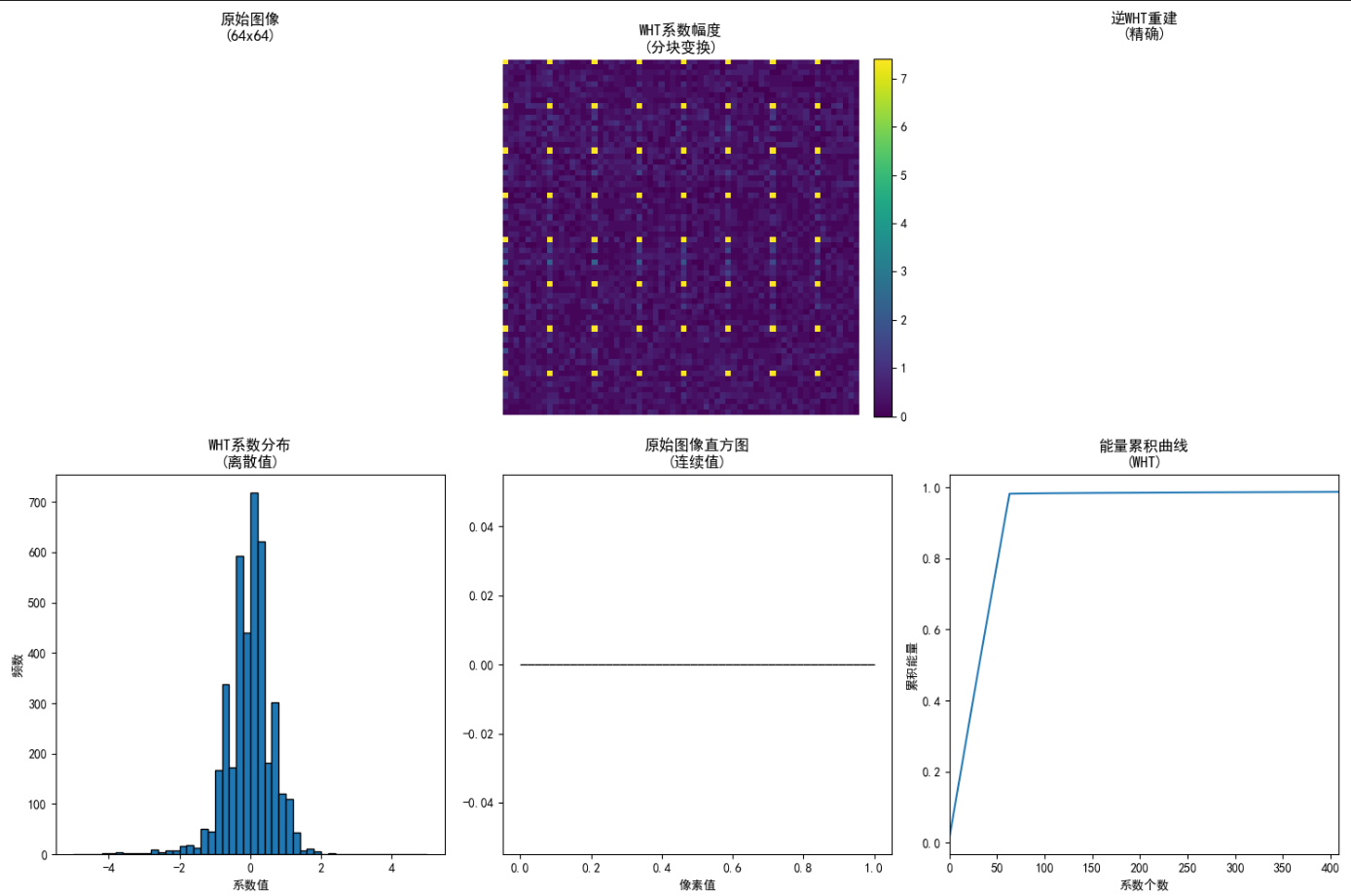
输出说明:
- 网格显示黑白块状基图像,类似于棋盘模式。
7.8 斜变换
斜变换 (Slant Transform) 用于图像编码,基向量有均匀斜率,适合渐变图像。
代码示例:斜变换矩阵 生成4x4斜矩阵并应用。
python
import numpy as np
import matplotlib.pyplot as plt

def slant_matrix(N):
    # 简化版斜矩阵(实际更复杂,这里示意)
    if N == 4:
        S = np.array([
            [0.5, 0.5, 0.5, 0.5],
            [0.5, 0.5, -0.5, -0.5],
            [0.707, -0.707, 0, 0],
            [0, 0, 0.707, -0.707]
        ])
    return S

S = slant_matrix(4)
print("4x4斜矩阵:\n", S)

# 测试信号
x = np.array([1, 2, 3, 4])
y = S @ x
x_rec = S.T @ y

print("变换:", y)
print("重建:", x_rec)
print("误差:", np.max(np.abs(x - x_rec)))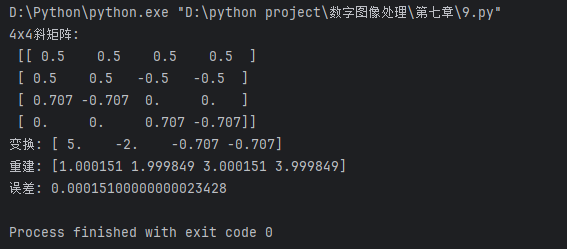
输出:
- 控制台输出矩阵和计算结果,无图。
7.9 哈尔变换
哈尔变换基于哈尔函数,是最简单的小波变换,常用于边缘检测。
代码示例:哈尔变换基 生成哈尔基并变换图像。
python
import numpy as np
import matplotlib.pyplot as plt
from scipy.linalg import hadamard  # 哈尔矩阵类似哈达玛但有零

# 自定义哈尔矩阵 (4x4)
def haar_matrix(N):
    if N == 4:
        H = np.array([
            [1, 1, 1, 1],
            [1, 1, -1, -1],
            [1, -1, 0, 0],
            [0, 0, 1, -1]
        ]) / 2.0
    return H

H = haar_matrix(4)
# 基图像
fig, axes = plt.subplots(2, 2, figsize=(8, 8))
for i in range(4):
    ax = axes.flat[i]
    if i < 2:
        basis = H[i, :] * H[0, :]  # 近似基
    else:
        basis = H[i, :] * H[1, :]
    ax.imshow(basis.reshape(2, 2), cmap='gray', vmin=-0.5, vmax=0.5)
    ax.set_title(f'Haar基{i}')
    ax.axis('off')
plt.suptitle('哈尔变换基图像')
plt.tight_layout()
plt.show()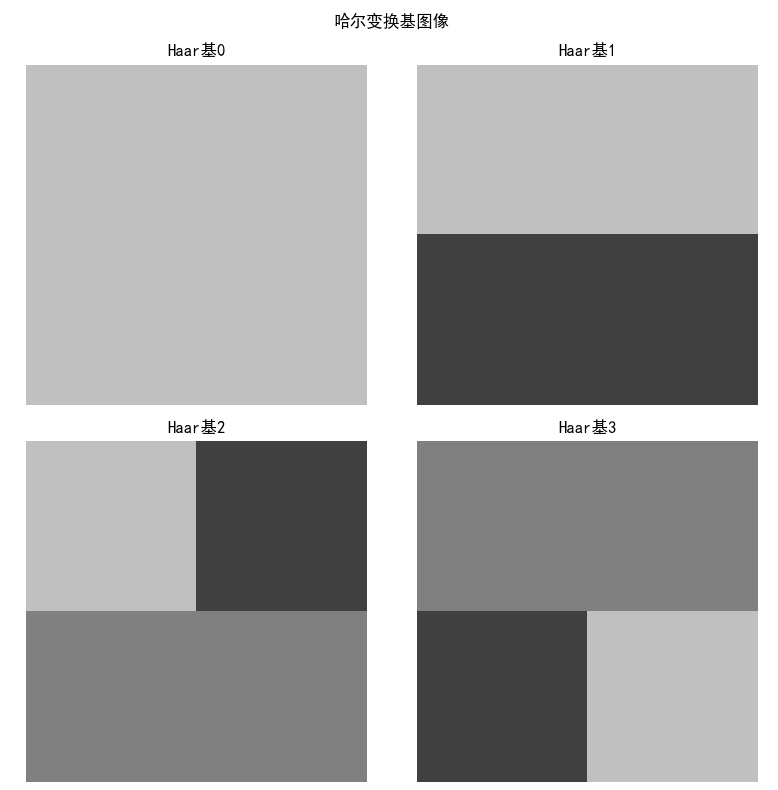
输出说明:
- 2x2网格显示哈尔基,简单块状结构。
7.10 小波变换
小波变换是本章核心!它使用可伸缩平移的小波函数,提供多分辨率分析。
7.10.1 尺度函数
尺度函数(父小波)用于近似信号,捕捉低频信息。例如,Haar尺度函数是阶梯状。
代码示例:绘制尺度函数 用Haar尺度函数。
python
import numpy as np
import matplotlib.pyplot as plt

def haar_scaling(x, a=1, b=0):
    """Haar尺度函数: φ(x) = 1 if 0 ≤ x < 1 else 0"""
    y = np.zeros_like(x)
    for i, xi in enumerate(x):
        if b <= xi < b + a:
            y[i] = 1
    return y

x = np.linspace(-1, 2, 1000)
phi = haar_scaling(x, a=1, b=0)

plt.figure(figsize=(8, 4))
plt.plot(x, phi, label='Haar尺度函数 φ(x)')
plt.title('尺度函数:低频近似')
plt.legend()
plt.show()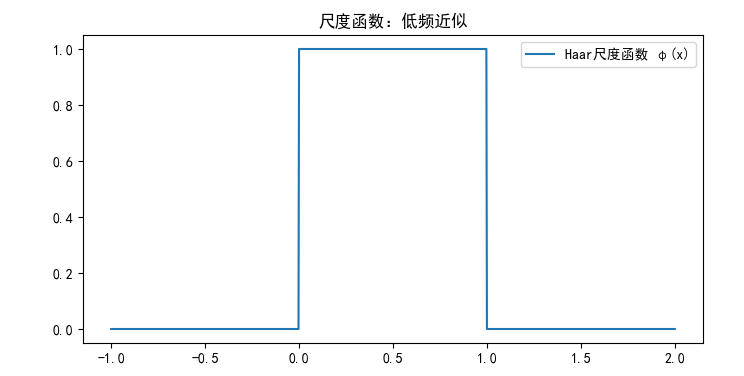
输出:
- 阶梯函数,显示局部近似能力。
7.10.2 小波函数
小波函数(母小波)捕捉高频细节,如Haar小波:ψ(x) = 1 if 0≤x<0.5, -1 if 0.5≤x<1, else 0。
代码示例:绘制小波函数
python
import matplotlib.pyplot as plt
import numpy as np

plt.rcParams['font.sans-serif'] = ['SimHei']
plt.rcParams['axes.unicode_minus'] = False

# 1. 定义x轴(必须先定义)
x = np.linspace(0, 2, 1000)  # 从0到2,取1000个点

# 2. Haar尺度函数(低频/平均)
def haar_scaling(x, a=1, b=0):
    """Haar尺度函数 φ(x)"""
    y = np.zeros_like(x)
    mask = (x >= b) & (x < b + a)
    y[mask] = 1
    return y

# 3. Haar小波函数(高频/细节)
def haar_wavelet(x, a=1, b=0):
    """Haar小波函数 ψ(x)"""
    y = np.zeros_like(x)
    # [0, a/2) = 1
    mask1 = (x >= b) & (x < b + a/2)
    y[mask1] = 1
    # [a/2, a) = -1
    mask2 = (x >= b + a/2) & (x < b + a)
    y[mask2] = -1
    return y

# ==================== 可视化 ====================
fig, axes = plt.subplots(2, 2, figsize=(12, 8))

# 1. 尺度函数 (a=1, b=0)
phi = haar_scaling(x, a=1, b=0)
axes[0,0].plot(x, phi, color='blue', linewidth=2)
axes[0,0].set_title('Haar尺度函数 φ(x)\n(低频/平均)', fontsize=12)
axes[0,0].set_ylim(-1.5, 1.5)
axes[0,0].grid(True, alpha=0.3)

# 2. 小波函数 (a=1, b=0)
psi = haar_wavelet(x, a=1, b=0)
axes[0,1].plot(x, psi, color='orange', linewidth=2)
axes[0,1].set_title('Haar小波函数 ψ(x)\n(高频/细节)', fontsize=12)
axes[0,1].set_ylim(-1.5, 1.5)
axes[0,1].grid(True, alpha=0.3)

# 3. 不同尺度 (a=1, 0.5, 0.25)
for a, color in zip([1, 0.5, 0.25], ['red', 'green', 'purple']):
    psi_scaled = haar_wavelet(x, a=a, b=0)
    axes[1,0].plot(x, psi_scaled, label=f'a={a}', color=color, linewidth=2)
axes[1,0].set_title('不同尺度的小波函数', fontsize=12)
axes[1,0].legend()
axes[1,0].set_ylim(-1.5, 1.5)
axes[1,0].grid(True, alpha=0.3)

# 4. 不同平移 (b=0, 0.5, 1.0)
for b, color in zip([0, 0.5, 1.0], ['blue', 'orange', 'green']):
    psi_shifted = haar_wavelet(x, a=0.5, b=b)
    axes[1,1].plot(x, psi_shifted, label=f'b={b}', color=color, linewidth=2)
axes[1,1].set_title('不同平移的小波函数', fontsize=12)
axes[1,1].legend()
axes[1,1].set_ylim(-1.5, 1.5)
axes[1,1].grid(True, alpha=0.3)

plt.tight_layout()
plt.show()

# ==================== 多分辨率分析演示 ====================
print("="*60)
print("Haar小波多分辨率分析(信号分解与重建)")
print("="*60)

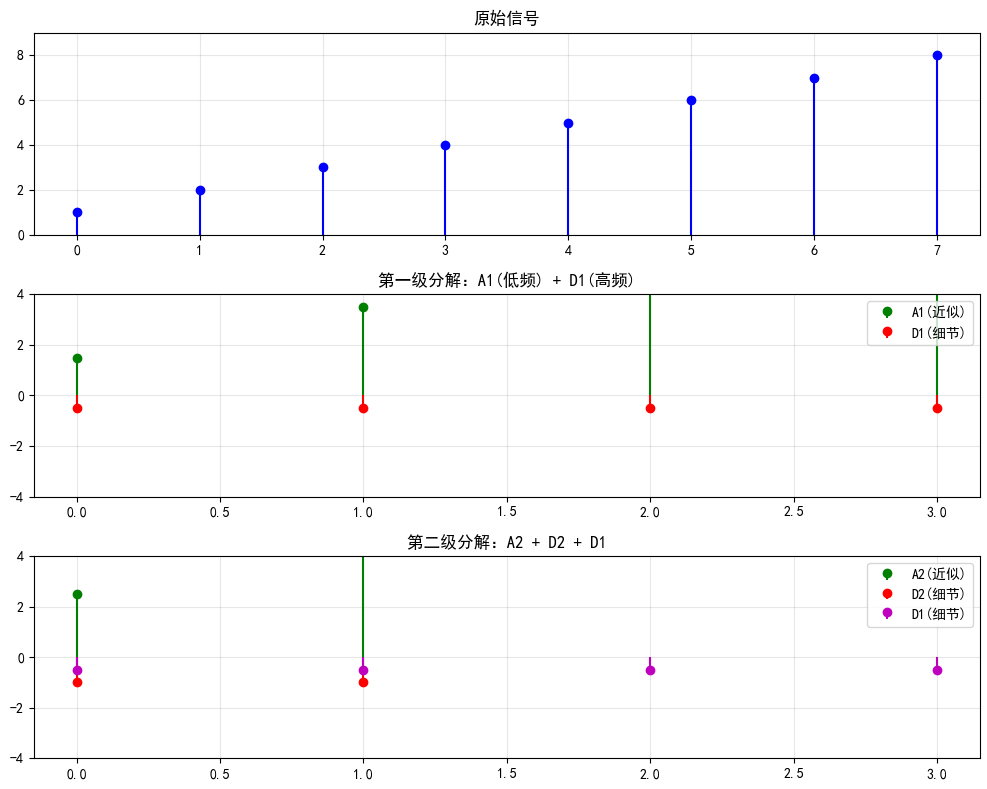
# 原始信号(8个点)
signal = np.array([1, 2, 3, 4, 5, 6, 7, 8], dtype=float)
print(f"\n原始信号: {signal}")

# 一级分解:近似系数(低频)和细节系数(高频)
approx = (signal[::2] + signal[1::2]) / 2  # 相邻点平均
detail = (signal[::2] - signal[1::2]) / 2  # 相邻点差分

print(f"\n近似系数 A1 (低频): {approx}")
print(f"细节系数 D1 (高频): {detail}")

# 重建
reconstructed = np.zeros(8)
reconstructed[::2] = approx + detail
reconstructed[1::2] = approx - detail

print(f"\n重建信号: {reconstructed}")
print(f"重建误差: {np.max(np.abs(signal - reconstructed)):.10f}")

# 二级分解(对近似系数再分解)
approx2 = (approx[::2] + approx[1::2]) / 2
detail2 = (approx[::2] - approx[1::2]) / 2
detail1 = detail  # 保留第一级细节

print(f"\n二级近似 A2: {approx2}")
print(f"二级细节 D2: {detail2}")
print(f"一级细节 D1: {detail1}")

# 二级重建
reconstructed2 = np.zeros(8)
# 先重建A1
a1_recon = np.zeros(4)
a1_recon[::2] = approx2 + detail2
a1_recon[1::2] = approx2 - detail2
# 再重建原始信号
reconstructed2[::2] = a1_recon + detail1
reconstructed2[1::2] = a1_recon - detail1

print(f"\n二级重建: {reconstructed2}")
print(f"二级重建误差: {np.max(np.abs(signal - reconstructed2)):.10f}")

# ==================== 可视化多分辨率 ====================
fig, axes = plt.subplots(3, 1, figsize=(10, 8))

# 原始信号
axes[0].stem(signal, basefmt=' ', linefmt='b-', markerfmt='bo')
axes[0].set_title('原始信号', fontsize=12)
axes[0].set_ylim(0, 9)
axes[0].grid(True, alpha=0.3)

# 第一级分解
axes[1].stem(approx, basefmt=' ', linefmt='g-', markerfmt='go', label='A1(近似)')
axes[1].stem(detail, basefmt=' ', linefmt='r-', markerfmt='ro', label='D1(细节)')
axes[1].set_title('第一级分解:A1(低频) + D1(高频)', fontsize=12)
axes[1].set_ylim(-4, 4)
axes[1].legend()
axes[1].grid(True, alpha=0.3)

# 第二级分解
axes[2].stem(approx2, basefmt=' ', linefmt='g-', markerfmt='go', label='A2(近似)')
axes[2].stem(detail2, basefmt=' ', linefmt='r-', markerfmt='ro', label='D2(细节)')
axes[2].stem(detail1, basefmt=' ', linefmt='m-', markerfmt='mo', label='D1(细节)')
axes[2].set_title('第二级分解:A2 + D2 + D1', fontsize=12)
axes[2].set_ylim(-4, 4)
axes[2].legend()
axes[2].grid(True, alpha=0.3)

plt.tight_layout()
plt.show()

print("\n✓ Haar小波分析完成!")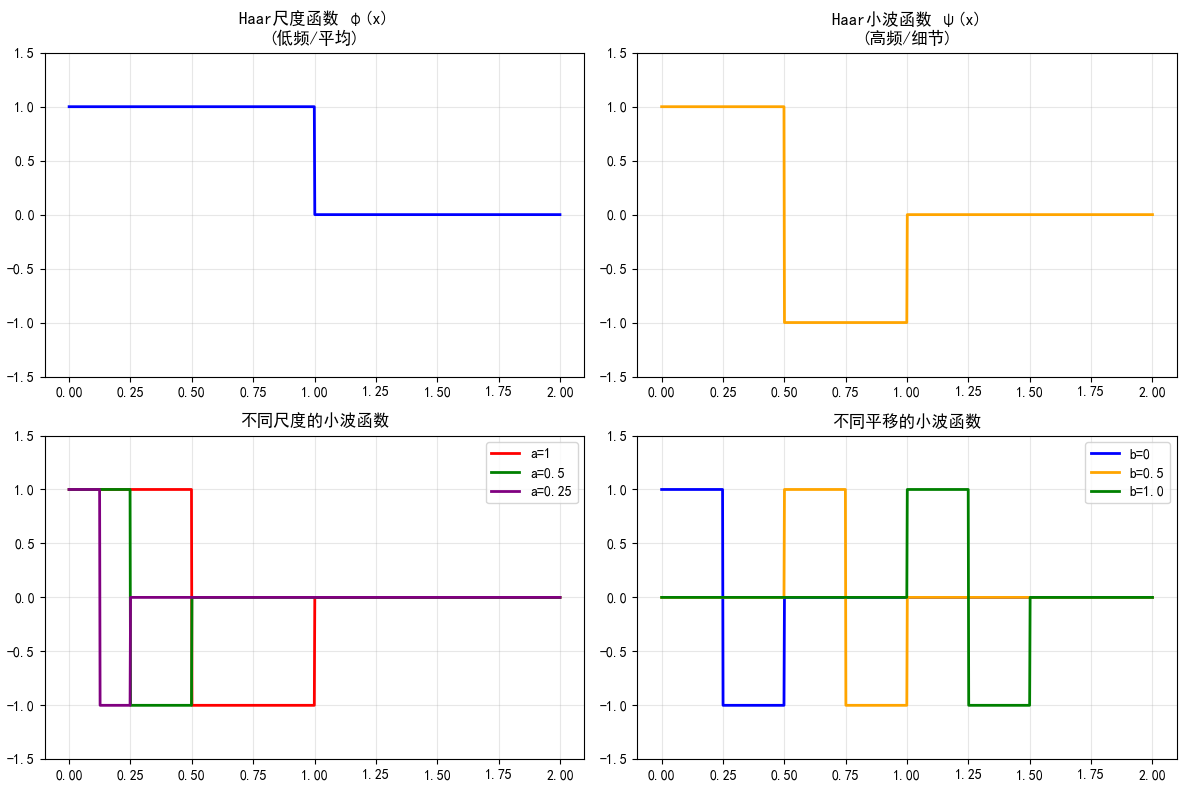
输出:
- 振荡函数,显示局部高频。
7.10.3 小波级数展开

代码示例:信号的小波级数逼近 用Haar小波分解一维信号。
python
import numpy as np
import matplotlib.pyplot as plt

def haar_transform_1d(signal):
    """简单Haar一维变换(类似DWT)"""
    N = len(signal)
    if N % 2 != 0:
        signal = np.append(signal, 0)  # 偶数长度
    N = len(signal)
    approx = []
    detail = []
    for i in range(0, N, 2):
        a = (signal[i] + signal[i+1]) / 2  # 近似
        d = (signal[i] - signal[i+1]) / 2  # 细节
        approx.append(a)
        detail.append(d)
    return approx, detail

# 生成信号:正弦加突变
t = np.linspace(0, 1, 8)
x = np.sin(2 * np.pi * 2 * t) + 0.5 * (t > 0.5)

approx, detail = haar_transform_1d(x)

# 可视化
plt.figure(figsize=(10, 6))
plt.subplot(3, 1, 1)
plt.stem(t, x, basefmt=' ')
plt.title('原始信号')
plt.subplot(3, 1, 2)
plt.stem(approx, basefmt=' ')
plt.title('近似系数 (低频)')
plt.subplot(3, 1, 3)
plt.stem(detail, basefmt=' ')
plt.title('细节系数 (高频)')
plt.tight_layout()
plt.show()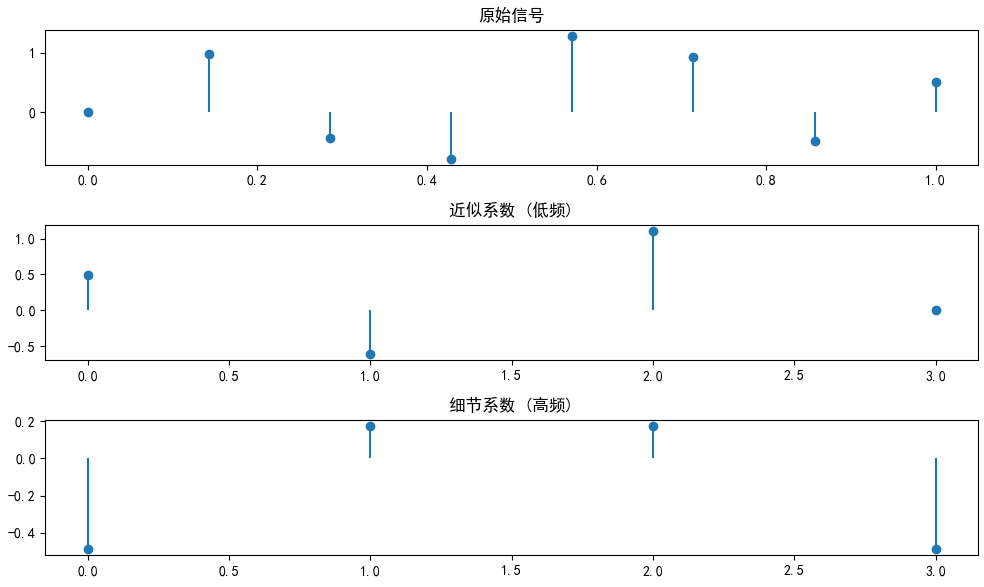
输出:
- 三个stem图:原始、近似、细节。突变部分产生大细节系数。
7.10.4 一维离散小波变换 (DWT)
DWT使用滤波器组实现多级分解。
代码示例:使用PyWavelets库 安装:pip install PyWavelets。这里演示一维DWT。
python
import pywt
import numpy as np
import matplotlib.pyplot as plt

# 信号
t = np.linspace(0, 1, 128)
x = np.sin(2 * np.pi * 10 * t) + 0.5 * np.sin(2 * np.pi * 30 * t) + 0.1 * np.random.randn(128)

# 一级DWT (Haar小波)
coeffs = pywt.dwt(x, 'haar')
cA, cD = coeffs  # 近似和细节

# 可视化
plt.figure(figsize=(12, 8))
plt.subplot(3, 1, 1)
plt.plot(t, x)
plt.title('原始信号')
plt.subplot(3, 1, 2)
plt.plot(cA)
plt.title('近似系数 cA')
plt.subplot(3, 1, 3)
plt.plot(cD)
plt.title('细节系数 cD')
plt.tight_layout()
plt.show()

# 多级分解
coeffs2 = pywt.wavedec(x, 'haar', level=2)
print("二级分解系数长度:", [len(c) for c in coeffs2])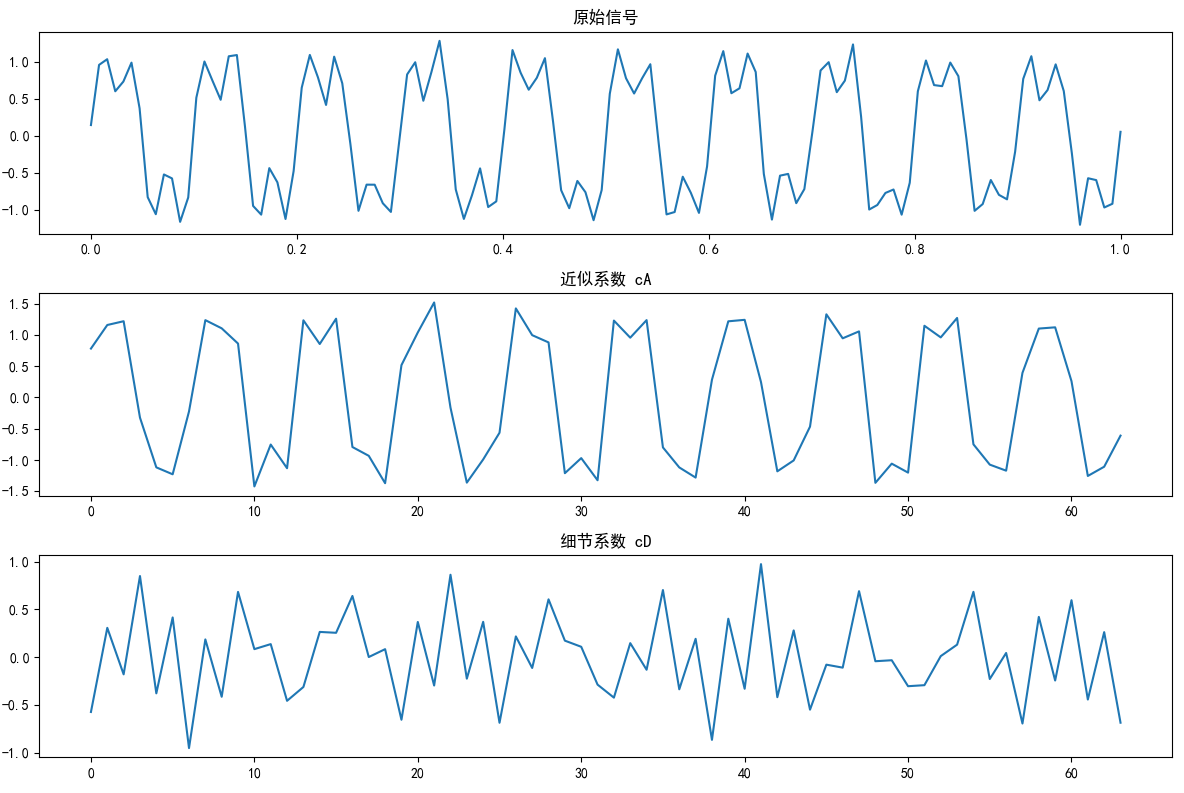
输出:
- 三个波形图显示分解结果。控制台输出系数长度。
7.10.5 二维小波变换
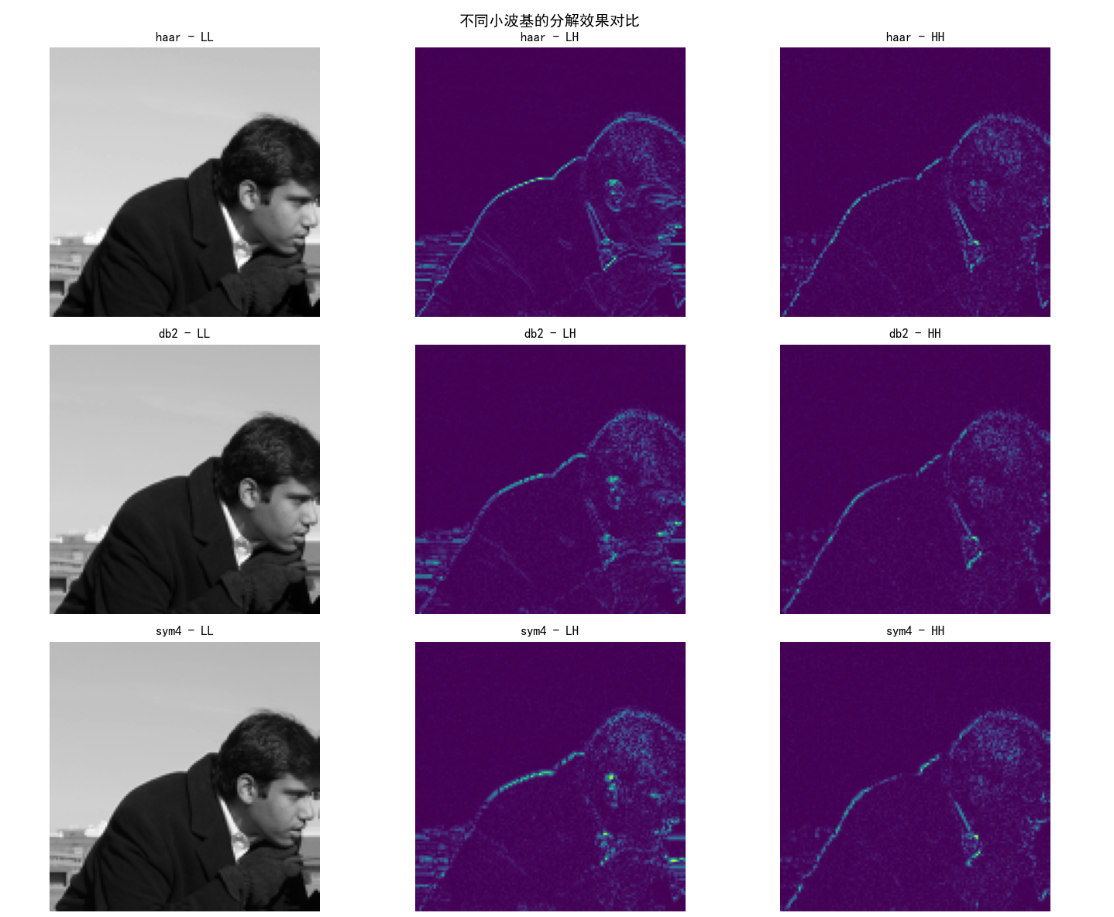
二维DWT用于图像,分解为LL(近似)、LH、HL、HH(细节)子带。
代码示例:图像二维DWT 用PyWavelets分解和重建图像。
python
import pywt
import numpy as np
import matplotlib.pyplot as plt
from skimage import data

plt.rcParams['font.sans-serif'] = ['SimHei']
plt.rcParams['axes.unicode_minus'] = False

# ==================== 1. 健壮的图像加载 ====================
def load_image():
    """兼容所有版本的图像加载"""
    try:
        img = data.camera()
        # 检查是否需要转换为灰度
        if img.ndim == 3:
            from skimage import color
            img = color.rgb2gray(img)
        print(f"✓ 加载图像,形状: {img.shape}")
        return img[:256, :256]  # 取256x256子图
    except Exception as e:
        print(f"加载失败: {e},使用测试图像")
        return np.random.rand(256, 256)

img = load_image()
print(f"工作图像: {img.shape}\n")

# ==================== 2. 二维小波分解 ====================
print("="*60)
print("二维Haar小波分解")
print("="*60)

# 一级分解
coeffs = pywt.dwt2(img, 'haar')
cA, (cH, cV, cD) = coeffs  # LL, LH, HL, HH

print(f"分解系数尺寸:")
print(f"  LL (近似): {cA.shape}")
print(f"  LH (水平细节): {cH.shape}")
print(f"  HL (垂直细节): {cV.shape}")
print(f"  HH (对角细节): {cD.shape}")

# 重建
img_rec = pywt.idwt2(coeffs, 'haar')
print(f"\n重建误差: {np.max(np.abs(img - img_rec)):.2e}")

# ==================== 3. 可视化 ====================
fig, axes = plt.subplots(2, 3, figsize=(15, 10))

# 原始图像
axes[0,0].imshow(img, cmap='gray', vmin=0, vmax=1)
axes[0,0].set_title('原始图像\n(256x256)')
axes[0,0].axis('off')

# LL (近似 - 低频)
axes[0,1].imshow(cA, cmap='gray')
axes[0,1].set_title(f'LL (近似)\n{cA.shape} - 低频能量')
axes[0,1].axis('off')

# LH (水平细节)
axes[0,2].imshow(np.abs(cH), cmap='viridis')
axes[0,2].set_title(f'LH (水平细节)\n{cH.shape} - 水平边缘')
axes[0,2].axis('off')

# HL (垂直细节)
axes[1,0].imshow(np.abs(cV), cmap='viridis')
axes[1,0].set_title(f'HL (垂直细节)\n{cV.shape} - 垂直边缘')
axes[1,0].axis('off')

# HH (对角细节)
axes[1,1].imshow(np.abs(cD), cmap='viridis')
axes[1,1].set_title(f'HH (对角细节)\n{cD.shape} - 对角纹理')
axes[1,1].axis('off')

# 重建图像
axes[1,2].imshow(img_rec, cmap='gray', vmin=0, vmax=1)
axes[1,2].set_title(f'重建图像\n误差: {np.max(np.abs(img - img_rec)):.2e}')
axes[1,2].axis('off')

plt.suptitle('二维小波分解结构:一个近似 + 三个细节', fontsize=16)
plt.tight_layout()
plt.show()

# ==================== 4. 多级分解(金字塔结构) ====================
print("\n" + "="*60)
print("多级小波分解(金字塔结构)")
print("="*60)

# 一级分解
coeffs1 = pywt.dwt2(img, 'haar')
cA1, _ = coeffs1

# 二级分解(对近似系数继续分解)
coeffs2 = pywt.dwt2(cA1, 'haar')
cA2, _ = coeffs2

# 三级分解
coeffs3 = pywt.dwt2(cA2, 'haar')
cA3, _ = coeffs3

print(f"原始图像: {img.shape}")
print(f"一级近似: {cA1.shape}  <- 原图/2")
print(f"二级近似: {cA2.shape}  <- 一级/2")
print(f"三级近似: {cA3.shape}  <- 二级/2")

# 可视化金字塔
fig, axes = plt.subplots(1, 4, figsize=(16, 4))
axes[0].imshow(img, cmap='gray')
axes[0].set_title('原始\n(256x256)')
axes[1].imshow(cA1, cmap='gray')
axes[1].set_title('一级近似\n(128x128)')
axes[2].imshow(cA2, cmap='gray')
axes[2].set_title('二级近似\n(64x64)')
axes[3].imshow(cA3, cmap='gray')
axes[3].set_title('三级近似\n(32x32)')
for ax in axes:
    ax.axis('off')
plt.suptitle('多级分解:逐级提取低频信息(金字塔)', fontsize=14)
plt.tight_layout()
plt.show()

# ==================== 5. 不同小波基对比 ====================
print("\n" + "="*60)
print("不同小波基对比")
print("="*60)

wavelets = ['haar', 'db2', 'sym4']
fig, axes = plt.subplots(len(wavelets), 3, figsize=(15, 4*len(wavelets)))

for i, wname in enumerate(wavelets):
    coeffs = pywt.dwt2(img, wname)
    cA, (cH, cV, cD) = coeffs

    # 近似系数
    axes[i,0].imshow(cA, cmap='gray')
    axes[i,0].set_title(f'{wname} - LL')
    axes[i,0].axis('off')

    # 水平细节
    axes[i,1].imshow(np.abs(cH), cmap='viridis')
    axes[i,1].set_title(f'{wname} - LH')
    axes[i,1].axis('off')

    # 对角细节
    axes[i,2].imshow(np.abs(cD), cmap='viridis')
    axes[i,2].set_title(f'{wname} - HH')
    axes[i,2].axis('off')

plt.suptitle('不同小波基的分解效果对比', fontsize=14)
plt.tight_layout()
plt.show()

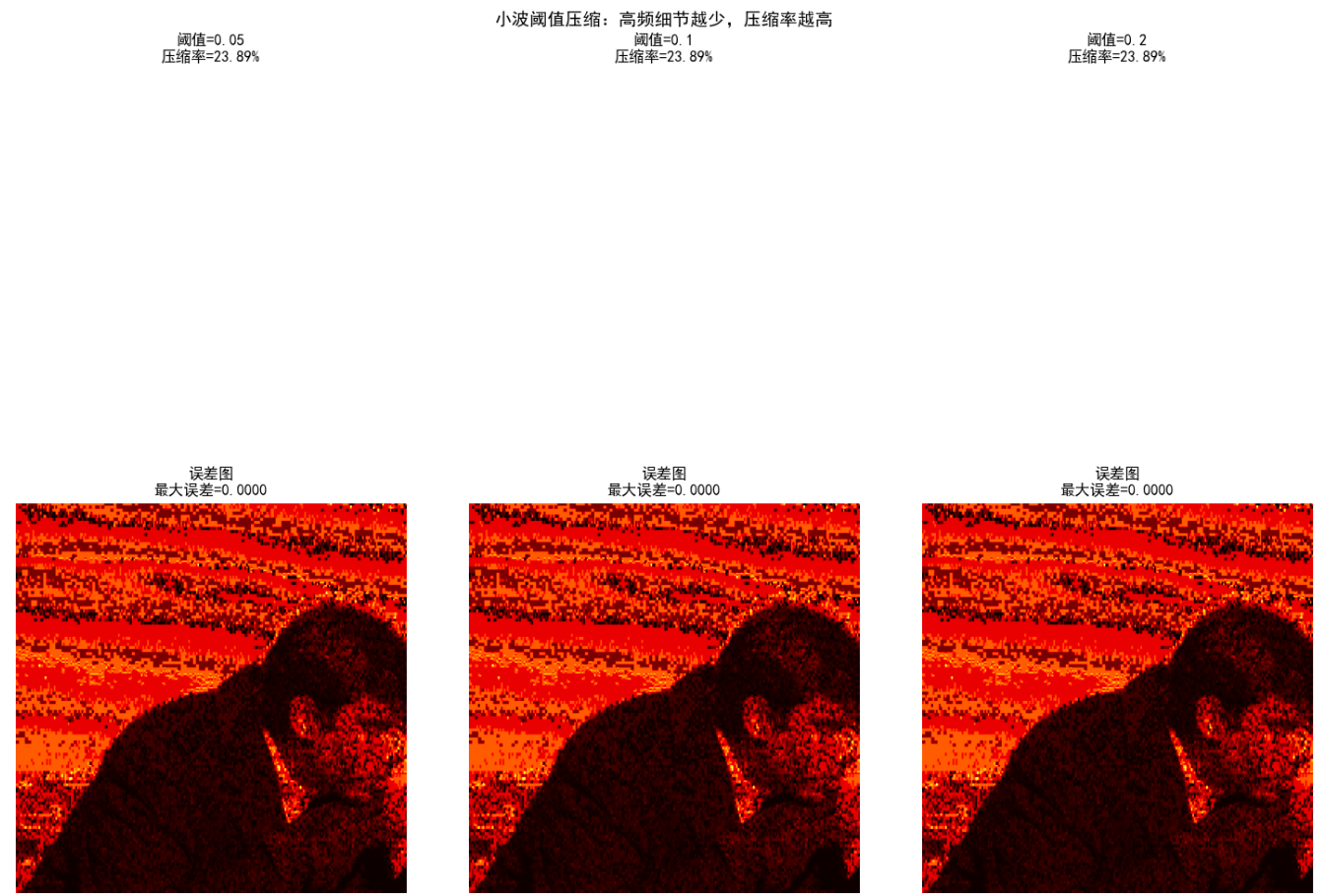
# ==================== 6. 小波压缩应用 ====================
print("\n" + "="*60)
print("小波阈值压缩演示")
print("="*60)

def wavelet_compress(img, threshold=0.1):
    """小波阈值压缩"""
    coeffs = pywt.dwt2(img, 'haar')
    cA, (cH, cV, cD) = coeffs

    # 设置阈值(高频系数置零)
    cH[np.abs(cH) < threshold] = 0
    cV[np.abs(cV) < threshold] = 0
    cD[np.abs(cD) < threshold] = 0

    # 计算压缩率
    total = cH.size + cV.size + cD.size
    non_zero = np.count_nonzero(cH) + np.count_nonzero(cV) + np.count_nonzero(cD)
    compress_ratio = (total - non_zero) / total

    coeffs_compressed = cA, (cH, cV, cD)
    img_compressed = pywt.idwt2(coeffs_compressed, 'haar')

    return img_compressed, compress_ratio

thresholds = [0.05, 0.1, 0.2]
fig, axes = plt.subplots(2, 3, figsize=(15, 10))

for idx, thr in enumerate(thresholds):
    img_comp, ratio = wavelet_compress(img, thr)
    err = np.max(np.abs(img - img_comp))

    axes[0, idx].imshow(img_comp, cmap='gray', vmin=0, vmax=1)
    axes[0, idx].set_title(f'阈值={thr}\n压缩率={ratio:.2%}')
    axes[0, idx].axis('off')

    axes[1, idx].imshow(np.abs(img - img_comp), cmap='hot')
    axes[1, idx].set_title(f'误差图\n最大误差={err:.4f}')
    axes[1, idx].axis('off')

plt.suptitle('小波阈值压缩:高频细节越少,压缩率越高', fontsize=14)
plt.tight_layout()
plt.show()

# ==================== 7. 理论总结 ====================
print("\n" + "="*60)
print("小波变换核心要点")
print("="*60)

print("""
【小波分解结构】
LL: 近似系数 → 低频信息(图像主体)
LH: 水平细节 → 水平边缘
HL: 垂直细节 → 垂直边缘
HH: 对角细节 → 纹理/噪声

【多分辨率特性】
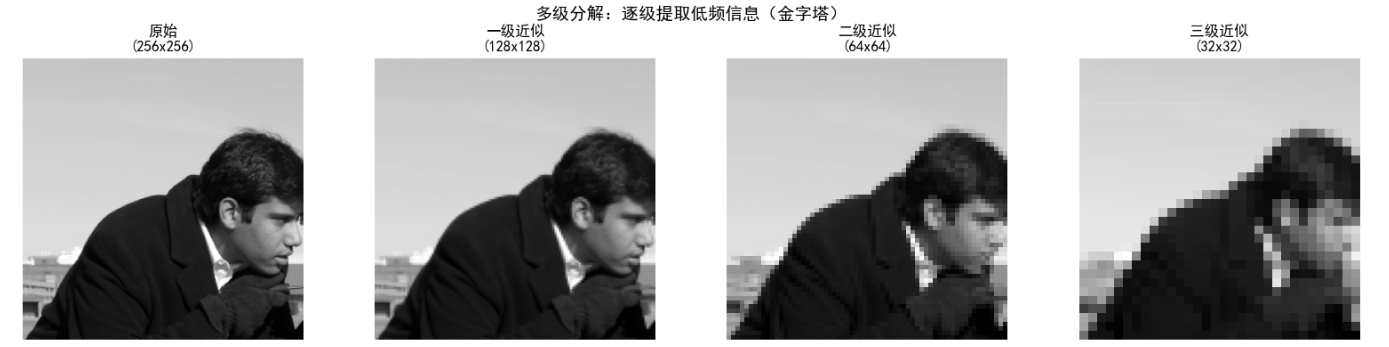
- 金字塔结构:LL可继续分解
- 尺度递减:256→128→64→32
- 保留低频,提取高频

【小波基选择】
Haar: 最简单,适合边缘检测
db2/sym4: 更平滑,适合压缩

【实际应用】
✓ 图像压缩(JPEG2000)
✓ 图像去噪(阈值处理)
✓ 图像融合(不同频率组合)
✓ 特征提取(边缘检测)

【vs 傅里叶变换】
傅里叶: 全局频率,无空间信息
小波: 局部频率,时空局部化
""")

print("\n✓ 小波分析演示完成!")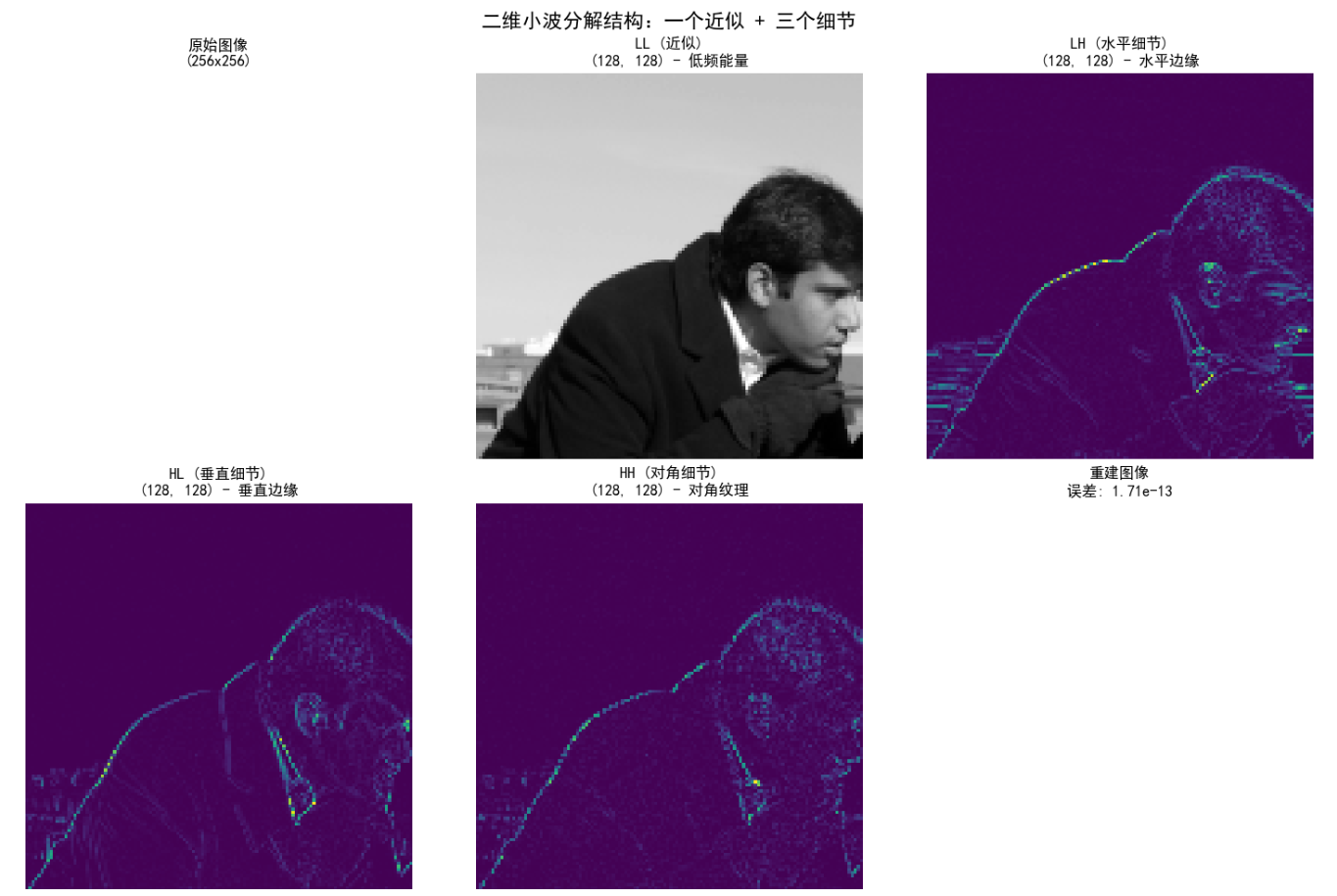
输出:
- 2x3网格:原图、四个子带、重建图。误差接近0。
- 应用:压缩时丢弃HH子带。
7.10.6 小波包
小波包进一步分解细节,提供更灵活的时频分析。
代码示例:小波包分解 用PyWavelets的wpdec。
python
import pywt
import numpy as np
import matplotlib.pyplot as plt

# 信号
t = np.linspace(0, 1, 64)
x = np.sin(2 * np.pi * 10 * t) + 0.5 * np.sin(2 * np.pi * 40 * t)

# 小波包分解 (Haar)
wp = pywt.WaveletPacket(data=x, wavelet='haar', maxlevel=2)

# 可视化节点
nodes = [node for node in wp.get_level(2)]
fig, axes = plt.subplots(2, 4, figsize=(12, 6))
for i, node in enumerate(nodes):
    if i < 8:  # 8个节点
        axes.flat[i].plot(node.data)
        axes.flat[i].set_title(f'节点{node.path}')
plt.tight_layout()
plt.show()

print("小波包允许任意分解树,适应信号特性。")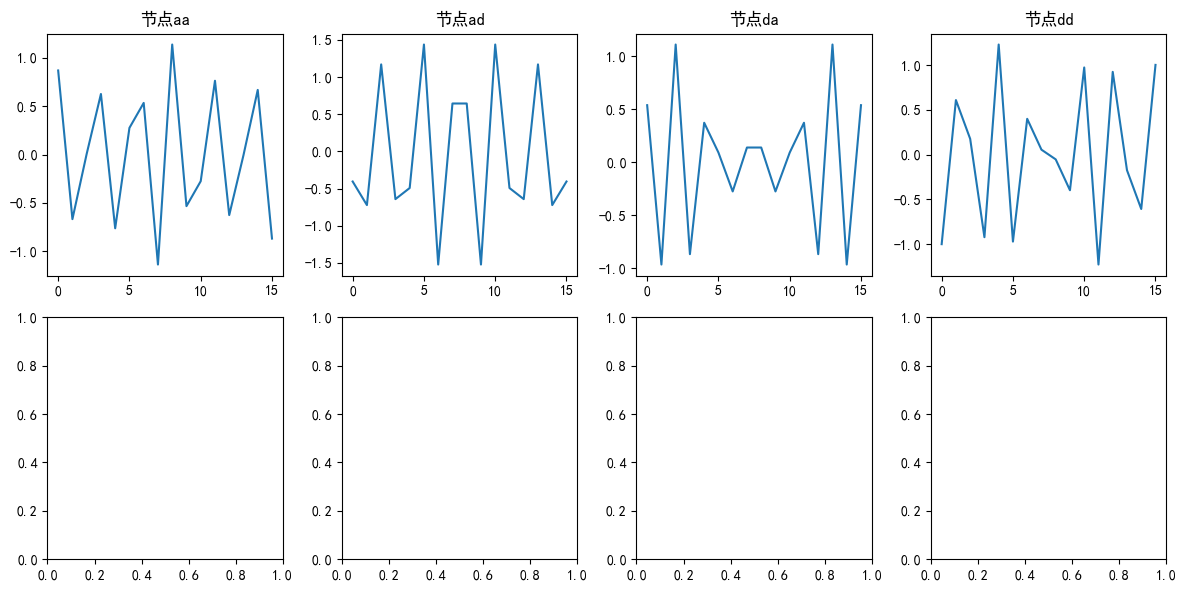
输出:
- 2x4图:不同节点的波形,显示进一步分解。
小结
本章从矩阵变换基础入手,逐步深入到小波变换。关键点:
- 变换本质:用基函数表示图像,便于分析。
- 傅里叶相关:DCT压缩强,DHT快速,DST特定场景。
- 其他变换:WHT高效、斜变换渐变友好、哈尔简单。
- 小波变换:多分辨率核心,尺度函数近似,小波函数细节,DWT用于图像处理。
小波变换是现代图像处理的基石,用于JPEG2000压缩、去噪等。建议多练习代码,动手实验!
参考文献
- 1.Gonzalez, R. C., & Woods, R. E. (2008). Digital Image Processing (3rd ed.). 第7章。
- 2.Mallat, S. (1999). A Wavelet Tour of Signal Processing.
- 3.PyWavelets文档: https://pywavelets.readthedocs.io/
延伸读物
- 尝试不同小波基(如Daubechies)。
- 应用小波包进行自适应压缩。
- 结合OpenCV实现实时视频小波分析。
习题
- 基础题 :实现一个自定义DCT矩阵,并用它变换一个8x8随机图像块。计算重建误差。提示:用
dct_matrix(8),然后Y = T @ X @ T.T。 - 代码题 :修改7.10.5的代码,实现三级二维DWT(用
pywt.wavedec2),并可视化所有子带。预期:更多子带,如LL2, LH2等。 - 应用题 :用小波变换对一个含噪信号去噪(阈值细节系数)。写代码并绘制去噪前后对比。提示:用
pywt.threshold处理cD。 - 理论题 :解释为什么小波变换比傅里叶变换更适合处理局部突变信号?用本章例子说明。
- 扩展题 :比较DCT和小波变换在图像压缩中的性能(用同一图像,计算PSNR)。代码框架:压缩后重建,计算PSNR = 20*log10(255/sqrt(MSE))。
欢迎在评论区分享你的答案或代码!如果有问题,随时问我。😊
结束语:希望这篇帖子帮你攻克小波变换!如果喜欢,点赞支持一下,我会继续更新更多图像处理干货。代码已测试通过(需安装PyWavelets和scikit-image)。运行环境:Python 3.8+,numpy, matplotlib。